wheel MERCEDES-BENZ E-CLASS ESTATE 2020 Service Manual
[x] Cancel search | Manufacturer: MERCEDES-BENZ, Model Year: 2020, Model line: E-CLASS ESTATE, Model: MERCEDES-BENZ E-CLASS ESTATE 2020Pages: 489, PDF Size: 9.15 MB
Page 208 of 489
Yo
u can also per form settings while theve hicle
is stationary if theve hicle has been star ted.
Obser vethe no tes on driving sy stems and your
re sponsibility; you may otherwise failto recog‐
nise dangers (/ page 194).
Me rcedes‑AMG vehicles: the limiter is available
up toa maximum speed of 250 km/h.
Displ ays on the multifunction display
R È (grey):va riable limiter is selec ted but
not yet acti vated.
R È (green): variable limiter is activated.
A stored speed appears along with theÈ dis‐
pla y.The segments in the speedome ter light up,
up tothe cur rently stored speed.
% When the driving speed is greater than the
st ored speed, theÈ display flashes.
Kickd own
If yo u depress the accelerator pedal be yond the
pressure point (kickdown), theva riable limiter
swit ches topassive mode. The Limiter pas-
sivemessage appears in the multifunction dis‐
pla y. Af
ter completion of kickdown, theva riable lim‐
iter is activated again in thefo llowing situations:
R Ifth eve hicle speed drops below thestored
speed.
R Ifth estored speed is called up.
R Ifyo ustore a new speed.
Operating cruise control or theva riable lim‐
iter &
WARNING Risk of accident due tostored
speed
If yo u call up thestored speed and this is
lo we rth an your cur rent speed, theve hicle
decelerates. #
Take into account the tra ffic situation
before calling up thestored speed. Re
quirements:
Cruise control
R Cruise control is selected.
R ESP ®
must be activated, but not inter vening.
R The vehicle speed is at least 20 km/h. R
The transmission is in position h.
Va riable limiter
R The variable limiter is selec ted. St
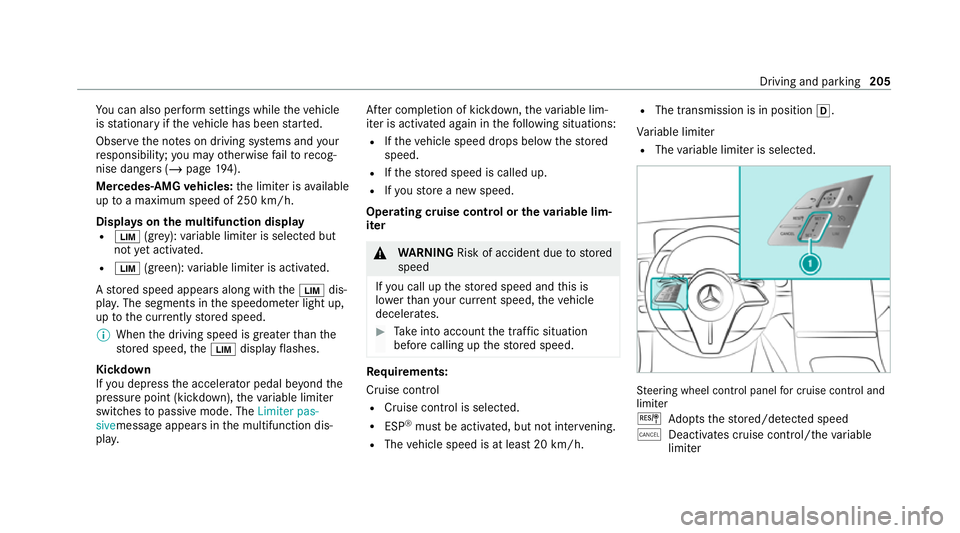
eering wheel cont rol panel for cruise control and
limi ter
J Adopts thestored/de tected speed
± Deacti vates cruise contro l/thevariable
limiter Driving and parking
205
Page 210 of 489
#
Press J.
The maximum permissible speed shown by
th e traf fic sign is stored and theve hicle
maintains or does not exceed this speed.
Deactivating cruise control or theva riable
limi ter #
Press ±.
% Ifyo u brake, deactivate ESP ®
or if ESP ®
inter venes, cruise control is deacti vated. The
va riable limiter is not deactivated.
Pe rm anent limi ter
If th eve hicle should ne verexc eed a specific
speed (e.g. for driving in winter tyre mode), you
can set this speed with the permanent limiter.
Yo u do this by limiting the speed toava lue
between 160 km/h and 240 km/h in the multi‐
media sy stem (/ page 207).
Shortly before the set speed is reached, it
appears in the multifunction displa y.When you
confirm the message, display messages no lon‐
ge r appear until you swit choff theve hicle. The
speed will only be displa yed again once theve hi‐ cle has been
restar ted or if the set speed is
ch anged.
The permanent limiter does not swit chtopas‐
sive mode even du ring kickdown and the driven
speed remains below the set speed.
Setting the speed limitation for winter tyres
Multimedia sy stem:
4 © 5
Settings 5
Vehicle
5 Winter tyres limit #
Select a speed or deactivate the function. DSR (Downhill Speed
Regulation) Fu
nction of DSR (Downhill Speed Regulation)
DSR is an aid toassist you when driving down‐
hill. It keeps the speed of tr avel at the selected
ta rget speed. The steeper the downhill gradient,
th e greater the DSR braking ef fect on theve hi‐
cle. On flat stre tches of road and uphill gradi‐
ents, the DSR brakes theve hicle minimally or
not at all.
When DSR is activated and the transmission is in
position h,kori, DSR controls the driving
speed. The target speed can be set toava lue between 2 km/h and
18km/h. By braking or
accele rating, you can drive at a higher or lo wer
speed than theta rget speed at any time.
DSR is deactivated automatically if you drive at
speeds greater than 45 km/h or select drive
program CorB. The îoffmessage
th en appears in the multifunction displa y.The
st atus indicator in the multifunction display dis‐
appears. You also hear a warning tone.
In fo rm ation on DSR &
WARNING Risk of skidding and accident
when DSR is acti vated on slippery road
sur faces
If th e driven speed and theta rget speed dif‐
fe r, th e wheels may lose traction. #
Take into account thero ad sur face and
th e dif fere nce between the driving
speed and target speed before activat‐
ing DSR. Obser
vethe no tes on driving sy stems and your
re sponsibility; you may otherwise failto recog‐
nise dangers (/ page 194). Driving and pa
rking 207
Page 211 of 489
Yo
u are alw aysre sponsible forke eping control of
th eve hicle and for assessing whe ther the down‐
hill gradient can be negotiated. Depending on
ro ad sur face and tyres, DSR may not al ways be
able tokeep totheta rget speed. Select a target
speed suitable forth e environmen tal conditions
and also apply the brakes yourself if requ ired.
Ac tivating or deactivating DSR (D ownhill
Speed Regulation)
Re quirements:
R You are driving at a speed of 40 km/h or
lo we r.
If th e cur rent vehicle speed is too high, the
Max. speed 40 km/h message appears in
th e multifunction displa y.
R Active Dis tance Assi stDISTRONIC is deacti‐
va ted.
Multimedia sy stem:
4 © 5
Settings 5
Quick access #
Select î.
A status display appears in the multifunction
display when the function is activated. Changing
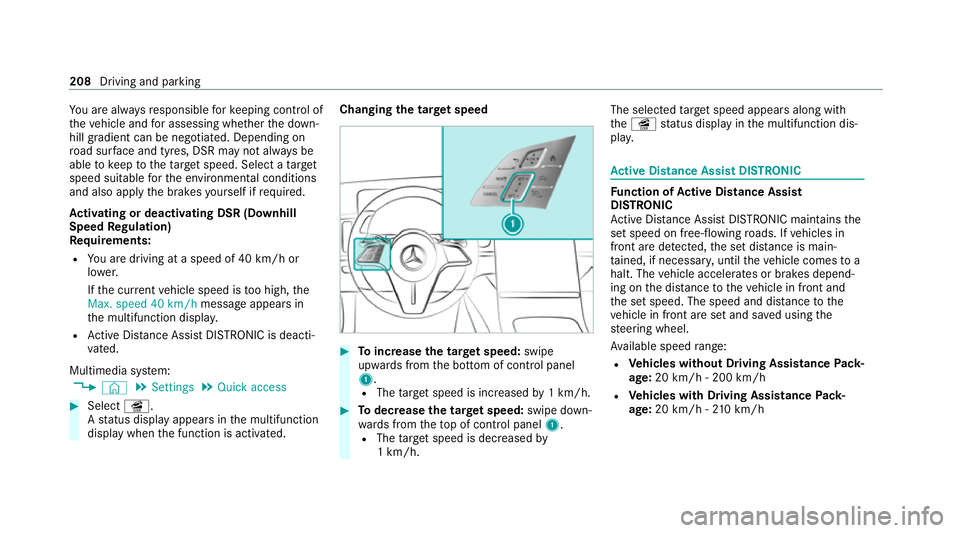
the tar get speed #
Toincrease the tar get speed: swipe
up wa rds from the bottom of control panel
1.
R The target speed is increased by1 km/h. #
Todec rease the tar get speed: swipe down‐
wa rds from theto p of control panel 1.
R The target speed is decreased by
1 km/h. The selected
target speed appears along with
th eî status display in the multifunction dis‐
pla y. Ac
tive Di stance Assist DISTRO NIC Fu
nction of Active Di stance Assist
DISTRO NIC
Ac tive Dis tance Assi stDISTRONIC maintains the
set speed on free-flowing roads. If vehicles in
front are de tected, the set dis tance is main‐
ta ined, if necessar y,until theve hicle comes to a
halt. The vehicle accelerates or brakes depend‐
ing on the dis tance totheve hicle in front and
th e set speed. The speed and dis tance tothe
ve hicle in front are set and sa ved using the
st eering wheel.
Av ailable speed range:
R Vehicles without Driving Assistance Pack‐
age: 20 km/h - 200 km/h
R Vehicles with Driving Assistance Pack‐
age: 20 km/h - 210 km/h 208
Driving and parking
Page 213 of 489
R
k (gre en): Active Dis tance Assi st
DISTRONIC acti ve, specified dis tance set and
ve hicle de tected
R r: Route-based speed adap tation acti ve
( / page 214).
The stored speed is shown along with the per‐
manent status display and highlighted on the
speedome ter.When Active Dis tance Assi st
DISTRONIC is passi ve,th e speed is gr eyed out.
% On mo torw ays or high-speed major roads,
th e green çvehicle symbol is displa yed
cyclically when theve hicle is ready topull
aw ay.
% Ifyo u depress the accelerator pedal be yond
th e setting of theAc tive Dis tance Assi st
DISTRONIC, the sy stem is switched topas‐
sive mode. The çsuspended message
appears in the multifunction displa y.
Display on the speedome ter
The stored speed is highlighted on the speedom‐
et er. If the speed of theve hicle in front or the
speed adjustment is less than thestored speed
due tothero ute event ahead, the segments in th
e speedome ter light up. Deactivation of Active
Dis tance Assi stDISTRONIC, as well as altera‐
tions tothe speed due tomanual or auto matic
adoption of the maximum permissible speed, are
displa yed in the control feedback of the multi‐
function display on a single line.
Sy stem limits
The sy stem may be impaired or may not function
in thefo llowing situations, forex ample:
R In sn ow,ra in, fog, heavy spr ay, if there is
gl are, in direct sunlight or in greatlyvarying
light conditions.
R The windsc reen in the area of the camera is
dirty, mis ted up, damaged or co vered.
R Ifth era dar sensors are dirty or co vered.
R In multi- stor ey car pa rks or on roads with
st eep uphill or downhill gradients.
R Ifth ere are nar rowvehicles in front, such as
bicycles or mo torcyc les.
In addition, on slippery roads, braking or accel‐
erating can cause one or se veral wheels tolose
traction and theve hicle could then skid. Do not use
Active Dis tance Assi stDISTRONIC in
th ese situations. &
WARNING Risk of accident from acceler‐
ation or braking byActive Dis tance
Assi stDISTRONIC
Ac tive Dis tance Assi stDISTRONIC may accel‐
erate or brake in thefo llowing cases, for
ex ample:
R Ifth eve hicle pulls away using Active Dis‐
ta nce Assi stDISTRONIC.
R Ifth estored speed is called up and is
considerably faster or slo werth an the
cur rently driven speed.
R IfAc tive Dis tance Assi stDISTRONIC no
longer de tects a vehicle in front or does
not react toreleva nt objects. #
Alw ays carefully obser vethe traf fic con‐
ditions and be ready tobrake at all
times. #
Take into account the tra ffic situation
before calling up thestored speed. 210
Driving and pa rking
Page 218 of 489
&
WARNING Risk of accident in spi teof
ro ute-based speed adap tation
Ro ute-based speed adap tation can malfunc‐
tion or be temp orarily una vailable in thefo l‐
lowing situations:
R Ifth e driver does not follow the calcula‐
te dro ute
R If map data is not up-to-date or available
R Intheeve nt of roadwor ks
R In bad weather or road conditions
R Ifth e accelera tor pedal is depressed
R Intheeve nt of electronical lydispla yed
speed limitations #
Adapt the speed tothe traf fic situation. Setting
route-based speed adaptation Re
quirements:
R Active Dis tance Assi stDISTRONIC is acti va‐
te d. Multimedia sy
stem:
4 © 5
Settings 5
Assistance
5 Route-based speed adapt. #
Activate or deacti vate the function.
When the function is active, theve hicle
speed is adjus ted depending on thero ute
eve nts ahead.
% Further information on thero ute-based
speed adap tation (/ page 214). Ac
tive Steering Assist Fu
nction of Active Steering Assist
Ac tive Steering Assist is only available up to a
speed of 210 km/h. The sy stem helps youto
st ay inthe cent reofthe lane bymeans of mod‐
erate steering inter ventions. Depending on the
speed driven, Active Steering Assist uses the
ve hicles ahead and lane markings as a refer‐
ence.
% Depending on the count ry, in the lo wer
speed range Active Steering Assist can use
th e sur rounding traf fic as a refere nce. If nec‐
essar y,Ac tive Steering Assist can then also pr
ov ide assis tance when driving outside the
centre of the lane, forex ample toform are s‐
cue lane.
If th e de tection of lane markings and vehicles
ahead is impaired, Active Steering Assist
switches topassive mode. The sy stem pr ovides
no support in this case.
St atus display of Active Steering Assist in
th e multifunction display
R Ø (gre y): activated and passive
R Ø (gre en): activated and active
R Ø (red): sy stem limits de tected
R Ø (white, red hands): "hands on thesteer‐
ing wheel" prom pt
% During the transition from active topassive
st atus, theØ symbol is shown as
enlar ged and flashing. Once the sy stem is
passive, theØ symbol is shown as gr eyin
th e multifunction displa y.
% Depending on the selected vehicle settings,
Ac tive Steering Assist may be una vailable. Driving and parking
215
Page 219 of 489
Ste
ering and touch de tection
The driver is requiredtokeep their hands on the
st eering wheel at all times and be able tointer‐
ve ne at any time tocor rect the course of the
ve hicle and keep it in lane. The driver must
ex pect a change from active topassive mode or
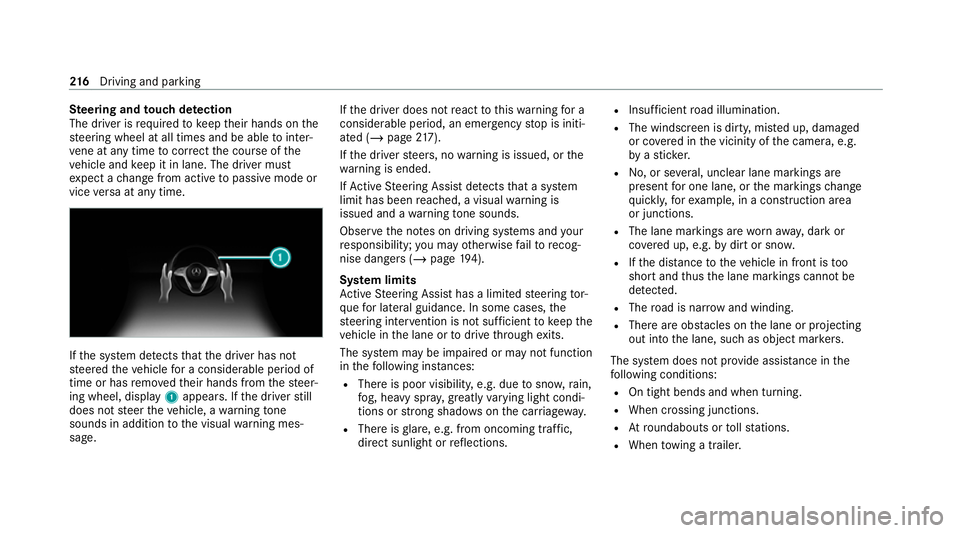
vice versa at any time. If
th e sy stem de tects that the driver has not
st eered theve hicle for a considerable period of
time or has remo vedth eir hands from thesteer‐
ing wheel, display 1appears. If the driver still
does not steer theve hicle, a warning tone
sounds in addition tothe visual warning mes‐
sage. If
th e driver does not react tothis wa rning for a
considerable period, an emergency stop is initi‐
ated (/ page217).
If th e driver steers, no warning is issued, or the
wa rning is ended.
If Ac tive Steering Assist de tects that a sy stem
limit has been reached, a visual warning is
issued and a warning tone sounds.
Obser vethe no tes on driving sy stems and your
re sponsibility; you may otherwise failto recog‐
nise dangers (/ page 194).
Sy stem limits
Ac tive Steering Assist has a limited steering tor‐
qu efo r lateral guidance. In some cases, the
st eering inter vention is not su fficient tokeep the
ve hicle in the lane or todrive thro ugh exits.
The sy stem may be impaired or may not function
in thefo llowing ins tances:
R The reis poor visibilit y,e.g. due tosno w,rain,
fo g, heavy spr ay,greatly varying light condi‐
tions or strong shado wsonthe car riag ew ay.
R There is glare, e.g. from oncoming traf fic,
di re ct sunlight or reflections. R
Insuf ficient road illumination.
R The windsc reen is dirty, mis ted up, damaged
or co vered in the vicinity of the camera, e.g.
by ast icke r.
R No, or se veral, unclear lane markings are
present for one lane, or the markings change
qu ickl y,forex ample, in a con stru ction area
or junctions.
R The lane markings are wornaw ay, dark or
co vered up, e.g. bydirt or sno w.
R Ifth e dis tance totheve hicle in front is too
short and thus the lane markings cann otbe
de tected.
R The road is nar row and winding.
R There are obs tacles on the lane or projecting
out into the lane, such as object mar kers.
The sy stem does not pr ovide assis tance in the
fo llowing conditions:
R On tight bends and when turning.
R When crossing junctions.
R Atroundabouts or tollst ations.
R When towing a trailer. 216
Driving and pa rking
Page 220 of 489
R
When the tyre pressure is too lo w. &
WARNING Risk of accident if Active
St eering Assist unexpectedly stops func‐
tioning
If th e sy stem limits of Active Steering Assist
are reached there is no guarantee that the
sy stem will remain active or will keep the
ve hicle in lane. #
Alw ayske ep your hands on thesteering
wheel and obser vethe tra ffic carefull y. #
Alw aysst eer theve hicle paying atten‐
tion totraf fic conditions. &
WARNING Risk of accident if Active
St eering Assist unexpectedly inter venes
The de tection of lane markings and objects
may malfunction and cause unexpected
st eering inter ventions. #
Steer according totraf fic conditions. Ac
tivating/deactivating Active Steering
Assist
Re quirements:
R ESP ®
is activated, but is not inter vening.
R Active Dis tance Assi stDISTRONIC is acti va‐
te d.
Multimedia sy stem:
4 © 5
Settings 5
Quick access #
Select aAct. Steer. Asst . Fu
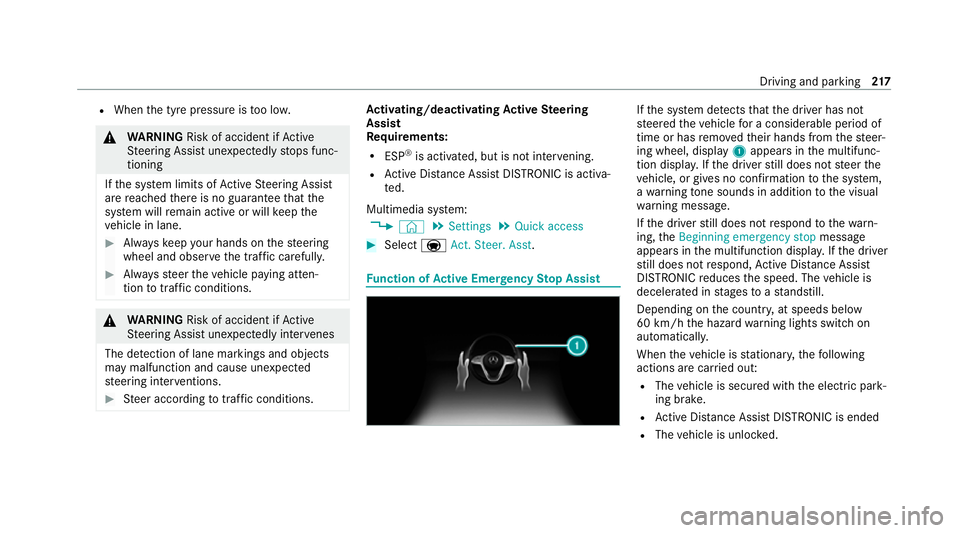
nction of Active Eme rgency Stop Assist If
th e sy stem de tects that the driver has not
st eered theve hicle for a considerable period of
time or has remo vedth eir hands from thesteer‐
ing wheel, display 1appears in the multifunc‐
tion displa y.Ifth e driver still does not steer the
ve hicle, or gives no confirmation tothe sy stem,
a wa rning tone sounds in addition tothe visual
wa rning message.
If th e driver still does not respond tothewa rn‐
ing, theBeginning emergency stop message
appears in the multifunction displa y.Ifth e driver
st ill does not respond, Active Dis tance Assi st
DISTRONIC reduces the speed. The vehicle is
decelerated in stages toast andstill.
Depending on the count ry, at speeds below
60 km/h the hazard warning lights switch on
automaticall y.
When theve hicle is stationar y,thefo llowing
actions are car ried out:
R The vehicle is secured with the electric park‐
ing brake.
R Active Dis tance Assi stDISTRONIC is ended
R The vehicle is unloc ked. Driving and parking
217
Page 221 of 489
R
If possible, an emer gency call is placed to
th e Mercedes-Benz emer gency call centre
The driver can cancel the deceleration at any
time byper form ing one of thefo llowing actions:
R Steering
R Braking or accelerating
R Deactivating Active Dis tance Assi st
DISTRONIC Fu
nction of Active Traf fic Jam Assist Ac
tive Traf fic Jam Assi sthelps you when in traf‐
fi c jams on multi-lane roads with separate car ria‐
ge wa ys by automatically pulling away within up
to 60 seconds and with mode rate steering
manoeuvres. It orients itself using theve hicle in
front and lane markings. Active Traf fic Jam
Assi stautomatically main tains a safe dis tance
from theve hicle in front and vehicles cutting in.
Ac tive Traf fic Jam Assi strequ ires you, as the
driver, tokeep your hands on thesteering wheel
at all times so that you are able tointer vene at
any time tocor rect the course of theve hicle and
ke ep it in lane. Obser
vethe no tes on driving sy stems and your
re sponsibility; you may otherwise failto recog‐
nise dangers (/ page 194).
Ac tive Traf fic Jam Assi stactivates automatically
when all of thefo llowing conditions are me t:
R You are in a traf fic jam on a mo torw ay or
high-speed major road.
R Active Dis tance Assi stDISTRONIC is acti va‐
te d and active (/ page211).
R Active Brake Assi stisavailable
(/ page 199).
R Active Steering Assist is activated and active
(/ page 217).
R Active Traf fic Jam Assi stis activated
(/ page 218).
R You are tra velling no fasterthan 60 km/h.
The following symbol is displa yed in the instru‐
ment clus ter when the sy stem is active: Sy
stem limits
The sy stem limitations of Active Dis tance Assi st
DISTRONIC and Active Steering Assist apply to
Ac tive Traf fic Jam Assi st (/ page 215). Ac
tivating/deactivating Active Traf fic Jam
Assist Multimedia sy
stem:
4 © 5
Settings 5
Quick access #
Select ¬. Fu
nction of Hill Start Assist Hill
Start Assist holds theve hicle for a short
time when pulling away on a hill under thefo l‐
lowing conditions:
R The transmission is in position hork.
R The elect ric pa rking brake is released.
This gives you enough time tomo veyour foot
from the brake pedal tothe accelera tor pedal
and depress it before theve hicle begins toroll
aw ay. 218
Driving and pa rking
Page 224 of 489
Drive program
F:
R The suspension setting is suitable for off-
ro ad terrain.
R The vehicle is set tothe normal le vel.
R When driving at speeds of 125 km/h or
abo vetheve hicle is lo wered.
R When driving at speeds below 80 km/ h,the
ve hicle is raised again.
Drive program G:
R The suspension setting is suitable for off-
ro ad terrain.
R The vehicle is set tohigh le vel +1.
R When driving at speeds of 35 km/h or abo ve
th eve hicle is lo weredto the normal le vel.
R When driving at speeds below 20 km/h, the
ve hicle is raised again.
Individual suspension settings can be called up
in drive prog ram = (/page 175). Se
tting the vehicle le vel &
WARNING Risk of accident because
ve hicle le vel is too high
Driving characteristics may be impaired.
The vehicle can drift outwards, forex ample,
when steering or cornering. #
Choose a vehicle le vel which is suited
to the driving style and thero ad sur face
conditions. &
WARNING Risk of entrapment from vehi‐
cle lo wering
When lo wering theve hicle, other people
could become trapped if their limbs are
between theve hicle body and the tyres or
underneath theve hicle. #
Make sure no one is underneath the
ve hicle or in the immediate vicinity of
th e wheel ar ches when theve hicle is
being lo wered. &
WARNING Risk of becoming trapped
due totheve hicle lo wering
Ve hicles with AIR BODY CONT ROL or
le ve l control sy stem: when you unload lug‐
ga ge or lea vetheve hicle, theve hicle first
ri ses slightly and then returns tothe set le vel
shortly af terw ards.
Yo u or an yone else in the vicinity of the
wheel ar ches or the underbody could thus
become trapped.
The vehicle can also be lo wered af ter being
loc ked. #
When leaving theve hicle, make sure
th at nobody is in the vicinity of the
wheel ar ches or the underbody. *
NO
TEDama gedue tovehicle lo wering Pa
rts of the body could be damaged when
th eve hicle is lo wered. #
Make sure that there are no obs tacles
su ch askerbs underneath or in the Driving and pa
rking 221
Page 235 of 489
To
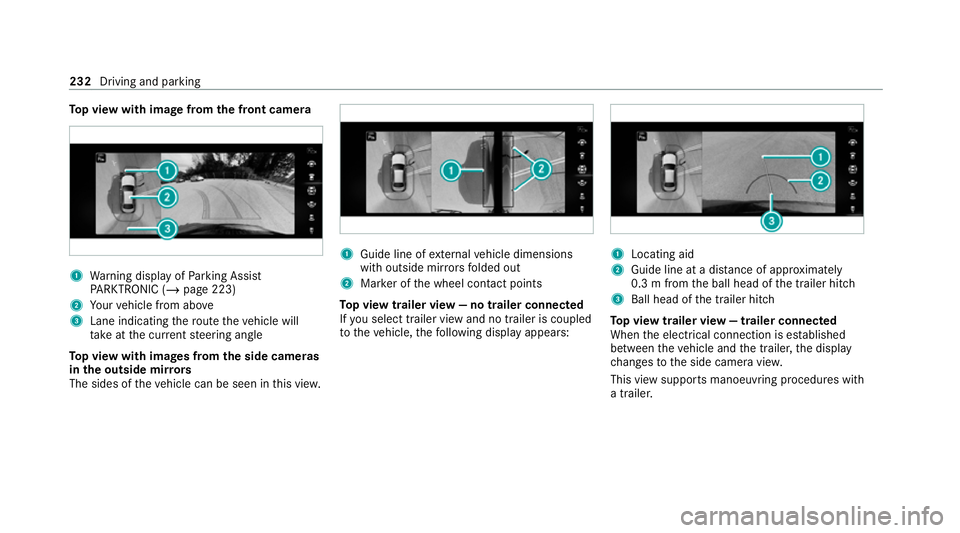
p view with image from the front came ra1
Warning display of Parking Assist
PA RKTRONIC (/ page 223)
2 Your vehicle from abo ve
3 Lane indicating thero ute theve hicle will
ta ke atthe cur rent steering angle
To p view with images from the side came ras
in the outside mir rors
The sides of theve hicle can be seen in this vie w. 1
Guide line of extern al vehicle dimensions
with outside mir rors folded out
2 Marker of the wheel conta ct points
To p view trailer view — no trailer connected
If yo u select trailer view and no trailer is coupled
to theve hicle, thefo llowing display appears: 1
Locating aid
2 Guide line at a dis tance of appr oximately
0.3 m from the ball head of the trailer hitch
3 Ball head of the trailer hitch
To p view trailer view — trailer connected
When the electrical connection is es tablished
between theve hicle and the trailer, the display
ch anges tothe side camera vie w.
This view supports manoeuvring procedures with
a trailer. 232
Driving and parking