coolant temperature MERCEDES-BENZ E-CLASS SALOON 2009 Owners Manual
[x] Cancel search | Manufacturer: MERCEDES-BENZ, Model Year: 2009, Model line: E-CLASS SALOON, Model: MERCEDES-BENZ E-CLASS SALOON 2009Pages: 373, PDF Size: 12.37 MB
Page 10 of 373
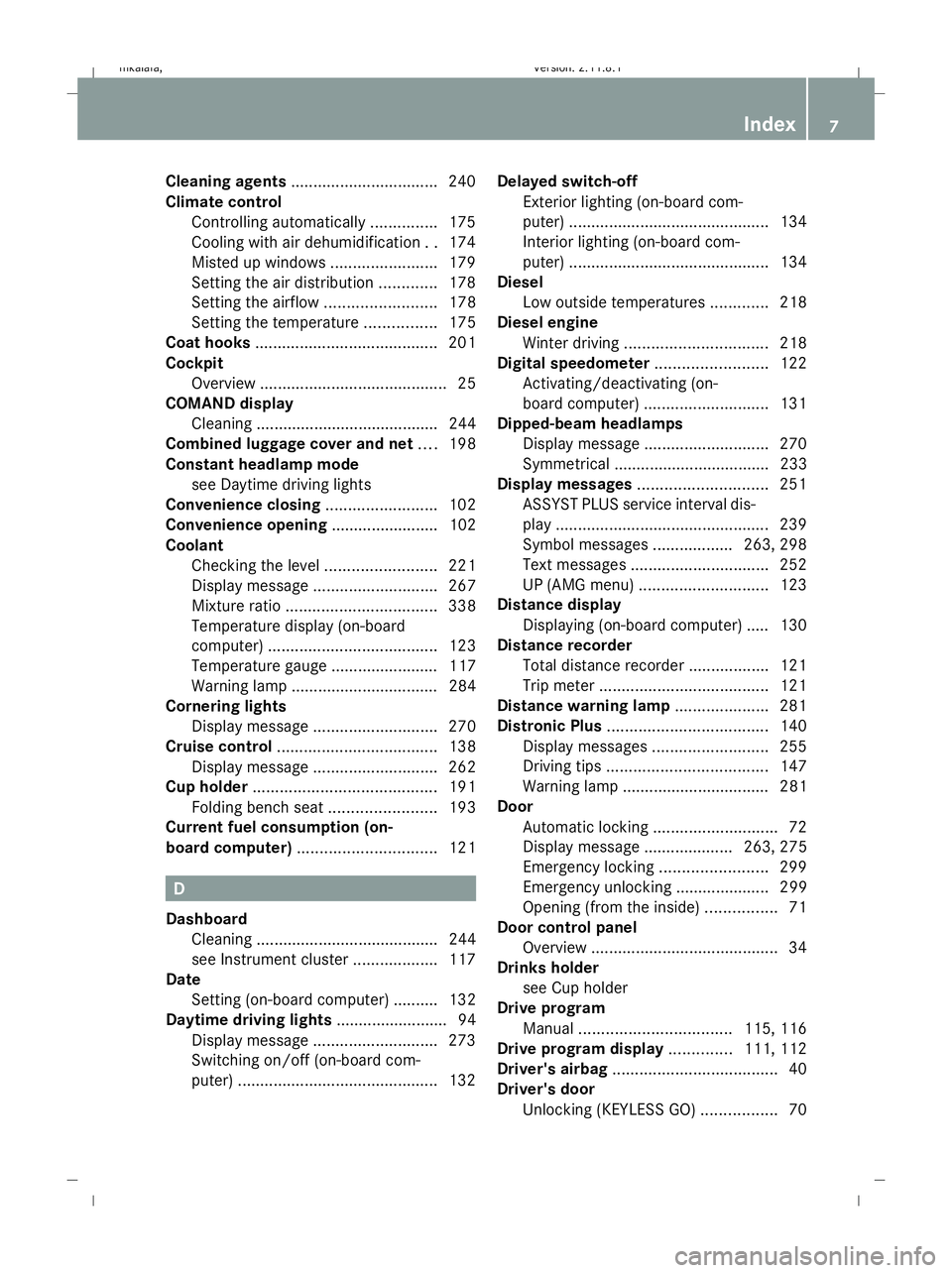
Cleaning agents
................................. 240
Climate control Controlling automatically ...............175
Cooling with air dehumidification ..174
Misted up windows ........................179
Setting the air distribution .............178
Setting the airflow .........................178
Setting the temperature ................175
Coat hooks ......................................... 201
Cockpit Overview .......................................... 25
COMAND display
Cleaning ......................................... 244
Combined luggage cover and net ....198
Constant headlamp mode see Daytime driving lights
Convenience closing .........................102
Convenience opening ........................ 102
Coolant Checking the level .........................221
Display message ............................ 267
Mixture ratio .................................. 338
Temperature display (on-board
computer) ...................................... 123
Temperature gauge ........................ 117
Warning lamp ................................. 284
Cornering lights
Display message ............................ 270
Cruise control .................................... 138
Display message ............................ 262
Cup holder ......................................... 191
Folding bench seat ........................193
Current fuel consumption (on-
board computer) ............................... 121 D
Dashboard Cleaning ......................................... 244
see Instrument cluster ...................117
Date
Setting (on-board computer) .......... 132
Daytime driving lights ......................... 94
Display message ............................ 273
Switching on/off (on-board com-
puter) ............................................. 132Delayed switch-off
Exterior lighting (on-board com-
puter) ............................................. 134
Interior lighting (on-board com-
puter) ............................................. 134
Diesel
Low outside temperatures .............218
Diesel engine
Winter driving ................................ 218
Digital speedometer .........................122
Activating/deactivating (on-
board computer) ............................ 131
Dipped-beam headlamps
Display message ............................ 270
Symmetrical ................................... 233
Display messages ............................. 251
ASSYST PLUS service interval dis-
pla y................................................ 239
Symbol messages ..................263, 298
Text messages ............................... 252
UP (AMG menu) ............................. 123
Distance display
Displaying (on-board computer) ..... 130
Distance recorder
Total distance recorder ..................121
Trip meter ...................................... 121
Distance warning lamp .....................281
Distronic Plus .................................... 140
Display messages ..........................255
Driving tips .................................... 147
Warning lamp ................................. 281
Door
Automatic locking ............................ 72
Display message .................... 263, 275
Emergency locking ........................299
Emergency unlocking ..................... 299
Opening (from the inside) ................71
Door control panel
Overview .......................................... 34
Drinks holder
see Cup holder
Drive program
Manual .................................. 115, 116
Drive program display ..............111, 112
Driver's airbag ..................................... 40
Driver's door Unlocking (KEYLESS GO) .................70 Index
7 212_AKB; 2; 4, en-GB
mkalafa,
Version: 2.11.8.1 2009-05-05T14:17:16+02:00 - Seite 7Dateiname: 6515346702_buchblock.pdf; erzeugt am 07. May 2009 14:15:26; WK
Page 19 of 373
Tank
see Fuel tank
Tank capacity .................................... 334
Technical data E 200 CDI BlueEFFICIENCY ...........344
E 200 CGI BlueEFFICIENCY ...........339
E 220 CDI BlueEFFICIENCY ...........344
E 220 CDI BlueEFFICIENCY (Bel-
gium) ............................................. 345
E 250 CDI BlueEFFICIENCY ...........345
E 250 CGI BlueEFFICIENCY ...........339
E 300 ............................................. 340
E 350 ............................................. 340
E 350 4MATIC ................................ 341
E 350 BlueTEC ............................... 347
E 350 CDI 4MATIC BlueEFFI-
CIENCY .......................................... 347
E 350 CDI BlueEFFICIENCY ...........346
E 350 CGI BlueEFFICIENCY ...........341
E 500 ............................................. 342
E 500 4MATIC ................................ 343
E 63 AMG ...................................... 343
Trailer loads ................................... 358
Tyres .............................................. 350
Wheels ........................................... 350
Telephone
see Mobile phone .......................... 128
Telephone compartment ..................189
Telescopic rod (Easy-Pack fix kit) ....203
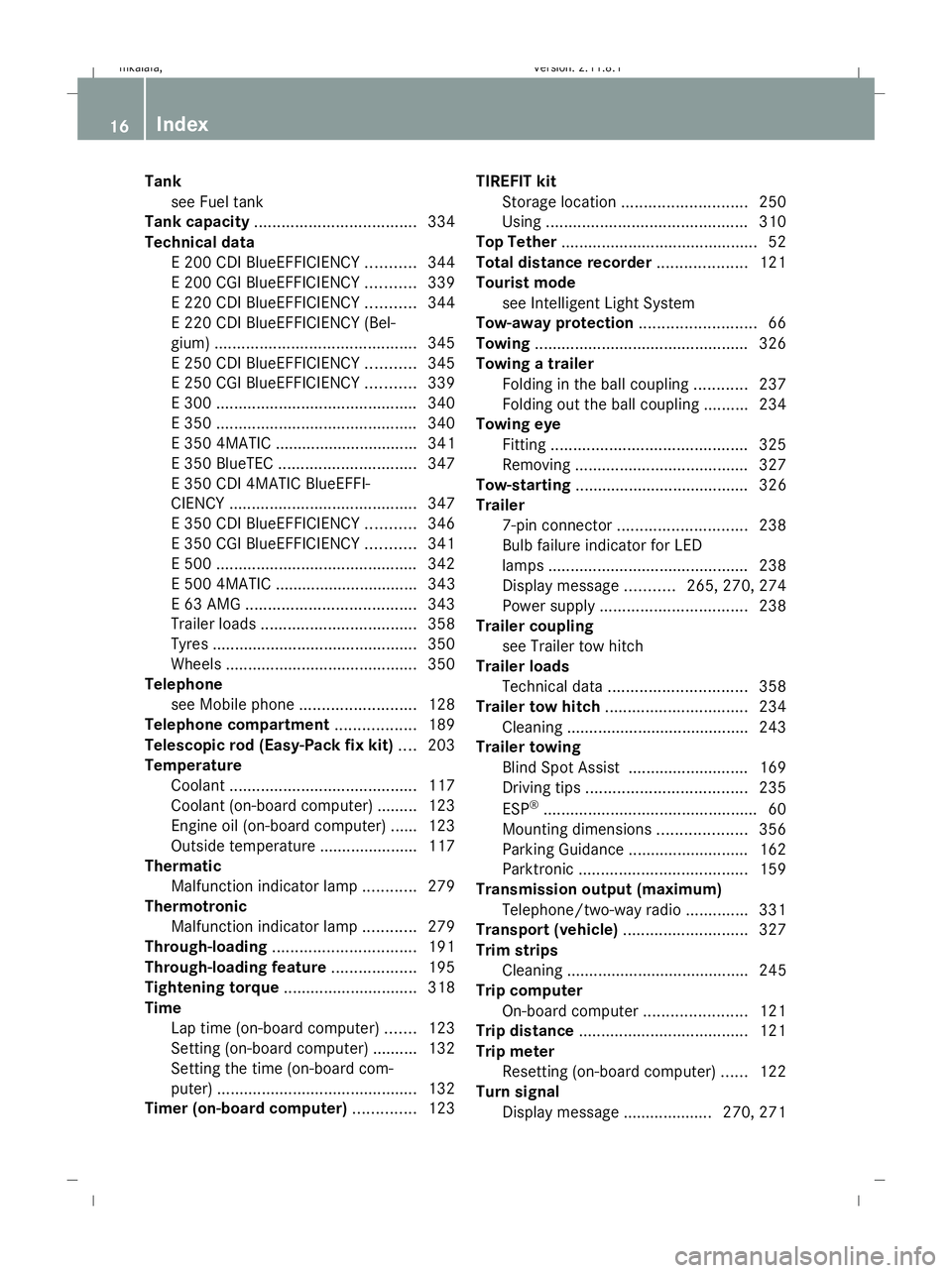
Temperature Coolant .......................................... 117
Coolant (on-board computer) ......... 123
Engine oil (on-board computer) ...... 123
Outside temperature ..................... .117
Thermatic
Malfunction indicator lamp ............279
Thermotronic
Malfunction indicator lamp ............279
Through-loading ................................ 191
Through-loading feature ...................195
Tightening torque .............................. 318
Time Lap time (on-board computer) .......123
Setting (on-board computer) .......... 132
Setting the time (on-board com-
puter) ............................................. 132
Timer (on-board computer) ..............123TIREFIT kit
Storage location ............................ 250
Using ............................................. 310
Top Tether ............................................ 52
Total distance recorder ....................121
Tourist mode see Intelligent Light System
Tow-away protection ..........................66
Towing ................................................ 326
Towing a trailer Folding in the ball coupling ............237
Folding out the ball coupling ..........234
Towing eye
Fitting ............................................ 325
Removing ....................................... 327
Tow-starting ....................................... 326
Trailer 7-pin connector ............................. 238
Bulb failure indicator for LED
lamps ............................................. 238
Display message ...........265, 270, 274
Power supply ................................. 238
Trailer coupling
see Trailer tow hitch
Trailer loads
Technical data ............................... 358
Trailer tow hitch ................................ 234
Cleaning ......................................... 243
Trailer towing
Blind Spot Assist ........................... 169
Driving tips .................................... 235
ESP ®
................................................ 60
Mounting dimensions ....................356
Parking Guidance ........................... 162
Parktroni c...................................... 159
Transmission output (maximum)
Telephone/two-way radio ..............331
Transport (vehicle) ............................327
Trim strips Cleaning ......................................... 245
Trip computer
On-board computer .......................121
Trip distance ...................................... 121
Trip meter Resetting (on-board computer) ......122
Turn signal
Display message .................... 270, 271 16
Index 212_AKB; 2; 4, en-GB
mkalafa,
Version: 2.11.8.1 2009-05-05T14:17:16+02:00 - Seite 16Dateiname: 6515346702_buchblock.pdf; erzeugt am 07. May 2009 14:15:27; WK
Page 30 of 373
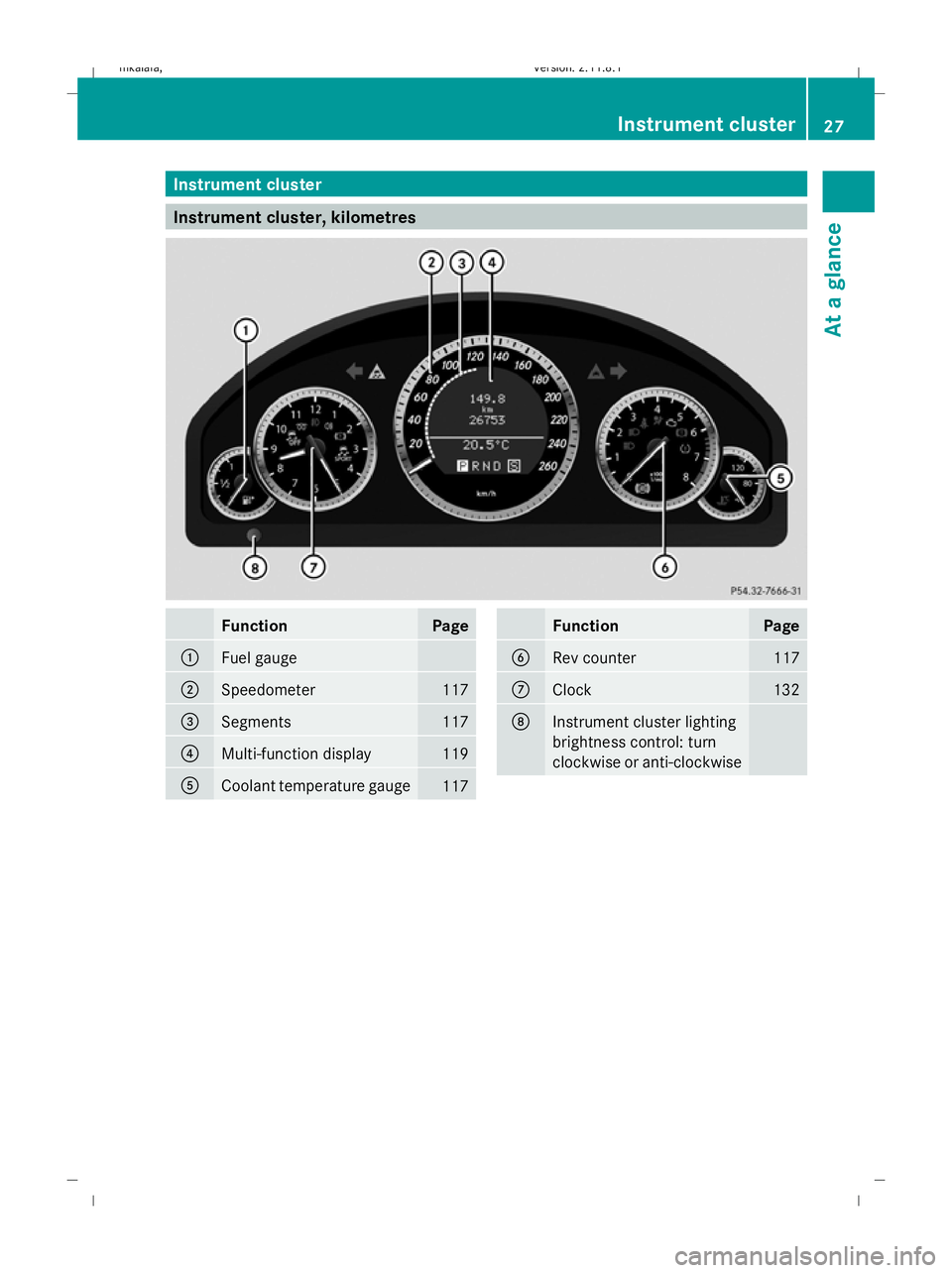
Instrument cluster
Instrument cluster, kilometres
Function Page
:
Fuel gauge
;
Speedometer 117
=
Segments 117
?
Multi-function display 119
A
Coolant temperature gauge
117 Function Page
B
Rev counter 117
C
Clock 132
D
Instrument cluster lighting
brightness control: turn
clockwise or anti-clockwise Instrument cluster
27At a glance
212_AKB; 2; 4, en-GB
mkalafa, Version: 2.11.8.1 2009-05-05T14:17:16+02:00 - Seite 27
Dateiname: 6515346702_buchblock.pdf; erzeugt am 07. May 2009 14:15:30; WK
Page 31 of 373
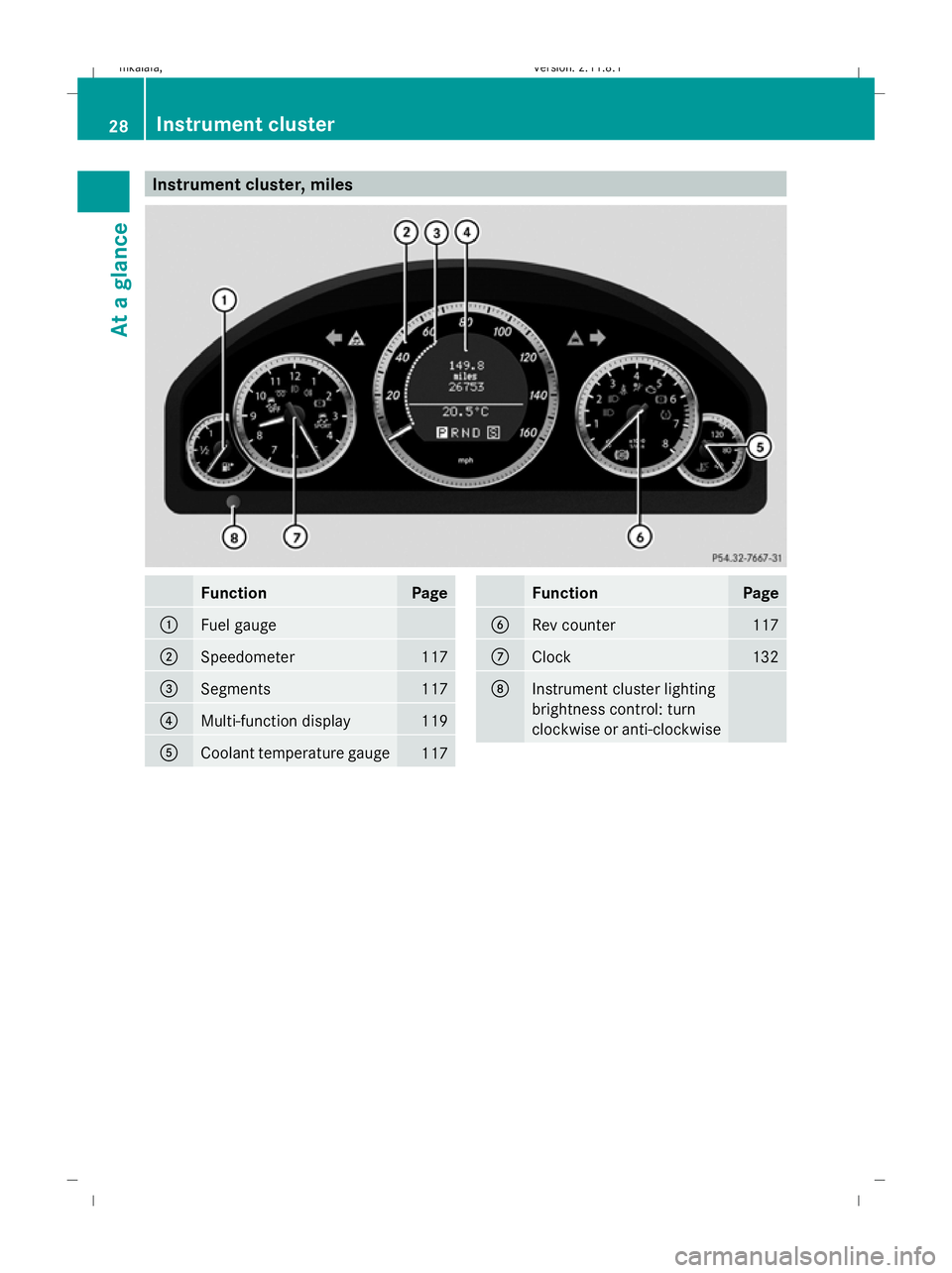
Instrument cluster, miles
Function Page
:
Fuel gauge
;
Speedometer 117
=
Segments 117
?
Multi-function display 119
A
Coolant temperature gauge
117 Function Page
B
Rev counter 117
C
Clock 132
D
Instrument cluster lighting
brightness control: turn
clockwise or anti-clockwise28
Instrument clusterAt a glance
212_AKB; 2; 4, en-GB
mkalafa,
Version: 2.11.8.1
2009-05-05T14:17:16+02:00 - Seite 28
Dateiname: 6515346702_buchblock.pdf; erzeugt am 07. May 2009 14:15:31; WK
Page 120 of 373
Downshifting
G
Risk of accident
Do not shift down to brake on a slippery road
surface. This could cause the drive wheels to
lose their grip, and the vehicle could skid.
X Pull the left-hand paddle ( Ypage 114).
The automatic transmission shifts down to
the next gear.
i For maximum acceleration, pull the left-
hand steering wheel gearshift paddle until
the transmission selects the optimum gear
for the current speed.
Kickdown
i On vehicles with AMG engines, it is not
possible to use kickdown in manual drive
program M. Instrument cluster
Points to remember
You will find an illustration of the instrument
cluster in the "At a glance" section
(Y page 27). G
Risk of accident
If the instrument cluster or the multi-function
display fails, then no display messages can be
shown.
You will not then be able to see information
about the vehicle status, such as speed and
outside temperature, warning and indicator
lamps, display messages or the failure of sys-
tems. The vehicle’s handling characteristics
may be affected. Adapt your driving style and
speed accordingly.
Immediately consult a qualified specialist
workshop which has the necessary specialist
knowledge and tools to carry out the work
required. Mercedes-Benz recommends that
you use a Mercedes-Benz Service Centre for
this purpose. In particular, work relevant to
safety or on safety-related systems must be
carried out at a qualified specialist workshop. Coolant temperature display
The coolant temperature gauge is in the
instrument cluster on the right-hand side.
Under normal operating conditions and with
the specified coolant level, the coolant tem-
perature may rise to 120 †. The coolant tem-
perature may rise to the top end of the scale
at high outside temperatures and on long
uphill stretches. Speedometer with segments
The segments in the speedometer indicate
which speed range is available.
Cruise control mode:
The segments light up from the stored speed
to the maximum speed.
Variable Speedtronic mode:
The segments light up from the start of the
scale to the selected limit speed.
Distronic Plus* mode:
One or two segments around the stored
speed light up. Rev counter
The red band in the rev counter indicates the
engine's overrevving range. The fuel supply is
interrupted to protect the engine when the
red band is reached.
! Do not drive in the overrevving range.
Doing so will damage the engine. Outside temperature display
G
Risk of accident
At temperatures just above freezing point, the
road could be icy, particularly in wooded areas
or on bridges. The vehicle could start skidding
if you fail to adapt your driving style. You
should therefore always adapt your driving
style and speed to suit the weather condi-
tions. Inst
rument cluster
117Controls
* optional
212_AKB; 2; 4, en-GB
mkalafa
,V ersion: 2.11.8.1
2009-05-05T14:17:16+02:00 - Seite 117 Z
Dateiname: 6515346702_buchblock.pdf; erzeugt am 07. May 2009 14:16:09; WK
Page 126 of 373
=
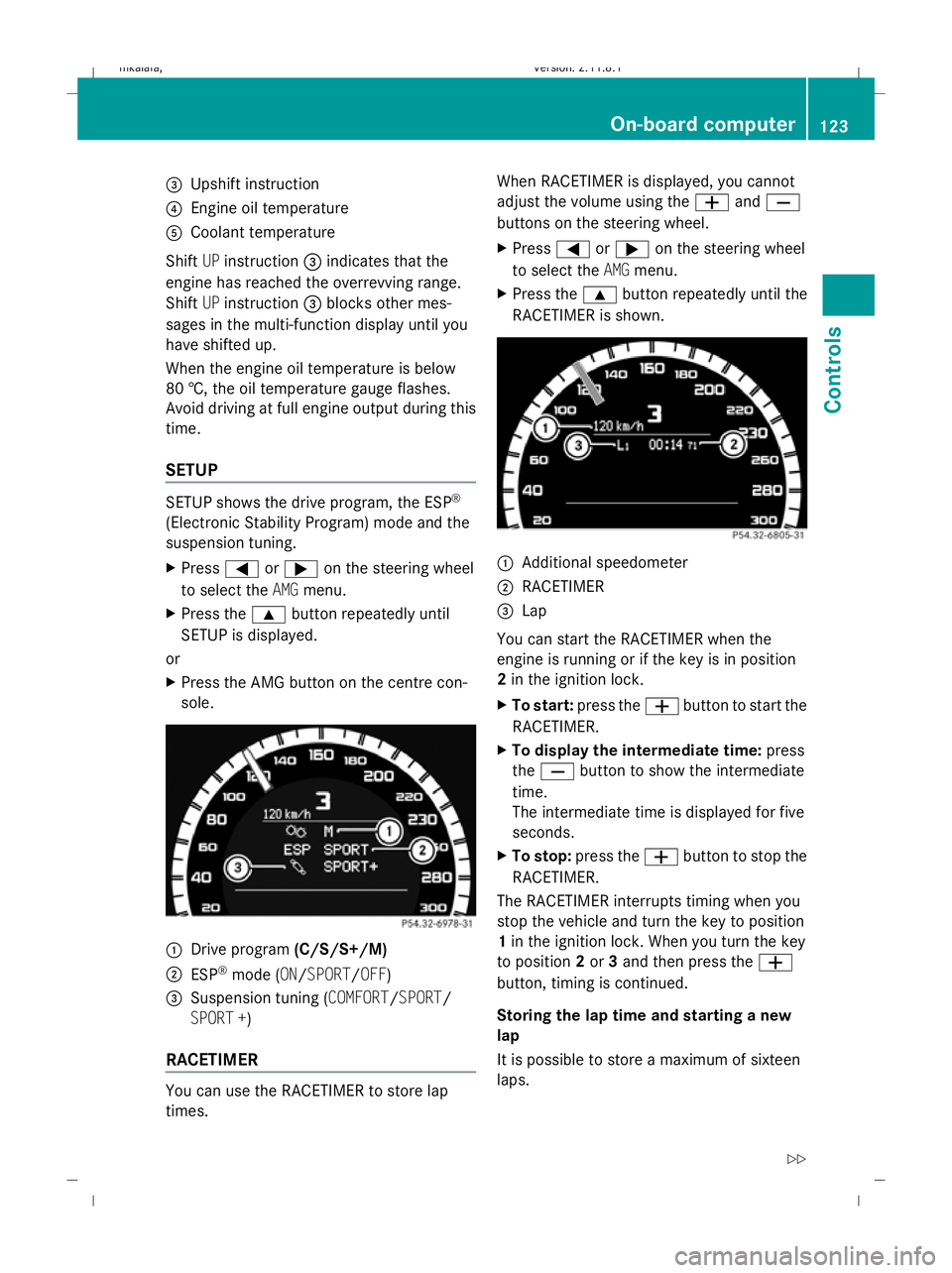
Upshift instruction
? Engine oil temperature
A Coolant temperature
Shift UPinstruction =indicates that the
engine has reached the overrevving range.
Shift UPinstruction =blocks other mes-
sages in the multi-function display until you
have shifted up.
When the engine oil temperature is below
80 †, the oil temperature gauge flashes.
Avoid driving at full engine output during this
time.
SETUP SETUP shows the drive program, the ESP
®
(Electronic Stability Program) mode and the
suspension tuning.
X Press =or; on the steering wheel
to select the AMGmenu.
X Press the 9button repeatedly until
SETUP is displayed.
or
X Press the AMG button on the centre con-
sole. :
Drive program (C/S/S+/M)
; ESP ®
mode (ON/SPORT/OFF)
3 Suspension tuning (COMFORT/SPORT/
SPORT +)
RACETIMER You can use the RACETIMER to store lap
times. When RACETIMER is displayed, you cannot
adjust the volume using the
WandX
buttons on the steering wheel.
X Press =or; on the steering wheel
to select the AMGmenu.
X Press the 9button repeatedly until the
RACETIMER is shown. :
Additional speedometer
; RACETIMER
= Lap
You can start the RACETIMER when the
engine is running or if the key is in position
2 in the ignition lock.
X To start: press the Wbutton to start the
RACETIMER.
X To display the intermediate time: press
the X button to show the intermediate
time.
The intermediate time is displayed for five
seconds.
X To stop: press the Wbutton to stop the
RACETIMER.
The RACETIMER interrupts timing when you
stop the vehicle and turn the key to position
1 in the ignition lock. When you turn the key
to position 2or 3and then press the W
button, timing is continued.
Storing the lap time and starting a new
lap
It is possible to store a maximum of sixteen
laps. On-board computer
123Controls
212_AKB; 2; 4, en-GB
mkalafa, Version: 2.11.8.1 2009-05-05T14:17:16+02:00 - Seite 123 Z
Dateiname: 6515346702_buchblock.pdf; erzeugt am 07. May 2009 14:16:12; WK
Page 224 of 373
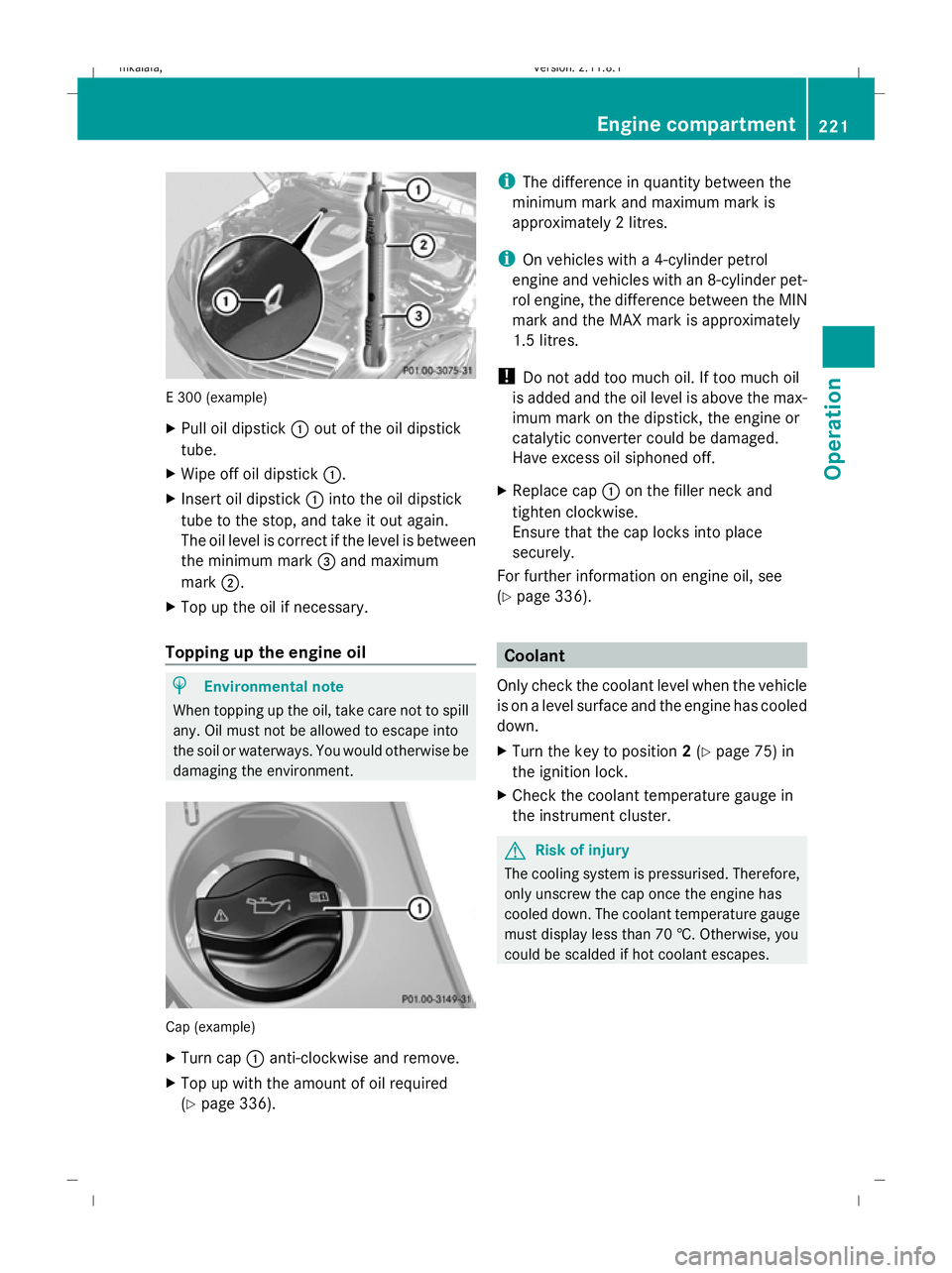
E 300 (example)
X
Pull oil dipstick :out of the oil dipstick
tube.
X Wipe off oil dipstick :.
X Insert oil dipstick :into the oil dipstick
tube to the stop, and take it out again.
The oil level is correct if the level is between
the minimum mark =and maximum
mark ;.
X Top up the oil if necessary.
Topping up the engine oil H
Environmental note
When topping up the oil, take care not to spill
any. Oil must not be allowed to escape into
the soil or waterways. You would otherwise be
damaging the environment. Cap (example)
X
Turn cap :anti-clockwise and remove.
X Top up with the amount of oil required
(Y page 336). i
The difference in quantity between the
minimum mark and maximum mark is
approximately 2 litres.
i On vehicles with a 4-cylinder petrol
engine and vehicles with an 8-cylinder pet-
rol engine, the difference between the MIN
mark and the MAX mark is approximately
1.5 litres.
! Do not add too much oil. If too much oil
is added and the oil level is above the max-
imum mark on the dipstick, the engine or
catalytic converter could be damaged.
Have excess oil siphoned off.
X Replace cap :on the filler neck and
tighten clockwise.
Ensure that the cap locks into place
securely.
For further information on engine oil, see
(Y page 336). Coolant
Only check the coolant level when the vehicle
is on a level surface and the engine has cooled
down.
X Turn the key to position 2(Y page 75) in
the ignition lock.
X Check the coolant temperature gauge in
the instrument cluster. G
Risk of injury
The cooling system is pressurised. Therefore,
only unscrew the cap once the engine has
cooled down. The coolant temperature gauge
must display less than 70 †. Otherwise, you
could be scalded if hot coolant escapes. Engine compartment
221Operation
212_AKB; 2; 4, en-GB
mkalafa, Version: 2.11.8.1 2009-05-05T14:17:16+02:00 - Seite 221 Z
Dateiname: 6515346702_buchblock.pdf; erzeugt am 07. May 2009 14:16:56; WK
Page 225 of 373
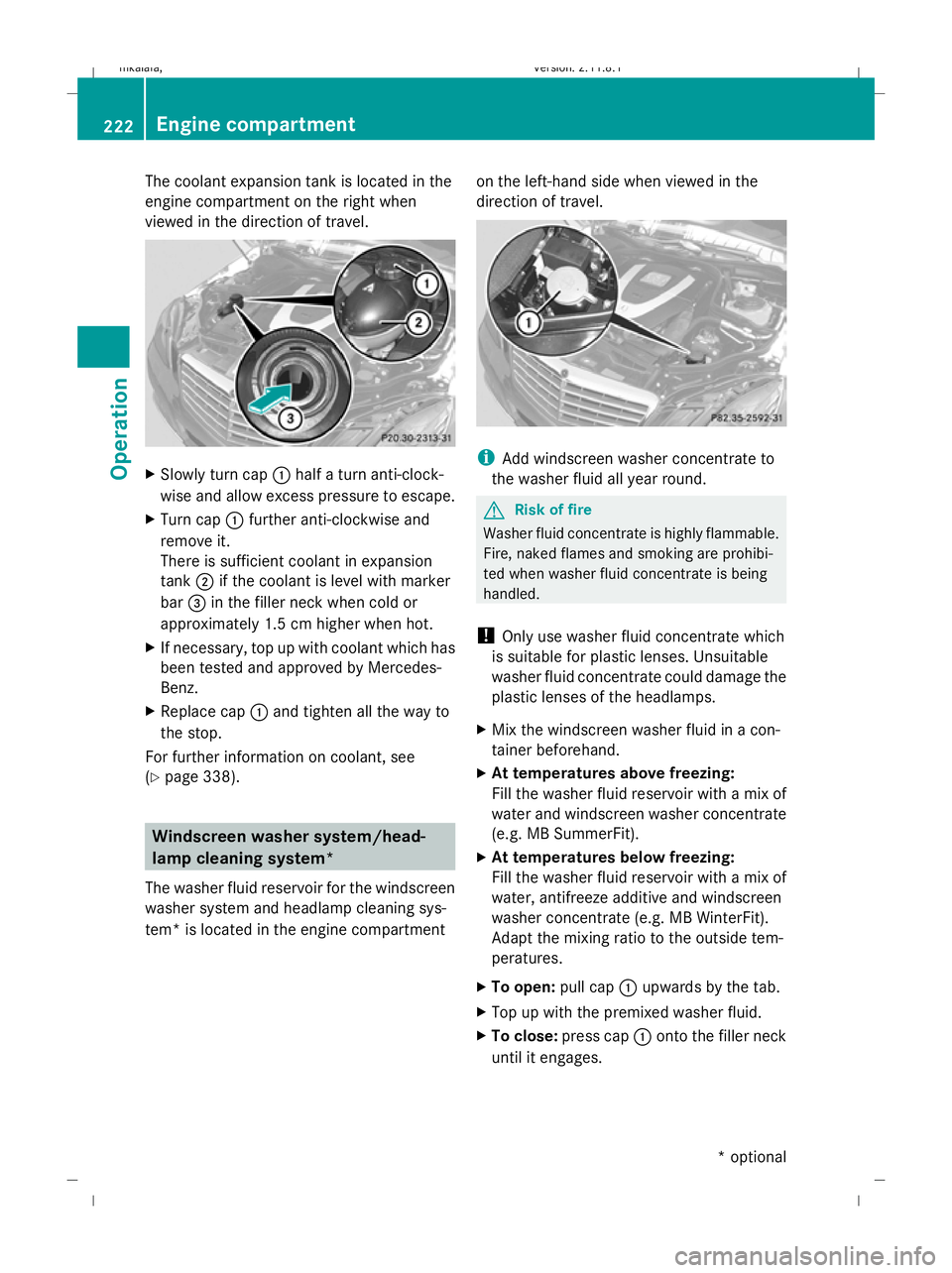
The coolant expansion tank is located in the
engine compartment on the right when
viewed in the direction of travel. X
Slowly turn cap :half a turn anti-clock-
wise and allow excess pressure to escape.
X Turn cap :further anti-clockwise and
remove it.
There is sufficient coolant in expansion
tank ;if the coolant is level with marker
bar =in the filler neck when cold or
approximately 1.5 cm higher when hot.
X If necessary, top up with coolant which has
been tested and approved by Mercedes-
Benz.
X Replace cap :and tighten all the way to
the stop.
For further information on coolant, see
(Y page 338). Windscreen washer system/head-
lamp cleaning system*
The washer fluid reservoir for the windscreen
washer system and headlamp cleaning sys-
tem* is located in the engine compartment on the left-hand side when viewed in the
direction of travel. i
Add windscreen washer concentrate to
the washer fluid all year round. G
Risk of fire
Washer fluid concentrate is highly flammable.
Fire, naked flames and smoking are prohibi-
ted when washer fluid concentrate is being
handled.
! Only use washer fluid concentrate which
is suitable for plastic lenses. Unsuitable
washer fluid concentrate could damage the
plastic lenses of the headlamps.
X Mix the windscreen washer fluid in a con-
tainer beforehand.
X At temperatures above freezing:
Fill the washer fluid reservoir with a mix of
water and windscreen washer concentrate
(e.g. MB SummerFit).
X At temperatures below freezing:
Fill the washer fluid reservoir with a mix of
water, antifreeze additive and windscreen
washer concentrate (e.g. MB WinterFit).
Adapt the mixing ratio to the outside tem-
peratures.
X To open: pull cap:upwards by the tab.
X Top up with the premixed washer fluid.
X To close: press cap :onto the filler neck
until it engages. 222
Engine compartmentOperation
* optional
212_AKB; 2; 4, en-GB
mkalafa,
Version: 2.11.8.1 2009-05-05T14:17:16+02:00 - Seite 222
Dateiname: 6515346702_buchblock.pdf; erzeugt am 07. May 2009 14:16:56; WK
Page 270 of 373
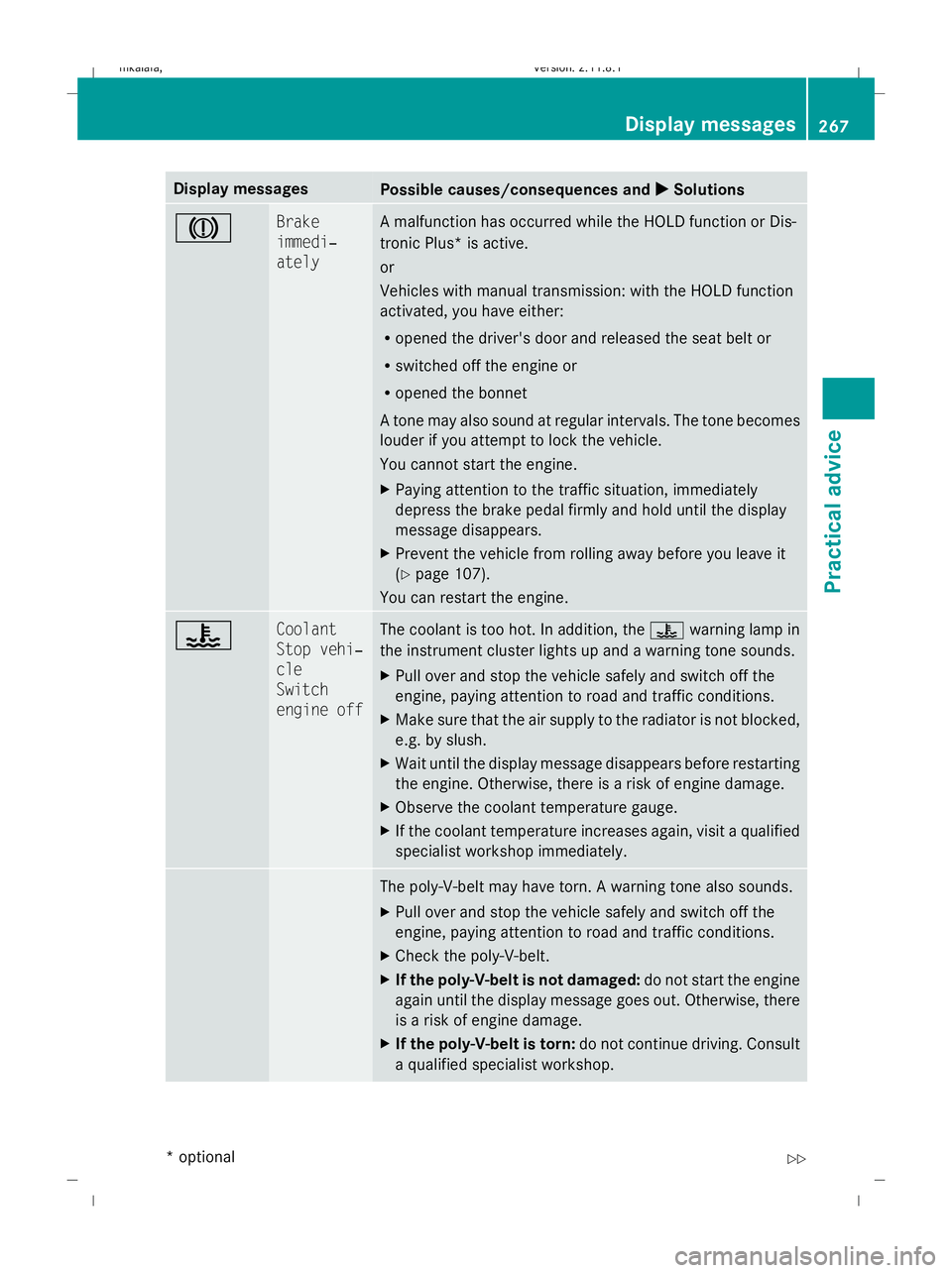
Display messages
Possible causes/consequences and
X
X Solutions J Brake
immedi‐
ately A malfunction has occurred while the HOLD function or Dis-
tronic Plus* is active.
or
Vehicles with manual transmission: with the HOLD function
activated, you have either:
R
opened the driver's door and released the seat belt or
R switched off the engine or
R opened the bonnet
A tone may also sound at regular intervals. The tone becomes
louder if you attempt to lock the vehicle.
You cannot start the engine.
X Paying attention to the traffic situation, immediately
depress the brake pedal firmly and hold until the display
message disappears.
X Prevent the vehicle from rolling away before you leave it
(Y page 107).
You can restart the engine. ? Coolant
Stop vehi‐
cle
Switch
engine off The coolant is too hot. In addition, the
?warning lamp in
the instrument cluster lights up and a warning tone sounds.
X Pull over and stop the vehicle safely and switch off the
engine, paying attention to road and traffic conditions.
X Make sure that the air supply to the radiator is not blocked,
e.g. by slush.
X Wait until the display message disappears before restarting
the engine. Otherwise, there is a risk of engine damage.
X Observe the coolant temperature gauge.
X If the coolant temperature increases again, visit a qualified
specialist workshop immediately. The poly-V-belt may have torn. A warning tone also sounds.
X
Pull over and stop the vehicle safely and switch off the
engine, paying attention to road and traffic conditions.
X Check the poly-V-belt.
X If the poly-V-belt is not damaged: do not start the engine
again until the display message goes out. Otherwise, there
is a risk of engine damage.
X If the poly-V-belt is torn: do not continue driving. Consult
a qualified specialist workshop. Display
messages
267Practical advice
* optional
212_AKB; 2; 4, en-GB
mkalafa
,V ersion: 2.11.8.1
2009-05-05T14:17:16+02:00 - Seite 267 Z
Dateiname: 6515346702_buchblock.pdf; erzeugt am 07. May 2009 14:17:10; WK
Page 271 of 373
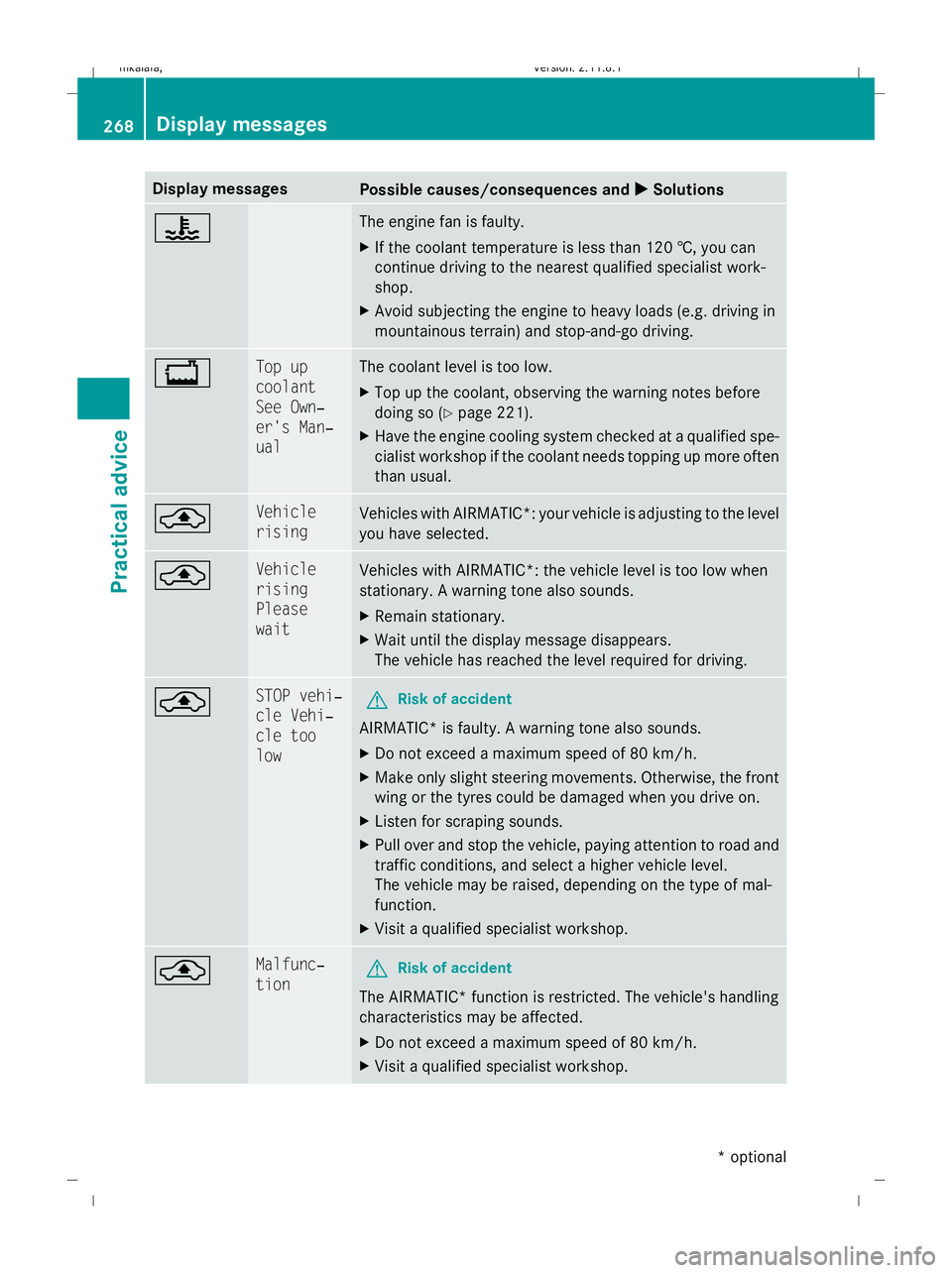
Display messages
Possible causes/consequences and
X
X Solutions ? The engine fan is faulty.
X
If the coolant temperature is less than 120 †, you can
continue driving to the nearest qualified specialist work-
shop.
X Avoid subjecting the engine to heavy loads (e.g. driving in
mountainous terrain) and stop-and-go driving. + Top up
coolant
See Own‐
er's Man‐
ual The coolant level is too low.
X
Top up the coolant, observing the warning notes before
doing so (Y page 221).
X Have the engine cooling system checked at a qualified spe-
cialist workshop if the coolant needs topping up more often
than usual. ¨ Vehicle
rising
Vehicles with AIRMATIC*: your vehicle is adjusting to the level
you have selected.
¨ Vehicle
rising
Please
wait
Vehicles with AIRMATIC*: the vehicle level is too low when
stationary. A warning tone also sounds.
X
Remain stationary.
X Wait until the display message disappears.
The vehicle has reached the level required for driving. ¨ STOP vehi‐
cle Vehi‐
cle too
low
G
Risk of accident
AIRMATIC* is faulty. A warning tone also sounds.
X Do not exceed a maximum speed of 80 km/h.
X Make only slight steering movements. Otherwise, the front
wing or the tyres could be damaged when you drive on.
X Listen for scraping sounds.
X Pull over and stop the vehicle, paying attention to road and
traffic conditions, and select a higher vehicle level.
The vehicle may be raised, depending on the type of mal-
function.
X Visit a qualified specialist workshop. ¨ Malfunc‐
tion
G
Risk of accident
The AIRMATIC* function is restricted. The vehicle's handling
characteristics may be affected.
X Do not exceed a maximum speed of 80 km/h.
X Visit a qualified specialist workshop. 268
Display
messagesPractical advice
* optional
212_AKB; 2; 4, en-GB
mkalafa
,V ersion: 2.11.8.1
2009-05-05T14:17:16+02:00 - Seite 268
Dateiname: 6515346702_buchblock.pdf; erzeugt am 07. May 2009 14:17:10; WK