lock MERCEDES-BENZ E-CLASS SALOON 2015 Owners Manual
[x] Cancel search | Manufacturer: MERCEDES-BENZ, Model Year: 2015, Model line: E-CLASS SALOON, Model: MERCEDES-BENZ E-CLASS SALOON 2015Pages: 497, PDF Size: 16.23 MB
Page 353 of 497
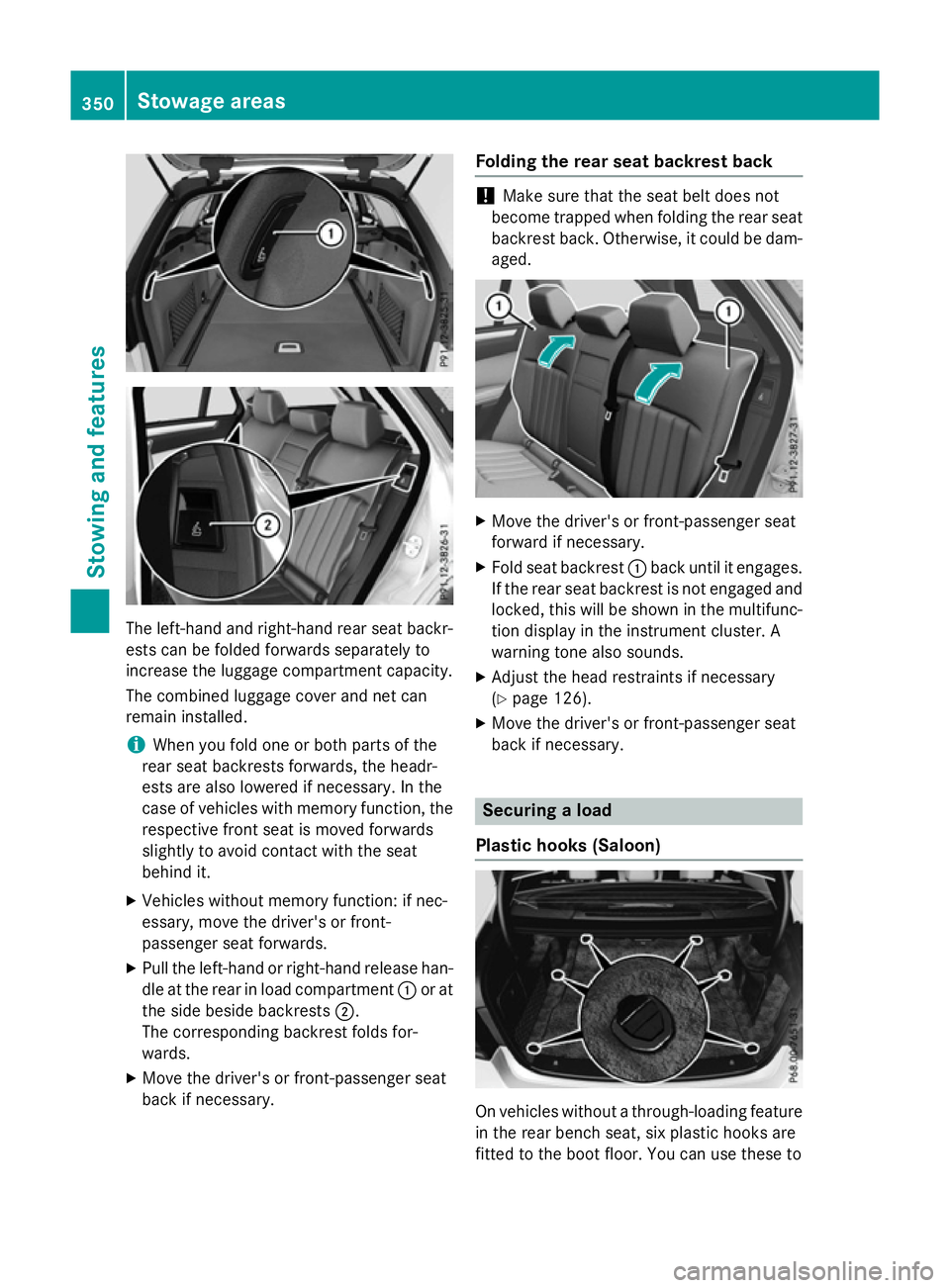
The left-hand and right-hand rear seat backr-
ests can be folded forwards separately to
increase the luggage compartment capacity.
The combined luggage cover and net can
remain installed.
i When you fold one or both parts of the
rear seat backrest sforwards, the headr-
ests are also lowered if necessary. In the
case of vehicles with memory function, the respective fronts eat is moved forwards
slightly to avoid contact with the seat
behind it.
X Vehicles without memory function: if nec-
essary, move the driver's or front-
passenger seat forwards.
X Pull the left-hand or right-hand release han-
dle at the rear in load compartment :or at
the side beside backrests ;.
The corresponding backrest folds for-
wards.
X Move the driver's or front-passenger seat
back if necessary. Folding the rear seat backrest back !
Make sure that the seat belt does not
become trapped when folding the rear seat backrest back. Otherwise, it could be dam- aged. X
Move the driver's or front-passenger seat
forward if necessary.
X Fold seat backrest :back until it engages.
If the rear seat backrest is not engaged and locked, this will be shown in the multifunc-
tion display in the instrument cluster. A
warning tonea lso sounds.
X Adjust the head restraints if necessary
(Y page 126).
X Move the driver's or front-passenger seat
back if necessary. Securing
aload
Plastic hooks (Saloon) On vehicles without
athrough-loading feature
in the rear bench seat, six plastic hooks are
fitted to the boot floor. You can use these to 350
Stowage areasStowing and features
Page 355 of 497
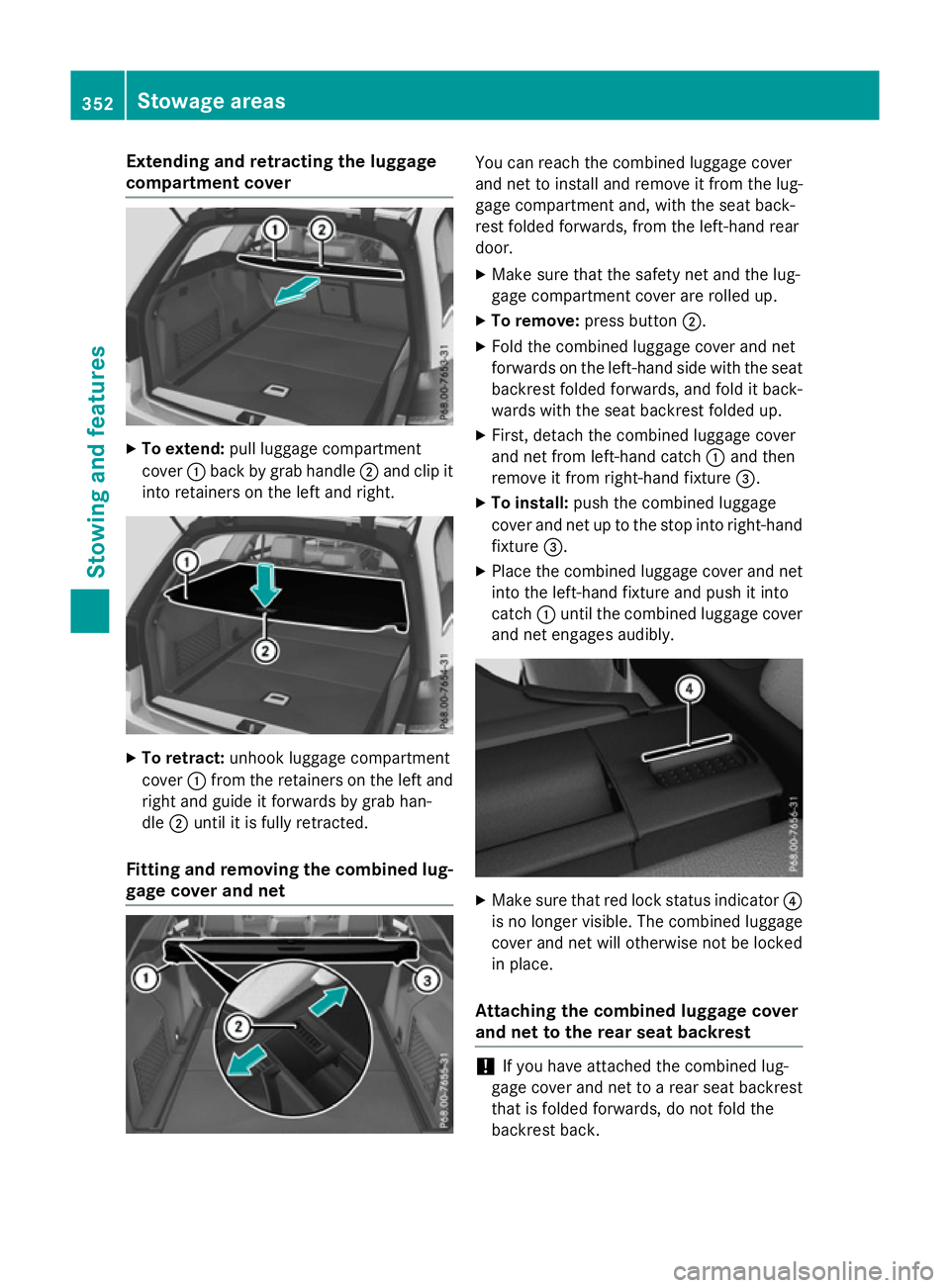
Extending and retractin
gthe luggage
compartment cover X
To extend: pull luggage compartment
cover :back by grab handle ;and clip it
int or etainers on th eleft and right. X
To retract: unhook luggage compartment
cover :from th eretainers on th eleft and
righ tand guide it forwards by grab han-
dle ;until it is fully retracted.
Fitting and removing th ecombined lug-
gage cover and net You can reac
hthe combined luggage cover
and ne ttoinstall and remove it from th elug-
gage compartmen tand, with th eseat back-
res tfolded forwards ,fro mt heleft-hand rear
door.
X Mak esure that th esafety ne tand th elug-
gage compartmen tcover are rolled up.
X To remove: pressbutton ;.
X Fol dthe combined luggage cover and net
forwards on th eleft-hand side with th eseat
backres tfolded forwards ,and fold it back-
wards with th eseat backres tfolded up.
X First ,detach th ecombined luggage cover
and ne tfroml eft-hand catch :and then
remove it from right-han dfixture =.
X To install: push thecombined luggage
cover and ne tuptothestop int oright-hand
fixture =.
X Plac ethe combined luggage cover and net
int ot he left-hand fixtur eand push it into
catch :until th ecombined luggage cover
and ne tengages audibly. X
Mak esure that red loc kstatus indicator ?
is no longer visible. The combined luggage
cover and ne twill otherwise no tbelocked
in place.
Attaching th ecombined luggage cover
and net to th erears eat backrest !
If you have attached th
ecombined lug-
gage cover and ne ttoarear seat backrest
that is folded forwards ,donotfold the
backres tback. 352
Stowage areasStowing and features
Page 358 of 497
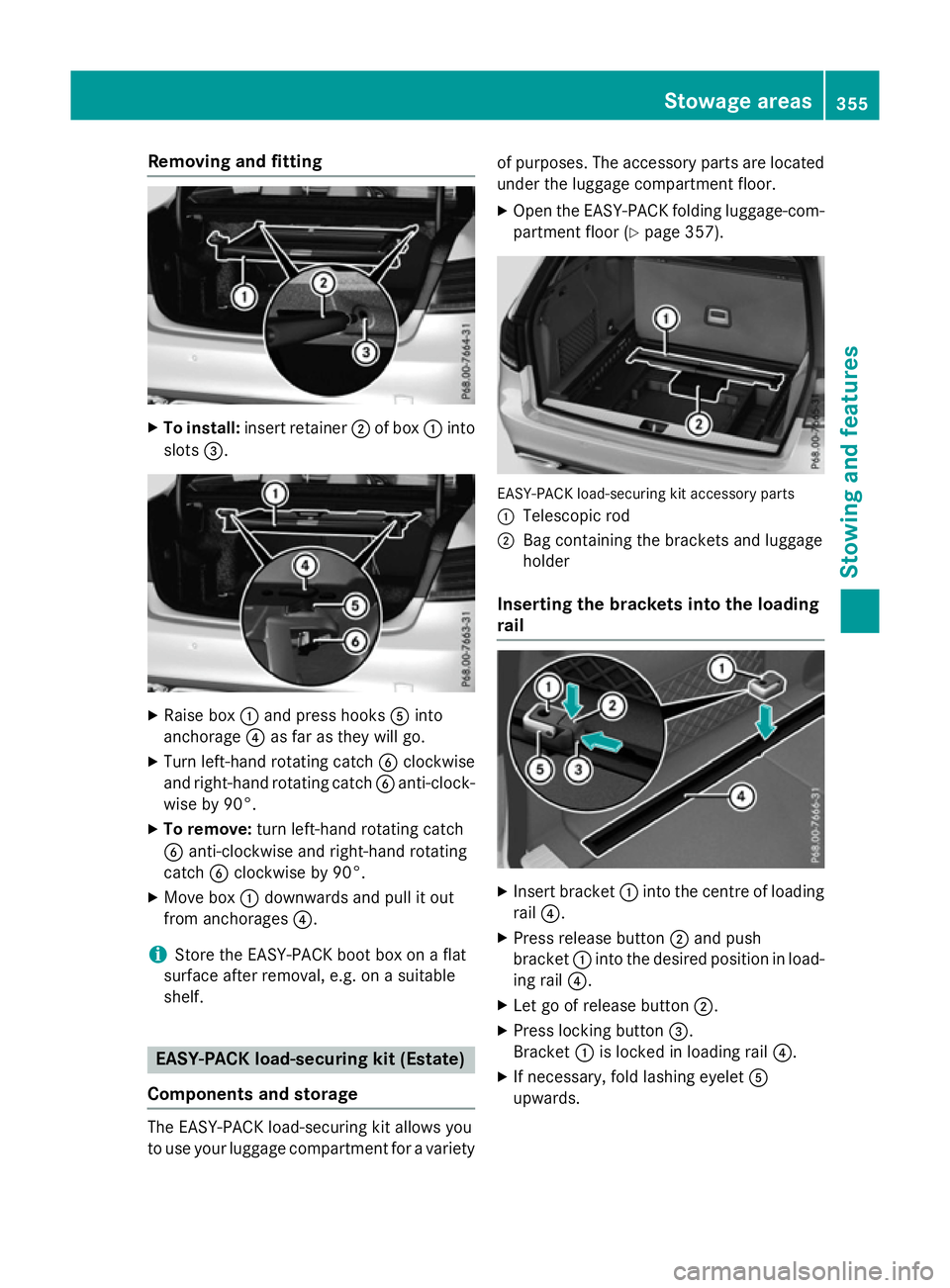
Removin
gand fitting X
To install: insert retainer ;of box :into
slots =. X
Raise box :and press hooks Ainto
anchorage ?as far as they will go.
X Turn left-hand rotating catch Bclockwise
and right-hand rotating catch Banti-clock-
wise by 90°.
X To remove: turn left-hand rotating catch
B anti-clockwise and right-hand rotating
catch Bclockwise by 90°.
X Move box :downwards and pull it out
from anchorages ?.
i Store the EASY-PAC
Kbootb ox on aflat
surface afte rremoval ,e.g. on asuitable
shelf. EASY-PACK load-securing kit (Estate)
Components and storage The EASY-PAC
Kload-s ecuring kit allows you
to us eyourlug gage compartment for avariety of purposes
.The accessory parts are located
under the luggage compartment floor.
X Ope nthe EASY-PAC Kfolding luggage-com-
partment floor (Y page 357). EASY-PAC
Kload-securing kit accessory parts
: Telescopi crod
; Bag containing the brackets and luggage
holder
Inserting the brackets into the loading
rail X
Insert bracket :into the centre of loading
rail ?.
X Press release button ;and push
bracket :into the desire dposition in load-
ing rail ?.
X Let go of release button ;.
X Press locking button =.
Bracket :is locked in loading rail ?.
X If necessary ,foldl ashing eyelet A
upwards. Stowage areas
355Stowingand features Z
Page 359 of 497
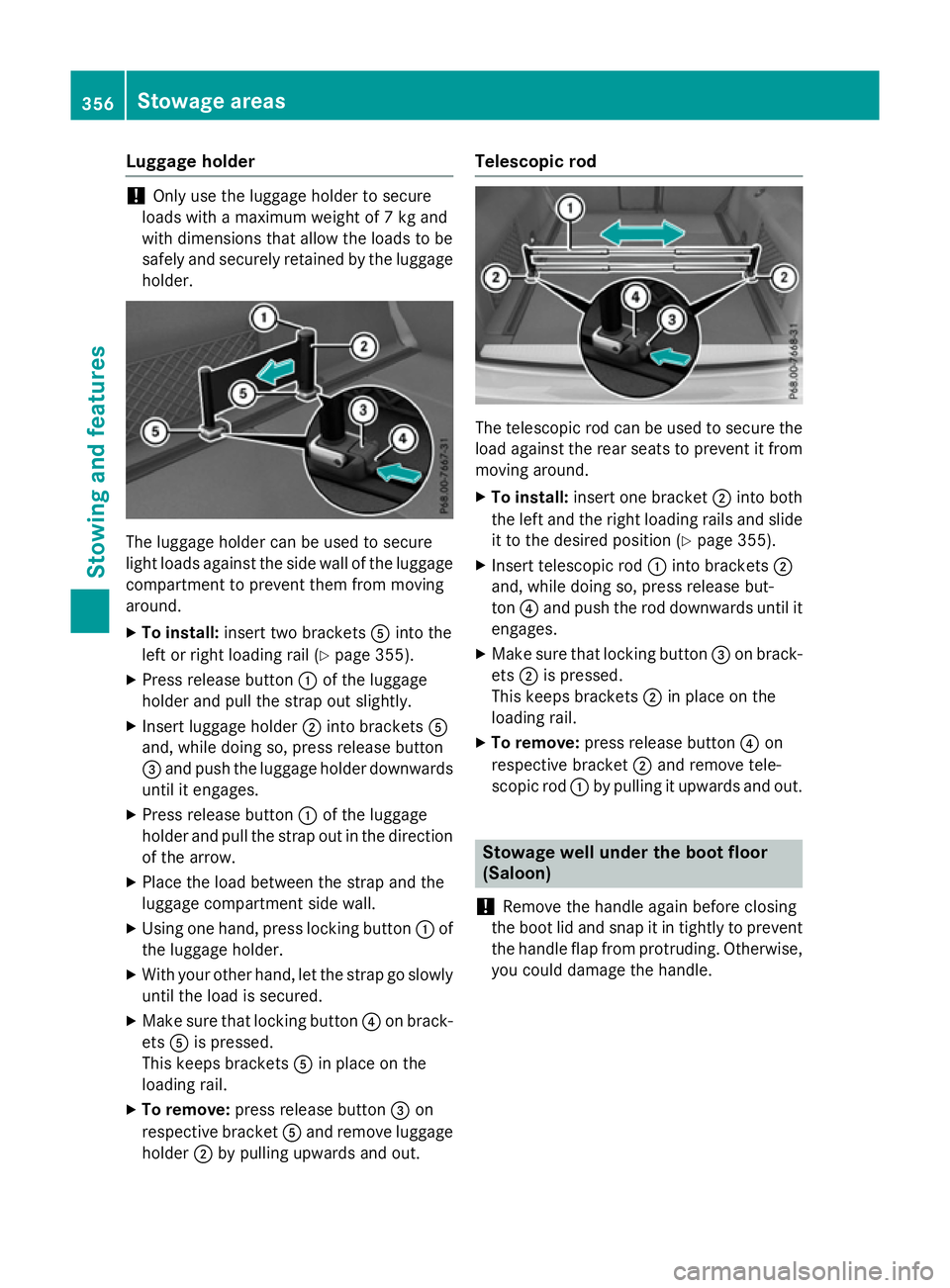
Luggage holder
!
Only use th
eluggage holde rtosecure
loads with amaximum weight of 7kgand
with dimension sthata llow th eloads to be
safely and securely retained by th eluggage
holder. The luggage holde
rcan be used to secure
light loads against th eside wall of th eluggage
compartmen ttoprevent them from moving
around.
X To install: insert two brackets Aintot he
left or righ tloadin grail (Y page 355).
X Pres sreleas ebutton :of th eluggage
holde rand pull th estrap out slightly.
X Inser tluggage holder ;intob rackets A
and, while doin gso, pres sreleas ebutton
= and push th eluggage holde rdownwards
until it engages.
X Pres sreleas ebutton :of th eluggage
holde rand pull th estrap out in th edirection
of th earrow.
X Place th eload between th estrap and the
luggage compartmen tside wall.
X Usin gone hand, pres slocking button :of
th el uggage holder.
X Wit hyour other hand, let th estrap go slowly
until th eload is secured.
X Mak esure that locking button ?on brack-
ets Ais pressed.
This keeps brackets Ain place on the
loadin grail.
X To remove: pressreleas ebutton =on
respectiv ebracket Aand remove luggage
holder ;by pullin gupwards and out. Telescopic rod
The telescopic rod can be used to secure the
load agains tthe rear seat stoprevent it from
moving around.
X To install: insert onebracket ;intob oth
th el eft and th erigh tloadin grails and slide
it to th edesired position (Y page 355).
X Inser ttelescopic rod :intob rackets ;
and, while doin gso, pres sreleas ebut-
ton ?and push th erod downwards until it
engages.
X Mak esure that locking button =on brack-
ets ;is pressed.
This keeps brackets ;in place on the
loadin grail.
X To remove: pressreleas ebutton ?on
respectiv ebracket ;and remove tele-
scopic rod :by pullin gitupwards and out. Stowage well under th
eboot floor
(Saloon)
! Remov
ethe handle again before closing
th eb oot lid and snap it in tightly to prevent
th eh andle flap from protruding. Otherwise,
you could damage th ehandle. 356
Stowage areasStowing and features
Page 363 of 497
Features
Cup holders
Important safety notes Vehicles wit
hmanual transmission or AMG
vehicles: G
WARNING
The cup holder canno tsecure adrinks con-
taine rinp laced urin gaj ourney. If you use a
cup holder durin gajourney, th edrinks con-
taine rcould be flun garoun dand liquid could
be spilt .Vehicl eoccupant scould come into
contact wit hthe liquid and ,inparticular, be
scalded by hot liquid. You could be distracted
from th etraffic situation and lose control of
th ev ehicle. Ther eisariskofana ccidentand
injury.
Only use th ecup holder when th evehicl eis
stationary. Only plac econtaine rs ofasuitable
siz eint hecup holder. Seal th econtaine r, in
particular when it contains hot liquid.
! Only use th
ecup holders for containers of
th er ight siz eand whic hhave lids. The
drinks could otherwise spill. G
WARNING
If object sinthepassenger compartmen tare
stowed incorrectly, they can slide or be
thrown aroun dand hit vehicl eoccupants.
Ther eisar iskofi njury, particularly in the
event of sudde nbraking or asudde nchange
in direction.
R Always stow object ssothatthe yc anno tbe
thrown aroun dinsuchs ituations.
R Always mak esure that object sdonotpro-
trude from stowage spaces, luggag enetsor
stowage nets.
R Close th elockable stowage spaces while
driving.
R Always stow and secure heavy, hard ,poin-
ted, sharp-edged, fragile or bulk yobject sin
th eb oot/luggage compartment.
! Do no
texpose drinks bottles in th ecup
holder in th ecentre console to continuous, stron
gand direct sunlight .The passenger
compartmen tinthearea of th ecentre con-
sole can otherwise be damaged by th econ-
centrated and reflecte dsunlight.
Observ ethe loadin gguideline s(Ypage 342).
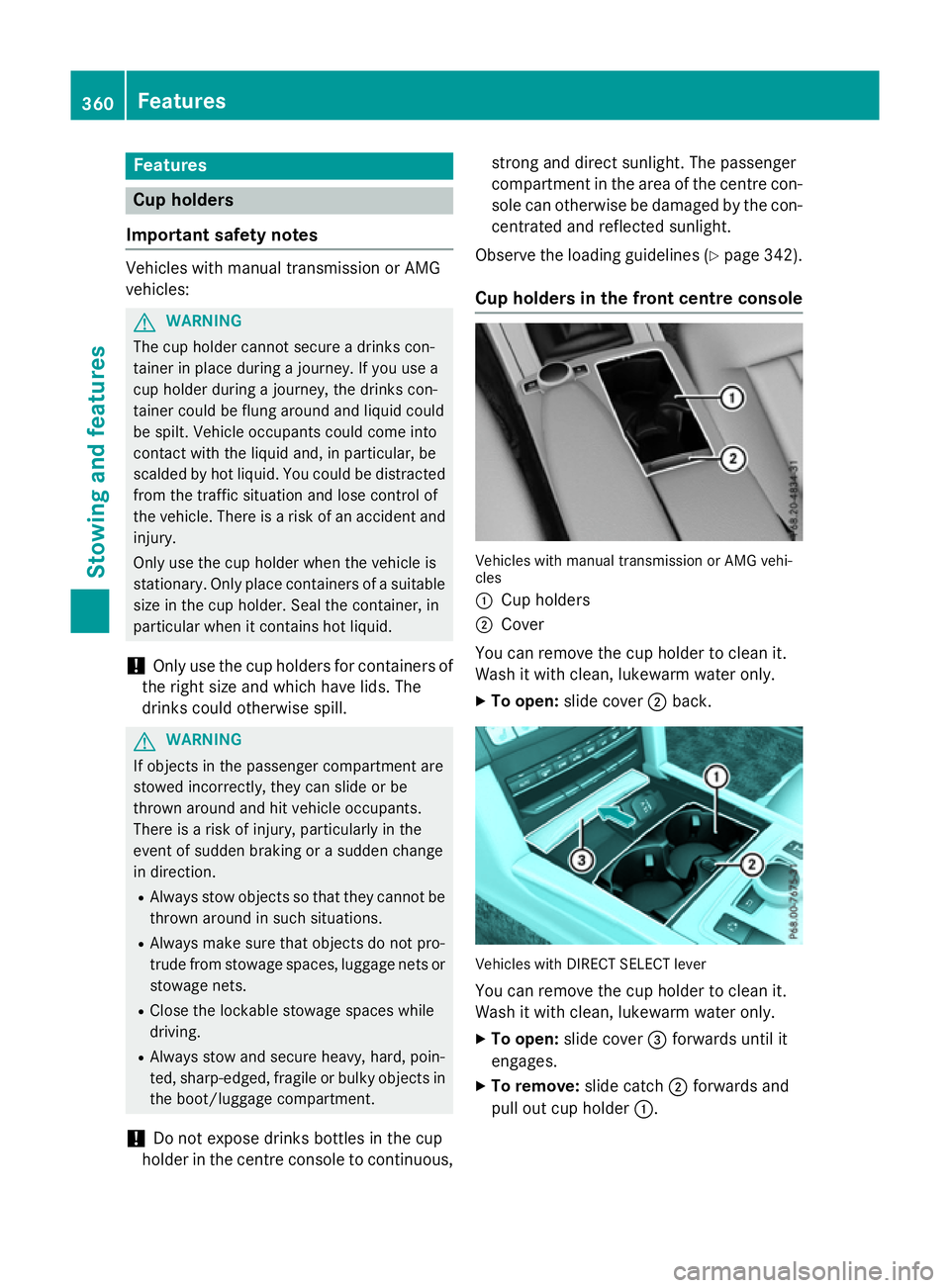
Cup holders in th efront centre console Vehicles wit
hmanual transmission or AM Gvehi-
cles
: Cup holders
; Cover
You can remove th ecup holder to clean it.
Wash it wit hclean, lukewarm wate ronly.
X To open: slide cover ;back. Vehicles wit
hDIRECT SELECT lever
You can remove th ecup holder to clean it.
Wash it wit hclean, lukewarm wate ronly.
X To open: slide cover =forwards until it
engages.
X To remove: slide catch;forwards and
pull out cup holder :.360
FeaturesStowing and featu
res
Page 365 of 497
X
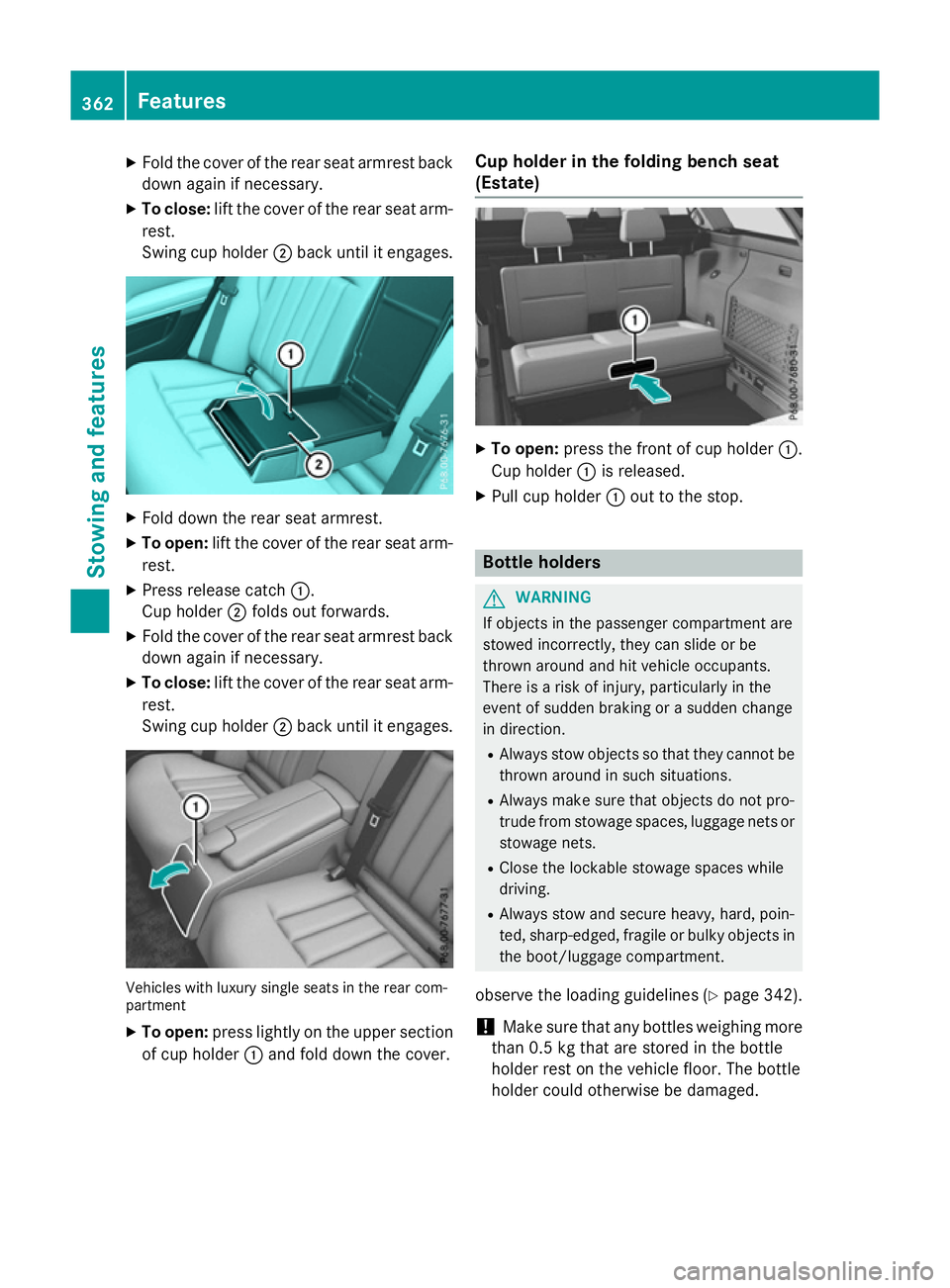
Fold the cover of the rea rsea tarmrest back
dow nagain if necessary.
X To close: lift the cover of the rea rsea ta rm-
rest.
Swing cup holder ;back unti litengages. X
Fold dow nthe rea rseata rmrest.
X To open: lift the cover of the rea rsea ta rm-
rest.
X Pres srelease catch :.
Cu ph older ;folds ou tforwards.
X Fold the cover of the rea rsea tarmrest back
dow nagain if necessary.
X To close: lift the cover of the rea rsea ta rm-
rest.
Swing cup holder ;back unti litengages. Vehicles with luxury single seats in the rea
rcom-
partment
X To open: press lightl yonthe upper section
of cup holder :and fol ddownthe cover. Cup holder in the folding benc
hseat
(Estate) X
To open: press the front of cup holder :.
Cu ph older :is released.
X Pull cup holder :outtot he stop. Bottle holders
G
WARNING
If objects in the passenger compartment are
stowed incorrectly ,they can slide or be
throw naround and hit vehicle occupants.
There is ariskofi njury, particularly in the
event of sudden braking or asudden change
in direction.
R Alway sstow objects so that they cannot be
throw naround in such situations.
R Alway smake sur ethat objects do not pro-
trud efrom stowag espaces, luggage nets or
stowag enets.
R Close the lockabl estowag espaces while
driving.
R Alway sstow and secure heavy, hard, poin-
ted, sharp-edged ,fragil eorb ulky objects in
the boot/luggage compartment.
observe the loading guidelines (Y page 342).
! Make sure that any bottles weighing more
than 0.5 kg that are store dinthe bottle
holder rest on the vehicle floor. The bottle
holder could otherwise be damaged. 362
FeaturesStowinga
nd features
Page 367 of 497
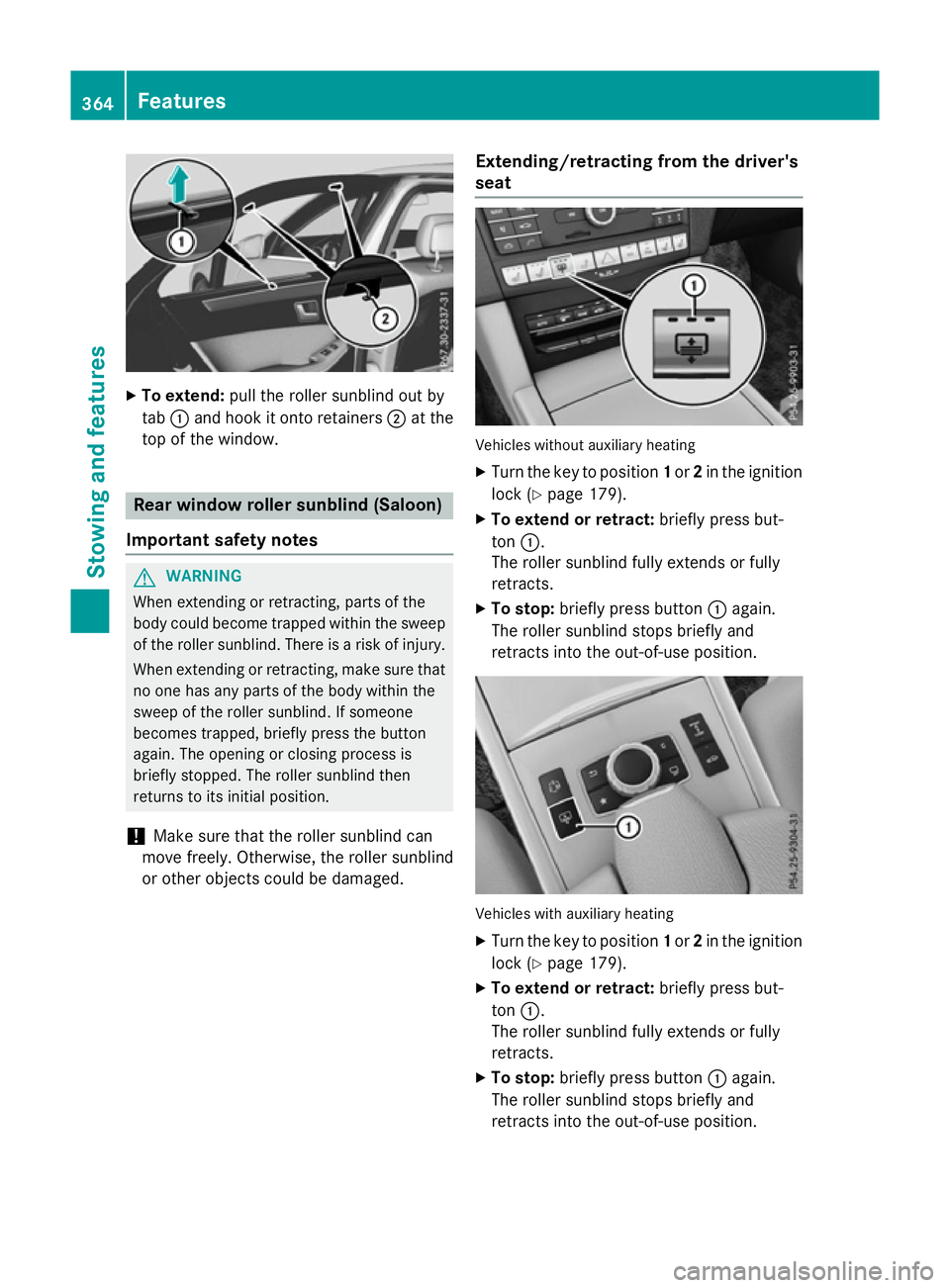
X
To extend: pull the rolle rsunblind ou tby
tab :and hoo kitonto retainers ;at the
top of the window. Rea
rwindo wr olle rsunblin d(Saloon)
Important safety notes G
WARNING
Whe nextending or retracting, parts of the
body could become trapped withi nthe sweep
of the rolle rsun blind .There is ariskofi njury.
Whe nextending or retracting, make sure that
no one ha sany parts of the body withi nthe
swee poft he rolle rsunblind .Ifsomeone
become strapped ,briefl ypress the button
again. The opening or closing proces sis
briefl ystopped. The rolle rsunblind then
returns to its initia lposit ion.
! Make sure tha
tthe rolle rsunblind can
mov efreely. Otherwise, the rolle rsunblind
or othe robjects could be damaged. Extending/retractin
gfrom the driver's
seat Vehicles withou
tauxiliary heating
X Turn the key to position 1or 2in the ignition
lock (Y page 179).
X To exten dorretract: brieflypress but-
ton :.
The rolle rsunblind full yextends or fully
retracts.
X To stop: brieflypress button :again.
The rolle rsunblind stop sbriefl yand
retracts into the out-of-use position. Vehicles with auxiliary heating
X Turn the key to position 1or 2in the ignition
lock (Y page 179).
X To exten dorretract: brieflypress but-
ton :.
The rolle rsunblind full yextends or fully
retracts.
X To stop: brieflypress button :again.
The rolle rsunblind stop sbriefl yand
retracts into the out-of-use position. 364
FeaturesSto
wing an dfeatures
Page 369 of 497
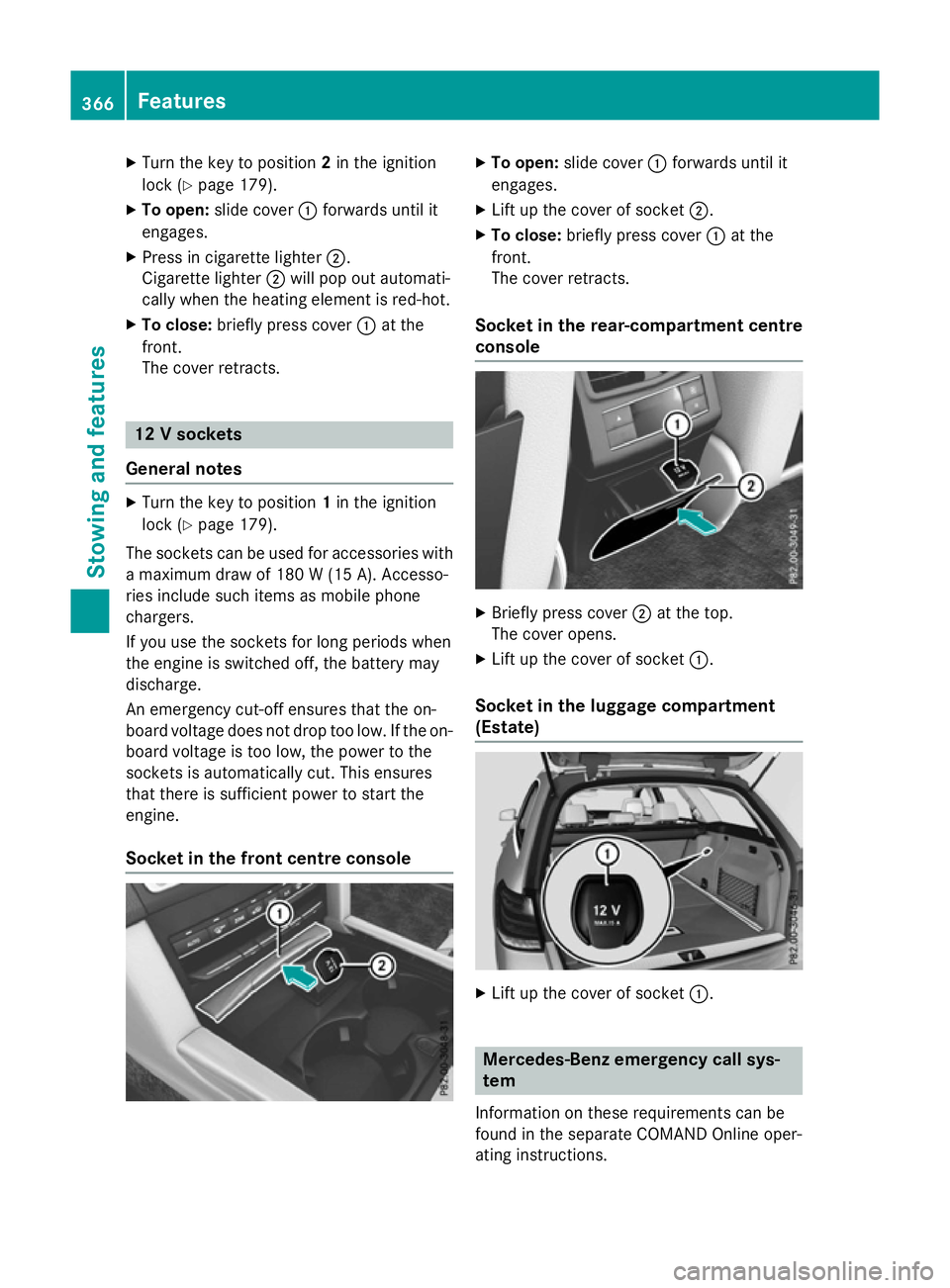
X
Turn the key to position 2in the ignition
lock (Y page 179).
X To open: slide cover :forwards until it
engages.
X Press in cigarett elighter ;.
Cigarette lighter ;will pop out automati-
cally when the heating element is red-hot.
X To close: briefly press cover :at the
front.
The cover retracts. 12
Vsockets
General notes X
Turn the key to position 1in the ignition
lock (Y page 179).
The sockets can be used for accessories with am aximum draw of 180 W(15 A). Accesso-
ries include such items as mobile phone
chargers.
If you use the sockets for long periods when
the engine is switched off, the battery may
discharge.
An emergenc ycut-off ensures that the on-
board voltage does not drop too low. If the on-
board voltage is too low, the power to the
sockets is automatically cut. This ensures
that there is sufficient power to start the
engine.
Socket in the front centre console X
To open: slide cover :forwards until it
engages.
X Lift up the cover of socket ;.
X To close: briefly press cover :at the
front.
The cover retracts.
Socket in the rear-compartment centre
console X
Briefly press cover ;at the top.
The cover opens.
X Lift up the cover of socket :.
Socket in the luggage compartment
(Estate) X
Lift up the cover of socket :. Mercedes-Benz emergency call sys-
tem
Information on these requirement scan be
found in the separate COMAND Online oper-
ating instructions. 366
FeaturesStowing and features
Page 371 of 497
More information on suitable mobile phones,
mobile phone brackets and on connecting
Bluetooth ®
-capable mobile phones to
COMAND Online/Audio 20 can be obtained:
R at your Mercedes-Ben zService Centre
R on the Internet at http://www.mercedes-
benz.com/connect
The functions and services available when
you use the phone depend on your mobile
phone model and service provider.
Using amobile phone To connect
amobile phone to the exterior
aerial and charge it, insert it into the mobile
phone bracket.
X Open the telephone compartment
(Y page 344).
X Place the mobile phone bracket into the
pre-installed fitting; see the separate instal-
lation instructions for the mobile phone fit-
ting.
X Insert the mobile phone into the mobile
phone bracket; see the separate installa-
tion instructions for the mobile phone fit-
ting.
i The mobile phone can also be operated
without being in the bracket. However, the charging function and aerial function are
not available.
In order to use Bluetooth ®
(SAP profile) on
your telephone module, you must first insert
the telephone module into the pre-installed
fitting. This connects it to the exterior aerial.
If you wish to charge the mobile phone, then
you must connect it to aUSB port.
Further information on the telephone module
with Bluetooth ®
(SAP profile) can be found in
the Digital Owner's Manual.
Operating the mobile phone You can operate the telephone using the
6 and~ buttons on the multifunction
steering wheel. You can operate other mobile phone functions via the on-board computer
(Y page 284).
When you remove the key from the ignition
lock, the mobile phone is disconnected from
the hands-free system. Active calls will first
be transferred to the mobile phone directly.
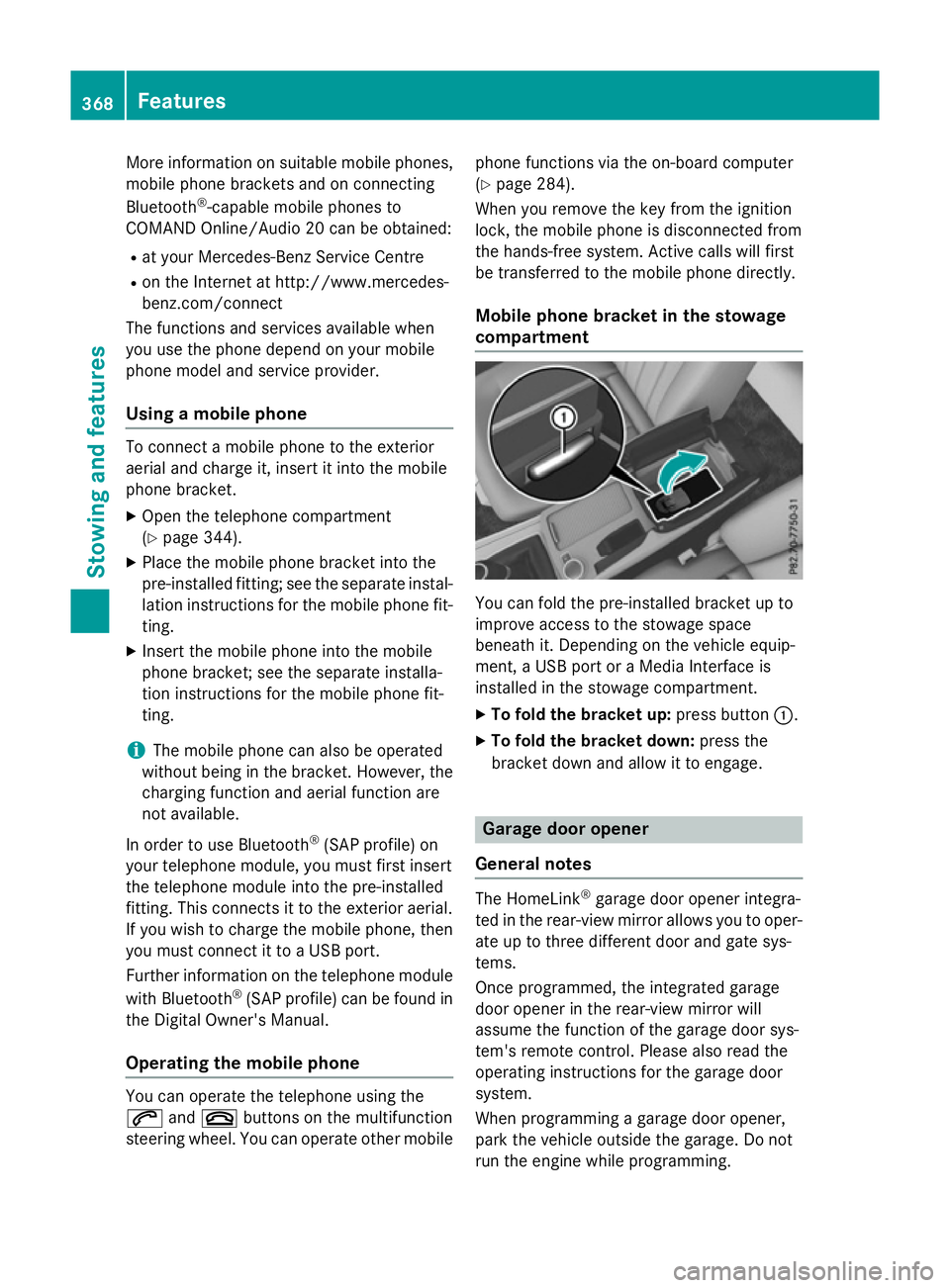
Mobile phone bracket in the stowage
compartment You can fold the pre-installed bracket up to
improve access to the stowage space
beneath it. Depending on the vehicle equip-
ment,aU
SB port or aMedia Interface is
installed in the stowage compartment.
X To fold the bracket up: press button:.
X To fold the bracket down: press the
bracket down and allow it to engage. Garage door opener
General notes The HomeLink
®
garage door opener integra-
ted in the rear-view mirror allowsy ou to oper-
ate up to three different door and gate sys-
tems.
Once programmed, the integrated garage
door opener in the rear-view mirror will
assume the function of the garage door sys-
tem's remote control. Please also read the
operating instructions for the garage door
system.
When programming agarage door opener,
park the vehicle outside the garage. Do not
run the engine while programming. 368
FeaturesStowing and features
Page 372 of 497
The garage door opener is only available for
certain countries. Observe the legal require-
mentsf or each individual country.
The HomeLink ®
garage door opener is com-
patible with most European garage and gate
opener drives. More information on Home-
Link ®
and/or compatible products is availa-
ble:
R at aq ualified specialist workshop
R via the HomeLink ®
Hotline
(0) 080004 66 354 65 or alternatively
+49 (0) 6838 907-277
R on the Internet at http://
www.homelink.com
Important safety notes G
WARNING
When you operate or program the garage door with the integrated garage door opener, per-
sons in the range of movemen tofthe garage
door can become trapped or struck by the
garage door. There is arisk of injury.
When using the integrated garage door
opener, alway smake sure that nobody is
within the range of movemen tofthe garage
door. G
WARNING
Combustion engines emit poisonous exhaust
gases such as carbon monoxide. Inhaling
these exhaust gases leads to poisoning. There is ar isk of fatal injury. Therefore never leave
the engine runnin ginenclosed spaces with-
out sufficient ventilation.
Programming Programming buttons
Pay attention to the "Importan
tsafety notes"
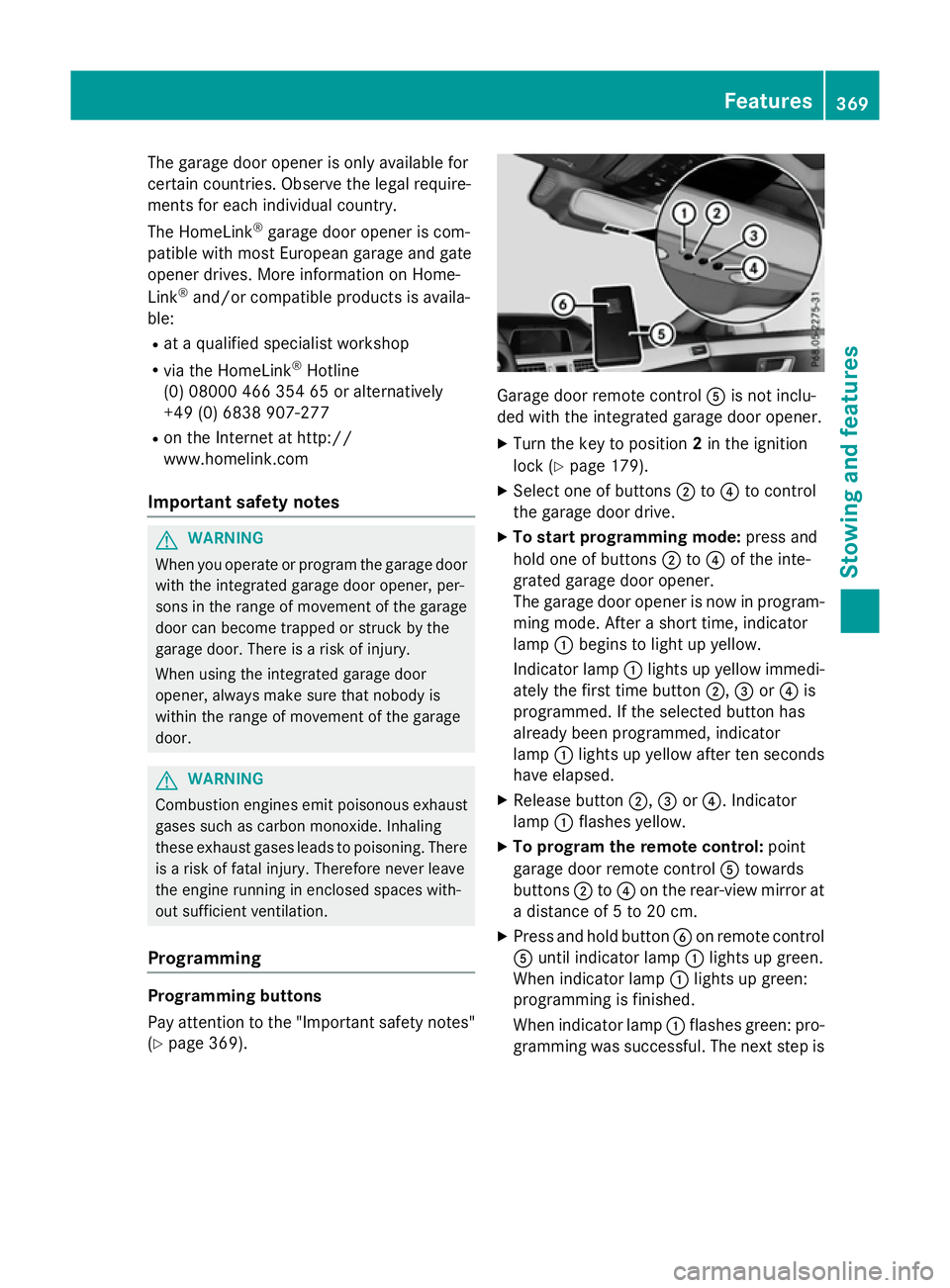
(Y page 369). Garage door remot
econtrol Ais not inclu-
ded with the integrated garage door opener.
X Turn the key to position 2in the ignition
lock (Y page 179).
X Select one of buttons ;to? to control
the garage door drive.
X To startp rogramming mode: press and
hold one of buttons ;to? of the inte-
grated garage door opener.
The garage door opener is now in program- ming mode. After ashort time, indicator
lamp :begins to light up yellow.
Indicator lamp :lights up yellow immedi-
ately the first time button ;,=or? is
programmed. If the selected button has
already been programmed, indicator
lamp :lights up yellow after ten seconds
have elapsed.
X Release button ;,=or?.I ndicator
lamp :flashes yellow.
X To program the remot econtrol: point
garage door remot econtrol Atowards
buttons ;to? on the rear-view mirror at
ad istanc eof5to20c m.
X Press and hold button Bon remot econtrol
A until indicator lamp :lights up green.
When indicator lamp :lights up green:
programming is finished.
When indicator lamp :flashes green: pro-
gramming was successful. The next step is Features
369Stowing and features Z