change time MERCEDES-BENZ E-CLASS SALOON 2015 User Guide
[x] Cancel search | Manufacturer: MERCEDES-BENZ, Model Year: 2015, Model line: E-CLASS SALOON, Model: MERCEDES-BENZ E-CLASS SALOON 2015Pages: 497, PDF Size: 16.23 MB
Page 215 of 497
vehicl
eoccupants and that of other road
users.
Further information on driving safety systems (Y page7 7). Cruise control
General notes Cruise control maintains
aconstant road
spee dfor you.Itb rakes automatically in order
to avoi dexceeding the set speed. You must
select alow gearing ood time on long and
steep downhill gradients, especially if the
vehicl eisladen or towing atrailer. By doing
so, you willm ake use of the braking effect of
the engine. This relieves the loadont he brake
system and prevents the brakes from over-
heating and wearing too quickly.
Use cruise control only if road and traffic con- ditions are appropriate for maintaining a
stead yspee dfor ap rolonged period. You can
store any road spee dabove 30 km/h.
Important safety notes If you fail to adapt yourd
riving style,cruise
control can neither reduce the risk of an acci-
dent nor overrid ethe lawsofp hysics. Cruise
control cannot take into account road,
weather or traffic conditions. Cruise control is only an aid.Y ou are responsibl efor the dis-
tance to the vehicl einfront, for vehicl espeed,
for braking in good time, and for staying in the lane.
Do not use cruise control:
R in road and traffic conditions which do not
allow you to maintai naconstant speed
(e.g. in heavy traffic or on winding roads)
R on smooth or slippery roads. Braking or
accelerating can caus ethe drive wheels to
lose traction and the vehicl ecouldt hen
skid
R when there is poor visibility, e.g. due to fog,
heavy rain or snow If there is
achange of drivers, advise the new
drive rofthe spee dstored.
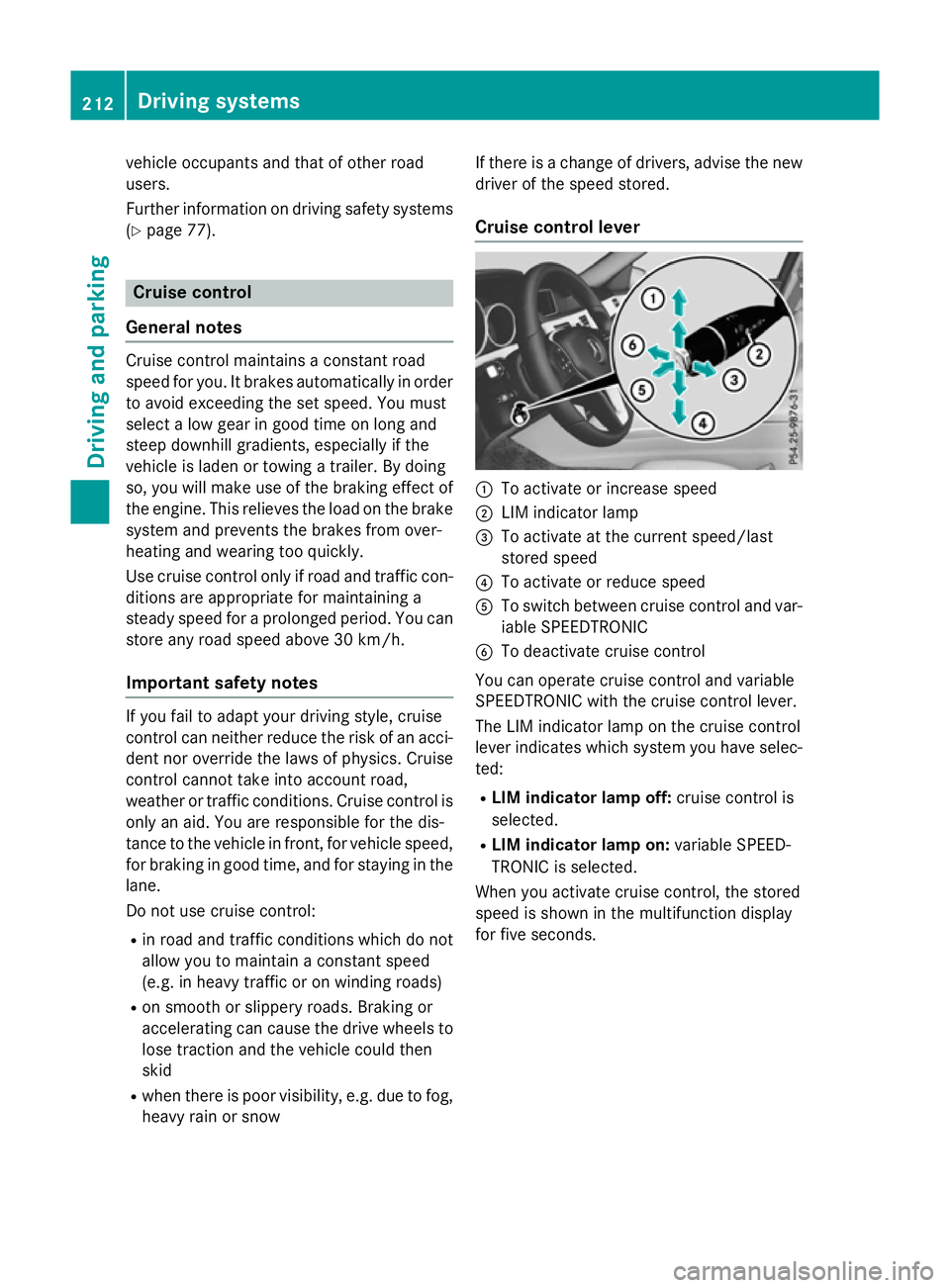
Cruise control lever :
To activate or increase speed
; LIM indicator lamp
= To activate at the current speed/last
stored speed
? To activate or reduce speed
A To switch between cruise control and var-
iable SPEEDTRONIC
B To deactivate cruise control
You can operate cruise control and variable
SPEEDTRONIC with the cruise control lever.
The LIM indicator lamp on the cruise control
leve rindicates which system you have selec-
ted:
R LIMi ndicator lamp off: cruise control is
selected.
R LIMi ndicator lamp on: variable SPEED-
TRONIC is selected.
When you activate cruise control, the stored
spee diss hownint he multifunction display
for five seconds. 212
Driving systemsDriving and parking
Page 216 of 497
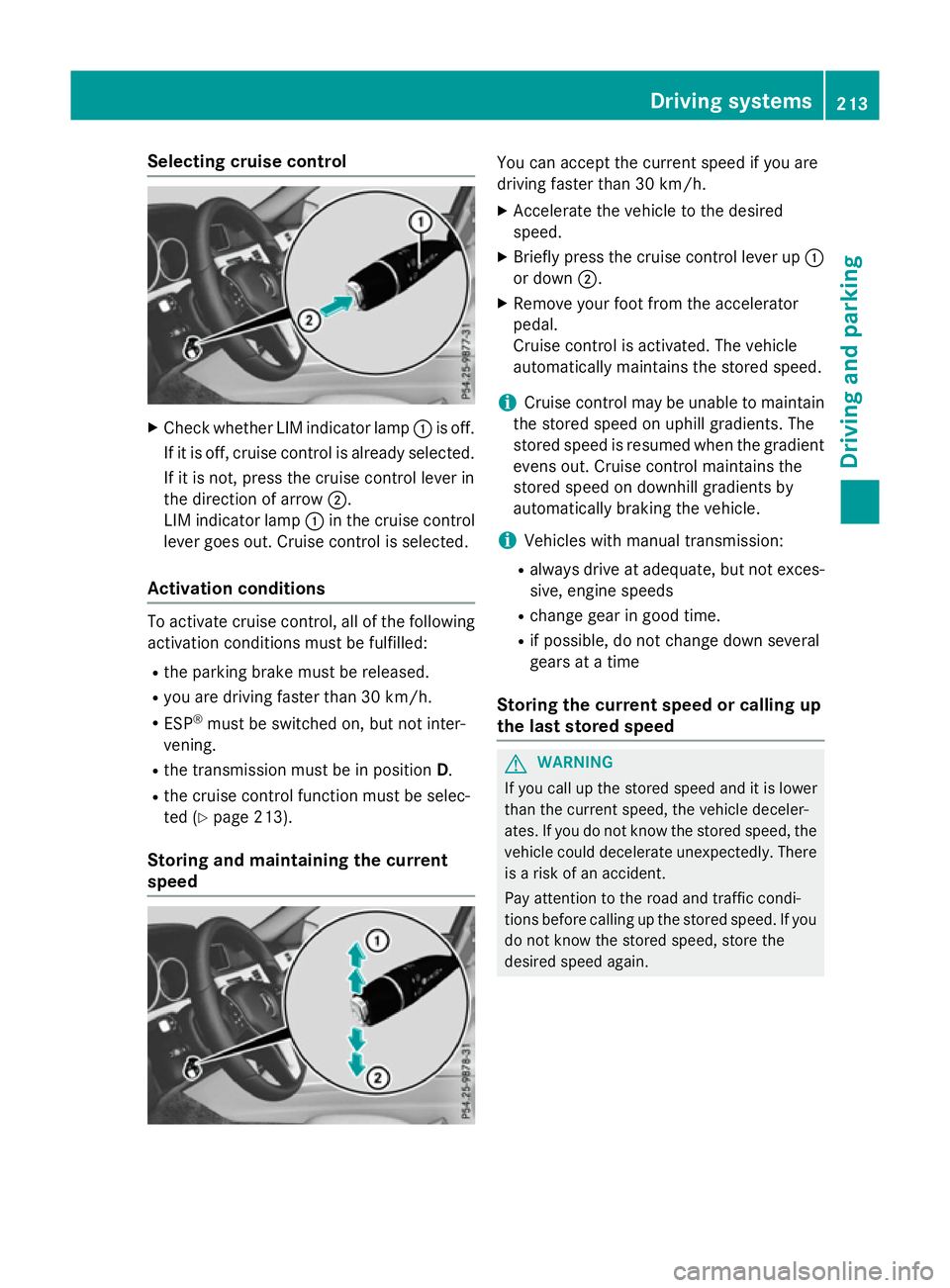
Selecting cruise control
X
Check whether LIM indicator lamp :is off.
If it is off, cruise control is already selected. If it is not, press the cruise control lever in
the direction of arrow ;.
LIM indicator lamp :in the cruise control
lever goes out. Cruise control is selected.
Activation conditions To activate cruise control, all of the following
activation condition smust be fulfilled:
R the parking brake must be released.
R you are driving faster than 30 km/h.
R ESP ®
must be switched on, but not inter-
vening.
R the transmission must be in position D.
R the cruise control function must be selec-
ted (Y page 213).
Storing and maintaining the current
speed You can accept the current speed if you are
driving faster than 30 km/h.
X Accelerate the vehicl etothe desired
speed.
X Briefl ypress the cruis econtro llev er up :
or down ;.
X Remov eyourfoo tfromt he accelerator
pedal.
Cruise contro lisactivated .The vehicle
automaticall ymaintains the stored speed.
i Cruise contro
lmaybe unabl etomaintain
the stored spee donuphillgradients. The
stored spee disresumed when the gradient
evens out. Cruise contro lmaintains the
stored spee dondownhil lgradients by
automaticall ybraking the vehicle.
i Vehicles with manua ltransmission:
R always drive at adequate, bu tnot exces-
sive, engine speeds
R change gear in goo dtime.
R if possible, do not change down several
gear satat ime
Storin gthe curren tspeed or callin gup
the las tstored speed G
WARNING
If yo ucallupt he stored speed and it is lower
tha nthe current speed ,the vehicl edeceler-
ates. If yo udonot know the stored speed ,the
vehicl ecould decelerate unexpectedly .There
is ar iskofana ccident.
Pa ya ttentio ntothe roa dand traffi ccondi-
tions befor ecalling up the stored speed .Ifyou
do not know the stored speed ,stor ethe
desired speed again. Dr
ivin gsystems
213Driving an dparking Z
Page 218 of 497
R
on vehicles with manual transmission, you
shift to agear that is too high, and as a
result the engine speed is too low
R on vehicles with automatic transmission,
you shift to position Nwhile driving
If cruise control is deactivated, you will hear a warning tone. You will see the Cruise con‐
Cruise con‐
trol off
trol off message in the multifunction dis-
play for approximately five seconds.
i The last speed stored is cleared when you
switch off the engine. SPEEDTRONIC
Important safety notes SPEEDTRONIC brakes automatically so that
you do not exceed the set speed. Change into
al ower gear in good time on long and steep
downhill gradients. Take particular noteof
this when driving aladen vehicle. By doing so,
you will make use of the braking effect of the engine. This relieves the load on the brake
system and prevent sthe brakes from over-
heating and wearing too quickly. If you need
additional braking, depress the brake pedal
repeatedly rather than continuously.
If you fail to adapt your driving style, SPEED-
TRONIC can neither reduce the risk of an
accident nor override the laws of physics.
SPEEDTRONIC cannot take into account
road, weather or traffic conditions. SPEED-
TRONIC is only an aid. You are responsible for
the distance to the vehicle in front,f or vehicle
speed, for braking in good time, and for stay- ing in lane.
If there is achange of drivers, advise the new
driver of the speed stored.
You can set avariable or permanent limit
speed:
R variable for speed limits, e.g. in built-up
areas
R permanent for long-term speed restric-
tions, e.g. when driving with winter tyres
fitted i
The speed indicated in the speedometer
may differ slightly from the limit speed
stored.
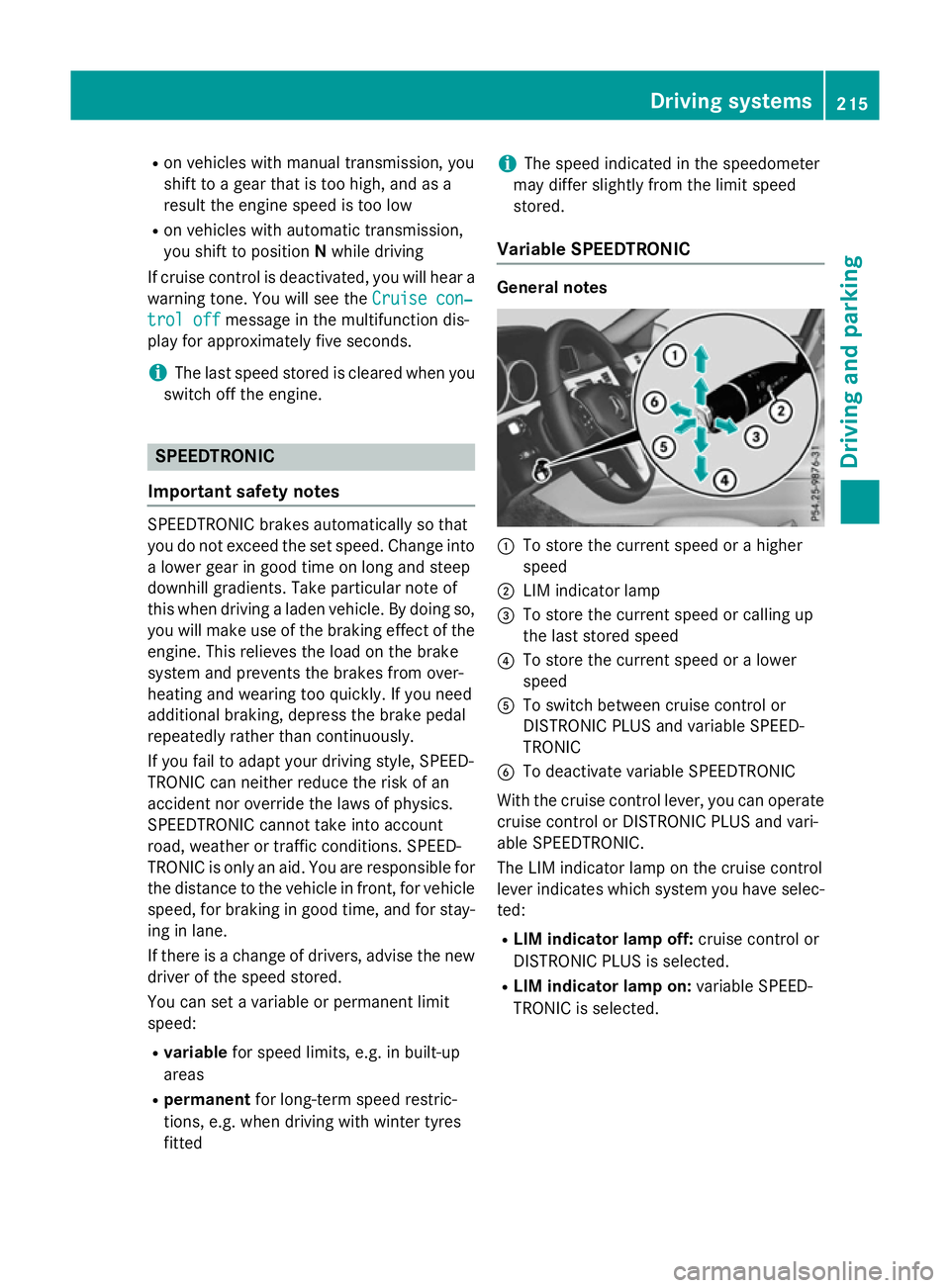
Variable SPEEDTRONIC General notes
:
To store the current speed or ahigher
speed
; LIM indicator lamp
= To store the current speed or calling up
the last stored speed
? To store the current speed or alower
speed
A To switch between cruise control or
DISTRONIC PLUS and variable SPEED-
TRONIC
B To deactivate variable SPEEDTRONIC
With the cruise control lever, you can operate
cruise control or DISTRONIC PLUS and vari-
able SPEEDTRONIC.
The LIM indicator lamp on the cruise control
lever indicates which system you have selec- ted:
R LIM indicator lamp off: cruise control or
DISTRONIC PLUS is selected.
R LIM indicator lamp on: variable SPEED-
TRONIC is selected. Driving systems
215Driving and parking Z
Page 220 of 497
speed is set. Press the cruise control lever
up : for ahigher speed or down ;for a
lower speed.
X To adjust the set speed in 1km/h incre-
ments: briefly press the cruise control
lever up :to the pressure point for a
higher speed or down ;for alower speed.
or
X Keep the cruise control lever pressed to the
pressure point until the desired speed is
set. Press the cruise control lever up :for
ah igher speed or down ;for alower
speed.
Switching SPEEDTRONIC to passive
If you depress the accelerator pedal beyond
the pressure point (kickdown), SPEED-
TRONIC is switched to passive mode. The fol-
lowing message appears in the multifunction
display: SPEEDTRONIC passive SPEEDTRONIC passive.
You can then exceed the stored speed.
SPEEDTRONIC is activated againify ou:
R drive slower than the stored speed without
kickdown
R set anew speed or
R call up the last speed stored again
The SPEEDTRONIC passive
SPEEDTRONIC passive message in the
multifunction displayd isappears.
Deactivating variable SPEEDTRONIC
It is not possible to deactivate variable
SPEEDTRONIC by braking. There are several waystod
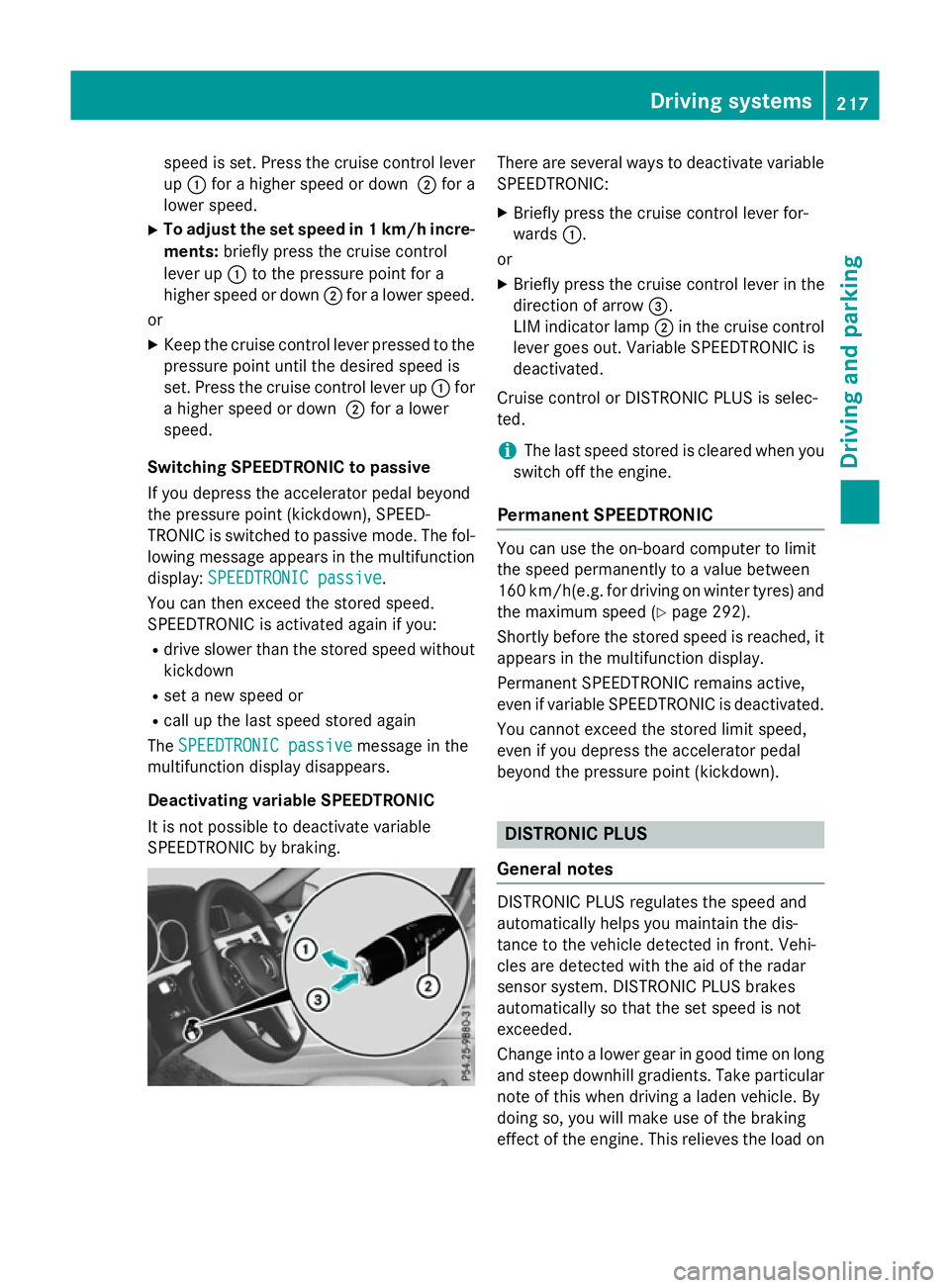
eactivate variable
SPEEDTRONIC:
X Briefly press the cruise control lever for-
wards :.
or X Briefly press the cruise control lever in the
direction of arrow =.
LIM indicator lamp ;in the cruise control
lever goes out. Variable SPEEDTRONIC is
deactivated.
Cruise control or DISTRONIC PLUS is selec-
ted.
i The last speed stored is cleared when you
switch off the engine.
Permanent SPEEDTRONIC You can use the on-board computer to limit
the speed permanently to
avalue between
160 km/h(e.g. for driving on winter tyres) and the maximum speed (Y page 292).
Shortly before the stored speed is reached, it appears in the multifunction display.
Permanent SPEEDTRONIC remains active,
even if variableS PEEDTRONIC is deactivated.
You cannot exceed the stored limit speed,
even if you depress the accelerator pedal
beyond the pressure point (kickdown). DISTRONIC PLUS
General notes DISTRONIC PLUS regulates the speed and
automaticallyh
elps you maintain the dis-
tance to the vehicle detected in front.V ehi-
cles are detected with the aid of the radar
sensor system. DISTRONIC PLUS brakes
automaticallysot hat the set speed is not
exceeded.
Change into alower gear in good time on long
and steep downhill gradients. Take particular note of this when driving aladen vehicle. By
doing so, you will make use of the braking
effect of the engine. This relieves the load on Driving systems
217Driving and parking Z
Page 224 of 497
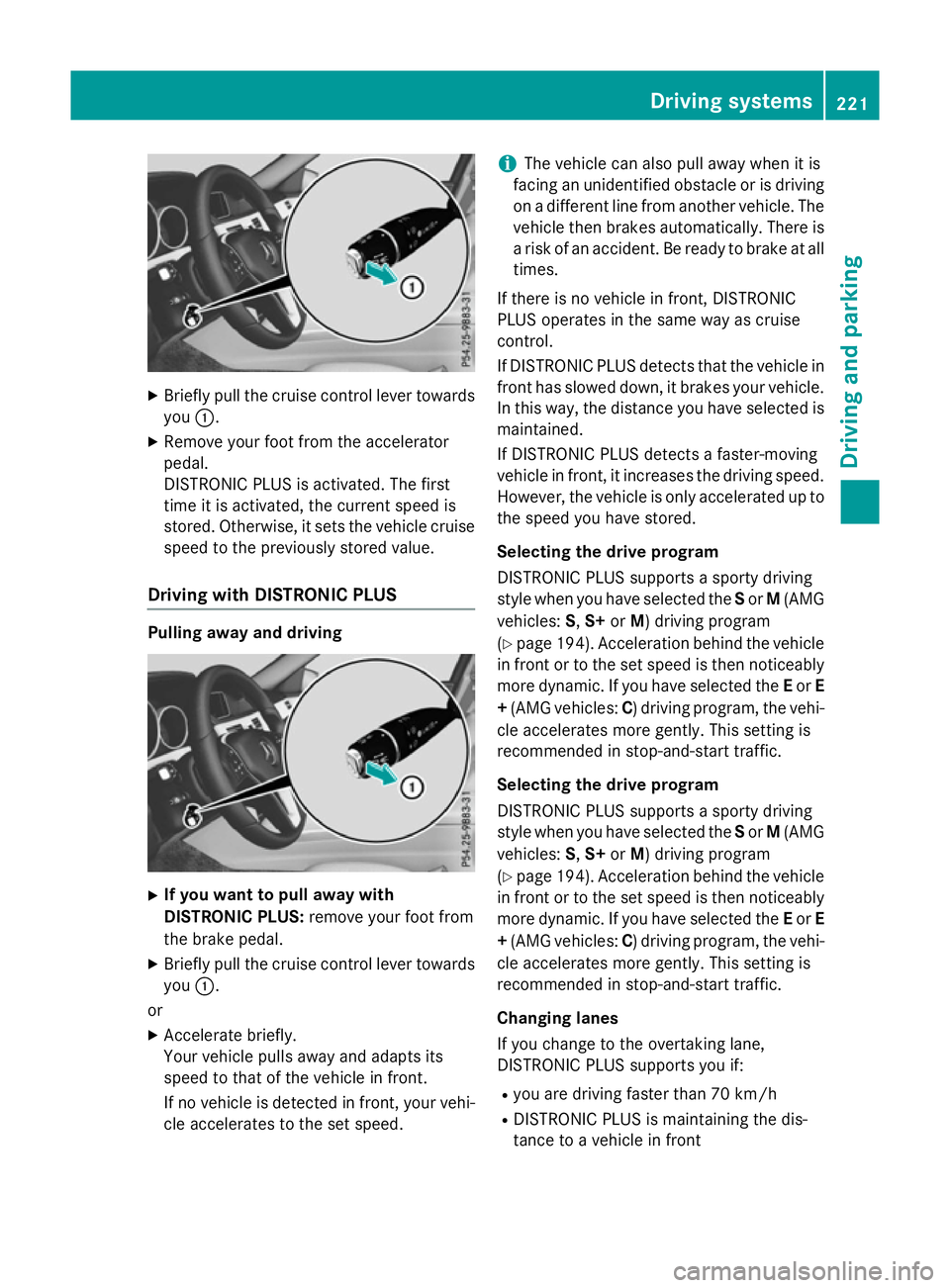
X
Briefly pull the cruise control lever towards
you :.
X Remove your foot from the accelerator
pedal.
DISTRONIC PLUS is activated. The first
time it is activated, the current speed is
stored. Otherwise, it sets the vehicle cruise speed to the previously store dvalue.
Drivin gwithD ISTRONI CPLUS Pulling away and driving
X
If you wan ttopull away with
DISTRONI CPLUS: remove your foot from
the brake pedal.
X Briefly pull the cruise control lever towards
you :.
or
X Accelerate briefly.
You rvehicle pull sawaya nd adapts its
speed to that of the vehicle in front.
If no vehicle is detected in front, your vehi-
cle accelerate stothe set speed. i
The vehicle can also pull away whe
nitis
facing an unidentifie dobstacl eorisd riving
on adifferent line from another vehicle .The
vehicle then brakes automatically. There is
ar iskofana ccident. Be ready to brake at all
times.
If there is no vehicle in front, DISTRONIC
PLUS operate sinthe same wa yascruise
control.
If DISTRONIC PLUS detects that the vehicle in front ha sslowe ddown, it brakes your vehicle.
In this way, the distance yo uhaves elected is
maintained.
If DISTRONIC PLUS detects afaster-moving
vehicle in front, it increases the driving speed.
However, the vehicle is only accelerate dupto
the speed yo uhaves tored.
Selecting the drive program
DISTRONIC PLUS supports asporty driving
styl ewheny ou have selected the Sor M(AMG
vehicles: S,S+ orM)d riving program
(Y page 194). Acceleration behind the vehicle
in front or to the set speed is then noticeably
more dynamic. If yo uhaves elected the Eor E
+ (AMG vehicles: C)driving program, the vehi-
cle accelerate smore gently. Thi ssetting is
recommende dinstop-and-start traffic.
Selecting the drive program
DISTRONIC PLUS supports asporty driving
styl ewheny ou have selected the Sor M(AMG
vehicles: S,S+ orM)d riving program
(Y page 194). Acceleration behind the vehicle
in front or to the set speed is then noticeably
more dynamic. If yo uhaves elected the Eor E
+ (AMG vehicles: C)driving program, the vehi-
cle accelerate smore gently. Thi ssetting is
recommende dinstop-and-start traffic.
Changing lanes
If yo uchange to the overtaking lane,
DISTRONIC PLUS supports yo uif:
R yo ua re driving faster than 70 km/h
R DISTRONIC PLUS is maintaining the dis-
tance to avehicle in front Drivin
gsystems
221Drivingand parking Z
Page 230 of 497
In
as peed range from 0-60km/h,Stop&Go
Pilotf ocuses on the vehicle in front, taking
into account lane markings, e.g. when follow- ing vehicle sinatraffic jam.
At speedsofm ore than 60 km/h ,Steering
Assist focuses on detected lane markings
(left and right), only focusing on the vehicle in
front if detected lane markings are not pres-
ent.
If these conditions are not present, Steering
Assist and Stop&Go Pilotc annot provide
assistance.
DISTRONIC PLUS must be active in order for
the function to be available.
Important safety notes
If you fail to adapt yourd riving style,
DISTRONIC PLUS with Steering Assist and
Stop&Go Pilotc an neither reduce the risk of
an accident nor override the lawsofp hysics.
It cannot take into account road, weather or
traffic conditions. DISTRONIC PLUS with
Steering Assist and Stop&Go Pilotiso nly an
aid.Y ou are responsible for the distance to
the vehicle in front, for vehicle speed,f or
braking in good time, and for staying in lane.
DISTRONIC PLUS with Steering Assist and
Stop&Go Pilotd oes not detect road and traf-
fic conditions and does not detect all road
users. If you are following avehicle which is
driving towards the edge of the carriageway,
yourv ehicle could come into contact with the
kerb or other road boundaries. Be particularly
aware of other road users, e.g. cyclists, that
are directly next to yourv ehicle.
Obstacles such as traffic pylons on the lane or
projecting out into the lane are not detected.
An inappropriate steering intervention, e.g.
after intentionally driving over alane marking,
can be corrected at any time if you steer
slightly in the opposite direction.
DISTRONIC PLUS with Steering Assist and
Stop&Go Pilotc annot continuousl ykeep your
vehicle in lane. In some cases, the steering
intervention is not sufficient to bring the vehi-
cle back to the lane. In such cases, you must steer the vehicle yourself to ensure that it
does not leave the lane.
The support offered by the system may be
impaired if:
R
there is poor visibility, e.g. due to insuffi-
cient illumination of the road, or due to
snow, rain, fog or spray
R there is glare, e.g. from oncoming traffic,
the sun or reflection from other vehicles
(e.g. if the road surface is wet)
R the windscree nisdirty, misted up, dam-
aged or covered, for instance by asticker,
in the vicinity of the camera
R no, or several ,unclea rlane markings are
present for one lane, e.g. in aconstruction
area
R the lane markings are worn away, dark or
covered up, e.g. by dirt or snow
R the distance to the vehicle in front is too
small and the lane markings thus cannot be
detected
R the lane markings change quickly, e.g.
lanes branch off, cross one another or
merge
R the road is narrow and winding
R there are highlyv ariable shade conditions
on the road
The system is switched to passive and no lon-
ger assists you by performing steering inter-
ventions if:
R you actively change lanes
R you switch on the turn signal
R you take yourh ands off the steering wheel
or do not steer for aprolonge dperio dof
time
i After you have finished changing lanes,
Steering Assist and Stop&Go Pilota re auto-
matically active again. Driving systems
227Driving and parking Z
Page 238 of 497
25 mm
.The leve lchange also occurs when
stationary.
If you drive faster than 170 km/h, the rear
axle leve lisset to amiddle level. Thi sincrea-
ses road safety and reduces airr esistance. If
you then drive slower than 150 km/h, the
leve loft he rear axle is again adjusted to cor-
respond to the selected suspension mode.
Load compensation
The vehicle can compensate differences in
the vehicle leve lbyraising or lowering the
rear axle .Thisist he case ,for example, when
people get out of the vehicle or whe nlug gage
is removed.
Al oadc ompensation occurs if:
R ad oor, the boot lid or the tailgate is opened
R the parked vehicle is unlocked
The engine needs to be running for larger level
changes. 4MATIC (permanent all-whee
ldrive)
If you fai ltoadapt you rdriving style, 4MATIC
can neither reduce the risk of an accident nor override the laws of physics. 4MATIC cannot
take account of road ,weather and traffic con-
ditions. 4MATIC is only an aid. You are
responsibl efor the distance to the vehicle in
front, for vehicle speed, for braking in good
time, and for staying in lane.
If ad rive wheel spins due to insufficient grip:
R whe npulling away,o nly depress the accel-
erato rpedal as far as is necessary.
R accelerate les swhend riving.
! Never tow the vehicle with one axle
raised. Thi smay damage the transfer case.
Damag eofthis sort is not covered by the
Mercedes-Benz implied warranty. All
wheels must remain eithe ronthe ground or
be fully raised. Observe the instructions for towing the vehicle with allw heels in full
contact with the ground.
i In wintry driving conditions, the maximum
effect of 4MATIC can only be achieved if you use winter tyres
(M+S tyres), with snow
chains if necessary.
4MATIC ensures that allf our wheels are per-
manently driven. Together with ESP ®
,it
improves the traction of you rvehicle when-
ever adrive wheel spins due to insufficient
grip. PARKTRONIC
Important safety notes PARKTRONI
Cisanelectronic parking aidw ith
ultrasoni csensors .Itmonitors the area
around you rvehicle using six sensors in the
front bumper and six sensors in the rear
bumper. PARKTRONI Cindicates visually and
audibly the distance between you rvehicle
and an object.
PARKTRONI Cisonly an aid. It is not asubsti-
tute for you rattention to the immediate sur-
roundings. The responsibility for safe
manoeuvring and parking remains with you.
Make sure that there are no persons, animals
or objects in range while manoeuvring and
parking.
! When parking, pay particular attention to
objects above or below the sensors ,such
as flower pots or trailer drawbars.
PARKTRONI Cdoes not detect such objects
whe nthey are in the immediate vicinity of
the vehicle. You coul ddamage the vehicle
or the objects.
The sensors may not detect snow and
objects which absorb ultrasoni csources.
Ultrasonic sources, such as an automatic
car wash, alorry's compressed-air brakes
or ap neumatic drill, coul dcause
PARKTRONI Ctomalfunction.
PARKTRONI Cmay not function correctly on
uneve nterrain. Driving systems
235Driving and parking Z
Page 258 of 497
Warning in the multifunction display
If fatigu
eorincreasing lapses in concentra-
tion are detected, awarning appears in the
multifunction display: Attention Assist:
Attention Assist:
Take abreak!
Take abreak!
In addition to the message show ninthe mul-
tifunction display, you wil lthen hea rawarn-
ing tone.
X If necessary, take abreak.
X Confirm the message by pressing the a
button on the steering wheel.
On long journeys, take regularb reaks in good
time that allow for adequate recuperation. If
you do not take abreak, you wil lbewarned
again after 15 minutes at the earliest. This will only happen if ATTENTION ASSIST still
detects typical indicators of fatigu eor
increasing lapses in concentration. Traffic SignA
ssist
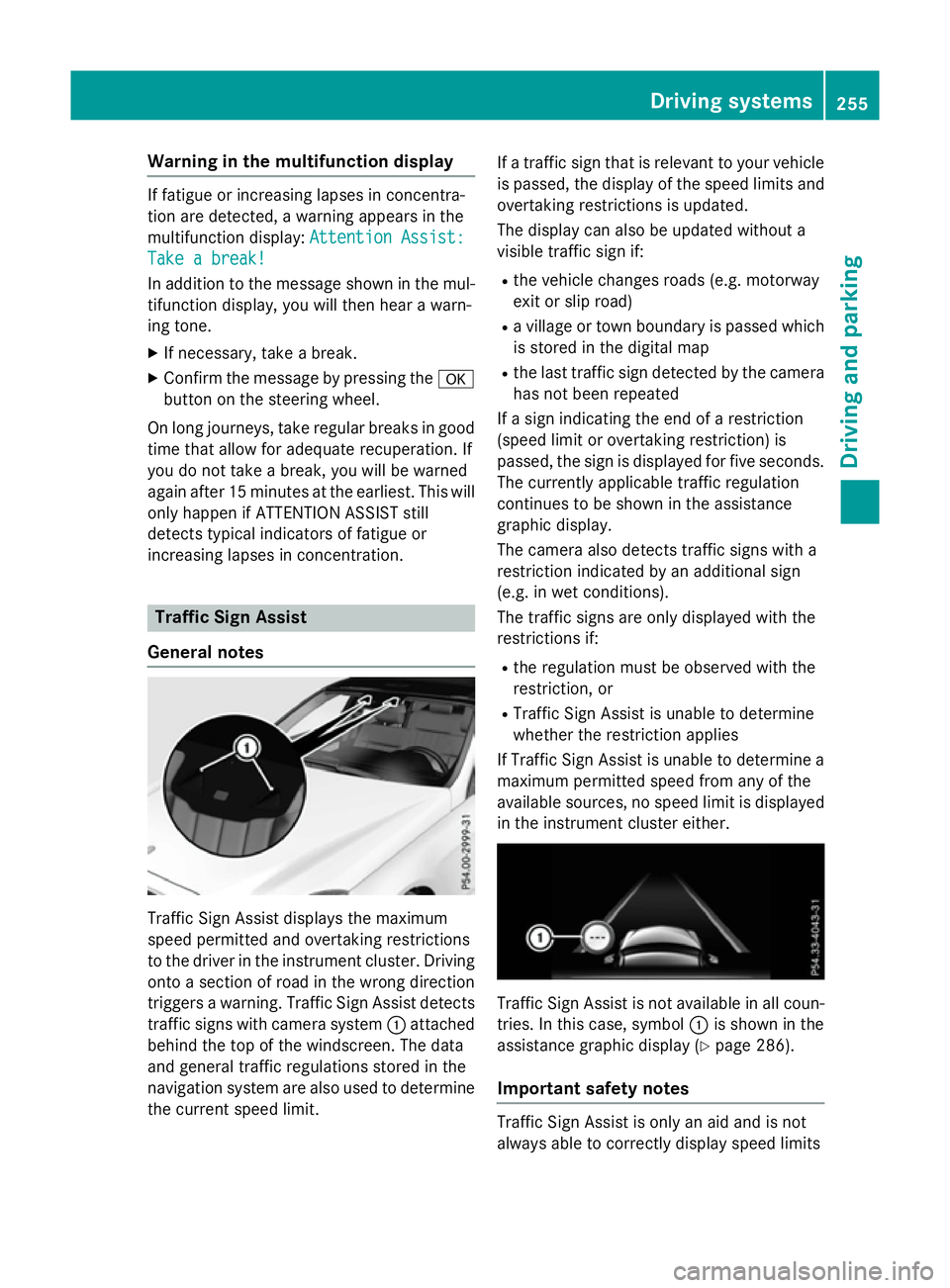
General notes Traffi
cSign Assist displays the maximum
spee dpermitted and overtaking restrictions
to the drive rinthe instrument cluster. Driving
onto asection of road in the wrong direction
trigger sawarning. Traffi cSign Assist detects
traffic signs with camera system :attached
behind the top of the windscreen. The data
and genera ltraffic regulations stored in the
navigation syste mare also use dtodetermine
the current spee dlimit. If
at raffic sign that is relevant to you rvehicle
is passed, the displayoft he speedlimits and
overtaking restrictions is updated.
The displayc an also be updated without a
visible traffic sign if:
R the vehicl echanges road s(e.g. motorway
exit or sli proad)
R av illage or town boundary is passed which
is stored in the digital map
R the last traffic sign detected by the camera
has not been repeated
If as ign indicating the end of arestriction
(speed limi torovertaking restriction) is
passed, the sign is displayed for five seconds.
The currently applicable traffic regulation
continues to be show ninthe assistance
graphic display.
The camera also detects traffic signs with a
restriction indicated by an additiona lsign
(e.g. in wet conditions).
The traffic signs are only displayed with the
restrictions if:
R the regulation must be observed with the
restriction, or
R Traffi cSign Assist is unable to determine
whether the restriction applies
If Traffi cSign Assist is unable to determine a
maximu mpermitted spee dfrom any of the
available sources, no spee dlimi tisd isplayed
in the instrument cluster either. Traffi
cSign Assist is not available in allc oun-
tries. In this case, symbol :is show ninthe
assistance graphic display( Ypag e286).
Important safety notes Traffi
cSign Assist is only an aida nd is not
always abl etocorrectly displays peedlimits Driving systems
255Driving and parking Z
Page 263 of 497
G
WARNING
The Lane Keeping Assist warning does not
return the vehicl etothe original lane. There is
ar isk of an accident.
Always steer, apply the brakes or accelerate
the vehicl eyourself, especially if Lane Keep-
ing Assist alerts you.
If you fail to adapt yourd riving style,Lane
Keeping Assist can neither reduce the risk of
an accident nor overrid ethe lawsofp hysics.
Lane Keeping Assist cannot take into account
road ,weather or traffic conditions. Lane
Keeping Assist is only an aid.Y ou are respon-
sibl efor the distance to the vehicl einfront,
for vehicl espeed, for braking in good time,
and for staying in lane.
Lane Keeping Assist does not keep yourv ehi-
cle in its lane.
The system may be impaired or may not func-
tion if:
R there is poor visibility, e.g. due to insuffi-
cient illumination of the road ,ordue to
snow, rain, fog or spray
R there is glare, e.g. from oncoming traffic,
the sun or reflection from other vehicles
(e.g. if the road surface is wet)
R the windscreen is dirty ,misted up, dam-
agedorc overed,for instance by asticker,
in the vicinity of the camera
R no or several, unclea rlane markings are
present for one lane ,e.g. in aconstruction
area
R the lane markings are worn away,d ark or
covered up, e.g. by dirt or snow
R the distance to the vehicl einfront is too
smal land the lane markings thus cannot be
detected
R the lane markings change quickly, e.g.
lane sbranch off, cross one another or
merge
R the road is narrow and winding
R there are highly variable shad econditions
on the road Activating Lane Keeping Assist
X Activate Lane Keeping Assist using the on-
board computer; to do so, select Standard
Standard
or Adaptive Adaptive (Ypage2 88).
If you drive at speeds above 60 km/h and
lane markings are detected, the lines in the
assistance graphic display (Y page286)
are show ningreen. Lane Keeping Assist is
read yfor use.
Standard
If Standard Standard is selected, no warning vibration
occurs if:
R you have switched on the turn signals. In
this case, the warnings are suppresse dfor
ac ertain period of time.
R ad riving safety system intervenes, such as
ABS, BAS or ESP ®
.
Adaptive
When Adaptive Adaptive is selected, no warning vibra-
tion occurs if:
R you have switched on the turn signals. In
this case, the warnings are suppresse dfor
ac ertain period of time.
R ad riving safety system intervenes, such as
ABS, BAS or ESP ®
.
R you accelerate hard ,e.g. kickdown.
R you brake hard.
R you steer actively, e.g. swerve to avoi dan
obstacl eorchange lane quickly.
R you cut the corner on asharp bend.
In order that you are warned only when nec-
essary and in good time if you cross the lane marking, the system detects certain condi-
tions and warns you accordingly.
The warning vibration occurs earlier if:
R you approach the outer lane marking on a
bend
R the road has very widel anes, e.g.amotor-
way
R the system detects soli dlane markings 260
Driving systemsDriving and parking
Page 265 of 497
Activ
eBlind Spo tAssist monitors the area up
to 3.0 mbehind your vehicle and directly next
to your vehicle, as shown in the diagram.
The detection of vehicles may be impaired in the case of:
R dirt on the sensor sorobscured sensors
R poor visibility, e.g. due to rain, snow or
spray
Vehicles in the monitoring range will then be
indicated late or not at all.
Active Blind Spot Assist may not detec tnar-
row vehicles, such as motorcycles or bicy-
cles, or may only detec tthem too late.
If the lanes are narrow, vehicles driving in the
lane beyond the lane nexttoy our vehicle may
be indicated, especially if the vehicles are not
driving in the middle of their lane. This may be the case if ther eare vehicles at the edge of
their lane.
Due to the nature of the system:
R warnings may be issued in error when driv-
ing close to crash barriers or similar solid
lane borders
R warnings may be interrupted when driving
alongside long vehicles, for example lor-
ries, for aprolonged time
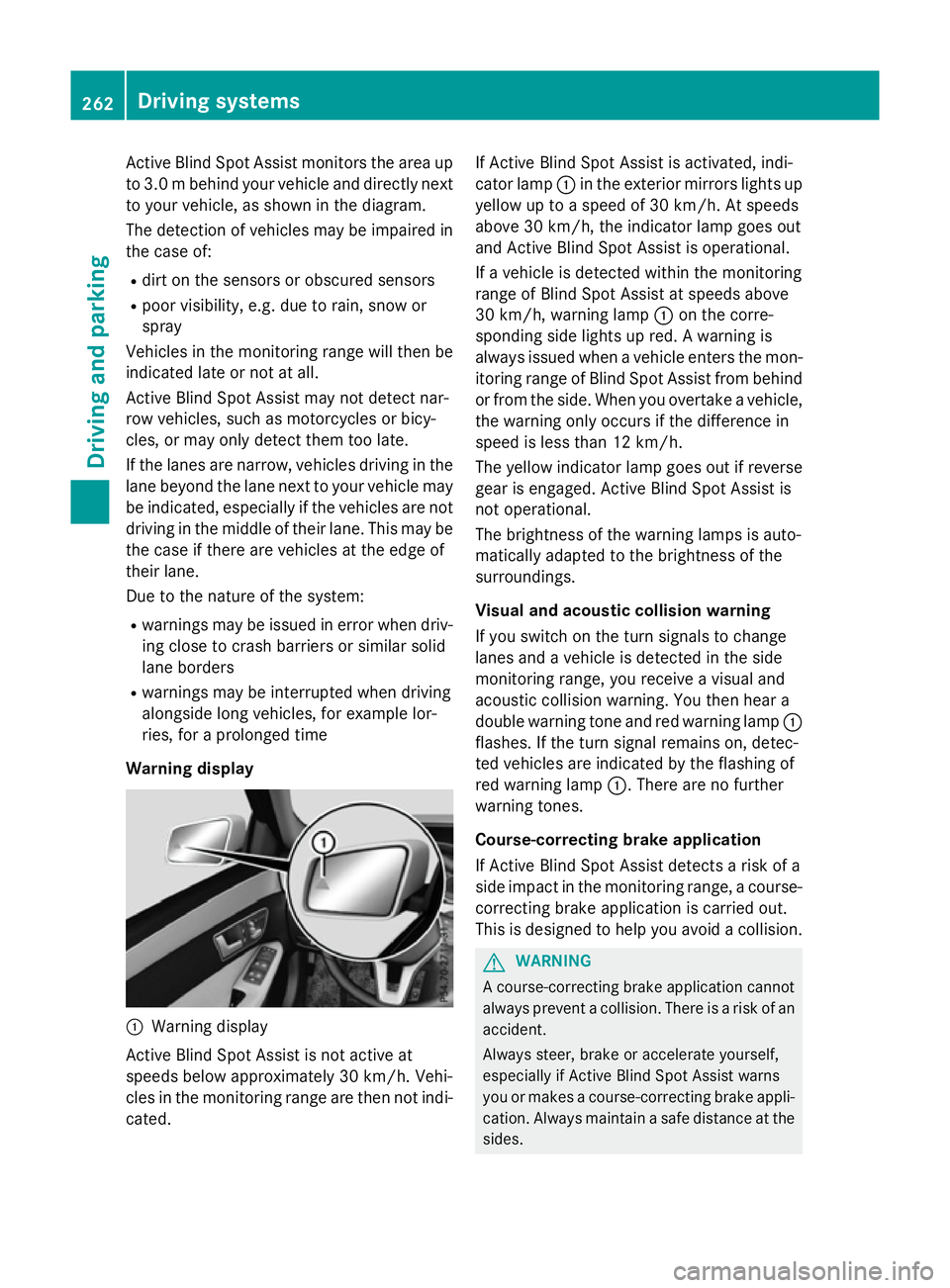
Warning display :
Warnin gdisplay
Active Blind Spot Assist is not active at
speeds below approximately 30 km/h. Vehi-
cles in the monitoring range are then not indi-
cated. If Active Blind Spot Assist is activated, indi-
cator lamp
:in the exterior mirror slights up
yellow up to aspeed of 30 km/h. At speeds
above 30 km/h, the indicator lamp goes out
and Active Blind Spot Assist is operational.
If av ehicle is detected within the monitoring
range of Blind Spot Assist at speeds above
30 km/h, warning lamp :on the corre-
spondin gside lights up red. Awarning is
alway sissued when avehicle enters the mon-
itorin grange of Blind Spot Assist from behind
or from the side. When you overtake avehicle,
the warning only occur sifthe difference in
speed is less than 12 km/h.
The yellow indicator lamp goes out if reverse gear is engaged. Active Blind Spot Assist is
not operational.
The brightness of the warning lamps is auto-
matically adapted to the brightness of the
surroundings.
Visua land acoustic collision warning
If you switch on the turn signals to change
lanes and avehicle is detected in the side
monitoring range, you receive avisual and
acoustic collision warning. You then hear a
double warning tonea nd red warning lamp:
flashes. If the turn signal remains on, detec-
ted vehicles are indicated by the flashing of
red warning lamp :.There are no further
warning tones.
Course-correcting brak eapplication
If Active Blind Spot Assist detects arisk of a
side impact in the monitoring range, acourse-
correcting brake application is carried out.
This is designed to help you avoid acollision. G
WARNING
Ac ourse-correcting brake application cannot
alway spreven tacollision. There is arisk of an
accident.
Always steer ,brake or accelerat eyourself,
especially if Active Blind Spot Assist warns
you or makes acourse-correcting brake appli-
cation .Always maintain asafe distanc eatthe
sides. 262
Driving systemsDriving and parking