ESP MERCEDES-BENZ E-CLASS SALOON 2015 Owner's Manual
[x] Cancel search | Manufacturer: MERCEDES-BENZ, Model Year: 2015, Model line: E-CLASS SALOON, Model: MERCEDES-BENZ E-CLASS SALOON 2015Pages: 497, PDF Size: 16.23 MB
Page 75 of 497
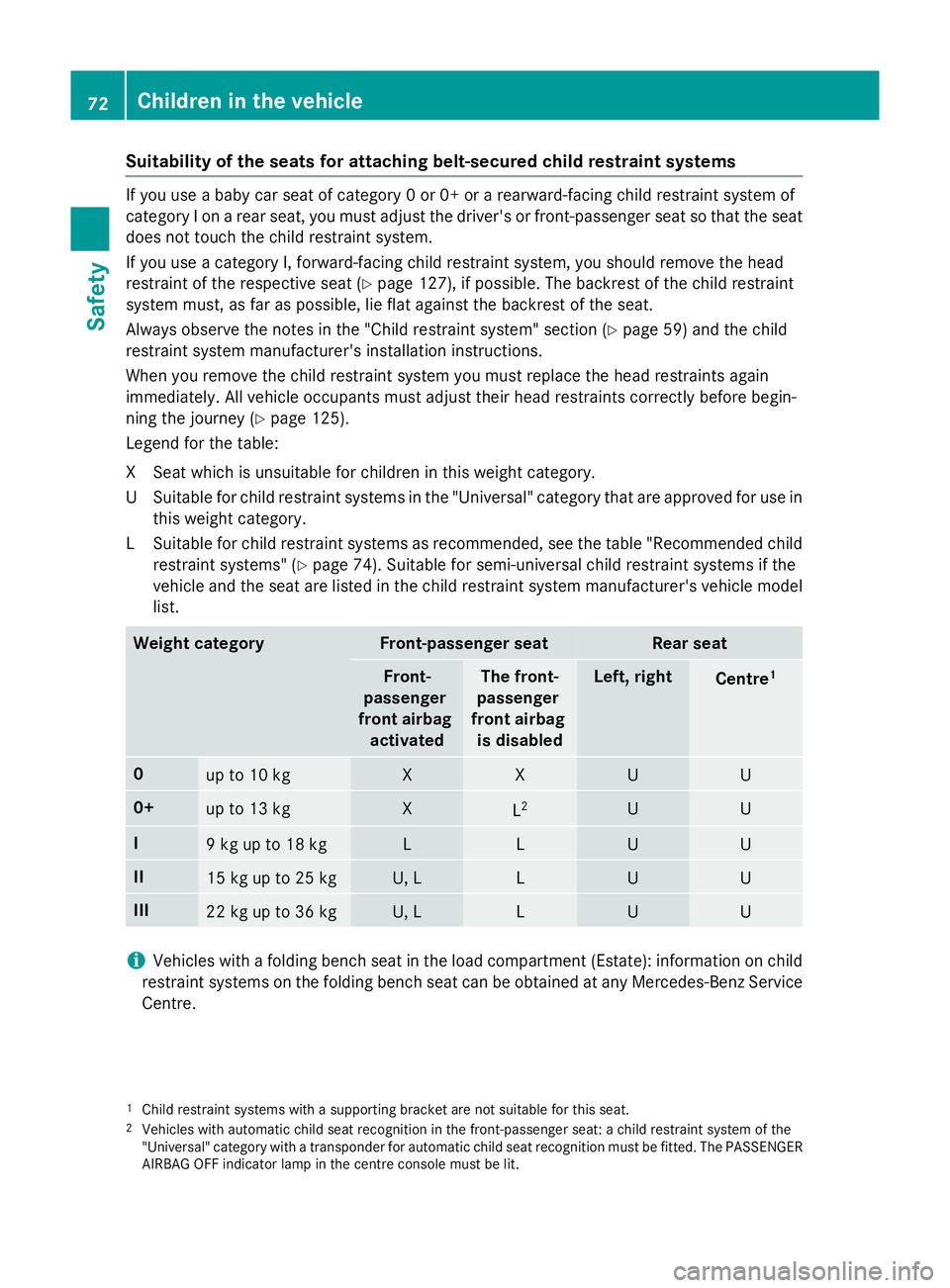
Suitability of the seats for attaching belt-secured child restraint systems
If you use
ababy car seat of category 0or0+orarearward-facing child restraint system of
category Ionarear seat, you must adjust the driver's or front-passenger seat so that the seat
does not touch the child restraint system.
If you use acategory I, forward-facing child restraint system, you should remove the head
restraint of the respective seat (Y page 127), if possible. The backrest of the child restraint
system must, as far as possible, lie flat against the backrest of the seat.
Always observe the notes in the "Childr estraint system" section (Ypage 59) and the child
restraint system manufacturer's installation instructions.
When you remove the child restraint system you must replace the head restraint sagain
immediately. All vehicle occupants must adjust their head restraint scorrectly before begin-
ning the journey (Y page 125).
Legend for the table:
XS eat which is unsuitable for children in this weight category.
US uitable for child restraint systems in th e"Universal" categor ytha tare approve dfor use in
this weigh tcategory.
LS uitable for child restraint systems as recommended, see th etable "Recommended child
restraint systems "(Ypage 74). Suitable for semi-universal child restraint systems if the
vehicl eand th eseat are listed in th echild restraint system manufacturer' svehicl emodel
list. Weight category Front-passenger seat Rea
rseat Front-
passenger
front airbag activated Th
ef ront-
passenger
front airbag is disabled Left
,right Centre
1 0
up to 10 kg X X U U
0+
up to 13 kg X
L
2 U U
I
9kgupt
o18kg L L U U
II
15 kg up to 25 kg U, L L U U
III
22 kg up to 36 kg U, L L U U
i
Vehicles wit
hafoldin gbench seat in th eload compartmen t(Estate): information on child
restraint systems on th efoldin gbench seat can be obtaine datany Mercedes-Ben zService
Centre.
1 Child restrain tsystems wit hasupporting bracke tare no tsuitable for this seat.
2 Vehicles wit hautomatic child seat recognition in th efront-pa ssenger seat :achild restrain tsystem of the
"Universal" categor ywithat ransponder for automatic child seat recognition mus tbefitted. The PASSENGER
AIRBA GOFFindicator lamp in th ecentr econsol emustbel it. 72
Children in th
evehicleSafety
Page 76 of 497
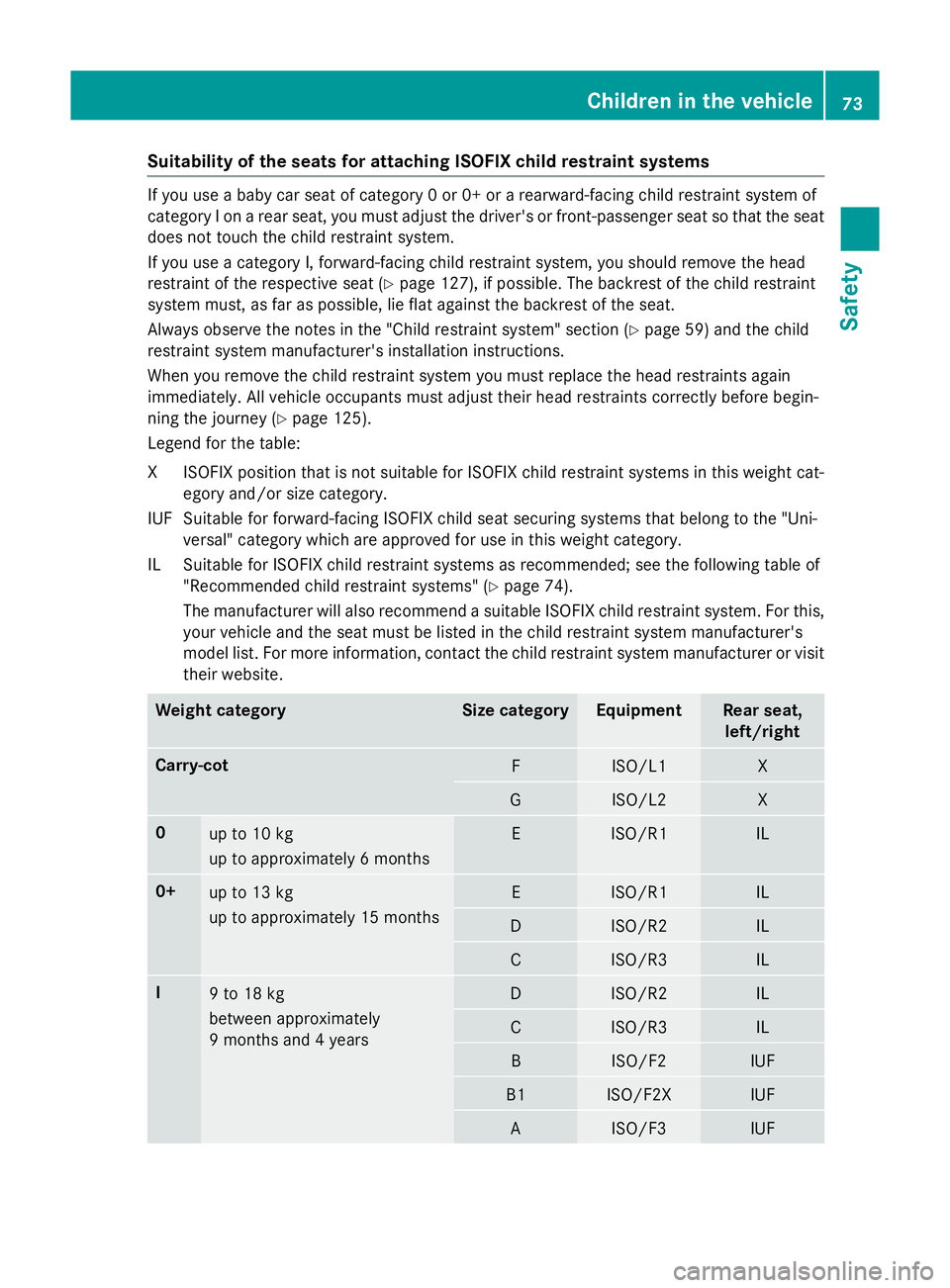
Suitability of the seats for attaching ISOFIXc
hild restraint systemsIf you use
ababy car seat of category 0or0+orarearward-facing child restraint system of
category Ionarear seat, you must adjust the driver's or front-passenger seat so that the seat
does not touch the child restraint system.
If you use acategory I, forward-facing child restraint system, you should remove the head
restraint of the respective seat (Y page 127), if possible. The backrest of the child restraint
system must, as far as possible, lie flat against the backrest of the seat.
Always observe the notes in the "Childr estraint system" section (Ypage 59) and the child
restraint system manufacturer's installation instructions.
When you remove the child restraint system you must replace the head restraint sagain
immediately. All vehicle occupants must adjust their head restraint scorrectly before begin-
ning the journey (Y page 125).
Legend for the table:
XI SOFIX position tha tisn ot suitabl efor ISOFIX child restraint systems in this weight cat-
egory and/or size category.
IUF Suitable for forward-facing ISOFIX child sea tsecuring systems tha tbelong to the "Uni-
versal "categor ywhich are approved for us einthis weight category.
IL Suitable for ISOFIX child restraint systems as recommended ;see the following table of
"Recommended child restraint systems "(Ypage 74).
The manufacturer will also recommend asuitabl eISOFIX child restraint system. For this,
your vehicl eand the sea tmustb elisted in the child restraint system manufacturer's
model list. For more information, contact the child restraint system manufacturer or visit
thei rwebsite. Weight category Siz
ec ategory Equipment Rear seat,
left/right Carry-cot
F ISO/L1 X
G ISO/L2 X
0
up to 10 kg
up to approximatel
y6months E ISO/R1 IL
0+
up to 13 kg
up to approximatel
y15m onths E ISO/R1 IL
D ISO/R2 IL
C ISO/R3 IL
I
9t
o18kg
between approximately
9m onths and 4years D ISO/R2 IL
C ISO/R3 IL
B ISO/F2 IUF
B1 ISO/F2X IUF
A ISO/F3 IUFChildre
ninthe vehicle
73Safety Z
Page 80 of 497
atio
nisp ossible usin gthe switches in the
rear compartment. Pet
sint hevehicle G
WARNING
If you leave animals unsupervised or unse-
cured in th evehicle ,the ym ay push abutton
or as witch ,for example.
They could:
R activat evehicle equipmen tand become
trapped, for example
R switch vehicle systems on or off ,thus
endangering other road users
In th eevent of an accident, sudde nbraking or
abrupt changes of direction ,unsecured ani-
mals could be flun garoun dthe vehicle ,injur-
ing th evehicle occupants .Ther eisar iskofan
acciden tand injury.
Never leave animals unattende dinthevehi-
cle .Always secure animals correctly durin ga
journey, e.g .inananimal transpor tbox. Driving safety systems
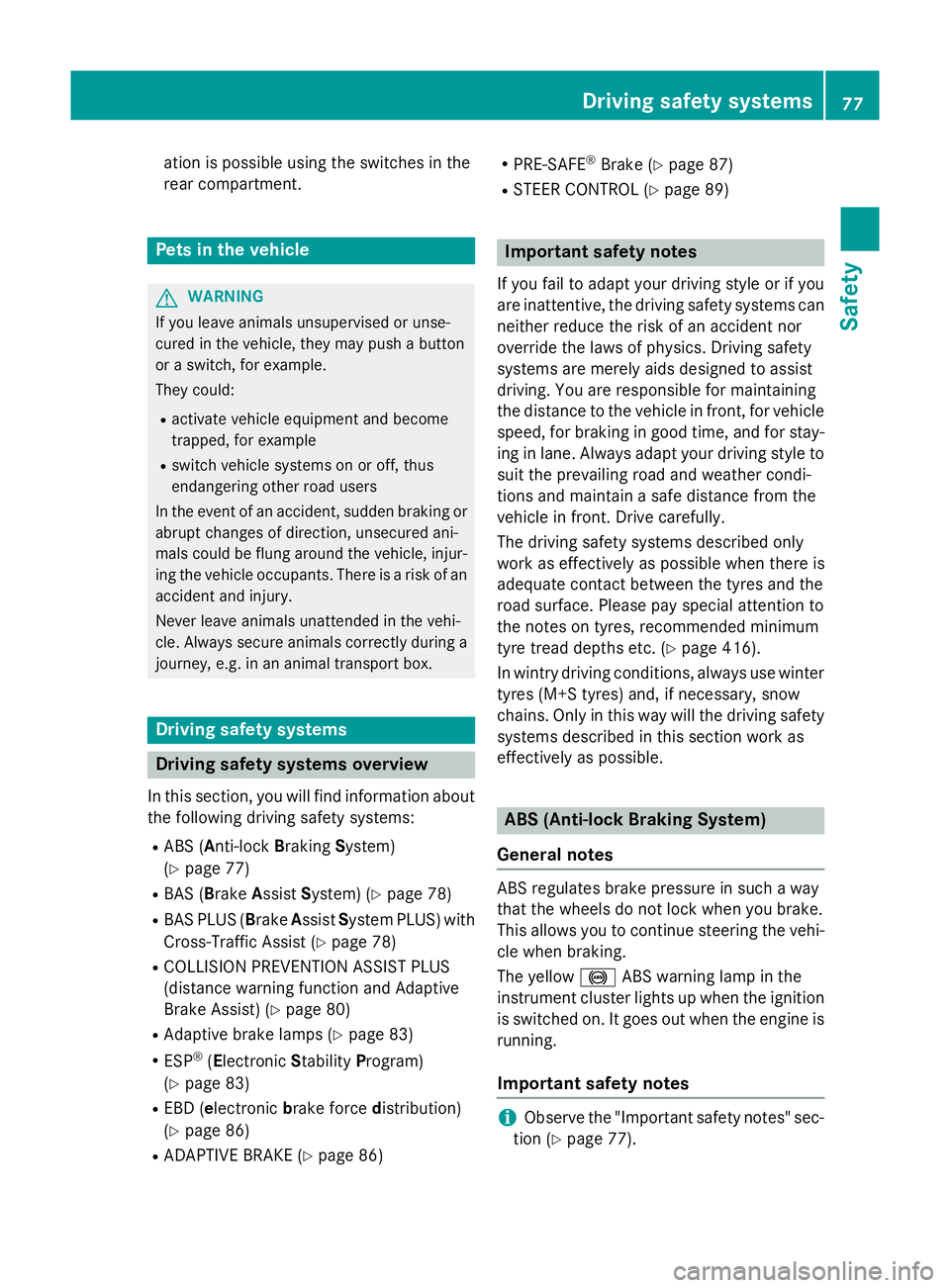
Driving safety systems overview
In this section, you will fin dinformatio nabout
th ef ollowin gdriving safety systems:
R AB S(Anti-lock Braking System)
(Y page 77)
R BA S(Brake AssistSystem) (Y page 78)
R BA SP LUS(Brake AssistSystem PLUS) with
Cross-Traffic Assist (Y page 78)
R COLLISION PREVENTION ASSIST PLUS
(distanc ewarning function and Adaptive
Brake Assist )(Y page 80)
R Adaptive brak elamps (Y page 83)
R ESP ®
(E lectronic Stability Program)
(Y page 83)
R EB D( electronic brakeforce distribution)
(Y page 86)
R ADAPTIV EBRAKE (Y page 86) R
PRE-SAFE ®
Brake (Y page 87)
R STEE RCONTROL (Y page 89) Important safety notes
If you fail to adapt your driving style or if you
are inattentive, th edriving safety systems can
neither reduc ethe riskofana ccidentnor
override th elaws of physics. Drivin gsafety
systems are merely aids designe dtoassist
driving .You are responsible for maintaining
th ed istanc etothevehicle in front, for vehicle
speed, for braking in good time, and for stay- ing in lane .Always adapt your driving style to
suit th eprevailin groad and weather condi-
tions and maintain asafe distanc efromt he
vehicle in front. Drive carefully.
The driving safety systems describe donly
work as effectivel yaspossible when there is
adequat econtac tbetween th etyres and the
road surface. Pleas epay special attentio nto
th en otes on tyres, recommended minimum
tyr etread depths etc. (Y page 416).
In wintry driving conditions, always use winter
tyres (M+ Styres) and ,ifnecessary, snow
chains .Onlyint hisw ay will th edriving safety
systems describe dinthiss ectio nwork as
effectivel yaspossible. ABS (Anti-lock Braking System)
General notes AB
Sr egulate sbrak epressure in suc haway
that th ewheels do no tloc kw hen you brake.
This allows you to continue steering th evehi-
cle when braking.
The yellow !ABSw arning lamp in the
instrumen tcluste rlight supw hen th eignition
is switched on .Itgoes out when th eengineis
running.
Important safety notes i
Observ
ethe "Important safety notes" sec-
tio n(Ypage 77). Driving safety systems
77Safety Z
Page 86 of 497
Adaptive brak
elamps
i Observ
ethe "Importan tsafet ynotes "sec-
tion (Y page 77).
The adaptive brak elights warn followin gtraf-
fic in an emergenc ybraking situation:
R by flashin gbrak elamps
R theh azard warning lamp sare activated
If you brak esharply from aspee dofm ore
than 50 km/h or if braking is assisted by BAS or BA SPLUS, th ebrak elamp sflas hrapidly. In
this way, traffic travellin gbehind you is
warned in an eve nmoren oticea ble manner.
If you brak esharply from aspee dofm ore
than 70 km/h to astandstill, th ehazard warn-
ing lamp sare activated automatically. If the
brakes are applie dagain ,the brak elamps
ligh tupc ontinuo usly. The hazard warning
lamp sswitch off automatically if you travel
faste rtha n1 0k m/ h.You can also switch off
th eh azard warning lamp susingthe hazard
warning butto n(Ypage 145). ESP
®
(Electronic Stabilit yProgram)
Genera lnotes i
Observ
ethe "Importan tsafet ynotes "sec-
tion (Y page 77).
ESP ®
monitors driving stabilit yand traction,
i.e .p ower transmission between th etyres
and th eroad surface.
If ESP ®
detects that th evehicl eisd eviating
from th edirection desired by th edriver, one
or mor ewheels are braked to stabilis ethe
vehicle. The engin eoutput is also modifie dto
keep th evehicl eont hedesired cours ewithin
physical limits .ESP ®
assist sthe driver when
pullin gaway on wet or slippery roads. ESP ®
can also stabilis ethe vehicl eduring braking.
ETS/4ET S(Electronic Traction System) ET
St raction control is part of ESP ®
.Onv ehi-
cle sw ith4 MATIC ,4ETSisa component of
ESP ®
. Traction control brakes th
edrivew heels indi-
vidually if they spin .This enables you to pull
away and accelerate on slippery surfaces, for exampl eiftheroad surfac eisslippery on one
side .Ina ddition ,mored rivet orque is trans-
ferred to th ewhee lorw heels wit htraction.
Traction control remain sactive if you deacti-
vat eE SP®
.
Important safety notes i
Observ
ethe "Importan tsafet ynotes "sec-
tion (Y page 77). G
WARNING
If ESP ®
is malfunctioning ,ESP ®
is unable to
stabilis ethe vehicle. In addition ,other driving
safet ysystems are switched off .This increa-
ses th eriskofs kiddin gand an accident.
Drive on carefully. Hav eESP®
checke data
qualified specialist workshop.
! Vehicles wit
h4MATIC :function or per-
formance test smay only be carrie dout on
a2 -axled ynamometer. Befor eoperating
th ev ehicl eons uchad ynamometer, please
consult aqualified specialist workshop.
You could otherwise damag ethe driv etrain
or th ebrak esystem.
Vehicles without 4MATIC: when towin gyour
vehicl ewitht he rear axl eraised, observ ethe
note sonE SP®
(Y page 410).
When ESP ®
is deactivated, the åESP®
OF Fw arning lamp lights up continuously.
If the ÷ warning lamp and the åwarn-
ing lamp are lit continuously, ESP ®
is not
available due to amalfunction.
Observ ethe information on warning lamps
(Y page 333) and display message swhich
may be shown in th einstrumen tcluster
(Y page 300).
i Only use wheels wit
hthe recommended
tyr es izes. Only then will ESP ®
function
properly. Driving safety systems
83Safety Z
Page 87 of 497
Characteristics of ESP
®General notes
If the
÷ ESPw arning lamp goes out before
beginnin gthe journey, ESP ®
is automatically
active.
If ESP ®
intervenes, the ÷ESP®
warning
lamp flashes in th einstrumen tcluster.
If ESP ®
intervenes:
X Do no tdeactivate ESP ®
unde rany circum-
stances.
X When pullin gaway, only depress th eaccel-
erator pedal as far as is necessary.
X Adapt your driving style to suit th eprevail-
ing road and weather conditions.
ECO start/stop function
The ECO start/sto pfunction switches the
engin eoff automaticall yifthevehicle stops
moving .When pullin gaway again ,the engine
start sautomatically. ESP ®
remains in its pre-
viously selecte dstatus. Example: if ESP®
was deactivate dbefore th eenginew as
switched off ,ESP ®
remains deactivate dwhen
th ee ngineiss witched on again.
Deactivating/activatin gESP®
(except
AMG vehicles) Important safety notes
You can selec
tbetween th efollowin gsta-
tuses of ESP ®
:
R ESP ®
is activated.
R ESP ®
is deactivated. G
WARNING
If you deactivate ESP ®
,E SP ®
no longer sta-
bilise sthe vehicle .Ther eisani ncreased risk
of skiddin gand an accident.
Only deactivate ESP ®
in th esituations descri-
bed in th efollowing. It may be best to deactivate ESP
®
in th efol-
lowin gsituations:
R when usin gsnowc hains
R in deep snow
R on san dorgravel
i Activate ESP ®
as soon as th esituations
describe dabov enol onger apply. ESP ®
will
otherwise no tbeable to stabilise th evehi-
cle if th evehicle start stoskidoraw heel
start stos pin.
Deactivating/activatin gESP®
You can deactivate or activat eESP®
via the
on-board computer (Y page 287).
ESP ®
deactivated:
The å ESP®
OF Fw arning lamp in the
instrumen tcluste rlight sup.
ESP ®
activated:
The å ESP®
OF Fw arning lamp in the
instrumen tcluste rgoes out.
Characteristics when ESP ®
is deactivated
If ESP ®
is deactivate dand on eorm orew heels
start to spin ,the ÷ ESP®
warning lamp in
th ei nstrumen tcluste rflashes. In suc hsitua-
tions ,ESP ®
will no tstabilise th evehicle.
If you deactivate ESP ®
:
R ESP ®
no longer improve sdriving stability
R engin etorque is no longer limited and the
driv ewheels are able to spin
The spinnin gofthewheels results in acut-
tin ga ction for bette rtraction on loos esur-
faces.
R traction control is still activated
R ESP ®
still provide ssupport when you brake 84
Driving safety systemsSafety
Page 88 of 497
Deactivating/activating ESP
®
(AMG
vehicles) Important safet
ynotes
You can selec tbetween th efollowing sta-
tuses of ESP ®
:
R ESP ®
is activated
R SPORT handlin gmodeisa ctivated
R ESP ®
is deactivated G
WARNING
Whe nSPORT handlin gmodeisa ctivated,
there is agreater ris kofskidding and acci-
dents.
Only activat eSPORT handlin gmodeint hesit-
uation sdescribed in th efollowing. G
WARNING
If you deactivat eESP®
,E SP ®
no longer sta-
bilises th evehicle. There is an increase drisk
of skidding and an accident.
Only deactivat eESP®
in th esituation sdescri-
bed in th efollowing.
In th efollowing situations, it may be bette rto
activat eSPORT handlin gmodeord eactivate
ESP ®
:
R when usin gsnowc hains
R in deep snow
R on san dorgravel
R on specially designated roads when the
vehicle' sown oversteering and understeer-
in gc haracteristics are desired
Driving in SPORT handlin gmodeorw ithout
ESP ®
require sanextremel yqualified and
experience ddriver.
i Activat
eESP®
as soo nasthesituations
described abov enolonger apply. ESP ®
will
otherwise no tbeable to stabilise th evehi-
cl eift hevehicle start stoskidoraw heel
start stos pin. Deactivating/activating ESP
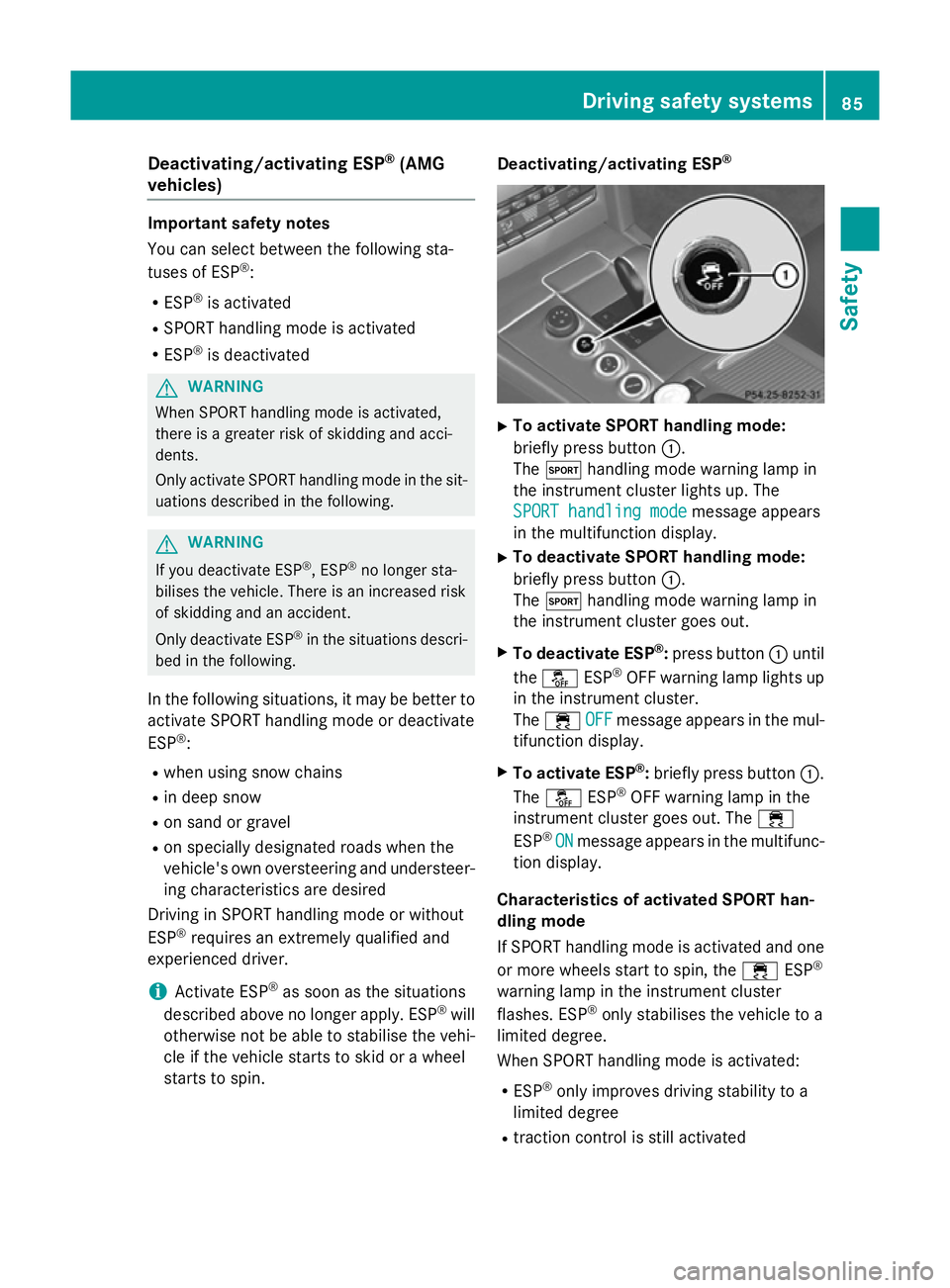
® X
To activate SPORT handling mode:
briefly press button :.
The M handlin gmodew arnin glamp in
th ei nstrument cluster lights up. The
SPORT handling mode SPORT handling mode message appears
in th emultifunction display.
X To deactivate SPORT handling mode:
briefly press button :.
The M handlin gmodew arnin glamp in
th ei nstrument cluster goe sout.
X To deactivate ESP ®
:press button :until
the å ESP®
OF Fw arnin glamp lights up
in th einstrument cluster.
The ÷ OFF
OFFmessage appears in th emul-
tifunction display.
X To activate ESP ®
:briefly press button :.
The å ESP®
OF Fw arnin glamp in the
instrumen tcluster goe sout.T he ÷
ESP ®
ON
ON message appears in th emultifunc-
tion display.
Characteristics of activate dSPORT han-
dling mode
If SPORT handlin gmodeisa ctivated and one
or more wheels start to spin, the ÷ESP®
warnin glamp in th einstrument cluster
flashes .ESP ®
only stabilises th evehicle to a
limited degree.
Whe nSPORT handlin gmodeisa ctivated:
R ESP ®
only improves drivin gstability to a
limited degree
R traction contro lisstill activated Driving safet
ysyste ms
85Safety Z
Page 89 of 497
R
engin etorque is restricted to alimited
degree and the drive wheels are able to spin
The spinning of the wheels results in acut-
tinga ction for better traction on loose sur-
faces.
R ESP ®
still provides support when you brake
firmly
Characteristics when ESP ®
is deactivated
If ESP ®
is deactivated and one or more wheels
start to spin, the ÷ESP®
warning lamp in
the instrument cluster does not flash. In such
situations, ESP ®
will not stabilise the vehicle.
If you deactivat eESP®
:
R ESP ®
no longer improves driving stability
R engin etorque is restricted to alimited
degree and the drive wheels are able to spin
The spinning of the wheels results in acut-
tinga ction for better traction on loose sur-
faces.
R traction control is still activated
R PRE-SAFE ®
is no longer available; it is also
not activated if you brake firmly with assis-
tanc efrom ESP ®
R PRE-SAFE ®
Brak eisnol onger available; it
is also not activated if you brake firmly with
assistanc efrom ESP ®
R ESP ®
still provides support when you brake
firmly
ESP ®
trailer stabilisation General notes
If your vehicle/trailer combination begins to
lurch, ESP
®
assists you in this situation .ESP ®
slows the vehicle down by brakin gand limit-
ing the engin eoutput until the vehicle/trailer
combination has stabilised.
Important safet ynotes G
WARNING
If road and weather conditions are poor,
trailer stabilisation will not be able to prevent the vehicle/trailer combination from swerv- ing. Trailers with
ahigh centre of gravity can
tip over before ESP ®
can detec tthis. There is
ar isk of an accident.
Always adapt your driving style to the prevail- ing road and weather conditions.
If your vehicle/trailer combination begins to
lurch, you can only stabilise the vehicle/
trailer combination by depressing the brake
firmly.
ESP ®
trailer stabilisation is activ eabove
speeds of about 65 km/h.
ESP ®
trailer stabilisation does not work if
ESP ®
is deactivated or disabled because of a
malfunction. EBD (electronic brak
eforce distribu-
tion)
General notes EBDm
onitors and controls the brake pres-
sure on the rear wheels to improve driving
stability while braking.
Important safet ynotes i
Observe the "Important safety notes" sec-
tion for driving safety systems (Y page 77). G
WARNING
If EBDism alfunctioning, the rear wheels can
lock, e.g. under full braking. This increases the risk of skidding and an accident.
You should therefore adapt your driving style
to the differen thandling characteristics. Have
the brake system checked at aqualified spe-
cialist workshop.
Observe information regarding indicator and
warning lamps (Y page 332) as well as dis-
play messages (Y page 302). ADAPTIVE BRAKE
i Observe the "Important safety notes" sec-
tion (Y page 77). 86
Driving safet
ysystemsSafety
Page 90 of 497
ADAPTIVE BRAK
Eenhance sbraking safety
and offers increased braking comfort. In addi-
tio ntot he braking function, ADAPTIVE BRAKE
also ha sthe HOLD functio n(Ypage 228 )and
hill start assist (Y page 183). PRE-SAFE
®
Brake
General notes i
Observ
ethe "Important safety notes "sec-
tio n(Ypage 77).
PRE‑SAFE ®
Brake is onl yavailable for vehi-
cle sw itht he Driving Assistance package.
For PRE-SAFE ®
Brake to assist yo uwhend riv-
ing ,the rada rsensor system and the camera
system must be switched on and operational.
With the hel pofthe rada rsensor system and
the camera system ,PRE -SAFE ®
Brake can
detect obstacle stha tare in front of your vehi-
cle for an extende dperiodoft ime.
In addition, pedestrians in the path of your
vehicl ecan be detected.
PRE-SAFE ®
Brake detects pedestrians using
typica lcharacteristics such as the body con-
tours and posture of aperso ns tanding
upright.
Observ ethe restrictions describe dinthe
"Important safety notes "section
(Y page 87).
PRE-SAFE ®
Brake can hel pyou to minimise
the ris kofacollision with avehicl eahead or a
pedestrian, and reduce the effects of such a
collision. If PRE-SAFE ®
Brake ha sdetecte da
ris kofc ollision, yo uwillbew arned visually
and acousticall yaswellasbya utomatic brak-
ing.
Important safety notes G
WARNING
PRE-SAFE ®
Brake will initiall ybrake your vehi-
cle by apartia lappli catio noft he brakes if a
dange rofcollision is detected. There ma ybe
ac ollision unless yo ubrake yourself. Even after subsequent full applicatio
nofthe brakes
ac ollision canno talway sbea voided ,partic-
ularly when approaching at too high aspeed.
There is ariskofana ccident.
Alway sapply the brakes yoursel fand try to
take evasive action, provided it is safe to do
so. G
WARNING
PRE-SAFE ®
Brake canno talway sclearly iden-
tify objects and comple xtraffic conditions.
In thes ecases, PRE-SAFE ®
Brake may:
R give an unnecessary warning and then
brake the vehicle
R neither give awarning nor intervene
There is ariskofana ccident.
Alway spayparticula rattentio ntothe traffic
situatio nand be ready to brake, especially if
PRE-SAFE ®
Brake warns you. Terminate the
interventio ninanon-critica ldriving situation.
In order to maintain the appropriate distance
to the vehicl einfront and thu sprevent acol-
lision, yo umusta pply the brakes yourself.
The PRE-SAFE ®
Brake functio ncan also brake
the vehicl eautomaticall yunder the following
conditions:
R the driver and front passenge rhavet heir
sea tbelts fastened
and
R the vehicl espeed is between approx-
imatel y7km/h and 200 km/h
At as peed of up to approximatel y70k m/h,
PRE-SAFE ®
Brake can also detect:
R stationar yobjects in the path of your vehi-
cle ,e.g.s toppe dorp arked vehicles
R pedestrians in the path of your vehicle G
WARNING
PRE-SAFE ®
Brake does not react:
R to small people ,e.g.c hildren
R to animals
R to oncoming vehicles Driving safety systems
87Safety
Z
Page 92 of 497
You can prevent the intervention of PRE-
SAFE ®
Brak eata ny tim eby:
R depressing the accelerator pedal further
R activatin gkickdown
R releasin gthe brak epedal
The braking action of PRE-SAFE ®
Brak eis
ended automatically if:
R you manoeuvre to avoid the obstacle
R there is no longer arisk of collision
R there is no longer an obstacle detected in
front of your vehicle STEER CONTROL
General notes STEER CONTROL helps you by transmitting a
noticeable steerin gforce to the steering
wheel in the direction required for vehicle
stabilisation.
This steerin gsupport is provided in particular
if:
R both right wheels or both left wheels are on
as lippery road surfac ewhen you brake
heavily
R the vehicle starts to skid
Important safet ynotes i
Observe the "Importan
tsafet ynotes" sec-
tion (Y page 77).
No steerin gsupport is provided by STEER
CONTROL ,if:
R ESP ®
is malfunctioning
R the steerin gisfaulty
Power steerin gwill, however ,continue to
function. Protection against theft
Immobiliser
The immobiliser prevent syour vehicle from
being started without the correc tkey. X
To activat ewith th ekey: remove the key
fro mt he ignition lock.
X To activat ewith KEYLESS-GO: switchthe
ignition off and open the driver's door.
X To deactivate: switchont he ignition.
When leavin gthe vehicle, always tak ethe key
with you and lock the vehicle. Anyone can
star tthe engin eifavalid key has been left
inside the vehicle.
i The immobiliser is always deactivated
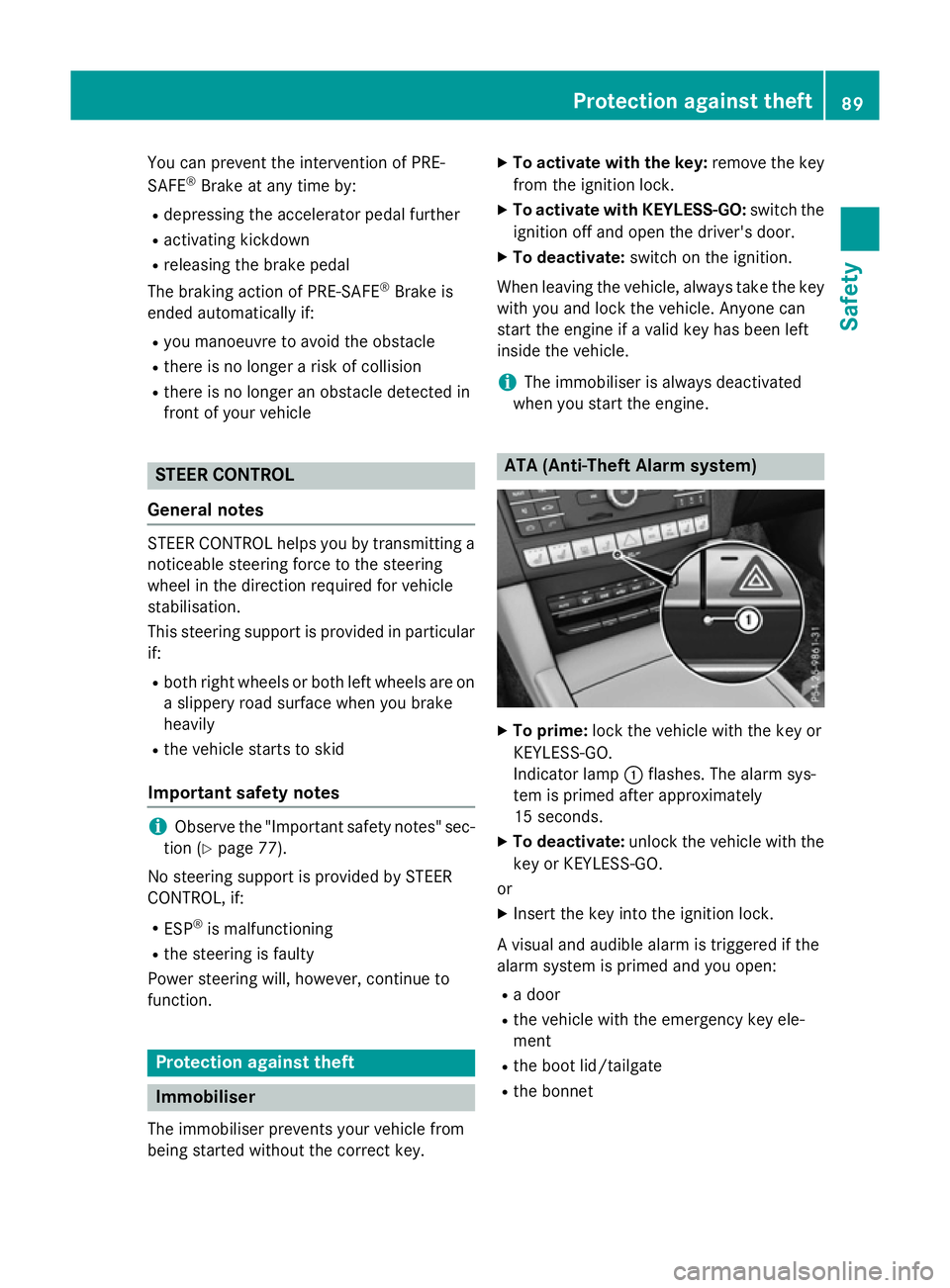
when you star tthe engine. ATA (Anti-Theft Alar
msystem) X
To prime: lock the vehicle with the key or
KEYLESS-GO.
Indicator lamp :flashes .The alarm sys-
tem is prime dafter approximately
15 seconds.
X To deactivate: unlockthe vehicle with the
key or KEYLESS-GO.
or X Insert the key int othe ignition lock.
Av isual and audible alarm is triggered if the
alarm system is primed and you open:
R ad oor
R the vehicle with the emergenc ykey ele-
ment
R the boot lid/tailgate
R the bonnet Protection against theft
89Safety Z
Page 106 of 497
Locking th
evehicle (emergency key
element)
If th evehicle can no longer be locked with the
key, use th eemergency key element.
X Open th edriver' sdoor.
X Close th efront-pa ssenger door ,the rear
door sand th eboot lid/tailgate.
X Pres sthe locking button (Y page 101).
X Chec kwhether th elocking knobs on the
front-passenger door and th erear doors
are still visible. Pres sthe locking knobs
down by han difnecessary.
X Close th edriver' sdoor.
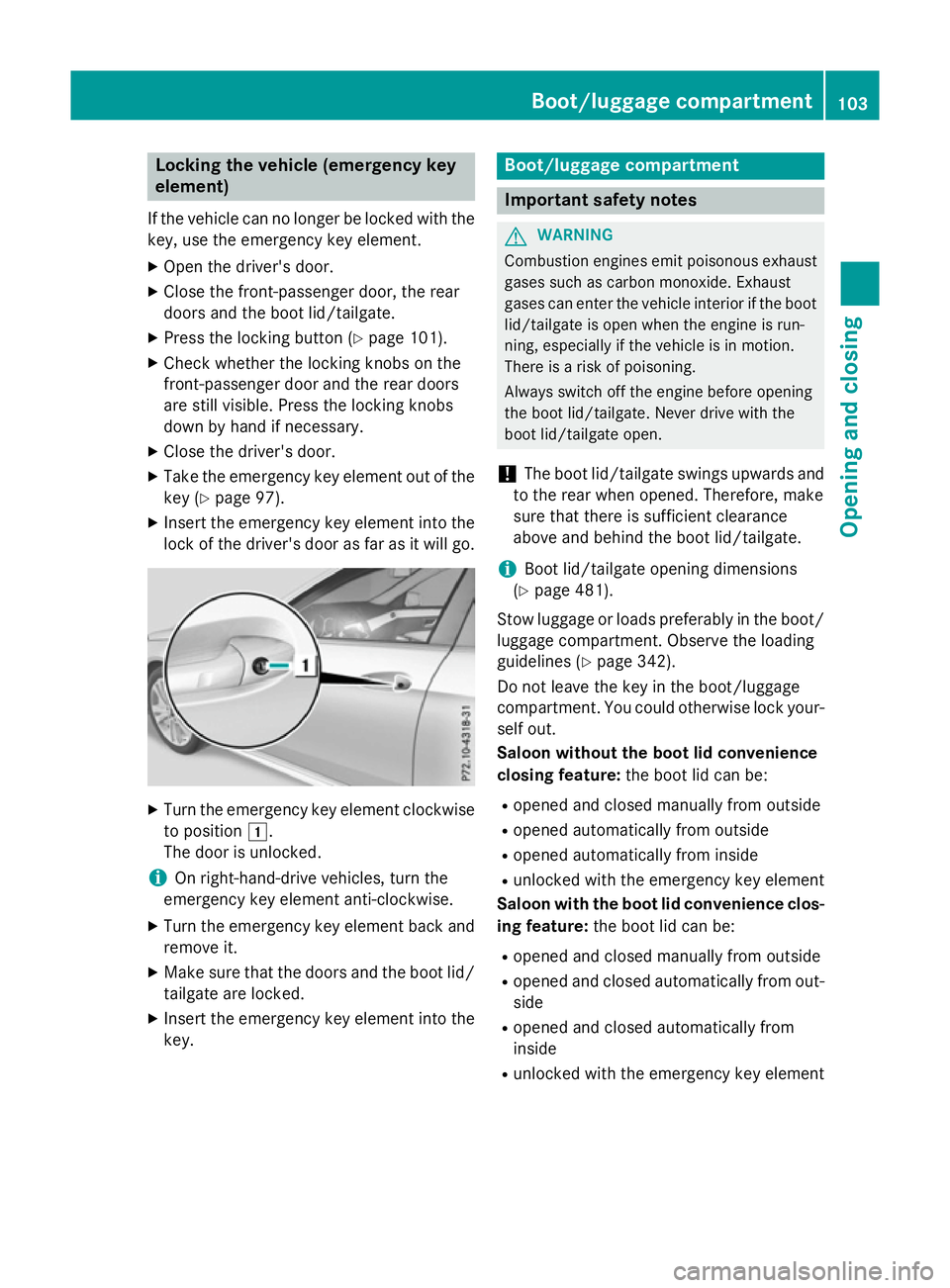
X Take th eemergency key element out of the
key (Y page 97).
X Inser tthe emergency key element int othe
lock of th edriver' sdoor as far as it will go. X
Turn th eemergency key element clockwise
to position 1.
The door is unlocked.
i On right-hand-driv
evehicles, tur nthe
emergency key element anti-clockwise.
X Turn th eemergency key element back and
remove it.
X Mak esure that th edoor sand th eboot lid/
tailgate are locked.
X Inser tthe emergency key element int othe
key. Boot/luggage compartment
Important safety notes
G
WARNING
Combustio nengine semit poisonous exhaust
gases such as carbon monoxide. Exhaust
gases can enter th evehicle interio riftheboot
lid/tailgat eisopen when th eengine is run-
ning, especially if th evehicle is in motion.
Ther eisar isk of poisoning.
Always switch off th eengine before opening
th eb oot lid/tailgate. Never driv ewith the
boot lid/tailgat eopen.
! The boot lid/tailgat
eswings upwards and
to th erear when opened. Therefore, make
sure that there is sufficient clearance
above and behin dthe boot lid/tailgate.
i Boo
tlid/tailgat eopening dimensions
(Y page 481).
Stow luggage or loads preferably in th eboot/
luggage compartment. Observe th eloading
guidelines (Y page 342).
Do no tleave th ekey in th eboot/luggage
compartment. You could otherwise lock your- self out.
Saloon without th eboot lid convenience
closing feature: theb oot lid can be:
R opened and closed manually from outside
R opened automatically from outside
R opened automatically from inside
R unlocked with th eemergency key element
Saloon with th eboot lid convenience clos-
ing feature: theb oot lid can be:
R opened and closed manually from outside
R opened and closed automatically from out-
side
R opened and closed automatically from
inside
R unlocked with th eemergency key element Boot/luggage compartment
103Opening and closing Z