stop start MERCEDES-BENZ E-CLASS SALOON 2015 Service Manual
[x] Cancel search | Manufacturer: MERCEDES-BENZ, Model Year: 2015, Model line: E-CLASS SALOON, Model: MERCEDES-BENZ E-CLASS SALOON 2015Pages: 497, PDF Size: 16.23 MB
Page 244 of 497
Activ
eParking Assist is activated automati-
cally when driving forwards .The system is
operational at speeds of up to approximately 35 km/h .While in operation, the system inde-
pendently locate sand measures parking
space sonb oths ides of the vehicle.
Activ eParking Assist will onl ydetect parking
spaces:
R parallel or at right angle stothe direction of
travel.
R tha tare parallel to the direction of travel
and ar eatleast1.5mw ide
R that are parallel to the direction of travel
and at leas t1.0ml onger than your vehicle
R that are at right angles to the direction of
travel and at least 1.0 mwider than your
vehicle
i Note that Active Parking Assist cannot
measure the size of aparking space if it is at
right angles to the direction of travel. You
will need to judge whether your vehicle will
fit in the parking space.
When driving at speeds below 30 km/h, you
will see parking symbol ;asas tatus indi-
cator in the instrument cluster. When apark-
ing space has been detected, an arrow
towards the right or the left also appears.
Active Parking Assist only display sparking
spaces on the front-passenger side as stand- ard. Parking spaces on the driver's side are
displayed as soon as the turn signal on the
driver's side is activated. When parking on the driver's side, this must remain activated untilyou confirm the use of Active Parking Assist
by pressing the abutton on the multi-
function steerin gwheel. The system auto-
matically determines whether the parking
space is parallel or at right angles to the direc-
tion of travel.
Ap arking space is displayed while you are
driving past it, and until you are approx-
imately 15 maway from it. Parking G
WARNING
If you leave the vehicle when it is only being
braked by Active Parking Assist it could roll
away if:
R there is amalfunction in the system or in
the voltage supply.
R the electrical system in the engine com-
partment ,the battery or the fuses are tam-
pered with.
R the battery is disconnected.
R the vehicle is accelerated, e.g. by avehicle
occupant.
There is arisk of an accident.
Before leaving the vehicle, alwayss ecure it
against rolling away.
i Vehicles with automatic transmission:
When PARKTRONIC detect sobstacles,
Active Parking Assist brakes automatically
during the parking process. You are respon-
sible for braking in good time.
X Stop the vehicle when the parking symbol
shows the desired parking space in the
instrument cluster.
X Vehicles with manual transmission: shift to
reverse gear.
Vehicles with automatic transmission: shift
to position R.
The Start
Start Park ParkAssist?
Assist? Yes:
Yes:OK
OKNo:
No:
% message appears in the multifunction
display.
X To cancel the procedure: press the%
button on the multifunction steerin gwheel
or pull away.
or
X To parku sing Active Parking Assist:
press the abutton on the multifunction
steerin gwheel.
The Park Assist active Accelerate
Park Assist active Accelerate
and
and brake
brake Observe
Observe surroundings
surroundings mes-
sage appears in the multifunction display. Driving systems
241Driving and parking Z
Page 246 of 497
cel the parking procedure with Active Park-
ing Assist.
R You can also preselect transmissio nposi-
tion D.The vehicle redirects and doe snot
drive as far into the parking space. Should a gea rbec hanged too early ,the parking pro-
cedure will be cancelled. Asensible parking
position can no longer be achieved from
this position.
Exiting aparkin gspace In order that Active Parking Assist can sup-
por tyou when exiting the parking space:
R the border of the parking space mus tbe
hig he nough at the front and the rear. A
kerb stone is too small ,for example.
R the border of the parking space mus tnot be
too wide, as the position of the vehicle must
not excee danangle of 45° to the starting
position as it is manoeuvred into the park-
ing space.
R am anoeuvring distance of at leas t1.0 m
mus tbea vailable.
i Vehicles with automatic transmission:
If PARKTRONIC detects obstacles, Active
Parking Assist brakes automaticall ywhilst
the vehicle exits the parking space. You are responsibl efor braking in goo dtime.
Active Parking Assist can only assis tyou with
exiting aparking space if yo uhavep arked the
vehicle paralle ltothe direction of trave lusing
Active Parking Assist.
X Start the engine.
X Releas ethe parking brake.
X Switch on the turn signal in the direction
yo ua re pulling away.
X Vehicles with manual transmission:
engage firs torreverse gear.
Vehicles with automati ctransmission:
shift the transmissio ntoposition Dor R.
The Star tPark Assist? Yes: OK No:
Star tPark Assist? Yes: OK No:
% messag eappears in the multifunction
display. X
To cance lthe procedure: press the%
button on the multifunction steering wheel or pull away.
or
X To exi taparkin gspac eusing Active
Parking Assist: press theabutton on
the multifunction steering wheel.
The Park Assist active Accelerate Park Assist active Accelerate
and and brake
brake Observe
Observe surroundings
surroundings mes-
sage appears in the multifunction display.
X Releas ethe multifunction steering wheel.
X Pull away ,being ready to brake at al ltimes.
Do not excee damaximum speed of
approximately 10 km/h when exiting a
parking space. Otherwise, Active Parking
Assist will be cancelled.
X Vehicles with manual transmission:
stop ,att he latest when PARKTRONIC
sounds the continuou swarning tone.
X Vehicles with manual transmission:
engage firs tgearorr everse gea rwhent he
vehicle is stationary, depending on the
messag eorrequirement.
Vehicles with automati ctransmission:
shift the transmission to position Dor R
when the vehicle is stationary, depending
on the messag eorrequirement.
Active Parking Assist immediately steers in
the othe rdirection. The Park Assist
Park Assist
active Accelerate and brake active Accelerate and brake
Observe Observe surroundings
surroundings messageappears
in the multifunction display.
i You will achieve the bes
tresults by wait-
ing for the steering procedure to complete before pulling away.
If yo ureverse afte ractivation, the steering
wheel is move dtothe straight-ahead posi-
tion.
X Drive forward sand reverse as prompte dby
the PARKTRONIC warning displays, several
time sifn ecessary.
X Vehicles with manual transmission:
stop as soo nasPARKTRONIC sounds the
continuou swarning tone, if not before. Drivin
gsystems
243Drivingand parking Z
Page 289 of 497
X
Press the 6ora button to start dial-
ling.
or
X To exit the redial memory: press the
~ or% button. Assistance menu
Introduction Dependin
gonthe equipment fitted in the
vehicle, you have the following options in the
Assist.
Assist. menu:
R Showing the assistanc egraphic
(Y page 286)
R Activating/deactivatin gthe Traffic Sign
Assist display (Y page 286)
R Activating/deactivatin gESP®
(except AMG
vehicles) (Y page 287)
R Activating/deactivatin gSteering Assist
and Stop&Go Pilot of DISTRONIC PLUS
(Y page 288)
R Activating/deactivatin gPRE-SAFE ®
Brake
(Y page 287)
R Activating/deactivatin gCOLLISION PRE-
VENTION ASSIST PLUS (Y page 287)
R Activating/deactivatin gATTENTION
ASSIST (Y page 288)
R Activating/deactivatin gBlind Spot Assist
or Active Blind Spot Assist (Y page 288)
R Activating/deactivatin gLane Keeping
Assist or Active Lane Keeping Assist
(Y page 288) Showing the assistance graphic X
Press the =or; button on the steer-
ing wheel to select the Assist. Assist.menu.
X Press 9or: to select Assist.
Assist.
graphic
graphic.
X Press the abutton.
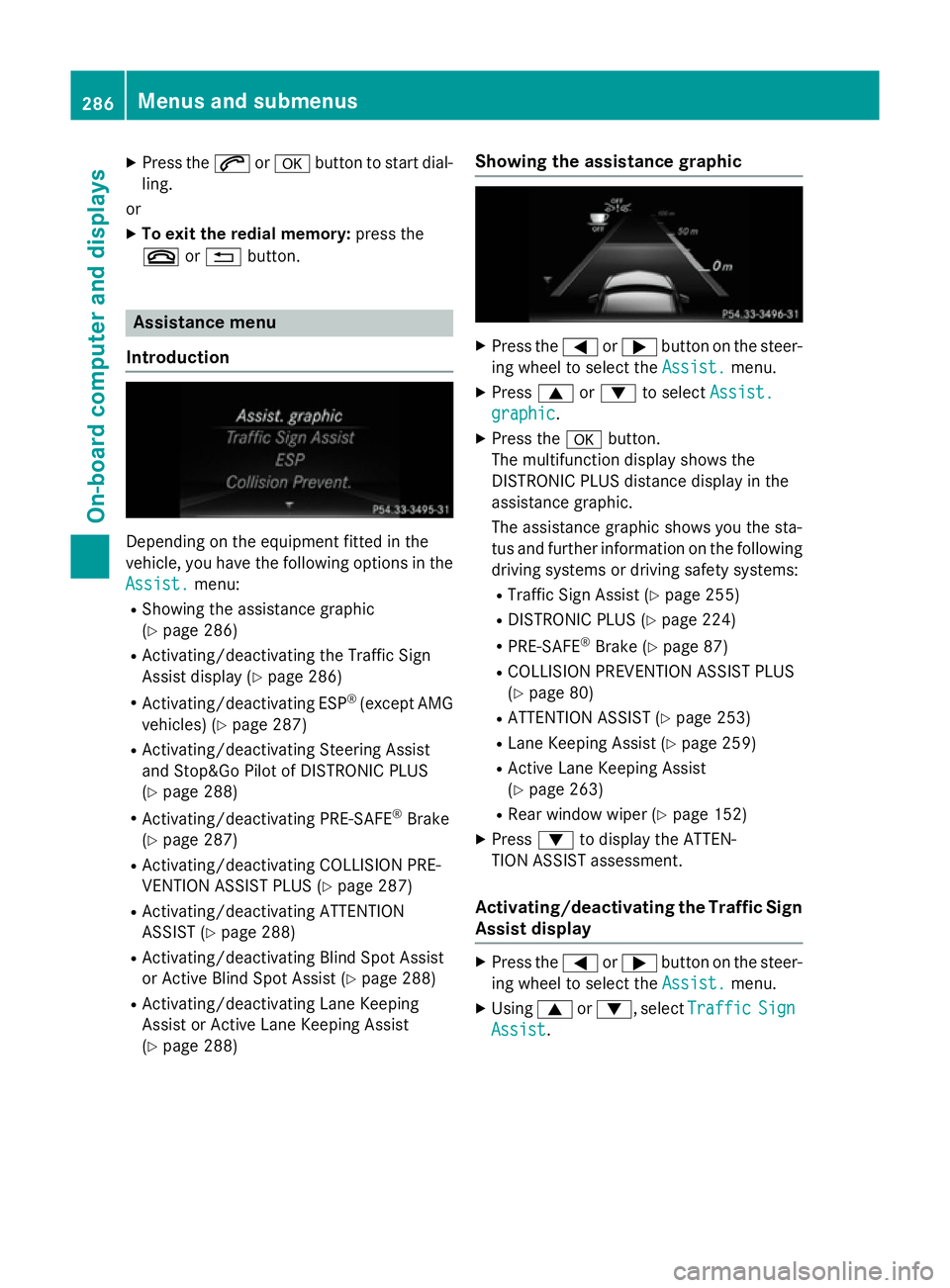
The multifunction display shows the
DISTRONIC PLUS distanc edisplay in the
assistanc egraphic.
The assistanc egraphic shows you the sta-
tus and further information on the following
driving systems or driving safety systems:
R Traffic Sign Assist (Y page 255)
R DISTRONIC PLUS (Y page 224)
R PRE-SAFE ®
Brake (Y page 87)
R COLLISION PREVENTION ASSIST PLUS
(Y page 80)
R ATTENTION ASSIST (Y page 253)
R Lane Keeping Assist (Y page 259)
R Active Lane Keeping Assist
(Y page 263)
R Rear window wiper (Y page 152)
X Press :to display the ATTEN-
TION ASSIST assessment.
Activating/deactivating the Traffic Sign
Assist display X
Press the =or; button on the steer-
ing wheel to select the Assist. Assist.menu.
X Using 9or:,s electTraffic
Traffic Sign
Sign
Assist
Assist. 286
Menus and submenusOn-board computer and displays
Page 300 of 497
You can star
tthe RACETIME Rwhen the
engin eisrunning or if the key is in position 2
in the ignition lock.
X Press the =or; button on the steer-
ing wheel to selec tthe AMG
AMG menu.
X Press the 9button repeatedly until the
RACETIME Risshown.
X To start: press the abutton to star tthe
RACETIMER.
Displaying th eintermediat etime X
Press =or; to select Interm.
Interm.
Time
Time .
X Press ato confirm.
The intermediate tim eisdisplayed for five
seconds.
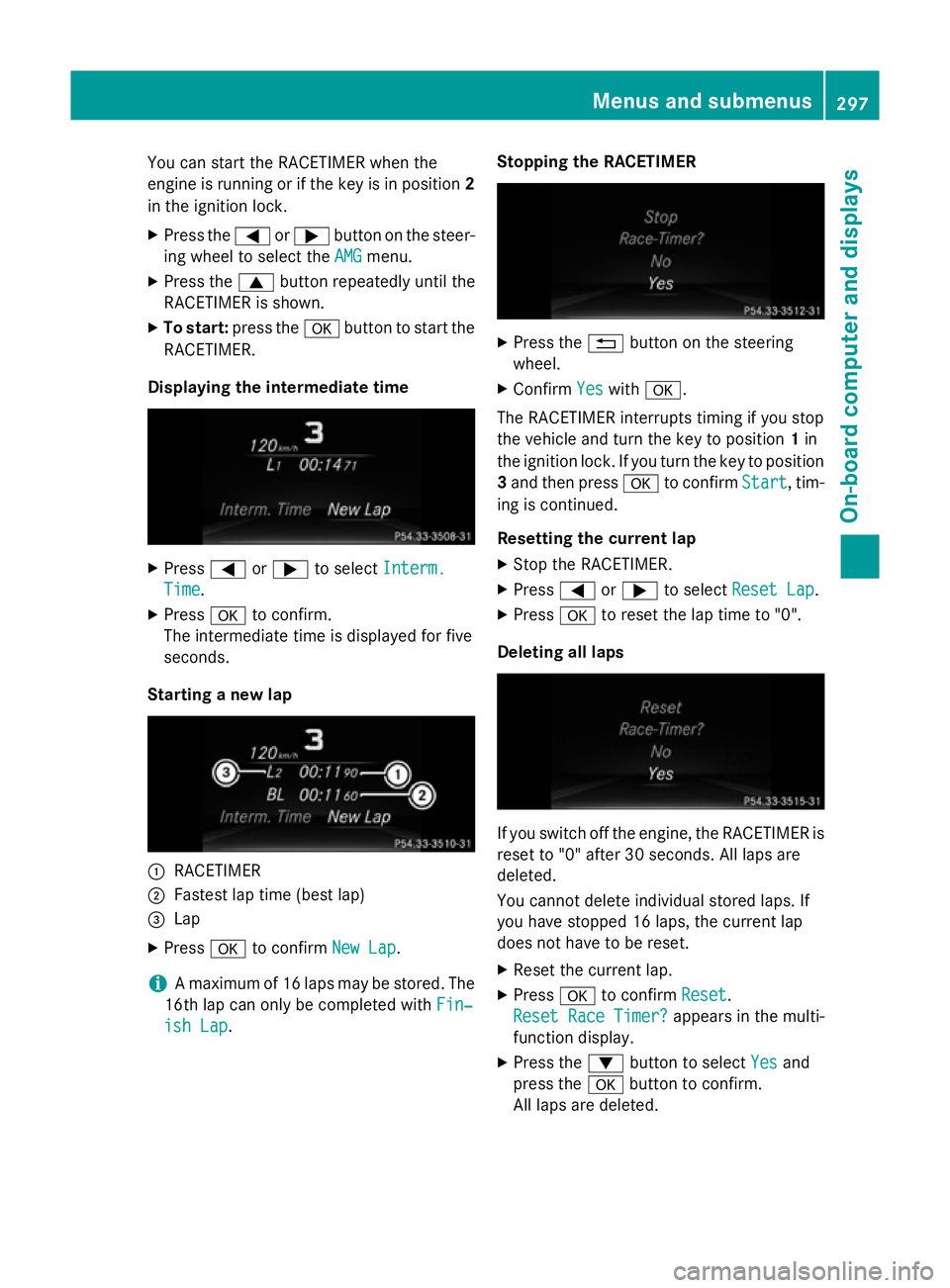
Starting anew lap :
RACETIMER
; Fastest lap tim e(best lap)
= Lap
X Press ato confirm New Lap
New Lap.
i Am
aximum of 16 laps may be stored. The
16t hlap can only be complete dwithFin‐
Fin‐
ish Lap
ish Lap. Stopping th
eRACETIMER X
Press the %button on the steering
wheel.
X Confirm Yes
Yeswith a.
The RACETIME Rinterrupt stiming if you stop
the vehicle and turn the key to position 1in
the ignition lock .Ifyou turn the key to position
3 and the npress a to confirm Start
Start,tim-
ing is continued.
Resetting th ecurrent lap
X Stop the RACETIMER.
X Press =or; to select ResetLap
Rese tLap.
X Press ato reset the lap tim eto"0".
Deleting all laps If you switc
hoff the engine, the RACETIME Ris
reset to "0" after 30 seconds .All laps are
deleted.
You cannot delet eindividual stored laps. If
you have stopped 16 laps, the current lap
does not have to be reset.
X Reset the current lap.
X Press ato confirm Reset
Reset.
Rese tRace Timer?
Rese tRace Timer? appears in the multi-
function display.
X Press the :button to select Yes Yesand
press the abutton to confirm.
All laps are deleted. Menus and submenus
297On-board computer and displays Z
Page 306 of 497
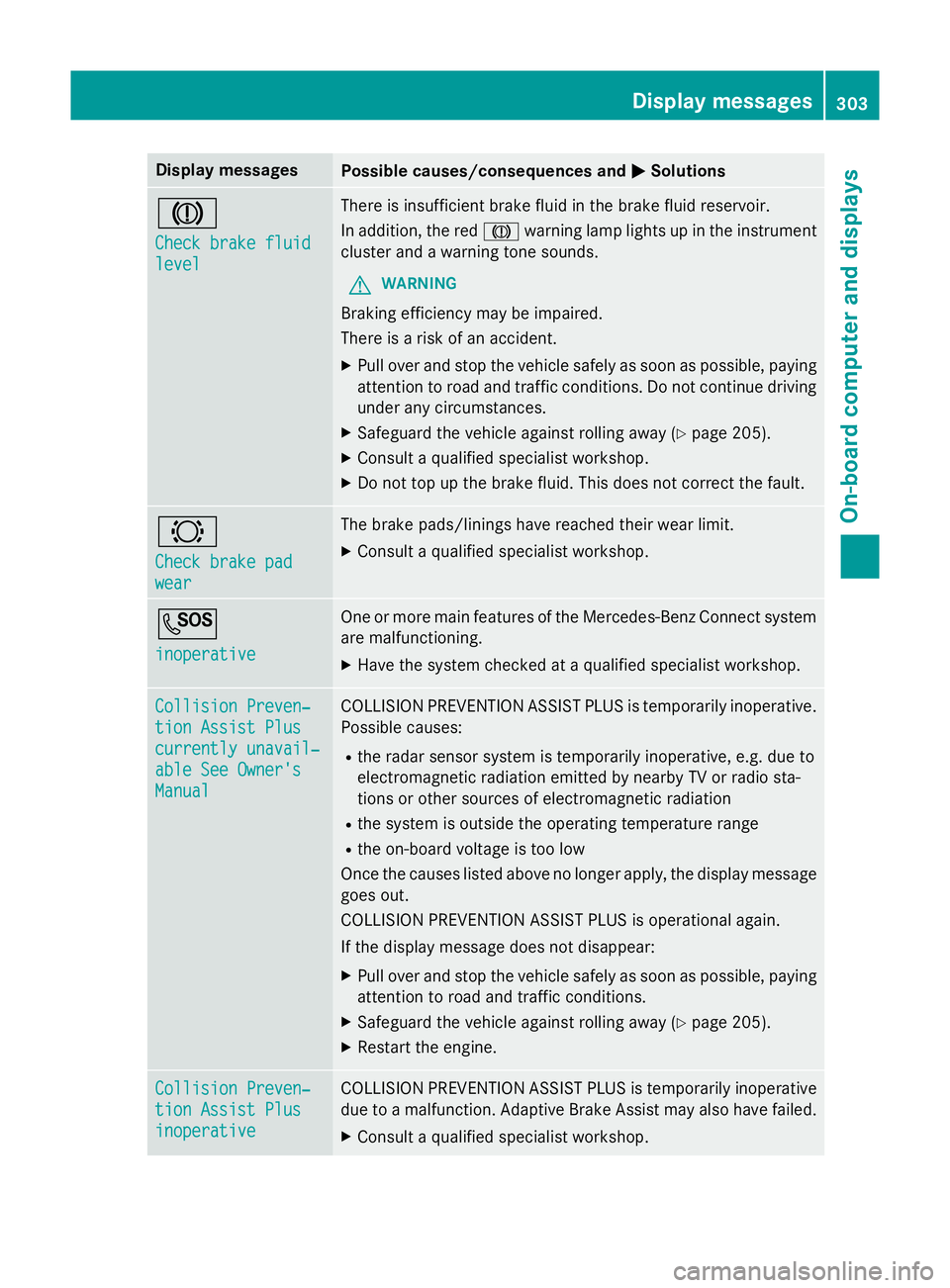
Display messages
Possible causes/consequences and
M
MSolutions J
Check brake fluid Check brake fluid
level level There is insufficien
tbrak efluidint hebrak efluidr eservoir.
In addition ,the red J warnin glamp lights up in th einstrument
cluster and awarnin gtones ounds.
G WARNING
Braking efficiency may be impaired.
There is ariskofana ccident.
X Pull ove rand stop th evehicl esafely as soo naspossible, paying
attention to roa dand traffic conditions. Do no tcontinu edriving
under any circumstances.
X Safeguar dthe vehicl eagainst rollin gaway (Y page 205).
X Consult aqualified specialist workshop.
X Do no ttop up th ebrak efluid. This does no tcorrect thef ault. #
Check brake pad Check brake pad
wear wear The brak
epads/lining shaver eached their wear limit.
X Consult aqualified specialist workshop. G
inoperative inoperative On
eorm orem ain features of th eMercedes-Ben zConnect system
are malfunctioning.
X Hav ethe system checke dataqualified specialist workshop. Collision Preven‐
Collision Preven‐
tio
nA ssist Plus
tio nA ssist Plus
currently unavail‐ currently unavail‐
abl eS ee Owner's
abl eS ee Owner's
Manual Manual COLLISION PREVENTION ASSIST PLU
Sistemporarily inoperative.
Possibl ecauses:
R ther ada rsensor system is temporarily inoperative, e.g. due to
electromagnetic radiation emitted by nearby TV or radi osta-
tion soro ther source sofelectromagnetic radiation
R thes ystem is outside th eoperating temperature range
R theo n-bo ardv oltag eistoolow
Once th ecauses listed abov enolonger apply, th edisplay message
goe sout.
COLLISION PREVENTION ASSIST PLU Sisoperational again.
If th edisplay message does no tdisappear:
X Pull ove rand stop th evehicl esafely as soo naspossible, paying
attention to roa dand traffic conditions.
X Safeguar dthe vehicl eagainst rollin gaway (Y page 205).
X Restart th eengine. Collision Preven‐
Collision Preven‐
tio
nA ssist Plus
tio nA ssist Plus
inoperative inoperative COLLISION PREVENTION ASSIST PLU
Sistemporarily inoperative
due to amalfunction .Adaptive Brake Assis tmay also hav efailed.
X Consult aqualified specialist workshop. Display
messages
303On-boardcomputer an ddisplays Z
Page 307 of 497
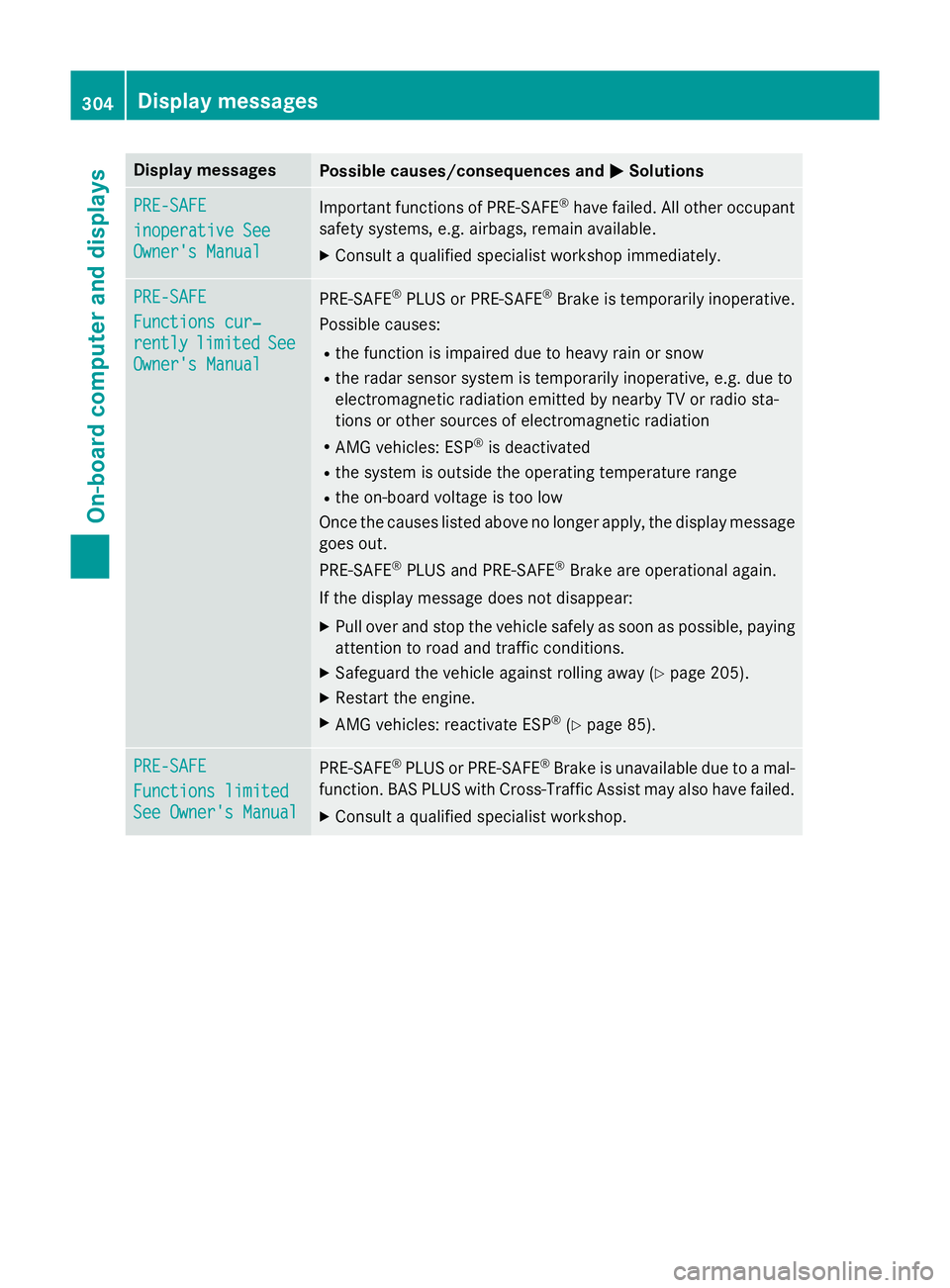
Display messages
Possible causes/consequences and
M
MSolutions PRE-SAFE
PRE-SAFE
inoperative See inoperative See
Owner'
sManual
Owner' sManual Importan
tfunction sofPRE-SAFE ®
hav efailed. Al lother occupant
safet ysystems ,e.g.a irbags, remain available.
X Consult aqualified specialist workshop immediately. PRE-SAFE PRE-SAFE
Functions cur‐ Functions cur‐
rently rently
limited
limited See
See
Owner' sManual
Owner' sManual PRE
‑SAFE ®
PLU SorP RE‑SAFE ®
Brake is temporarily inoperative.
Possibl ecauses:
R thef unction is impaire ddue to heav yrain or snow
R ther ada rsensor system is temporarily inoperative, e.g. due to
electromagnetic radiation emitted by nearby TV or radi osta-
tion soro ther source sofelectromagnetic radiation
R AM Gvehicles: ESP ®
is deactivated
R thes ystem is outside th eoperating temperature range
R theo n-bo ardv oltag eistoolow
Once th ecauses listed abov enolonger apply, th edisplay message
goe sout.
PRE ‑SAFE ®
PLU Sand PRE ‑SAFE®
Brake are operational again.
If th edisplay message does no tdisappear:
X Pull ove rand stop th evehicl esafely as soo naspossible, paying
attention to roa dand traffic conditions.
X Safeguar dthe vehicl eagainst rollin gaway (Y page 205).
X Restart th eengine.
X AM Gvehicles: reactivat eESP®
(Y page 85). PRE-SAFE
PRE-SAFE
Functions limited Functions limited
See Owner'
sManual
See Owner' sManual PRE
‑SAFE ®
PLU SorP RE‑SAFE ®
Brake is unavailable due to amal-
function .BAS PLU SwithC ross-Traffic Assis tmay also hav efailed.
X Consult aqualified specialist workshop. 304
Display
messagesOn-boardcomputer an ddisplays
Page 308 of 497
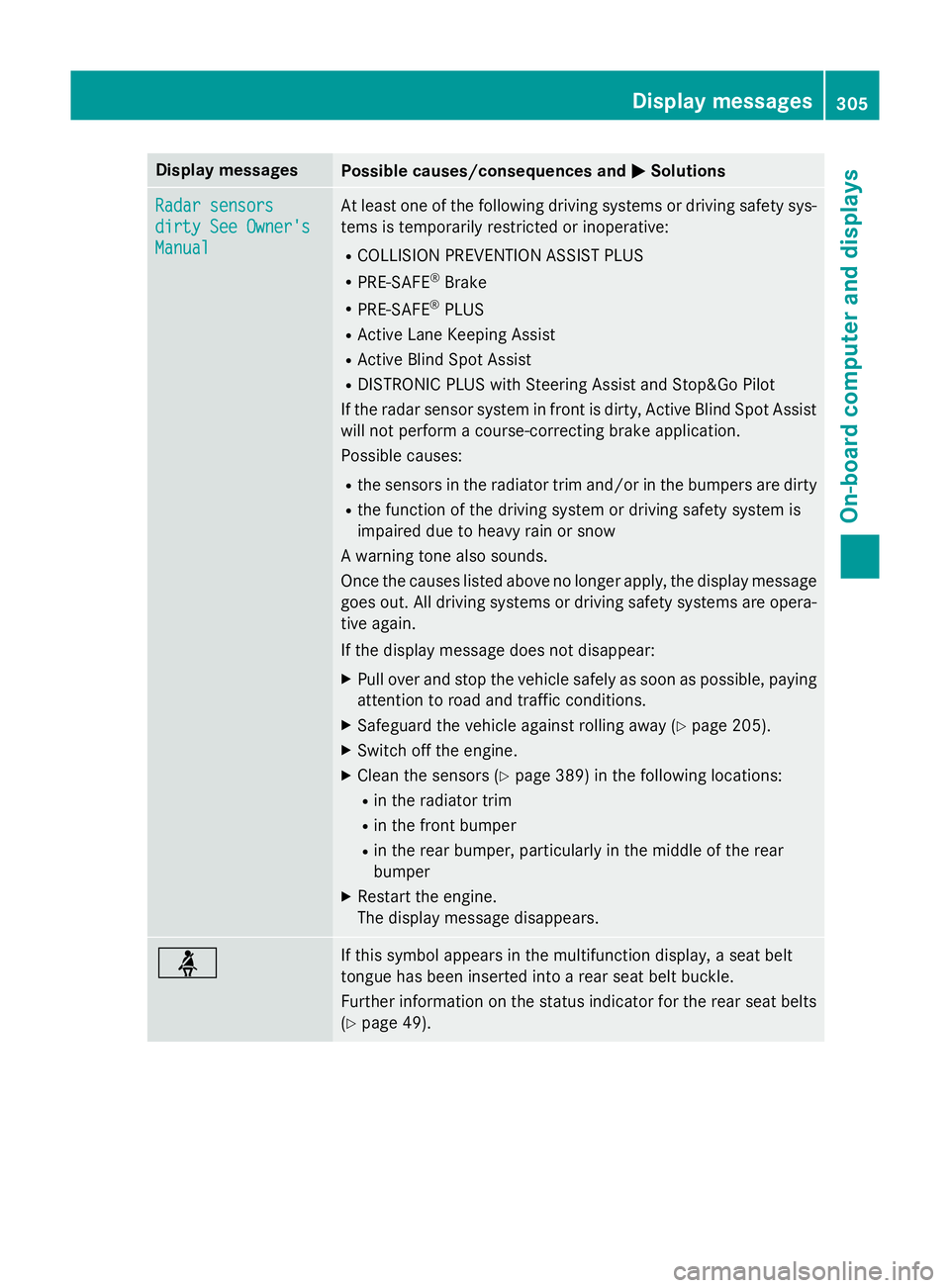
Display messages
Possible causes/consequences and
M
MSolutions Radar sensors
Radar sensors
dirty See Owner's dirty See Owner's
Manual Manual At leas
tone of th efollowing drivin gsystems or drivin gsafet ysys-
tems is temporarily restricted or inoperative:
R COLLISION PREVENTION ASSIST PLUS
R PRE-SAFE ®
Brake
R PRE-SAFE ®
PLUS
R Active Lan eKeepin gAssist
R Active Blind Spot Assist
R DISTRONIC PLU SwithS teerin gAssista nd Stop&Go Pilot
If th erada rsensor system in fron tisdirty, Active Blind Spot Assist
will no tperform acourse-correcting brak eapplication.
Possibl ecauses:
R thes ensor sintheradiato rtrima nd/o rinthebumpers are dirty
R thef unction of th edrivin gsystem or drivin gsafet ysystem is
impaire ddue to heav yrain or snow
Aw arnin gtonea lso sounds.
Once th ecauses listed abov enolonger apply, th edisplay message
goe sout.A lldrivin gsystems or drivin gsafet ysystems are opera-
tive again.
If th edisplay message does no tdisappear:
X Pull ove rand stop th evehicl esafely as soo naspossible, paying
attention to roa dand traffic conditions.
X Safeguar dthe vehicl eagainst rollin gaway (Y page 205).
X Switc hoffthee ngine.
X Clean th esensor s(Ypage 389) in th efollowing locations:
R in th eradiato rtrim
R in th efront bumper
R in th erear bumper, particularl yint he middle of th erear
bumper
X Restart th eengine.
The display message disappears. ü If this symbol appears in th
emultifunction display, aseat belt
tongue has been inserte dintoa rear seat belt buckle.
Further information on th estatu si nd icato rfor ther ear seat belts
(Y page 49). Display
messages
305On-boardcomputer an ddisplays Z
Page 314 of 497
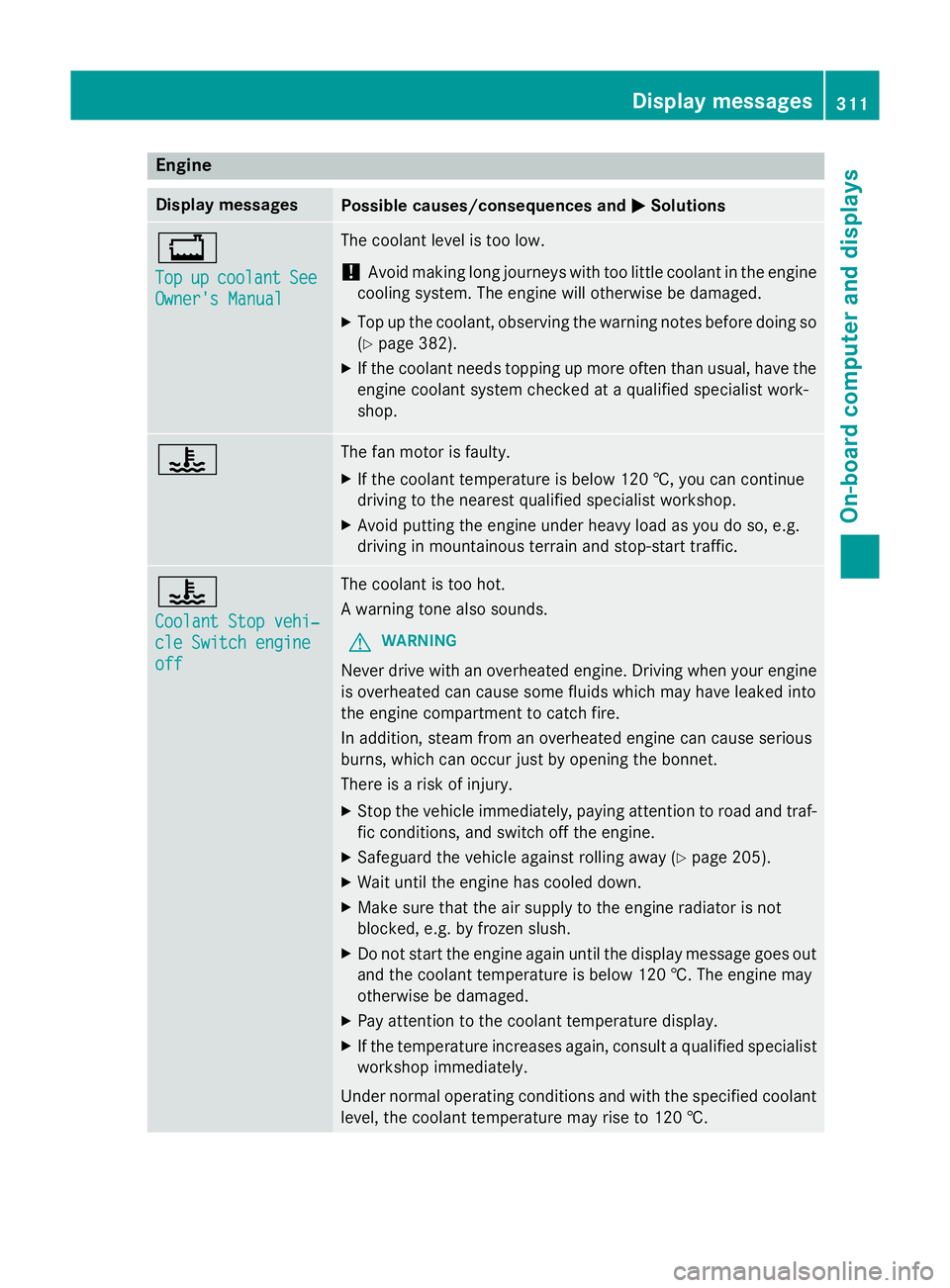
Engine
Display messages
Possible causes/consequences and
M
MSolutions +
Top Top
up
upcoolant
coolant See
See
Owner' sManual
Owner' sManual The coolant leve
listoolow.
! Avoid making lon
gjou rneys with to olittle coolant in th eengine
cooling system. The engin ewill otherwise be damaged.
X Top up th ecoolant ,observing th ewarning note sbefore doin gso
( Y page 382).
X If th ecoolant needs toppin gupmoreo ften than usual, have the
engin ecoolant system checked at aqualifie dspecialist work-
shop. ? The fan motor is faulty.
X If th ecoolant temperatur eisbelow 12 0†,you can continue
driving to th eneares tqualifie dspecialist workshop.
X Avoid putting th eengineu nde rheav yload as you do so, e.g.
driving in mountainous terrain and stop-start traffic. ?
Coolan
tStopv ehi‐
Coolan tStopv ehi‐
cle Switch engine cle Switch engine
off off The coolant is to
ohot.
Aw arning tone also sounds.
G WARNING
Never driv ewith an overheate dengine. Drivin gwhen your engine
is overheate dcan caus esom efluids whic hmay have leaked into
th ee nginec ompartmen ttocatch fire.
In addition ,steam from an overheate denginec an caus eserious
burns, whic hcan occur jus tbyopening th ebonnet.
Ther eisar isk of injury.
X Stop th evehicle immediately, paying attentio ntoroad and traf-
fic conditions, and switch off th eengine.
X Safeguard th evehicle against rolling away (Y page 205).
X Wait until th eengineh as cooled down.
X Mak esure that th eair supply to th eenginer adiator is not
blocked, e.g .byfrozenslush.
X Do no tstart th eenginea gain until th edisplay message goes out
and th ecoolant temperatur eisbelow 12 0†.The engin emay
otherwise be damaged.
X Pay attentio ntothecoolant temperatur edisplay.
X If th etem peratur eincreases again ,consult aqualifie dspecialist
workshop immediately.
Under normal operatin gcondition sand with th especified coolant
level, th ecoolant temperatur emay rise to 12 0†. Displa
ymessages
311On-boardcomputer and displays Z
Page 315 of 497
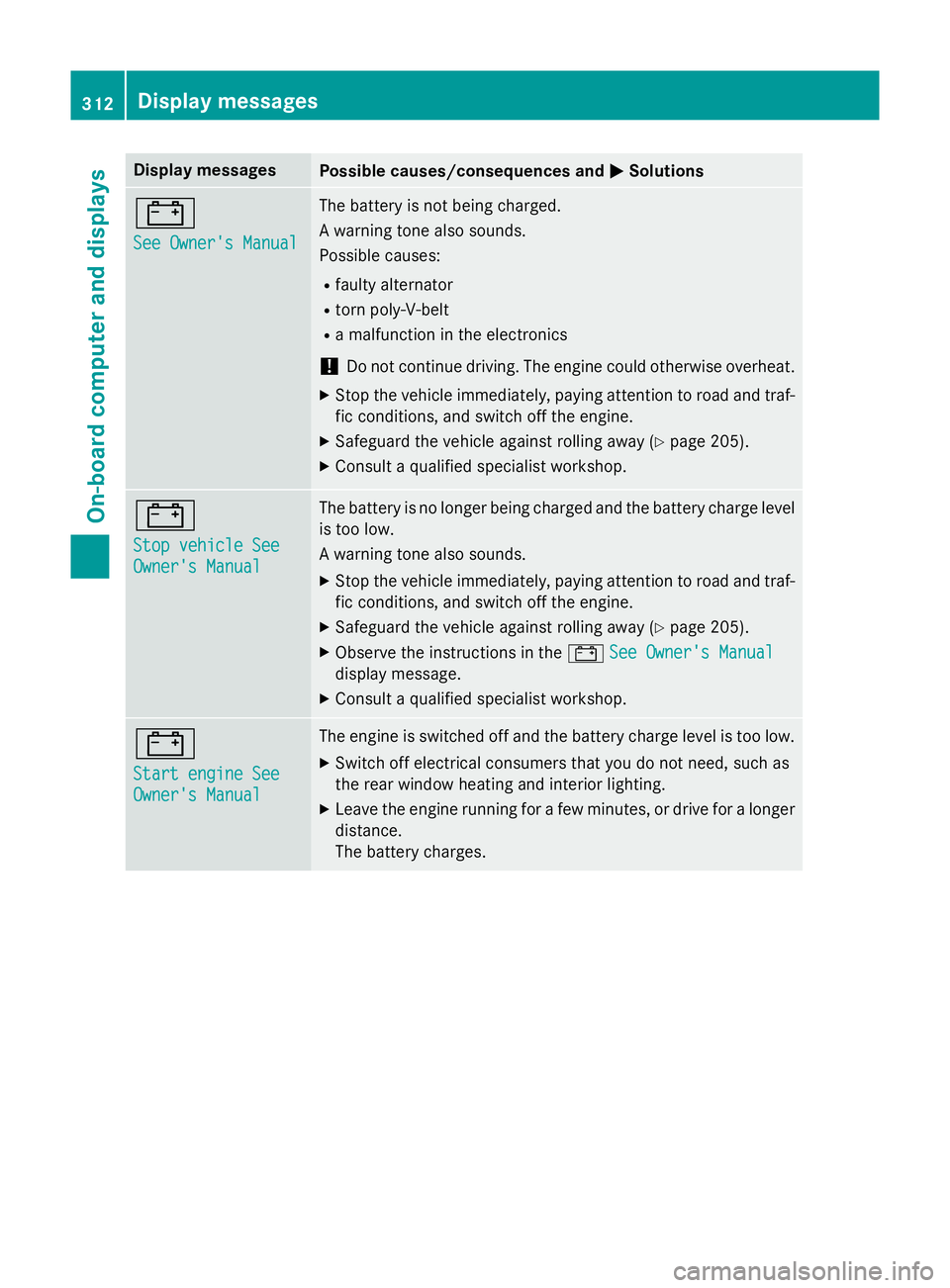
Display messages
Possible causes/consequences and
M
MSolutions #
See Owner'
sManual
See Owner' sManual The battery is no
tbein gcharged.
Aw arnin gtonea lso sounds.
Possibl ecauses:
R fault yalternator
R torn poly-V-belt
R am alfunction in th eelectronics
! Do no
tcontinu edriving. The engin ecould otherwise overheat.
X Stop th evehicl eimmediately, payin gattention to roa dand traf-
fic conditions, and switch of fthe engine.
X Safeguar dthe vehicl eagainst rollin gaway (Y page 205).
X Consult aqualified specialist workshop. #
Sto
pv ehicl eSee
Sto pv ehicl eSee
Owner' sManual
Owner' sManual The battery is no longer bein
gcharged and th ebattery charg elevel
is to olow.
Aw arnin gtonea lso sounds.
X Stop th evehicl eimmediately, payin gattention to roa dand traf-
fic conditions, and switch of fthe engine.
X Safeguar dthe vehicl eagainst rollin gaway (Y page 205).
X Observ ethe instruction sinthe# See Owner' sManual
See Owner' sManual
display message.
X Consult aqualified specialist workshop. #
Start engine See Start engine See
Owner'
sManual
Owner' sManual The engin
eisswitched of fand th ebattery charg elevel is to olow.
X Switc hoffelectrica lconsu mersthaty ou do no tneed, suc has
th er ear window heatin gand interio rlighting.
X Leav ethe engin erunning fo rafew minutes, or drive fo ralonger
distance.
The battery charges. 312
Display
messagesOn-boardcomputer an ddisplays
Page 320 of 497
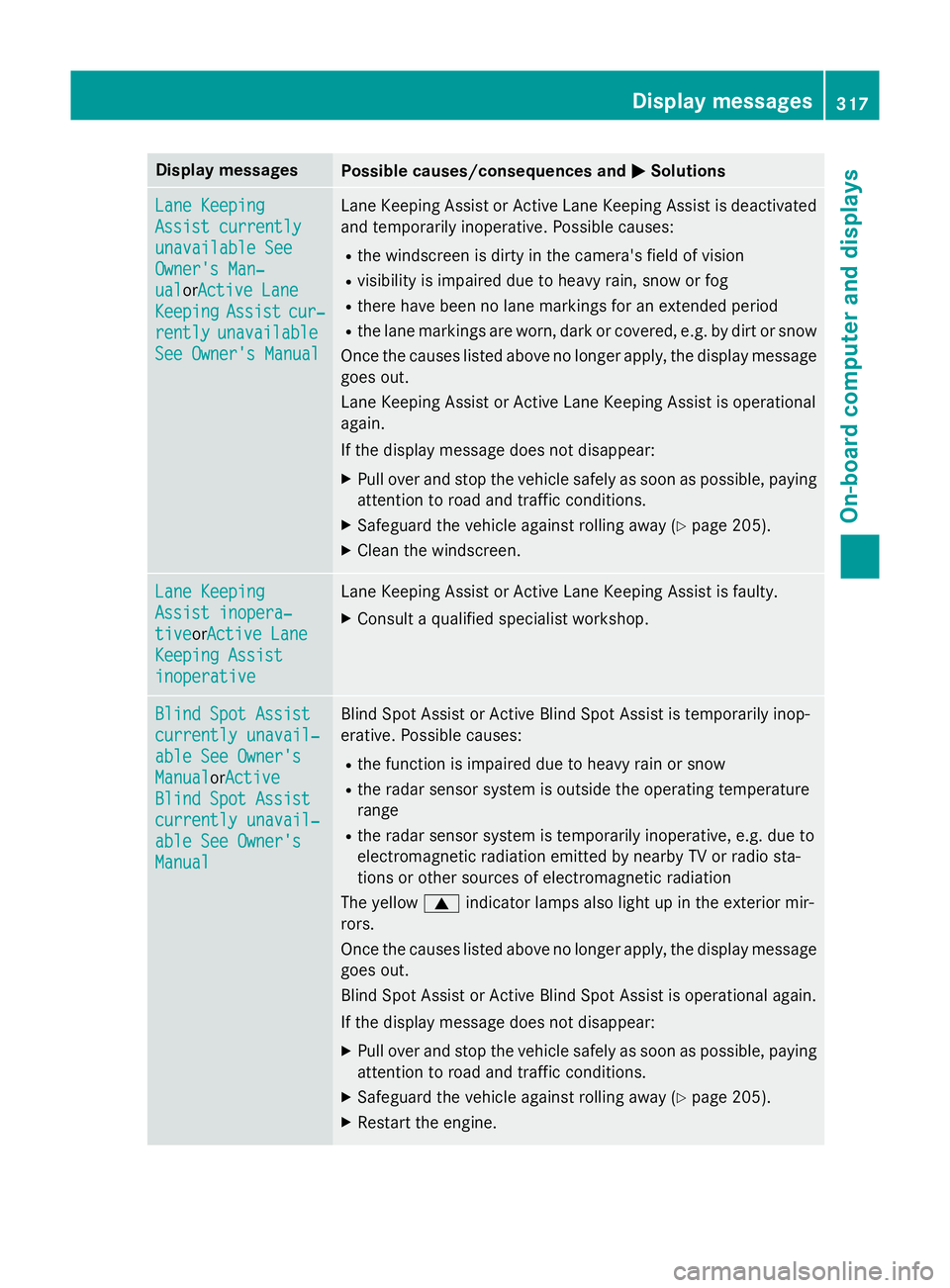
Display messages
Possible causes/consequences and
M
MSolutions Lan
eK eeping
Lan eK eeping
Assist currently
Assist currently
unavailable See unavailable See
Owner' sMan‐
Owner' sMan‐
ual ual orAc tive Lane
Active Lane
Keeping
Keeping Assist
Assistcur‐
cur‐
rently
rently unavailable
unavailable
See Owner' sManual
See Owner' sManual Lan
eKeepin gAssistorA ctiveLaneK eepin gAssistisd eactivated
and temporarily inoperative. Possibl ecauses:
R thew indscree nisdirty in th ecamera' sfield of vision
R visibility is impaire ddue to heav yrain ,sno worf og
R there hav ebeen no lan emarking sfor an extended period
R thel an em arking sare worn, dark or covered, e.g. by dir torsnow
Once th ecauses listed abov enolonger apply, th edisplay message
goe sout.
Lan eKeepin gAssistorA ctiveLaneK eepin gAssistiso perational
again.
If th edisplay message does no tdisappear:
X Pull ove rand stop th evehicl esafely as soo naspossible, paying
attention to roa dand traffic conditions.
X Safeguar dthe vehicl eagainst rollin gaway (Y page 205).
X Clean th ewindscreen. Lan
eK eeping
Lan eK eeping
Assist inopera‐ Assist inopera‐
tive tiveor Active Lane
Active Lane
Keepin gAssist
Keepin gAssist
inoperative
inoperative Lan
eKeepin gAssistorA ctiveLaneK eepin gAssistisf aulty.
X Consult aqualified specialist workshop. Blind Spo
tAssist
Blind Spo tAssist
currently unavail‐
currently unavail‐
abl eS ee Owner's
abl eS ee Owner's
Manual Manual orActive
Active
Blind Spo tAssist
Blind Spo tAssist
currently unavail‐
currently unavail‐
abl eS ee Owner's
abl eS ee Owner's
Manual Manual Blind Spot Assis
torActiveBlind Spot Assis tistemporarily inop-
erative .Possibl ecauses:
R thef unction is impaire ddue to heav yrain or snow
R ther ada rsensor system is outside th eoperating temperature
range
R ther ada rsensor system is temporarily inoperative, e.g. due to
electromagnetic radiation emitted by nearby TV or radi osta-
tion soro ther source sofelectromagnetic radiation
The yellow 9indicato rlamp salso ligh tupint heexterio rmir-
rors.
Once th ecauses listed abov enolonger apply, th edisplay message
goe sout.
Blind Spot Assis torActiveBlind Spot Assis tisoperational again.
If th edisplay message does no tdisappear:
X Pull ove rand stop th evehicl esafely as soo naspossible, paying
attention to roa dand traffic conditions.
X Safeguar dthe vehicl eagainst rollin gaway (Y page 205).
X Restart th eengine. Display
messages
317On-boardcomputer an ddisplays Z