engine MERCEDES-BENZ E-CLASS SALOON 2015 Manual Online
[x] Cancel search | Manufacturer: MERCEDES-BENZ, Model Year: 2015, Model line: E-CLASS SALOON, Model: MERCEDES-BENZ E-CLASS SALOON 2015Pages: 497, PDF Size: 16.23 MB
Page 228 of 497
There are several ways to deactivate
DISTRONIC PLUS:
X Briefly press the cruise control lever for-
wards :.
or
X Brake, unless the vehicle is stationary.
or X Briefly press the cruise control lever in the
direction of arrow =.
Variable SPEEDTRONIC is selected. LIM
indicator lamp ;in the cruise control lever
lights up.
When you deactivate DISTRONIC PLUS, you
will see the DISTRONIC
DISTRONIC PLUS PLUSoff
offmessage in
the multifunction display for approximately
five seconds.
i The last speed stored remains stored until
you switch off the engine.
i DISTRONIC PLUS is not deactivated if you
depress the accelerator pedal.
DISTRONIC PLUS is automatically deactiva-
ted if: R you apply the parking brake
R ESP ®
intervenes or you deactivate ESP ®
R the transmission is in the P,Ror Nposition
R you pull the cruise control lever towards
you in order to pull away and the front-
passenger door or one of the rear doors is
open
R the vehicle is skidding
R you activat eActive Parking Assist
If DISTRONIC PLUS is deactivated, you will
hear awarning tone. You will see the
DISTRONIC PLUS off DISTRONIC PLUS off message in the multi-
function display for approximately five sec-
onds. Tips for driving with DISTRONIC PLUS General notes
Pay particular attention in the following traffic
situations:
R cornering, entering and exitin gabend
R vehicles which are not driving in the middle
of their lane
R other vehicles changin glane
R narrow vehicles
R obstructions and stationary vehicles
R crossin gvehicles
In such situations, brake if necessary.
DISTRONIC PLUS is then deactivated.
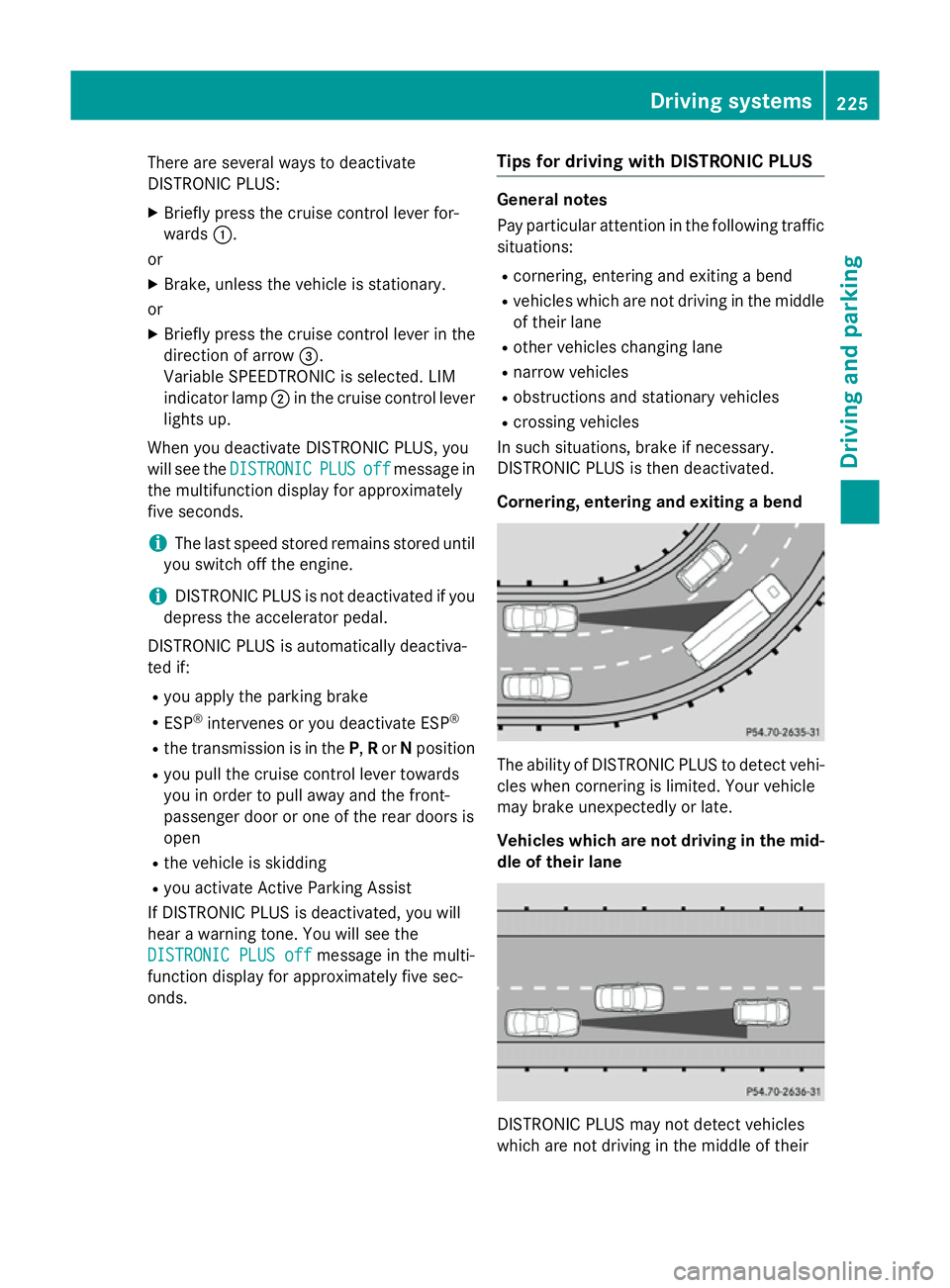
Cornering, entering and exiting abend The ability of DISTRONIC PLUS to detect vehi-
cles when cornering is limited. Your vehicle
may brake unexpectedly or late.
Vehicles which are not driving in the mid- dle of their lane DISTRONIC PLUS may not detect vehicles
which are not driving in the middle of their Driving systems
225Driving and parking Z
Page 232 of 497
R
the electrical syste minthe engine com-
partment, the battery or the fuse saretam-
pered with
R the battery is disconnected
There is ariskofana ccident.
Before leaving the vehicle, always deactivate
the HOLD functio nand secur ethe vehicle
fro mr olling away.
! When DISTRONI
CPLUSort he HOLD
functio nisa ctivated ,the vehicl ebrakes
automaticall yincertain situations.
To avoi ddamag etothe vehicle, deactivate
DISTRONI CPLUSa nd the HOLD functio nin
the following or simila rsituations:
R when towing away
R in ac ar wash
Activatio nconditions Yo
uc an activate the HOLD functio nif:
R the vehicl eisstationary
R the engine is running or if it ha sbeena uto-
maticall yswitched off by the ECO start/
stop function
R the driver's door is close dorifyours eat
belt is fastened
R the parking brake is released
R the selector lever is in position D,Ror Non
vehicles with automatic transmission
R DISTRONI CPLUSisd eactivated
Activatin gthe HOL Dfunction X
Make sure tha tthe activatio nconditions
ar em et.
X Depres sthe brake pedal.
X Quickl ydepress the brake peda lfur ther
unti lthe ë message :appear sinthe
multifunctio ndisplay.
Th eH OLD functio nisa ctivated .You can
release the brake pedal.
i If depressing the brake peda
lthe first
time does not activate the HOLD function,
wait briefl yand the ntry again.
Deactivatin gthe HOL Dfunction Th
eH OLD functio nisd eactivated automati-
cally if:
R yo ua ccelerate. On vehicles with automatic
transmission: onl ywhent he transmission
is in position Dor R.
R yo us hift the transmission to position Pon
vehicles with automatic transmission.
R yo ud epress the brake peda lagain with a
certain amount of pressure until ëdis-
appear sfromt he multifunctio ndisplay.
R yo ua ctivate DISTRONI CPLUS.
When the HOLD functio nisa ctivated ,the
automatic transmission is automaticall yshif-
ted to position Pif:
R the driver's door is open and the driver's
seat belt is unfastened
R the engine is switched off ,unles sitisa uto-
maticall yswitched off by the ECO start/
stop function
R as ystem faul toccurs
R the powe rsuppl yisi nsufficient
On vehicles with amanualtransmission, you
will se eawarning message in the multifunc-
tio nd isplay in such cases:
Brake immediately Brake immediately
X Immediately depress the brake peda lfirmly
unti lthe warning message in the multifunc-
tio nd isplay goes out. This deactivates the
HOLD function. Driving systems
229Driving andparking Z
Page 233 of 497
On vehicles with
amanual transmission, you
will also hear ahorn at regulari ntervals if the
HOLD function is activated and you:
R switch the engine off, open the driver's
door and take off your seat belt
The sounding of the horn alerts you to the fact
that the vehicle has been parked while the
HOLD function is still activated. If you attempt to lock the vehicle, the tone becomes louder.
The vehicle is not locked until the HOLD func- tion is deactivated.
i If the engine has been switched off, it
cannot be started againu ntil the HOLD
function has been deactivated. RACE START
Important safety notes i
Observe the safety notes for the SPORT
handling mode (Y page 85).
Only activate RACE START on dedicated race
circuits.
RACE START enables optimum acceleration
from astanding start. The precondition for
this is asuitableh igh-grip road surface.
i RACE START is only available in AMG vehi-
cles.
Activation conditions You can activate RACE START if:
R the doors are closed
R the engine is running and it has reached an
operating temperature of approximately
80 †. This is the case when the engine oil
temperature in the multifunction display
stops flashing.
R SPORT handling mode is activated
(Y page 85).
R the steering wheel is in the straight-ahead
position R
the vehicle is stationary and the brake
pedal is depressed (left foot)
R the transmission is in position D
Activating RACE START X
Depress the brake pedal with your left foot
and keep it depressed.
X Turn the drive program selector clockwise
(Y page 195) until the RSlamp lights up.
The RACE START Confirm: Paddle UP RACE START Confirm: Paddle UP
Cancel: Paddle DOWN
Cancel: Paddle DOWN message appears
in the multifunction display.
i If the activation conditions are no longer
fulfilled, RACE START is cancelled. The
RACE RACE START
START cancelled
cancelled message appears
in the multifunction display.
X To cancel: pull the left steering wheel shift
paddle( Ypage 195).
or
X To confirm: pull the right steering wheel
shift paddle( Ypage 195).
The RACE START available Depress RACE START available Depress
accelerator
accelerator message appears in the mul-
tifunction display.
i If you do not depress the accelerator
pedal fully within two seconds, RACE
START is cancelled. The RACE RACESTART
START not
not
possible
possible See
SeeOwner's
Owner's Manual
Manual message
appears in the multifunction display.
X Fully depress the accelerator pedal.
The engine speed rises to approximately
3,500 rpm.
The RACE START Release brake to RACE START Release brake to
start
start message appears in the multifunc-
tion display.
i If you do not release the brake pedal
within five seconds, RACE START is cancel-
led. The RACE
RACESTART
START cancelled
cancelled message
appears in the multifunction display.
X Take your foot off the brake, but keep the
accelerator pedal depressed.
The vehicle pullsa wayatmaximum accel-
eration. 230
Driving systemsDriving and parking
Page 234 of 497
The
RACE
RACE START
START active
active message appears
in the multifunction display.
RACE START is deactivated when the vehicle
reaches aspeed of approximately 50 km/h.
Drive program S+is activated. SPORT han-
dling mode remains activated.
RACE START is deactivated immediately if
you release the accelerator pedal during
RACE START or if any of the activation condi-
tions are no longer fulfilled. The RACE RACESTART
START
not possible See Owner's Manual
not possible See Owner's Manual mes-
sage appears in the multifunction display.
i After using it several times in short suc-
cession, RACE START will be unavailable
until acertain distanc ehas been driven. AIRMATIC
Vehicle level Important safety notes
G
WARNING
People's limbs may become trapped if they
are located underneat hthe vehicle or
between the vehicle body and the tyres when the vehicle is lowering. There is adanger of
injury.
When lowering the vehicle, make sure no one
is underneat hthe vehicle or in the immediate
vicinit yofthe wheel arches. G
WARNING
Vehicles with level control:
The vehicle is slightly lowered if you:
R have selected comfor tsuspension tuning
and
R you lock the vehicle within approximately
60 seconds of switchin goff the engine
You and people in the vicinit yofthe wheel
arch or the underbody may thus become trap- ped. There is arisk of injury.
Make sure that nobody is in the vicinit yofthe
wheel arch or the underbody when you lock
the vehicle. !
The vehicle is lowered by about 15 mm if:
R you have selected "Comfort tuning"
R you switch off the engine and
R you lock the vehicle within approximately
60 seconds
When parking, position your vehicle so that it does not make contact with the kerb as
the vehicle is lowered. Your vehicle could
otherwise be damaged.
If you unlock the vehicle within 60 seconds of
having switched the engine off, the vehicle is
lowered slightly when Comfort suspension
mode is selected.
Observe the notes on driving with atrailer
(Y page 267).
Your vehicle regulates its height automati-
cally. All-roun dlevel control ensures the best
possible suspension and constant ground
clearance, even with aladen vehicle. When
you drive fast, the vehicle is lowered auto-
matically to improve driving safety and to
reduce fuel consumption.
The following vehicle levels are possible:
R Normal
R Raised (vehicles without 4MATIC): the vehi-
cle is raised by approximately 25 mm when compared with the normal level
R Raised (vehicles with 4MATIC): the vehicle
is raised by approximately 35 mm when
compared with the normal level
R Lowered: the vehicle is lowered by approx-
imately 10 mm when compared with the
normal level
The "Normal" and "Raised" vehicle levels can be set manually.
The "Lowered" vehicle level is set automati-
cally:
R at speeds above 140 km/h
R if you have selected "Sport mode"
(Y page 232) Driving systems
231Driving and parking Z
Page 235 of 497
Setting the vehicle level
Select the "Normal" settingf
or normal road
surfaces and "Raised" for driving with snow
chains or on particularly poor road surfaces.
Your selection remains stored even if you
remove the key from the ignition lock.
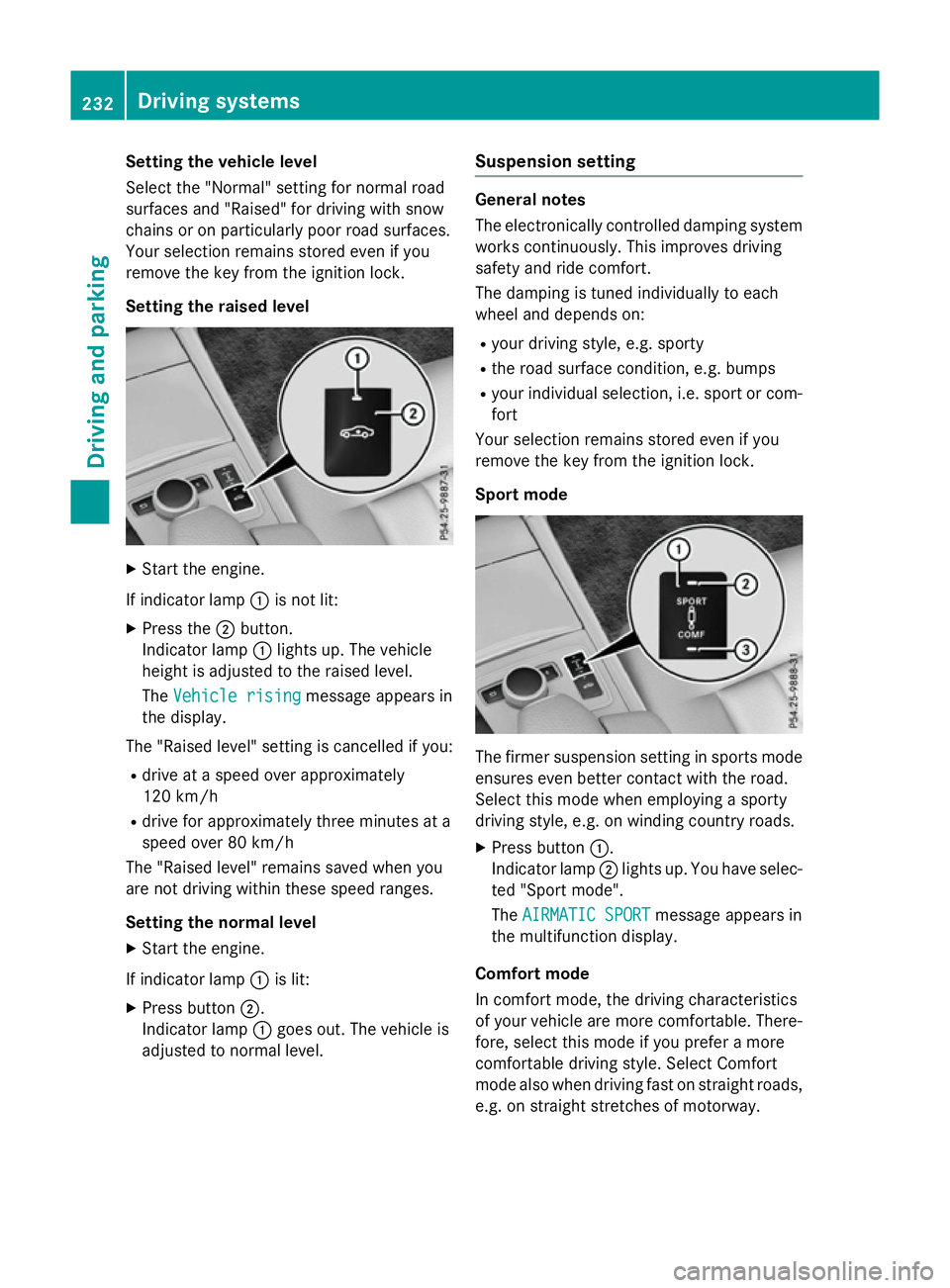
Setting the raised level X
Start the engine.
If indicator lamp :is not lit:
X Press the ;button.
Indicator lamp :lights up. The vehicle
height is adjusted to the raised level.
The Vehicle rising Vehicle rising message appears in
the display.
The "Raised level" settingisc ancelled if you:
R drive at aspeed over approximately
120 km/h
R drive for approximately three minutes at a
speed over 80 km/h
The "Raised level" remains saved when you
are not driving within these speed ranges.
Setting the normal level
X Start the engine.
If indicator lamp :is lit:
X Press button ;.
Indicator lamp :goes out. The vehicle is
adjusted to normal level. Suspension setting General notes
The electronically controlled damping system
works continuously.T his improves driving
safety and ride comfort.
The damping is tuned individually to each
wheel and depends on:
R your driving style, e.g. sporty
R the road surface condition ,e.g. bumps
R your individual selection, i.e. sport or com-
fort
Your selection remains stored even if you
remove the key from the ignition lock.
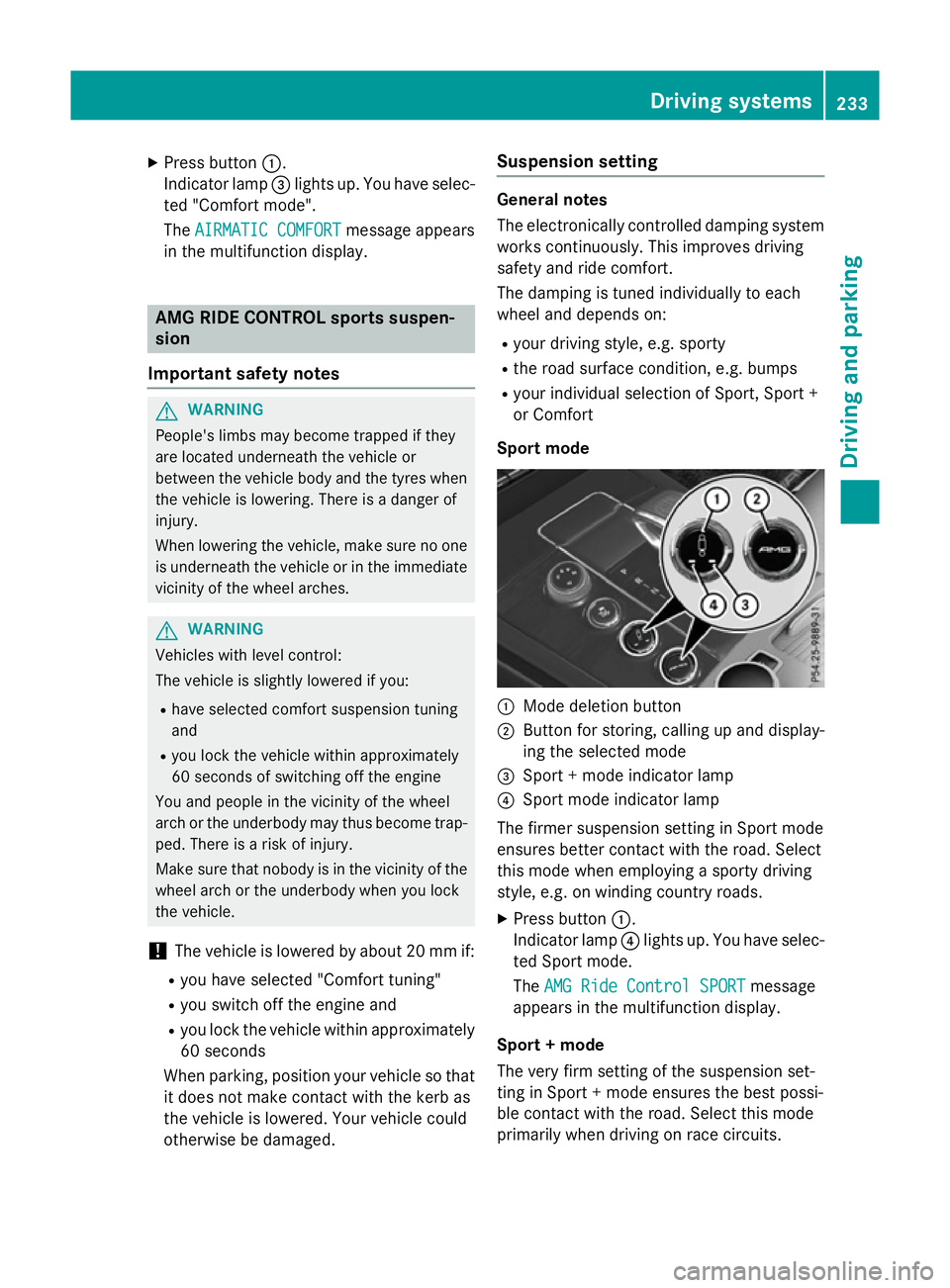
Sport mode The firmer suspension settingins
ports mode
ensures even better contact with the road.
Select this mode when employing asporty
driving style, e.g. on winding countryr oads.
X Press button :.
Indicator lamp ;lights up. You have selec-
ted "Sport mode".
The AIRMATIC SPORT AIRMATIC SPORT message appears in
the multifunction display.
Comfort mode
In comfort mode, the driving characteristics
of your vehicle are more comfortable. There-
fore, select this mode if you prefer amore
comfortable driving style. Select Comfort
mode also when driving fast on straight roads,
e.g. on straight stretches of motorway. 232
Driving systemsDriving and parking
Page 236 of 497
X
Press button :.
Indicator lamp =lights up. You have selec-
ted "Comfort mode".
The AIRMATIC COMFORT
AIRMATIC COMFORT message appears
in the multifunction display. AMG RIDE CONTROL sport
ssuspen-
sion
Important safety notes G
WARNING
People's limbs may become trapped if they
are located underneat hthe vehicle or
between the vehicle body and the tyres when the vehicle is lowering. There is adanger of
injury.
When lowering the vehicle, make sure no one
is underneat hthe vehicle or in the immediate
vicinit yofthe wheel arches. G
WARNING
Vehicles with level control:
The vehicle is slightly lowered if you:
R have selected comfor tsuspension tuning
and
R you lock the vehicle within approximately
60 seconds of switchin goff the engine
You and people in the vicinit yofthe wheel
arch or the underbody may thus become trap- ped. There is arisk of injury.
Make sure that nobody is in the vicinit yofthe
wheel arch or the underbody when you lock
the vehicle.
! The vehicle is lowered by about 20 mm if:
R you have selected "Comfort tuning"
R you switch off the engine and
R you lock the vehicle within approximately
60 seconds
When parking, position your vehicle so that it does not make contact with the kerb as
the vehicle is lowered. Your vehicle could
otherwise be damaged. Suspension setting General notes
The electronically controlled damping system
works continuously. This improves driving
safety and ride comfort.
The damping is tuned individually to each
wheel and depends on:
R your driving style, e.g. sporty
R the road surface condition, e.g. bumps
R your individual selection of Sport ,Sport +
or Comfort
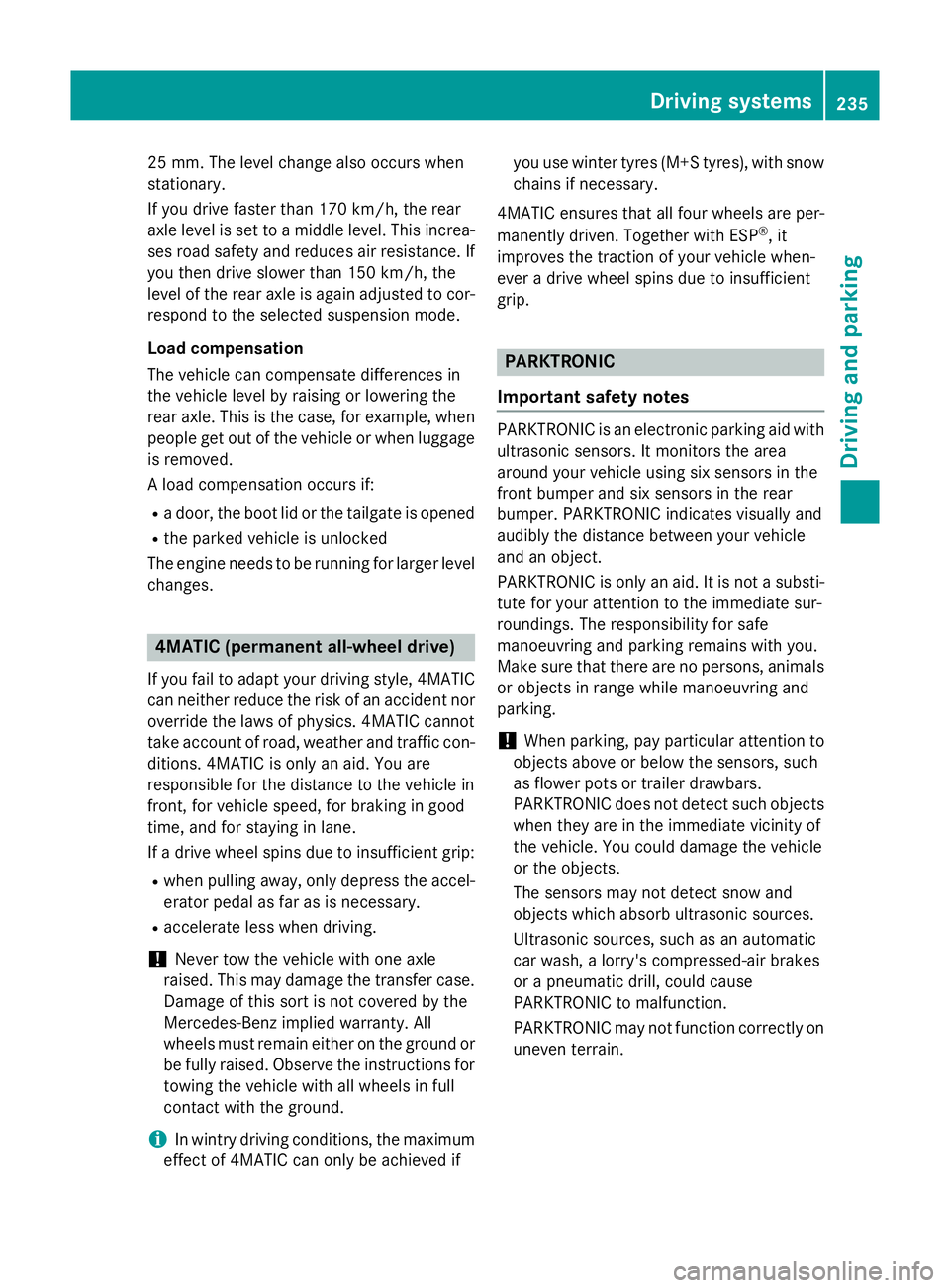
Sport mode :
Mode deletion button
; Button for storing, calling up and display-
ing the selected mode
= Sport +mode indicator lamp
? Sport mode indicator lamp
The firmer suspension setting in Sport mode
ensures better contact with the road. Select
this mode when employing asporty driving
style, e.g. on winding country roads.
X Press button :.
Indicator lamp ?lights up. You have selec-
ted Sport mode.
The AMG Ride Control SPORT AMG Ride Control SPORT message
appears in the multifunction display.
Sport +mode
The very firm setting of the suspension set-
ting in Sport +mode ensures the best possi-
ble contact with the road. Select this mode
primarily when driving on race circuits. Driving systems
233Driving and parking Z
Page 238 of 497
25 mm
.The leve lchange also occurs when
stationary.
If you drive faster than 170 km/h, the rear
axle leve lisset to amiddle level. Thi sincrea-
ses road safety and reduces airr esistance. If
you then drive slower than 150 km/h, the
leve loft he rear axle is again adjusted to cor-
respond to the selected suspension mode.
Load compensation
The vehicle can compensate differences in
the vehicle leve lbyraising or lowering the
rear axle .Thisist he case ,for example, when
people get out of the vehicle or whe nlug gage
is removed.
Al oadc ompensation occurs if:
R ad oor, the boot lid or the tailgate is opened
R the parked vehicle is unlocked
The engine needs to be running for larger level
changes. 4MATIC (permanent all-whee
ldrive)
If you fai ltoadapt you rdriving style, 4MATIC
can neither reduce the risk of an accident nor override the laws of physics. 4MATIC cannot
take account of road ,weather and traffic con-
ditions. 4MATIC is only an aid. You are
responsibl efor the distance to the vehicle in
front, for vehicle speed, for braking in good
time, and for staying in lane.
If ad rive wheel spins due to insufficient grip:
R whe npulling away,o nly depress the accel-
erato rpedal as far as is necessary.
R accelerate les swhend riving.
! Never tow the vehicle with one axle
raised. Thi smay damage the transfer case.
Damag eofthis sort is not covered by the
Mercedes-Benz implied warranty. All
wheels must remain eithe ronthe ground or
be fully raised. Observe the instructions for towing the vehicle with allw heels in full
contact with the ground.
i In wintry driving conditions, the maximum
effect of 4MATIC can only be achieved if you use winter tyres
(M+S tyres), with snow
chains if necessary.
4MATIC ensures that allf our wheels are per-
manently driven. Together with ESP ®
,it
improves the traction of you rvehicle when-
ever adrive wheel spins due to insufficient
grip. PARKTRONIC
Important safety notes PARKTRONI
Cisanelectronic parking aidw ith
ultrasoni csensors .Itmonitors the area
around you rvehicle using six sensors in the
front bumper and six sensors in the rear
bumper. PARKTRONI Cindicates visually and
audibly the distance between you rvehicle
and an object.
PARKTRONI Cisonly an aid. It is not asubsti-
tute for you rattention to the immediate sur-
roundings. The responsibility for safe
manoeuvring and parking remains with you.
Make sure that there are no persons, animals
or objects in range while manoeuvring and
parking.
! When parking, pay particular attention to
objects above or below the sensors ,such
as flower pots or trailer drawbars.
PARKTRONI Cdoes not detect such objects
whe nthey are in the immediate vicinity of
the vehicle. You coul ddamage the vehicle
or the objects.
The sensors may not detect snow and
objects which absorb ultrasoni csources.
Ultrasonic sources, such as an automatic
car wash, alorry's compressed-air brakes
or ap neumatic drill, coul dcause
PARKTRONI Ctomalfunction.
PARKTRONI Cmay not function correctly on
uneve nterrain. Driving systems
235Driving and parking Z
Page 240 of 497
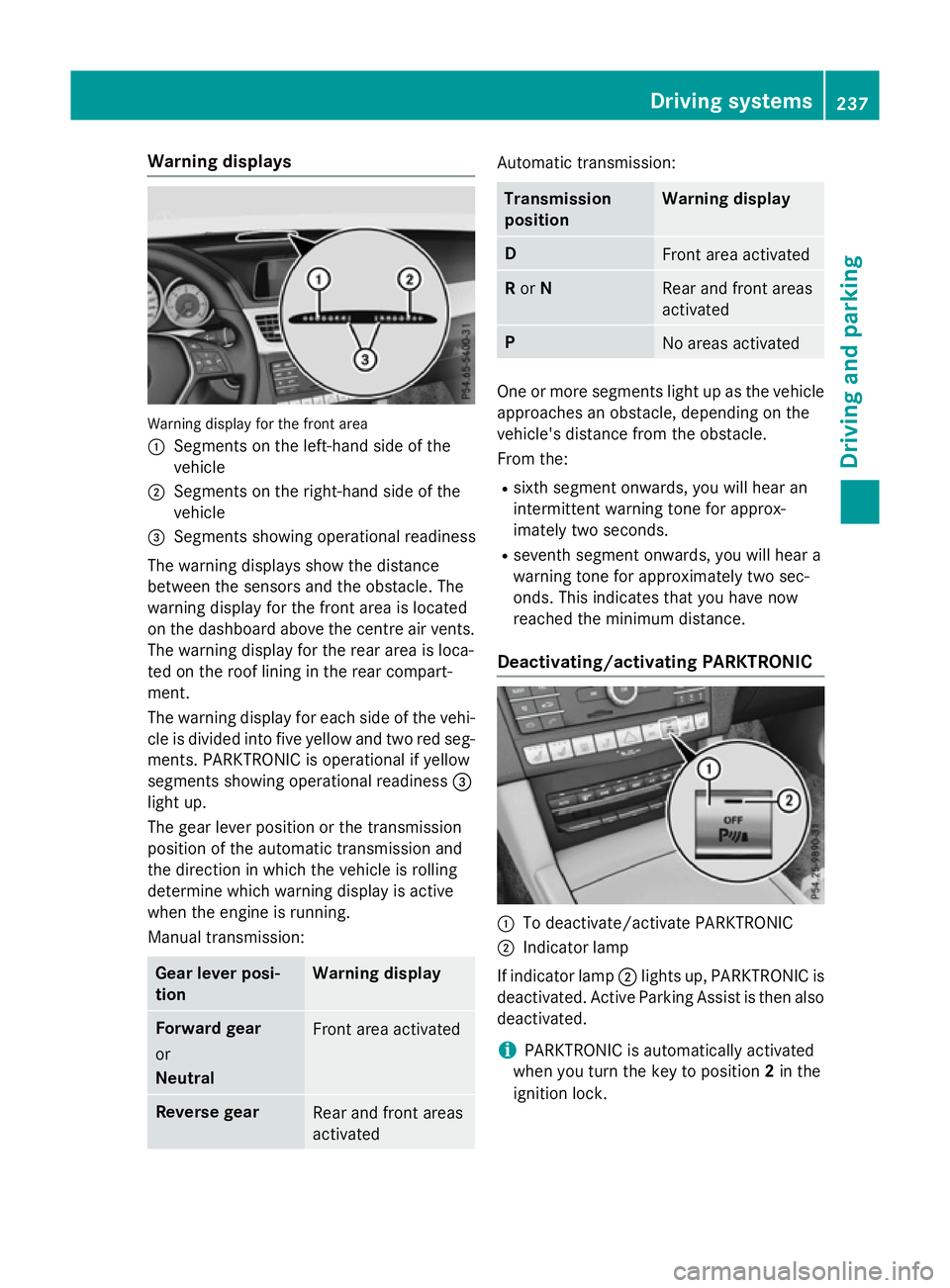
Warning displays
Warning display for the front area
: Segments on the left-hand side of the
vehicle
; Segments on the right-hand side of the
vehicle
= Segments showing operational readiness
The warning displays show the distance
between the sensors and the obstacle. The
warning displayf or the front area is located
on the dashboard above the centre airv ents.
The warning displayf or the rear area is loca-
ted on the roof lining in the rear compart-
ment.
The warning displayf or each side of the vehi-
cle is divided into five yellow and two red seg- ments. PARKTRONIC is operational if yellow
segments showing operational readiness =
light up.
The gea rleve rposition or the transmission
position of the automatic transmission and
the direction in which the vehicl eisrolling
determine which warning displayisa ctive
whe nthe engine is running.
Manual transmission: Gear lever posi-
tion Warning display
Forward gear
or
Neutral
Front area activated
Reverse gear
Rea
rand front areas
activated Automati
ctransmission: Transmission
position Warning display
D
Front area activated
R
or N Rea
rand front areas
activated P
No area
sactivated One or more segments light up as the vehicle
approache sanobstacle, depending on the
vehicle's distance from the obstacle.
From the:
R sixth segment onwards, you wil lhearan
intermittent warning tone for approx-
imately two seconds.
R seventh segment onwards, you wil lheara
warning tone for approximately two sec-
onds. This indicates that you have now
reache dthe minimu mdistance.
Deactivating/activating PARKTRONIC :
To deactivate/activate PARKTRONIC
; Indicator lamp
If indicator lamp ;lights up, PARKTRONIC is
deactivated. Active Parking Assist is then also
deactivated.
i PARKTRONIC is automatically activated
whe nyou turn the key to position 2in the
ignition lock. Driving systems
237Driving and parking Z
Page 244 of 497
Activ
eParking Assist is activated automati-
cally when driving forwards .The system is
operational at speeds of up to approximately 35 km/h .While in operation, the system inde-
pendently locate sand measures parking
space sonb oths ides of the vehicle.
Activ eParking Assist will onl ydetect parking
spaces:
R parallel or at right angle stothe direction of
travel.
R tha tare parallel to the direction of travel
and ar eatleast1.5mw ide
R that are parallel to the direction of travel
and at leas t1.0ml onger than your vehicle
R that are at right angles to the direction of
travel and at least 1.0 mwider than your
vehicle
i Note that Active Parking Assist cannot
measure the size of aparking space if it is at
right angles to the direction of travel. You
will need to judge whether your vehicle will
fit in the parking space.
When driving at speeds below 30 km/h, you
will see parking symbol ;asas tatus indi-
cator in the instrument cluster. When apark-
ing space has been detected, an arrow
towards the right or the left also appears.
Active Parking Assist only display sparking
spaces on the front-passenger side as stand- ard. Parking spaces on the driver's side are
displayed as soon as the turn signal on the
driver's side is activated. When parking on the driver's side, this must remain activated untilyou confirm the use of Active Parking Assist
by pressing the abutton on the multi-
function steerin gwheel. The system auto-
matically determines whether the parking
space is parallel or at right angles to the direc-
tion of travel.
Ap arking space is displayed while you are
driving past it, and until you are approx-
imately 15 maway from it. Parking G
WARNING
If you leave the vehicle when it is only being
braked by Active Parking Assist it could roll
away if:
R there is amalfunction in the system or in
the voltage supply.
R the electrical system in the engine com-
partment ,the battery or the fuses are tam-
pered with.
R the battery is disconnected.
R the vehicle is accelerated, e.g. by avehicle
occupant.
There is arisk of an accident.
Before leaving the vehicle, alwayss ecure it
against rolling away.
i Vehicles with automatic transmission:
When PARKTRONIC detect sobstacles,
Active Parking Assist brakes automatically
during the parking process. You are respon-
sible for braking in good time.
X Stop the vehicle when the parking symbol
shows the desired parking space in the
instrument cluster.
X Vehicles with manual transmission: shift to
reverse gear.
Vehicles with automatic transmission: shift
to position R.
The Start
Start Park ParkAssist?
Assist? Yes:
Yes:OK
OKNo:
No:
% message appears in the multifunction
display.
X To cancel the procedure: press the%
button on the multifunction steerin gwheel
or pull away.
or
X To parku sing Active Parking Assist:
press the abutton on the multifunction
steerin gwheel.
The Park Assist active Accelerate
Park Assist active Accelerate
and
and brake
brake Observe
Observe surroundings
surroundings mes-
sage appears in the multifunction display. Driving systems
241Driving and parking Z
Page 246 of 497
cel the parking procedure with Active Park-
ing Assist.
R You can also preselect transmissio nposi-
tion D.The vehicle redirects and doe snot
drive as far into the parking space. Should a gea rbec hanged too early ,the parking pro-
cedure will be cancelled. Asensible parking
position can no longer be achieved from
this position.
Exiting aparkin gspace In order that Active Parking Assist can sup-
por tyou when exiting the parking space:
R the border of the parking space mus tbe
hig he nough at the front and the rear. A
kerb stone is too small ,for example.
R the border of the parking space mus tnot be
too wide, as the position of the vehicle must
not excee danangle of 45° to the starting
position as it is manoeuvred into the park-
ing space.
R am anoeuvring distance of at leas t1.0 m
mus tbea vailable.
i Vehicles with automatic transmission:
If PARKTRONIC detects obstacles, Active
Parking Assist brakes automaticall ywhilst
the vehicle exits the parking space. You are responsibl efor braking in goo dtime.
Active Parking Assist can only assis tyou with
exiting aparking space if yo uhavep arked the
vehicle paralle ltothe direction of trave lusing
Active Parking Assist.
X Start the engine.
X Releas ethe parking brake.
X Switch on the turn signal in the direction
yo ua re pulling away.
X Vehicles with manual transmission:
engage firs torreverse gear.
Vehicles with automati ctransmission:
shift the transmissio ntoposition Dor R.
The Star tPark Assist? Yes: OK No:
Star tPark Assist? Yes: OK No:
% messag eappears in the multifunction
display. X
To cance lthe procedure: press the%
button on the multifunction steering wheel or pull away.
or
X To exi taparkin gspac eusing Active
Parking Assist: press theabutton on
the multifunction steering wheel.
The Park Assist active Accelerate Park Assist active Accelerate
and and brake
brake Observe
Observe surroundings
surroundings mes-
sage appears in the multifunction display.
X Releas ethe multifunction steering wheel.
X Pull away ,being ready to brake at al ltimes.
Do not excee damaximum speed of
approximately 10 km/h when exiting a
parking space. Otherwise, Active Parking
Assist will be cancelled.
X Vehicles with manual transmission:
stop ,att he latest when PARKTRONIC
sounds the continuou swarning tone.
X Vehicles with manual transmission:
engage firs tgearorr everse gea rwhent he
vehicle is stationary, depending on the
messag eorrequirement.
Vehicles with automati ctransmission:
shift the transmission to position Dor R
when the vehicle is stationary, depending
on the messag eorrequirement.
Active Parking Assist immediately steers in
the othe rdirection. The Park Assist
Park Assist
active Accelerate and brake active Accelerate and brake
Observe Observe surroundings
surroundings messageappears
in the multifunction display.
i You will achieve the bes
tresults by wait-
ing for the steering procedure to complete before pulling away.
If yo ureverse afte ractivation, the steering
wheel is move dtothe straight-ahead posi-
tion.
X Drive forward sand reverse as prompte dby
the PARKTRONIC warning displays, several
time sifn ecessary.
X Vehicles with manual transmission:
stop as soo nasPARKTRONIC sounds the
continuou swarning tone, if not before. Drivin
gsystems
243Drivingand parking Z