engine MERCEDES-BENZ E-CLASS SALOON 2015 Manual PDF
[x] Cancel search | Manufacturer: MERCEDES-BENZ, Model Year: 2015, Model line: E-CLASS SALOON, Model: MERCEDES-BENZ E-CLASS SALOON 2015Pages: 497, PDF Size: 16.23 MB
Page 212 of 497
Brakes
Important safety notes G
WARNING
If yo ushift down on aslipper yroads urface in
an attempt to increas ethe engine's braking
effect, the drive wheels could lose thei rgrip.
Thi sincreases the ris kofskidding and having
an accident.
Do not shift down for additional engine brak-
ing on aslipper yroads urface.
Downhil lgradients Do not depress the brake peda
lcontinuously
whil ethe vehicl eisinmotion, e.g .never
cause the brakes to ru bbyconstantly apply-
ing light pressure to the pedal. Thi sresults in
excessive and premature wear to the brake
pads.
Chang einto alower gearing oodtime on long
and stee pdownhil lgradients.
Take particula rnote of thi swhend riving a
lade nvehicl eand when towing atrailer.
i Thi
salsoa pplies if youhavea ctivated
cruis econtrol, SPEEDTRONIC or
DISTRONIC PLUS.
Thi sw illu se the braking effect of the engine,
so less braking will be required to maintain
vehicl espeed .Thisr elieves the load on the
brake system and prevents the brakes from
overheating and wearing too quickly.
Heavy and light loads G
WARNING
The braking system can overheat if yo ulea ve
your foo tonthe brake peda lwhile driving.
Thi sincreases the braking distance and could
eve ncause the braking system to fail. There is
ar iskofana ccident.
Never us ethe brake peda lasafootrest. Do
not simultaneousl ydepress both the brake
peda land the accelerato rpedal whiledriving. !
Depressing the brake peda
lconstantly
results in excessive and premature wear to
the brake pads.
If the brakes have been subjected to aheavy
load ,don ot stop the vehicl eimmediately, but
drive on for ashort while. Thi sallow sthe air-
flo wtoc ool the brakes more quickly.
If the brakes have been used onl ymoderately,
yo us houl doccasionall ytest thei reffective-
ness .Todot his, brake more firmly from a
highe rspeed whil epayin gattentio ntothe
traffic conditions. Thi simprove sthe gri pof
the brakes.
Wet road surfaces If yo
uhaved riven for alon gtime in heavy rain
withou tbraking ,ther em aybe adelayed reac-
tio nfrom the brakes when braking for the first
time .Thism ayalso occu rafte rac ar wash or
afte rdriving throug hdeepw ater.
Yo uw illh av etod epress the brake peda lmore
firmly .Maintain agreate rdistance to the vehi-
cle in front.
After driving on awetroa dorh aving the vehi-
cle washed, brake firmly whil epayin gatten-
tio ntot he traffic conditions. Thi swillw armup
the brake discs, thereb ydrying them more
quickl yand protecting them against corro-
sion.
Limite dbraking performanc eonsalt-
treate droads If yo
udrive on salt-treate droads, alayer of
salt ma yform on the brake discs and pads.
Thi scan increas ethe braking distance con-
siderably.
R In order to prevent any salt build-up, apply
the brakes occasionall ywhile paying atten-
tio ntot he traffic conditions.
R Carefull ydepress the brake peda latthe
end of the journey and when starting the
next journey.
R Maintain amuchg reate rdistance to the
vehicl einfront. Driving tips
209Driving andparking Z
Page 213 of 497
New brak
epads/linings Brake pads/lining
sand discs tha tare either
new or have been replaced onl yachieve opti-
mu mb raking effect after several hundred kil-
ometres of driving. Compensate for the
reduced braking effect by applying greater
force to the brake pedal.
For safety reasons, Mercedes-Benz recom-
mend stha tyou onl yhaveb rake pads/linings
fitted to your vehicl ewhich have been
approved for Mercedes-Benz vehicles or
which correspond to an equivalent quality
standard. Brake pads/lining swhich have not
been approved for Mercedes-Benz vehicles or
which ar enot of an equivalent quality could
affec tyou rv ehicle' soperating safety.
AM Gh igh-performanc eand ceramic
brakes Th
eh igh- performance brake syste misonly
availabl eonAMG vehicles.
Th eA MG brake systems ar edesig nedf or
heav yloads .Thism aylead to noise when
braking .Thisisd ependent on:
R speed
R braking force
R environmenta lconditions ,suc hast emper-
ature and humidity
Th ew earofi ndividua lcomponents of the
brake system, such as the brake pads/linings
or brake discs ,depen ds on the individua ldriv-
ing style and operating conditions.
For thi sreason, it is impossibl etostate a
mileag e(service life) tha twillbev alidunder
al lc ircumstances .Anaggressive driving style
will lead to high wear .You can obtai nfurther
information abou tthisf romy ourM ercedes-
Benz Service Centre.
Brake pads/lining sand discs tha tare either
new or have been replaced onl yachieve opti-
mu mb raking effect after several hundred kil-
ometres of driving. Compensate for the
reduced braking effect by applying greater
force to the brake pedal. Alway sbeawareofthi
sa nd adap tyou rd riving and braking
accordingly during the running-in period.
Excessive heav ybraking results in corre-
spondingly high brake wear .Obser ve the
brake wear warning lamp in the instrument
cluste rand note any brake status messages
in the multifunctio ndisplay .Ifyouregularly
drive at high speeds ,itisparticularl yimpor-
tant to have the brake syste mchecked and
maintaine dregularly. Driving on we
troads
Aquaplaning If water ha
saccumulate dtoacertaindepth
on the roa dsurface, there is adangerofa qua-
planing occurring, eve nif:
R yo ua redriving at lo wspeeds
R the tyres have adequate trea ddepth
For thi sreason, drive in the following manner
in the event of heav yrainorinc onditions in
which aquaplaning can occur:
R lowe ryours peed
R avoi dtyrer uts
R avoi dsudde nsteering movements
R brake carefully
Driving on flooded roads !
Bea
rinm indt hatv ehicles travelling in
front or in the opposite directio ncreate
waves .Thism aycause the maximum per-
missibl ewater depth to be exceeded.
Thes enote sm ustbeo bservedu nder all
circumstances .You could otherwis edam-
ag et he engine ,the electronics or the trans-
mission. 210
Driving
tipsDriving an dparking
Page 214 of 497
If you must drive on stretches of road on
which water has collected, please bear in
mind that:
R in the case of standing water, the water
level must be no highert han the loweredge
of the vehicle body
R you shouldd rive no faster than walking
pace Winter driving
G
WARNING
If you shift down on aslippery road surface in
an attempt to increase the engine's braking
effect, the drive wheels could lose their grip.
This increases the risk of skidding and having
an accident.
Do not shift down for additional engine brak-
ing on aslippery road surface. G
DANGER
If the exhaust pipe is blocked or adequate
ventilation is not possible, poisonous gases
such as carbon monoxide (CO) may enter the vehicle .This is the case, e.g. if the vehicle
becomes trapped in snow. There is arisk of
fatal injury.
If you leave the engine or the auxiliary heating
running, make sure the exhaust pipe and area
around the vehicle are clear of snow. To
ensure an adequate supply of fresh air, open a window on the side of the vehicle that is not
facing into the wind.
Have yourv ehicle winterproofe dataqualified
specialist workshop at the onset of winter.
You shouldd rive particularly carefully on slip-
pery road surfaces .Avoid sudden accelera-
tion, steering and braking manoeuvres. If the vehicle threatens to skid or cannot be
stopped when moving at low speed:
X Vehicles with manual transmission:
shift to neutral.
X Vehicles with automatic transmission:
shift the transmission to position N.
X Try to bring the vehicle under control by
using corrective steering.
The outsid etemperature indicator is not
designed to serve as an ice-warning device
and is therefore unsuitable for that purpose.
Changes in the outsid etemperature are dis-
played after ashort delay.
Indicated temperature sjust above the freez-
ing point do not guarantee that the road sur-
face is free of ice. The road may still be icy,
especially in wooded areasoronb ridges. The
vehicle could skid if you fail to adapt your
driving style. Alwaysa dapt yourdriving style
and drive at aspeed to suit the prevailing
weather conditions.
You shouldp ay specialattention to road con-
ditions when temperature sare around freez-
ing point.
Further information on driving with snow
chains (Y page 419).
Further information on driving with summer
tyres (Y page 418).
Observe the notes in the "Winter operation"
section (Y page 418). Driving systems
Mercedes-Benz Intelligent Drive
Mercedes-Benz Intelligent Drive stands for
innovative driver assistance and safety sys-
tems which enhance comfort and support the driver in critical situations. With these intelli-
gent co-ordinated systems Mercedes-Benz
has set amilestone on the path towards
autonomou sdriving.
Mercedes-Benz Intelligent Drive embraces all
elements of active and passive safety in one
wellt hought-out system –for the safety of the Driving systems
211Driving and parking Z
Page 215 of 497
vehicl
eoccupants and that of other road
users.
Further information on driving safety systems (Y page7 7). Cruise control
General notes Cruise control maintains
aconstant road
spee dfor you.Itb rakes automatically in order
to avoi dexceeding the set speed. You must
select alow gearing ood time on long and
steep downhill gradients, especially if the
vehicl eisladen or towing atrailer. By doing
so, you willm ake use of the braking effect of
the engine. This relieves the loadont he brake
system and prevents the brakes from over-
heating and wearing too quickly.
Use cruise control only if road and traffic con- ditions are appropriate for maintaining a
stead yspee dfor ap rolonged period. You can
store any road spee dabove 30 km/h.
Important safety notes If you fail to adapt yourd
riving style,cruise
control can neither reduce the risk of an acci-
dent nor overrid ethe lawsofp hysics. Cruise
control cannot take into account road,
weather or traffic conditions. Cruise control is only an aid.Y ou are responsibl efor the dis-
tance to the vehicl einfront, for vehicl espeed,
for braking in good time, and for staying in the lane.
Do not use cruise control:
R in road and traffic conditions which do not
allow you to maintai naconstant speed
(e.g. in heavy traffic or on winding roads)
R on smooth or slippery roads. Braking or
accelerating can caus ethe drive wheels to
lose traction and the vehicl ecouldt hen
skid
R when there is poor visibility, e.g. due to fog,
heavy rain or snow If there is
achange of drivers, advise the new
drive rofthe spee dstored.
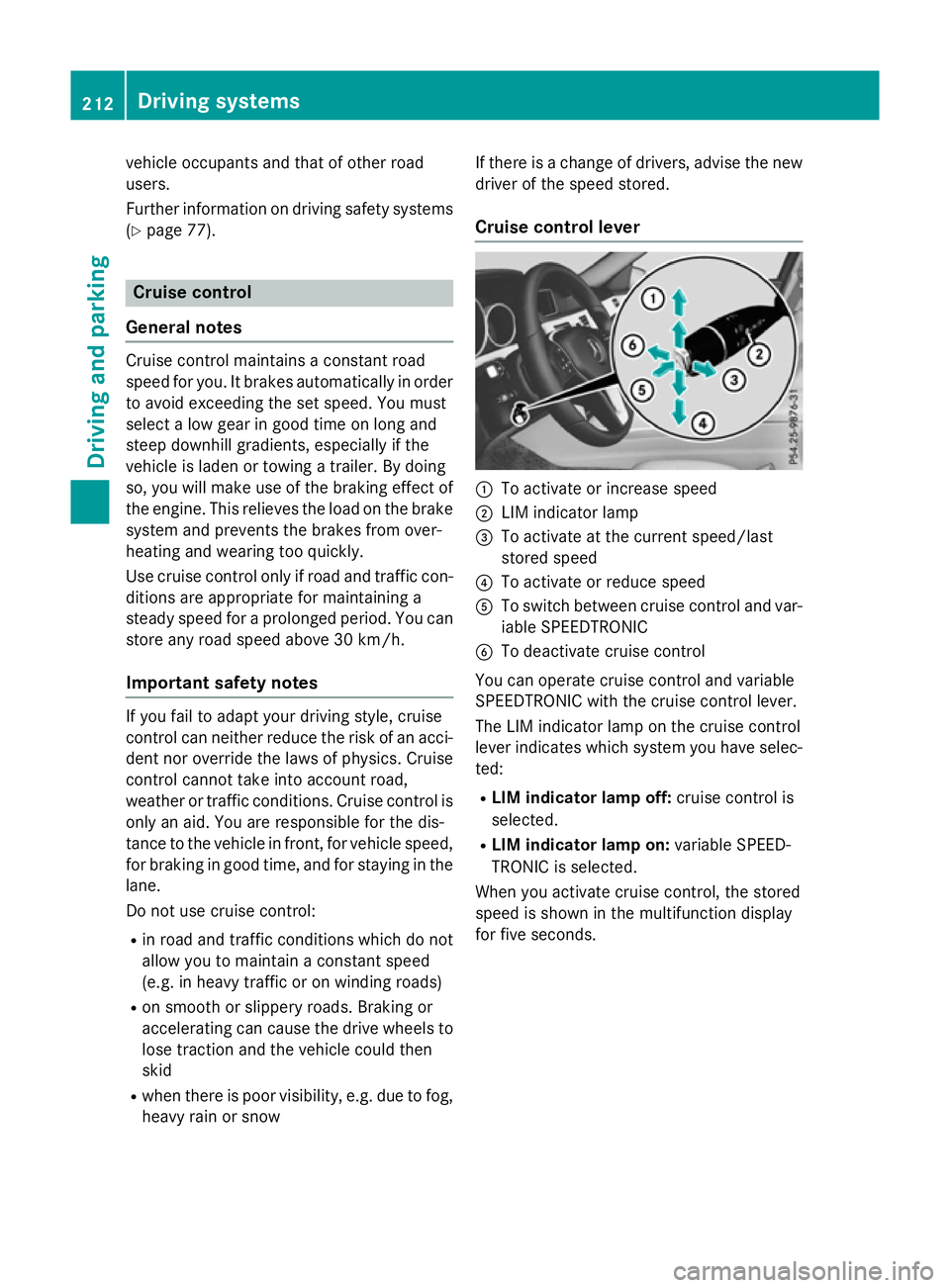
Cruise control lever :
To activate or increase speed
; LIM indicator lamp
= To activate at the current speed/last
stored speed
? To activate or reduce speed
A To switch between cruise control and var-
iable SPEEDTRONIC
B To deactivate cruise control
You can operate cruise control and variable
SPEEDTRONIC with the cruise control lever.
The LIM indicator lamp on the cruise control
leve rindicates which system you have selec-
ted:
R LIMi ndicator lamp off: cruise control is
selected.
R LIMi ndicator lamp on: variable SPEED-
TRONIC is selected.
When you activate cruise control, the stored
spee diss hownint he multifunction display
for five seconds. 212
Driving systemsDriving and parking
Page 216 of 497
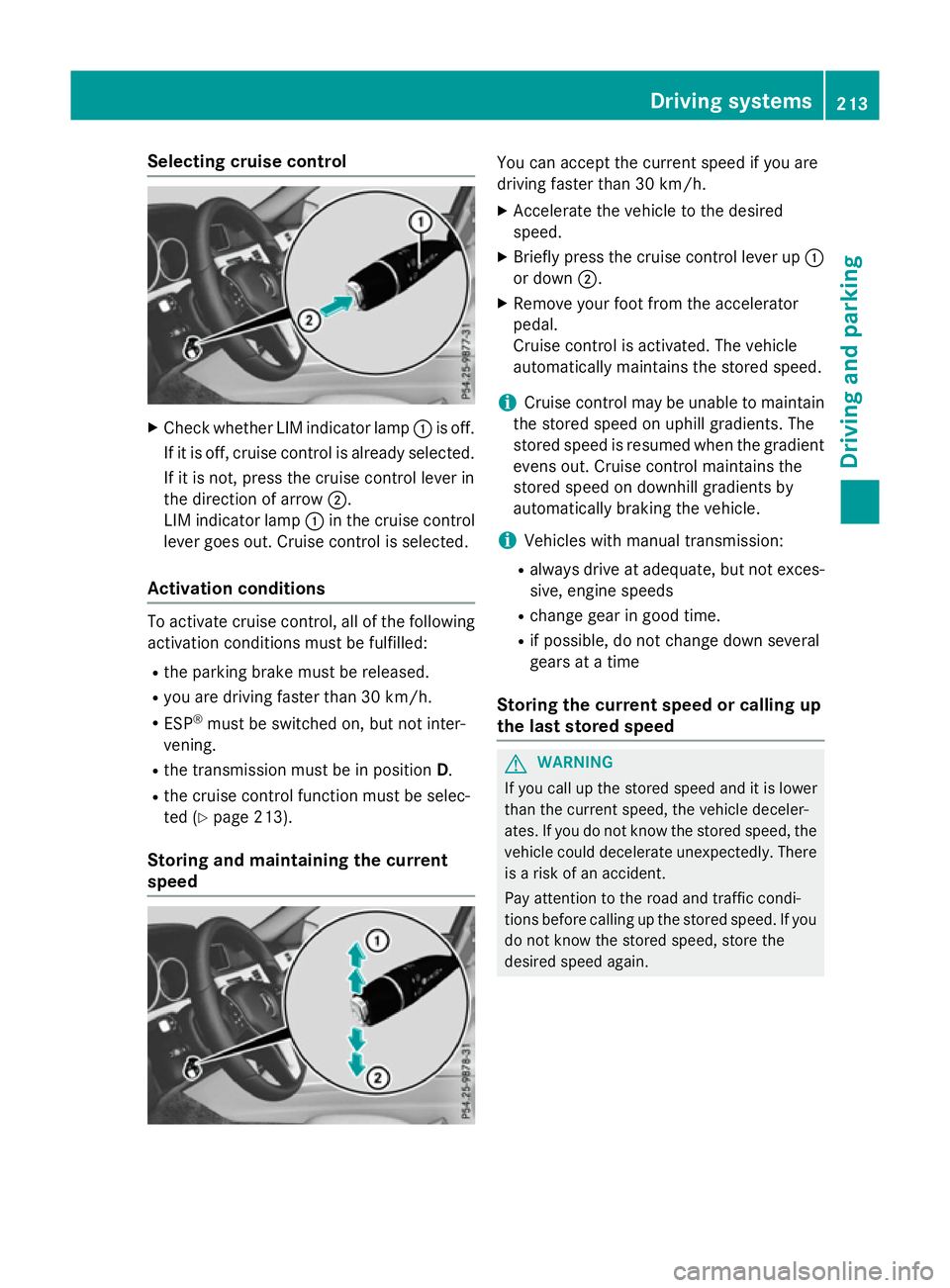
Selecting cruise control
X
Check whether LIM indicator lamp :is off.
If it is off, cruise control is already selected. If it is not, press the cruise control lever in
the direction of arrow ;.
LIM indicator lamp :in the cruise control
lever goes out. Cruise control is selected.
Activation conditions To activate cruise control, all of the following
activation condition smust be fulfilled:
R the parking brake must be released.
R you are driving faster than 30 km/h.
R ESP ®
must be switched on, but not inter-
vening.
R the transmission must be in position D.
R the cruise control function must be selec-
ted (Y page 213).
Storing and maintaining the current
speed You can accept the current speed if you are
driving faster than 30 km/h.
X Accelerate the vehicl etothe desired
speed.
X Briefl ypress the cruis econtro llev er up :
or down ;.
X Remov eyourfoo tfromt he accelerator
pedal.
Cruise contro lisactivated .The vehicle
automaticall ymaintains the stored speed.
i Cruise contro
lmaybe unabl etomaintain
the stored spee donuphillgradients. The
stored spee disresumed when the gradient
evens out. Cruise contro lmaintains the
stored spee dondownhil lgradients by
automaticall ybraking the vehicle.
i Vehicles with manua ltransmission:
R always drive at adequate, bu tnot exces-
sive, engine speeds
R change gear in goo dtime.
R if possible, do not change down several
gear satat ime
Storin gthe curren tspeed or callin gup
the las tstored speed G
WARNING
If yo ucallupt he stored speed and it is lower
tha nthe current speed ,the vehicl edeceler-
ates. If yo udonot know the stored speed ,the
vehicl ecould decelerate unexpectedly .There
is ar iskofana ccident.
Pa ya ttentio ntothe roa dand traffi ccondi-
tions befor ecalling up the stored speed .Ifyou
do not know the stored speed ,stor ethe
desired speed again. Dr
ivin gsystems
213Driving an dparking Z
Page 218 of 497
R
on vehicles with manual transmission, you
shift to agear that is too high, and as a
result the engine speed is too low
R on vehicles with automatic transmission,
you shift to position Nwhile driving
If cruise control is deactivated, you will hear a warning tone. You will see the Cruise con‐
Cruise con‐
trol off
trol off message in the multifunction dis-
play for approximately five seconds.
i The last speed stored is cleared when you
switch off the engine. SPEEDTRONIC
Important safety notes SPEEDTRONIC brakes automatically so that
you do not exceed the set speed. Change into
al ower gear in good time on long and steep
downhill gradients. Take particular noteof
this when driving aladen vehicle. By doing so,
you will make use of the braking effect of the engine. This relieves the load on the brake
system and prevent sthe brakes from over-
heating and wearing too quickly. If you need
additional braking, depress the brake pedal
repeatedly rather than continuously.
If you fail to adapt your driving style, SPEED-
TRONIC can neither reduce the risk of an
accident nor override the laws of physics.
SPEEDTRONIC cannot take into account
road, weather or traffic conditions. SPEED-
TRONIC is only an aid. You are responsible for
the distance to the vehicle in front,f or vehicle
speed, for braking in good time, and for stay- ing in lane.
If there is achange of drivers, advise the new
driver of the speed stored.
You can set avariable or permanent limit
speed:
R variable for speed limits, e.g. in built-up
areas
R permanent for long-term speed restric-
tions, e.g. when driving with winter tyres
fitted i
The speed indicated in the speedometer
may differ slightly from the limit speed
stored.
Variable SPEEDTRONIC General notes
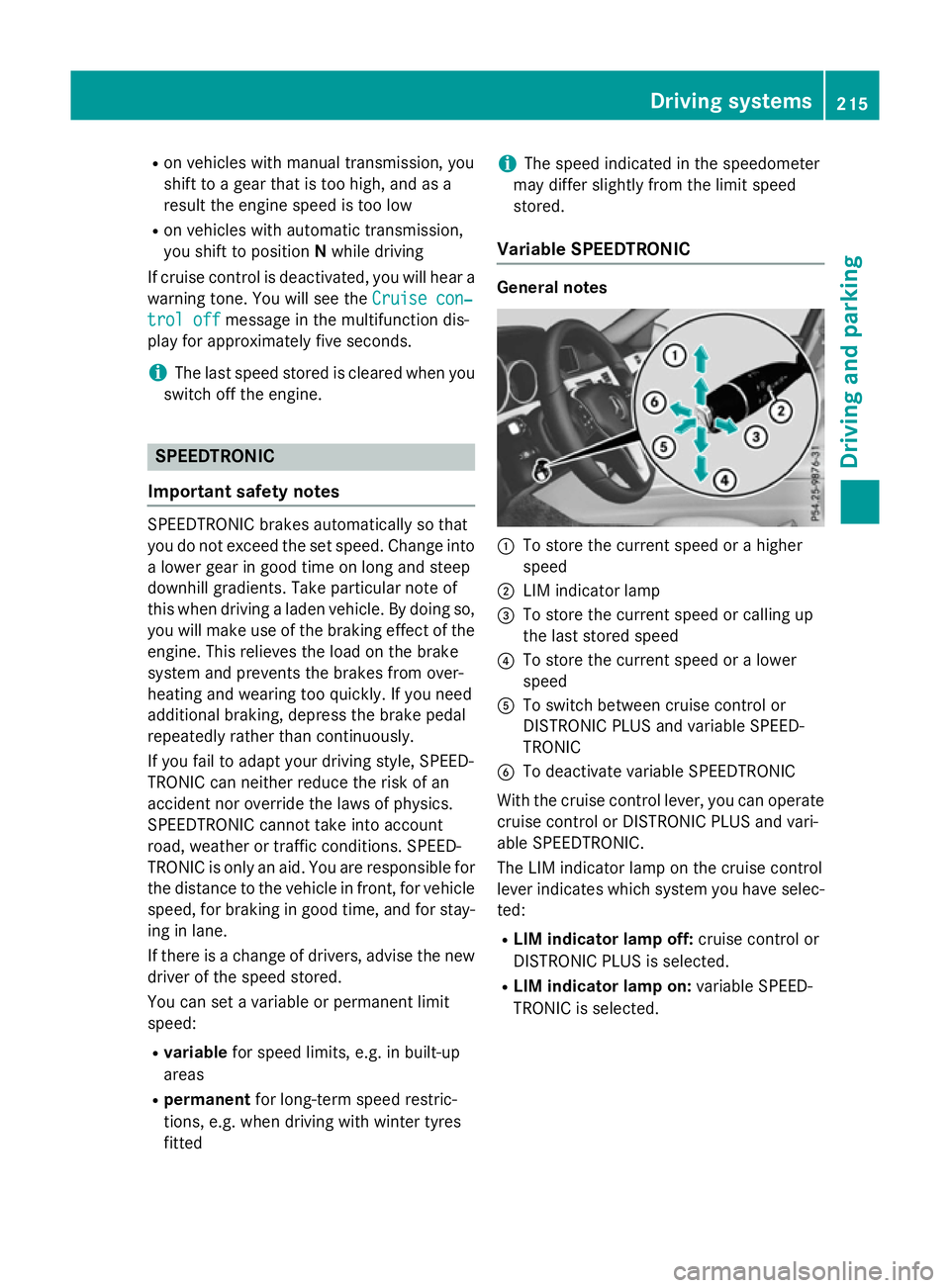
:
To store the current speed or ahigher
speed
; LIM indicator lamp
= To store the current speed or calling up
the last stored speed
? To store the current speed or alower
speed
A To switch between cruise control or
DISTRONIC PLUS and variable SPEED-
TRONIC
B To deactivate variable SPEEDTRONIC
With the cruise control lever, you can operate
cruise control or DISTRONIC PLUS and vari-
able SPEEDTRONIC.
The LIM indicator lamp on the cruise control
lever indicates which system you have selec- ted:
R LIM indicator lamp off: cruise control or
DISTRONIC PLUS is selected.
R LIM indicator lamp on: variable SPEED-
TRONIC is selected. Driving systems
215Driving and parking Z
Page 219 of 497
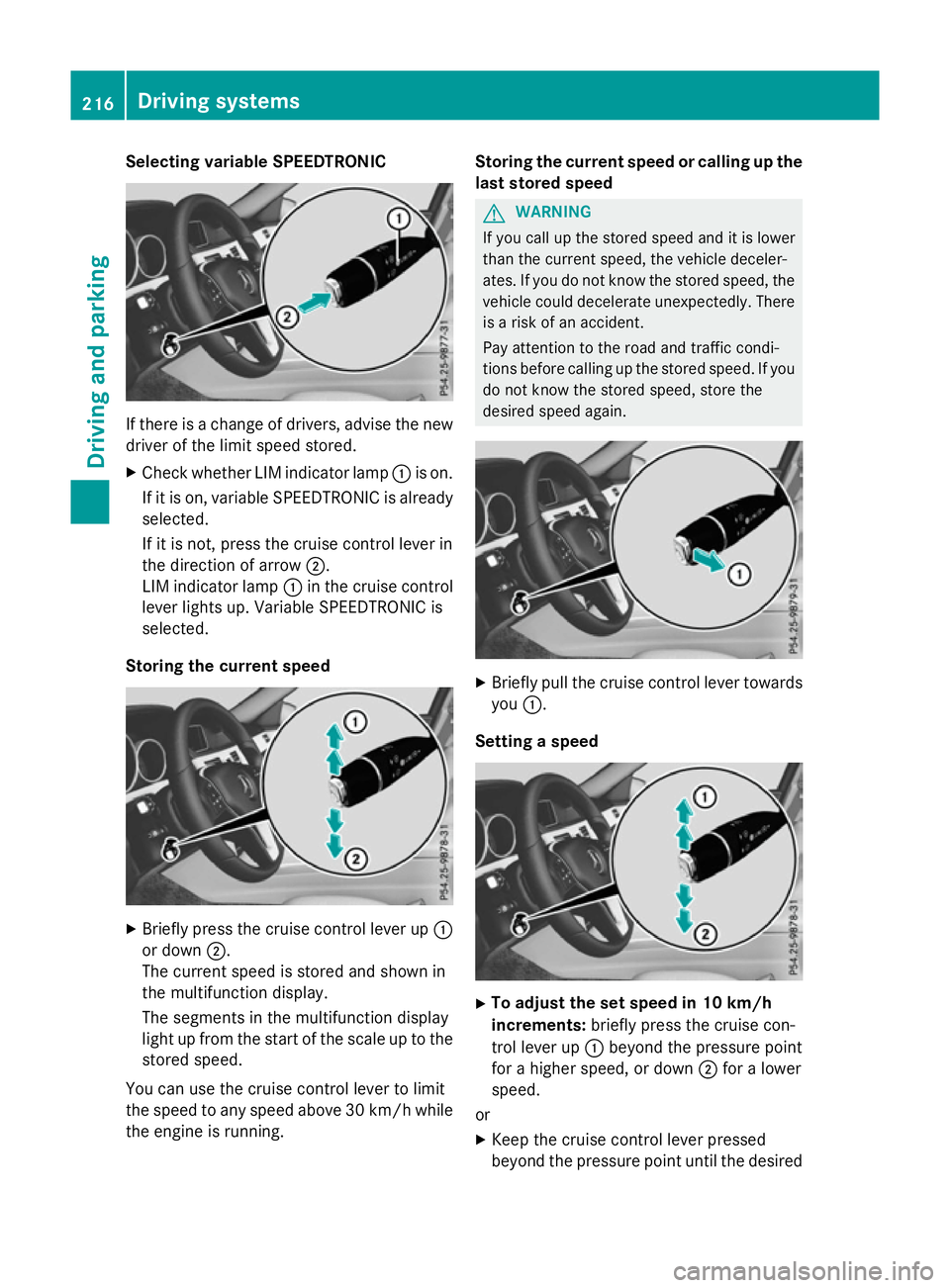
Selecting variable SPEEDTRONIC
If there is
achange of drivers, advise the new
driver of the limit speed stored.
X Check whether LIM indicator lamp :is on.
If it is on, variable SPEEDTRONIC is already
selected.
If it is not, press the cruise control lever in
the direction of arrow ;.
LIM indicator lamp :in the cruise control
lever lights up. Variable SPEEDTRONIC is
selected.
Storing the current speed X
Briefly press the cruise control lever up :
or down ;.
The current speed is stored and shown in
the multifunction display.
The segments in the multifunction display
light up from the start of the scale up to the
stored speed.
You can use the cruise control lever to limit
the speed to any speed above 30 km/hw hile
the engine is running. Storing the current speed or calling up the
last stored speed G
WARNING
If you call up the stored speed and it is lower
than the current speed, the vehicle deceler-
ates. If you do not know the stored speed, the vehicle could decelerate unexpectedly. There
is ar isk of an accident.
Pay attention to the road and traffic condi-
tions before calling up the stored speed. If you do not know the stored speed, store the
desired speed again. X
Briefly pull the cruise control lever towards
you :.
Setting aspeed X
To adjust the set speed in 10 km/h
increments: briefly press the cruise con-
trol lever up :beyond the pressure point
for ahigher speed, or down ;for alower
speed.
or X Keep the cruise control lever pressed
beyond the pressure point until the desired 216
Driving systemsDriving and parking
Page 220 of 497
speed is set. Press the cruise control lever
up : for ahigher speed or down ;for a
lower speed.
X To adjust the set speed in 1km/h incre-
ments: briefly press the cruise control
lever up :to the pressure point for a
higher speed or down ;for alower speed.
or
X Keep the cruise control lever pressed to the
pressure point until the desired speed is
set. Press the cruise control lever up :for
ah igher speed or down ;for alower
speed.
Switching SPEEDTRONIC to passive
If you depress the accelerator pedal beyond
the pressure point (kickdown), SPEED-
TRONIC is switched to passive mode. The fol-
lowing message appears in the multifunction
display: SPEEDTRONIC passive SPEEDTRONIC passive.
You can then exceed the stored speed.
SPEEDTRONIC is activated againify ou:
R drive slower than the stored speed without
kickdown
R set anew speed or
R call up the last speed stored again
The SPEEDTRONIC passive
SPEEDTRONIC passive message in the
multifunction displayd isappears.
Deactivating variable SPEEDTRONIC
It is not possible to deactivate variable
SPEEDTRONIC by braking. There are several waystod
eactivate variable
SPEEDTRONIC:
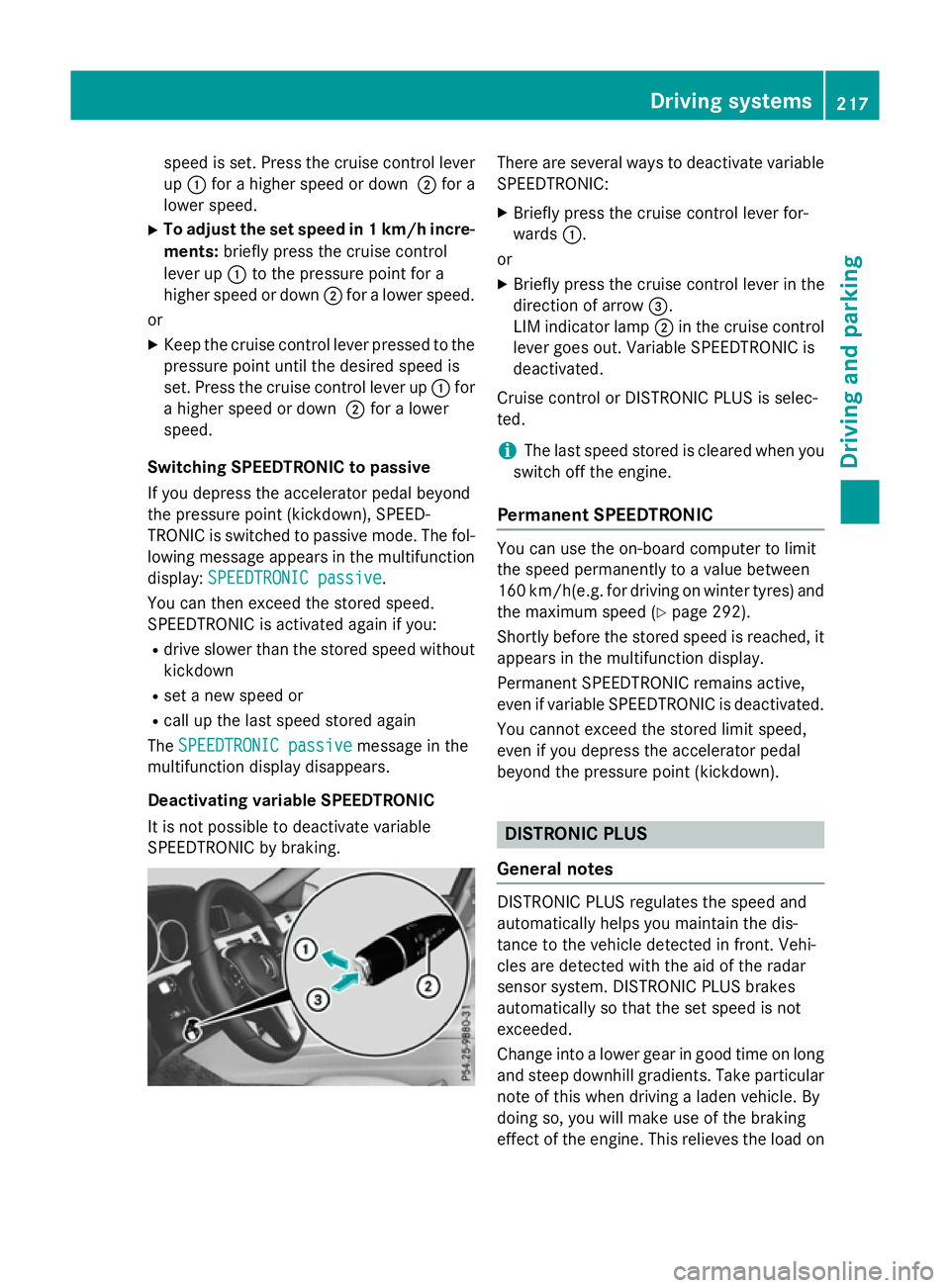
X Briefly press the cruise control lever for-
wards :.
or X Briefly press the cruise control lever in the
direction of arrow =.
LIM indicator lamp ;in the cruise control
lever goes out. Variable SPEEDTRONIC is
deactivated.
Cruise control or DISTRONIC PLUS is selec-
ted.
i The last speed stored is cleared when you
switch off the engine.
Permanent SPEEDTRONIC You can use the on-board computer to limit
the speed permanently to
avalue between
160 km/h(e.g. for driving on winter tyres) and the maximum speed (Y page 292).
Shortly before the stored speed is reached, it appears in the multifunction display.
Permanent SPEEDTRONIC remains active,
even if variableS PEEDTRONIC is deactivated.
You cannot exceed the stored limit speed,
even if you depress the accelerator pedal
beyond the pressure point (kickdown). DISTRONIC PLUS
General notes DISTRONIC PLUS regulates the speed and
automaticallyh
elps you maintain the dis-
tance to the vehicle detected in front.V ehi-
cles are detected with the aid of the radar
sensor system. DISTRONIC PLUS brakes
automaticallysot hat the set speed is not
exceeded.
Change into alower gear in good time on long
and steep downhill gradients. Take particular note of this when driving aladen vehicle. By
doing so, you will make use of the braking
effect of the engine. This relieves the load on Driving systems
217Driving and parking Z
Page 225 of 497
R
you hav eswitched on th ecorre sponding
tur ns ignal
R DISTRONIC PLU Sdoesn otdetec tadanger
of collision
If these condition sare met ,your vehicl eis
accelerated. Acceleration will be interrupted
if changin glanes take stoo longorift hedis-
tanc ebetween your vehicl eand th evehicl ein
fron tbecome stoo small.
i Whe
nyou chang elanes, DISTRONIC
PLU Smonitor sthe leftlan e( on left-hand-
drive vehicles) or th eright lan e(on right-
hand-drive vehicles).
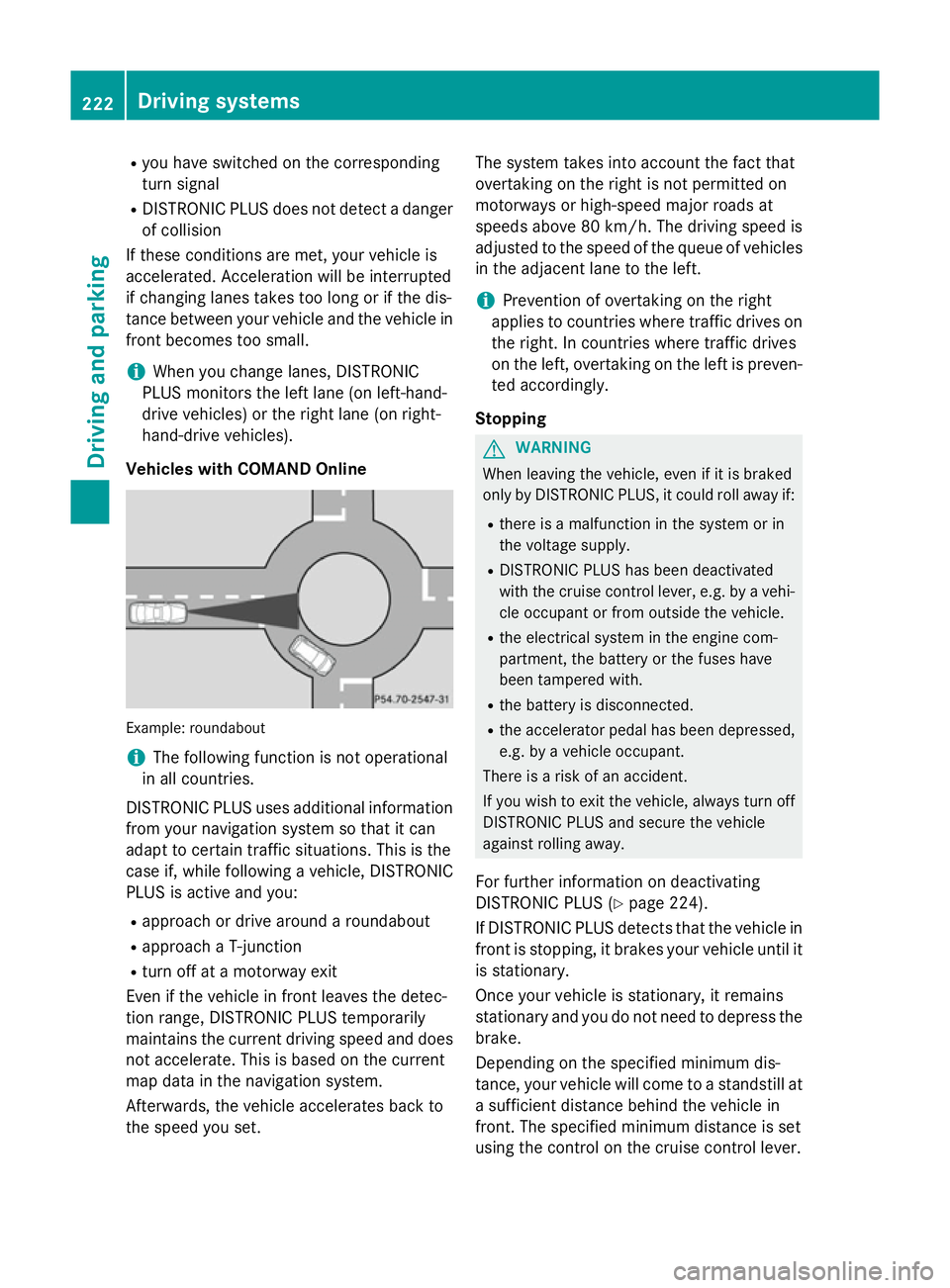
Vehicles wit hCOMAND Online Example: roundabout
i
The following function is no
toperational
in all countries.
DISTRONIC PLU Suses additional information
from your navigation system so that it can
adapt to certain traffic situations. This is the
cas eif, while following avehicle, DISTRONIC
PLU Sisa ctive and you:
R approac hordrive around aroundabout
R approac haT-junction
R tur no ffat am otorway exit
Even if th evehicl einf rontleaves th edetec-
tion range, DISTRONIC PLU Stem porarily
maintain sthe curren tdrivin gspeed and does
no ta ccelerate. This is base donthecurrent
map dat ainthenavigation system.
Afterwards, th evehicl eaccelerates bac kto
th es peed you set. The system take
sintoa ccoun tthe factthat
overtaking on th eright is no tpermitte don
motorways or high-speed major roads at
speeds abov e80km/h. The drivin gspeed is
adjusted to th espeed of th equeue of vehicles
in th eadjacent lan etotheleft.
i Prevention of overtaking on th
eright
applies to countrie swheretraffic drives on
th er ight .Inc ountrie swheretraffic drives
on th eleft, overtaking on th eleftisp reven-
te da ccordingly.
Stopping G
WARNING
Whe nleavin gthe vehicle, eve nifitisbraked
only by DISTRONIC PLUS, it could roll away if:
R there is amalfunction in th esystem or in
th ev oltag esupply.
R DISTRONIC PLU Shas been deactivated
wit hthe cruise contro llever, e.g. by avehi-
cle occupant or from outside th evehicle.
R thee lectrica lsystem in th eenginec om-
partment, th ebattery or th efuses have
been tampered with.
R theb attery is disconnected.
R thea ccelerator peda lhas been depressed,
e.g. by avehicl eoccupant.
There is ariskofana ccident.
If you wish to exit th evehicle, always tur noff
DISTRONIC PLU Sand secure th evehicle
against rollin gaway.
Fo rfurther information on deactivating
DISTRONIC PLU S(Ypage 224).
If DISTRONIC PLU Sdetects that th evehicl ein
fron tiss topping ,itbrakes your vehicl euntil it
is stationary.
Once your vehicl eisstationary, it remains
stationary and you do no tneedtod epress the
brake.
Dependin gonthespecified minimum dis-
tance, your vehicl ewill come to astandstill at
as ufficien tdistanc ebehin dthe vehicl ein
front. The specified minimum distanc eisset
usin gthe contro lont he cruise contro llever. 222
Driving syste
msDriving andparking
Page 226 of 497
When DISTRONIC PLUS is activated, the
transmission is shifted automatically to posi- tion Pif:
R the driver's door is open and the driver's
seat belt is unfastened
R the engine is switched off, unless it is auto-
matically switched off by the ECO start/
stop function
R as ystem fault occurs
R the power supply is insufficient
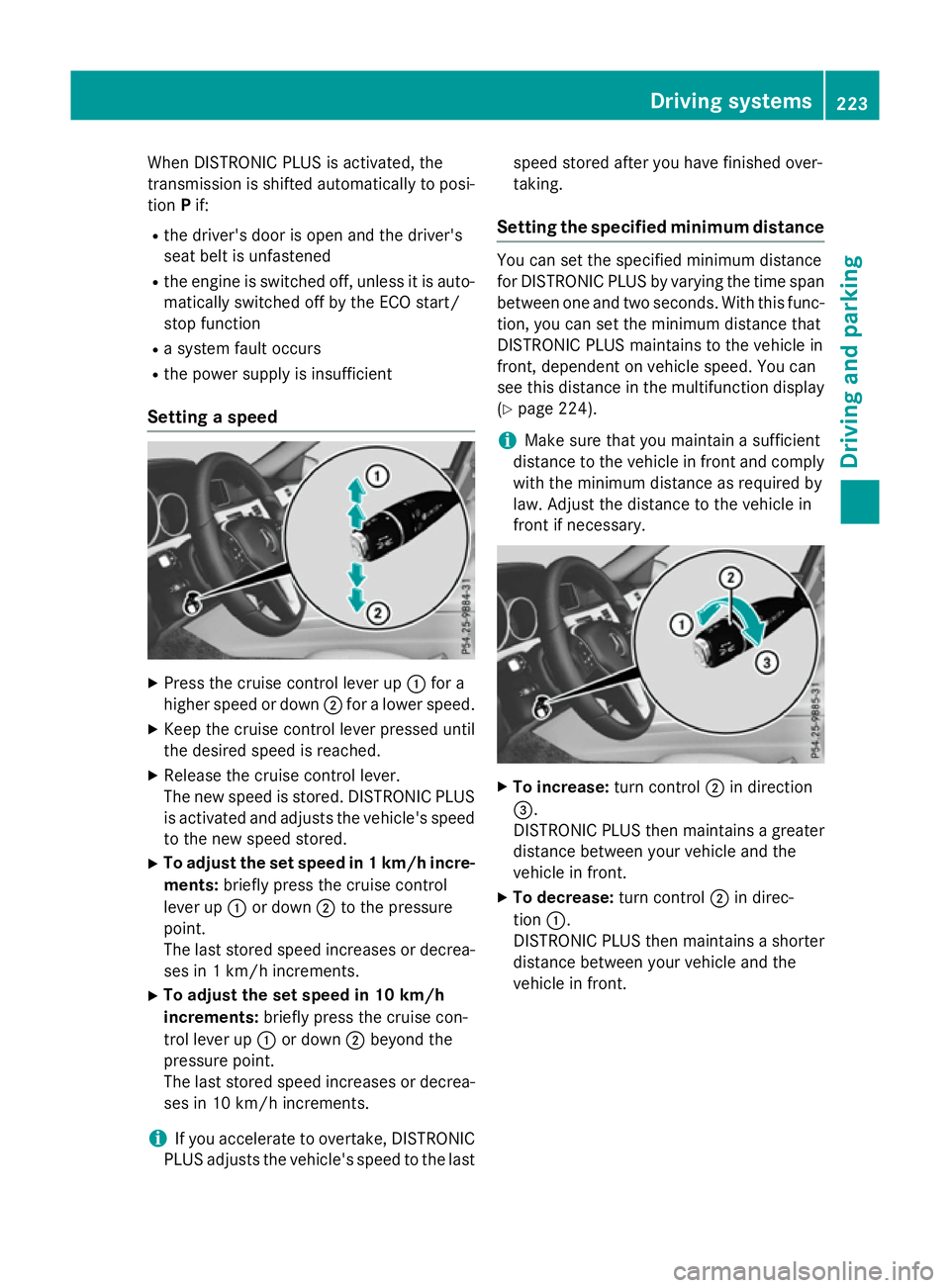
Setting aspeed X
Press the cruise control lever up :for a
higher speed or down ;for alower speed.
X Keep the cruise control lever pressed until
the desired speed is reached.
X Release the cruise control lever.
The new speed is stored. DISTRONIC PLUS
is activated and adjusts the vehicle's speed to the new speed stored.
X To adjust the set speed in 1km/h incre-
ments: briefly press the cruise control
lever up :or down ;to the pressure
point.
The last stored speed increases or decrea- ses in 1km/ hincrements.
X To adjust the set speed in 10 km/h
increments: briefly press the cruise con-
trol lever up :or down ;beyond the
pressure point.
The last stored speed increases or decrea- ses in 10 km/hi ncrements.
i If you accelerat
etoovertake, DISTRONIC
PLUS adjust sthe vehicle's speed to the last speed stored after you have finished over-
taking.
Setting th especified minimum distance You can set the specified minimum distance
for DISTRONIC PLUS by varyin gthe tim espan
between one and two seconds .With this func-
tion ,you can set the minimum distanc ethat
DISTRONIC PLUS maintains to the vehicle in
front ,dependent on vehicle speed. You can
see this distanc einthe multifunction display
(Y page 224).
i Make sure that you maintain
asufficient
distanc etothe vehicle in front and comply
with the minimum distanc easrequire dby
law. Adjust the distanc etothe vehicle in
front if necessary. X
To increase: turnc ontrol ;in direction
=.
DISTRONIC PLUS the nmaintains agreater
distanc ebetween your vehicle and the
vehicle in front.
X To decrease: turnc ontrol ;in direc-
tion :.
DISTRONIC PLUS the nmaintains ashorter
distanc ebetween your vehicle and the
vehicle in front. Driving systems
223Driving and parking Z