transmission MERCEDES-BENZ E-CLASS SALOON 2016 Workshop Manual
[x] Cancel search | Manufacturer: MERCEDES-BENZ, Model Year: 2016, Model line: E-CLASS SALOON, Model: MERCEDES-BENZ E-CLASS SALOON 2016Pages: 557, PDF Size: 11.09 MB
Page 450 of 557
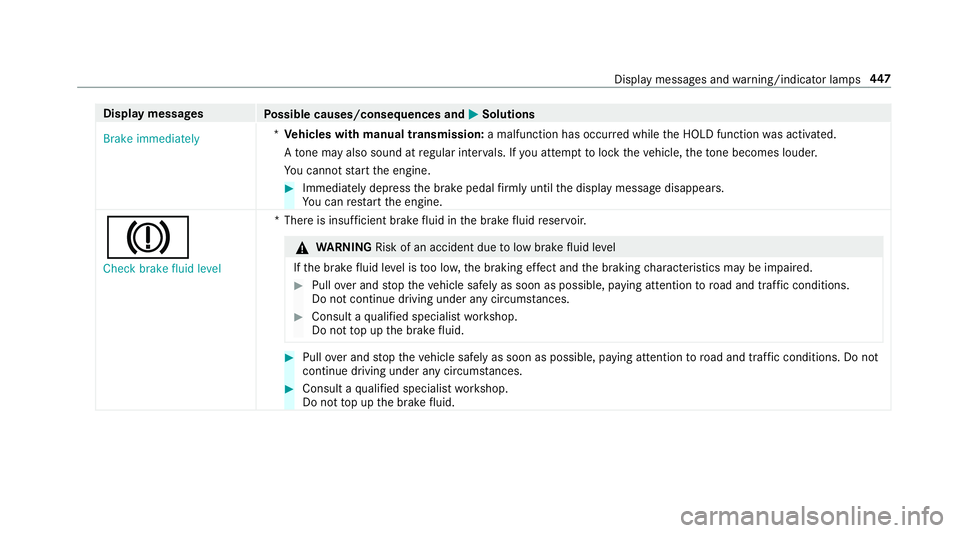
Display messages
Possible causes/consequences and M
MSolutions
Brake immediately *
Ve hicles with manual transmission: a malfunction has occurred while the HOLD function was activated.
A tone may also sound at regular inter vals. If you attem pttolock theve hicle, theto ne becomes louder.
Yo u cannot start the engine. #
Immediately depress the brake pedal firm lyuntil the display message disappears.
Yo u can restart the engine.
J
Check brake fluid level *T
here is insuf ficient brake fluid in the brake fluid reser voir. &
WARNING Risk of an accident due tolow brake fluid le vel
If th e brake fluid le vel is too lo w,the braking ef fect and the braking characteristics may be impaired. #
Pull over and stop theve hicle safely as soon as possible, paying attention toroad and traf fic conditions.
Do not continue driving under any circums tances. #
Consult a qualified specialist workshop.
Do not top up the brake fluid. #
Pull over and stop theve hicle safely as soon as possible, paying attention toroad and traf fic conditions. Do not
continue driving under any circums tances. #
Consult a qualified specialist workshop.
Do not top up the brake fluid. Display messages and
warning/indicator lamps 447
Page 484 of 557
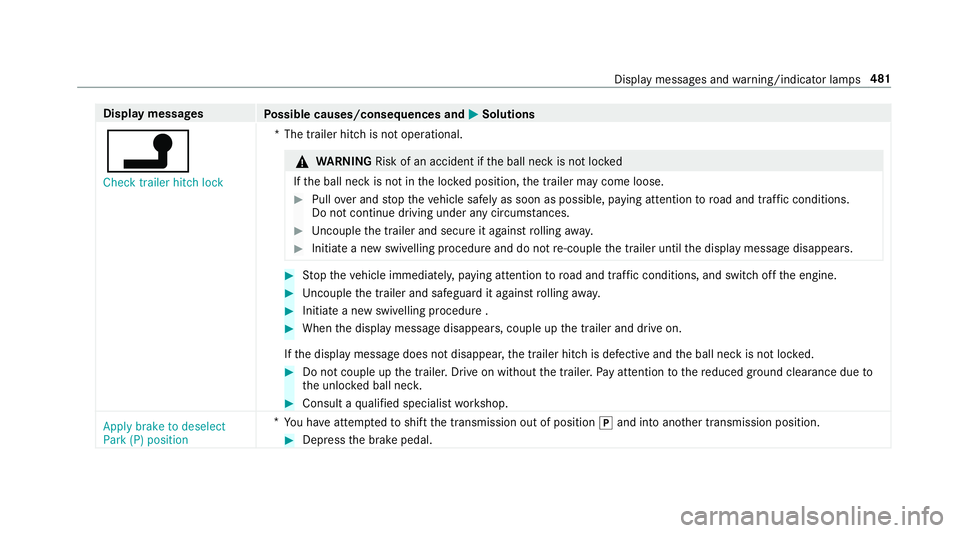
Display messages
Possible causes/consequences and M
MSolutions
j Check trailer hitch lock *T
he trailer hitch is not operational. &
WARNING Risk of an accident if the ball neck is not loc ked
If th e ball neck is not in the loc ked position, the trailer may come loose. #
Pull over and stop theve hicle safely as soon as possible, paying attention toroad and traf fic conditions.
Do not continue driving under any circums tances. #
Uncouple the trailer and secure it against rolling away. #
Initiate a new swivelling procedure and do not re-couple the trailer until the display message disappears. #
Stop theve hicle immediately, paying attention toroad and traf fic conditions, and switch off the engine. #
Uncouple the trailer and safeguard it against rolling away. #
Initiate a new swivelling procedure . #
When the display message disappears, couple up the trailer and drive on.
If th e display message does not disappear, the trailer hitch is defective and the ball neck is not loc ked. #
Do not couple up the trailer. Drive on without the trailer. Pay attention tothere duced ground clearance due to
th e unloc ked ball nec k. #
Consult a qualified specialist workshop.
Apply brake to deselect
Park (P) position *
Yo u ha veattem ptedto shift the transmission out of position jand into ano ther transmission position. #
Depress the brake pedal. Display messages and
warning/indicator lamps 481
Page 485 of 557
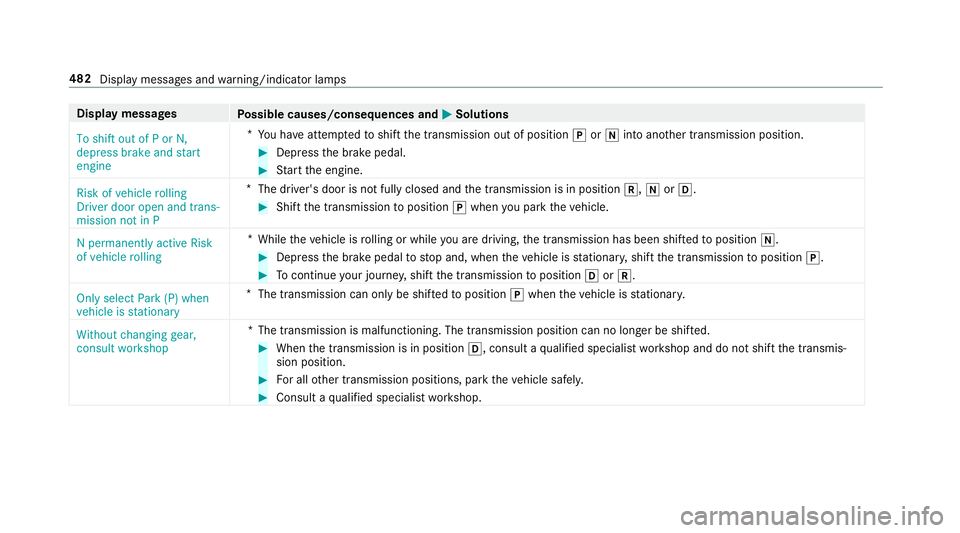
Display messages
Possible causes/consequences and M
MSolutions
To shift out of P or N,
depress brake and start
engine *
Yo u ha veattem ptedto shift the transmission out of position jori into ano ther transmission position. #
Depress the brake pedal. #
Start the engine.
Risk of vehicle rolling
Driver door open and trans-
mission not in P *
The driver's door is not fully closed and the transmission is in position k,iorh. #
Shift the transmission toposition jwhen you park theve hicle.
N permanently active Risk
of vehicle rolling *
While theve hicle is rolling or while you are driving, the transmission has been shif tedto position i. #
Depress the brake pedal tostop and, when theve hicle is stationar y,shift the transmission toposition j. #
Tocontinue your journe y,shift the transmission toposition hork.
Only select Park (P) when
vehicle is stationary *
The transmission can only be shif tedto position jwhen theve hicle is stationar y.
Without changing gear,
consult workshop *T
he transmission is malfunctioning. The transmission position can no longer be shif ted. #
When the transmission is in position h, consult aqualified specialist workshop and do not shift the transmis‐
sion position. #
For all other transmission positions, park theve hicle safely. #
Consult a qualified specialist workshop. 482
Display messages and warning/indicator lamps
Page 486 of 557
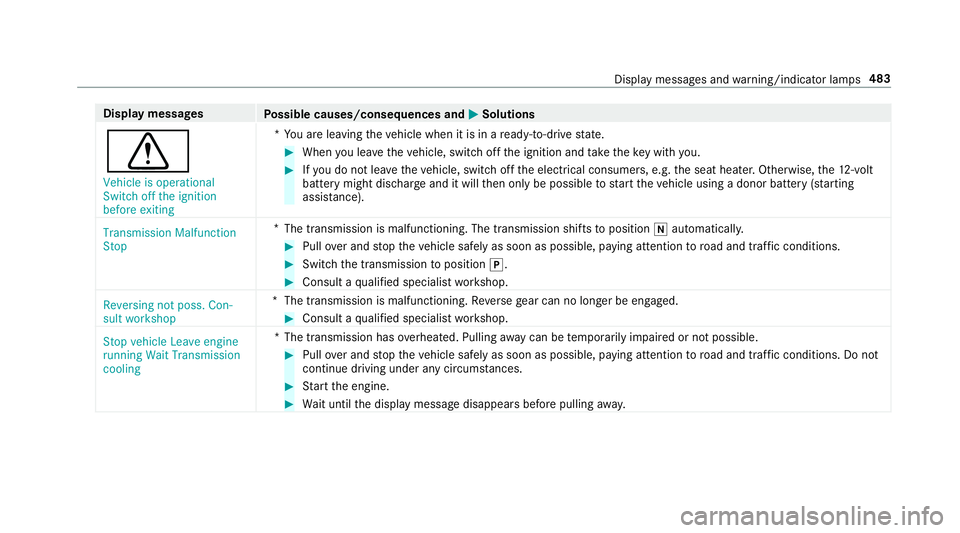
Display messages
Possible causes/consequences and M
MSolutions
d Vehicle is operational
Switch off the ignition
before exiting *Y
ou are leaving theve hicle when it is in a ready-to-drive state. #
When you lea vetheve hicle, switch off the ignition and take theke y with you. #
Ifyo u do not lea vetheve hicle, switch off the electrical consumers, e.g. the seat heater. Otherwise, the12 ‑volt
battery might discha rge and it will then only be possible tostart theve hicle using a donor battery (s tarting
assis tance).
Transmission Malfunction
Stop *
The transmission is malfunctioning. The transmission shi fts to position iautomaticall y. #
Pull over and stop theve hicle safely as soon as possible, paying attention toroad and traf fic conditions. #
Switch the transmission toposition j. #
Consult a qualified specialist workshop.
Reversing not poss. Con-
sult workshop *T
he transmission is malfunctioning. Reversege ar can no lon ger be engaged. #
Consult a qualified specialist workshop.
Stop vehicle Leave engine
running Wait Transmission
cooling *T
he transmission has overheated. Pulling away can be temp orarily impaired or not possible. #
Pull over and stop theve hicle safely as soon as possible, paying attention toroad and traf fic conditions. Do not
continue driving under any circums tances. #
Start the engine. #
Wait until the display message disappears before pulling away. Displ
aymessa ges and warning/indicator lamps 483
Page 487 of 557
Display messages
Possible causes/consequences and M
MSolutions
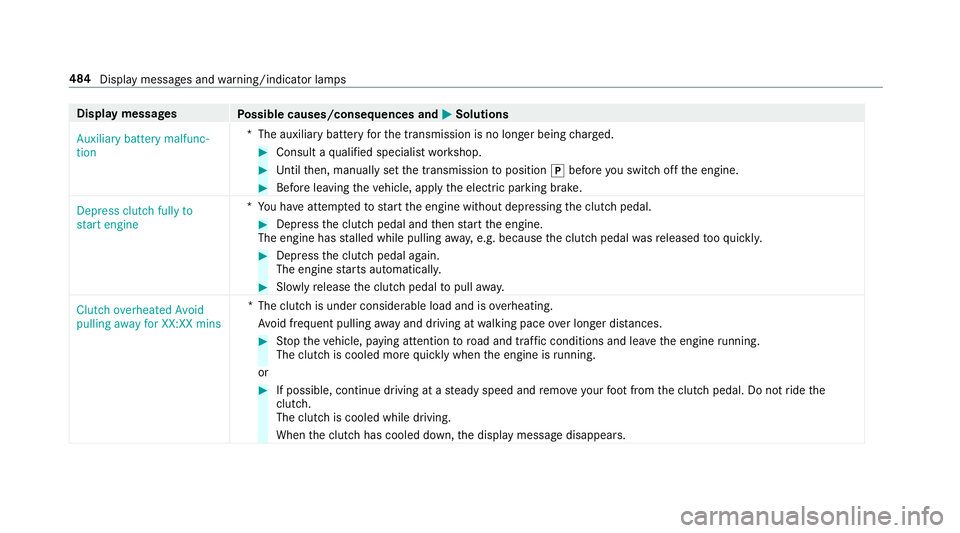
Auxiliary battery malfunc-
tion *T
he auxiliary batteryforth e transmission is no longer being charge d. #
Consult a qualified specialist workshop. #
Untilthen, manually set the transmission toposition jbefore you swit choff the engine. #
Before leaving theve hicle, apply the electric parking brake.
Depress clutch fully to
start engine *Y
ou ha veattem ptedto start the engine without depressing the clutch pedal. #
Depress the clutch pedal and then start the engine.
The engine has stalled while pulling away, e.g. because the clutch pedal wasre leased tooqu ickl y. #
Dep ress the clutch pedal again.
The engine starts automaticall y. #
Slowly release the clutch pedal topull away.
Clutch overheated Avoid
pulling away for XX:XX mins *T
he clutch is under considerable load and is overheating.
Av oid frequent pulling away and driving at walking pace over longer dis tances. #
Stop theve hicle, paying attention toroad and traf fic conditions and le avethe engine running.
The clutch is cooled more quickly when the engine is running.
or #
If possible, continue driving at a steady speed and remo veyour foot from the clutch pedal. Do not ride the
clutch.
The clutch is cooled while driving.
When the clutch has cooled down, the display message disappears. 484
Display messages and warning/indicator lamps
Page 488 of 557
Display messages
Possible causes/consequences and M
MSolutions
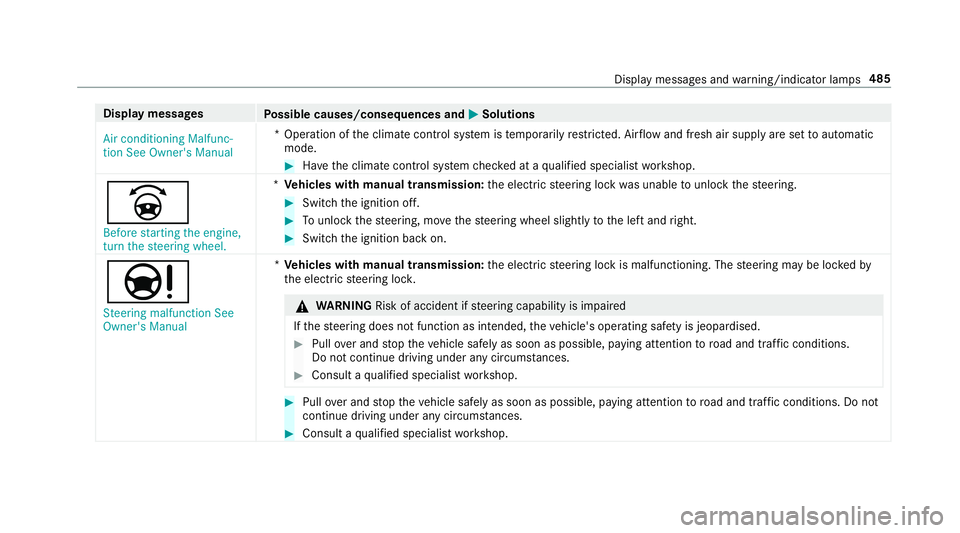
Air conditioning Malfunc-
tion See Owner's Manual *O
peration of the climate control sy stem is temp orarily restricted. Air flow and fresh air supply are set toautomatic
mode. #
Have the climate control sy stem checked at a qualified specialist workshop.
_ Before starting the engine,
turn the steering wheel. *
Ve hicles with manual transmission: the electric steering lock was unable tounlo ckthesteering. #
Switch the ignition off. #
Tounlo ckthesteering, mo vethesteering wheel slightly tothe left and right. #
Switch the ignition back on.
Ð Steering malfunction See
Owner's Manual *
Ve hicles with manual transmission: the electric steering lock is malfunctioning. The steering may be loc kedby
th e electric steering loc k. &
WARNING Risk of accident if steering capability is impaired
If th esteering does not function as intended, theve hicle's operating saf ety is jeopardised. #
Pull over and stop theve hicle safely as soon as possible, paying attention toroad and traf fic conditions.
Do not continue driving under any circums tances. #
Consult a qualified specialist workshop. #
Pull over and stop theve hicle safely as soon as possible, paying attention toroad and traf fic conditions. Do not
continue driving under any circums tances. #
Consult a qualified specialist workshop. Display messages and
warning/indicator lamps 485
Page 516 of 557

Au
tomatic mir rorfo lding function
Ac tivating/deactivating ...................... .139
Au tomatic transmission
DIRECT SELECT le ver ........................... 16 2
Drive program display .......................... 161
Drive programs .................................... 16 0
DY NA MIC SELECT switch .................... 16 0
Engaging drive position ....................... 16 4
Engaging reve rsege ar ........................ .164
Kickdown ............................................. 16 5
Manual gearshifting ............................ .165
Selecting park position ........................ 16 4
Shifting toneutral ................................ 16 4
St eering wheel gearshift paddles ........ .165
Tr ansmission position display .............. 16 2
Tr ansmission positions ........................ 16 2
Au tomatic transmission
see Selector le ver
Axle load Perm issible .......................................... 423
Tr ailer operation .................................. 436 B
Ball neck Extending/r etra cting ........................... 238
BA S (Brake Assist Sy stem) .................... .181
Battery Key ........................................................ 66
Re mo tecontrol (s tationary heater) ...... 14 9
Battery (vehicle) Charging .............................................. 389
Notes ................................................... 387
St arting assis tance .............................. 389
Battery (vehicle) see Vehicle battery
Belt .............................................................32
Belt airbag Activation .............................................. 31
Fu nction/no tes .....................................35
Bic ycle rack
Tr ailer operation .................................. .241
Blind Spot Assi st..................................... 232
Ac tivating/deactivating ...................... .234
Fu nction/no tes ................................... 232
Sy stem limits ....................................... 232 Blind Spot Assist
see Active Blind Spot Assi st
Blo wer
see Climate control
BlueTEC see AdBlue ®
Blue tooth ®
Ac tivating/deactivating ...................... .278
Setting up an Internet connection ....... 330
Settings ............................................... 277
Switching profile (DUN/PAN) .............. 332
Blue tooth ®
Au dio
Ac tivating ............................................ 349
De-authorising (de-regis tering) the
device .................................................. 349
Information .......................................... 346
Overview .............................................3 47
Sea rching for and auth orisingthe
device .................................................. 348
Switching device via NFC .................... 349
Boot box see EASY -PAC K boot box Index
513
Page 524 of 557
Pa
rking Pilot Manoeuvring assis‐
ta nce limited See Owner's Manual ...... 463
ÂPlace theke y in the mar ked
space See Owner's Manual .................479
É Please reduce speed ...................4 56
PRE-SAFE impulse side inope rative
See Owner's Manual ...........................449
PRE-SAFE inoperative See Owner's
Manual ................................................ 448
Ra dar sensors dirty See Owner's
Manual ................................................ 449
h Rectify tyre pressure ....................474
Ø Refill Ad Blue Eng. start not pos‐
sible .................................................... .470
ØRe fill Ad Blue No start in XXX mi ..472
Ø Refill Ad Blue See Owne r’s Man‐
ual .......................................................4 70
!Re lease parking brake .................443
¸Re place air cleaner ......................471,
Replace key See Owner's Man‐
ual ...................................................... .478
 Replace key ................................ .477
8 Reser vefuel le vel........................ 471
6 Restra int sys. malfunction Con‐
sult workshop ...................................... 450
Re versing not poss. Consult work‐
shop ....................................................4 83
Risk of vehicle rolling Driver door
open and transmission not in P ...........482
#See Owner's Manual ................... 466
Speed limit (winter tyres) XXX mph..... 462
#St art engine See Owner's Man‐
ual ...................................................... .472
Ð Steering malfunction Drive
carefully Visit workshop ......................4 86
ÐSt eering malfunction Incre ased
ph ysical ef fort See Owner's Manual .... 487
ÐSt eering malfunction See Own‐
er's Manual ......................................... 485 ÐSt
eering malfunction Stop
immediately See Owner's Manual .......487
St eering Pilot cur rently una vailable
See Owner's Manual ............................ 461
St eering Pilot inoperative ..................... 461
St op vehicle Lea veengine running
Wa itTransmission cooling ...................483
#St opvehicle Lea veengine run‐
ning ..................................................... 467
#St opvehicle See Owner's Man‐
ual .......................................................4 66
ÉSt opvehicle Vehicle too low ........ 456
bSwitch off lights .......................... 492
bSwitch on headlamps .................. 492
To shift out of P or N,depress brake
and start engine .................................. 482
To p up coolant See Owner ’sManual ... 464
¥To p upwasher fluid .................... .490
Tr af fic Sign Assi stCamera view
re stricted See Owner's Manual ........... 458 Index
521
Page 534 of 557

Malfunction
Restra int sy stem .................................... 31
Manual transmission Operating thege arshift le ver ............... 161
Map .......................................... .299, 301, 302
Av oiding (changing) an area ................3 04
Av oiding an area ..................................3 04
Av oiding an area (deleting) .................. 305
Av oiding an area (o verview) ................ .304
Displ aying Qibla .................................. 306
Displaying the compass ....................... 306
Displaying the map version ................ .304
Displ aying the next intersecting
st re et ................................................... 303
Displaying the satellite map ................3 06
Displ aying the tra ffic map .................. .299
Displ aying traf fic signs ........................ 303
Displaying weather information .......... .306
Map data ............................................. 305
Moving ................................................ 302
Overview .............................................. 301
Selecting POI symbols ......................... 303
Selecting text information ................... 303
Selecting the map orientation .............3 02
Setting the map scale .......................... 302 Up
dating .............................................3 05
Map and comp ass
Overview .............................................. 301
Massage prog rammes
Overview ............................................... 98
Selecting the front seats ....................... 99
Massage settings Resetting ............................................... 99
Matt finish (cleaning instructions) ........373
Maximum speed see Limiter
MB Info call see Service call
Mecca ...................................................... .306
Media Menu (on-boa rdcompu ter) .................. 252
Sear ching ............................................ 344
Media display Notes .................................................. 268
Media Inter face
In fo rm ation .......................................... 344
Overview ............................................ .346
Switching on ....................................... 345 Media mode
Activating ............................................ 338
Media playba ck
Operating (on-board computer) ........... 252
Media sear ch
St arting .............................................. .344
Media source Selecting (on-boa rdcompu ter) ............ 252
Memory function Head-up Display — Calling up sa ved
settings ............................................... 104
Head-up Display — Saving settings ...... 104
Operating ............................................ 104
Outside mir ror — Calling up sa ved
settings ............................................... 104
Outside mir ror — Saving settings ......... 104
Seat — Calling up sa ved settings .........1 04
Seat — Saving settings ......................... 104
St eering wheel — Calling up sa ved
settings ............................................... 104
St eering wheel — Saving settings ......... 104
Menu (on-board computer) .................... 254
Assis tance graphic .............................. 24 8
Con tent ............................................... 254 Index
531
Page 545 of 557

T
Ta ilgate
see Boot lid
Ta ilpipes (Care) ........................................ 374
Ta ke -back of end-of-life vehicles .............. 21
Ta nk capacity
Ad Blue ®
............................................... 430
Fu el ..................................................... 429
Re ser ve(fuel) ...................................... 429
Te ch nical data .......................................... 421
Axle load (trailer operation) ................. 436
Information .......................................... 421
No tes (trailer hitch) ............................. 435
To ngue weight .................................... .436
To wing weight (t owing a trailer) .......... .435
Ty re pressure monitoring sy stem ........ 406
Ve hicle identification plate .................. 423
Te lephone ................................................ .307
Ac tivating functions du ring a call ......... 311
Auth orising a mobile phone (Remo te
Pa rking Pilot) ...................................... .226
Call and ringtone volume .................... .310
Calls with se veral participants ............ .311 Commands (LINGU
ATRO NIC) .............. 263
Connecting a mobile phone (Near Field Communication (NFC)) ............... 309
Connecting a mobile phone (Pass‐
ke y) .................................................... .308
Connecting a mobile phone (Secu re
Simple Pairing) .................................... 308
Disconnecting the mobile phone ......... 309
Incoming call during an existing call .... 312
Locking theve hicle (mobile phone) .......69
Menu (on-board computer) .................. 253
Mobile phone voice recognition ........... 311
No tes ................................................... 307
Re ception and transmission volume .... 310
St arting theve hicle (mobile phone) ..... 154
Switching mobile phones .................... 309
Switching mobile phones (Near Field
Communication (NFC)) ........................ 309
Te lephone menu overview .................. .307
Te lephone operation ............................ 311
Unlocking theve hicle (mobile phone) ....69
Using Near Field Communication
(NFC) ................................................... 309
Wi reless charging (mobile phone) ........ 121Te
lephone
see Mobile phone
Te lephone module
Ac tivating/deactivating ...................... .322
Ac tivating/deactivating caller ID
transmission ........................................ 324
Ac tivating/deactivating da taroam‐
ing ...................................................... .324
Ac tivating/deactivating network pro‐
vider restriction ................................... 324
Ac tivating/deactivating text mes‐
sa ge trans fer ....................................... 324
Ad justing the brightness ......................3 24
Charging a mobile phone .................... 326
Connecting .......................................... 322
Deleting call lists ................................ .325
Disconnecting ..................................... 326
Es tablishing a connection tothe
mobile phone ...................................... 323
Fitting/removing ................................. 322
Inserting/removing a SIM card .......... .323
No tes on receiving text messa ges .......3 25
Re setting tofactory settings ............... 326
Setting theringtone ............................ 325
Settings ............................................... 324 542
Index