ECO mode MERCEDES-BENZ E-CLASS SALOON 2016 Owners Manual
[x] Cancel search | Manufacturer: MERCEDES-BENZ, Model Year: 2016, Model line: E-CLASS SALOON, Model: MERCEDES-BENZ E-CLASS SALOON 2016Pages: 557, PDF Size: 11.09 MB
Page 25 of 557
Mercedes-Benz GenuineParts
+ ENVIRONMENTAL
NOTEEnvironmental
dama gecaused bythe non-use of recon‐
ditioned components. Daimler
AGoffers recycled reconditioned
components and pa rts with the same quality
as new parts. The same entitlement from the
implied warranty is valid as for new parts. #
Use recycled reconditioned compo‐
nents and pa rts from Daimler AG.*
NO
TEImpairment of the operating ef fi‐
ciency of there stra int sy stems from
ins talling accessories or from repairs or
we lding Airbags and seat belt
tensioners, as well as
control units and sensors forth ere stra int
sy stems, may be ins talled in thefo llowing
areas of your vehicle:
R Doors
R Door pillars R
Door sills
R Seats
R Cockpit
R Instrument clus ter
R Centre console #
Do not ins tall accessories such as audio
sy stems in these areas. #
Do not car ryout repairs or welding. #
Have accesso ries retrofitted at a quali‐
fi ed specialist workshop. Yo
u could jeopardise the operating saf ety of your
ve hicle if you use parts, tyres and wheels as well
as accessories releva nt tosaf ety which ha venot
been appr ovedby Mercedes-Benz. This could
lead tomalfunctions in saf ety-re leva nt sy stems,
e.g. the brake sy stem. Only use Mercedes-Benz
GenuineParts or parts of equal qualit y.Only use
tyres, wheels and accessory parts that ha ve
been specifically appr ovedfo ryo ur vehicle
model.
Mercedes-Benz testsge nuine pa rts and con ver‐
sion parts and accessory parts that ha vebeen specifically appr
ovedfo ryo ur vehicle model for
th eir reliability, saf ety and suitabilit y.Despite
ongoing ma rket resear ch, Mercedes-Benz is
unable toassess other parts. Mercedes-Benz
th erefore accepts no responsibility forth e use of
such parts in Mercedes-Benz vehicles, even if
th ey have been of ficially appr oved or independ‐
ently appr oved byate sting centre.
Cer tain parts are only of ficially appr ovedfor
ins tallation or modification if they comply wi th
legal requirements. All Mercedes-Benz Genuine‐
Pa rts meet the appr oval requ irements. The use
of non-appr oved parts may in validate theve hi‐
cle's general operating pe rmit.
This is the case in thefo llowing situations:
R Ach ange of theve hicle type from that for
which theve hicle's general operating pe rmit
wa s granted.
R Ifot her road users could be endangered.
R Ifth eex haust gas or noise le vels are
adversely af fected.
Alw ays specify theve hicle identification number
(VIN) (→ page 423) when ordering Mercedes-
Benz GenuineParts. 22
General no tes
Page 57 of 557

R
For cer tain child restra int sy stems in weight
categories II or III, there might be restrictions
in the maximum size setting, e.g. due topos‐
sible con tact wi th thero of.
R Make sure that thech ild's feet do not touch
th e front seat. If necessar y,mo vethe front
seat forw ard slightl y.
R The child restra int sy stem must not touch the
ro of or be put under stra in by the head
re stra ints. Adjust the head restra ints accord‐
ing ly. R
Obser vethe manufacturer's ins tallation
instructions forth ech ild restra int sy stem.
Legend for the table:
X Not suitable forch ildren in this we ight
categor y.
U Suitable forch ild restra int sy stems of
th e "Universal" category in this we ight
categor y. UF
Suitable forfo rw ard-facing child
re stra int sy stems of the "Universal" cat‐
egory in this we ight categor y.
L Suitable for semi-universal child
re stra int sy stems according totheta ble
in "Recommended child restra int sys‐
te ms", or if theve hicle and the seat are
lis ted in thech ild restra int sy stem man‐
ufacturer's vehicle model list. Fr
ont passenger seat: We
ight categories Front passenger airbag ena‐
bled Fr
ont passenger airbag disabled 1
Category 0: upto10 kg XU, L
Category 0+: upto13 kg XU, L
Category I: 9to 18 kg UF,LU , L
Category II: 15to25 kg UF,LU , L54
Occupant saf ety
Page 145 of 557
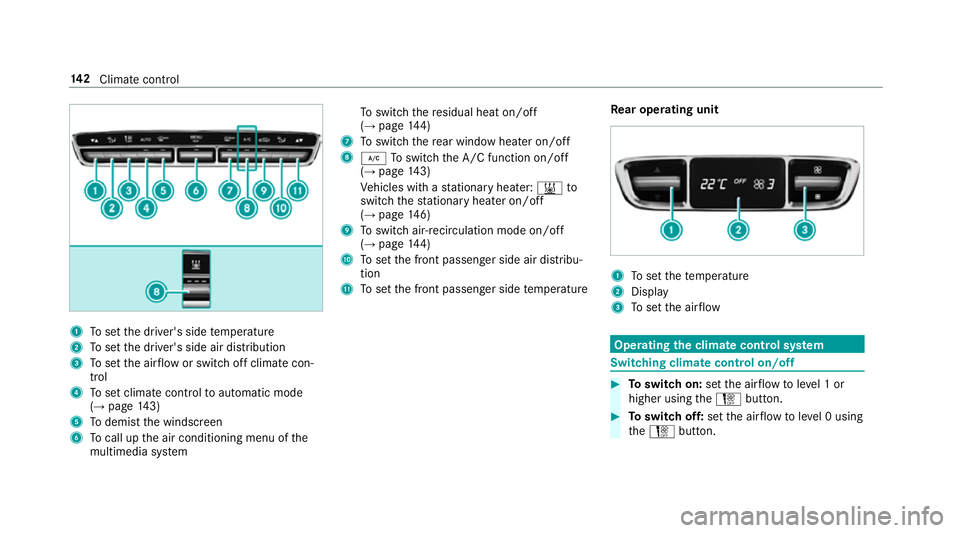
1
Toset the driver's side temp erature
2 Toset the driver's side air distribution
3 Toset the air flow or switch off climate con‐
trol
4 Toset climate contro lto automatic mode
(→ page 143)
5 Todemist the windscreen
6 Tocall up the air conditioning menu of the
multimedia sy stem To
switch there sidual heat on/off
(→ page 144)
7 Toswitch there ar wind owheater on/off
8 ¿ Toswitch the A/C function on/off
(→ page 143)
Ve hicles with a stationary heater: &to
switch thest ationary heater on/off
(→ page 146)
9 Toswitch air-recirculation mode on/off
(→ page 144)
A Toset the front passenger side air distribu‐
tion
B Toset the front passenger side temp erature Re
ar operating unit 1
Toset thete mp erature
2 Display
3 Toset the air flow Operating
the clima tecont rol sy stem Switching clima
tecont rol on/off #
Toswitch on: setthe air flow toleve l 1 or
higher using theH button. #
Toswitch off: setthe air flow toleve l 0 using
th eH button. 14 2
Climate cont rol
Page 146 of 557
%
When the climate control is switched off, the
windo wscan mist up faster. Only switch off
th e climate control brief ly.Ac
tivating/deactivating the A/C function via
the control panel The A/C function cools, heats and dehumidifies
th
e interior air in theve hicle. #
Press button ¿.
Deactivate the A/C function only briefly other‐
wise the windo wscan mist up more quickl y.
Condensation may drip from the underside of
th eve hicle when cooling mode is active. This is
not a sign that there is a malfunction. Ac
tivating/deactivating the A/C function
using the multimedia sy stem Multimedia sy
stem:
, Vehicle .
b Climate control .
A/C
The A/C function heats, cools and dehumidifies
th eve hicle's interior air. #
Switch the function on Oor off ª. Setting climate control
toautomatic mode In auto
matic mode, the set temp erature is con‐
trolled and maintained at a const ant levelby the
air suppl y. #
Press the à button. #
Toswitch tomanual mode: presstheH
or _ button. Climate
style Climate
style function
In automatic mode you can select thefo llowing
climate style settings forth e driver's and front
passenger areas:
R FOCUS: high air flow , slightly cooler setting
R MEDIUM: medium air flow ,st andard setting
R DIFFUSE: low airflow , slightly warmer and
draught-f ree setting Setting
the clima testyle
Requ irements:
R THERMOTRONIC automatic climate control is
fitted.
R The à button has been pressed.
Multimedia sy stem:
, Vehicle .
b Climate control .
Cli-
mate mode #
Select FOCUS, MEDIUM orDIFFUSE . Air distribution settings
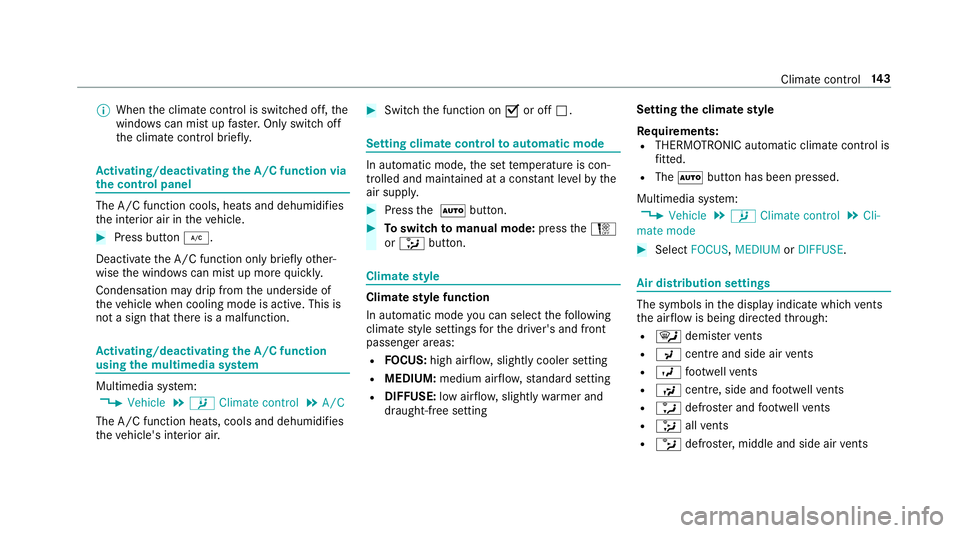
The symbols in
the display indicate which vents
th e air flow is being directed thro ugh:
R ¯ demis terve nts
R P centre and side air vents
R O foot we llve nts
R S centre, side and foot we llve nts
R a defros ter and foot we llve nts
R _ allvents
R b defros ter,middle and side air vents Clima
tecontrol 14 3
Page 162 of 557
th
eve hicle conditions are met, theç symbol
appears in the multifunction displa y.
The engine is restar ted automatically if:
R Vehicles with manual transmission: Yo u
depress the clutch pedal.
R Vehicles with manual transmission: Yo u
engage reve rsege ar k.
R Vehicles with automatic transmission: In
transmission position h,youre lease the
brake pedal when the HOLD function is not
active.
R Vehicles with automatic transmission:
Yo u shift out of transmission position j.
R Vehicles with automatic transmission:
Yo u shift into transmission position hor
k.
R You depress the accelerator pedal.
R You swit chtodrive prog ram S+.
R Youch ange theve hicle le vel.
R An automatic engine start is necessar y.
If th e engine was switched off bythe ECO start/
st op function and you lea vetheve hicle, a warn‐ ing
tone sounds. The Vehicle is operational
Switch off the ignition before exiting display
messa gealso appears in the multifunction dis‐
pla y.
If yo u do not swit choff the ignition, the ignition
is automatically switched off af ter one minute.
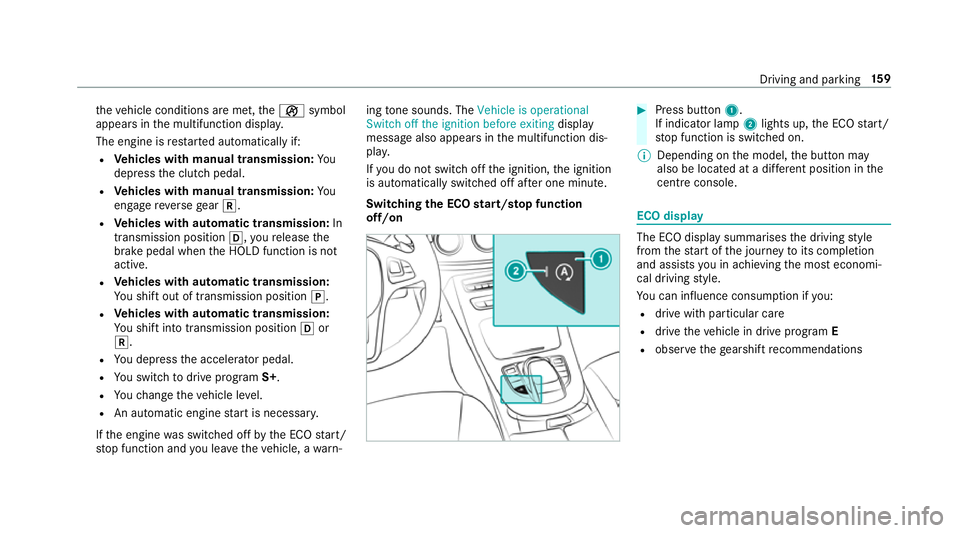
Switching the ECO start/s top function
off/on #
Press button 1.
If indicator la mp2lights up, the ECO start/
st op function is switched on.
% Depending on the model, the button may
also be located at a dif fere nt position in the
centre console. ECO displ
ay The ECO display summarises
the driving style
from thest art of the journey toits completion
and assists you in achieving the most economi‐
cal driving style.
Yo u can influence consum ption if you:
R drive with particular care
R drive theve hicle in drive program E
R obser vethege arshift recommendations Driving and pa
rking 15 9
Page 163 of 557
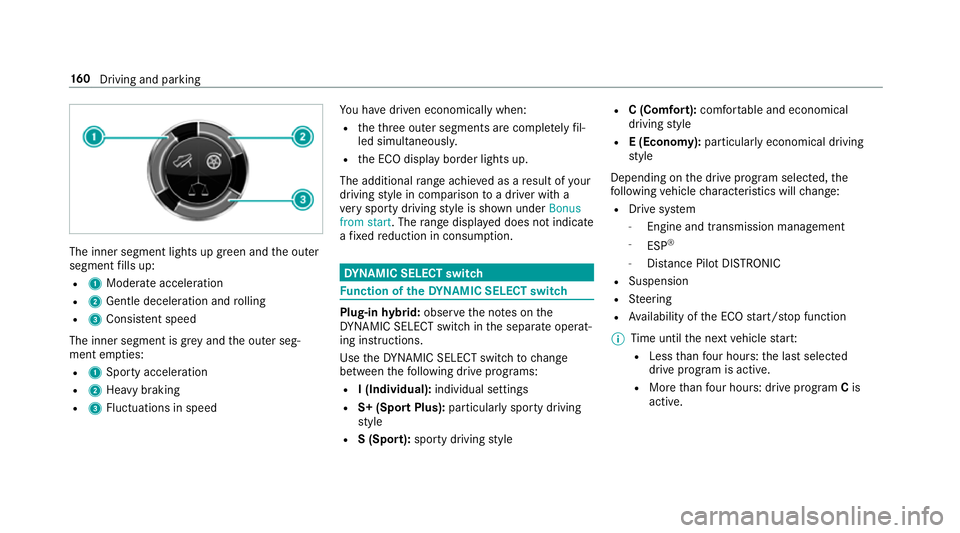
The inner segment lights up green and
the outer
segment fills up:
R 1 Moderate acceleration
R 2 Gentle decele ration and rolling
R 3 Consis tent speed
The inner segment is gr eyand the outer seg‐
ment em pties:
R 1 Sporty acceleration
R 2 Heavy braking
R 3 Fluctuations in speed Yo
u ha vedriven economically when:
R theth re e outer segments are comple tely fil‐
led simultaneousl y.
R the ECO display border lights up.
The additional range achi eved as a result of your
driving style in comparison toa driver with a
ve ry sporty driving style is shown under Bonus
from start. The range displ ayed does not indicate
a fixe dre duction in consum ption. DY
NA MIC SELECT switch Fu
nction of theDY NA MIC SELECT switch Plug-in
hybrid: obser vethe no tes on the
DY NA MIC SELECT switch in the separate operat‐
ing instructions.
Use theDY NA MIC SELECT switch tochange
between thefo llowing drive programs:
R I (Individual): individual settings
R S+ (Sport Plus): particularly sporty driving
st yle
R S (Sport): sporty driving style R
C (Comfort): comfortable and economical
driving style
R E (Economy): particularly economical driving
st yle
Depending on the drive program selected, the
fo llowing vehicle characteristics will change:
R Drive sy stem
- Engine and transmission management
- ESP ®
- Distance Pilot DISTRONIC
R Suspension
R Steering
R Availability of the ECO start/ stop function
% Time until the next vehicle star t:
R Less than four hours: the last selected
drive program is active.
R More than four hours: drive program Cis
active. 16 0
Driving and pa rking
Page 169 of 557
#
Ease off the accelera tor pedal once the
desired speed is reached. Glide mode function
Glide mode helps
youto reduce fuel consump‐
tion.
Glide mode is characterised bythefo llowing:
R The combustion engine is disconnected from
th e driv etra in.
R The engine speed cor responds tothe idle
speed.
Glide mode is activated if thefo llowing condi‐
tions are me t:
R Drive program Eis selected.
R The speed is wi thin a suitable range.
R The cou rse of thero ad is suitable, e.g. no
st eep uphill or downhill gradients.
R You are no lon ger depressing the accelerator
or brake pedal.
% Glide mode can also be activated if you ha ve
selected the "Eco" setting forth e drive (engine management) when in drive program
I.
Glide mode is deactivated again if one of the
conditions is no longer met.
Ve hicles with Driving Assistance Package,
Dist ance Pil otDISTRONIC or Active Brake
Assi st:Glide mode is also deacti vated depend‐
ing on the traf fic situation and theve hicle then
switches toove rrun mode. This fur ther reduces
fuel consum ption.
Glide mode can also be pr evented bythefo llow‐
ing parame ters:
R Gradient
R Temp erature
R Height
R Speed
R Obs tacle de tection
R Ope rating condition of the engine Re
fuelling Re
fuelling theve hicle &
WARNING ‑ Risk of fire or explosion
caused byfuel
Fu els are highly inflammable. #
You must avoidfire , naked flames, cre‐
ating spar ksand smoking. #
Before refuelling, switch off the engine
and auxiliary heating if your vehicle is
equipped with auxiliary heating. &
WARNING Risk of inju ryfrom fuel
Fu els are poisonous and harmful to your
health #
Do not swallow fuel or let it come into
contact with skin, eyes or clo thing. #
Do not inhale fuel vapour. #
Keep children away from fuel.
If yo u or other people come into contact with
fuel, obser vethefo llowing: 16 6
Driving and pa rking
Page 186 of 557
ESP
®
ch aracteristics per drive prog ramDrive prog
ram
ESP®
mode Cha
racteristics
C (Comfort)
E (Economy) ESP
®
Comfort These drive prog
rams pr ovide the ideal balance
between traction and stabilit y.
Select drive program Eor Cin di fficult road con‐
ditions, such as in sn owor ice, or when thero ad
is we t from rain.
S (Sport)
ESP®
Sport This drive program continues
toofferst ability
but with a sporty setup which allo wsthe enthu‐
siastic driver a more active driving style.
Only select drive prog ram Sin good road condi‐
tions, forex ample on dry car riag ewa ysand clear
st re tches of road.
S+ (Sport Plus)
ESP®
Spo rtPlus The
vehicle's own under steering and overste er‐
ing characteristics are accentuated. This allo ws
a more active driving style to be adop ted.
Only select drive prog ram S+ in good road con‐
ditions, forex ample on dry car riag ewa ysand
clear stre tches of road. Driving and parking
18 3
Page 197 of 557
re
sponsible forth e dis tance totheve hicle in
front, forve hicle speed, for braking in good time
and forst ay ing in lane.
If all activation conditions are met, you can acti‐
va te Dis tance Pilot DISTRONIC du ring a jou rney
or while stationar y.When Dis tance Pilot
DISTRONIC is acti vated, a speed is stored which
th e driver can increase or reduce at any time.
The speed can be adjus ted between 20 km/h
and 200 km/h.
Ve hicles with the Driving Assistance Pack‐
age: The speed can be adju sted between
20 km/h and 210 km/h.
Ve hicles with Driving Assistance Package,
Pa rking Pilot and COMAND Online: Upto30
seconds af terst opping, theve hicle automatically
fo llo ws theve hicle ahead without the inter ven‐
tion of the driver. This is only possible if theve hi‐
cle is tr avelling on a mo torw ay or a high-speed
major road. If an obs tacle is de tected in front of
th eve hicle during the driving-off procedure, a
ta ke ove rwa rning is given. Acceleration is
re duced, the driver is given a visual and acoustic
wa rning and must stop theve hicle before reach‐
ing the obs tacle or take evasive action. Ve
hicles with the Driving Assistance Pack‐
age: In conjunction with navigation sy stems, Dis‐
ta nce Pilot DISTRONIC pr events prohibi tedove r‐
ta king on theright at speeds over 80 km/h in
ri ght-hand traf fic and overtaking on the left in
left-hand tra ffic on mo torw ays and high-speed
major roads.
Dis tance Pilot DISTRONIC uses information from
th e navigation sy stem torespond tocer tain traf‐
fi c situations:
R Roundabouts
R T junctions
R Motorw ay ex its
R Tollboo th
Even if theve hicle in front lea vesth e de tection
ra nge in these situations, Dis tance Pilot
DISTRONIC temp orarily maintains the cur rent
driving speed and does not accele rate.
If yo u activate the turn signal indicator tochange
lanes, theve hicle will accelerate more briskly to
th e set speed under thefo llowing conditions:
R Distance Pilot DISTRONIC is acti vated.
R Ifth e driving speed is higher than 70 km/h. R
Ifth e driven speed drops below thestored
speed.
R Ifth e tra ffic situation in theove rtaking lane
permits a safe lane change.
Ve hicles with Driving Assistance Package
and Traf fic Sign Assis t:Distance Pilot
DI STRO NIC also has the Speed Limit Pilot func‐
tion. This function can be confi gured inthe mul‐
timedia sy stem. If a change in the speed limit is
de tected and Dis tance Pil otDISTRONIC is acti va‐
te d, Dis tance Pilot DISTRONIC assumes this new
speed.
The driven speed is adap ted when theve hicle is
le ve l with the tra ffic signs. In the case of signs
indicating entry into an urban area, the speed is
adap ted beforehand. The speed limit display in
th e Instrument Display is alw ays update d when
th eve hicle is le vel with the tra ffic sign.
If th e Dis tance Pilot DISTRONIC has been put
into passi vemode bypressing the accelera tor
pedal, only speed limits which are higher than
th e set speed are adop ted. 194
Driving and pa rking
Page 205 of 557
Assi
stance when changing lanes is pr ovided if all
th efo llowing conditions are me t:
R You are driving on a mo torw ay or high-speed
multi-lane major road with multiple lanes in
th e direction of tr avel.
R The neighbouring lane is free and separated
bya broken lane marking.
R The driven speed is between 80 km/h and
18 0 km/h.
R The turn signal indicator is switched on for
longer than two seconds.
If th e sy stem is impaired, Active Lane Change
Assi stmay be inter rupte d. If an inter ruption
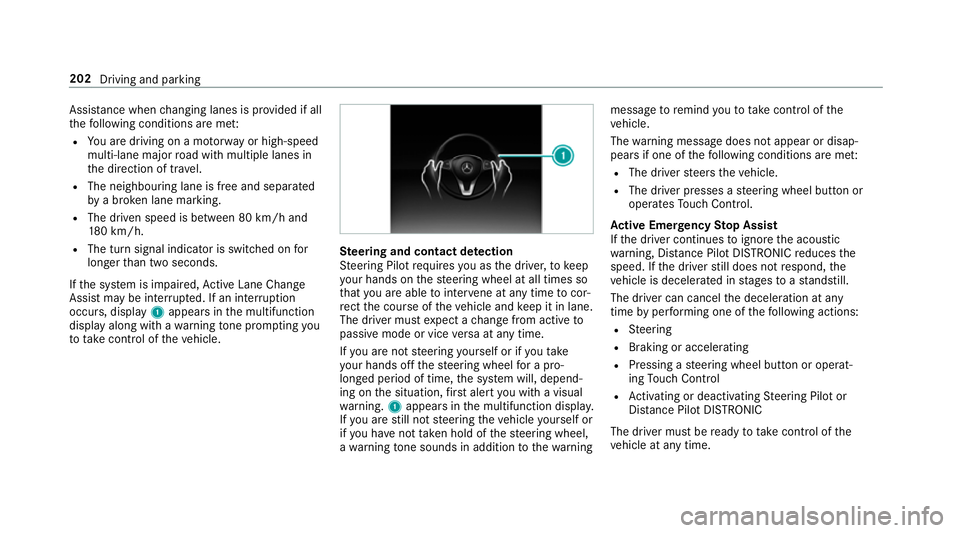
occurs, display 1appears in the multifunction
display along with a warning tone prom pting you
to take control of theve hicle. Ste
ering and contact de tection
St eering Pilot requ ires you as the driver, tokeep
yo ur hands on thesteering wheel at all times so
th at you are able tointer vene at any time tocor‐
re ct the course of theve hicle and keep it in lane.
The driver must expect a change from active to
passive mode or vice versa at any time.
If yo u are not steering yourself or if you take
yo ur hands off thesteering wheel for a pro‐
longed period of time, the sy stem will, depend‐
ing on the situation, firs t alert you with a visual
wa rning. 1appears in the multifunction displa y.
If yo u are still not steering theve hicle yourself or
if yo u ha venot take n hold of thesteering wheel,
a wa rning tone sounds in addition tothewa rning message
toremind youto take control of the
ve hicle.
The warning message does not appear or disap‐
pears if one of thefo llowing conditions are me t:
R The driver steers theve hicle.
R The driver presses a steering wheel button or
operates Touch Control.
Ac tive Eme rgency Stop Assist
If th e driver continues toigno rethe acoustic
wa rning, Dis tance Pilot DISTRONIC reduces the
speed. If the driver still does not respond, the
ve hicle is decelerated in stages toast andstill.
The driver can cancel the deceleration at any
time byper form ing one of thefo llowing actions:
R Steering
R Braking or accelerating
R Pressing a steering wheel button or operat‐
ing Touch Control
R Activating or deacti vating Steering Pilot or
Dis tance Pilot DISTRONIC
The driver mu stbe ready totake control of the
ve hicle at any time. 202
Driving and parking