warning MERCEDES-BENZ E-CLASS SALOON 2017 Owners Manual
[x] Cancel search | Manufacturer: MERCEDES-BENZ, Model Year: 2017, Model line: E-CLASS SALOON, Model: MERCEDES-BENZ E-CLASS SALOON 2017Pages: 497, PDF Size: 10.38 MB
Page 201 of 497
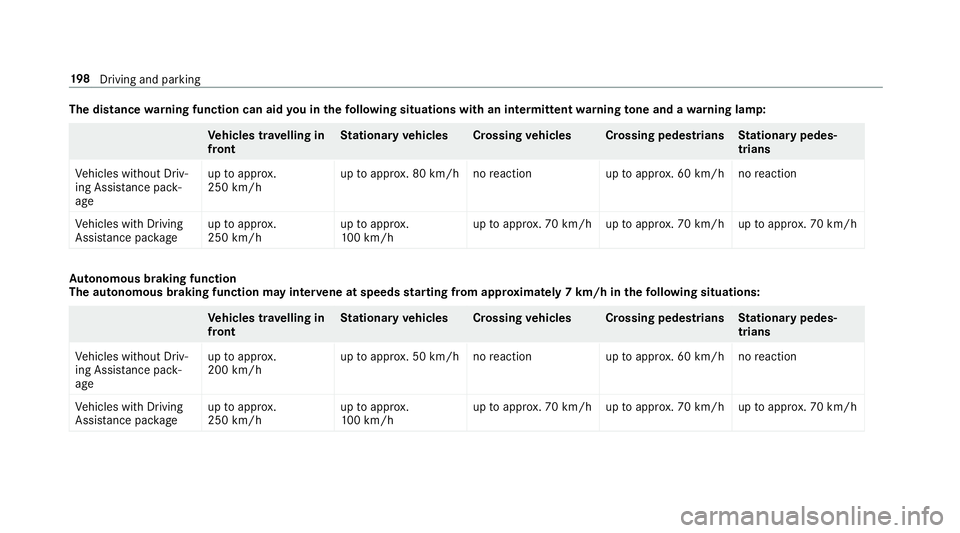
The distance
warning function can aid you in thefo llowing situations with an intermit tent wa rning tone and a warning lamp: Ve
hicles tr avelling in
front St
ationary vehicles Crossing vehicles Crossing pedestrians Stationary pedes‐
trians
Ve hicles without Driv‐
ing Assis tance pa ck‐
age up
toappr ox.
250 km/h up
toappr ox. 80 km/h no reaction uptoappr ox. 60 km/h no reaction
Ve hicles with Driving
Assis tance pa ckage up
toappr ox.
250 km/h up
toappr ox.
10 0 km/h up
toappr ox. 70 km/h up toappr ox. 70 km/h up toappr ox. 70 km/h Au
tonomous braking function
The autonomous braking function may inter vene at speeds starting from appr oxima tely 7 km/h in thefo llowing situations: Ve
hicles tr avelling in
front St
ationary vehicles Crossing vehicles Crossing pedestrians Stationary pedes‐
trians
Ve hicles without Driv‐
ing Assis tance pa ck‐
age up
toappr ox.
200 km/h up
toappr ox. 50 km/h no reaction uptoappr ox. 60 km/h no reaction
Ve hicles with Driving
Assis tance pa ckage up
toappr ox.
250 km/h up
toappr ox.
10 0 km/h up
toappr ox. 70 km/h up toappr ox. 70 km/h up toappr ox. 70 km/h 19 8
Driving and pa rking
Page 203 of 497
R
Can assist during swerving and stra ightening
of theve hicle.
R Can react from a speed of appr oximately
20 km/h up toa speed of appr oximately
70 km/h.
Yo u can pr eventthe assis tance at any time by
actively steering. &
WARNING Risk of an accident despi te
Evasive Steering Assist
Evasive Steering Assist cann otalw ays clearly
identify objects and complex traf fic situa‐
tions.
In addition, thesteering support of Evasive
St eering Assist is generally not su fficient to
av oid a collision.
In such cases Evasive Steering Assist can:
R give an unnecessary warning or pr ovide
assis tance
R not gi veawa rning or not pr ovide assis‐
ta nce #
Alw ays pay careful attention tothe traf‐
fi c situation; do not rely on Ev asive
St eering Assist alone. #
Beready tobrake and take evasive
action, if necessar y. #
Preve ntthe assis tance byactively steer‐
ing in non-critical driving situations. #
Drive at an appropriate speed if pedes‐
trians are close tothe path of your vehi‐
cle. Also obser
vethe sy stem limitations of Evasive
St eering Assist.
Sy stem limitations
The sy stem may be impaired or may not function
in thefo llowing situations:
R In sno w,rain, fog, heavy spr ay, if there is
gl are, in direct sunlight or in greatlyvarying
light conditions.
R Ifth e sensors are dirty, mis ted up, damaged
or co vered. R
Ifth e sensors malfunction due to otherradar
source inter fere nce, forex ample stro ng radar
re flections in multi-s torey car par ks.
R If a loss of tyre pressure or a defective tyre
has been de tected and displ ayed.
The sy stem may not react cor rectly:
R In compl extraf fic situations whe reobjects
cannot always be clearly identified.
R Topedestrians or vehicles if they mo ve
qu ickly into the sensor de tection range.
R Topedestrians who are hidden by other
objects.
R Ifth e typical outline of a pedestrian cann ot
be distinguished from the bac kground.
R If a pedestrian is not recognised as su ch, e.g.
due tospecial clo thing or other objects.
R On bends with a tight radius. 200
Driving and parking
Page 204 of 497
Setting
Active Brake Assi st Multimedia sy
stem:
, Vehicle .
Assistance .
Active Brake
Assist
Ve hicles without Driving Assistance pack‐
age: The settings can be made af terst arting the
ve hicle.
Ve hicles with Driving Assistance pac kage:
The settings can be made when the ignition is
switched on.
% It is recommended that you alw ays lea ve
Ac tive Brake Assi stswitched on.
The moment of warning or inter vention can be
adjus ted as follo ws: #
Select Warning/brake applic.: early: your
selection is retained when theve hicle is next
st ar ted. #
Select Warn./brake applic.: medium :yo ur
selection is retained when theve hicle is next
st ar ted. #
Select Warning/brake applic.: late :yo ur
selection is retained when theve hicle is next
st ar ted. #
Select Warning/brake applic.: off:
Ve hicles without Driving Assistance pack‐
age: The dis tance warning function and the
autonomous braking function are deactiva‐
te d. When theve hicle is next star ted, the
medium setting is auto matically selected.
Ve hicles with Driving Assistance pack‐
age: The dis tance warning function and the
autonomous braking function are deactiva‐
te d. Evasive Steering Assist is una vailable.
When the ignition is next star ted, the
medium setting is selected auto maticallyand
Evasive Steering Assist is available.
% When Active Brake Assi stis deactivated, the
æ symbol appears inthe assis tance
graphic in the multifunction displa y. Ad
aptive Brake Lights function Ad
aptive Brake Lights warnfollowing traf fic in an
emergency braking situation:
R Byflashing brake lamps
R By activating the hazard warning lights
If th eve hicle is braked sharply from speeds
abo ve50 km/h, the brake lamps flash rapidly.
This pr ovides traf fic tr ave lling behind you with an
eve n more noticeable warning.
If th eve hicle is tr avelling at speeds of more than
70 km/h at the beginning of the brake applica‐
tion, the hazard warning lights switch on once
th eve hicle is stationar y.When pulling away
again, the hazard warning lights switch off auto‐
matically at appr oximately 10km/h. You can
also swit choff the hazard warning lights using
th e hazard warning button. Cruise control and limiter
Fu
nction of cruise control
Cruise cont rol accelerates and brakes theve hi‐
cle automatically in order tomaintain a pr evi‐
ously stored speed. Driving and parking
201
Page 206 of 497
Operating cruise control or
theva riable lim‐
iter &
WARNING Risk of accident due to
unknown stored speed
If yo u call up thestored speed and this is
lo we rth an your cur rent speed, theve hicle
decelerates.
If yo u do not kn owthestored speed, the
ve hicle could decelerate unexpectedl y.#
Take into account the tra ffic situation
before calling up thestored speed. #
Ifth estored speed is not known, store
th e desired speed again. Change into a lo
werge ar in good time on long
and steep downhill gradients. Take particular
no te ofthis when driving a laden vehicle. By
doing so, you will make use of the braking ef fect
of the engine. This relie vesth e load on the brake
sy stem and pr events the brakes from overheat‐
ing and wearing tooqu ickl y. Re
quirements:
Cruise control:
R Cruise control is selected.
R ESP ®
must be activated, but not inter vening.
R The driving speed mu stbe at least 20 km/ h.
Va riable limiter:
R The vehicle has been star ted.
R The variable limiter is selec ted. #
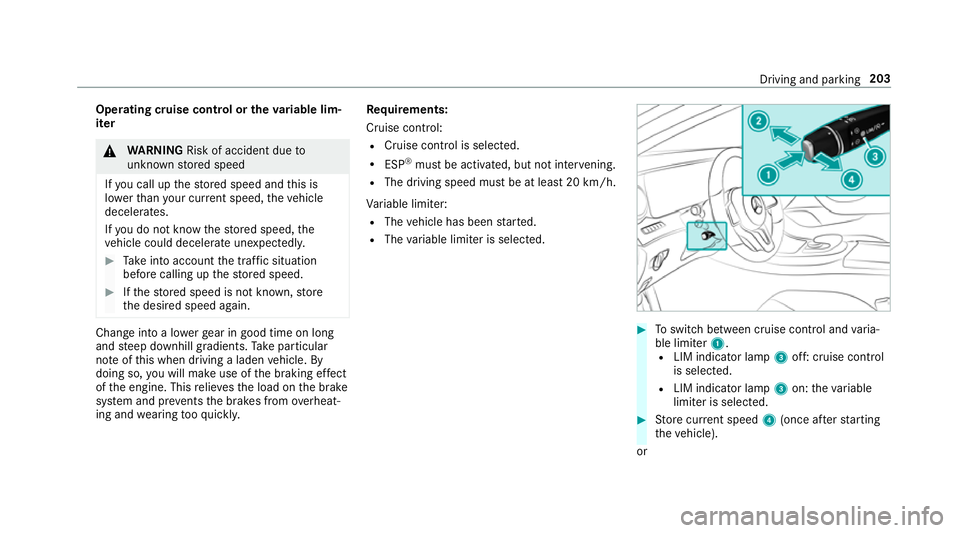
Toswitch between cruise contro l andvaria‐
ble limiter 1.
R LIM indicator lamp 3off: cruise control
is selec ted.
R LIM indicator lamp 3on: theva riable
limiter is selec ted. #
Store cur rent speed 4(once af terst arting
th eve hicle).
or Driving and parking
203
Page 208 of 497
ve
hicle. The speed will only be displa yed again
once theve hicle has been restar ted.
The permanent limiter does not switch topas‐
sive mode even du ring kickdown and the driven
speed remains below the set speed.
Setting the speed limit for winter tyres
Multimedia sy stem:
, Vehicle .
Vehicle settings .
Limit
speed, winter tyres #
Select the speed or deactivate the function. Ac
tive Di stance Assist DISTRO NICFu
nction of Active Di stance Assist
DISTRO NIC
Ac tive Dis tance Assi stDISTRONIC
R Maintains the set speed and accelera tes or
decelerates theve hicle if the dis tance from
th eve hicle in front permits.
R Assists you in main taining the dis tance from
th eve hicle in front and can bring your vehi‐
cle toast andstill if necessar y. R
Brakes your vehicle with up to50 % of the
maximum possible braking po wer.If greater
decele ration pe rformance is requ ired, a vis‐
ual and acoustic warning is given and you
must then inter vene yourself.
R Vehicles with Driving Assistance Pack‐
age: responds tostationary vehicles in urban
speed ranges (e xcept bicycles, mo torcyc les
and pedestrians) if conditions are suf ficient
to enable de tection.
If yo ufa ilto adapt your driving style, Ac tive Dis‐
ta nce Assi stDISTRONIC can nei ther reduce the
ri sk of an accident nor override the la wsof ph ys‐
ics. It cannot take into account road, weather or
traf fic conditions. Active Dis tance Assi st
DISTRONIC is only an aid. You are responsible
fo rth e dis tance totheve hicle in front, forve hi‐
cle speed, for braking in good time and forst ay‐
ing in lane.
If all activation conditions are met, you can acti‐
va te Active Dis tance Assi stDISTRONIC du ring a
jou rney or while stationar y.When Active Dis‐
tan ce Assi stDISTRONIC is acti vated, a speed is
st ored which the driver can increase or reduce at any time. The speed can be adjus
ted between
20 km/h and 200 km/h.
Ve hicles with the Driving Assistance Pack‐
age: the speed can be adjus ted between
20 km/h and 210 km/h.
Ve hicles with the Driving Assistance Pack‐
age: in conjunction with navigation sy stems,
Ac tive Dis tance Assi stDISTRONIC pr events pro‐
hibited overtaking on theright at speeds over
80 km/h in right-hand traf fic and overtaking on
th e left in left-hand traf fic on mo torw ays and
high-speed major roads.
Ac tive Dis tance Assi stDISTRONIC uses informa‐
tion from the navigation sy stem torespond to
cer tain traf fic situations:
R Roundabouts
R T-junctions
R Motorw ay ex its
R Tollboo th
Even if theve hicle in front lea vesth e de tection
ra nge in these situations, Active Dis tance Assi st
DISTRONIC temp orarily maintains the cur rent
driving speed and does not accele rate. Driving and pa
rking 205
Page 210 of 497
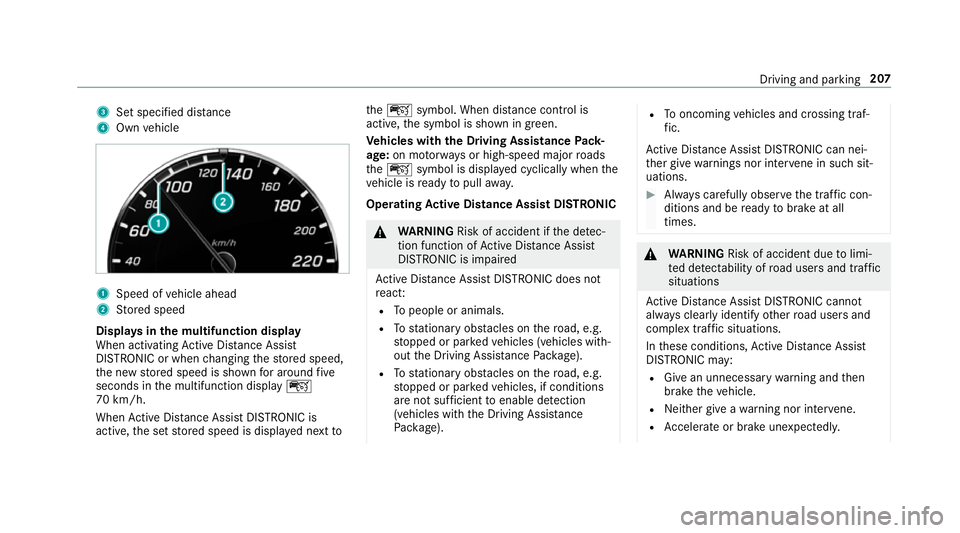
3
Set specified di stance
4 Own vehicle 1
Speed of vehicle ahead
2 Stored speed
Displa ysinthe multifunction display
When activating Active Dis tance Assi st
DISTRONIC or when changing thestored speed,
th e new stored speed is shown for around five
seconds in the multifunction display ç
70 km/h.
When Active Dis tance Assi stDISTRONIC is
acti ve,th e set stored speed is displa yed next toth
eç symbol. When dis tance control is
acti ve,th e symbol is shown in green.
Ve hicles with the Driving Assistance Pack‐
age: on mo torw ays or high-speed major roads
th eç symbol is displa yed cyclically when the
ve hicle is ready topull away.
Operating Active Di stance Assist DIST RONIC &
WARNING Risk of accident if the de tec‐
tion function of Active Dis tance Assi st
DISTRONIC is impaired
Ac tive Dis tance Assi stDISTRONIC does not
re act:
R Topeople or animals.
R Tostationary obstacles on thero ad, e.g.
st opped or par kedve hicles (vehicles with‐
out the Driving Assis tance Package).
R Tostationary obstacles on thero ad, e.g.
st opped or par kedve hicles, if conditions
are not suf ficient toenable de tection
(vehicles wi th the Driving Assis tance
Pa ckage). R
Tooncoming vehicles and crossing traf‐
fi c.
Ac tive Dis tance Assi stDISTRONIC can nei‐
th er give warnings nor inter vene in su chsit‐
uations. #
Alw ays carefully obser vethe traf fic con‐
ditions and be ready tobrake at all
times. &
WARNING Risk of accident due tolimi‐
te d de tectability of road users and traf fic
situations
Ac tive Dis tance Assi stDISTRONIC cannot
al wa ys clear lyidentify other road users and
complex traf fic situations.
In these conditions, Active Dis tance Assi st
DISTRONIC may:
R Give an unnecessary warning and then
brake theve hicle.
R Neither give a warning nor inter vene.
R Accelerate or brake unexpectedly. Driving and pa
rking 207
Page 211 of 497
#
Continue driving with care and be ready
to brake, particular lyifAc tive Dis tance
Assi stDISTRONIC warnsyo u. &
WARNING Risk of accident from acceler‐
ation or braking byActive Dis tance
Assi stDISTRONIC
Ac tive Dis tance Assi stDISTRONIC may accel‐
erate or brake in thefo llowing cases, for
ex ample:
R Ifth eve hicle pulls away using Active Dis‐
ta nce Assi stDISTRONIC.
R Ifth estored speed is called up and is
considerably faster or slo werth an the
cur rently driven speed.
R IfAc tive Dis tance Assi stDISTRONIC no
longer de tects a vehicle in front or does
not react toreleva nt objects. #
Alw ays carefully obser vethe traf fic con‐
ditions and be ready tobrake at all
times. #
Take into account the tra ffic situation
before calling up thestored speed. &
WARNING Risk of accident due toinsuf‐
fi cient decele ration byActive Dis tance
Assi stDISTRONIC
Ac tive Dis tance Assi stDISTRONIC brakes
yo ur vehicle with up to50 % of the maximum
possible deceleration. If this decele ration is
not su fficient, Active Dis tance Assi st
DISTRONIC alerts you with a visual and
acoustic warning. #
Inthese cases, adjust your speed and
ke ep a suf ficient di stance. #
Brake theve hicle yourself and/or take
ev asive action. &
WARNING Risk of accident due toActive
Dis tance Assi stDISTRONIC still being
activated when you lea vethe driver's
seat
If yo u lea vethe driver's seat while theve hicle
is being braked byActive Dis tance Assi st
DISTRONIC only, theve hicle can rollaw ay. #
Alw ays deactivate Active Dis tance
Assi stDISTRONIC and secure theve hi‐
cle topreve nt it from rolling away
before you lea vethe driver's seat. Re
quirements:
R The vehicle has been star ted.
R The elect ric pa rking brake is released.
R Active Parking Assist is not being used to
park theve hicle or toexit from a parking
space.
R ESP ®
is activated, but is not inter vening.
R The transmission is in position h.
R The driver's door, front passenger door and
there ar doors are closed.
R The bonnet is closed. 208
Driving and parking
Page 213 of 497
#
Brief lypull the cruise control le verto wa rds
yo u3.
or #
Accelerate brie fly.
Yo ur vehicle pulls away and adapts its speed
to that of theve hicle in front. If no vehicle is
de tected in front, your vehicle accelerates to
th e set speed.
Collision warning
If Ac tive Dis tance Assi stDISTRONIC is unable to
suf ficiently decele rate theve hicle in order to
pr eve nt it from approa ching theve hicle in front,
yo u will be warned visually and acousticall y.An
intermittent warning tone will then sound and
th e dis tance warning lamp will light up in the
instrument clus ter. #
Brake immediately in order toinc rease the
dis tance from theve hicle in front.
or #
Take evasive action pr ovided it is safe todo
so. Ac
tive Steering Assist Fu
nction of Active Steering Assist
Ac tive Steering Assist is only available for
ve hicles with the Driving Assistance Pack‐
age.
R Active Steering Assist is operational at
speeds up to210 km/h and helps youto stay
in the cent reofthe lane bymeans of moder‐
ate steering inter ventions.
R It uses theve hicle in front and the lane mark‐
ings as a refere nce depending on the driven
speed.
R Active Steering Assist requ ires you as the
driver, tokeep your hands on thesteering
wheel at all times so that you are able to
inter vene at any time tocor rect the course of
th eve hicle and keep it in lane.
R Active Steering Assist can be overridden at
any time bysteering theve hicle yourself.
R When the sy stem is actively steering, the
è symbol is shown in green in the multi‐
function displa y. Sy
stem limitations of Active Steering Assist
Ac tive Steering Assist has a limited steering tor‐
qu efo r lateral guidance. In some cases, the
st eering inter vention is not su fficient tokeep the
ve hicle in the lane.
If th e de tection of lane markings and vehicles
ahead is impaired, Active Steering Assist
switches topassive mode. The sy stem pr ovides
no support in this case. During the transition
from the active topassive status, theè sym‐
bol is shown as enlar ged and flashes yello w.
Once the sy stem is passive theè symbol is
shown as gr eyinthe multifunction displa y.
The sy stem may be impaired or may not function
in thefo llowing ins tances:
R Ifth ere is poor visibility, e.g. due toinsuf fi‐
cient illumination of thero ad, or due tosno w,
ra in, fog or heavy spr ay.
R Ifth ere is glare, e.g. from oncoming traf fic,
di re ct sunlight or reflection from other vehi‐
cles (e.g. if the car riag ewa y is wet).
R Ifth e windscreen is dirty, mis ted up, dam‐
aged or co vered, for ins tance byast icke r,in
th e vicinity of the camera. 210
Driving and pa rking
Page 214 of 497
R
If no, or se veral, unclear lane markings are
present for one lane, e.g. in a construction
area.
R Ifth e lane markings are wornaw ay, dark or
co vered up, e.g. bydirt or sno w.
R The dis tance totheve hicle in front is too
small and the lane markings thus cannot be
de tected.
R Ifth e lane markings change quickl y,e.g.
lanes branch off, cross one ano ther or
mer ge.
R The car riag ewa y is nar row and winding.
R Ifth ere are highly variable shade conditions
on the car riag ewa y.
R Ifth ere are obs tacles su chas object mar kers
on the lane or projecting out into the lane.
The sy stem does not pr ovide assis tance in the
fo llowing conditions:
R Onvery sharp bends.
R When towing a trailer.
R Ifyo u actively change lane without swit ching
on the turn signal indicator. Ac
tivating Active Steering Assist
Requ irements:
R ESP ®
must be activated, but not inter vening.
R Active Dis tance Assi stDISTRONIC is acti va‐
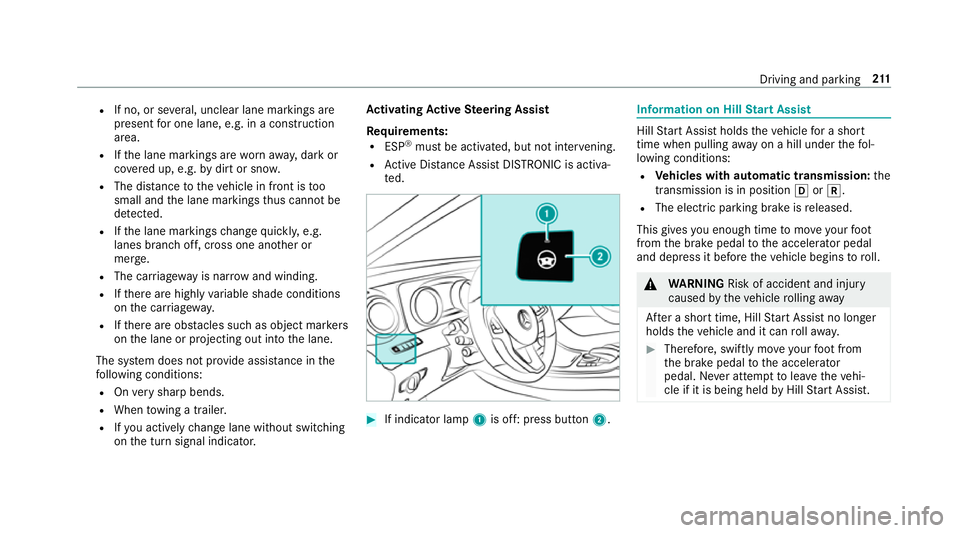
te d. #
If indicator lamp 1is off: press button 2. Information on Hill
Start Assist Hill
Start Assist holds theve hicle for a short
time when pulling away on a hill under thefo l‐
lowing conditions:
R Vehicles with automatic transmission: the
transmission is in position hork.
R The electric pa rking brake is released.
This gives you enough time tomo veyour foot
from the brake pedal tothe accelera tor pedal
and depress it before theve hicle begins toroll. &
WARNING Risk of accident and inju ry
caused bytheve hicle rolling away
Af ter a short time, Hill Start Assist no lon ger
holds theve hicle and it can rollaw ay. #
Therefore, swiftly mo veyour foot from
th e brake pedal tothe accelerator
pedal. Ne ver attem pttolea vetheve hi‐
cle if it is being held byHill Start Assist. Driving and parking
211
Page 215 of 497
HOLD function
HOLD function
The HOLD function holds
theve hicle at a stand‐
st ill without requ iring youto depress the brake
pedal, e.g. when pulling away on steep slopes.
Sy stem limitations
R The incline must not be greaterth an 30%.
Ac tivating/deactivating the HOLD function &
WARNING Risk of an accident due tothe
HOLD function being activated when you
lea vetheve hicle
If yo u lea vetheve hicle while only the HOLD
function is braking theve hicle, theve hicle
can rollaw ay inthefo llowing situations:
R Ifth ere is a malfunction in the sy stem or
in the po wer supply.
R Ifth e HOLD function is deactivated by
depressing the accelera tor pedal or the
brake pedal, e.g. byave hicle occupant. R
Ifth e electrics in the engine compart‐
ment, the battery or the fuses are tam‐
pered with or if the battery is disconnec‐
te d. #
Alw ays deactivate the HOLD function
and secure theve hicle against rolling
aw ay before leaving theve hicle. *
NO
TEDama gefrom auto matic braking When
Active Brake Assi st,Ac tive Dis tance
Assi stDISTRONIC or the HOLD function are
activated, theve hicle brakes autonomously
in cer tain situations.
To avo id damage totheve hicle, deactivate
th ese sy stems in thefo llowing or similar sit‐
uations: #
During towing #
In a car wash Re
quirements:
R The vehicle is stationar y.
R The driver's door is closed or the seat belt on
th e driver's side is fastened. R
The engine is running or has been au tomati‐
cally switched off bythe ECO start/ stop
function.
R The electric parking brake is released.
R Active Dis tance Assi stDISTRONIC is not acti‐
va ted.
R Vehicles with automatic transmission: the
transmission is in position h,kori.
Ac tivating the HOLD function #
Dep ress the brake pedal and af ter a short
time depress fur ther until theë display
appears in the multifunction displa y. #
Release the brake pedal.
Deactivating the HOLD function #
Depress the accelerator pedal topull away.
or #
Depress the brake pedal until theë dis‐
play disappears from the multifunction dis‐
pla y. 212
Driving and pa rking