warning MERCEDES-BENZ E-CLASS SALOON 2017 Owners Manual
[x] Cancel search | Manufacturer: MERCEDES-BENZ, Model Year: 2017, Model line: E-CLASS SALOON, Model: MERCEDES-BENZ E-CLASS SALOON 2017Pages: 497, PDF Size: 10.38 MB
Page 251 of 497
%
Accessories can be connected tothe perma‐
nent po wer supp lyup to180W, and tothe
po we r supp lythat is swit ched on via the igni‐
tion loc k.
Un coupling a trailer &
WARNING Risk of being crushed and
becoming trapped when uncoupling a
trailer
When uncoupling a trailer wi than engaged
ine rtia-activated brake, your hand may
become trapped between theve hicle and the
trailer dr awbar. #
Do not uncouple trailers with an
engaged overrun brake. &
WARNING Risk of becoming trapped
when disconnecting the trailer cable
Ve hicles with le vel control sy stem: the
ve hicle lo werswhen the trailer cable is dis‐
connected. This could
result in you or other people
becoming trapped if your or their limbs are
between theve hicle body and the tyres or
underneath theve hicle. #
Make sure nobody is underneath the
ve hicle or in the immediate vicinity of
th e wheel ar ches when you disconnect
th e trailer cable. *
NO
TEDama getothere ar bumper from
ins talling adap ter cables or adapte r plugs The
following parts could be damaged when
re tracting the ball neck fully electrically:
R bumper
R adap ter cable
R adapte r plug #
Alw aysre mo vethe adap ter cable or
adapte r plug before retracting the ball
neck fully electrically. #
Safeguard the trailer against rolling away. #
Disconnect the electrical connection
between theve hicle and the trailer. #
Uncouple the trailer. #
Place the co ver on the ball head. Bicycle
rack &
WARNING Risk of an accident when
using the bicycle rack incor rectly
The bicycle rack may become de tach ed from
th eve hicle in thefo llowing cases:
R the permissible load capacity of the
trailer hitch is exceeded.
R the bicycle rack is used incor rectl y.
R the bicycle rack is secured tothe ball
neck beneath the ball head.
Obser vethefo llowing foryo ur ow n sa fety
and that of other road users:
R always adhere tothe permissible load
capacity of the trailer hitch. 248
Driving and pa rking
Page 254 of 497
Instrument display
overview
Mercedes-AMG vehicles: be sure toobser ve
th e no tes in the Supplement. Otherwise, you
may failto recognise dangers. &
WARNING Risk of accident due toan
instrument display malfunction
If th e instrument display has failed or mal‐
functioned, you may not recognise function
re strictions applying tosaf etyre leva nt sys‐
te ms.
The operating saf ety of your vehicle may be
impaired. #
Drive on carefull y. #
Have theve hicle checked immediately
at a qualified specialist workshop. If
th e operating saf ety of your vehicle is
impaired, park theve hicle safely as soon as pos‐
sible. Contact a qualified specialist workshop. Instrument display (standard)
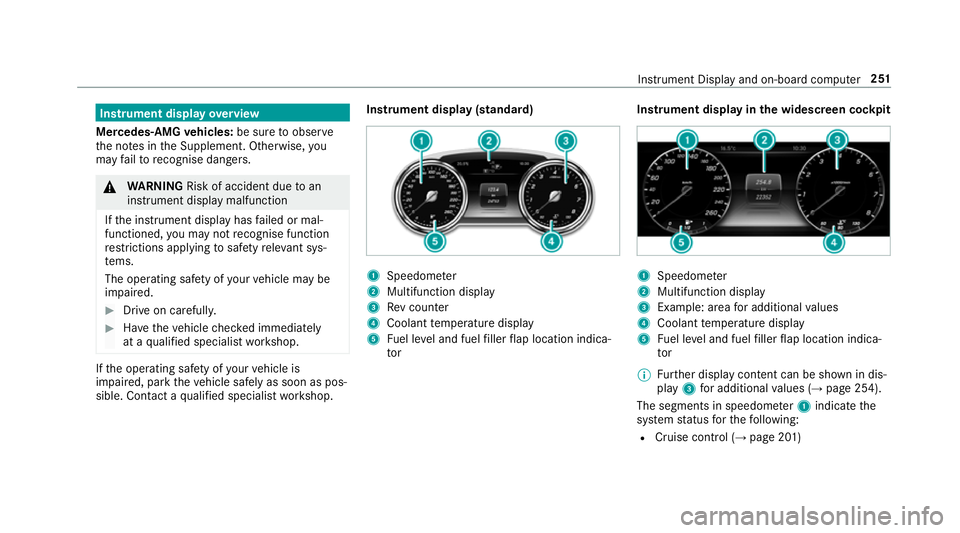
1
Speedome ter
2 Multifunction display
3 Rev counter
4 Coolant temp erature display
5 Fuel le vel and fuel filler flap location indica‐
tor Instrument display in
the widescreen cockpit 1
Speedome ter
2 Multifunction display
3 Example: area for additional values
4 Coolant temp erature display
5 Fuel le vel and fuel filler flap location indica‐
tor
% Further display content can be shown in dis‐
play 3for additional values (→ page 254).
The segments in speedom eter 1 indicate the
sy stem status forth efo llowing:
R Cruise control (→ page 201) Instrument Display and on-board computer
251
Page 255 of 497
R
Limiter (→ page 202)
R Active Dis tance Assi stDISTRONIC
(→ page 205)
* NO
TEEngine dama gedue toexc essively
high engine speeds The engine will be damaged if
you drive with
th e engine in theov errevving range. #
Do not drive wi th the engine in theove r‐
re vving range. The fuel supply is inter
rupted toprotect the
engine when there d band in rev counter 3
(o ve rrev ving range) is reached.
During no rmal operating conditions, coolant
te mp erature display 4may rise to120 °C. &
WARNING Danger of bu rns when open‐
ing the bonn et
If yo u open the engine bonn etwhen the
engine has overheated or during a fire inthe
engine compartment, you could come into
contact with hot gases or other escaping
operating fluids. #
Before opening the bonn et, allow the
engine tocool down. #
Intheeve nt of a fire inthe engine com‐
partment, keep the engine bonn et
closed and call thefire service. Ve
hicles with a 48 V on-board electrical sys‐
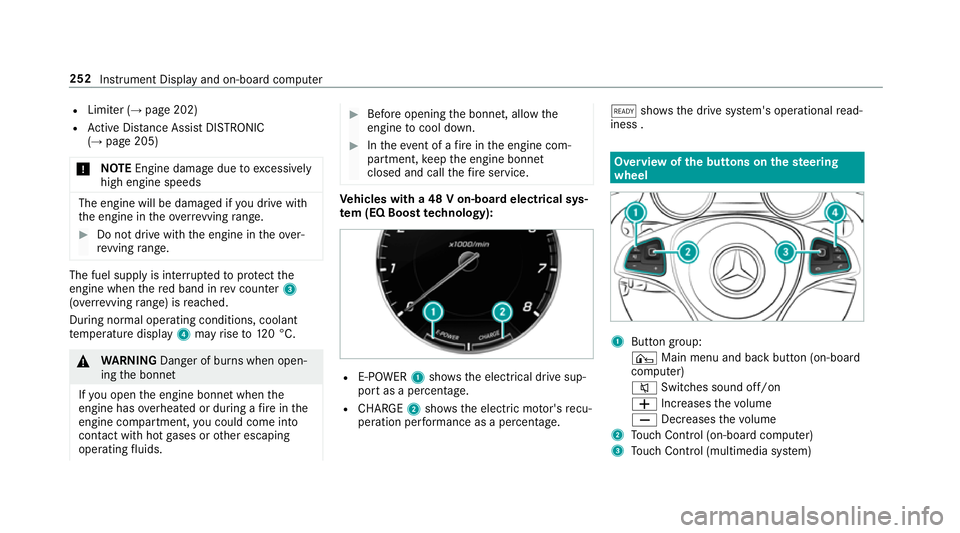
te m (EQ Boo sttech nology): R
E-POWER 1shows th e electrical drive sup‐
port as a percentage.
R CHARGE 2showsthe electric mo tor's recu‐
peration per form ance as a percen tage. õ
showsthe drive sy stem's operational read‐
iness . Overview of
the but tons on thest eering
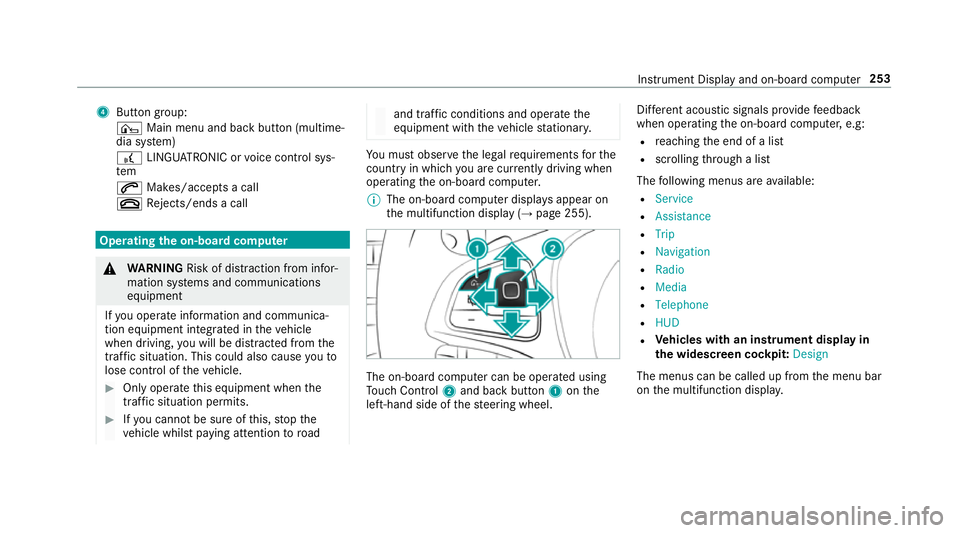
wheel 1
Button group:
¤ Main menu and ba ckbutton (on-board
computer)
8 Switches sound off/on
W Increases thevo lume
X Decreases thevo lume
2 Touch Control (on-board co mputer)
3 Touch Control (multimedia sy stem) 252
Instrument Display and on-board computer
Page 256 of 497
4
Button group:
¤ Main menu and ba ckbutton (multime‐
dia sy stem)
£ LINGU ATRO NIC or voice control sys‐
tem
6 Makes/accepts a call
~ Rejects/ends a call Ope
rating the on-board co mputer &
WARNING Risk of di stra ction from infor‐
mation sy stems and communications
equipment
If yo u operate information and communica‐
tion equipment integ rated in theve hicle
when driving, you will be distracted from the
traf fic situation. This could also cause youto
lose control of theve hicle. #
Only operate this equipment when the
traf fic situation permits. #
Ifyo u cannot be sure of this, stop the
ve hicle whilst paying attention toroad and traf
fic conditions and ope rate the
equipment with theve hicle stationar y. Yo
u must obse rveth e legal requirements forthe
country in whi chyou are cur rently driving when
operating the on-board computer.
% The on-board computer displa ysappear on
th e multifunction display (→ page 255). The on-board computer can be operated using
To uch Control 2and back but ton1 onthe
left-hand side of thesteering wheel. Dif
fere nt acoustic signals pr ovide feedback
when operating the on-board computer, e.g:
R reaching the end of a list
R scrolling thro ugh a list
The following menus are available:
R Service
R Assistance
R Trip
R Navigation
R Radio
R Media
R Telephone
R HUD
R Vehicles with an instrument display in
th e widescreen cockpit: Design
The menus can be called up from the menu bar
on the multifunction displa y. Instrument Display and on-board computer
253
Page 259 of 497
Menus and submenus
Fu
nctions on the Service menu of the on-
board compu terOn-board computer:
, Service #
Toselect the function: swipe upwards or
down wards on the left-hand touch cont rol. #
Press the left-hand touch cont rol.
Fu nctions on theService menu:
R Message memory (→ page 381)
R AdBlue: Adblue ®
ra nge
R Tyres:
- Restarting the tyre pressure loss warning
sy stem (→ page 352)
- Checking tyre pressure with the tyre
pressure monitoring sy stem
(→ page 348)
- Restarting the tyre pressure monitoring
sy stem(→ page 348)
R ASSYST PLUS: Calling up the service due
date (→ page 306) R
Engine oil le vel Calling up
the assistant display On-board computer:
, Assistance
% Ve
hicles with the instrument display in
th e widescreen cockpit: whenyou ha ve
th e design set toProgressive ,yo u can view
th e assis tant displ ayinthe left-hand portion
of the instrument displa y.
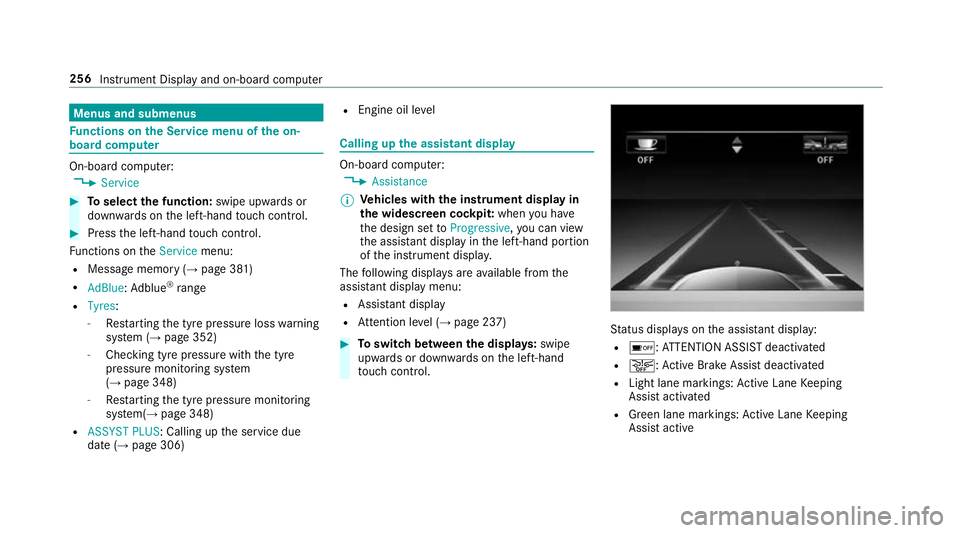
The following displa ysare available from the
assis tant displ aymenu:
R Assis tant displ ay
R Attention le vel (→ page 237) #
Toswitch between the displa ys:swipe
upwards or down wards on the left-hand
to uch cont rol. St
atus displa yson the assis tant displ ay:
R é :AT TENTION ASSIST deactivated
R æ: Active Brake Assi stdeactivated
R Light lane markings: Active Lane Keeping
Assist activated
R Green lane markings: Active Lane Keeping
Assist active 256
Instrument Display and on-board computer
Page 263 of 497
#
Toselect a radio station: swipe upwards or
down wards on the left-hand touch cont rol.
Selecting the frequency range or station pre‐
set #
Press the left-hand touch cont rol. #
Toselect the frequency range/station
prese t:swipe upwards or down wards on the
left-hand touch cont rol. #
Press the left-hand touch cont rol. Media playback using
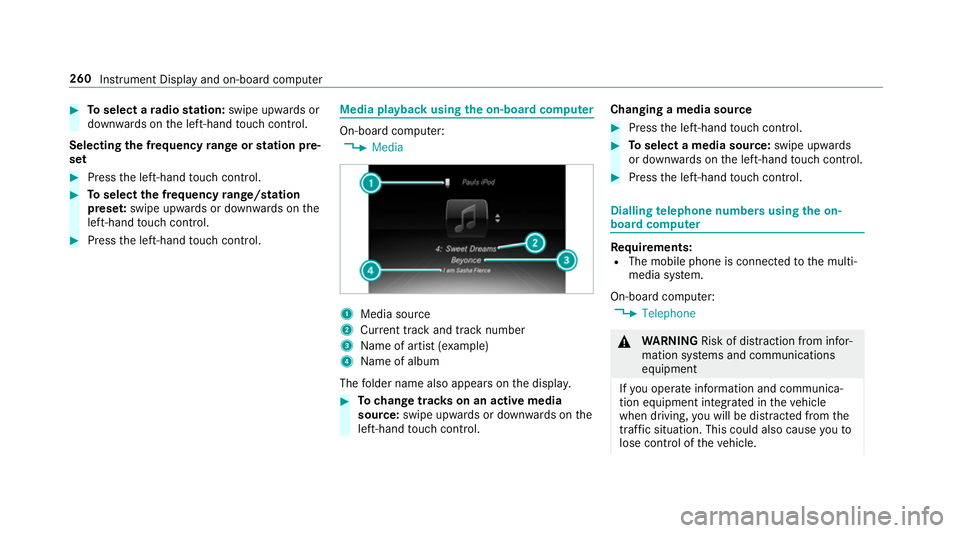
the on-boa rdcompu ter On-board computer:
, Media 1
Media source
2 Current track and track number
3 Name of artist (e xamp le)
4 Name of album
The folder name also appears on the displa y. #
Tochange trac kson an active media
source: swipe upwards or down wards on the
left-hand touch cont rol. Changing a media source #
Press the left-hand touch cont rol. #
Toselect a media source: swipe upwards
or down wards on the left-hand touch cont rol. #
Press the left-hand touch cont rol. Dialling
telephone numbers using the on-
board compu ter Re
quirements:
R The mobile phone is connec tedto the multi‐
media sy stem.
On-board computer: , Telephone &
WARNING Risk of di stra ction from infor‐
mation sy stems and communications
equipment
If yo u operate information and communica‐
tion equipment integ rated in theve hicle
when driving, you will be distracted from the
traf fic situation. This could also cause youto
lose control of theve hicle. 260
Instrument Display and on-board computer
Page 265 of 497
1
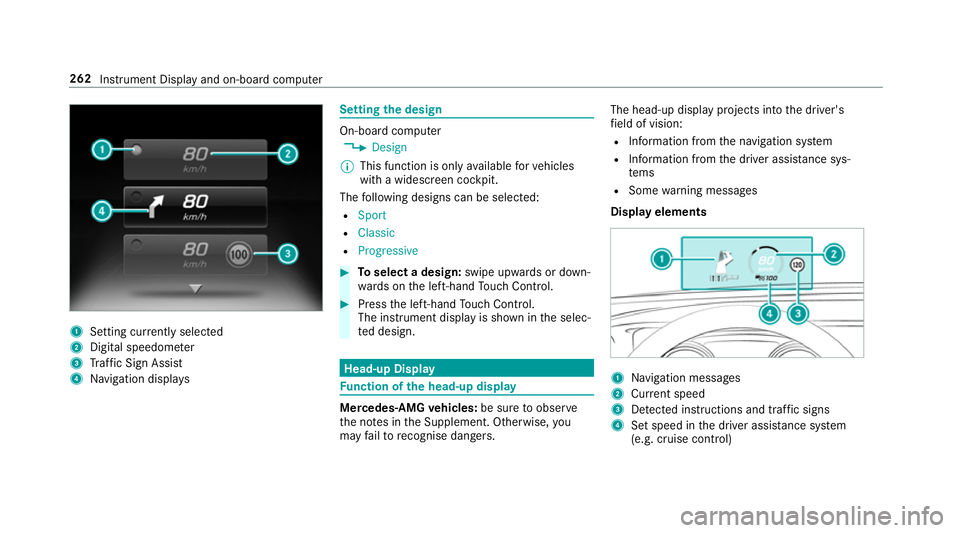
Setting cur rently selected
2 Digital speedome ter
3 Traf fic Sign Assi st
4 Navigation displa ys Setting
the design On-board computer
, Design
% This function is only available forve hicles
with a widescreen cockpit.
The following designs can be selec ted:
R Sport
R Classic
R Progressive #
Toselect a design: swipe upwards or down‐
wa rds on the left-hand Touch Control. #
Press the left-hand Touch Control.
The instrument displ ayis shown in the selec‐
te d design. Head-up Display
Fu
nction of the head-up display Mercedes-AMG
vehicles: be sure toobser ve
th e no tes in the Supplement. Otherwise, you
may failto recognise dangers. The head-up displ
ayprojects into the driver's
fi eld of vision:
R Information from the navigation sy stem
R Information from the driver assis tance sys‐
te ms
R Some warning messages
Display elements 1
Navigation messa ges
2 Current speed
3 Detected instructions and traf fic signs
4 Set speed in the driver assis tance sy stem
(e.g. cruise control) 262
Instrument Display and on-board computer
Page 279 of 497
Exporting
If PIN pr
otection is activated, the PIN is reques‐
te d. #
Ente rth efo ur-digit PIN. #
Select a data storage medium.
The data is expor ted. The data export may
ta ke several minutes.
Ac tivating/deactivating PIN pr otection for
data export
Multimedia sy stem:
, Vehicle .
System settings .
Import/
export data #
Toactivate: activateActivate PIN protection
O. #
Enter your four-digit PIN. #
Enteryo ur four-digit PIN again.
PIN pr otection is activated when bo thPINs
match. #
Todeactivate: deactivateActivate PIN pro-
tection ª. #
Enter your four-digit PIN. %
Ifyo u ha veforg ottenyo ur PIN, a Mercedes-
Benz service centre can deactivate your PIN
pr otection foryo u.
Alternatively: you can deactivate PIN pr otec‐
tion byresetting your personal data
(→ page 276). Re
set function Multimedia sy
stem:
, Vehicle .
System settings .
Reset
The multimedia sy stem is reset tothefa ctory
settings.
Pe rsonal data is dele ted, forex ample:
R station presets
R connec ted mobile phones #
Select Yes.
A qu ery appears asking if you are sure that
yo uwa nttoreset.
No selected: the process is cancelled. #
Select Yes.
The multimedia sy stem is reset tofactory
settings and restar ted. Garmin
®
MAP PIL OTnavigation module Overview of Garmin
®
MAP PIL OTnavigation
module &
DANG ER Risk of fata l injury from swal‐
lowing SD cards
SD cards are small parts.
They could be swallo wed and lead tochok‐
ing. #
Keep SD cards out of there ach of chil‐
dren. #
Seek medical attention immediately if
an SD card has been swallo wed. &
WARNING Risk of di stra ction from infor‐
mation sy stems and communications
equipment
If yo u operate information and communica‐
tion equipment integ rated in theve hicle
when driving, you will be distracted from the
traf fic situation. This could also cause youto
lose control of theve hicle. 276
Multimedia sy stem
Page 281 of 497
4
Bluetoo th®
device name of the cur rently
connected mobile phone
5 Telephone menu character bar
6 Toenter characters using theto uchpad
7 Todisplay the phone book
Symbols 1to4 are not shown until af ter a
mobile phone has been connected tothe multi‐
media sy stem. The symbols depend on your
mobile phone and your mobile phone network
pr ov ider.
The Blue tooth®
inter face is available toyoufor
te lephon y.The mobile phone is connected
directly via the multimedia sy stem.
If th e mobile phone connected supports the
MAP Blue tooth®
profile (Message Access
Pro file), the1 menu item is available. Note
s ontelephony &
WARNING Risk of di stra ction from oper‐
ating integrated communication equip‐
ment while theve hicle is in motion
If yo u operate communication equipment
integrated in theve hicle when driving, you
will be distracted from the traf fic situation.
This could also cause youto lose control of
th eve hicle. #
Only operate this equipment when the
traf fic situation permits. #
Ifyo u cannot be sure of this, stop the
ve hicle whilst paying attention toroad
and traf fic conditions and ope rate the
equipment with theve hicle stationar y. &
WARNING Risk of di stra ction from oper‐
ating mobile communication equipment
while theve hicle is in motion
If yo u operate communication equipment
integrated in theve hicle when driving, you
will be distracted from the tra ffic situation. This could also cause
youto lose control of
th eve hicle.
Only operate this equipment when theve hi‐
cle is stationar y. Yo
u must obse rveth e legal requ irements forthe
country in whi chyou are cur rently driving when
operating mobile communication equipment in
th eve hicle.
Te lephony is possible via:
R the Blue tooth®
inter face
Blue tooth ®
profile overview Blue
tooth ®
profile
of the mobile phone Fu
nction
PBAP (Phone Book
Access Profile) Contacts are auto‐
matically displa
yed in
th e multimedia sys‐
tem
MAP (Message
Access Profile) Message functions
can be used 278
Multimedia sy stem
Page 296 of 497
Online and Internet functions
Internet connection
Internet connection
restrictions &
WARNING Risk of di stra ction from infor‐
mation sy stems and communications
equipment
If yo u operate information and communica‐
tion equipment integ rated in theve hicle
when driving, you will be distracted from the
traf fic situation. This could also cause youto
lose control of theve hicle. #
Only operate this equipment when the
traf fic situation permits. #
Ifyo u cannot be sure of this, stop the
ve hicle whilst paying attention toroad
and traf fic conditions and ope rate the
equipment with theve hicle stationar y. Yo
u must obse rveth e legal requirements forthe
country in whi chyou are cur rently driving when
operating the multimedia sy stem. Internet access may be
restricted or not function
if:
R the mobile phone is switched off
R the mobile phone network co verage is insuf‐
fi cient
R the mobile phone is not enabled for Internet
access
R the Blue tooth®
function is switched off on
th e multimedia sy stem and the desired tele‐
phone is tobe connec ted via Blue tooth®
R the Blue tooth®
function is switched off on
th e mobile phone and thete lephone is tobe
connec ted via Blue tooth®
R neither the mobile phone network nor the
mobile phone allow simultaneous use of a
te lephone and an Internet connection
R the mobile phone has not been enabled for
Internet access via Blue tooth®
The Internet functions can only be used toa limi‐
te d deg ree whilst driving. Setting up an Internet connection
Re quirements:
R A mobile phone is connec tedto the multime‐
dia sy stem via Blue tooth®
(→ page 279).
To do so, the mobile phone must support one
of thefo llowing Blue tooth®
profiles:
- DUN (Dial-Up Networking)
- PAN (Personal Area Network)
R Set the access data of the mobile phone net‐
wo rkprov ider forth e connected mobile
phone in the multimedia sy stem. If you use
incor rect access da ta, additional costs may
be incur red.
Yo u can obtain more de tailed information at
http://www.me rcedes-benz.com/connect or
from a Mercedes-Benz service cent re.
Multimedia sy stem:
, Tel/ ®.
Tel/ ®.
Inter-
net .
Settings .
Manage Internet set- Multimedia sy
stem 293