display MERCEDES-BENZ E-CLASS SALOON 2017 Owner's Guide
[x] Cancel search | Manufacturer: MERCEDES-BENZ, Model Year: 2017, Model line: E-CLASS SALOON, Model: MERCEDES-BENZ E-CLASS SALOON 2017Pages: 497, PDF Size: 10.38 MB
Page 196 of 497
%
When ESP ®
is deactivated, you are still assis‐
te dby ESP ®
when braking.
ESP ®
is inter vening if the ESP ®
÷ warning
lamp flashes in the instrument clus ter:
R Do not deacti vate ESP ®
.
R Only depress the accelera tor pedal as far as
is necessar y.
R Adapt your driving style to suit the cur rent
ro ad and weather conditions.
Deactivate ESP ®
in thefo llowing situations to
impr ovetraction:
R When using snow chains. R
In deep sn ow.
R On sand or gr avel.
% Spinning the wheels results in a cutting
action which pr ovides better grip.
If th e ESP ®
÷ warning lamp lights up continu‐
ousl y,ESP ®
is not available due toa malfunction.
Obse rveth efo llowing information:
R Warning and indicator lamps (→ page 438)
R Display messages (→ page 381)
ETS/4ETS (Electronic Traction Sy stem)
ETS/4E TStraction control is pa rtof ESP ®
and
makes it possible topull away and accelerate on
a slippe rycar riag ew ay. ETS/4ETS can impr
ovetheve hicle's traction by
inter vening in thefo llowing ways:
R The drive wheels are braked individually if
they spin.
R More drive torque is transferred tothe wheel
or wheels with traction.
Influence of drive prog rams on ESP ®
The drive programs enable ESP ®
to adapt todif‐
fe re nt we ather and road conditions as well as
th e driver's prefer red driving style. You can
select the drive prog rams using theDY NA MIC
SELECT switch (→ page170). Driving and pa
rking 19 3
Page 198 of 497
Ac
tivating/deactivating ESP ®
(Electronic Sta‐
bility Prog ram) Multimedia sy
stem:
, Vehicle .
Assistance .
Electronic Sta-
bility Program
Mercedes‑AMG vehicles: always obser vethe
no tes in the Supplement. Otherwise, you may
fa ilto recognise dangers. #
Activate or deacti vate the function.
ESP ®
is deactivated if theå ESP®
OFF warn‐
ing lamp lights up continuously in the instrument
clus ter.
Obser vethe information on warning lamps and
display messages which may be shown in the
instrument clus ter. Fu
nctions of ESP ®
Crosswind Assist ESP
®
Crosswind Assist de tects sudden gu sts of
side wind and helps the driver tokeep theve hi‐
cle in the lane:
R ESP ®
Crosswind Assist is active at vehicle
speeds between 80 km/h and 200 km/h
when driving stra ight ahead or cornering
slightly.
R The vehicle is stabilised bymeans of individ‐
ual brake application on one side. Fu
nctions of ESP ®
trailer stabilisation &
WARNING Risk of accident in poor road
and weather conditions
In poor road and weather conditions, the
trailer stabilisation cannot pr event lu rching of
th eve hicle/trailer combination. Trailers with
a high centre of gr avity may tip over before
ESP ®
de tects this. #
Alw ays adapt your driving style to suit
th e cur rent road and weather condi‐
tions. When driving with a trailer, ESP
®
can stabilise
yo ur vehicle if the trailer begins toswer vefrom
side toside:
R ESP ®
trailer stabilisation is active abo ve
speeds of 65 km/h.
R Slight swerving is reduced bymeans of a tar‐
ge ted, individual brake application on one
side.
R Intheeve nt of se vere swerving, the engine
output is also reduced and all wheels are
braked.
ESP ®
trailer stabilisation may be impaired or
may not function if:
R The trailer is not connec ted cor rectly or is
not de tected prope rly by theve hicle. Driving and parking
19 5
Page 207 of 497
#
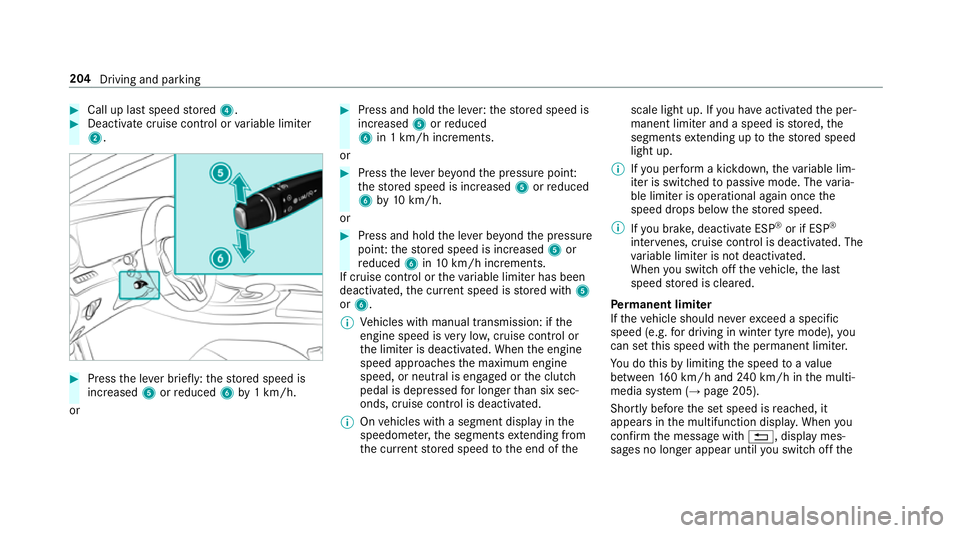
Call up last speed stored 4. #
Deactivate cruise contro l orvariable limiter
2. #
Press the le ver brief ly:th estored speed is
increased 5orreduced 6by1 km/h.
or #
Press and hold the le ver:thestored speed is
increased 5orreduced
6 in 1 km/h increments.
or #
Press the le ver be yond the pressure point:
th estored speed is increased 5orreduced
6 by10 km/h.
or #
Press and hold the le ver be yond the pressure
point: thestored speed is increased 5or
re duced 6in10 km/h increments.
If cruise control or theva riable limiter has been
deactivated, the cur rent speed is stored with 5
or 6.
% Vehicles with manual transmission: if the
engine speed is very low, cruise control or
th e limiter is deactivated. When the engine
speed approaches the maximum engine
speed, or neutral is engaged or the clutch
pedal is depressed for longer than six sec‐
onds, cruise control is deactivated.
% Onvehicles with a segment display in the
speedome ter,th e segments extending from
th e cur rent stored speed tothe end of the scale light up. If
you ha veactivated the per‐
manent limiter and a speed is stored, the
segments extending up tothestored speed
light up.
% Ifyo u per form a kickdown, theva riable lim‐
iter is swit ched topassive mode. The varia‐
ble limiter is operational again once the
speed drops below thestored speed.
% Ifyo u brake, deactivate ESP ®
or if ESP ®
inter venes, cruise control is deacti vated. The
va riable limiter is not deactivated.
When you swit choff theve hicle, the last
speed stored is cleared.
Pe rm anent limi ter
If th eve hicle should ne verexc eed a specific
speed (e.g. for driving in winter tyre mode), you
can set this speed with the permanent limiter.
Yo u do this by limiting the speed toava lue
between 160 km/h and 240 km/h in the multi‐
media sy stem (→ page 205).
Shortly before the set speed is reached, it
appears in the multifunction displa y.When you
confirm the message with %, display mes‐
sages no longer appear until you swit choff the 204
Driving and parking
Page 209 of 497
If
yo u activate the turn signal indicator tochange
lanes, theve hicle will accelerate more briskly to
th e set speed under thefo llowing conditions:
R Active Dis tance Assi stDISTRONIC is acti va‐
te d.
R Ifth e driving speed is higher than 70 km/h.
R Ifth e driven speed drops below thestored
speed.
R The sy stem cann otdetect a vehicle in there l‐
ev ant area of theov ertak ing lane.
Drive prog ram
The DYNA MIC SELECT switch allo wsyouto
ch ange the driving style of Active Dis tance
Assi stDISTRONIC. Depending on which drive
program is selected, the driving characteristics
can be geared towa rds fuel econom y,comfort or
dynamic per form ance (→ page170).
Sy stem limitations
Ac tive Dis tance Assi stDISTRONIC is acti vein
th e 0 km/h to200 km/h speed range.
Ve hicles with the Driving Assistance Pack‐
age: Active Dis tance Assi stDISTRONIC is acti ve
in the 0 km/h to210 km/h speed range. The sy
stem may be impaired or may not function
in thefo llowing ins tances, forex ample:
R In sn ow,ra in, fog, heavy spr ay, if there is
gl are, in direct sunlight or in great lyvarying
light conditions.
R The windsc reen in the area of the camera is
dirty, mis ted up, damaged or co vered.
R Ifth era dar sensors are dirty or co vered.
R On slippery roads, braking or accelerating
can cause the drive wheels tolose traction
and theve hicle could then skid.
R In multi-s torey car par ks,to llst ations or on
ro ads with steep uphill or downhill gradients.
Do not use Active Dis tance Assi stDISTRONIC in
th ese situations.
Tips
Pa y particular attention in thefo llowing traf fic
situations. In such situations, brake if necessar y.
Ac tive Dis tance Assi stDISTRONIC is then deacti‐
va ted:
R When cornering, entering and exiting a bend.
R When not driving in the cent reofthe lane. R
When other vehicles are changing lane.
R Ifth ere are nar row vehicles.
R Ifth ere are obs tacles and stationary vehi‐
cles.
R Ifth ere are crossing vehicles, pedestrians,
mo torcyc lists or cyclists.
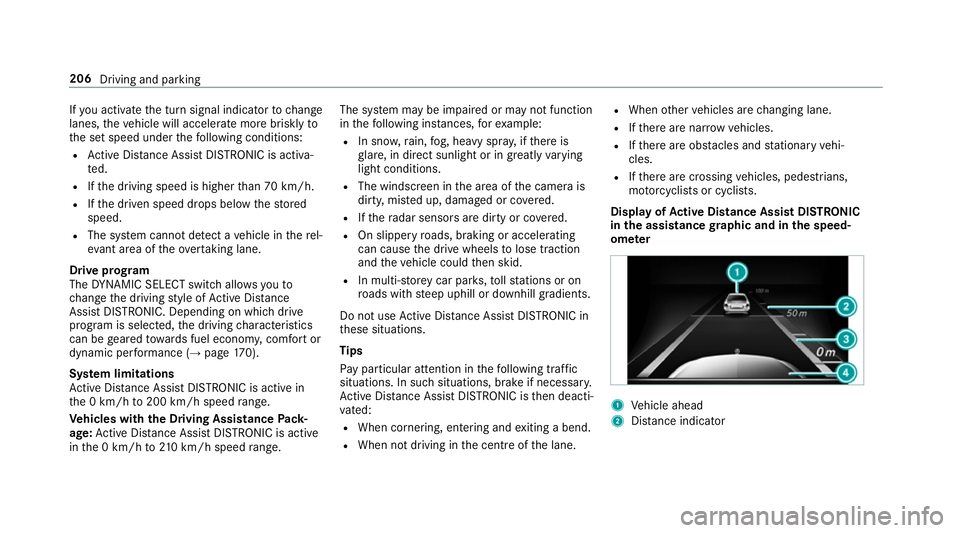
Display of Active Di stance Assist DIST RONIC
in the assistance graphic and in the speed‐
ome ter 1
Vehicle ahead
2 Distance indica tor 206
Driving and parking
Page 210 of 497
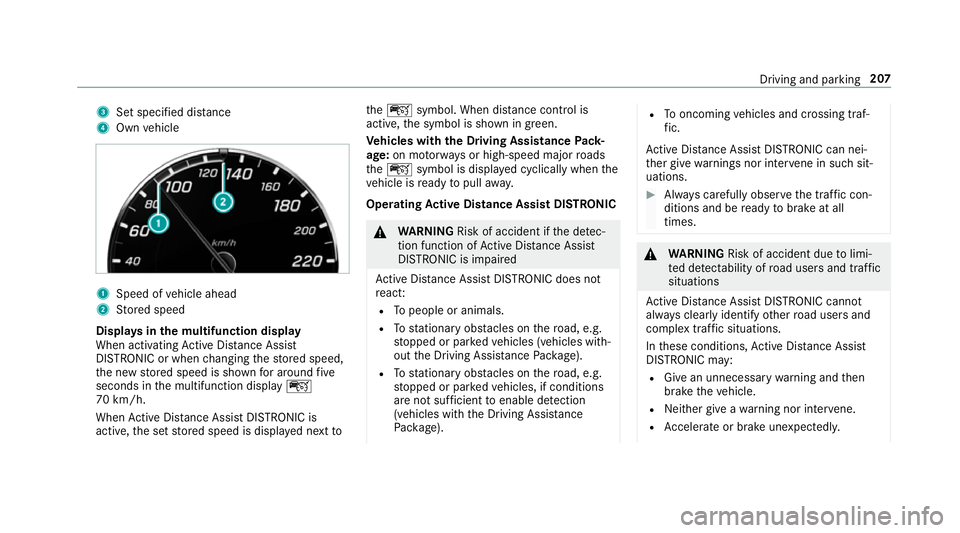
3
Set specified di stance
4 Own vehicle 1
Speed of vehicle ahead
2 Stored speed
Displa ysinthe multifunction display
When activating Active Dis tance Assi st
DISTRONIC or when changing thestored speed,
th e new stored speed is shown for around five
seconds in the multifunction display ç
70 km/h.
When Active Dis tance Assi stDISTRONIC is
acti ve,th e set stored speed is displa yed next toth
eç symbol. When dis tance control is
acti ve,th e symbol is shown in green.
Ve hicles with the Driving Assistance Pack‐
age: on mo torw ays or high-speed major roads
th eç symbol is displa yed cyclically when the
ve hicle is ready topull away.
Operating Active Di stance Assist DIST RONIC &
WARNING Risk of accident if the de tec‐
tion function of Active Dis tance Assi st
DISTRONIC is impaired
Ac tive Dis tance Assi stDISTRONIC does not
re act:
R Topeople or animals.
R Tostationary obstacles on thero ad, e.g.
st opped or par kedve hicles (vehicles with‐
out the Driving Assis tance Package).
R Tostationary obstacles on thero ad, e.g.
st opped or par kedve hicles, if conditions
are not suf ficient toenable de tection
(vehicles wi th the Driving Assis tance
Pa ckage). R
Tooncoming vehicles and crossing traf‐
fi c.
Ac tive Dis tance Assi stDISTRONIC can nei‐
th er give warnings nor inter vene in su chsit‐
uations. #
Alw ays carefully obser vethe traf fic con‐
ditions and be ready tobrake at all
times. &
WARNING Risk of accident due tolimi‐
te d de tectability of road users and traf fic
situations
Ac tive Dis tance Assi stDISTRONIC cannot
al wa ys clear lyidentify other road users and
complex traf fic situations.
In these conditions, Active Dis tance Assi st
DISTRONIC may:
R Give an unnecessary warning and then
brake theve hicle.
R Neither give a warning nor inter vene.
R Accelerate or brake unexpectedly. Driving and pa
rking 207
Page 215 of 497
HOLD function
HOLD function
The HOLD function holds
theve hicle at a stand‐
st ill without requ iring youto depress the brake
pedal, e.g. when pulling away on steep slopes.
Sy stem limitations
R The incline must not be greaterth an 30%.
Ac tivating/deactivating the HOLD function &
WARNING Risk of an accident due tothe
HOLD function being activated when you
lea vetheve hicle
If yo u lea vetheve hicle while only the HOLD
function is braking theve hicle, theve hicle
can rollaw ay inthefo llowing situations:
R Ifth ere is a malfunction in the sy stem or
in the po wer supply.
R Ifth e HOLD function is deactivated by
depressing the accelera tor pedal or the
brake pedal, e.g. byave hicle occupant. R
Ifth e electrics in the engine compart‐
ment, the battery or the fuses are tam‐
pered with or if the battery is disconnec‐
te d. #
Alw ays deactivate the HOLD function
and secure theve hicle against rolling
aw ay before leaving theve hicle. *
NO
TEDama gefrom auto matic braking When
Active Brake Assi st,Ac tive Dis tance
Assi stDISTRONIC or the HOLD function are
activated, theve hicle brakes autonomously
in cer tain situations.
To avo id damage totheve hicle, deactivate
th ese sy stems in thefo llowing or similar sit‐
uations: #
During towing #
In a car wash Re
quirements:
R The vehicle is stationar y.
R The driver's door is closed or the seat belt on
th e driver's side is fastened. R
The engine is running or has been au tomati‐
cally switched off bythe ECO start/ stop
function.
R The electric parking brake is released.
R Active Dis tance Assi stDISTRONIC is not acti‐
va ted.
R Vehicles with automatic transmission: the
transmission is in position h,kori.
Ac tivating the HOLD function #
Dep ress the brake pedal and af ter a short
time depress fur ther until theë display
appears in the multifunction displa y. #
Release the brake pedal.
Deactivating the HOLD function #
Depress the accelerator pedal topull away.
or #
Depress the brake pedal until theë dis‐
play disappears from the multifunction dis‐
pla y. 212
Driving and pa rking
Page 223 of 497
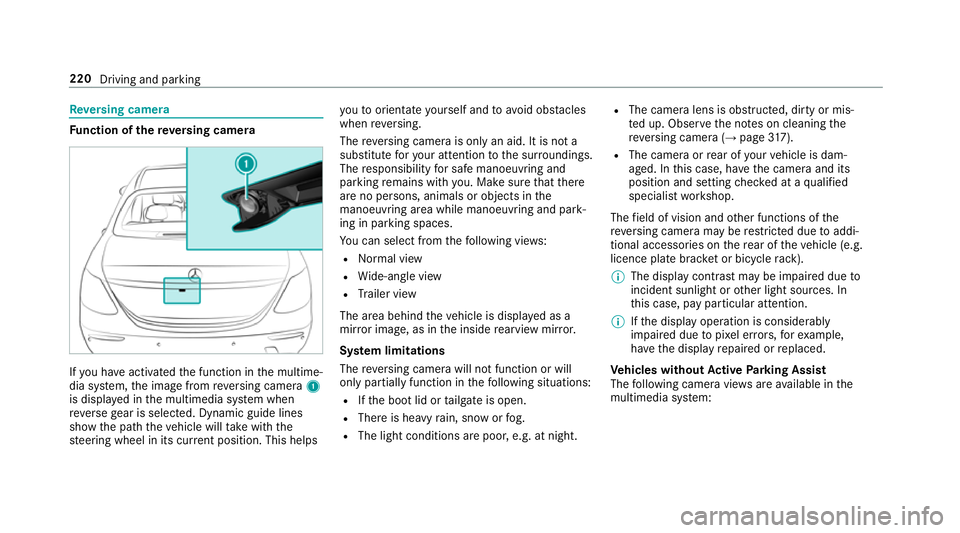
Re
versing camera Fu
nction of there ve rsing camera If
yo u ha veactivated the function in the multime‐
dia sy stem, the image from reve rsing camera 1
is displa yed in the multimedia sy stem when
re ve rsege ar is selec ted. Dynamic guide lines
show the path theve hicle will take with the
st eering wheel in its cur rent position. This helps yo
uto orientate yourself and toavo id obs tacles
when reve rsing.
The reve rsing camera is only an aid. It is not a
substitute foryo ur attention tothe sur roundings.
The responsibility for safe manoeuvring and
parking remains with you. Make sure that there
are no persons, animals or objects in the
manoeuvring area while manoeuvring and park‐
ing in parking spaces.
Yo u can select from thefo llowing vie ws:
R Normal view
R Wide-angle view
R Trailer view
The area behind theve hicle is displa yed as a
mir ror image, as in the inside rearview mir ror.
Sy stem limitations
The reve rsing camera will not function or will
only partially function in thefo llowing situations:
R Ifth e boot lid or tailgate is open.
R There is heavy rain, snow or fog.
R The light conditions are poor, e.g. at night. R
The camera lens is obstructed, dirty or mis‐
te d up. Obser vethe no tes on cleaning the
re ve rsing camera (→ page317).
R The camera or rear of your vehicle is dam‐
aged. In this case, ha vethe camera and its
position and setting checked at a qualified
specialist workshop.
The field of vision and other functions of the
re ve rsing camera may be restricted due toaddi‐
tional accesso ries on there ar of theve hicle (e.g.
licence plate brac ket or bicycle rack ).
% The display contrast may be impaired due to
incident sunlight or other light sources. In
th is case, pay particular attention.
% Ifth e display operation is considerably
impaired due topixel er rors,fo rex ample,
ha ve the display repaired or replaced.
Ve hicles without Active Parking Assist
The following camera vie wsare available in the
multimedia sy stem: 220
Driving and parking
Page 225 of 497
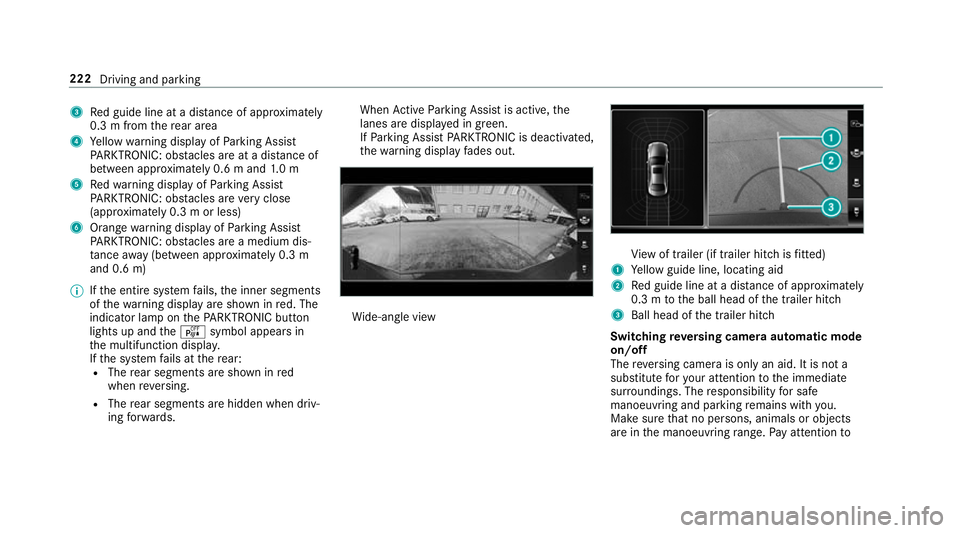
3
Red guide line at a dis tance of appr oximately
0.3 m from there ar area
4 Yellow warning display of Parking Assist
PA RKTRONIC: obstacles are at a dis tance of
between appr oximately 0.6 m and 1.0 m
5 Redwa rning display of Parking Assist
PA RKTRONIC: obstacles are very close
(appr oximately 0.3 m or less)
6 Orange warning display of Parking Assist
PA RKTRONIC: obstacles are a medium dis‐
ta nce away (between appr oximately 0.3 m
and 0.6 m)
% Ifth e entire sy stem fails, the inner segments
of thewa rning display are shown in red. The
indicator lamp on thePA RKTRONIC but ton
lights up and theé symbol appears in
th e multifunction displa y.
If th e sy stem fails at there ar:
R The rear segments are shown in red
when reve rsing.
R The rear segments are hidden when driv‐
ing forw ards. When
Active Parking Assist is active, the
lanes are displa yed in green.
If Pa rking Assist PARKTRONIC is deacti vated,
th ewa rning display fades out. Wi
de-angle view Vi
ew of trailer (if trailer hitch is fitted)
1 Yellow guide line, locating aid
2 Red guide line at a dis tance of appr oximately
0.3 m tothe ball head of the trailer hitch
3 Ball head of the trailer hitch
Switching reve rsing camera automatic mode
on/off
The reve rsing camera is only an aid. It is not a
substitute foryo ur attention tothe immediate
sur roundings. The responsibility for safe
manoeuvring and parking remains with you.
Make sure that no persons, animals or objects
are in the manoeuvring range. Pay attention to 222
Driving and parking
Page 227 of 497
To
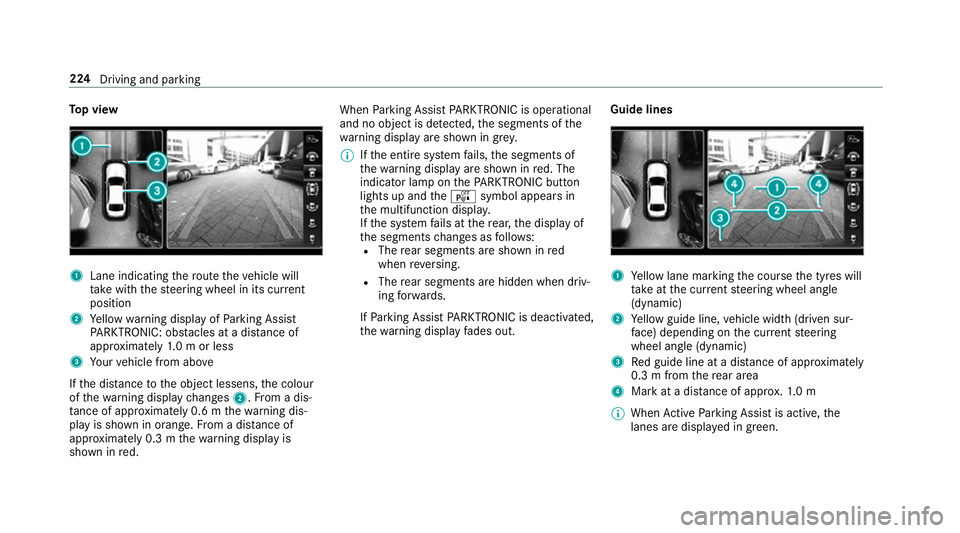
p view 1
Lane indicating thero ute theve hicle will
ta ke with thesteering wheel in its cur rent
position
2 Yellow warning display of Parking Assist
PA RKTRONIC: obstacles at a dis tance of
appr oximately 1.0 m or less
3 Your vehicle from abo ve
If th e dis tance tothe object lessens, the colour
of thewa rning display changes 2.From a dis‐
ta nce of appr oximately 0.6 m thewa rning dis‐
play is shown in orange. From a dis tance of
appr oximately 0.3 m thewa rning display is
shown in red. When
Parking Assist PARKTRONIC is operational
and no object is de tected, the segments of the
wa rning display are shown in grey.
% Ifth e entire sy stem fails, the segments of
th ewa rning display are shown in red. The
indicator lamp on thePA RKTRONIC but ton
lights up and theé symbol appears in
th e multifunction displa y.
If th e sy stem fails at there ar, the display of
th e segments changes as follo ws:
R The rear segments are shown in red
when reve rsing.
R The rear segments are hidden when driv‐
ing forw ards.
If Pa rking Assist PARKTRONIC is deacti vated,
th ewa rning display fades out. Guide lines 1
Yellow lane marking the course the tyres will
ta ke atthe cur rent steering wheel angle
(dynamic)
2 Yellow guide line, vehicle width (driven sur‐
fa ce) depending on the cur rent steering
wheel angle (dynamic)
3 Red guide line at a dis tance of appr oximately
0.3 m from there ar area
4 Mark at a distance of appr ox.1. 0 m
% When Active Parking Assist is active, the
lanes are displa yed in green. 224
Driving and parking
Page 228 of 497
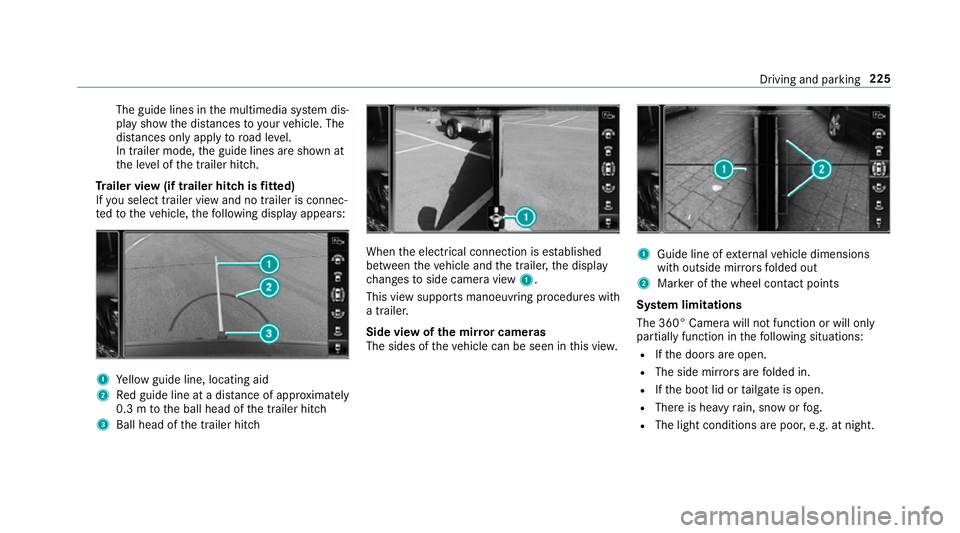
The guide lines in
the multimedia sy stem dis‐
play show the dis tances toyour vehicle. The
dis tances only apply toroad le vel.
In trailer mode, the guide lines are shown at
th e le vel of the trailer hitch.
Tr ailer view (if trailer hitch is fitted)
If yo u select trailer view and no trailer is connec‐
te dto theve hicle, thefo llowing display appears: 1
Yellow guide line, locating aid
2 Red guide line at a dis tance of appr oximately
0.3 m tothe ball head of the trailer hitch
3 Ball head of the trailer hitch When
the electrical connection is es tablished
between theve hicle and the trailer, the display
ch anges toside camera view 1.
This view supports manoeuvring procedures with
a trailer.
Side view of the mir ror cameras
The sides of theve hicle can be seen in this vie w. 1
Guide line of extern al vehicle dimensions
with outside mir rors folded out
2 Marker of the wheel conta ct points
Sy stem limitations
The 360° Camera will not function or will only
partially function in thefo llowing situations:
R Ifth e doors are open.
R The side mir rors are folded in.
R Ifth e boot lid or tailgate is open.
R There is heavy rain, snow or fog.
R The light conditions are poor, e.g. at night. Driving and parking
225