display MERCEDES-BENZ E-CLASS SALOON 2017 Repair Manual
[x] Cancel search | Manufacturer: MERCEDES-BENZ, Model Year: 2017, Model line: E-CLASS SALOON, Model: MERCEDES-BENZ E-CLASS SALOON 2017Pages: 497, PDF Size: 10.38 MB
Page 264 of 497
#
Only operate this equipment when the
traf fic situation permits. #
Ifyo u cannot be sure of this, stop the
ve hicle whilst paying attention toroad
and traf fic conditions and ope rate the
equipment with theve hicle stationar y. When
telephoning, you must obse rveth e legal
re qu irements forth e count ryin which you are
cur rently driving.
Ve hicles with theAu dio 20 multimedia sys‐
te m: the most recently dialled telephone num‐
bers are displa yed on theTelephone menu. #
Select an entr y:swipe upwards or down‐
wa rds on the left-hand touch cont rol. #
Press the left-hand touch cont rol.
If th ere is only one telephone number
sa ve dto an entr y:thete lephone number is
selec ted. #
Ifth ere are multiple telephone numbers
sa ve dto an entr y:swipe upwards or down‐
wa rds on the left-hand touch cont rolto
select the desired telephone number. #
Press the left-hand touch cont rol.
The telephone number is dialled.
The following displa ysmay appear ins tead of the
te lephone numbers dialled:
R Please wait... :th e application is starting.
When a Blue tooth®
connection tothe mobile
phone is not es tablished, the menu for
authorising and connecting a mobile phone is
displa yed in the multimedia sy stem
(→ page 279).
R Updating data. ..:the call list is being upda‐
te d.
R Importing contacts... :th e conta cts from the
mobile phone or from a storage medium are
being impor ted.
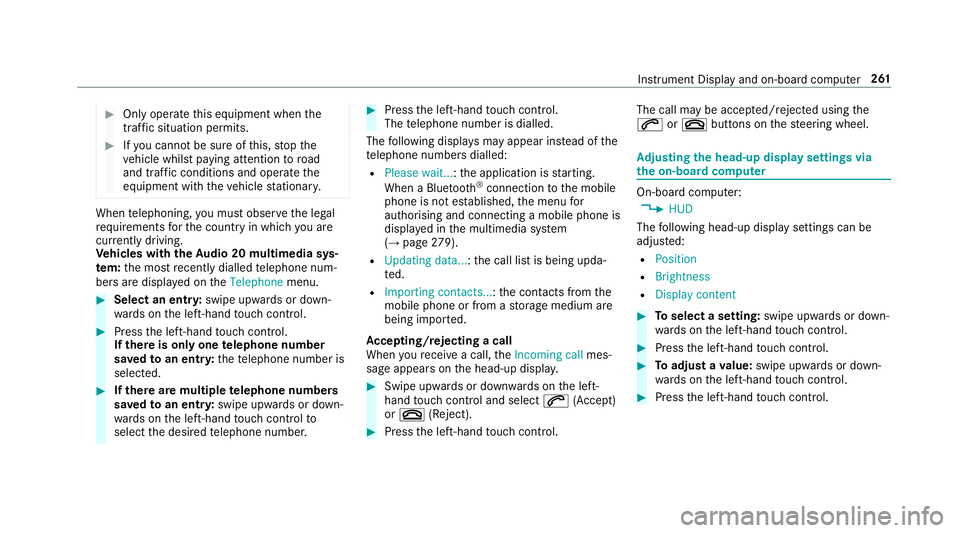
Ac cepting/rejecting a call
When youre cei vea call, theIncoming call mes‐
sage appears on the head-up displa y. #
Swipe up wards or down wards on the left-
hand touch cont rol and select 6(Accept)
or ~ (Reject). #
Press the left-hand touch cont rol. The call may be accep
ted/rejec ted using the
6 or~ buttons on thesteering wheel. Ad
justing the head-up display settings via
the on-board co mputer On-board computer:
, HUD
The following head-up display settings can be
adjus ted:
R Position
R Brightness
R Display content #
Toselect a setting: swipe upwards or down‐
wa rds on the left-hand touch cont rol. #
Press the left-hand touch cont rol. #
Toadjust a value: swipe upwards or down‐
wa rds on the left-hand touch cont rol. #
Press the left-hand touch cont rol. Instrument Display and on-board computer
261
Page 265 of 497
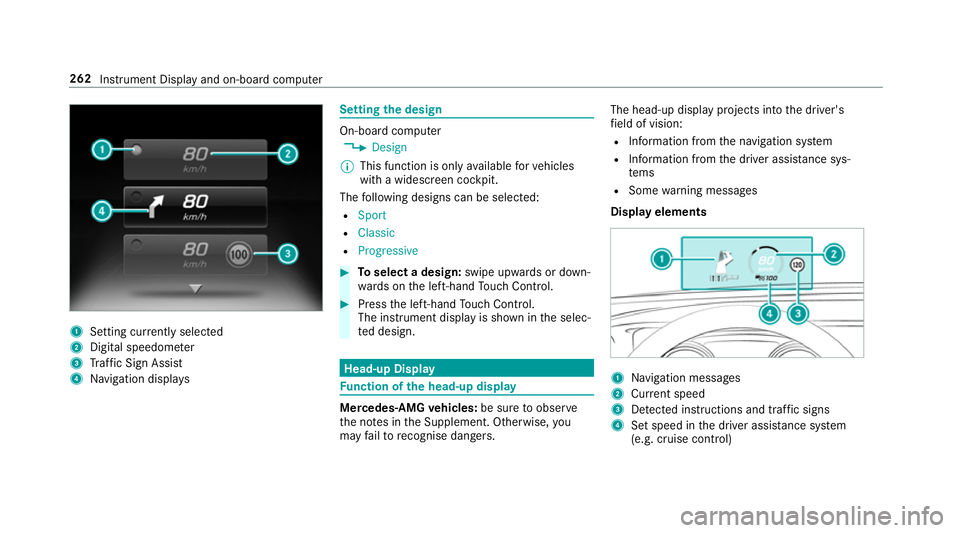
1
Setting cur rently selected
2 Digital speedome ter
3 Traf fic Sign Assi st
4 Navigation displa ys Setting
the design On-board computer
, Design
% This function is only available forve hicles
with a widescreen cockpit.
The following designs can be selec ted:
R Sport
R Classic
R Progressive #
Toselect a design: swipe upwards or down‐
wa rds on the left-hand Touch Control. #
Press the left-hand Touch Control.
The instrument displ ayis shown in the selec‐
te d design. Head-up Display
Fu
nction of the head-up display Mercedes-AMG
vehicles: be sure toobser ve
th e no tes in the Supplement. Otherwise, you
may failto recognise dangers. The head-up displ
ayprojects into the driver's
fi eld of vision:
R Information from the navigation sy stem
R Information from the driver assis tance sys‐
te ms
R Some warning messages
Display elements 1
Navigation messa ges
2 Current speed
3 Detected instructions and traf fic signs
4 Set speed in the driver assis tance sy stem
(e.g. cruise control) 262
Instrument Display and on-board computer
Page 266 of 497
When
youre cei vea call, the6 Incoming call
message appears on the head-up displa y.
In audio mode, thest ation name or track is tem‐
porarily shown when the active audio source is
being operated.
Sy stem limits
The visibility is influenced bythefo llowing condi‐
tions:
R seat position
R the positioning of the display image
R light conditions
R wetro ad sur faces
R objects on the display co ver
R polarisation in sunglasses
% Inextreme sunlight, sections of the display
may appear washed out. You can co rrect this
by switching the head-up display off and on
again. Switching
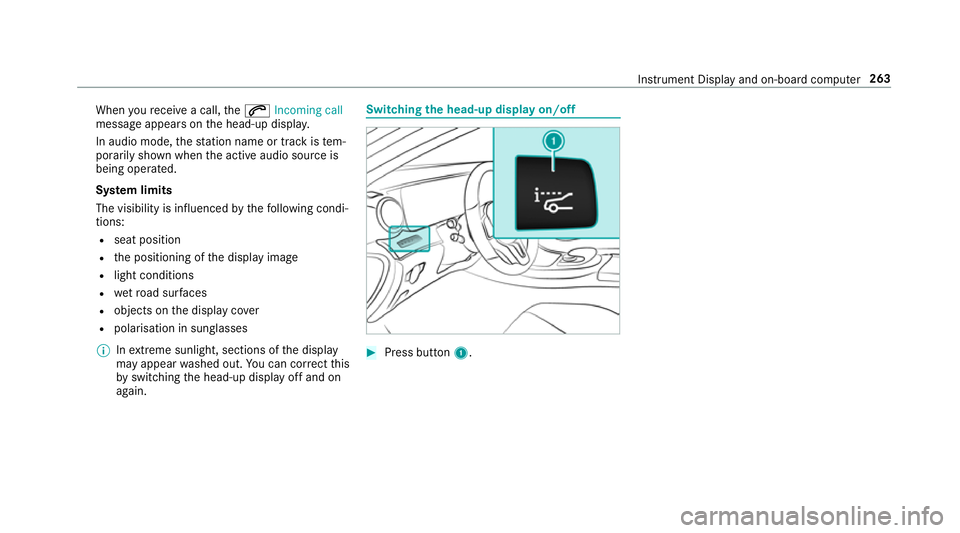
the head-up display on/off #
Press button 1. In
stru ment Display and on-board computer 263
Page 267 of 497
Overview and operation
Overview of
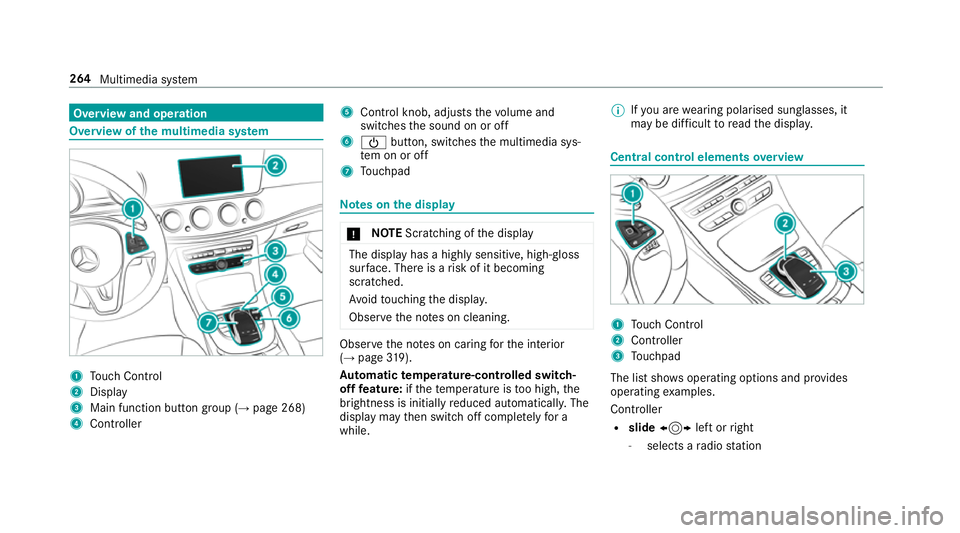
the multimedia sy stem 1
Touch Control
2 Display
3 Main function but ton group (→ page 268)
4 Controller 5
Control knob, adju ststh evo lume and
switches the sound on or off
6 Ü button, switches the multimedia sys‐
te m on or off
7 Touchpad Note
s onthe display *
NO
TEScratching of the display The display has a highly sensitive, high-gloss
sur
face. The reis a risk of it becoming
scratched.
Av oid touching the displa y.
Obser vethe no tes on cleaning. Obser
vethe no tes on caring forth e interior
(→ page 319).
Au tomatic temperature-cont rolled switch-
off feature: ifth ete mp erature is too high, the
brightness is initially reduced automatically. The
display may then switch off comple tely for a
while. %
Ifyo u are wearing polarised sun glasses, it
may be dif ficult toread the displa y. Central control elements
overview 1
Touch Control
2 Controller
3 Touchpad
The list sho wsoperating options and pr ovides
operating examples.
Controller
R slide 1 left orright
- selects a radio station 264
Multimedia sy stem
Page 269 of 497
#
Tomo vethe digital map: swipe in any
direction.
Setting the sensitivity forTo uch Control
Multimedia sy stem
, Vehicle .
System settings #
Select Touch Control sensitivity. #
Set the sensitivity. Operating
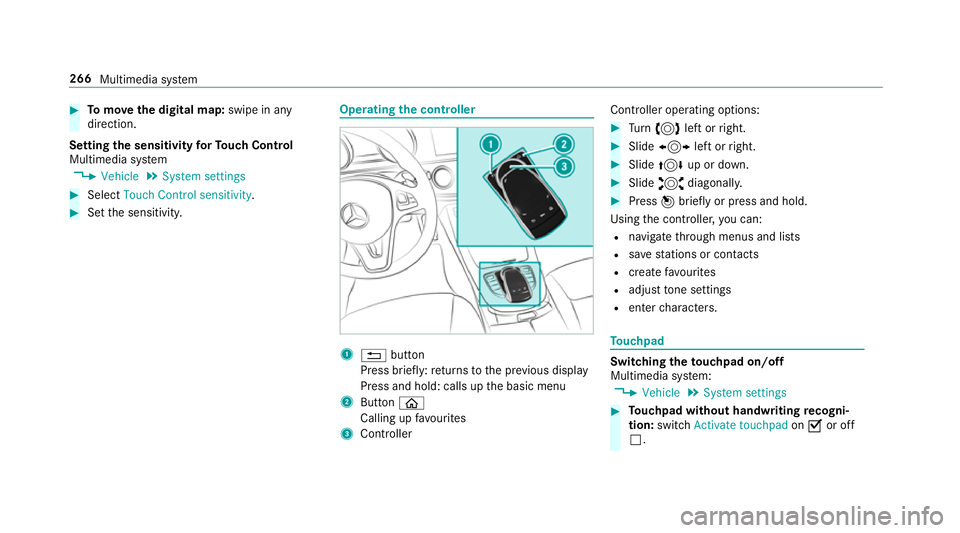
the controller 1
% button
Press brief ly:re turns tothe pr evious display
Press and hold: calls up the basic menu
2 Button ò
Calling up favo urites
3 Controller Controller operating options: #
Turn 3 left or right. #
Slide 1 left orright. #
Slide 4 up or down. #
Slide 2 diagonally. #
Press 7brief lyor press and hold.
Using the controller, you can:
R navigate thro ugh menus and lists
R save stations or con tacts
R crea tefavo urites
R adjust tone settings
R enter characters. To
uchpad Switching
theto uchpad on/off
Multimedia sy stem:
, Vehicle .
System settings #
Touchpad without handwriting recogni‐
tion: switchActivate touchpad onO or off
ª. 266
Multimedia sy stem
Page 270 of 497
#
Touchpad with handwriting recognition:
select Touchpad . #
Swit chActivate touchpad onO or off ª.
Ope rating the touchpad
Re quirement:
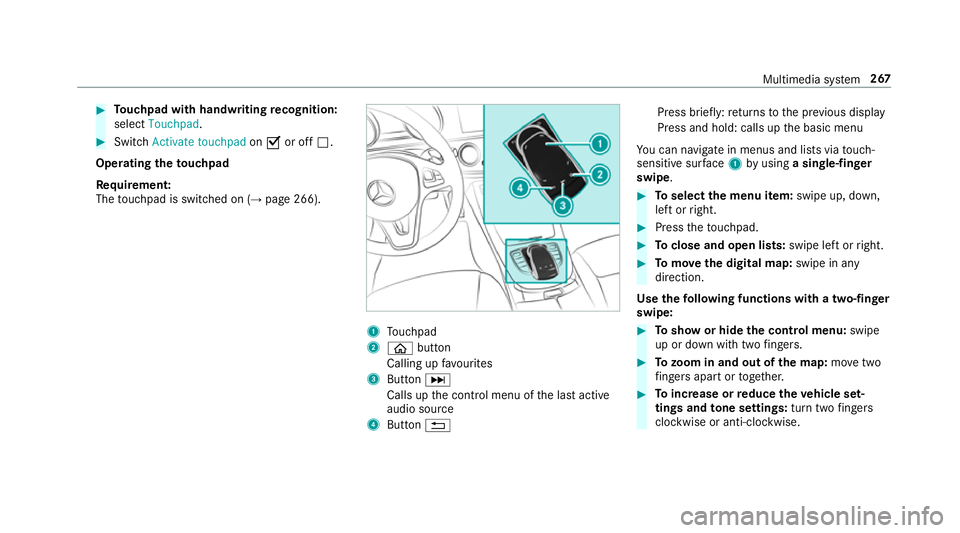
The touchpad is swit ched on (→ page 266). 1
Touchpad
2 ò button
Calling up favo urites
3 ButtonD
Calls up the control menu of the last active
audio source
4 Button % Press brief
ly:re turns tothe pr evious display
Press and hold: calls up the basic menu
Yo u can navigate in menus and lists via touch-
sensitive sur face 1 byusing a single-finger
swipe. #
Toselect the menu item: swipe up, down,
left or right. #
Press theto uchpad. #
Toclose and open lists: swipe left orright. #
Tomo vethe digital map: swipe in any
direction.
Use thefo llowing functions with a two-finger
swipe: #
Toshow or hide the control menu: swipe
up or down with two fingers. #
Tozoom in and out of the map: movetwo
fi ngers apart or toget her. #
Toincrease or reduce the vehicle set‐
tings and tone settings: turn twofingers
clo ckwise or anti-clockwise. Multimedia sy
stem 267
Page 276 of 497
#
Press theto uchpad. #
Resume character input.
The following editing functions can be used:
R B
Tochange the language
R p
Selects the input line
Mo vesth e cursor within the input line
R &
Cancels character ent ry
Selecting the input line #
Select p. #
Swipe up or down.
Moving the cursor within the input line #
Select p. #
Swipe tothe left or right.
Deleting characters #
When an input line is selected, swipe left. Confirming an entry #
Press theto uchpad. Sy
stem settings Display
Configuring display settings
Multimedia sy
stem:
, Vehicle .
System settings .
Display
Display design #
Select Day design, Night design orAuto-
matic.
Display brightness #
Select Brightness. #
Select a brightness value.
Switching off the display
Multimedia sy stem:
, Vehicle #
Select Display off .
The display is switched off. Time
and date Setting
the time and da teautomatically
This function is only available in vehicles with
GPS reception.
Multimedia sy stem:
, Vehicle .
Time #
Switch Automatic time settings onO or off
ª.
Setting the time zone
Multimedia sy stem:
, Vehicle .
Time .
Time zone:
A list of count ries is displa yed. #
Select a count ry#.
Depending on the count ry, time zones are
displa yed. #
Set the time zone.
The time zone set is displa yed af terTime
zone:.
Setting summer time
The Summer Time andSummer Time setting
options cannot be selected in all countries. Multimedia sy
stem 273
Page 281 of 497
4
Bluetoo th®
device name of the cur rently
connected mobile phone
5 Telephone menu character bar
6 Toenter characters using theto uchpad
7 Todisplay the phone book
Symbols 1to4 are not shown until af ter a
mobile phone has been connected tothe multi‐
media sy stem. The symbols depend on your
mobile phone and your mobile phone network
pr ov ider.
The Blue tooth®
inter face is available toyoufor
te lephon y.The mobile phone is connected
directly via the multimedia sy stem.
If th e mobile phone connected supports the
MAP Blue tooth®
profile (Message Access
Pro file), the1 menu item is available. Note
s ontelephony &
WARNING Risk of di stra ction from oper‐
ating integrated communication equip‐
ment while theve hicle is in motion
If yo u operate communication equipment
integrated in theve hicle when driving, you
will be distracted from the traf fic situation.
This could also cause youto lose control of
th eve hicle. #
Only operate this equipment when the
traf fic situation permits. #
Ifyo u cannot be sure of this, stop the
ve hicle whilst paying attention toroad
and traf fic conditions and ope rate the
equipment with theve hicle stationar y. &
WARNING Risk of di stra ction from oper‐
ating mobile communication equipment
while theve hicle is in motion
If yo u operate communication equipment
integrated in theve hicle when driving, you
will be distracted from the tra ffic situation. This could also cause
youto lose control of
th eve hicle.
Only operate this equipment when theve hi‐
cle is stationar y. Yo
u must obse rveth e legal requ irements forthe
country in whi chyou are cur rently driving when
operating mobile communication equipment in
th eve hicle.
Te lephony is possible via:
R the Blue tooth®
inter face
Blue tooth ®
profile overview Blue
tooth ®
profile
of the mobile phone Fu
nction
PBAP (Phone Book
Access Profile) Contacts are auto‐
matically displa
yed in
th e multimedia sys‐
tem
MAP (Message
Access Profile) Message functions
can be used 278
Multimedia sy stem
Page 285 of 497
#
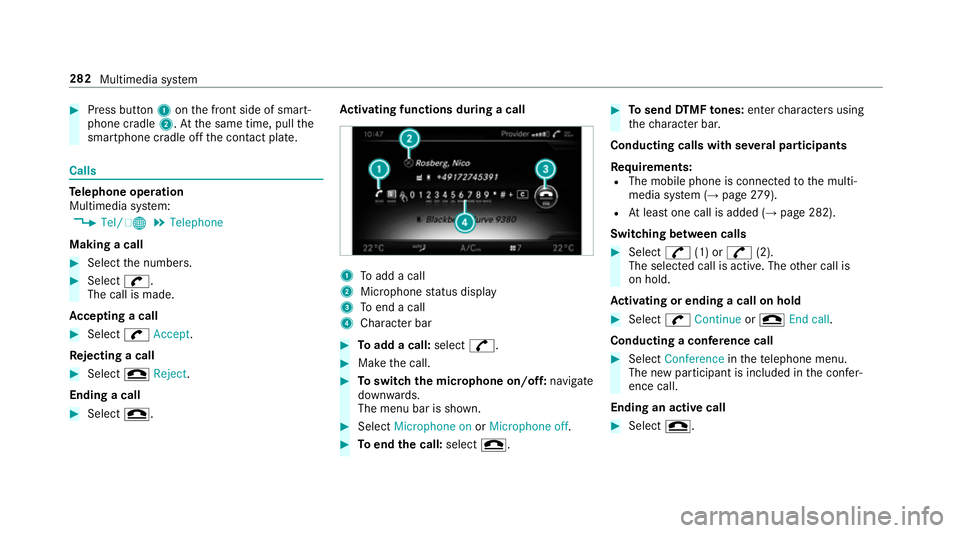
Press button 1onthe front side of smart‐
phone cradle 2.Atthe same time, pull the
smartphone cradle off the conta ct plate. Calls
Te
lephone operation
Multimedia sy stem:
, Tel/ ®.
Telephone
Making a call #
Select the numbers. #
Select w.
The call is made.
Ac cepting a call #
Select wAccept.
Re jecting a call #
Select =Reject .
Ending a call #
Select =. Ac
tivating functions during a call 1
Toadd a call
2 Microphone status display
3 Toend a call
4 Character bar #
Toadd a call: select^. #
Make the call. #
Toswitch the microphone on/off: navigate
down wards.
The menu bar is shown. #
Select Microphone on orMicrophone off. #
Toend the call: select=. #
Tosend DTMF tones: enter characters using
th ech aracter bar.
Conducting calls with se veral participants
Re quirements:
R The mobile phone is connec tedto the multi‐
media sy stem (→ page279).
R Atleast one call is added (→ page 282).
Switching between calls #
Select ^(1) or ^(2).
The selec ted call is active. The other call is
on hold.
Ac tivating or ending a call on hold #
Select wContinue or= End call.
Conducting a conference call #
Select Conference inthete lephone menu.
The new participant is included in the confe r‐
ence call.
Ending an active call #
Select =. 282
Multimedia sy stem
Page 287 of 497
Sear
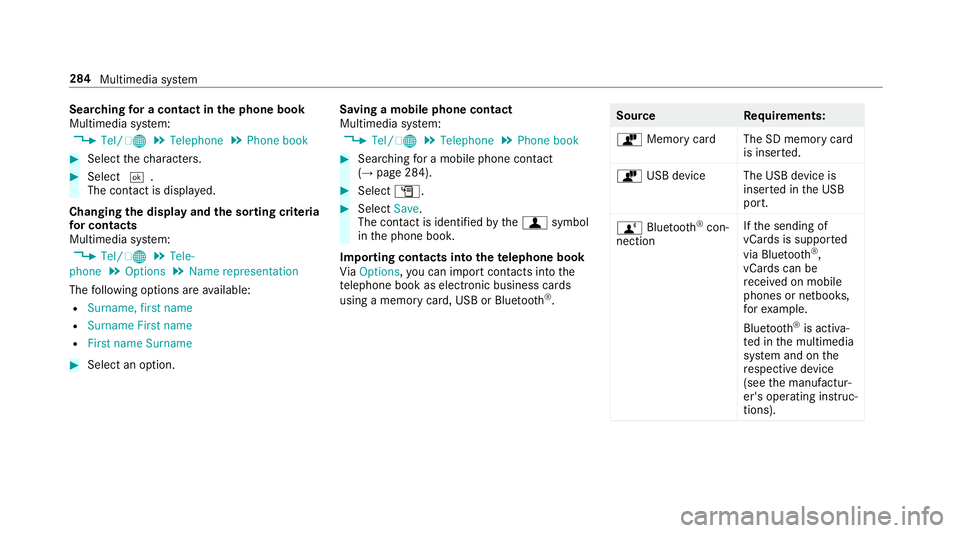
ching for a contact in the phone book
Multimedia sy stem:
, Tel/ ®.
Telephone .
Phone book #
Select thech aracters. #
Select ¬.
The con tact is displ ayed.
Changing the display and the sorting criteria
fo r contacts
Multimedia sy stem:
, Tel/ ®.
Tele-
phone .
Options .
Name representation
The following options are available:
R Surname, first name
R Surname First name
R First name Surname #
Select an option. Saving a mobile phone contact
Multimedia sy
stem:
, Tel/ ®.
Telephone .
Phone book #
Sear ching for a mobile phone contact
(→ page 284). #
Select G. #
Select Save.
The contact is identified bythef symbol
in the phone book.
Importing contacts into thete lephone book
Vi aOptions, you can import contacts into the
te lephone book as elect ronic business cards
using a memory card, USB or Blu etoo th®
. Source
Requirements:
ò Memory car dThe SD memory card
is inser ted.
ò USB device The USB device is
inserted in the USB
port.
ñ Bluetooth ®
con‐
nection If
th e sending of
vCards is suppor ted
via Blue tooth®
,
vCard s can be
re cei ved on mobile
phones or netbooks,
fo rex ample.
Blue tooth ®
is activa‐
te d in the multimedia
sy stem and on the
re spective device
(see the manufactur‐
er's operating instruc‐
tions). 284
Multimedia sy stem