Side MERCEDES-BENZ E-Class SEDAN 2010 W212 Comand Manual
[x] Cancel search | Manufacturer: MERCEDES-BENZ, Model Year: 2010, Model line: E-Class SEDAN, Model: MERCEDES-BENZ E-Class SEDAN 2010 W212Pages: 224, PDF Size: 7.4 MB
Page 88 of 224
segment and the route segment to which
the block goes.XTo cancel the function: Select Back.XTo start route calculation: Select Start,
see also ( Y page 70).XTo delete block: In map view with the
menu system displayed, select Route
£ Detour £Delete .
Alternative Route
i You can have other routes calculated for
the original route guidance using the
Alternative Route function.
XIn the map display with the menu system
displayed ( Y page 54) select Route
£ Alternative Route .
The display is split into two halves. On the
left is the map, which displays one or more
alternative routes between the start and
the destination. The current route is
highlighted in dark blue, other alternative
routes are light blue (day mode). If the
display is in night mode, the representation
is inverse.
The right side of the display shows
information on the active alternative route,
e.g. length of the segment and the
estimated time of arrival.XTo select next or previous alternative
route: Select Next or Previous .
The selected route is now highlighted in
dark blue.XTo return to the original route guidance:
Select Back.XTo start route guidance with the
selected alternative route guidance:
Select Start.
Route Browser
i The route browser provides an overview
of the route. You can move along the route
segment by segment using the route
browser and view information and details
about the route segments.XIn the map display with the menu system
displayed, select Route£Route
Browser .
The route browser is in the display.
The top of the display shows information on
the highlighted route segment, e.g. the
road name or number and the segment
length of the road to be driven.
The highlighted route segment is identified
on the map by its white color and red edge.XTo display next or previous route
segment: Select Next or Previous .XTo enlarge or reduce the map display:
Select ; or :.XTo close route browser: Select Back.
Displaying Destination Information
XIn the map display with the menu system
( Y page 54) shown, select Route
£ Destination Information .
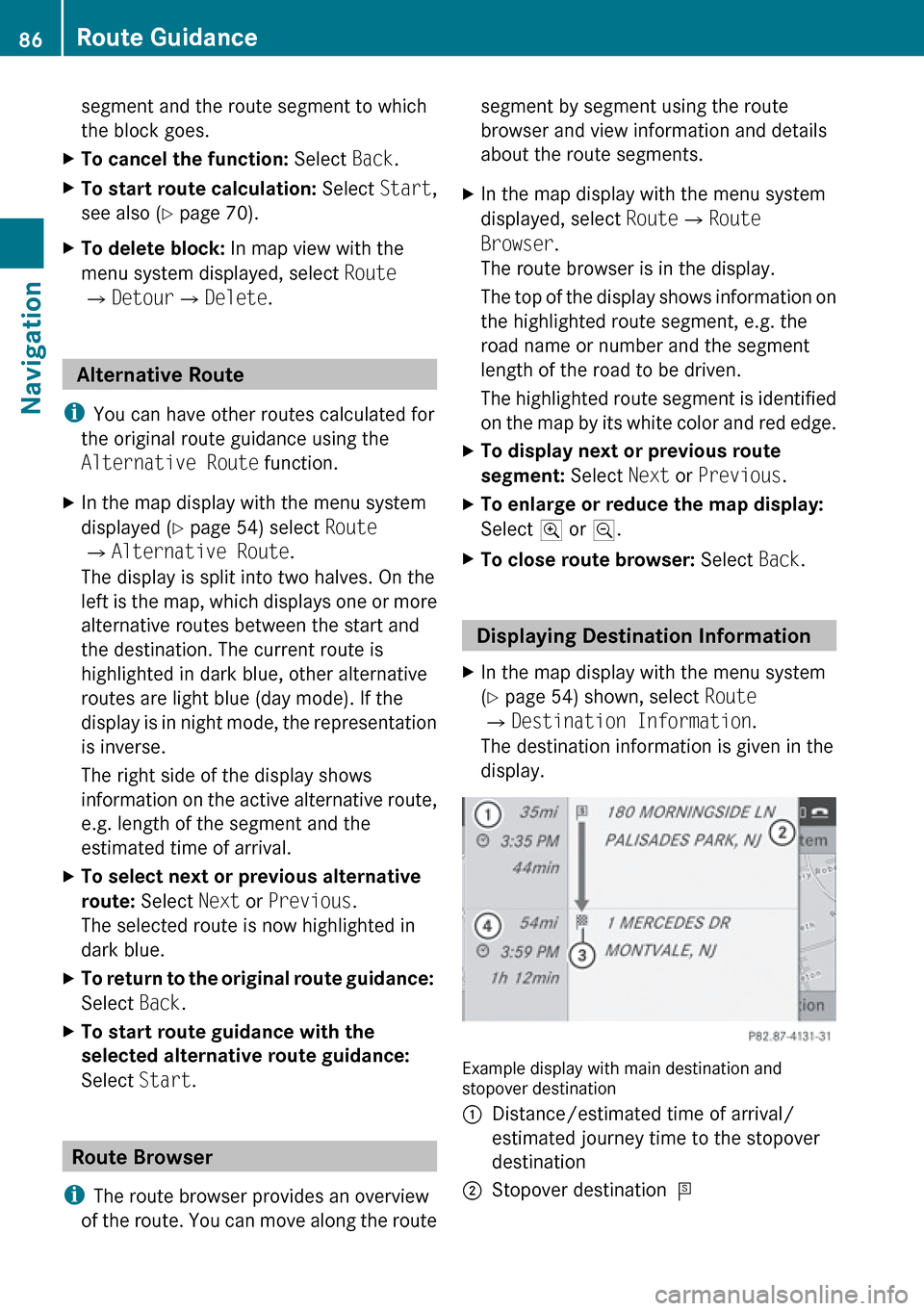
The destination information is given in the
display.
Example display with main destination and
stopover destination
1Distance/estimated time of arrival/
estimated journey time to the stopover
destination2Stopover destination =86Route GuidanceNavigation
Page 89 of 224
3Main destination4Distance/estimated time of arrival/
estimated journey time to the main
destination <
i
When calculating the estimated time of
arrival, COMAND uses the time set on the
COMAND as its basis. For this reason, the
time on COMAND must be set correctly
( Y page 41). The calculation of the
estimated time of arrival does not
specifically take into consideration
whether it is summer time or standard time
at the destination. It is not taken into
consideration whether or not the
destination is in a different time zone. The
distance to the destination, the estimated
time of arrival and the estimated remaining
journey time 1, 4 are not displayed until
the route calculation is complete.
XTo close the destination information:
Slide om p.
or
XPress the k button.
Traffic Messages
i Optional satellite radio equipment and a
subscription to SIRIUS XM Satellite Radio
service provider are required for the
satellite radio reception referred to here.
You can find more information on SatRadio
in chapter “Satellite Radio” ( Y page 127).
COMAND can receive and incorporate traffic
messages via satellite radio into the
navigation system. Traffic report messages
and map symbols can then be viewed in the
COMAND display.
Real-Time Traffic Notifications in the
Map
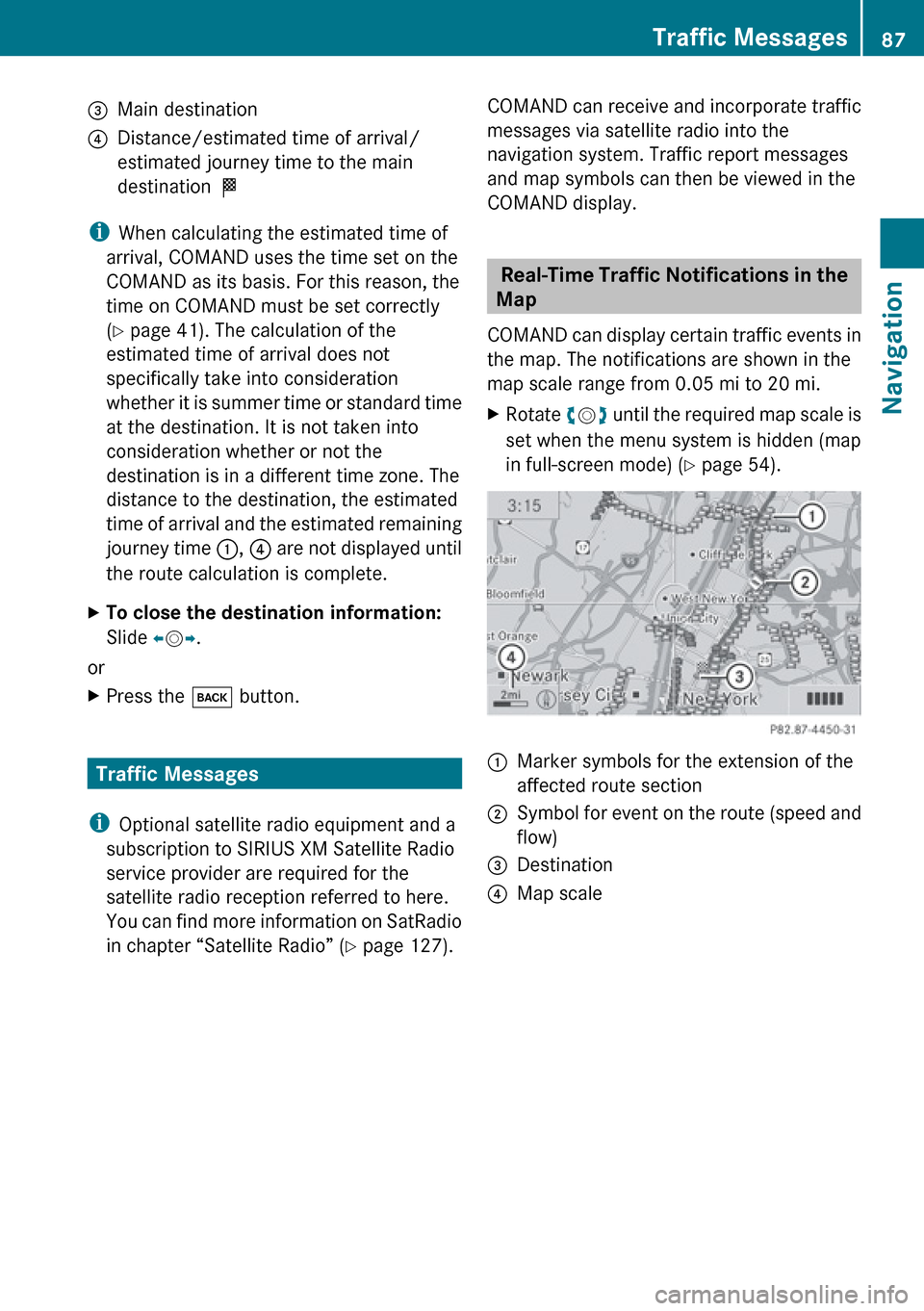
COMAND can display certain traffic events in
the map. The notifications are shown in the
map scale range from 0.05 mi to 20 mi.
XRotate ym z until the required map scale is
set when the menu system is hidden (map
in full-screen mode) ( Y page 54).1Marker symbols for the extension of the
affected route section2Symbol for event on the route (speed and
flow)3Destination4Map scaleTraffic Messages87NavigationZ
Page 90 of 224
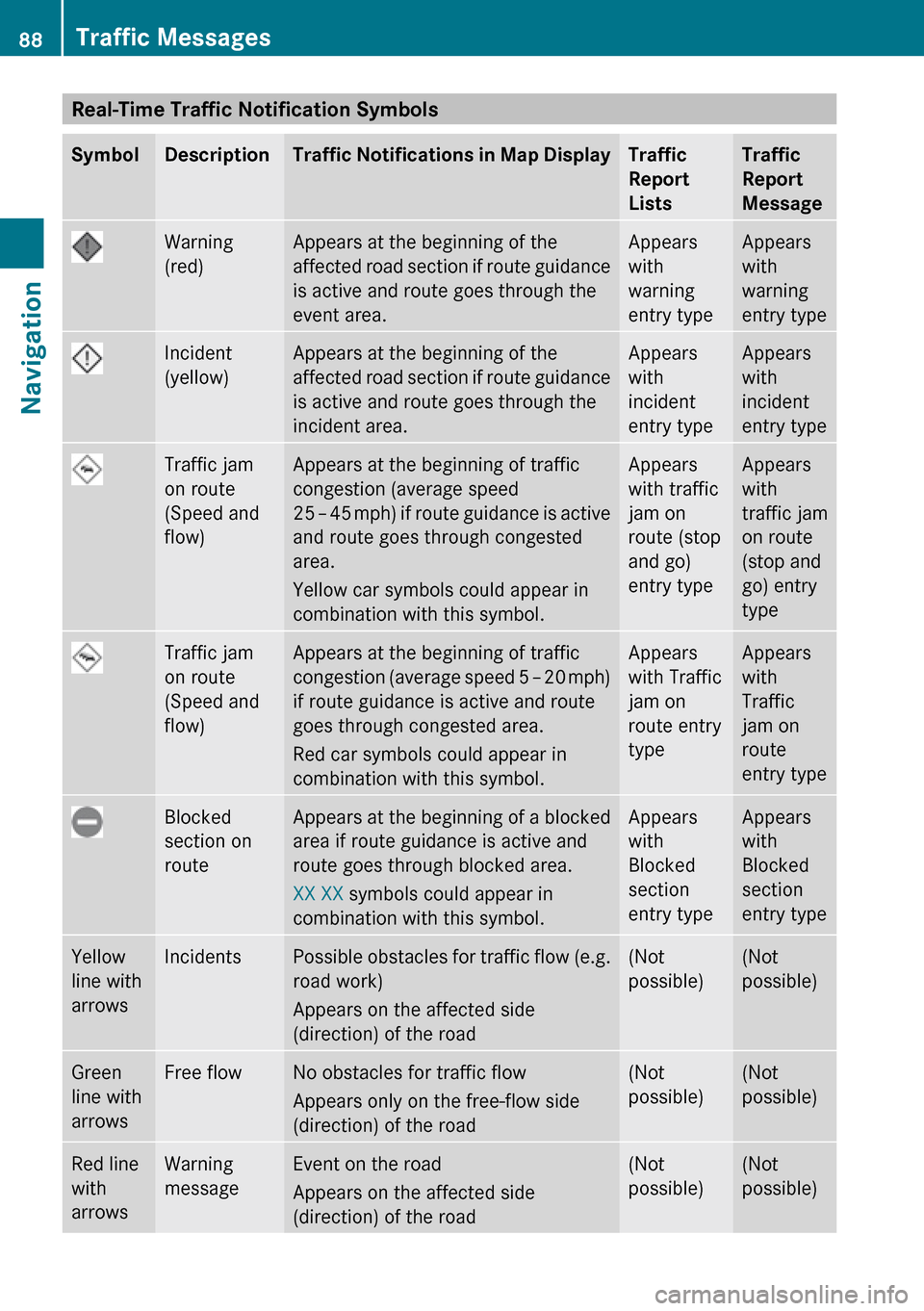
Real-Time Traffic Notification SymbolsSymbolDescriptionTraffic Notifications in Map DisplayTraffic
Report
ListsTraffic
Report
MessageWarning
(red)Appears at the beginning of the
affected road section if route guidance
is active and route goes through the
event area.Appears
with
warning
entry typeAppears
with
warning
entry typeIncident
(yellow)Appears at the beginning of the
affected road section if route guidance
is active and route goes through the
incident area.Appears
with
incident
entry typeAppears
with
incident
entry typeTraffic jam
on route
(Speed and
flow)Appears at the beginning of traffic
congestion (average speed
25 – 45 mph ) if route guidance is active
and route goes through congested
area.
Yellow car symbols could appear in
combination with this symbol.Appears
with traffic
jam on
route (stop
and go)
entry typeAppears
with
traffic jam
on route
(stop and
go) entry
typeTraffic jam
on route
(Speed and
flow)Appears at the beginning of traffic
congestion (average speed 5 – 20 mph)
if route guidance is active and route
goes through congested area.
Red car symbols could appear in
combination with this symbol.Appears
with Traffic
jam on
route entry
typeAppears
with
Traffic
jam on
route
entry typeBlocked
section on
routeAppears at the beginning of a blocked
area if route guidance is active and
route goes through blocked area.
XX XX symbols could appear in
combination with this symbol.Appears
with
Blocked
section
entry typeAppears
with
Blocked
section
entry typeYellow
line with
arrowsIncidentsPossible obstacles for traffic flow (e.g.
road work)
Appears on the affected side
(direction) of the road(Not
possible)(Not
possible)Green
line with
arrowsFree flowNo obstacles for traffic flow
Appears only on the free-flow side
(direction) of the road(Not
possible)(Not
possible)Red line
with
arrowsWarning
messageEvent on the road
Appears on the affected side
(direction) of the road(Not
possible)(Not
possible)88Traffic MessagesNavigation
Page 112 of 224
XTo delete individual digits: Press briefly
the CLR button on the COMAND control
unit.XTo delete an entire phone number: Press
and hold the CLR button until the number
is deleted.XTo place a call: Press the 6 button on
the COMAND control panel or press the
6 button on the multifunction steering
wheel.
Entering a Phone Number from the
COMAND Controller
XOpen the phone main menu ( Y page 102).XTo enter digits: Select the required digits
in sequence.XTo delete individual digits: Select õ
and briefly press the n button.
or
XPress the 2 button next to the
COMAND controller.XTo delete an entire phone number:
Select õ and press n until the phone
number has been deleted.
or
XPress and hold down the 2 button next
to the COMAND controller until the entire
entry is deleted.XTo connect a call: Select ° at the bottom
right-hand side of the input speller.
or
XPress the 6 button on the COMAND
control panel or the 6 button on the
multifunction steering wheel. Redialing XOpen the phone main menu ( Y page 102).XSelect ° at the bottom right-hand side of
the input speller.
or
XPress the 6 button on the COMAND
control unit when the phone main menu is
displayed.
The dialed calls list appears. The call dialed
last will be at the top of the list.XTo select a call: Rotate ym z or slide qm rXTo initiate call: Press n.
Initiating a Call to a Call List Entry or
COMAND Phone Book Entry
XCall up a call list and select an entry
( Y page 106).
or
XOpen the COMAND phone book and select
an entry ( Y page 103).XTo initiate call: Press n.
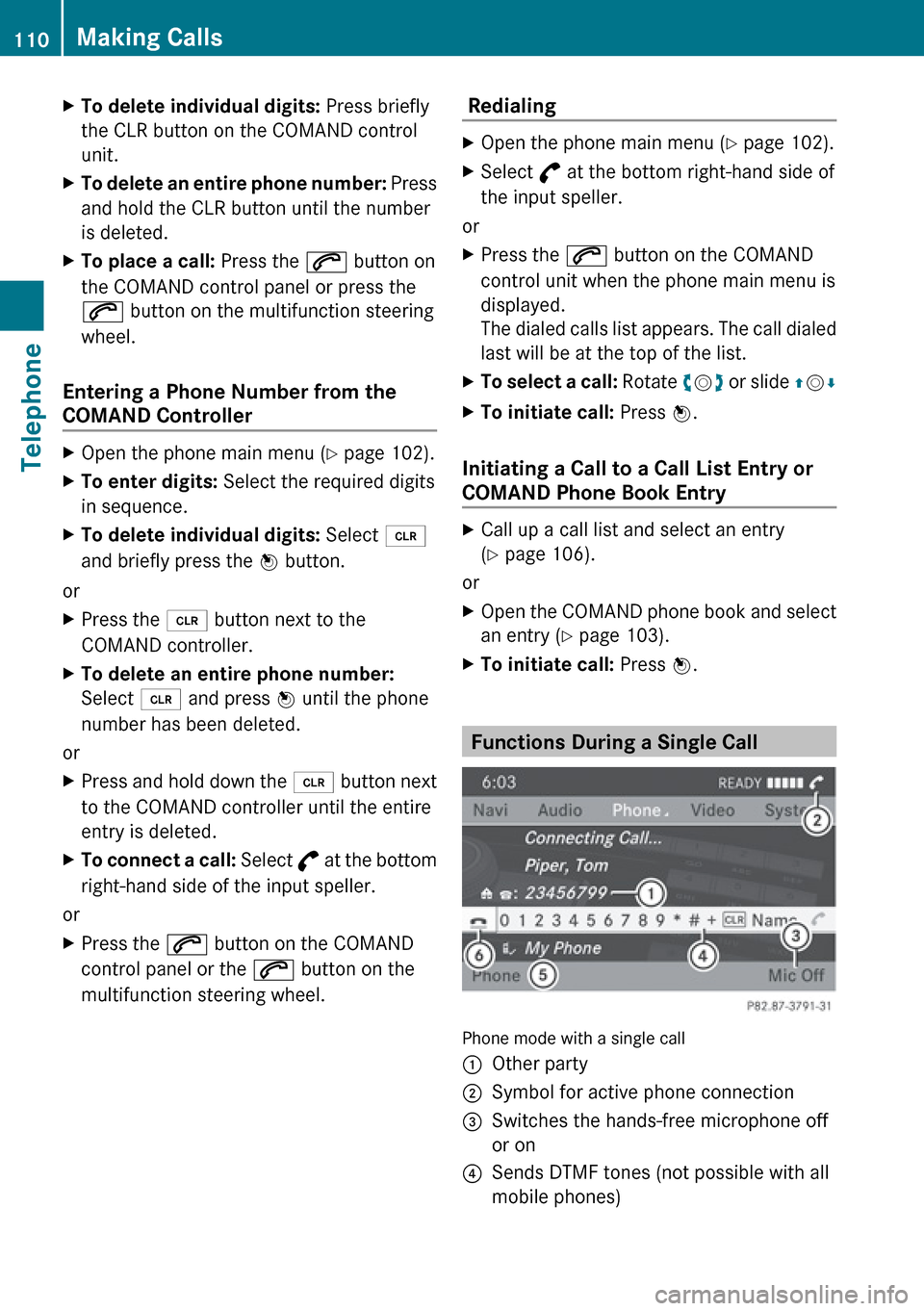
Functions During a Single Call
Phone mode with a single call
1Other party2Symbol for active phone connection3Switches the hands-free microphone off
or on4Sends DTMF tones (not possible with all
mobile phones)110Making CallsTelephone
Page 127 of 224
Tuning to a Station
You can tune to a station via station search,
by manual frequency input or via the station
memory.
Tuning to a Station via Station SearchXRotate ym z or slide om p when the main
area is highlighted.
or
XPress E or F on the COMAND
control unit.
The search proceeds upwards or
downwards and stops at the next
receivable station.
Tuning to a Station via Manual
Frequency Input
XSelect Radio£Enter Frequency in the
radio display.
An input menu appears.
or
XPress õ on the control unit.XTo enter a frequency: Press number
buttons on the control unit.
i You can only select numbers that are
currently permissible.
COMAND will tune to the frequency entered.
i If in the FM or AM wavebands you enter a
frequency outside the frequency sub-
range, COMAND will select the next
frequency down.
Tuning to a Station via the Station
Memory
XSelect Presets in the radio display.
or
XPress n when the main area is highlighted.
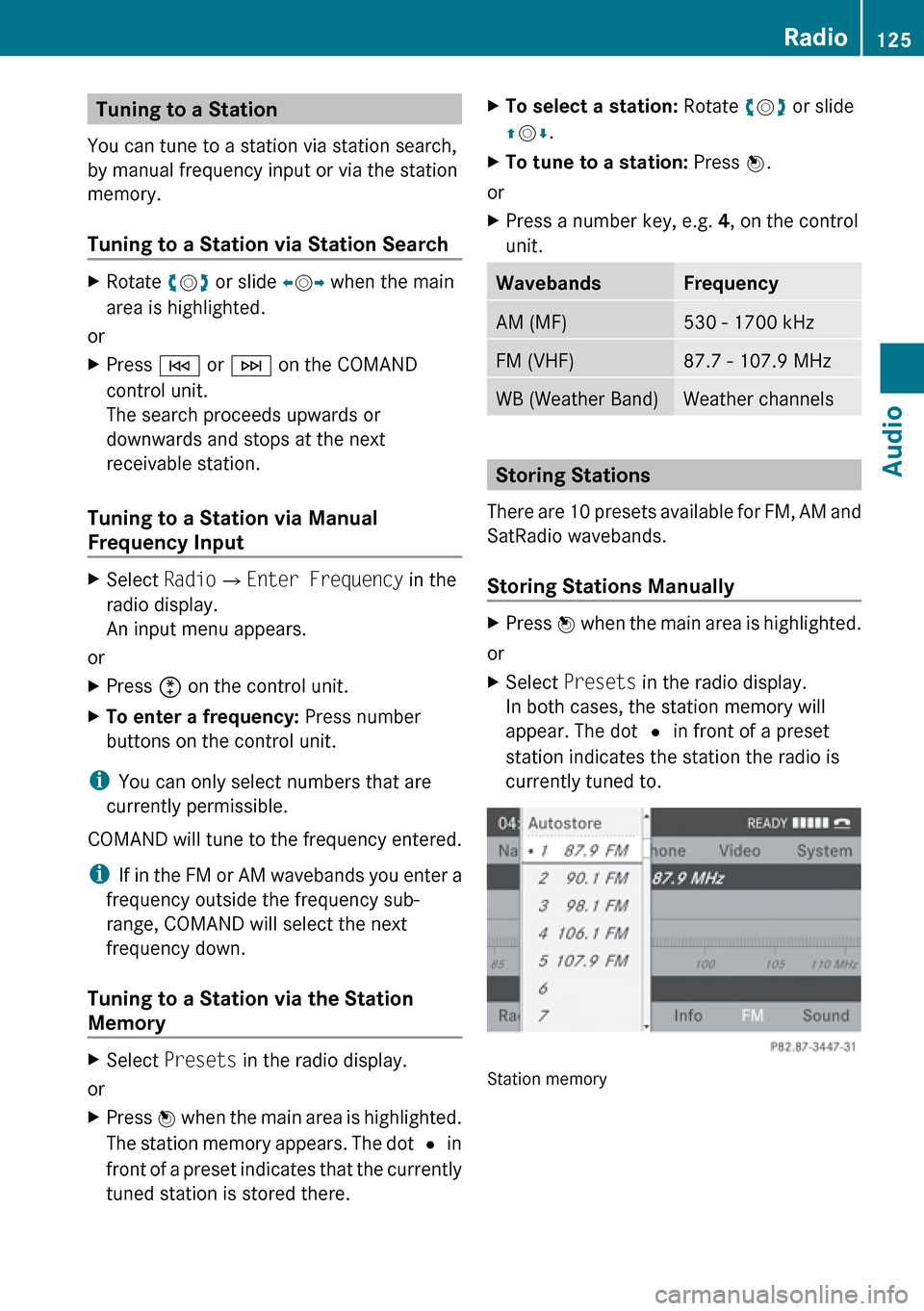
The station memory appears. The dot R in
front of a preset indicates that the currently
tuned station is stored there.XTo select a station: Rotate ym z or slide
q m r.XTo tune to a station: Press n.
or
XPress a number key, e.g. 4, on the control
unit.WavebandsFrequencyAM (MF)530 - 1700 kHzFM (VHF)87.7 - 107.9 MHzWB (Weather Band)Weather channels
Storing Stations
There are 10 presets available for FM, AM and
SatRadio wavebands.
Storing Stations Manually
XPress n when the main area is highlighted.
or
XSelect Presets in the radio display.
In both cases, the station memory will
appear. The dot R in front of a preset
station indicates the station the radio is
currently tuned to.
Station memory
Radio125AudioZ
Page 136 of 224
There may be playback problems with
userburned CDs with a storage capacity of
more than 700 MB. These CDs do not meet
current valid standards.
i When playing a DVD Audio, it may be the
case with numerous albums that the last
track does not contain any music and
COMAND switches to the next track. This
is due to the production method and does
not imply a fault with the unit.
! Do not attach stickers or labels of any
kind to discs. They may come loose and
damage COMAND.
COMAND has been designed for discs
meeting the requirements of standard
EN 60908. Therefore, only discs with a
maximum thickness of 1.3 mm can be
used.
If a thicker disc is inserted, e.g. one which
stores data on both sides, (DVD on one
side, audio data on the other side), this
cannot be ejected and COMAND will be
damaged.
Do not use 8 cm diameter discs, not even
with an adapter. Only use round discs with
a diameter of 12 cm.
i COMAND can play CD Audio with the high
resolution surround format.
Notes on the Care of CD/DVD Discs
R Only touch the discs at the edges.
R Handle discs with care in order to prevent
malfunctions during playback.
R Avoid scratching, leaving fingerprints and
dust on the discs.
R Clean the discs occasionally with a
commercially available cleaning cloth.
Always wipe in a straight line from the
inside outwards, never in a circular motion.
R The discs must only be labelled using pens
specially designed for this purpose.
R After use, put the discs back into the box.
R Protect the discs from heat and direct
sunlight.
Loading CDs and DVDs
GWarning
Only load a CD or DVD when the vehicle is
stationary. There is a risk of accident by being
distracted from road and traffic conditions if
you load a CD/DVD while the vehicle is in
motion.
Bear in mind that at a speed of just 30 mph
(appr. 50 km/h), your vehicle is covering a
distance of 44 feet (appr. 14 m) every second.
i If the CD/DVD is printed on one side, this
side must face upwards when loaded. If
neither side is printed, the side to be played
must face downwards.
The system may not be able to play copy-
protected CDs/DVDs.
Loading the DVD Changer
The DVD changer is a magazine with six built-
in compartments.
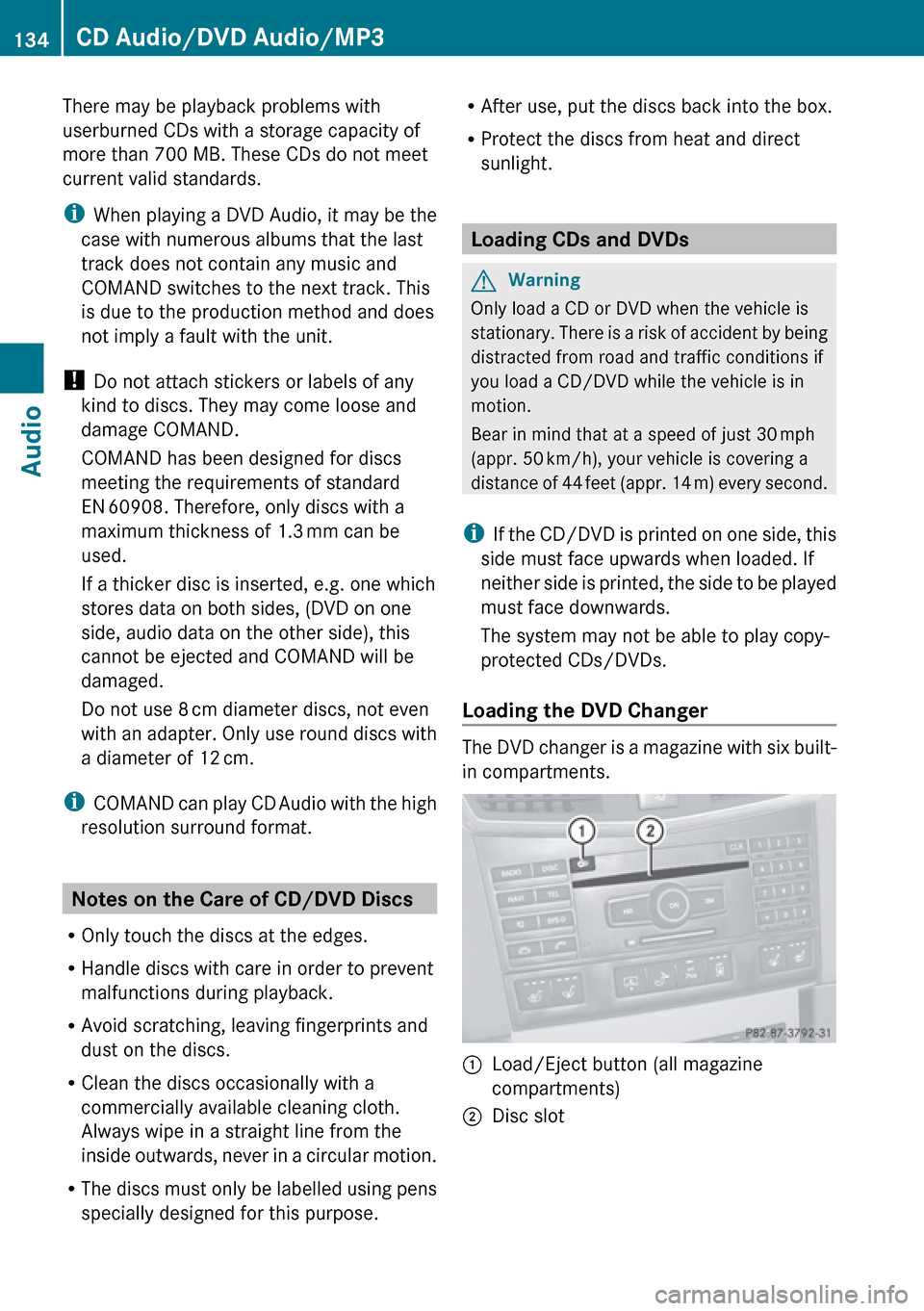
1Load/Eject button (all magazine
compartments)2Disc slot134CD Audio/DVD Audio/MP3Audio
Page 137 of 224
Loading an Individual Magazine
CompartmentXPress the Load V button.
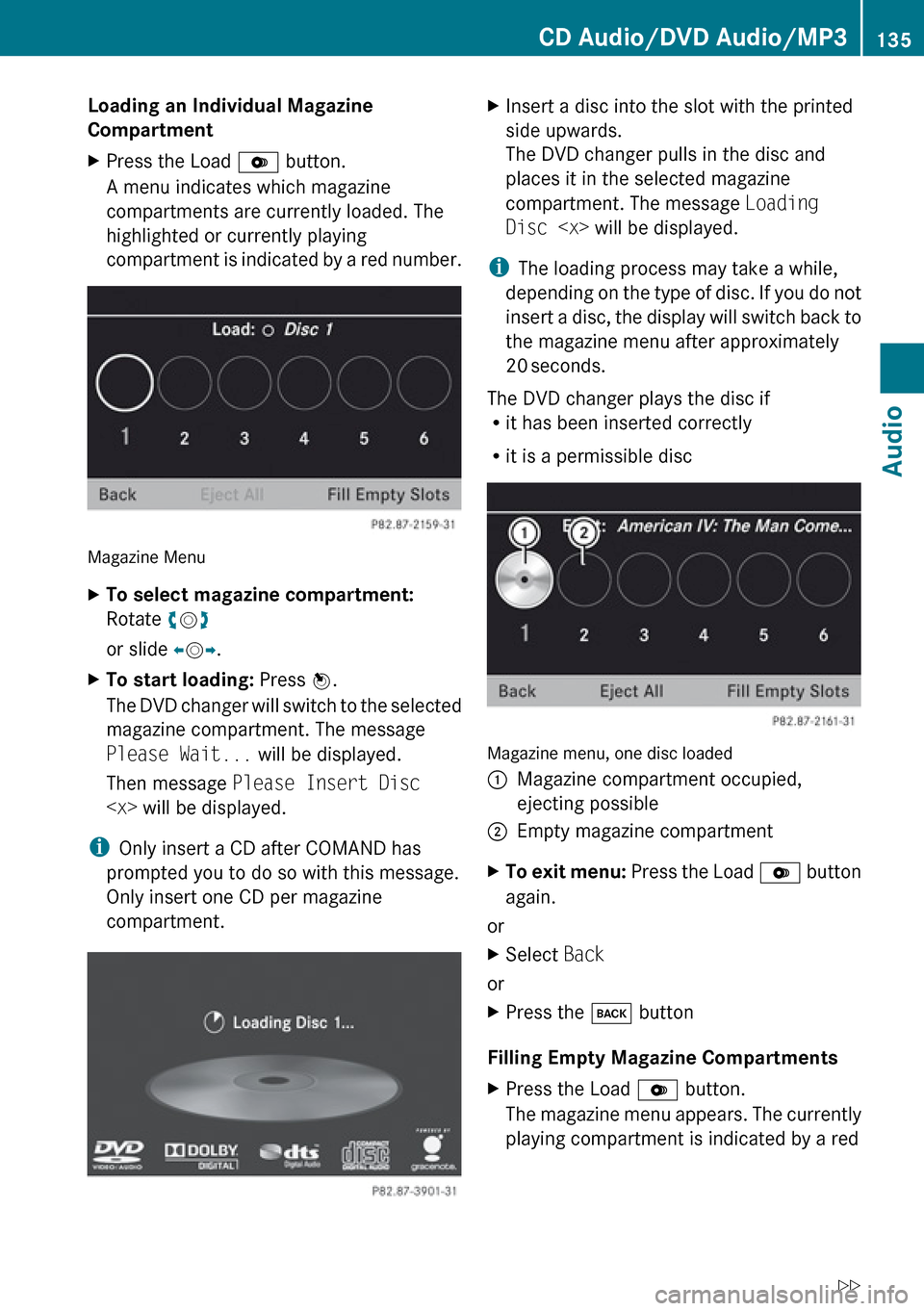
A menu indicates which magazine
compartments are currently loaded. The
highlighted or currently playing
compartment is indicated by a red number.
Magazine Menu
XTo select magazine compartment:
Rotate ym z
or slide om p.XTo start loading: Press n.
The DVD changer will switch to the selected
magazine compartment. The message
Please Wait... will be displayed.
Then message Please Insert Disc
i
Only insert a CD after COMAND has
prompted you to do so with this message.
Only insert one CD per magazine
compartment.
XInsert a disc into the slot with the printed
side upwards.
The DVD changer pulls in the disc and
places it in the selected magazine
compartment. The message Loading
Disc
i
The loading process may take a while,
depending on the type of disc. If you do not
insert a disc, the display will switch back to
the magazine menu after approximately
20 seconds.
The DVD changer plays the disc if
R it has been inserted correctly
R it is a permissible disc
Magazine menu, one disc loaded
1Magazine compartment occupied,
ejecting possible2Empty magazine compartmentXTo exit menu: Press the Load V button
again.
or
XSelect Back
or
XPress the k button
Filling Empty Magazine Compartments
XPress the Load V button.
The magazine menu appears. The currently
playing compartment is indicated by a redCD Audio/DVD Audio/MP3135AudioZ
Page 138 of 224
number or, if the magazine is empty,
compartment 1 is marked.XSelect Fill Empty Slots .
The message Please insert disc
will be displayed.
i Only insert a CD after COMAND has
prompted you to do so with this message.
Only insert one CD per magazine
compartment.
XInsert a disc into the slot with the printed
side facing upwards.
You see the Please wait... message.
Once the disc is loaded, the DVD changer
switches to the next empty compartment.
You see these messages: Please wait
and then Please insert disc
loaded.
The DVD changer plays the last disc you
loaded if it has been inserted correctly and
if it is a permissible type.
If loading is not completed, COMAND plays
the first disc inserted.XTo end loading procedure: Press the Load
V button again.
or
XSelect Back.
or
XPress the k button next to the
COMAND controller.
Loading PCMCIA Memory Card
GWarning
Only load a memory card when the vehicle is
stationary. There is a risk of accident by being
distracted from road and traffic conditions if
you load a memory card while the vehicle is
in motion.
Bear in mind that at a speed of just 30 mph
(appr. 50 km/h), your vehicle is covering a
distance of 44 feet (appr. 14 m) every second.
COMAND supports 16-bit full-size type I and II
PCMCIA memory cards.
i COMAND supports commercially
available PCMCIA cards or PCMCIA card
adapters with storage media that may not
be designed for the temperatures which
occur in the vehicle. You should therefore
remove the PCMCIA card from the vehicle
when not in use since extreme
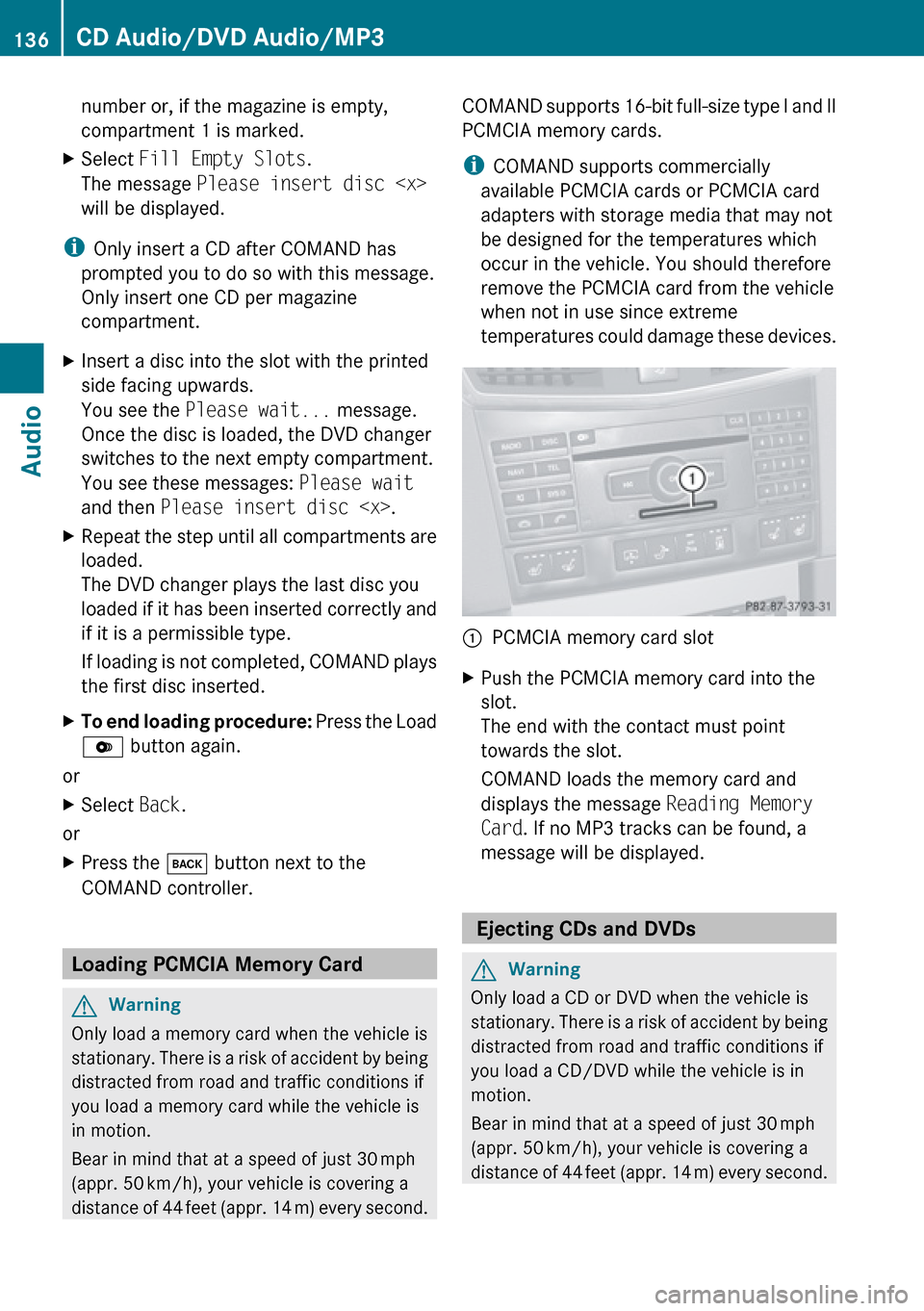
temperatures could damage these devices.1PCMCIA memory card slotXPush the PCMCIA memory card into the
slot.
The end with the contact must point
towards the slot.
COMAND loads the memory card and
displays the message Reading Memory
Card . If no MP3 tracks can be found, a
message will be displayed.
Ejecting CDs and DVDs
GWarning
Only load a CD or DVD when the vehicle is
stationary. There is a risk of accident by being
distracted from road and traffic conditions if
you load a CD/DVD while the vehicle is in
motion.
Bear in mind that at a speed of just 30 mph
(appr. 50 km/h), your vehicle is covering a
distance of 44 feet (appr. 14 m) every second.
136CD Audio/DVD Audio/MP3Audio
Page 150 of 224
Supported Data Formats (USB devices)
The following data types are supported:
R MP3: CBR, VBR (up to 320 kbit/s)
R WMA: CBR, VBR (up to 320 kbit/s)
In order to display the metadata during
playback, ID3 tags (version 1.x, 2.3, 2.4) and
WMA tags in ASCII and UTF16 coding are
supported.
Notes on USB Devices
R In order to keep the initialisation time short,
do not store data other than music files on
the USB device.
R Up to eight directory levels with up to 1,000
tracks are supported.
R Do not use a USB extension cable or
adapter. These may impair functionality.
R Playlists are searched for in the
background on the USB device and, if
available, are offered beside folders in a
separate category.
R You can only use USB devices formatted
with the file system format FAT (File
Allocation Table).
i Files protected with DRM (Digital Rights
Management) are not supported by the
Media Interface.
Connecting External Devices
You will find the connection sockets in the
glove compartment.
Never connect more than one device at a
time. Please consult a Mercedes-Benz
Service Center for further information.
i Do not leave external devices in the
vehicle, as functionality cannot be
guaranteed above certain temperatures
(such as inside a vehicle in direct sunlight).
Mercedes-Benz does not take
responsibility for any damage to external
devices.
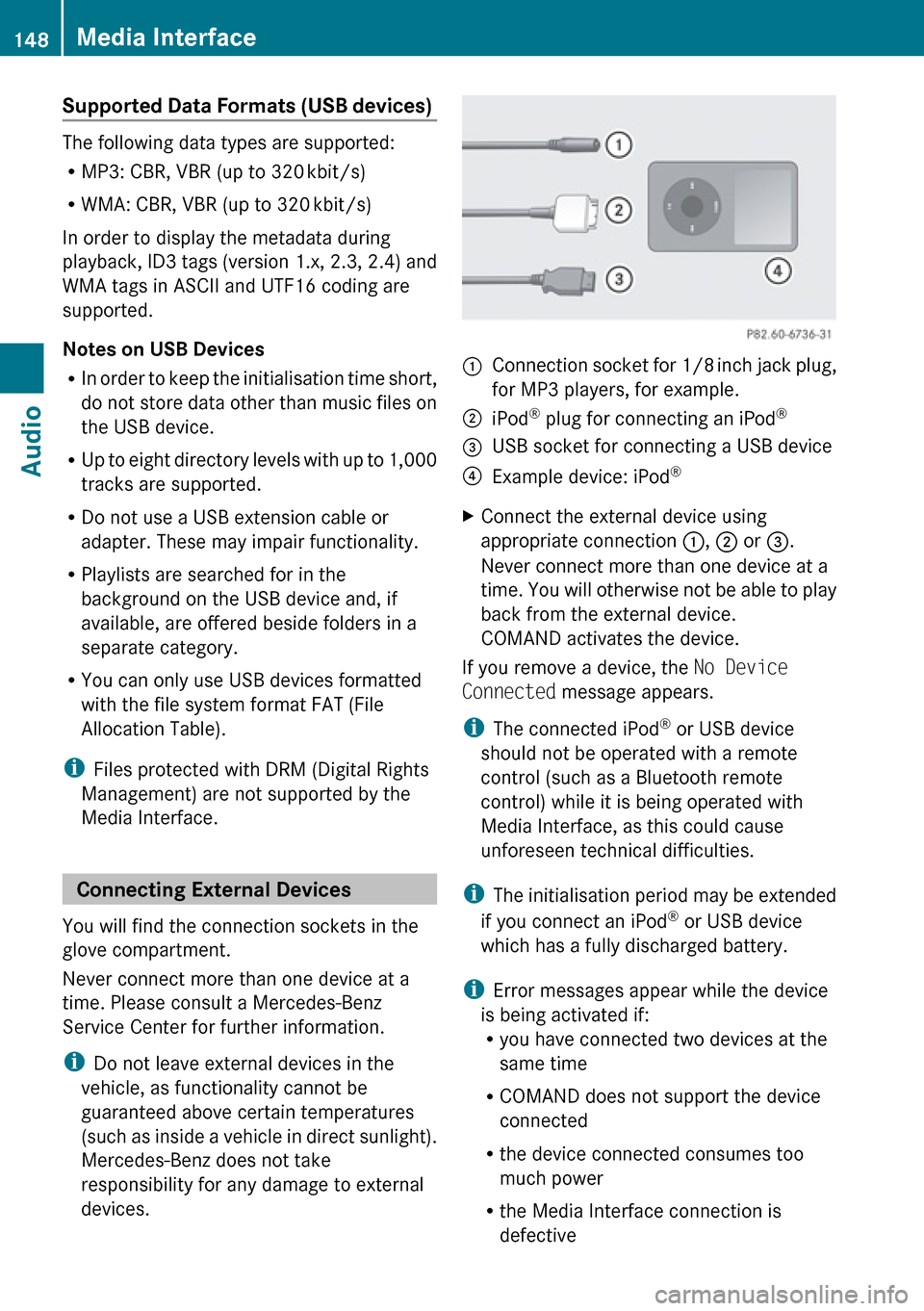
1Connection socket for 1/8 inch jack plug,
for MP3 players, for example.2iPod ®
plug for connecting an iPod ®3USB socket for connecting a USB device4Example device: iPod®XConnect the external device using
appropriate connection 1, 2 or 3.
Never connect more than one device at a
time. You will otherwise not be able to play
back from the external device.
COMAND activates the device.
If you remove a device, the No Device
Connected message appears.
i The connected iPod ®
or USB device
should not be operated with a remote
control (such as a Bluetooth remote
control) while it is being operated with
Media Interface, as this could cause
unforeseen technical difficulties.
i The initialisation period may be extended
if you connect an iPod ®
or USB device
which has a fully discharged battery.
i Error messages appear while the device
is being activated if:
R you have connected two devices at the
same time
R COMAND does not support the device
connected
R the device connected consumes too
much power
R the Media Interface connection is
defective
148Media InterfaceAudio
Page 155 of 224
Audio Aux
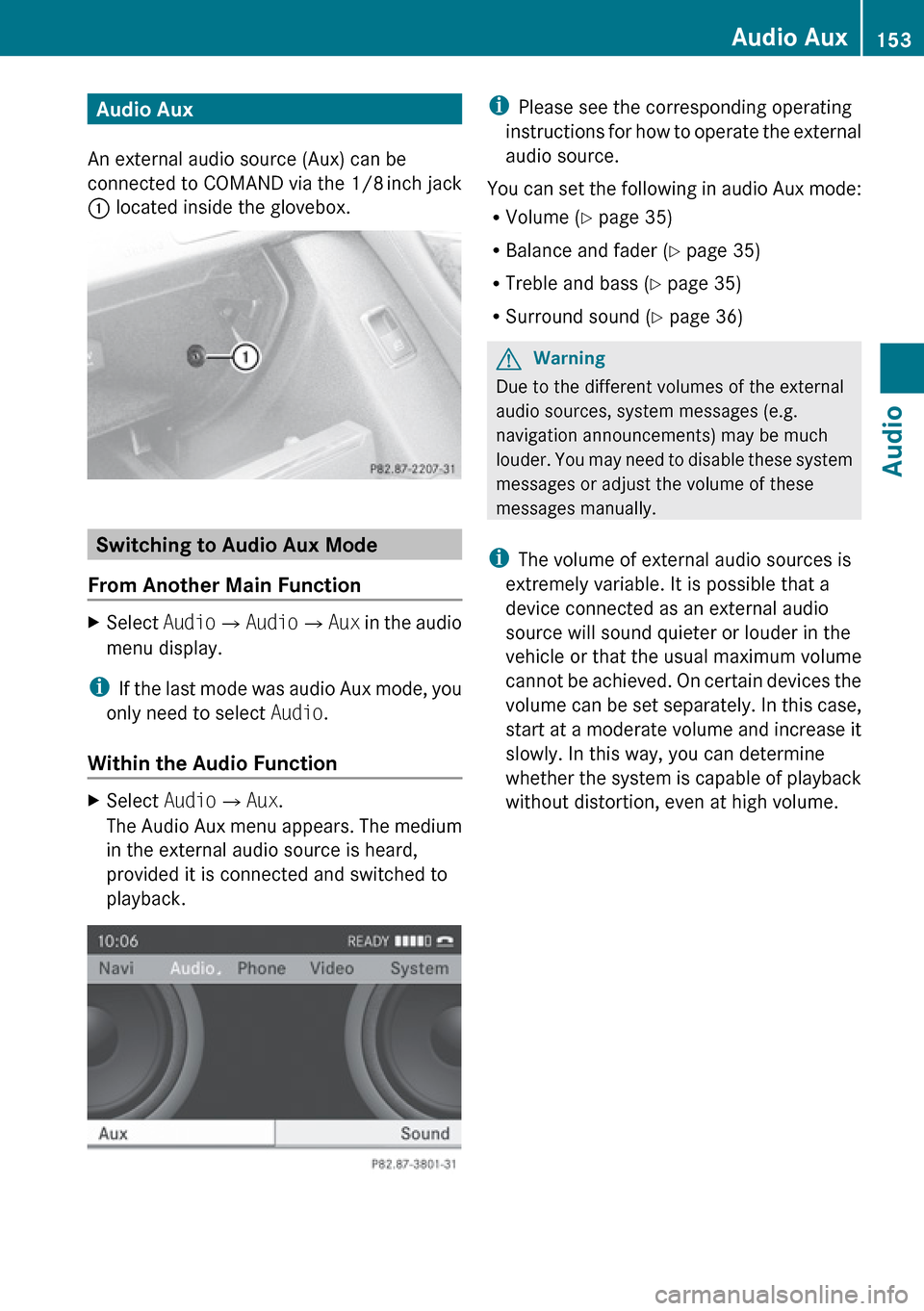
An external audio source (Aux) can be
connected to COMAND via the 1/8 inch jack
1 located inside the glovebox.
Switching to Audio Aux Mode
From Another Main Function
XSelect Audio£Audio £Aux in the audio
menu display.
i If the last mode was audio Aux mode, you
only need to select Audio.
Within the Audio Function
XSelect Audio£Aux .
The Audio Aux menu appears. The medium
in the external audio source is heard,
provided it is connected and switched to
playback.i Please see the corresponding operating
instructions for how to operate the external
audio source.
You can set the following in audio Aux mode:
R Volume ( Y page 35)
R Balance and fader ( Y page 35)
R Treble and bass ( Y page 35)
R Surround sound ( Y page 36)GWarning
Due to the different volumes of the external
audio sources, system messages (e.g.
navigation announcements) may be much
louder. You may need to disable these system
messages or adjust the volume of these
messages manually.
i The volume of external audio sources is
extremely variable. It is possible that a
device connected as an external audio
source will sound quieter or louder in the
vehicle or that the usual maximum volume
cannot be achieved. On certain devices the
volume can be set separately. In this case,
start at a moderate volume and increase it
slowly. In this way, you can determine
whether the system is capable of playback
without distortion, even at high volume.
Audio Aux153AudioZ