light MERCEDES-BENZ E-Class SEDAN 2010 W212 Comand Manual
[x] Cancel search | Manufacturer: MERCEDES-BENZ, Model Year: 2010, Model line: E-Class SEDAN, Model: MERCEDES-BENZ E-Class SEDAN 2010 W212Pages: 224, PDF Size: 7.4 MB
Page 172 of 224
Remote Control Batteries
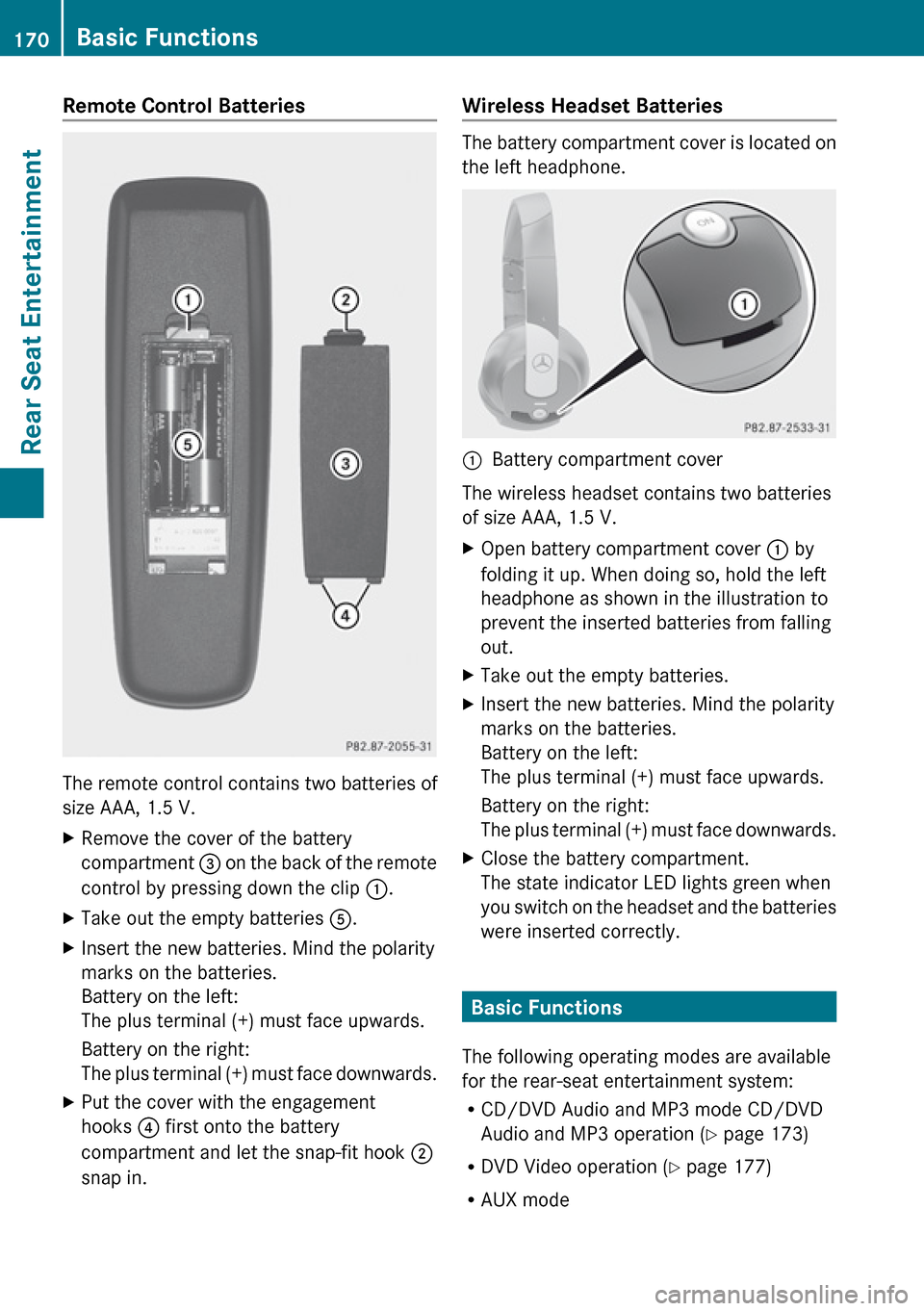
The remote control contains two batteries of
size AAA, 1.5 V.
XRemove the cover of the battery
compartment 3 on the back of the remote
control by pressing down the clip :.XTake out the empty batteries 5.XInsert the new batteries. Mind the polarity
marks on the batteries.
Battery on the left:
The plus terminal (+) must face upwards.
Battery on the right:
The plus terminal (+) must face downwards.XPut the cover with the engagement
hooks ? first onto the battery
compartment and let the snap-fit hook 2
snap in.Wireless Headset Batteries
The battery compartment cover is located on
the left headphone.
1Battery compartment cover
The wireless headset contains two batteries
of size AAA, 1.5 V.
XOpen battery compartment cover : by
folding it up. When doing so, hold the left
headphone as shown in the illustration to
prevent the inserted batteries from falling
out.XTake out the empty batteries.XInsert the new batteries. Mind the polarity
marks on the batteries.
Battery on the left:
The plus terminal (+) must face upwards.
Battery on the right:
The plus terminal (+) must face downwards.XClose the battery compartment.
The state indicator LED lights green when
you switch on the headset and the batteries
were inserted correctly.
Basic Functions
The following operating modes are available
for the rear-seat entertainment system:
R CD/DVD Audio and MP3 mode CD/DVD
Audio and MP3 operation ( Y page 173)
R DVD Video operation ( Y page 177)
R AUX mode
170Basic FunctionsRear Seat Entertainment
Page 174 of 224
The following functions affect only one
screen:
R Changing Audio, Video or screen settings
R Switching between full screen and menu
system.
Switching Operating Modes
When you leave an operation mode, e.g. CD
Audio, its current settings are stored. If you
call up this operation mode later, there are
two possibilities:
R The operation mode settings have been
changed on the other display screen.
R The operation mode settings have not been
changed.
In the first case the operation mode settings
will be as they are on the other display screen.
In the second case the settings remain as
they were before you left the operation mode.
Functional Restrictions in DVD Video
Mode
Some functions may temporarily or
permanently not be available. If you use such
functions, you will see the symbol 7.
System Settings
All system settings can be set for each display
screen independently.
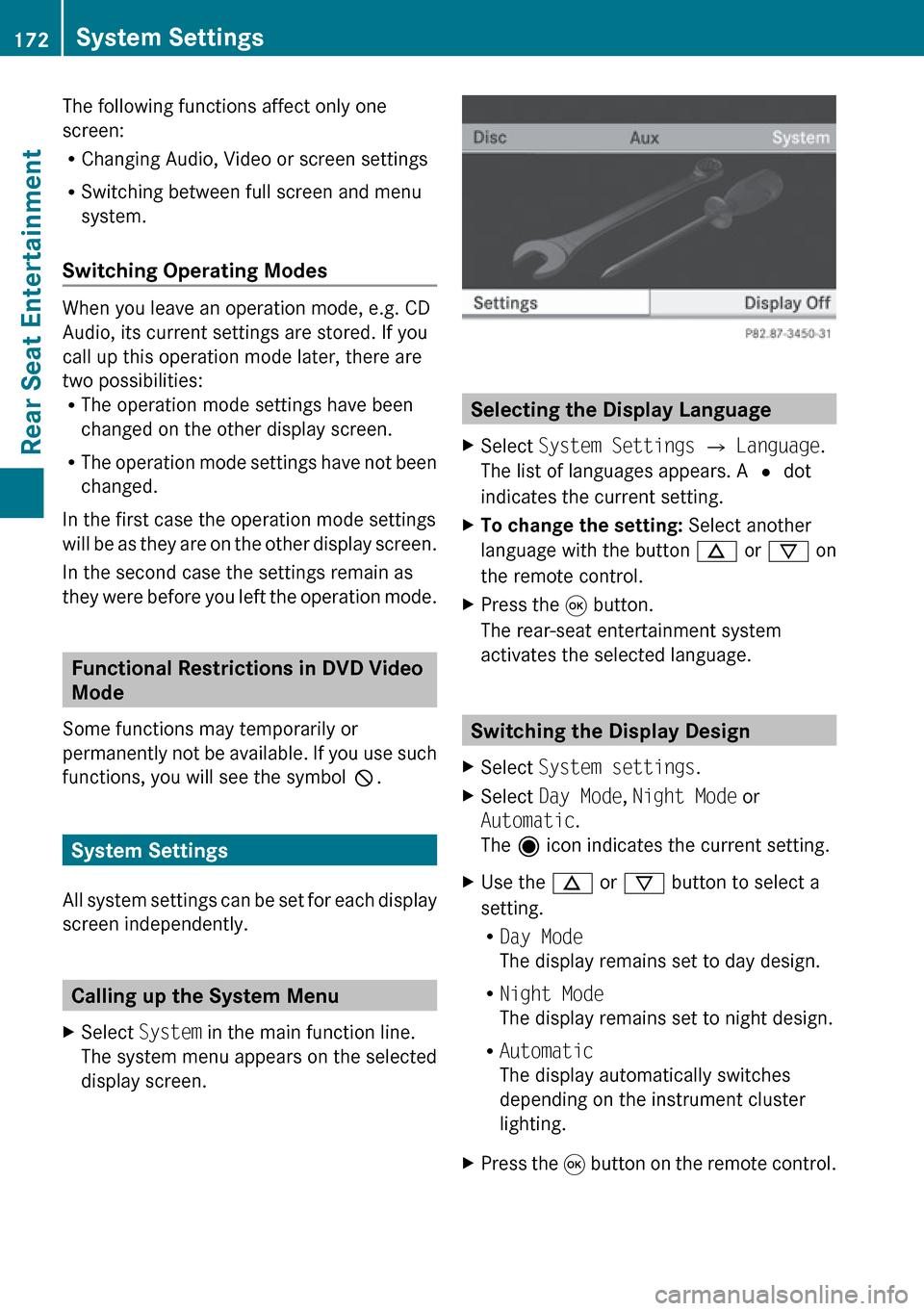
Calling up the System Menu
XSelect System in the main function line.
The system menu appears on the selected
display screen.
Selecting the Display Language
XSelect System Settings £ Language .
The list of languages appears. A R dot
indicates the current setting.XTo change the setting: Select another
language with the button n or ý on
the remote control.XPress the 9 button.
The rear-seat entertainment system
activates the selected language.
Switching the Display Design
XSelect System settings .XSelect Day Mode , Night Mode or
Automatic .
The ä icon indicates the current setting.XUse the n or ý button to select a
setting.
R Day Mode
The display remains set to day design.
R Night Mode
The display remains set to night design.
R Automatic
The display automatically switches
depending on the instrument cluster
lighting.XPress the 9 button on the remote control.172System SettingsRear Seat Entertainment
Page 177 of 224
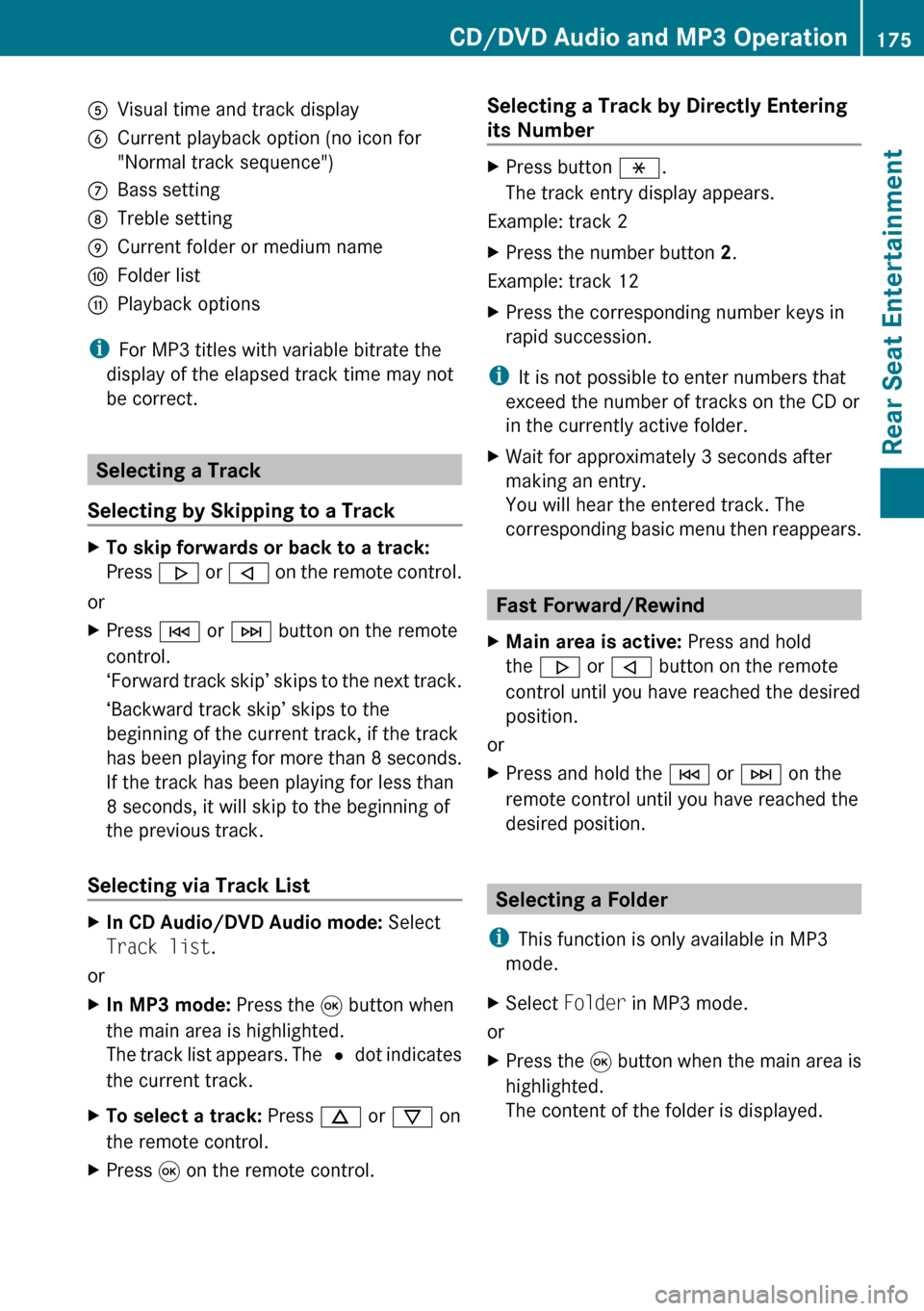
5Visual time and track display6Current playback option (no icon for
"Normal track sequence")7Bass setting8Treble setting9Current folder or medium nameaFolder listbPlayback options
i For MP3 titles with variable bitrate the
display of the elapsed track time may not
be correct.
Selecting a Track
Selecting by Skipping to a Track
XTo skip forwards or back to a track:
Press . or , on the remote control.
or
XPress E or F button on the remote
control.
‘ Forward track skip’ skips to the next track.
‘Backward track skip’ skips to the
beginning of the current track, if the track
has been playing for more than 8 seconds.
If the track has been playing for less than
8 seconds, it will skip to the beginning of
the previous track.
Selecting via Track List
XIn CD Audio/DVD Audio mode: Select
Track list .
or
XIn MP3 mode: Press the 9 button when
the main area is highlighted.
The track list appears. The R dot indicates
the current track.XTo select a track: Press n or ý on
the remote control.XPress 9 on the remote control.Selecting a Track by Directly Entering
its NumberXPress button h.
The track entry display appears.
Example: track 2
XPress the number button 2.
Example: track 12
XPress the corresponding number keys in
rapid succession.
i It is not possible to enter numbers that
exceed the number of tracks on the CD or
in the currently active folder.
XWait for approximately 3 seconds after
making an entry.
You will hear the entered track. The
corresponding basic menu then reappears.
Fast Forward/Rewind
XMain area is active: Press and hold
the . or , button on the remote
control until you have reached the desired
position.
or
XPress and hold the E or F on the
remote control until you have reached the
desired position.
Selecting a Folder
i This function is only available in MP3
mode.
XSelect Folder in MP3 mode.
or
XPress the 9 button when the main area is
highlighted.
The content of the folder is displayed.CD/DVD Audio and MP3 Operation175Rear Seat EntertainmentZ
Page 183 of 224
You will see the 7 icon in the display as
an indicator.
Back to MovieXPress % on the remote control
repeatedly until you see the film.
or
XSelect the corresponding menu item in the
DVD menu.
or
XSelect any menu item from the DVD menu.XSelect the Back (To the Movie) menu
item from the selection menu.
i Depending on the DVD, the Back (To
the Movie) menu item may not function
in general or may not function at certain
points in the DVD menu. You will see the
7 icon in the display as an indicator.
Setting the Language
i This function is not available on all DVDs.
If it is available, you can set the audio
language or the audio format. The number
of settings is determined by the DVD
content. The settings may also be
accessible in the DVD menu ( Y page 180).
XDisplay the menu system if necessary
( Y page 178).XSelect DVD-V £ DVD Functions .XSelect Audio Language .
A selection menu appears after a short
while. The R dot in front of an entry
indicates the currently selected language.XTo change a setting: Press n or ý
until the desired setting has been reached.XTo save setting: Press 9.XTo exit the menu without changes:
Press . or , .Subtitles and Camera Angle
i These functions are not available on all
DVDs. The number of subtitle languages
and camera angles available depends on
the content of the DVD. The settings may
also be accessible in the DVD menu.XDisplay the menu system if necessary
( Y page 178).XSelect DVD-V £ DVD functions .XSelect Subtitles or Camera angle .
Both of these will call up a selection menu
after a few seconds. The R dot in front of
an entry indicates the current setting.XTo change a setting: Press n or ý
until the desired setting has been attained.XTo save setting: Press 9.XTo exit the menu without changes:
Press . or , .
Interactive content
DVDs can also contain interactive content
(e.g. a video game). In a video game, you may
be able to influence events by selecting and
triggering actions. The type and number of
actions depend on the DVD.
XTo select an action: Press n,
ý , . or , on the remote control.XTo trigger an action: Press 9 on the
remote control.
A menu appears and the first entry,
Select , is highlighted.XPress 9 on the remote control.
Aux Operation
i You can connect two external video
sources to the display screens (Display
Aux) and additionally one video source to
the DVD drive (Drive Aux).
Aux Operation181Rear Seat EntertainmentZ
Page 193 of 224
iIf there is more than one phone number
for an entry, voice control queries this.tDo you want to call Smith?sHometSmith home. Dialing.XTo cancel the dialog: Press the %
button.
The system confirms by responding
“Cancel”.
“Redial”
You can use the “Redial” command to redial
the number most recently called.
Managing Announcement Services or
Voice Mail
You can also use voice control to manage
your voice mail or recorded announcement
services.
XPress the ? button while a phone call is
in progress.
An acoustic signal confirms that the system
is activated.XSay the required digits (“zero” to “nine”).
or
XSay the required words “Star” or “Hash”.XSay the concluding command “Okay”.
The system dials the number entered.
Navigation
GWarning!
For safety reasons, you should only select a
destination when the vehicle is stationary.
While the navigation system provides
directional assistance, the driver must remain
focused on safe driving behavior, especially
pay attention to traffic and street signs, and
should utilize the system’s audio cues while
driving.
The navigation system does not supply any
information on stop signs, yield signs, traffic
regulations or traffic safety rules. Their
observance always remains in the driver’s
personal responsibility. DVD maps do not
cover all areas nor all routes within an area.
Traffic regulations always have priority over
any route recommendations given. Bear in
mind that at a speed of just 30 mph
(approximately 50 km/h), your vehicle is
covering a distance of 44 feet (approximately
14 m) every second.
During route guidance, you will not receive
information on:
R traffic lights
R stop and yield signs
R parking or stopping zones
R one-way streets
R narrow bridges
R other traffic regulation data
You should therefore always strictly observe
traffic regulations while driving. Drive
carefully and always obey traffic laws and
road signs, even if they contradict navigation
system instructions.GWarning!
Please do not use the Voice Control System
in an emergency, as the tone of your voice
may change in a stressful situation. This could
cause a delay in completing your phone call
in a timely manner. This could distract you in
an emergency situation and cause you to be
involved in an accident.
Operation
You can use voice control to:
R enter a state
R enter a province
R enter a city
R enter a district (center)
Navigation191Voice ControlZ