parking brake MERCEDES-BENZ E-Class WAGON 2016 W213 Owner's Guide
[x] Cancel search | Manufacturer: MERCEDES-BENZ, Model Year: 2016, Model line: E-Class WAGON, Model: MERCEDES-BENZ E-Class WAGON 2016 W213Pages: 350, PDF Size: 6.71 MB
Page 143 of 350
catalytic converter to reach its operating
temperature more quickly.
Hill start assist
Hill start assist helps you when pulling away
forwards or in reverse on an uphill gradient. It
holds the vehicle for a short time after you
have removed your foot from the brake pedal.
This gives you enough time to move your foot
from the brake pedal to the accelerator pedal
and to depress it before the vehicle begins toroll.
GWARNING
After a short time, hill start assist will no lon-
ger brake your vehicle and it could roll away.
There is a risk of an accident and injury.
Therefore, quickly move your foot from the
brake pedal to the accelerator pedal. Never
leave the vehicle when it is held by hill start
assist.
Hill start assist is not active if:
Ryou are pulling away on a level road or on a downhill gradient.
Rthe transmission is in position N.
Rthe parking brake is applied.
RESP®is malfunctioning.
ECO start/stop function
Introduction
The ECO start/stop function switches the
engine off automatically if the vehicle is stop-
ped under certain conditions.
The engine starts automatically when the
driver wants to pull away again. The ECO
start/stop function thereby helps you to
reduce the fuel consumption and emissions
of your vehicle.
Important safety notes
GWARNING
If the engine is switched off automatically and
you exit the vehicle, the engine is restarted
automatically. The vehicle may begin moving.
There is a risk of accident and injury.
If you wish to exit the vehicle, always turn off
the ignition and secure the vehicle against
rolling away.
General notes
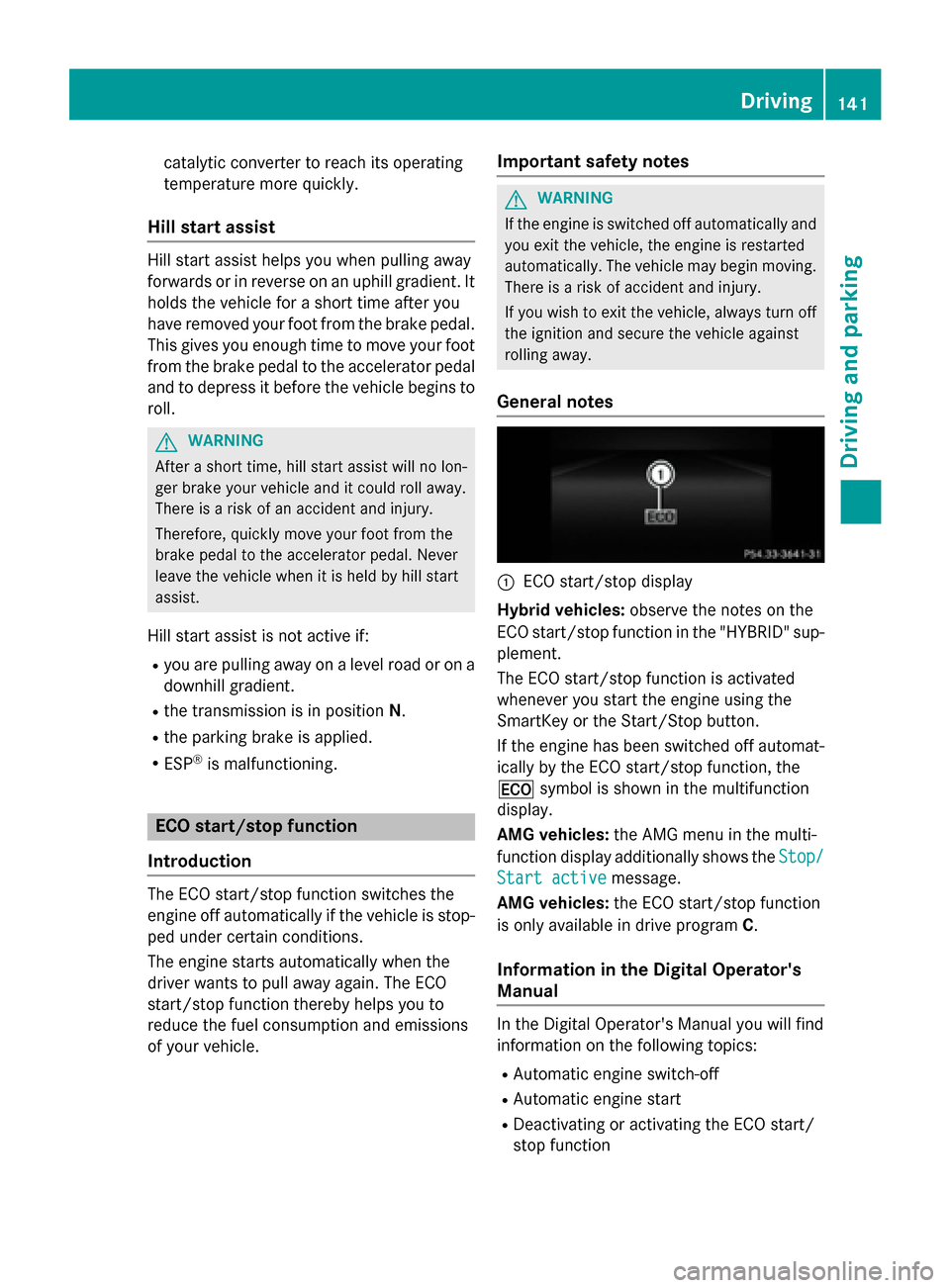
:ECO start/stop display
Hybrid vehicles: observe the notes on the
ECO start/stop function in the "HYBRID" sup-
plement.
The ECO start/stop function is activated
whenever you start the engine using the
SmartKey or the Start/Stop button.
If the engine has been switched off automat-
ically by the ECO start/stop function, the
¤ symbol is shown in the multifunction
display.
AMG vehicles: the AMG menu in the multi-
function display additionally shows the Stop/
Start activemessage.
AMG vehicles: the ECO start/stop function
is only available in drive program C.
Information in the Digital Operator's
Manual
In the Digital Operator's Manual you will find
information on the following topics:
RAutomatic engine switch-off
RAutomatic engine start
RDeactivating or activating the ECO start/
stop function
Driving141
Driving and parking
Z
Page 144 of 350
Problems with the engine
You can find information about this in the
Digital Operator's Manual.
Automatic transmission
Important safety notes
GWARNING
If the engine speed is above the idling speed
and you engage transmission position Dor R,
the vehicle could pull away suddenly. There is
a risk of an accident.
When engaging transmission position Dor R,
always firmly depress the brake pedal and do not simultaneously accelerate.
GWARNING
The automatic transmission switches to neu-
tral position Nwhen you switch off the engine.
The vehicle may roll away. There is a risk of an
accident.
After switching off the engine, always switch
to parking position P. Prevent the parked vehi-
cle from rolling away by applying the parking
brake.
HYBRID vehicles: make sure that you read
the "HYBRID" supplement included in the
vehicle literature. Otherwise, you may not
recognize dangers.
Selector lever (AMG vehicles)
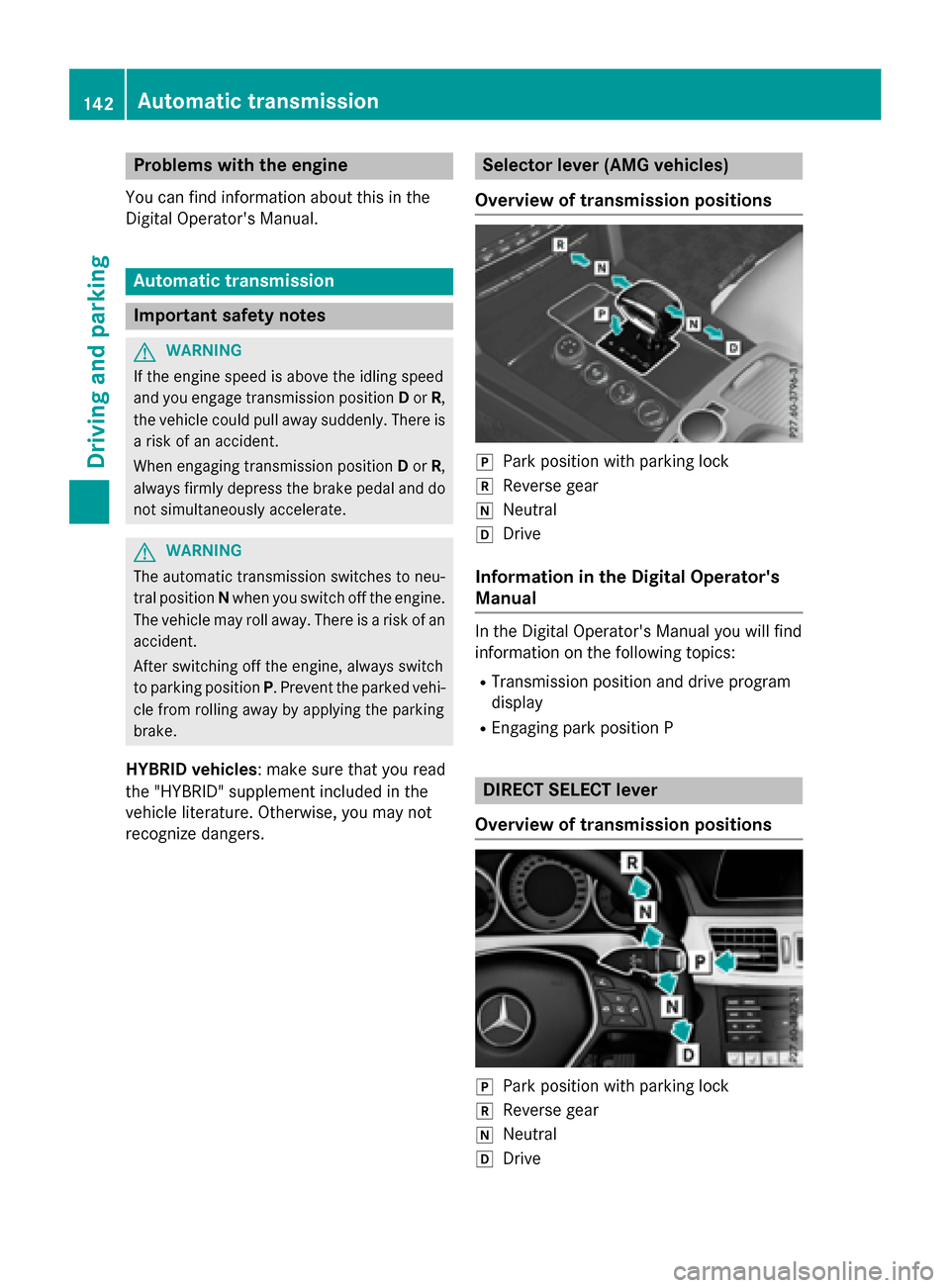
Overview of transmission positions
jPark position with parking lock
kReverse gear
iNeutral
hDrive
Information in the Digital Operator's
Manual
In the Digital Operator's Manual you will find
information on the following topics:
RTransmission position and drive program
display
REngaging park position P
DIRECT SELECT lever
Overview of transmission positions
jPark position with parking lock
kReverse gear
iNeutral
hDrive
142Automatic transmission
Driving and parking
Page 145 of 350
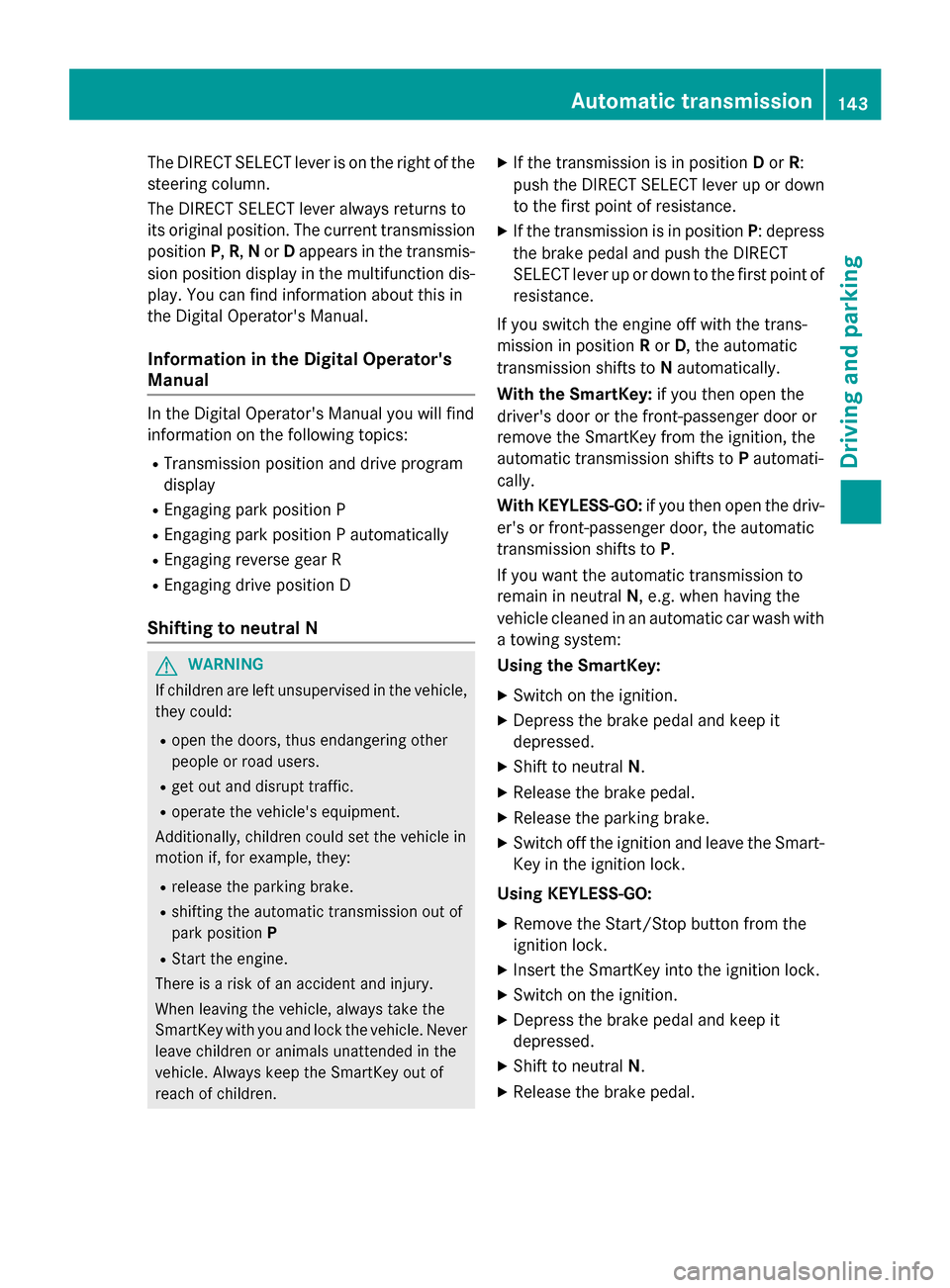
The DIRECT SELECT lever is on the right of the
steering column.
The DIRECT SELECT lever always returns to
its original position. The current transmission
positionP,R, Nor Dappears in the transmis-
sion position display in the multifunction dis-
play. You can find information about this in
the Digital Operator's Manual.
Information in the Digital Operator's
Manual
In the Digital Operator's Manual you will find
information on the following topics:
RTransmission position and drive program
display
REngaging park position P
REngaging park position P automatically
REngaging reverse gear R
REngaging drive position D
Shifting to neutral N
GWARNING
If children are left unsupervised in the vehicle,
they could:
Ropen the doors, thus endangering other
people or road users.
Rget out and disrupt traffic.
Roperate the vehicle's equipment.
Additionally, children could set the vehicle in
motion if, for example, they:
Rrelease the parking brake.
Rshifting the automatic transmission out of
park position P
RStart the engine.
There is a risk of an accident and injury.
When leaving the vehicle, always take the
SmartKey with you and lock the vehicle. Never
leave children or animals unattended in the
vehicle. Always keep the SmartKey out of
reach of children.
XIf the transmission is in position Dor R:
push the DIRECT SELECT lever up or down to the first point of resistance.
XIf the transmission is in position P: depress
the brake pedal and push the DIRECT
SELECT lever up or down to the first point of
resistance.
If you switch the engine off with the trans-
mission in position Ror D, the automatic
transmission shifts to Nautomatically.
With the SmartKey: if you then open the
driver's door or the front-passenger door or
remove the SmartKey from the ignition, the
automatic transmission shifts to Pautomati-
cally.
With KEYLESS-GO: if you then open the driv-
er's or front-passenger door, the automatic
transmission shifts to P.
If you want the automatic transmission to
remain in neutral N, e.g. when having the
vehicle cleaned in an automatic car wash with
a towing system:
Using the SmartKey:
XSwitch on the ignition.
XDepress the brake pedal and keep it
depressed.
XShift to neutral N.
XRelease the brake pedal.
XRelease the parking brake.
XSwitch off the ignition and leave the Smart-
Key in the ignition lock.
Using KEYLESS-GO:
XRemove the Start/Stop button from the
ignition lock.
XInsert the SmartKey into the ignition lock.
XSwitch on the ignition.
XDepress the brake pedal and keep it
depressed.
XShift to neutral N.
XRelease the brake pedal.
Automatic transmission143
Driving and parking
Z
Page 146 of 350
XReleaseth eparkin gbrake.
XSwitc hoff th eignition and leav eth eSmart -
Key in th eignition lock.
Information in th eDigital Operator's
Manua l
In theDigital Operator' sManual you will fin d
information on th efollowin gtopics:
RTransmission position s
RDrivingtips
RProgra mselector butto n
RSteeringwhee lpaddl eshifters
RAutomati cdrive progra m
RProblemswit hth etransmission
Manua ldr ive program (AMG vehicles)
Genera linformation
In this drive program, you can permanentl y
chang egear yourself by usin gth esteerin g
whee lpaddl eshifters .The transmission mus t
be in position D.
iIn addition to permanen tdrive progra m
M ,you can also activat etemporar ydrive
progra mM;see th eDigital Operator' sMan -
ual.
Switchin gon th emanua ldr ive program
XTurn th edrive progra mselector
(
Ypage 144) until Mappear sin th emulti-
function display.
The indicato rM on th edrive progra mselec-
to rlights up in red .
The manual drive progra mis only available for
AM Gvehicles.
Manual drive progra mM is differen tfrom
drive programs Sand S+withregard to spon-
taneity, responsiveness and smoothness of
gear changes.
Manual drive progra mM can be selected
usin gth edrive progra mselector. In manual drive progra
mM,you can chang egear usin g
th esteerin gwhee lpaddl eshifters if th etrans -
mission is in position D.The gear currentl y
selected and engage dis shown in th emulti-
function display.
Upshi fting
XPull th eright-hand steerin gwhee lpaddl e
shifter.
The automatic transmission shift sup to th e
next gear .
AMGvehicles
!In manual drive progra mM,th eautomatic
transmission does no tshift up automati-
call yeve nwhen th eengin elimiting speed
for th ecurren tgear is reached. Whe nth e
engin elimiting speed is reached, th efuel
supply is cut to preven tth eengin efrom
overrevving. Always mak esur ethat th e
engin espeed does no treac hth ered area of
th etachometer. There is otherwise aris kof
engin edamage.
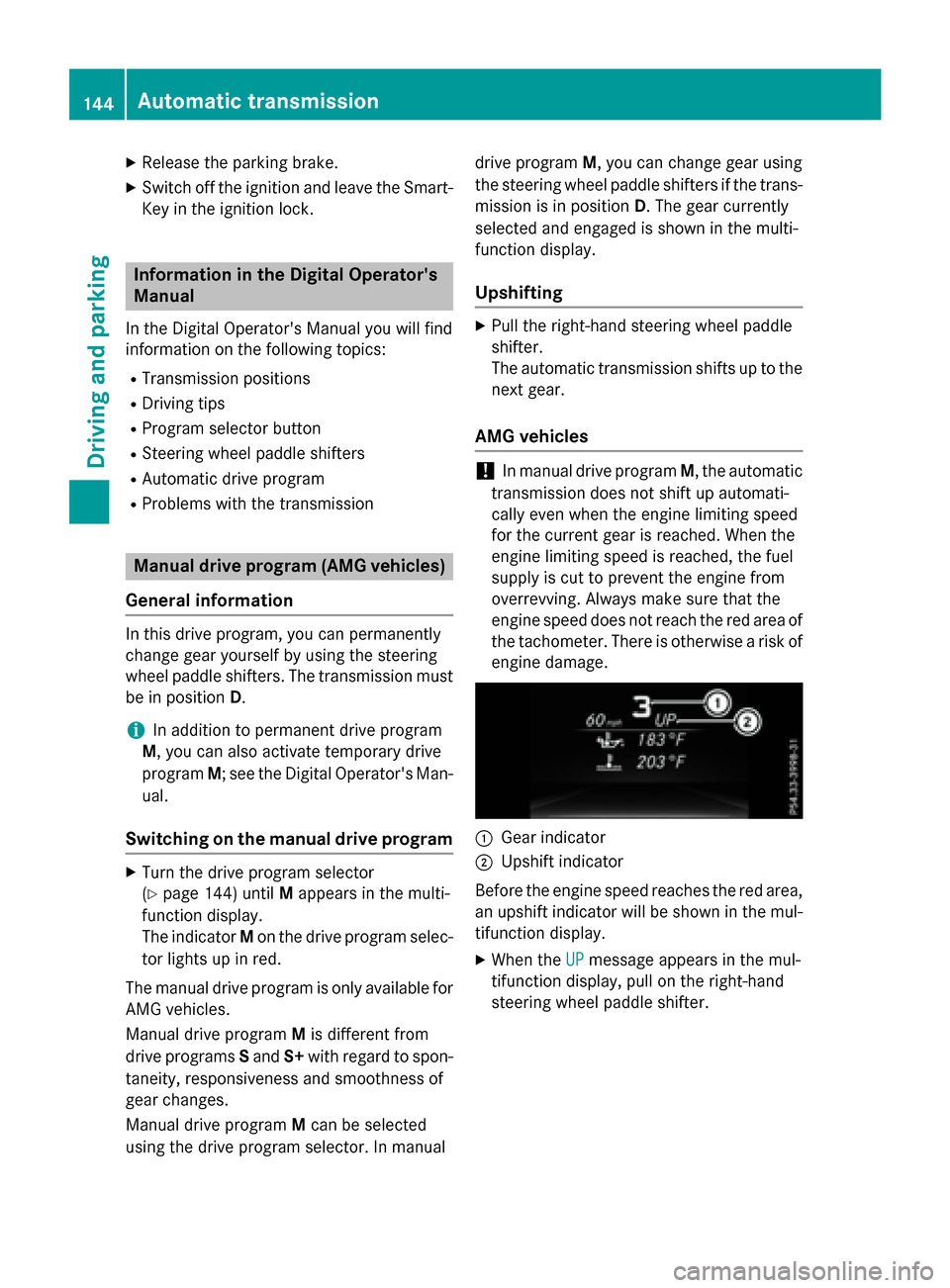
:Gear indicato r
;Upshiftindicato r
Befor eth eengin espeed reaches th ered area ,
an upshift indicato rwill be shown in th emul-
tifunction display.
XWhe nth eUPmessage appear sin th emul-
tifunction display, pull on th eright-hand
steerin gwhee lpaddl eshifter.
144Automatic transmission
Driving an d parking
Page 147 of 350
Shift recommendation
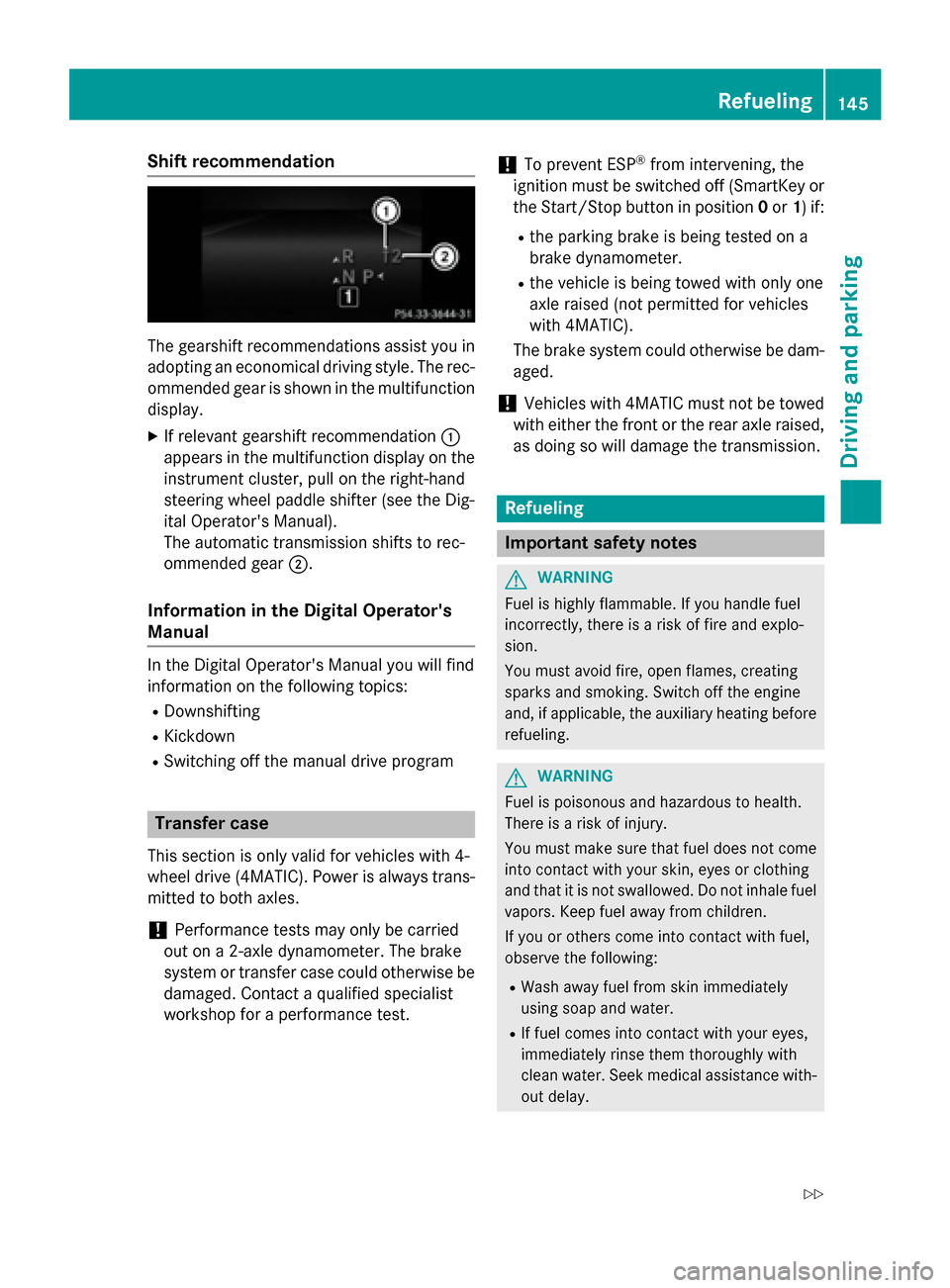
The gearshift recommendations assist you in
adopting an economical driving style. The rec-
ommended gear is shown in the multifunction
display.
XIf relevant gearshift recommendation :
appears in the multifunction display on the
instrument cluster, pull on the right-hand
steering wheel paddle shifter (see the Dig-
ital Operator's Manual).
The automatic transmission shifts to rec-
ommended gear ;.
Information in the Digital Operator's
Manual
In the Digital Operator's Manual you will find
information on the following topics:
RDownshifting
RKickdown
RSwitching off the manual drive program
Transfer case
This section is only valid for vehicles with 4-
wheel drive (4MATIC). Power is always trans-
mitted to both axles.
!Performance tests may only be carried
out on a 2-axle dynamometer. The brake
system or transfer case could otherwise be
damaged. Contact a qualified specialist
workshop for a performance test.
!To prevent ESP®from intervening, the
ignition must be switched off (SmartKey or
the Start/Stop button in position 0or 1) if:
Rthe parking brake is being tested on a
brake dynamometer.
Rthe vehicle is being towed with only one
axle raised (not permitted for vehicles
with 4MATIC).
The brake system could otherwise be dam-
aged.
!Vehicles with 4MATIC must not be towed
with either the front or the rear axle raised,
as doing so will damage the transmission.
Refueling
Important safety notes
GWARNING
Fuel is highly flammable. If you handle fuel
incorrectly, there is a risk of fire and explo-
sion.
You must avoid fire, open flames, creating
sparks and smoking. Switch off the engine
and, if applicable, the auxiliary heating before refueling.
GWARNING
Fuel is poisonous and hazardous to health.
There is a risk of injury.
You must make sure that fuel does not come into contact with your skin, eyes or clothing
and that it is not swallowed. Do not inhale fuel
vapors. Keep fuel away from children.
If you or others come into contact with fuel,
observe the following:
RWash away fuel from skin immediately
using soap and water.
RIf fuel comes into contact with your eyes,
immediately rinse them thoroughly with
clean water. Seek medical assistance with-
out delay.
Refueling145
Driving and parking
Z
Page 151 of 350
Problems with fuel and the fuel tank
This section provides descriptions of and solutions to safety-relevant problems. Descriptions
of and solutions to further problems can be found in the Digital Operator's Manual.
ProblemPossible causes/consequences and MSolutions
Fuel is leaking from the
vehicle.GWARNING
The fuel line or the fuel tank is faulty.
Risk of explosion or fire.
XApply the electric parking brake.
XSwitch off the engine.
XRemove the SmartKey from the ignition lock.
or, on vehicles with KEYLESS‑GO:
XOpen the driver's door.
The on-board electronics now have status 0. This is the same as
the SmartKey having been removed.
XDo not restart the engine under any circumstances.
XConsult a qualified specialist workshop.
DEF (BlueTEC vehicles only)
Important notes on use
To function properly, BlueTEC exhaust gas
aftertreatment must be operated with the
reducing agent DEF. Adding DEF is one of the
tasks performed during maintenance. Under
normal operating conditions, a tank of DEF
lasts until the next service due date.
When the supply of DEF is almost used up, the
Check
AdditiveSeeOperator'sManual
message is shown in the multifunction dis-
play.
When the DEF supply drops to a minimum, the
Remaining Starts: 16
message is shown
in the multifunction display.
If the Remaining Starts: 16
message
appears in the multifunction display, you can
start the engine another 16 times. If DEF is
not refilled, you will subsequently be unable
to start the engine.
XAdd at least 1 gal (3.8 l)of DEF.
XSwitch on the ignition for at least 60 sec-
onds.
XStart the engine.
iHave the DEF tank refilled at a qualified
specialist workshop.
Use the special DEF refill bottle when adding
DEF between maintenance intervals. Contact
an authorized Mercedes-Benz Center with
any questions or, if necessary, contact Road-
side Assistance (
Ypage 29).
If the outside temperature is below 12 ‡
(Ò11 †) it may be difficult to top up. If DEF is frozen and there is an active warning indica-
tor, it may not be possible to add DEF. Park
the vehicle in a warmer place, e.g. in a garage,
until DEF has become fluid again. It will then
be possible to add DEF again. Alternatively,
have the DEF tank refilled at a qualified spe-
cialist workshop.
Further information about BlueTEC exhaust
gas aftertreatment and DEF is available at any
authorized Mercedes-Benz Center.
Refueling149
Driving and parking
Z
Page 153 of 350
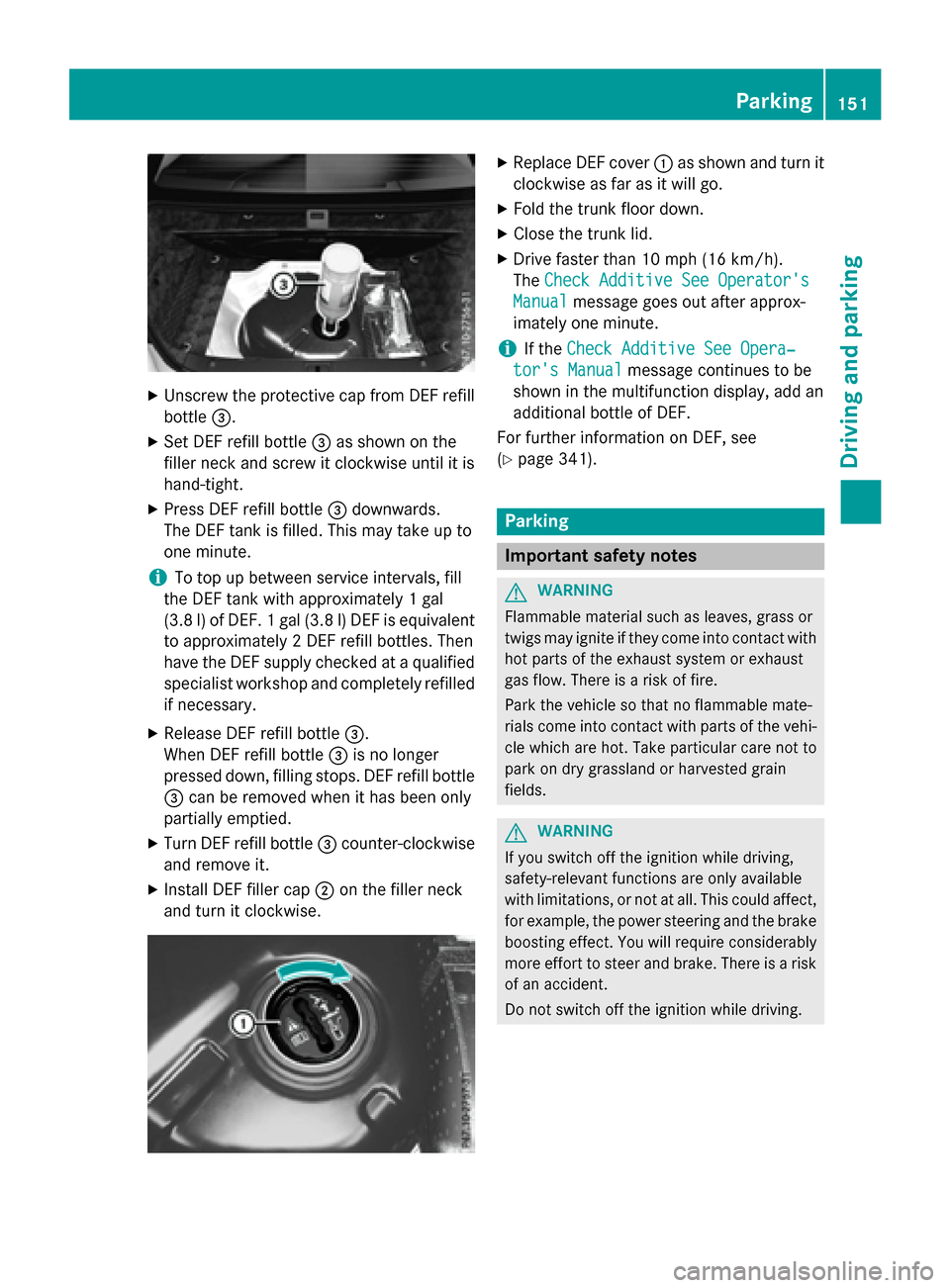
XUnscrew the protective cap from DEF refillbottle =.
XSet DEF refill bottle =as shown on the
filler neck and screw it clockwise until it is
hand-tight.
XPress DEF refill bottle =downwards.
The DEF tank is filled. This may take up to
one minute.
iTo top up between service intervals, fill
the DEF tank with approximately 1 gal
(3.8 l) of DEF. 1 gal (3.8 l)DEF is equivalent
to approximately 2 DEF refill bottles. Then
have the DEF supply checked at a qualified
specialist workshop and completely refilled
if necessary.
XRelease DEF refill bottle =.
When DEF refill bottle =is no longer
pressed down, filling stops. DEF refill bottle
= can be removed when it has been only
partially emptied.
XTurn DEF refill bottle =counter-clockwise
and remove it.
XInstall DEF filler cap ;on the filler neck
and turn it clockwise.
XReplace DEF cover :as shown and turn it
clockwise as far as it will go.
XFold the trunk floor down.
XClose the trunk lid.
XDrive faster than 10 mph (16 km/h).
The Check Additive See Operator's
Manualmessage goes out after approx-
imately one minute.
iIf the Check Additive See Opera‐
tor's Manualmessage continues to be
shown in the multifunction display, add an
additional bottle of DEF.
For further information on DEF, see
(
Ypage 341).
Parking
Important safety notes
GWARNING
Flammable material such as leaves, grass or
twigs may ignite if they come into contact with
hot parts of the exhaust system or exhaust
gas flow. There is a risk of fire.
Park the vehicle so that no flammable mate-
rials come into contact with parts of the vehi-
cle which are hot. Take particular care not to
park on dry grassland or harvested grain
fields.
GWARNING
If you switch off the ignition while driving,
safety-relevant functions are only available
with limitations, or not at all. This could affect, for example, the power steering and the brake
boosting effect. You will require considerably
more effort to steer and brake. There is a risk
of an accident.
Do not switch off the ignition while driving.
Parking151
Driving an d parking
Z
Page 154 of 350
GWARNING
If you leave children unsupervised in the vehi-
cle, they could set it in motion by, for example:
Rrelease the parking brake.
Rshift the automatic transmission out of the
parking position P.
Rstart the engine.
In addition, they may operate vehicle equip-
ment and become trapped. There is a risk of
an accident and injury.
When leaving the vehicle, always take the
SmartKey with you and lock the vehicle. Never
leave children unsupervised in the vehicle.
!Always secure the vehicle correctly
against rolling away. Otherwise, the vehicle
or its drivetrain could be damaged.
To ensure that the vehicle is secured against
rolling away unintentionally:
Rthe parking brake must be applied.
Rthe transmission must be in position Pand
the SmartKey must be removed from the
ignition lock.
Rthe front wheels must be turned towards
the curb on steep uphill or downhill gradi-
ents.
Switching off the engine
Important safety notes
GWARNING
The automatic transmission switches to neu-
tral position Nwhen you switch off the engine.
The vehicle may roll away. There is a risk of an
accident.
After switching off the engine, always switch
to parking position P. Prevent the parked vehi-
cle from rolling away by applying the parking
brake.
Information in the Digital Operator's
Manual
A description of how to switch off the engine
can be found in the Digital Operator's Manual.
Parking brake
GWARNING
If you must brake the vehicle with the parking brake, the braking distance is considerably
longer and the wheels could lock. There is an
increased danger of skidding and accidents.
Only use the parking brake to brake the vehi-
cle when the service brake is faulty. Do not
apply the parking brake too firmly. If the
wheels lock, release the parking brake until
the wheels begin turning again.
GWARNING
If you leave children unsupervised in the vehi-
cle, they could set it in motion by, for example:
Rrelease the parking brake.
Rshift the automatic transmission out of the
parking position P.
Rstart the engine.
In addition, they may operate vehicle equip-
ment and become trapped. There is a risk of
an accident and injury.
When leaving the vehicle, always take the
SmartKey with you and lock the vehicle. Never
leave children unsupervised in the vehicle.
If you brake the vehicle with the parking
brake, the brake lamps will not light up.
152Parking
Driving and parking
Page 155 of 350
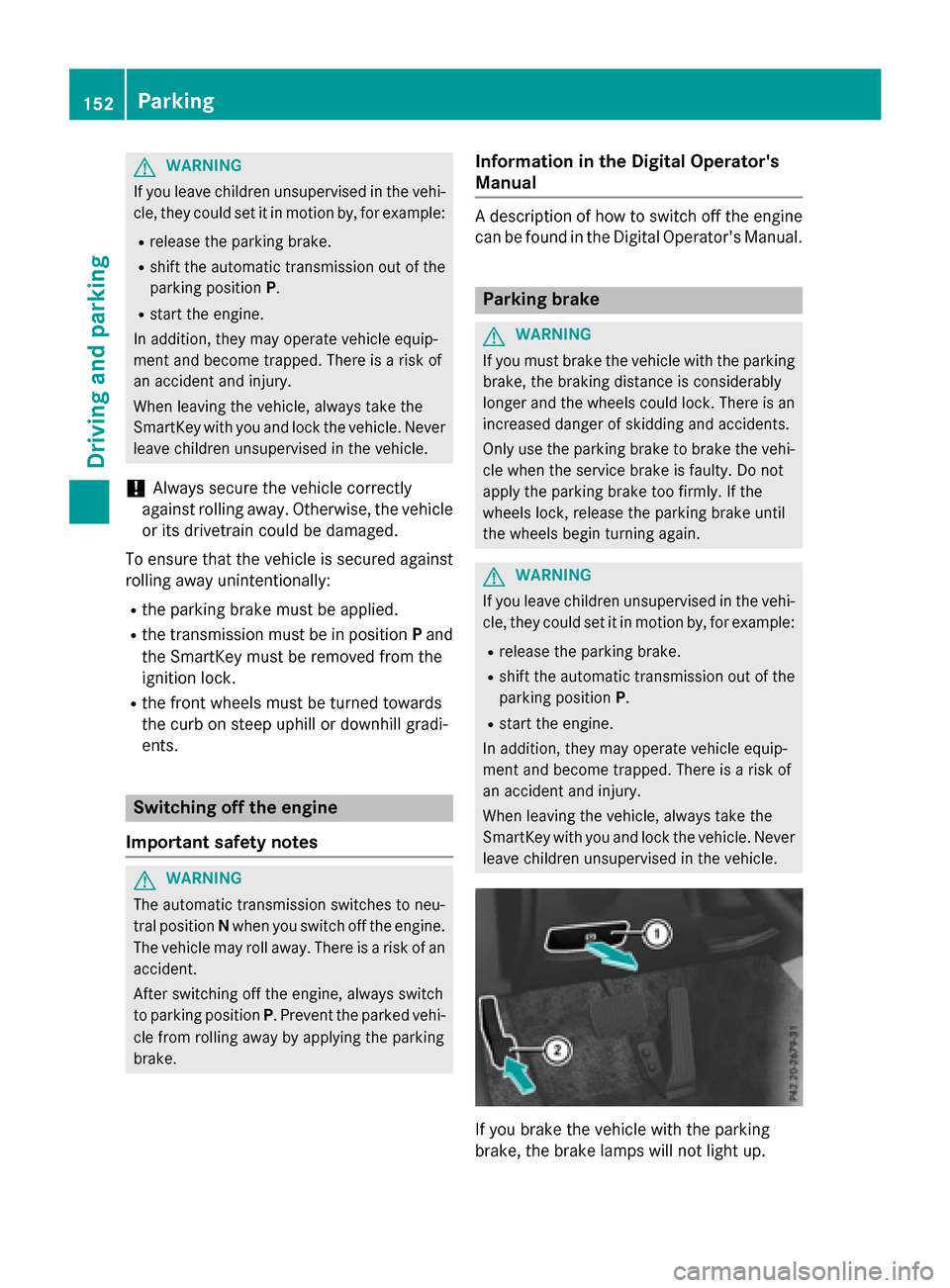
XTo apply:depress parking brake ;firmly.
When the engine is running, the $(USA
only) or J(Canada only) indicator lamp
lights up in the instrument cluster.
XTo release: depress the brake pedal and
keep it depressed.
XPull release handle :.
When the ignition is switched on or the
engine is running, the $(USA only) or
J (Canada only) indicator lamp goes out
in the instrument cluster.
Parking the vehicle for a long period
You can find information about this in the
Digital Operator's Manual.
Driving tips
General notes
Important safety notes
GWARNING
If you switch off the ignition while driving,
safety-relevant functions are only available
with limitations, or not at all. This could affect, for example, the power steering and the brake
boosting effect. You will require considerably
more effort to steer and brake. There is a risk
of an accident.
Do not switch off the ignition while driving.
GWARNING
If you operate mobile communication equip-
ment while driving, you will be distracted from traffic conditions. You could also lose control
of the vehicle. There is a risk of an accident.
Only operate this equipment when the vehicle
is stationary.
Observe the legal requirements for the coun-
try in which you are driving. Some jurisdic-
tions prohibit the driver from using a mobile
phone while driving a vehicle. If you make a call while driving, always use
hands-free mode. Only operate the telephone
when the traffic situation permits. If you are
unsure, pull over to a safe location and stop
before operating the telephone.
Bear in mind that at a speed of only 30 mph
(approximately 50 km/h), the vehicle covers
a distance of 44 ft (approximately 14 m) per
se cond.
Drive sensibly – save fuel
Observe the following tips to save fuel:
XThe tires should always be inflated to the
recommended tire pressure.
XRemove unnecessary loads.
XRemove roof racks when they are not nee-
ded.
XWarm up the engine at low engine speeds.
XAvoid frequent acceleration or braking.
XHave all maintenance work carried out as
indicated by the service intervals in the
Maintenance Booklet or by the service
interval display.
Fuel consumption also increases when driv-
ing in cold weather, in stop-start traffic and in
hilly terrain.
Drinking and driving
GWARNING
Drinking and driving and/or taking drugs and driving are very dangerous combinations.
Even a small amount of alcohol or drugs can
affect your reflexes, perceptions and judg-
ment.
The possibility of a serious or even fatal acci-
dent is greatly increased when you drink or
take drugs and drive.
Do not drink or take drugs and drive or allow
anyone to drive who has been drinking or tak-
ing drugs.
Driving tips153
Driving and parking
Z
Page 156 of 350
Emission control
GWARNING
Combustion engines emit poisonous exhaust
gases such as carbon monoxide. Inhaling
these exhaust gases leads to poisoning. There
is a risk of fatal injury. Therefore never leave
the engine running in enclosed spaces with-
out sufficient ventilation.
Certain engine systems are designed to keep
the level of poisonous components in exhaust
fumes within legal limits.
These systems only work at peak efficiency if
they are serviced exactly in accordance with
the manufacturer's specifications. For this
reason, only have work on the engine carried
out by qualified and authorized Mercedes-
Benz technicians.
The engine settings must not be changed
under any circumstances. Furthermore, all
specific service work must be carried out at
regular intervals and in accordance with the
Mercedes-Benz service requirements. Details
can be found in the Maintenance Booklet.
ECO display
You can find information about this in the
Digital Operator's Manual.
Braking
Important safety notes
GWARNING
If you shift down on a slippery road surface in an attempt to increase the engine's braking
effect, the drive wheels could lose their grip.
There is an increased danger of skidding and
accidents.
Do not shift down for additional engine brak-
ing on a slippery road surface.
Downhill gradients
You can find information about this in the
Digital Operator's Manual.
Heavy and light loads
GWARNING
If you rest your foot on the brake pedal while
driving, the braking system can overheat. This increases the stopping distance and can even
cause the braking system to fail. There is a
risk of an accident.
Never use the brake pedal as a footrest. Never
depress the brake pedal and the accelerator
pedal at the same time.
Further information can be found in the Digi-
tal Operator's Manual.
Wet roads
You can find information about this in the
Digital Operator's Manual.
Limited braking performance on salt-
treated roads
You can find information about this in the
Digital Operator's Manual.
Servicing the brakes
You can find information about this in the
Digital Operator's Manual.
AMG high-performance and ceramic
brakes
You can find information about this in the
Digital Operator's Manual.
154Driving tips
Driving and parking