stop start MERCEDES-BENZ E-SEDAN 2014 User Guide
[x] Cancel search | Manufacturer: MERCEDES-BENZ, Model Year: 2014, Model line: E-SEDAN, Model: MERCEDES-BENZ E-SEDAN 2014Pages: 430, PDF Size: 5.8 MB
Page 72 of 430
BAS PLUS provides braking assistance in
hazardous situations with vehicles in front
within a speed range between 4 mph
(7 km/h) and 155 mph (250 km/h).
At speeds of up to approximately 44 mph
(70 km/h), BAS PLUS reacts to:
R stationary objects in the path of your
vehicle, e.g. stopped or parked vehicles
R pedestrians in the path of your vehicle
R objects crossing your path
i If BAS PLUS demands particularly high
braking force, preventative passenger
protection measures (PRE-SAFE ®
) are
activated simultaneously.
X Keep the brake pedal depressed until the
emergency braking situation is over.
ABS prevents the wheels from locking.
BAS PLUS is deactivated and the brakes
function as usual, if:
R you release the brake pedal
R there is no longer a risk of collision
R no obstacle is detected in front of your
vehicle
R you depress the accelerator pedal
R you activate kickdown COLLISION PREVENTION ASSIST
General notes COLLISION PREVENTION ASSIST consists of
the distance warning function and adaptive
Brake Assist, which are described in the
following section.
Distance warning function Important safety notes
i
Observe the "Important safety notes"
section (Y page 67). G
WARNING
The distance warning function does not react:
R to people or animals
R to oncoming vehicles
R to crossing traffic
R when cornering
Thus, the distance warning function cannot
provide a warning in all critical situations.
There is a risk of an accident.
Always pay careful attention to the traffic
situation and be ready to brake. G
WARNING
The distance warning function cannot always
clearly identify objects and complex traffic
situations.
In such cases, the distance warning function
may:
R give an unnecessary warning
R not give a warning
There is a risk of an accident.
Always pay careful attention to the traffic
situation and do not rely solely on the distance
warning function.
Function
X To activate/deactivate: activate or
deactivate the distance warning function in
the on-board computer (Y page 247).
If the distance warning function is not
activated, the æsymbol appears in the
assistance graphics display.
The distance warning function can help you
to minimize the risk of a front-end collision
with a vehicle ahead or reduce the effects of
such a collision. If the distance warning
function detects that there is a risk of a
collision, you will be warned visually and
acoustically. The distance warning function
cannot prevent a collision without your
intervention.
Starting at a speed of around 4 mph
(7 km/h), the distance warning function
warns you if you rapidly approach a vehicle in 70
Driving safety systemsSafety
ProCarManuals.com
Page 75 of 430
Application of the brakes by ESP
®
may
otherwise destroy the brake system.
Vehicles without 4MATIC: observe the notes
on ESP ®
(Y page 366) when towing the
vehicle with a raised rear axle.
ESP ®
is deactivated if the åwarning lamp
in the instrument cluster lights up
continuously when the engine is running.
If the ÷ warning lamp and the å
warning lamp are lit continuously, ESP ®
is not
available due to a malfunction.
Observe the information on warning lamps
(Y page 289) and display messages which
may be shown in the instrument cluster
(Y page 258).
i Only use wheels with the recommended
tire sizes. Only then will ESP ®
function
properly.
Characteristics of ESP ®General information
If the
÷ ESP warning lamp goes out before
beginning the journey, ESP ®
is automatically
active.
If ESP ®
intervenes, the ÷ESP®
warning
lamp flashes in the instrument cluster.
If ESP ®
intervenes:
X Do not deactivate ESP ®
under any
circumstances.
X Only depress the accelerator pedal as far
as necessary when pulling away.
X Adapt your driving style to suit the
prevailing road and weather conditions.
ECO start/stop function
The ECO start/stop function switches the
engine off automatically when the vehicle
stops moving. The engine starts
automatically when the driver wants to pull
away again. ESP ®
remains in its previously
selected status. Example:if ESP®
was
deactivated before the engine was switched off, ESP
®
remains deactivated when the
engine is switched on again.
Deactivating/activating ESP ®
(except
AMG vehicles) Important safety notes
You can select between the following
statuses of ESP:
R
ESP ®
is activated.
R ESP ®
is deactivated. G
WARNING
If you deactivate ESP ®
, ESP ®
no longer
stabilizes the vehicle. There is an increased
risk of skidding and an accident.
Only deactivate ESP ®
in the situations
described in the following.
! Avoid spinning the driven wheels for an
extended period with ESP ®
deactivated.
You could otherwise damage the drivetrain.
It may be best to deactivate ESP ®
in the
following situations:
R when using snow chains
R in deep snow
R on sand or gravel
i Activate ESP ®
as soon as the situations
described above no longer apply. ESP ®
will
otherwise not be able to stabilize the
vehicle if the vehicle starts to skid or a
wheel starts to spin.
Deactivating/activating ESP ®
X To deactivate:( Ypage 247).
The å ESP®
OFF warning lamp in the
instrument cluster lights up.
X To activate: (Ypage 247).
The å ESP®
OFF warning lamp in the
instrument cluster goes out. Driving safety systems
73Safety Z
ProCarManuals.com
Page 79 of 430
R
a narrow vehicle traveling in front, e.g. a
motorbike
R a vehicle traveling in front on a different line
relative to the center of your vehicle
Recognition by the camera system is also
impaired in the event of:
R dirt on the camera or if the camera is
covered
R there is glare on the camera system, e.g.
from the sun being low in the sky
R darkness
R if:
-pedestrians move quickly, e.g. into the
path of the vehicle
- the camera system no longer recognizes
a pedestrian as a person due to special
clothing or other objects
- a pedestrian is concealed by other
objects
- the typical outline of a person is not
distinguishable from the background
Following damage to the front end of the
vehicle, have the configuration and operation
of the radar sensors checked at a qualified
specialist workshop. This also applies to
collisions at low speeds where there is no
visible damage to the front of the vehicle.
Following damage to the windshield, have the
configuration and operation of the camera
system checked at a qualified specialist
workshop.
Function X
To activate/deactivate: activate or
deactivate PRE-SAFE ®
Brake in the on-
board computer (Y page 247).
If the PRE-SAFE ®
Brake is not activated, the
æ symbol appears in the multifunction
display.
Starting at a speed of around 4 mph
(7 km/h), this function warns you if you
rapidly approach a vehicle in front. An
intermittent warning tone will then sound and the
· distance warning lamp will light up
in the instrument cluster.
X Brake immediately to defuse the situation.
or
X Take evasive action provided it is safe to do
so.
PRE-SAFE ®
Brake can also brake the vehicle
automatically under the following conditions:
R the driver and front-passenger have their
seat belts fastened
and
R the vehicle speed is between
approximately 4 mph (7 km/h) and
124 mph (200 km/h)
At a speed of up to approximately 44 mph
(70 km/h), PRE-SAFE ®
Brake can also detect:
R stationary objects in the path of your
vehicle, e.g. stopped or parked vehicles
R pedestrians in the path of your vehicle
i If there is an increased risk of collision,
preventive passenger protection measures
(PRE-SAFE ®
) are activated.
If the risk of collision with the vehicle in front
remains and you do not brake, take evasive
action or accelerate significantly, the vehicle
may perform automatic emergency braking,
up to the point of full brake application.
Automatic emergency braking is not
performed until immediately prior to an
imminent accident.
You can prevent the intervention of the PRE-
SAFE ®
Brake at any time by:
R depressing the accelerator pedal further.
R activating kickdown.
R releasing the brake pedal.
The braking action of PRE-SAFE ®
Brake is
ended automatically if:
R you maneuver to avoid the obstacle.
R there is no longer a risk of collision.
R there is no longer an obstacle detected in
front of your vehicle. Driving safety systems
77Safety Z
ProCarManuals.com
Page 81 of 430
X
To stop the alarm using KEYLESS-GO:
grasp the outside door handle. The
SmartKey must be outside the vehicle.
The alarm is switched off.
or
X Press the Start/Stop button on the
dashboard. The SmartKey must be inside
the vehicle.
The alarm is switched off.
The alarm is not switched off, even if you
close the open door that triggered it, for
example.
i If the alarm continues for more than
30 seconds, the mbrace emergency call
system automatically notifies the
Customer Assistance Center. This is done
either by text message or data connection.
The emergency call system sends the
message or data provided that:
R you have subscribed to the mbrace
service.
R the mbrace service has been activated
properly.
R the necessary mobile phone network is
available. Theft deterrent locking system
79Safety Z
ProCarManuals.com
Page 86 of 430
approximately six seconds until the battery
check lamp flashes twice (Y page 85).
i If the setting of the locking system is
changed within the signal range of the
vehicle, pressing the &or% button:
R locks or
R unlocks the vehicle
The SmartKey now functions as follows:
X To unlock the driver's door: press the
% button once.
X To unlock centrally: press the%
button twice.
X To lock centrally: press the&button.
The KEYLESS-GO function is changed as
follows:
X To unlock the driver's door: touch the
inner surface of the door handle on the
driver's door.
X To unlock centrally: touch the inner
surface of the door handle on the front-
passenger door or the rear door.
X To lock centrally: touch the outer sensor
surface on one of the door handles.
X To restore the factory settings: press
and hold down the %and& buttons
simultaneously for approximately six
seconds until the battery check lamp
flashes twice ( Ypage 85). Mechanical key
General notes If the vehicle can no longer be locked or
unlocked with the SmartKey, use the
mechanical key.
If you use the mechanical key to unlock and
open the driver's door or the trunk lid/
tailgate, the anti-theft alarm system will be
triggered (Y page 78). There are several ways to turn off the alarm:
X
To turn the alarm off with the
SmartKey: press the%or& button
on the SmartKey.
or
X Insert the SmartKey into the ignition lock.
or
X To disarm the alarm with KEYLESS-GO:
press the Start/Stop button in the ignition
lock. The SmartKey must be in the vehicle.
or
X Lock or unlock the vehicle using KEYLESS-
GO. The SmartKey must be outside the
vehicle.
If you unlock the vehicle using the mechanical
key, the fuel filler flap will not be unlocked
automatically.
X To unlock the fuel filler flap: insert the
SmartKey into the ignition lock.
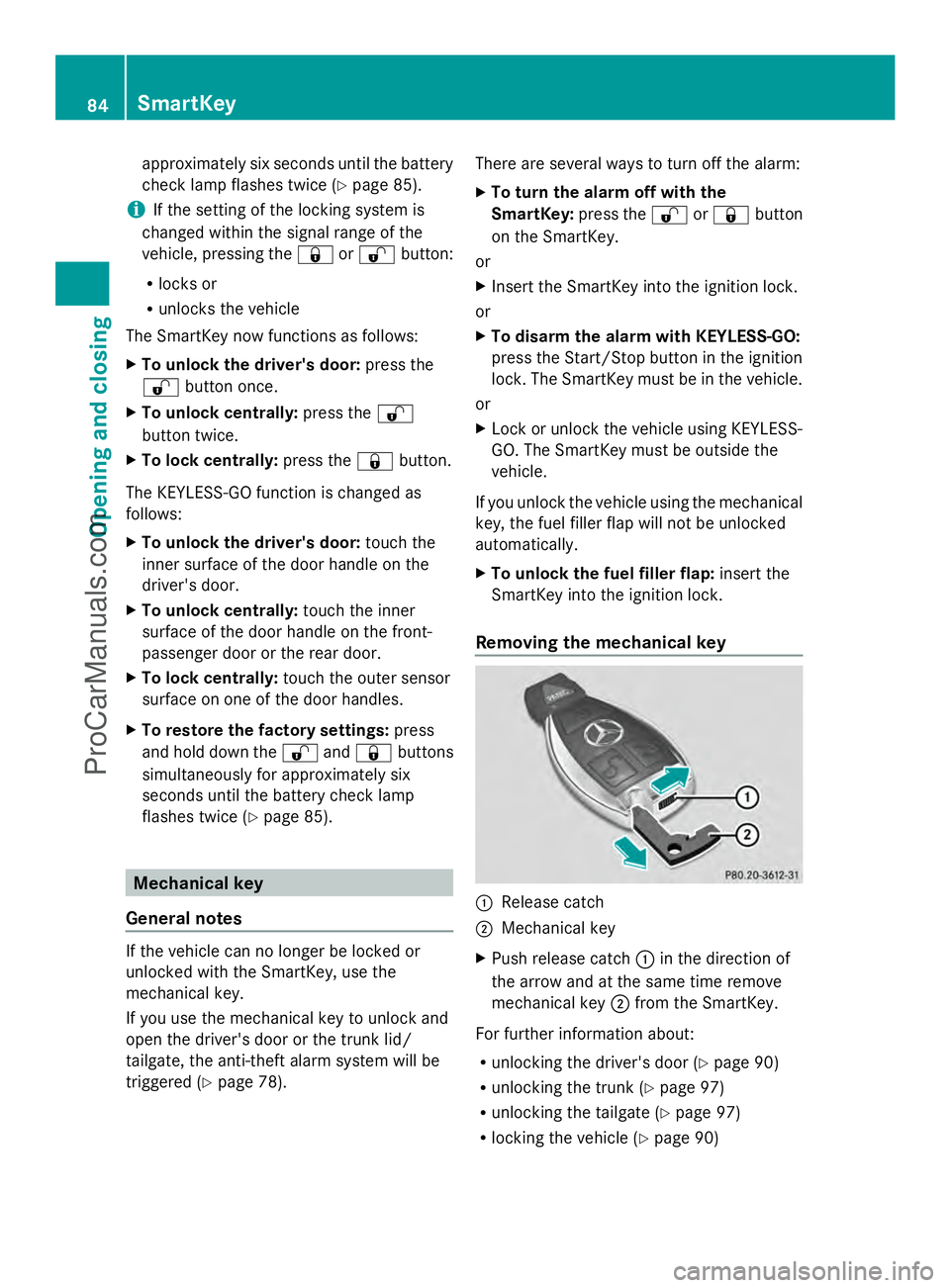
Removing the mechanical key :
Release catch
; Mechanical key
X Push release catch :in the direction of
the arrow and at the same time remove
mechanical key ;from the SmartKey.
For further information about:
R unlocking the driver's door (Y page 90)
R unlocking the trunk (Y page 97)
R unlocking the tailgate (Y page 97)
R locking the vehicle (Y page 90)84
SmartKeyOpening and closing
ProCarManuals.com
Page 96 of 430
R
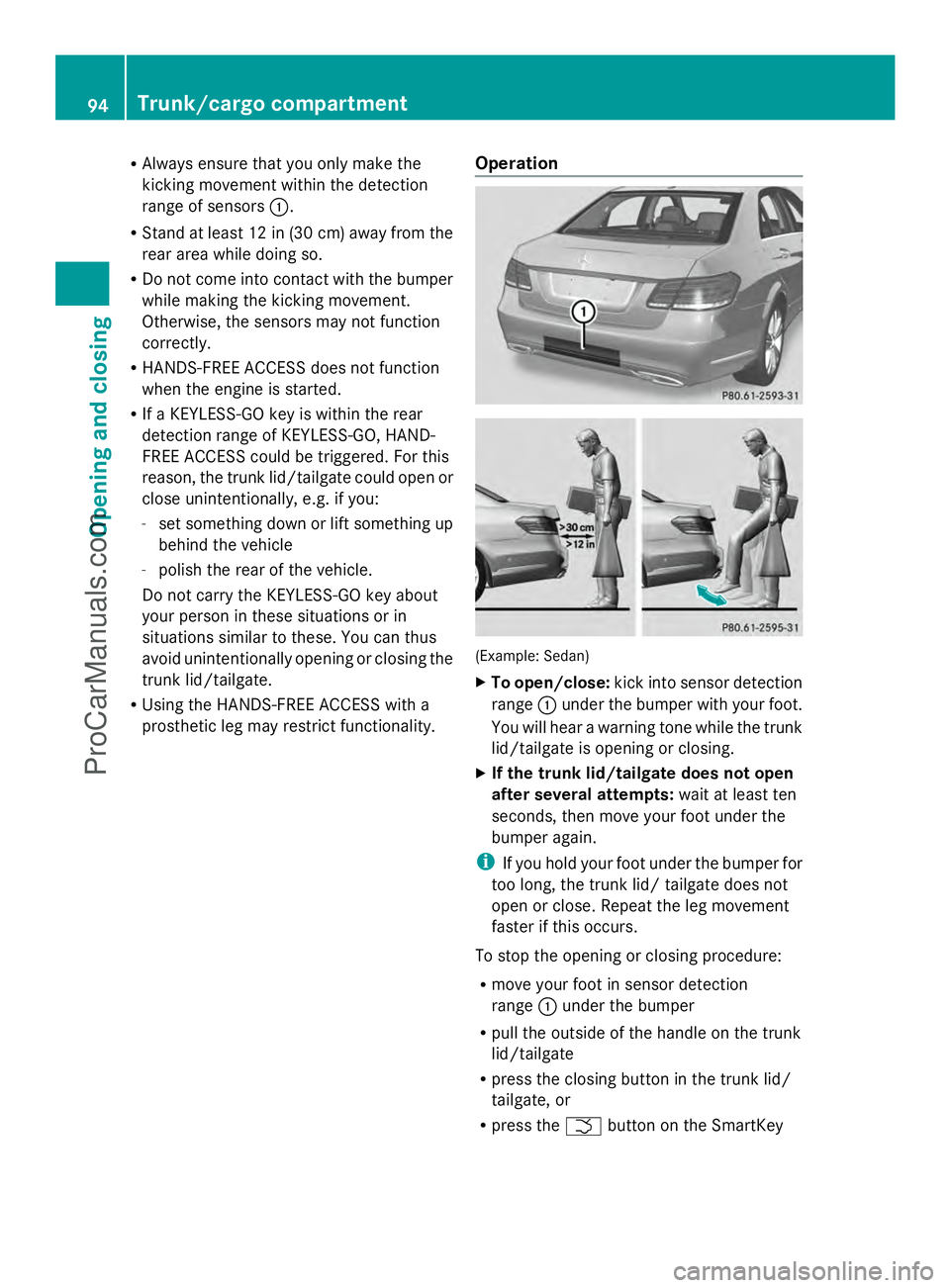
Always ensure that you only make the
kicking movement within the detection
range of sensors :.
R Stand at least 12 in (30 cm) away from the
rear area while doing so.
R Do not come into contact with the bumper
while making the kicking movement.
Otherwise, the sensors may not function
correctly.
R HANDS-FREE ACCESS does not function
when the engine is started.
R If a KEYLESS-GO key is within the rear
detection range of KEYLESS-GO, HAND-
FREE ACCESS could be triggered. For this
reason, the trunk lid/tailgate could open or
close unintentionally, e.g. if you:
- set something down or lift something up
behind the vehicle
- polish the rear of the vehicle.
Do not carry the KEYLESS-GO key about
your person in these situations or in
situations similar to these. You can thus
avoid unintentionally opening or closing the
trunk lid/tailgate.
R Using the HANDS-FREE ACCESS with a
prosthetic leg may restrict functionality. Operation (Example: Sedan)
X
To open/close: kick into sensor detection
range :under the bumper with your foot.
You will hear a warning tone while the trunk
lid/tailgate is opening or closing.
X If the trunk lid/tailgate does not open
after several attempts: wait at least ten
seconds, then move your foot under the
bumper again.
i If you hold your foot under the bumper for
too long, the trunk lid/ tailgate does not
open or close. Repeat the leg movement
faster if this occurs.
To stop the opening or closing procedure:
R move your foot in sensor detection
range :under the bumper
R pull the outside of the handle on the trunk
lid/tailgate
R press the closing button in the trunk lid/
tailgate, or
R press the Fbutton on the SmartKey 94
Trunk/cargo compartmentOpening and closing
ProCarManuals.com
Page 101 of 430
Make sure that no body parts are in close
proximity during the closing procedure. If
someone becomes trapped, press the switch
to open the side window again. Opening and closing the side
windows
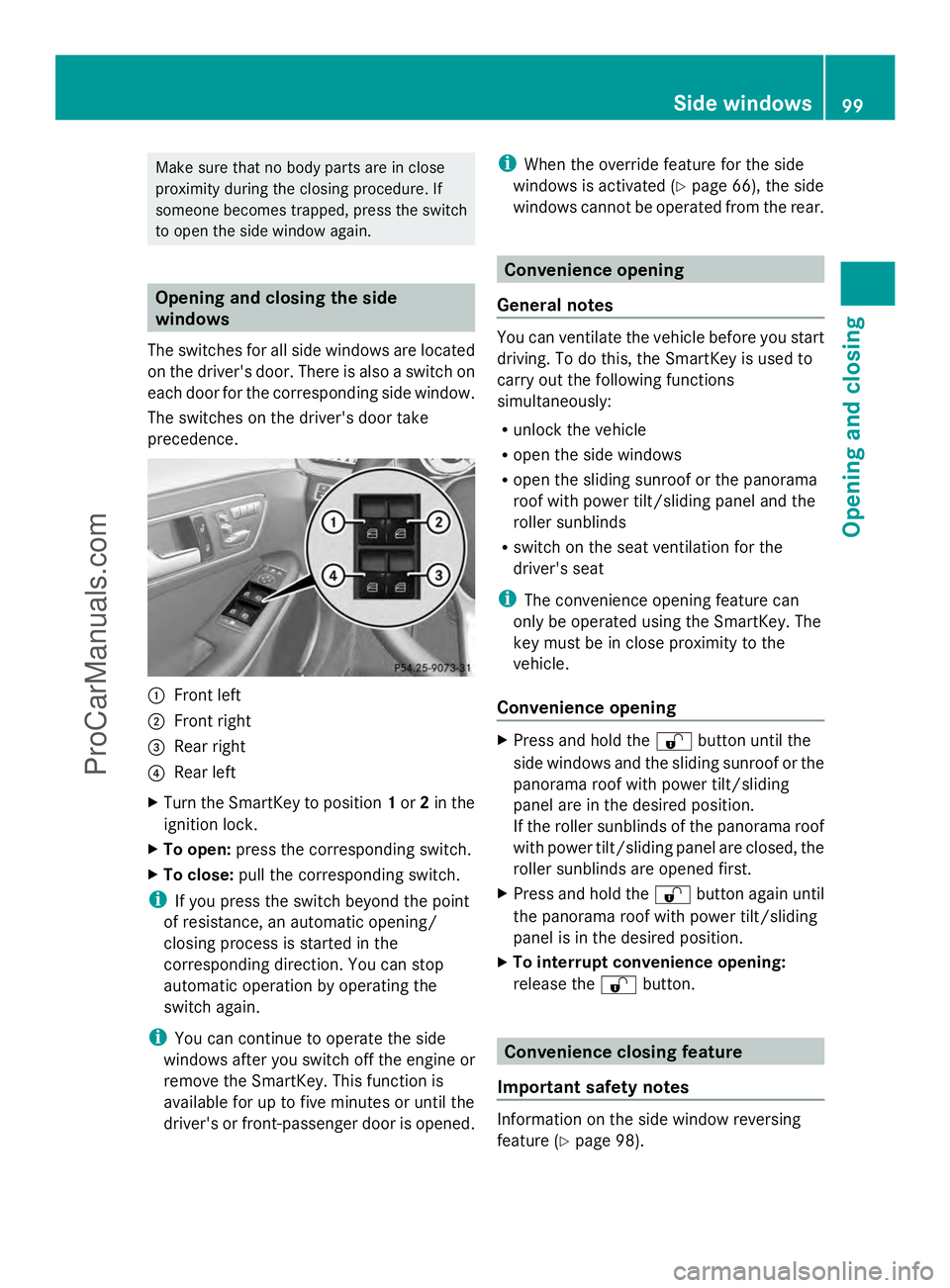
The switches for all side windows are located
on the driver's door. There is also a switch on
each door for the corresponding side window.
The switches on the driver's door take
precedence. :
Front left
; Front right
= Rear right
? Rear left
X Turn the SmartKey to position 1or 2in the
ignition lock.
X To open: press the corresponding switch.
X To close: pull the corresponding switch.
i If you press the switch beyond the point
of resistance, an automatic opening/
closing process is started in the
corresponding direction. You can stop
automatic operation by operating the
switch again.
i You can continue to operate the side
windows after you switch off the engine or
remove the SmartKey. This function is
available for up to five minutes or until the
driver's or front-passenger door is opened. i
When the override feature for the side
windows is activated (Y page 66), the side
windows cannot be operated from the rear. Convenience opening
General notes You can ventilate the vehicle before you start
driving. To do this, the SmartKey is used to
carry out the following functions
simultaneously:
R
unlock the vehicle
R open the side windows
R open the sliding sunroof or the panorama
roof with power tilt/sliding panel and the
roller sunblinds
R switch on the seat ventilation for the
driver's seat
i The convenience opening feature can
only be operated using the SmartKey. The
key must be in close proximity to the
vehicle.
Convenience opening X
Press and hold the %button until the
side windows and the sliding sunroof or the
panorama roof with power tilt/sliding
panel are in the desired position.
If the roller sunblinds of the panorama roof
with power tilt/sliding panel are closed, the
roller sunblinds are opened first.
X Press and hold the %button again until
the panorama roof with power tilt/sliding
panel is in the desired position.
X To interrupt convenience opening:
release the %button. Convenience closing feature
Important safety notes Information on the side window reversing
feature (Y
page 98). Side windows
99Opening and closing Z
ProCarManuals.com
Page 105 of 430
!
Only open the sliding sunroof if it is free
of snow and ice. Otherwise, malfunctions
may occur.
Do not allow anything to protrude from the
sliding sunroof. Otherwise, the seals could
be damaged.
! The weather can change abruptly. It could
start to rain or snow. Make sure that the
sliding sunroof is closed when you leave the
vehicle. The vehicle electronics can be
damaged if water enters the vehicle
interior.
i Resonance noises can occur in addition
to the usual airflow noises when the sliding
sunroof is open. They are caused by minor
pressure fluctuations in the vehicle interior.
Change the position of the sliding sunroof
or open a side window slightly to reduce or
eliminate these noises. Sliding sunroof reversing feature
The sliding sunroof is equipped with an
automatic reversing feature. If a solid object
blocks or restricts the sliding sunroof during
the closing process, the sliding sunroof opens
again automatically. However, the automatic
reversing feature is only an aid and does not
relieve you of the responsibility of paying
attention when closing the sliding sunroof. G
WARNING
The reversing feature does not react:
R to soft, light and thin objects, e.g. small
fingers
R over the last 1/6 in(4 mm) of the closing
movement
R during resetting
R when closing the sliding sunroof again
manually immediately after automatic
reversing
This means that the reversing feature cannot
prevent someone being trapped in these
situations. There is a risk of injury. Make sure that no body parts are in close
proximity during the closing procedure.
If somebody becomes trapped:
R
release the switch immediately, or
R during automatic operation, push the
switch briefly in any direction
The closing process is stopped. Operating the sliding sunroof
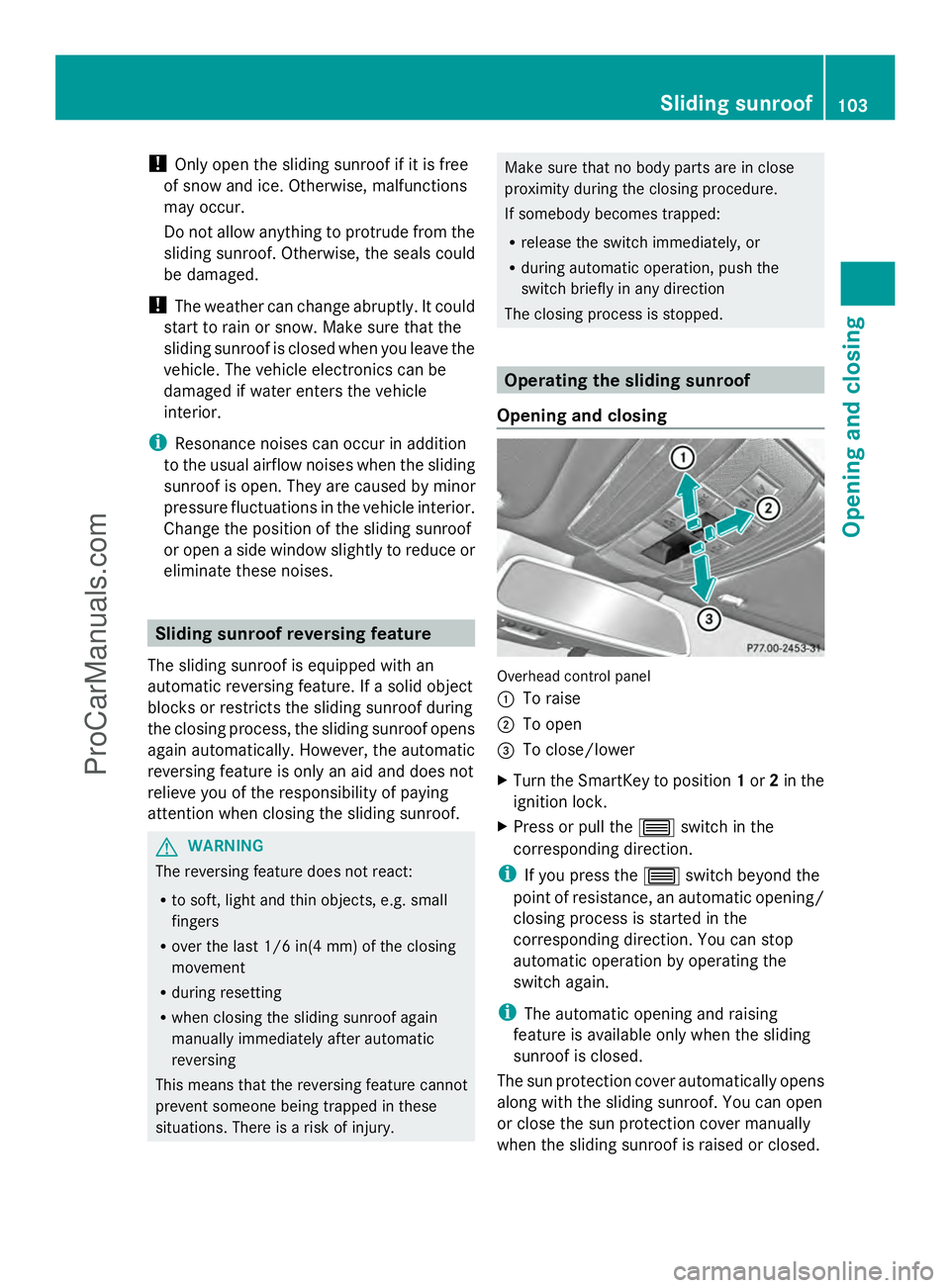
Opening and closing Overhead control panel
:
To raise
; To open
= To close/lower
X Turn the SmartKey to position 1or 2in the
ignition lock.
X Press or pull the 3switch in the
corresponding direction.
i If you press the 3switch beyond the
point of resistance, an automatic opening/
closing process is started in the
corresponding direction. You can stop
automatic operation by operating the
switch again.
i The automatic opening and raising
feature is available only when the sliding
sunroof is closed.
The sun protection cover automatically opens
along with the sliding sunroof. You can open
or close the sun protection cover manually
when the sliding sunroof is raised or closed. Sliding sunroof
103Opening and closing Z
ProCarManuals.com
Page 106 of 430
i
You can continue to operate the sliding
sunroof after switching off the engine or
removing the SmartKey from the ignition
lock. This function remains active for five
minutes or until you open a front door.
Resetting !
If the sliding sunroof still cannot be
opened or closed fully after resetting,
contact a qualified specialist workshop.
Reset the sliding sunroof if it does not move
smoothly.
X Turn the SmartKey to position 2in the
ignition lock.
X Raise the sliding sunroof fully at the rear
(Y page 103).
X Keep the 3switch pressed for another
second.
X Make sure that the sliding sunroof can be
fully opened and closed again
(Y page 103).
X If this is not the case, repeat the steps
above again. Operating the panorama roof with
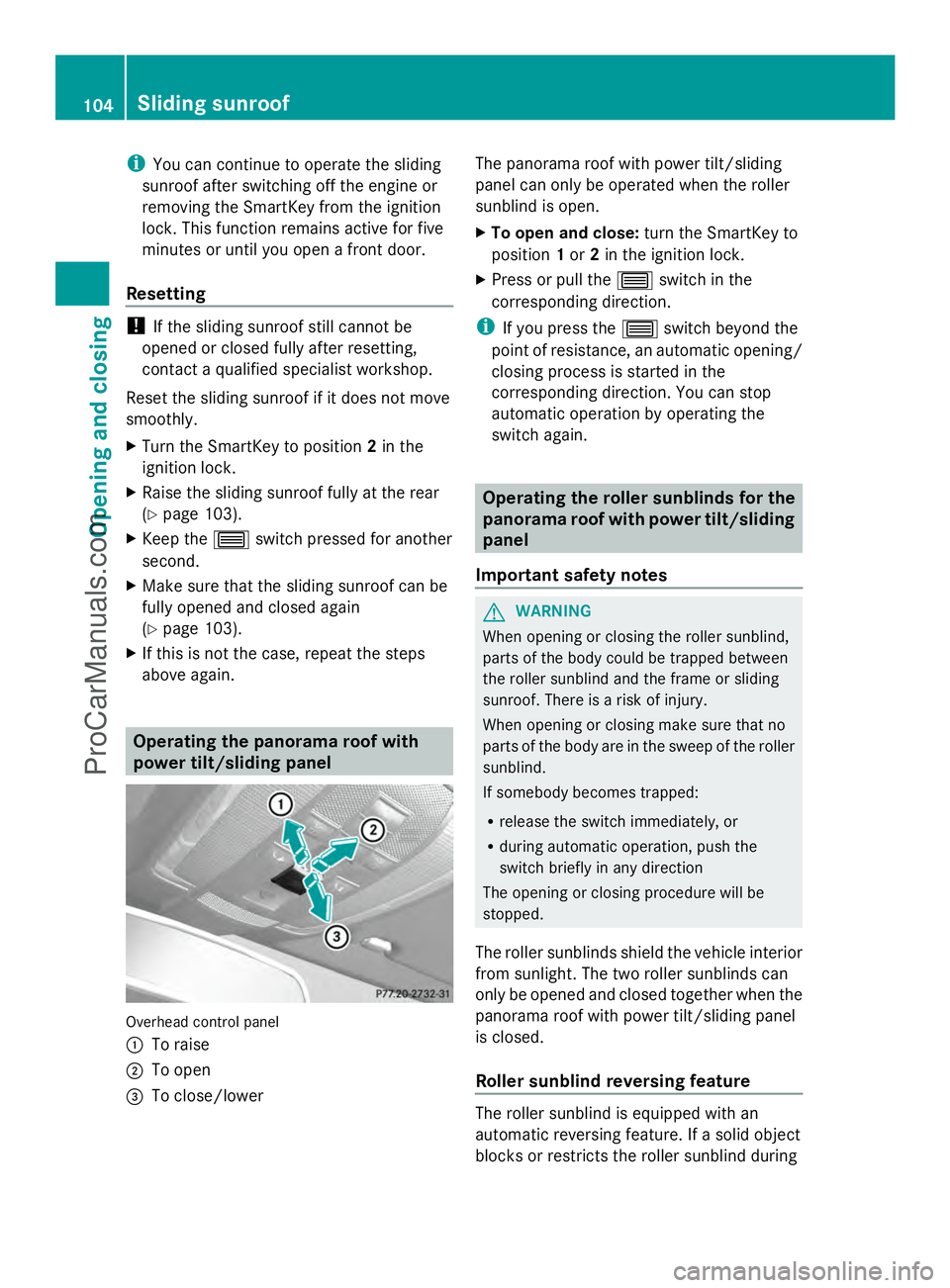
power tilt/sliding panel Overhead control panel
:
To raise
; To open
= To close/lower The panorama roof with power tilt/sliding
panel can only be operated when the roller
sunblind is open.
X
To open and close: turn the SmartKey to
position 1or 2in the ignition lock.
X Press or pull the 3switch in the
corresponding direction.
i If you press the 3switch beyond the
point of resistance, an automatic opening/
closing process is started in the
corresponding direction. You can stop
automatic operation by operating the
switch again. Operating the roller sunblinds for the
panorama roof with power tilt/sliding
panel
Important safety notes G
WARNING
When opening or closing the roller sunblind,
parts of the body could be trapped between
the roller sunblind and the frame or sliding
sunroof. There is a risk of injury.
When opening or closing make sure that no
parts of the body are in the sweep of the roller
sunblind.
If somebody becomes trapped:
R release the switch immediately, or
R during automatic operation, push the
switch briefly in any direction
The opening or closing procedure will be
stopped.
The roller sunblinds shield the vehicle interior
from sunlight. The two roller sunblinds can
only be opened and closed together when the
panorama roof with power tilt/sliding panel
is closed.
Roller sunblind reversing feature The roller sunblind is equipped with an
automatic reversing feature. If a solid object
blocks or restricts the roller sunblind during104
Sliding sunroofOpening and closing
ProCarManuals.com
Page 107 of 430
the closing process, the roller sunblind opens
again automatically. The automatic reversing
feature is only an aid and is not a substitute
for your attentiveness to the roller sunblind
while it is closing. G
WARNING
The reversing feature especially does not
react to soft, light and thin objects such as
small fingers. This means that the reversing
feature cannot prevent someone being
trapped in these situations. There is a risk of
injury.
When closing make sure that no parts of the
body are in the sweep of the roller sunblind.
If somebody becomes trapped:
R release the switch immediately, or
R during automatic operation, push the
switch briefly in any direction
The closing process is stopped.
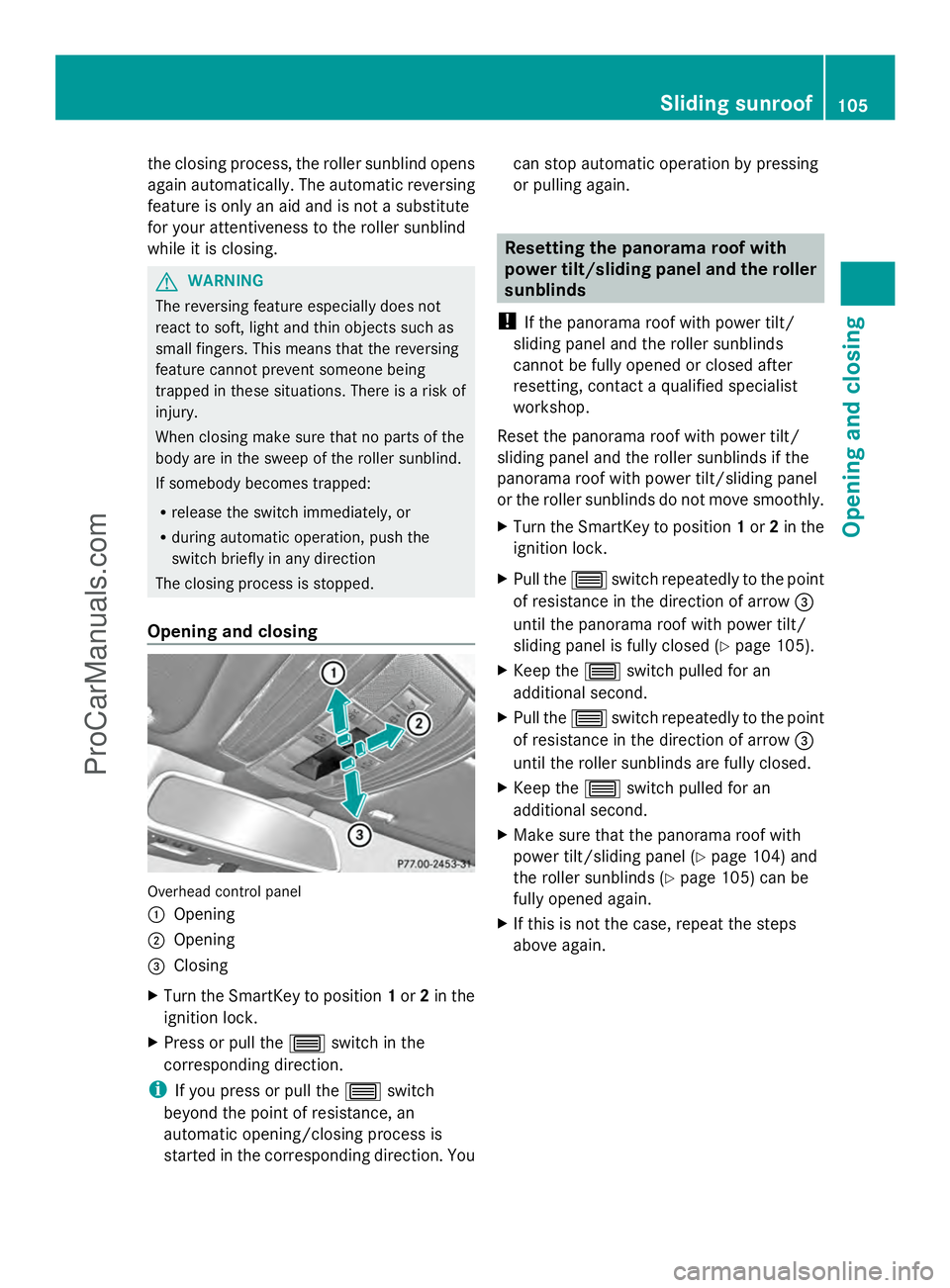
Opening and closing Overhead control panel
:
Opening
; Opening
= Closing
X Turn the SmartKey to position 1or 2in the
ignition lock.
X Press or pull the 3switch in the
corresponding direction.
i If you press or pull the 3switch
beyond the point of resistance, an
automatic opening/closing process is
started in the corresponding direction. You can stop automatic operation by pressing
or pulling again. Resetting the panorama roof with
power tilt/sliding panel and the roller
sunblinds
! If the panorama roof with power tilt/
sliding panel and the roller sunblinds
cannot be fully opened or closed after
resetting, contact a qualified specialist
workshop.
Reset the panorama roof with power tilt/
sliding panel and the roller sunblinds if the
panorama roof with power tilt/sliding panel
or the roller sunblinds do not move smoothly.
X Turn the SmartKey to position 1or 2in the
ignition lock.
X Pull the 3switch repeatedly to the point
of resistance in the direction of arrow =
until the panorama roof with power tilt/
sliding panel is fully closed (Y page 105).
X Keep the 3switch pulled for an
additional second.
X Pull the 3switch repeatedly to the point
of resistance in the direction of arrow =
until the roller sunblinds are fully closed.
X Keep the 3switch pulled for an
additional second.
X Make sure that the panorama roof with
power tilt/sliding panel (Y page 104) and
the roller sunblinds (Y page 105) can be
fully opened again.
X If this is not the case, repeat the steps
above again. Sliding sunroof
105Opening and closing Z
ProCarManuals.com