navigation MERCEDES-BENZ EQC SUV 2019 User Guide
[x] Cancel search | Manufacturer: MERCEDES-BENZ, Model Year: 2019, Model line: EQC SUV, Model: MERCEDES-BENZ EQC SUV 2019Pages: 629, PDF Size: 11.02 MB
Page 280 of 629
#
Tocor rect an ent ry:say theCorrection
vo ice command. #
Toselect an entry from the selection lis t:
say the line number or the conte nts. #
Tobrows eth e selection lis t:say theNext
or Back voice command. #
Tointer rupt the dialogue: saythePause
vo ice command.
The dialogue can be continued with the
"Hello Mercedes" voice command or by
pressing up the£ rock er switch on the
multifunction steering wheel. #
Tojump tothe preceding dialogue: saythe
Back voice command. #
Tojump back totheto p dialogue le vel:
say theHome voice command. #
Tocancel the dialogue: saytheClose voice
command or press the8 or~ button
on the multifunction steering wheel. #
Tointer rupt avo ice output: speak inthe
middle of a voice dialogue when the sy stem
is still answering.
The voice output is shor tened and the con‐
clusion is reached more quickl y.
% The Voice barge-in option must be switched
on in the multimedia sy stem forth is
(/ page 278). Overvi
ewof operable functions in LINGUA‐
TRONIC Yo
u can use the LINGU ATRO NIC voice control
sy stem tooperate thefo llowing functions
depending on theve hicle equipment:
R Telephone
R Text messa geand e-mail
R Navigation
R Address book
R Radio
R Media
R TV
R Vehicle functions R
Weather
Fu ll functionality is only available foryo u with
activation of online voice control (/ page278). Note
s onthe language setting Yo
u can change the language of LINGU ATRO NIC
via the sy stem language settings. If the set sys‐
te m language is not suppor tedby LINGUA‐
TRONIC, English will be selected.
LINGU ATRO NIC is available in thefo llowing lan‐
guages:
R German
R English
R French
R Italian
R Dutch
R Polish
R Portuguese
R Russian
R Swedish
R Spanish LINGU
ATRO NIC 277
Page 283 of 629
%
Con tent in angled brac kets, e.g.
comple tedby yo u with the desired term . The
vo ice command Set
could,forex ample, be comple ted
with: Set Mercedes-Benz Arena as intermedi-
ate destination. Overview of switch
voice commands Swit
chvoice commands can be used toopen
cer tain applications.
Switch voice commands Vo
ice command Colloquialexample Function
Switch to navigation I would like to go to navigationSwitches
tonavigation
Switch to address book I would like to switch to the
address bookSwitches
tothe address book
Switch to telephon eI would like to switch to the phone Swit
ches tothete lephone
Switch to messages Can you switch to messages
please?Swit
ches tothete xt messa geapplication.
Switch to e-mail I would like to go to the e-mail
applicationSwit
ches tothe e-mail application
Switch to radio I would like to switch to the radioSwitches
toradio
Switch to TV I would like to switch to the TVSwitches
toTV
Switch to media I would like to switch to the media
applicationSwitches
tomedia 280
LINGU ATRO NIC
Page 284 of 629
Vo
ice command Colloquialexample Function
Switch to comfort I would like to go to the comfort
applicationSwitches
tothe comfort settings
Switch to vehicle info I would like to go to the vehicle
applicationSwitches
tovehicle information
Switch to settings I would like to go to the settings
menuSwitches
tothe menu with the setting options %
It is not necessary tofirs t call up a menu in
order tooperate a function it contains with
LINGU ATRO NIC. You can operate the func‐
tion directly using voice input, e.g. call a
con tact or enter a destination for navigation. Yo
u can find fur ther information in theove r‐
view tables forvo ice commands. Overview of navigation
voice commands Using
the navigation voice commands you can
en ter POIs and con ventional addresses or navi‐ ga
te to your ow n contacts. You can also car ry
out impor tant navigation settings di rectl y.The
fo llowing list of fers just a small selection of the
possible navigation commands. You will recei ve
additional suggestions if you say Help for naviga-
tion. LINGU
ATRO NIC 281
Page 298 of 629
Overview and operation
Overview of
the MBUX multimedia sy stem &
WARNING Risk of di stra ction from infor‐
mation sy stems and communications
equipment
If yo u operate information and communica‐
tion equipment integ rated in theve hicle
when driving, you will be distracted from the
traf fic situation. This could also cause youto
lose control of theve hicle. #
Only operate this equipment when the
traf fic situation permits. #
Ifyo u cannot be sure of this, stop the
ve hicle whilst paying attention toroad
and traf fic conditions and ope rate the
equipment with theve hicle stationar y. Yo
u must obse rveth e legal requirements forthe
country in whi chyou are cur rently driving when
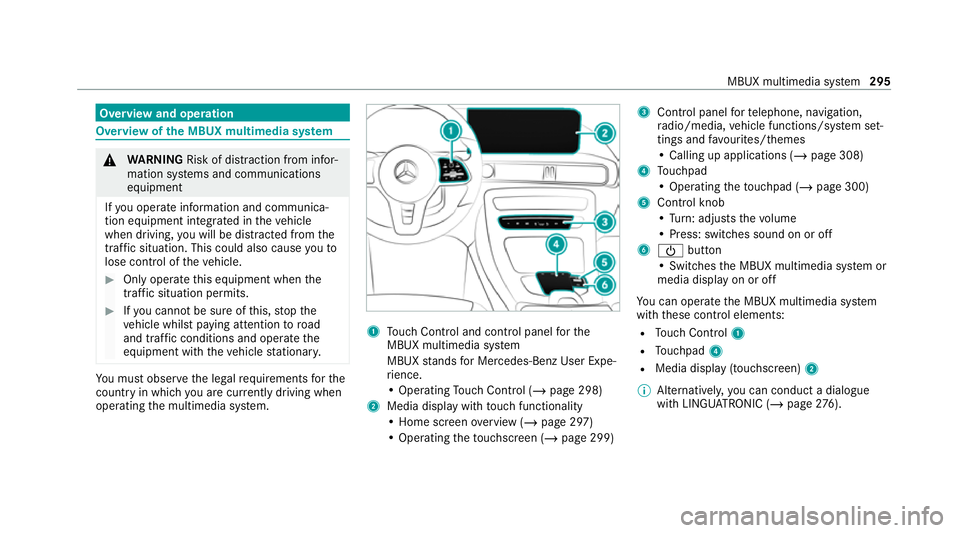
operating the multimedia sy stem. 1
Touch Control and cont rol panel forthe
MBUX multimedia sy stem
MBUX stands for Mercedes-Benz User Expe‐
ri ence.
• Operating Touch Control (/ page 298)
2 Media displ aywith touch functionality
• Home sc reen ove rview (/ page 297)
• Operating theto uchsc reen (/ page 299) 3
Control panel forte lephone, navigation,
ra dio/media, vehicle functions/sy stem set‐
tings and favo urites/ themes
• Calling up applications (/ page 308)
4 Touchpad
• Operating theto uchpad (/ page 300)
5 Control knob
•Turn: adjusts thevo lume
• Press: switches sound on or off
6 Ü button
• Swit ches the MBUX multimedia sy stem or
media display on or off
Yo u can operate the MBUX multimedia sy stem
with these control elements:
R Touch Control 1
R Touchpad 4
R Media displ ay(touchscreen) 2
% Alternatively, you can conduct a dialogue
with LINGU ATRO NIC (/ page276). MBUX multimedia sy
stem 295
Page 299 of 629
%
Ifth eve hicle is fitted wi thgesture mode,
selected functions of the multimedia sy stem
can be operated conta ct-free aswell as turn‐
ing there ading light on or off (/ page 303).
Nu merous application, online services, services
and apps are available foryo u. These can be
called up via the home screen or using buttons
3.
Yo u can co nveniently call up and add favo urites
on thesteering wheel using theß rock er
switch or using theß button on control panel
3. Quic k-access in the home screen and in the
applications ser vetoselect functions more
qu ickl y.
If yo u use the learn function of the multimedia
sy stem, you will recei vesuggestions during oper‐
ation of the most probable navigation destina‐
tions, media sources, radio stations and con‐
ta cts. The configu ration of the suggestions takes
place in your profile. You can co mpileyour pro‐
fi le from various vehicle settings and settings of
th e multimedia sy stem. You can create themes
fo rva rious driving situations in the home screen
as well as using theß rocker switch or the
ß button. The
Notifications Centre collects incoming notifi‐
cations, e.g. about an available software update.
Depending on the type of notification it of fers
va rious actions. You can call up the Notifications
Centre on the home screen and in the applica‐
tion menus.
Wi th th eglobal sear chintheve hicle you can
sear chon-board across many categories as well
as online in the Internet. You can use theglobal
sear chinthe home screen and in the notifica‐
tions.
Anti-theft pr otection
This device is equipped with tech nical pr ovisions
to protect it against theft. More de tailed informa‐
tion about anti-theft pr otection can be obtained
at a qualified specialist workshop. Note
s onthe media display Obser
vethe no tes on caring forth e interior
(/ page 471).
Au tomatic temperature-cont rolled switch-
off feature: ifth ete mp erature is too high, the
brightness is initially reduced automatically. The media display may
then switch off comple tely for
a while.
% Ifyo u are wearing polarised sun glasses, it
may be dif ficult toread the multimedia sys‐
te m displa y. 296
MBUX multimedia sy stem
Page 304 of 629
Swipe le
ftor right on theto uchpad when the
control menu is shown.
3 © button
Pressing: sho ws the home screen and calls
up applications
4 Touchpad
% Calls up suggestions, themes and favo urites:
when the home screen is shown, swipe
down on touchpad 4.
Yo u can navigate in menus and lists via the
to uch-sensitive sur face of touchpad 4byusing
a single-finger swipe .#
Toselect the menu item or entr y:mo ve
th e selection byswiping up, down, left or
ri ght. #
Confirm the selection bypressing on touch‐
pad 4.
or #
IfTouchpad tap is activated,tapping is suf fi‐
cient (/ page 301). #
Toenter a character: select acharacter on
th eke yboard ( /page 323). or #
Write a character on theto uchpad with hand‐
writing input. #
Tomo vethe digital map: whenthe digital
map is shown with the navigation menu,
swipe up with one finger. #
Press theto uchpad.
The digital map can be mo ved. #
Swipe in all directions.
Use thefo llowing functions with a two-finger
swipe: #
Tocall up theNo tifications Centre: swipe
down wi thtwo fingers. #
Toclose theNo tifications Centre: swipe
up wi thtwo fingers. #
Tocall up the control menu of the last
active audio source: swipe up with twofin‐
ge rs. #
Tozoom in and out of the map: movetwo
fi ngers toget her or apart. #
Toenlar georreduce the size of a section
of a website: movetwo fingers toget her or
apart.
Setting the sensitivity for the touchpad
Multimedia sy stem:
4 © 5
Settings 5
System
5 Controls 5
Touchpad sensitivity #
Select Fast,Medium orSlow . #
Toset the pressure sensitivit y:switch
Touchpad tap on or off.
If th e function is switched on, a tap on the
to uchpad is enough toselect a menu item.
Switching there ad-aloud function for hand‐
writing recognition on/off
Re quirements:
R The multimedia sy stem is equipped with a
vo ice control sy stem.
R The read-aloud function is available forthe
selected sy stem language. MBUX multimedia sy
stem 301
Page 308 of 629
-
Radio menu or media menu
- Map in the navigation
- Active Parking Assist
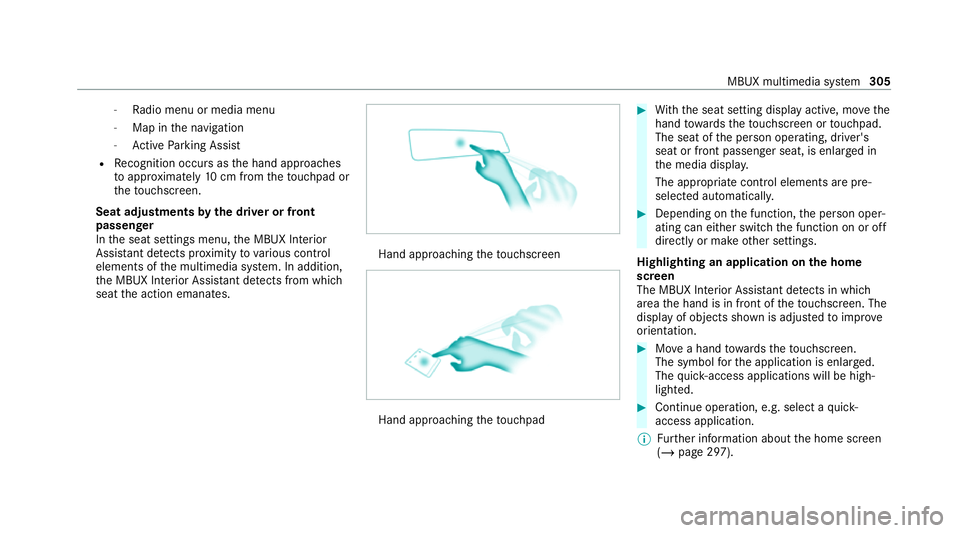
R Recognition occu rsas the hand approaches
to appr oximately 10cm from theto uchpad or
th eto uchsc reen.
Seat adjustments bythe driver or front
passenger
In the seat settings menu, the MBUX Interior
Assis tant de tects pr oximity tovarious control
elements of the multimedia sy stem. In addition,
th e MBUX Interior Assis tant de tects from whi ch
seat the action emanates. Hand approaching
theto uchsc reen Hand approaching
theto uchpad #
With th e seat setting display active, mo vethe
hand towa rdsth eto uchsc reen or touchpad.
The seat of the person operating, driver's
seat or front passenger seat, is enlar ged in
th e media displa y.
The appropriate contro l elements are pre-
selec ted automatically. #
Depending on the function, the person oper‐
ating can either switch the function on or off
directly or make other settings.
Highlighting an application on the home
screen
The MBUX In terior Assis tant de tects in whi ch
area the hand is in front of theto uchsc reen. The
display of objects shown is adjus tedto impr ove
orientation. #
Movea hand towa rdsth eto uchsc reen.
The symbol forth e application is enlar ged.
The quick- access applications will be high‐
lighted. #
Continue operation, e.g. select a quick-
access application.
% Further information about the home screen
(/ page 297). MBUX multimedia sy
stem 305
Page 309 of 629
Ac
tivating co verch ange in thera dio menu
and media menu
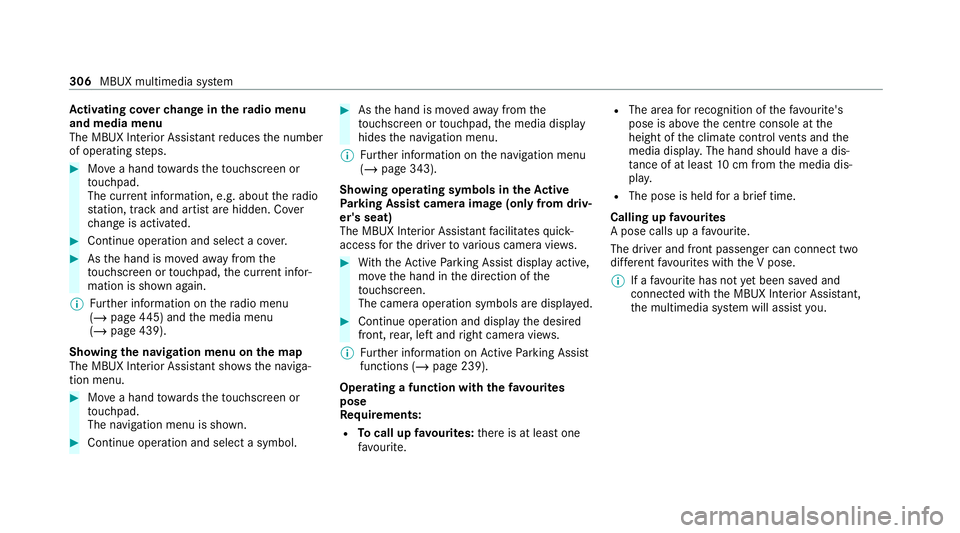
The MBUX Interior Assi stant reduces the number
of operating steps. #
Movea hand towa rdsth eto uchsc reen or
to uchpad.
The cur rent information, e.g. about thera dio
st ation, track and artist are hidden. Co ver
ch ange is activated. #
Continue operation and select a co ver. #
Asthe hand is mo vedaw ay from the
to uchsc reen or touchpad, the cur rent infor‐
mation is shown again.
% Further information on thera dio menu
(/ page 445) and the media menu
(/ page 439).
Showing the navigation menu on the map
The MBUX In terior Assis tant sho wsthe naviga‐
tion menu. #
Movea hand towa rdsth eto uchsc reen or
to uchpad.
The navigation menu is shown. #
Continue operation and select a symbol. #
Asthe hand is mo vedaw ay from the
to uchsc reen or touchpad, the media display
hides the navigation menu.
% Further information on the navigation menu
(/ page 343).
Showing operating symbols in theAc tive
Pa rking Assist camera ima ge(only from driv‐
er's seat)
The MBUX In terior Assis tant facilitates quick-
access forth e driver tovarious camera vie ws. #
With th eAc tive Parking Assist display active,
mo vethe hand in the direction of the
to uchsc reen.
The camera operation symbols are displa yed. #
Continue operation and display the desired
front, rear, left and right camera vie ws.
% Further information on Active Parking Assist
functions (/ page 239).
Operating a function with thefa vo urites
pose
Re quirements:
R Tocall up favo urites: there is at least one
fa vo urite. R
The area forre cognition of thefa vo urite's
pose is abo vethe cent reconsole at the
height of the climate control vents and the
media displa y.The hand should ha vea dis‐
ta nce of at least 10cm from the media dis‐
pla y.
R The pose is held for a brief time.
Calling up favo urites
A pose calls up a favo urite.
The driver and front passen ger can connect two
dif fere nt favo urites with the V pose.
% If afavo urite has not yet been sa ved and
connec ted with the MBUX Interior Assis tant,
th e multimedia sy stem will assist you. 306
MBUX multimedia sy stem
Page 311 of 629
#
Toswitch off: take your hand back away
from the front passenger seat.
The sear chlight is switched off again.
Settings for the MBUX In terior Assistant
Multimedia sy stem:
4 © 5
Settings 5
System
5 Interior assistant #
Toswitch on full functionality of the
MBUX Interior Assistant: selectOn.
The option is activated #.#
Toactivate additional functions forre ad‐
ing and sear chlights: selectIncluding read-
ing light.
When the option is switched on, the display
button is activated.
The functions forth ere ading and sear ch
lights are activated in addition tothe pr oxim‐
ity functions. #
Toswitch off the MBUX Interior Assis‐
tant: select Off.
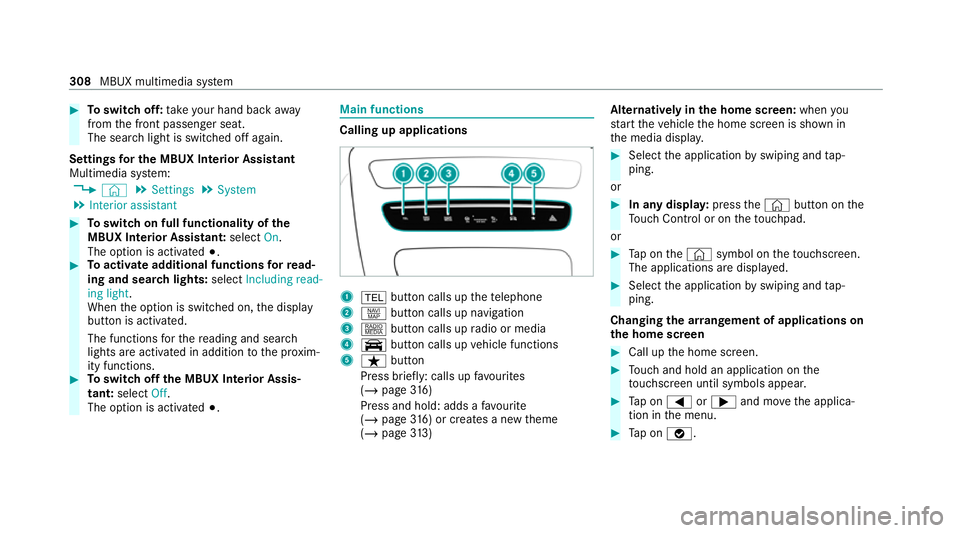
The option is activated #. Main functions
Calling up applications
1
% button calls up thete lephone
2 z button calls up navigation
3 | button calls up radio or media
4 y button calls up vehicle functions
5 ß button
Press brief ly: calls up favo urites
(/ page 316)
Press and hold : adds afavo urite
(/ page 316) or creates a new theme
(/ page 313) Alternatively in
the home screen: whenyou
st art theve hicle the home screen is shown in
th e media displa y. #
Select the application byswiping and tap‐
ping.
or #
In any displa y:press the© button on the
To uch Control or on theto uchpad.
or #
Tap on the© symbol on theto uchsc reen.
The applications are displa yed. #
Select the application byswiping and tap‐
ping.
Changing the ar rangement of applications on
th e home screen #
Call up the home screen. #
Touch and hold an application on the
to uchsc reen until symbols appear. #
Tap on = or; and mo vethe applica‐
tion in the menu. #
Tap on ø. 308
MBUX multimedia sy stem
Page 315 of 629
%
During synchronisation the profile lis tand
th e profile functions are bloc ked.
% Note on data pr otection: ifyo u do not wish
to share your data with Mercedes me, make
sure that the automatic synchronisation is
switched off and do not select Synchronise
profiles now .
Showing the profile selection when entering
Re quirements:
R Atleast one profile has been created.
Multimedia sy stem:
4 © 5
f Profiles
If th e option is activated, you can see a profile as
soon as youget in. #
Select General settings. #
Activate Show profile selection when enter-
ing .
When theve hicle is star ted, the media dis‐
play sho wsthe active profile. Themes
Overview of
themes
Yo u can configure theve hicle settings according
to yo ur preferences and sa veas a theme. A
th eme can be called up any time via the home
screen. There is then no need tomake the
desired settings again.
There are pre-defined themes available, e.g.
Journe y,Efficiency and Lounge.
Example for the use of themes
Fo rre cur ring driving situations, su chas long
drives on the mo torw ay,yo u can sa veyour pre‐
fe rred settings in a theme in theve hicle.
Yo u can sa vethefo llowing settings in a theme,
fo rex ample:
R Displa ys(e.g. navigation map or tach ome ter)
R Prefer redra dio station
R Favo ured drive program
These settings are sa ved under the name you
wish when setting up a theme (/ page313). On
th e next mo torw ay jou rney yo u can select this
th eme and thereby restore your settings. Content of a
theme
Depending on vehicle equipment thefo llowing
settings can be sa ved in a theme:
R Setting of the Instrument Display
(/ page 263)
R Setting of the Head-up Display (/ page273)
R Setting of the ambient lighting (/ page141)
R Active audio sou rce, e.g. radio or USB
R Starting sc reen forth e media display
R Visual style (/ page 329)
R DYNA MIC SELECT drive program
(/ page 172)
R Navigation sy stem settings
% Atheme conta insthe cur rently acti veset‐
tings in theve hicle.
Calling up themes
Multimedia sy stem:
4 © #
When the home screen is shown, swipe up
until THEMES appears. #
Select a theme. 312
MBUX multimedia sy stem