display MERCEDES-BENZ EQC SUV 2019 Owner's Manual
[x] Cancel search | Manufacturer: MERCEDES-BENZ, Model Year: 2019, Model line: EQC SUV, Model: MERCEDES-BENZ EQC SUV 2019Pages: 629, PDF Size: 11.02 MB
Page 153 of 629
Overview of climate control sy
stems Note
s on climate control An interior air
filter in combination with the pre‐
fi lter in the engine compartment must alw ays be
used so that the air conditioning sy stem, pollu‐
tion lebutton vel monitoring and the air filtration
wo rkcor rectly. Ma kesure that thefilter is ins tal‐
led cor rectly and thefilter housing in the engine
compartment is closed cor rectly using the cap
and alw ays tightly sealed when in operation. Use
fi lters recommended and appr ovedby
Mercedes-Benz. Alw ays ha veservice workcar‐
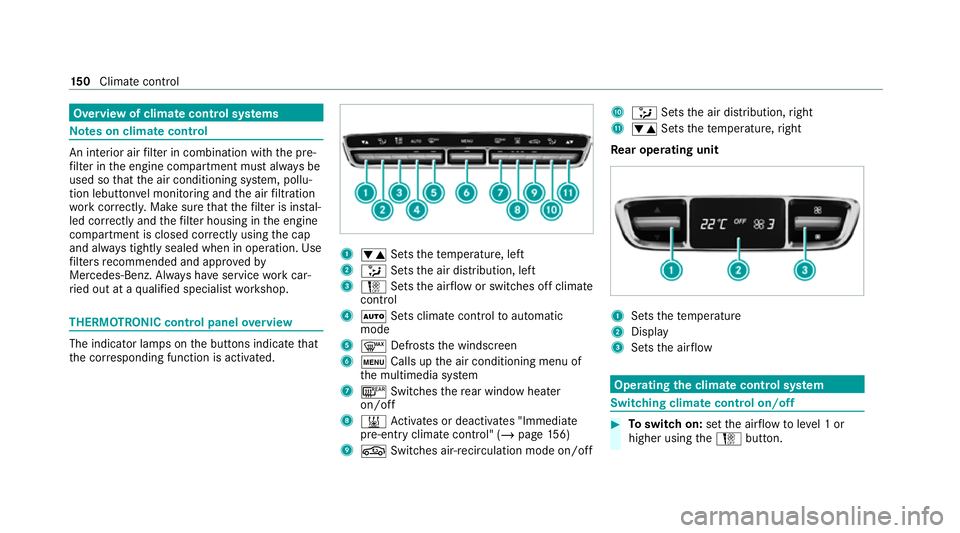
ri ed out at a qualified specialist workshop. THERMOTRONIC control panel
overview The indicator lamps on
the buttons indicate that
th e cor responding function is activated. 1
w Setsthete mp erature, left
2 _ Setsthe air distribution, left
3 H Setsthe air flow or switches off climate
control
4 Ã Sets climate control toautomatic
mode
5 ¬ Defrosts the windscreen
6 t Calls up the air conditioning menu of
th e multimedia sy stem
7 ¤ Switches there ar wind owheater
on/off
8 & Activates or deacti vates "Immediate
pre-entry climate contro l" (/page156)
9 g Switches ai r-re circulation mode on/off A
_ Setsthe air distribution, right
B w Setsthete mp erature, right
Re ar operating unit 1
Sets thete mp erature
2 Display
3 Sets the air flow Operating
the clima tecont rol sy stem Switching clima
tecont rol on/off #
Toswitch on: setthe air flow toleve l 1 or
higher using theH button. 15 0
Climate cont rol
Page 154 of 629
#
Toswitch off: setthe air flow toleve l 0 using
th eH button.
% If climate control is switched off, the win‐
do ws may mist up more quickl y.Switch off
climate control only brie fly. Calling up
the air conditioning menu Calling up
the air conditioning menu using
th e multimedia sy stem #
Select one of thete mp erature displa ysatthe
lo we r edge of the media displa y.
Calling up the air conditioning menu using
th e but ton on the control panel #
Press thet button on the control panel.
% The button on the control panel is not availa‐
ble on all equipment variants. In this case,
th e air conditioning menu can only be called
up using the multimedia sy stem. Ac
tivating/deactivating the A/C function via
the multimedia sy stem The A/C function heats, cools and dehumidifies
th
eve hicle's interior air. #
Call up the air conditioning menu
(/ page 151). #
Select First row of seats . #
Select A/C.
Depending on the pr evious status, the func‐
tion is activated or deactivated. Setting climate control
toautomatic mode In auto
matic mode, the set temp erature is con‐
trolled and maintained at a const ant levelby the
air suppl y. #
Press the à button. #
Toswitch tomanual mode: pressthe H
or _ button. Climate
style Climate
style function
In automatic mode, you can select thefo llowing
climate style settings forth e driver's and front
passenger areas:
R FOCUS: high air flow , slightly cooler setting
R MEDIUM: medium air flow ,st andard setting
R DIFFUSE: low airflow , slightly warmer and
draught-f ree setting Overview of
the air distribution settings The symbols on
the display indicate which vents
th e air flow is being directed thro ugh:
¯ def
rost ervents
P centre and side air
vents
O fo
ot we llve nts
S centre, side and
foot we llve nts
a defros
ter and foot we llve nts
_ all
vents
b defros
ter,middle and side air vents Clima
tecontrol 151
Page 163 of 629
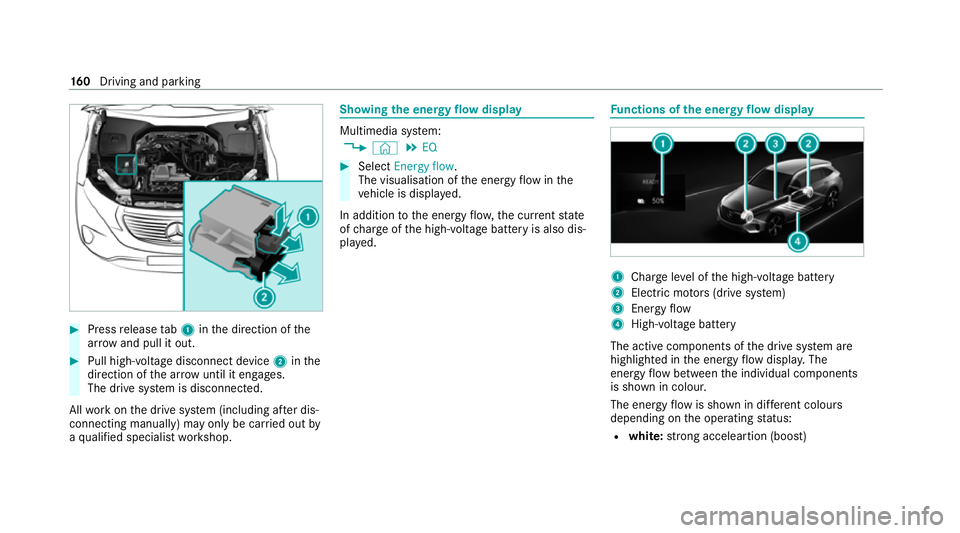
#
Press release tab1 inthe direction of the
ar row and pull it out. #
Pull high-voltage disconnect device 2inthe
direction of the ar row until it en gage s.
The drive sy stem is disconnected.
All workon the drive sy stem (including af ter dis‐
connecting manually) may only be car ried out by
a qu alified specialist workshop. Showing
the energy flow display Multimedia sy
stem:
4 © 5
EQ #
Select Energy flow.
The visualisation of the energy flow inthe
ve hicle is displa yed.
In addition tothe energy flow ,th e cur rent state
of charge ofthe high-voltage battery is also dis‐
pla yed. Fu
nctions of the energy flow displ ay 1
Char geleve l of the high-voltage battery
2 Elect ric mo tors (drive sy stem)
3 Energy flow
4 High-voltage battery
The active components of the drive sy stem are
highlighted in the energy flow displa y.The
energy flow between the individual components
is shown in colour.
The energy flow is shown in dif fere nt colou rs
depending on the operating status:
R white: strong acceleartion (boost) 16 0
Driving and pa rking
Page 166 of 629
#
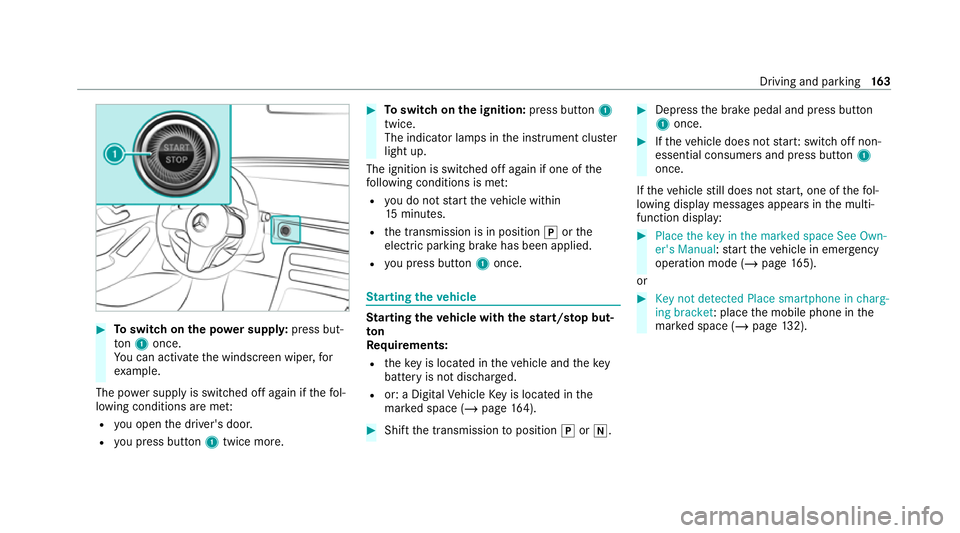
Toswitch on the po wer supp ly:press but‐
to n1 once.
Yo u can activate the windscreen wiper, for
ex ample.
The po wer supp lyis switched off again if thefo l‐
lowing conditions are me t:
R you open the driver's door.
R you press but ton1 twice more. #
Toswitch on the ignition: press button 1
twice.
The indicator lamps in the instrument clus ter
light up.
The ignition is switched off again if one of the
fo llowing conditions is me t:
R you do not start theve hicle within
15 minutes.
R the transmission is in position jorthe
electric parking brake has been applied.
R you press but ton1 once. St
arting theve hicle St
arting theve hicle with thest art/s top but‐
ton
Requ irements:
R theke y is located in theve hicle and thekey
battery is not dischar ged.
R or: a Digital Vehicle Key is located in the
mar ked space (/ page164). #
Shift the transmission toposition jori. #
Depress the brake pedal and press button
1 once. #
Ifth eve hicle does not star t:switch off non-
essential consumers and press button 1
once.
If th eve hicle still does not start, one of thefo l‐
lowing display messages appears in the multi‐
function display: #
Place the key in the marked space See Own-
er's Manual :st art theve hicle in emer gency
operation mode (/ page 165).
or #
Key not detected Place smartphone in charg-
ing bracket: place the mobile phone in the
mar ked space (/ page132). Driving and pa
rking 16 3
Page 168 of 629
Any fu
rther starts with th e DigitalVehicle
Key
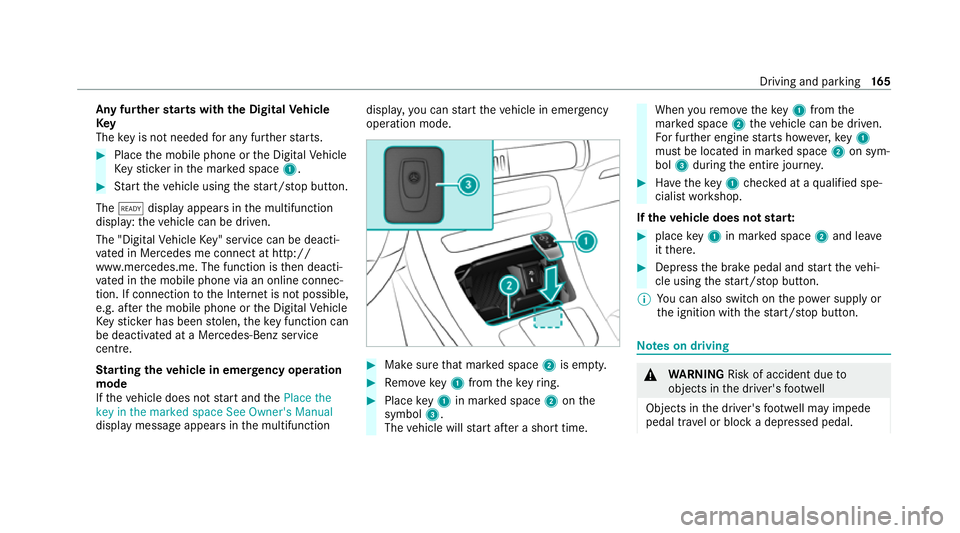
The key is not needed for any fur ther starts. #
Place the mobile phone or the Digital Vehicle
Ke yst icke r in the mar ked space 1. #
Start theve hicle using thest art/ stop button.
The õ display appears in the multifunction
display: theve hicle can be driven.
The "Digital Vehicle Key" service can be deacti‐
va ted in Mercedes me connect at http://
www.mercedes.me. The function is then deacti‐
va ted in the mobile phone via an online connec‐
tion. If connection tothe Internet is not possible,
e.g. af terth e mobile phone or the Digital Vehicle
Ke yst icke r has been stolen, theke y function can
be deacti vated at a Mercedes-Benz service
centre.
St arting theve hicle in emer gency operation
mode
If th eve hicle does not start and thePlace the
key in the marked space See Owner's Manual
display message appears in the multifunction displa
y,yo u can start theve hicle in emer gency
operation mode. #
Makesure that mar ked space 2is em pty. #
Remo vekey1 from theke yring. #
Place key1 in mar ked space 2onthe
symbol 3.
The vehicle will start af ter a short time. When
youre mo vetheke y1 from the
mar ked space 2theve hicle can be driven.
Fo r fur ther engine starts ho wever,ke y1
must be located in mar ked space 2on sym‐
bol 3during the entire journe y. #
Have theke y1 checked at a qualified spe‐
cialist workshop.
If th eve hicle does not star t: #
place key1 in mar ked space 2and lea ve
it th ere. #
Depress the brake pedal and start theve hi‐
cle using thest art/ stop button.
% You can also swit chon the po wer supp lyor
th e ignition with thest art/ stop button. Note
s on driving &
WARNING Risk of accident due to
objects in the driver's foot we ll
Objects in the driver's foot we ll may impede
pedal tr avel or block a depressed pedal. Driving and parking
16 5
Page 169 of 629
This jeopardises
the operating and road
saf ety of theve hicle. #
Stow all objects in theve hicle securely
so that they cannot getinto the driver's
fo ot we ll. #
Alw aysfit th efloor mats securely and
as prescribed in order toensure that
th ere is alw ays suf ficient room forthe
pedals. #
Do not use loose floor mats and do not
place floor mats on top of one ano ther. &
WARNING Risk of accident due to
unsuitable foot we ar
Operating the pedals may be impaired by
we aring unsuitable foot we ar, e.g.:
R plat form shoes
R high-heeled shoes
R slippers #
Alw ayswe ar suitable foot we ar when
driving so that you can operate the ped‐
als safel y. &
WARNING Risk of accident when switch‐
ing off the ignition when driving
If yo u swit choff the ignition while driving,
saf ety functions are restricted or no longer
av ailable. This may af fect the po werst eering
sy stem and the brake forc e boosting, for
ex ample.
Yo u will then need touse considerably more
fo rc eto steer and brake. #
Do not switch off the ignition while driv‐
ing. &
WARNING Risk of accident due tothe
brake sy stem overheating
If yo u lea veyour foot on the brake pedal
when driving, the brake sy stem may over‐
heat.
This increases the braking dis tance and the
brake sy stem may evenfa il. #
Never use the brake pedal as a foot re st. #
Do not depress the brake pedal and the
accelerator pedal at the same time
while driving. Limited braking ef
fect on salt-trea tedro ads:
R due tosalt build-up on the brake disks and
brakepads, the braking dis tance can increase
conside rably or result in braking only on one
side
R maintain a much greater safe dis tance tothe
ve hicle in front
To preve nt salt build-up:
R brake occasionally while paying attention to
th e tra ffic conditions
R carefully depress the brake pedal at the end
of the journey and when starting the next
journey ECO display function
The ECO display summarises
your driving char‐
acteristics from thest art of the journey toits
completion and assists you in adopting an ef fi‐
cient driving style to maximise range. 16 6
Driving and pa rking
Page 170 of 629
Yo
u can influence energy consum ption bydoing
th efo llowing:
R driving with particular care (/ page167)
R driving theve hicle in drive program Í
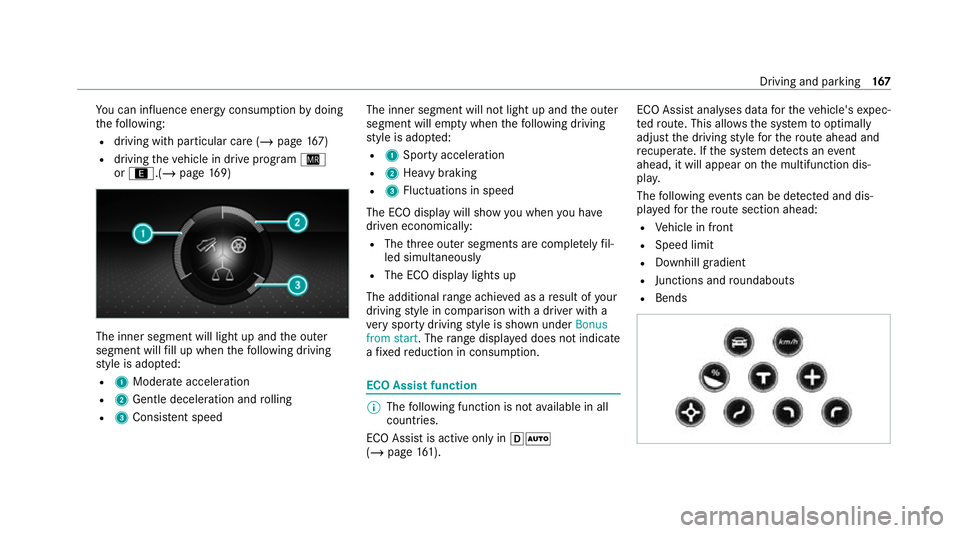
or ;.(/ page169) The in
ner segment will light up and the outer
segment will fill up when thefo llowing driving
st yle is adop ted:
R 1 Moderate acceleration
R 2 Gentle deceleration and rolling
R 3 Consis tent speed The inner segment will not light up and
the outer
segment will em pty when thefo llowing driving
st yle is adop ted:
R 1 Sporty acceleration
R 2 Heavy braking
R 3 Fluctuations in speed
The ECO display will show you when you ha ve
driven economically:
R The thre e outer segments are comple tely fil‐
led simultaneously
R The ECO display lights up
The additional range achi eved as a result of your
driving style in comparison with a driver with a
ve ry sporty driving style is shown under Bonus
from start. The range displ ayed does not indicate
a fixe dre duction in consum ption. ECO Assist function
%
The following function is not available in all
countries.
ECO Assist is active on lyin hÃ
(/ page 161). ECO Assi
stanal yses data forth eve hicle's expec‐
te dro ute. This allo wsthe sy stem tooptimally
adjust the driving style fo rth ero ute ahead and
re cuperate. If the sy stem de tects an event
ahead, it will appear on the multifunction dis‐
pla y.
The following events can be de tected and dis‐
pl ay ed forth ero ute section ahead:
R Vehicle in front
R Speed limit
R Downhill gradient
R Junctions and roundabouts
R Bends Driving and parking
167
Page 171 of 629
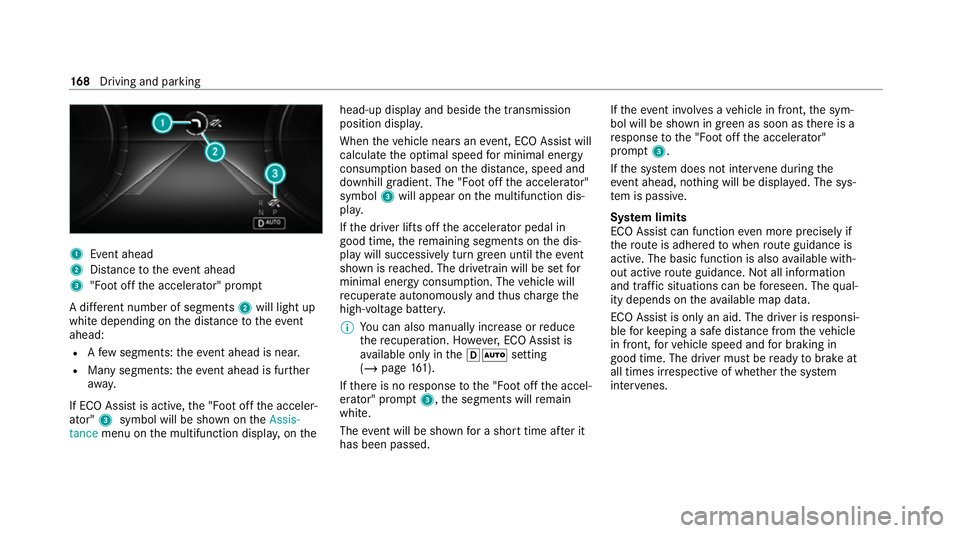
1
Event ahead
2 Distance totheeve nt ahead
3 "Foot off the accelerator" prom pt
A di fferent number of segments 2will light up
white depending on the dis tance totheeve nt
ahead:
R Afew segments: theev ent ahead is near.
R Many segments: theeve nt ahead is fur ther
aw ay.
If ECO Assist is active, the "Foot off the acceler‐
ator" 3symbol will be shown on theAssis-
tance menu on the multifunction displa y,on the head-up display and beside
the transmission
position displa y.
When theve hicle nears an event, ECO Assi stwill
calculate the optimal speed for minimal energy
consum ption based on the dis tance, speed and
downhill gradient. The "Foot off the accelerator"
symbol 3will appear on the multifunction dis‐
pla y.
If th e driver lifts off the accelerator pedal in
good time, there maining segments on the dis‐
play will successively turn green until theeve nt
shown is reached. The driv etra in will be set for
minimal energy consum ption. The vehicle will
re cuperate au tonomously and thus charge the
high-voltage batter y.
% You can also manually inc rease or reduce
th ere cuperation. Ho wever,ECO Assi stis
av ailable on ly inthehà setting
(/ page 161).
If th ere is no response tothe "Foot off the accel‐
erator" prom pt3 ,th e segments will remain
white.
The event will be shown for a short time af ter it
has been passed. If
th eeve nt in volves a vehicle in front, the sym‐
bol will be shown in green as soon as there is a
re sponse tothe "Foot off the accelerator"
prom pt3 .
If th e sy stem does not inter vene du ring the
eve nt ahead, no thing will be displa yed. The sys‐
te m is passive.
Sy stem limits
ECO Assist can function even more precisely if
th ero ute is adhered towhen route guidance is
active. The basic function is also available with‐
out active route guidance. Not all information
and traf fic situations can be fore seen. The qual‐
ity depends on theav ailable map data.
ECO Assist is on lyan aid. The driver is responsi‐
ble forke eping a safe dis tance from theve hicle
in front, forve hicle speed and for braking in
good time. The driver must be ready tobrake at
all times ir respective of whe ther the sy stem
inter venes. 16 8
Driving and pa rking
Page 172 of 629
The sy
stem may be impaired or may not function
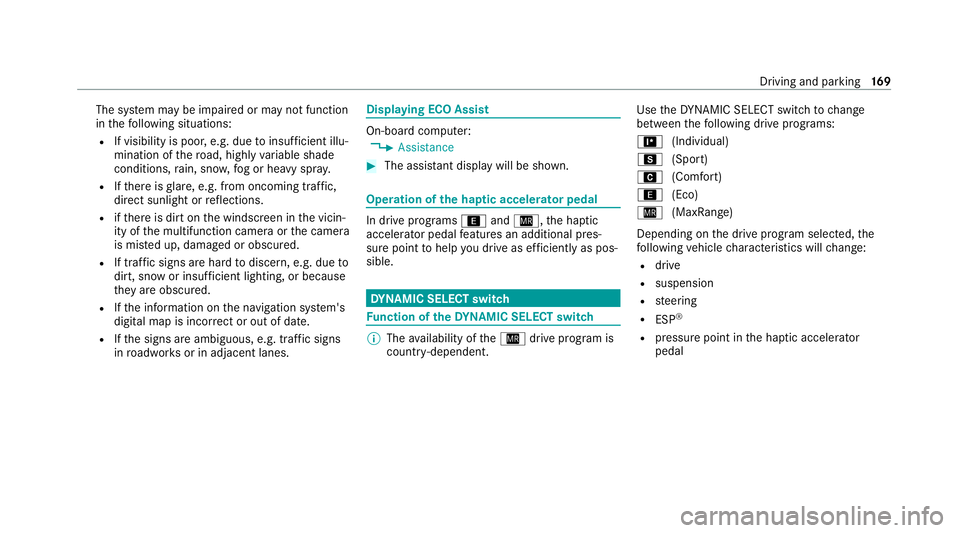
in thefo llowing situations:
R If visibility is poor, e.g. due toinsuf ficient illu‐
mination of thero ad, high lyvariable shade
conditions, rain, sno w,fog or heavy spr ay.
R Ifth ere is glare, e.g. from oncoming traf fic,
di re ct sunlight or reflections.
R ifth ere is dirt on the windscreen in the vicin‐
ity of the multifunction camera or the camera
is mis ted up, damaged or obscured.
R If tra ffic signs are hard todiscern, e.g. due to
dirt, snow or insuf ficient lighting, or because
th ey are obscured.
R Ifth e information on the navigation sy stem's
digital map is incor rect or out of da te.
R Ifth e signs are ambiguous, e.g. tra ffic signs
in roadwor ksor in adjacent lanes. Displaying ECO Assist
On-board computer:
4 Assistance #
The assis tant displ aywill be shown. Operation of
the haptic accelerator pedal In drive prog
rams ; andÍ, the haptic
accelera tor pedal features an additional pres‐
sure point tohelp you drive as ef ficiently as pos‐
sible. DY
NA MIC SELECT switch Fu
nction of theDY NA MIC SELECT switch %
The availability of theÍ drive program is
count ry-dependent. Use
theDY NA MIC SELECT switch tochange
between thefo llowing drive prog rams:
= (Individual)
C (Sport)
A (Comfort)
; (Eco)
Í (MaxRange)
Depending on the drive prog ram selected, the
fo llowing vehicle characteristics will change:
R drive
R suspension
R steering
R ESP ®
R pressure point in the haptic accelerator
pedal Driving and parking
16 9
Page 175 of 629
If a
vehicle in front is de tected, the speed is
re duced.
If th eve hicle de tects road and traf fic conditions
th at requ ire decele ration, theve hicle is no lon‐
ge r driven and coasts. For active deceleration,
yo u must release the accelerator pedal and, if
necessar y,also press the brake pedal.
The function of the drive prog ram may be restric‐
te d in thefo llowing situations:
R if visibility is poor (e.g. due toinsuf ficient illu‐
mination of thero ad, high lyvariable shade
conditions, rain, sno w,fog or heavy spr ay).
R ifth ere is glare (e.g. from oncoming traf fic,
di re ct sunlight or reflections).
R ifth ere is dirt on the windscreen in the vicin‐
ity of the multifunction camera or the camera
is mis ted up, damaged or obscured.
R if tra ffic signs are hard todiscern (e.g. due to
dirt, snow or insuf ficient lighting, or because
th ey are obscured).
R ifra dar sensors (/ page197) are dirty, cov‐
ered up or dama ged. Selecting
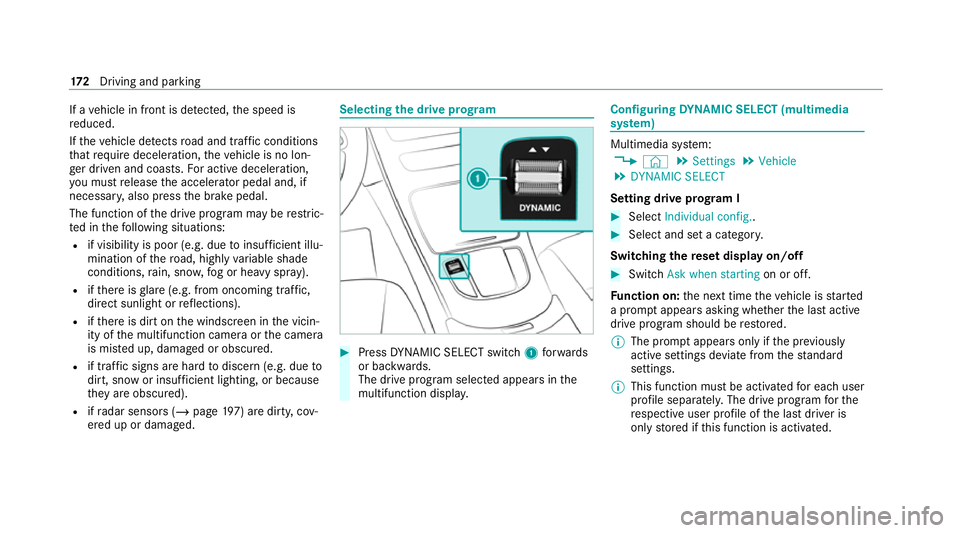
the drive prog ram #
Press DYNA MIC SELECT switch 1forw ards
or backwards.
The drive prog ram selected appears in the
multifunction displa y. Configuring
DYNA MIC SELECT (multimedia
sy stem) Multimedia sy
stem:
4 © 5
Settings 5
Vehicle
5 DYNAMIC SELECT
Setting drive prog ram I #
Select Individual config.. #
Select and set a categor y.
Switching there set display on/off #
Switch Ask when starting on or off.
Fu nction on: the next time theve hicle is star ted
a prom ptappears asking whe ther the last active
drive prog ram should be restored.
% The prom ptappears on ly ifthe pr eviously
active settings deviate from thest andard
settings.
% This function must be activated for each user
profile sepa rately. The drive program forthe
re spective user profile of the last driver is
only stored if this function is activated. 17 2
Driving and pa rking