light MERCEDES-BENZ EQC SUV 2019 Repair Manual
[x] Cancel search | Manufacturer: MERCEDES-BENZ, Model Year: 2019, Model line: EQC SUV, Model: MERCEDES-BENZ EQC SUV 2019Pages: 629, PDF Size: 11.02 MB
Page 175 of 629
If a
vehicle in front is de tected, the speed is
re duced.
If th eve hicle de tects road and traf fic conditions
th at requ ire decele ration, theve hicle is no lon‐
ge r driven and coasts. For active deceleration,
yo u must release the accelerator pedal and, if
necessar y,also press the brake pedal.
The function of the drive prog ram may be restric‐
te d in thefo llowing situations:
R if visibility is poor (e.g. due toinsuf ficient illu‐
mination of thero ad, high lyvariable shade
conditions, rain, sno w,fog or heavy spr ay).
R ifth ere is glare (e.g. from oncoming traf fic,
di re ct sunlight or reflections).
R ifth ere is dirt on the windscreen in the vicin‐
ity of the multifunction camera or the camera
is mis ted up, damaged or obscured.
R if tra ffic signs are hard todiscern (e.g. due to
dirt, snow or insuf ficient lighting, or because
th ey are obscured).
R ifra dar sensors (/ page197) are dirty, cov‐
ered up or dama ged. Selecting
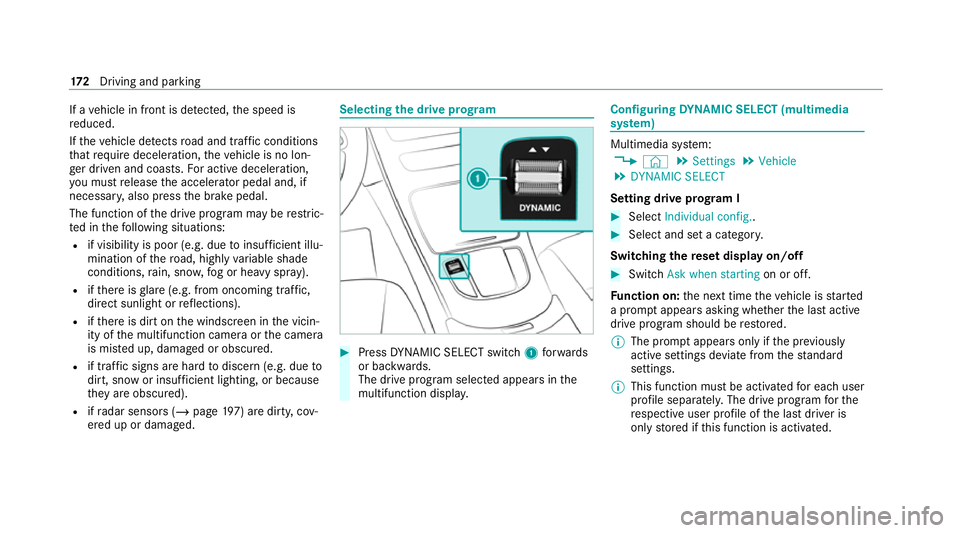
the drive prog ram #
Press DYNA MIC SELECT switch 1forw ards
or backwards.
The drive prog ram selected appears in the
multifunction displa y. Configuring
DYNA MIC SELECT (multimedia
sy stem) Multimedia sy
stem:
4 © 5
Settings 5
Vehicle
5 DYNAMIC SELECT
Setting drive prog ram I #
Select Individual config.. #
Select and set a categor y.
Switching there set display on/off #
Switch Ask when starting on or off.
Fu nction on: the next time theve hicle is star ted
a prom ptappears asking whe ther the last active
drive prog ram should be restored.
% The prom ptappears on ly ifthe pr eviously
active settings deviate from thest andard
settings.
% This function must be activated for each user
profile sepa rately. The drive program forthe
re spective user profile of the last driver is
only stored if this function is activated. 17 2
Driving and pa rking
Page 182 of 629
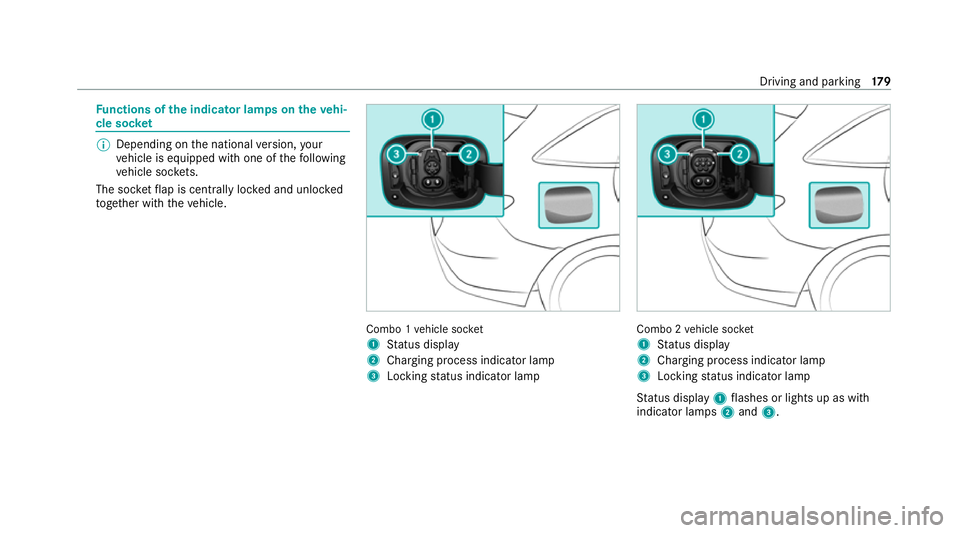
Fu
nctions of the indica tor lamps on the vehi‐
cle soc ket %
Depending on the national version, your
ve hicle is equipped with one of thefo llowing
ve hicle soc kets.
The soc ketflap is centrally loc ked and unloc ked
to ge ther with theve hicle. Combo 1
vehicle soc ket
1 Status display
2 Charging process indicator lamp
3 Locking status indicator lamp Combo 2
vehicle soc ket
1 Status display
2 Charging process indicator lamp
3 Locking status indicator lamp
St atus display 1flashes or lights up as with
indicator lamps 2and 3. Driving and parking
17 9
Page 183 of 629
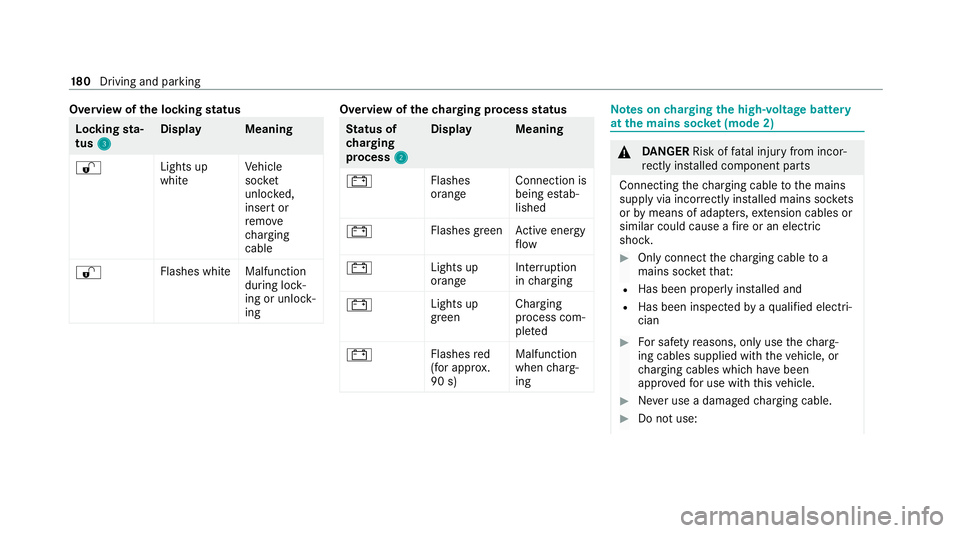
Overview of
the locking status Lock
ingsta‐
tus 3 3 Displa
yM eaning
% Lights up
whiteVe
hicle
soc ket
unlo cked,
insert or
re mo ve
ch arging
cable
% Flashes whit
eMalfunction
during lock‐
ing or unlo ck‐
ing Overview of
thech arging process status St
atus of
ch arging
process 2 2Displa
yM eaning
# Flashes
orangeConnection is
being es
tab‐
lished
# Flashes green
Active energy
fl ow
# Lights up
orangeInter
ruption
in charging
# Lights up
greenCharging
process com‐
ple
ted
# Flashes
red
(for appr ox.
90 s) Malfunction
when
charg‐
ing Note
s oncharging the high-voltage bat tery
at the mains soc ket (mode 2) &
DANG ER Risk of fata l injury from incor‐
re ctly ins talled component parts
Connecting thech arging cable tothe mains
supply via incor rectly ins talled mains soc kets
or by means of adapte rs,ex tension cables or
similar could cause a fire or an electric
shoc k. #
Only connect thech arging cable to a
mains soc ketth at:
R Has been proper lyins talled and
R Has been inspected byaqu alified electri‐
cian #
For saf etyre asons, on lyuse thech arg‐
ing cables supplied with theve hicle, or
ch arging cables which ha vebeen
appr ovedfo r use with this vehicle. #
Never use a dama gedch arging cable. #
Do not use: 18 0
Driving and pa rking
Page 184 of 629
R
Extension cables
R Extension reels
R Multiple soc kets #
Never use soc ket adap ters to connect
th ech arging cable tothe mains soc ket.
The only exception being if the adap ter
has been tested and appr oved bythe
manufacturer forch arging the high-volt‐
age battery of an electric vehicle. #
Obser vethe saf ety no tes in the operat‐
ing instructions forth e soc ket adap ter. Only
thefo llowing charging cables may be used:
R The charging cable supplied with theve hicle.
R Ach arging cable that has been appr oved for
th eve hicle.
The charging process can vary depending on the
po we r supp lyequipment.
Shor terch arging times can be achie ved in the
fo llowing ways:
R Charging at a wallbox.
R Charging at a charging station. When doing so, alw
ays obser vethe local infor‐
mation.
Do not lea vethech arging cable controls hanging
loose from a mains soc ket.
Do not li ftthe controls bythefo llowing compo‐
nent parts:
R The charging cable connec tor.
R The mains plug.
The charging cable should be stowed and held in
place in the bag pr ovided in the boot of theve hi‐
cle. Overview of
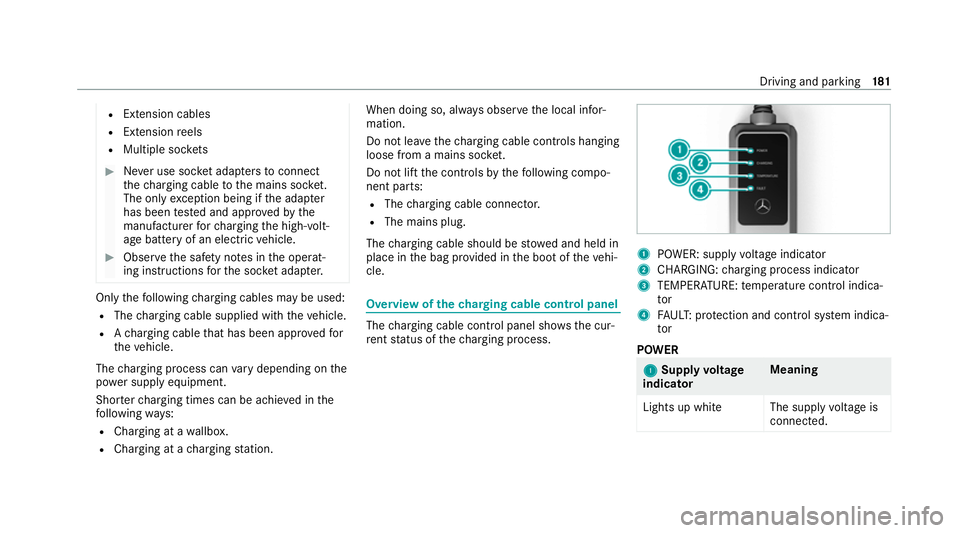
thech arging cable control panel The
charging cable control panel sho wsthe cur‐
re nt status of thech arging process. 1
POWER: supply voltage indicator
2 CHARGING: charging process indicator
3 TEMPERATURE: temp erature control indica‐
tor
4 FAUL T:protection and control sy stem indica‐
tor
POWER 1 1
Supply voltage
indicator Meaning
Lights up whit eThe supplyvoltage is
connec ted. Driving and parking
181
Page 185 of 629
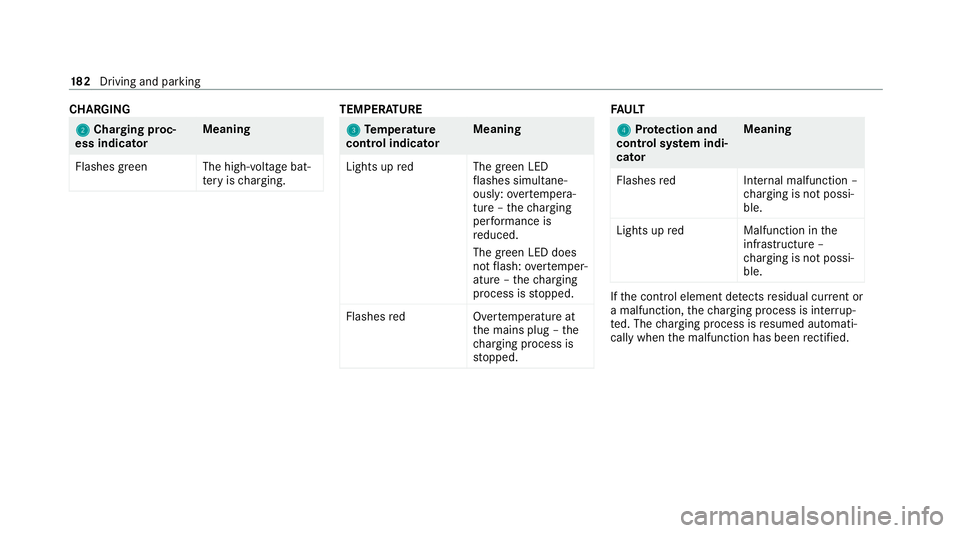
CHA
RGING 2 2
Cha rging proc‐
ess indicator Meaning
Flashes green The high- voltage bat‐
te ry isch arging. TEMPER
ATURE 3
3
Temp erature
control indica torMeaning
Lights up redT he green LED
fl ashes simul tane‐
ously: overtemp era‐
ture – thech arging
per form ance is
re duced.
The green LED does
not flash: overtemp er‐
ature – thech arging
process is stopped.
Flashes redO vertemperature at
th e mains plug – the
ch arging process is
st opped. FA
ULT 4 4
Protection and
control sy stem indi‐
cator Meaning
Flashes redI nternal malfunction –
ch arging is not possi‐
ble.
Lights up redM alfunction inthe
inf rastru cture –
ch arging is not possi‐
ble. If
th e control element de tects residual cur rent or
a malfunction, thech arging process is inter rup‐
te d. The charging process is resumed automati‐
cally when the malfunction has been rectified. 18 2
Driving and pa rking
Page 189 of 629
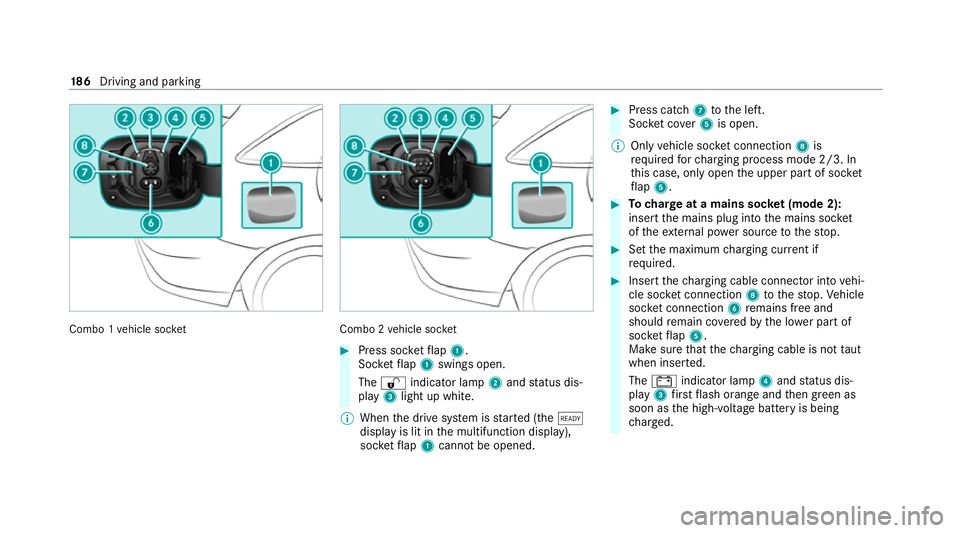
Combo 1
vehicle soc ket Combo 2
vehicle soc ket #
Press soc ketflap 1.
Soc ketflap 1 swings open.
The % indicator lamp 2and status dis‐
play 3light up white.
% When the drive sy stem is star ted (the õ
display is lit in the multifunction display),
soc ketflap 1 cannot be opened. #
Press cat ch7 tothe left.
Soc ket co ver5 is open.
% Only vehicle soc ket connection 8is
re qu ired forch arging process mode 2/3. In
th is case, only open the upper part of soc ket
fl ap 5. #
Tocharge at a mains soc ket (mode 2):
insert the mains plug into the mains soc ket
of theex tern al po wer source tothestop. #
Set the maximum charging cur rent if
re qu ired. #
Insert thech arging cable connec tor into vehi‐
cle soc ket connection 8tothestop. Vehicle
soc ket connection 6remains free and
should remain co veredby the lo wer part of
soc ketflap 5.
Make sure that thech arging cable is not taut
when inser ted.
The # indicator lamp 4and status dis‐
play 3firs tflash orange and then green as
soon as the high-voltage battery is being
ch arge d. 18 6
Driving and pa rking
Page 190 of 629
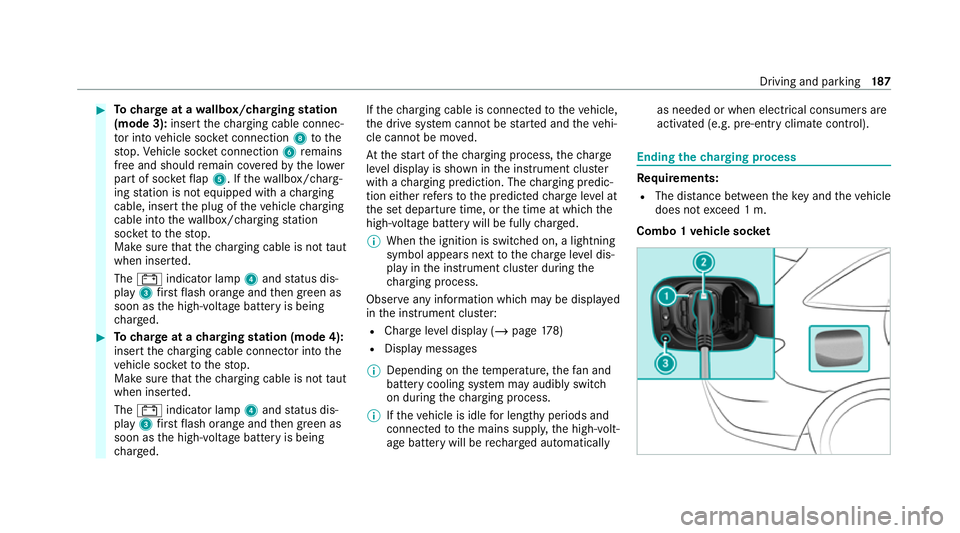
#
Tocharge at a wallbox/charging station
(mode 3): insertthech arging cable connec‐
to r into vehicle soc ket connection 8tothe
st op. Vehicle soc ket connection 6remains
free and should remain co veredby the lo wer
part of soc ketflap 5. If thewa llbox/ charg‐
ing station is not equipped with a charging
cable, insert the plug of theve hicle charging
cable into thewa llbox/ charging station
soc ketto thestop.
Make sure that thech arging cable is not taut
when inser ted.
The # indicator lamp 4and status dis‐
play 3firs tflash orange and then green as
soon as the high-voltage battery is being
ch arge d. #
Tocharge at a charging station (mode 4):
insert thech arging cable connec tor into the
ve hicle soc ketto thestop.
Make sure that thech arging cable is not taut
when inser ted.
The # indicator lamp 4and status dis‐
play 3firs tflash orange and then green as
soon as the high-voltage battery is being
ch arge d. If
th ech arging cable is connec tedto theve hicle,
th e drive sy stem cann otbe star ted and theve hi‐
cle cannot be mo ved.
At thest art of thech arging process, thech arge
le ve l display is shown in the instrument clus ter
with a charging prediction. The charging predic‐
tion either refers to the predicted charge leve l at
th e set departure time, or the time at which the
high-voltage battery will be fully charge d.
% When the ignition is switched on, a lightning
symbol appears next tothech arge leve l dis‐
play in the instrument clus ter during the
ch arging process.
Obse rve any information which may be displa yed
in the instrument clus ter:
R Char geleve l display (/ page178)
R Displ aymessa ges
% Depending on thete mp erature, thefa n and
battery cooling sy stem may audibly switch
on during thech arging process.
% Ifth eve hicle is idle for lengt hyperiods and
connec tedto the mains suppl y,the high-volt‐
age battery will be rech arge d automatically as needed or when elect
rical consumers are
acti vated (e.g. pre-entry climate control). Ending
thech arging process Re
quirements:
R The dis tance between theke y and theve hicle
does not exceed 1 m.
Combo 1 vehicle soc ket Driving and pa
rking 187
Page 191 of 629
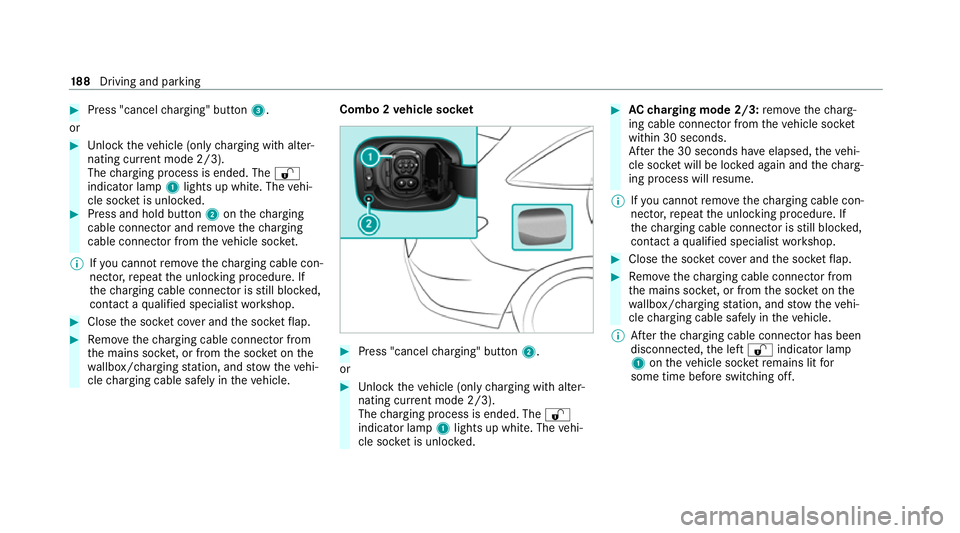
#
Press "cancel charging" button 3.
or #
Unlock theve hicle (only charging with alter‐
nating cur rent mode 2/3).
The charging process is ended. The %
indicator lamp 1lights up white. The vehi‐
cle soc ket is unloc ked. #
Press and hold button 2onthech arging
cable connec tor and remo vethech arging
cable connec tor from theve hicle soc ket.
% Ifyo u cannot remo vethech arging cable con‐
nec tor,re peat the unlocking procedure. If
th ech arging cable connec tor is still bloc ked,
con tact a qualified specialist workshop. #
Close the soc ket co ver and the soc ketflap. #
Remo vethech arging cable connec tor from
th e mains soc ket, or from the soc ket on the
wa llbox/ charging station, and stow theve hi‐
cle charging cable safely in theve hicle. Combo 2
vehicle soc ket #
Press "cancel charging" button 2.
or #
Unlock theve hicle (only charging with alter‐
nating cur rent mode 2/3).
The charging process is ended. The %
indicator lamp 1lights up white. The vehi‐
cle soc ket is unloc ked. #
AC charging mode 2/3: remo vethech arg‐
ing cable connec tor from theve hicle soc ket
within 30 seconds.
Af terth e 30 seconds ha veelapsed, theve hi‐
cle soc ket will be lo cked again and thech arg‐
ing process will resume.
% Ifyo u cannot remo vethech arging cable con‐
nec tor,re peat the unlocking procedure. If
th ech arging cable connec tor is still bloc ked,
con tact a qualified specialist workshop. #
Close the soc ket co ver and the soc ketflap. #
Remo vethech arging cable connec tor from
th e mains soc ket, or from the soc ket on the
wa llbox/ charging station, and stow theve hi‐
cle charging cable safely in theve hicle.
% Afterth ech arging cable connec tor has been
disconnected, the left % indicator lamp
1 ontheve hicle soc ketre mains lit for
some time before switching off. 18 8
Driving and pa rking
Page 192 of 629
Pa
rking Pa
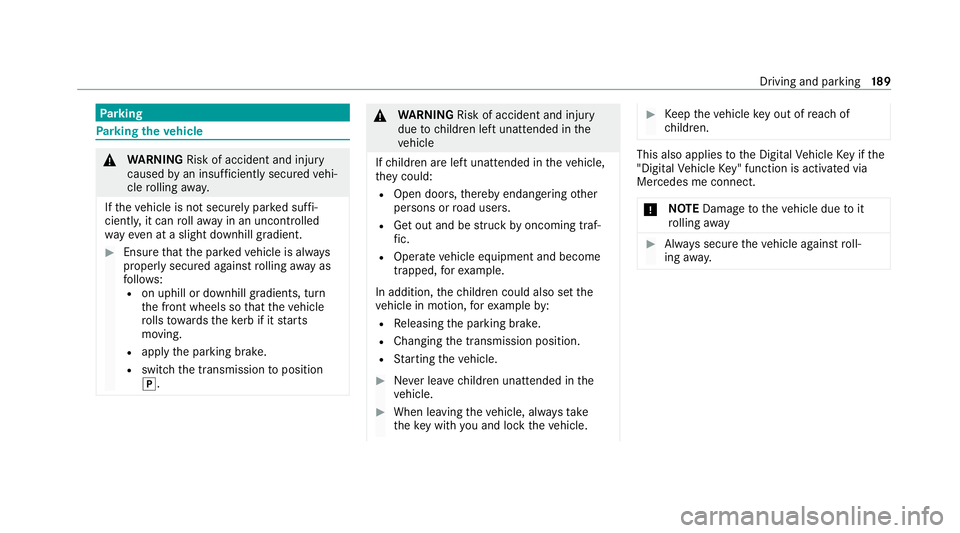
rking theve hicle &
WARNING Risk of accident and inju ry
caused byan insuf ficiently secu redve hi‐
cle rolling away.
If th eve hicle is not securely par ked suf fi‐
ciently, it can rollaw ay in an uncont rolled
wa yev en at a slight downhill gradient. #
Ensure that the par kedve hicle is alw ays
properly secured against rolling away as
fo llo ws:
R on uphill or downhill gradients, turn
the front wheels so that theve hicle
ro lls towa rdsth eke rb if it starts
moving.
R apply the parking brake.
R switch the transmission toposition
j. &
WARNING Risk of accident and inju ry
due tochildren left unat tended in the
ve hicle
If ch ildren are left unat tended in theve hicle,
th ey could:
R Open doo rs,th ereby endangering other
persons or road users.
R Get out and be stru ck byoncoming traf‐
fi c.
R Ope rate ve hicle equipment and become
trapped, forex ample.
In addition, thech ildren could also set the
ve hicle in motion, forex ample by:
R Releasing the parking brake.
R Changing the transmission position.
R Starting theve hicle. #
Never lea vechildren unat tended in the
ve hicle. #
When leaving theve hicle, alw aysta ke
th eke y with you and lock theve hicle. #
Keep theve hicle key out of reach of
ch ildren. This also applies
tothe Digital Vehicle Key if the
"Digital Vehicle Key" function is activated via
Mercedes me connect.
* NO
TEDama getotheve hicle due toit
ro lling away #
Alw ays secure theve hicle against roll‐
ing away. Driving and pa
rking 18 9
Page 194 of 629
#
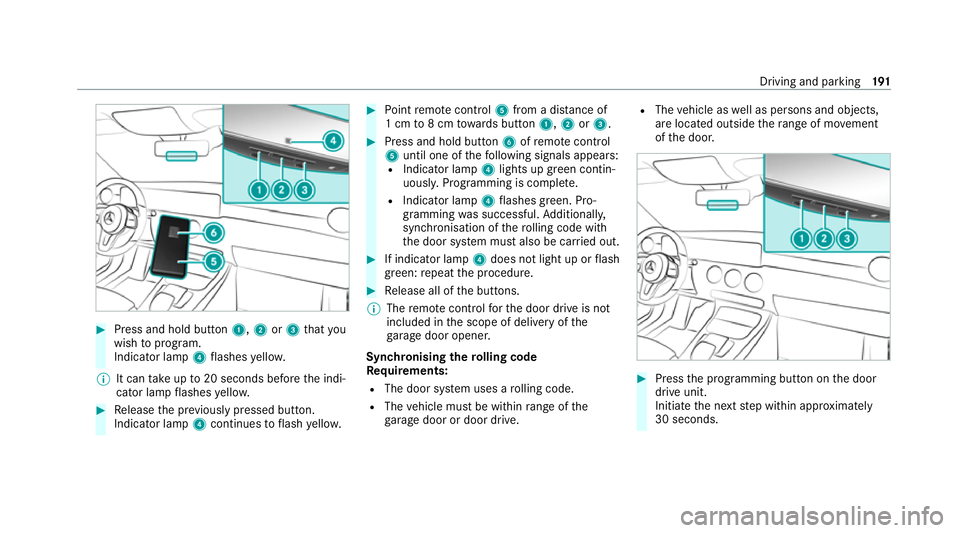
Press and hold button 1,2or3 that you
wish toprog ram.
Indicator lamp 4flashes yello w.
% It can take up to20 seconds before the indi‐
cator lamp flashes yello w. #
Release the pr eviously pressed button.
Indicator lamp 4continues toflash yello w. #
Point remo tecontrol 5from a di stance of
1 cm to8 cm towa rds button 1,2or3. #
Press and hold button 6ofremo tecontrol
5 until one of thefo llowing signals appears:
R Indicator lamp 4lights up green contin‐
uousl y.Programming is comple te.
R Indicator lamp 4flashes green. Pro‐
gramming was successful. Additionall y,
synchronisation of thero lling code with
th e door sy stem must also be car ried out. #
If indicator lamp 4does not light up or flash
green: repeat the procedure. #
Release all of the buttons.
% The remo tecontrol forth e door drive is not
included in the scope of delivery of the
ga rage door opener.
Synchronising thero lling code
Re quirements:
R The door sy stem uses a rolling code.
R The vehicle must be within range of the
ga rage door or door drive. R
The vehicle as well as persons and objects,
are located outside thera nge of mo vement
of the door. #
Press the programming button on the door
drive unit.
Initiate the next step within appr oximately
30 seconds. Driving and parking
191