display MERCEDES-BENZ G-CLASS 2011 User Guide
[x] Cancel search | Manufacturer: MERCEDES-BENZ, Model Year: 2011, Model line: G-CLASS, Model: MERCEDES-BENZ G-CLASS 2011Pages: 288, PDF Size: 11.6 MB
Page 14 of 288
Route guidance (on-board
computer) .......................................... 162
S
Safety Children in the vehicle .....................49
Child restraint systems ....................50
Overview of occupant safety
systems ........................................... 34
Safety systems
see Driving safety systems
Seat
Important safety notes ....................77
Seat backrest
Folding back .................................. 195
Folding forwards ............................ 195
Seat belt
Fastening, front ............................... 46
Fastening in the rear, center ............46
Seat belts
Adjusting the height ......................... 47
Belt force limiters ............................ 49
Cleaning ......................................... 226
Correct usage .................................. 44
Emergency Tensioning Devices ........ 49
Fastening ................................... 45, 46
Important safety guidelines .............43
Releasing ......................................... 48
Safety guidelines ............................. 35
Special seat belt retractor ...............51
Warning lamp ................................. 184
Warning lamp (function) ................... 48
Seat heating
Indicator lamp (Malfunction) ............82
Seats
Adjusting the 4-way lumbar
support ............................................ 81
Adjusting the head restraint ............79
Cleaning the cover .........................225
Correct driver's seat position ........... 76
Multicontour seat ............................ 81
Storing settings (memory
function) .......................................... 88
Switching seat heating on/off .........81
Switching the seat ventilation on/
off .................................................... 82
Seat ventilation
Indicator lamp (Malfunction) ............83
Sensors (cleaning instructions) ....... 224
Service indicator see Service interval display
Service interval display .................... 219
Displaying a service message (on-
board computer) ............................ 220
Service products
Brake fluid ..................................... 280
Capacities ...................................... 277
Coolant (engine) ............................ 280
Engine oil ....................................... 279
Fuel ................................................ 277
Important safety notes ..................276
Notes ............................................. 276
Refrigerant (air-conditioning
system) .......................................... 279
Washer fluid ................................... 281
Settings
Calling up a stored setting ...............88
Factory (on-board computer) .........162
On-board computer .......................162
Setting the unit (on-board
computer) Speedometer ................................. 163
Shift ranges ....................................... 123
Side marker lamp (display
message) ............................................ 173
Side window Important safety information ...........70
Side windows
Convenience closing feature ............71
Convenience opening feature ..........71
Opening and closing ........................71
Troubleshooting ............................... 72
Ski rack .............................................. 197
Sliding sunroof Important safety notes ....................72
Opening/closing .............................. 73
Operating manually ..........................73
SmartKey
Changing the battery .......................64
Changing the programming .............63
Checking the battery .......................64
Convenience closing feature ............71
Convenience opening feature ..........71
Important safety notes ....................6212IndexProCarManuals.com
Page 15 of 288
Loss ................................................. 66
Malfunction ...................................... 66
Starting the engine ........................117
Snow chains ...................................... 248
Socket Front-passenger footwell ...............200
Luggage compartment ...................200
Rear compartment .........................200
SOS
see mbrace
Spare fuses ........................................ 243
Spare wheel Exterior spare wheel bracket .........230
Installing ........................................ 232
Notes/data .................................... 272
Speedometer
Additional speedometer (on-
board computer) ............................ 160
Setting the unit (on-board
computer) ...................................... 163
SPEEDTRONIC
Display-Meldung ............................ 178
SRS (Supplemental Restraint
System) Display message ............................ 170
Introduction ..................................... 34
Warning lamp ................................. 187
Warning lamp (function) ................... 34
Standard display (on-board
computer) .......................................... 160
Starting the engine Important safety notes ..................117
Station
see Radio
Status line (on-board computer) ...... 158
Selecting the display ...................... 163
Steering wheel
Adjusting ......................................... 83
Buttons (on-board computer) ......... 157
Cleaning ......................................... 225
Important safety notes ....................83
Steering wheel heating ....................83
Storing settings (memory
function) .......................................... 88
Steering wheel heating
Indicator lamp (Malfunction) ............84Stowage compartments
Armrest (under) ............................. 193
Glove box ....................................... 193
Stowage pockets ........................... 194
Stowage space
Cup holders ................................... 197
Important safety information .........193
Submenu (on-board computer)
Convenience .................................. 165
Vehicle ........................................... 165
Summer opening
see Convenience opening feature
Summer tires ..................................... 248
Sun visor ............................................ 198
Supplemental Restraint System see SRS
Surround lighting
Switching on/off (on-board
computer) ...................................... 164
SUV
(Sport Utility Vehicle) .......................19
Switching air-recirculation mode
on/off ................................................. 111
Switching off the alarm (ATA) ............ 59
T
Tachometer ........................................ 156
Tail lamps Changing ....................................... 100
Tail lamps (Display message) ........... 174
Technical data G 500 ............................................. 281
G 55 AMG ...................................... 282
Tires ............................................... 272
Wheels ........................................... 272
TELEAID
Call priority .................................... 206
Display message ............................ 170
Downloading destinations
(COMAND) ..................................... 206
Emergency call .............................. 203
Important safety notes ..................202
Locating a stolen vehicle ...............207
MB info call button ........................205
Roadside Assistance button ..........204
Self-test ......................................... 202
Index13ProCarManuals.com
Page 16 of 288
System .......................................... 202
Vehicle remote unlocking ..............206
Telephone
Menu (on-board computer) ............167
Telephone compartment .................. 193
Temperature Coolant .......................................... 156
Displaying the outside
temperature ................................... 160
Outside temperature ...................... 157
Setting (climate control) ................109
Theft deterrent locking system
Immobilizer ...................................... 59
Tilt/sliding sunroof
see Sliding sunroof
Tire pressure
Calling up (on-board computer) .....253
Checking ........................................ 252
Checking manually ........................253
Display message ............................ 179
Maximum ....................................... 252
Notes ............................................. 250
Recommended ............................... 249
Tire pressure monitoring system
Function/notes ............................. 253
Restarting ...................................... 255
Warning lamp ................................. 189
Tires
Aspect ratio (definition) .................268
Average weight of the vehicle
occupants (definition) ....................267
Bar (definition) ............................... 266
Characteristics .............................. 266
Checking ........................................ 246
Definition of terms .........................266
Direction of rotation ......................270
Distribution of the vehicle
occupants (definition) ....................269
DOT, Tire Identification Number
(TIN) ............................................... 265
DOT (Department of
Transportation) (definition) ............266
GAWR (Gross Axle Weight Rating)
(definition) ..................................... 267
GTW (Gross Trailer Weight)
(definition) ..................................... 267
GVW (Gross Vehicle Weight)
(definition) ..................................... 267GVWR (Gross Vehicle Weight
Rating) (definition) .........................267
Increased vehicle weight due to
optional equipment (definition) ......267
Kilopascal (kPa) (definition) ...........268
Labeling (overview) ........................262
Load bearing index (definition) ......269
Load index ..................................... 265
Load index (definition) ...................268
Maximum loaded vehicle weight
(definition) ..................................... 267
Maximum load on a tire
(definition) ..................................... 268
Maximum permissible tire
pressure (definition) ....................... 268
Maximum tire load .........................260
Maximum tire load (definition) .......268
Optional equipment weight
(definition) ..................................... 268
PSI (pounds per square inch)
(definition) ..................................... 268
Replacing ....................................... 269
Service life ..................................... 248
Sidewall (definition) .......................268
Speed index (definition) .................267
Storing ........................................... 270
Structure and characteristics
(definition) ..................................... 266
Technical data ............................... 272
Temperature .................................. 262
TIN (Tire Identification Number)
(definition) ..................................... 269
Tire bead (definition) ......................268
Tire pressure (definition) ................268
Tire pressures (recommended) ......267
Tire size designation, load-bearing
capacity, speed index ....................263
Tire tread ....................................... 247
Tire tread (definition) .....................268
Total load limit (definition) .............269
Traction ......................................... 261
Traction (definition) .......................269
Tread wear ..................................... 261
TWR (permissible trailer drawbar
noseweight) (definition) .................269
Uniform Tire Quality Grading
Standards ...................................... 26114IndexProCarManuals.com
Page 17 of 288
Uniform Tire Quality Grading
Standards (definition) ....................267
Unladen weight (definition) ............268
Wear indicator (definition) .............269
Wheel rim (definition) ....................267
Top Tether ............................................ 53
Tow-away alarm .................................. 60
Towing ................................................ 242
Important safety guidelines ...........240
Towing eye
Front .............................................. 240
Rear ............................................... 240
Trailer loads and drawbar
noseweights ...................................... 260
Transfer case Display message ............................ 182
Shift ranges ................................... 126
Transmission position display ......... 122
Transmission positions .................... 122
Transporting the vehicle .................. 241
Traveling uphill Brow of hill ..................................... 146
Trip computer (on-board
computer) .......................................... 166
Trip odometer Calling up ....................................... 160
Turn signal
Display message ............................ 172
Turn signals ......................................... 93
TWR (permissible trailer drawbar
noseweight) (definition) ................... 269
Type identification plate see Vehicle identification plate
U
Ultrasonic backing up aid Function/notes ............................. 149
Malfunction .................................... 152
Range of the sensors .....................150
Warning display ............................. 150
Unlocking
Emergency unlocking .......................68
From inside the vehicle (central
unlocking button) ............................. 67
V
Vanity mirror Sun visor ........................................ 198
Vehicle
Data acquisition ............................... 21
Emergency unlocking .......................68
Equipment ....................................... 17
Individual settings (on-board
computer) ...................................... 162
Loading .......................................... 256
Lowering ........................................ 234
Maintenance .................................... 18
Parking up ..................................... 135
Raising ........................................... 233
Reporting problems .........................20
Towing away .................................. 240
Tow-starting ................................... 240
Transporting .................................. 241
Vehicle dimensions
Technical data ............................... 281
Vehicle identification number
see VIN
Vehicle identification number
(VIN) ................................................... 275
Vehicle identification plate .............. 275
Vehicle tool kit .................................. 229
Vehicle weights Technical data ............................... 281
Ventilation
Setting the air distribution .............109
Setting the airflow .........................110
Video (DVD) ........................................ 161
Video DVD (on-board computer) ...... 161
VIN ...................................................... 275
W
Warning and indicator lamps ABS ................................................ 185
Brakes ........................................... 183
Check Engine ................................. 188
ESP ®
OFF ....................................... 186
Fuel tank ........................................ 188
PASSENGER AIRBAG OFF ................39
Reserve fuel ................................... 188
Seat belt ........................................ 184
Index15ProCarManuals.com
Page 18 of 288
SRS ................................................ 187
Tire pressure monitor ....................189
Warranty ............................................ 274
Washer fluid Display message ............................ 181
Wheel bolt tightening torque ........... 234
Wheel change see Flat tire .................................... 232
Wheels
Changing/replacing .......................269
Changing a wheel .......................... 232
Checking ........................................ 246
Cleaning ......................................... 222
Mounting a wheel .......................... 234
Removing a wheel ..........................234
Storing ........................................... 270
Technical data ............................... 272
Tightening torque ........................... 234
Wheels and tires
Important safety notes ..................246
Window curtain air bag
Operation ......................................... 39
Windows
see Side windows
Windows (cleaning instructions) ..... 223
Windshield heater ............................. 110
Windshield heating see Windshield defroster
Windshield washer system .............. 218
Notes ............................................. 281
Windshield wipers
Important safety notes ..................101
Replacing the wiper blades ............103
Switching on/off ........................... 102
Troubleshooting ............................. 104
Winter
Driving in winter ............................. 141
Winter operation ............................ 248
Winter operation ............................... 141
Winter tires M+S tires ....................................... 248
Wiper blades
Cleaning ......................................... 22316IndexProCarManuals.com
Page 28 of 288
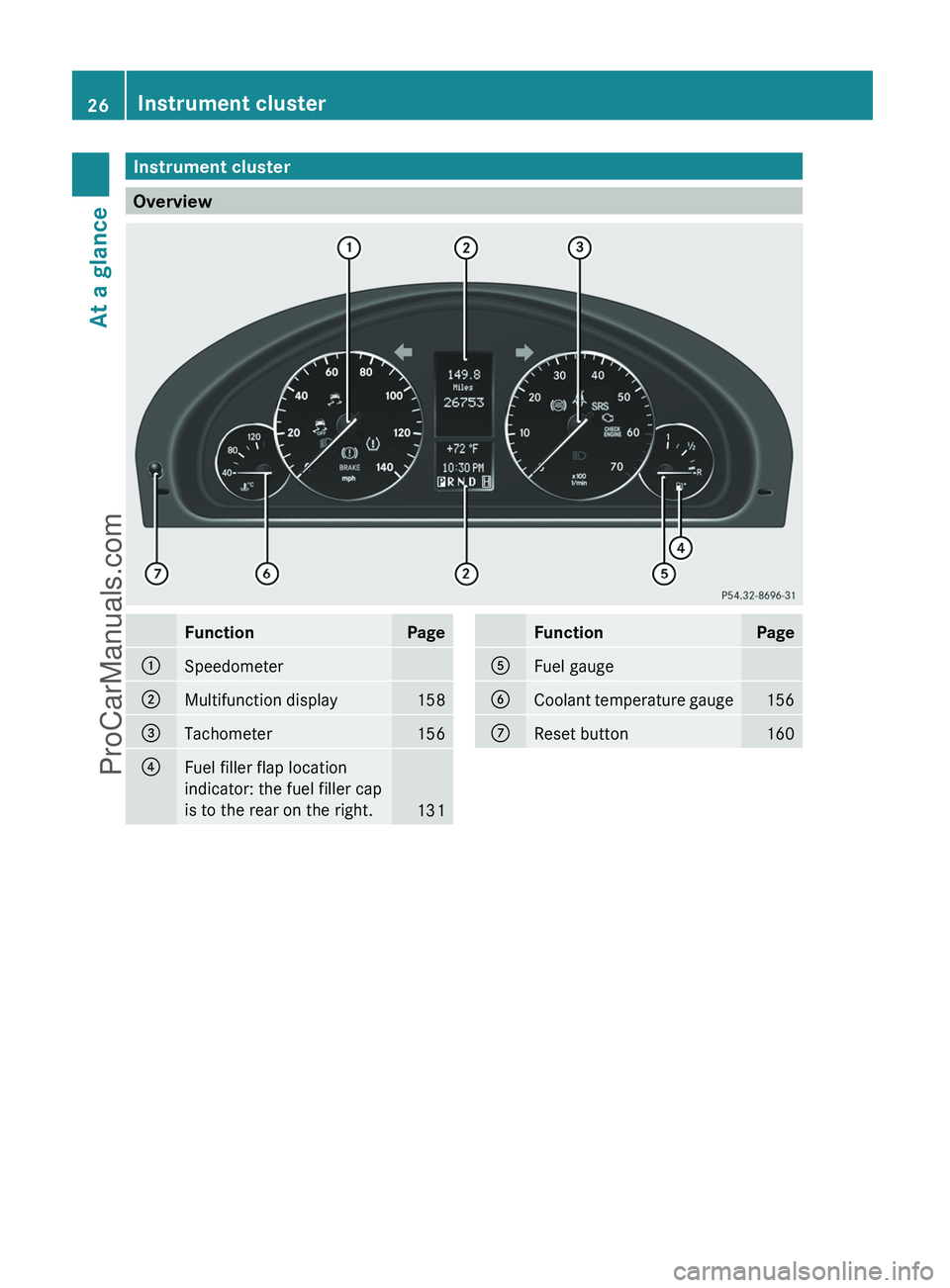
Instrument cluster
Overview
FunctionPage:Speedometer;Multifunction display158=Tachometer156?Fuel filler flap location
indicator: the fuel filler cap
is to the rear on the right.
131
FunctionPageAFuel gaugeBCoolant temperature gauge156CReset button16026Instrument clusterAt a glance
ProCarManuals.com
Page 30 of 288
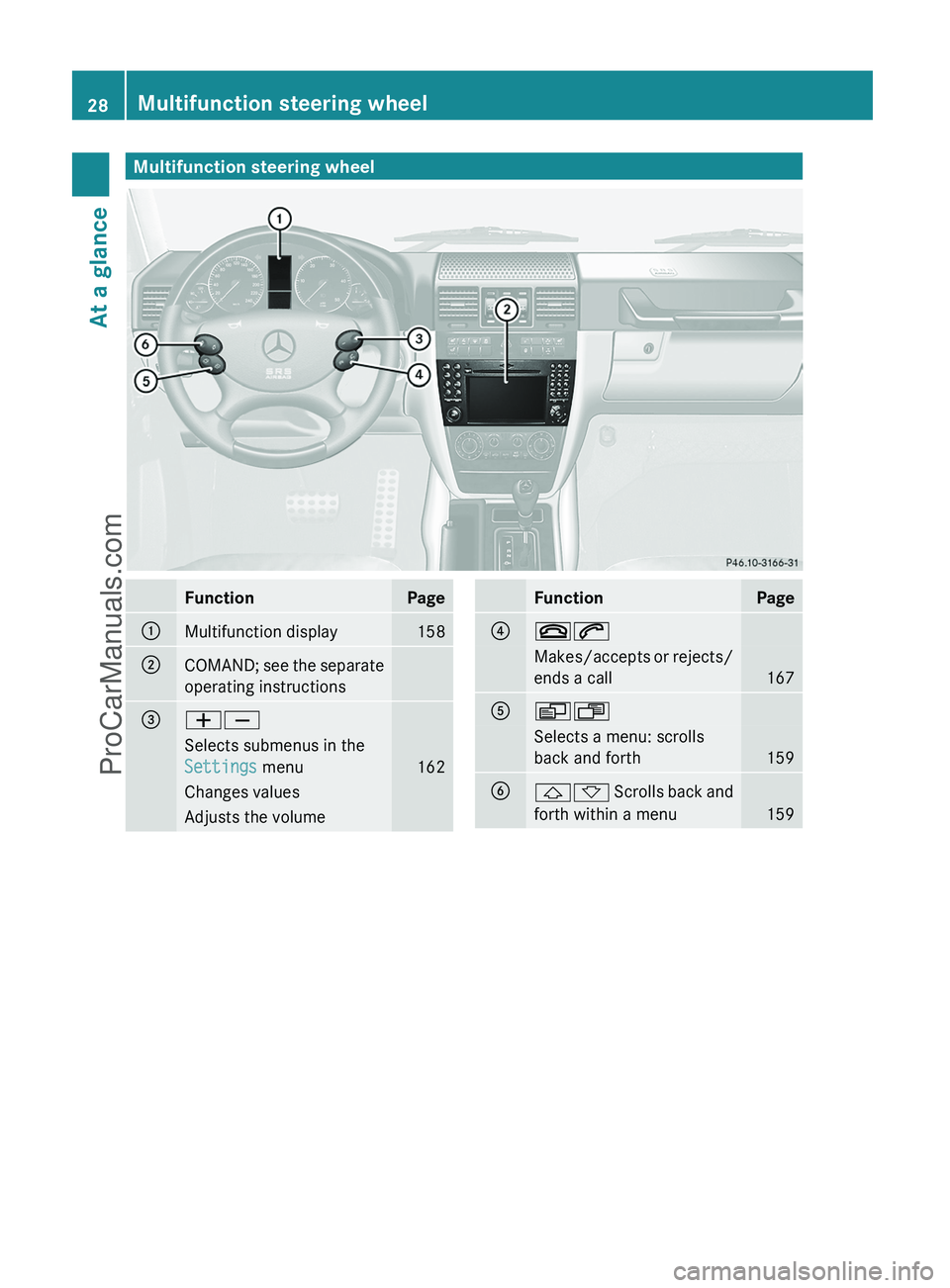
Multifunction steering wheelFunctionPage:Multifunction display158;COMAND; see the separate
operating instructions=WXSelects submenus in the
Settings menu
162
Changes valuesAdjusts the volumeFunctionPage?~6Makes/accepts or rejects/
ends a call
167
AVUSelects a menu: scrolls
back and forth
159
B&* Scrolls back and
forth within a menu
159
28Multifunction steering wheelAt a glance
ProCarManuals.com
Page 57 of 288
X To activate: press ! button : for at
least one second.
An alarm sounds and the indicator lamp
flashes.XTo deactivate: press ! button : again.
or
XInsert the key into the ignition lock.
i
USA only:
This device complies with part 15 of the
FCC regulations. Operation is subject to
the following two conditions:
1. This device may not cause interference,
and
2. This device must withstand any
interference received, including
interference that may cause undesired
operation.
Any unauthorized modification to this
device could void the user's authority to
operate the equipment.
i Canada only:
This device complies with RSS-210
regulations of Industry Canada. Operation
is subject to the following two conditions:
1. This device may not cause interference,
and
2. This device must withstand any
interference received, including
interference that may cause undesired
operation of the device.
Any unauthorized modification to this
device could void the user's authority to
operate the equipment.
Driving safety systems
Driving safety systems overview
In this section, you will find information about
the following driving safety systems:
R ABS ( Anti-lock Braking System)
R BAS ( Brake Assist System)
R
ESP ®
(E lectronic Stability Program)
R EBD ( Electronic Brake force Distribution)
Important safety notes
GWarning
The following factors increase the risk of
accidents:
R Excessive speed, especially in turns
R Wet and slippery road surfaces
R Following another vehicle too closely
The driving safety systems described in this
section cannot reduce these risks or prevent
the natural laws of physics from acting on the
vehicle. They cannot increase braking or
steering efficiency beyond that afforded by
the condition of the vehicle brakes and tires
or the traction afforded.
Only a safe, attentive, and skillful driver can
prevent accidents.
The capabilities of a vehicle equipped with the
driving safety systems described in this
section must never be exploited in a reckless
or dangerous manner which could jeopardize
the user's safety or the safety of others.
Always adjust your driving style to the
prevailing road and weather conditions and
keep a safe distance to other road users and
objects on the street.
If a driving system malfunctions, other driving
safety systems may also switch off. Observe
indicator and warning lamps that may come
on as well as messages in the multifunction
display that may appear.
GWarning!
The ABS, the BAS, and the ESP ®
switch off
when the differential locks are switched on.
When the ABS, the BAS, and the ESP ®
are
switched off
R wheels may lock during hard braking
R steering capabilities are reduced
Driving safety systems55SafetyZProCarManuals.com
Page 58 of 288
Rbraking distance is increased
R vehicle stability in standard driving
maneuvers is increased
Make sure the differential locks are switched
on at all times except when driving off-road
for example. Switch on the differential locks
immediately when returning from off-road
driving.
i In wintry driving conditions, always use
winter tires (M+S tires) and if necessary,
snow chains. Only in this way will the
driving safety systems described in this
section work as effectively as possible.
ABS (Anti-lock Braking System)
Important safety notes
GWarning
Observe "Important safety notes"
( Y page 55).
GWarning
Do not pump the brake pedal. Use firm, steady
brake pedal pressure instead. Pumping the
brake pedal defeats the purpose of the ABS
and significantly reduces braking
effectiveness.
ABS regulates brake pressure in such a way
that the wheels do not lock when you brake.
This allows you to continue steering the
vehicle when braking.
ABS operates above a speed of about
5 mph(8 km/h) regardless of road-surface
conditions, provided the differential locks are
not active. ABS works on slippery surfaces,
even when you only brake gently.
The ! warning lamp in the instrument
cluster lights up when the ignition is switched
on. It goes out when the engine is running.
Braking
If ABS intervenes when braking, you will feel
a pulsing in the brake pedal.
XIf ABS intervenes: continue to depress the
brake pedal with force until the braking
situation is over.XTo make a full brake application:
depress the brake pedal with full force.
The pulsating brake pedal can be an
indication of hazardous road conditions and
functions as a reminder to take extra care
while driving.
GWarning
If the ABS malfunctions, other driving systems
such as the BAS or the ESP ®
are also switched
off. Observe indicator and warning lamps that
may come on as well as messages in the
multifunction display that may appear.
If the ABS malfunctions, the wheels may lock
during hard braking, reducing the steering
capability and extending the braking distance.
Off-road ABS
If the LOW shift range ( Y page 126) is
selected on the transfer case, an ABS system
specifically suited to off-road terrain is
activated.
At speeds below 37 mph(60 km/h) , the front
wheels lock periodically when braking. The
digging-in effect achieved in the process
reduces the stopping distance on off-road
terrain. This limits steering capability.
BAS (Brake Assist)
GWarning
Observe "Important safety notes"
( Y page 55).
BAS operates in emergency braking
situations. If you depress the brake pedal
quickly, BAS automatically boosts the braking
force, thus shortening the stopping distance.
56Driving safety systemsSafety
ProCarManuals.com
Page 78 of 288
Vehicle equipment
i This manual describes all the standard
and optional equipment of your vehicle
which was available at the time of
purchase. Country-specific differences are
possible. Please note that your vehicle may
not be equipped with all features
described. This also applies to safety-
relevant systems and functions.
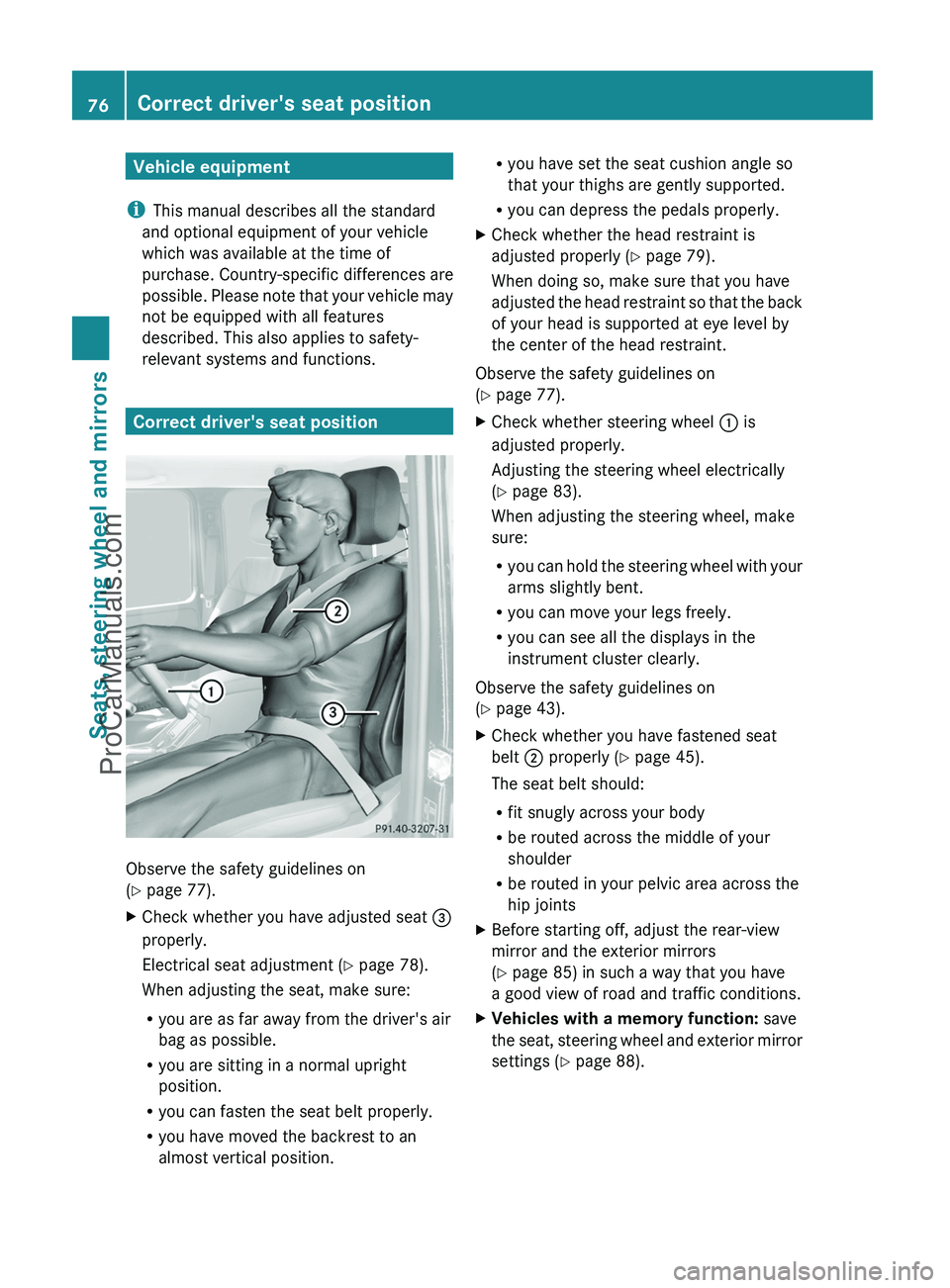
Correct driver's seat position
Observe the safety guidelines on
( Y page 77).
XCheck whether you have adjusted seat =
properly.
Electrical seat adjustment ( Y page 78).
When adjusting the seat, make sure:
R you are as far away from the driver's air
bag as possible.
R you are sitting in a normal upright
position.
R you can fasten the seat belt properly.
R you have moved the backrest to an
almost vertical position.R you have set the seat cushion angle so
that your thighs are gently supported.
R you can depress the pedals properly.XCheck whether the head restraint is
adjusted properly ( Y page 79).
When doing so, make sure that you have
adjusted the head restraint so that the back
of your head is supported at eye level by
the center of the head restraint.
Observe the safety guidelines on
( Y page 77).
XCheck whether steering wheel : is
adjusted properly.
Adjusting the steering wheel electrically
( Y page 83).
When adjusting the steering wheel, make
sure:
R you can hold the steering wheel with your
arms slightly bent.
R you can move your legs freely.
R you can see all the displays in the
instrument cluster clearly.
Observe the safety guidelines on
( Y page 43).
XCheck whether you have fastened seat
belt ; properly ( Y page 45).
The seat belt should:
R fit snugly across your body
R be routed across the middle of your
shoulder
R be routed in your pelvic area across the
hip jointsXBefore starting off, adjust the rear-view
mirror and the exterior mirrors
( Y page 85) in such a way that you have
a good view of road and traffic conditions.XVehicles with a memory function: save
the seat, steering wheel and exterior mirror
settings ( Y page 88).76Correct driver's seat positionSeats, steering wheel and mirrors
ProCarManuals.com