display MERCEDES-BENZ G-CLASS 2011 Workshop Manual
[x] Cancel search | Manufacturer: MERCEDES-BENZ, Model Year: 2011, Model line: G-CLASS, Model: MERCEDES-BENZ G-CLASS 2011Pages: 288, PDF Size: 11.6 MB
Page 165 of 288
XPress the V or U button on the
steering wheel to select the Settings
menu.XPress and hold the reset button on the left
of the instrument cluster for approximately
three seconds.
A prompt appears in the multifunction
display asking you to confirm by pressing
the reset button again.XPress the reset button again.
The settings of most functions are restored
to the factory settings.
or
XIf you want to retain the settings, do not
press the reset button a second time.
The Settings menu appears again after
approximately five seconds.XPress the V or U button to select a
different menu.
Instrument cluster
Selecting the unit of measurement for
distance
The selected unit of measurement for
distance applies to:
R the odometer and the trip odometer
R the trip computer
R the digital speedometer
XPress the V or U button on the
steering wheel to select the Settings
menu.XPress the & button to select submenus.XPress the W or X button to select the
Inst. Cluster submenu.XPress the & button to select Disp.
Unit Speed-/Odom.XPress the W or X button to select
Km (kilometers) or Miles as the unit of
measurement for distance.XPress the &, V or U button to
select a different display.Selecting the language
The Language function allows you to select
the language for the instrument cluster.XPress the V or U button on the
steering wheel to select the Settings
menu.XPress the & button to select submenus.XPress the W or X button to select the
Inst. cluster submenu.XPress the & button to select Language.XPress the W or X button to select the
desired language.XPress the &, V or U button to
select a different display.
Selecting the status line display
XPress the V or U button on the
steering wheel to select the Settings
menu.XPress the & button to select submenus.XPress the W or X button to select the
Inst. cluster submenu.XPress the & button to select Status
line display .XPress the W or X button to select the
status line display: speed ( Speed) or
outside temperature ( Outside temp.).
The selected display now appears
constantly in the lower multifunction
display. When you scroll through the
Standard display menu (Y page 160), you
will see the display you have not selected.XPress the &, V or U button to
select a different display.
Lighting
Adjusting the instrument cluster lighting
The instrument cluster lighting automatically
adjusts to the ambient light.
XBrighter or dimmer: turn reset button
( Y page 26) clockwise or counter-
clockwise.Menus and submenus163On-board computer and displaysZProCarManuals.com
Page 166 of 288
Switching the daytime running lamps on/
off
This function is not available in Canada.
If you have activated the daytime running
lamps function and the light switch is in the
$ or à position, the low-beam
headlamps are switched on automatically
when the engine is running.
In the dark, the following also light up:
R the low-beam headlamps
R the standing lamps
R the tail lamps
R the license plate lamp
R the side marker lamp
In countries where daytime running lamps are
legally required, Constant is the factory
setting.XPress the V or U button on the
steering wheel to select the Settings
menu.XPress the & button to select submenus.XPress the W or X button to select the
Lighting submenu.XPress the & button to select Headlamp
mode .XPress the W or X button to set the
mode for the headlamps to Manual or
Constant (daytime running lamps).XPress the &, V or U button to
select a different display.
Switching the surround lighting on or off
If you activate the surround lighting function
and the light switch is set to Ã, the
following will light up if it is dark and you
unlock the vehicle using the key:
R the standing lamps
R the license plate lamp
R the tail lamps
R the fog lamps
R the side marker lamp
The surround lighting switches off
automatically after 40 seconds or when the
driver's door is opened.XPress the V or U button on the
steering wheel to select the Settings
menu.XPress the & button to select submenus.XPress the W or X button to select the
Lighting submenu.XPress the & button to select Surround
lighting .XPress the W or X button to switch
the Surround lighting on or off.XWhen leaving the vehicle, turn the light
switch to position Ã.
The surround lighting is activated.XPress the &, V or U button to
select a different display.
Activating/deactivating the exterior
lighting delayed switch-off
If you have activated the delayed switch-off
function, the light switch is set to à and
you switch off the engine, the following
remain lit:
R the standing lamps
R the license plate lamp
R the tail lamps
R the fog lamps
R the side marker lamp
If the engine is switched off and then none of
the doors are opened, or if an open door is
not closed, the exterior lighting goes out after
60 seconds.
XPress the V or U button on the
steering wheel to select the Settings
menu.XPress the & button to select submenus.XPress the W or X button to select the
Lighting submenu.XPress the & button to select Headl.
Delayed Switch Off .164Menus and submenusOn-board computer and displays
ProCarManuals.com
Page 167 of 288
XPress the W or X button to activate
or deactivate the Headl. Delayed
Switch Off function.XBefore switching off the engine, turn the
light switch to position Ã.
The exterior lighting delayed switch-off is
activated.XPress the &, V or U button to
select a different display.
Deactivating the delayed switch-off
temporarily:
XBefore leaving the vehicle, turn the key to
position 0 in the ignition lock.XTurn the key to position 2 in the ignition
lock and back to position 0.
The delayed switch-off is deactivated.
Delayed switch-off is reactivated the next
time you start the engine.
Activating/deactivating the interior
lighting delayed switch-off
If the Interior Light. Delay. Sw. Off:
function is activated and you pull the key out
of the ignition lock, the interior lighting
remains on for around 10 seconds.
XPress the V or U button on the
steering wheel to select the Settings
menu.XPress the & button to select submenus.XPress the W or X button to select the
Lighting submenu.XPress the & button to select Interior
Light. Delay Sw. Off .XPress the W or X button to activate
or deactivate Interior Light. Delay.
Sw. Off .XPress the &, V or U button to
select a different display.Vehicle
Activating/deactivating the automatic
door locking feature
If you select the Automatic Locking
function, the vehicle is centrally locked above
a speed of around 9 mph (15 km/h).
i For more information on the automatic
locking feature, see ( Y page 68).
XPress the V or U button on the
steering wheel to select the Settings
menu.XPress the & button to select submenus.XPress the W or X button to select the
Vehicle submenu.XPress the & button to select
Automatic Door Lock .XPress the W or X button to switch
the Automatic Door Lock feature on or
off.XPress the &, V or U button to
select a different display.
Convenience
Activating/deactivating the EASY-
ENTRY/EXIT feature
You can use the Easy-entry Function to
activate or deactivate the EASY-ENTRY/EXIT
feature ( Y page 84).
GWarning!
You must make sure no one can become
trapped or injured by the moving steering
wheel when the easy-entry/exit feature is
activated.
To stop steering wheel movement do one of
the following:
R Move steering wheel adjustment stalk.
R Press one of the memory position buttons.
R Press the memory button.
Do not leave children unattended in the
vehicle, or with access to an unlocked vehicle.
Children could open the driver’s door and
Menus and submenus165On-board computer and displaysZProCarManuals.com
Page 168 of 288
unintentionally activate the easy-entry/exit
feature, which could result in an accident
and/or serious personal injury.XPress the V or U button on the
steering wheel to select the Settings
menu.XPress the & button to select submenus.XPress the W or X button to select the
Convenience submenu.XPress the & button to select the Easy-
entry Function .XPress the W or X button to activate
or deactivate the Easy-entry Function .XPress the &, V or U button to
select a different display.
Trip computer menu
Trip computer "From start" or "From
reset"
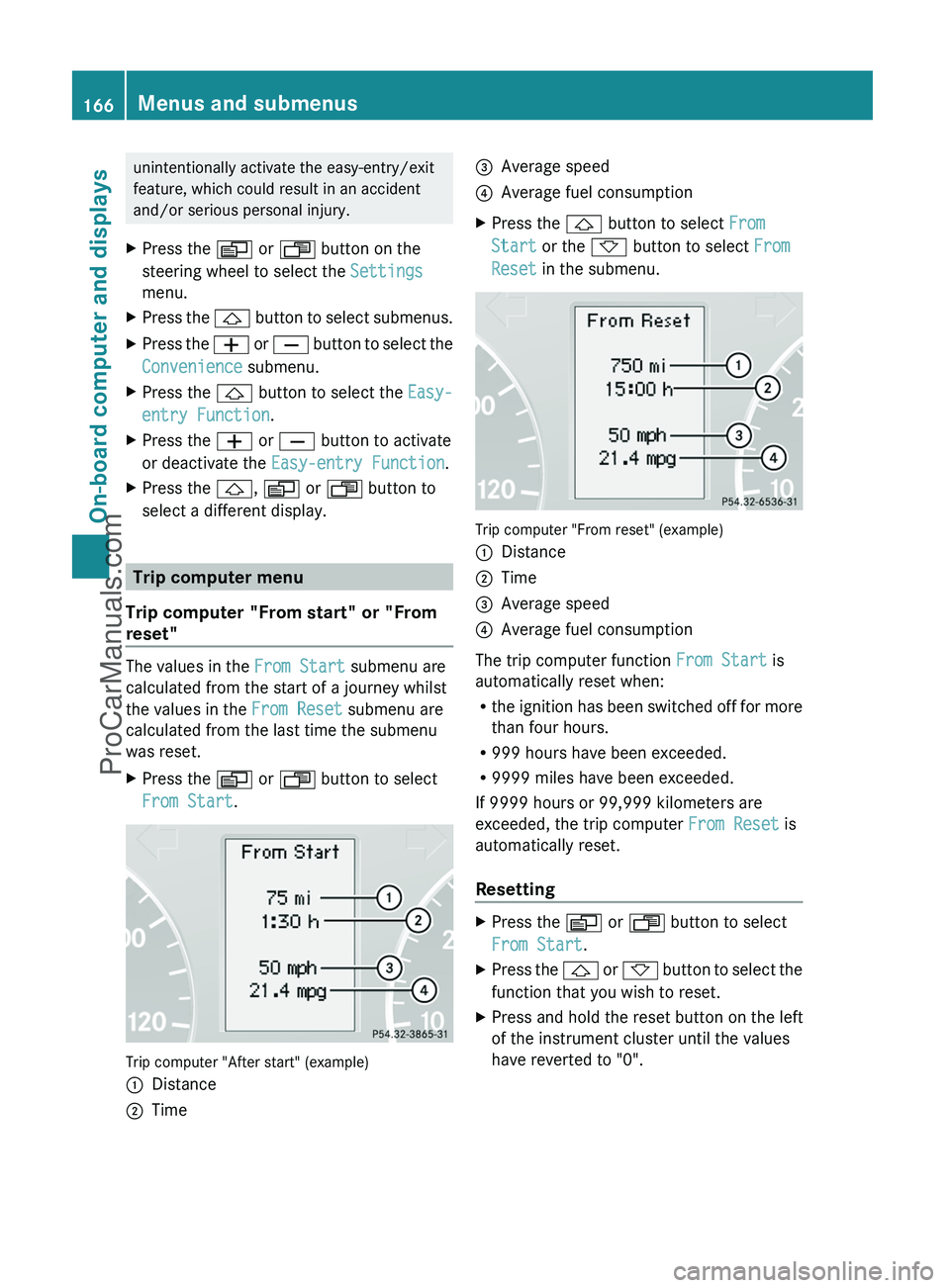
The values in the From Start submenu are
calculated from the start of a journey whilst
the values in the From Reset submenu are
calculated from the last time the submenu
was reset.
XPress the V or U button to select
From Start .
Trip computer "After start" (example)
:Distance;Time=Average speed?Average fuel consumptionXPress the & button to select From
Start or the * button to select From
Reset in the submenu.
Trip computer "From reset" (example)
:Distance;Time=Average speed?Average fuel consumption
The trip computer function From Start is
automatically reset when:
R the ignition has been switched off for more
than four hours.
R 999 hours have been exceeded.
R 9999 miles have been exceeded.
If 9999 hours or 99,999 kilometers are
exceeded, the trip computer From Reset is
automatically reset.
Resetting
XPress the V or U button to select
From Start .XPress the & or * button to select the
function that you wish to reset.XPress and hold the reset button on the left
of the instrument cluster until the values
have reverted to "0".166Menus and submenusOn-board computer and displays
ProCarManuals.com
Page 169 of 288
Calling up the rangeXPress the V or U button to select
From Start .XPress the & or * button to select
Range: .
The multifunction display shows the
estimated range of the vehicle, based on
the current driving style and the fuel level.
If there is only a small amount of fuel
remaining in the fuel tank, a gas pump
7 appears instead of the range.
Telephone menu
Introduction
You can establish a Bluetooth ®
connection to
COMAND (see the separate operating
instructions).
GWarning
A driver's attention to the road must always
be his/her primary focus when driving. For
your safety and the safety of others, we
recommend that you pull over to a safe
location and stop before placing or taking a
telephone call. If you choose to use the
telephone while driving, please use the hands-
free device and only use the telephone when
weather, road and traffic conditions permit.
Some jurisdictions prohibit the driver from
using a mobile phone while driving a vehicle.
Bear in mind that at a speed of just 30 mph
(approximately 50 km/h ), your vehicle is
covering a distance of 44 feet (approximately
14 m) every second.
XSwitch on the mobile phone and COMAND
(see the separate operating instructions).XPress the V or U button on the
steering wheel to select the Telephone
menu.
You will see one of the following display
messages in the multifunction display:
R Ready or the name of the network provider:
the mobile phone has found a network and
is ready to receive.
R Bluetooth Ready : the mobile phone is not
yet connected via Bluetooth ®
to COMAND.
R No Service : no network is available.
Accepting a call
If someone calls you when you are in the
Telephone menu, a display message appears
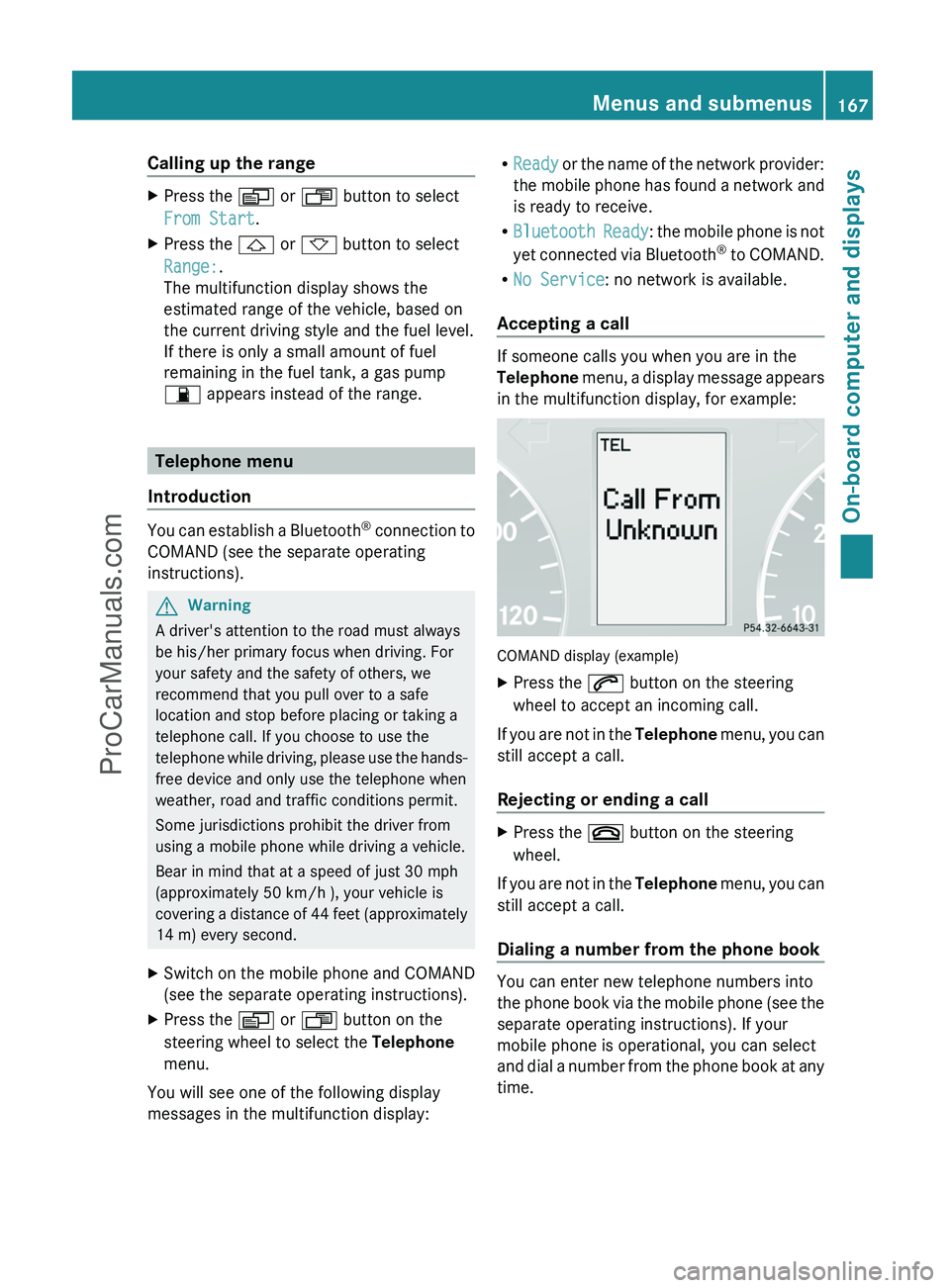
in the multifunction display, for example:
COMAND display (example)
XPress the 6 button on the steering
wheel to accept an incoming call.
If you are not in the Telephone menu, you can
still accept a call.
Rejecting or ending a call
XPress the ~ button on the steering
wheel.
If you are not in the Telephone menu, you can
still accept a call.
Dialing a number from the phone book
You can enter new telephone numbers into
the phone book via the mobile phone (see the
separate operating instructions). If your
mobile phone is operational, you can select
and dial a number from the phone book at any
time.
Menus and submenus167On-board computer and displaysZProCarManuals.com
Page 170 of 288
XPress the V or U button on the
steering wheel to select the Telephone
menu.XPress the & or * button to select the
desired name.
To start scrolling rapidly, press and hold the
& or * button for longer than one
second.XPress 6 to start dialing.
The multifunction display shows the
Connecting call display message.
The number dialed is stored in the redial
memory.
If the call is connected, the call duration
appears in the multifunction display. If it is
stored in the phone book, the name is also
displayed. Otherwise, the number dialed is
displayed.
or
XIf you do not want to make a call, press the
~ button.
Redialing
The on-board computer stores the last phone
numbers which have been dialed.
XPress the V or U button on the
steering wheel to select the Telephone
menu.XPress the 6 button to switch to the
redial memory.XPress the & or * button to select the
desired name or number.XPress 6 to start dialing.168Menus and submenusOn-board computer and displays
ProCarManuals.com
Page 171 of 288
Display messages
Hiding display messages
GWarning
All categories of messages contain important information which should be taken note of and,
where a malfunction is indicated, addressed as soon as possible at an authorized Mercedes-Benz
Center.
Failure to repair the condition noted may cause damage not covered by the Mercedes-Benz
Limited Warranty, or result in property damage or personal injury.
Display messages appear in the multifunction display.
XPress the V, U , & or * button on the steering wheel to select another display.
or
XPress the reset button on the instrument cluster ( Y page 26).
The display message is cleared.
The multifunction display shows high-priority display messages in red.
You cannot hide display messages of the highest priority. The multifunction display shows
these messages continuously until the causes for the messages have been remedied.
Certain display messages are accompanied by an audible warning tone or a continuous tone.
Please respond in accordance with the display messages and follow the additional notes in
this Operator's Manual.
Message memory menu
The on-board computer saves certain display messages. You can call up the display messages
in the message memory menu.
The message memory menu is only shown if any display messages have been stored.
XPress the V or U button repeatedly, until either the original menu or the message
memory menu is shown.
If there are display messages, the multifunction display shows 2 Messages, for example.XPress the & or * button to scroll through the display messages.
When the ignition is switched off, all display messages are deleted apart from some high-
priority display messages. Once the causes of the high-priority display messages have been
rectified, the corresponding display messages are also deleted.
Display messages169On-board computer and displaysZProCarManuals.com
Page 172 of 288
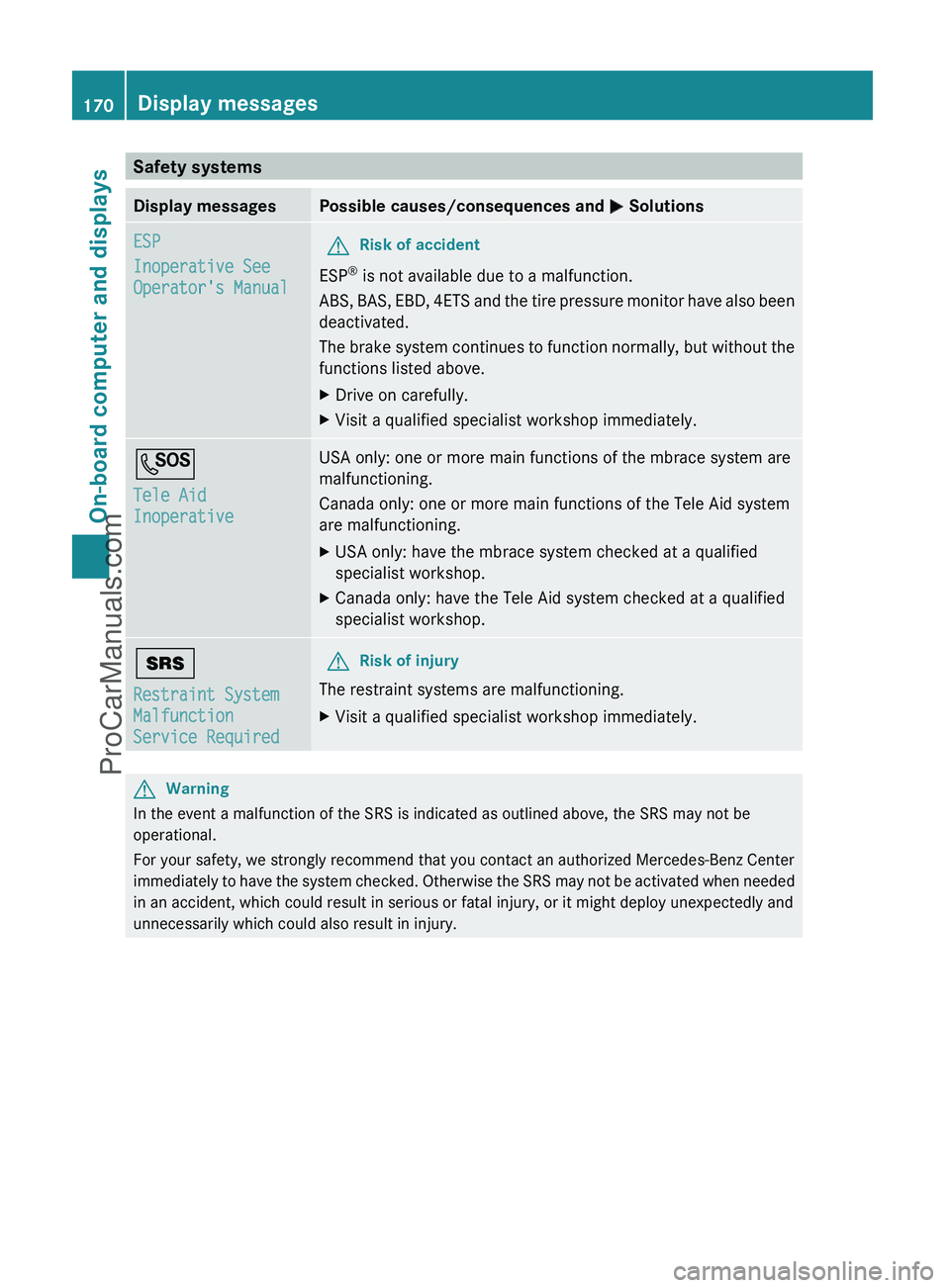
Safety systemsDisplay messagesPossible causes/consequences and M SolutionsESP
Inoperative See
Operator's ManualGRisk of accident
ESP ®
is not available due to a malfunction.
ABS, BAS, EBD, 4ETS and the tire pressure monitor have also been
deactivated.
The brake system continues to function normally, but without the
functions listed above.
XDrive on carefully.XVisit a qualified specialist workshop immediately.G
Tele Aid
InoperativeUSA only: one or more main functions of the mbrace system are
malfunctioning.
Canada only: one or more main functions of the Tele Aid system
are malfunctioning.XUSA only: have the mbrace system checked at a qualified
specialist workshop.XCanada only: have the Tele Aid system checked at a qualified
specialist workshop.+
Restraint System
Malfunction
Service RequiredGRisk of injury
The restraint systems are malfunctioning.
XVisit a qualified specialist workshop immediately.GWarning
In the event a malfunction of the SRS is indicated as outlined above, the SRS may not be
operational.
For your safety, we strongly recommend that you contact an authorized Mercedes-Benz Center
immediately to have the system checked. Otherwise the SRS may not be activated when needed
in an accident, which could result in serious or fatal injury, or it might deploy unexpectedly and
unnecessarily which could also result in injury.
170Display messagesOn-board computer and displays
ProCarManuals.com
Page 173 of 288
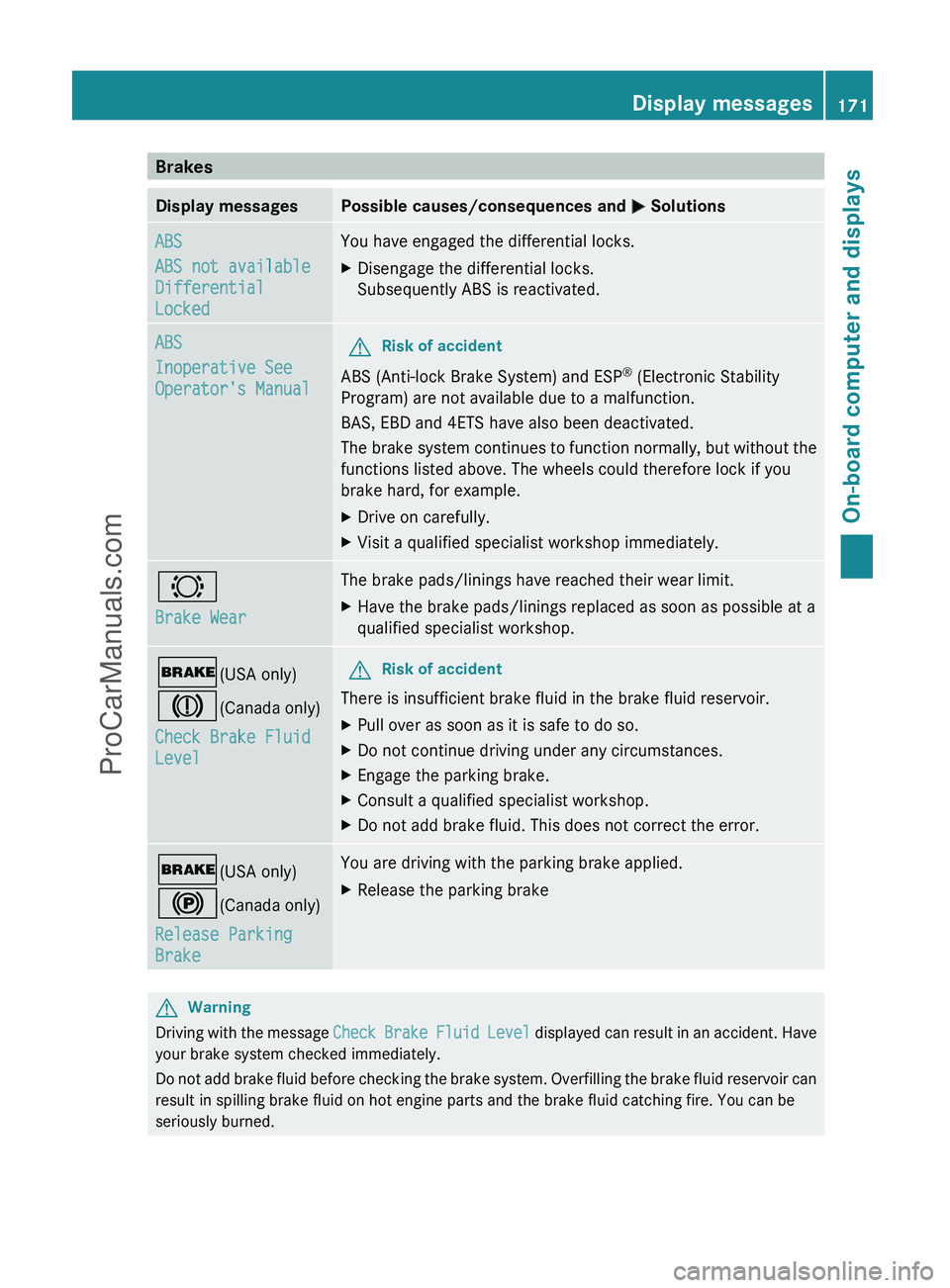
BrakesDisplay messagesPossible causes/consequences and M SolutionsABS
ABS not available
Differential
LockedYou have engaged the differential locks.XDisengage the differential locks.
Subsequently ABS is reactivated.ABS
Inoperative See
Operator's ManualGRisk of accident
ABS (Anti-lock Brake System) and ESP ®
(Electronic Stability
Program) are not available due to a malfunction.
BAS, EBD and 4ETS have also been deactivated.
The brake system continues to function normally, but without the
functions listed above. The wheels could therefore lock if you
brake hard, for example.
XDrive on carefully.XVisit a qualified specialist workshop immediately.#
Brake WearThe brake pads/linings have reached their wear limit.XHave the brake pads/linings replaced as soon as possible at a
qualified specialist workshop.$ (USA only)
J (Canada only)
Check Brake Fluid
LevelGRisk of accident
There is insufficient brake fluid in the brake fluid reservoir.
XPull over as soon as it is safe to do so.XDo not continue driving under any circumstances.XEngage the parking brake.XConsult a qualified specialist workshop.XDo not add brake fluid. This does not correct the error.$ (USA only)
! (Canada only)
Release Parking
BrakeYou are driving with the parking brake applied.XRelease the parking brakeGWarning
Driving with the message Check Brake Fluid Level displayed can result in an accident. Have
your brake system checked immediately.
Do not add brake fluid before checking the brake system. Overfilling the brake fluid reservoir can
result in spilling brake fluid on hot engine parts and the brake fluid catching fire. You can be
seriously burned.
Display messages171On-board computer and displaysZProCarManuals.com
Page 174 of 288
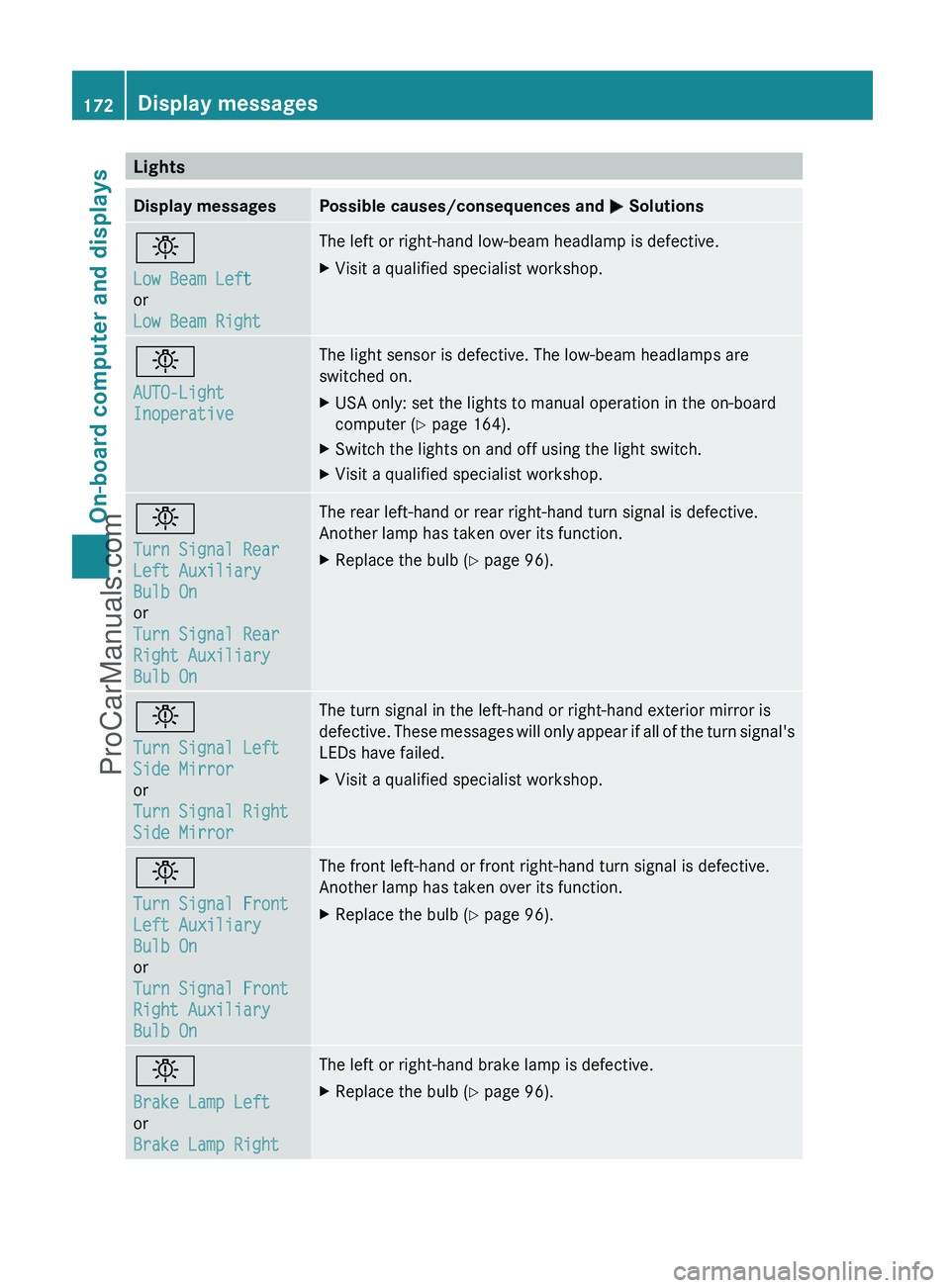
LightsDisplay messagesPossible causes/consequences and M Solutionsb
Low Beam Left
or
Low Beam RightThe left or right-hand low-beam headlamp is defective.XVisit a qualified specialist workshop.b
AUTO-Light
InoperativeThe light sensor is defective. The low-beam headlamps are
switched on.XUSA only: set the lights to manual operation in the on-board
computer ( Y page 164).XSwitch the lights on and off using the light switch.XVisit a qualified specialist workshop.b
Turn Signal Rear
Left Auxiliary
Bulb On
or
Turn Signal Rear
Right Auxiliary
Bulb OnThe rear left-hand or rear right-hand turn signal is defective.
Another lamp has taken over its function.XReplace the bulb ( Y page 96).b
Turn Signal Left
Side Mirror
or
Turn Signal Right
Side MirrorThe turn signal in the left-hand or right-hand exterior mirror is
defective. These messages will only appear if all of the turn signal's
LEDs have failed.XVisit a qualified specialist workshop.b
Turn Signal Front
Left Auxiliary
Bulb On
or
Turn Signal Front
Right Auxiliary
Bulb OnThe front left-hand or front right-hand turn signal is defective.
Another lamp has taken over its function.XReplace the bulb ( Y page 96).b
Brake Lamp Left
or
Brake Lamp RightThe left or right-hand brake lamp is defective.XReplace the bulb ( Y page 96).172Display messagesOn-board computer and displays
ProCarManuals.com