display MERCEDES-BENZ G-CLASS 2011 Service Manual
[x] Cancel search | Manufacturer: MERCEDES-BENZ, Model Year: 2011, Model line: G-CLASS, Model: MERCEDES-BENZ G-CLASS 2011Pages: 288, PDF Size: 11.6 MB
Page 154 of 288
Problems with ultrasonic reversing aidProblemPossible causes/consequences and M SolutionsYou hear a warning
signal when backing
up.The ultrasonic backing up aid sensors are dirty or there is
interference.XClean the ultrasonic backing up aid sensors ( Y page 224).XSwitch the ignition back on.The problem may be caused by an external source of radio or
ultrasound waves. The ultrasonic backing up aid has switched off
automatically.XSee if the ultrasonic backing up aid functions in a different
location.You hear a warning
tone when backing up
or you do not hear a
warning tone and none
of the segments light
up.The ultrasonic backing up aid is malfunctioning and has switched
itself off.XHave the ultrasonic backing up aid checked at a qualified
specialist workshop as soon as possible.Rear view camera
Important safety notes
The rear view camera is an optical parking aid.
It shows the area behind your vehicle in the
COMAND display.
GWarning!
Make sure no persons or animals are in or
near the area in which you are parking/
maneuvering. Otherwise, they could be
injured.
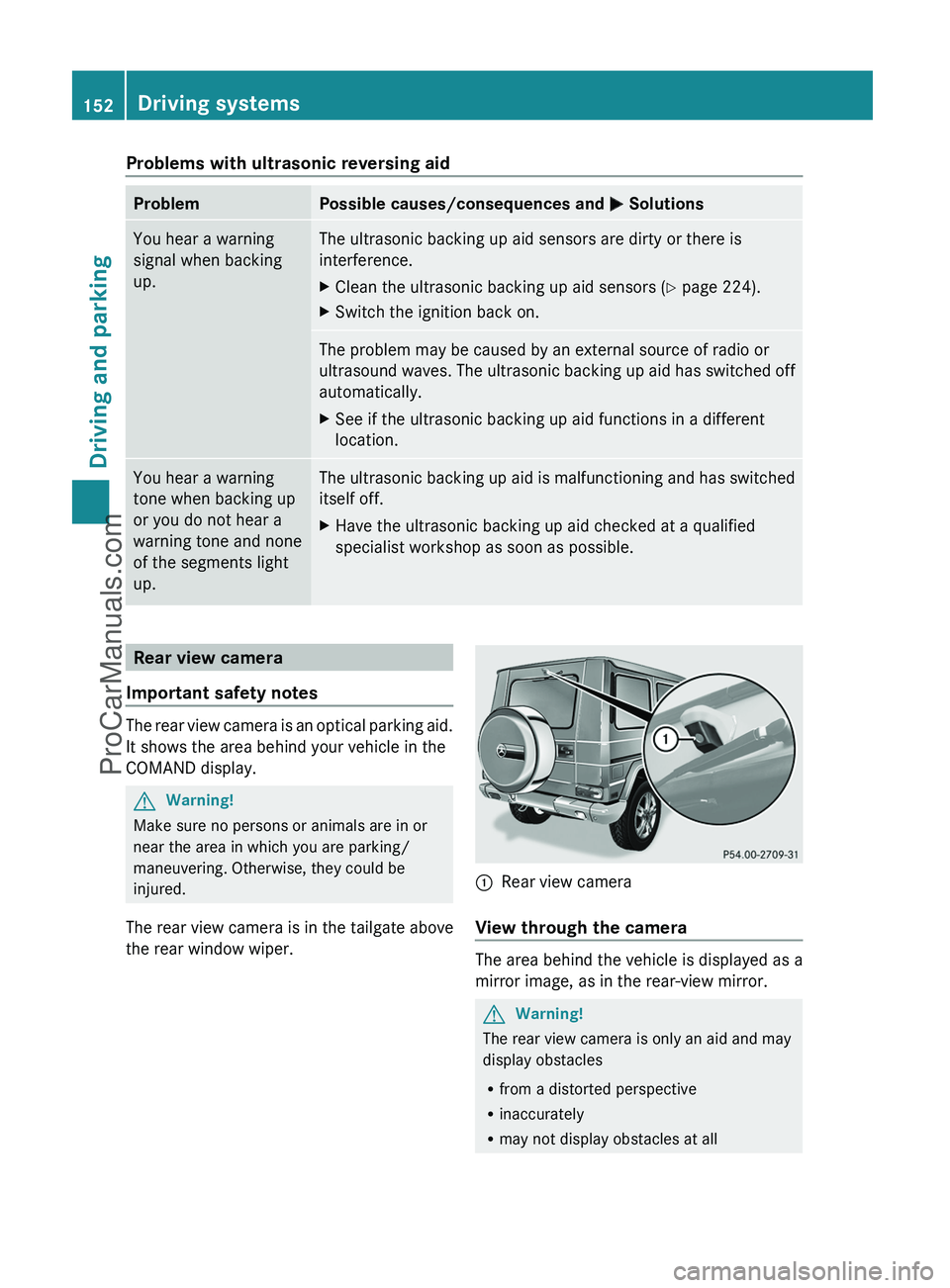
The rear view camera is in the tailgate above
the rear window wiper.
:Rear view camera
View through the camera
The area behind the vehicle is displayed as a
mirror image, as in the rear-view mirror.
GWarning!
The rear view camera is only an aid and may
display obstacles
R from a distorted perspective
R inaccurately
R may not display obstacles at all
152Driving systemsDriving and parking
ProCarManuals.com
Page 155 of 288
The rear view camera does not relieve you of
the responsibility to be cautious. Take care
and pay careful attention. The rear view
camera may not show objects which are
R very close to the rear bumper
R under the rear bumper
R under the spare wheel
R nearby behind the spare wheel
You are responsible for safety at all times and
must continue to pay attention to the
immediate surroundings when parking and
maneuvering. This includes the area behind,
in front of, and beside the vehicle. Otherwise
you could endanger yourself and/or others.GWarning!
The rear view camera either will not function
or will not function to its full capability if
R the tailgate is open
R it is raining very hard, snowing or foggy
R it is night or you are parking/maneuvering
your vehicle in an area where it is very dark
R the camera is exposed to a very bright white
light
R the immediate surroundings are
illuminated with fluorescent light (the
display may flicker)
R there is a sudden change in temperature,
e.g. if you drive into a heated garage from
the cold (lens condensation)
R the camera lens is dirty or covered
R the rear of your vehicle is damaged
In this case, have the position and setting
of the camera checked by a qualified
specialist workshop. Mercedes-Benz
recommends that you contact a Mercedes-
Benz Center for this purpose.
Do not use the rear view camera in these
situations. Otherwise you could injure
yourself or others and/or damage property
including your vehicle while parking/
maneuvering.
Activating the rear view cameraXMake sure that the SmartKey is in
position 2 in the ignition lock.XMake sure that the "rear view camera"
function is selected in COMAND (see the
separate operating instructions for
COMAND).XEngage reverse gear.
The area behind the vehicle is shown in the
COMAND display.Driving systems153Driving and parkingZProCarManuals.com
Page 157 of 288
Vehicle equipment ............................156
Important safety notes ....................156
Displays and operation ....................156
Menus and submenus ......................159
Display messages ............................. 169
Warning and indicator lamps in the
instrument cluster ............................183155On-board computer and displaysProCarManuals.com
Page 158 of 288
Vehicle equipment
i This manual describes all the standard
and optional equipment of your vehicle
which was available at the time of
purchase. Country-specific differences are
possible. Please note that your vehicle may
not be equipped with all features
described. This also applies to safety-
relevant systems and functions.
Important safety notes
You will find an illustration of the instrument
cluster in the "At a glance" section
( Y page 26).
GWarning
A driver's attention to the road and traffic
conditions must always be his/her primary
focus when driving.
For your safety and the safety of others,
selecting features through the multifunction
steering wheel should only be done by the
driver when traffic and road conditions permit
it to be done safely.
Bear in mind that at a speed of just 30 mph
(approximately 50 km/h ), your vehicle is
covering a distance of 44 feet (approximately
14 m) every second.
GWarning!
No messages will be displayed if either the
instrument cluster or the multifunction
display is inoperative.
As a result, you will not be able to see
information about your driving conditions,
such as
R speed
R outside temperature
R warning/indicator lamps
R malfunction/warning messages
R failure of any systems
Driving characteristics may be impaired.
If you must continue to drive, do so with added
caution. Contact an authorized Mercedes-
Benz Center as soon as possible.GWarning
Malfunction and warning messages are only
indicated for certain systems and are
intentionally not very detailed. The
malfunction and warning messages are
simply a reminder with respect to the
operation of certain systems. They do not
replace the owner's and/or driver's
responsibility to maintain the vehicle's
operating safety. Have all required
maintenance and safety checks performed on
the vehicle. Bring the vehicle to an authorized
Mercedes-Benz Center to address the
malfunction and warning messages.
Displays and operation
Tachometer
The red band in the tachometer indicates the
engine's overrevving range.
! Do not drive in the overrevving range, as
this could damage the engine.
The fuel supply is interrupted to protect the
engine when the red band is reached.
Displaying the coolant temperature
GWarning
Driving when your engine is overheated can
cause some fluids which may have leaked into
the engine compartment to catch fire. You
could be seriously burned.
Steam from an overheated engine can cause
serious burns which can occur just by opening
the engine hood. Stay away from the engine
if you see or hear steam coming from it.
Stop the vehicle in a safe location away from
other traffic. Turn off the engine, get out of the
vehicle and do not stand near the vehicle until
the engine has cooled down.
156Displays and operationOn-board computer and displays
ProCarManuals.com
Page 159 of 288
The coolant temperature gauge is in the
instrument cluster on the left-hand side.
Under normal driving conditions, with the
correct anti-corrosion and antifreeze additive
concentration, the reading may rise to
248 ‡(120 †).
! If the coolant temperature exceeds
248 ‡(120 †) do not continue driving. The
engine will otherwise be damaged.
Outside temperature display
The outside temperature display is in the
multifunction display ( Y page 158).
GWarning!
The outside temperature indicator is not
designed to serve as an ice-warning device
and is therefore unsuitable for that purpose.
Indicated temperatures just above the
freezing point do not guarantee that the road
surface is free of ice. The road may still be icy,
especially in wooded areas or on bridges.
Changes in the outside temperature are
displayed after a short delay.
Operating the on-board computer
The on-board computer is activated as soon
as you turn the SmartKey to position 1 in the
ignition lock.
You can control the multifunction display and
the settings in the on-board computer using
the buttons on the multifunction steering
wheel.
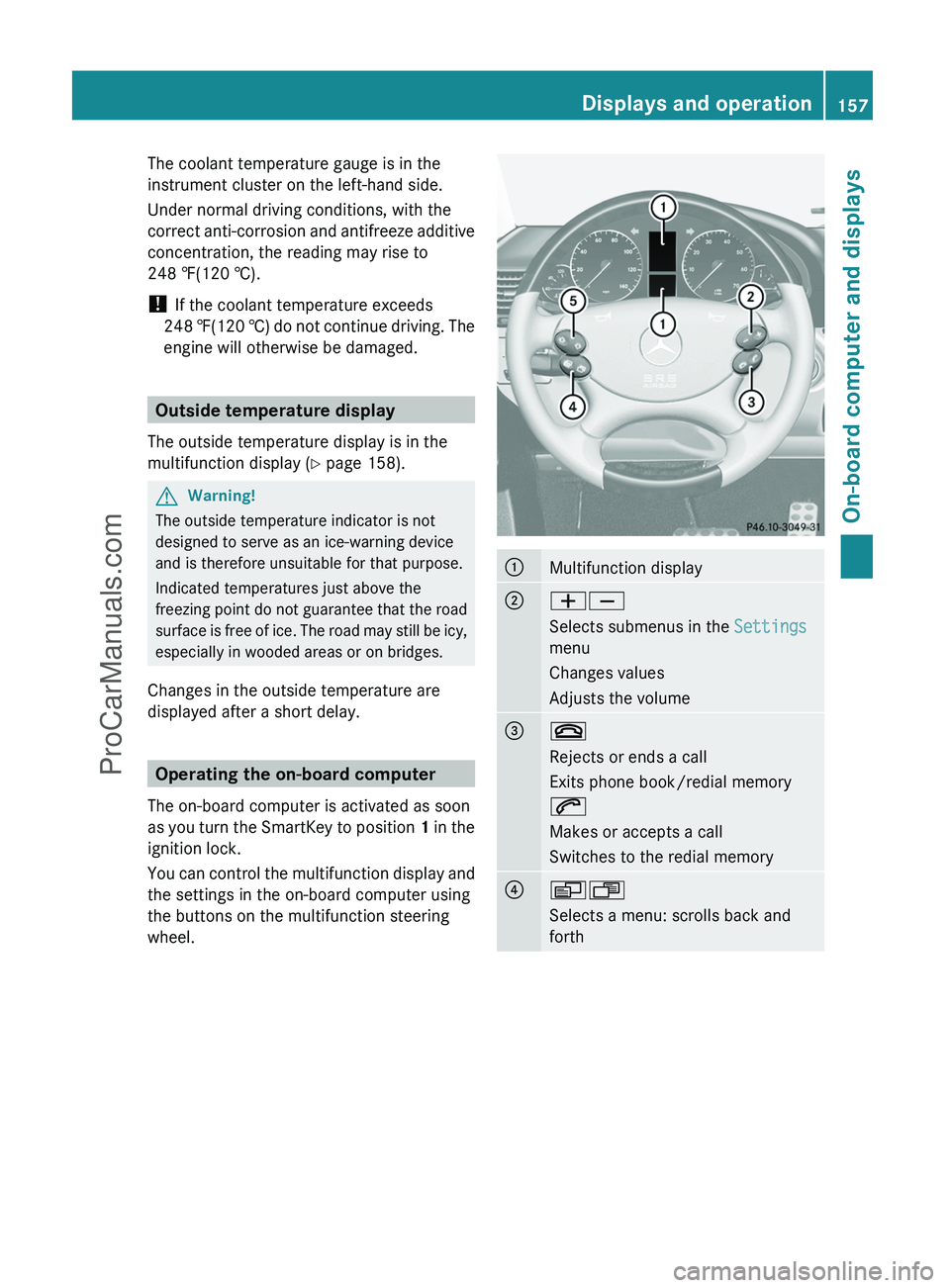
:Multifunction display;WX
Selects submenus in the Settings
menu
Changes values
Adjusts the volume=~
Rejects or ends a call
Exits phone book/redial memory
6
Makes or accepts a call
Switches to the redial memory?VU
Selects a menu: scrolls back and
forthDisplays and operation157On-board computer and displaysZProCarManuals.com
Page 160 of 288
A&*
Press briefly:
Scrolls back and forth within a menu
In the Audio menu: selects a stored
station, an audio track or a video
scene
In the Telephone menu: switches to
the phone book and selects a name
or a telephone number&*
Press and hold:
In the Audio menu: selects the
previous/next station or selects an
audio track using rapid scrolling
In the Telephone menu: starts rapid
scrolling through the phone book
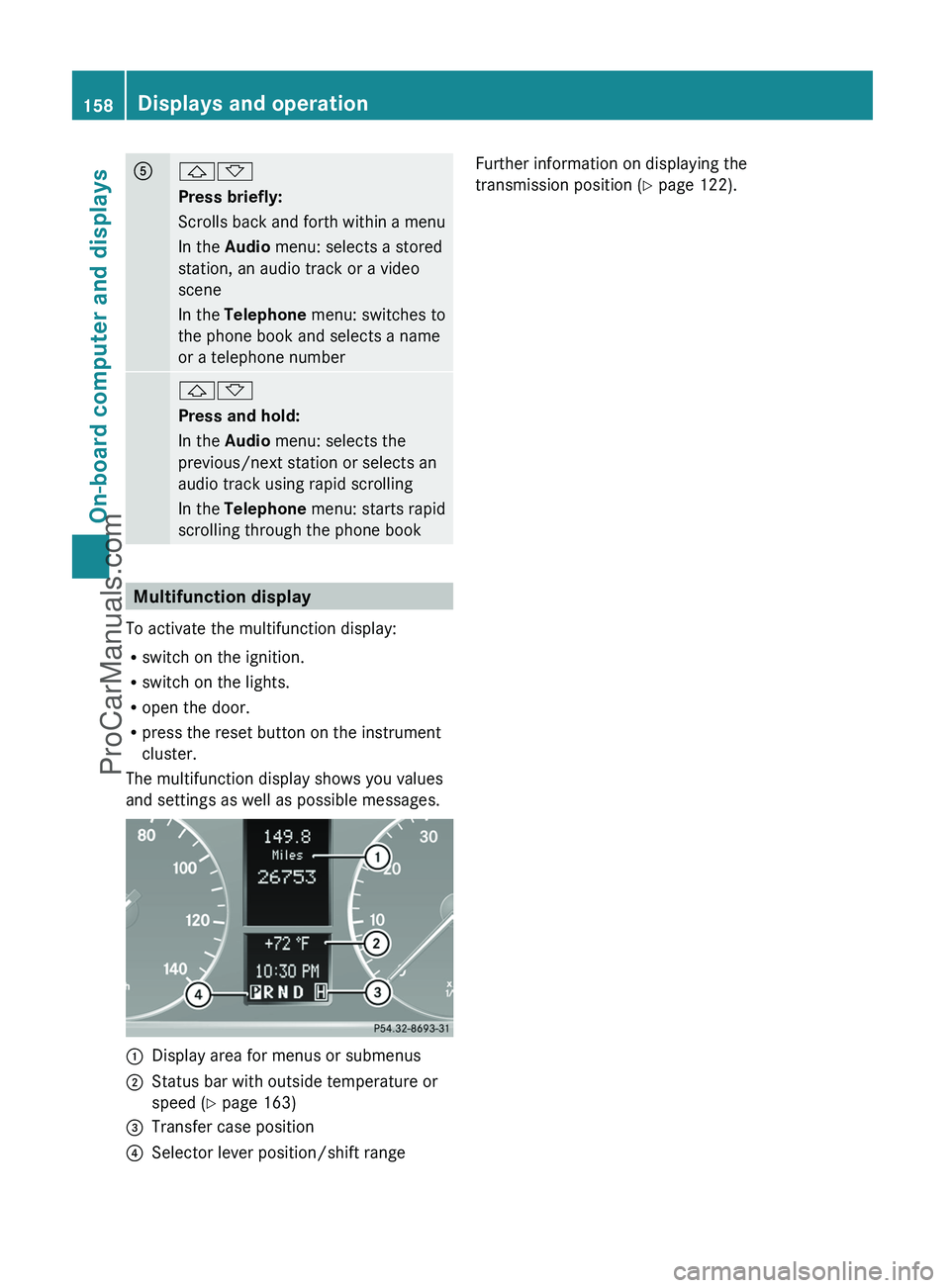
Multifunction display
To activate the multifunction display:
R switch on the ignition.
R switch on the lights.
R open the door.
R press the reset button on the instrument
cluster.
The multifunction display shows you values
and settings as well as possible messages.
:Display area for menus or submenus;Status bar with outside temperature or
speed ( Y page 163)=Transfer case position?Selector lever position/shift rangeFurther information on displaying the
transmission position ( Y page 122).158Displays and operationOn-board computer and displays
ProCarManuals.com
Page 161 of 288
Menus and submenus
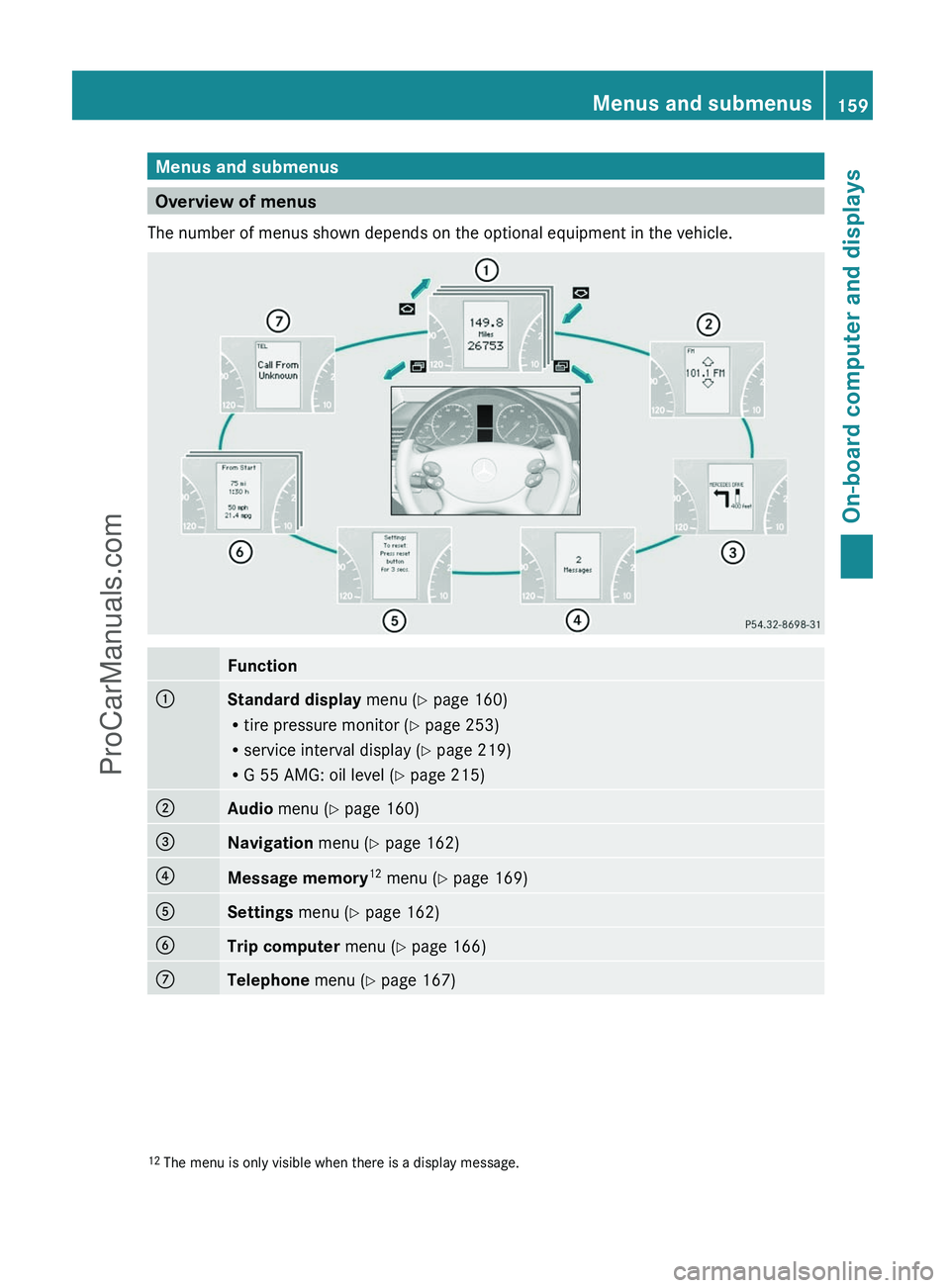
Overview of menus
The number of menus shown depends on the optional equipment in the vehicle.
Function:Standard display menu (Y page 160)
R tire pressure monitor ( Y page 253)
R service interval display ( Y page 219)
R G 55 AMG: oil level ( Y page 215);Audio menu ( Y page 160)=Navigation menu (Y page 162)?Message memory 12
menu ( Y page 169)ASettings menu (Y page 162)BTrip computer menu (Y page 166)CTelephone menu (Y page 167)12
The menu is only visible when there is a display message.Menus and submenus159On-board computer and displaysZProCarManuals.com
Page 162 of 288
Standard display menu
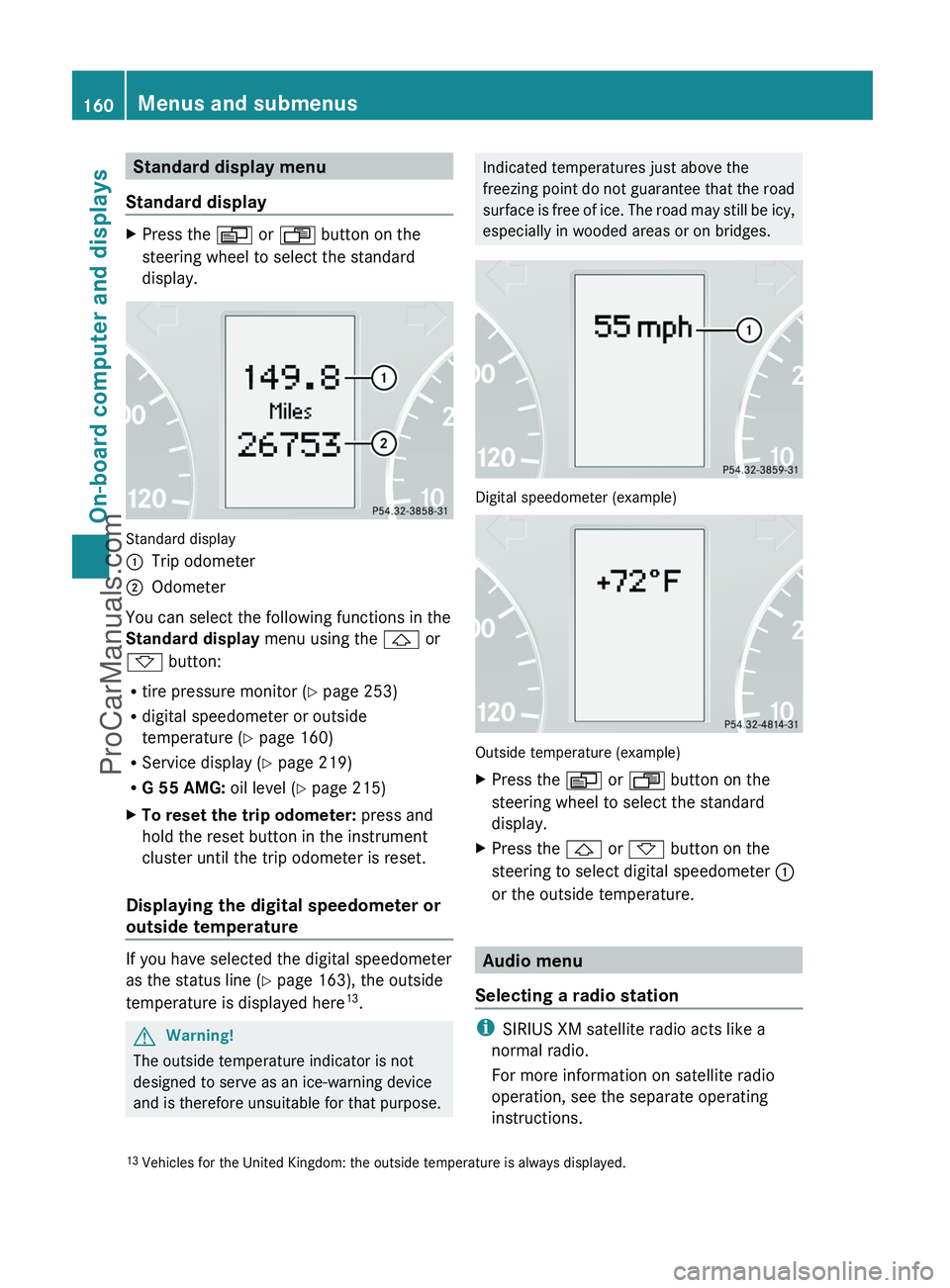
Standard displayXPress the V or U button on the
steering wheel to select the standard
display.
Standard display
:Trip odometer;Odometer
You can select the following functions in the
Standard display menu using the & or
* button:
R tire pressure monitor ( Y page 253)
R digital speedometer or outside
temperature ( Y page 160)
R Service display ( Y page 219)
R G 55 AMG: oil level (Y page 215)
XTo reset the trip odometer: press and
hold the reset button in the instrument
cluster until the trip odometer is reset.
Displaying the digital speedometer or
outside temperature
If you have selected the digital speedometer
as the status line ( Y page 163), the outside
temperature is displayed here 13
.
GWarning!
The outside temperature indicator is not
designed to serve as an ice-warning device
and is therefore unsuitable for that purpose.
Indicated temperatures just above the
freezing point do not guarantee that the road
surface is free of ice. The road may still be icy,
especially in wooded areas or on bridges.
Digital speedometer (example)
Outside temperature (example)
XPress the V or U button on the
steering wheel to select the standard
display.XPress the & or * button on the
steering to select digital speedometer :
or the outside temperature.
Audio menu
Selecting a radio station
i SIRIUS XM satellite radio acts like a
normal radio.
For more information on satellite radio
operation, see the separate operating
instructions.
13 Vehicles for the United Kingdom: the outside temperature is always displayed.160Menus and submenusOn-board computer and displays
ProCarManuals.com
Page 163 of 288
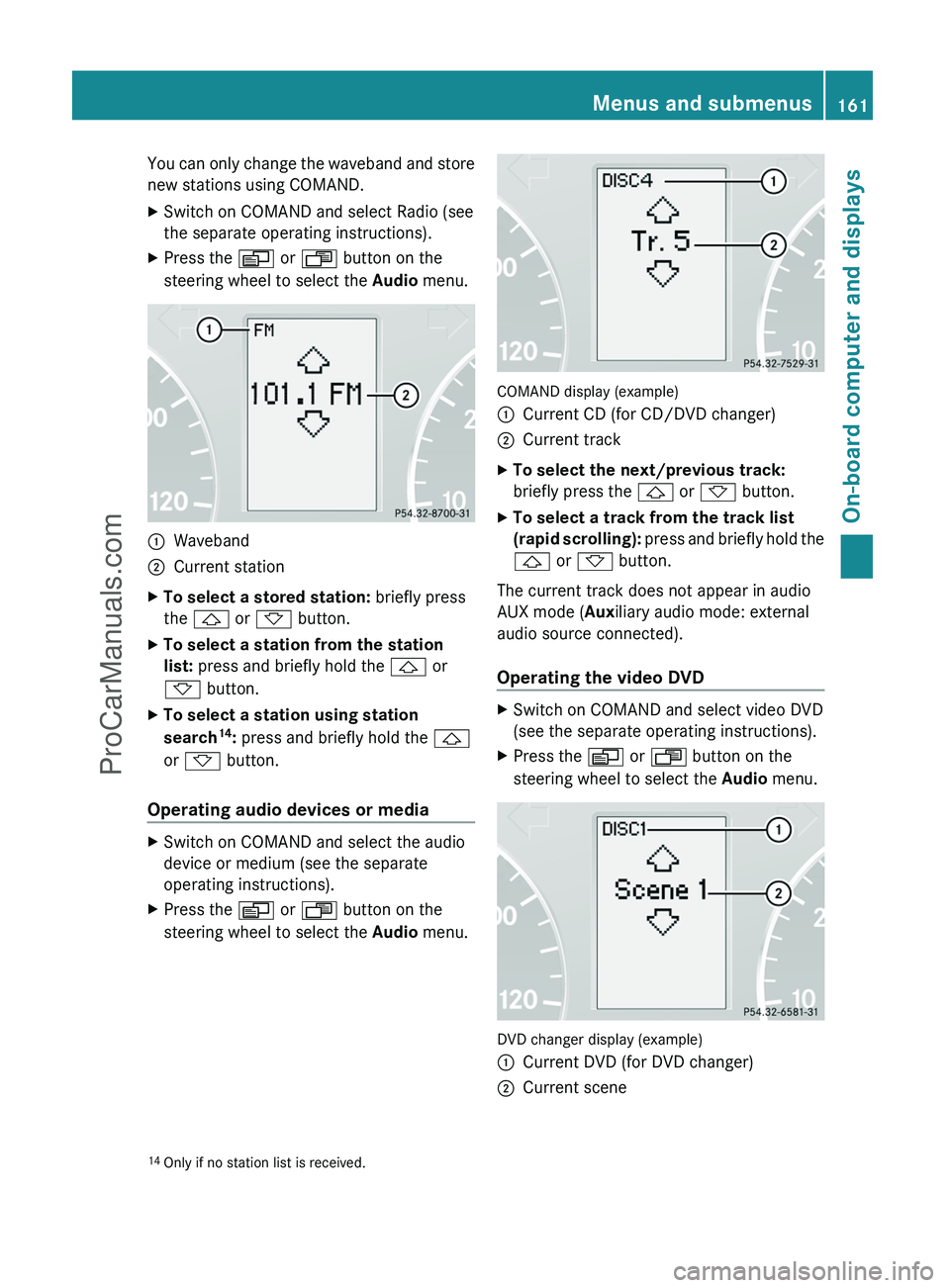
You can only change the waveband and store
new stations using COMAND.XSwitch on COMAND and select Radio (see
the separate operating instructions).XPress the V or U button on the
steering wheel to select the Audio menu.:Waveband;Current stationXTo select a stored station: briefly press
the & or * button.XTo select a station from the station
list: press and briefly hold the & or
* button.XTo select a station using station
search 14
: press and briefly hold the &
or * button.
Operating audio devices or media
XSwitch on COMAND and select the audio
device or medium (see the separate
operating instructions).XPress the V or U button on the
steering wheel to select the Audio menu.
COMAND display (example)
:Current CD (for CD/DVD changer);Current trackXTo select the next/previous track:
briefly press the & or * button.XTo select a track from the track list
(rapid scrolling): press and briefly hold the
& or * button.
The current track does not appear in audio
AUX mode ( Auxiliary audio mode: external
audio source connected).
Operating the video DVD
XSwitch on COMAND and select video DVD
(see the separate operating instructions).XPress the V or U button on the
steering wheel to select the Audio menu.
DVD changer display (example)
:Current DVD (for DVD changer);Current scene14
Only if no station list is received.Menus and submenus161On-board computer and displaysZProCarManuals.com
Page 164 of 288
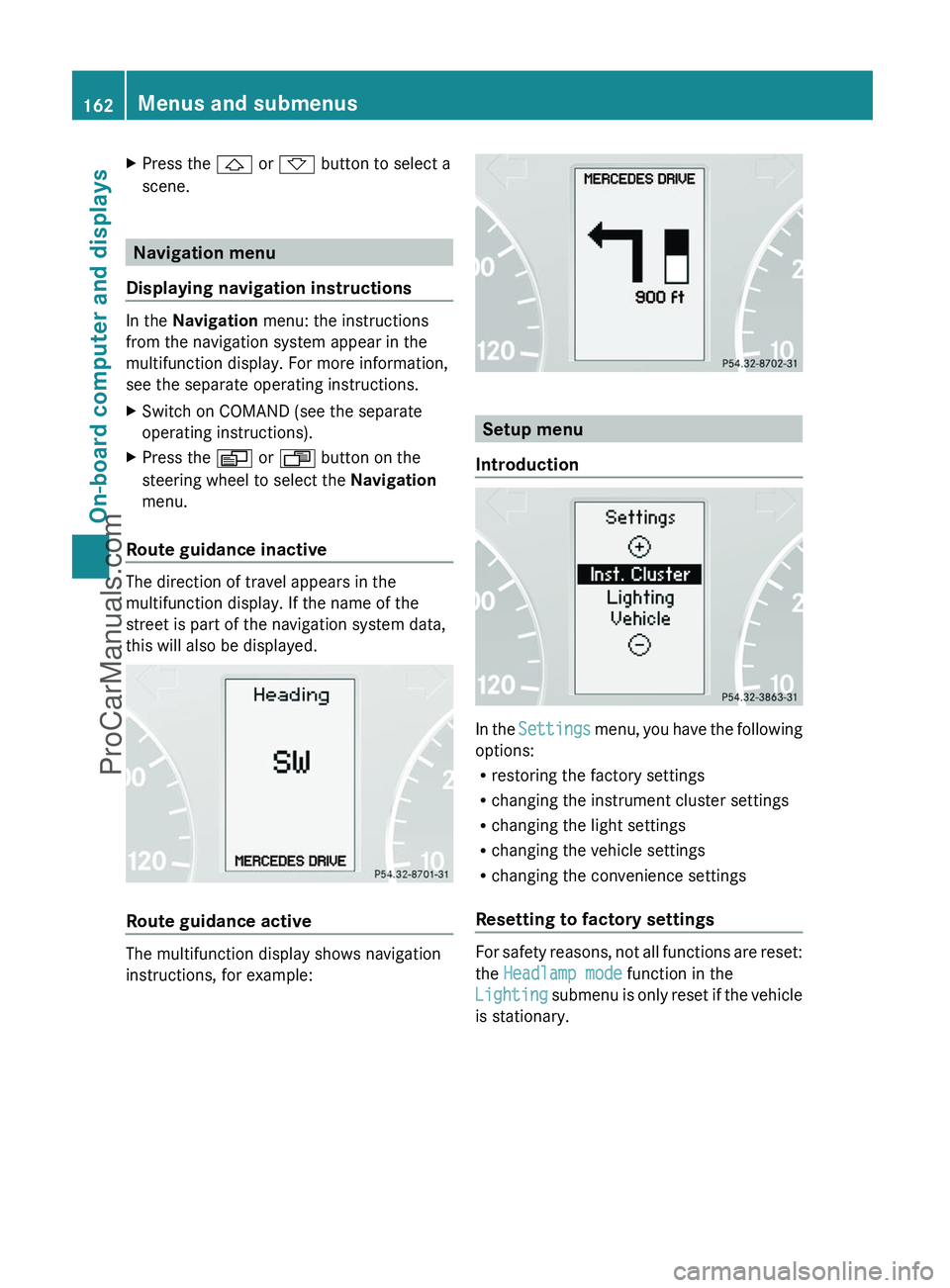
XPress the & or * button to select a
scene.
Navigation menu
Displaying navigation instructions
In the Navigation menu: the instructions
from the navigation system appear in the
multifunction display. For more information,
see the separate operating instructions.
XSwitch on COMAND (see the separate
operating instructions).XPress the V or U button on the
steering wheel to select the Navigation
menu.
Route guidance inactive
The direction of travel appears in the
multifunction display. If the name of the
street is part of the navigation system data,
this will also be displayed.
Route guidance active
The multifunction display shows navigation
instructions, for example:
Setup menu
Introduction
In the Settings menu, you have the following
options:
R restoring the factory settings
R changing the instrument cluster settings
R changing the light settings
R changing the vehicle settings
R changing the convenience settings
Resetting to factory settings
For safety reasons, not all functions are reset:
the Headlamp mode function in the
Lighting submenu is only reset if the vehicle
is stationary.
162Menus and submenusOn-board computer and displays
ProCarManuals.com