reset MERCEDES-BENZ G-CLASS 2011 User Guide
[x] Cancel search | Manufacturer: MERCEDES-BENZ, Model Year: 2011, Model line: G-CLASS, Model: MERCEDES-BENZ G-CLASS 2011Pages: 288, PDF Size: 11.6 MB
Page 90 of 288
passenger side returns to the driving
position.
Calling up a stored parking position
settingXWith the key in position 2 in the ignition
lock and the exterior mirror on the front-
passenger side activated, engage reverse
gear.
The exterior mirror on the front-passenger
side moves to the stored parking position.
The exterior mirror on the front-passenger
side moves back to its original position:
R as soon as you exceed a speed of
10 km/h
R about ten seconds after you have
disengaged reverse gear R
R if you press button = for the exterior
mirror on the driver's side
Memory functions
Storing settings
With the memory function, you can store up
to three different settings, e.g. for three
different people.
The following settings are stored as a single
memory preset:
R position of the seat, backrest and head
restraint
R driver's side: steering wheel position
R driver's side: position of the exterior
mirrors on the driver's and front-passenger
sides
GWarning
Do not activate the memory function while
driving. Activating the memory function while
driving could cause the driver to lose control
of the vehicle.
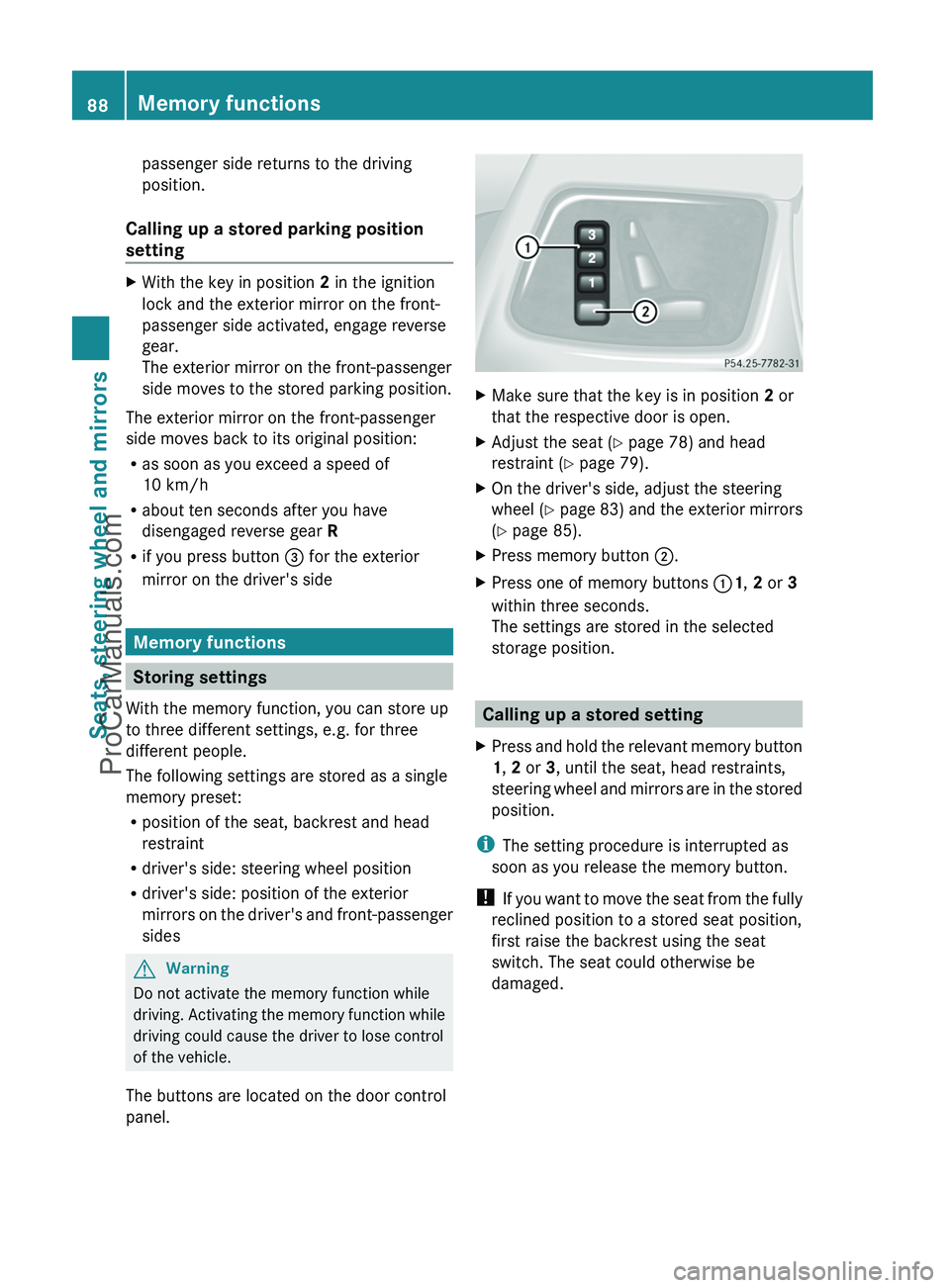
The buttons are located on the door control
panel.
XMake sure that the key is in position 2 or
that the respective door is open.XAdjust the seat ( Y page 78) and head
restraint ( Y page 79).XOn the driver's side, adjust the steering
wheel ( Y page 83) and the exterior mirrors
( Y page 85).XPress memory button ;.XPress one of memory buttons :1, 2 or 3
within three seconds.
The settings are stored in the selected
storage position.
Calling up a stored setting
XPress and hold the relevant memory button
1 , 2 or 3, until the seat, head restraints,
steering wheel and mirrors are in the stored
position.
i The setting procedure is interrupted as
soon as you release the memory button.
! If you want to move the seat from the fully
reclined position to a stored seat position,
first raise the backrest using the seat
switch. The seat could otherwise be
damaged.
88Memory functionsSeats, steering wheel and mirrors
ProCarManuals.com
Page 95 of 288
Combination switch
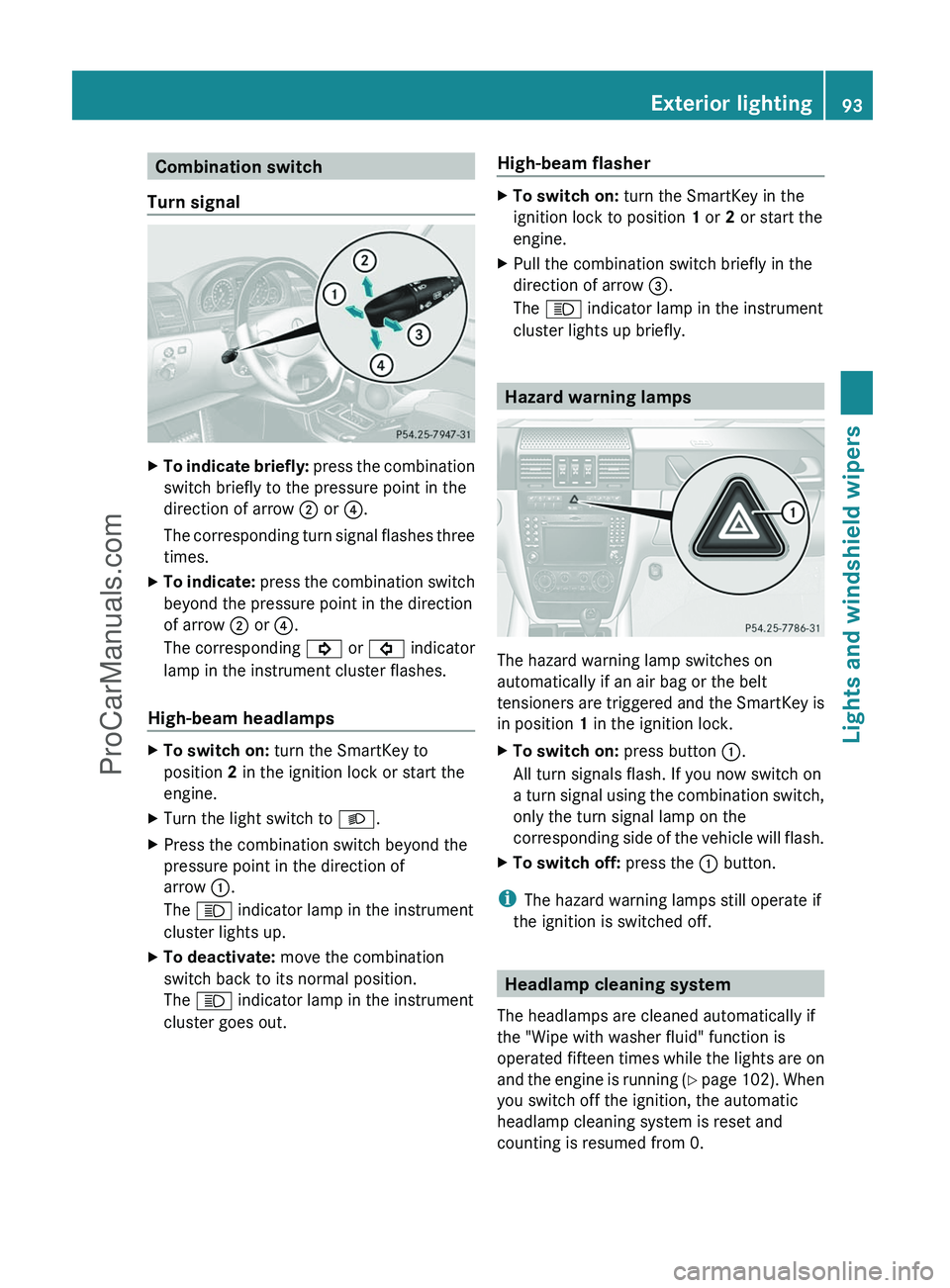
Turn signalXTo indicate briefly: press the combination
switch briefly to the pressure point in the
direction of arrow ; or ?.
The corresponding turn signal flashes three
times.XTo indicate: press the combination switch
beyond the pressure point in the direction
of arrow ; or ?.
The corresponding ! or # indicator
lamp in the instrument cluster flashes.
High-beam headlamps
XTo switch on: turn the SmartKey to
position 2 in the ignition lock or start the
engine.XTurn the light switch to L.XPress the combination switch beyond the
pressure point in the direction of
arrow :.
The K indicator lamp in the instrument
cluster lights up.XTo deactivate: move the combination
switch back to its normal position.
The K indicator lamp in the instrument
cluster goes out.High-beam flasherXTo switch on: turn the SmartKey in the
ignition lock to position 1 or 2 or start the
engine.XPull the combination switch briefly in the
direction of arrow =.
The K indicator lamp in the instrument
cluster lights up briefly.
Hazard warning lamps
The hazard warning lamp switches on
automatically if an air bag or the belt
tensioners are triggered and the SmartKey is
in position 1 in the ignition lock.
XTo switch on: press button :.
All turn signals flash. If you now switch on
a turn signal using the combination switch,
only the turn signal lamp on the
corresponding side of the vehicle will flash.XTo switch off: press the : button.
i
The hazard warning lamps still operate if
the ignition is switched off.
Headlamp cleaning system
The headlamps are cleaned automatically if
the "Wipe with washer fluid" function is
operated fifteen times while the lights are on
and the engine is running (Y page 102). When
you switch off the ignition, the automatic
headlamp cleaning system is reset and
counting is resumed from 0.
Exterior lighting93Lights and windshield wipersZProCarManuals.com
Page 149 of 288
Driving systems
Cruise control
Important safety notes
Cruise control maintains a constant road
speed for you. On long and steep downhill
gradients, especially if the vehicle is laden,
you must select shift range 1, 2 or 3 in good
time. By doing so, you will make use of the
braking effect of the engine, which relieves
the load on the brake system and prevents
the brakes from overheating and wearing too
quickly.
Use cruise control only if road and traffic
conditions make it appropriate to maintain a
steady speed for a prolonged period. You can
store any road speed above 20 mph
(30 km/h).
GWarning
The cruise control is a convenience system
designed to assist the driver during vehicle
operation. The driver is and must always
remain responsible for the vehicle's speed
and for safe brake operation.
Only use the cruise control if the road, traffic,
and weather conditions make it advisable to
travel at a constant speed.
R The use of the cruise control can be
dangerous on winding roads or in heavy
traffic because conditions do not allow safe
driving at a constant speed.
R The use of the cruise control can be
dangerous on slippery roads. Rapid
changes in tire traction can result in wheel
spin and loss of control.
R Deactivate the cruise control when driving
in fog.
The "Resume" function should only be
operated if the driver is fully aware of the
previously set speed and wishes to resume
this particular preset speed.
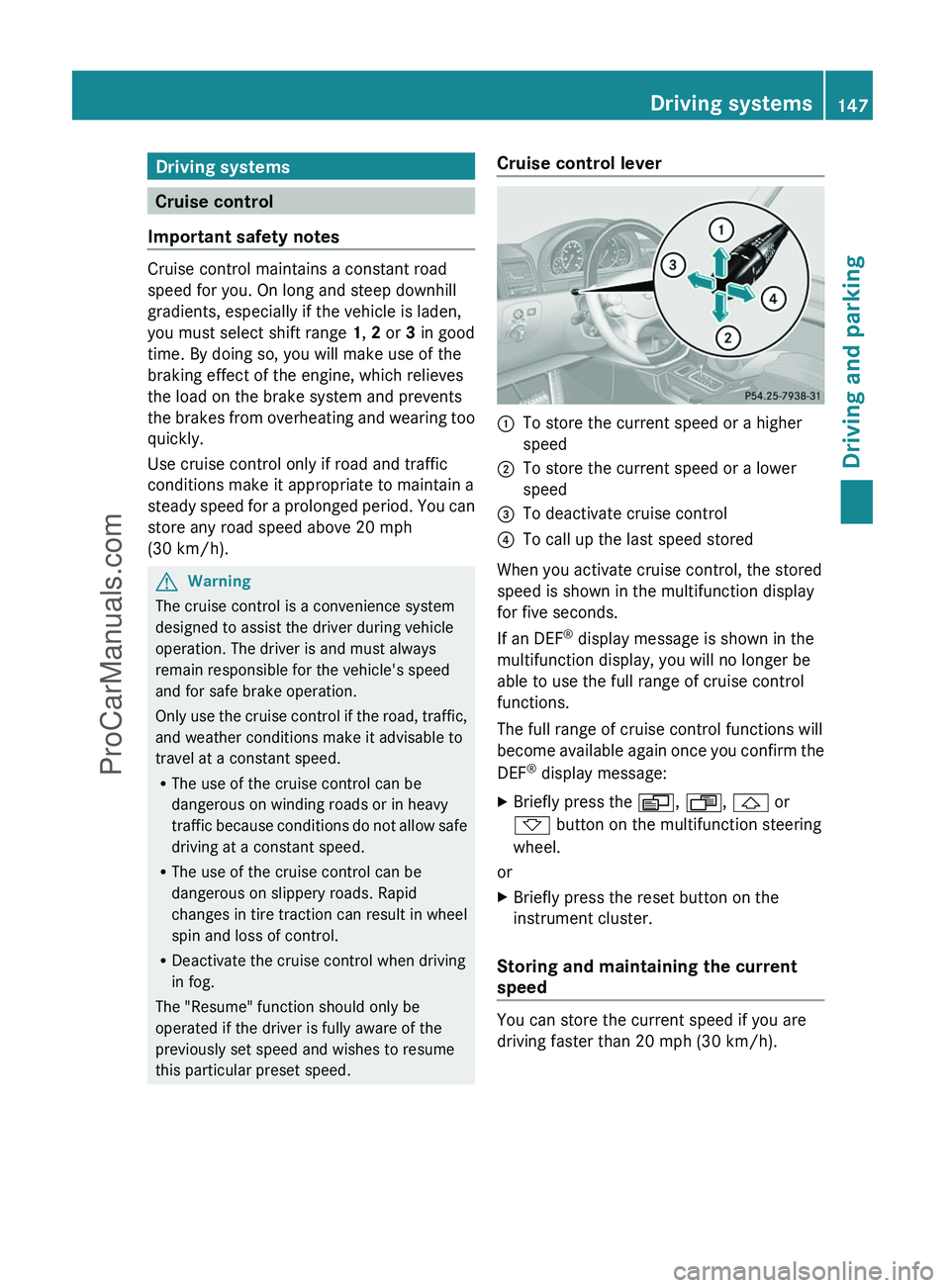
Cruise control lever:To store the current speed or a higher
speed;To store the current speed or a lower
speed=To deactivate cruise control?To call up the last speed stored
When you activate cruise control, the stored
speed is shown in the multifunction display
for five seconds.
If an DEF ®
display message is shown in the
multifunction display, you will no longer be
able to use the full range of cruise control
functions.
The full range of cruise control functions will
become available again once you confirm the
DEF ®
display message:
XBriefly press the V, U , & or
* button on the multifunction steering
wheel.
or
XBriefly press the reset button on the
instrument cluster.
Storing and maintaining the current
speed
You can store the current speed if you are
driving faster than 20 mph (30 km/h).
Driving systems147Driving and parkingZProCarManuals.com
Page 150 of 288
XAccelerate the vehicle to the desired
speed.XBriefly press the cruise control lever
up : or down ;.XRemove your foot from the accelerator
pedal.
Cruise control is activated. The vehicle
automatically maintains the stored speed.
i Cruise control may be unable to maintain
the stored speed on uphill and downhill
gradients. The stored speed is resumed
when the gradient levels out.
Calling up the last speed stored
GWarning
The set speed stored in memory should only
be set again if prevailing road conditions and
legal speed limits permit. Possible
acceleration or deceleration differences
arising from returning to the preset speed
could cause an accident and/or serious injury
to you and others.
XBriefly pull the cruise control lever towards
you ?.XRemove your foot from the accelerator
pedal.
Cruise control is activated and adjusts the
vehicle's speed to the last speed stored.
i G 350 CDI: if no speed is stored, cruise
control stores the current speed and
maintains it.
Setting a speed
GWarning
Keep in mind that it may take a brief moment
until the vehicle has made the necessary
adjustments.
Increase or decrease the set vehicle speed to
a value that the prevailing road conditions and
legal speed limits permit. Otherwise, sudden
and unexpected acceleration or deceleration
of the vehicle could cause an accident and/
or serious injury to you and others.XPress the cruise control lever up : for a
higher speed or down ; for a lower speed.XKeep the cruise control lever pressed until
the desired speed is reached.XRelease the cruise control lever.
The new speed is stored.
i Cruise control is not deactivated if you
depress the accelerator pedal. For
example, if you accelerate briefly to
overtake, cruise control adjusts the
vehicle's speed to the last speed stored
after you have finished overtaking.
Setting in 1 mph (Canada: 1 km/h)
increments
XBriefly press the cruise control lever
up : for a higher speed or down ; for a
lower speed.
The last speed stored is increased or
reduced.
Deactivating cruise control
There are several ways to deactivate cruise
control:
XBriefly press the cruise control lever
forwards =.
or
XBrake.
Cruise control is automatically deactivated if:
R you apply the parking brake.
R you are driving below 20 mph (30 km/h).
R ESP ®
intervenes or you deactivate ESP ®
.
R you shift the transmission to position N
while driving.
R G 350 CDI: you engage a differential lock.
i The last speed stored is cleared when you
switch off the engine.
148Driving systemsDriving and parking
ProCarManuals.com
Page 160 of 288
A&*
Press briefly:
Scrolls back and forth within a menu
In the Audio menu: selects a stored
station, an audio track or a video
scene
In the Telephone menu: switches to
the phone book and selects a name
or a telephone number&*
Press and hold:
In the Audio menu: selects the
previous/next station or selects an
audio track using rapid scrolling
In the Telephone menu: starts rapid
scrolling through the phone book
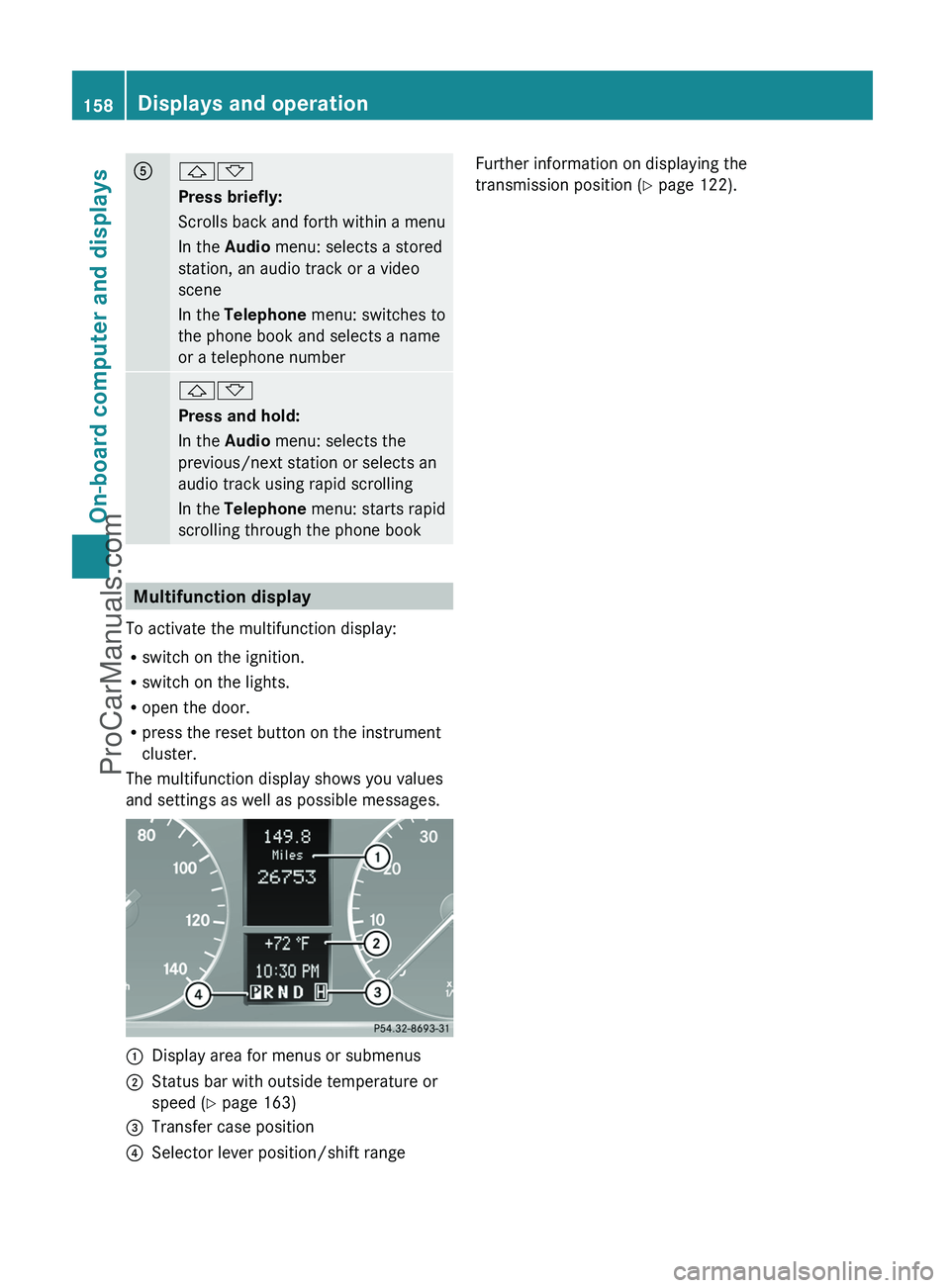
Multifunction display
To activate the multifunction display:
R switch on the ignition.
R switch on the lights.
R open the door.
R press the reset button on the instrument
cluster.
The multifunction display shows you values
and settings as well as possible messages.
:Display area for menus or submenus;Status bar with outside temperature or
speed ( Y page 163)=Transfer case position?Selector lever position/shift rangeFurther information on displaying the
transmission position ( Y page 122).158Displays and operationOn-board computer and displays
ProCarManuals.com
Page 162 of 288
Standard display menu
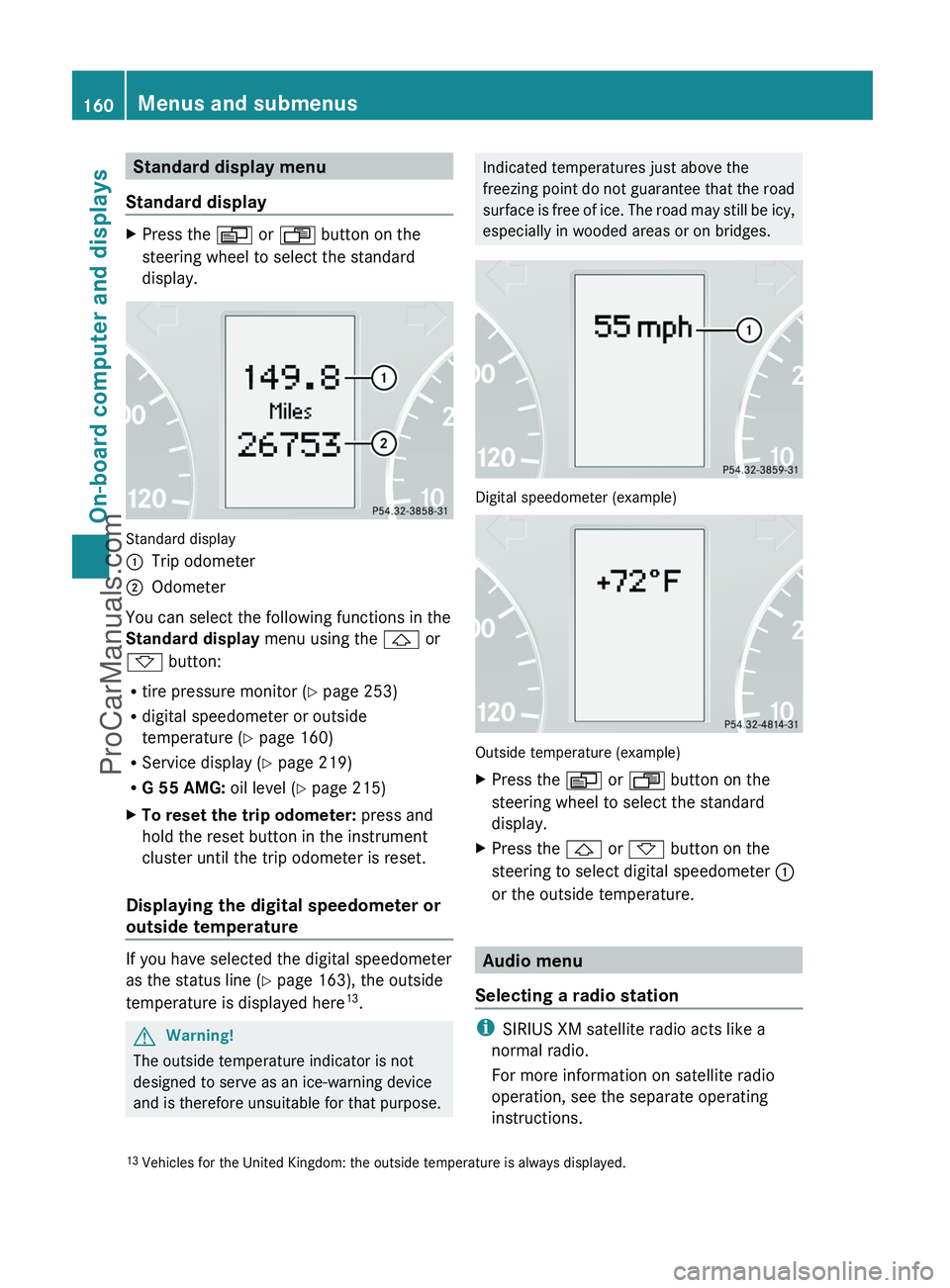
Standard displayXPress the V or U button on the
steering wheel to select the standard
display.
Standard display
:Trip odometer;Odometer
You can select the following functions in the
Standard display menu using the & or
* button:
R tire pressure monitor ( Y page 253)
R digital speedometer or outside
temperature ( Y page 160)
R Service display ( Y page 219)
R G 55 AMG: oil level (Y page 215)
XTo reset the trip odometer: press and
hold the reset button in the instrument
cluster until the trip odometer is reset.
Displaying the digital speedometer or
outside temperature
If you have selected the digital speedometer
as the status line ( Y page 163), the outside
temperature is displayed here 13
.
GWarning!
The outside temperature indicator is not
designed to serve as an ice-warning device
and is therefore unsuitable for that purpose.
Indicated temperatures just above the
freezing point do not guarantee that the road
surface is free of ice. The road may still be icy,
especially in wooded areas or on bridges.
Digital speedometer (example)
Outside temperature (example)
XPress the V or U button on the
steering wheel to select the standard
display.XPress the & or * button on the
steering to select digital speedometer :
or the outside temperature.
Audio menu
Selecting a radio station
i SIRIUS XM satellite radio acts like a
normal radio.
For more information on satellite radio
operation, see the separate operating
instructions.
13 Vehicles for the United Kingdom: the outside temperature is always displayed.160Menus and submenusOn-board computer and displays
ProCarManuals.com
Page 164 of 288
XPress the & or * button to select a
scene.
Navigation menu
Displaying navigation instructions
In the Navigation menu: the instructions
from the navigation system appear in the
multifunction display. For more information,
see the separate operating instructions.
XSwitch on COMAND (see the separate
operating instructions).XPress the V or U button on the
steering wheel to select the Navigation
menu.
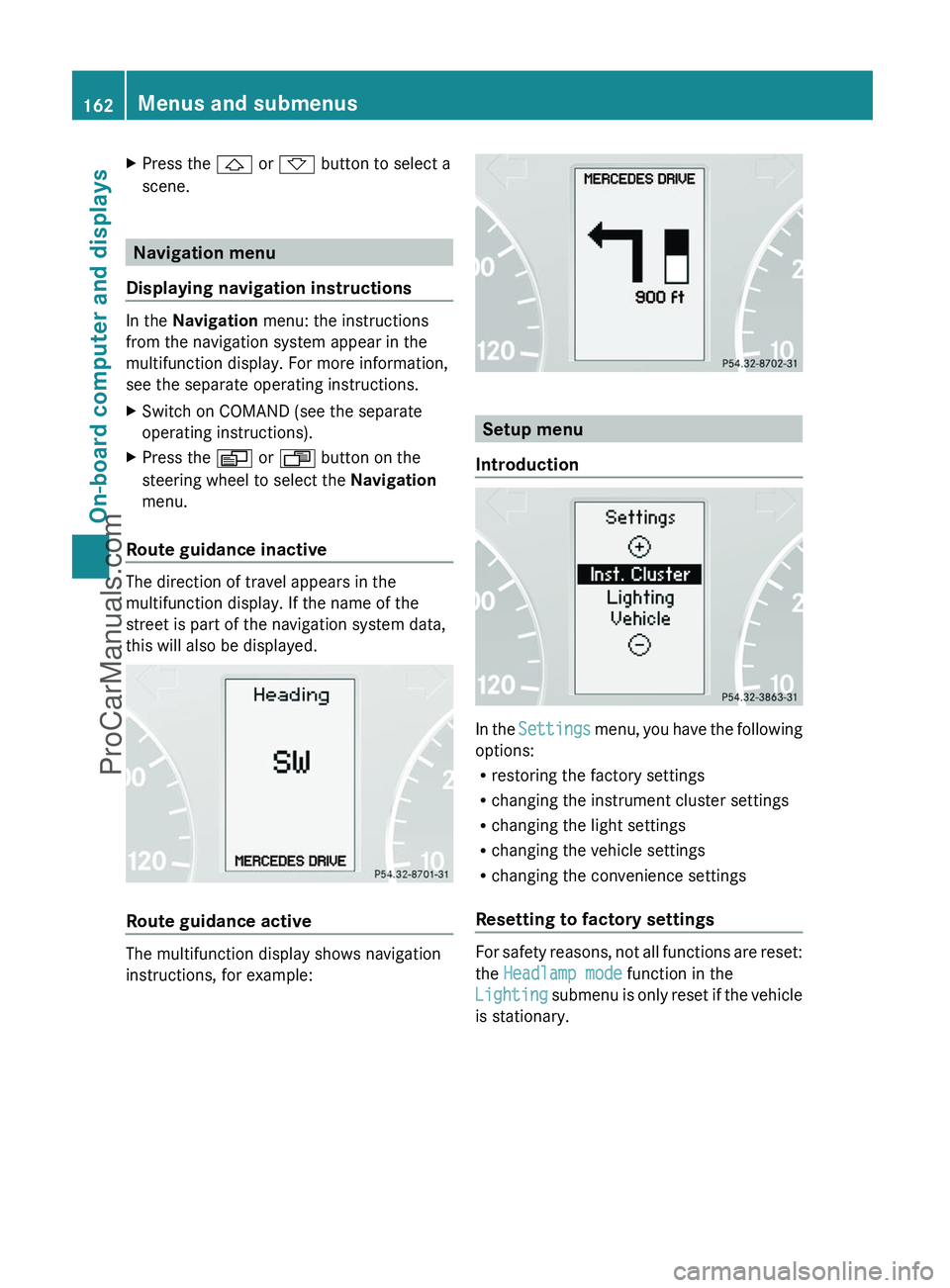
Route guidance inactive
The direction of travel appears in the
multifunction display. If the name of the
street is part of the navigation system data,
this will also be displayed.
Route guidance active
The multifunction display shows navigation
instructions, for example:
Setup menu
Introduction
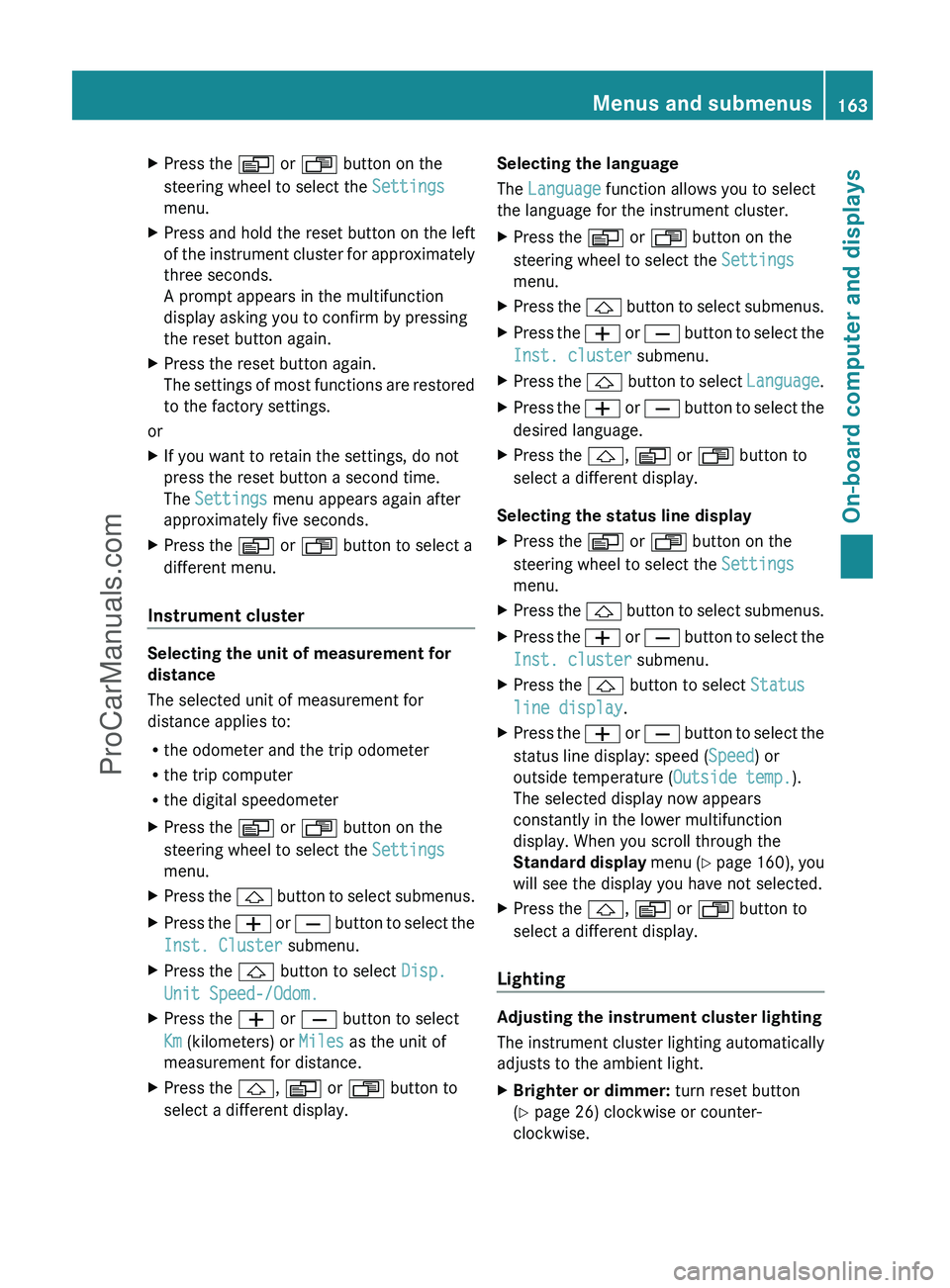
In the Settings menu, you have the following
options:
R restoring the factory settings
R changing the instrument cluster settings
R changing the light settings
R changing the vehicle settings
R changing the convenience settings
Resetting to factory settings
For safety reasons, not all functions are reset:
the Headlamp mode function in the
Lighting submenu is only reset if the vehicle
is stationary.
162Menus and submenusOn-board computer and displays
ProCarManuals.com
Page 165 of 288
XPress the V or U button on the
steering wheel to select the Settings
menu.XPress and hold the reset button on the left
of the instrument cluster for approximately
three seconds.
A prompt appears in the multifunction
display asking you to confirm by pressing
the reset button again.XPress the reset button again.
The settings of most functions are restored
to the factory settings.
or
XIf you want to retain the settings, do not
press the reset button a second time.
The Settings menu appears again after
approximately five seconds.XPress the V or U button to select a
different menu.
Instrument cluster
Selecting the unit of measurement for
distance
The selected unit of measurement for
distance applies to:
R the odometer and the trip odometer
R the trip computer
R the digital speedometer
XPress the V or U button on the
steering wheel to select the Settings
menu.XPress the & button to select submenus.XPress the W or X button to select the
Inst. Cluster submenu.XPress the & button to select Disp.
Unit Speed-/Odom.XPress the W or X button to select
Km (kilometers) or Miles as the unit of
measurement for distance.XPress the &, V or U button to
select a different display.Selecting the language
The Language function allows you to select
the language for the instrument cluster.XPress the V or U button on the
steering wheel to select the Settings
menu.XPress the & button to select submenus.XPress the W or X button to select the
Inst. cluster submenu.XPress the & button to select Language.XPress the W or X button to select the
desired language.XPress the &, V or U button to
select a different display.
Selecting the status line display
XPress the V or U button on the
steering wheel to select the Settings
menu.XPress the & button to select submenus.XPress the W or X button to select the
Inst. cluster submenu.XPress the & button to select Status
line display .XPress the W or X button to select the
status line display: speed ( Speed) or
outside temperature ( Outside temp.).
The selected display now appears
constantly in the lower multifunction
display. When you scroll through the
Standard display menu (Y page 160), you
will see the display you have not selected.XPress the &, V or U button to
select a different display.
Lighting
Adjusting the instrument cluster lighting
The instrument cluster lighting automatically
adjusts to the ambient light.
XBrighter or dimmer: turn reset button
( Y page 26) clockwise or counter-
clockwise.Menus and submenus163On-board computer and displaysZProCarManuals.com
Page 168 of 288
unintentionally activate the easy-entry/exit
feature, which could result in an accident
and/or serious personal injury.XPress the V or U button on the
steering wheel to select the Settings
menu.XPress the & button to select submenus.XPress the W or X button to select the
Convenience submenu.XPress the & button to select the Easy-
entry Function .XPress the W or X button to activate
or deactivate the Easy-entry Function .XPress the &, V or U button to
select a different display.
Trip computer menu
Trip computer "From start" or "From
reset"
The values in the From Start submenu are
calculated from the start of a journey whilst
the values in the From Reset submenu are
calculated from the last time the submenu
was reset.
XPress the V or U button to select
From Start .
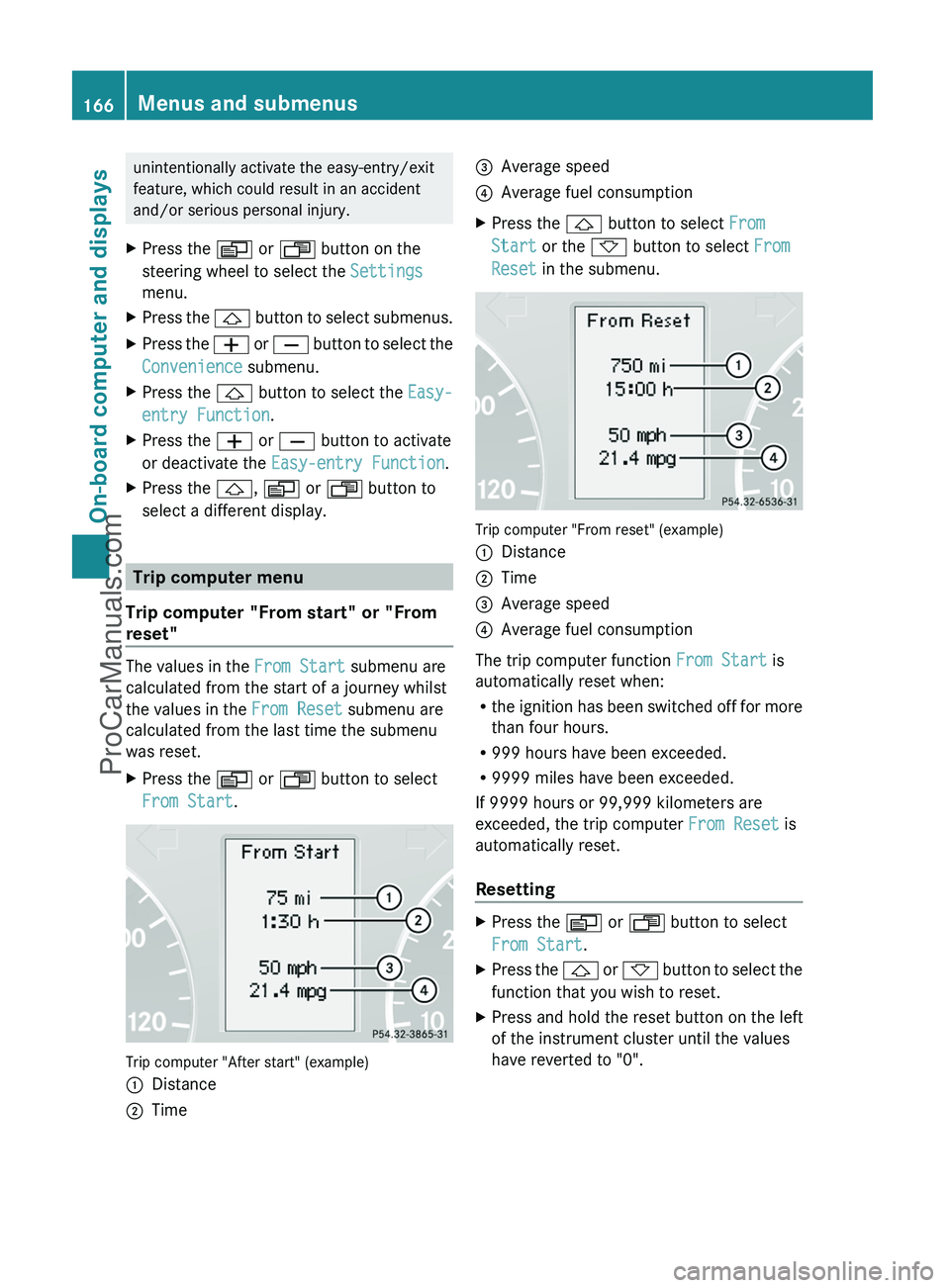
Trip computer "After start" (example)
:Distance;Time=Average speed?Average fuel consumptionXPress the & button to select From
Start or the * button to select From
Reset in the submenu.
Trip computer "From reset" (example)
:Distance;Time=Average speed?Average fuel consumption
The trip computer function From Start is
automatically reset when:
R the ignition has been switched off for more
than four hours.
R 999 hours have been exceeded.
R 9999 miles have been exceeded.
If 9999 hours or 99,999 kilometers are
exceeded, the trip computer From Reset is
automatically reset.
Resetting
XPress the V or U button to select
From Start .XPress the & or * button to select the
function that you wish to reset.XPress and hold the reset button on the left
of the instrument cluster until the values
have reverted to "0".166Menus and submenusOn-board computer and displays
ProCarManuals.com
Page 171 of 288
Display messages
Hiding display messages
GWarning
All categories of messages contain important information which should be taken note of and,
where a malfunction is indicated, addressed as soon as possible at an authorized Mercedes-Benz
Center.
Failure to repair the condition noted may cause damage not covered by the Mercedes-Benz
Limited Warranty, or result in property damage or personal injury.
Display messages appear in the multifunction display.
XPress the V, U , & or * button on the steering wheel to select another display.
or
XPress the reset button on the instrument cluster ( Y page 26).
The display message is cleared.
The multifunction display shows high-priority display messages in red.
You cannot hide display messages of the highest priority. The multifunction display shows
these messages continuously until the causes for the messages have been remedied.
Certain display messages are accompanied by an audible warning tone or a continuous tone.
Please respond in accordance with the display messages and follow the additional notes in
this Operator's Manual.
Message memory menu
The on-board computer saves certain display messages. You can call up the display messages
in the message memory menu.
The message memory menu is only shown if any display messages have been stored.
XPress the V or U button repeatedly, until either the original menu or the message
memory menu is shown.
If there are display messages, the multifunction display shows 2 Messages, for example.XPress the & or * button to scroll through the display messages.
When the ignition is switched off, all display messages are deleted apart from some high-
priority display messages. Once the causes of the high-priority display messages have been
rectified, the corresponding display messages are also deleted.
Display messages169On-board computer and displaysZProCarManuals.com