service MERCEDES-BENZ G-CLASS 2011 Owner's Manual
[x] Cancel search | Manufacturer: MERCEDES-BENZ, Model Year: 2011, Model line: G-CLASS, Model: MERCEDES-BENZ G-CLASS 2011Pages: 288, PDF Size: 11.6 MB
Page 161 of 288
Menus and submenus
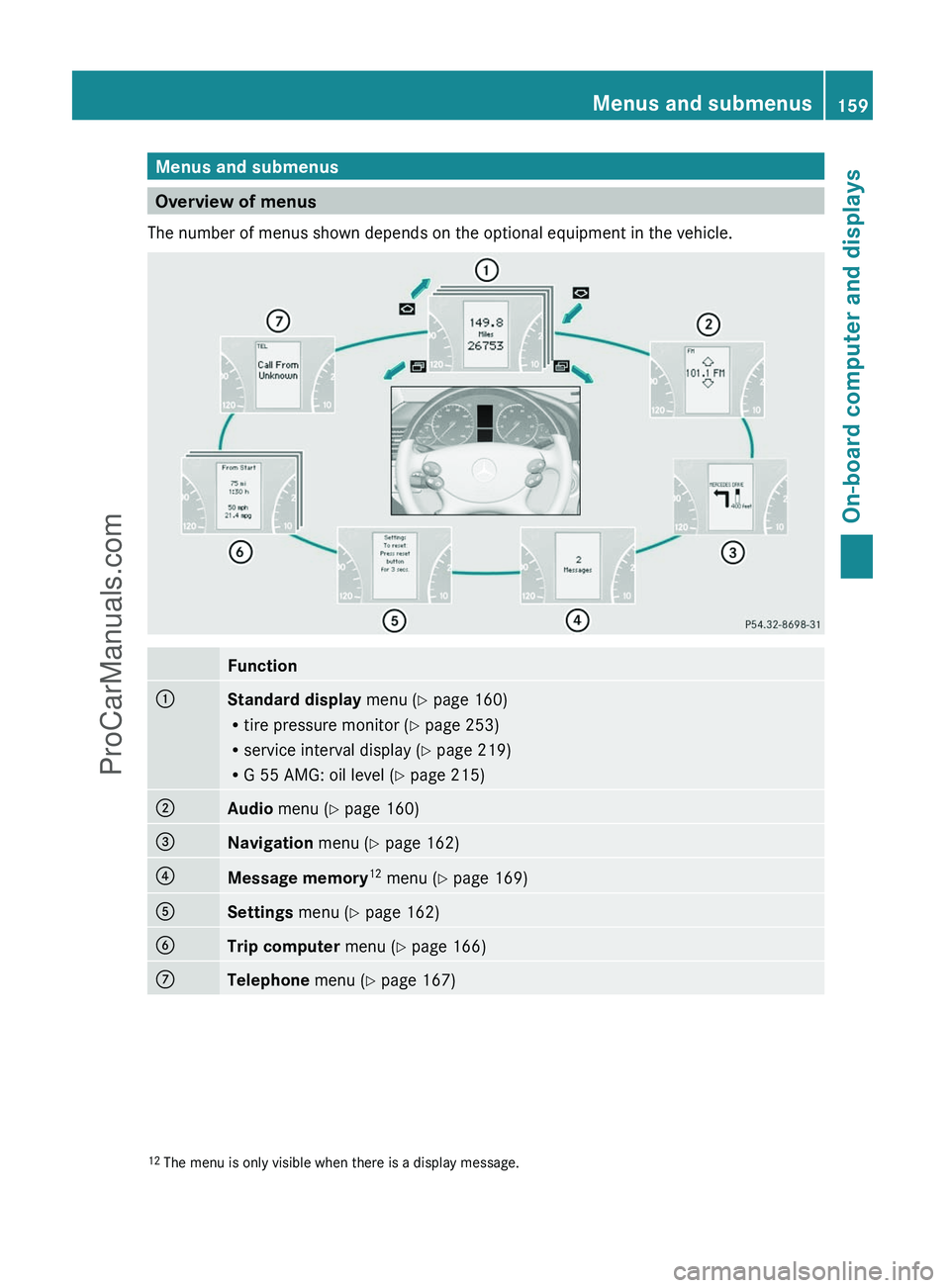
Overview of menus
The number of menus shown depends on the optional equipment in the vehicle.
Function:Standard display menu (Y page 160)
R tire pressure monitor ( Y page 253)
R service interval display ( Y page 219)
R G 55 AMG: oil level ( Y page 215);Audio menu ( Y page 160)=Navigation menu (Y page 162)?Message memory 12
menu ( Y page 169)ASettings menu (Y page 162)BTrip computer menu (Y page 166)CTelephone menu (Y page 167)12
The menu is only visible when there is a display message.Menus and submenus159On-board computer and displaysZProCarManuals.com
Page 162 of 288
Standard display menu
Standard displayXPress the V or U button on the
steering wheel to select the standard
display.
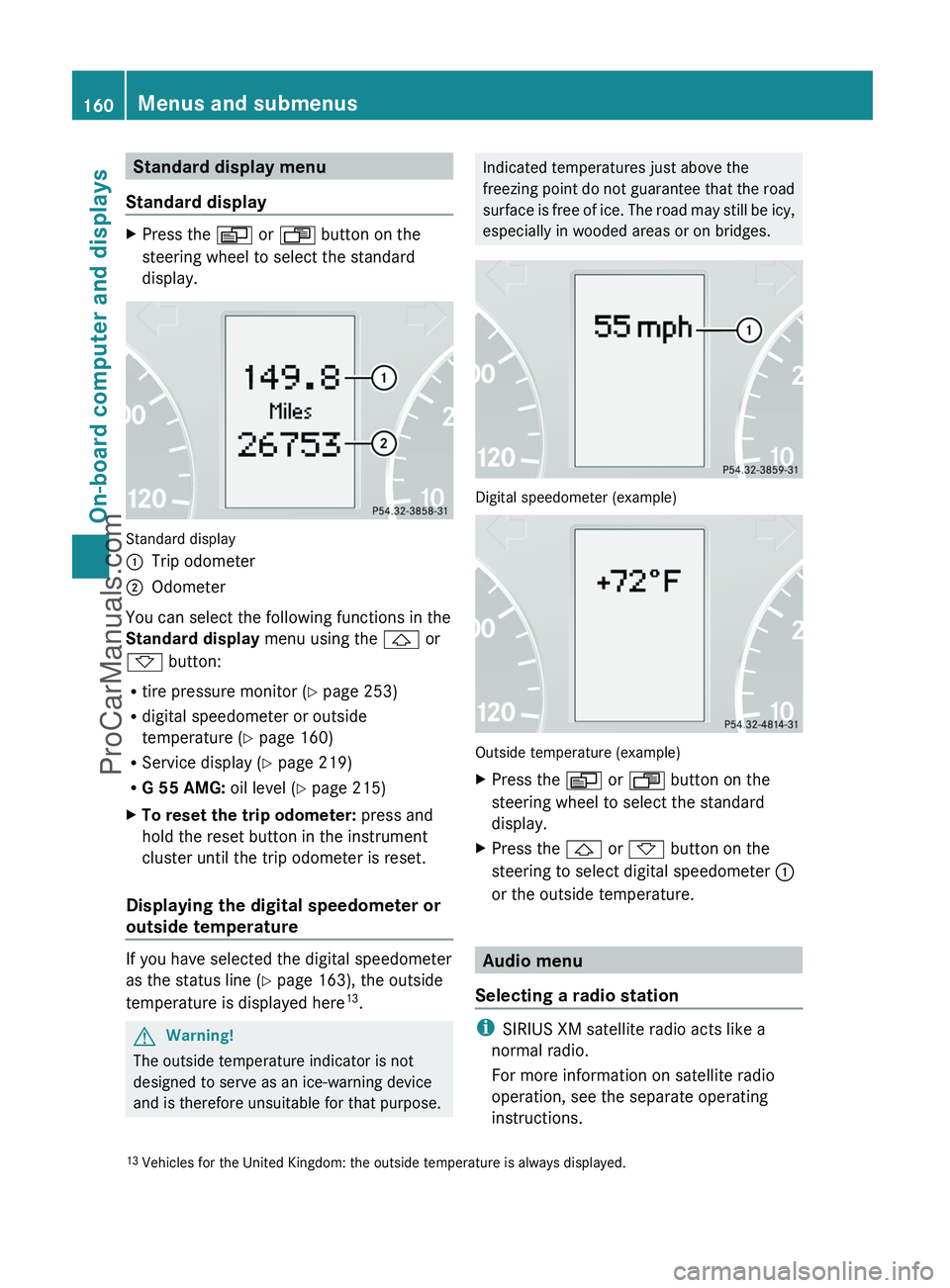
Standard display
:Trip odometer;Odometer
You can select the following functions in the
Standard display menu using the & or
* button:
R tire pressure monitor ( Y page 253)
R digital speedometer or outside
temperature ( Y page 160)
R Service display ( Y page 219)
R G 55 AMG: oil level (Y page 215)
XTo reset the trip odometer: press and
hold the reset button in the instrument
cluster until the trip odometer is reset.
Displaying the digital speedometer or
outside temperature
If you have selected the digital speedometer
as the status line ( Y page 163), the outside
temperature is displayed here 13
.
GWarning!
The outside temperature indicator is not
designed to serve as an ice-warning device
and is therefore unsuitable for that purpose.
Indicated temperatures just above the
freezing point do not guarantee that the road
surface is free of ice. The road may still be icy,
especially in wooded areas or on bridges.
Digital speedometer (example)
Outside temperature (example)
XPress the V or U button on the
steering wheel to select the standard
display.XPress the & or * button on the
steering to select digital speedometer :
or the outside temperature.
Audio menu
Selecting a radio station
i SIRIUS XM satellite radio acts like a
normal radio.
For more information on satellite radio
operation, see the separate operating
instructions.
13 Vehicles for the United Kingdom: the outside temperature is always displayed.160Menus and submenusOn-board computer and displays
ProCarManuals.com
Page 169 of 288
Calling up the rangeXPress the V or U button to select
From Start .XPress the & or * button to select
Range: .
The multifunction display shows the
estimated range of the vehicle, based on
the current driving style and the fuel level.
If there is only a small amount of fuel
remaining in the fuel tank, a gas pump
7 appears instead of the range.
Telephone menu
Introduction
You can establish a Bluetooth ®
connection to
COMAND (see the separate operating
instructions).
GWarning
A driver's attention to the road must always
be his/her primary focus when driving. For
your safety and the safety of others, we
recommend that you pull over to a safe
location and stop before placing or taking a
telephone call. If you choose to use the
telephone while driving, please use the hands-
free device and only use the telephone when
weather, road and traffic conditions permit.
Some jurisdictions prohibit the driver from
using a mobile phone while driving a vehicle.
Bear in mind that at a speed of just 30 mph
(approximately 50 km/h ), your vehicle is
covering a distance of 44 feet (approximately
14 m) every second.
XSwitch on the mobile phone and COMAND
(see the separate operating instructions).XPress the V or U button on the
steering wheel to select the Telephone
menu.
You will see one of the following display
messages in the multifunction display:
R Ready or the name of the network provider:
the mobile phone has found a network and
is ready to receive.
R Bluetooth Ready : the mobile phone is not
yet connected via Bluetooth ®
to COMAND.
R No Service : no network is available.
Accepting a call
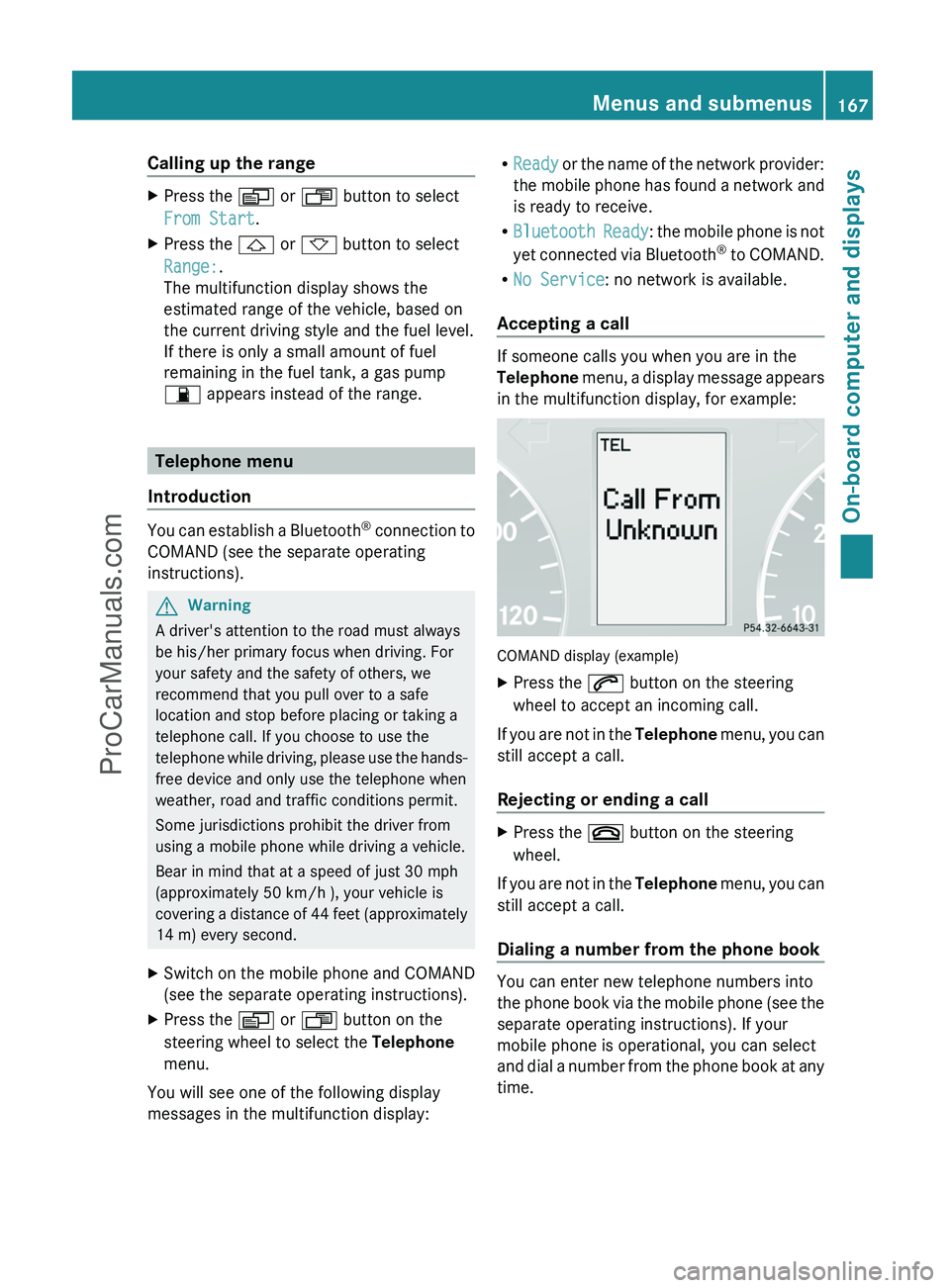
If someone calls you when you are in the
Telephone menu, a display message appears
in the multifunction display, for example:
COMAND display (example)
XPress the 6 button on the steering
wheel to accept an incoming call.
If you are not in the Telephone menu, you can
still accept a call.
Rejecting or ending a call
XPress the ~ button on the steering
wheel.
If you are not in the Telephone menu, you can
still accept a call.
Dialing a number from the phone book
You can enter new telephone numbers into
the phone book via the mobile phone (see the
separate operating instructions). If your
mobile phone is operational, you can select
and dial a number from the phone book at any
time.
Menus and submenus167On-board computer and displaysZProCarManuals.com
Page 172 of 288
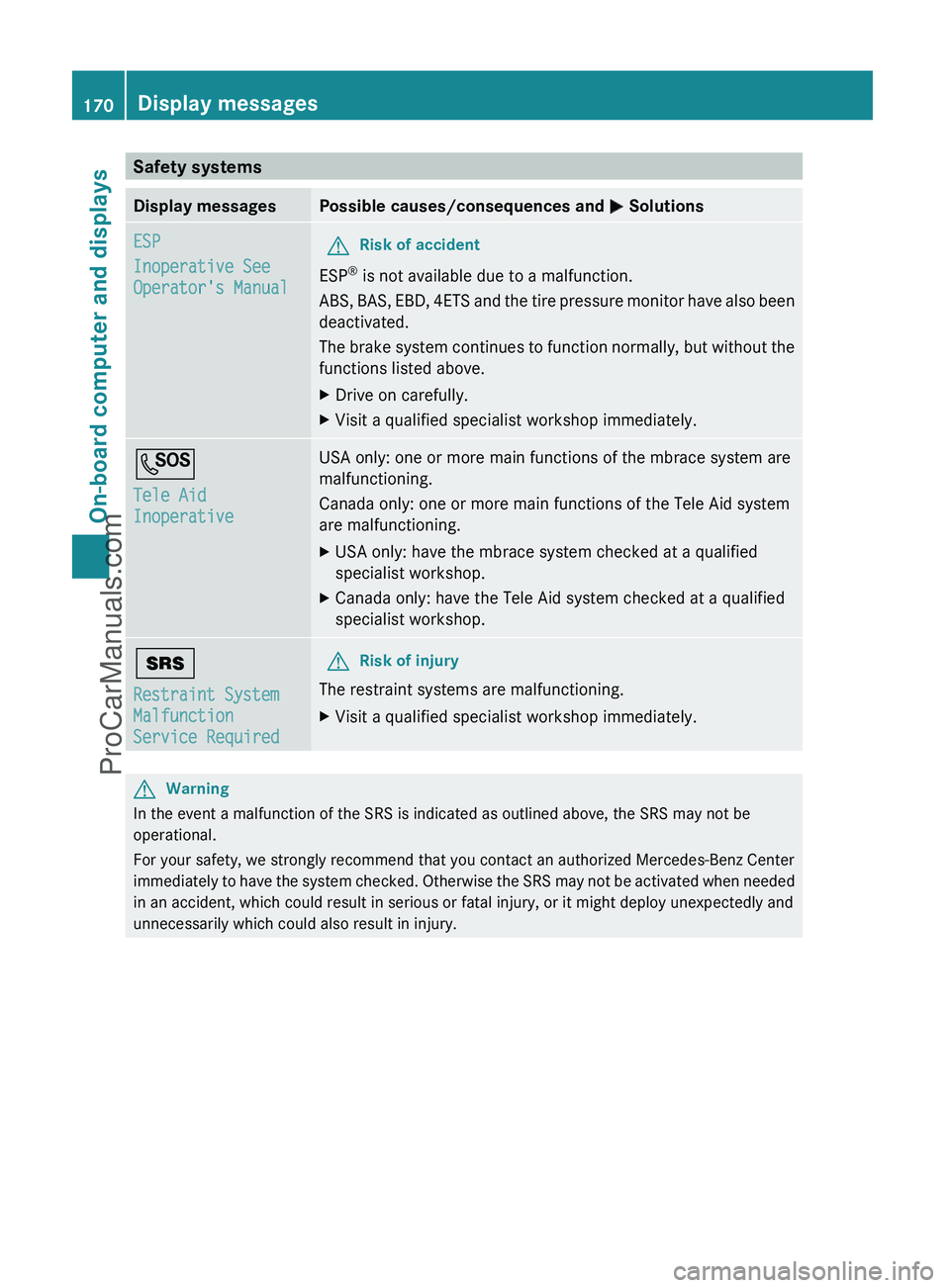
Safety systemsDisplay messagesPossible causes/consequences and M SolutionsESP
Inoperative See
Operator's ManualGRisk of accident
ESP ®
is not available due to a malfunction.
ABS, BAS, EBD, 4ETS and the tire pressure monitor have also been
deactivated.
The brake system continues to function normally, but without the
functions listed above.
XDrive on carefully.XVisit a qualified specialist workshop immediately.G
Tele Aid
InoperativeUSA only: one or more main functions of the mbrace system are
malfunctioning.
Canada only: one or more main functions of the Tele Aid system
are malfunctioning.XUSA only: have the mbrace system checked at a qualified
specialist workshop.XCanada only: have the Tele Aid system checked at a qualified
specialist workshop.+
Restraint System
Malfunction
Service RequiredGRisk of injury
The restraint systems are malfunctioning.
XVisit a qualified specialist workshop immediately.GWarning
In the event a malfunction of the SRS is indicated as outlined above, the SRS may not be
operational.
For your safety, we strongly recommend that you contact an authorized Mercedes-Benz Center
immediately to have the system checked. Otherwise the SRS may not be activated when needed
in an accident, which could result in serious or fatal injury, or it might deploy unexpectedly and
unnecessarily which could also result in injury.
170Display messagesOn-board computer and displays
ProCarManuals.com
Page 179 of 288
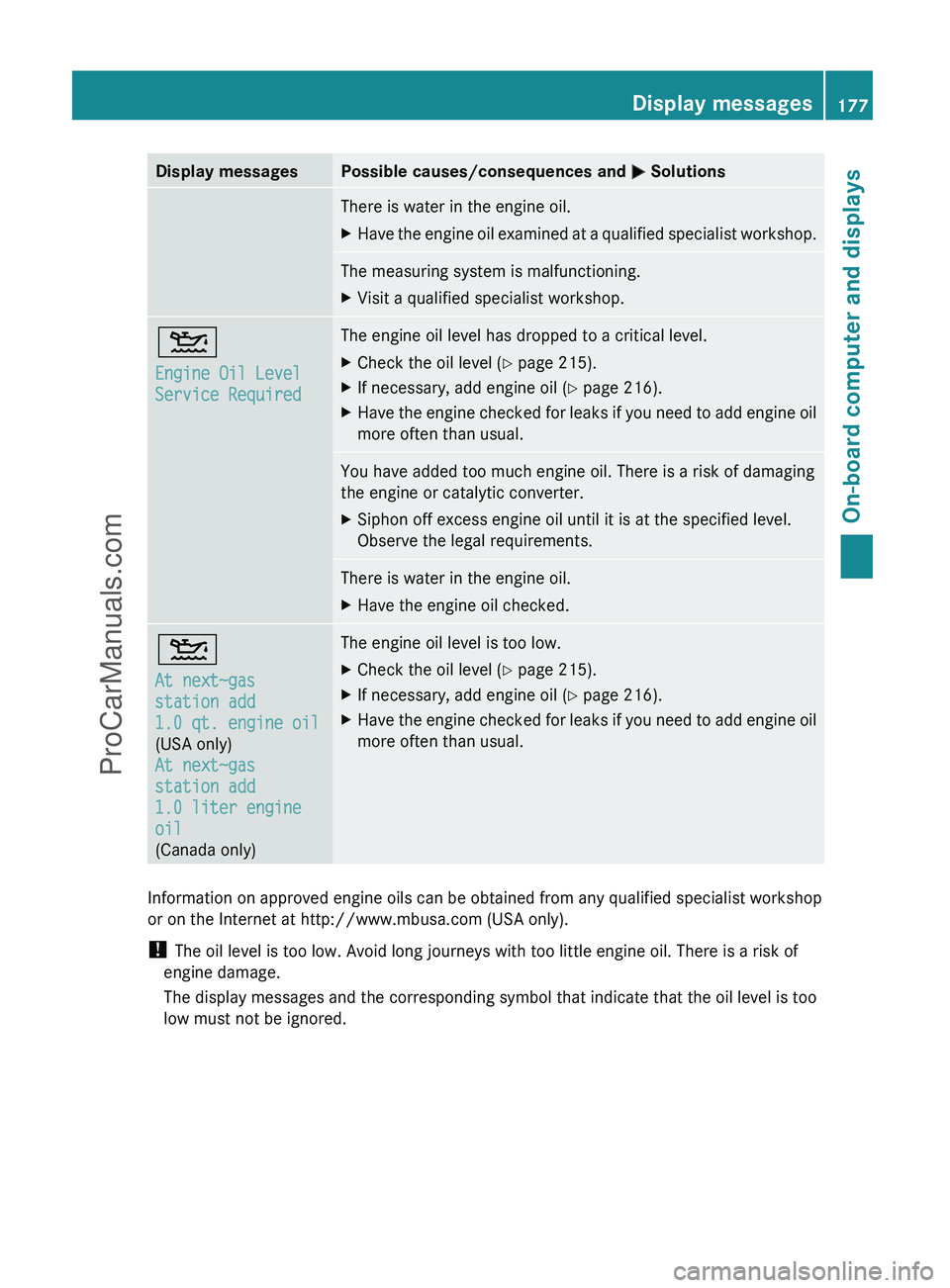
Display messagesPossible causes/consequences and M SolutionsThere is water in the engine oil.XHave the engine oil examined at a qualified specialist workshop.The measuring system is malfunctioning.XVisit a qualified specialist workshop.4
Engine Oil Level
Service RequiredThe engine oil level has dropped to a critical level.XCheck the oil level ( Y page 215).XIf necessary, add engine oil ( Y page 216).XHave the engine checked for leaks if you need to add engine oil
more often than usual.You have added too much engine oil. There is a risk of damaging
the engine or catalytic converter.XSiphon off excess engine oil until it is at the specified level.
Observe the legal requirements.There is water in the engine oil.XHave the engine oil checked.4
At next~gas
station add
1.0 qt. engine oil
(USA only)
At next~gas
station add
1.0 liter engine
oil
(Canada only)The engine oil level is too low.XCheck the oil level ( Y page 215).XIf necessary, add engine oil ( Y page 216).XHave the engine checked for leaks if you need to add engine oil
more often than usual.
Information on approved engine oils can be obtained from any qualified specialist workshop
or on the Internet at http://www.mbusa.com (USA only).
! The oil level is too low. Avoid long journeys with too little engine oil. There is a risk of
engine damage.
The display messages and the corresponding symbol that indicate that the oil level is too
low must not be ignored.
Display messages177On-board computer and displaysZProCarManuals.com
Page 180 of 288
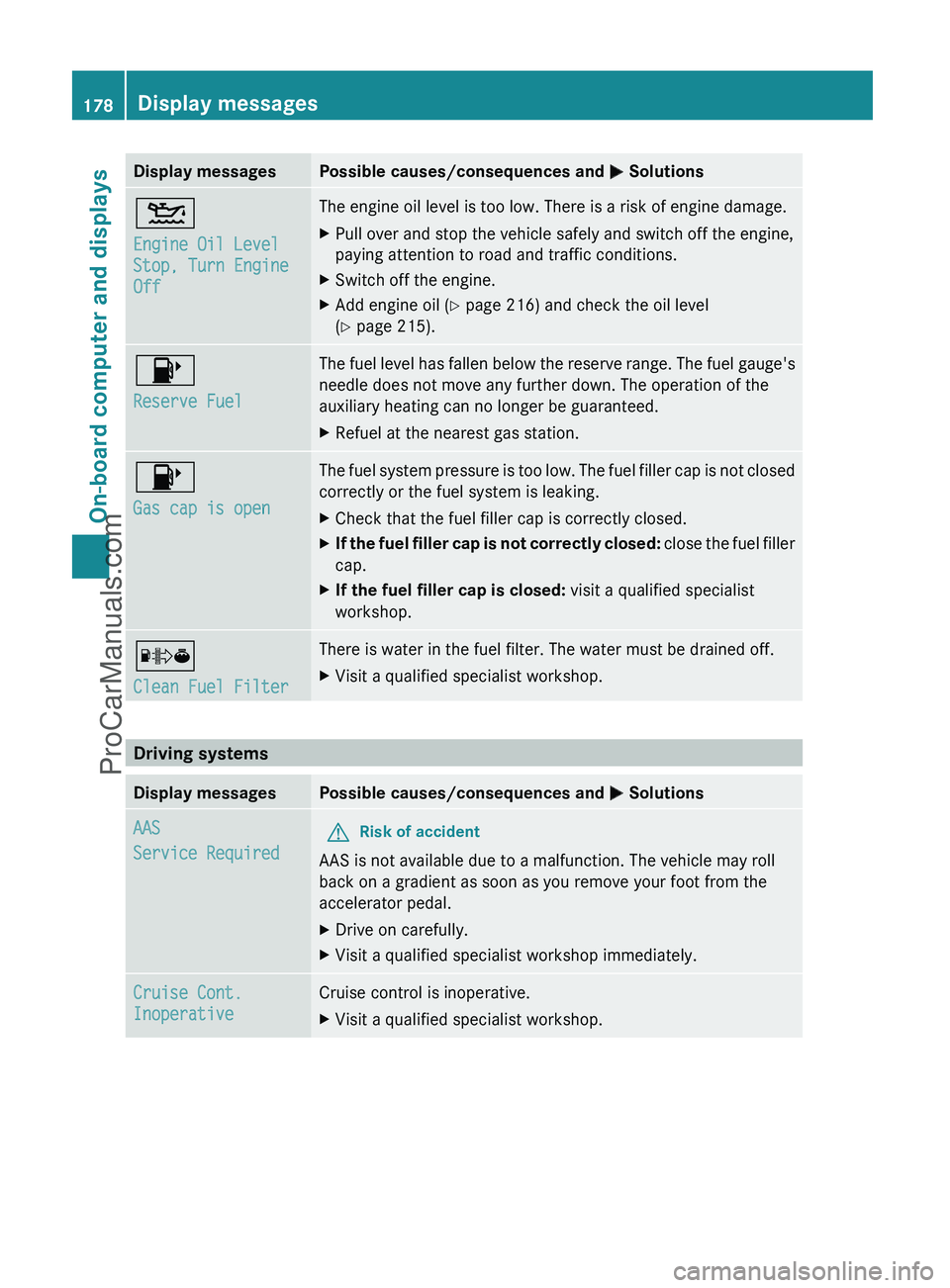
Display messagesPossible causes/consequences and M Solutions4
Engine Oil Level
Stop, Turn Engine
OffThe engine oil level is too low. There is a risk of engine damage.XPull over and stop the vehicle safely and switch off the engine,
paying attention to road and traffic conditions.XSwitch off the engine.XAdd engine oil ( Y page 216) and check the oil level
( Y page 215).8
Reserve FuelThe fuel level has fallen below the reserve range. The fuel gauge's
needle does not move any further down. The operation of the
auxiliary heating can no longer be guaranteed.XRefuel at the nearest gas station.8
Gas cap is openThe fuel system pressure is too low. The fuel filler cap is not closed
correctly or the fuel system is leaking.XCheck that the fuel filler cap is correctly closed.XIf the fuel filler cap is not correctly closed: close the fuel filler
cap.XIf the fuel filler cap is closed: visit a qualified specialist
workshop.´
Clean Fuel FilterThere is water in the fuel filter. The water must be drained off.XVisit a qualified specialist workshop.
Driving systems
Display messagesPossible causes/consequences and M SolutionsAAS
Service RequiredGRisk of accident
AAS is not available due to a malfunction. The vehicle may roll
back on a gradient as soon as you remove your foot from the
accelerator pedal.
XDrive on carefully.XVisit a qualified specialist workshop immediately.Cruise Cont.
InoperativeCruise control is inoperative.XVisit a qualified specialist workshop.178Display messagesOn-board computer and displays
ProCarManuals.com
Page 184 of 288
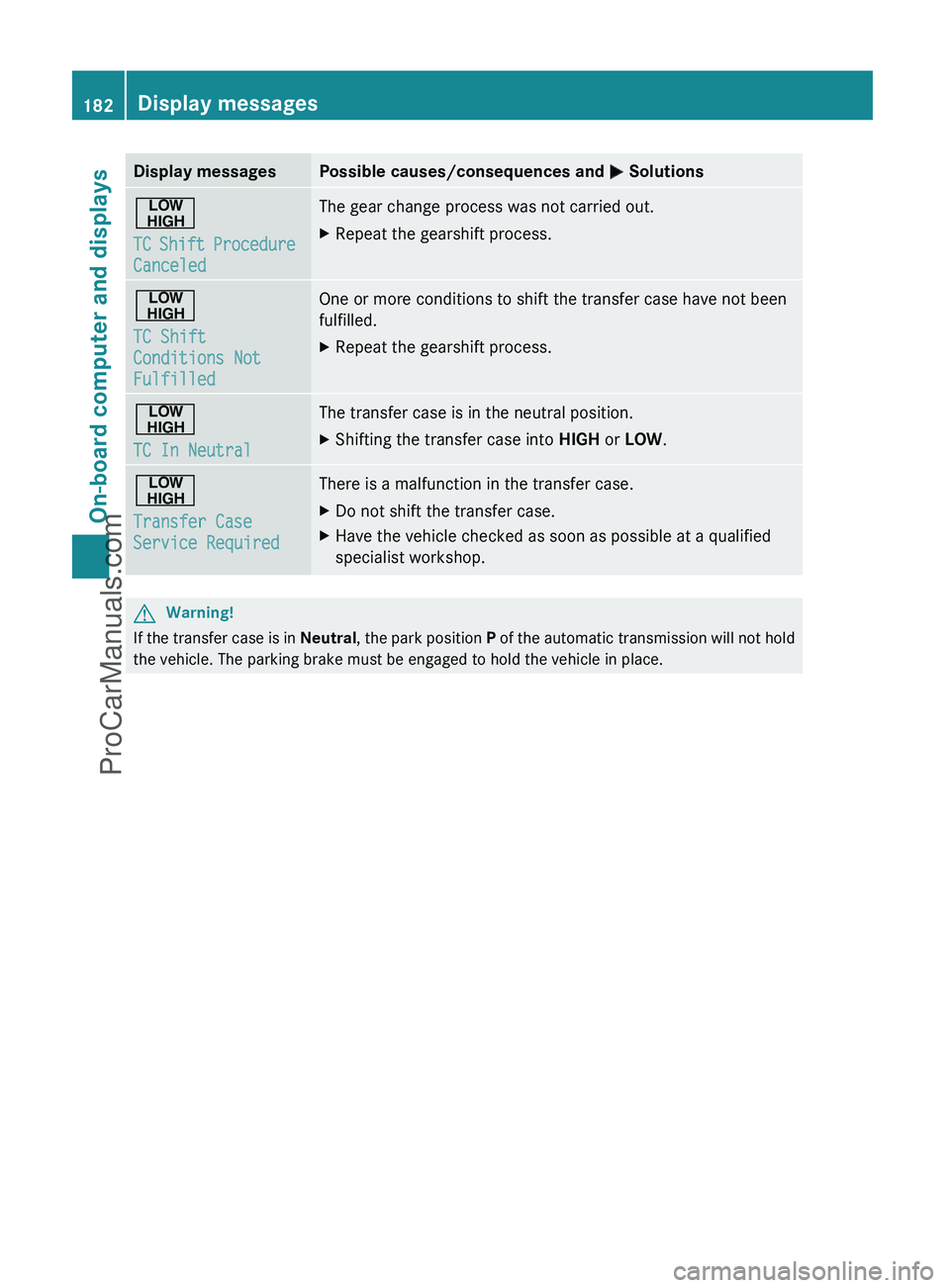
Display messagesPossible causes/consequences and M Solutions©
TC Shift Procedure
CanceledThe gear change process was not carried out.XRepeat the gearshift process.©
TC Shift
Conditions Not
FulfilledOne or more conditions to shift the transfer case have not been
fulfilled.XRepeat the gearshift process.©
TC In NeutralThe transfer case is in the neutral position.XShifting the transfer case into HIGH or LOW .©
Transfer Case
Service RequiredThere is a malfunction in the transfer case.XDo not shift the transfer case.XHave the vehicle checked as soon as possible at a qualified
specialist workshop.GWarning!
If the transfer case is in Neutral, the park position P of the automatic transmission will not hold
the vehicle. The parking brake must be engaged to hold the vehicle in place.
182Display messagesOn-board computer and displays
ProCarManuals.com
Page 191 of 288
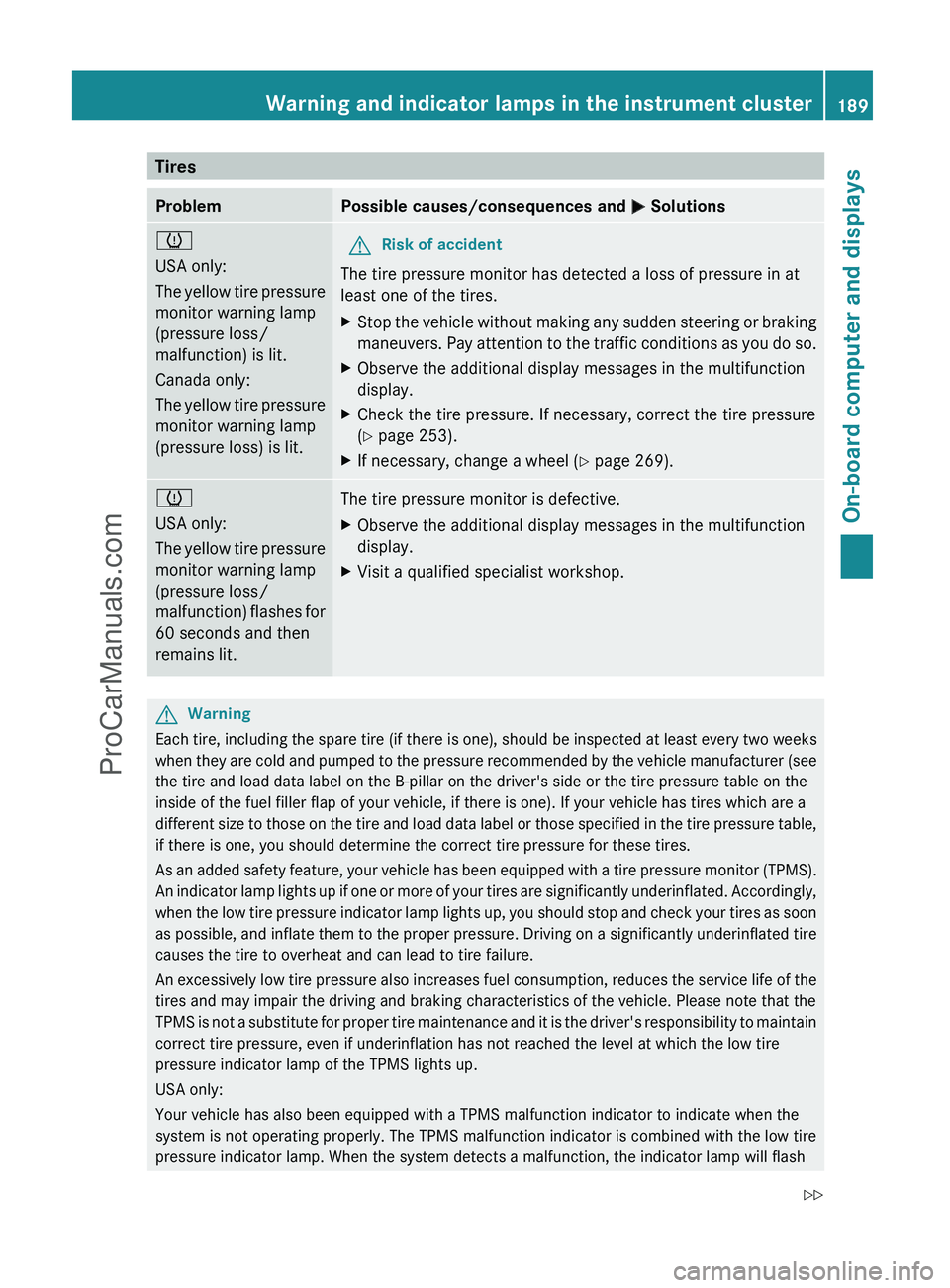
TiresProblemPossible causes/consequences and M Solutionsh
USA only:
The yellow tire pressure
monitor warning lamp
(pressure loss/
malfunction) is lit.
Canada only:
The yellow tire pressure
monitor warning lamp
(pressure loss) is lit.GRisk of accident
The tire pressure monitor has detected a loss of pressure in at
least one of the tires.
XStop the vehicle without making any sudden steering or braking
maneuvers. Pay attention to the traffic conditions as you do so.XObserve the additional display messages in the multifunction
display.XCheck the tire pressure. If necessary, correct the tire pressure
( Y page 253).XIf necessary, change a wheel ( Y page 269).h
USA only:
The yellow tire pressure
monitor warning lamp
(pressure loss/
malfunction) flashes for
60 seconds and then
remains lit.The tire pressure monitor is defective.XObserve the additional display messages in the multifunction
display.XVisit a qualified specialist workshop.GWarning
Each tire, including the spare tire (if there is one), should be inspected at least every two weeks
when they are cold and pumped to the pressure recommended by the vehicle manufacturer (see
the tire and load data label on the B-pillar on the driver's side or the tire pressure table on the
inside of the fuel filler flap of your vehicle, if there is one). If your vehicle has tires which are a
different size to those on the tire and load data label or those specified in the tire pressure table,
if there is one, you should determine the correct tire pressure for these tires.
As an added safety feature, your vehicle has been equipped with a tire pressure monitor (TPMS).
An indicator lamp lights up if one or more of your tires are significantly underinflated. Accordingly,
when the low tire pressure indicator lamp lights up, you should stop and check your tires as soon
as possible, and inflate them to the proper pressure. Driving on a significantly underinflated tire
causes the tire to overheat and can lead to tire failure.
An excessively low tire pressure also increases fuel consumption, reduces the service life of the
tires and may impair the driving and braking characteristics of the vehicle. Please note that the
TPMS is not a substitute for proper tire maintenance and it is the driver's responsibility to maintain
correct tire pressure, even if underinflation has not reached the level at which the low tire
pressure indicator lamp of the TPMS lights up.
USA only:
Your vehicle has also been equipped with a TPMS malfunction indicator to indicate when the
system is not operating properly. The TPMS malfunction indicator is combined with the low tire
pressure indicator lamp. When the system detects a malfunction, the indicator lamp will flash
Warning and indicator lamps in the instrument cluster189On-board computer and displaysZProCarManuals.com
Page 204 of 288
Possible causes of malfunction:
R the on-board voltage is not within a
permissible voltage range.
R the temperature of the DC/AC converter is
temporarily too high.
R some small electronic devices have a
constant nominal power of less than
150 W, but a very high switch-on current.
In that case, there is a possibility that these
devices will not function properly as 115 V
socket : is not able to provide a high
enough current.
If indicator lamp ; still does not light up,
consult a qualified specialist workshop, e.g.
an authorized Mercedes-Benz Center.
mbrace 15
Important safety notes
! A license agreement must exist in order
to activate the mbrace service. Make sure
that your system is activated and ready for
use, and press the E MB info call button
to register. If you cannot carry out any of
the steps mentioned, the system may not
be activated.
If you have any questions concerning
activation, please contact one of the
following service hotlines:
R USA: Response Center under
1-888-990-9007
R Canada: Customer Service under
1-888-923-8367
Shortly after successfully registering with the
mbrace service, a user ID and password will
be sent to you by post. You can use this
password to log in to the mbrace section
under "Owners Online" at http://
www.mbusa.com 16
.
The mbrace system is available if:
R it has been activated and is operational.
Activation requires an available mobile
phone network, a valid SIM card and a
service subscription to a surveillance
service provider.
R the battery is sufficiently charged.
R the corresponding mobile phone network
is available for transmitting data to the
Customer Center.
i Determining the location of the vehicle on
a map is only possible if there is sufficient
GPS reception and the vehicle position can
be forwarded to the Customer Center.
The mbrace system
The mbrace system provides three different
services:
R automatic and manual emergency call
R Roadside Assistance call
R MB Info call
To adjust the volume during an mbrace call,
proceed as follows:
XPress the W or X button on the
multifunction steering wheel.
or
XUse the COMAND volume controller.
You can find information and a description of
all available features under "Owners Online"
at http://www.mbusa.com 17
.
System self-test
After you have switched on the ignition, the
system carries out a self-diagnosis.
15 The system is called TELE AID in Canada.
16 USA only.
17 USA only.202FeaturesLoading, stowing and features
ProCarManuals.com
Page 205 of 288
GWarning
A malfunction in the system has been
detected if any or all of the following
conditions occur:
R The indicator lamp in the SOS button does
not come on during the system self-test.
R The indicator lamp in Roadside Assistance
button º does not come on during the
system self-test.
R The indicator lamp in Information button
E does not come on during the system
self-test.
R The indicator lamp in the SOS button,
Roadside Assistance button º, or
Information button E remains
illuminated constantly in red after the
system self-test.
R The message Tele Aid Inoperative or
Tele Aid Not Activated appears in the
multifunction display after the system self-
test.
If a malfunction is indicated as outlined above,
the system may not operate as expected. In
case of an emergency, help will have to be
summoned by other means.
Have the system checked at the nearest
authorized Mercedes-Benz Center or contact
the following service hotlines:
R USA: Response Center under the number
1-888-990-9007
R Canada: Customer Service under
1-888-923-8367
Emergency call
Important safety notes
! A license agreement must exist in order
to activate the mbrace service. Make sure
that your system is activated and ready for
use, and press the E MB info call button
to register. If you cannot carry out any of
the steps mentioned, the system may not
be activated.
If you have any questions concerning
activation, please contact one of the
following service hotlines:
R USA: Response Center under
1-888-990-9007
R Canada: Customer Service under
1-888-923-8367
An emergency call is dialed automatically if
an air bag or Emergency Tensioning Device is
triggered.
i An automatically dialed mbrace
emergency call cannot be canceled.
An emergency call can also be initiated
manually.
As soon as the emergency call has been
initiated, the indicator lamp in the SOS button
flashes. The Connecting Call message
appears on the multifunction display.
COMAND is muted.
Once a connection has been established, the
Call Connected message appears in the
multifunction display.
All important information on the emergency
is provided, for example:
R current location of the vehicle (as
determined by the GPS system)
R vehicle model
R vehicle color
R vehicle identification number
A short time after the emergency call is
initiated, a voice connection is automatically
established between the Response Center
and the vehicle occupants. If the vehicle
occupants are able to respond, the Response
Center will attempt to obtain more detailed
information on the emergency.
i If no vehicle occupant answers, an
ambulance is immediately sent to the
vehicle.GWarning
If the indicator lamp in the SOS button is
flashing continuously and there was no voice
connection to the Response Center
Features203Loading, stowing and featuresZProCarManuals.com