clock MERCEDES-BENZ G-Class 2012 W463 User Guide
[x] Cancel search | Manufacturer: MERCEDES-BENZ, Model Year: 2012, Model line: G-Class, Model: MERCEDES-BENZ G-Class 2012 W463Pages: 284, PDF Size: 9.4 MB
Page 128 of 284
i
When the engine is running and the fuel
filler flap is open, the yellow reserve fuel
warning lamp and the = (USA only)
or ; (Canada only) Check Engine
warning lamp may light up.
For further information on warning and
indicator lamps in the instrument cluster,
see ( Y page 184).
X Remove the SmartKey from the ignition
lock.
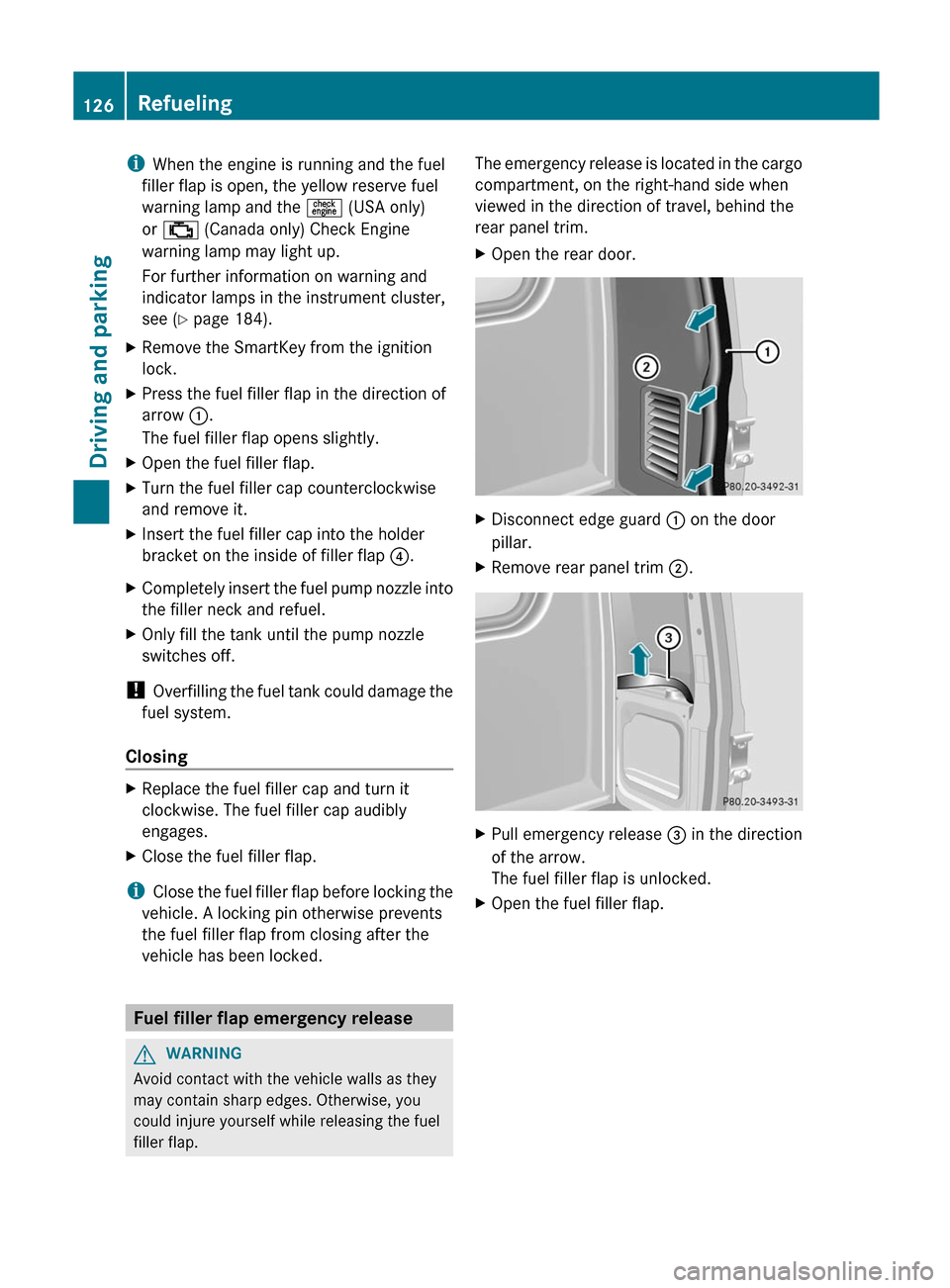
X Press the fuel filler flap in the direction of
arrow :.
The fuel filler flap opens slightly.
X Open the fuel filler flap.
X Turn the fuel filler cap counterclockwise
and remove it.
X Insert the fuel filler cap into the holder
bracket on the inside of filler flap ?.
X Completely insert the fuel pump nozzle into
the filler neck and refuel.
X Only fill the tank until the pump nozzle
switches off.
! Overfilling the
fuel tank could damage the
fuel system.
Closing X
Replace the fuel filler cap and turn it
clockwise. The fuel filler cap audibly
engages.
X Close the fuel filler flap.
i Close the
fuel filler flap before locking the
vehicle. A locking pin otherwise prevents
the fuel filler flap from closing after the
vehicle has been locked. Fuel filler flap emergency release
G
WARNING
Avoid contact with the vehicle walls as they
may contain sharp edges. Otherwise, you
could injure yourself while releasing the fuel
filler flap. The emergency release is located in the cargo
compartment, on the right-hand side when
viewed in the direction of travel, behind the
rear panel trim.
X
Open the rear door. X
Disconnect edge guard : on the door
pillar.
X Remove rear panel trim ;. X
Pull emergency release = in the direction
of the arrow.
The fuel filler flap is unlocked.
X Open the fuel filler flap.126
Refueling
Driving and parking
Page 161 of 284
X
Press the V or U button on the
steering wheel to select the Settings
menu.
X Press and hold the reset button on the left
of the
instrument cluster for approximately
three seconds.
A prompt appears in the multifunction
display asking you to confirm by pressing
the reset button again.
X Press the reset button again.
The settings
of most functions are restored
to the factory settings.
or
X If you want to retain the settings, do not
press the reset button a second time.
The Settings menu appears again after
approximately five seconds.
X Press the V or U button to select a
different menu.
Instrument cluster Selecting the unit of measurement for
distance
The selected unit of measurement for
distance applies to:
R
the odometer and the trip odometer
R the trip computer
R the digital speedometer
X Press the V or U button on the
steering wheel to select the Settings
menu.
X Press the & button
to select submenus.
X Press the W or X
button to select the
Inst. Cluster submenu.
X Press the & button to select Disp.
Unit Speed-/Odom.
X Press the W or X button to select
Km (kilometers) or Miles as the unit of
measurement for distance.
X Press the &, V or U button to
select a different display. Selecting the language
The Language function allows you to select
the language for the instrument cluster.
X
Press the V or U button on the
steering wheel to select the Settings
menu.
X Press the & button
to select submenus.
X Press the W or X
button to select the
Inst. cluster submenu.
X Press the & button
to select Language.
X Press the W or X
button to select the
desired language.
X Press the &, V or U button to
select a different display.
Selecting the status line display
X Press the V or U button on the
steering wheel to select the Settings
menu.
X Press the &
button
to select submenus.
X Press the W or X
button to select the
Inst. cluster submenu.
X Press the & button to select Status
line display.
X Press the W or X
button to select the
status line display: speed ( Speed) or
outside temperature ( Outside temp.).
The selected display now appears
constantly in the lower multifunction
display. When you scroll through the
Standard display menu (Y page 156), you
will see the display you have not selected.
X Press the &, V or U button to
select a different display.
Lights Adjusting the instrument cluster lighting
The instrument cluster lighting automatically
adjusts to the ambient light.
X
To brighten or to dim: turn reset button
(Y page 25) clockwise or
counterclockwise. Menus and submenus
159
On-board computer and displays Z
Page 191 of 284
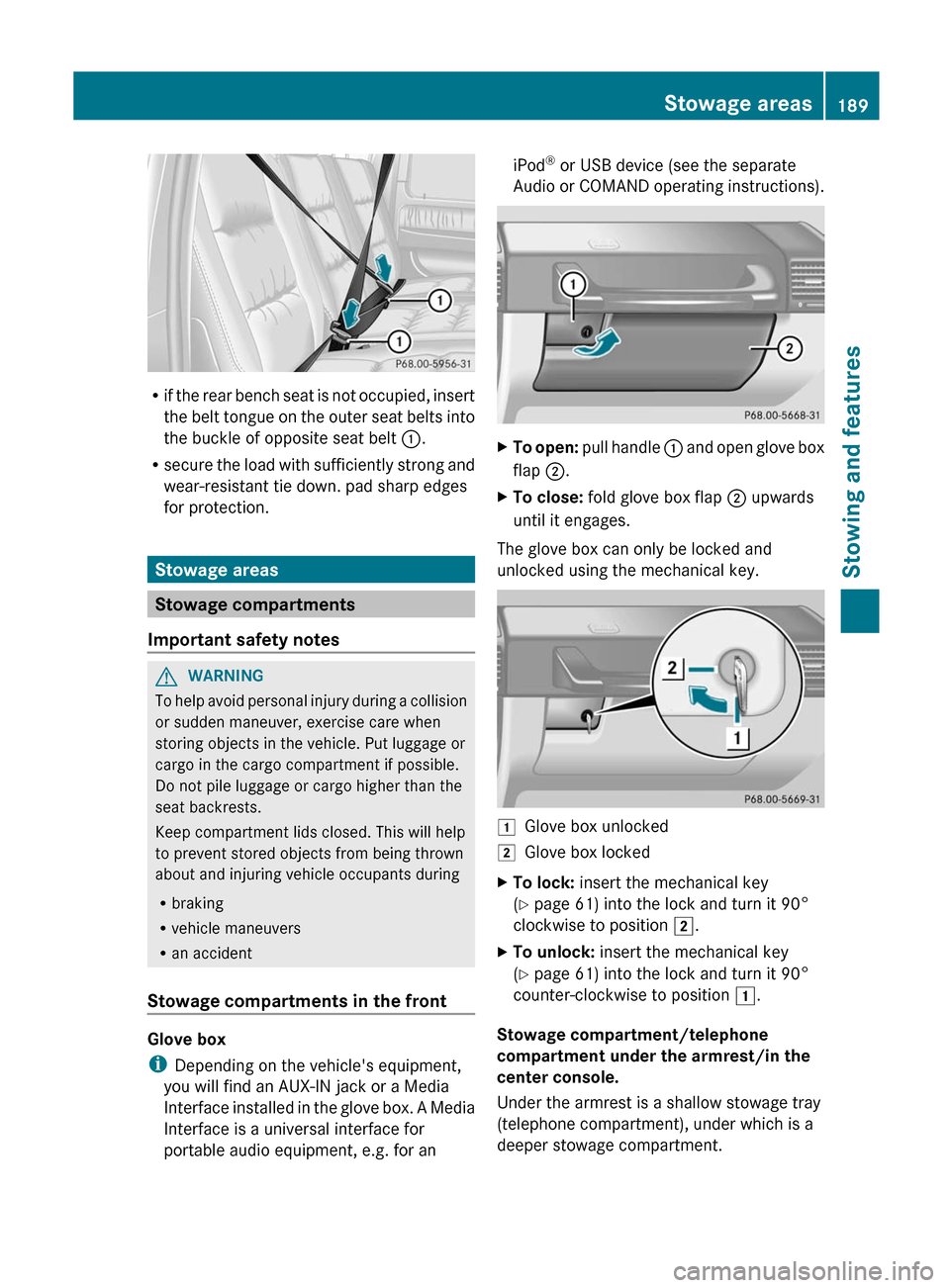
R
if the
rear bench seat is not occupied, insert
the belt tongue on the outer seat belts into
the buckle of opposite seat belt :.
R secure the load with sufficiently strong and
wear-resistant tie down. pad sharp edges
for protection. Stowage areas
Stowage compartments
Important safety notes G
WARNING
To help avoid personal injury during a collision
or sudden maneuver, exercise care when
storing objects in the vehicle. Put luggage or
cargo in the cargo compartment if possible.
Do not pile luggage or cargo higher than the
seat backrests.
Keep compartment lids closed. This will help
to prevent stored objects from being thrown
about and injuring vehicle occupants during
R braking
R vehicle maneuvers
R an accident
Stowage compartments in the front Glove box
i
Depending on the vehicle's equipment,
you will find an AUX-IN jack or a Media
Interface installed
in the glove box. A Media
Interface is a universal interface for
portable audio equipment, e.g. for an iPod
®
or USB device (see the separate
Audio or
COMAND operating instructions). X
To open: pull handle :
and open glove box
flap ;.
X To close: fold glove box flap ; upwards
until it engages.
The glove box can only be locked and
unlocked using the mechanical key. 1
Glove box unlocked
2 Glove box locked
X To lock: insert the mechanical key
(Y page 61) into the lock and turn it 90°
clockwise to position 2.
X To unlock: insert the mechanical key
(Y page 61) into the lock and turn it 90°
counter-clockwise to position 1.
Stowage compartment/telephone
compartment under the armrest/in the
center console.
Under the armrest is a shallow stowage tray
(telephone compartment), under which is a
deeper stowage compartment. Stowage areas
189
Stowing and features Z
Page 215 of 284
Adding engine oil
H
Environmental note
When adding oil, take care not to spill any. If
oil enters the soil or waterways, it is harmful
to the environment.
! Use only engine oils and oil filters that
have been approved for vehicles equipped
with a service system. A list of the engine
oils and oil filters tested and approved in
accordance with the Mercedes-Benz
Specifications for Service Products can be
obtained from any authorized Mercedes-
Benz Center.
Damage to
the engine or exhaust system is
caused by the following:
R using engine oils and oil filters which
have not been specifically approved for
the service system.
R replacing the engine oil or oil filter after
the replacement interval required by the
service system has elapsed
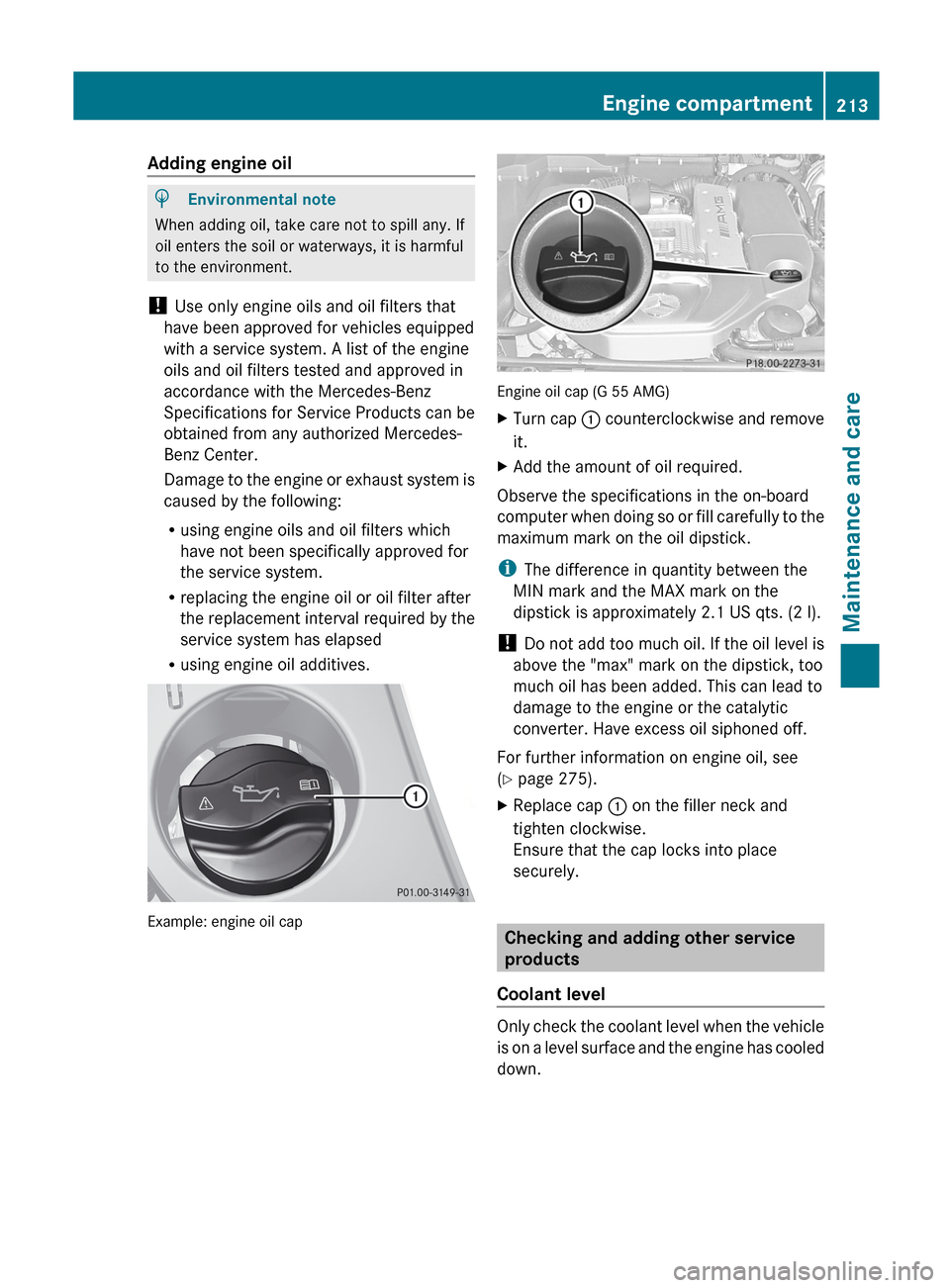
R using engine oil additives. Example: engine oil cap Engine oil cap (G 55 AMG)
X
Turn cap : counterclockwise
and remove
it.
X Add the amount of oil required.
Observe the specifications in the on-board
computer when
doing so or fill carefully to the
maximum mark on the oil dipstick.
i The difference in quantity between the
MIN mark and the MAX mark on the
dipstick is approximately 2.1 US qts. (2 l).
! Do not add too much oil. If the oil level is
above the "max" mark on the dipstick, too
much oil has been added. This can lead to
damage to the engine or the catalytic
converter. Have excess oil siphoned off.
For further information on engine oil, see
(Y page 275).
X Replace cap : on the filler neck and
tighten clockwise.
Ensure that the cap locks into place
securely. Checking and adding other service
products
Coolant level Only check the coolant level when the vehicle
is on
a level surface and the engine has cooled
down. Engine compartment
213
Maintenance and care Z
Page 216 of 284
X
Turn the SmartKey to position
2(Y page 115) in the ignition lock.
X Check the coolant temperature display in
the instrument cluster.
The coolant temperature must be below
158 ‡ (70 †). G
WARNING
In order to avoid any potentially serious burns:
R use extreme caution when opening the
hood if there are any signs of steam or
coolant leaking
from the cooling system, or
if the coolant temperature display indicates
that the coolant is overheated.
R do not remove the pressure cap on the
coolant reservoir if the coolant temperature
is above 158 ‡ (70 †). Allow the engine to
cool down before removing the cap. The
coolant reservoir contains hot fluid and is
under pressure.
R using a rag, slowly turn the cap
approximately 1
/ 2 turn to relieve excess
pressure. If opened immediately, scalding
hot fluid and steam will be blown out under
pressure.
R do not spill antifreeze on hot engine parts.
Antifreeze contains ethylene glycol which
may burn if it comes into contact with hot
engine parts. X
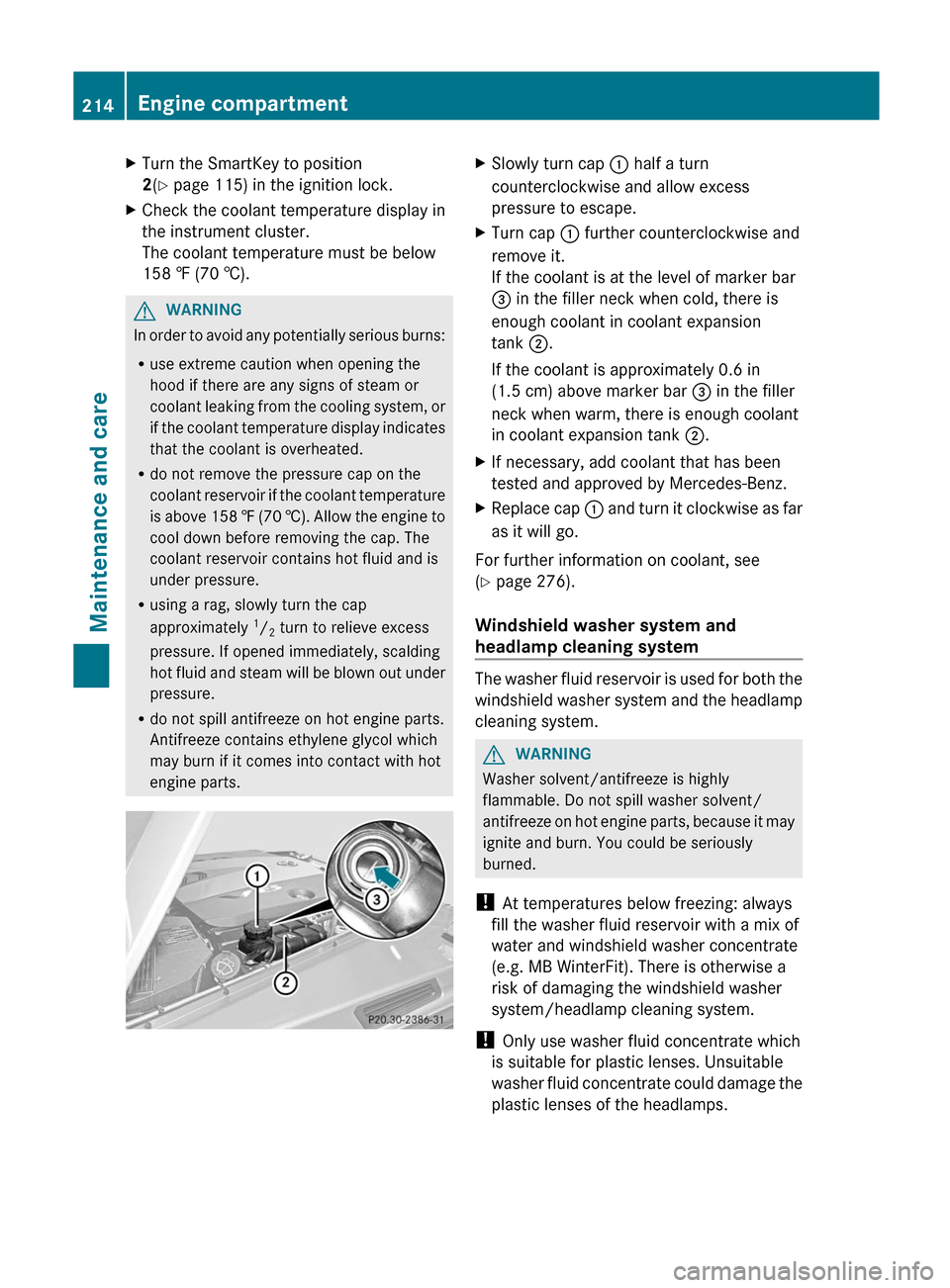
Slowly turn cap : half a turn
counterclockwise and allow excess
pressure to escape.
X Turn cap : further counterclockwise and
remove it.
If the coolant is at the level of marker bar
= in the filler neck when cold, there is
enough coolant in coolant expansion
tank ;.
If the coolant is approximately 0.6 in
(1.5 cm) above marker bar = in the filler
neck when warm, there is enough coolant
in coolant expansion tank ;.
X If necessary, add coolant that has been
tested and approved by Mercedes-Benz.
X Replace cap : and
turn it clockwise as far
as it will go.
For further information on coolant, see
(Y page 276).
Windshield washer system and
headlamp cleaning system The washer fluid reservoir is used for both the
windshield
washer
system and the headlamp
cleaning system. G
WARNING
Washer solvent/antifreeze is highly
flammable. Do not spill washer solvent/
antifreeze on
hot engine parts, because it may
ignite and burn. You could be seriously
burned.
! At temperatures below freezing: always
fill the washer fluid reservoir with a mix of
water and windshield washer concentrate
(e.g. MB WinterFit). There is otherwise a
risk of damaging the windshield washer
system/headlamp cleaning system.
! Only use washer fluid concentrate which
is suitable for plastic lenses. Unsuitable
washer fluid concentrate could damage the
plastic lenses of the headlamps. 214
Engine compartment
Maintenance and care
Page 230 of 284
surfaces, such as tiled floors, you should use
a
non-slip
underlay, for example a rubber mat.
Do not use wooden blocks or similar objects
to support the jack. Otherwise the jack may
not be able to achieve its load-bearing
capacity if it is not at its full height.
Never start the engine when the vehicle is
raised.
Also observe the notes on the jack. X
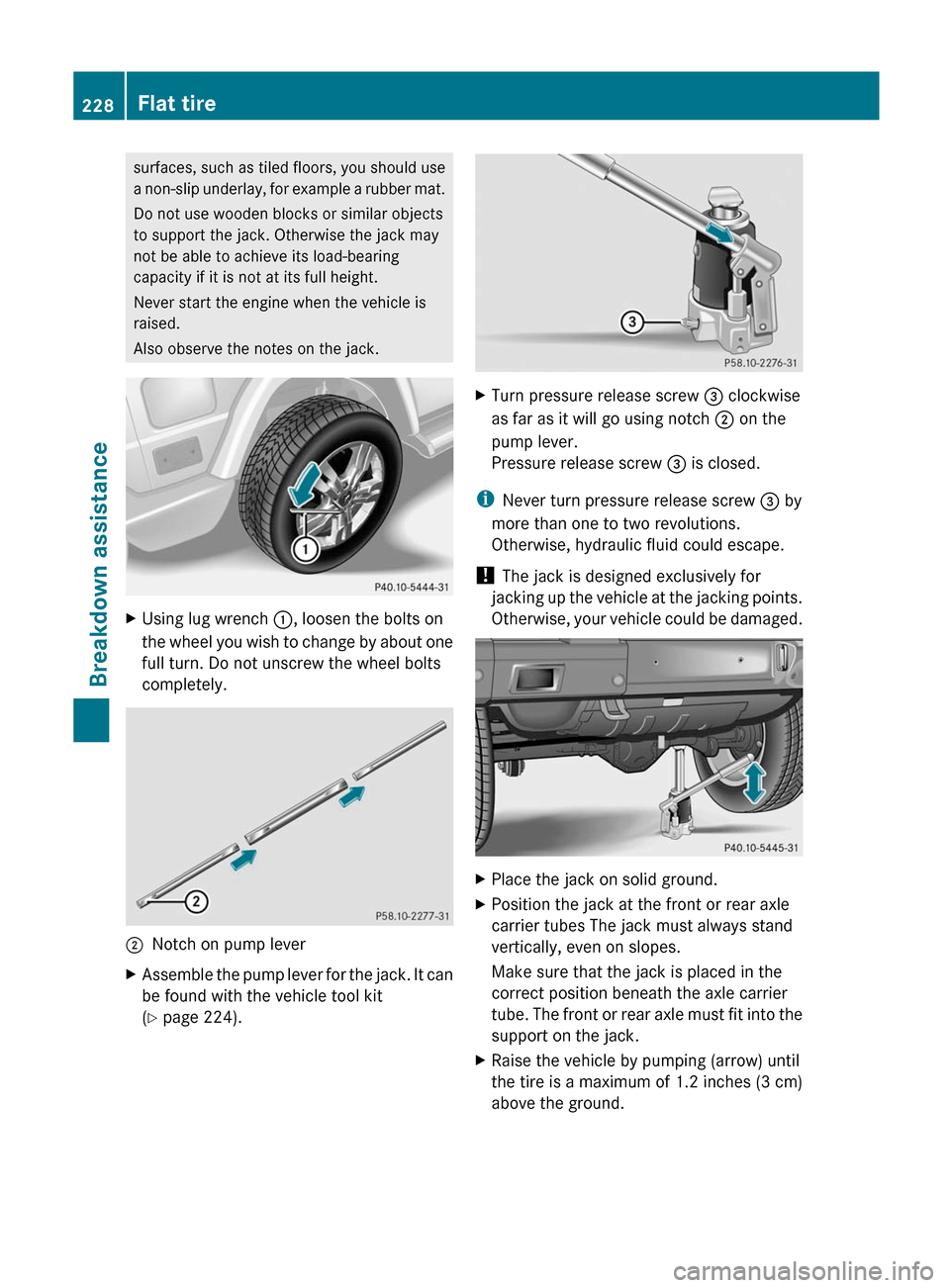
Using lug wrench
:, loosen the bolts on
the wheel
you wish to change by about one
full turn. Do not unscrew the wheel bolts
completely. ;
Notch on pump lever
X Assemble
the pump lever for the jack. It can
be found with the vehicle tool kit
(Y page 224). X
Turn pressure release screw = clockwise
as far as it will go using notch ; on the
pump lever.
Pressure release screw = is closed.
i Never turn pressure release screw = by
more than one to two revolutions.
Otherwise, hydraulic fluid could escape.
! The jack is designed exclusively for
jacking up
the vehicle at the jacking points.
Otherwise, your vehicle could be damaged. X
Place the jack on solid ground.
X Position the jack at the front or rear axle
carrier tubes The jack must always stand
vertically, even on slopes.
Make sure that the jack is placed in the
correct position beneath the axle carrier
tube. The
front or rear axle must fit into the
support on the jack.
X Raise the vehicle by pumping (arrow) until
the tire is a maximum of 1.2 inches (3 cm)
above the ground.228
Flat tire
Breakdown assistance