clock MERCEDES-BENZ G-Class 2012 W463 Owner's Manual
[x] Cancel search | Manufacturer: MERCEDES-BENZ, Model Year: 2012, Model line: G-Class, Model: MERCEDES-BENZ G-Class 2012 W463Pages: 284, PDF Size: 9.4 MB
Page 68 of 284
i
It is only possible to lock the vehicle
centrally if all doors are closed. X
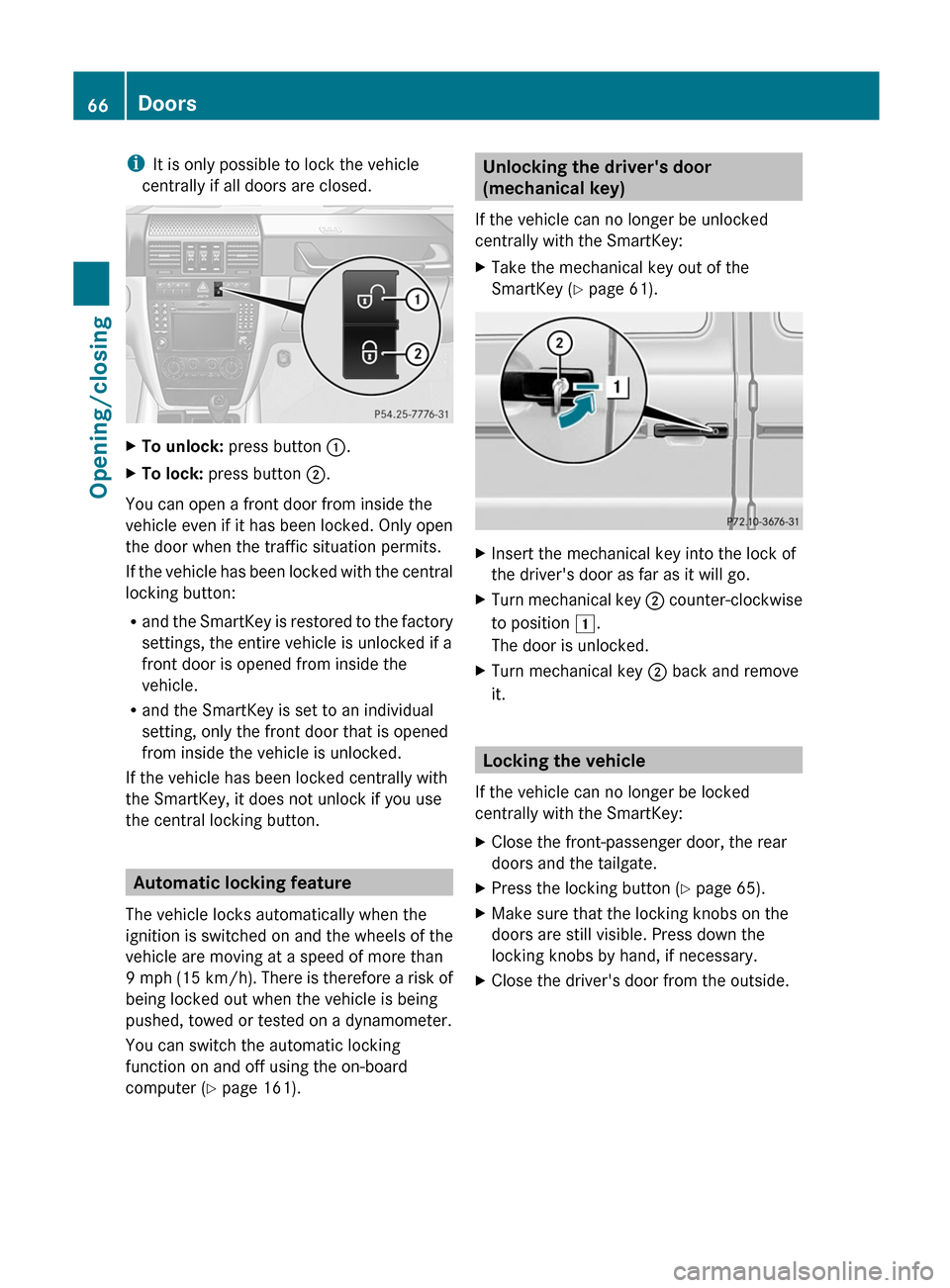
To unlock: press button :.
X To lock: press button ;.
You can open a front door from inside the
vehicle even if it has been locked. Only open
the door when the traffic situation permits.
If the
vehicle has been locked with the central
locking button:
R and the SmartKey is restored to the factory
settings, the entire vehicle is unlocked if a
front door is opened from inside the
vehicle.
R and the SmartKey is set to an individual
setting, only the front door that is opened
from inside the vehicle is unlocked.
If the vehicle has been locked centrally with
the SmartKey, it does not unlock if you use
the central locking button. Automatic locking feature
The vehicle locks automatically when the
ignition is switched on and the wheels of the
vehicle are moving at a speed of more than
9 mph
(15 km/h). There is therefore a risk of
being locked out when the vehicle is being
pushed, towed or tested on a dynamometer.
You can switch the automatic locking
function on and off using the on-board
computer (Y page 161). Unlocking the driver's door
(mechanical key)
If the vehicle can no longer be unlocked
centrally with the SmartKey:
X Take the mechanical key out of the
SmartKey (Y page 61). X
Insert the mechanical key into the lock of
the driver's door as far as it will go.
X Turn mechanical key ; counter-clockwise
to position
1.
The door is unlocked.
X Turn mechanical key ; back and remove
it. Locking the vehicle
If the vehicle can no longer be locked
centrally with the SmartKey:
X Close the front-passenger door, the rear
doors and the tailgate.
X Press the locking button (Y page 65).
X Make sure that the locking knobs on the
doors are still visible. Press down the
locking knobs by hand, if necessary.
X Close the driver's door from the outside.66
Doors
Opening/closing
Page 69 of 284
X
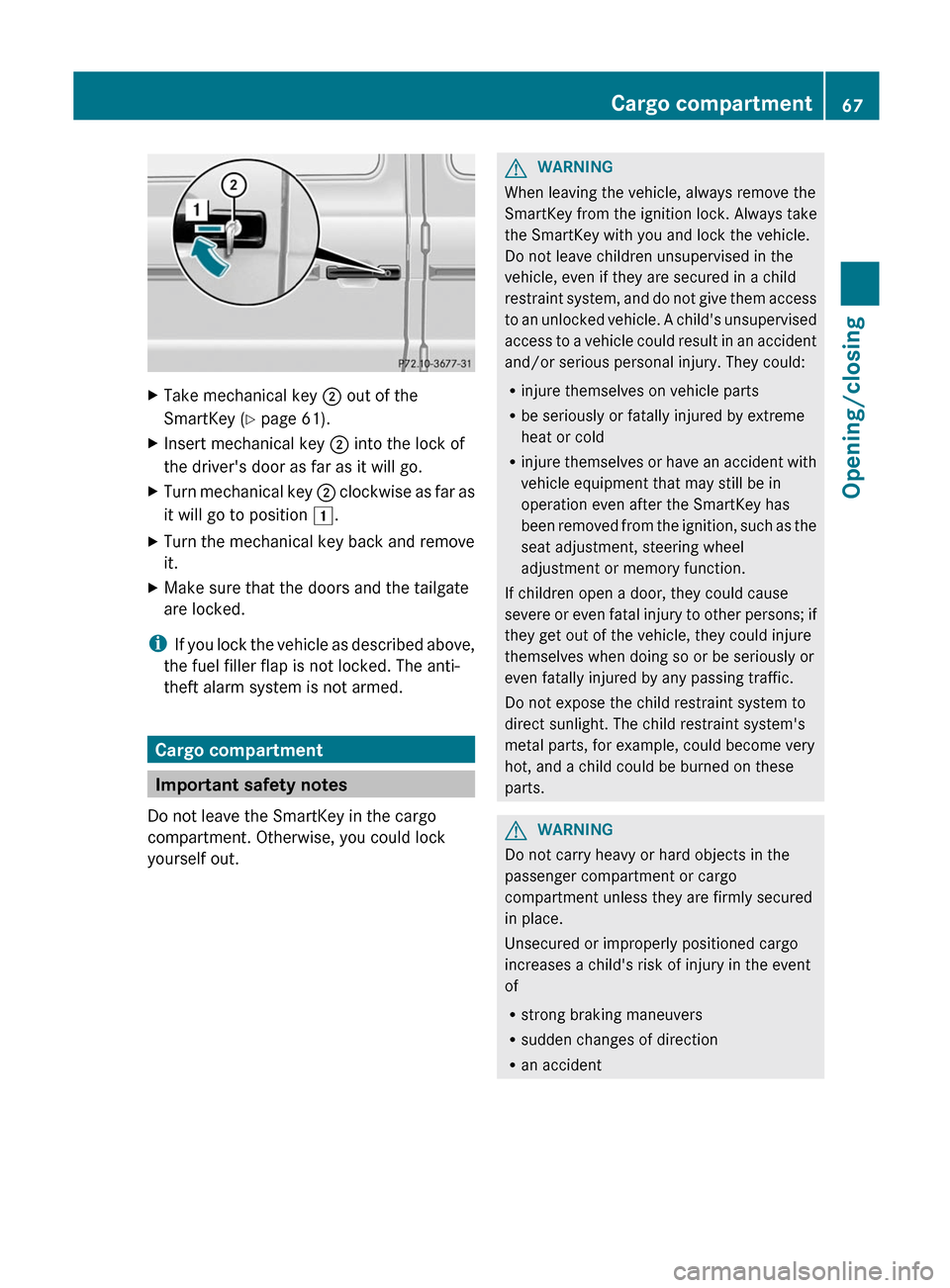
Take mechanical key ; out of the
SmartKey (Y page 61).
X Insert mechanical key ; into the lock of
the driver's door as far as it will go.
X Turn mechanical key ; clockwise
as far as
it will go to position 1.
X Turn the mechanical key back and remove
it.
X Make sure that the doors and the tailgate
are locked.
i If you
lock the vehicle as described above,
the fuel filler flap is not locked. The anti-
theft alarm system is not armed. Cargo compartment
Important safety notes
Do not leave the SmartKey in the cargo
compartment. Otherwise, you could lock
yourself out. G
WARNING
When leaving the vehicle, always remove the
SmartKey from the ignition lock. Always take
the SmartKey with you and lock the vehicle.
Do not leave children unsupervised in the
vehicle, even if they are secured in a child
restraint system,
and do not give them access
to an unlocked vehicle. A child's unsupervised
access to a vehicle could result in an accident
and/or serious personal injury. They could:
R injure themselves on vehicle parts
R be seriously or fatally injured by extreme
heat or cold
R injure themselves or have an accident with
vehicle equipment that may still be in
operation even after the SmartKey has
been removed from the ignition, such as the
seat adjustment, steering wheel
adjustment or memory function.
If children open a door, they could cause
severe or even fatal injury to other persons; if
they get out of the vehicle, they could injure
themselves when doing so or be seriously or
even fatally injured by any passing traffic.
Do not expose the child restraint system to
direct sunlight. The child restraint system's
metal parts, for example, could become very
hot, and a child could be burned on these
parts. G
WARNING
Do not carry heavy or hard objects in the
passenger compartment or cargo
compartment unless they are firmly secured
in place.
Unsecured or improperly positioned cargo
increases a child's risk of injury in the event
of
R strong braking maneuvers
R sudden changes of direction
R an accident Cargo compartment
67
Opening/closing Z
Page 73 of 284
Operating the sliding sunroof
manually
The actuator is located in the cargo
compartment, on the left-hand side behind
the rear wall trim. X
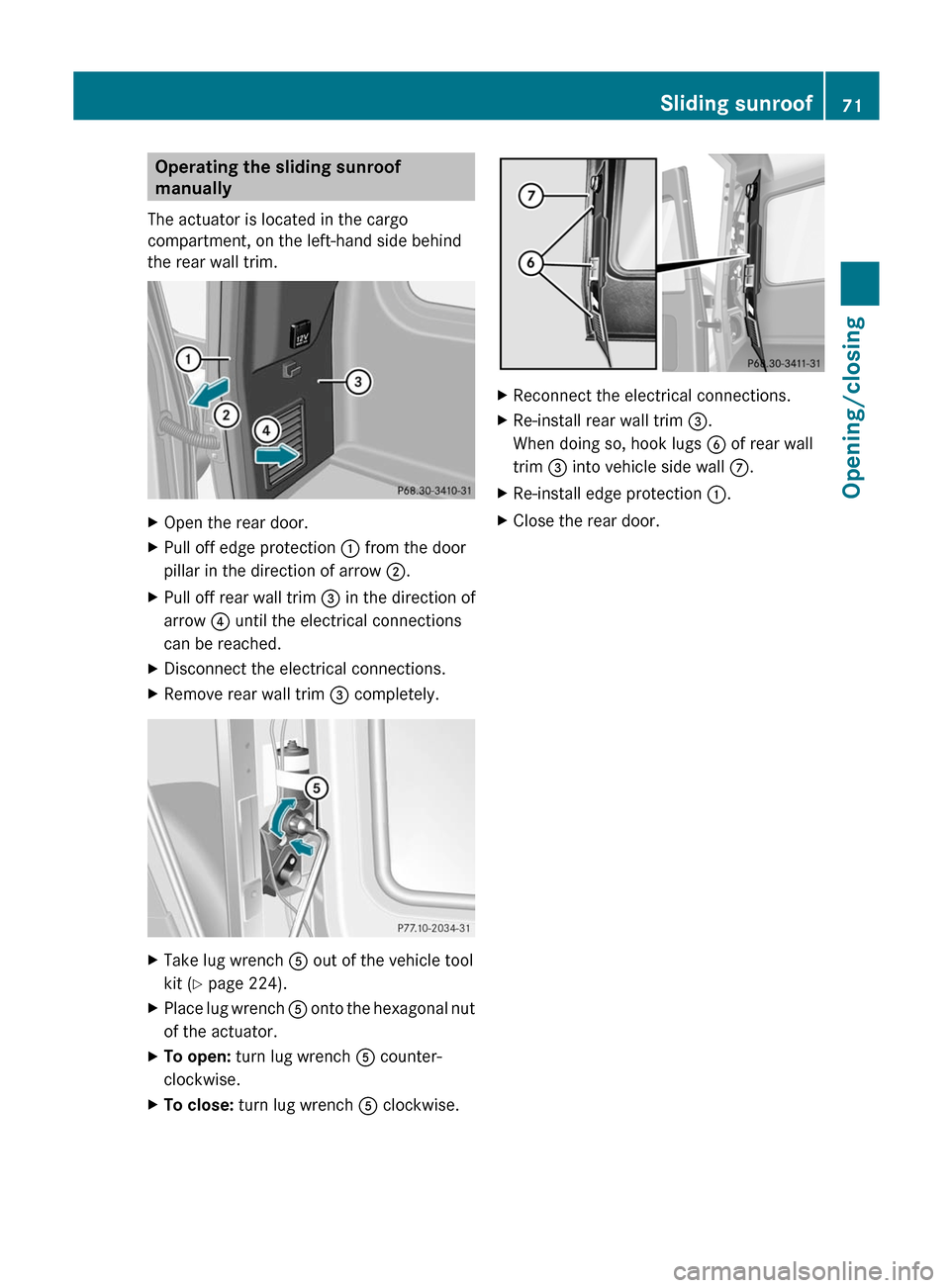
Open the rear door.
X Pull off edge protection : from the door
pillar in the direction of arrow ;.
X Pull off rear wall trim = in the direction of
arrow ? until the electrical connections
can be reached.
X Disconnect the electrical connections.
X Remove rear wall trim = completely.X
Take lug wrench A out of the vehicle tool
kit ( Y page 224).
X Place lug wrench A onto
the hexagonal nut
of the actuator.
X To open: turn lug wrench A counter-
clockwise.
X To close: turn lug wrench A clockwise. X
Reconnect the electrical connections.
X Re-install rear wall trim =
.
When doing so, hook lugs B of rear wall
trim = into vehicle side wall C.
X Re-install edge protection :.
X Close the rear door. Sliding sunroof
71
Opening/closing Z
Page 98 of 284
Changing the front bulbs
Front fog lamps/cornering lamps with
fog lamp function X
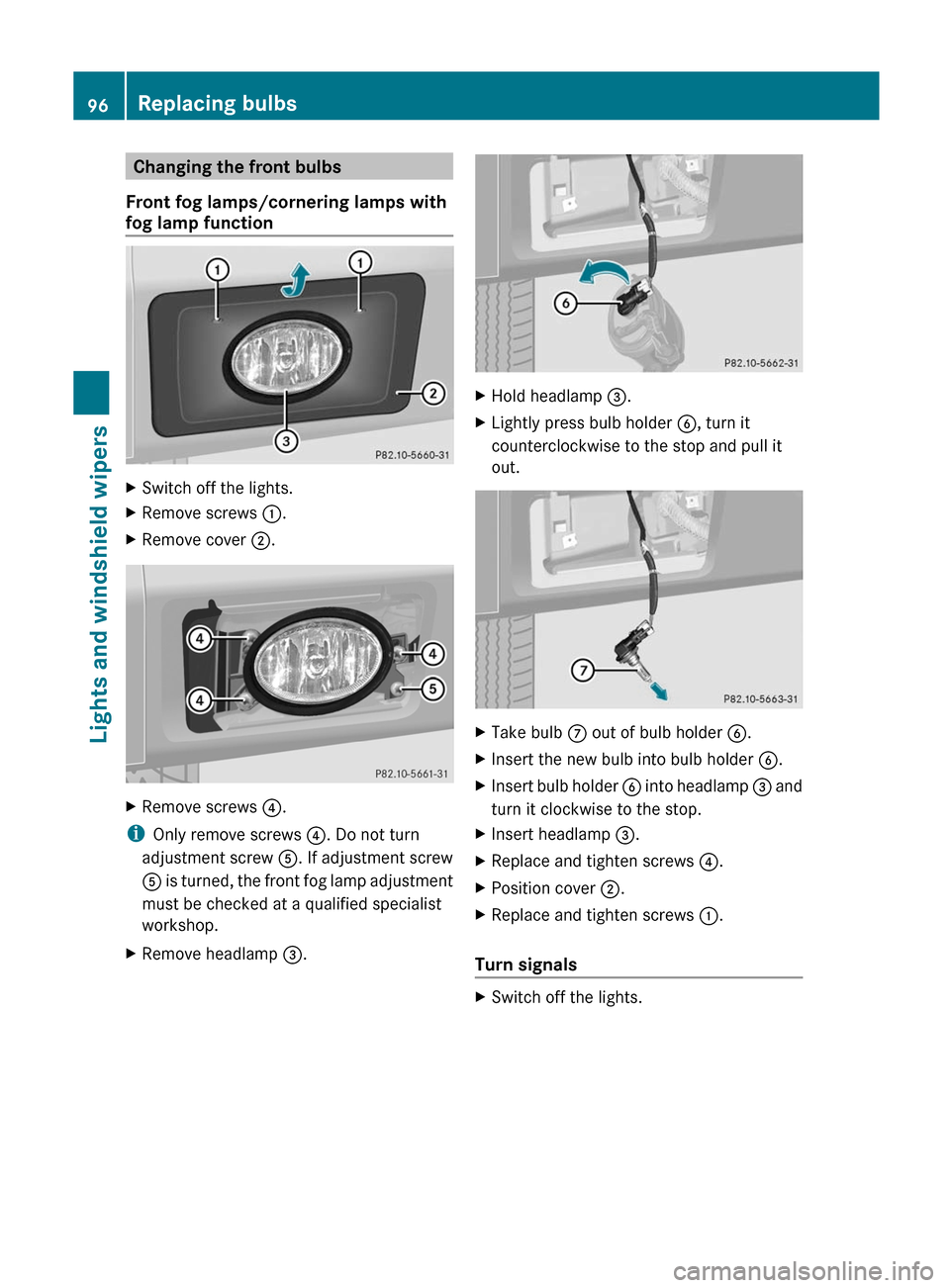
Switch off the lights.
X Remove screws : .
X Remove cover ;. X
Remove screws ? .
i Only remove screws ?. Do not turn
adjustment screw A. If adjustment screw
A is
turned, the front fog lamp adjustment
must be checked at a qualified specialist
workshop.
X Remove headlamp =. X
Hold headlamp =
.
X Lightly press bulb holder B, turn it
counterclockwise to the stop and pull it
out. X
Take bulb C out of bulb holder
B.
X Insert the new bulb into bulb holder B.
X Insert bulb holder B
into
headlamp = and
turn it clockwise to the stop.
X Insert headlamp =.
X Replace and tighten screws ?.
X Position cover ;.
X Replace and tighten screws :.
Turn signals X
Switch off the lights.96
Replacing bulbs
Lights and windshield wipers
Page 99 of 284
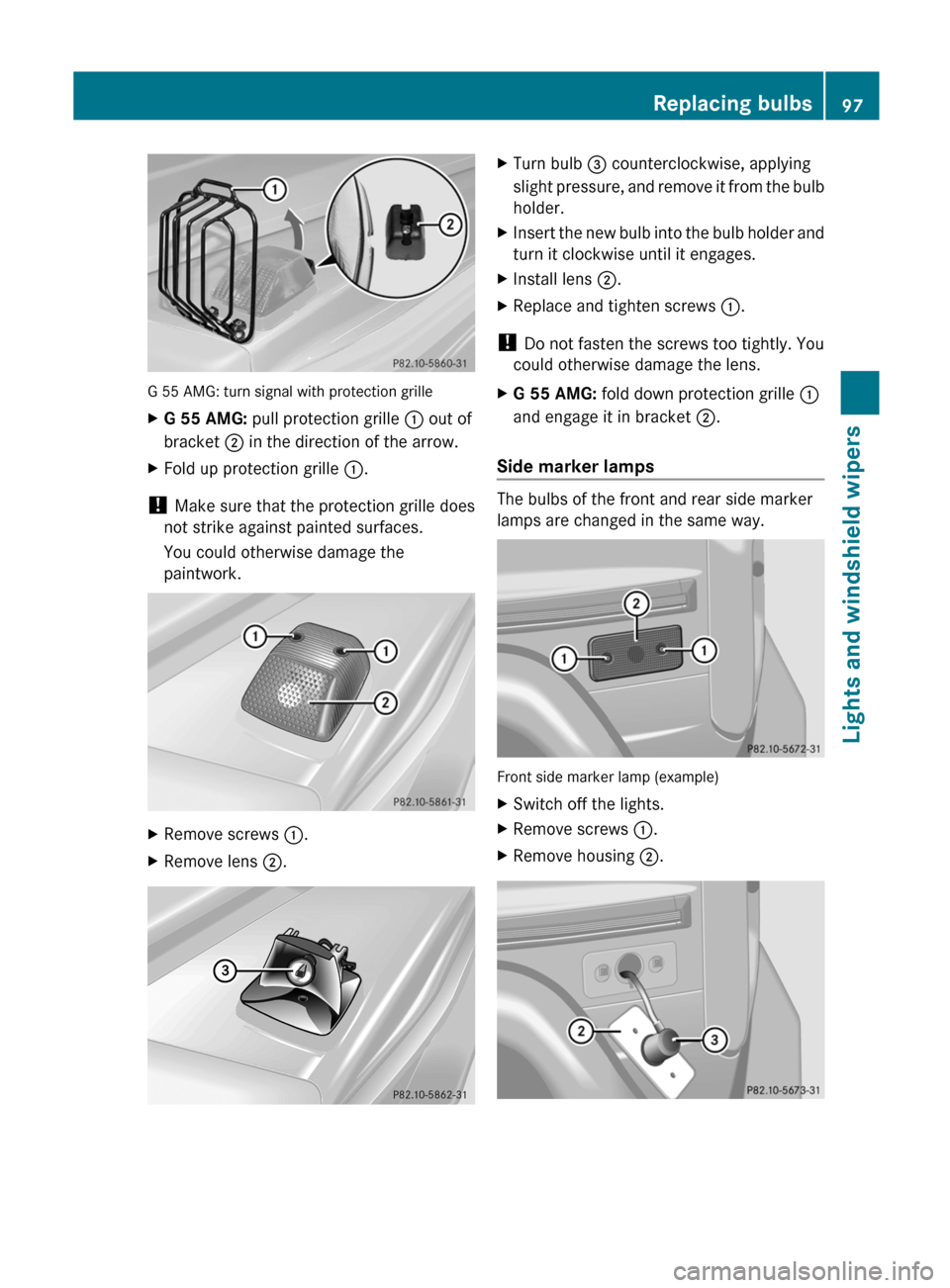
G 55 AMG: turn signal with protection grille
X
G 55 AMG: pull protection grille : out of
bracket ; in the direction of the arrow.
X Fold up protection grille :.
! Make sure that the protection grille does
not strike against painted surfaces.
You could otherwise damage the
paintwork. X
Remove screws :.
X Remove lens ;. X
Turn bulb = counterclockwise, applying
slight pressure,
and remove it from the bulb
holder.
X Insert the new bulb into the bulb holder and
turn it clockwise until it engages.
X Install lens ;.
X Replace and tighten screws :.
! Do not fasten the screws too tightly. You
could otherwise damage the lens.
X G 55 AMG: fold down protection grille :
and engage it in bracket ;.
Side marker lamps The bulbs of the front and rear side marker
lamps are changed in the same way.
Front side marker lamp (example)
X
Switch off the lights.
X Remove screws :.
X Remove housing ;. Replacing bulbs
97
Lights and windshield wipers Z
Page 100 of 284
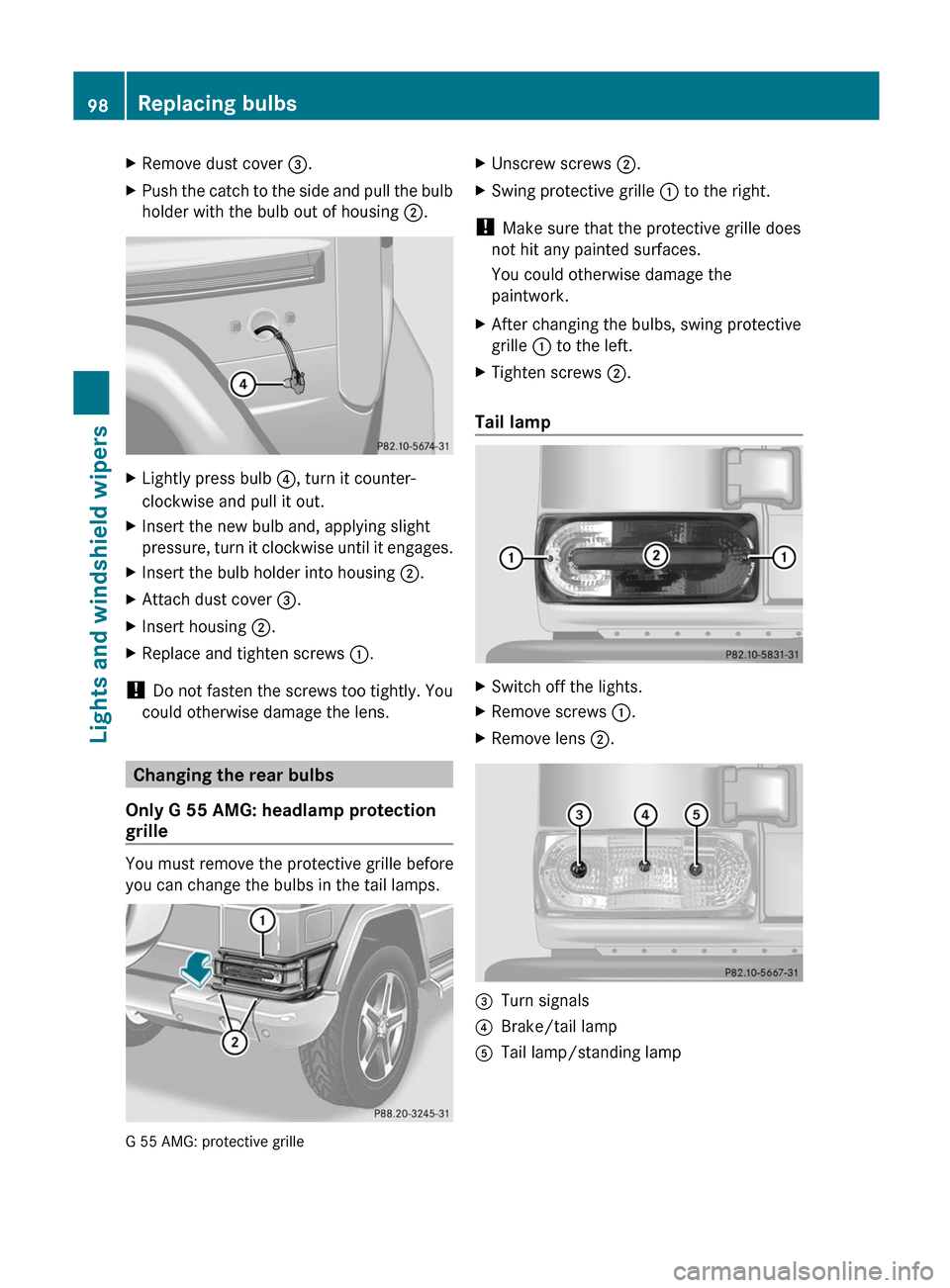
X
Remove dust cover =.
X Push the catch to the side and pull the bulb
holder with the bulb out of housing ;.X
Lightly press bulb ?, turn it counter-
clockwise and pull it out.
X Insert the new bulb and, applying slight
pressure, turn
it clockwise until it engages.
X Insert the bulb holder into housing ;.
X Attach dust cover =.
X Insert housing ;.
X Replace and tighten screws :.
! Do not fasten the screws too tightly. You
could otherwise damage the lens. Changing the rear bulbs
Only G 55 AMG: headlamp protection
grille You must remove the protective grille before
you can change the bulbs in the tail lamps.
G 55 AMG: protective grille X
Unscrew screws ;.
X Swing protective grille : to the right.
! Make sure that the protective grille does
not hit any painted surfaces.
You could otherwise damage the
paintwork.
X After changing the bulbs, swing protective
grille : to the left.
X Tighten screws ;.
Tail lamp X
Switch off the lights.
X Remove screws :.
X Remove lens ;. =
Turn signals
? Brake/tail lamp
A Tail lamp/standing lamp98
Replacing bulbs
Lights and windshield wipers
Page 101 of 284
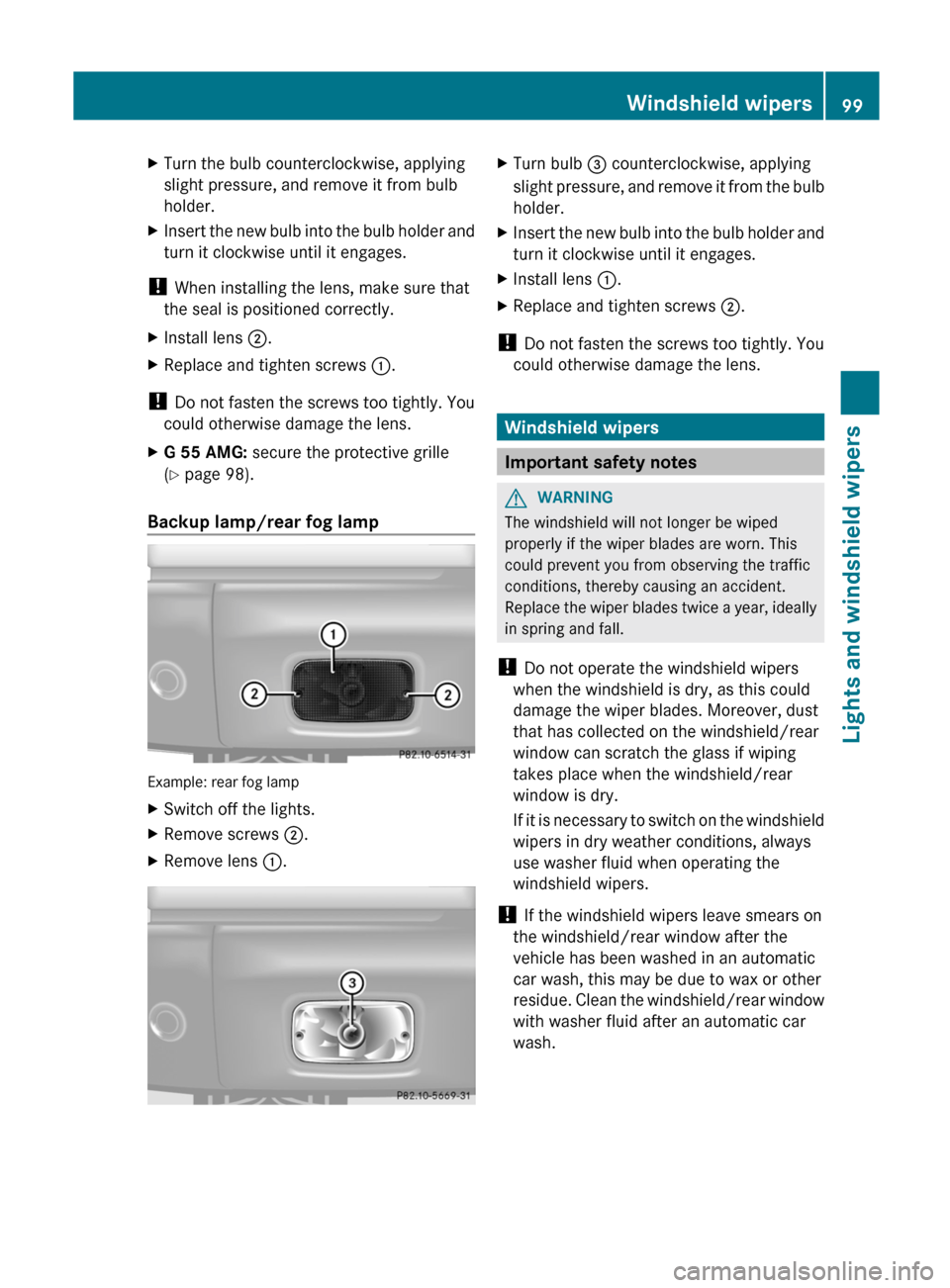
X
Turn the bulb counterclockwise, applying
slight pressure, and remove it from bulb
holder.
X Insert the new bulb into the bulb holder and
turn it clockwise until it engages.
! When installing the lens, make sure that
the seal is positioned correctly.
X Install lens ;.
X Replace and tighten screws :.
! Do not fasten the screws too tightly. You
could otherwise damage the lens.
X G 55 AMG: secure the protective grille
(Y page 98).
Backup lamp/rear fog lamp Example: rear fog lamp
X
Switch off the lights.
X Remove screws ;.
X Remove lens :. X
Turn bulb = counterclockwise, applying
slight pressure,
and remove it from the bulb
holder.
X Insert the new bulb into the bulb holder and
turn it clockwise until it engages.
X Install lens :.
X Replace and tighten screws ;.
! Do not fasten the screws too tightly. You
could otherwise damage the lens. Windshield wipers
Important safety notes
G
WARNING
The windshield will not longer be wiped
properly if the wiper blades are worn. This
could prevent you from observing the traffic
conditions, thereby causing an accident.
Replace the
wiper blades twice a year, ideally
in spring and fall.
! Do not operate the windshield wipers
when the windshield is dry, as this could
damage the wiper blades. Moreover, dust
that has collected on the windshield/rear
window can scratch the glass if wiping
takes place when the windshield/rear
window is dry.
If it is necessary to switch on the windshield
wipers in dry weather conditions, always
use washer fluid when operating the
windshield wipers.
! If the windshield wipers leave smears on
the windshield/rear window after the
vehicle has been washed in an automatic
car wash, this may be due to wax or other
residue. Clean the windshield/rear window
with washer fluid after an automatic car
wash. Windshield wipers
99
Lights and windshield wipers Z
Page 108 of 284
otherwise fog up as, in air-recirculation
mode,
no
fresh air is drawn into the vehicle.
R Use the residual heat function if you want
to heat or ventilate the vehicle interior
when the ignition is switched off. The
"residual heat" function can only be
activated or deactivated with the ignition
switched off.
R At very low temperatures, the rear window
defroster is only switched on once the
vehicle interior has warmed up. Activating/deactivating climate
control
Important information G
WARNING
When the climate control system is
deactivated, the outside air supply and
circulation are also deactivated. Only choose
this setting for a short time. Otherwise the
windows could
fog up, impairing visibility and
endangering you and others.
i Switch on climate control primarily using
the à button ( Y page 107).
Activating/deactivating X
Turn the SmartKey to position 2 in the
ignition lock.
X To switch on:
turn
control : clockwise to
the desired position (except position 0)
(Y page 105).
X The previously selected settings come into
effect again.
X To switch off: turn control : counter-
clockwise to position 0(Y page 105). Activating/deactivating the cooling
with air dehumidification function
Important information The cooling with air dehumidification function
is only available when the engine is running.
The air inside the vehicle is cooled and
dehumidified according to the temperature
selected.
G
WARNING
If you switch off the cooling function, the
vehicle will not be cooled when weather
conditions are
warm. The windows can fog up
more quickly. Window fogging may impair
visibility and endanger you and others.
Condensation may drip from the underside of
the vehicle when it is in cooling mode. This is
normal and not a sign that there is a
malfunction.
i The cooling with air dehumidification
function uses refrigerant R134a. This
coolant does not contain
chlorofluorocarbons, and therefore does
not damage the ozone layer.
Activating/deactivating !
If the cooling with air dehumidification
does not switch on, it is possible that the
climate control system has lost coolant.
Have the cooling with air dehumidification
checked at
a qualified specialist workshop.
X To activate: press the Á button.
The indicator
lamp in the Á button lights
up.
X To switch off: press the Á button.
The indicator
lamp in the Á button goes
out. The cooling with air dehumidification
function has a delayed switch-off feature. 106
Operating the climate control system
Climate control
Page 109 of 284
Problems with the cooling with air
dehumidification function
If the indicator lamp in the
Á button does
not go out or flashes when switched on, the
cooling with air dehumidification function is
switched off
due to a malfunction. You can no
longer switch on the cooling with air
dehumidification function.
X Consult a qualified specialist workshop. Setting climate control to automatic
G
WARNING
If you switch off the cooling function, the
vehicle will not be cooled when weather
conditions are
warm. The windows can fog up
more quickly. Window fogging may impair
visibility and endanger you and others.
In automatic mode, the set temperature is
maintained automatically at a constant level.
The system automatically regulates the
temperature of the dispensed air, the airflow
and the air distribution.
Automatic mode will achieve optimal
operation if cooling with air dehumidification
is also activated. If desired, cooling with air
dehumidification can be deactivated.
X Turn the SmartKey to position 2 in the
ignition lock.
X Set the desired temperature.
X To switch on: press the à button.
The indicator
lamp in the à button lights
up. Automatic air distribution and airflow
are activated.
X To switch off: press the à button.
The indicator
lamp in the à button goes
out. Automatic air distribution and airflow
are deactivated. Setting the temperature
Different temperatures can be set for the
driver's and front-passenger sides. X
Turn the SmartKey to position 2 in the
ignition lock.
X To increase/reduce: turn controls ;
and
= clockwise or counterclockwise
(Y page 105).
Only change the temperature setting in
small increments. Start at 72 ‡ (22 †).
i If you
turn the temperature control on one
side of the vehicle fully clockwise or
counterclockwise, you will increase or
reduce the temperature on the other side
of the vehicle at the same time. Setting the air distribution
You can set the air distribution for the entire
vehicle.
The symbols for the air distribution have the
following meanings: Symbol Meaning
M
Directs the airflow through the
defroster vents to the
windshield and side windows
Q
Directs the airflow to the entire
vehicle interior
O
Directs the airflow through the
footwell and side air vents
P
Directs the airflow through the
center and side air vents
X
Turn the SmartKey to position 2 in the
ignition lock.
X Press the à button.
The indicator
lamp in the à button goes
out.
X Turn control ?(Y page 105) to the
corresponding symbol. The control can
also be turned to the area between two
symbols. Operating the climate control system
107
Climate control Z
Page 110 of 284
Setting the airflow
X Turn the SmartKey to position 2 in the
ignition lock.
X Press the à button.
The indicator
lamp in the à button goes
out.
X To increase/reduce: turn control :
clockwise or counterclockwise
(Y page 105).
i The airflow from the rear-compartment
vents and the center vents is the same. Defrosting the windshield
You can use this function to defrost the
windshield or to defrost the inside of the
windshield and the side windows.
i You should only select the defrosting
function until
the windshield is clear again.
i When you switch on the "defrosting"
function using the ¥5
or z 6
button,
you cannot adjust any of the other settings.
X Turn the SmartKey to position 2 in the
ignition lock.
X To switch on: press the ¥ 5
or z 6
button.
The indicator lamp in the ¥5
or z 6
button comes on.
The climate
control system switches to the
following functions:
R cooling with air dehumidification on
R high airflow
R high temperature
R air distribution to the windshield and
front side windows
R air-recirculation mode off
i If necessary,
also activate the windshield
defroster (Y page 108). X
To deactivate: press the ¥5
or z 6
button.
The indicator lamp in the ¥5
or z 6
button goes off. The previously selected
settings come into effect again.
or
X Press the à button.
The indicator
lamp in the à button lights
up. The indicator lamp in the z button
goes out. Airflow and air distribution are set
to automatic mode. Defrosting the windows
Windows fogged up on the inside X
Activate the defrosting function.
X If necessary, activate the windshield
heating (
Y page 108).
i You should only select this setting until
the windshield is clear again.
Windows fogged up on the outside X
Activate the windshield wipers.
X Close the center air vents.
When automatic air distribution is switched
off:
X Turn the air distribution thumbwheel to the
O or P symbol.
i You should only select this setting until
the windshield is clear again.
X If necessary, activate the windshield
heating (Y page 108). Switching the windshield defroster
on/off
G
WARNING
Any accumulation of snow and ice should be
removed from the windshield before driving.
5 USA only.
6 Canada only.108
Operating the climate control system
Climate control