engine MERCEDES-BENZ G-Class 2012 W463 Workshop Manual
[x] Cancel search | Manufacturer: MERCEDES-BENZ, Model Year: 2012, Model line: G-Class, Model: MERCEDES-BENZ G-Class 2012 W463Pages: 284, PDF Size: 9.4 MB
Page 141 of 284
i
Hill start assist will aid you when pulling
away on a hill.
For further information, see "Hill start
assist" ( Y page 117).
Maximum gradient-climbing capability On good road surface conditions, the
maximum
gradient-climbing
capability is 80%,
which corresponds to an approach/
departure angle of 38°. Note that the
vehicle's gradient-climbing capability
depends on the off-road conditions.
Accelerate carefully and make sure that the
wheels do not spin when driving on steep
terrain.
i If the load on the front axle is reduced
when pulling away on a steep uphill slope,
the front wheels have a tendency to spin.
4ETS detects this and brakes the wheels
accordingly. The rear wheel torque is
increased, making it easier to drive off.
Brow of hill When driving on an uphill gradient, reduce
pressure slightly on the accelerator
immediately
before
reaching the top of the hill
(do not shift the transmission to position N).
Use the vehicle's own impetus to drive over
the top of the hill.
This style of driving prevents:
R the vehicle from lifting off the ground on the
brow of a hill
R loss of traction
R the vehicle from traveling too quickly down
the other side
Driving downhill R
Before tackling steep downhill gradients,
select shift range 1 (Y page 121).
This way you use the engine's braking
effect to reduce the speed. If this is not
sufficient, brake gently. When doing so, make sure that the vehicle is facing in the
direction of the line of fall.
R Observe the notes on driving in
mountainous terrain (Y page 139).
R Drive slowly.
R Do not drive at an angle down steep
inclines. Steer
into the line of fall and drive
with the front wheels aligned straight.
Otherwise, the vehicle could slip sideways,
tip and roll over.
R Check that the brakes are working normally
after a long downhill stretch.
i The special off-road ABS(Y page 54)
enables accurate, brief and repeated
locking of the front wheels, causing them
to dig into the loose ground. Note that when
the front wheels are fully braked, they slide
easily over the surface of the ground,
making it difficult to steer. Driving systems
Cruise control
Important safety notes Cruise control maintains a constant road
speed for you. On long and steep downhill
gradients, especially if the vehicle is laden,
you must select shift range 1, 2 or 3 in good
time. By doing so, you will make use of the
braking effect of the engine, which relieves
the load on the brake system and prevents
the
brakes
from overheating and wearing too
quickly.
Use cruise control only if road and traffic
conditions make it appropriate to maintain a
steady speed for a prolonged period. You can
set any road speed above 20 mph
(30 km/h). G
WARNING
The cruise control is a convenience system
designed to assist the driver during vehicle
operation. The driver is and must always Driving systems
139
Driving and parking
Z
Page 143 of 284
of the vehicle could cause an accident and/
or serious injury to you and others.
X Press the cruise control lever up : for a
higher speed
or down ; for a lower speed.
X Keep the cruise control lever pressed until
the desired speed is reached.
X Release the cruise control lever.
The new speed is stored.
i Cruise control is not deactivated if you
depress the accelerator pedal. For
example, if you accelerate briefly to
overtake, cruise control adjusts the
vehicle's speed to the last speed stored
after you have finished overtaking.
Making adjustments in 1 mph
(Canada:
1 km/h) increments X
Briefly press the cruise control lever
up :
for a higher speed or down
; for a
lower speed.
The last speed stored is increased or
reduced.
Deactivating cruise control There are several ways to deactivate cruise
control:
X
Briefly press the cruise control lever
forwards = .
or
X Brake.
Cruise control is automatically deactivated if:
R you apply the parking brake.
R you are driving below 20 mph (30 km/h
).
R ESP ®
intervenes or you deactivate ESP ®
.
R you shift the transmission to position N
while driving.
i The last speed stored is cleared when you
switch off the engine. 4MATIC
(permanent four-wheel drive)
4MATIC ensures that all four wheels are
permanently driven. Together with ESP ®
and
4ETS, it
improves the traction of your vehicle
whenever a drive wheel spins due to
insufficient grip. G
WARNING
If
a drive wheel is spinning due to insufficient
traction:
R While driving off, apply as little throttle as
possible.
R While driving, ease up on the accelerator
pedal.
R Adapt your speed and driving style to the
prevailing road conditions.
Failure to observe these guidelines could
cause the vehicle to skid.
4MATIC cannot prevent accidents resulting
from excessive speed.
! Never tow the vehicle with one axle
raised. This
may damage the transfer case.
Damage of this sort is not covered by the
Mercedes-Benz Limited Warranty. All
wheels must remain either on the ground
or be fully raised. Observe the instructions
for towing the vehicle with all wheels in full
contact with the ground.
i In wintry driving conditions, the maximum
effect of 4MATIC can only be achieved if
you use winter tires (M+S tires), with snow
chains if necessary.
! When testing the parking brake, operate
the vehicle only briefly (for a maximum of
ten seconds) on a brake test dynamometer.
When doing this, turn the SmartKey to
position 0 or 1 in the ignition. Failure to do
this can cause damage to the drive train or
the brake system.
! Function or performance tests may only
be performed on a 2-axle dynamometer. If
you wish to operate the vehicle on such a
dynamometer, please consult an
authorized Mercedes-Benz Center Driving systems
141
Driving and parking Z
Page 148 of 284
Shift ranges
H HIGH
Position for all normal on-road
driving conditions.
L LOW
Low-range position for driving off-
road.
Also for use on steep uphill or
downhill gradients, especially
when towing a trailer.
!
When the
transfer case is in the
off-road driving position LOW
range, the automatic
transmission does not shift up,
even when the engine has
reached the overrevving limit.
There is then a risk of engine
damage. Make sure that you do
not exceed the maximum
permissible engine speed.
The vehicle travels around half the
speed of on-road driving range
HIGH. The tractive power is
correspondingly higher. N Neutral
Neutral position.
No power is transmitted to the
drive wheels.
Shifting the transfer case
General information
G
WARNING
If you do not wait for the gear change process
to complete, it may not be correctly
implemented. The transfer case may then be
in neutral and the power transmission
between the engine and the drive axles may
be disengaged. The vehicle can then move
freely, even if a gear is engaged, and may
inadvertently start moving, particularly if it is
on a slope. There is therefore a risk of an
accident. Always wait for the gear change process from
HIGH to LOW and from LOW to HIGH to
complete. Do not turn off the engine while
changing
gear
and do not shift the automatic
transmission to another gear.
Observe the relevant messages in the
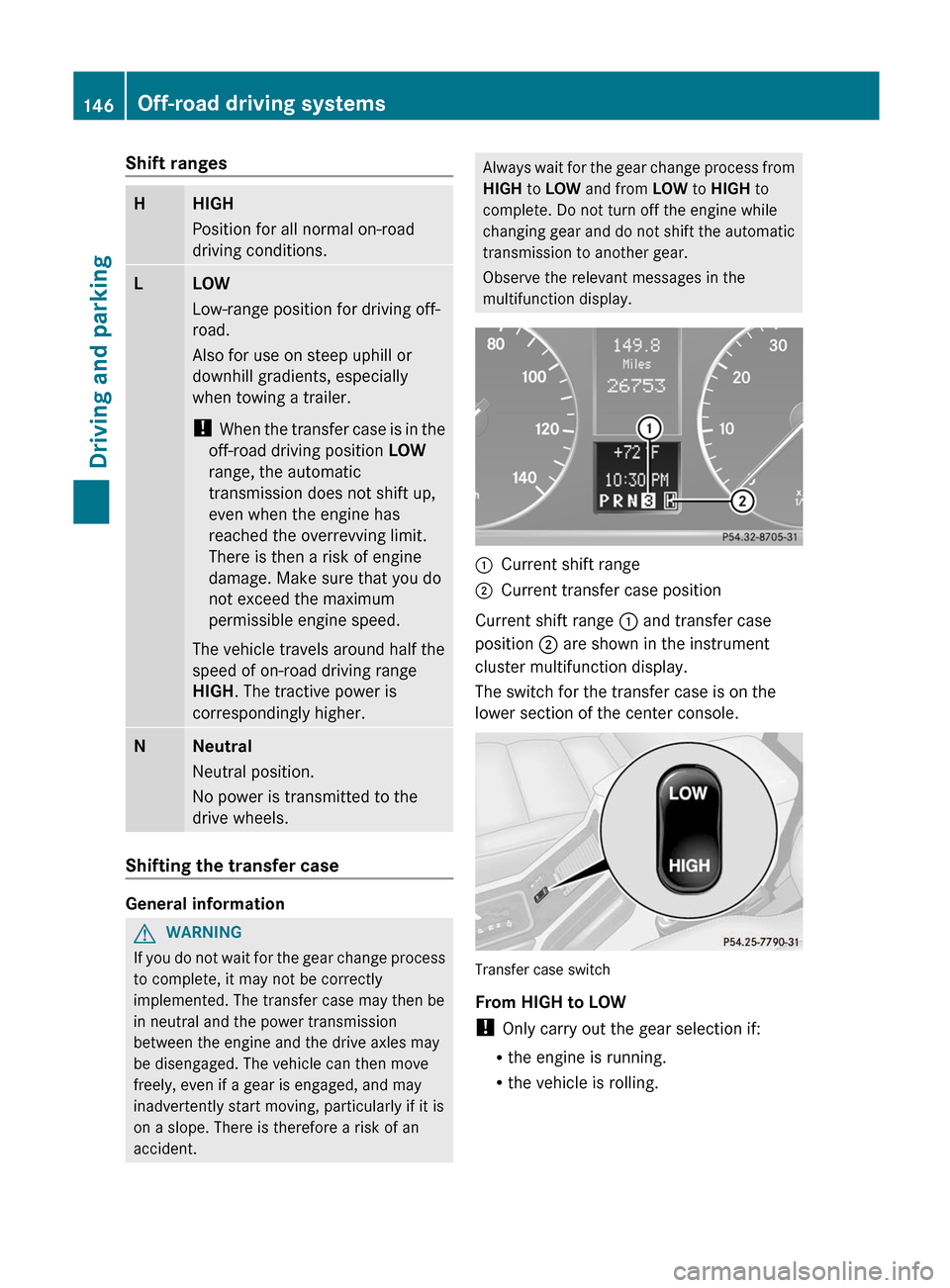
multifunction display. :
Current shift range
; Current transfer case position
Current shift range : and transfer case
position ; are shown in the instrument
cluster multifunction display.
The switch for the transfer case is on the
lower section of the center console. Transfer case switch
From HIGH to LOW
!
Only carry out the gear selection if:
R the engine is running.
R the vehicle is rolling.146
Off-road driving systems
Driving and parking
Page 149 of 284
R
the automatic transmission is in selector
lever position N.
R you are driving no faster than 25 mph
(40 km/h).
You could otherwise damage the transfer
case.
X Push the transfer case switch to LOW.
When the shift procedure is complete, the
L transfer case position appears in the
multifunction display.
X Shift the transmission to position D.
From LOW to HIGH
! Only carry out the gear selection if:
R the engine is running.
R the vehicle is rolling.
R the automatic
transmission is in selector
lever position N.
R you are driving no faster than 43 mph
(70 km/h).
You could otherwise damage the transfer
case.
X Push the transfer case switch to HIGH.
When the shift procedure is complete, the
H transfer case position appears in the
multifunction display.
If the gear change is not completed, the
following messages could appear in the
display:
R TC shift conditions not fulfilled
You have not met one or more shift
conditions.
R TC in neutral
The transfer case has canceled the gear
change process and is in N. The N transfer
case position appears in the multifunction
display. G
WARNING
If the transfer case is in Neutral, the park
position P of the automatic transmission will not hold the vehicle. The parking brake must
be engaged to hold the vehicle in place.
R TC shift procedure canceled
The transfer case has not performed the
gear change process.
X Carry out the gear change process again.
Make sure to meet all conditions for
changing gears.
R Transfer case Consult workshop
There is
a malfunction in the transfer case.
X Do not shift the transfer case.
X Have the vehicle checked as soon as
possible at
a qualified specialist workshop.
Shifting to neutral G
WARNING
If the transfer case is in Neutral, the park
position P of the automatic transmission will
not hold the vehicle. The parking brake must
be engaged to hold the vehicle in place.
X Turn the SmartKey to position 2 in the
ignition lock.
X Apply the parking brake.
X Depress the brake pedal.
X Move the selector lever to
position N (Y page 120).
X Push the transfer case switch to LOW for
about 30 seconds.
When the shift procedure is complete, the
N transfer case position appears in the
multifunction display.
i If the transfer case is in N, the SmartKey
is in the ignition lock and you open the
driver's door,
the TC in neutral message
appears in the multifunction display. If you
then release the parking brake, a warning
tone will sound. Off-road driving systems
147
Driving and parking Z
Page 154 of 284
Useful information
i This Operator's Manual describes all
models and all standard and optional
equipment of your vehicle available at the
time of publication of the Operator's
Manual. Country-specific differences are
possible. Please
note that your vehicle may
not be equipped with all features
described. This also applies to safety-
related systems and functions.
i Please read the information on qualified
specialist workshops (Y page 20). Important safety notes
You will find an illustration of the instrument
cluster in the "At a glance" section
(
Y page 25).
G
WARNING
A driver's attention to the road and traffic
conditions must always be his/her primary
focus when driving.
For your safety and the safety of others,
selecting features through the multifunction
steering wheel should only be done by the
driver when
traffic and road conditions permit
it to be done safely.
Bear in mind that at a speed of just 30 mph
(approximately 50 km/h ), your vehicle is
covering a distance of 44 feet (approximately
14 m) every second. G
WARNING
No messages will be displayed if either the
instrument cluster or the multifunction
display is inoperative.
As a result, you will not be able to see
information about your driving conditions,
such as
R speed
R outside temperature
R warning/indicator lamps R
malfunction/warning messages
R failure of any systems
Driving characteristics may be impaired.
If you
must continue to drive, do so with added
caution. Contact an authorized Mercedes-
Benz Center as soon as possible. G
WARNING
Malfunction and warning messages are only
displayed for certain systems and are
intentionally not very detailed. The
malfunction and warning messages are
simply a reminder with respect to the
operation of certain systems. They do not
replace the owner's and/or driver's
responsibility to maintain the vehicle's
operating safety. Have all required
maintenance services and safety checks
performed on
the vehicle. Bring the vehicle to
an authorized Mercedes-Benz Center to
address the malfunction and warning
messages. Displays and operation
Tachometer
The red
band in the tachometer indicates the
engine's overrevving range.
! Do not drive in the overrevving range, as
this could damage the engine.
The fuel supply is interrupted to protect the
engine when the red band is reached. Displaying the coolant temperature
G
WARNING
Driving when your engine is overheated can
cause some
fluids which may have leaked into
the engine compartment to catch fire. You
could be seriously burned.
Steam from an overheated engine can cause
serious burns which can occur just by opening 152
Displays and operation
On-board computer and displays
Page 155 of 284
the engine hood. Stay away from the engine
if you see or hear steam coming from it.
Stop the vehicle in a safe location away from
other
traffic.
Turn off the engine, get out of the
vehicle and do not stand near the vehicle until
the engine has cooled down.
The coolant temperature gauge is in the
instrument cluster on the left-hand side.
Under normal driving conditions, with the
correct anti-corrosion and antifreeze additive
concentration, the reading may rise to
248 ‡(120 †).
! If the coolant temperature exceeds
248 ‡(120 †) do not continue driving. The
engine will otherwise be damaged. Outside temperature display
The outside temperature display is in the
multifunction display (Y
page 154).G
WARNING
The outside temperature indicator is not
designed to serve as an ice-warning device
and is therefore unsuitable for that purpose.
Indicated temperatures just above the
freezing point
do not guarantee that the road
surface is free of ice. The road may still be icy,
especially in wooded areas or on bridges.
Changes in the outside temperature are
displayed after a short delay. Operating the on-board computer
The on-board computer is activated as soon
as you
turn the SmartKey to position 1 in the
ignition lock.
You can control the multifunction display and
the settings in the on-board computer using
the buttons on the multifunction steering
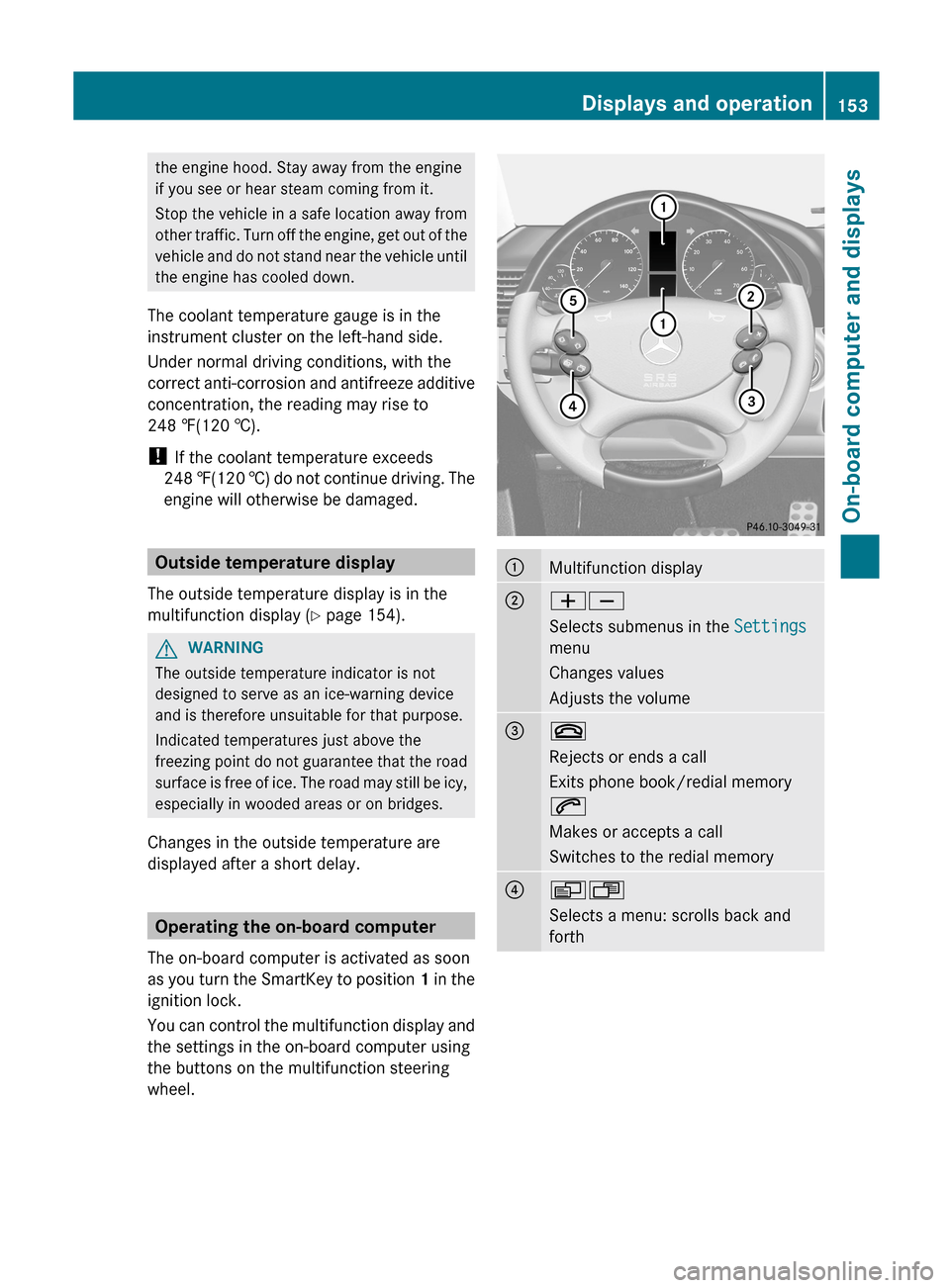
wheel. :
Multifunction display
;
WX
Selects submenus in the
Settings
menu
Changes values
Adjusts the volume =
~
Rejects or ends a call
Exits phone book/redial memory
6
Makes or accepts a call
Switches to the redial memory
?
VU
Selects a menu: scrolls back and
forth Displays and operation
153
On-board computer and displays Z
Page 162 of 284
Switching the daytime running lamps on/
off
This function is not available in Canada.
If you have activated the daytime running
lamps function and the light switch is in the
$ or à position, the low-beam
headlamps are switched on automatically
when the engine is running.
In the dark, the following also light up:
R
the low-beam headlamps
R the standing lamps
R the tail lamps
R the license plate lamp
R the side marker lamp
In countries
where daytime running lamps are
legally required, Constant is the factory
setting.
X Press the V or U button on the
steering wheel to select the Settings
menu.
X Press the & button
to select submenus.
X Press the W or X
button to select the
Lighting submenu.
X Press the & button
to select Headlamp
mode.
X Press the W or X button to set the
mode for the headlamps to Manual or
Constant (daytime running lamps).
X Press the &, V or U button to
select a different display.
Switching the surround lighting on or off
If you activate the surround lighting function
and the light switch is set to Ã, the
following will light up if it is dark and you
unlock the vehicle using the SmartKey:
R the standing lamps
R the license plate lamp
R the tail lamps
R the fog lamps
R the side marker lamp The surround lighting switches off
automatically after 40 seconds or when the
driver's door is opened.
X
Press the V or U button on the
steering wheel to select the Settings
menu.
X Press the & button
to select submenus.
X Press the W or X
button to select the
Lighting submenu.
X Press the & button
to select Surround
lighting.
X Press the W or X button to switch
the Surround lighting on or off.
X When leaving the vehicle, turn the light
switch to position Ã.
The surround lighting is activated.
X Press the &, V or U button to
select a different display.
Activating/deactivating the exterior
lighting delayed switch-off
If you have activated the delayed switch-off
function, the light switch is set to à and
you switch off the engine, the following
remain lit:
R the standing lamps
R the license plate lamp
R the tail lamps
R the fog lamps
R the side marker lamp
If the
engine is switched off and then none of
the doors are opened, or if an open door is
not closed, the exterior lighting goes out after
60 seconds.
X Press the V or U button on the
steering wheel to select the Settings
menu.
X Press the & button
to select submenus.
X Press the W or X
button to select the
Lighting submenu.
X Press the & button to select Headl.
Delayed Switch Off. 160
Menus and submenus
On-board computer and displays
Page 163 of 284
X
Press the W or X button to activate
or deactivate the Headl. Delayed
Switch Off function.
X Before switching off the engine, turn the
light switch to position Ã.
The exterior lighting delayed switch-off is
activated.
X Press the &, V or U button to
select a different display.
Deactivating the delayed switch-off
temporarily:
X Before leaving the vehicle, turn the
SmartKey to
position 0 in the ignition lock.
X Turn the SmartKey to position 2 in the
ignition lock and back to position 0.
The delayed switch-off is deactivated.
Delayed switch-off is reactivated the next
time you start the engine.
Activating/deactivating the interior
lighting delayed switch-off
If the Interior Light. Delay. Sw. Off:
function is activated and you pull the
SmartKey out
of the ignition lock, the interior
lighting remains on for around 10 seconds.
X Press the V or U button on the
steering wheel to select the Settings
menu.
X Press the & button
to select submenus.
X Press the W or X
button to select the
Lighting submenu.
X Press the & button
to select Interior
Light. Delay Sw. Off.
X Press the W or X button to activate
or deactivate Interior Light. Delay.
Sw. Off.
X Press the &, V or U button to
select a different display. Vehicle Activating/deactivating the automatic
door locking feature
If you select the Automatic Locking
function,
the
vehicle is centrally locked above
a speed of around 9 mph (15 km/h).
i For more information on the automatic
locking feature, see ( Y page 66).
X Press the V or U button on the
steering wheel to select the Settings
menu.
X Press the & button
to select submenus.
X Press the W or X
button to select the
Vehicle submenu.
X Press the & button to select
Automatic Door Lock.
X Press the W or X button to switch
the Automatic Door Lock feature on or
off.
X Press the &, V or U button to
select a different display.
Convenience Activating/deactivating the EASY-
ENTRY/EXIT feature
You can use the
Easy-entry Function to
activate or deactivate the EASY-ENTRY/EXIT
feature ( Y page 83). G
WARNING
You must make sure no one can become
trapped or injured by the moving steering
wheel when the easy-entry/exit feature is
activated.
To stop steering wheel movement do one of
the following:
R Move steering wheel adjustment stalk.
R Press one
of the memory position buttons.
R Press the memory button.
Do not leave children unattended in the
vehicle, or with access to an unlocked vehicle.
Children could open the driver's door and Menus and submenus
161
On-board computer and displays
Z
Page 169 of 284
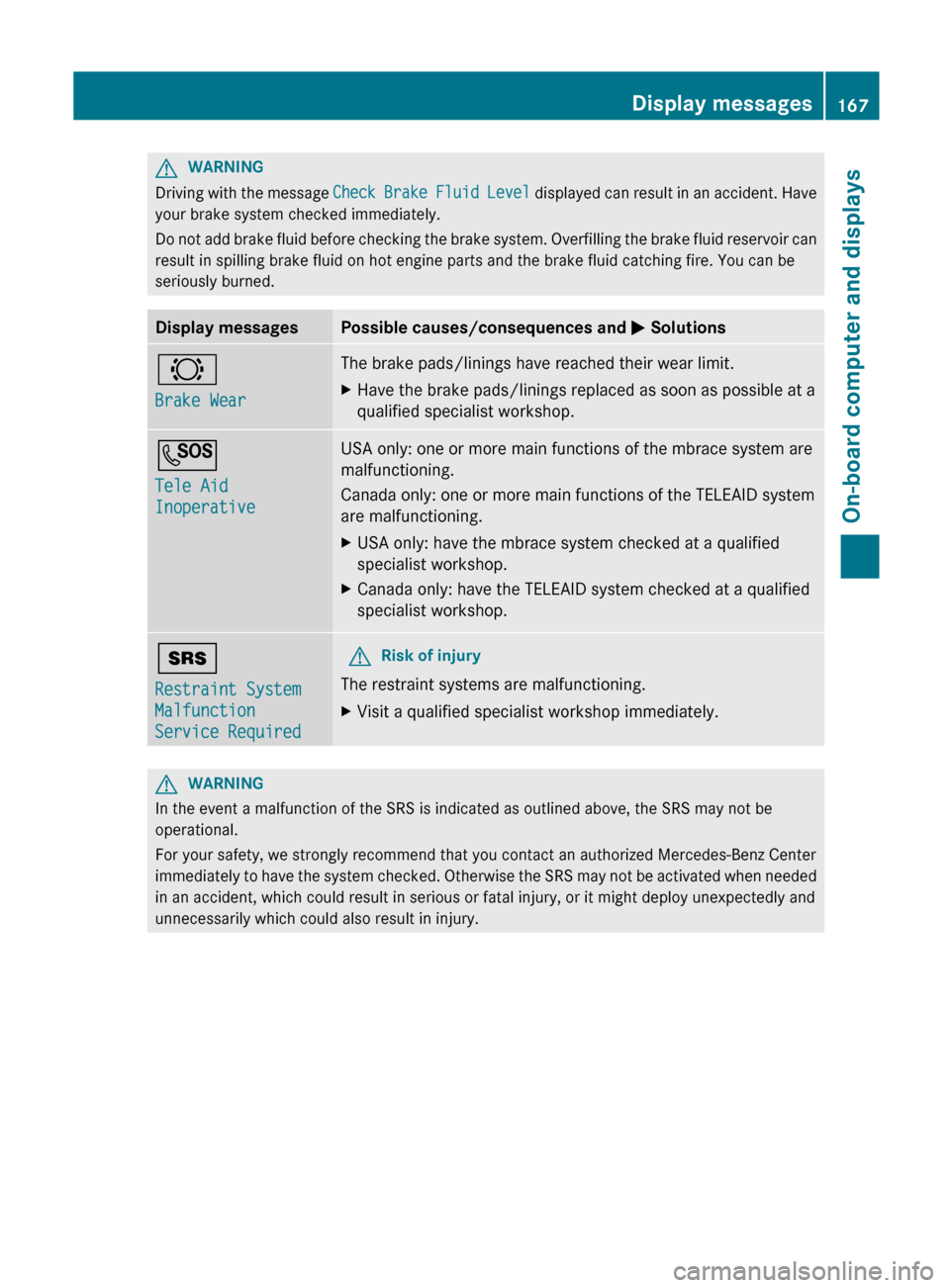
G
WARNING
Driving with the message
Check
Brake
Fluid Level displayed can result in an accident. Have
your brake system checked immediately.
Do not add brake fluid before checking the brake system. Overfilling the brake fluid reservoir can
result in spilling brake fluid on hot engine parts and the brake fluid catching fire. You can be
seriously burned. Display messages Possible causes/consequences and
M
Solutions
#
Brake Wear The brake pads/linings have reached their wear limit.
X
Have the brake pads/linings replaced as soon as possible at a
qualified specialist workshop. G
Tele Aid
Inoperative USA only: one or more main functions of the mbrace system are
malfunctioning.
Canada only: one or more main functions of the TELEAID system
are malfunctioning.
X
USA only: have the mbrace system checked at a qualified
specialist workshop.
X Canada only: have the TELEAID system checked at a qualified
specialist workshop. +
Restraint System
Malfunction
Service Required G
Risk of injury
The restraint systems are malfunctioning.
X Visit a qualified specialist workshop immediately. G
WARNING
In the event a malfunction of the SRS is indicated as outlined above, the SRS may not be
operational.
For your safety, we strongly recommend that you contact an authorized Mercedes-Benz Center
immediately to
have the system checked. Otherwise the SRS may not be activated when needed
in an accident, which could result in serious or fatal injury, or it might deploy unexpectedly and
unnecessarily which could also result in injury. Display messages
167
On-board computer and displays Z
Page 172 of 284
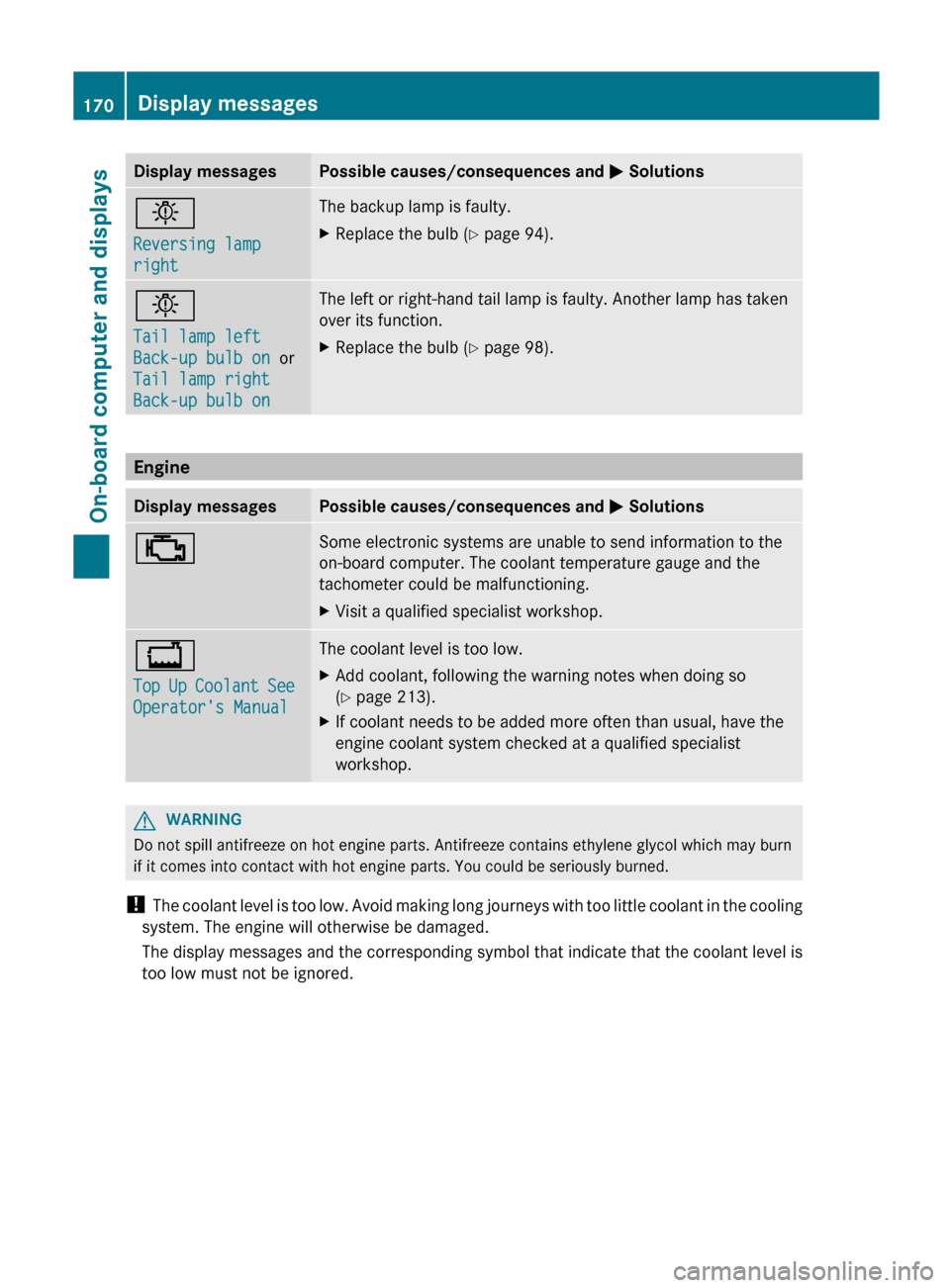
Display messages Possible causes/consequences and
M Solutionsb
Reversing lamp
right The backup lamp is faulty.
X
Replace the bulb ( Y page 94).b
Tail lamp left
Back-up bulb on
or
Tail lamp right
Back-up bulb on The left or right-hand tail lamp is faulty. Another lamp has taken
over its function.
X
Replace the bulb ( Y page 98).Engine
Display messages Possible causes/consequences and
M Solutions; Some electronic systems are unable to send information to the
on-board computer. The coolant temperature gauge and the
tachometer could be malfunctioning.
X
Visit a qualified specialist workshop. +
Top
Up
Coolant See
Operator's Manual The coolant level is too low.
X
Add coolant, following the warning notes when doing so
(Y page 213).
X If coolant needs to be added more often than usual, have the
engine coolant system checked at a qualified specialist
workshop. G
WARNING
Do not spill antifreeze on hot engine parts. Antifreeze contains ethylene glycol which may burn
if it comes into contact with hot engine parts. You could be seriously burned.
! The coolant
level is too low. Avoid making long journeys with too little coolant in the cooling
system. The engine will otherwise be damaged.
The display messages and the corresponding symbol that indicate that the coolant level is
too low must not be ignored. 170
Display messages
On-board computer and displays