check engine light MERCEDES-BENZ G-Class 2017 W463 User Guide
[x] Cancel search | Manufacturer: MERCEDES-BENZ, Model Year: 2017, Model line: G-Class, Model: MERCEDES-BENZ G-Class 2017 W463Pages: 286, PDF Size: 4.91 MB
Page 121 of 286
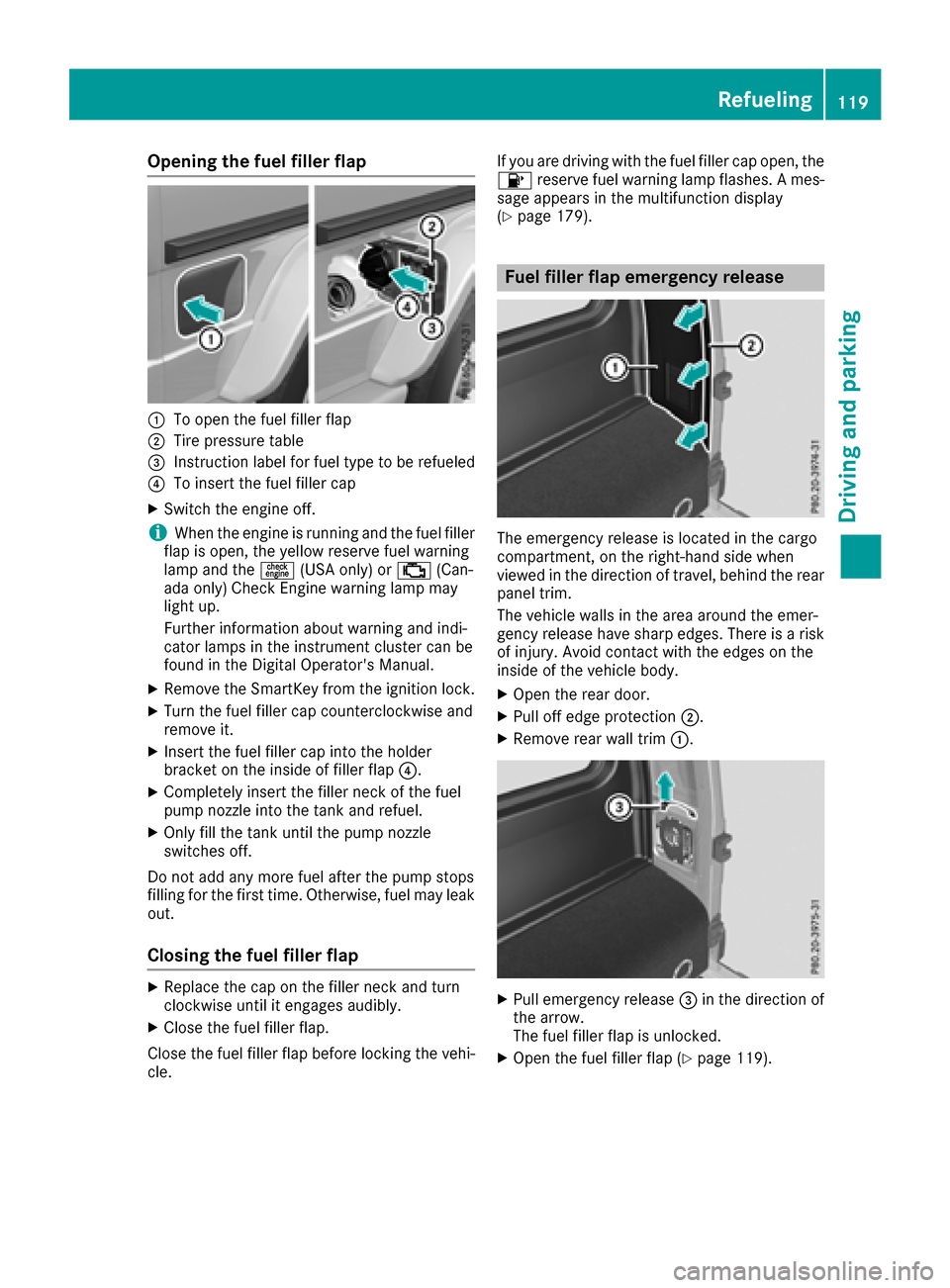
Opening the fuel filler flap
:To open the fuel filler flap
;Tire pressure table
=Instruction label for fuel type to be refueled
?To insert the fuel filler cap
XSwitchthe engine off.
iWhen the engine is running and the fuel filler
flap is open, the yellow reserve fuel warning
lamp and the =(USA only) or ;(Can-
ada only) Check Engine warning lamp may
light up.
Further information about warning and indi-
cator lamps in the instrument cluster can be
found in the Digital Operator's Manual.
XRemove the SmartKey from the ignition lock.
XTurn the fuel filler cap counterclockwise and
remove it.
XInser tthe fuel filler cap into the holder
bracket on the inside of filler flap ?.
XCompletely insert the filler neck of the fuel
pump nozzle into the tank and refuel.
XOnly fill the tank until the pump nozzle
switches off.
Do not add any more fuel after the pump stops
filling for the first time. Otherwise, fuel may leak
out.
Closing the fuel filler flap
XReplace the cap on the filler neck and turn
clockwise until it engages audibly.
XClose the fuel filler flap.
Close the fuel filler flap before lockin gthe vehi-
cle. If you are driving with the fuel filler cap open, the
8
reservef uel warning lamp flashes. Ames-
sage appears in the multifunction display
(
Ypage 179).
Fuel filler flap emergency release
The emergency release is located in the cargo
compartment ,onthe right-hand side when
viewed in the direction of travel, behind the rear
panel trim.
The vehicle walls in the area around the emer-
genc yrelease have sharp edges. There is arisk
of injury. Avoid contact with the edges on the
inside of the vehicle body.
XOpen the rear door.
XPull off edge protection ;.
XRemove rear wall trim:.
XPull emergency release =in the direction of
the arrow.
The fuel filler flap is unlocked.
XOpen the fuel filler flap (Ypage 119).
Refueling119
Driving and parking
Z
Page 126 of 286
Heavy and light loads
GWARNING
If you rest you rfoot on the brake pedalw hile
driving, the braking system can overheat. This increases the stopping distance and can even
caus ethe braking system to fail .There is a
risk of an accident.
Never use the brake pedalasaf ootrest. Never
depress the brake pedala nd the accelerator
pedalatt he same time.
!Depressing the brake pedalc onstantly
results in excessive and premature weart o
the brake pads.
If the brakes have been subjected to aheavy
load, do not stop the vehiclei mmediately. Drive
on for ashort while. This allows the airflow to
cool the brakes more quickly.
Wet roads
If driving in heavy rain for aprolonged period of
time without braking, there may be adelayed
reactio nfrom the brakes when braking for the
first time. This may als ooccur after the vehicle
has been washed.
You have to depress the brake pedalm ore
firmly.M aintainagreater distance from the
vehicleinf ront.
After driving on awet road or having the vehicle
washed, brake firmly while paying attention to
the traffic conditions. This wil lwarmupt he
brake discs, thereby drying them more quickly
and protecting them against corrosion.
Limited braking performance on salt-
treated roads
If you drive on salted roads, alayer of sal tresi-
due may form on the brake discs and brake
pads. This can result in asignificantly longer
braking distance.
RIn order to prevent any sal tbuild-up, apply the
brakes occasionall ywhile paying attention to
the traffic conditions.
RCarefully depress the brake pedala nd the
beginning and end of ajourney.
RMaintain agreater distance to the vehicle
ahead.
Servicing the brakes
!The brake flui dlevelm ay be too low,i f:
Rif the red brake warning lamp lights up in
the instrument cluste rand
Ryou hearaw arning tone while the engine is
running
Observe additiona lwarning messages in the
multifunction display.
The brake flui dlevelm ay be too low due to
brake pad wearorl eaking brake lines.
Have the brake system checked immediately. Consult aqualified specialist workshopt o
arrange this.
!If the brake warning lamp lights up in the
instrument cluste rand you hearaw arning
tone even though the parking brake has been
released ,the brake flui dlevelm ay be too low.
Observe additionalw arning messages in the
multifunction display.
The brake flui dlevelm ay be too low due to
brake pad wearorl eaking brake lines.
Have the brake system checked immediately.
This work should be carrie dout at aqualified
specialist workshop.
!Af unction or performance test should only
be carrie dout on a2-axle dynamometer. If
you wis htooperate the vehicleons uch a
dynamometer, please consul taqualified spe-
cialist workshopina dvance. You couldoth-
erwise damage the drive train or the brake
system.
!The ESP®system operates automatically.I f
the parking brake is tested on abrake dyna-
mometer (for amaximu moften seconds),t he
engine and the ignitio nmust be switched off.
Braking triggereda utomatically by ESP
®may
otherwise caus esevere damage to the brake
system.
All checks and maintenance work on the brake
system must be carrie dout at aqualified spe-
cialist workshop.
Have brake pad sinstalled and brake fluid
replaced at aqualified specialist workshop.
If the brake system has only been subject to
moderate loads, you shoul
d test the functional-
ity of you rbrakes at regular intervals.
Informatio nonBAS (Brake Assist) (
Ypage5 8).
124Driving tips
Driving and parking
Page 130 of 286
Familiarize yourself with the characteristics of
your vehicle and the gearshift operation before
driving through difficult terrain.
The following driving systems are specially
adapted to off-roadd riving:
R4ETS (Ypage 59)
ROff-roadABS (Ypage 58)
RTransfer case (Ypage 145)
RDifferentia llocks (Ypage 120)
Observe the following notes:
RStop the vehicle before yo udrive off-roada nd,
if necessary ,shift the transfe rcase to the off-
roadd riving position LOW RANGE
(
Ypage 146).
REngag ethe differential locks if necessary
(Ypage 148).
iABS, 4ETS, ESP®and BAS are deactivated
while the differential locks are engaged.T his
allow sthe front wheels to lock briefly, so that
these can dig into aloose surface .However,
please note that locke dwheels skid and can
no longer steer.
RCheck that items of luggage and loads are
stowed safely and are well secured
(
Ypage 209).
RTo avoid damaging the vehicle, make sure
there is always sufficient ground clearance.
RAlway skeep the engine running and in gear
whe ndriving on adownhil lgradient.
RAlway skeep the engine running and in gear
whe ndriving downani ncline.
RDrive slowlyand evenly, if necessary at a
walking pace.
REnsure that the wheels are in contact with the
ground at al ltimes.
RDrive with extreme care on unfamilia roff-road
routes where visibility is poor. For safety rea-
sons, get ou
tofthe vehicle firs tand survey
the off-roadr oute.
RCheck the depth of water before fording rivers
and streams.
RWatch outfor obstacles.
RAlwayskeep the doors, reard oor, sidewin-
dowsa nd the sliding sunroof closed while the
vehicle is in motion.
RSwitch off cruise control.
RDo not deviate from marke droutes.
RAdap tyou rspeed to the terrain. The rougher,
steeper or more ruts on the terrain, the slower
your speed should be.
RDo not jump with the vehicle. as this will inter-
rup tthe vehicle' spropulsion.
RAvoid hig hengine speeds .Drive at appropri-
ate engine speeds (maximu m3,000 rpm).
RDo not shift the automatic transmission to
position N.
RAlwayscheck the vehicle for damag eafteroff-
roadd riving.
Do not use the HOLD function whe ndriving off-
road, on steep uphil lordownhil lgradients or on
slippery or loose surfaces. The HOLD function
cannot holdt he vehicle on such surfaces.
You can obtain further information aboutr etro-
fitting specia lall-terrain tires from aquali fied
specialist workshop.
Checklist before driving off-road
!If the engine oil warning lamp lights up while
the vehicle is in motion, stop the vehicle in a
saf ep lace as soona spossible. Check the
engine oil level. The engine oil warning lamp
warning mus tnot be ignored.C ontinuing the
journey while the symbol is displaye dcould
lea dtoe ngine damage.
XEngin eoillevel: check the engine oil level
and ad doil if necessary.
Whend riving on steep gradients, the engine
oil level mus tbes ufficiently hig htoensure a
correct oil supply in the vehicle.
XTire-changing too lkit: check that the jack is
working and make sur eyou hav ethe lug
wrench, arobust tow cable and afolding
spade in the vehicle.
XWheels and tires: check the tire treadd epth
and tire pressure.
XCheck for damag eand remove any foreign
objects, e.g. small stones,f rom the wheels/
tires.
XReplace any missing valve caps.
XReplace dente dordamaged wheels .Also
check the spare wheel.
XRims: dentedorbent rims can result in aloss
of tire pressure and damag ethe tire bead.
Befored riving off-road, check the wheels and
replace them if necessary.
128Drivin gtips
Drivin gand parking
Page 131 of 286
Checklist after driving off-road
!If you detect damagetothevehicle after
driving off-road, have th evehicle checked
immediately at aqualified specialist work-
shop.
Drivin goverroug hterra in places greater
demands on your vehicle than driving on normal
roads. Afte rdriving off-road, check th evehicle.
This allows you to detect damag epromptly and
reduc ethe riskofana ccidenttoy ourself and
other road users.
XShift th etransfer cas etotheon-road position
HIG HRANGE (Ypage 146).
XDisengage th edifferential locks
(Ypage 149).
XClean th eheadlamps and rear lightsa nd
check for damage.
XClean th efront and rear licens eplates.
XClean th ewheelsa nd tires withaw aterjet
and remove any foreign objects.
XClean th ewheels, wheel housing sand the
vehicle underside withaw aterjet;c he ck for
any foreign object sand damage.
XCheckw hether twigs or other part sofplants
have become trapped. Thesei ncreasethe risk
of fir eand can damag efuel pipes,b rake
hoses or th erubbe rbellows of th eaxle joints
and propeller shafts.
XAfte rthe trip, examin ewithout fail th eentire
undercarriage, wheels, tires, brakes, body-
work structure, steering ,cha ssis and exhaust
system for damage.
XAfte rdriving in sand, mud, gravel, wate ror
similar dirt yconditions, have th efollowing
checked and cleaned:
Rbrak ediscs
Rwheels
Rbrak epads
Raxle joints
XIf you notic estron gv ibrations after off-road
driving ,che ck for foreign object sinthe
wheelsa nd drivetrain and ,ifnecessary,
remove them. Foreign object scan disturb the
balance and caus evibrations.
XCarr youtab rak etest.
Driving on sand
Observ ethe followingr ules when driving on
sand:
RShift th etransfer cas etotheoff-road driving
position LOW RANGE (Ypage 146).
RAvoid high engines peeds.
RShift theautomatic transmission to alow
gear.
RDrive quickly to overcome th erolling resist-
ance. Otherwise th evehicle's wheelsc ould
become stuck in looseg round.
RDrive in thetrack sofo ther vehicle sifpossi-
ble. When doings o, makesure that:
-thet irer utsa re no ttoo deep
-thes andiss ufficiently firm
-your vehicle has sufficient ground clear-
ance
Tirer utsa nd grave lroads
!Checkt hatthe rutsa re no ttoo deep and
that your vehicle has sufficient clearance.
Otherwise, your vehicle coul dbedamaged or
botto mout and get stuck.
Observ ethe followingr ules when driving along
rut sino ff-road terrain or on road swithl oose
gravel:
RShift th etransfer cas etotheoff-road driving
position LOW RANGE (Ypage 146).
RAvoid high engines peeds.
RObservethe safety note s(Ypage 127) and
th eg eneral note s(Ypage 127) on off-road
driving.
RShift th eautomatic transmission to alow
gear.
RDrive slowly.
RWherer utsa re to odeep, driv ewitht he
wheelsofo neside on th ecente rgrassy area,
if possible.
Driving over obstacles
!Obstacle scoul dd amag ethe floo roft he
vehicle or components of th echassis.A sk
passengersf or guidance when driving over
large obstacles. The passenger should always
keep asafe distanc efromt hevehicle when
doingsoino rder to avoid injury as aresult of
unexpected vehicle movements. Afte rdriving
off-road or ove robstacles, check th evehicle
Driving tips129
Driving and parking
Z
Page 133 of 286
sufficient, brake gently. When doing so, make
sure that the vehicle is facing in the direction
of the line of fall.
RObserve the notes on driving in mountainous
terrain (Ypage 130).
RCheck that the service brake is working nor-
mally after along downhill stretch.
When driving at speeds below 37 mph
(60 km/h), off-road ABS is activated and the
front wheels lock cyclically during braking. The
digging-in effect achieved in the process
reduces the stopping distance on off-road ter-
rain. This limits steering capability.
Driving systems
Cruise control
General notes
Cruise control maintains aconstant road speed
for you. It brakes automatically in order to avoid
exceeding the set speed. Change into alower
gear in good time on long and steep downhill
gradients.
This is especiallyi mportant if the vehicle is
laden. By doing so, you will make use of the
braking effect of the engine. This relieves the
load on the brake system and prevents the
brakes from overheating and wearing too
quickly.
Use cruise control only if road and traffic con-
ditions make it appropriate to maintain asteady
speed for aprolonged period. You can store any
road speed above 20 mph (30 km/h).
Do not activate cruise control on off-road jour-
neys.
Important safety notes
Cruise control can neither reduce the risk of an
accident if you fail to adapty our driving style nor
override the laws of physics. Cruise control can-
not take into account the road, traffic and
weather conditions. Cruise control is only an
aid. You are responsible for maintaining asafe
distance to the vehicle in front,f or vehicle
speed, for braking in good time and for staying in
lane.
Do not use cruise control:
Rin road and traffic conditions that do not allow
you to maintain aconstant speed, e.g. in heavy traffic, on winding roads or on rough
terrain
Ron slippery road surfaces. Braking or accel-
erating could cause the drive wheels to lose
traction and the vehicle could then skid
Rin poor visibility, e.g. due to fog, heavy rain or
snow
If there is achange of drivers, advise the new
driver of the speed stored.
iThe speed indicated in the speedometer
may differ slightly from the speed stored.
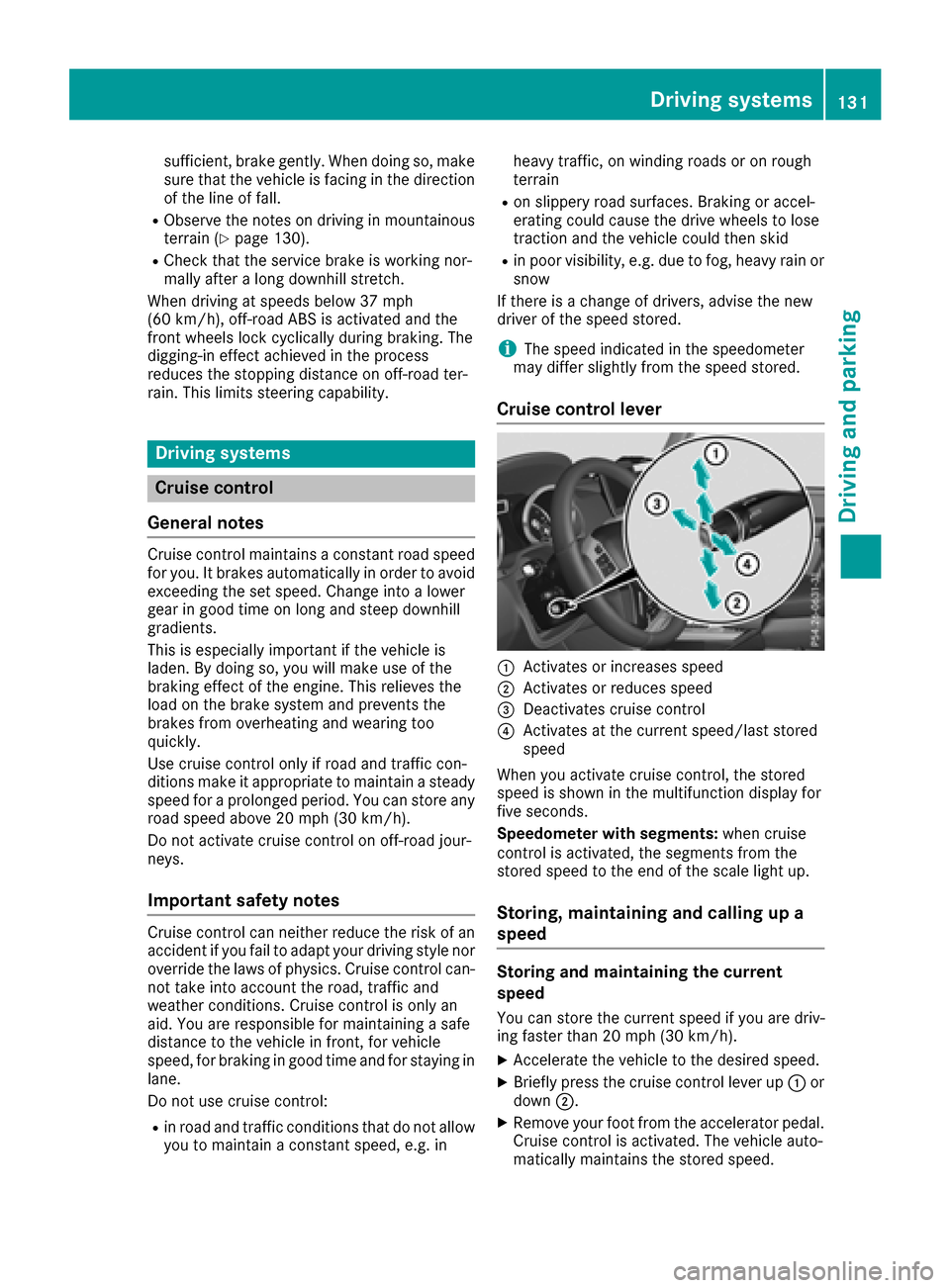
Cruise control lever
:Activates or increases speed
;Activates or reduces speed
=Deactivates cruise control
?Activates at the current speed/last stored
speed
When you activate cruise control, the stored
speed is shown in the multifunction displayf or
five seconds.
Speedometer with segments: when cruise
control is activated, the segments from the
stored speed to the end of the scale light up.
Storing, maintaining and callingupa
speed
Storing and maintaining the current
speed
You can store the current speed if you are driv-
ing faster than 20 mph (30 km/h).
XAccelerate the vehicle to the desired speed.
XBriefly press the cruise control lever up :or
down ;.
XRemove your foot from the accelerator pedal.
Cruise control is activated. The vehicle auto-
matically maintains the stored speed.
Driving systems131
Driving and parking
Z
Page 157 of 286
In order to accumulate driving experience and
accustom yourself to the new handling charac-
teristics, practice the following atalocation
where there is no traffic:
RCornering
RStopping
RBacking up
Before driving, check the following:
RTrailer tow hitch
RSafety switch for braked trailers
RSafety chains
RElectrical connections
RLighting system
RWheelsa nd tires
RLoad-securing measures
Adjust the exterior mirrors to provide an unob-
structed view of the rear section of the trailer.
Trailers with electronically controlled
brakes: pullawaycarefully in the vehicle/trailer
combination, brake manually using the brake
controller and check whether the brakes func-
tion correctly.
Check the load securing measures on aregular
basis.
When towing atrailer, you rvehicle's handling
characteristics willbed ifferent in comparison
with when driving withoutat railer.
The vehicle/trailer combination:
Ris heavier
Ris restricted in its acceleration and gradient-
climbing capability
Rhas an increased braking distance
Ris affected more by strong crosswinds
Rdemands more sensitive steering
Rhas alargert urning radius
Avoid sudden steering movements.
Avoid braking abruptly. If possible, brake gently
at first to allow the trailer to run on. Then,
increase the braking force rapidly.
When overtaking, pay particular attention to the
extended length of you rvehicle/trailer combi-
nation.
Due to the length of the vehicle/trailer combi-
nation, you require additional road space when
overtaking before you can change back to the
originall ane.
If the automatic transmission repeatedly shifts
betweeng ears on uphill or downhill gradients,
shift to alowerg ear. Driving in
alowerg ear and at areduced speed
decreases the risk of engine damage.
Avoid constant braking. Otherwise,t he vehicle
brakes and possibly also the trailerb rakes may
overheat.
When driving downhill, shift to alowerg ear to
utilize the engine's braking effect.
If the coolant temperature increases dramati-
cally whilet he air-conditioning system is
switched on, switch off the air-conditioning sys- tem.
Coolant heat can also be dissipated by opening
the windowsa
nd sw
itching the ventilation
blower and the interior temperature to the high-
est level.
Decoupling atrailer
GWARNING
If you uncoupl eatrailerwith the overrun
brake engaged,y ou could trap you rhand
betweent he vehicle and the trailerd rawbar.
There is arisk of injury.
Do not uncoupl eatrailerift he overrun brake
is engaged.
!Do not disconnect atraile rwith an engaged
overrun brake. Otherwise,y ourv ehicle could
be damaged by the rebounding of the overrun
brake.
XApply the parking brake.
XMake sure that the automatic transmission is
set to position P.
XSecure the vehicle and trailera gainst rolling
away.
XClose all doors, including the rear door.
XRemove the trailerc able.
XRemove the safety chains, if there are any.
XUncouple the trailer.
Permissible trailer and drawbar loads
Weight specifications
The gross trailerw eight is calculated as the
weight of the trailerp lusthe weight of the load
and the trailer'se quipment.
Towingatrailer155
Driving and parking
Z
Page 159 of 286
Important safety notes
GWARNING
If you operate information systems and com-
munication equipmen tintegrate dinthevehi-
cle while driving ,you will be distracte dfrom
traffic conditions. You could also lose control
of th evehicle. Ther eisariskofana ccident.
Only operate th eequipmen twhen th etraffic
situation permits. If you are no tsuret hatthis
is possible ,park th evehicl epayin gattention
to traffic condition sand operate th eequip-
men twhen th evehicl eiss tationary.
You must observ ethe legal requirements for th e
country in whic hyou are currentl ydriving when
operating th eon-bo ard computer.
GWARNIN G
If th einstrumen tcluste rhas faile dormal-
functioned, you may no trecognize function
restriction sinsystems relevan ttosafety. The
operating safet yofyour vehicl emay be
impaired .Ther eisar iskofana ccident.
Drive on carefully. Hav ethe vehicl echecked
at aq ualified specialist workshop immedi-
ately.
If th eoperating safet yofyour vehicl eis
impaired ,pull ove rassoonasitiss afetodos o.
Contac taqualified specialist workshop.
The on-board computer only shows message sor
warning sfromc ertai nsystems in th emultifunc-
tion display. You should therefor emakes ure
your vehicl eisoperating safely at all times .
Fo rano verview, see th einstrumen tpanel illus-
tration (
Ypage 32).
Display sand operation
Instrumen tcluster lighting
The brightness control knob is locate donthe
botto mleftoft heinstrumen tcluste r
(
Ypage 32).
XTurn th ebrightness control knob clockwise or
counter-clockwise.
If th eligh tswitch is set to th eÃ, Tor
L position ,the brightness is dependen t
upon th ebrightness of th eambien tlight.
iThe ligh tsensor in th einstrumen tcluste r
automatically control sthe brightness of th e
multifunction display.
In daylight, th edisplays in th einstrumen t
cluste rare no tilluminated.
Speedometer with segments
The segments in th espeedometer indicat e
whic hspee drange is available.
RCruis econtro lactivated (Ypage 131):
The segments ligh tupfromt hestore dspee d
to th eend of th escale.
RDISTRONI CPLUSa ctivated (Ypage 134):
On eort wo segments in th eset spee drange
ligh tup.
RDISTRONI CPLUSd etects avehicl einf ront:
The segments between th espee doft hevehi-
cle in fron tand th estoreds pee dligh tup.
Tachometer
!
Do no tdriveint heoverrevving range, as this
could damag ethe engine.
The red ban dinthetachometer indicates th e
engine's overrevving range.
The fuel suppl yisinterrupted to protect th e
engin ewhen th ered ban disreached.
Outsidet emperatur edisplay
You should pay special attention to road condi-
tion swhen temperatures are aroun dfreezing
point.
Bea rinm indt hatthe outside temperature dis-
play indicates th etem perature measured and
does no trecord th eroad temperature.
The outside temperature display is in th emulti-
function display (
Ypage 159).
Changes in th eoutside temperature are dis-
played after ashort delay.
Display sand operation157
On-boardc omputer and displays
Z
Page 166 of 286
XPress the9or: button to select the
desired name.
or
XTo startr apid scrolling: press and hold9
or : for longer than one second.
Rapid scrolling stops when you release the
button or reach the end of the list.
XIf only one telephone number is stored for
an ame: press the 6ora button to
start dialing.
or
XIf thereism ore thanone number for a
particular name:press the 6ora
button to display the numbers.
XPress the 9or: button to select the
number you want to dial.
XPress the 6ora button to start dialing.
or
XTo exit the phone book: press the~or
% button.
Redialing
The on-board computer saves the last names or
numbers dialed in the redial memory.
XPress the =or; button on the steering
wheel to select the Telmenu.
XPress the6button to switch to the redial
memory.
XPress the 9or: button to select the
desired name or number.
XPress the 6ora button to start dialing.
or
XTo exit the redial memory: press the~
or % button.
Assistance menu
Introduction
In the DriveAssistmenu, you have the follow-
ing options:
RDisplaying the assistanc egraphic
(Ypage 164)
RActivating/deactivatin gBlind Spot Assist
(Ypage 164)
Showing the distance display
XPress the =or; button on the steering
wheel to select the DriveAssistmenu.
XPress9or: to select AssistanceGraphic.
XPressa.
The DISTRONIC PLUS distanc edisplay
appears in the multifunction display.
Activating/deactivating Blind Spot
Assist
XPress the =or; button on the steering
wheel to select the DriveAssistmenu.
XPress the9or: button to select
Blind Spot Assist.
XPress a.
The currents election appears.
XTo activate/deactivate: press theabut-
ton again.
For further information about Blind Spot Assist,
see (
Ypage 137).
Service menu
In the Serv.menu, you have the following
options:
RCalling up display messages (Ypage 170)
RChecking the tire pressure electronically
(Ypage 258)
RCalling up the service due date
(Ypage 231)
RChecking the engine oil level (Ypage 227)
Settings menu
Introduction
In the Sett.menu, you have the following
options:
RChanging the instrument cluster settings
(Ypage 165)
RChanging the light settings (Ypage 165)
RChanging the vehicle settings (Ypage 166)
RChanging the conveniences ettings
(Ypage 166)
RRestoring the factor ysettings (Ypage 167)
164Menus and submenus
On-board computer and displays
Page 177 of 286
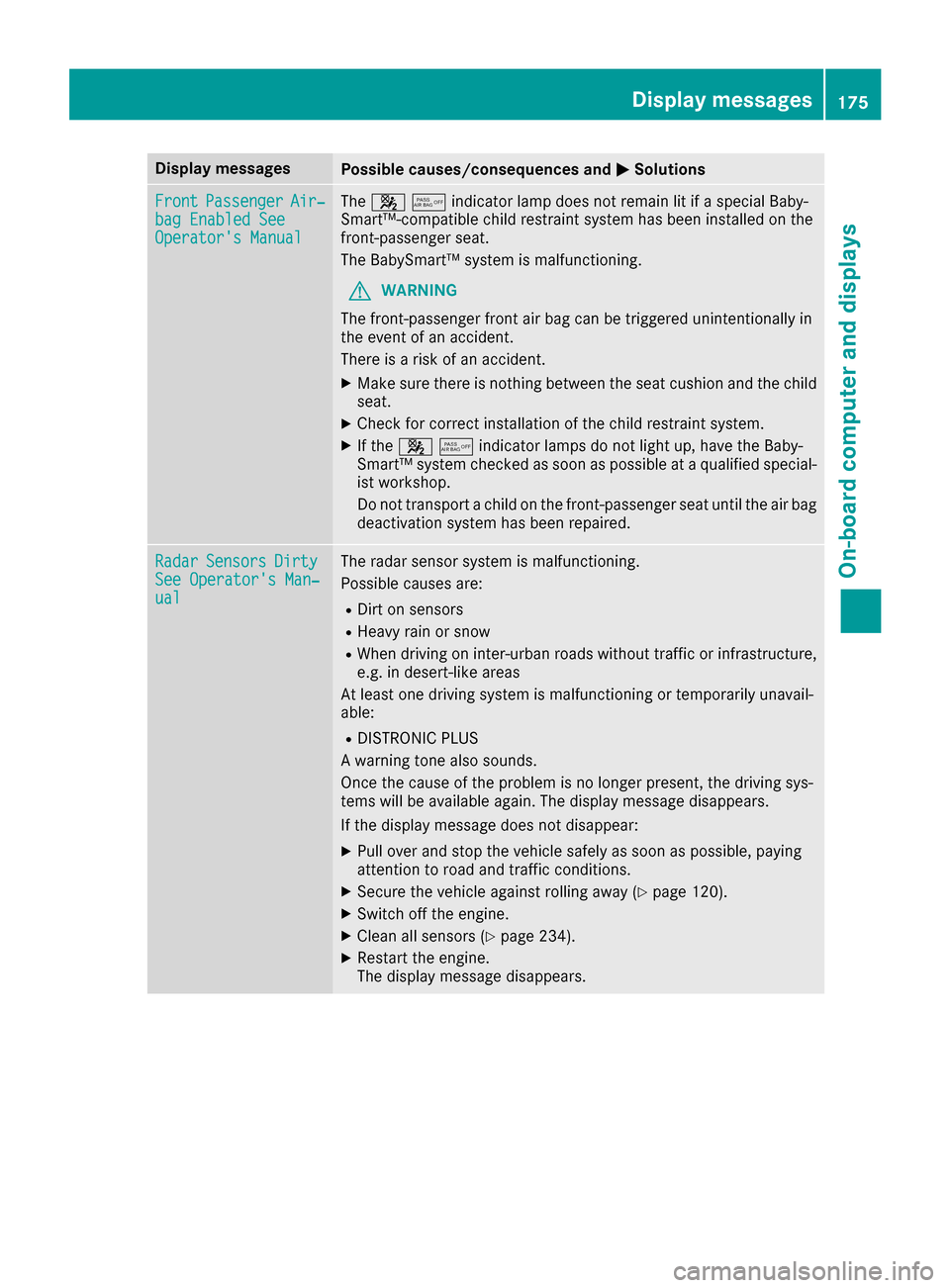
Display messagesPossible causes/consequences andMSolutions
FrontPassengerAir‐bag Enable dSeeOperator' sManual
The 45indicator lamp does not remain lit if aspecial Baby-
Smart™-compatible child restraint system has been installed on the
front-passenge rseat.
The BabySmart™ system is malfunctioning.
GWARNING
The front-passenge rfront air bag can be triggeredu nintentionally in
the eventofana ccident.
There is arisk of an accident.
XMake sure there is nothing betwee nthe seat cushio nand the child
seat.
XCheck for correcti nstallation of the child restraint system.
XIf the45indicator lamps do not light up, have the Baby-
Smart™ system checked as soon as possible at aqualified special-
ist workshop.
Do not transport achild on the front-passenge rseat until the air bag
deactivatio nsystem has been repaired.
RadarSensorsDirtySee Operator's Man‐ual
The radar sensor system is malfunctioning.
Possible causes are:
RDirtons ensors
RHeavy rain or snow
RWhen drivingoni nter-urban roads without traffic or infrastructure,
e.g. in desert-lik eareas
At least one drivings ystem is malfunctionin gortemporarily unavail-
able:
RDISTRONIC PLUS
Aw arnin gtonea lso sounds.
Onc ethe cause of the problem is no longer present ,the drivings ys-
tem swill be available again. The display message disappears.
If the display message does not disappear:
XPull over and sto pthe vehicle safely as soon as possible,p aying
attention to road and traffic conditions.
XSecure the vehicle against rollinga way (Ypage 120).
XSwitch off the engine.
XClean all sensors (Ypage 234).
XRestartthe engine.
The display message disappears.
Display messages175
On-board computer and displays
Z
Page 178 of 286
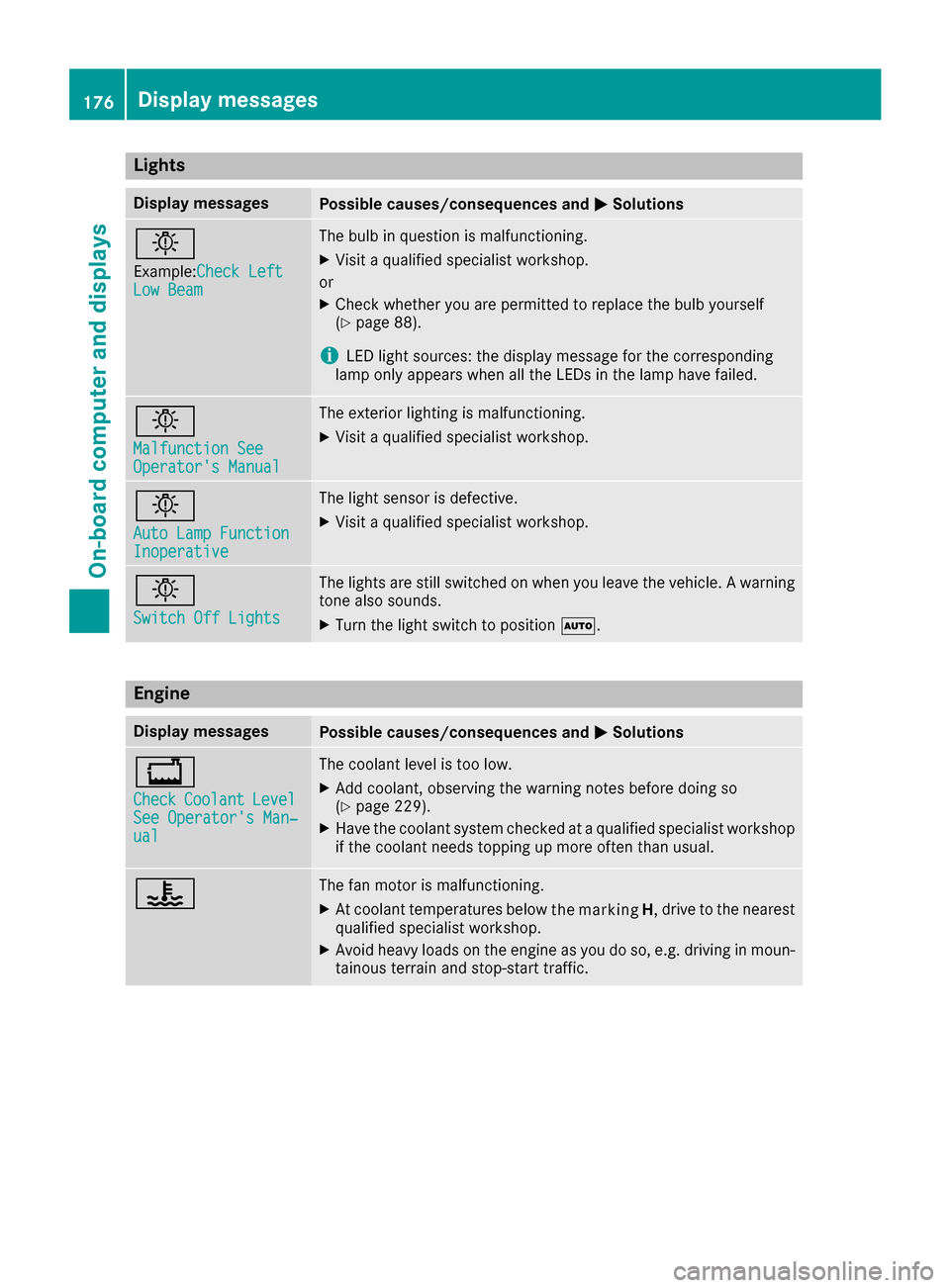
Lights
Display messagesPossible causes/consequences andMSolutions
b
Example:CheckL eftLow Beam
The bulb in question is malfunctioning.
XVisitaqualifie dspecialist workshop.
or
XCheckw hether you are permitted to replacet hebulb yourself
(Ypage 88).
iLEDl ight sources :the display message for th ecorresponding
lamp onl yappearsw hen all th eLEDsint helamp have failed.
b
Malfunction SeeOperator'sM anual
The exteriorlighting is malfunctioning.
XVisit aqualifie dspecialist workshop.
b
AutoL ampFunctionInoperative
The light sensor is defective.
XVisitaqualifie dspecialist workshop.
b
Switch Off Lights
The lightsa re still switche donwhen you leave th evehicle .Awarning
tone also sounds.
XTurn th elight switch to position Ã.
Engine
Display messagesPossible causes/consequences and MSolutions
+
CheckCoolantLevelSee Operator'sMan‐ual
The coolant level is to olow.
XAdd coolant ,observingt hewarning notes before doings o
(Ypage 229).
XHav ethe coolant system checked at aqualifie dspecialist workshop
if th ecoolant needs toppingupm oreo ften than usual.
?The fan motor is malfunctioning.
XAt coolant temperatures below drivetot he nearest
qualified specialist workshop.
XAvoid heavy loads on the engine as you do so, e.g. driving in moun-
tainou sterrai nand stop-start traffic.
176Display messages
On-board computer and displays
the marking
H,