ECU MERCEDES-BENZ G-Class 2017 W463 Owner's Guide
[x] Cancel search | Manufacturer: MERCEDES-BENZ, Model Year: 2017, Model line: G-Class, Model: MERCEDES-BENZ G-Class 2017 W463Pages: 286, PDF Size: 4.91 MB
Page 85 of 286
Automa tica nti-glar emirror s
The rear-view mirror and th eexter iorm irror on
th ed river's side automatically go int oanti-glare
mod eif:
Rthei gnition is switched on and
Rinciden tligh tfro mh eadlamp sstrikes th esen-
sor in th erear-view mirror
iThe mirror sdonotgo int oanti-glare mod eif
revers egear is engage doriftheinterior light-
ing is switched on .
Parking position for th eexteri or mir-
ror on thef ront-passenger side
Setting/stori ng theparki ng position
Usin grevers egear
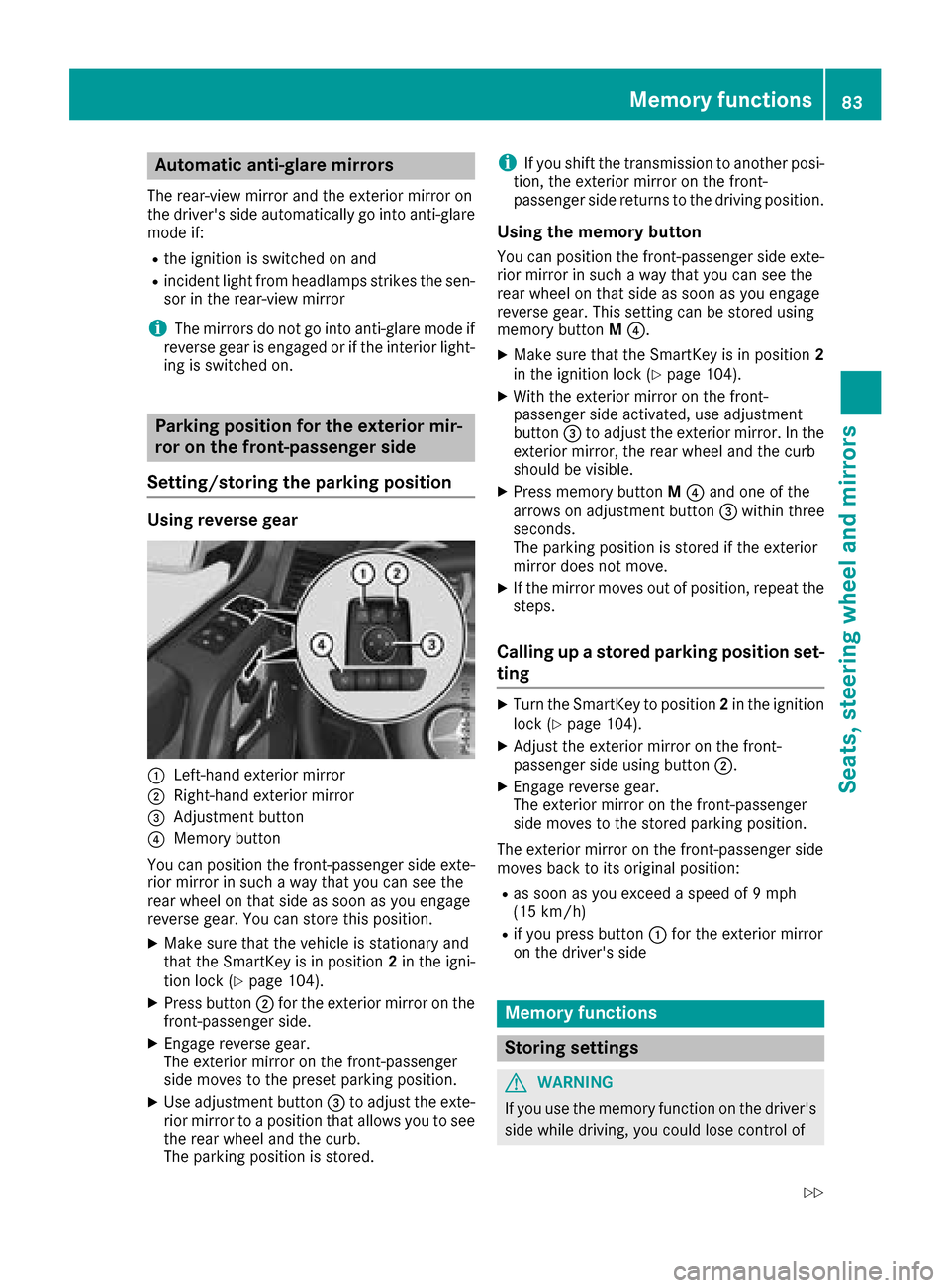
:Left-han dexter iorm irror
;Right-hand exterio rmirror
=Adjustmen tbutto n
?Memory butto n
You can position th efront-pa ssenger side exte -
rio rm irror in suc haway that you can see th e
rear whee lonthats ide as soo nasyou engage
revers egear .You can store this position .
XMakesuret hatthe vehicl eisstationary and
that th eSmartKey is in position 2in th eigni-
tion loc k(
Ypage 104).
XPress butto n; for th eexter iorm irror on th e
front-passenger side .
XEngage reversegear .
The exterio rmirror on th efront-pa ssenger
side moves to th epreset parking position .
XUse adjustmentbutto n= to adjust th eexte-
rio rm irror to aposition that allows you to see
th er ear whee land th ecurb.
The parking position is stored.
iIf you shif tthe transmission to another posi-
tion ,the exterio rmirror on th efront -
passenger side return stothedrivin gposition .
Usingthe memory button
You can position th efront-pa ssenger side exte -
rio rm irror in suc haway that you can see th e
rear whee lonthats ide as soo nasyou engage
revers egear .This setting can be store dusing
memory butto nM ?.
XMak esuret hatthe SmartKey is in position 2
in thei gnition loc k(Ypage 104).
XWiththe exterio rmirror on th efront -
passenger side activated, use adjustmen t
butto n= to adjust th eexter iorm irror .Int he
exterio rmirror ,the rear whee land th ecurb
should be visible.
XPress memory butto nM ? and on eofthe
arrows on adjustmen tbutto n= within three
seconds.
The parking position is store diftheexterio r
mirror does no tmove.
XIf th emirror moves out of position ,repeat th e
steps.
Calling up astoredp arki ng position set-
ting
XTurn th eSma rtKey to position 2in th eignition
loc k(Ypage 104).
XAdjus tthe exterio rmirror on th efront -
passenger side usin gbutto n;.
XEngage revers egear .
The exterio rmirror on th efront-pa ssenger
side moves to th estoredp arking position .
The exterio rmirror on th efront-pa ssenger side
moves bac ktoitsoriginal position :
Ras soonasyou exceed aspee dof9 mph
(15 km/h)
Rif you press butto n: for th eexter iorm irror
on th edriver's side
Mem oryfunctions
Stori ng settings
GWARNIN G
If you use th ememory function on th edriver's
side while driving, you could lose control of
Memoryf unctions83
Seats ,steering wheel and mirrors
Z
Page 93 of 286
Mercedes-AMG vehicles:you must remove
the protective grille before you can replace the
bulbs in the tail lamps.
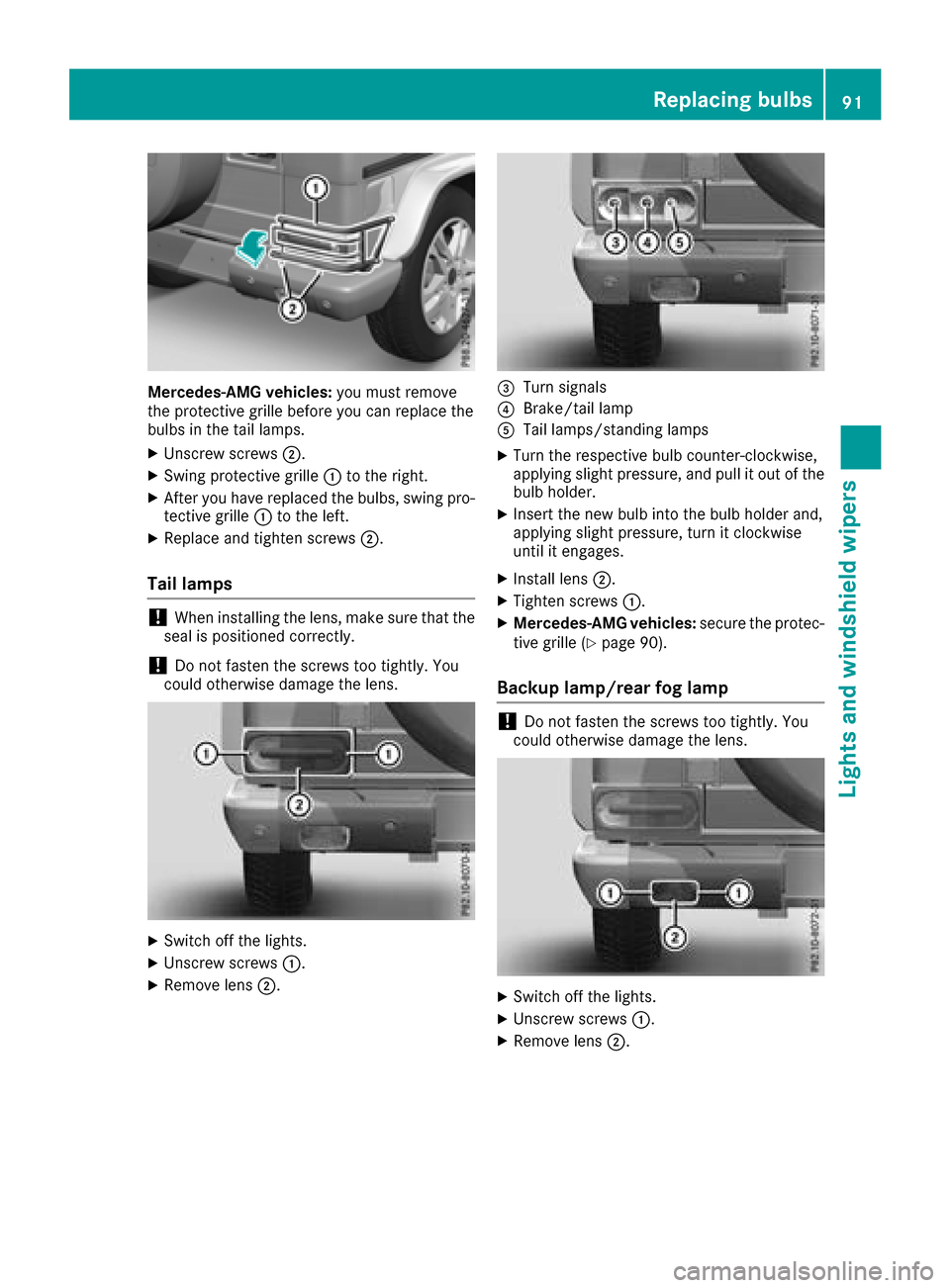
XUnscrew screws ;.
XSwing protective grille :to the right.
XAfter you have replaced the bulbs, swing pro-
tective grille :to the left.
XReplace and tighten screws ;.
Tail lamps
!When installing the lens, make sure that the
seal is positioned correctly.
!Do not fasten the screws too tightly.Y ou
could otherwise damage the lens.
XSwitch off the lights.
XUnscrew screws :.
XRemove lens;.
=Turn signals
?Brake/tail lamp
ATaillamps/standing lamps
XTurn the respective bul bcounter-clockwise,
applying slight pressure, and pul litout of the
bul bh older.
XInsert the new bul binto the bul bholder and,
applying slight pressure, turn it clockwise
until it engages.
XInstall lens ;.
XTighten screws :.
XMercedes-AMG vehicles: secure the protec-
tive grille (Ypag e90).
Backup lamp/rear fog lamp
!Do not fasten the screws too tightly.Y ou
coul dotherwise damage the lens.
XSwitch off the lights.
XUnscrew screws :.
XRemove lens;.
Replacing bulbs91
Lights and windshield wipers
Z
Page 105 of 286
Notesonb reaking-in anew vehicle
Important safety notes
Thes ensors ystemofs omedriving and driving
safety systems adjusts automaticall ywhile a
certai ndistance is being driven after the vehicle
ha sb eend elivere dorafter repairs. Full system
effectiveness is not reachedu ntilthe end of this
teach-inp rocedure.
New and replaced brake pads and discs only
reach their optimum braking effect after several hundred kilometers of driving. Compensate for
thi sb yapplyin ggreate rforce to the brake pedal.
The first 1000 miles (150 0km)
Them orey ou look after the engine when it is
new ,the mor esatisfied yo uwillbew ithi ts per-
formance in the future.
RYo us houl dtherefore drive at varying vehicle
and engine speeds for the first 1,000 miles
(1,500 km).
RAvoi dheavy loads, e.g .driving at full throttle,
during thi speriod.
RWhen shifting gear smanually, shift up in good
time, befor ethe tachomete rneedl ereaches
Ô of the wa ytothe red area of the tachom-
ete rdisplay .
RDo not manuall yshift to alower gear to brake
the vehicle.
RTry to avoi ddepressing the accelerator pedal
beyond the pressure point (kickdown).
Additiona lbreaking-i nnote sfor Mercedes-AMG
vehicles:
RDo not drive fastert han85m ph (140km/h)
for the first 1,000 mile s(1,50 0km).
ROnlyb rieflyallow the engine to reach amax-
imum engine spee dof4,500 rpm.
RAvoiddriving off-roa dbefor et he first differ-
ential oi lchange at 2,000 mile s(3,000 km).
RIdeally ,for the first 1,000 mile s(1,50 0km),
drive in program C.
After 1,000 mile s(1,500 km), you can increase
the engine speedg radually and bring the vehicle
to ful lspeed.
You should also observe these notes on break-
i
ng in if the engine or parts of the drive train on
you rvehicle have beenr eplaced.
Always observe the maximu mpermissible
speed.
Axl edifferential transmission
(Mercedes-AMG vehicles)
Change the oil after abreaking-in period of
2,000 miles( 3,000 km) to improve protectiono f
the axle differential transmission.
This oil change prolongs the service life of the
axle differential transmission. Have the oil
change carrie dout at aqualified specialist work-
shop.
Driving
Important safety notes
GWARNING
Objects in the driver's footwell may restrict
the clearance around the pedal sorblock a
depressedp edal.This jeopardizes the oper-
ating and road safety of the vehicle. There is a risk of an accident.
Stow al lobjects securely in the vehicle so that
they do not get into the driver's footwell.
When using floormats or carpets, make sure
that they are properly secured so that they do not sliporo bstruct the pedals. Do not place
severalf loormats or carpets on top of one
another.
GWARNING
Unsuitabl efootwear can hinde rcorrect usage
of the pedals, e.g.:
Rshoesw ith thick soles
Rshoeswith high heels
Rslippers
There is arisk of an accident.
Wears uitablefootwear to ensure correct
usage of the pedals.
GWARNING
If you switch off the ignition while driving,
safety-relevant functions are only available
with limitations, or not at all. This coul daffect,
for example, the power steering and the brake
boosting effect. You wil lrequire considerably
more effort to steer and brake .There is arisk
of an accident.
Driving103
Driving and parking
Z
Page 108 of 286
XReleasethe brak epedal .
XCarefully depress th eaccelerato rpedal .
ECO start/stop function
Important safety notes
GWARNIN G
If th eengineiss witched off automatically and
you exit th evehicle, th eengineisr estarte d
automatically. The vehicl emay begi nmoving .
There is ariskofa cciden tand injury.
If you wish to exit th evehicle, always tur noff
th ei gnition and secure th evehicl eagainst
rollin gaway.
General notes
The ECO start/sto pfunction switches th e
engin eoff automatically when th evehicl estops
moving .
The engin estartsa utomatically when th edriver
want stop ull away again .The ECO start/sto p
function thereby help syou to reduce th efuel
consumption and emission sofyour vehicle.
The ECO start/sto pfunction is activated eac h
time th eengineiss witched on .
The ECO start/sto pfunction is only available in
driv eprogram C/E.
The system is operational if all condition sfor
automatic engin eswitch-off hav ebeen fulfilled
(
Ypage 106) and th eè symbol is shown in
green in th emultifunction display.
In addition ,the Stop/Star tactive
message
is shown in th eAMG men uint hemultifunction
display.
If no tall condition sfor automatic engin eswitch -
off are fulfilled (
Ypage 106), theè ECO
symbol is shown in yellow in th emultifunction
display.
In addition ,the Stop/Star tinactive
mes -
sage is shown in th eAMG men uint hemulti-
function display.
If th eECO start/sto pfunction has been man -
ually deactivated (
Ypage 106) oramalfunction
has caused th esystem to be deactivated, th e
è ECO symbol is no tdisplayed.
The Stop/Star tactive
orStop/Star tinactivemessage in th eAMG men uint he
multifunction display goes out .
Deactivating/activating theECO start/
stop function
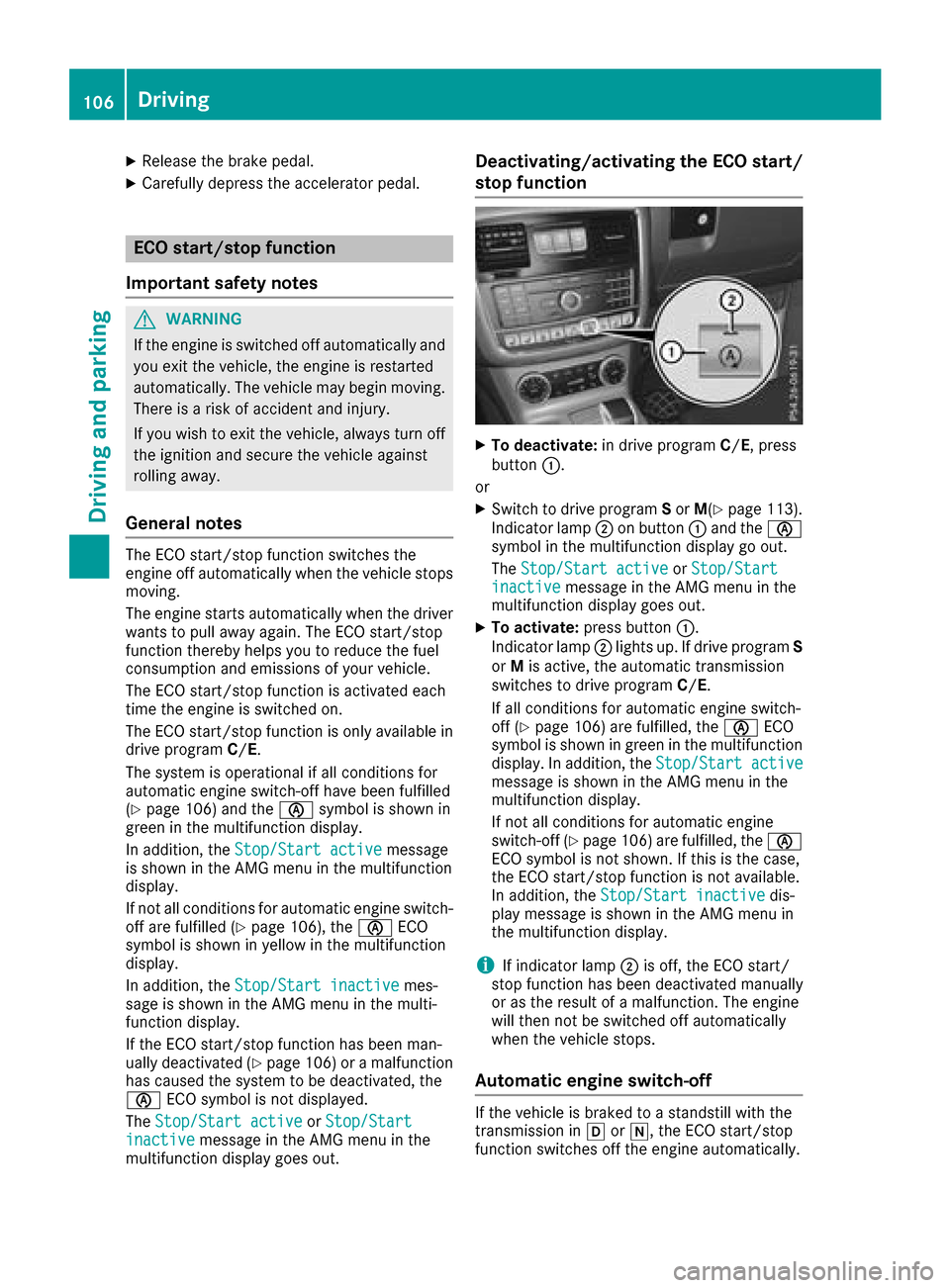
XTo deactivate: in driveprogram C/E,p ress
butto n:.
or
XSwitc htod rivep rogram Sor M(Ypage 113).
Indicato rlamp ;on butto n: and th eè
symbol in th emultifunction display go out .
The Stop/Star tactive
orStop/Star tinactivemessage in th eAMG men uint he
multifunction display goes out .
XTo activate:press button:.
Indicato rlamp ;lights up. If driv eprogram S
or Mis active ,the automatic transmission
switches to driv eprogram C/E.
If all condition sfor automatic engin eswitch -
off (
Ypage 106) are fulfilled ,the è ECO
symbol is shown in green in th emultifunction
display. In addition ,the Stop/Star tactive
message is shown in th eAMG men uint he
multifunction display.
If no tall condition sfor automatic engin e
switch-off (
Ypage 106) are fulfilled ,the è
ECO symbol is no tshown. If this is th ecase,
th eE CO start/sto pfunction is no tavailable.
In addition ,the Stop/Star tinactive
dis-
play message is shown in th eAMG men uin
th em ultifunction display.
iIf indicator lamp ;is off ,the ECO start /
stop function has been deactivated manually
or as th eresult of amalfunction .The engin e
will then no tbeswitched off automatically
when th evehicl estops .
Automati cengines witch-off
If thevehicl eisb raked to astandstill wit hthe
transmission in hori,t heECO start/sto p
function switches off th eenginea utomatically.
106Driving
Driving and parking
Page 114 of 286
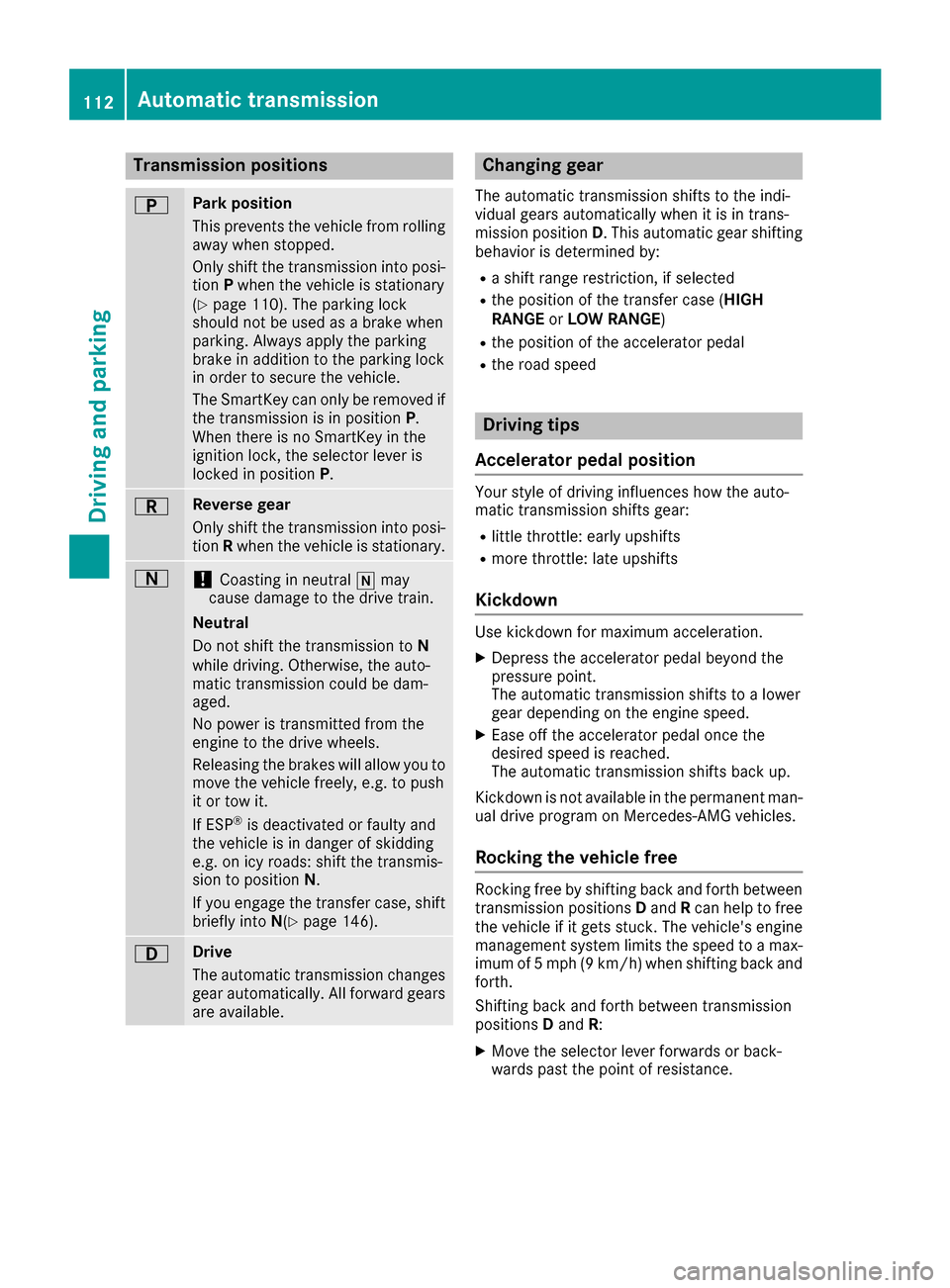
Transmission positions
BPark position
Thisprevents the vehicl efromr olling
away when stopped.
Onlys hift the transmission into posi-
tion Pwhen the vehicl eisstationary
(
Ypage 110). The parkin gloc k
shoul dnot be used as abrake when
parking. Alway sapply the parking
brake in additio ntothe parkin gloc k
in order to secur ethe vehicle.
The SmartKeyc an onlyberemove dif
the transmission is in position P.
When there is no SmartKeyint he
ignition lock, the selecto rlev er is
locked in position P.
CRevers egear
Onlys hift the transmission into posi-
tion Rwhen the vehicl eisstationary.
A!Coasting in neutral imay
cause damage to the drive train.
Neutral
Do not shift the transmission to N
whil edriving. Otherwise, the auto-
matic transmission could be dam-
aged.
No powe ristransmitted fromt he
engine to the drive wheels.
Releasing the brakes will allo wyouto
mov ethe vehicl efreely, e.g .topush
it or tow it.
If ESP
®is deactivated or faulty and
the vehicl eisindangerofs kidding
e.g .oni cy roads :shift the transmis-
sion to position N.
If yo uengag ethe transferc ase, shift
briefl yinto N(
Ypage 146).
7Drive
The automatic transmission changes
gear automatically. All forward gears
ar ea vailable.
Changin ggear
The automatic transmission shifts to the indi-
vidua lgears automaticall ywhenitisint rans-
mission position D.T hisa utomatic gear shifting
behavio risdetermine dby:
Rashift range restriction, if selected
Rthe positio nofthe transferc ase( HIGH
RANGE orLO WR ANGE )
Rthe positio nofthe accelerator pedal
Rthe roa dspeed
Driving tips
Accelerator peda lposition
Your style of drivin ginfluences how the auto-
matic transmission shifts gear:
Rlittle throttle :early upshifts
Rmor ethrottle :lat eu pshifts
Kickdown
Use kickdow nfor maximum acceleration.
XDepres sthe accelerator peda lbeyond the
pressure point.
The automatic transmission shifts to alower
gear depending on the engine speed.
XEas eoff the accelerator peda lonce the
desired spee disreached.
The automatic transmission shifts back up.
Kickdown is not availabl einthe permanent man-
ua ld rive programonM ercedes-AMG vehicles.
Rockin gthe vehicle free
Rocking freebys hifting back and forth between
transmission positions Dand Rcan help to free
the vehicl eifitgetss tuck. The vehicle's engine
management system limits the spee dtoamax-
imu mof5m ph (9 km/h )whens hifting back and
forth.
Shifting back and forth between transmission
positions Dand R:
XMovethe selecto rlev er forwards or back-
wards past the point of resistance.
112Automati ctransmission
Driving an dparking
Page 123 of 286
To ensure that the vehicle is safeguarded
against rolling away unintentionally:
Rthe parking brake must be applied.
Rthe transmission must be in positionPand the
SmartKey must be removed from the ignition
lock
Rthe transfer case must not be in the neutral
position
Rthe front wheels must be turned towards the
curb on steep uphill or downhill gradients
Rthe empty vehicle must be secured at the
front axle with awheel chock or similar
object ,for example, on uphill or downhill gra-
dients
Ral aden vehicle must also be secured at the
rear axle with awheel chock or similar object,
for example, on uphill or downhill gradients
Switching off the engine
GWARNING
The automatic transmission switches to neu-
tral position Nwhen you switch off the engine.
The vehicle may roll away.T here isarisk of an
accident.
After switching off the engine, alwayss witch
to parking position P.Prevent the parked vehi-
cle from rolling away by applying the parking
brake.
XShift the automatic transmission to position
P.
XTurn the SmartKey to position 0in the ignition
lock and remove it.
The immobilizer is activated.
XApply the parking brake firmly.
XTurn the steerin gwheel until the steering
wheel lock engages.
If you switch the engine off with the transmis-
sion in position Ror D,t he automatic transmis-
sion shifts to Nautomatically.
If you then open the driver's door or the front-
passenger door or remove the SmartKey from
the ignition ,the automatic transmission shifts
to Pautomatically.
If you switch off the engine while the transmis-
sion is in position N,t he automatic transmission
remains in Neven if adoor is opened. The auto-
matic transmission only automatically shifts into neutral
Nwhen you switch off the engine
using the SmartKey.
Parking brake
GWARNING
If you must brake the vehicle with the parking brake, the braking distance is considerably
longer and the wheels could lock. There is an
increased danger of skidding and accidents.
Only use the parking brake to brake the vehi-
cle when the service brake is faulty. Do not
apply the parking brake too firmly. If the
wheels lock, release the parking brake until
the wheels begin turnin gagain.
GWARNING
If you leave children unsupervised in the vehi-
cle, they could set it in motion by, for example:
Rrelease the parking brake.
Rshift the automatic transmission out of the
parking position P.
Rstart the engine.
In addition, they may operate vehicle equip-
ment and become trapped. There is arisk of
an accident and injury.
When leaving the vehicle, alwayst ake the
SmartKey with you and lock the vehicle. Never
leave children unsupervised in the vehicle.
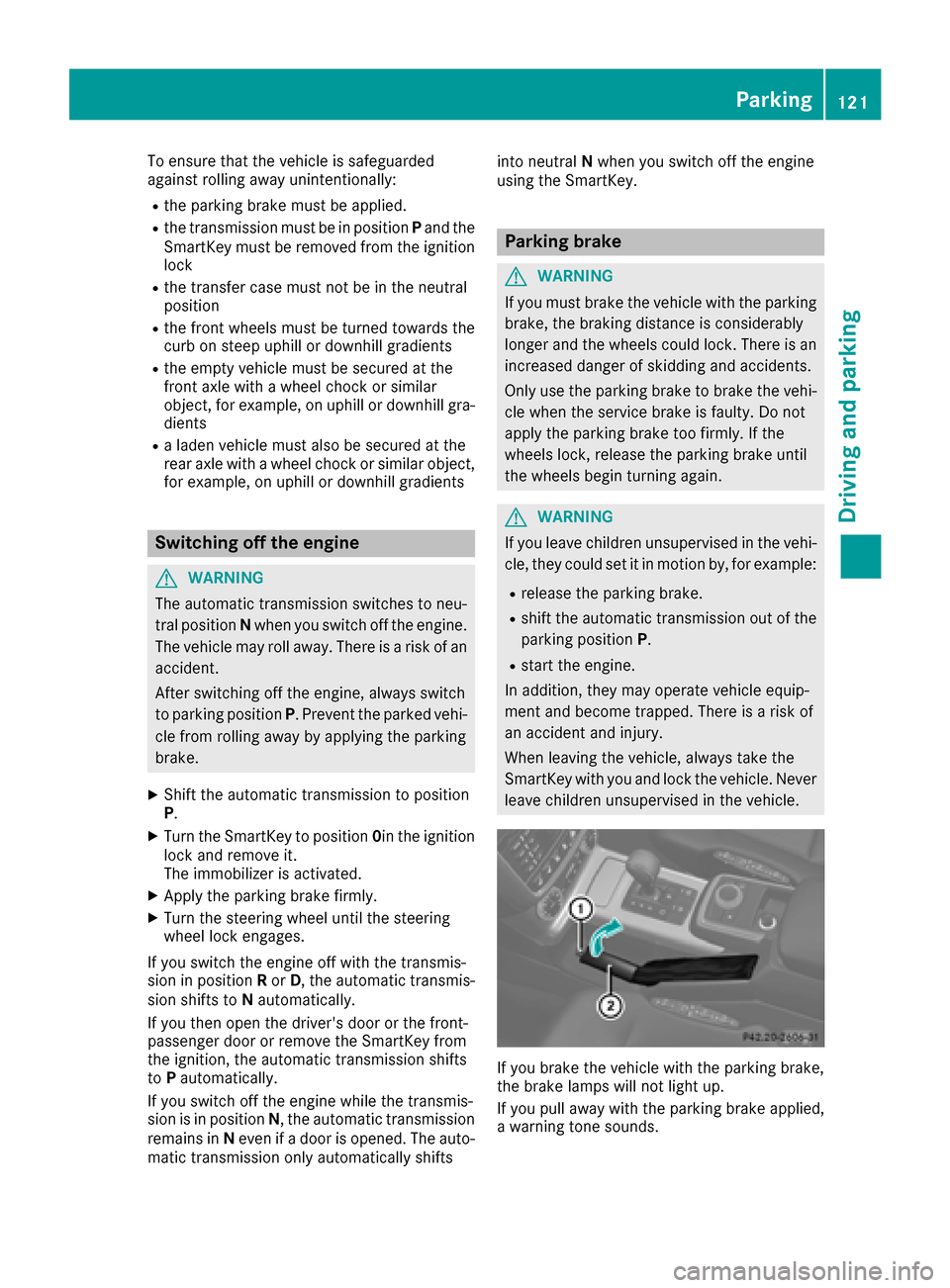
If you brake the vehicle with the parking brake,
the brake lamps will not light up.
If you pull away with the parking brake applied,
aw arning ton esounds.
Parking121
Driving and parking
Z
Page 130 of 286
Familiarize yourself with the characteristics of
your vehicle and the gearshift operation before
driving through difficult terrain.
The following driving systems are specially
adapted to off-roadd riving:
R4ETS (Ypage 59)
ROff-roadABS (Ypage 58)
RTransfer case (Ypage 145)
RDifferentia llocks (Ypage 120)
Observe the following notes:
RStop the vehicle before yo udrive off-roada nd,
if necessary ,shift the transfe rcase to the off-
roadd riving position LOW RANGE
(
Ypage 146).
REngag ethe differential locks if necessary
(Ypage 148).
iABS, 4ETS, ESP®and BAS are deactivated
while the differential locks are engaged.T his
allow sthe front wheels to lock briefly, so that
these can dig into aloose surface .However,
please note that locke dwheels skid and can
no longer steer.
RCheck that items of luggage and loads are
stowed safely and are well secured
(
Ypage 209).
RTo avoid damaging the vehicle, make sure
there is always sufficient ground clearance.
RAlway skeep the engine running and in gear
whe ndriving on adownhil lgradient.
RAlway skeep the engine running and in gear
whe ndriving downani ncline.
RDrive slowlyand evenly, if necessary at a
walking pace.
REnsure that the wheels are in contact with the
ground at al ltimes.
RDrive with extreme care on unfamilia roff-road
routes where visibility is poor. For safety rea-
sons, get ou
tofthe vehicle firs tand survey
the off-roadr oute.
RCheck the depth of water before fording rivers
and streams.
RWatch outfor obstacles.
RAlwayskeep the doors, reard oor, sidewin-
dowsa nd the sliding sunroof closed while the
vehicle is in motion.
RSwitch off cruise control.
RDo not deviate from marke droutes.
RAdap tyou rspeed to the terrain. The rougher,
steeper or more ruts on the terrain, the slower
your speed should be.
RDo not jump with the vehicle. as this will inter-
rup tthe vehicle' spropulsion.
RAvoid hig hengine speeds .Drive at appropri-
ate engine speeds (maximu m3,000 rpm).
RDo not shift the automatic transmission to
position N.
RAlwayscheck the vehicle for damag eafteroff-
roadd riving.
Do not use the HOLD function whe ndriving off-
road, on steep uphil lordownhil lgradients or on
slippery or loose surfaces. The HOLD function
cannot holdt he vehicle on such surfaces.
You can obtain further information aboutr etro-
fitting specia lall-terrain tires from aquali fied
specialist workshop.
Checklist before driving off-road
!If the engine oil warning lamp lights up while
the vehicle is in motion, stop the vehicle in a
saf ep lace as soona spossible. Check the
engine oil level. The engine oil warning lamp
warning mus tnot be ignored.C ontinuing the
journey while the symbol is displaye dcould
lea dtoe ngine damage.
XEngin eoillevel: check the engine oil level
and ad doil if necessary.
Whend riving on steep gradients, the engine
oil level mus tbes ufficiently hig htoensure a
correct oil supply in the vehicle.
XTire-changing too lkit: check that the jack is
working and make sur eyou hav ethe lug
wrench, arobust tow cable and afolding
spade in the vehicle.
XWheels and tires: check the tire treadd epth
and tire pressure.
XCheck for damag eand remove any foreign
objects, e.g. small stones,f rom the wheels/
tires.
XReplace any missing valve caps.
XReplace dente dordamaged wheels .Also
check the spare wheel.
XRims: dentedorbent rims can result in aloss
of tire pressure and damag ethe tire bead.
Befored riving off-road, check the wheels and
replace them if necessary.
128Drivin gtips
Drivin gand parking
Page 134 of 286
iCruisecontro lmaybe unab leto maintain
th es toreds peedonu phillanddownhill gra-
dien ts.T he storeds peedisresumed when the
gradientl evelsout.C ruisecontro lmaintains
th es toreds peedond ownhillgradients by
automaticall yapplyin gthe brakes.
Calling up th estored speed
GWAR NING
If you call up th estoreds peeda ndit is lower
than th ecurren tspeed, thev ehicle deceler-
ates. Ifyou donotkno wt he storeds peed,the
veh icle could decelerate unexpectedly. There
is ar iskofana cciden t.
Pay attentio ntotheroad and traff iccondi-
tions before calling up th estoreds peed. If you
do notk nowt he storeds peed,store the
desired speeda gain.
XBrieflypull th ecruise control leve rtow ards
you ?.
XRemove your foo tfro mt heaccelerato rpedal.
Cruis econtro lisactivated and adjustst he
veh icle's speedtot helast speeds tored.
If no speediss tored, cruise control storest he
curren tspeeda nd maintain sit.
Settin gaspeed
Keep inmin dthatitm ay tak eabriefm oment
unt ilth ev ehicle has accelerate dorbraked to
th es peeds et.
XPress th ecruise control leve rup: for a
higher speedord own;for alower speed.
XTo ad just th eset speed in1 mphincre-
ments (1 km/h increments): briefly press
th ec ruise control leve rup: ordown ;to
th ep ressurep oint.
Every tim ethe cruise control leve rispressed
up : ordown ;thel ast speeds toredi s
increased or reduced.
XTo ad just th eset speed in 5mphincre-
ments (10 km/h increments): briefly press
th ec ruise control leve rup: ordown ;
beyondt hepressurep oint.
Every tim ethe cruise control leve rispressed
up : ordown ;thel ast speeds toredi s
increased or reduced.
iCruis econtro lisnotdeactivate difyou
depr ess th eaccelerato rpedal. Ifyou acceler-
ate to overtake ,cruise control adjustst hevehicle's speedtot
helast speeds toreda fter
you have finishedo vertaking.
Deactivatingcruise control
Therea re several ways to deactivate cruise con-
trol:
XBriefl ypress th ecruise control leve rforwards
=.
or
XBrake.
Cruis econtro lisautomaticall ydeactivate dif:
Ryou apply th eparking brake
Ryou are driving at less than 20 mph (30 km/h)
RESP®intervenes or yo udeactivate ESP®
Ryous hift the automatic transmission to posi-
tion Nwhil edriving
Ryoue ngag ead ifferential lock
If cruis econtro lisdeactivated ,awarning tone
sounds .You will see the Cruise ControlO ff
message in the multifunctio ndisplay for approx-
imatel yfives econds. The message on the mul-
tifunctio ndisplay disappears and the segments
on the speedomete rgoout.
iWhen yo uswitch off the engine ,the last
spee dstored is cleared.
DISTRONIC PLUS
General notes
DISTRONICP LUSregulate sthe spee dand auto-
maticall yhelps youm aintain the distance from
the vehicl edetecte dinf ront. Vehicles ar edetec-
ted with the ai dofthe rada rsensor system.
DISTRONICP LUSb rakes automaticall ysothat
the set spee disnot exceeded.
Chang einto alower gear in good time on long
and stee pdownhil lgradients.
Thi sise specially important if the vehicl eis
laden. By doing so, yo uwillm akeu seof the
braking effect of the engine .Thisr elieves the
load on the brake system and prevents the
brakes fromo verheating and wearing too
quickly.
If DISTRONICP LUSd etects acritica lriskofc ol-
lision with the vehicl einfront, yo uwillbew arned
visuall yand acoustically. DISTRONICP LUSc an-
not prevent acollision withou tyou rintervention.
An intermittent warning tone sounds and the
132Driving system s
Driving an dparking
Page 137 of 286
Activatingatthe curren tspeed/last
store dspeed
GWARNIN G
If you call up th estoreds pee dand it differs
from th ecurren tspeed, th evehicl eacceler -
ate sord ecelerates. If you do no tknowt he
store dspeed, th evehicl ecould accelerate or
brak eunexpectedly. Ther eisariskofana cci-
dent.
Pay attentio ntotheroad and traffic condi-
tions before calling up th estoreds peed. If you
do no tknowt he store dspeed, store th e
desired spee dagain .
XBriefl ypull th ecruise control leve rtow ards
you ?.
XRemove your foo tfro mt heaccelerato rpedal.
DISTRONI CPLUSisa ctivated. The first tim eit
is activated, th ecurren tspee diss tored. Oth-
erwise, it set sthe vehicl espee dtot heprevi-
ously store dvalue .
Driving with DISTRONIC PLUS
Pulling awa yand driving
XIf you want to pull awa ywith DISTRONIC
PLUS :remove your foo tfro mt hebrak epedal.
XBriefl ypull th ecruise control leve rtow ards
you ?.
or
XAccelerat ebriefly.
The vehicl epulls away and adapt sits spee dto
that of th evehicl einf ront.Ifnov ehicleis
detected in front, your vehicl eaccelerate sto
th es toreds peed.
The vehicl ecan also pull away when it is facing
an unidentified obstacle or is driving on adiffer-
en tlinef roma nother vehicle. The vehicl ethen
brakes automatically.
If DISTRONI CPLUSd oes no tdetect avehicl ein
front, th esystem operate slikeac ruise control .
If DISTRONI CPLUSd etect sthatthe vehicl ein
fron tisd riving slower, your vehicl ebrakes. In
this way, th especifie dminimum distanc eyou
have selected is maintained.
If DISTRONI CPLUSd etect safaster-moving
vehicl einfront,itincreases th edriving spee dto
th es et speed. If you depress th
ebrake, DISTRONI CPLUSis
deactivate dunless your vehicl eisstationary.
Selecting thed rive program
DISTRONI CPLUSs upport sasporty driving style
when you have selected th eS driving program
(
Ypage 114). Acceleration behind th evehicl ein
fron tortot heset spee disthenn oticeably mor e
dynamic .Ifyou h
ave selected driv
eprogram Eor
C (Mercedes-AM Gvehicles), th evehicl eaccel-
erates mor egently. This settin gisrecommen -
ded in stop-start traffic.
Changing lanes
If you chang etothepassing lane ,DISTR ONIC
PLU Ssupport syou when :
Ryou are driving faste rtha n40m ph(60 km/ h)
RDISTRONICP LUSism aintaining the distance
to av ehicl einf ront
Ryous witch on the appropriate tur nsignal
RDISTRONICP LUSd oesn ot detect adangero f
collision
If these conditions ar efulfilled ,you rv ehicl eis
accelerated .Acceleratio nwillbei nterrupte dif
changing lanes take stoo long or if the distance
between your vehicl eand the vehicl einfront
become stoo small.
When changing lanes ,DISTRONICP LUSm oni-
tors the left lane on left-hand drive vehicles and
the right lane on right-hand drive vehicles.
Stopping
GWARNING
When leaving the vehicle, eve nifitisbraked
onl ybyD ISTRONICP LUS, it could rol lawa yif:
Rthere is amalfunctio ninthe system or in
the voltag esupply.
RDISTRONICP LUSh asbeen deactivated
with the cruis econtro llev er,e .g.b yav ehi-
cle occupant or fromo utside the vehicle.
Rthe electrical system in the engine com-
partment, the battery or the fuses have
been tampered with.
Rthe battery is disconnected.
Rthe accelerator peda lhas been depressed,
e.g .byav ehicl eoccupant.
There is ariskofana ccident.
Driving system s135
Driving an dparking
Z
Page 138 of 286
If you wish to exit the vehicle,always turn off
DISTRONIC PLUS and secure the vehicle
against rolling away.
For further information on deactivating
DISTRONIC PLUS (
Ypage 136).
If DISTRONIC PLUS detects that the vehicle in
front is stopping, it brakes you rvehicle until it is
stationary.
Once you rvehicle is stationary,itr emains sta-
tionary and you do not need to depresst he
brake.
Depending on the specifiedm inimum distance,
you rvehicle willc ome toastandstill at asuffi-
cient distance behind the vehicle in front. The
specifiedm inimum distance is set using the
control on the cruise control lever.
The automatic transmission shifts automatically
to transmission position P,ifDISTRONIC PLUS
is activated and:
Rthe driver's seat belt is not fastened and the
driver's door is open.
Rthe engine is switched off, unless it is auto-
matically switched off by the ECO start/stop
function.
On steep uphill or downhill inclines or if there is
am alfunction, the automatic transmission may
also automatically be shifted to position P.
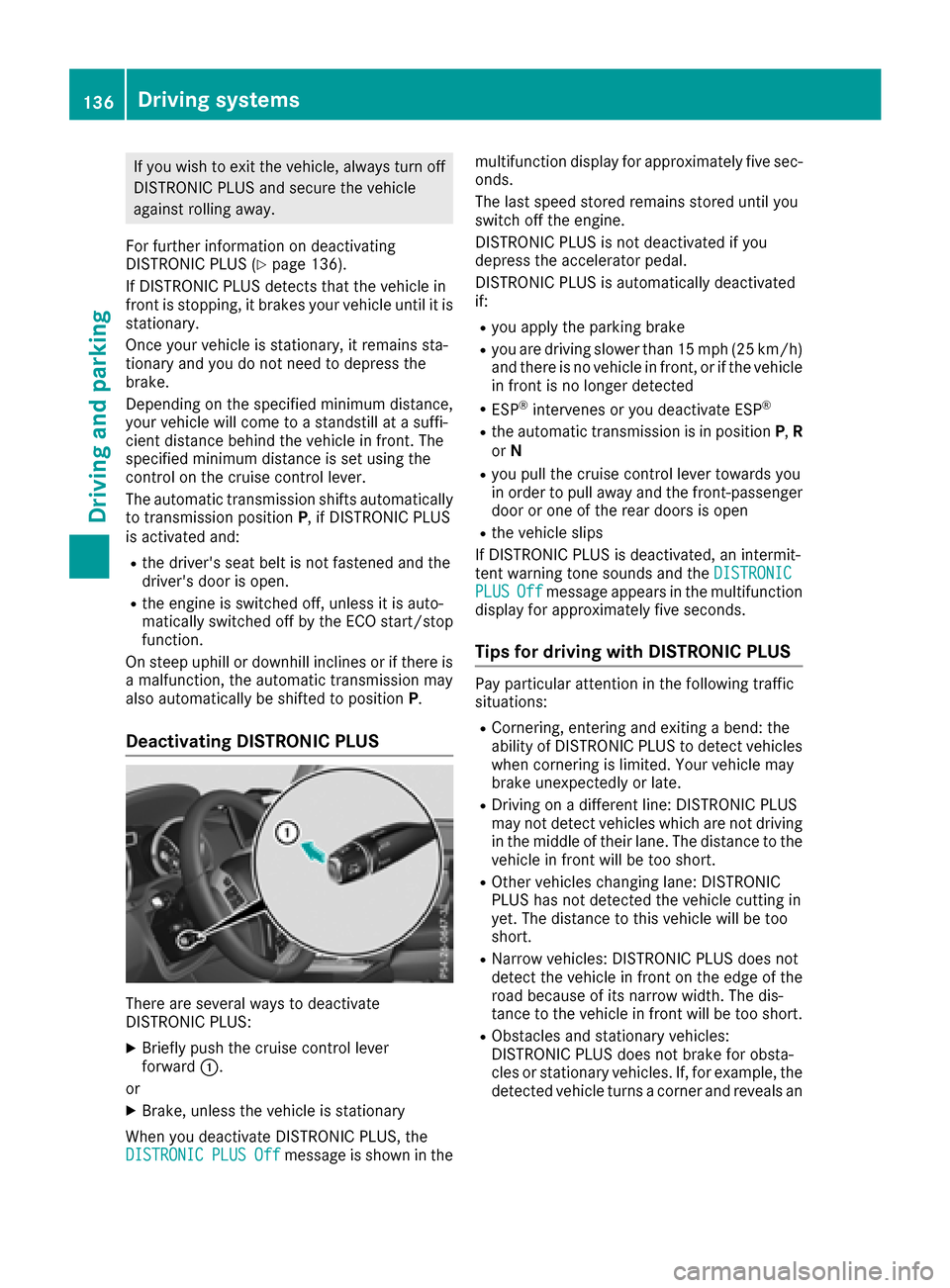
Deactivating DISTRONIC PLUS
There are several waystodeactivate
DISTRONIC PLUS:
XBriefly push the cruise control lever
forward :.
or
XBrake, unless the vehicle is stationary
When you deactivate DISTRONIC PLUS, the
DISTRONIC
PLUSOffmessage is shown in the multifunction display for approximately five sec-
onds.
The last speed stored remains stored until you
switch off the engine.
DISTRONIC PLUS is not deactivated if you
depresst
he accelerator pedal.
DISTRONIC PLUS is automatically deactivated
if:
Ryou applyt he parking brake
Ryou are driving slower than 15 mph (25 km/h)
and there is no vehicle in front, or if the vehicle
in front is no longer detected
RESP®intervenes or you deactivate ESP®
Rthe automatic transmission is in position P,R
or N
Ryou pullt he cruise control lever towards you
in order to pulla waya nd the front-passenger
door or one of the rear doors is open
Rthe vehicle slips
If DISTRONIC PLUS is deactivated, an intermit-
tent warning tone sounds and the DISTRONIC
PLUSOffmessageappears in the multifunction
display for approximately five seconds.
Tips for driving with DISTRONIC PLUS
Pay particular attention in the following traffic
situations:
RCornering, entering and exiting abend: the
ability of DISTRONIC PLUS to detect vehicles
when cornering is limited. Your vehicle may
brake unexpectedly or late.
RDriving on adifferent line: DISTRONIC PLUS
may not detect vehiclesw hich are not driving
in the middleoft heir lane. The distance to the
vehicle in front willbet oo short.
ROther vehicleschanging lane: DISTRONIC
PLUS has not detected the vehicle cutting in
yet. The distance to this vehicle willbet oo
short.
RNarrow vehicles: DISTRONIC PLUS does not
detect the vehicle in front on the edge of the
road because of its narrow width. The dis-
tance to the vehicle in front willbet oo short.
RObstacles and stationary vehicles:
DISTRONIC PLUS does not brake for obsta-
cles or stationary vehicles. If, for example,t he
detected vehicle turns acorner and revealsa n
136Driving systems
Driving and parking