steering MERCEDES-BENZ G-CLASS 2018 Owner's Guide
[x] Cancel search | Manufacturer: MERCEDES-BENZ, Model Year: 2018, Model line: G-CLASS, Model: MERCEDES-BENZ G-CLASS 2018Pages: 294, PDF Size: 4.86 MB
Page 82 of 294
When leaving the vehicle, always take the
SmartKey with you and lock the vehicle. Never
leave children unsupervised in the vehicle.
The electrically adjustable steering wheel can
still be adjusted when there is no SmartKey in
the ignition lock.
Adjusting the steering wheel
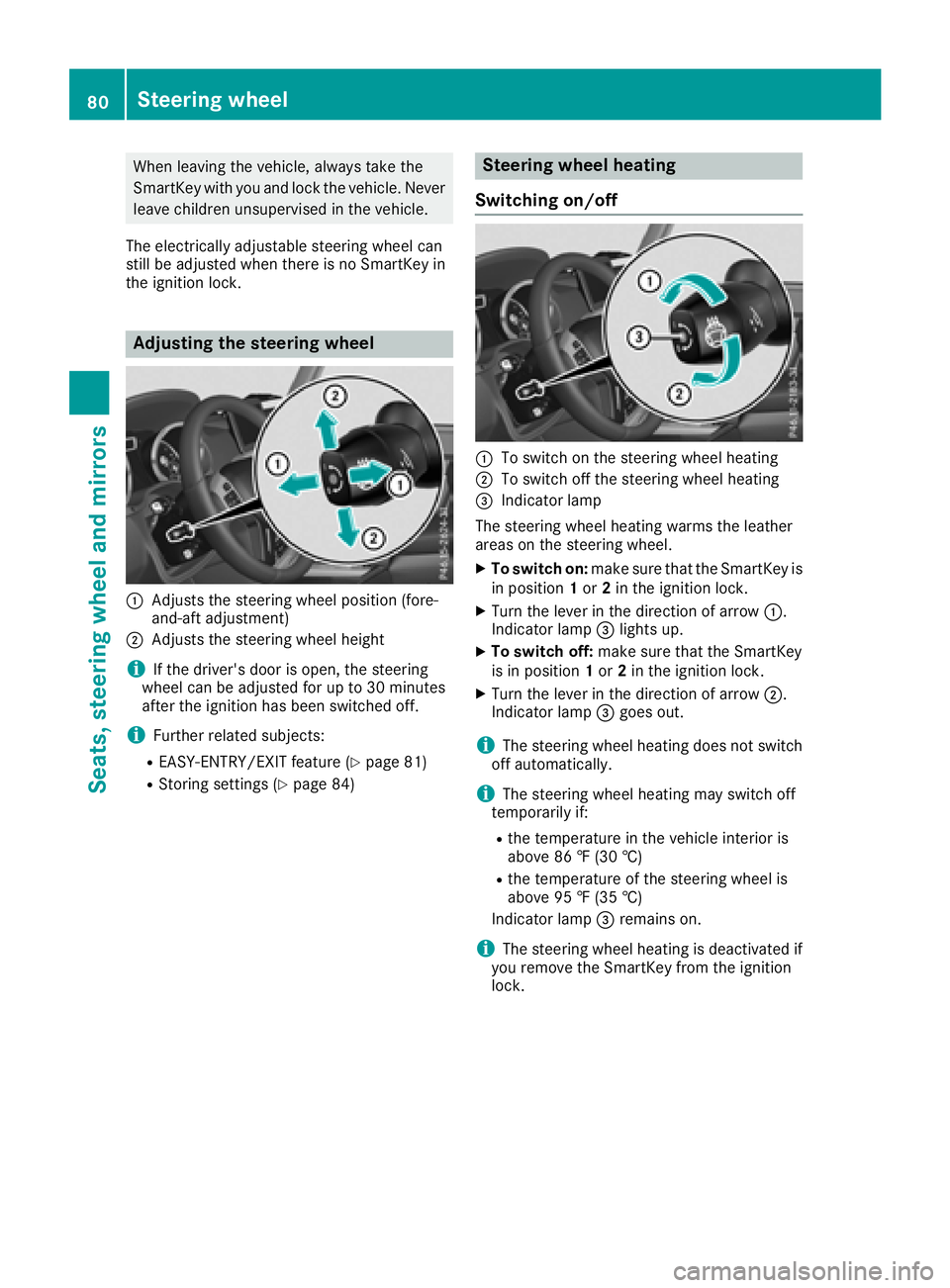
:Adjusts the steering wheel position (fore-
and-aft adjustment)
;Adjusts the steering wheel height
iIf the driver's door is open, the steering
wheel can be adjusted for up to 30 minutes
after the ignition has been switched off.
iFurther related subjects:
REASY-ENTRY/EXIT feature (Ypage 81)
RStoring settings (Ypage 84)
Steering wheel heating
Switching on/off
:To switch on the steering wheel heating
;To switch off the steering wheel heating
=Indicator lamp
The steering wheel heating warms the leather
areas on the steering wheel.
XTo switch on: make sure that the SmartKey is
in position 1or 2in the ignition lock.
XTurn the lever in the direction of arrow :.
Indicator lamp =lights up.
XTo switch off: make sure that the SmartKey
is in position 1or 2in the ignition lock.
XTurn the lever in the direction of arrow ;.
Indicator lamp =goes out.
iThe steering wheel heating does not switch
off automatically.
iThe steering wheel heating may switch off
temporarily if:
Rthe temperature in the vehicle interior is
above 86 ‡ (30 †)
Rthe temperature of the steering wheel is
above 95 ‡ (35 †)
Indicator lamp =remains on.
iThe steering wheel heating is deactivated if
you remove the SmartKey from the ignition
lock.
80Steering wheel
Seats, steering wheel and mirrors
Page 83 of 294
Problems with the steering wheel heat-
ing
If steering wheel heating indicator lamp=is
flashing, the steering wheel heating has
switched off automatically. The vehicle's elec-
trical system voltage is too low because too
many electrical consumers are switched on.
XSwitch off electrical consumers that you do
not need, such as the rear window defroster
or interior lighting.
Once the battery is sufficiently charged, the
steering wheel heating will switch back on
automatically.
Steering wheel EASY-ENTRY/EXIT fea-
ture
Important safety notes
GWARNING
When the EASY-ENTRY/EXIT feature adjusts
the steering wheel and the driver's seat, you
and other vehicle occupants – particularly
children – could become trapped. There is a
risk of injury.
While the EASY-ENTRY/EXIT feature is mak-
ing adjustments, make sure that no one has
any body parts in the sweep of the seat and
the steering wheel.
If somebody becomes trapped:
Rpress one of the memory function position
buttons, or
Rpress one of the memory function memory
buttons, or
Rmove the switch for steering wheel adjust-
ment in the opposite direction to that in
which the steering wheel is moving
The adjustment process is stopped.
GWARNING
If you drive off while the EASY-ENTRY/EXIT
feature is making adjustments, you could lose
control of the vehicle. There is a risk of an
accident.
Always wait until the adjustment process is
complete before driving off.
!Do not activate the EASY-ENTRY/EXIT fea-
ture, if the seat backrest is reclined too far
backwards. This can damage the front or rear
seats. You must first move the backrest to a
vertical position.
The EASY-ENTRY/EXIT feature makes getting in
and out of your vehicle easier.
You can activate and deactivate the EASY-
ENTRY/EXIT feature in the on-board computer
(
Ypage 170).
Position of the steering wheel when the
EASY-ENTRY/EXIT feature is active
The steering wheel moves upwards and towards
the dashboard if:
Ryou remove the SmartKey from the ignition
lock or
Ryou open the driver's door and the SmartKey
is in position 0or 1in the ignition lock
iThe steering wheel only moves upwards and
towards the dashboard if it has not already
reached the upper steering limiter.
Position of the steering wheel for driv-
ing
The steering wheel is moved to the last selected position when:
Rthe driver's door is closed
Ryou insert the SmartKey into the ignition lock
The last position of the steering column is stored
when you switch off the ignition or when you
store the setting with the memory function
(
Ypage 84).
Mirrors
Rear-view mirror
XAdjust the rear-view mirror in such a way that
you have a good view of road and traffic con- ditions behind you.
Mirrors81
Seats, steering wheel and mirrors
Z
Page 84 of 294
Exterior mirrors
Adjusting the exterior mirrors
GWARNING
The exterior mirror on the front-passenger
side reduces the size of the image. Visible
objects are actually closer than they appear.
This means that you could misjudge the dis-
tance from road users traveling behind, e.g.
when changing lane. There is a risk of an acci-
dent.
For this reason, always make sure of the
actual distance from the road users traveling
behind by glancing over your shoulder.
XMake sure that the SmartKey is in position 1
or 2in the ignition lock (Ypage 105).
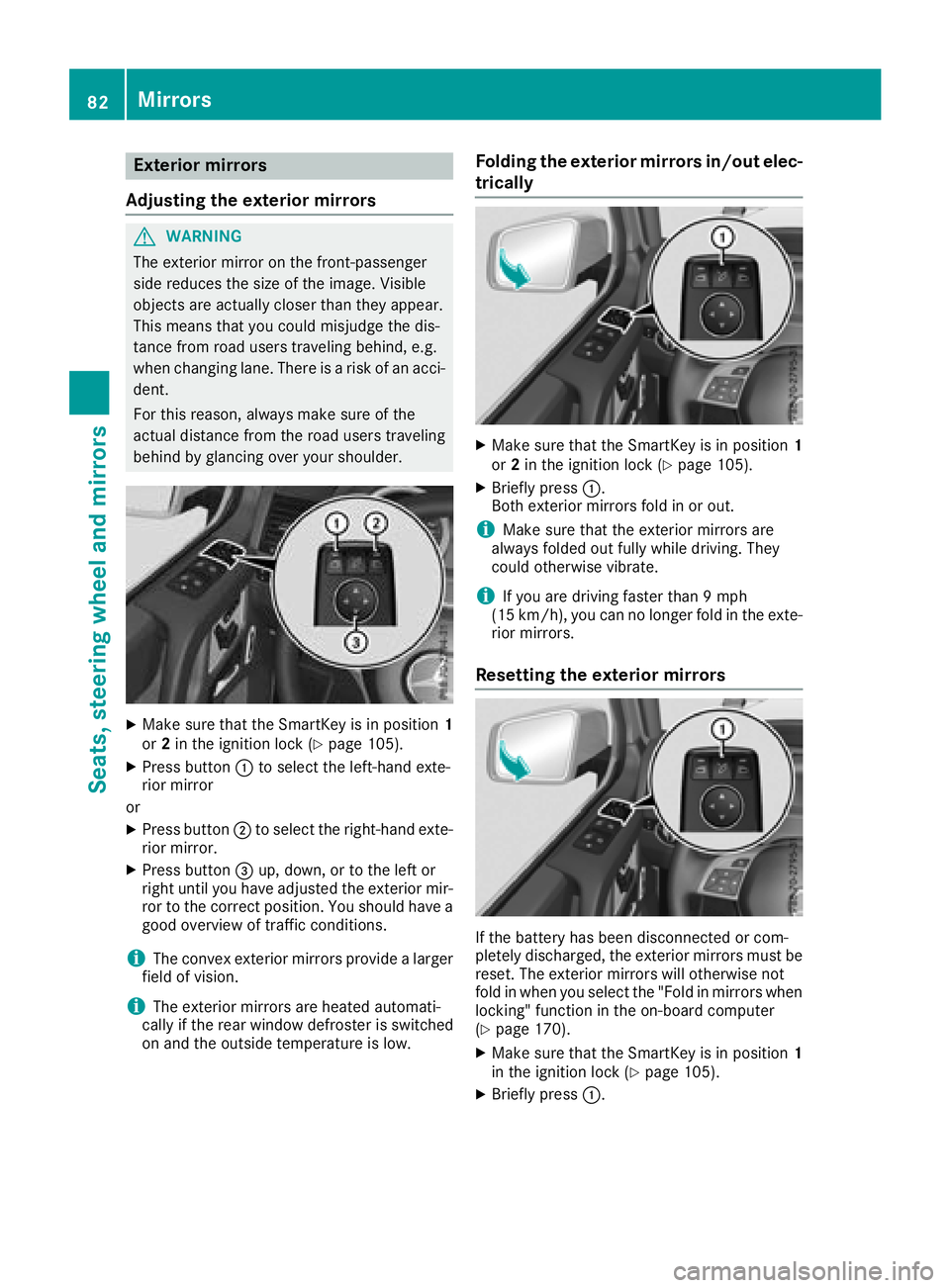
XPress button :to select the left-hand exte-
rior mirror
or
XPress button ;to select the right-hand exte-
rior mirror.
XPress button =up, down, or to the left or
right until you have adjusted the exterior mir- ror to the correct position. You should have a
good overview of traffic conditions.
iThe convex exterior mirrors provide a larger
field of vision.
iThe exterior mirrors are heated automati-
cally if the rear window defroster is switched
on and the outside temperature is low.
Folding the exterior mirrors in/out elec-
trically
XMake sure that the SmartKey is in position 1
or 2in the ignition lock (Ypage 105).
XBriefly press :.
Both exterior mirrors fold in or out.
iMake sure that the exterior mirrors are
always folded out fully while driving. They
could otherwise vibrate.
iIf you are driving faster than 9 mph
(15 km/h), you can no longer fold in the exte-
rior mirrors.
Resetting the exterior mirrors
If the battery has been disconnected or com-
pletely discharged, the exterior mirrors must be
reset. The exterior mirrors will otherwise not
fold in when you select the "Fold in mirrors when
locking" function in the on-board computer
(
Ypage 170).
XMake sure that the SmartKey is in position 1
in the ignition lock (Ypage 105).
XBriefly press :.
82Mirrors
Seats, steering wheel and mirrors
Page 85 of 294
Folding the exterior mirrors in/out
automatically
If the"Fold in mirror swhen locking" function is
activated in th eon-board computer
(
Ypage 170):
Rth eexterio rmirror sfol din automatically as
soo nas you loc kth evehicl efrom th eoutside .
Rtheexterio rmirror sfol dout again automati-
call yas soo nas you unlock th evehicl eand
then open th edriver' sor front-passenger
door .
Exterior mirror pushed out of position
XPress butto n: repeatedly until you hear th e
mirror engage in position .
The mirror housing is engage dagain and you
can adjust th eexterio rmirror sas usual
(
Ypage 82).
Automatic anti-glare mirrors
The rear-view mirror and th eexterio rmirror on
th edriver' sside automatically go int oanti-glare
mod eif:
Rth eignition is switched on and
Rinciden tligh tfrom headlamps strikes th esen -
sor in th erear-view mirror
iThe mirror sdo no tgo int oanti-glare mod eif
revers egear is engage dor if th einterio rlight-
ing is switched on .
Parking position for the exterior mir-
ror on the front-passenger side
Setting/storing the parking position
Using reverse gear
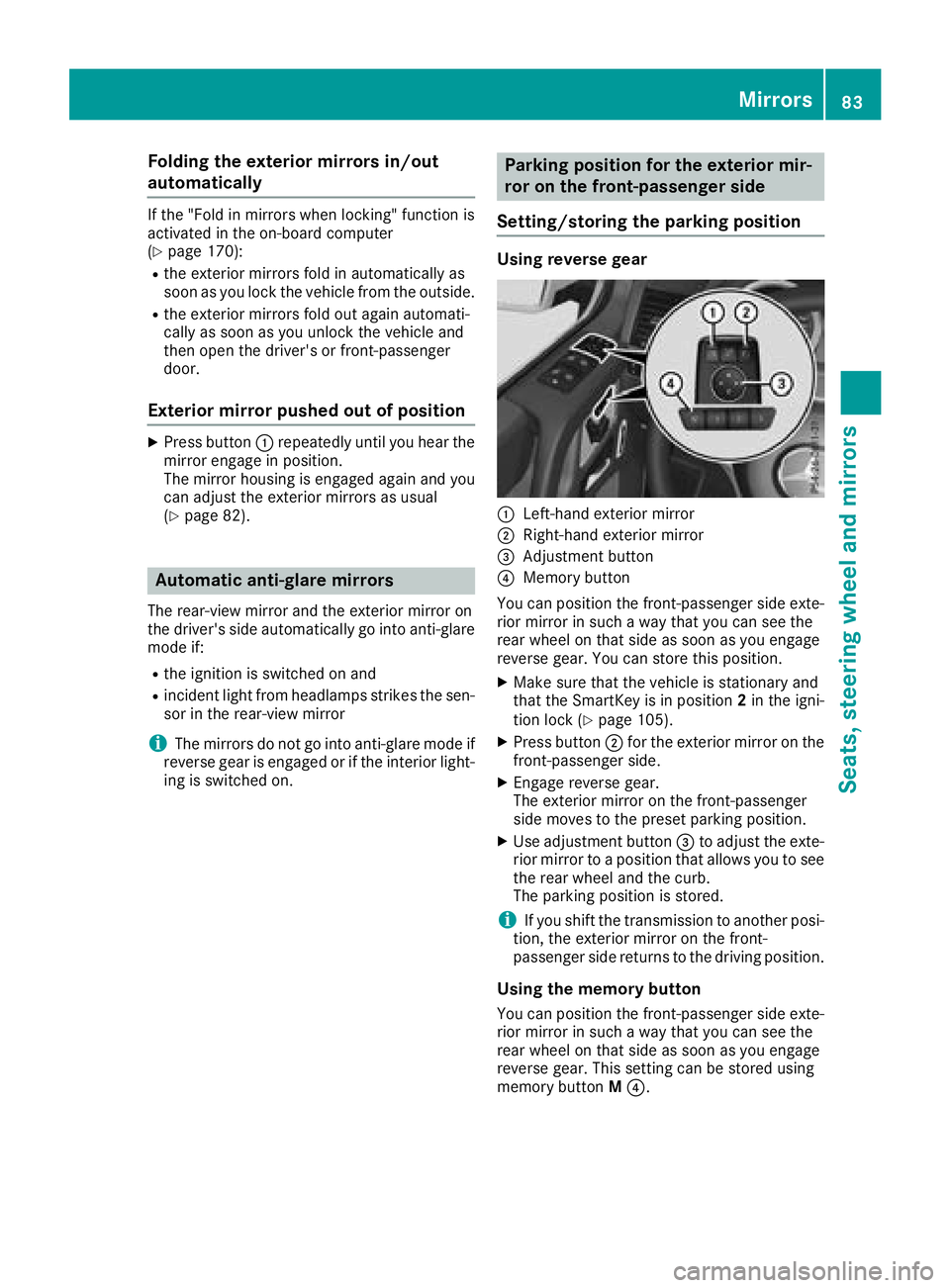
:Left-han dexterio rmirror
;Right-hand exterio rmirror
=Adjustmen tbutto n
?Memory butto n
You can position th efront-passenger side exte -
rio rmirror in suc h away that you can see th e
rear whee lon that side as soo nas you engage
revers egear .You can store this position .
XMakesure that th evehicl eis stationary and
that th eSmartKey is in position 2in th eigni-
tion loc k (
Ypage 105).
XPress butto n; for th eexterio rmirror on th e
front-passenger side .
XEngage reversegear .
The exterio rmirror on th efront-passenger
side moves to th epreset parking position .
XUse adjustmentbutto n= to adjust th eexte -
rio rmirror to aposition that allows you to see
th erear whee land th ecurb.
The parking position is stored.
iIf you shif tth etransmission to another posi -
tion ,th eexterio rmirror on th efront-
passenger side return sto th edriving position .
Usingthe memory but ton
You can position th efront-passenger side exte -
rio rmirror in suc h away that you can see th e
rear whee lon that side as soo nas you engage
revers egear .This setting can be store dusin g
memory butto nM ?.
Mirrors83
Seats, steering wheel and mirrors
Z
Page 86 of 294
XMake sure that the SmartKey is in position2
in the ignition lock (Ypage 105).
XWith the exterior mirror on the front-
passenger side activated, use adjustment
button =to adjust the exterior mirror. In the
exterior mirror, the rear wheel and the curb
should be visible.
XPress memory button M? and one of the
arrows on adjustment button =within three
seconds.
The parking position is stored if the exterior
mirror does not move.
XIf the mirror moves out of position, repeat the
steps.
Calling up a stored parking position set-
ting
XTurn the SmartKey to position 2in the ignition
lock (Ypage 105).
XAdjust the exterior mirror on the front-
passenger side using button ;.
XEngage reverse gear.
The exterior mirror on the front-passenger
side moves to the stored parking position.
The exterior mirror on the front-passenger side
moves back to its original position:
Ras soon as you exceed a speed of 9 mph
(15 km/h)
Rif you press button :for the exterior mirror
on the driver's side
Memory functions
Storing settings
GWARNING
If you use the memory function on the driver's side while driving, you could lose control of
the vehicle as a result of the adjustments
being made. There is a risk of an accident.
Only use the memory function on the driver's
side when the vehicle is stationary.
GWARNING
When the memory function adjusts the seat or steering wheel, you and other vehicle occu-
pants – particularly children – could become
trapped. There is a risk of injury.
While the memory function is making adjust-
ments, make sure that no one has any body
parts in the sweep of the seat or steering
wheel. If somebody becomes trapped, imme-diately release the memory function position
button. The adjustment process is stopped.
GWARNING
Children could become trapped if they acti-
vate the memory function, particularly when
unattended. There is a risk of injury.
When leaving the vehicle, always take the
SmartKey with you and lock the vehicle. Never
leave children unsupervised in the vehicle.
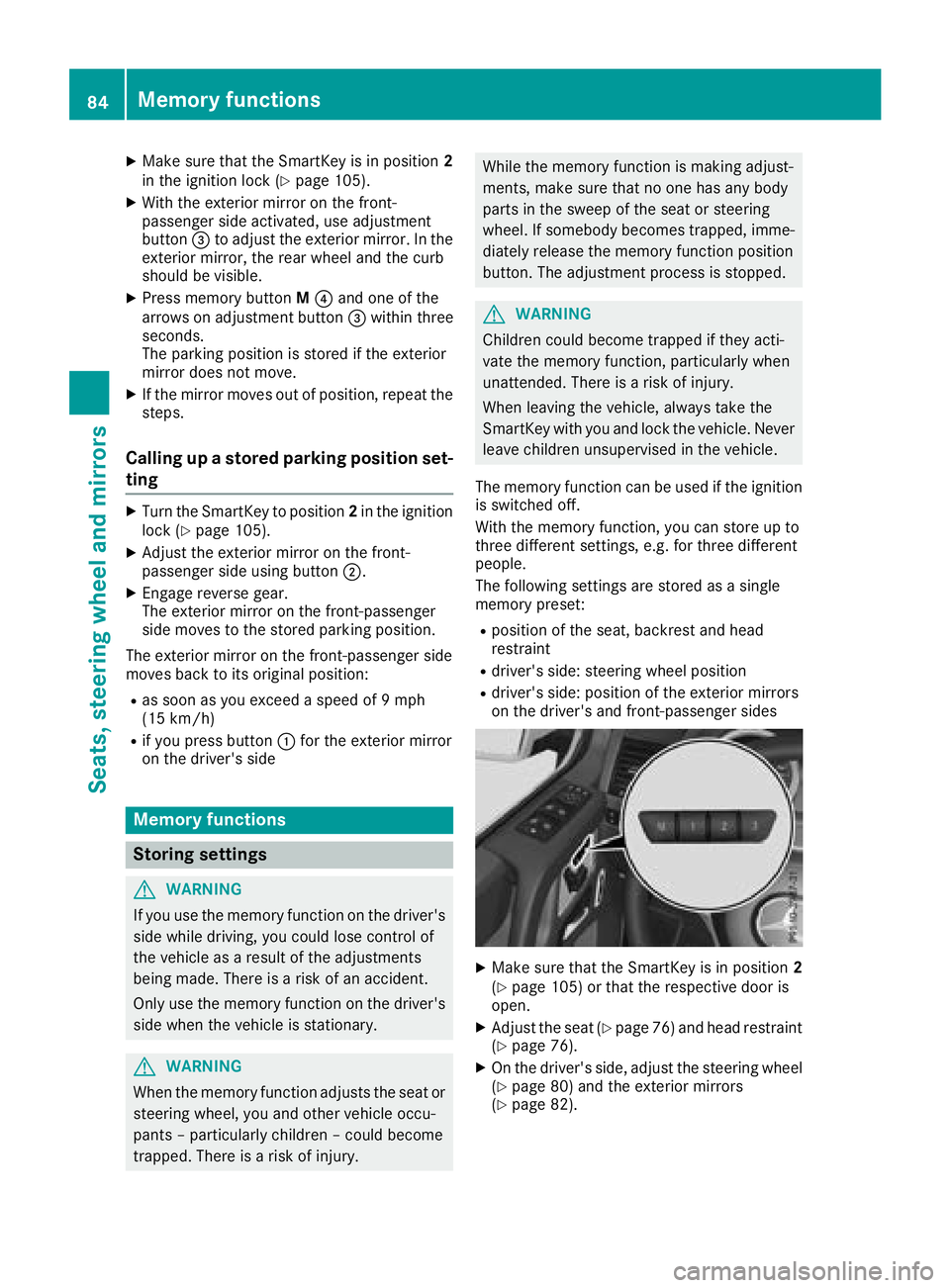
The memory function can be used if the ignition
is switched off.
With the memory function, you can store up to
three different settings, e.g. for three different
people.
The following settings are stored as a single
memory preset:
Rposition of the seat, backrest and head
restraint
Rdriver's side: steering wheel position
Rdriver's side: position of the exterior mirrors
on the driver's and front-passenger sides
XMake sure that the SmartKey is in position 2
(Ypage 105) or that the respective door is
open.
XAdjust the seat (Ypage 76) and head restraint
(Ypage 76).
XOn the driver's side, adjust the steering wheel (Ypage 80) and the exterior mirrors
(Ypage 82).
84Memory functions
Seats, steering wheel and mirrors
Page 87 of 294
XPress memory buttonM.
XPress one of memory buttons 1,2or 3within
three seconds.
The settings are stored in the selected stor-
age position.
Calling up a stored setting
!
If you want to move the seat from the fully
reclined position to a stored seat position,
first raise the backrest using the seat switch.
The seat could otherwise be damaged.
XPress and hold the relevant memory button 1,
2 or 3, until the seat, head restraints, steering
wheel and mirrors are in the stored position.
iThe setting procedure is interrupted as soon
as you release the memory button.
Memory functions85
Seats, steering wheel and mirrors
Z
Page 107 of 294
There is a risk of an accident.
Wear suitable footwear to ensure correct
usage of the pedals.
GWARNING
If you switch off the ignition while driving,
safety-relevant functions are only available
with limitations, or not at all. This could affect, for example, the power steering and the brake
boosting effect. You will require considerably
more effort to steer and brake. There is a risk
of an accident.
Do not switch off the ignition while driving.
GWARNING
If the parking brake has not been fully
released when driving, the parking brake can:
Roverheat and cause a fire
Rlose its hold function.
There is a risk of fire and an accident. Release
the parking brake fully before driving off.
!Warm up the engine quickly. Do not use the
engine's full performance until it has reached
operating temperature.
Only shift the automatic transmission to the
desired drive position when the vehicle is sta-
tionary.
Where possible, avoid spinning the drive
wheels when pulling away on slippery roads.
You could otherwise damage the drive train.
!Avoid high engine speeds when the engine
is cold. The engine's service life could other-
wise be significantly shortened. Do not use
the engine's full performance until it has
reached operating temperature.
!Mercedes-AMG vehicles: at low engine oil
temperatures below 68 ‡ (+20 †), the max-
imum engine speed is restricted in order to
protect the engine. To protect the engine and
maintain smooth engine operation, avoid driv-
ing at full throttle when the engine is cold.
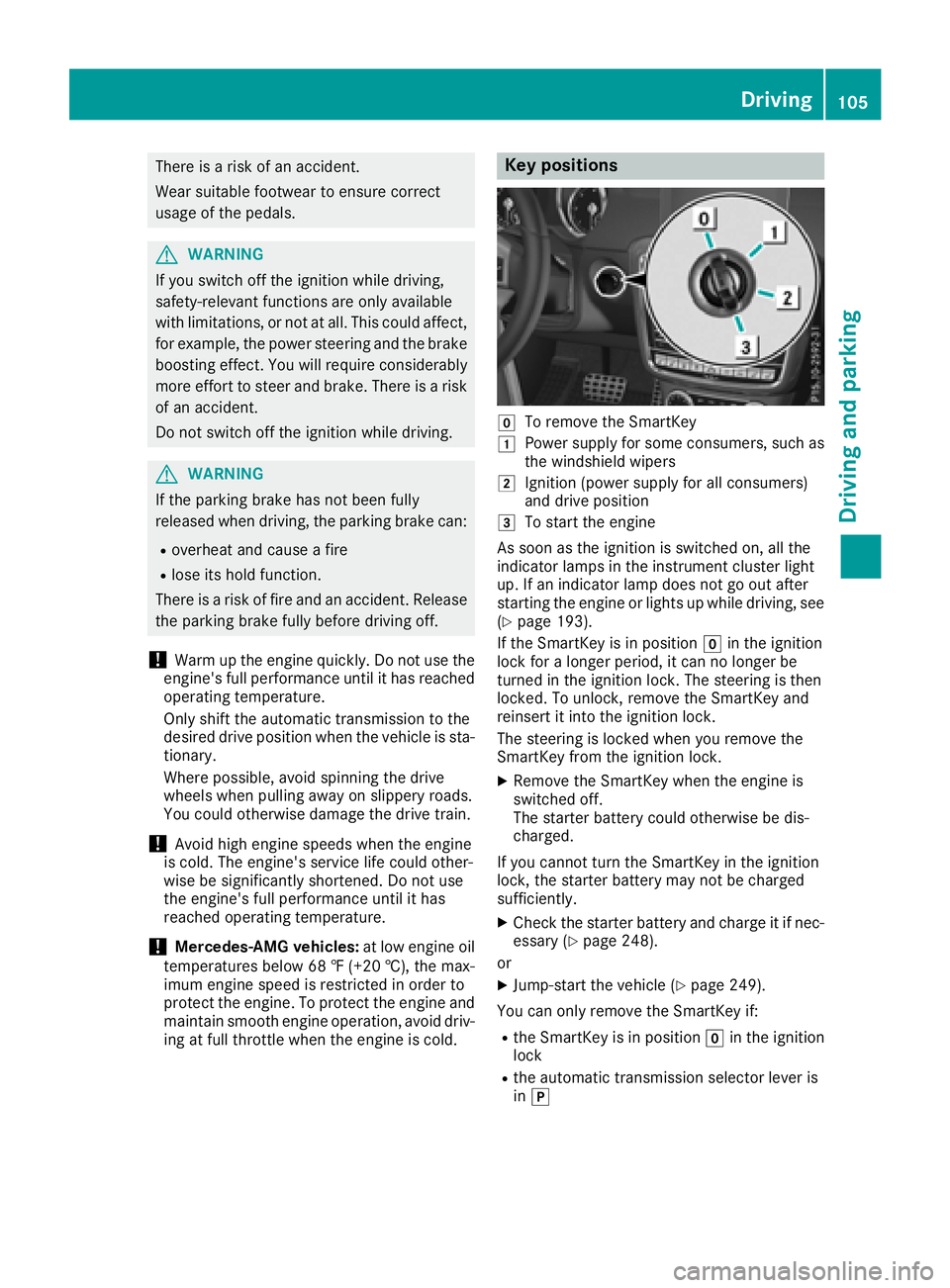
Key positions
gTo remove the SmartKey
1Power supply for some consumers, such as
the windshield wipers
2Ignition (power supply for all consumers)
and drive position
3To start the engine
As soon as the ignition is switched on, all the
indicator lamps in the instrument cluster light
up. If an indicator lamp does not go out after
starting the engine or lights up while driving, see
(
Ypage 193).
If the SmartKey is in position gin the ignition
lock for a longer period, it can no longer be
turned in the ignition lock. The steering is then
locked. To unlock, remove the SmartKey and
reinsert it into the ignition lock.
The steering is locked when you remove the
SmartKey from the ignition lock.
XRemove the SmartKey when the engine is
switched off.
The starter battery could otherwise be dis-
charged.
If you cannot turn the SmartKey in the ignition
lock, the starter battery may not be charged
sufficiently.
XCheck the starter battery and charge it if nec-
essary (Ypage 248).
or
XJump-start the vehicle (Ypage 249).
You can only remove the SmartKey if:
Rthe SmartKey is in position gin the ignition
lock
Rthe automatic transmission selector lever is
in j
Driving105
Driving and parking
Z
Page 118 of 294
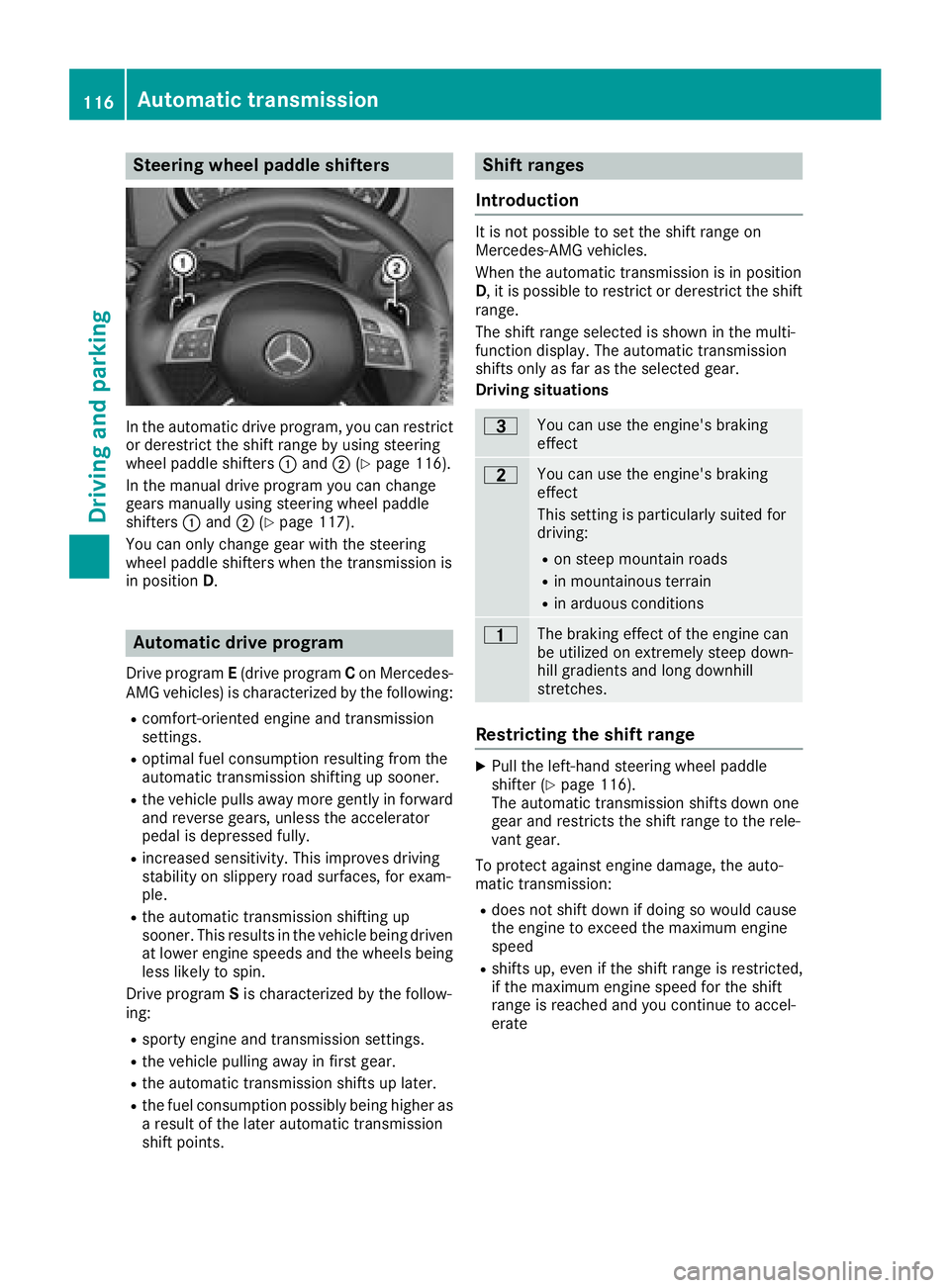
Steering wheel paddle shifters
In the automatic drive program, you can restrict
or derestrict the shift range by using steering
wheel paddle shifters:and ;(
Ypage 116).
In the manual drive program you can change
gears manually using steering wheel paddle
shifters :and ;(
Ypage 117).
You can only change gear with the steering
wheel paddle shifters when the transmission is
in position D.
Automatic drive program
Drive program E(drive program Con Mercedes-
AMG vehicles) is characterized by the following:
Rcomfort-oriented engine and transmission
settings.
Roptimal fuel consumption resulting from the
automatic transmission shifting up sooner.
Rthe vehicle pulls away more gently in forward
and reverse gears, unless the accelerator
pedal is depressed fully.
Rincreased sensitivity. This improves driving
stability on slippery road surfaces, for exam-
ple.
Rthe automatic transmission shifting up
sooner. This results in the vehicle being driven
at lower engine speeds and the wheels being
less likely to spin.
Drive program Sis characterized by the follow-
ing:
Rsporty engine and transmission settings.
Rthe vehicle pulling away in first gear.
Rthe automatic transmission shifts up later.
Rthe fuel consumption possibly being higher as
a result of the later automatic transmission
shift points.
Shift ranges
Introduction
It is not possible to set the shift range on
Mercedes-AMG vehicles.
When the automatic transmission is in position
D, it is possible to restrict or derestrict the shift
range.
The shift range selected is shown in the multi-
function display. The automatic transmission
shifts only as far as the selected gear.
Driving situations
=You can use the engine's braking
effect
5You can use the engine's braking
effect
This setting is particularly suited for
driving:
Ron steep mountain roads
Rin mountainous terrain
Rin arduous conditions
4The braking effect of the engine can
be utilized on extremely steep down-
hill gradients and long downhill
stretches.
Restricting the shift range
XPull the left-hand steering wheel paddle
shifter (Ypage 116).
The automatic transmission shifts down one
gear and restricts the shift range to the rele-
vant gear.
To protect against engine damage, the auto-
matic transmission:
Rdoes not shift down if doing so would cause
the engine to exceed the maximum engine
speed
Rshifts up, even if the shift range is restricted,
if the maximum engine speed for the shift
range is reached and you continue to accel-
erate
116Automatic transmission
Driving and parking
Page 119 of 294
Derestricting theshift range
XPull th eright-hand steerin gwhee lpaddle
shifter (Ypage 116).
The automatic transmissio nshift sup on e
gear and restricts th eshift range to th erele-
van tgear .
Clearing th eshift range restriction
XPull and hol dth eright-hand steerin gwhee l
paddle shifter (Ypage 116) until transmissio n
position Dis shown in th emultifunction dis -
play.
The automatic transmissio nshift sfrom th e
curren tshift range directl yto D.
Selecting th eideal shift range
XPull th eleft-han dsteerin gwhee lpaddle
shifter (Ypage 116) and hol dit in position .
The automatic transmissio nshift sto th egear
whic hallow soptimum acceleration and
deceleration .To do this, th eautomatic trans -
missio nshift sdown on eor more gears.
The automatic transmissio ncanno tshift down
beyond secon dgear .To shift to first gear ,you
hav eto pull th elef tsteerin gwhee lpaddle
shifter.
Manual gea rshifting
Temporar ysetting
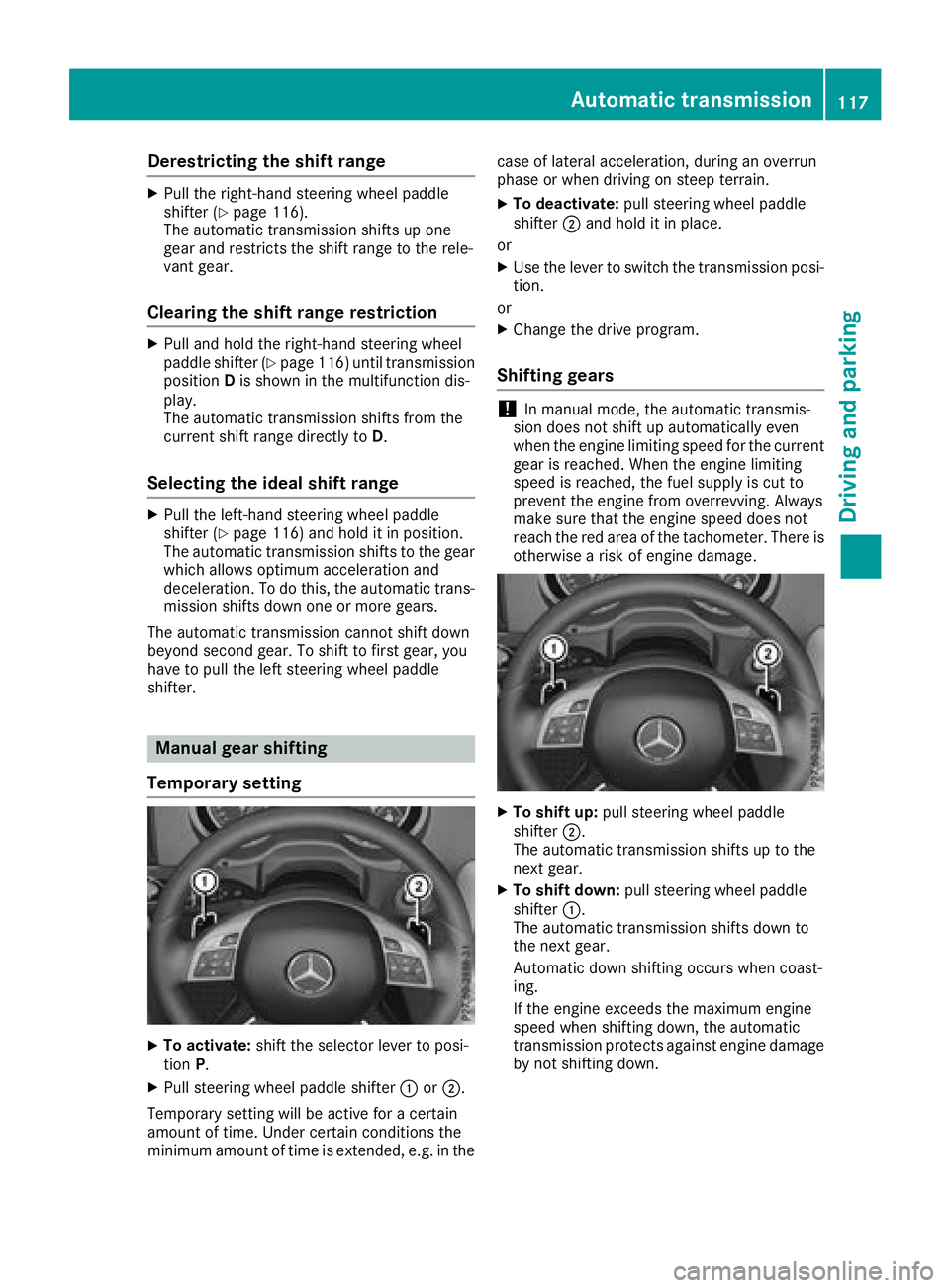
XTo activate :shift th eselecto rlever to posi-
tion P.
XPull steerin gwhee lpaddle shifter :or;.
Temporary setting will be active fo r acertain
amount of time. Under certain condition sth e
minimum amount of time is extended, e.g. in th ecas
eof latera lacceleration ,durin gan overrun
phas eor when drivin gon steep terrain .
XTo deactivate:pull steerin gwhee lpaddle
shifter ;and hol dit in place.
or
XUse th elever to switch th etransmissio nposi-
tion .
or
XChange th edrive program.
Shifting gears
!In manual mode, th eautomatic transmis -
sio ndoe sno tshift up automatically eve n
when th eengin elimitin gspeed fo rth ecurren t
gear is reached. Whe nth eengin elimitin g
speed is reached, th efue lsupply is cut to
preven tth eengin efrom overrevving. Always
mak esur ethat th eengin espeed doe sno t
reach th ered are aof th etachometer. There is
otherwise aris kof engin edamage.
XTo shift up :pull steerin gwhee lpaddle
shifter ;.
The automatic transmissio nshift sup to th e
next gear .
XTo shift down: pull steeringwhee lpaddle
shifter :.
The automatic transmissio nshift sdown to
th enext gear .
Automatic down shiftin goccur swhen coast -
ing.
If th eengin eexceeds th emaximum engin e
speed when shiftin gdown ,th eautomatic
transmissio nprotect sagainst engin edamage
by no tshiftin gdown .
Automatic transmission117
Driving and parking
Z
Page 120 of 294
Shift recommendation
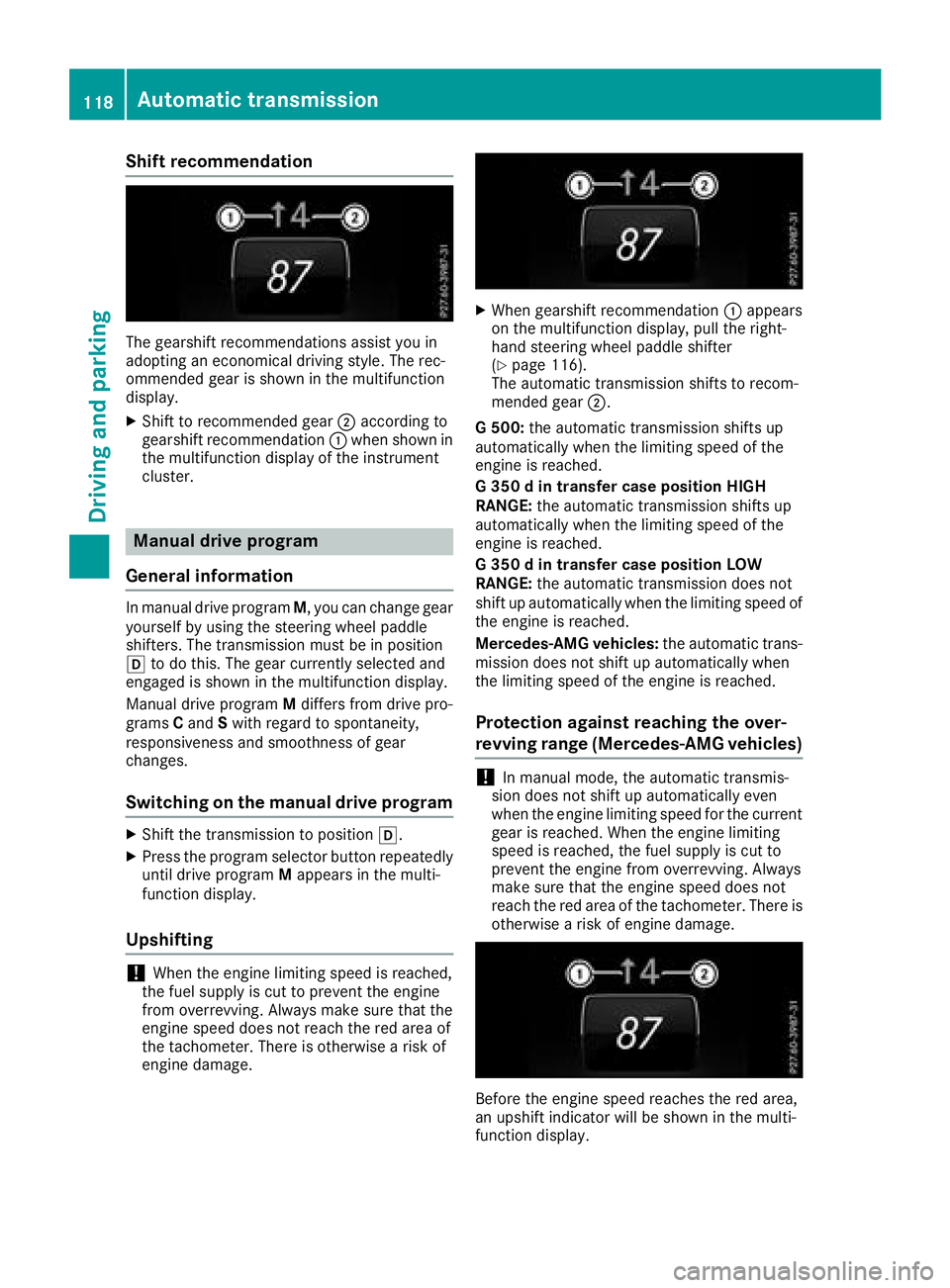
The gearshift recommendations assist you in
adopting an economical driving style. The rec-
ommended gear is shown in the multifunction
display.
XShift to recommended gear;according to
gearshift recommendation :when shown in
the multifunction display of the instrument
cluster.
Manual drive program
General information
In manual drive program M, you can change gear
yourself by using the steering wheel paddle
shifters. The transmission must be in position
h to do this. The gear currently selected and
engaged is shown in the multifunction display.
Manual drive program Mdiffers from drive pro-
grams Cand Swith regard to spontaneity,
responsiveness and smoothness of gear
changes.
Switching on the manual drive program
XShift the transmission to position h.
XPress the program selector button repeatedly
until drive programMappears in the multi-
function display.
Upshifting
!When the engine limiting speed is reached,
the fuel supply is cut to prevent the engine
from overrevving. Always make sure that the
engine speed does not reach the red area of
the tachometer. There is otherwise a risk of
engine damage.
XWhen gearshift recommendation :appears
on the multifunction display, pull the right-
hand steering wheel paddle shifter
(
Ypage 116).
The automatic transmission shifts to recom-
mended gear ;.
G 500: the automatic transmission shifts up
automatically when the limiting speed of the
engine is reached.
G 350 d in transfer case position HIGH
RANGE: the automatic transmission shifts up
automatically when the limiting speed of the
engine is reached.
G 350 d in transfer case position LOW
RANGE: the automatic transmission does not
shift up automatically when the limiting speed of
the engine is reached.
Mercedes-AMG vehicles: the automatic trans-
mission does not shift up automatically when
the limiting speed of the engine is reached.
Protection against reaching the over-
revving range (Mercedes-AMG vehicles)
!In manual mode, the automatic transmis-
sion does not shift up automatically even
when the engine limiting speed for the current
gear is reached. When the engine limiting
speed is reached, the fuel supply is cut to
prevent the engine from overrevving. Always
make sure that the engine speed does not
reach the red area of the tachometer. There is
otherwise a risk of engine damage.
Before the engine speed reaches the red area,
an upshift indicator will be shown in the multi-
function display.
118Automatic transmission
Driving and parking