cruise control MERCEDES-BENZ G-CLASS 2018 Owner's Manual
[x] Cancel search | Manufacturer: MERCEDES-BENZ, Model Year: 2018, Model line: G-CLASS, Model: MERCEDES-BENZ G-CLASS 2018Pages: 294, PDF Size: 4.86 MB
Page 9 of 294
Problem with the rear window
defroster ........................................101
Problems with "cooling with air
dehumidification" .............................9 8
Refrigerant .................................... .287
Refrigerant filling capacity ............. 288
Setting the air distribution ...............9 9
Setting the air vents ...................... 102
Setting the airflow ........................... 99
Setting the temperature .................. 99
Switching air-recirculation mode
on/off ............................................ 102
Switching on/off .............................. 98
Switching residual heat on/off ...... 102
Switching the rear window
defroster on/off ............................ 101
Switching the ZONE function
on/off ............................................ 100
Windshield defroster ...................... 101
Clock (on-board computer) ............... 169
Cockpit
Overview .......................................... 31
COMAND
see separate operating instructions
COMAND display
Cleaning ......................................... 241
Combination switch ............................ 88
Connecting a USB device
see also Digital Operator's Man-
ual .................................................. 203
Consumption statistics (on-board
computer) .......................................... 163
Controller ........................................... 204
Controlling speed
see DISTRONIC PLUS
Convenience closing feature .............. 70
Convenience opening feature ............ 70
Coolant (engine)
Checking the level ......................... 234
Display message ............................ 180
Filling capacity ............................... 287
Notes ............................................. 286
Temperature (on-board com-
puter) ............................................. 171
Temperature gauge ........................ 161
Warning lamp ................................. 199 Cooling
see Climate control
Copyright ............................................. 29
Cruise control
Cruise control lever ....................... 133
Deactivating ................................... 134
Driving system ............................... 133
Functio
n/notes ............................. 133
General notes ................................ 133
Important safety notes .................. 133
Resuming the stored speed ........... 134
Setting a speed .............................. 134
Storing and maintaining current
speed ............................................. 133
Cup holder
Center console .............................. 215
Important safety notes .................. 215
Rear compartment ......................... 215
D
Datasee Technical data
Date (on-board computer) ................ 168
Daytime running lamps
Display message ............................ 180
Switching on/off (on-board com-
puter) ............................................. 169
Switching on/off (switch) ................ 86
Delayed switch-off
Exterior lighting (on-board com-
puter) ............................................. 169
Interior lighting .............................. 169
Diagnostics connection ...................... 27
Differential locks
Disengaging ................................... 153
Engaging ........................................ 151
Front axle ...................................... 152
General notes ................................ 151
Rear axle ........................................ 152
Terrain ........................................... 151
Transfer case ................................. 152
Digital Operator's Manual
Help ................................................. 22
Introduction ..................................... 22
Digital speedometer ......................... 163
Display messages
Calling up (on-board computer) ..... 174
Index7
Page 10 of 294
Driving systems ............................. 183
Engine ............................................ 180
General notes ................................ 173
Hiding (on-board computer) ........... 173
Lights ............................................. 180
Safety systems .............................. 175
Service interval display .................. 235
SmartKey ....................................... 191
Tires ............................................... 187
Vehicle ........................................... 190
Distance recorder
see Odometer
see Trip odometer
Distance warning (warning lamp) .... 201
DISTRONIC PLUS
Activating ....................................... 136
Activation conditions ..................... 136
Cruise control lever ....................... 136
Deactivating ................................... 139
Display message ............................ 185
Displays in the instrument cluster. .139
Displays in the multifunction dis-
play ................................................ 139
Driving tips .................................... 140
Driving with DISTRONIC PLUS ....... 137
Function/notes ............................. 134
Important safety notes .................. 135
Setting a speed .............................. 138
Setting the specified minimum
distance ......................................... 138
Stopping ........................................ 137
Warning lamp ................................. 201
Doors
Automatic locking (on-board com-
puter) ............................................. 170
Automatic locking (switch) ............... 67
Central locking/unlocking
(SmartKey) ....................................... 63
Control panel ................................... 37
Display message ............................ 190
Emergency locking ........................... 68
Emergency unlocking ....................... 68
Important safety notes .................... 66
Opening (from inside) ...................... 67
Overview .......................................... 66
Drinking and driving ......................... 125
Drive program
Automatic transmission ................. 116 Display ........................................... 112
SETUP (on-board computer,
Mercedes-AMG vehicles) ............... 171
Driver's door
see Doors
Driving downhill ................................ 132
Drivin g i
n mountainous terrain
Approach/departure angle ............ 132
Driving downhill ............................. 132
Gradient-climbing capability
(maximum) ..................................... 132
Driving lamps
see Daytime running lamps
Driving off-road
Driving downhill ............................. 132
see Off-road driving
Driving on flooded roads .................. 128
Driving safety systems
ABS (Anti-lock Braking System) ....... 58
ADAPTIVE BRAKE ............................. 61
BAS (Brake Assist System) .............. 59
EBD (electronic brake force distri-
bution) ............................................. 61
ESP
®(Electronic Stability Pro-
gram) ............................................... 59
Important safety information ........... 58
Overview .......................................... 58
Driving systems
Blind Spot Assist ............................ 140
Cruise control ................................ 133
Display message ............................ 183
DISTRONIC PLUS ........................... 134
HOLD function ............................... 142
PARKTRONIC ................................. 143
Rear view camera .......................... 146
Driving tips
Automatic transmission ................. 114
Brakes ........................................... 125
Break-in period .............................. 104
DISTRONIC PLUS ........................... 140
Downhill gradient ........................... 125
Drinking and driving ....................... 125
Driving in winter ............................. 128
Driving on flooded roads ................ 128
Driving on sand .............................. 131
Driving on wet roads ...................... 127
Driving over obstacles ................... 131
Exhaust check ............................... 125
8Index
Page 33 of 294
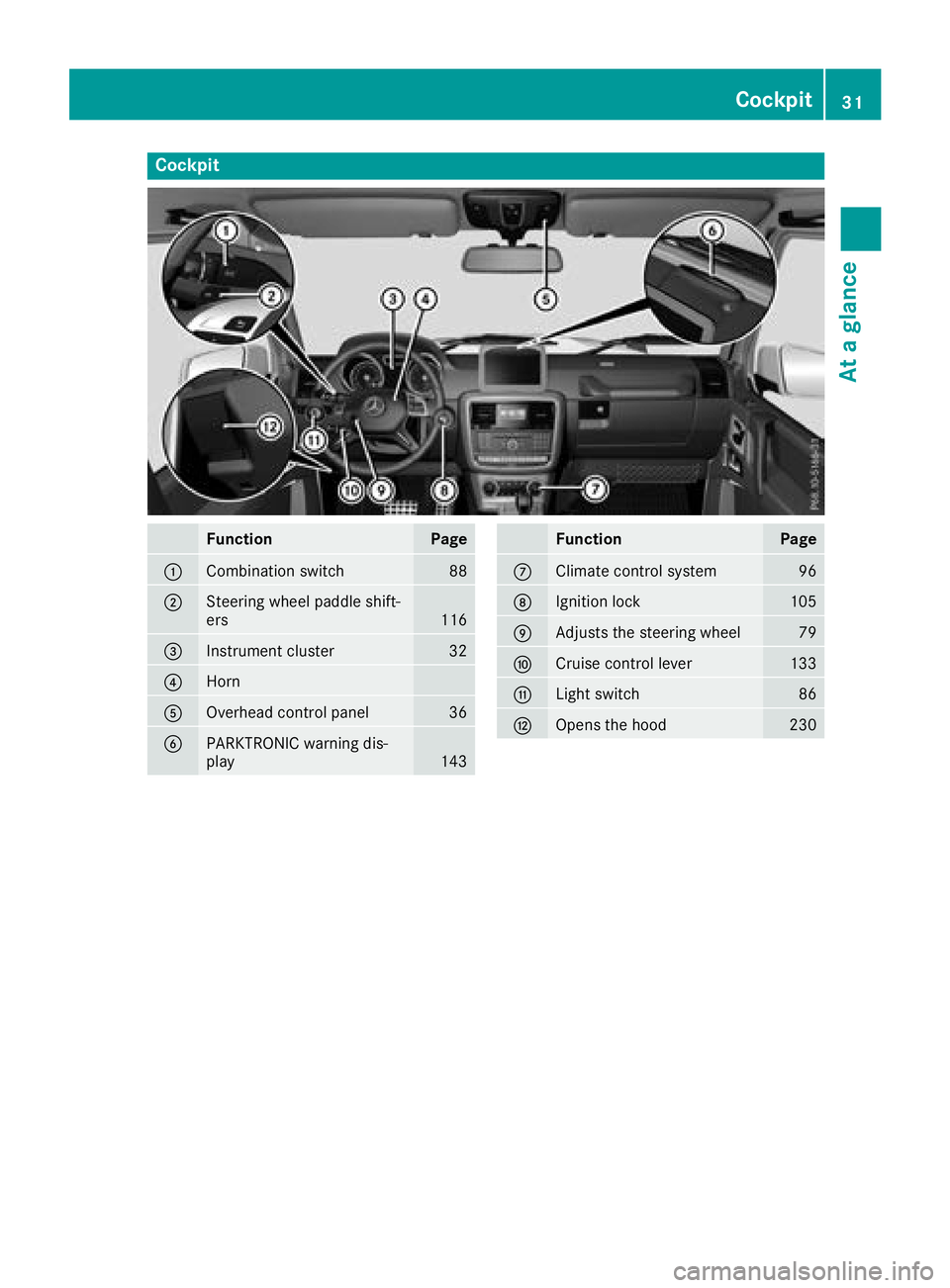
Cockpit
FunctionPage
:Combination switch88
;Steering wheel paddle shift-
ers116
=Instrument cluster32
?Horn
AOverhead control panel36
BPARKTRONIC warning dis-
play143
FunctionPage
CClimate control system96
DIgnition lock105
EAdjusts the steering wheel79
FCruise control lever133
GLight switch86
HOpens the hood230
Cockpit31
At a glance
Page 117 of 294
Towing a trailer
XDrive in the middle of the engine speed range
on uphill gradients.
XVehicles except Mercedes‑AMG vehicles:
limit the shift range to 3or 2depending on the
uphill or downhill gradient (
Ypage 116). This
also applies if cruise control, the speed limiter
or DISTRONIC PLUS is activated.
Mercedes ‑AMG vehicles: shift down to shift
range 3or 2depending on the uphill or down-
hill gradient (
Ypage 116). This also applies if
cruise control, the speed limiter or
DISTRONIC PLUS is activated.
XShift the transfer case into low-range driving
position LOW RANGE on extreme uphill gra-
dients or steep downhill gradients
(
Ypage 149).
Program selector button
General notes
The program selector button allows you to
choose between drive programs with different
driving characteristics.
On Mercedes-AMG vehicles, drive program Eis
called drive program C.
The automatic transmission switches to auto-
matic drive program E(drive program Cin
Mercedes-AMG vehicles) each time the engine
is started.
Only change from automatic drive program Cor
S to manual drive program Mwhen the vehicle is
stationary.
Drive programs available for vehicles
except Mercedes-AMG vehicles
E EconomyComfortable, economical
driving
S SportSporty driving style
M ManualManual gear shifting
Drive programs available for
Mercedes ‑AMG vehicles
C Controlled
EfficiencyComfortable, economical
driving
S SportSporty driving style
M ManualManual gear shifting
For further information on the automatic drive
program, see (Ypage 116).
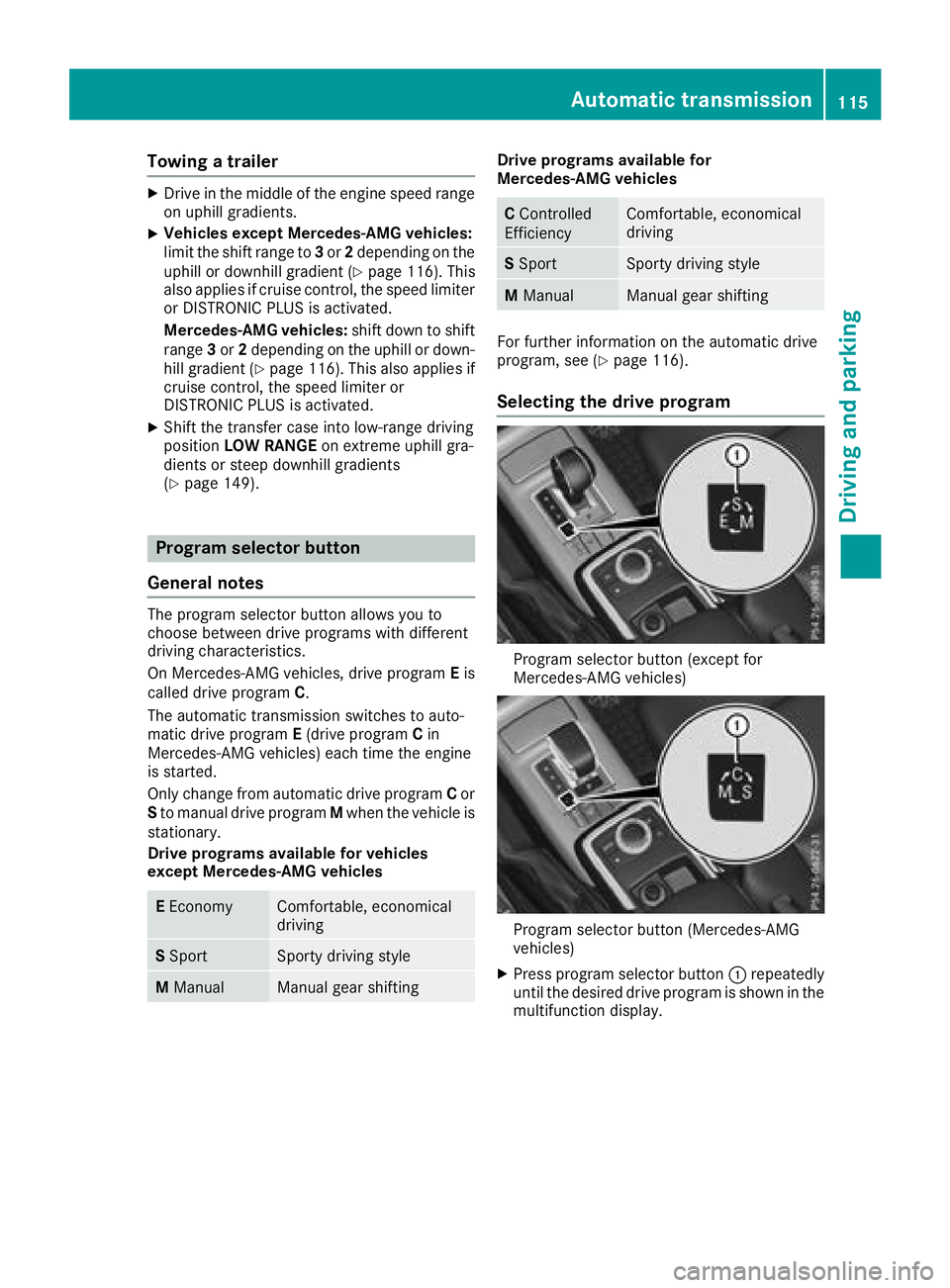
Selecting the drive program
Program selector button (except for
Mercedes-AMG vehicles)
Program selector button (Mercedes-AMG
vehicles)
XPress program selector button :repeatedly
until the desired drive program is shown in the
multifunction display.
Automatic transmission115
Driving an d parking
Z
Page 128 of 294
This also applies if cruise control or DISTRONIC
PLUS is activated.
Heavy and light loads
GWARNING
If you rest your foot on the brake pedal while
driving, the braking system can overheat. This increases the stopping distance and can even
cause the braking system to fail. There is a
risk of an accident.
Never use the brake pedal as a footrest. Never
depress the brake pedal and the accelerator
pedal at the same time.
!Depressing the brake pedal constantly
results in excessive and premature wear to
the brake pads.
If the brakes have been subjected to a heavy
load, do not stop the vehicle immediately. Drive
on for a short while. This allows the airflow to
cool the brakes more quickly.
Wet roads
If driving in heavy rain for a prolonged period of
time without braking, there may be a delayed
reaction from the brakes when braking for the
first time. This may also occur after the vehicle
has been washed.
You have to depress the brake pedal more
firmly. Maintain a greater distance from the
vehicle in front.
After driving on a wet road or having the vehicle
washed, brake firmly while paying attention to
the traffic conditions. This will warm up the
brake discs, thereby drying them more quickly
and protecting them against corrosion.
Limited braking performance on salt-
treated roads
If you drive on salted roads, a layer of salt resi-
due may form on the brake discs and brake
pads. This can result in a significantly longer
braking distance.
RIn order to prevent any salt build-up, apply the
brakes occasionally while paying attention to
the traffic conditions.
RCarefully depress the brake pedal and the
beginning and end of a journey.
RMaintain a greater distance to the vehicle
ahead.
Servicing the brakes
!The brake fluid level may be too low, if:
Rif the red brake warning lamp lights up in
the instrument cluster and
Ryou hear a warning tone while the engine is
running
Observe additional warning messages in the
multifunction display.
The brake fluid level may be too low due to
brake pad wear or leaking brake lines.
Have the brake system checked immediately. Consult a qualified specialist workshop to
arrange this.
!If the brake warning lamp lights up in the
instrument cluster and you hear a warning
tone even though the parking brake has been released, the brake fluid level may be too low.
Observe additional warning messages in the
multifunction display.
The brake fluid level may be too low due to
brake pad wear or leaking brake lines.
Have the brake system checked immediately. This work should be carried out at a qualified
specialist workshop.
!A function or performance test should only
be carried out on a 2-axle dynamometer. If
you wish to operate the vehicle on such a
dynamometer, please consult a qualified spe-
cialist workshop in advance. You could oth-
erwise damage the drive train or the brake
system.
!The ESP®system operates automatically. If
the parking brake is tested on a brake dyna-
mometer (for a maximum of ten seconds), the
engine and the ignition must be switched off.
Braking triggered automatically by ESP
®may
otherwise cause severe damage to the brake
system.
All checks and maintenance work on the brake
system must be carried out at a qualified spe-
cialist workshop.
126Driving tips
Driving and parking
Page 132 of 294
General notes
HEnvironmental note
Protection of the environment is of primary
importance. Treat nature with respect.
Observe all prohibiting signs.
Read this section carefully before driving your
vehicle off-road. Practice by driving over more
gentle off-road terrain first.
Familiarize yourself with the characteristics of
your vehicle and the gear shift operation before
driving through difficult terrain.
The following driving systems are specially
adapted to off-road driving:
R4ETS (Ypage 59)
ROff-road ABS (Ypage 59)
RTransfer case (Ypage 149)
RDifferential locks (Ypage 151)
Observe the following notes:
Rstop the vehicle before you drive off-road and,
if necessary, shift the transfer case to the
LOW RANGE off-road gear (
Ypage 149).
REngage the differential locks if necessary
(Ypage 151).
iABS, 4ETS, ESP®and BAS are deactivated
while the differential locks are engaged. This
allows the front wheels to lock briefly, so that
these can dig into a loose surface. However,
please note that locked wheels skid and can
no longer steer.
RCheck that items of luggage and loads are
stowed safely and are well secured
(
Ypage 214).
RTo avoid damaging the vehicle, make sure
there is always sufficient ground clearance.
RAlways keep the engine running and in gear
when driving on a downhill gradient.
RAlways keep the engine running and in gear
when driving down an incline.
RDrive slowly and evenly, if necessary at a
walking pace.
REnsure that the wheels are in contact with the
ground at all times.
RDrive with extreme care on unfamiliar off-road
routes where visibility is poor. For safety rea-
sons, get out of the vehicle first and survey
the off-road route.
RCheck the depth of water before fording rivers
and streams.
RWatch out for obstacles.
RAlways keep the doors, rear door, side win-
dows and the sliding sunroof closed while the
vehicle is in motion.
RSwitch off cruise control.
RDo not deviate from marked routes.
RAdapt your speed to the terrain. The rougher,
steeper or more ruts on the terrain, the slower
your speed should be.
RDo not jump with the vehicle. as this will inter-
rupt the vehicle's propulsion.
RAvoid high engine speeds. Drive at appropri-
ate engine speeds (maximum 3,000 rpm).
RDo not shift the automatic transmission to
position i.
RAlways check the vehicle for damage after off-
road driving.
Do not use the HOLD function when driving off-
road, on steep uphill or downhill gradients or on slippery or loose surfaces. The HOLD function
cannot hold the vehicle on such surfaces.
You can obtain further information about mount-
ing special all-terrain tires from a qualified spe-
cialist workshop.
Checklist before driving off-road
!If the engine oil warning lamp lights up while
the vehicle is in motion, stop the vehicle in a
safe place as soon as possible. Check the
engine oil level. The engine oil warning lamp
warning must not be ignored. Continuing the
journey while the symbol is displayed could
lead to engine damage.
XEngine oil level: check the engine oil level
and add oil if necessary.
When driving on steep gradients, the engine
oil level must be sufficiently high to ensure a
correct oil supply in the vehicle.
XTire-changing tool kit: check that the jack is
working and make sure you have the lug
wrench, a robust tow cable and a folding
spade in the vehicle.
XWheels and tires: check the tire tread depth
and tire pressure.
XCheck for damage and remove any foreign
objects, e.g. small stones, from the wheels/
tires.
XReplace any missing valve caps.
130Driving tips
Driving and parking
Page 135 of 294
RBefore tackling steep downhill gradients, shift
the automatic transmission to a low gear.
By doing so, you will use the braking effect of
the engine to reduce the speed. If this is not
sufficient, brake gently. When doing so, make
sure that the vehicle is facing in the direction
of the line of fall.
RObserve the notes on driving in mountainous
terrain (Ypage 132).
RCheck that the service brake is working nor-
mally after a long downhill stretch.
When driving at speeds below 37 mph
(60 km/h), off-road ABS is activated and the
front wheels lock cyclically during braking. The
digging-in effect achieved in the process
reduces the stopping distance on off-road ter-
rain. This limits steering capability.
Driving systems
Cruise control
General notes
Cruise control maintains a constant road speed
for you. It brakes automatically in order to avoid
exceeding the set speed. Change into a lower
gear in good time on long and steep downhill
gradients.
This is especially important if the vehicle is
laden. By doing so, you will make use of the
braking effect of the engine. This relieves the
load on the brake system and prevents the
brakes from overheating and wearing too
quickly.
Use cruise control only if road and traffic con-
ditions make it appropriate to maintain a steady
speed for a prolonged period. You can store any
road speed above 20 mph (30 km/h).
Do not activate cruise control on off-road jour-
neys.
Important safety notes
Cruise control can neither reduce the risk of an
accident if you fail to adapt your driving style nor override the laws of physics. Cruise control can-
not take into account the road, traffic and
weather conditions. Cruise control is only an
aid. You are responsible for maintaining a safe
distance to the vehicle in front, for vehicle
speed, for braking in good time and for staying in
lane. Do not use cruise control:
Rin road and traffic conditions that do not allow
you to maintain a constant speed, e.g. in
heavy traffic, on winding roads or on rough
terrain
Ron slippery road surfaces. Braking or accel-
erating could cause the drive wheels to lose
traction and the vehicle could then skid
Rin poor visibility, e.g. due to fog, heavy rain or
snow
If there is a change of drivers, advise the new
driver of the speed stored.
iThe speed indicated in the speedometer
may differ slightly from the speed stored.
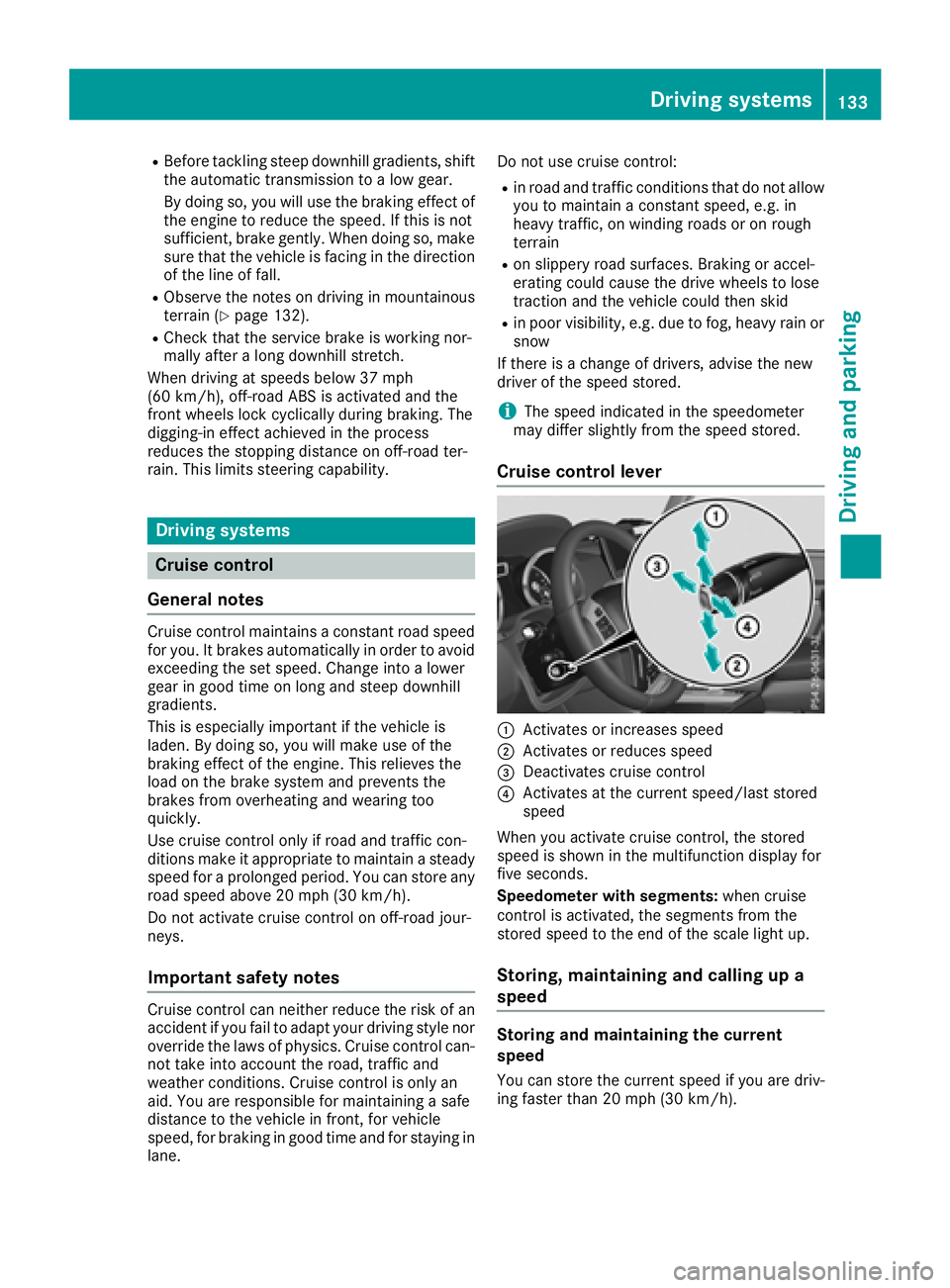
Cruise control lever
:Activates or increases speed
;Activates or reduces speed
=Deactivates cruise control
?Activates at the current speed/last stored
speed
When you activate cruise control, the stored
speed is shown in the multifunction display for
five seconds.
Speedometer with segments: when cruise
control is activated, the segments from the
stored speed to the end of the scale light up.
Storing, maintaining and calling up a
speed
Storing and maintaining the current
speed
You can store the current speed if you are driv-
ing faster than 20 mph (30 km/h).
Driving systems133
Driving and parking
Z
Page 136 of 294
XAccelerate the vehicle to the desired speed.
XBriefly press the cruise control lever up:or
down ;.
XRemove your foot from the accelerator pedal.
Cruise control is activated. The vehicle auto-
matically maintains the stored speed.
iCruise control may be unable to maintain
the stored speed on uphill and downhill gra-
dients. The stored speed is resumed when the
gradient levels out. Cruise control maintains
the stored speed on downhill gradients by
automatically applying the brakes.
Calling up the stored speed
GWARNING
If you call up the stored speed and it is lower
than the current speed, the vehicle deceler-
ates. If you do not know the stored speed, the vehicle could decelerate unexpectedly. There
is a risk of an accident.
Pay attention to the road and traffic condi-
tions before calling up the stored speed. If you
do not know the stored speed, store the
desired speed again.
XBriefly pull the cruise control lever towards
you ?.
XRemove your foot from the accelerator pedal.
Cruise control is activated and adjusts the
vehicle's speed to the last speed stored.
If no speed is stored, cruise control stores the
current speed and maintains it.
Setting a speed
Keep in mind that it may take a brief moment
until the vehicle has accelerated or braked to
the speed set.
XPress the cruise control lever up :for a
higher speed or down ;for a lower speed.
XTo adjust the set speed in 1 mph incre-
ments (1 km/h increments): briefly press
the cruise control lever up :or down ;to
the pressure point.
Every time the cruise control lever is pressed
up : or down ;the last speed stored is
increased or reduced.
XTo adjust the set speed in 5 mph incre-
ments (10 km/h increments): briefly pressthe cruise control lever up
:or down ;
beyond the pressure point.
Every time the cruise control lever is pressed
up : or down ;the last speed stored is
increased or reduced.
iCruise control is not deactivated if you
depress the accelerator pedal. If you acceler-
ate to overtake, cruise control adjusts the
vehicle's speed to the last speed stored after
you have finished overtaking.
Deactivating cruise control
There are several ways to deactivate cruise con-
trol:
XBriefly press the cruise control lever forwards
=.
or
XBrake.
Cruise control is automatically deactivated if:
Ryou apply the parking brake
Ryou are driving at less than 20 mph (30 km/h)
RESP®intervenes or you deactivate ESP®
Ryou shift the automatic transmission to posi-
tion iwhile driving
Ryou engage a differential lock
If cruise control is deactivated, a warning tone
sounds. You will see the Cruise Control Off
message in the multifunction display for approx-
imately five seconds. The message on the mul-
tifunction display disappears and the segments
on the speedometer go out.
iWhen you switch off the engine, the last
speed stored is cleared.
DISTRONIC PLUS
General notes
DISTRONIC PLUS regulates the speed and auto-
matically helps you maintain the distance from
the vehicle detected in front. Vehicles are detec-
ted with the aid of the radar sensor system.
DISTRONIC PLUS brakes automatically so that
the set speed is not exceeded.
Change into a lower gear in good time on long
and steep downhill gradients.
This is especially important if the vehicle is
laden. By doing so, you will make use of the
braking effect of the engine. This relieves the
134Driving systems
Driving an d parking
Page 138 of 294
Do not use DISTRONIC PLUS:
Rin road and traffic conditions that do not allow
you to maintain a constant speed, e.g. in
heavy traffic or on winding roads
Ron slippery road surfaces. Braking or accel-
erating can cause the drive wheels to lose
traction and the vehicle could then skid
Rwhen there is poor visibility, e.g. due to fog,
heavy rain or snow
DISTRONIC PLUS may not detect narrow vehi-
cles driving in front, e.g. motorcycles, or vehi-
cles driving on a different line.
In particular, the detection of obstacles can be
impaired if:
Rthere is dirt on the sensors or anything else
covering the sensors
Rthere is snow or heavy rain
Rthere is interference by other radar sources
Rthere are strong radar reflections, for exam-
ple, in parking garages
If DISTRONIC PLUS no longer detects a vehicle
in front, DISTRONIC PLUS may unexpectedly
accelerate the vehicle to the stored speed.
This speed may:
Rbe too high if you are driving in a filter lane or an exit lane
Rbe so high in the right lane that you pass vehi-cles driving on the left (left-hand drive coun-
tries)
Rbe so high in the left lane that you pass vehi-
cles driving on the right (right-hand drive
countries)
If there is a change of drivers, advise the new
driver of the speed stored.
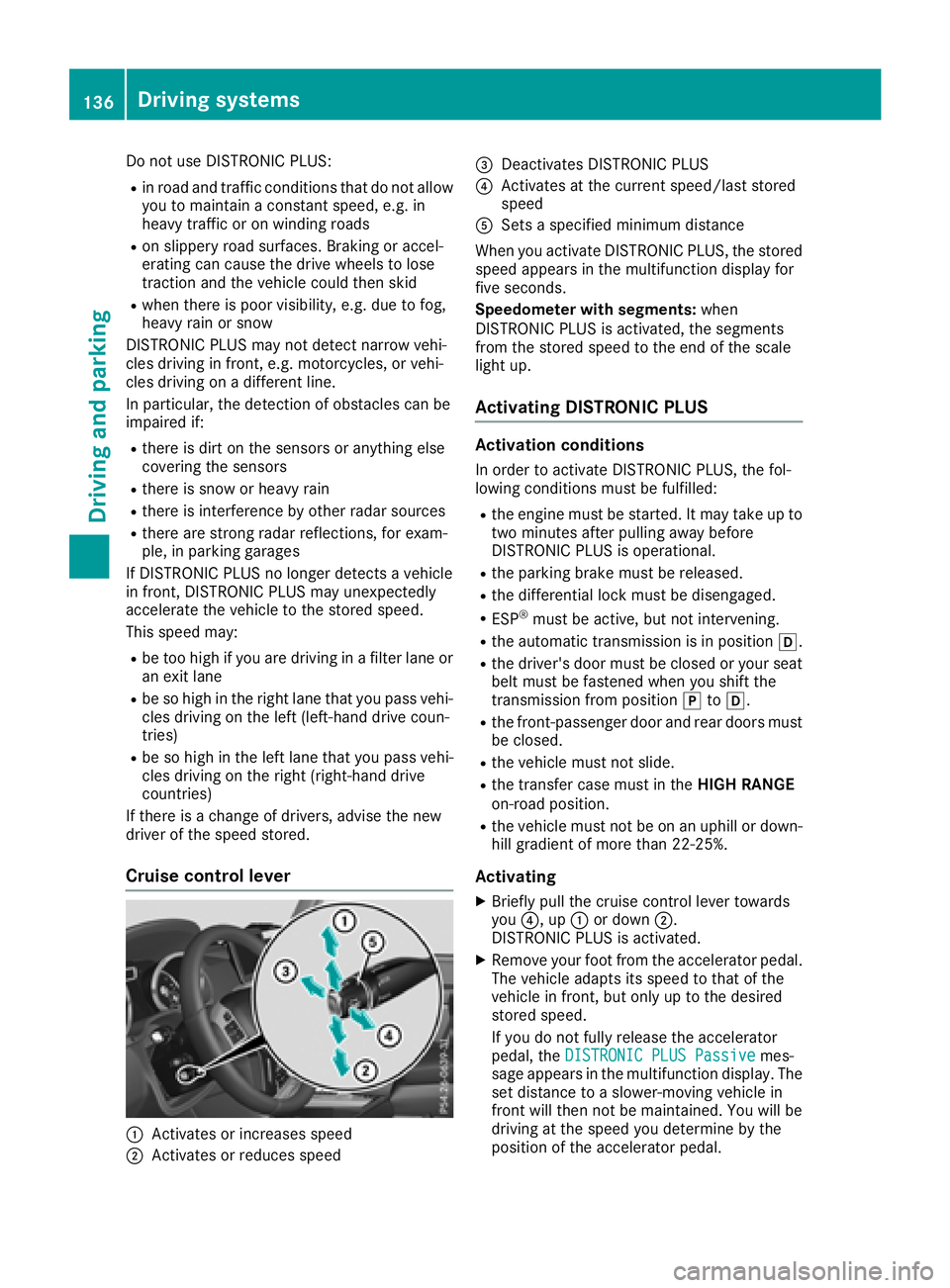
Cruise control lever
:Activates or increases speed
;Activates or reduces speed
=Deactivates DISTRONIC PLUS
?Activates at the current speed/last stored
speed
ASets a specified minimum distance
When you activate DISTRONIC PLUS, the stored
speed appears in the multifunction display for
five seconds.
Speedometer with segments: when
DISTRONIC PLUS is activated, the segments
from the stored speed to the end of the scale
light up.
Activating DISTRONIC PLUS
Activation conditions
In order to activate DISTRONIC PLUS, the fol-
lowing conditions must be fulfilled:
Rthe engine must be started. It may take up to
two minutes after pulling away before
DISTRONIC PLUS is operational.
Rthe parking brake must be released.
Rthe differential lock must be disengaged.
RESP®must be active, but not intervening.
Rthe automatic transmission is in position h.
Rthe driver's door must be closed or your seat
belt must be fastened when you shift the
transmission from positionjtoh.
Rthe front-passenger door and rear doors must
be closed.
Rthe vehicle must not slide.
Rthe transfer case must in the HIGH RANGE
on-road position.
Rthe vehicle must not be on an uphill or down-
hill gradient of more than 22‑25%.
Activating
XBriefly pull the cruise control lever towards
you ?, up :or down ;.
DISTRONIC PLUS is activated.
XRemove your foot from the accelerator pedal.
The vehicle adapts its speed to that of the
vehicle in front, but only up to the desired
stored speed.
If you do not fully release the accelerator
pedal, the DISTRONIC PLUS Passive
mes-
sage appears in the multifunction display. The set distance to a slower-moving vehicle in
front will then not be maintained. You will be
driving at the speed you determine by the
position of the accelerator pedal.
136Driving system s
Driving an d parking
Page 139 of 294
You can also activate DISTRONIC PLUS when
stationary. The lowest speed that can be set is
20 mph (30 km/h).
XBriefly pull the cruise control lever towards
you?, up :or down ;.
DISTRONIC PLUS is activated.
Activating at the current speed/last
stored speed
GWARNING
If you call up the stored speed and it differs
from the current speed, the vehicle acceler-
ates or decelerates. If you do not know the
stored speed, the vehicle could accelerate or brake unexpectedly. There is a risk of an acci-
dent.
Pay attention to the road and traffic condi-
tions before calling up the stored speed. If you
do not know the stored speed, store the
desired speed again.
XBriefly pull the cruise control lever towards
you ?.
XRemove your foot from the accelerator pedal.
DISTRONIC PLUS is activated. The first time it
is activated, the current speed is stored. Oth-
erwise, it sets the vehicle speed to the previ-
ously stored value.
Driving with DISTRONIC PLUS
Pulling away and driving
XIf you want to pull away with DISTRONIC
PLUS: remove your foot from the brake pedal.
XBriefly pull the cruise control lever towards
you?.
or
XAccelerate briefly.
The vehicle pulls away and adapts its speed to that of the vehicle in front. If no vehicle is
detected in front, your vehicle accelerates to
the stored speed.
The vehicle can also pull away when it is facing
an unidentified obstacle or is driving on a differ- ent line from another vehicle. The vehicle then
brakes automatically.
If DISTRONIC PLUS does not detect a vehicle in
front, the system operates like a cruise control.
If DISTRONIC PLUS detects that the vehicle in
front is driving slower, your vehicle brakes. In this way, the specified minimum distance you
have selected is maintained.
If DISTRONIC PLUS detects a faster-moving
vehicle in front, it increases the driving speed to
the set speed.
If you depress the brake, DISTRONIC PLUS is
deactivated unless your vehicle is stationary.
Selecting the drive program
DISTRONIC PLUS supports a sporty driving style
when you have selected the
Sdriving program
(
Ypage 116). Acceleration behind the vehicle in
front or to the set speed is then noticeably more dynamic. If you have selected drive program Eor
C (Mercedes-AMG vehicles), the vehicle accel-
erates more gently. This setting is recommen-
ded in stop-start traffic.
Changing lanes
If you change to the passing lane, DISTRONIC
PLUS supports you when:
Ryou are driving faster than 40 mph (60 km/h)
RDISTRONIC PLUS is maintaining the distance
to a vehicle in front
Ryou switch on the appropriate turn signal
RDISTRONIC PLUS does not detect a danger of
collision
If these conditions are fulfilled, your vehicle is
accelerated. Acceleration will be interrupted if
changing lanes takes too long or if the distance
between your vehicle and the vehicle in front
becomes too small.
When changing lanes, DISTRONIC PLUS moni-
tors the left lane on left-hand drive vehicles and
the right lane on right-hand drive vehicles.
Stopping
GWARNING
When leaving the vehicle, even if it is braked
only by DISTRONIC PLUS, it could roll away if:
Rthere is a malfunction in the system or in
the voltage supply.
RDISTRONIC PLUS has been deactivated
with the cruise control lever, e.g. by a vehi-
cle occupant or from outside the vehicle.
Rthe electrical system in the engine com-
partment, the battery or the fuses have
been tampered with.
Driving systems137
Driving and parking
Z