display MERCEDES-BENZ G-CLASS SUV 2008 User Guide
[x] Cancel search | Manufacturer: MERCEDES-BENZ, Model Year: 2008, Model line: G-CLASS SUV, Model: MERCEDES-BENZ G-CLASS SUV 2008Pages: 293, PDF Size: 4.49 MB
Page 16 of 293
13
Trailer towing
Driving tips. .................................... 178
Mounting dimensions. ....................274
Ultrasonic reversing aid. .................119
Transfer case
Display message ............................. 202
Shift range ........................................ 92
Transmission
Display message ............................. 198
Transmission output (maximum)
Telephone/two-way radio ...............260
Transport (vehicle)............................. 254
Travelling uphill .................................. 174
Trip computer Menu (on-board computer). ............110
Trip meter........................................... 100
Resetting. ......................................... 96
Turn signal lamps
Display message ............................. 205
Two-way radio
Installation. ..................................... 260
Tyre grip.............................................. 171
Tyre pressure ..................................... 164
Calling up (on-board computer) .....165
Display message ............................. 198
see Tyre pressure
Tyres
Direction of rotatio n....................... 164
General notes. ................................ 162
Technical data. ............................... 267Tyre tread............................................ 164 U
Ultrasonic reversing aid.................... 118
Malfunction..................................... 222
Range of the sensors. .....................118
Trailer towing. ................................. 119
Warning displa y.............................. 119
Unladen weight.......................... 271, 272
Unlocking Emergency unlocking...................... 229
From the inside (central unlocking
button) .............................................. 56 V
Variable Speedtronic .........................115
Vehicle Emergency unlocking .............229, 230
Individual settings (on-board com-
puter). ............................................. 104
Leaving parked up. .........................228
Towing. ........................................... 254
Transporting ................................... 254
Vehicle battery................................... 247
Vehicle dimensions............................ 269
Vehicle electronics............................ 260
Vehicle identification number
(VIN)............................................ 261, 262
Vehicle identification plates............. 261Vehicle tool kit
Cabriolet. ........................................ 191
Long-wheelbase station wagon....... 189
Short-wheelbase station wagon. .....190
Vehicle weights.................................. 271 W
Warning and indicator lamp ABS (yellow).................................... 212
LIM (cruise control)......................... 114
LIM (variable Speedtronic). .............116
Warning and indicator lamps
ESP ®
......................................... 48, 213
Warning signal
Audible. .......................................... 217
Warning triangle
Cabriolet. ........................................ 191
Long-wheelbase station wagon
............................................... 188, 190
Washer fluid
Display message ............................. 209
Wearing seat belts............................... 71
Wheel bolts Tightening torque............................ 246
Wheels
General notes. ................................ 162
Interchanging.................................. 167
Technical data. ............................... 267
Windowbags......................................... 37 Index
463_AKB; 1; 8, en-GB
wobuchh,
Version: 2.10.6 2008-07-17T15:19:41+02:00 - Seite 13Dateiname: 6515_4091_02_buchblock.pdf; preflight
Page 26 of 293
Instrument cluster
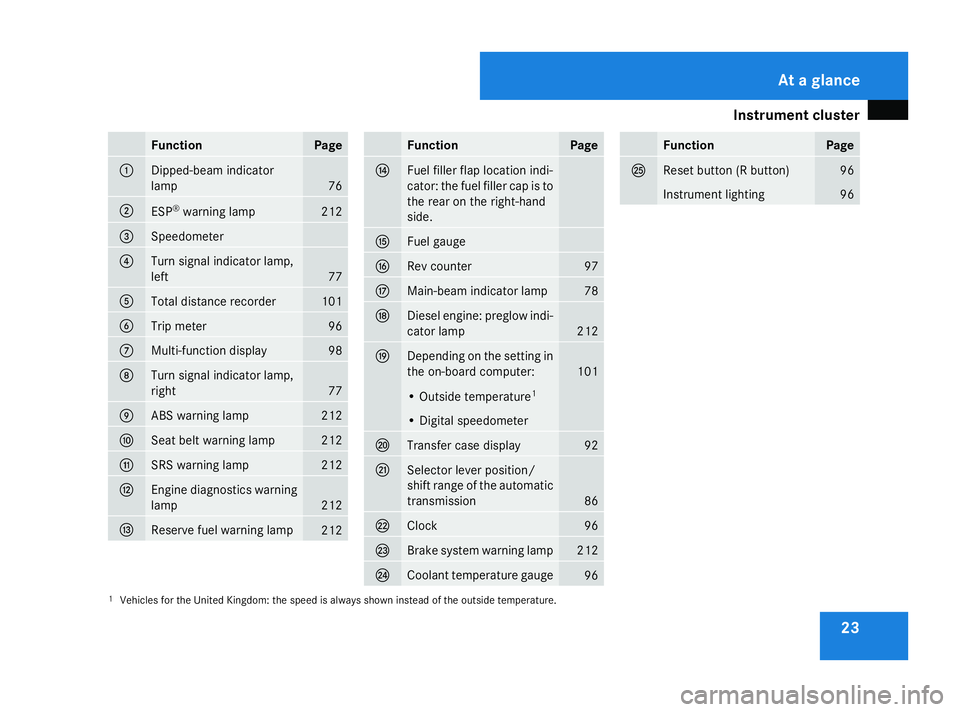
23Function Page
1
Dipped-beam indicator
lamp
76
2
ESP
®
warning lamp 212
3
Speedometer
4
Turn signal indicator lamp,
left 77
5
Total distance recorder 101
6
Trip meter 96
7
Multi-function display 98
8
Turn signal indicator lamp,
right 77
9
ABS warning lamp 212
a
Seat belt warning lamp 212
b
SRS warning lamp 212
c
Engine diagnostics warning
lamp
212
d
Reserve fuel warning lamp
212 Function Page
e
Fuel filler flap location indi-
cator: the fuel filler cap is to
the rear on the right-hand
side. f
Fuel gauge
g
Rev counter 97
h
Main-beam indicator lamp 78
j
Diesel engine: preglow indi-
cator lamp
212
k
Depending on the setting in
the on-board computer:
101
• Outside temperature
1 • Digital speedometer
l
Transfer case display 92
m
Selector lever position/
shift range of the automatic
transmission
86
n
Clock 96
o
Brake system warning lamp 212
p
Coolant temperature gauge
96 Function Page
q
Reset button (R button) 96
Instrument lighting 96
1 Vehicles for the United Kingdom: the speed is always shown instead of the outside temperature. At a glance
463_AKB; 1; 8, en-GB
wobuchh,
Version: 2.10.6 2008-07-17T15:19:41+02:00 - Seite 23Dateiname: 6515_4091_02_buchblock.pdf; preflight
Page 27 of 293
Multi-function steering wheel
24 Multi-function steering wheel
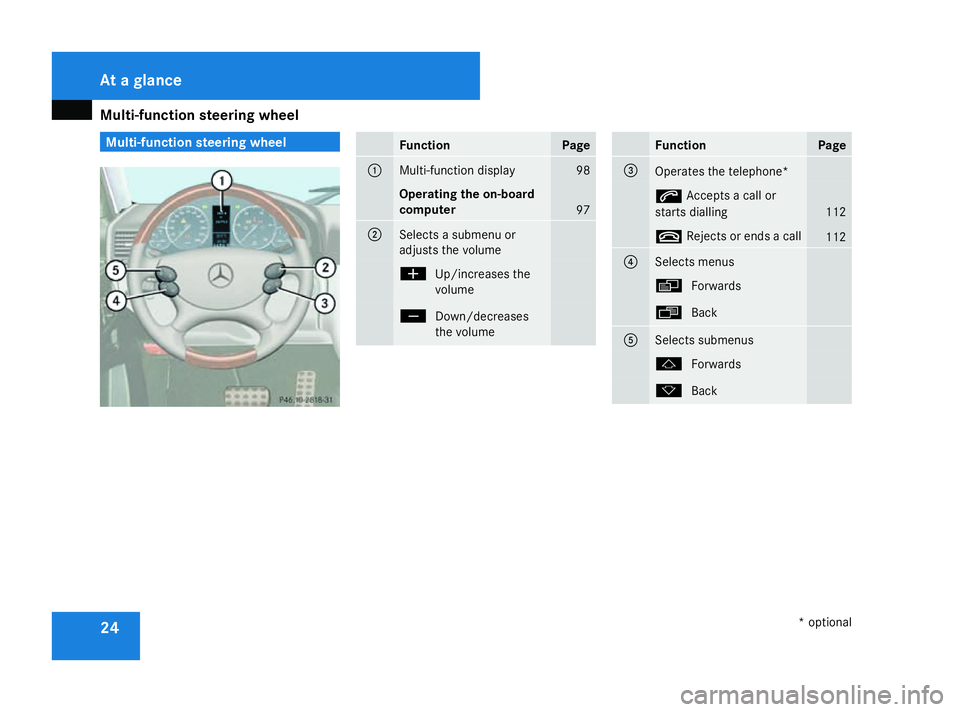
Function Page
1
Multi-function display 98
Operating the on-board
computer
97
2
Selects a submenu or
adjusts the volume
æ
Up/increases the
volume ç
Down/decreases
the volume Function Page
3
Operates the telephone*
s
Accepts a call or
starts dialling 112
t
Rejects or ends a call 112
4
Selects menus
è
Forwards ·
Back 5
Selects submenus
j
Forwards k
Back At a glance
* optional
463_AKB; 1; 8, en-GB
wobuchh
,V ersion: 2.10.6
2008-07-17T15:19:41+02:00 - Seite 24 Dateiname: 6515_4091_02_buchblock.pdf; preflight
Page 69 of 293
Steering wheel
66
X
Make sure that support 1lies on wheel
arch 4.
X To fold up: fold up side-facing bench seat
2.
X Fold support 1in and push it into recess
3 of side-facing bench seat 2. Steering wheel
Points to remember
You can adjust the steering wheel electrically. G
Risk of injury
The electrically adjustable steering wheel
can still be adjusted when there is no key
in the ignition lock. Therefore, do not leave
children unsupervised in the vehicle as they
could become trapped as the steering
wheel is adjusted. G
Risk of accident
Only adjust the steering wheel when the
vehicle is stationary. Drive only when the
steering wheel is fixed.
When you adjust the steering wheel, make
sure that:
R the steering wheel can be reached with
your arms slightly bent
R you can move your legs freely
R you can see all the displays in the instru-
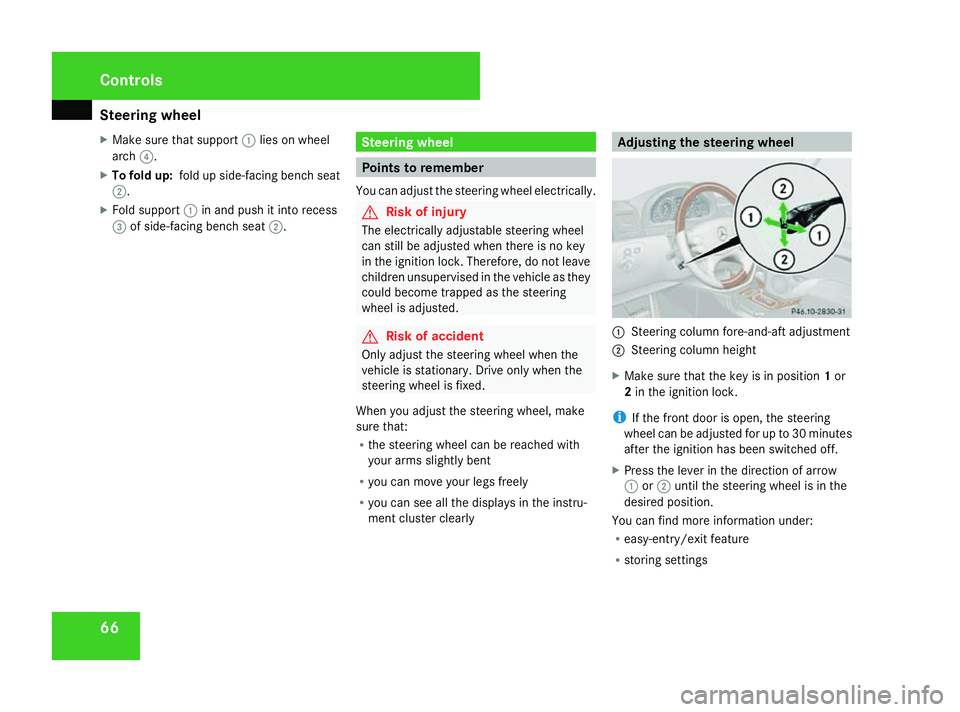
ment cluster clearly Adjusting the steering wheel
1
Steering column fore-and-aft adjustment
2 Steering column height
X Make sure that the key is in position 1or
2 in the ignition lock.
i If the front door is open, the steering
wheel can be adjusted for up to 30 minutes
after the ignition has been switched off.
X Press the lever in the direction of arrow
1 or2 until the steering wheel is in the
desired position.
You can find more information under:
R easy-entry/exit feature
R storing settings Controls
463_AKB; 1; 8, en-GB
wobuchh,
Version: 2.10.6 2008-07-17T15:19:41+02:00 - Seite 66Dateiname: 6515_4091_02_buchblock.pdf; preflight
Page 78 of 293
Lights
75Correct driver's seat position
G
Risk of accident
Only adjust the driver's seat when the vehi-
cle is stationary. You will otherwise be dis-
tracted from the road and traffic conditions
and you could lose control of the vehicle as
a result of the seat moving. This could
cause an accident. G
Risk of accident
Only adjust the steering wheel when the
vehicle is stationary. Drive only when the
steering wheel is fixed.
X Check whether seat and the head restraint
are adjusted properly (Y page 60).
Make sure that:
R you are as far away from the driver's front
airbag as possible.
R you are sitting in a normal upright posi-
tion.
R you can fasten the seat belt properly.
R you have moved the backrest to an
almost vertical position.
R you have set the seat angle so that your
thighs are gently supported. R
you can depress the pedals properly.
R you have adjusted the head restraint so
that the back of your head is supported
at eye level by the central area of the
head restraint.
X Check whether steering wheel is adjusted
properly (Y page 66).
Make sure that:
R you can hold the steering wheel with your
arms slightly bent.
R you can move your legs freely.
R you can see all the displays in the instru-
ment cluster clearly.
X Check whether you have fastened seat belt
properly (Y page 71).
It should:
R fit snugly across your body
R be routed across the middle of your
shoulder
R routed in your pelvic area across the hip
joints Lights
Light switch
For safety reasons, Mercedes-Benz recom-
mends that you drive with the lights switched
on even during the daytime. In some coun-
tries, daytime operation of headlamps varies
due to legal and voluntary requirements. In
these countries, the dipped-beam headlamps
are automatically switched on when the
engine is started.
i If you drive in countries in which traffic
drives on the opposite side of the road to
the country where the vehicle is registered,
oncoming traffic may be dazzled by the
asymmetrical dipped-beam headlamps.
Have the headlamps changed to symmet-
rical dipped beam when driving in these
countries. You can obtain information
about this from any Mercedes-Benz Service
Centre.
The light switch is located on the dashboard
between the steering wheel and the driver's
door. Controls
463_AKB; 1; 8, en-GB
wobuchh,
Version: 2.10.6 2008-07-17T15:19:41+02:00 - Seite 75 ZDateiname: 6515_4091_02_buchblock.pdf; preflight
Page 79 of 293
Lights
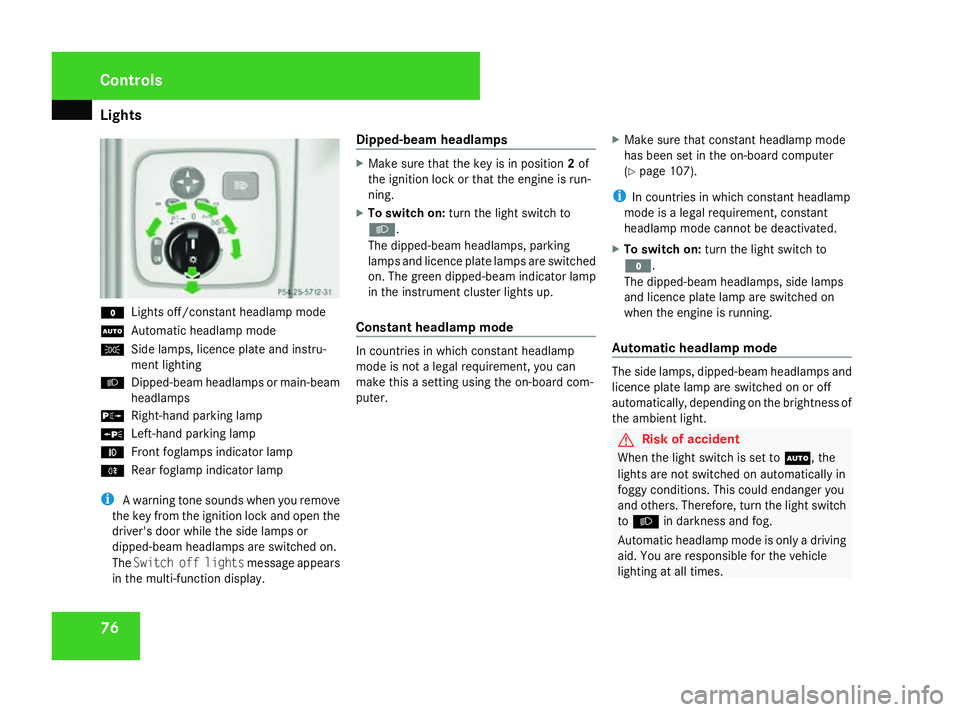
76M
Lights off/constant headlamp mode
U Automatic headlamp mode
C Side lamps, licence plate and instru-
ment lighting
B Dipped-beam headlamps or main-beam
headlamps
g Right-hand parking lamp
a Left-hand parking lamp
¥ Front foglamps indicator lamp
† Rear foglamp indicator lamp
i A warning tone sounds when you remove
the key from the ignition lock and open the
driver's door while the side lamps or
dipped-beam headlamps are switched on.
The Switch off lights message appears
in the multi-function display. Dipped-beam headlamps X
Make sure that the key is in position 2of
the ignition lock or that the engine is run-
ning.
X To switch on: turn the light switch to
B.
The dipped-beam headlamps, parking
lamps and licence plate lamps are switched
on. The green dipped-beam indicator lamp
in the instrument cluster lights up.
Constant headlamp mode In countries in which constant headlamp
mode is not a legal requirement, you can
make this a setting using the on-board com-
puter.
X
Make sure that constant headlamp mode
has been set in the on-board computer
(Y page 107).
i In countries in which constant headlamp
mode is a legal requirement, constant
headlamp mode cannot be deactivated.
X To switch on: turn the light switch to
M.
The dipped-beam headlamps, side lamps
and licence plate lamp are switched on
when the engine is running.
Automatic headlamp mode The side lamps, dipped-beam headlamps and
licence plate lamp are switched on or off
automatically, depending on the brightness of
the ambient light.
G
Risk of accident
When the light switch is set to U, the
lights are not switched on automatically in
foggy conditions. This could endanger you
and others. Therefore, turn the light switch
to B in darkness and fog.
Automatic headlamp mode is only a driving
aid. You are responsible for the vehicle
lighting at all times. Controls
463_AKB; 1; 8, en-GB
wobuchh,
Version: 2.10.6 2008-07-17T15:19:41+02:00 - Seite 76Dateiname: 6515_4091_02_buchblock.pdf; preflight
Page 92 of 293
Transmission
89Transmission
Notes on the transmission
G
Risk of accident
The movement of the pedals must not be
impaired in any way. Do not keep any
objects in the driver's footwell. Make sure
that floormats or carpets are correctly
secured and that there is sufficient clear-
ance for the pedals. G
Risk of accident
Do not change down for additional engine
braking on a slippery road surface. This
could cause the drive wheels to lose their
grip and the vehicle could skid. This could
cause you to lose control of your vehicle
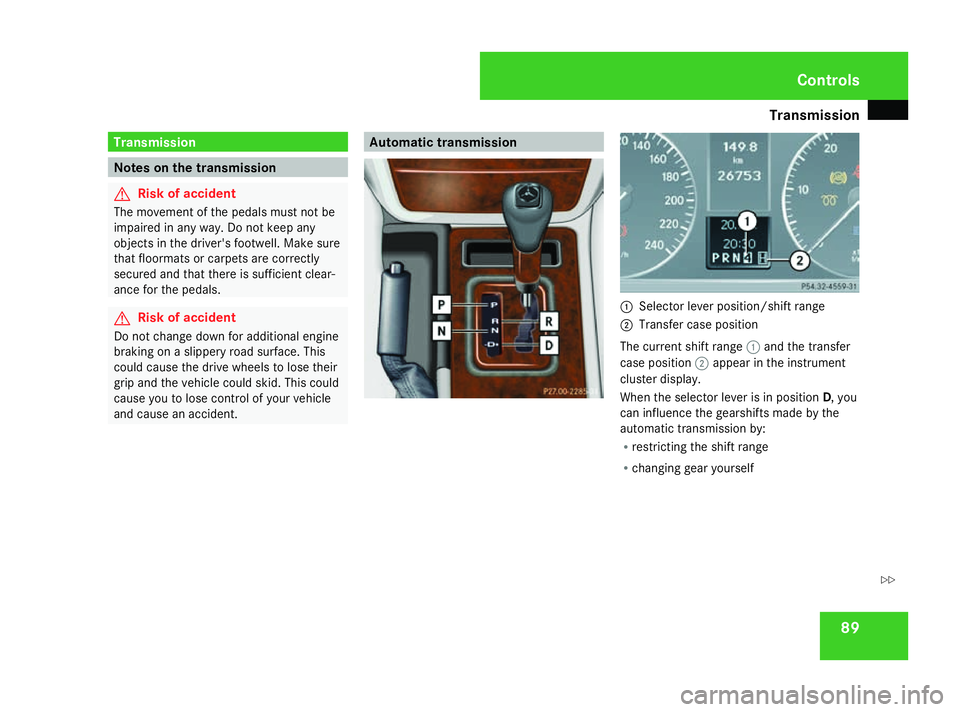
and cause an accident. Automatic transmission
1
Selector lever position/shift range
2 Transfer case position
The current shift range 1and the transfer
case position 2appear in the instrument
cluster display.
When the selector lever is in position D, you
can influence the gearshifts made by the
automatic transmission by:
R restricting the shift range
R changing gear yourself Controls
463_AKB; 1; 8, en-GB
wobuchh
,V ersion: 2.10.6
2008-07-17T15:19:41+02:00 - Seite 89 ZDateiname: 6515_4091_02_buchblock.pdf; preflight
Page 93 of 293
Transmission
90
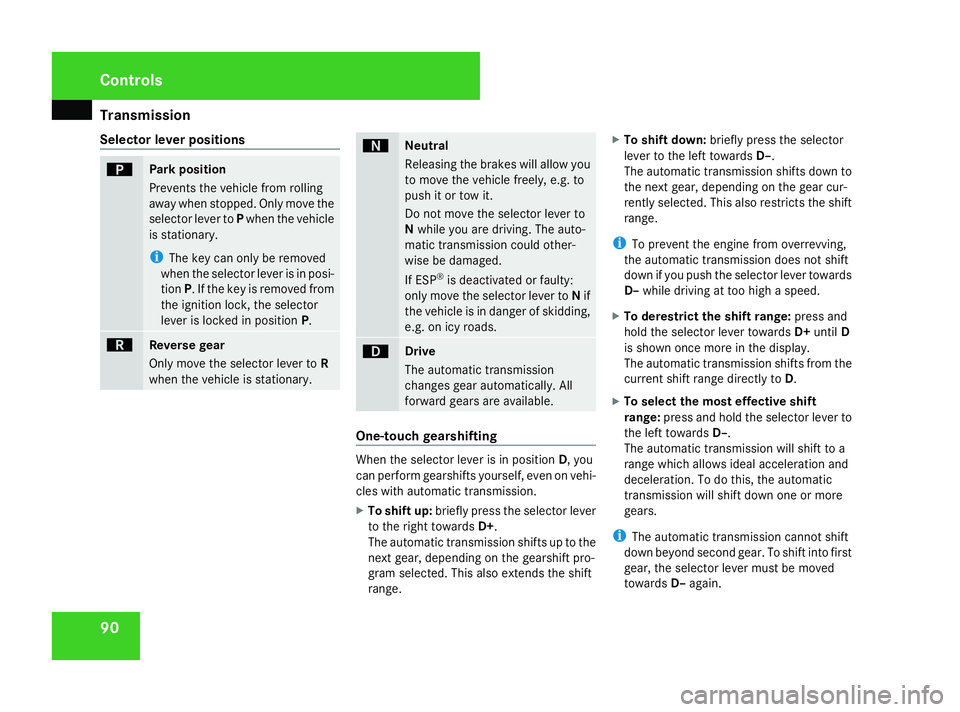
Selector lever positions ì
Park position
Prevents the vehicle from rolling
away when stopped. Only move the
selector lever to Pwhen the vehicle
is stationary.
i The key can only be removed
when the selector lever is in posi-
tion P. If the key is removed from
the ignition lock, the selector
lever is locked in position P.í
Reverse gear
Only move the selector lever to
R
when the vehicle is stationary. ë
Neutral
Releasing the brakes will allow you
to move the vehicle freely, e.g. to
push it or tow it.
Do not move the selector lever to
N
while you are driving. The auto-
matic transmission could other-
wise be damaged.
If ESP ®
is deactivated or faulty:
only move the selector lever to Nif
the vehicle is in danger of skidding,
e.g. on icy roads. ê
Drive
The automatic transmission
changes gear automatically. All
forward gears are available.
One-touch gearshifting
When the selector lever is in position
D, you
can perform gearshifts yourself, even on vehi-
cles with automatic transmission.
X To shift up: briefly press the selector lever
to the right towards D+.
The automatic transmission shifts up to the
next gear, depending on the gearshift pro-
gram selected. This also extends the shift
range. X
To shift down: briefly press the selector
lever to the left towards D–.
The automatic transmission shifts down to
the next gear, depending on the gear cur-
rently selected. This also restricts the shift
range.
i To prevent the engine from overrevving,
the automatic transmission does not shift
down if you push the selector lever towards
D– while driving at too high a speed.
X To derestrict the shift range: press and
hold the selector lever towards D+until D
is shown once more in the display.
The automatic transmission shifts from the
current shift range directly to D.
X To select the most effective shift
range: press and hold the selector lever to
the left towards D–.
The automatic transmission will shift to a
range which allows ideal acceleration and
deceleration. To do this, the automatic
transmission will shift down one or more
gears.
i The automatic transmission cannot shift
down beyond second gear. To shift into first
gear, the selector lever must be moved
towards D–again. Controls
463_AKB; 1; 8, en-GB
wobuchh
,V ersion: 2.10.6
2008-07-17T15:19:41+02:00 - Seite 90 Dateiname: 6515_4091_02_buchblock.pdf; preflight
Page 94 of 293
Transmission
91
Shift ranges When the selector lever is in position
D, it is
possible to restrict or derestrict the shift
range for the automatic transmission.
X Briefly press the selector lever to the right
towards D+or to the left towards D–.
The shift range selected is shown in the
display. The automatic transmission shifts
only as far as the selected gear.
i If the maximum engine speed for the shift
range is reached and you continue to accel-
erate, the automatic transmission shifts up
in order to prevent the engine from over-
revving, even if the shift range is restricted.
! When the transfer case is in the off-road
driving position LOWrange, the automatic
transmission does not shift up, even when
the engine has reached the overrevving
limit. There is then a risk of engine damage.
Make sure that you do not exceed the max-
imum permissible engine speed. Driving situation
è
The braking effect of the engine can
be used in this position. ç
To use the braking effect of the
engine on downhill gradients and
for driving:
R
on steep mountain roads
R in mountainous terrain
R in arduous conditions æ
To use the braking effect of the
engine on extremely steep downhill
gradients and long downhill
stretches
Driving tips
Accelerator pedal position
Your style of driving influences how the auto-
matic transmission shifts gear:
R light throttle: early upshifts
R more throttle: late upshifts
Kickdown
Use kickdown for maximum acceleration. X
Depress the accelerator pedal beyond the
pressure point.
The transmission shifts to a lower gear
depending on the engine speed.
X Ease off the accelerator pedal once the
desired speed is reached.
The automatic transmission shifts back up.
Trailer towing
X Drive in the middle of the engine speed
range on uphill gradients.
X Shift down to shift range 3or 2depending
on the incline of the uphill or downhill gra-
dient (Y page 91), even if cruise control is
activated.
X Shift the transfer case into low-range driv-
ing position LOWon extreme uphill gradi-
ents or steep downhill gradients
(Y page 92). Controls
463_AKB; 1; 8, en-GB
wobuchh
,V ersion: 2.10.6
2008-07-17T15:19:41+02:00 - Seite 91 ZDateiname: 6515_4091_02_buchblock.pdf; preflight
Page 95 of 293
Transmission
92 Transfer case
The vehicle has permanent all-wheel drive.
The front and rear axles are being constantly
driven.
You will find further information about driving
off-road in the "Operation" section
(Y page 172). Shift ranges H HIGH
Position for all normal on-road driv-
ing conditions.
L LOW
Low-range position for driving off-
road.
Also for use on steep uphill or
downhill gradients, especially
when towing a trailer.
The vehicle travels around half the
speed of on-road driving range
HIGH. The drive power is corre-
spondingly higher.
N Neutral
Neutral position
No power is transmitted to the
drive wheels.
Changing gears
G
Risk of accident
Always apply the parking brake when park-
ing the vehicle. Make sure that the transfer
case is not set to Nwhen parking. Other-
wise, the vehicle could begin to move. 1
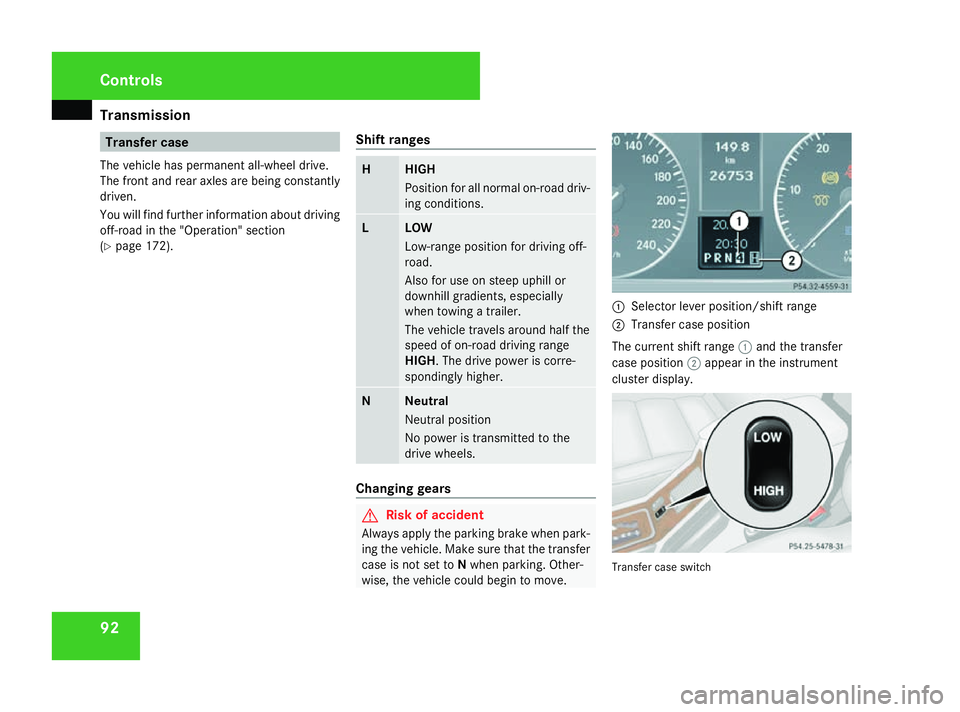
Selector lever position/shift range
2 Transfer case position
The current shift range 1and the transfer
case position 2appear in the instrument
cluster display. Transfer case switchControls
463_AKB; 1; 8, en-GB
wobuchh
,V ersion: 2.10.6
2008-07-17T15:19:41+02:00 - Seite 92 Dateiname: 6515_4091_02_buchblock.pdf; preflight