display MERCEDES-BENZ G-CLASS SUV 2008 Service Manual
[x] Cancel search | Manufacturer: MERCEDES-BENZ, Model Year: 2008, Model line: G-CLASS SUV, Model: MERCEDES-BENZ G-CLASS SUV 2008Pages: 293, PDF Size: 4.49 MB
Page 117 of 293
Driving sys
tems 114 vehicle's speed and for braking in good
time. G
Risk of accident
Do not use cruise control:
R in road and traffic conditions which do
not allow you to maintain a constant
speed (e.g. heavy traffic or winding
roads). You could otherwise cause an
accident.
R on slippery roads. Braking or accelerat-
ing could cause the drive wheels to lose
traction and the vehicle could then skid.
R when there is poor visibility, e.g. due to
fog, heavy rain or snow
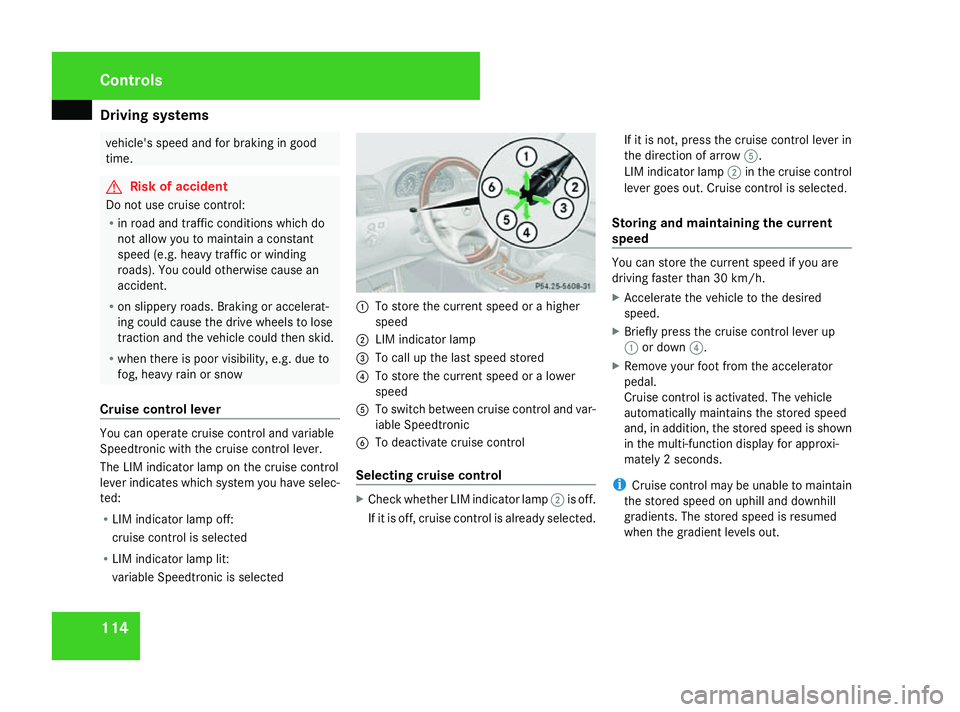
Cruise control lever You can operate cruise control and variable
Speedtronic with the cruise control lever.
The LIM indicator lamp on the cruise control
lever indicates which system you have selec-
ted:
R LIM indicator lamp off:
cruise control is selected
R LIM indicator lamp lit:
variable Speedtronic is selected 1
To store the current speed or a higher
speed
2 LIM indicator lamp
3 To call up the last speed stored
4 To store the current speed or a lower
speed
5 To switch between cruise control and var-
iable Speedtronic
6 To deactivate cruise control
Selecting cruise control X
Check whether LIM indicator lamp 2is off.
If it is off, cruise control is already selected. If it is not, press the cruise control lever in
the direction of arrow
5.
LIM indicator lamp 2in the cruise control
lever goes out. Cruise control is selected.
Storing and maintaining the current
speed You can store the current speed if you are
driving faster than 30 km/h.
X
Accelerate the vehicle to the desired
speed.
X Briefly press the cruise control lever up
1 or down 4.
X Remove your foot from the accelerator
pedal.
Cruise control is activated. The vehicle
automatically maintains the stored speed
and, in addition, the stored speed is shown
in the multi-function display for approxi-
mately 2 seconds.
i Cruise control may be unable to maintain
the stored speed on uphill and downhill
gradients. The stored speed is resumed
when the gradient levels out. Controls
463_AKB; 1; 8, en-GB
wobuchh
,V ersion: 2.10.6
2008-07-17T15:19:41+02:00 - Seite 114 Dateiname: 6515_4091_02_buchblock.pdf; preflight
Page 119 of 293
Driving sys
tems 116 never cause the brakes to rub by applying
constant slight pedal pressure. This causes
the brake system to overheat, increases
the braking distance and can lead to the
brakes failing completely. G
Risk of accident
Do not change down for additional engine
braking on a slippery road surface. This
could cause the drive wheels to lose their
grip and the vehicle could skid. G
Risk of accident
Variable Speedtronic is only an aid
designed to assist driving. You are respon-
sible for the vehicle's speed and for braking
in good time.
i The speed indicated in the speedometer
may differ slightly from the limit speed
stored.
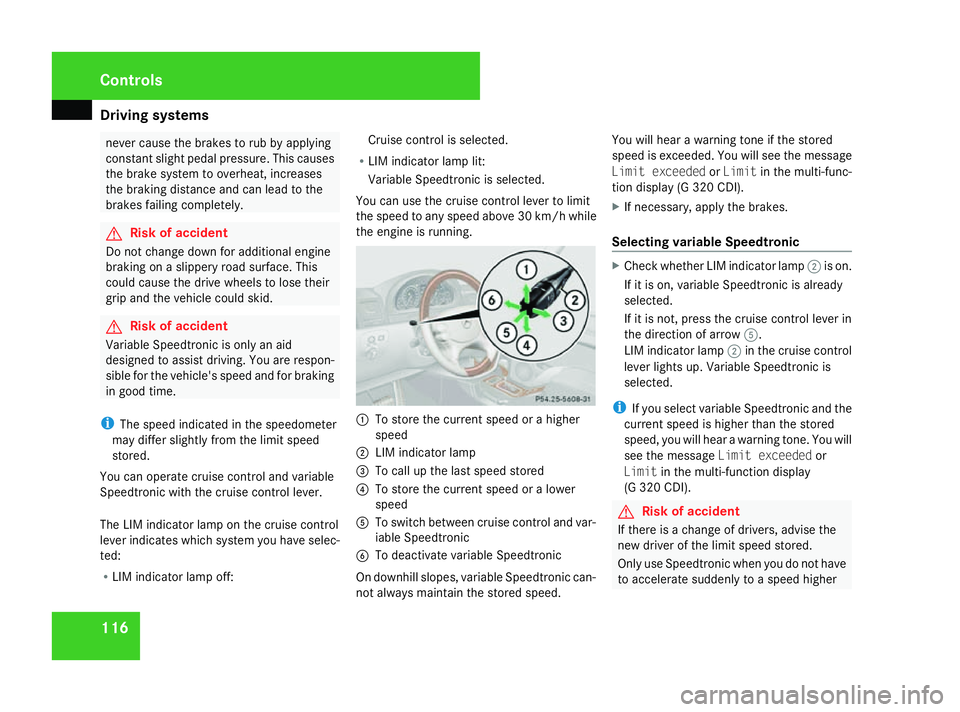
You can operate cruise control and variable
Speedtronic with the cruise control lever.
The LIM indicator lamp on the cruise control
lever indicates which system you have selec-
ted:
R LIM indicator lamp off: Cruise control is selected.
R LIM indicator lamp lit:
Variable Speedtronic is selected.
You can use the cruise control lever to limit
the speed to any speed above 30 km/h while
the engine is running. 1
To store the current speed or a higher
speed
2 LIM indicator lamp
3 To call up the last speed stored
4 To store the current speed or a lower
speed
5 To switch between cruise control and var-
iable Speedtronic
6 To deactivate variable Speedtronic
On downhill slopes, variable Speedtronic can-
not always maintain the stored speed. You will hear a warning tone if the stored
speed is exceeded. You will see the message
Limit exceeded orLimit in the multi-func-
tion display (G 320 CDI).
X If necessary, apply the brakes.
Selecting variable Speedtronic X
Check whether LIM indicator lamp 2is on.
If it is on, variable Speedtronic is already
selected.
If it is not, press the cruise control lever in
the direction of arrow 5.
LIM indicator lamp 2in the cruise control
lever lights up. Variable Speedtronic is
selected.
i If you select variable Speedtronic and the
current speed is higher than the stored
speed, you will hear a warning tone. You will
see the message Limit exceeded or
Limit in the multi-function display
(G 320 CDI). G
Risk of accident
If there is a change of drivers, advise the
new driver of the limit speed stored.
Only use Speedtronic when you do not have
to accelerate suddenly to a speed higher Controls
463_AKB; 1; 8, en-GB
wobuchh
,V ersion: 2.10.6
2008-07-17T15:19:41+02:00 - Seite 116 Dateiname: 6515_4091_02_buchblock.pdf; preflight
Page 120 of 293
Driving sys
tems 117than the stored limit speed allows. You
could otherwise cause an accident.
You can only exceed the limit speed stored
if you deactivate variable Speedtronic:
R
using the cruise control lever.
R by depressing the accelerator pedal
beyond the pressure point (kickdown).
It is not possible to deactivate variable
Speedtronic by braking.
Storing the current speed You can use the cruise control lever to limit
the speed to any speed above 30 km/h while
the engine is running.
X Briefly press the cruise control lever up
1 or down 4.
The current speed is stored and shown in
the multi-function display.
Calling up the last speed stored X
Briefly pull the cruise control lever towards
you 3.
i If you call up the stored speed and your
current speed is higher, you will hear a
warning tone. You will see the message Limit exceeded
orLimit in the multi-
function display (G 320 CDI).
i G 320 CDI: if no speed is stored,
Speedtronic stores the current speed and
maintains it.
Making adjustments in 1 km/hincre-
ments X
Briefly press the cruise control lever up
1 for a higher speed or down 4for a
lower speed.
Adjustment in 10 km/hincrements X
Press the cruise control lever up 1for a
higher speed or down 4for a lower speed.
X Keep the cruise control lever pressed until
the desired speed is reached.
X Release the cruise control lever.
The new speed is stored.
Deactivating va riable Speedtronic There are several ways to deactivate variable
Speedtronic:
X
Briefly press the cruise control lever for-
wards 6.
or X
Briefly press the cruise control lever in the
direction of arrow 5.
LIM indicator lamp 2in the cruise control
lever goes out. Variable Speedtronic is
deactivated.
Cruise control is selected.
Variable Speedtronic is deactivated automat-
ically when you depress the accelerator pedal
beyond the pressure point (kickdown), but
only if your current speed does not differ by
more than 20 km/h from the stored speed.
C 320 CDI: you will hear a warning tone if this
is the case. G
Risk of accident
It is not possible to deactivate variable
Speedtronic by braking.
i The last speed stored is cleared when you
switch off the engine. Controls
463_AKB; 1; 8, en-GB
wobuchh
,V ersion: 2.10.6
2008-07-17T15:19:41+02:00 - Seite 117 ZDateiname: 6515_4091_02_buchblock.pdf; preflight
Page 122 of 293
Driving sys
tems 119
!
When parking, pay particular attention to
objects above or below the sensors, such
as flower pots or trailer towbars. The ultra-
sonic reversing aid does not detect such
objects when they are in the immediate
vicinity of the vehicle. You could damage
the vehicle or the objects.
Ultrasonic sources such as an automatic
car wash, a lorry's compressed-air brakes
or a pneumatic drill could cause the ultra-
sonic reversing aid to malfunction.
Minimum distance Centre Approximately 30 cm
Corners Approximately 30 cm
If there is an obstacle within this range, all
warning displays flash and a warning tone
sounds. If the distance falls below the mini-
mum clearance, it may no longer be shown.
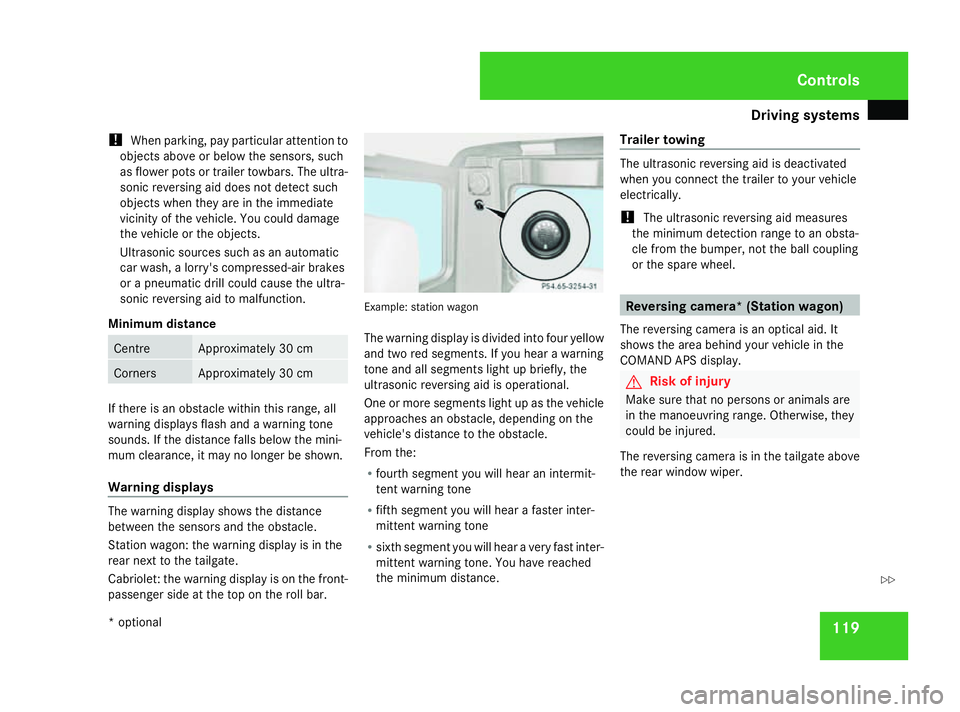
Warning displays
The warning display shows the distance
between the sensors and the obstacle.
Station wagon: the warning display is in the
rear next to the tailgate.
Cabriolet: the warning display is on the front-
passenger side at the top on the roll bar. Example: station wagon
The warning display is divided into four yellow
and two red segments. If you hear a warning
tone and all segments light up briefly, the
ultrasonic reversing aid is operational.
One or more segments light up as the vehicle
approaches an obstacle, depending on the
vehicle's distance to the obstacle.
From the:
R
fourth segment you will hear an intermit-
tent warning tone
R fifth segment you will hear a faster inter-
mittent warning tone
R sixth segment you will hear a very fast inter-
mittent warning tone. You have reached
the minimum distance. Trailer towing The ultrasonic reversing aid is deactivated
when you connect the trailer to your vehicle
electrically.
!
The ultrasonic reversing aid measures
the minimum detection range to an obsta-
cle from the bumper, not the ball coupling
or the spare wheel. Reversing camera* (Station wagon)
The reversing camera is an optical aid. It
shows the area behind your vehicle in the
COMAND APS display. G
Risk of injury
Make sure that no persons or animals are
in the manoeuvring range. Otherwise, they
could be injured.
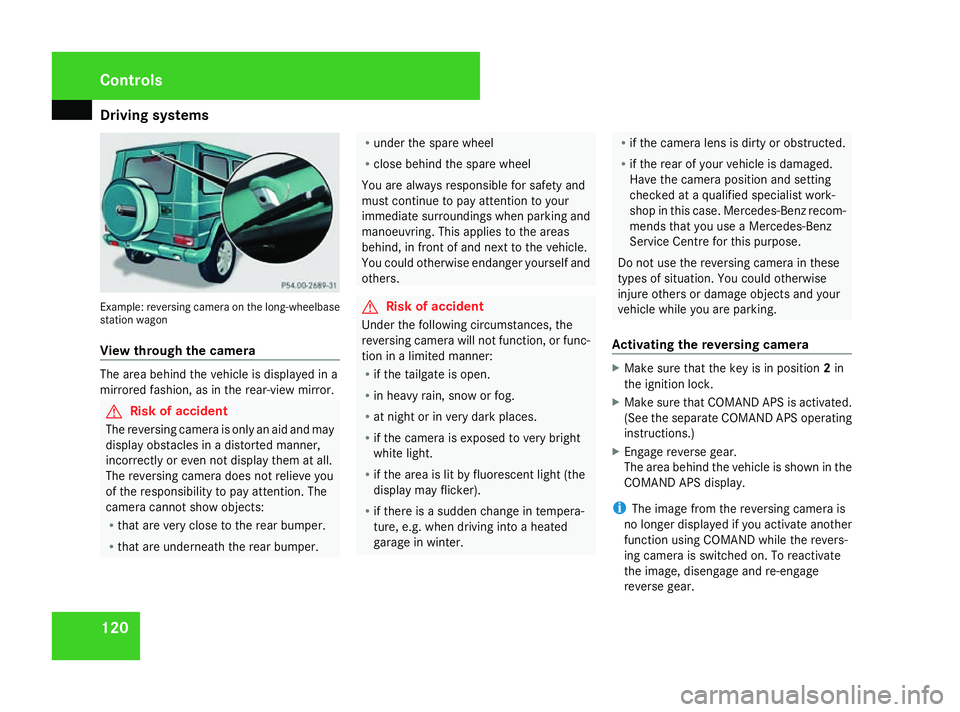
The reversing camera is in the tailgate above
the rear window wiper. Controls
* optional
463_AKB; 1; 8, en-GB
wobuchh
,V ersion: 2.10.6
2008-07-17T15:19:41+02:00 - Seite 119 ZDateiname: 6515_4091_02_buchblock.pdf; preflight
Page 123 of 293
Driving sys
tems 120Example: reversing camera on the long-wheelbase
station wagon
View through the camera The area behind the vehicle is displayed in a
mirrored fashion, as in the rear-view mirror. G
Risk of accident
The reversing camera is only an aid and may
display obstacles in a distorted manner,
incorrectly or even not display them at all.
The reversing camera does not relieve you
of the responsibility to pay attention. The
camera cannot show objects:
R that are very close to the rear bumper.
R that are underneath the rear bumper. R
under the spare wheel
R close behind the spare wheel
You are always responsible for safety and
must continue to pay attention to your
immediate surroundings when parking and
manoeuvring. This applies to the areas
behind, in front of and next to the vehicle.
You could otherwise endanger yourself and
others. G
Risk of accident
Under the following circumstances, the
reversing camera will not function, or func-
tion in a limited manner:
R if the tailgate is open.
R in heavy rain, snow or fog.
R at night or in very dark places.
R if the camera is exposed to very bright
white light.
R if the area is lit by fluorescent light (the
display may flicker).
R if there is a sudden change in tempera-
ture, e.g. when driving into a heated
garage in winter. R
if the camera lens is dirty or obstructed.
R if the rear of your vehicle is damaged.
Have the camera position and setting
checked at a qualified specialist work-
shop in this case. Mercedes-Benz recom-
mends that you use a Mercedes-Benz
Service Centre for this purpose.
Do not use the reversing camera in these
types of situation. You could otherwise
injure others or damage objects and your
vehicle while you are parking.
Activating the reversing camera X
Make sure that the key is in position 2in
the ignition lock.
X Make sure that COMAND APS is activated.
(See the separate COMAND APS operating
instructions.)
X Engage reverse gear.
The area behind the vehicle is shown in the
COMAND APS display.
i The image from the reversing camera is
no longer displayed if you activate another
function using COMAND while the revers-
ing camera is switched on. To reactivate
the image, disengage and re-engage
reverse gear. Controls
463_AKB; 1; 8, en-GB
wobuchh
,V ersion: 2.10.6
2008-07-17T15:19:41+02:00 - Seite 120 Dateiname: 6515_4091_02_buchblock.pdf; preflight
Page 162 of 293
Engine compartment
159Engine oil
Depending on driving style, the vehicle con-
sumes a maximum of 0.8 l oil per 1,000 km.
The oil consumption may be higher than this
when the vehicle is new or if you frequently
drive at high engine speeds. You can only
estimate the oil consumption after you have
driven a considerable distance.
You will find further information about engine
oil in the "Technical data" section
(Y page 279).
Checking the engine oil level To do so:
R
the vehicle should be parked on level
ground.
R the engine should be switched off for at
least five minutes if the engine was at nor-
mal operating temperature.
R the engine should be switched off for at
least 30 minutes if the engine was not at
operating temperature (i.e. if you only star-
ted the engine briefly). Via the on-board computer
i
Only possible on the G 55 AMG. On all
other models, a dipstick is used to check
the engine oil level (Y page 160).
X Make sure that the key is in position 2in
the ignition lock (Y page 59).
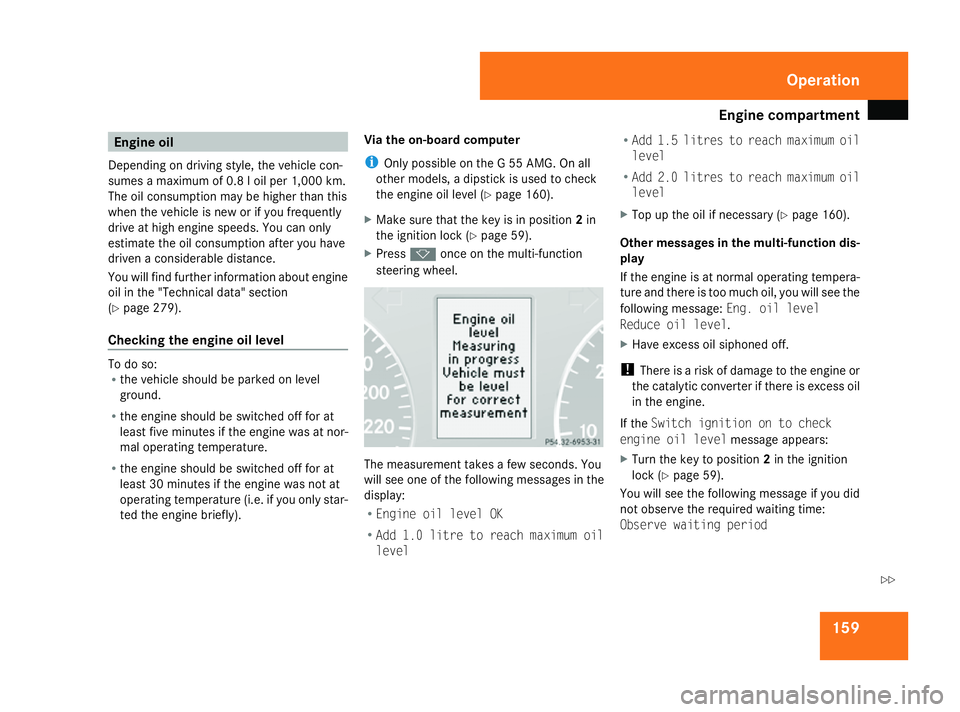
X Press konce on the multi-function
steering wheel. The measurement takes a few seconds. You
will see one of the following messages in the
display:
R
Engine oil level OK
R Add 1.0 litre to reach maximum oil
level R
Add 1.5 litres to reach maximum oil
level
R Add 2.0 litres to reach maximum oil
level
X Top up the oil if necessary ( Ypage 160).
Other messages in the multi-function dis-
play
If the engine is at normal operating tempera-
ture and there is too much oil, you will see the
following message: Eng. oil level
Reduce oil level.
X Have excess oil siphoned off.
! There is a risk of damage to the engine or
the catalytic converter if there is excess oil
in the engine.
If the Switch ignition on to check
engine oil level message appears:
X Turn the key to position 2in the ignition
lock (Y page 59).
You will see the following message if you did
not observe the required waiting time:
Observe waiting period Operation
463_AKB; 1; 8, en-GB
wobuchh,
Version: 2.10.6 2008-07-17T15:19:41+02:00 - Seite 159 ZDateiname: 6515_4091_02_buchblock.pdf; preflight
Page 164 of 293
Engine compartment
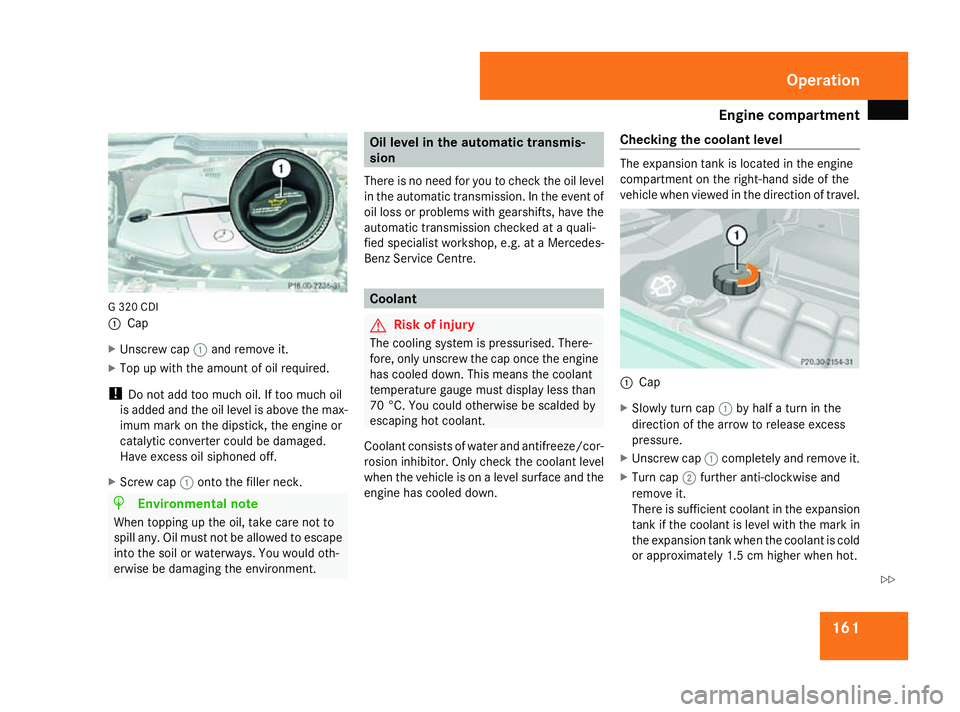
161G 320 CDI
1
Cap
X Unscrew cap 1and remove it.
X Top up with the amount of oil required.
! Do not add too much oil. If too much oil
is added and the oil level is above the max-
imum mark on the dipstick, the engine or
catalytic converter could be damaged.
Have excess oil siphoned off.
X Screw cap 1onto the filler neck. H
Environmental note
When topping up the oil, take care not to
spill any. Oil must not be allowed to escape
into the soil or waterways. You would oth-
erwise be damaging the environment. Oil level in the automatic transmis-
sion
There is no need for you to check the oil level
in the automatic transmission. In the event of
oil loss or problems with gearshifts, have the
automatic transmission checked at a quali-
fied specialist workshop, e.g. at a Mercedes-
Benz Service Centre. Coolant
G
Risk of injury
The cooling system is pressurised. There-
fore, only unscrew the cap once the engine
has cooled down. This means the coolant
temperature gauge must display less than
70 °C. You could otherwise be scalded by
escaping hot coolant.
Coolant consists of water and antifreeze/cor-
rosion inhibitor. Only check the coolant level
when the vehicle is on a level surface and the
engine has cooled down. Checking the coolant level The expansion tank is located in the engine
compartment on the right-hand side of the
vehicle when viewed in the direction of travel.
1
Cap
X Slowly turn cap 1by half a turn in the
direction of the arrow to release excess
pressure.
X Unscrew cap 1completely and remove it.
X Turn cap 2further anti-clockwise and
remove it.
There is sufficient coolant in the expansion
tank if the coolant is level with the mark in
the expansion tank when the coolant is cold
or approximately 1.5 cm higher when hot. Operation
463_AKB; 1; 8, en-GB
wobuchh,
Version: 2.10.6
2008-07-17T15:19:41+02:00 - Seite 161 ZDateiname: 6515_4091_02_buchblock.pdf; preflight
Page 169 of 293
Tyres and wheels
166 help you decide whether the tyre pressures
should be corrected.
The tyre pressure monitor is not able to
warn you of a sudden loss of pressure, e.g.
if the tyre is penetrated by a foreign object.
In the event of a sudden loss of pressure,
bring the vehicle to a halt by braking care-
fully. Do not make any sudden steering
movements when doing so.
i The operation of the tyre pressure moni-
tor can be affected by interference from
radio transmitting equipment (e.g. radio
headphones, two-way radios) that may be
being operated in or near the vehicle.
i If you are carrying a deflated tyre in the
vehicle, you may only reactivate the tyre
pressure monitor if:
R the deflated tyre is no longer in the vehi-
cle
R you have adjusted the tyre pressure cor-
rectly Calling up the tyre pressure by using
the on-board computer X
Make sure that the key is in position 2in
the ignition lock.
The standard display appears in the multi-
function display (Y page 100).
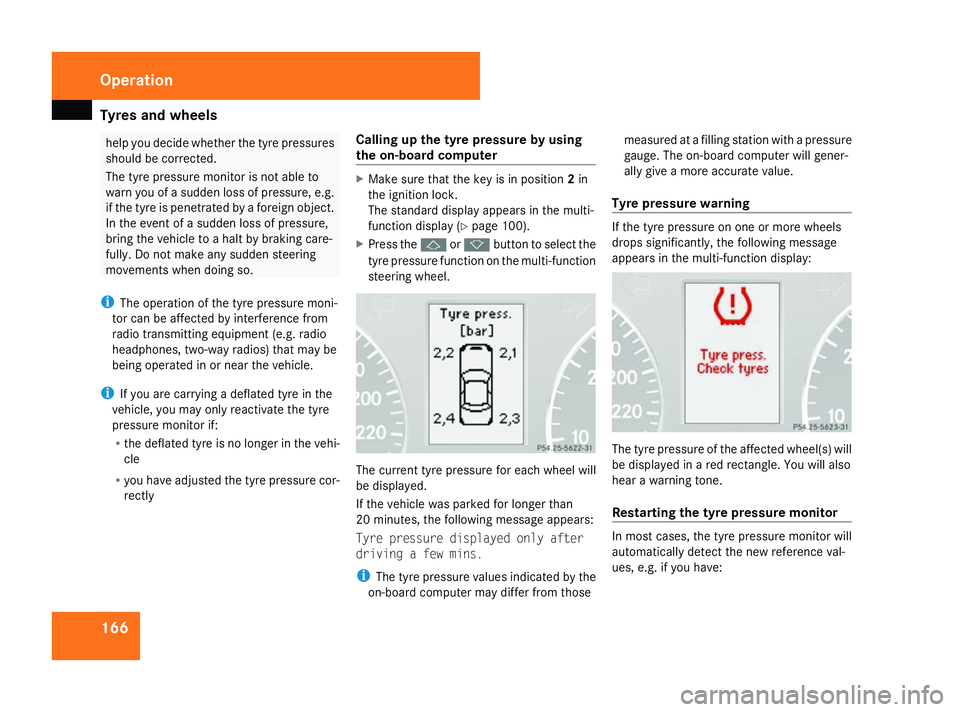
X Press the jork button to select the
tyre pressure function on the multi-function
steering wheel. The current tyre pressure for each wheel will
be displayed.
If the vehicle was parked for longer than
20 minutes, the following message appears:
Tyre pressure displayed only after
driving a few mins.
i
The tyre pressure values indicated by the
on-board computer may differ from those measured at a filling station with a pressure
gauge. The on-board computer will gener-
ally give a more accurate value.
Tyre pressure warning If the tyre pressure on one or more wheels
drops significantly, the following message
appears in the multi-function display:
The tyre pressure of the affected wheel(s) will
be displayed in a red rectangle. You will also
hear a warning tone.
Restarting the tyre pressure monitor
In most cases, the tyre pressure monitor will
automatically detect the new reference val-
ues, e.g. if you have:Operation
463_AKB; 1; 8, en-GB
wobuchh,
Version: 2.10.6 2008-07-17T15:19:41+02:00 - Seite 166Dateiname: 6515_4091_02_buchblock.pdf; preflight
Page 170 of 293
Tyres and wheels
167
R
changed the tyre pressure
R changed the wheels or tyres
R fitted new wheels or tyres
If you wish to define the new reference values
manually:
X Use the table on the inside of the fuel filler
flap to ensure that the tyre pressure is set
correctly in all four tyres for the current
operating conditions.
Also observe the notes in the section on
tyre pressures (Y page 164).
X Make sure that the key is in position 2in
the ignition lock.
The standard display appears in the multi-
function display (Y page 101).
X Press the jork button to select the
Tyre pressure function on the multi-func-
tion steering wheel or wait until the follow-
ing message appears:
Tyre pressure displayed only after
driving a few mins.
X Press the reset button on the left of the
instrument cluster (Y page 96).
The following message appears in the
multi-function display:
Tyre pressure monitor
reactivate?
Yes No
X Press the æbutton on the multi-func-
tion steering wheel.
The following message appears in the
multi-function display:
Tyre pressure monitor restarted
The tyre pressure monitor has stored the
pressure of the tyres as a new reference
value.
If you wish to cancel the restart:
X Press the çbutton on the multi-func-
tion steering wheel.
The tyre pressure values stored at the last
restart will continue to be monitored. Interchanging the wheels
G
Risk of accident
Interchange the front and rear wheels only
if they have the same dimensions: for exam-
ple size, offset, etc.
After every wheel interchange/change,
have the tightening torque checked at a
qualified specialist workshop that has the
necessary specialist knowledge and tools
to carry out the work required. Mercedes-
Benz recommends that you use a Mercedes-Benz Service Centre for this pur-
pose. In particular, work relevant to safety
or on safety-related systems must be car-
ried out at a qualified specialist workshop.
The wheels could work loose if they are not
tightened to a torque of 130 Nm.
For safety reasons, Mercedes-Benz recom-
mends that you only use wheel bolts of the
correct size which have been approved for
Mercedes-Benz vehicles.
The wear patterns on the front and rear tyres
differ depending on the operating conditions.
Interchange the wheels before a clear wear
pattern has formed on the tyres. Front tyres
typically wear more on the shoulders and the
rear tyres in the centre.
Interchange the wheels every 5,000 km to
10,000 km depending on the degree of tyre
wear, provided that the vehicle has the same
size front and rear tyres. Do not reverse the
direction of tyre rotation.
Clean the contact surfaces of the wheel and
the brake disc thoroughly every time a wheel
is interchanged. Check the tyre pressure and
reactivate the tyre pressure monitor* if nec-
essary. Operation
* optional
463_AKB; 1; 8, en-GB
wobuchh
,V ersion: 2.10.6
2008-07-17T15:19:41+02:00 - Seite 167 ZDateiname: 6515_4091_02_buchblock.pdf; preflight
Page 171 of 293
Winter driving
168
!
On vehicles fitted with a tyre pressure
monitor*, electronic components are loca-
ted in the wheel.
Tyre-fitting tools should not be applied in
the area of the valve, as this could damage
the electronic components.
Always have the wheels interchanged/
changed at a qualified specialist workshop,
e.g. a Mercedes-Benz Service Centre.
i Vehicles with a tyre pressure monitor*
If the positions of the wheels on the vehicle
are changed, the tyre pressure may be tem-
porarily displayed at the wrong position.
This is rectified after a few minutes of driv-
ing; the tyre pressures are then displayed
for the correct positions. Winter driving
Points to remember
Have your vehicle winterproofed at a qualified
specialist workshop, e.g. at a Mercedes-Benz
Service Centre, at the onset of winter. Winter tyres
Use winter tyres at temperatures below +7 °C
and on snow or ice-covered roads. Only then
can the effect of the ABS, BAS, 4ETS and
ESP ®
driving systems also be ensured in win-
ter.
Use winter tyres of the same make and tread
on all wheels to maintain safe handling char-
acteristics. G
Risk of accident
Winter tyres with a tread depth of less than
4 mm must be replaced immediately. They
are no longer suitable for winter use and
can no longer provide sufficient grip. This
could cause you to lose control of your
vehicle and cause an accident.
Always observe the maximum permissible
speed specified for the winter tyres you have
fitted. If you fit winter tyres which have a
lower maximum permissible speed than that of the vehicle, affix an appropriate warning
sign in the driver's field of vision. This can be
obtained at a qualified specialist workshop,
e.g. from a Mercedes-Benz Service Centre.
Once you have fitted the winter tyres:
X
Check the tyre pressures (Y page 164).
X Restart the tyre pressure moni-
tor* (Y page 166). G
Risk of accident
If you fit the spare wheel when driving with
winter tyres, bear in mind that driving sta-
bility will be impaired due to unstable cor-
nering characteristics caused by the differ-
ent tyres. Therefore, you should adapt your
driving style and drive even more carefully.
Have the spare wheel replaced at the near-
est qualified specialist workshop which has
the necessary specialist knowledge and
tools to carry out the work required.
Mercedes-Benz recommends that you use
a Mercedes-Benz Service Centre for this
purpose. In particular, work relevant to
safety or on safety-related systems must be
carried out at a qualified specialist work-
shop. Operation
* optional
463_AKB; 1; 8, en-GB
wobuchh,
Version: 2.10.6 2008-07-17T15:19:41+02:00 - Seite 168Dateiname: 6515_4091_02_buchblock.pdf; preflight