steering MERCEDES-BENZ G-CLASS SUV 2008 User Guide
[x] Cancel search | Manufacturer: MERCEDES-BENZ, Model Year: 2008, Model line: G-CLASS SUV, Model: MERCEDES-BENZ G-CLASS SUV 2008Pages: 293, PDF Size: 4.49 MB
Page 69 of 293
Steering wheel
66
X
Make sure that support 1lies on wheel
arch 4.
X To fold up: fold up side-facing bench seat
2.
X Fold support 1in and push it into recess
3 of side-facing bench seat 2. Steering wheel
Points to remember
You can adjust the steering wheel electrically. G
Risk of injury
The electrically adjustable steering wheel
can still be adjusted when there is no key
in the ignition lock. Therefore, do not leave
children unsupervised in the vehicle as they
could become trapped as the steering
wheel is adjusted. G
Risk of accident
Only adjust the steering wheel when the
vehicle is stationary. Drive only when the
steering wheel is fixed.
When you adjust the steering wheel, make
sure that:
R the steering wheel can be reached with
your arms slightly bent
R you can move your legs freely
R you can see all the displays in the instru-
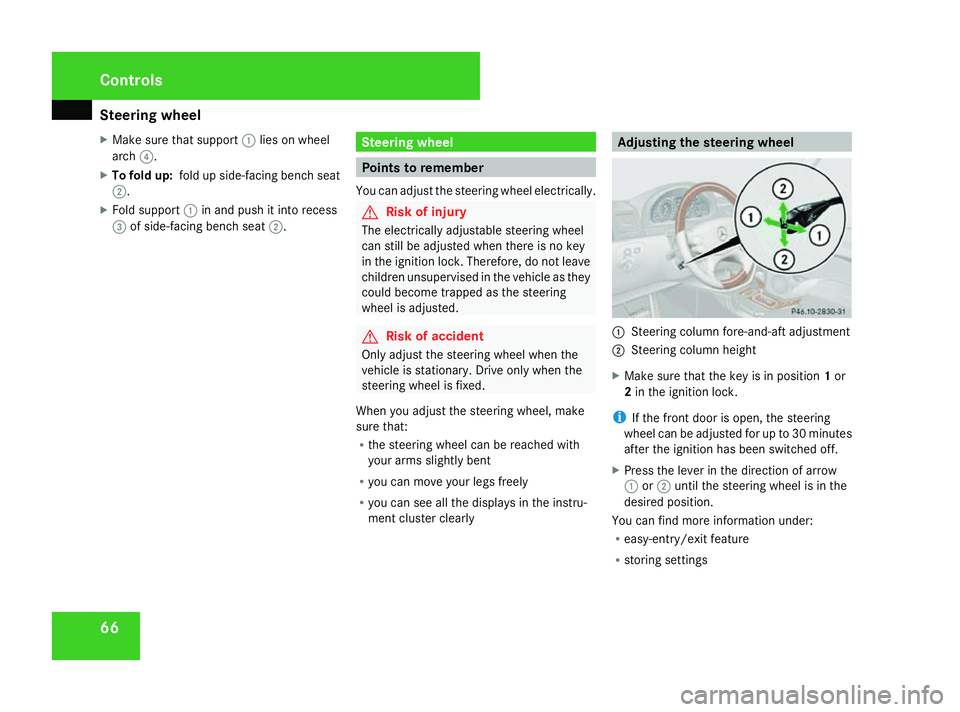
ment cluster clearly Adjusting the steering wheel
1
Steering column fore-and-aft adjustment
2 Steering column height
X Make sure that the key is in position 1or
2 in the ignition lock.
i If the front door is open, the steering
wheel can be adjusted for up to 30 minutes
after the ignition has been switched off.
X Press the lever in the direction of arrow
1 or2 until the steering wheel is in the
desired position.
You can find more information under:
R easy-entry/exit feature
R storing settings Controls
463_AKB; 1; 8, en-GB
wobuchh,
Version: 2.10.6 2008-07-17T15:19:41+02:00 - Seite 66Dateiname: 6515_4091_02_buchblock.pdf; preflight
Page 70 of 293

Steering wheel
67Steering wheel heating*
The steering-wheel heating heats the leather
areas of the steering wheel. 1
To switch on the steering-wheel heating
2 Indicator lamp
3 To switch off the steering-wheel heating
X To switch on/off: make sure that the key
is in position 1or 2in the ignition lock.
X Turn the lever in direction of arrow 1or
3.
Indicator lamp 2lights up or goes out.
i The steering-wheel heating does not
switch off automatically. Easy-entry/exit feature
The easy-entry/exit feature makes getting in
and out of your vehicle easier.
The steering wheel moves upwards and
towards the dashboard if:
R an easy-entry/exit steering wheel position
has been stored on the key and
R you remove the key from the ignition lock
or
R you open the driver's door with the key in
position 0or 1in the ignition lock.
The steering wheel is moved automatically to
the position previously set when the key is
inserted into the ignition lock with the driver's
door closed.
i The steering wheel only moves upwards
and towards the dashboard if it has not
already reached the upper end stop. G
Risk of injury
Make sure that nobody can become trap-
ped when you activate the easy-entry/exit
feature.
If there is a risk of becoming trapped, stop
the adjustment procedure. To halt the pro-
cedure: R
press the steering-column adjustment
switch
R press one of the memory function posi-
tion buttons
The steering column stops moving immedi-
ately.
Never leave children unsupervised in the
vehicle. They could open the driver's door
and thereby unintentionally activate the
easy-entry feature and become trapped.
You can activate and deactivate the easy-
entry/exit feature via the on-board computer
(Y page 109). Controls
* optional
463_AKB; 1; 8, en-GB
wobuchh,
Version: 2.10.6 2008-07-17T15:19:41+02:00 - Seite 67 ZDateiname: 6515_4091_02_buchblock.pdf; preflight
Page 73 of 293

Memory functions
70 Memory functions
Storing settings
Using the memory button on the driver's side
you can store up to three different settings
per key. You can store one setting per mem-
ory button on the front-passenger side.
On the driver's side the following settings can
be stored on each memory position:
R seat and head restraint position of the driv-
er's seat
R steering wheel position
R exterior mirror position on the driver’s and
front-passenger side
R parking position for the exterior mirror on
the front-passenger side
On the front-passenger side, the following
settings can be stored on each memory posi-
tion:
R seat and head restraint position of the
front-passenger seat G
Risk of accident
Only use the memory function on the driv-
er's side when the vehicle is stationary.
Otherwise, you could be distracted from
the traffic conditions by the steering wheel and seat moving of their own accord, as a
result cause an accident.
The buttons are located on the door control
panel. 1
Memory button
2 Storage position switches
X Make sure that the key is in position 2or
that the respective door is open.
X Adjust the seat and head restraint
(Y page 60).
X On the driver's side, also adjust the steer-
ing wheel (Y page 66) and the mirrors
(Y page 68). X
Press memory button 1.
X Press storage position switch 2within
three seconds.
The settings are stored in the selected stor-
age position. Calling up a stored setting
G
Risk of accident
Only use the memory function on the driv-
er's side when the vehicle is stationary.
Otherwise, you could be distracted from
the traffic conditions by the steering wheel
and seat moving of their own accord, as a
result cause an accident.
X Press the required storage position button
2 until the seat, head restraints, steering
wheel and mirrors are in the stored posi-
tion.
i The setting procedure is interrupted as
soon as you release the storage position
switch.
! If you want to move the seat from the fully
reclined position to a stored seat position,
first raise the backrest using the seat Controls
463_AKB; 1; 8, en-GB
wobuchh
, Version: 2.10.6 2008-07-17T15:19:41+02:00 - Seite 70Dateiname: 6515_4091_02_buchblock.pdf; preflight
Page 78 of 293
Lights
75Correct driver's seat position
G
Risk of accident
Only adjust the driver's seat when the vehi-
cle is stationary. You will otherwise be dis-
tracted from the road and traffic conditions
and you could lose control of the vehicle as
a result of the seat moving. This could
cause an accident. G
Risk of accident
Only adjust the steering wheel when the
vehicle is stationary. Drive only when the
steering wheel is fixed.
X Check whether seat and the head restraint
are adjusted properly (Y page 60).
Make sure that:
R you are as far away from the driver's front
airbag as possible.
R you are sitting in a normal upright posi-
tion.
R you can fasten the seat belt properly.
R you have moved the backrest to an
almost vertical position.
R you have set the seat angle so that your
thighs are gently supported. R
you can depress the pedals properly.
R you have adjusted the head restraint so
that the back of your head is supported
at eye level by the central area of the
head restraint.
X Check whether steering wheel is adjusted
properly (Y page 66).
Make sure that:
R you can hold the steering wheel with your
arms slightly bent.
R you can move your legs freely.
R you can see all the displays in the instru-
ment cluster clearly.
X Check whether you have fastened seat belt
properly (Y page 71).
It should:
R fit snugly across your body
R be routed across the middle of your
shoulder
R routed in your pelvic area across the hip
joints Lights
Light switch
For safety reasons, Mercedes-Benz recom-
mends that you drive with the lights switched
on even during the daytime. In some coun-
tries, daytime operation of headlamps varies
due to legal and voluntary requirements. In
these countries, the dipped-beam headlamps
are automatically switched on when the
engine is started.
i If you drive in countries in which traffic
drives on the opposite side of the road to
the country where the vehicle is registered,
oncoming traffic may be dazzled by the
asymmetrical dipped-beam headlamps.
Have the headlamps changed to symmet-
rical dipped beam when driving in these
countries. You can obtain information
about this from any Mercedes-Benz Service
Centre.
The light switch is located on the dashboard
between the steering wheel and the driver's
door. Controls
463_AKB; 1; 8, en-GB
wobuchh,
Version: 2.10.6 2008-07-17T15:19:41+02:00 - Seite 75 ZDateiname: 6515_4091_02_buchblock.pdf; preflight
Page 82 of 293
Lights
79
X
Make sure the key is in position 2in the
ignition lock.
X To switch on: briefly press button 1.
The headlamps are cleaned with a high-
pressure water jet. Cornering light function
Specially designed front foglamps light up the
area into which you are driving when turning
corners.
The cornering light function is automatically
deactivated if:
R the engine is switched off.
R the foglamps are switched on.
R you are driving at speeds above 40 km /h.
R it is light.
X To activate: make sure that the light
switch is set to the UorB position.
X Switch on the turn signal.
The cornering lamp on the same side as the
turn signal comes on, even if you turn the
steering wheel in the opposite direction
after indicating.
or X
Turn the steering wheel in the desired
direction.
When in a forwards gear: the cornering
lamp on the inside of the bend comes on.
When in reverse gear: the cornering lamp
on the outside of the bend comes on.
X To deactivate: turn the steering wheel
back to the straight-ahead position.
The turn signal switches off. The cornering
lamp may remain lit for a short time.
or
X Switch off the turn signal.
The cornering lamp may remain lit for a
short time.
The cornering light will go out after a maxi-
mum of three minutes. Interior lighting
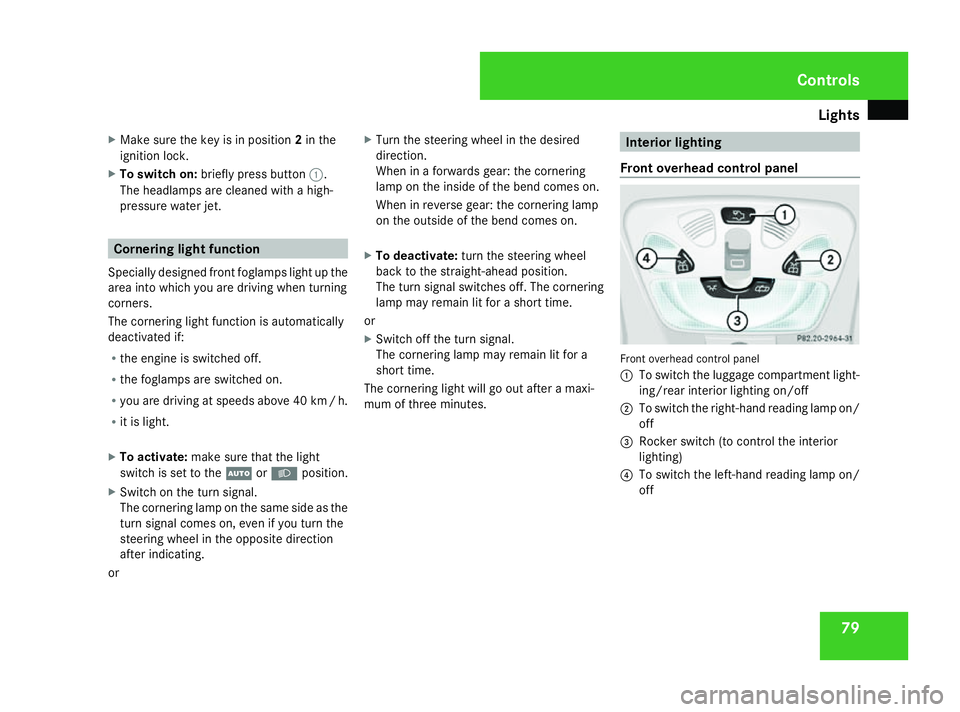
Front overhead control panel Front overhead control panel
1
To switch the luggage compartment light-
ing/rear interior lighting on/off
2 To switch the right-hand reading lamp on/
off
3 Rocker switch (to control the interior
lighting)
4 To switch the left-hand reading lamp on/
off Controls
463_AKB; 1; 8, en-GB
wobuchh,
Version: 2.10.6 2008-07-17T15:19:41+02:00 - Seite 79 ZDateiname: 6515_4091_02_buchblock.pdf; preflight
Page 91 of 293
Driving and pa
rking 88
R
the vehicle is secured with the parking
brake
R ESP ®
is malfunctioning Parking
G
Risk of accident
Only remove the key from the ignition lock
when the vehicle is stationary as you can-
not steer the vehicle with the key removed.
Never leave children unsupervised in the
vehicle. They could release the parking
brake. This could lead to a serious or fatal
accident. G
Risk of fire
Make sure that the exhaust system does
not under any circumstances come into
contact with easily ignitable material such
as dry grass or petrol. The material could
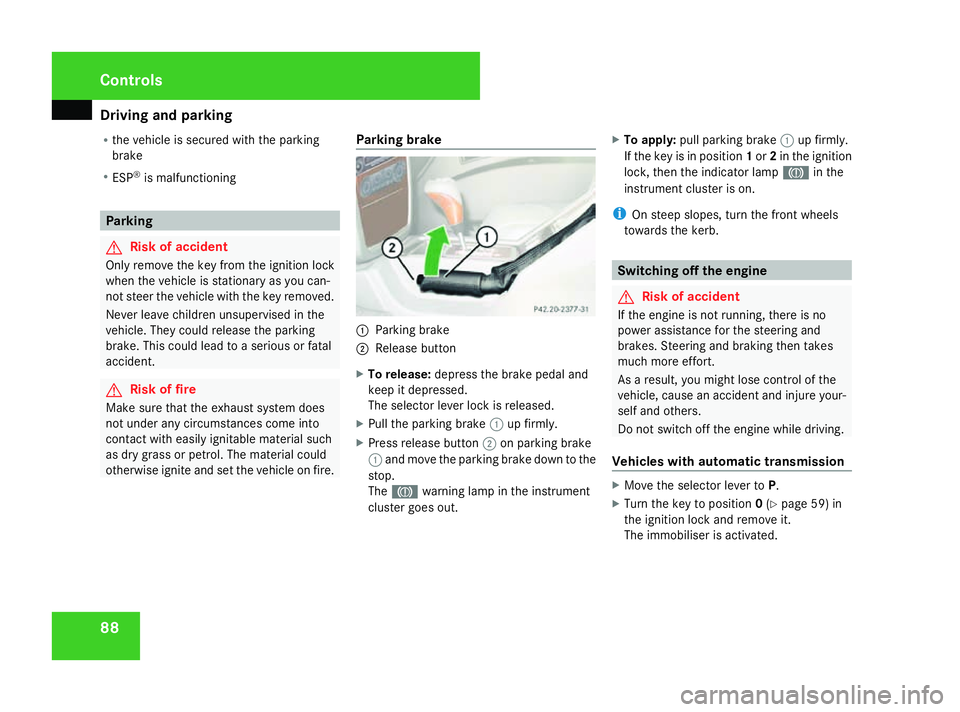
otherwise ignite and set the vehicle on fire. Parking brake 1
Parking brake
2 Release button
X To release: depress the brake pedal and
keep it depressed.
The selector lever lock is released.
X Pull the parking brake 1up firmly.
X Press release button 2on parking brake
1 and move the parking brake down to the
stop.
The 3 warning lamp in the instrument
cluster goes out. X
To apply: pull parking brake 1up firmly.
If the key is in position 1or 2in the ignition
lock, then the indicator lamp 3in the
instrument cluster is on.
i On steep slopes, turn the front wheels
towards the kerb. Switching off the engine
G
Risk of accident
If the engine is not running, there is no
power assistance for the steering and
brakes. Steering and braking then takes
much more effort.
As a result, you might lose control of the
vehicle, cause an accident and injure your-
self and others.
Do not switch off the engine while driving.
Vehicles with automatic transmission X
Move the selector lever to P.
X Turn the key to position 0(Y page 59) in
the ignition lock and remove it.
The immobiliser is activated. Controls
463_AKB; 1; 8, en-GB
wobuchh
,V ersion: 2.10.6
2008-07-17T15:19:41+02:00 - Seite 88 Dateiname: 6515_4091_02_buchblock.pdf; preflight
Page 98 of 293
Instrument cluster
95
i
If necessary, you can now engage the dif-
ferential lock for the rear 2and front axle
3.
Differential lock for the rear axle
X To engage: press switch 2.
The yellow indicator lamp lights up first and
then the red function indicator lamp lights
up.
The differential lock of the rear axle is
engaged.
Differential lock for the front axle
X To engage: press switch 3.
The yellow indicator lamp lights up first and
then the red function indicator lamp lights
up.
The differential lock of the front axle is
engaged.
Disengaging differential locks You can disengage the differential locks in the
reverse order (3
,2, 1).
X To disengage all differential locks
simultaneously: press switch1.
Yellow indicator lamps 4go out. Red func-
tion indicator lamps 5go out when the
differentials are no longer locked. After three seconds of normal driving,
4ETS, ESP
®
, BAS and ABS are activated.
The message ABS not available;
locks engaged; DIFFERENTIAL LOCK in
the multi-function display and the v
- warning lamps in the instrument clus-
ter go out.
If red function indicator lamps 5do not go
out when the differential locks are disen-
gaged:
X Pay attention to traffic conditions.
X Only perform slow steering movements
when driving the vehicle.
The red function indicator lamp will then go
out. Instrument cluster
Points to remember
You will find an illustration of the instrument
cluster in the "At a glance" section . G
Risk of accident
No further messages can be displayed if the
instrument cluster and/or the multi-func-
tion display fails.
This means that you will not see information
about the driving situation, such as the
speed, outside temperature, warning/indi-
cator lamps, display messages or system
failures. The vehicle's handling character-
istics may be affected. Adjust your driving
style and speed accordingly.
Immediately consult a qualified specialist
workshop which has the necessary special-
ist knowledge and tools to carry out the
work required. Mercedes-Benz recom-
mends that you use a Mercedes-Benz
Service Centre for this purpose. In particu-
lar, work relevant to safety or on safety-
related systems must be carried out at a
qualified specialist workshop. Cont
rols
463_AKB; 1; 8, en-GB
wobuchh,
Version: 2.10.6 2008-07-17T15:19:41+02:00 - Seite 95 ZDateiname: 6515_4091_02_buchblock.pdf; preflight
Page 100 of 293
On-board computer
97Rev counter
The red band in the rev counter indicates the
engine's overrevving range. The fuel supply is
interrupted to protect the engine when the
red band is reached.
! Do not drive in the overrevving range.
Doing so will damage the engine. H
Environmental note
Avoid driving at high engine speeds, as this
increases your vehicle's consumption
unnecessarily and pollutes the environ-
ment through increased emissions. Outside temperature display
G
Risk of accident
The road surface may be icy, especially in
wooded areas or on bridges, even if tem-
peratures are just above freezing point. The
vehicle could skid if you fail to adapt your
driving style. You should therefore always
adapt your driving style and speed to suit
the weather conditions.
There is a short delay before a change in out-
side temperature is displayed. On-board computer
Points to remember
The on-board computer is activated as soon
as you turn the key to position 1in the ignition
lock. You can use the on-board computer to
call up information relating to your vehicle
and to make and adjust settings.
You can call up the next service due date,
select the display language for the instrument
cluster and set other functions. G
Risk of accident
Only use the on-board computer when road
and traffic conditions permit. You would
otherwise be distracted and unable to con-
centrate properly on driving, and could
cause an accident.
The on-board computer shows information in
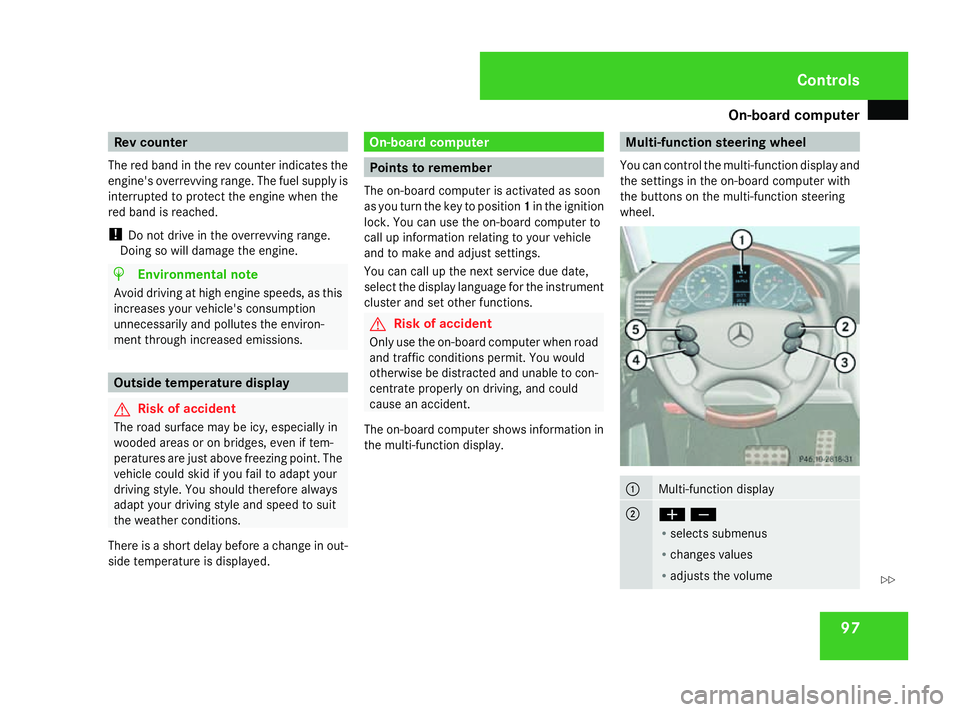
the multi-function display. Multi-function steering wheel
You can control the multi-function display and
the settings in the on-board computer with
the buttons on the multi-function steering
wheel. 1
Multi-function display
2
æç
R
selects submenus
R changes values
R adjusts the volume Controls
463_AKB; 1; 8, en-GB
wobuchh,
Version: 2.10.6 2008-07-17T15:19:41+02:00 - Seite 97 ZDateiname: 6515_4091_02_buchblock.pdf; preflight
Page 112 of 293
On-board computer
109
The auxiliary heating is switched off automat-
ically after 50 minutes. This time can be
changed. To do this, visit a qualified specialist
workshop, e.g. a Mercedes-Benz Service
Centre.
G
Risk of fire and poisoning
The operation of the auxiliary heating pro-
duces hot, toxic exhaust fumes. The fuel
vapours produced during refuelling could
ignite on the hot exhaust system.
Do not switch on the auxiliary heating at
filling stations or in enclosed spaces, for
instance, a garage, if there is no air extrac-
tion system.
You could otherwise endanger yourself and
others.
The Auxiliary heat. function can be called
up directly.
X Turn the key to position 1or 2in the ignition
lock.
X Press the button for the auxiliary heating on
the centre console (Y page 130).
or
X Press the èor· button to select the
Settings menu.
X Press the jbutton to select submenus. X
Press the æorç button to select the
Heater submenu.
X Press the jbutton to select Auxiliary
heat. .
X Press the æorç button to select
one of the three switch-on times or Timer
off (auxiliary heating switched off).
When a switch-on time is selected, the yel-
low indicator lamp lights up in the auxiliary
heating button.
X Press the j,èorÿ button to
select a different display.
Changing the switch-on time for the
auxiliary heating* This function is only displayed if you have
selected a switch-on time. Here you can enter
the time at which the auxiliary heating is to
be switched on.
X
Press the èor· button to select the
Settings menu.
X Press the jbutton to select submenus.
X Press the æorç button to select the
Heater submenu.
X Press the jbutton to select Sw.-on
time hour. X
Press the æorç button to set the
hour.
X Press the jbutton to select Sw.-on
time minute(s).
X Press the æorç button to set the
minutes.
After changing from one menu to another,
the new time setting is stored. The yellow
indicator lamp lights up on the button for
the auxiliary heating on the centre console.
X Press the j,èorÿ button to
select a different display.
Activating/deactivating the easy-
entry/exit feature i
For more information on the easy-entry/
exit feature, see (Y page 67). G
Risk of injury
The steering wheel moves when the easy-
entry/exit feature is active. There is a risk
of occupants becoming trapped. Before
activating the easy-entry/exit feature,
make sure that nobody can become trap-
ped.
Do not leave children unsupervised in the
vehicle, even if they are secured in a child
restraint system. The children could open Controls
* optional
463_AKB; 1; 8, en-GB
wobuchh
,V ersion: 2.10.6
2008-07-17T15:19:41+02:00 - Seite 109 ZDateiname: 6515_4091_02_buchblock.pdf; preflight
Page 154 of 293
Features
151Two-way radios and fax equipment used
without low-reflection exterior aerials can
interfere with the vehicle's electronics and,
thereby, jeopardise the operating safety of
the vehicle and your safety. Therefore, you
may only use this equipment if it is correctly
connected to a separate reflection-free
exterior aerial.
G
Risk of injury
Excessive electromagnetic radiation may
cause damage to your health and the health
of others. Using an exterior aerial takes into
account current scientific discussions
relating to the possible health risk posed by
electromagnetic fields.
In order to ensure optimum signal quality for
mobile phones and to minimise mutual inter-
ference between the vehicle electronics and
mobile phones, Mercedes-Benz recommends
the use of an approved exterior aerial. An
exterior aerial conducts the electromagnetic
fields generated by a wireless device to the
exterior of the vehicle; the field strength
within the vehicle interior is lower than in a
vehicle that does not have an exterior aerial.
i There are various mobile phone brackets
that may be fitted in your vehicle. In some cases, these are country-specific. You can
obtain these mobile phone brackets from a
qualified specialist workshop, e.g. a
Mercedes-Benz Service Centre.
The functions and services available when
you use the phone depend on your mobile
phone model and service provider.
X Open the telephone compart-
ment* (Y page 147).
X Place the mobile phone bracket into the
pre-installed fitting, see separate mobile
phone cradle/bracket installation instruc-
tions.
X Insert the mobile phone into the mobile
phone bracket, see separate mobile phone
cradle/bracket installation instructions.
If the mobile phone is inserted in the mobile
phone bracket, you can only speak to the per-
son you are calling using the hands-free sys-
tem.
You can operate the telephone using the
s andt buttons on the luxury multi-
function steering wheel. You can control
other mobile phone functions via the on-
board computer (Y page 111).
When you remove the key from the ignition
lock, the mobile phone remains switched on
for approximately ten minutes (run-on time). If you make a call during this time, the mobile
phone will be switched off approximately ten
minutes after you have ended the call. Garage door opener*
The remote control integrated in the rear-view
mirror allows you to operate up to three dif-
ferent door and gate systems.
i The garage door opener is only available
for certain countries. Observe the legal
requirements in all countries concerned.
It may not be possible to operate some
garage door opening systems with the inte-
grated remote control. You can obtain
detailed information from any Mercedes-
Benz Service Centre. Cont
rols
* option al
463_AKB; 1; 8, en-GB
wobuchh,
Version: 2.10.6 2008-07-17T15:19:41+02:00 - Seite 151 ZDateiname: 6515_4091_02_buchblock.pdf; preflight