lock MERCEDES-BENZ G-CLASS SUV 2008 Repair Manual
[x] Cancel search | Manufacturer: MERCEDES-BENZ, Model Year: 2008, Model line: G-CLASS SUV, Model: MERCEDES-BENZ G-CLASS SUV 2008Pages: 293, PDF Size: 4.49 MB
Page 64 of 293
Seats
61
X
Slide the button forwards or back in the
direction of arrow 3.
Backrest angle X
Slide the button forwards or back in the
direction of arrow 2.
Seat height X
Slide the button up or down in the direction
of arrow 5.
Seat cushion angle Adjust the angle so that your thighs are gently
supported.
X
Slide the button up or down in the direction
of arrow 4.
Head restraint height G
Risk of injury
Make sure that the central area of the head
restraint supports the back of your head at
about eye level. You could seriously injure
your neck if your head is not correctly sup-
ported by the head restraint in the event of
an accident. Never travel without a cor-
rectly adjusted and engaged head restraint. X
Slide the button up or down in the direction
of arrow 1.
Head restraint angle X
Sit on the seat.
X Using both hands, reach backwards and
grasp the sides of the head restraint.
X Adjust the head restraint angle. Pull the
bottom of the head restraint forwards or
push it back. Head restraints
G
Risk of injury
Occupants should only travel sitting on
seats which have the head restraints instal-
led. This reduces the risk of injury to the
passengers in the rear in the event of an
accident. Fitting and removing the front head
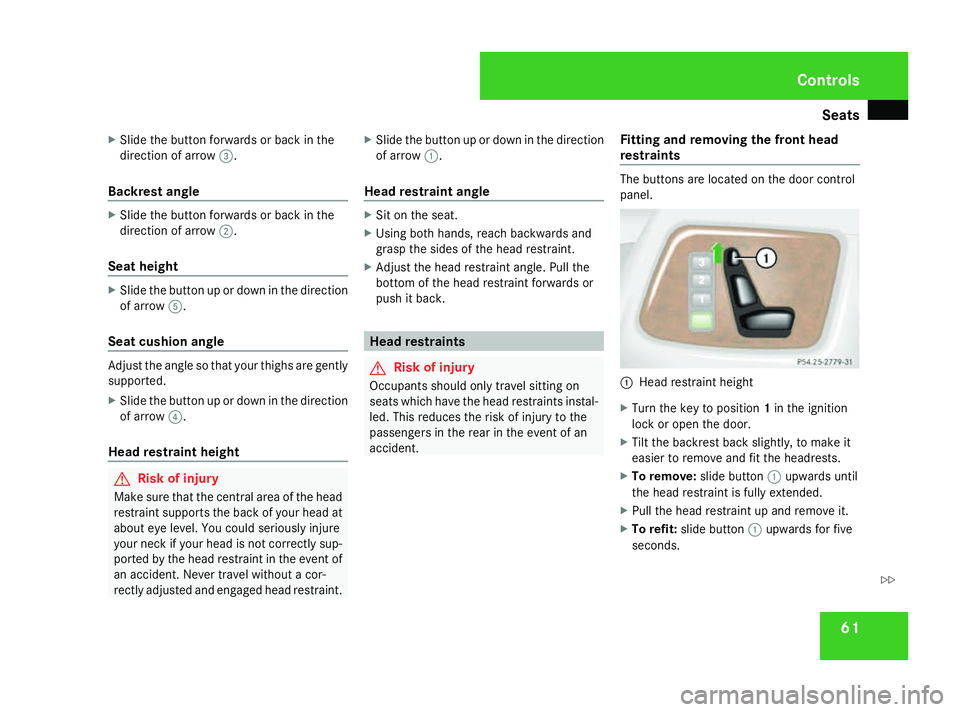
restraints The buttons are located on the door control
panel.
1
Head restraint height
X Turn the key to position 1in the ignition
lock or open the door.
X Tilt the backrest back slightly, to make it
easier to remove and fit the headrests.
X To remove: slide button1upwards until
the head restraint is fully extended.
X Pull the head restraint up and remove it.
X To refit: slide button 1upwards for five
seconds. Controls
463_AKB; 1; 8, en-GB
wobuchh,
Version: 2.10.6 2008-07-17T15:19:41+02:00 - Seite 61 ZDateiname: 6515_4091_02_buchblock.pdf; preflight
Page 65 of 293
Seats
62
X
Insert the head restraint so that the
notches on the bar are on the left when
viewed in the direction of travel.
X Push the head restraint down until you hear
it click into place.
Resetting the front seat head restraints
It is necessary to reset the front seat head
restraints after the voltage supply has been
interrupted, e. g. if the battery has been com-
pletely discharged or disconnected.
X Make sure that the cup holder* on the
centre console is folded down
(Y page 138).
X Move the seat as far forward as possible
and the head restraint in as far as possible.
Adjusting the head restraint height G
Risk of injury
Make sure that the central area of the head
restraint supports the back of your head at
about eye level. You could seriously injure
your neck if your head is not correctly sup-
ported by the head restraint in the event of
an accident. Never travel without a cor-
rectly adjusted and engaged head restraint. X
To raise: pull the head restraint up until the
desired height has been reached.
X To lower: push the head restraint down
until the desired height has been reached.
Adjusting the head restraint angle X
Pull the lower edge of the head restraint
forwards or push it back until it is in the
desired position.
Fitting and removing the rear-compart-
ment head restraints X
To remove: pull the head restraint up and
out.
X To refit: insert the head restraint so that
the arched side points in the direction of
travel.
X Push the head restraint down until you hear
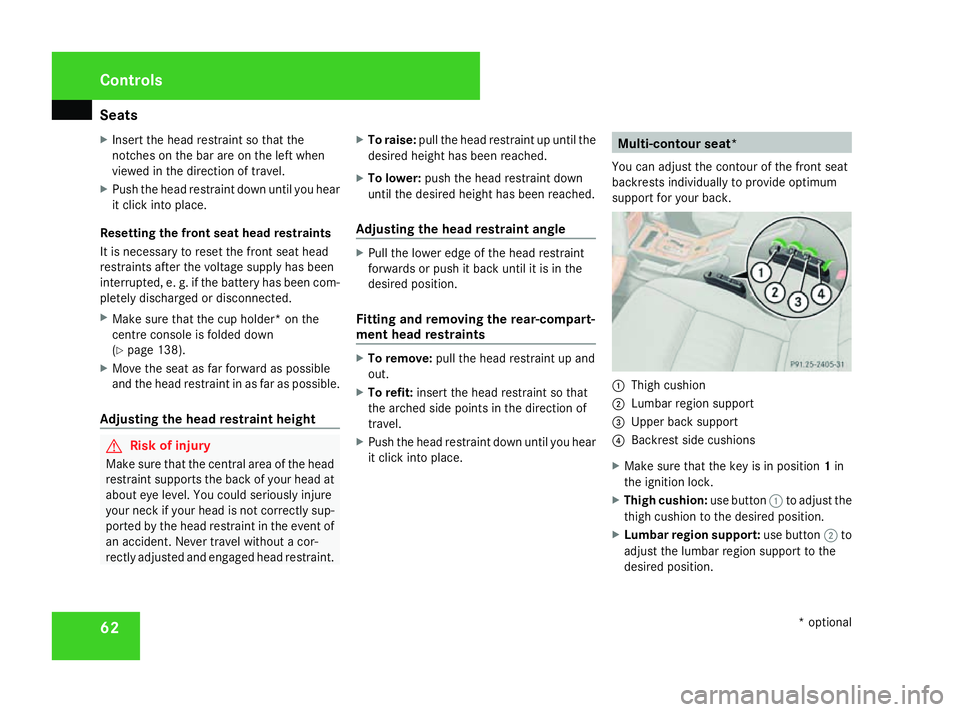
it click into place. Multi-contour seat*
You can adjust the contour of the front seat
backrests individually to provide optimum
support for your back. 1
Thigh cushion
2 Lumbar region support
3 Upper back support
4 Backrest side cushions
X Make sure that the key is in position 1in
the ignition lock.
X Thigh cushion: use button1to adjust the
thigh cushion to the desired position.
X Lumbar region support: use button2to
adjust the lumbar region support to the
desired position. Controls
* optional
463_AKB; 1; 8, en-GB
wobuchh,
Version: 2.10.6 2008-07-17T15:19:41+02:00 - Seite 62Dateiname: 6515_4091_02_buchblock.pdf; preflight
Page 66 of 293
Seats
63
X
Upper back support: use button3to
adjust the upper back support to the
desired position.
X Backrest side bolsters: use button4to
adjust the backrest side bolsters to the
desired position. Folding the front seats forward (easy-
entry feature of short-wheelbase sta-
tion wagon and cabriolet)
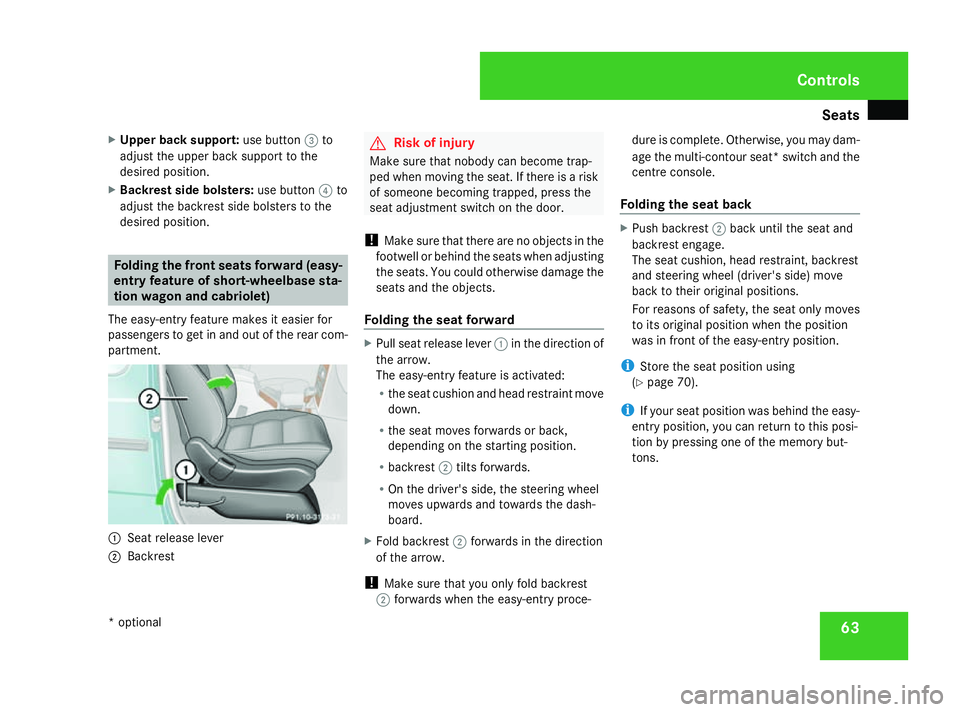
The easy-entry feature makes it easier for
passengers to get in and out of the rear com-
partment. 1
Seat release lever
2 Backrest G
Risk of injury
Make sure that nobody can become trap-
ped when moving the seat. If there is a risk
of someone becoming trapped, press the
seat adjustment switch on the door.
! Make sure that there are no objects in the
footwell or behind the seats when adjusting
the seats. You could otherwise damage the
seats and the objects.
Folding the seat forward X
Pull seat release lever 1in the direction of
the arrow.
The easy-entry feature is activated:
R the seat cushion and head restraint move
down.
R the seat moves forwards or back,
depending on the starting position.
R backrest 2tilts forwards.
R On the driver's side, the steering wheel
moves upwards and towards the dash-
board.
X Fold backrest 2forwards in the direction
of the arrow.
! Make sure that you only fold backrest
2 forwards when the easy-entry proce- dure is complete. Otherwise, you may dam-
age the multi-contour seat* switch and the
centre console.
Folding the seat back X
Push backrest 2back until the seat and
backrest engage.
The seat cushion, head restraint, backrest
and steering wheel (driver's side) move
back to their original positions.
For reasons of safety, the seat only moves
to its original position when the position
was in front of the easy-entry position.
i Store the seat position using
(Y page 70).
i If your seat position was behind the easy-
entry position, you can return to this posi-
tion by pressing one of the memory but-
tons. Controls
* optional
463_AKB; 1; 8, en-GB
wobuchh,
Version: 2.10.6 2008-07-17T15:19:41+02:00 - Seite 63 ZDateiname: 6515_4091_02_buchblock.pdf; preflight
Page 67 of 293
Seats
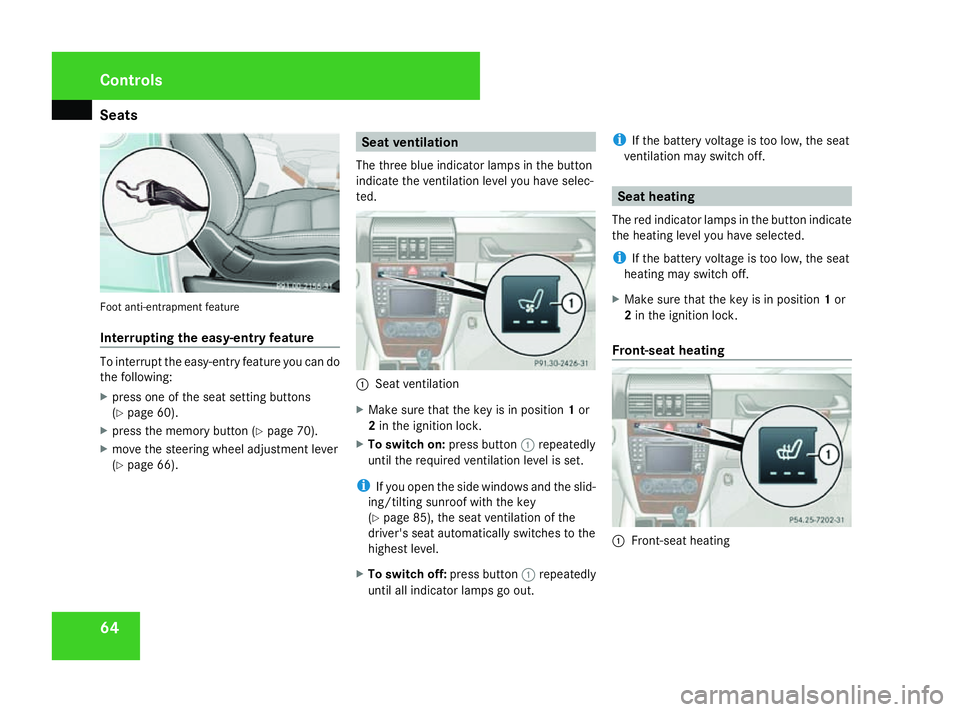
64Foot anti-entrapment feature
Interrupting the easy-entry feature
To interrupt the easy-entry feature you can do
the following:
X press one of the seat setting buttons
(Y page 60).
X press the memory button (Y page 70).
X move the steering wheel adjustment lever
(Y page 66). Seat ventilation
The three blue indicator lamps in the button
indicate the ventilation level you have selec-
ted. 1
Seat ventilation
X Make sure that the key is in position 1or
2 in the ignition lock.
X To switch on: press button1repeatedly
until the required ventilation level is set.
i If you open the side windows and the slid-
ing/tilting sunroof with the key
(Y page 85), the seat ventilation of the
driver's seat automatically switches to the
highest level.
X To switch off: press button1repeatedly
until all indicator lamps go out. i
If the battery voltage is too low, the seat
ventilation may switch off. Seat heating
The red indicator lamps in the button indicate
the heating level you have selected.
i If the battery voltage is too low, the seat
heating may switch off.
X Make sure that the key is in position 1or
2 in the ignition lock.
Front-seat heating 1
Front-seat heating Controls
463_AKB; 1; 8, en-GB
wobuchh,
Version: 2.10.6 2008-07-17T15:19:41+02:00 - Seite 64Dateiname: 6515_4091_02_buchblock.pdf; preflight
Page 68 of 293

Seats
65
i
The system automatically switches down
from level 3to level 2after approximately
five minutes.
The system automatically switches down
from level 2to level 1after approximately
ten minutes.
The system automatically switches off
approximately 20 minutes after it is set to
level 1.
X To switch on: press button1repeatedly
until the desired heating level is set.
X To switch off: press button1repeatedly
until all indicator lamps go out.
Rear-seat heating* Example: long-wheelbase station wagon
1
Rear-seat heating i
The system automatically switches down
from level 2to level 1after approximately
five minutes.
The system automatically switches off
approximately 30 minutes after it is set to
level 1.
X To select level 1: press the upper section
of button 1.
X To select level 2: press the lower section
of button 1.
X To switch off: press button1repeatedly
until all indicator lamps go out. Side-facing bench seat* in the lug-
gage compartment
G
Risk of injury
Make sure that nobody can become trap-
ped when folding down the side-facing
bench seat.
Side-facing bench seats may only be occu-
pied when the rear bench seat is upright
and the seat catch is engaged.
The rear bench seat head restraints must
be fitted. 1
Support
2 Side-facing bench seat
3 Recess
X To fold down: fold out support 1.
X Fold down side-facing bench seat 2. 4
Wheel arch Controls
* optional
463_AKB; 1; 8, en-GB
wobuchh,
Version: 2.10.6 2008-07-17T15:19:41+02:00 - Seite 65 ZDateiname: 6515_4091_02_buchblock.pdf; preflight
Page 69 of 293
Steering wheel
66
X
Make sure that support 1lies on wheel
arch 4.
X To fold up: fold up side-facing bench seat
2.
X Fold support 1in and push it into recess
3 of side-facing bench seat 2. Steering wheel
Points to remember
You can adjust the steering wheel electrically. G
Risk of injury
The electrically adjustable steering wheel
can still be adjusted when there is no key
in the ignition lock. Therefore, do not leave
children unsupervised in the vehicle as they
could become trapped as the steering
wheel is adjusted. G
Risk of accident
Only adjust the steering wheel when the
vehicle is stationary. Drive only when the
steering wheel is fixed.
When you adjust the steering wheel, make
sure that:
R the steering wheel can be reached with
your arms slightly bent
R you can move your legs freely
R you can see all the displays in the instru-
ment cluster clearly Adjusting the steering wheel
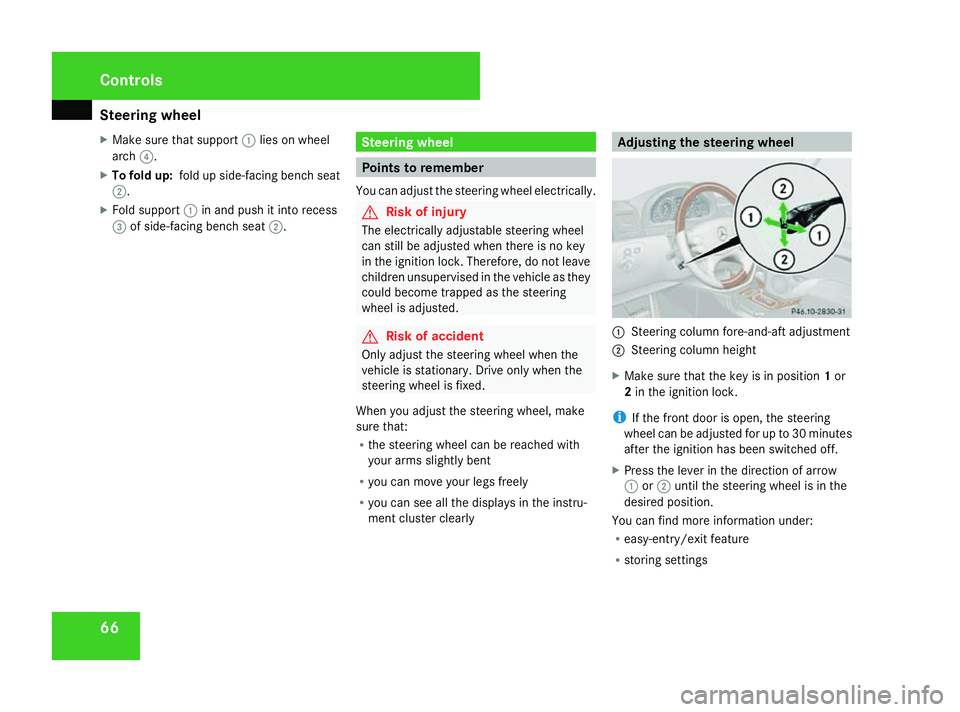
1
Steering column fore-and-aft adjustment
2 Steering column height
X Make sure that the key is in position 1or
2 in the ignition lock.
i If the front door is open, the steering
wheel can be adjusted for up to 30 minutes
after the ignition has been switched off.
X Press the lever in the direction of arrow
1 or2 until the steering wheel is in the
desired position.
You can find more information under:
R easy-entry/exit feature
R storing settings Controls
463_AKB; 1; 8, en-GB
wobuchh,
Version: 2.10.6 2008-07-17T15:19:41+02:00 - Seite 66Dateiname: 6515_4091_02_buchblock.pdf; preflight
Page 70 of 293

Steering wheel
67Steering wheel heating*
The steering-wheel heating heats the leather
areas of the steering wheel. 1
To switch on the steering-wheel heating
2 Indicator lamp
3 To switch off the steering-wheel heating
X To switch on/off: make sure that the key
is in position 1or 2in the ignition lock.
X Turn the lever in direction of arrow 1or
3.
Indicator lamp 2lights up or goes out.
i The steering-wheel heating does not
switch off automatically. Easy-entry/exit feature
The easy-entry/exit feature makes getting in
and out of your vehicle easier.
The steering wheel moves upwards and
towards the dashboard if:
R an easy-entry/exit steering wheel position
has been stored on the key and
R you remove the key from the ignition lock
or
R you open the driver's door with the key in
position 0or 1in the ignition lock.
The steering wheel is moved automatically to
the position previously set when the key is
inserted into the ignition lock with the driver's
door closed.
i The steering wheel only moves upwards
and towards the dashboard if it has not
already reached the upper end stop. G
Risk of injury
Make sure that nobody can become trap-
ped when you activate the easy-entry/exit
feature.
If there is a risk of becoming trapped, stop
the adjustment procedure. To halt the pro-
cedure: R
press the steering-column adjustment
switch
R press one of the memory function posi-
tion buttons
The steering column stops moving immedi-
ately.
Never leave children unsupervised in the
vehicle. They could open the driver's door
and thereby unintentionally activate the
easy-entry feature and become trapped.
You can activate and deactivate the easy-
entry/exit feature via the on-board computer
(Y page 109). Controls
* optional
463_AKB; 1; 8, en-GB
wobuchh,
Version: 2.10.6 2008-07-17T15:19:41+02:00 - Seite 67 ZDateiname: 6515_4091_02_buchblock.pdf; preflight
Page 71 of 293
Mirrors
68 Mirrors
Rear-view mirror
X Adjust the rear-view mirror by hand so you
have a good overview of the traffic condi-
tions. Exterior mirrors
G
Risk of accident
The exterior mirrors reduce the size of the
image. Objects are actually closer than
they appear. You could misjudge the dis-
tance from vehicles driving behind and
cause an accident, e.g. when changing
lane. For this reason, make sure of the
actual distance from the vehicle driving
behind by glancing over your shoulder.
The convex exterior mirrors provide a larger
field of vision.
At low outside temperatures the exterior mir-
rors are heated automatically.
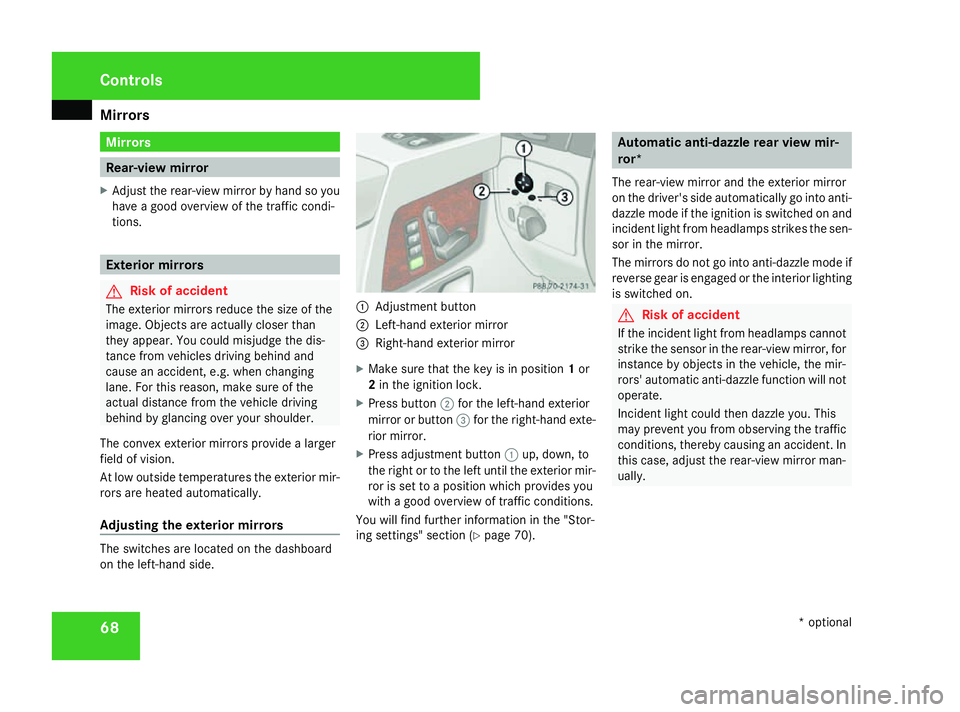
Adjusting the exterior mirrors The switches are located on the dashboard
on the left-hand side. 1
Adjustment button
2 Left-hand exterior mirror
3 Right-hand exterior mirror
X Make sure that the key is in position 1or
2 in the ignition lock.
X Press button 2for the left-hand exterior
mirror or button 3for the right-hand exte-
rior mirror.
X Press adjustment button 1up, down, to
the right or to the left until the exterior mir-
ror is set to a position which provides you
with a good overview of traffic conditions.
You will find further information in the "Stor-
ing settings" section (Y page 70). Automatic anti-dazzle rear view mir-
ror*
The rear-view mirror and the exterior mirror
on the driver's side automatically go into anti-
dazzle mode if the ignition is switched on and
incident light from headlamps strikes the sen-
sor in the mirror.
The mirrors do not go into anti-dazzle mode if
reverse gear is engaged or the interior lighting
is switched on. G
Risk of accident
If the incident light from headlamps cannot
strike the sensor in the rear-view mirror, for
instance by objects in the vehicle, the mir-
rors' automatic anti-dazzle function will not
operate.
Incident light could then dazzle you. This
may prevent you from observing the traffic
conditions, thereby causing an accident. In
this case, adjust the rear-view mirror man-
ually. Controls
* optional
463_AKB; 1; 8, en-GB
wobuchh,
Version: 2.10.6 2008-07-17T15:19:41+02:00 - Seite 68Dateiname: 6515_4091_02_buchblock.pdf; preflight
Page 72 of 293
Mirrors
69Passenger side exterior mirror park-
ing position
To make it easier to park, you can store the
front-passenger side exterior mirror position
in such a way that you can see the rear wheel
on that side as soon as you engage reverse
gear.
Using the storage position buttons on the
driver's side, you can store three parking
positions per key.
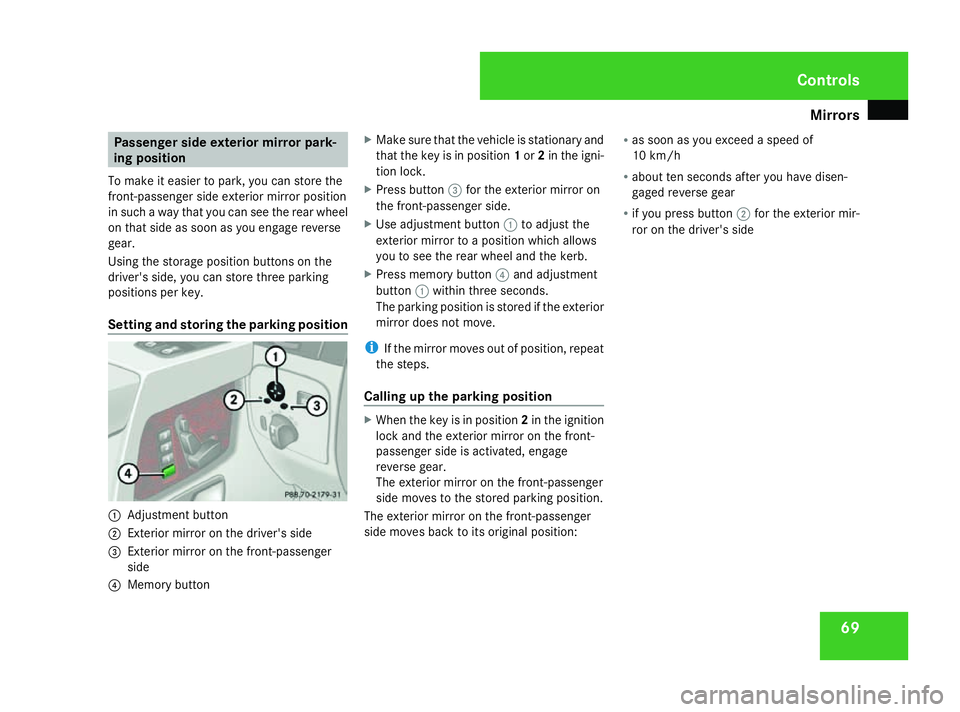
Setting and storing the parking position 1
Adjustment button
2 Exterior mirror on the driver's side
3 Exterior mirror on the front-passenger
side
4 Memory button X
Make sure that the vehicle is stationary and
that the key is in position 1or 2in the igni-
tion lock.
X Press button 3for the exterior mirror on
the front-passenger side.
X Use adjustment button 1to adjust the
exterior mirror to a position which allows
you to see the rear wheel and the kerb.
X Press memory button 4and adjustment
button 1within three seconds.
The parking position is stored if the exterior
mirror does not move.
i If the mirror moves out of position, repeat
the steps.
Calling up the parking position X
When the key is in position 2in the ignition
lock and the exterior mirror on the front-
passenger side is activated, engage
reverse gear.
The exterior mirror on the front-passenger
side moves to the stored parking position.
The exterior mirror on the front-passenger
side moves back to its original position: R
as soon as you exceed a speed of
10 km/h
R about ten seconds after you have disen-
gaged reverse gear
R if you press button 2for the exterior mir-
ror on the driver's side Controls
463_AKB; 1; 8, en-GB
wobuchh,
Version: 2.10.6 2008-07-17T15:19:41+02:00 - Seite 69 ZDateiname: 6515_4091_02_buchblock.pdf; preflight
Page 73 of 293

Memory functions
70 Memory functions
Storing settings
Using the memory button on the driver's side
you can store up to three different settings
per key. You can store one setting per mem-
ory button on the front-passenger side.
On the driver's side the following settings can
be stored on each memory position:
R seat and head restraint position of the driv-
er's seat
R steering wheel position
R exterior mirror position on the driver’s and
front-passenger side
R parking position for the exterior mirror on
the front-passenger side
On the front-passenger side, the following
settings can be stored on each memory posi-
tion:
R seat and head restraint position of the
front-passenger seat G
Risk of accident
Only use the memory function on the driv-
er's side when the vehicle is stationary.
Otherwise, you could be distracted from
the traffic conditions by the steering wheel and seat moving of their own accord, as a
result cause an accident.
The buttons are located on the door control
panel. 1
Memory button
2 Storage position switches
X Make sure that the key is in position 2or
that the respective door is open.
X Adjust the seat and head restraint
(Y page 60).
X On the driver's side, also adjust the steer-
ing wheel (Y page 66) and the mirrors
(Y page 68). X
Press memory button 1.
X Press storage position switch 2within
three seconds.
The settings are stored in the selected stor-
age position. Calling up a stored setting
G
Risk of accident
Only use the memory function on the driv-
er's side when the vehicle is stationary.
Otherwise, you could be distracted from
the traffic conditions by the steering wheel
and seat moving of their own accord, as a
result cause an accident.
X Press the required storage position button
2 until the seat, head restraints, steering
wheel and mirrors are in the stored posi-
tion.
i The setting procedure is interrupted as
soon as you release the storage position
switch.
! If you want to move the seat from the fully
reclined position to a stored seat position,
first raise the backrest using the seat Controls
463_AKB; 1; 8, en-GB
wobuchh
, Version: 2.10.6 2008-07-17T15:19:41+02:00 - Seite 70Dateiname: 6515_4091_02_buchblock.pdf; preflight