ESP MERCEDES-BENZ G-CLASS SUV 2012 Repair Manual
[x] Cancel search | Manufacturer: MERCEDES-BENZ, Model Year: 2012, Model line: G-CLASS SUV, Model: MERCEDES-BENZ G-CLASS SUV 2012Pages: 357, PDF Size: 8.86 MB
Page 208 of 357
For further information on driving off-road,
see (Y page 169).
i You can only engage the differential locks
if the transfer case is in the LOW RANGE
off-road driving positio n(Ypage 201).
i You can activate the differential locks in
the following order =,?,;.
Differential lock for the transfer case X
To engage: switch the transfer case to the
LOW RANGE off-road driving position
(Y page 202).
X Press switch =.
When the transfer case is in the LOW
RANGE off-road driving position, the yellow
activation indicator lamp below switch =
lights up.
The å warning lamp in the instrument
panel lights up.
When the differential is locked, the red
function indicator lamp above switch =
lights up.
The following message appears in the mul-
tifunction display:
ABS not available differential locked
The
å!÷ warning lamps in the
instrument cluster light up.
The differential lock for the transfer case is
engaged.
4ETS, ESP ®
, BASa nd ABS ar edeactivated.
The vehicle's ability to steer is severely
restricted. Drive carefully and accelerate gen-
tly for optimum traction.
i You can now engage the differential lock
for rear axle ?and the differential lock for
front axle ;as required. Differential lock for the rear axle X
To engage: press switch ?.
Yellow activation indicator lamp Alights
up first, followed by red function indicator
lamp :of switch ?.
The differential lock for the rear axle is
engaged.
Differential lock for the front axle X
To engage: press switch ;.
The yellow activation indicator lamp lights
up first, followed by the red function indi-
cator lamp.
The differential lock for the front axle is
engaged.
Deactivating the differential lock You can deactivate the differential locks in
this order:
;,?,=.
X To simultaneously deactivate all differ-
ential locks: press switch=.
Yellow activation indicator lamps Aand
red function indicator lamps :go out.
After approximately three seconds of nor-
mal driving, ABS, 4ETS, ESP ®
and BAS are
activated.
The ABS not available differential
locked message disappears from the mul-
tifunction display and the å,!and
÷ warning lamps in the instrument clus-
ter go out.
X Shift the transfer case to the HIGH
RANGE on-road position (Y page 202).
If red function indicator lamps :do not go
out when deactivating the differential locks:
X Observe the traffic situation.
X While driving, make some gentle steering
movements.
Red function indicator lamps :go out as
soon as the differential locks have been
disengaged. Off-road driving systems
205Driving and parking Z
Page 209 of 357
Towing
atrailer Notes on towing
atrailer
Important safety notes G
WARNING
The braking syste mcan overheat if you leave
your foo tonthe brake pedal while driving.
This increases the braking distance and could
even cause the braking system to fail. There
is a risk of an accident.
Never use the brake pedal as a footrest.Do
not simultaneously depress both the brake
pedal and the accelerato rpedal while driving. G
WARNING
You could lose control of the vehicle/trailer
combination if it begins to swerve. The vehi-
cle/trailer combination could even overturn.
There is a risk of an accident.
On no account should you attempt to
straighten out the vehicle/trailer combina-
tion by increasing speed. Decrease your
speed and do not countersteer. Brake if nec-
essary. G
WARNING
If the ball coupling has not been correctly fit-
ted and has not been secured with the bolt
supplied and the correspondin gspring cotter,
the trailer can detach. There is a risk of an
accident.
Always fit and secure the ball coupling as
described. Before beginning each journey,
make sure that the fitted ball coupling is
secured with the bolt supplied and the corre-
sponding spring cotter.
You will find the applicable permissible val-
ues, which must not be exceeded, in the vehi-
cle documents. You will find the values
approved by the manufacturer on the vehicle
identification plates and those for the towing
vehicle in the "Technical data" section
(Y page 340). Couple and uncouple the trailer carefully. If
you do not couple the trailer to the towing
vehicle correctly, the trailer could become
detached.
Make sure that the following values are not
exceeded:
R the permissible trailer drawbar noseweight
R the permissible trailer load
R the permissible rear axle load of the towing
vehicle
R the maximum permissible gross vehicle
weight of both the towing vehicle and the
trailer
When towing a trailer, your vehicle's handling
characteristics will be differen tincomparison
to when driving without a trailer.
The vehicle/trailer combination:
R is heavier
R is restricted in its acceleration and gradi-
ent-climbing capability
R has an increased braking distance
R is affected more by strong crosswinds
R demands more sensitive steering
R has a larger turning circle
This can impair the vehicle's handling char-
acteristics.
When towing a trailer, always adjust your
speed to the current road and weather con-
ditions. Do not exceed the maximum permis-
sible speed for your vehicle/trailer combina-
tion.
General notes !
Use a drawbar noseweight as close to the
maximum permissible noseweight as pos-
sible. Do not use a noseweight of less than
80 kg; otherwise, the trailer may come
loose.
Note that the payload and the rear axle load
are reduced by the actual payload.
i When towing a trailer, set the tyre pres-
sure on the rear axle of the towing vehicle 206
Towing
atrailerDriving an d parking
Page 215 of 357
=
Rev counter (Y page 212)
? Coolan ttemperature (Y page 212)
A Fuel gauge
B Instrument cluster lighting (Y page 212)Instrument cluster lighting
The lighting in the instrument cluster, in the
displays and the controls in the vehicle inte-
rior can be adjusted using the brightness con-
trol knob.
The brightness control knob is located on the
bottom left of the instrument cluster
(Y page 211).
X Turn the brightness control knob clockwise
or anti-clockwise.
If the light switch is set to Ã,Tor
L, the brightness is dependen tupon
the brightness of the ambient light.
i The light senso rinthe instrumentc luster
automatically controls the brightness of
the multifunction display.
In daylight, the displays in the instrument
cluster are not illuminated. Displaying the coolant temperature
The coolan ttemperature gauge is in the
instrument cluster on the right-hand side
(Y page 211).
The reading may rise up to 120 †undernor-
mal driving conditions if the coolant has been
filled correctly.
At high outside temperatures and when driv-
ing uphill, the coolant temperature may rise
to the end of the scale. Rev counter
! Do not drive in the overrevving range.
Doing so will damage the engine.
The red band in the rev counter indicates the
engine's overrevving range. The fuel supply is interrupted to protec
tthe
engine when the red band is reached. Outside temperature display
G
WARNING
At temperatures just above freezing point, the
street may be icy, especially in wooded areas
or on bridges. If you do not adapt your driving
style to the conditions, the vehicle could skid.
For this reason, adapt your driving style and
speed to the weather conditions.
The outside temperature displayi s in the mul-
tifunction display (Y page 214).
Changes in the outside temperature are dis-
played after a short delay. Speedometer with segments
The segments in the speedometer indicate
which speed range is available.
R Cruise control activated (Y page 173):
The segments light up from the stored
speed to the maximum speed.
R Variable SPEEDTRONIC activated
(Y page 178):
The segments light up from the start of the
scale to the selected limit speed.
R DISTRONIC PLUS activated (Y page 184):
One or two segments in the set speed
range light up.
R DISTRONIC PLUS detects avehicle in front:
The segments between the speed of the
vehicle in fron tand the stored speed light
up. 212
Displays and operationOn-board computer and displays
Page 229 of 357
using the full output of the engine during this
time.
SETUP
:
Drive program (C /SS+ /M )
; ESP ®
mode (ON /OFF )
= Suspension tuning (SPORT /COMFORT )
SETUP shows the drive program, the ESP ®
(Electronic Stability Program) mode and the
SPORT handling mode.
X Press =or; on the steering wheel
to select the AMG menu.
X Press the 9buttonrepeatedly until
SETUP is displayed.
RACETIMER Displaying and starting the RACETIMER
G
WARNING
The RACETIMER feature is only for use on
roads and in conditions where high speed
driving is permitted. Racing on public roads is
prohibited under all circumstances. The driver
is and must always remain responsible for fol-
lowing posted speed limits. :
Lap
; RACETIMER
You can start the RACETIMER when the
engine is running or if the key is in position
2(Y page 143) in the ignition lock. X
Press =or; on the steering wheel
to select the AMG menu.
X Press the 9button repeatedly until the
RACETIMER is shown.
X To start: press the abutton to start the
RACETIMER.
Displaying the intermediate time X
Press the =or; button to select
Interm. Time .
X Press ato confirm.
The intermediate time is displayed for five
seconds.
Starting a new lap :
RACETIMER
; Fastes tlap time (bes tlap)
= Lap
X Press ato confirm New Lap .
i It is possible to store a maximum of six-
teen laps. The 16th lap can only be com-
pleted with Finish Lap .
Stopping the RACETIMER 226
Menus and submenusOn-board computer and displays
Page 231 of 357
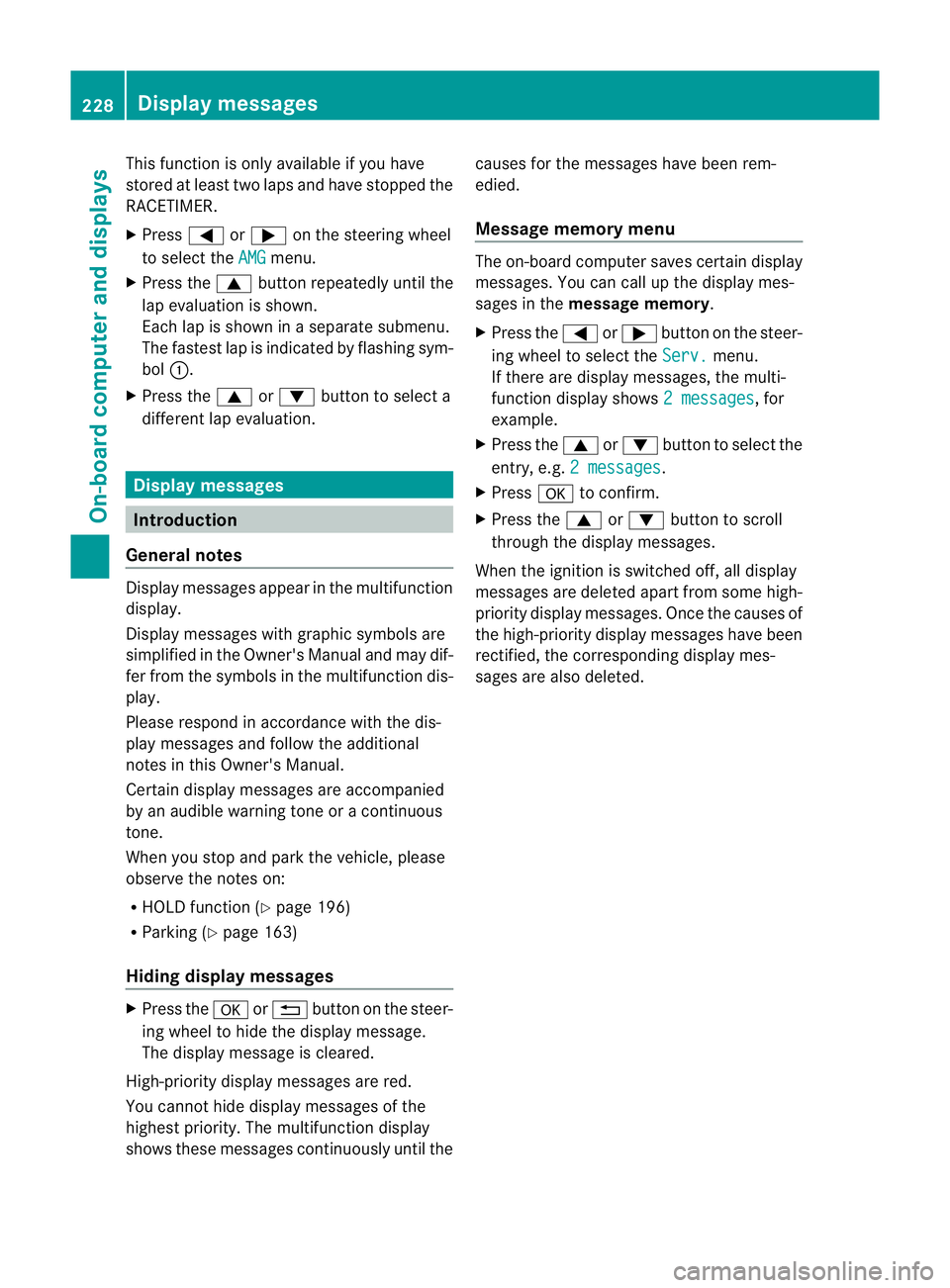
This function is only available if you have
stored at least two laps and have stopped the
RACETIMER.
X
Press =or; on the steering wheel
to select the AMG menu.
X Press the 9button repeatedly until the
lap evaluation is shown.
Each lap is shown in a separate submenu.
The fastest lap is indicated by flashing sym-
bol :.
X Press the 9or: button to select a
different lap evaluation. Display messages
Introduction
General notes Display messages appear in the multifunction
display.
Display messages with graphic symbols are
simplified in the Owner's Manual and may dif-
fer from the symbols in the multifunction dis-
play.
Please respond in accordance with the dis-
play messages and follow the additional
notes in this Owner's Manual.
Certain display messages are accompanied
by an audible warning tone or a continuous
tone.
When you stop and park the vehicle, please
observe the notes on:
R
HOLD function (Y page 196)
R Parking (Y page 163)
Hiding display messages X
Press the aor% button on the steer-
ing wheel to hide the display message.
The display message is cleared.
High-priority display messages are red.
You cannot hide display messages of the
highest priority. The multifunction display
shows these messages continuously until the causes for the messages have been rem-
edied.
Message memor
ymenu The on-board compute
rsaves certain display
messages .You can call up the display mes-
sages in the message memory.
X Press the =or; button on the steer-
ing wheel to select the Serv. menu.
If there are display messages, the multi-
function display shows 2 messages , for
example.
X Press the 9or: button to select the
entry, e.g. 2 messages .
X Press ato confirm.
X Press the 9or: button to scroll
through the display messages.
When the ignition is switched off, all display
messages are deleted apart from some high-
priority display messages. Once the causes of
the high-priority display messages have been
rectified, the corresponding display mes-
sages are also deleted. 228
Display messagesOn-board computer and displays
Page 232 of 357
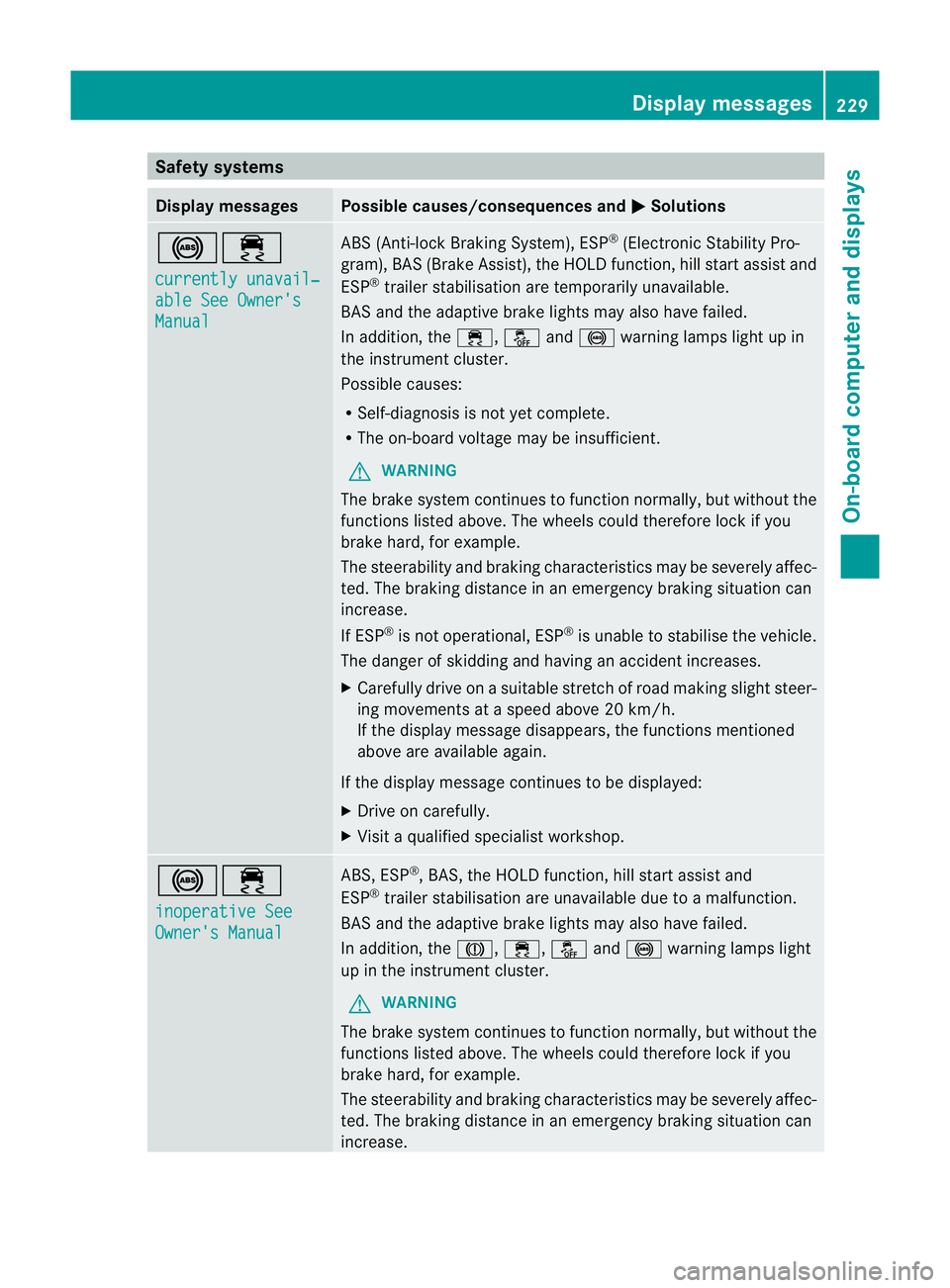
Safety systems
Display messages Possible causes/consequences and
M Solutions
!÷
currently unavail‐
able See Owner's
Manual ABS (Anti-lock Braking System), ESP
®
(Electronic Stability Pro-
gram), BAS (Brake Assist), the HOLD function, hill start assist and
ESP ®
trailer stabilisation are temporarily unavailable.
BAS and the adaptive brake lights may also have failed.
In addition, the ÷,åand! warning lamps light up in
the instrument cluster.
Possible causes:
R Self-diagnosis is not yet complete.
R The on-board voltage may be insufficient.
G WARNING
The brake system continues to function normally, but without the
functions listed above. The wheels could therefore lock if you
brake hard, for example.
The steerability and braking characteristics may be severely affec-
ted. The braking distance in an emergency braking situation can
increase.
If ESP ®
is not operational, ESP ®
is unable to stabilise the vehicle.
The danger of skidding and having an accident increases.
X Carefully drive on a suitable stretch of road making slight steer-
ing movements at a speed above 20 km/h.
If the display message disappears, the functions mentioned
above are available again.
If the display message continues to be displayed:
X Drive on carefully.
X Visit a qualified specialist workshop. !÷
inoperative See
Owner's Manual ABS, ESP
®
, BAS, the HOLD function, hill start assist and
ESP ®
trailer stabilisation are unavailable due to a malfunction.
BAS and the adaptive brake lights may also have failed.
In addition, the J,÷,åand! warning lamps light
up in the instrument cluster.
G WARNING
The brake system continues to function normally, but without the
functions listed above. The wheels could therefore lock if you
brake hard, for example.
The steerability and braking characteristics may be severely affec-
ted. The braking distance in an emergency braking situation can
increase. Display messages
229On-board computer and displays Z
Page 233 of 357
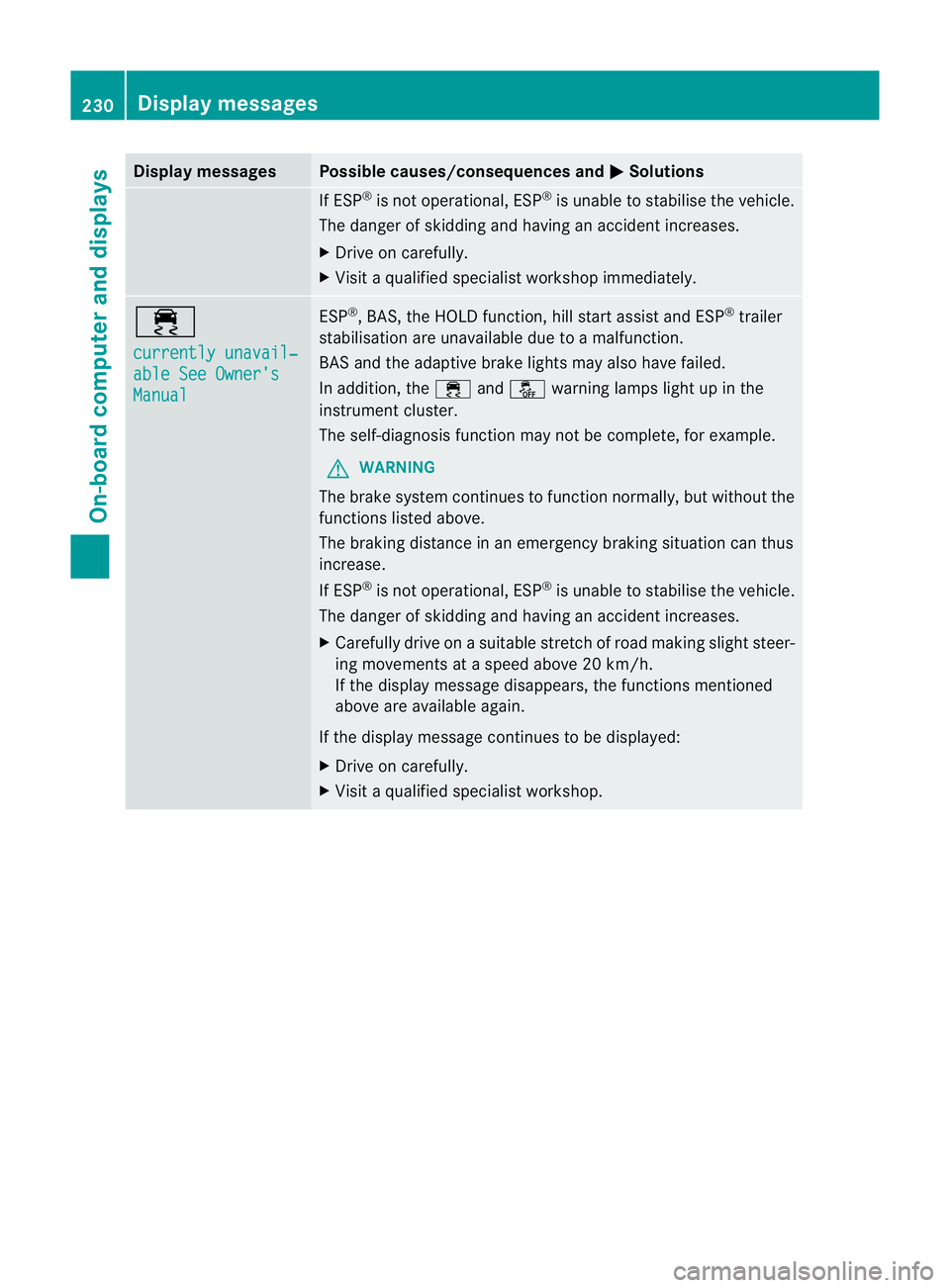
Display messages Possible causes/consequences and
M Solutions
If ESP
®
is no toperational, ESP ®
is unable to stabilise the vehicle.
The danger of skidding and having an acciden tincreases.
X Drive on carefully.
X Visi taqualified specialist workshop immediately. ÷
currently unavail‐
able See Owner's
Manual ESP
®
, BAS, the HOLD function, hill start assist and ESP ®
trailer
stabilisation are unavailable due to a malfunction.
BASa nd the adaptive brake lights may also have failed.
In addition, the ÷andå warning lamps light up in the
instrument cluster.
The self-diagnosis functio nmay no tbe complete, for example.
G WARNING
The brake system continues to function normally, but without the
functions listed above.
The braking distance in an emergency braking situation can thus
increase.
If ESP ®
is not operational, ESP ®
is unable to stabilise the vehicle.
The danger of skidding and having an acciden tincreases.
X Carefully drive on a suitable stretch of road making slight steer-
ing movements at a speed above 20 km/h.
If the display message disappears, the functions mentioned
above are available again.
If the display message continues to be displayed:
X Drive on carefully.
X Visi taqualified specialist workshop. 230
Display messagesOn-board computer and displays
Page 234 of 357
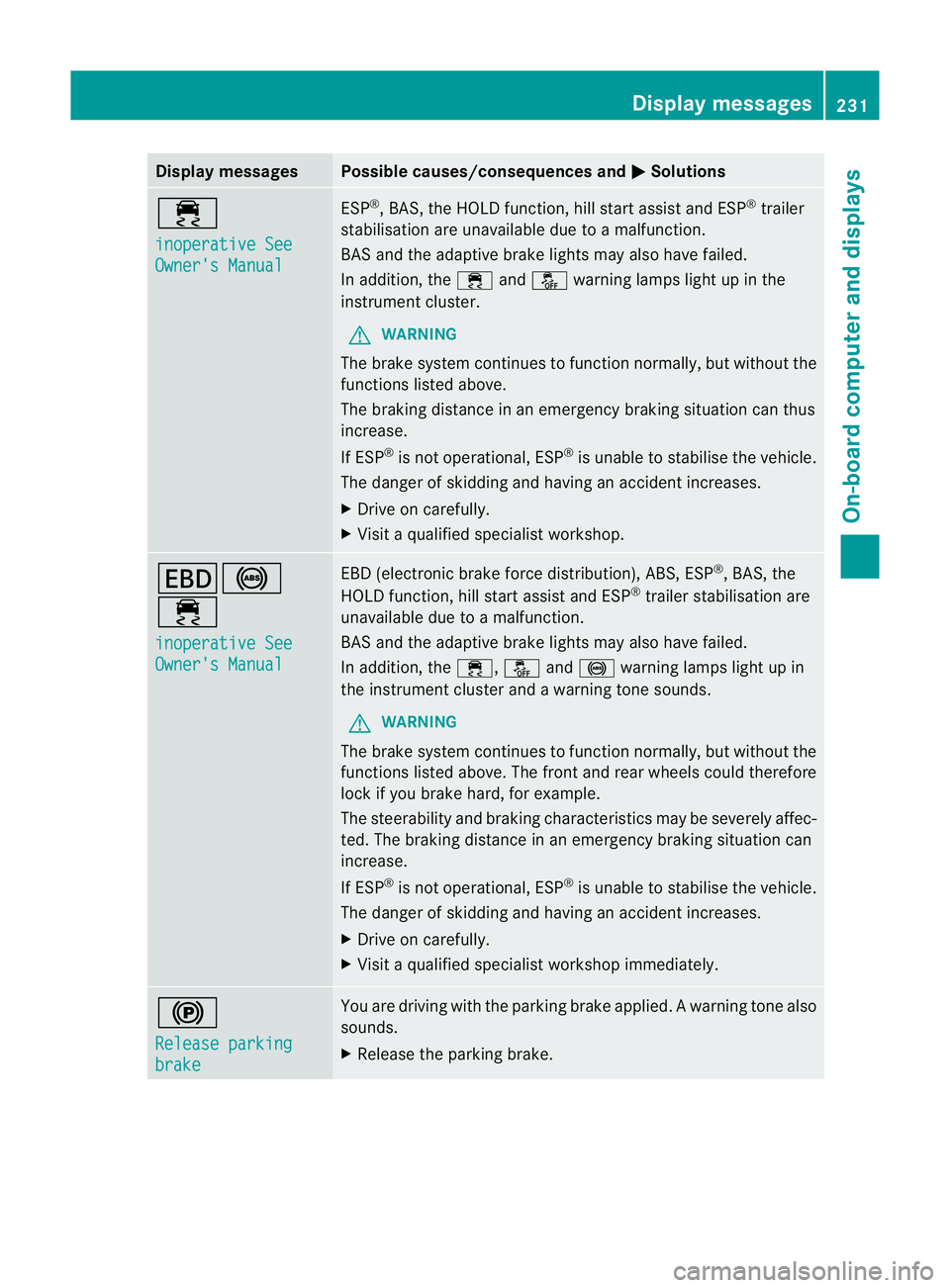
Display messages Possible causes/consequences and
M Solutions
÷
inoperative See
Owner's Manual ESP
®
, BAS, the HOLD function, hill start assist and ESP ®
trailer
stabilisation are unavailable due to a malfunction.
BA Sa nd the adaptive brake lights may also have failed.
In addition, the ÷andå warning lamps light up in the
instrument cluster.
G WARNING
The brake system continue sto function normally, but without the
functions listed above.
The braking distance in an emergency braking situation can thus
increase.
If ESP ®
is not operational, ESP ®
is unable to stabilise the vehicle.
The danger of skidding and having an accident increases.
X Drive on carefully.
X Visit a qualified specialist workshop. T!
÷
inoperative See
Owner's Manual EBD (electronic brake force distribution), ABS, ESP
®
, BAS, the
HOLD function, hill start assist and ESP ®
trailer stabilisation are
unavailable due to a malfunction.
BAS and the adaptive brake lights may also have failed.
In addition, the ÷,åand! warning lamps light up in
the instrument cluster and a warning tone sounds.
G WARNING
The brake system continues to function normally, but without the
functions listed above. The front and rear wheels could therefore
lock if you brake hard, for example.
The steerability and braking characteristics may be severely affec-
ted. The braking distance in an emergency braking situation can
increase.
If ESP ®
is not operational, ESP ®
is unable to stabilise the vehicle.
The danger of skidding and having an accident increases.
X Drive on carefully.
X Visit a qualified specialist workshop immediately. !
Release parking
brake You are driving with the parking brake applied
.Awarning tone also
sounds.
X Release the parking brake. Display messages
231On-board computer and displays Z
Page 245 of 357
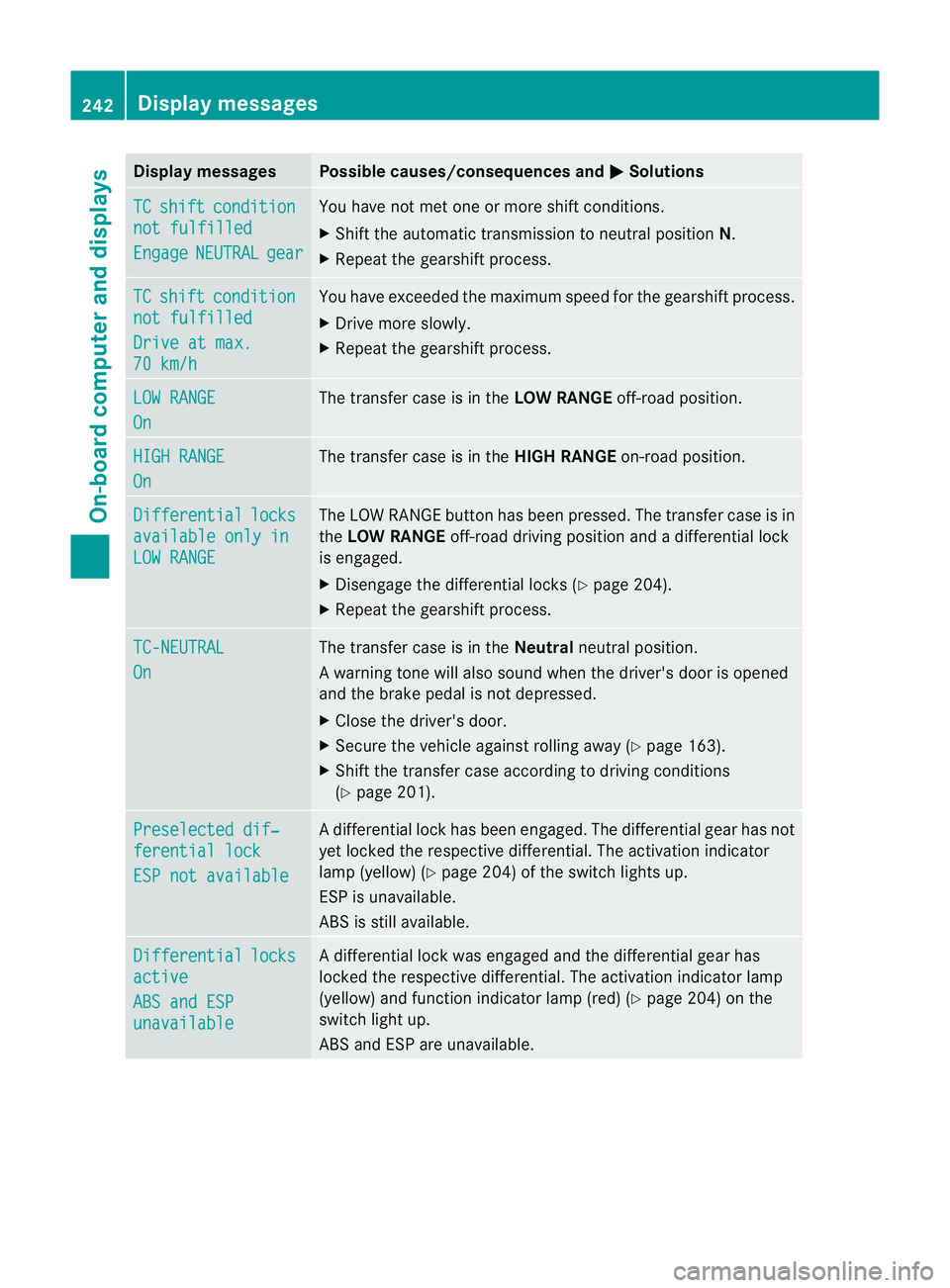
Display messages Possible causes/consequences and
M Solutions
TC shift condition
not fulfilled
Engage NEUTRAL gear You have not met one or more shift conditions.
X
Shift the automati ctransmission to neutral position N.
X Repeat the gearshift process. TC shift condition
not fulfilled
Drive at max.
70 km/h You have exceeded the maximu
mspeed for the gearshift process.
X Drive more slowly.
X Repeat the gearshift process. LOW RANGE
On The transfer case is in the
LOW RANGEoff-road position. HIGH RANGE
On The transfer case is in the
HIGH RANGEon-road position. Differential locks
available only in
LOW RANGE The LOW RANGE button has been pressed. The transfer case is in
the
LOW RANGE off-road driving position and a differential lock
is engaged.
X Disengage the differential locks (Y page 204).
X Repeat the gearshift process. TC-NEUTRAL
On The transfer case is in the
Neutralneutral position.
Aw arning tone will also sound when the driver's door is opened
and the brake pedal is no tdepressed.
X Close the driver's door.
X Secure the vehicle against rolling away (Y page 163).
X Shift the transfer case according to driving conditions
(Y page 201). Preselected dif‐
ferential lock
ESP not available Ad
ifferential lock has been engaged. The differential gear has not
yet locked the respective differential. The activation indicator
lamp (yellow) ( Ypage 204) of the switch lights up.
ESP is unavailable.
AB Sis still available. Differential locks
active
ABS and ESP
unavailable Ad
ifferential lock was engaged and the differential gear has
locked the respective differential. The activation indicator lamp
(yellow) and function indicator lamp (red) (Y page 204) on the
switch light up.
AB Sa nd ESP are unavailable. 242
Display messagesOn-board computer and displays
Page 249 of 357
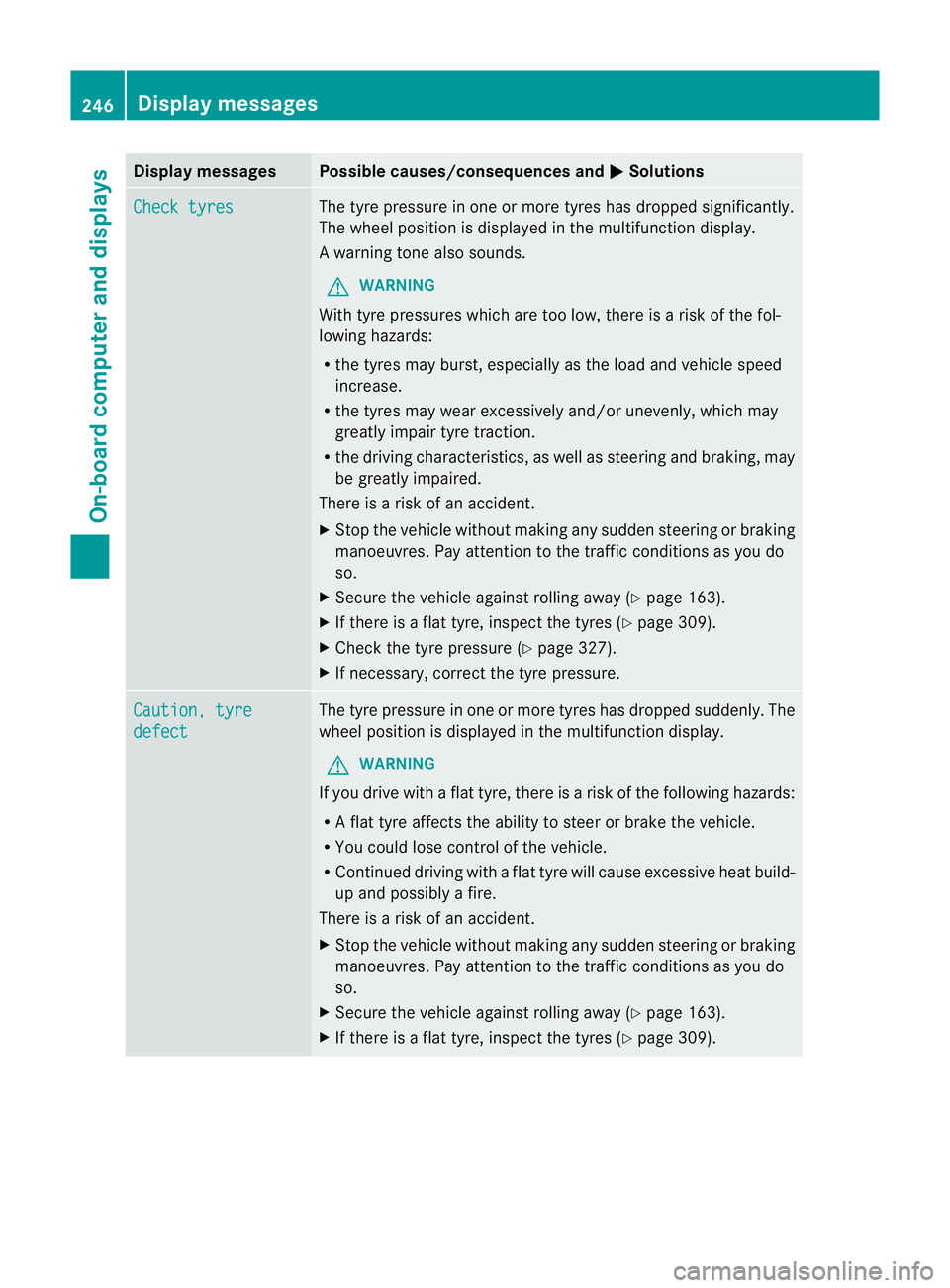
Display messages Possible causes/consequences and
M Solutions
Check tyres The tyre pressure in one or more tyres has dropped significantly.
The wheel position is displayed in the multifunction display.
Aw
arning tone also sounds.
G WARNING
With tyre pressures which are too low, there is a ris kofthe fol-
lowing hazards:
R the tyres may burst, especially as the load and vehicle speed
increase.
R the tyres may wear excessively and/or unevenly, which may
greatly impair tyre traction.
R the driving characteristics, as well as steering and braking, may
be greatly impaired.
There is a risk of an accident.
X Stop the vehicle without making any sudden steering or braking
manoeuvres. Pay attention to the traffic conditions as you do
so.
X Secure the vehicle against rolling away (Y page 163).
X If there is a flat tyre, inspect the tyres (Y page 309).
X Check the tyre pressure (Y page 327).
X If necessary, correct the tyre pressure. Caution, tyre
defect The tyre pressure in one or more tyres has dropped suddenly. The
wheel position is displayed in the multifunction display.
G WARNING
If you drive with a flat tyre, there is a risk of the following hazards:
R A flat tyre affects the ability to steer or brake the vehicle.
R You could lose control of the vehicle.
R Continued driving with a flat tyre will cause excessive heat build-
up and possibly a fire.
There is a risk of an accident.
X Stop the vehicle without making any sudden steering or braking
manoeuvres. Pay attention to the traffic conditions as you do
so.
X Secure the vehicle against rolling away (Y page 163).
X If there is a flat tyre, inspect the tyres (Y page 309).246
Display messagesOn-board computer and displays