buttons MERCEDES-BENZ G-CLASS SUV 2013 User Guide
[x] Cancel search | Manufacturer: MERCEDES-BENZ, Model Year: 2013, Model line: G-CLASS SUV, Model: MERCEDES-BENZ G-CLASS SUV 2013Pages: 364, PDF Size: 9.62 MB
Page 122 of 364
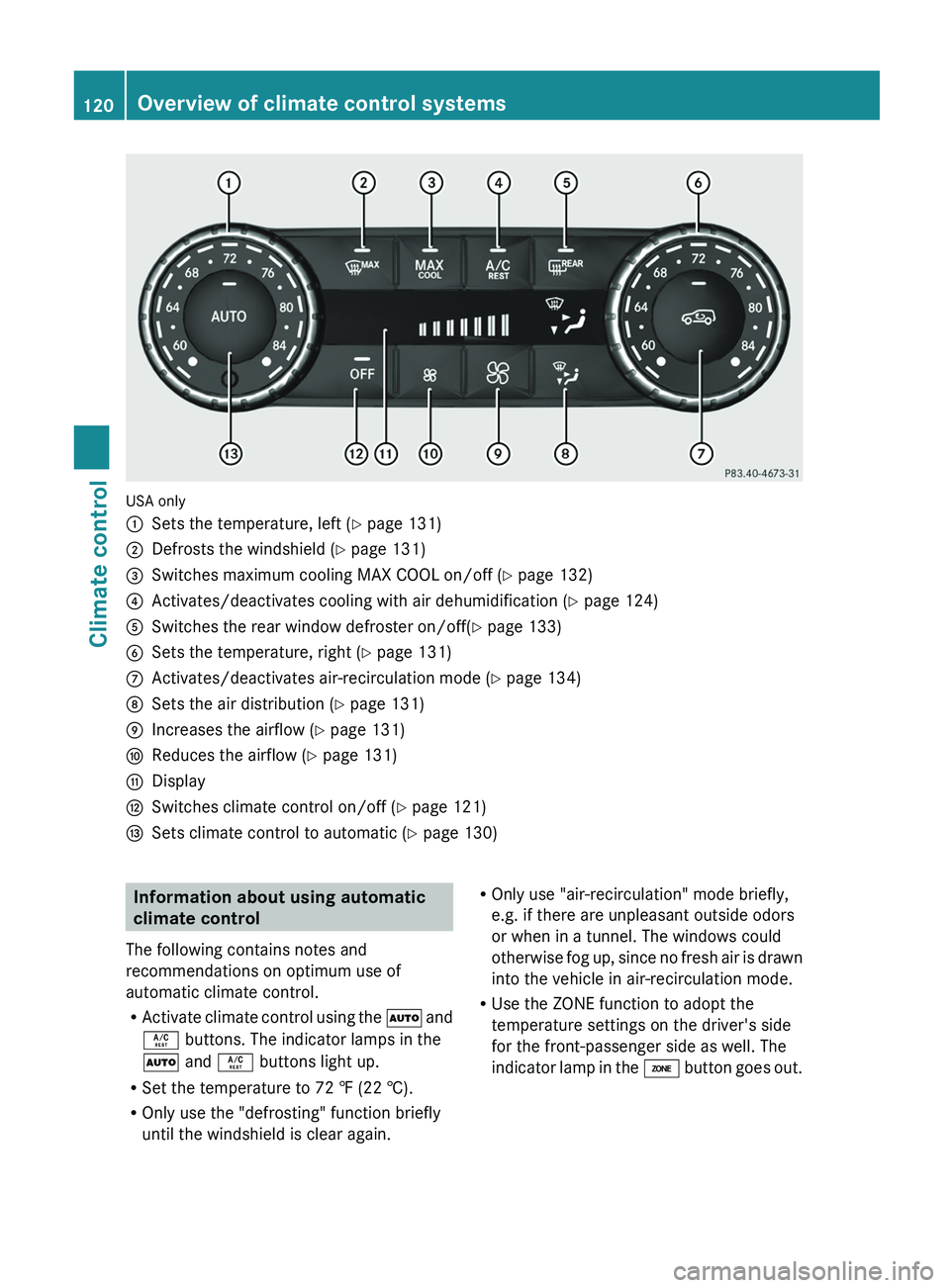
USA only
0043
Sets the temperature, left ( Y page 131)
0044 Defrosts the windshield ( Y page 131)
0087 Switches maximum cooling MAX COOL on/off ( Y page 132)
0085 Activates/deactivates cooling with air dehumidification ( Y page 124)
0083 Switches the rear window defroster on/off( Y page 133)
0084 Sets the temperature, right ( Y page 131)
006B Activates/deactivates air-recirculation mode (Y page 134)
006C Sets the air distribution (Y page 131)
006D Increases the airflow ( Y page 131)
006E Reduces the airflow ( Y page 131)
006F Display
0070 Switches climate control on/off ( Y page 121)
0071 Sets climate control to automatic (Y page 130) Information about using automatic
climate control
The following contains notes and
recommendations on optimum use of
automatic climate control.
R Activate climate control using
the 0058 and
0056 buttons. The indicator lamps in the
0058 and 0056 buttons light up.
R Set the temperature to 72 ‡ (22 †).
R Only use the "defrosting" function briefly
until the windshield is clear again. R
Only use "air-recirculation" mode briefly,
e.g. if there are unpleasant outside odors
or when in a tunnel. The windows could
otherwise fog up, since
no fresh air is drawn
into the vehicle in air-recirculation mode.
R Use the ZONE function to adopt the
temperature settings on the driver's side
for the front-passenger side as well. The
indicator lamp in the 00D6 button goes out.120
Overview of climate control systems
Climate control
Page 213 of 364
X
To activate the on-board computer: turn
the SmartKey to position 1(Y
page 139) in
the ignition lock.
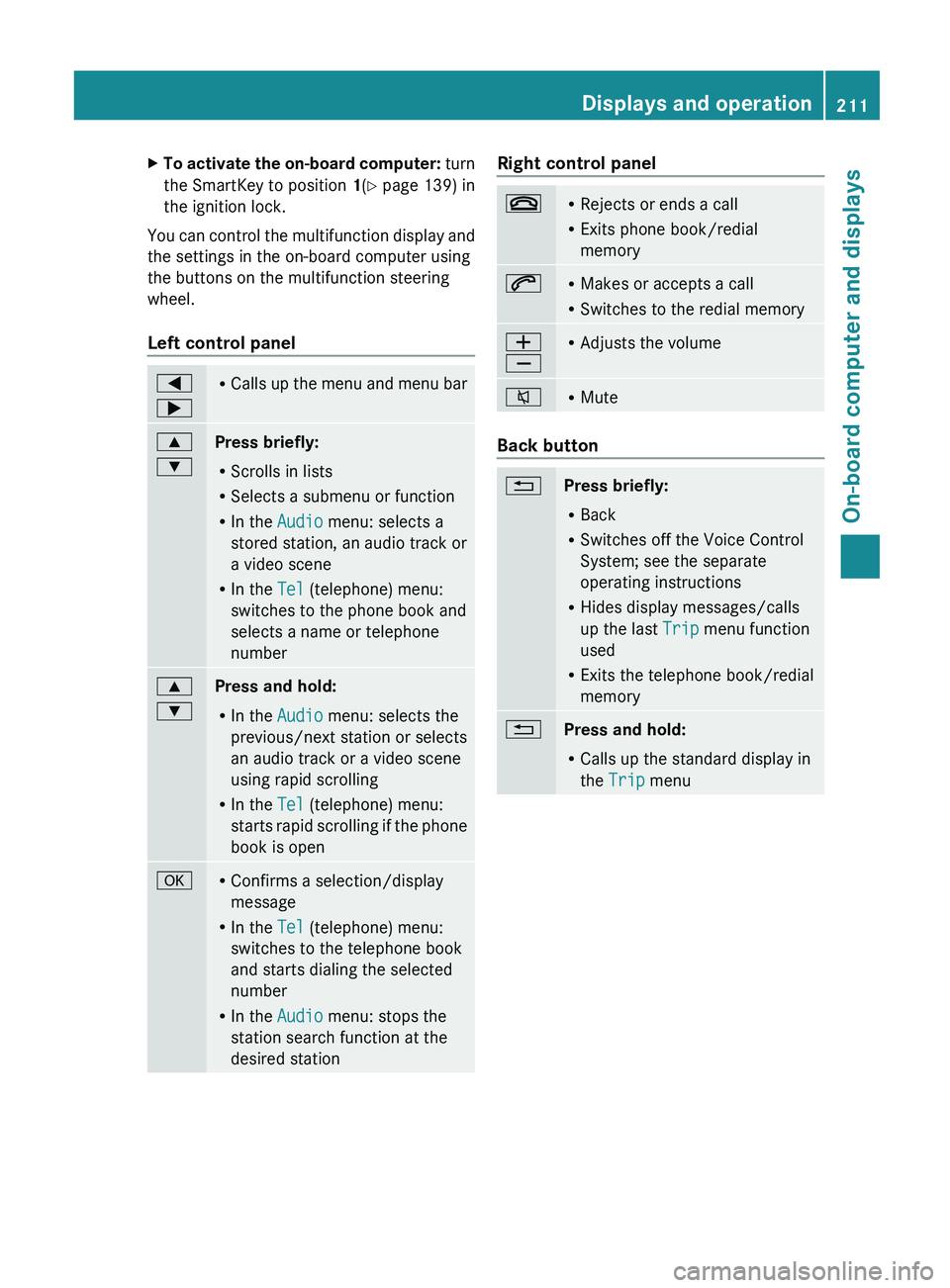
You can control the multifunction display and
the settings in the on-board computer using
the buttons on the multifunction steering
wheel.
Left control panel 0059
0065 R
Calls up the menu
and menu bar0063
0064
Press briefly:
R
Scrolls in lists
R Selects a submenu or function
R In the Audio menu: selects a
stored station, an audio track or
a video scene
R In the Tel (telephone) menu:
switches to the phone book and
selects a name or telephone
number 0063
0064
Press and hold:
R
In the Audio menu: selects the
previous/next station or selects
an audio track or a video scene
using rapid scrolling
R In the Tel (telephone) menu:
starts rapid scrolling
if
the phone
book is open 0076 R
Confirms a selection/display
message
R In the Tel (telephone) menu:
switches to the telephone book
and starts dialing the selected
number
R In the Audio menu: stops the
station search function at the
desired station Right control panel
007F R
Rejects or ends a call
R Exits phone book/redial
memory 006A R
Makes or accepts a call
R Switches to the redial memory 0081
0082 R
Adjusts the volume 006C R
Mute Back button
0041
Press briefly:
R
Back
R Switches off the Voice Control
System; see the separate
operating instructions
R Hides display messages/calls
up the last Trip menu function
used
R Exits the telephone book/redial
memory 0041
Press and hold:
R
Calls up the standard display in
the Trip menu Displays and operation
211
On-board computer and displays Z
Page 223 of 364
Activating/deactivating the acoustic
locking verification signal
If you switch
on
the Acoustic Lock function,
an acoustic signal sounds when you lock the
vehicle.
X Press the 0059 or 0065 button on the
steering wheel to select the Sett. menu.
X Press 0064 or 0063 to select the Vehicle
submenu.
X Press 0076 to confirm.
X Press the 0064 or 0063 button
to select the
Acoustic Lock function.
If the Acoustic Lock function is activated,
the 0037 symbol in the multifunction
display lights up red.
X Press the 0076 button to save the setting.
Convenience Activating/deactivating the EASY-
ENTRY/EXIT feature
G
WARNING
You must make sure no one can become
trapped or injured by the moving steering
wheel when the easy-entry/exit feature is
activated.
To stop steering wheel movement, move
steering wheel adjustment lever
or press one
of the memory position buttons.
Do not leave children unattended in the
vehicle, or with access to an unlocked vehicle.
Children could open the driver's door and
unintentionally activate the easy-entry/exit
feature, which could result in an accident
and/or serious personal injury.
X Press the 0059 or 0065 button on the
steering wheel to select the Sett. menu.
X Press the 0064
or 0063
button
to select the
Convenience submenu.
X Press 0076 to confirm. X
Press 0064 or 0063 to select the Easy
Entry/Exit: function.
If the Easy Entry/Exit function is
activated, the vehicle steering wheel is
displayed in red in the multifunction
display.
X Press the 0076 button to save the setting.
Further information on the EASY-ENTRY/EXIT
feature ( Y page 92).
Switching the fold-in mirrors when
locking feature on/off
When you activate the Auto. Mirror
Folding function, the exterior mirrors are
folded in when the vehicle is locked. If you
unlock the vehicle and then open a door, the
exterior mirrors fold out again.
X Press the 0059 or 0065 button on the
steering wheel to select the Sett. menu.
X Press the 0064 or
0063 button
to select the
Convenience submenu.
X Press 0076 to confirm.
X Press 0064 or 0063 to select the Auto.
Mirror Folding function.
If the Auto. Mirror Folding function is
activated, the vehicle's exterior mirror is
displayed in red in the multifunction
display.
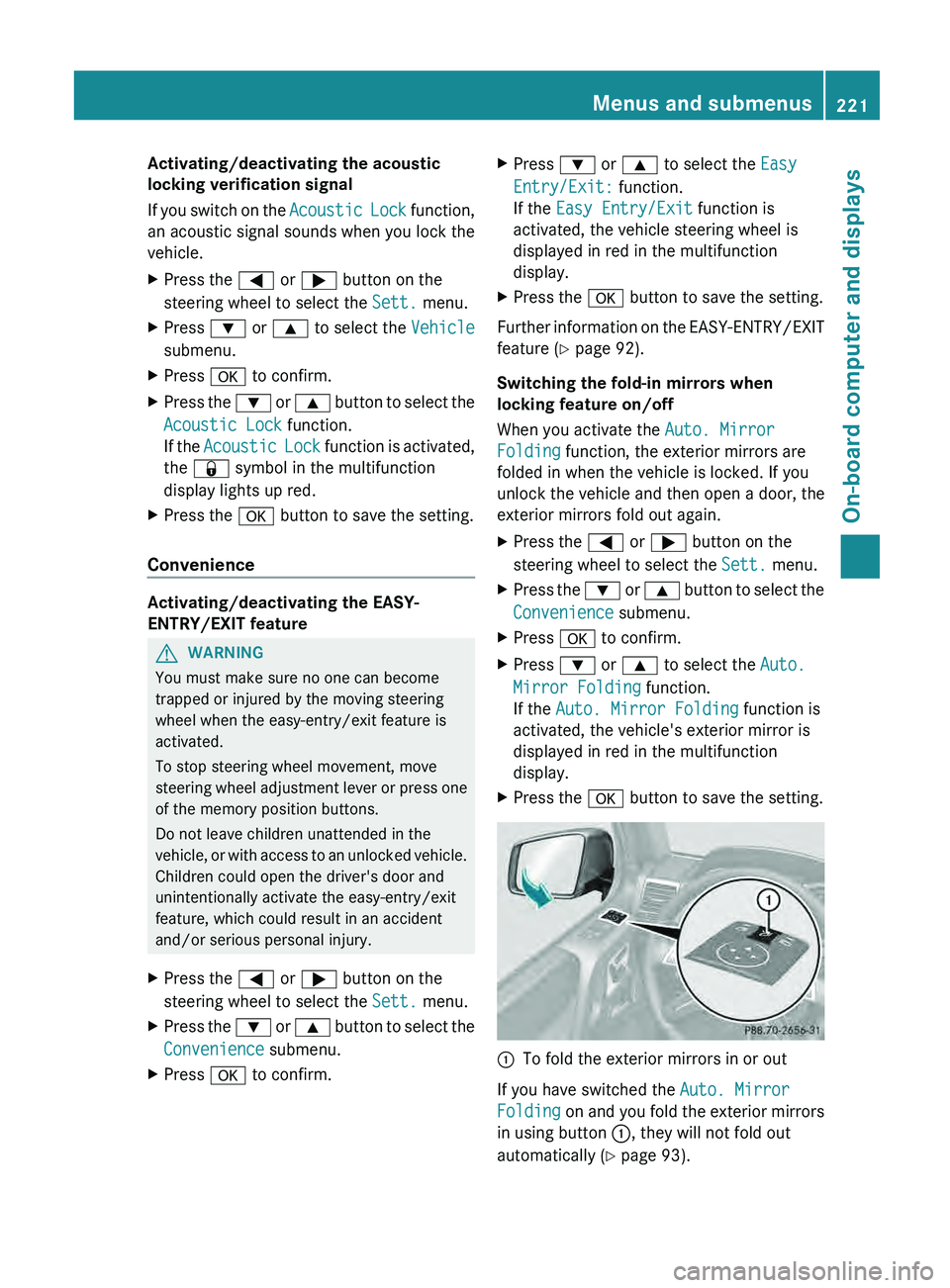
X Press the 0076 button to save the setting. 0043
To fold the exterior mirrors in or out
If you have switched the Auto. Mirror
Folding on and you
fold the exterior mirrors
in using button 0043, they will not fold out
automatically ( Y page 93). Menus and submenus
221
On-board computer and displays Z
Page 283 of 364
i
Certain garage door drives are
incompatible with the integrated garage
door opener. If you have difficulty
programming the integrated garage door
opener, contact an authorized Mercedes-
Benz Center. You can also contact the
following service hotlines:
R USA: Mercedes-Benz Customer
Assistance Center at
1-800-FOR-MERCedes
R Canada: Customer Service at
1-800-387-0100
i USA only:
This device complies with Part 15 of the
FCC Rules. Operation is subject to the
following two conditions:
1. This device may not cause harmful
interference, and
2. this device
must accept any interference
received, including interference that may
cause undesired operation.
Any unauthorized modification to this
device could void the user's authority to
operate the equipment.
i Canada only:
This device complies with the RSS-210
Rules of Industry Canada. Operation is
subject to the following two conditions:
1. This device may not cause harmful
interference, and
2. this device must accept any interference
received, including interference that may
cause undesired operation of the device.
Any unauthorized modification to this
device could void the user's authority to
operate the equipment.
Programming the remote control Programming
G
WARNING
Only press the button on the integrated
garage door opener if
there are no persons or
objects present within the sweep of the garage door. Persons could otherwise be
injured as the door moves.
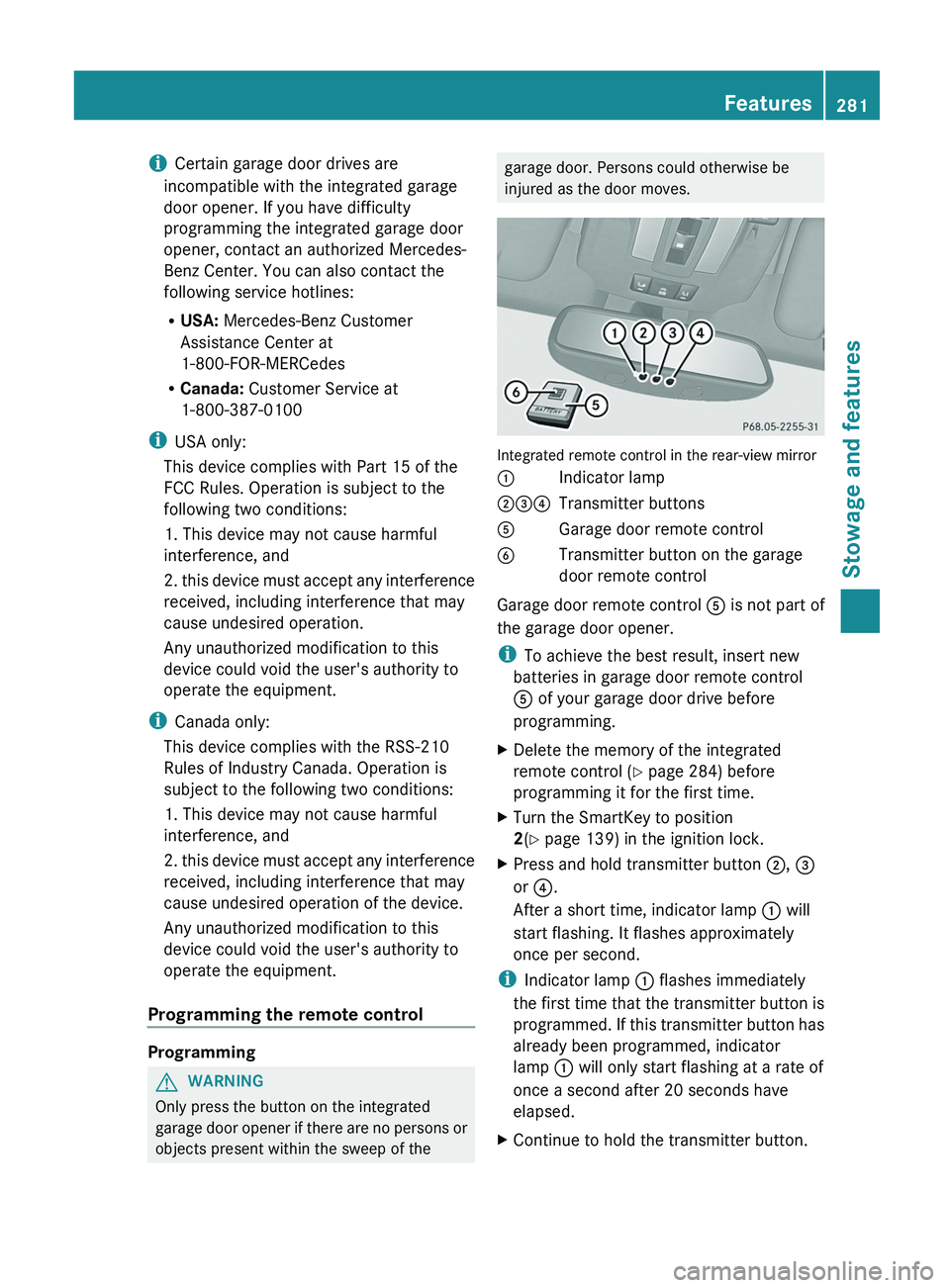
Integrated remote control in the rear-view mirror
0043
Indicator lamp
004400870085 Transmitter buttons
0083 Garage door remote control
0084 Transmitter button on the garage
door remote control
Garage door remote control 0083 is not part of
the garage door opener.
i To achieve the best result, insert new
batteries in garage door remote control
0083 of your garage door drive before
programming.
X Delete the memory of the integrated
remote control (Y
page 284) before
programming it for the first time.
X Turn the SmartKey to position
2
(Y page 139) in the ignition lock.
X Press and hold transmitter button 0044, 0087
or 0085.
After a short time, indicator lamp 0043 will
start flashing. It flashes approximately
once per second.
i Indicator lamp 0043 flashes immediately
the first time
that
the transmitter button is
programmed. If this transmitter button has
already been programmed, indicator
lamp 0043 will only start flashing at a rate of
once a second after 20 seconds have
elapsed.
X Continue to hold the transmitter button. Features
281
Stowage and features Z
Page 284 of 364
X
Point transmitter button 0083 of garage door
remote control 0084
towards the transmitter
buttons on the rear-view mirror at a
distance of 2 to 12 inches (5 to 30 cm).
i The distance between garage door
remote control 0083 and the integrated
garage door opener
depends
on the system
of the garage door drive. Several attempts
might be necessary. You should test every
position for at least 20 seconds before
trying another position.
X Keep transmitter button 0084 on garage door
remote control 0083
pressed until indicator
lamp 0043 starts to flash rapidly.
The programming has been successful if
indicator lamp 0043 flashes rapidly.
X Release transmitter buttons 0044, 0087 or 0085
on the integrated remote control and
transmitter button 0084 on the garage door
remote control.
If indicator lamp 0043 goes out after
approximately 20 seconds and has not
flashed rapidly:
X Release transmitter buttons 0044 ,
0087 or 0085
on the integrated remote control and
transmitter button 0084 on the garage door
remote control.
X Repeat the procedure for the other
transmitter buttons. When doing so, vary
the distance between the garage door's
remote control and
the
transmitter buttons
in the rear-view mirror.
i If the garage door system works with a
rolling code, you must synchronize the
remote control integrated in the rear-view
mirror with the garage door system
receiver after programming.
You will find further information in the
garage door opening system's operating
instructions, e.g. the sections on
"Synchronizing the transmitter" or
"Registering a new transmitter". You can
also call the hotline mentioned above. Synchronizing the rolling code
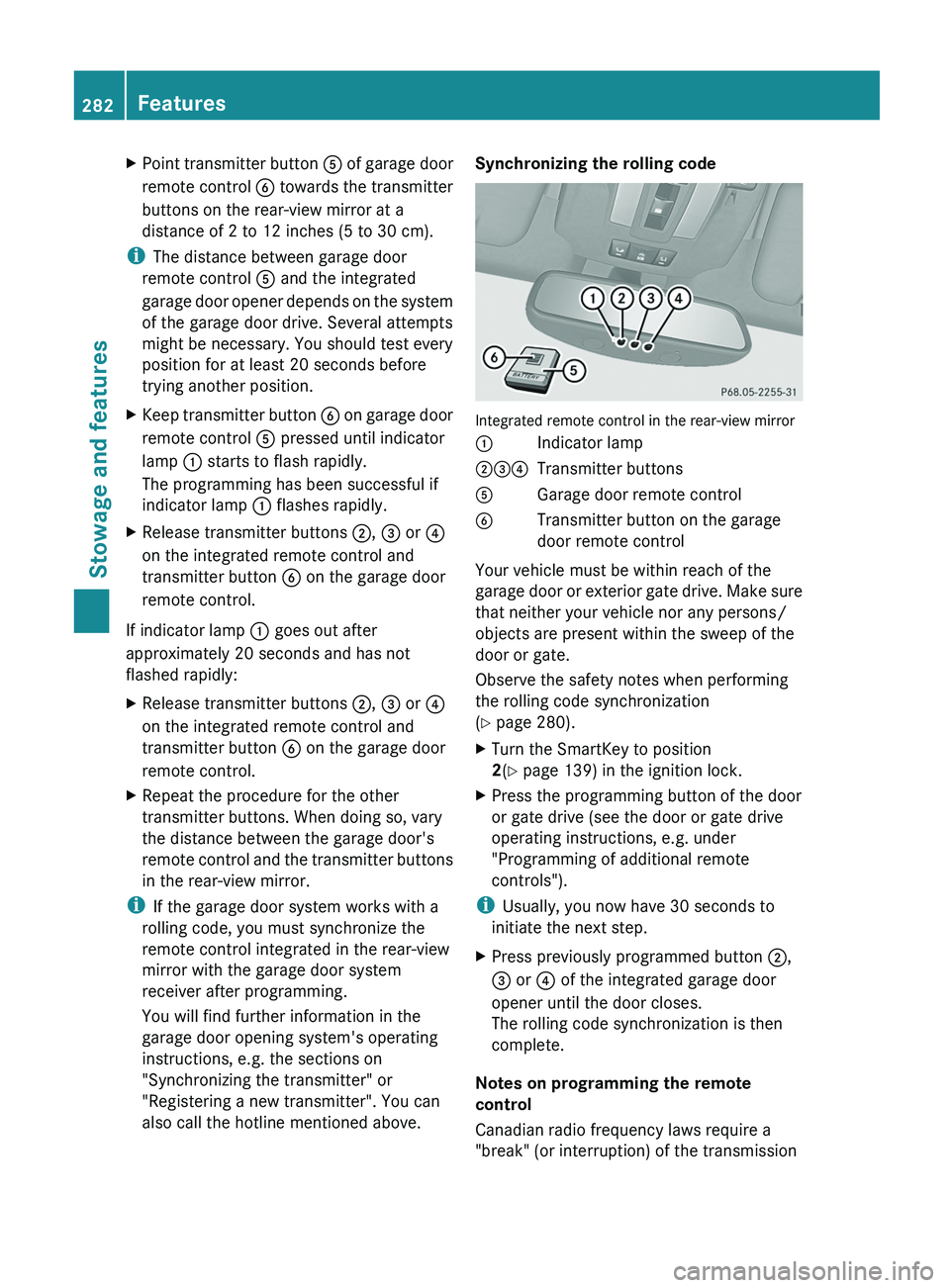
Integrated remote control in the rear-view mirror
0043
Indicator lamp
004400870085 Transmitter buttons
0083 Garage door remote control
0084 Transmitter button on the garage
door remote control
Your vehicle must be within reach of the
garage door or
exterior
gate drive. Make sure
that neither your vehicle nor any persons/
objects are present within the sweep of the
door or gate.
Observe the safety notes when performing
the rolling code synchronization
(Y page 280).
X Turn the SmartKey to position
2(Y page 139) in the ignition lock.
X Press the programming button of the door
or gate drive (see the door or gate drive
operating instructions, e.g. under
"Programming of additional remote
controls").
i Usually, you now have 30 seconds to
initiate the next step.
X Press previously programmed button 0044,
0087 or
0085 of the integrated garage door
opener until the door closes.
The rolling code synchronization is then
complete.
Notes on programming the remote
control
Canadian radio frequency laws require a
"break" (or interruption) of the transmission 282
Features
Stowage and features
Page 285 of 364
signals after broadcasting for a few seconds.
Therefore, these signals may not last long
enough for the integrated remote control to
recognize the signal during programming.
Comparable with Canadian law, American
garage door openers also have a built-in
"interruption".
If you live in Canada or have difficulties
programming the garage door opener
(regardless of where
you
live) when using the
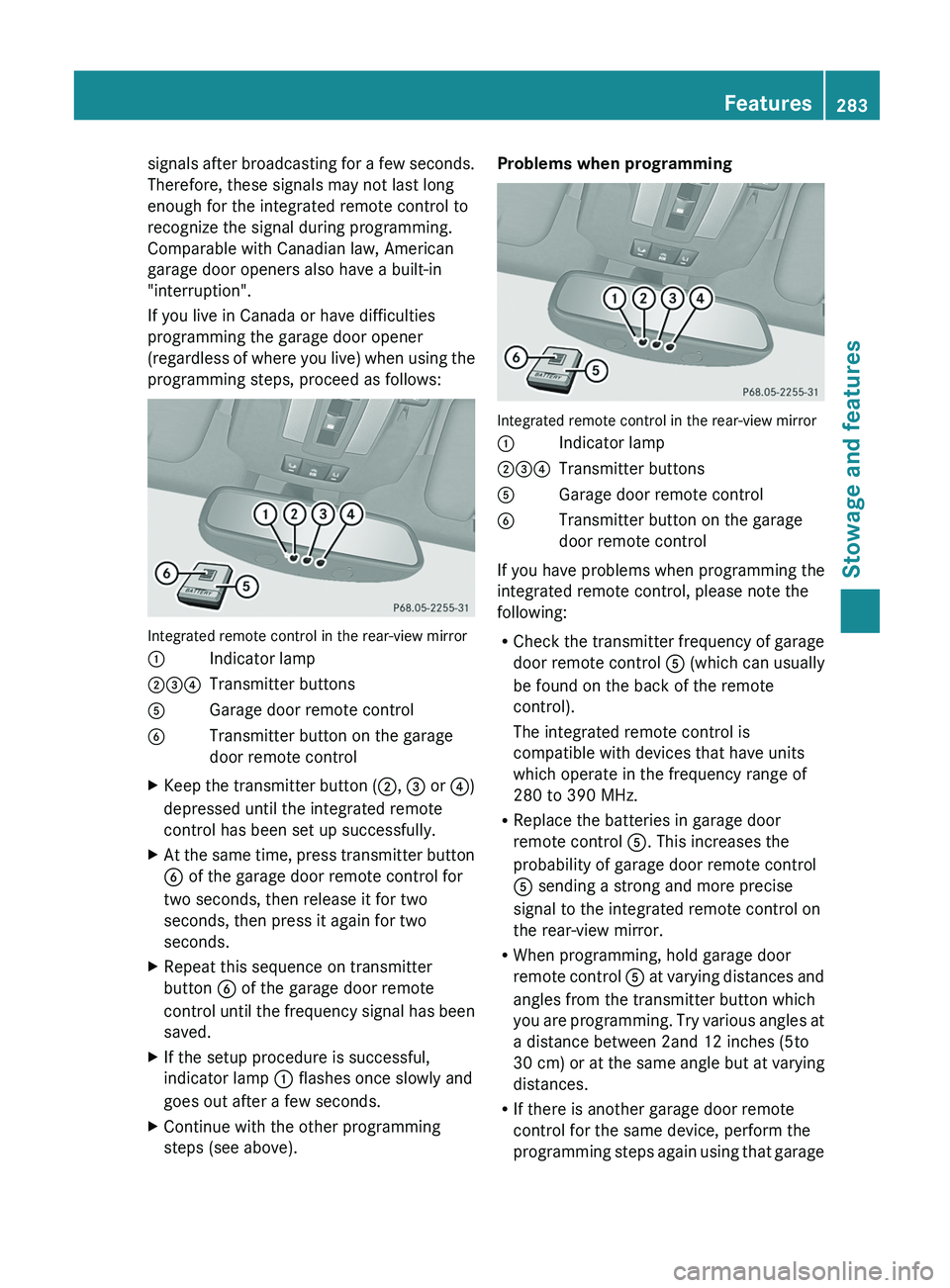
programming steps, proceed as follows: Integrated remote control in the rear-view mirror
0043
Indicator lamp
004400870085 Transmitter buttons
0083 Garage door remote control
0084 Transmitter button on the garage
door remote control
X Keep the transmitter button (0044, 0087 or
0085)
depressed until the integrated remote
control has been set up successfully.
X At the
same time, press transmitter button
0084 of the garage door remote control for
two seconds, then release it for two
seconds, then press it again for two
seconds.
X Repeat this sequence on transmitter
button 0084 of the garage door remote
control until the
frequency
signal has been
saved.
X If the setup procedure is successful,
indicator lamp 0043 flashes once slowly and
goes out after a few seconds.
X Continue with the other programming
steps (see above). Problems when programming
Integrated remote control in the rear-view mirror
0043
Indicator lamp
004400870085 Transmitter buttons
0083 Garage door remote control
0084 Transmitter button on the garage
door remote control
If you have problems when programming the
integrated remote control, please note the
following:
R Check the transmitter
frequency
of garage
door remote control 0083 (which can usually
be found on the back of the remote
control).
The integrated remote control is
compatible with devices that have units
which operate in the frequency range of
280 to 390 MHz.
R Replace the batteries in garage door
remote control 0083. This increases the
probability of garage door remote control
0083 sending a strong and more precise
signal to the integrated remote control on
the rear-view mirror.
R When programming, hold garage door
remote control 0083 at varying distances and
angles from the transmitter button which
you are programming. Try various angles at
a distance between 2and 12 inches (5to
30 cm) or at the same angle but at varying
distances.
R If there is another garage door remote
control for the same device, perform the
programming steps again using that garage Features
283Stowage and features Z
Page 286 of 364
door opener. Before performing these
steps, make sure that new batteries have
been inserted in the garage door remote
control.
R Align the antenna cable
of the garage door
opener unit. This can improve signal
reception/transmission.
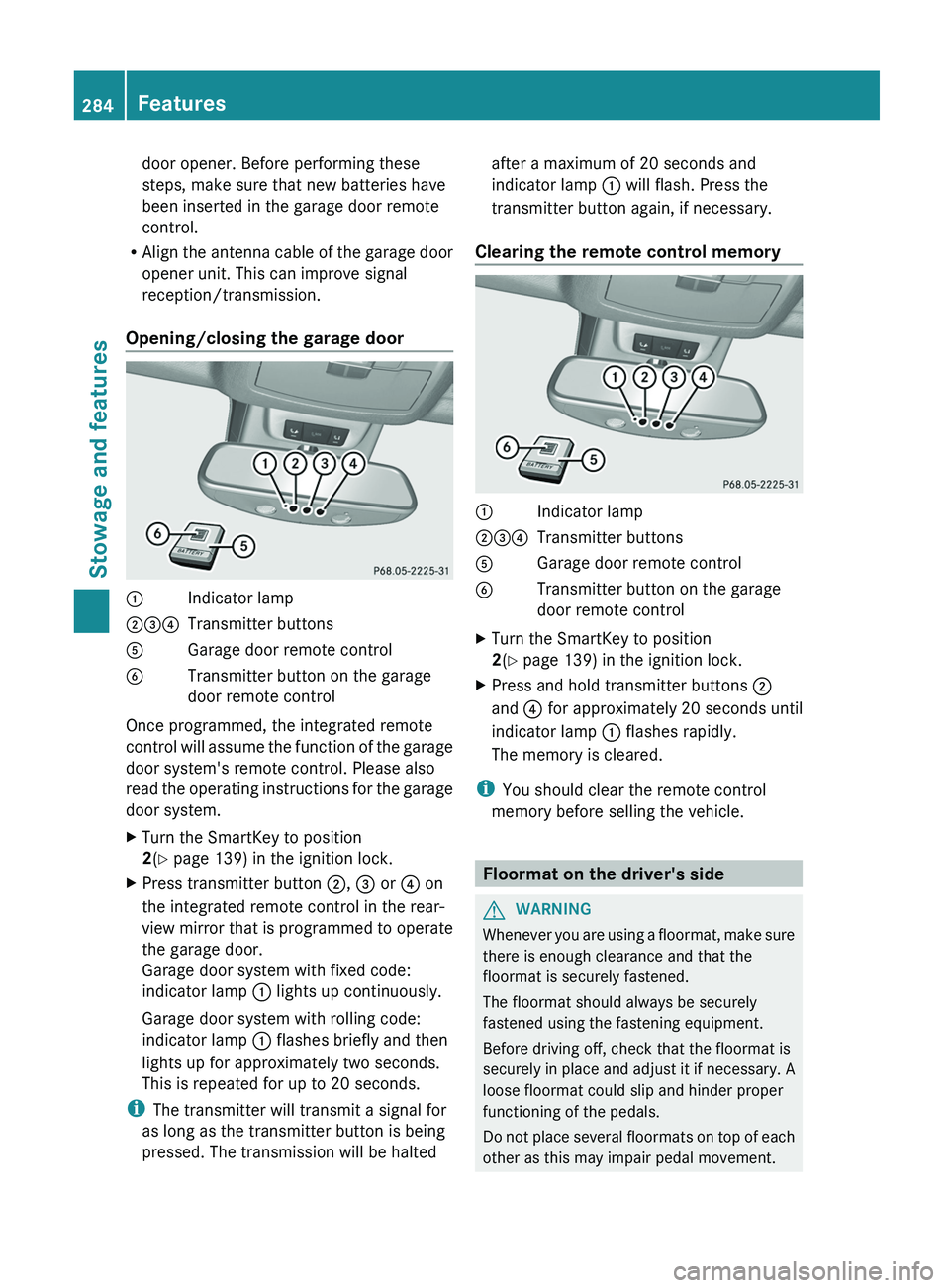
Opening/closing the garage door 0043
Indicator lamp
004400870085 Transmitter buttons
0083 Garage door remote control
0084 Transmitter button on the garage
door remote control
Once programmed, the integrated remote
control will assume
the
function of the garage
door system's remote control. Please also
read the operating instructions for the garage
door system.
X Turn the SmartKey to position
2(Y page 139) in the ignition lock.
X Press transmitter button 0044, 0087 or 0085 on
the integrated remote control in the rear-
view mirror that is
programmed to operate
the garage door.
Garage door system with fixed code:
indicator lamp 0043 lights up continuously.
Garage door system with rolling code:
indicator lamp 0043 flashes briefly and then
lights up for approximately two seconds.
This is repeated for up to 20 seconds.
i The transmitter will transmit a signal for
as long as the transmitter button is being
pressed. The transmission will be halted after a maximum of 20 seconds and
indicator lamp
0043 will flash. Press the
transmitter button again, if necessary.
Clearing the remote control memory 0043
Indicator lamp
004400870085 Transmitter buttons
0083 Garage door remote control
0084 Transmitter button on the garage
door remote control
X Turn the SmartKey to position
2(Y page 139) in the ignition lock.
X Press and hold transmitter buttons 0044
and 0085 for approximately 20 seconds until
indicator lamp 0043 flashes rapidly.
The memory is cleared.
i You should clear the remote control
memory before selling the vehicle. Floormat on the driver's side
G
WARNING
Whenever you are using a floormat, make sure
there is enough clearance and that the
floormat is securely fastened.
The floormat should always be securely
fastened using the fastening equipment.
Before driving off, check that the floormat is
securely in place and
adjust it if necessary. A
loose floormat could slip and hinder proper
functioning of the pedals.
Do not place several floormats on top of each
other as this may impair pedal movement. 284
Features
Stowage and features
Page 295 of 364
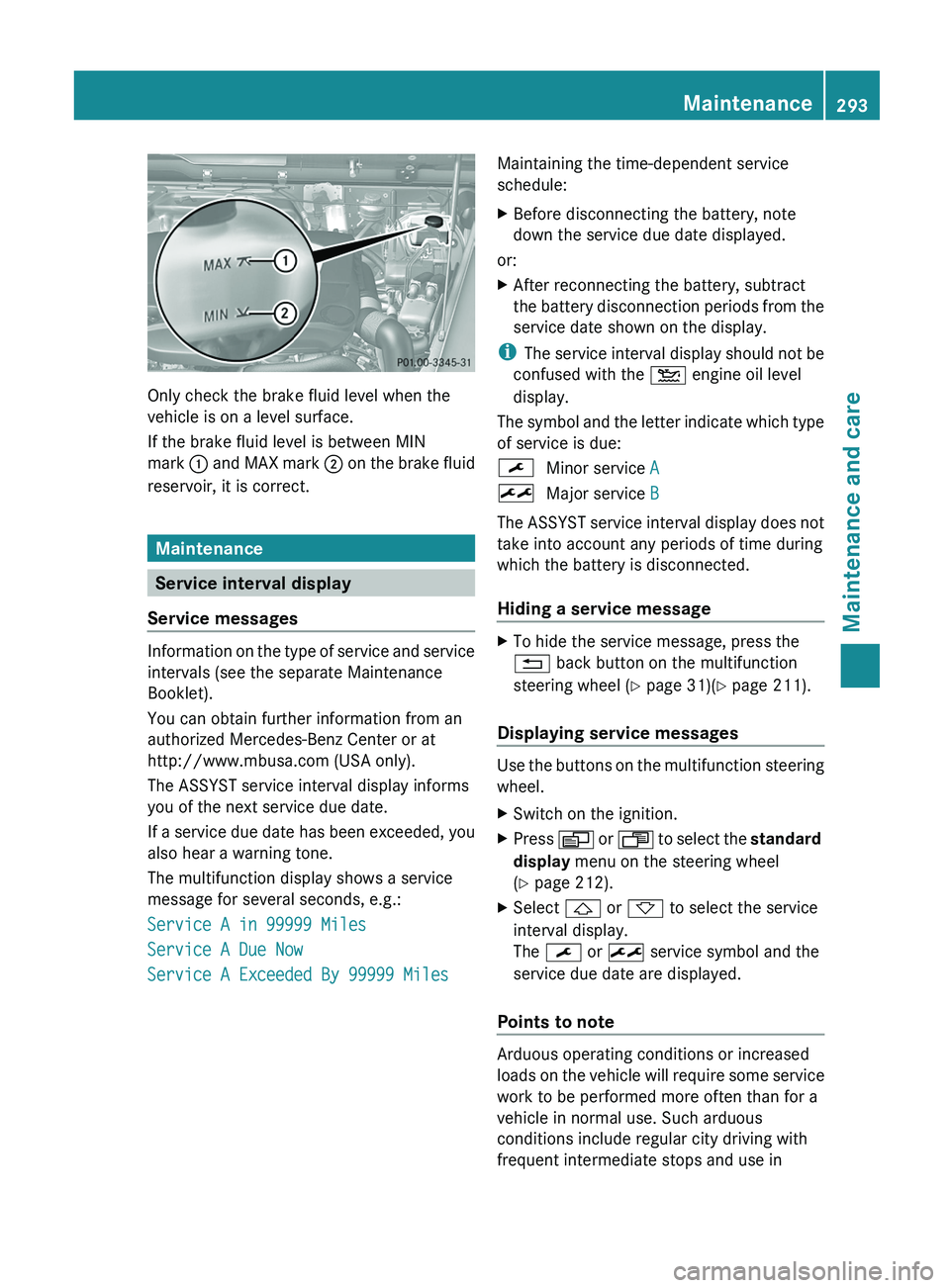
Only check the brake fluid level when the
vehicle is on a level surface.
If the brake fluid level is between MIN
mark
0043 and MAX mark 0044
on the brake fluid
reservoir, it is correct. Maintenance
Service interval display
Service messages Information on the type of service and service
intervals (see the separate Maintenance
Booklet).
You can obtain further information from an
authorized Mercedes-Benz Center or at
http://www.mbusa.com (USA only).
The ASSYST service interval display informs
you of the next service due date.
If a service
due
date has been exceeded, you
also hear a warning tone.
The multifunction display shows a service
message for several seconds, e.g.:
Service A in 99999 Miles
Service A Due Now
Service A Exceeded By 99999 Miles Maintaining the time-dependent service
schedule:
X
Before disconnecting the battery, note
down the service due date displayed.
or:
X After reconnecting the battery, subtract
the battery disconnection periods
from the
service date shown on the display.
i The service interval display
should not be
confused with the 00B2 engine oil level
display.
The symbol and the letter indicate which type
of service is due:
0099 Minor service A
009B Major service B
The ASSYST service interval display does not
take into account any periods of time during
which the battery is disconnected.
Hiding a service message X
To hide the service message, press the
0041 back button on the multifunction
steering wheel ( Y page 31)(Y page 211).
Displaying service messages Use the buttons on the multifunction steering
wheel.
X
Switch on the ignition.
X Press 0080 or 007F to
select the standard
display menu on the steering wheel
(Y page 212).
X Select 0041 or 0068 to select the service
interval display.
The 0099 or 009B service symbol and the
service due date are displayed.
Points to note Arduous operating conditions or increased
loads on the
vehicle
will require some service
work to be performed more often than for a
vehicle in normal use. Such arduous
conditions include regular city driving with
frequent intermediate stops and use in Maintenance
293
Maintenance and care Z
Page 297 of 364
Exterior care
Automatic car wash G
WARNING
Braking efficiency is reduced after washing
the vehicle. This could
cause an accident. For
this reason, you must drive particularly
carefully after washing the vehicle until the
brakes have dried.
! Never clean your vehicle in a Touchless
Automatic Car Wash as these use special
cleaning agents. These cleaning agents can
damage the paintwork or plastic parts.
! Make sure that the automatic car wash is
suitable for the size of the vehicle. Fold in
the exterior mirrors before the vehicle is
washed. The exterior mirrors could
otherwise be damaged.
! Make sure that the automatic
transmission is in position N when washing
your vehicle in a tow-through car wash. The
vehicle could be damaged if the
transmission is in another position.
! Make sure that:
R the side windows and sliding sunroof are
closed completely.
R the blower for the ventilation/heating is
switched off (airflow control is turned to
position 0/the 0058 and 0056 buttons
are switched off).
R the windshield wiper switch is at position
0.
The vehicle could otherwise be damaged.
You can wash the vehicle in an automatic car
wash from the very start.
If the vehicle is very dirty, pre-wash it before
cleaning it in an automatic car wash.
After using an automatic car wash, wipe off
wax from the windshield and the wiper
blades. This will prevent smears and reduce
wiping noises caused by residue on the
windshield. Washing by hand In some countries, washing by hand is only
allowed at specially equipped washing bays.
Observe the legal requirements in all
countries concerned.
When using the vehicle in winter, remove all
traces of road salt deposits carefully and as
soon as possible.
When washing the vehicle underbody, also
clean the inside of the wheels.
X
Do not use hot water and do not wash the
vehicle in direct sunlight.
X Use a soft sponge to clean.
X Use a mild cleaning agent, such as a car
shampoo approved by Mercedes-Benz.
X Thoroughly hose down the vehicle with a
gentle jet of water.
X Do not point the water jet directly towards
the air inlets.
X Use plenty of water and rinse out the
sponge frequently.
X Rinse the vehicle with clean water and dry
thoroughly with a chamois.
X Do not let the cleaning agent dry on the
paintwork.
Power washers G
WARNING
Do not use power washers with circular jet
nozzles (concentrated-power jets) to clean
your vehicle, especially for
cleaning tires. You
could otherwise damage the tires and cause
an accident.
! Always maintain a distance of at least
11.8 in (30 cm) between the vehicle and the
power washer nozzle. Information about
the correct distance is available from the
equipment manufacturer.
Move the power washer nozzle around
when cleaning your vehicle. Care
295
Maintenance and care Z