ignition MERCEDES-BENZ G-CLASS SUV 2013 Manual PDF
[x] Cancel search | Manufacturer: MERCEDES-BENZ, Model Year: 2013, Model line: G-CLASS SUV, Model: MERCEDES-BENZ G-CLASS SUV 2013Pages: 364, PDF Size: 9.62 MB
Page 222 of 364
X
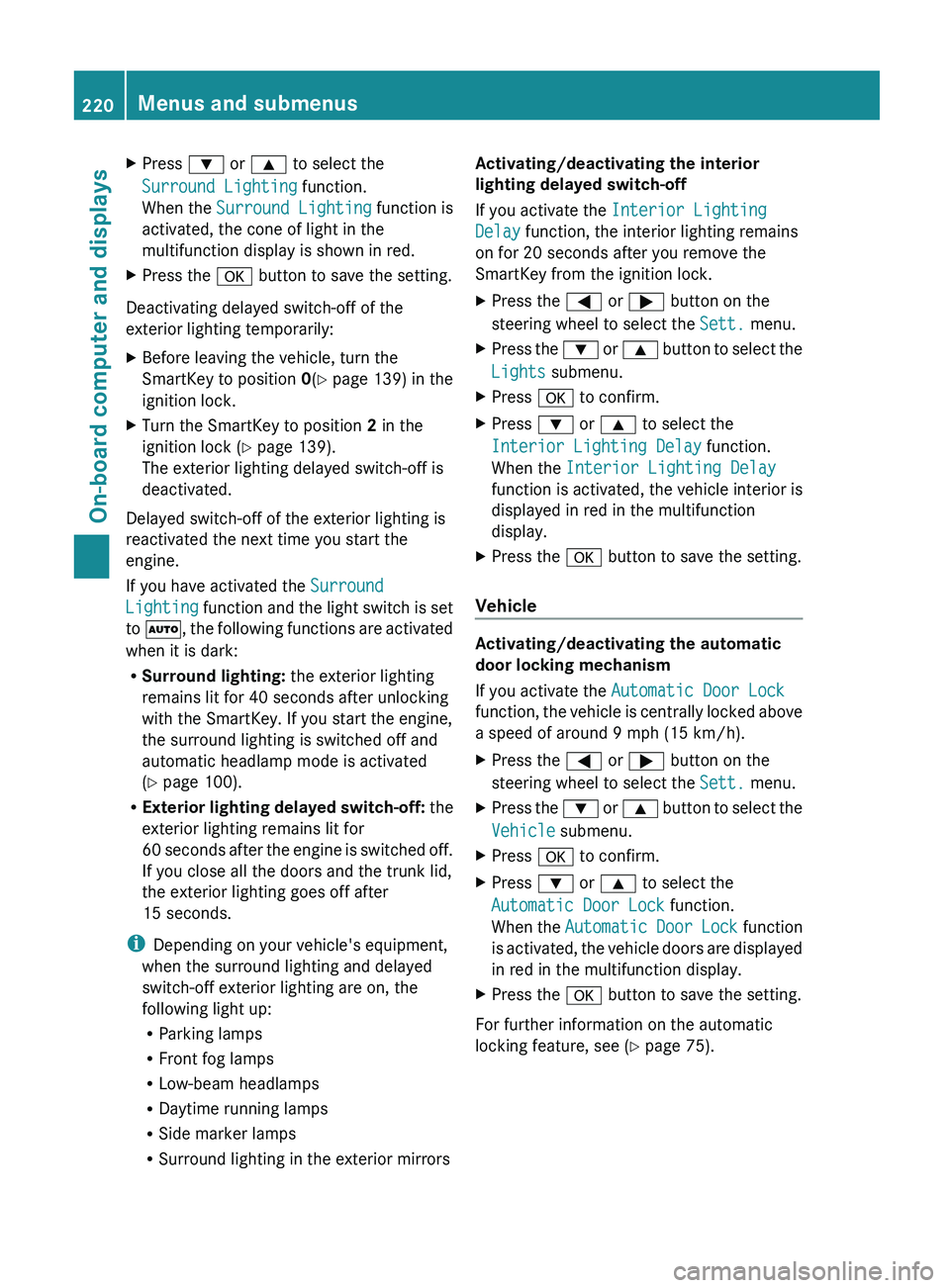
Press 0064 or 0063 to select the
Surround Lighting function.
When the Surround Lighting function is
activated, the cone of light in the
multifunction display is shown in red.
X Press the 0076 button to save the setting.
Deactivating delayed switch-off of the
exterior lighting temporarily:
X Before leaving the vehicle, turn the
SmartKey to position 0(Y page 139) in the
ignition lock.
X Turn the SmartKey to position 2 in the
ignition lock ( Y
page 139).
The exterior lighting delayed switch-off is
deactivated.
Delayed switch-off of the exterior lighting is
reactivated the next time you start the
engine.
If you have activated the Surround
Lighting function and
the
light switch is set
to 0058, the following functions are activated
when it is dark:
R Surround lighting: the exterior lighting
remains lit for 40 seconds after unlocking
with the SmartKey. If you start the engine,
the surround lighting is switched off and
automatic headlamp mode is activated
(Y page 100).
R Exterior lighting delayed switch-off: the
exterior lighting remains lit for
60 seconds after the engine is switched off.
If you close all the doors and the trunk lid,
the exterior lighting goes off after
15 seconds.
i Depending on your vehicle's equipment,
when the surround lighting and delayed
switch-off exterior lighting are on, the
following light up:
R Parking lamps
R Front fog lamps
R Low-beam headlamps
R Daytime running lamps
R Side marker lamps
R Surround lighting in the exterior mirrors Activating/deactivating the interior
lighting delayed switch-off
If you activate the Interior Lighting
Delay function, the interior lighting remains
on for 20 seconds
after you remove the
SmartKey from the ignition lock.
X Press the 0059 or
0065 button on the
steering wheel to select the Sett. menu.
X Press the 0064
or 0063
button
to select the
Lights submenu.
X Press 0076 to confirm.
X Press 0064 or 0063 to select the
Interior Lighting Delay function.
When the Interior Lighting Delay
function is activated,
the
vehicle interior is
displayed in red in the multifunction
display.
X Press the 0076 button to save the setting.
Vehicle Activating/deactivating the automatic
door locking mechanism
If you activate the Automatic Door Lock
function, the vehicle
is
centrally locked above
a speed of around 9 mph (15 km/h).
X Press the 0059 or 0065 button on the
steering wheel to select the Sett. menu.
X Press the 0064 or 0063 button
to select the
Vehicle submenu.
X Press 0076 to confirm.
X Press 0064 or 0063 to select the
Automatic Door Lock function.
When the Automatic Door
Lock function
is
activated, the vehicle doors are displayed
in red in the multifunction display.
X Press the 0076 button to save the setting.
For further information on the automatic
locking feature, see ( Y page 75).220
Menus and submenus
On-board computer and displays
Page 225 of 364
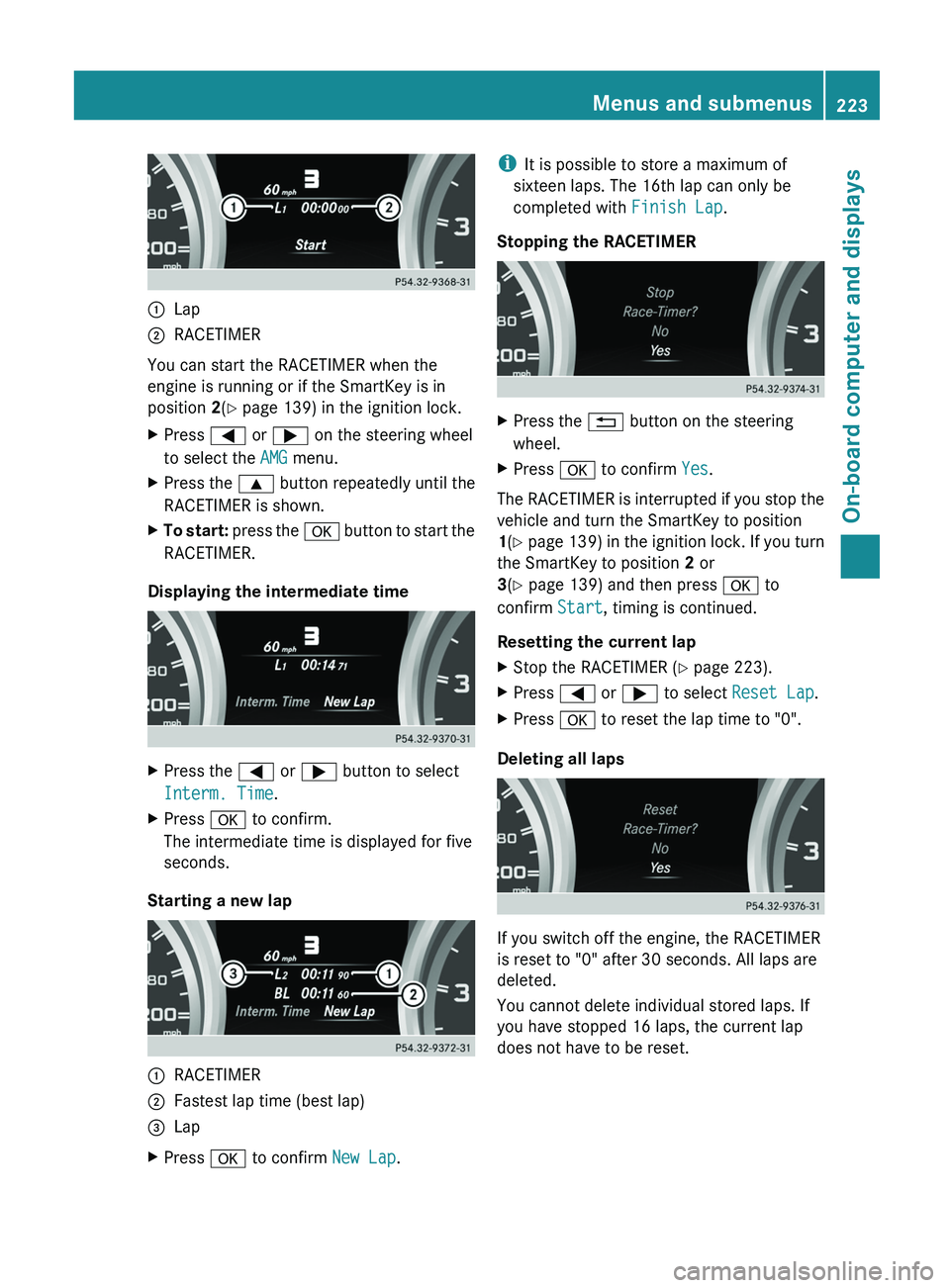
0043
Lap
0044 RACETIMER
You can start the RACETIMER when the
engine is running or if the SmartKey is in
position 2(Y page 139) in the ignition lock.
X Press 0059 or 0065 on the steering wheel
to select the AMG menu.
X Press the 0063 button repeatedly until the
RACETIMER is shown.
X To start: press the 0076 button to start the
RACETIMER.
Displaying the intermediate time X
Press the 0059 or 0065 button to select
Interm. Time.
X Press 0076 to confirm.
The intermediate time is displayed for five
seconds.
Starting a new lap 0043
RACETIMER
0044 Fastest lap time (best lap)
0087 Lap
X Press 0076 to confirm New Lap.i
It is possible to store a maximum of
sixteen laps. The 16th lap can only be
completed with Finish Lap.
Stopping the RACETIMER X
Press the 0041 button on the steering
wheel.
X Press 0076 to confirm Yes.
The RACETIMER is interrupted if you stop the
vehicle and turn the SmartKey to position
1(Y page 139) in
the ignition lock. If you turn
the SmartKey to position 2 or
3(Y page 139) and then press 0076 to
confirm Start, timing is continued.
Resetting the current lap
X Stop the RACETIMER ( Y page 223).
X Press 0059 or 0065 to select Reset Lap.
X Press 0076 to reset the lap time to "0".
Deleting all laps If you switch off the engine, the RACETIMER
is reset to "0" after 30 seconds. All laps are
deleted.
You cannot delete individual stored laps. If
you have stopped 16 laps, the current lap
does not have to be reset. Menus and submenus
223On-board computer and displays Z
Page 227 of 364
shows these messages continuously until the
causes for the messages have been
remedied.
Message memory menu
The on-board computer saves certain display
messages. You can call up the display
messages in the message memory.
X
Press the 0059 or 0065 button on the
steering wheel to select the Serv. menu.
If there are display messages, the
multifunction display shows 2 Messages,
for example.
X Press the 0063 or 0064 button to select the
entry, e.g. 2 Messages.
X Press 0076 to confirm.
X Press the 0063 or 0064 button to scroll
through the display messages.
When the ignition is switched off, all display
messages are deleted, apart
from some high-
priority display messages. Once the causes of
the high-priority display messages have been
rectified, the corresponding display
messages are also deleted. Display messages
225
On-board computer and displays Z
Page 249 of 364
SmartKey
Display messages Possible causes/consequences and
0050 Solutions00AF
Key Does Not
Belong to Vehicle You have put the wrong SmartKey in the ignition lock.
X
Use the correct SmartKey. 00AF
Take Your Key
from
Ignition The SmartKey is in the ignition lock.
X
Remove the SmartKey. 00AF
Obtain a New Key The SmartKey needs to be replaced.
X
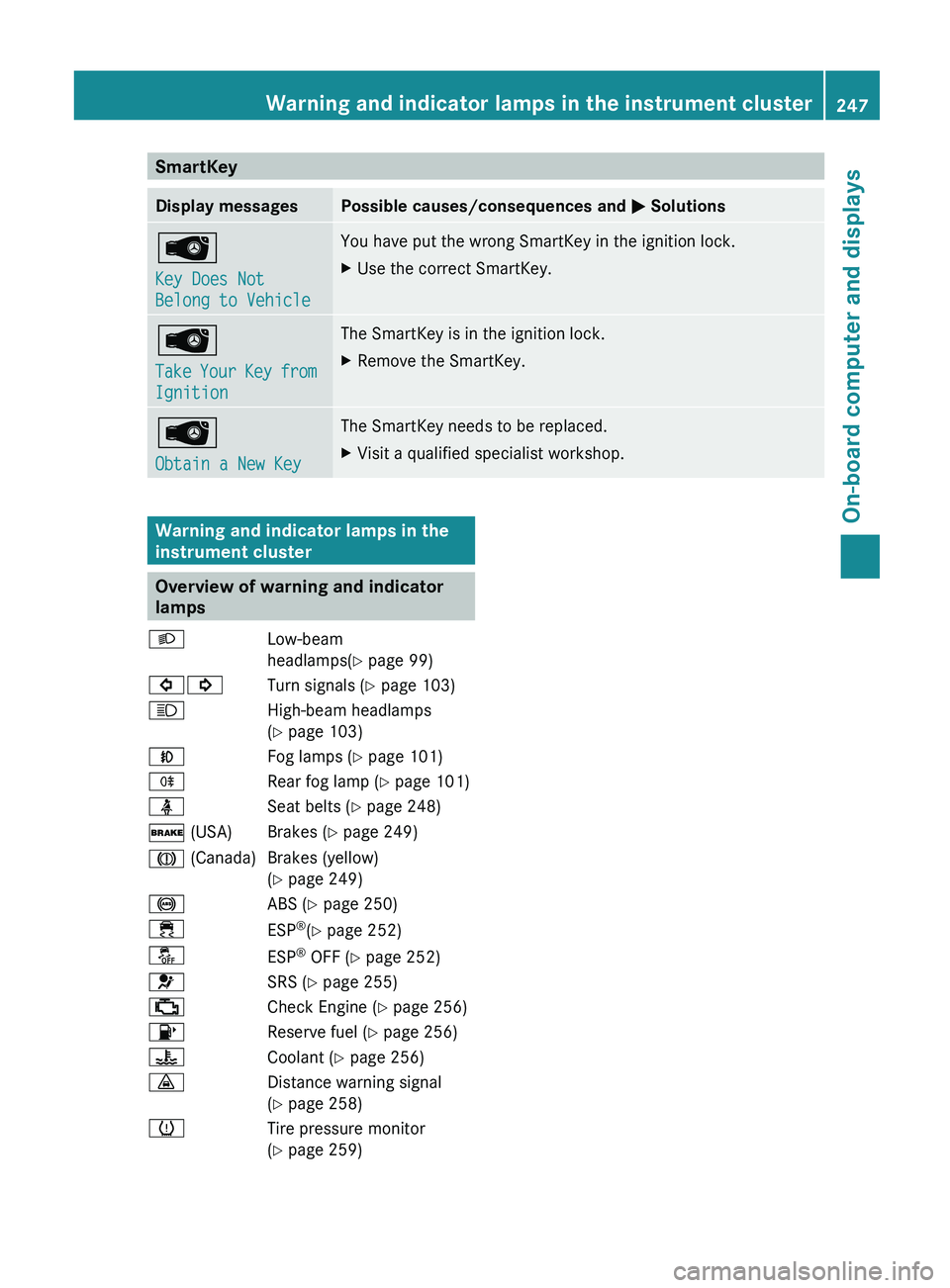
Visit a qualified specialist workshop. Warning and indicator lamps in the
instrument cluster
Overview of warning and indicator
lamps
0058 Low-beam
headlamps(Y page 99)
003E003D Turn signals (Y
page 103)
0057 High-beam headlamps
(
Y page 103)
005A Fog lamps (Y page 101)
005E Rear fog lamp (Y page 101)
00E9 Seat belts (Y page 248)
0027 (USA) Brakes (Y page 249)
004D (Canada) Brakes (yellow) (Y page 249)
0025 ABS (Y page 250)
00E5 ESP®
(Y page 252)
00BB ESP®
OFF (Y page 252)
0075 SRS (Y page 255)
00B9 Check Engine (Y page 256)
00B6 Reserve fuel (Y page 256)
00AC Coolant (Y page 256)
00BA Distance warning signal
(Y page 258)
0077 Tire pressure monitor
(Y page 259) Warning and indicator lamps in the instrument cluster
247
On-board computer and displays Z
Page 258 of 364
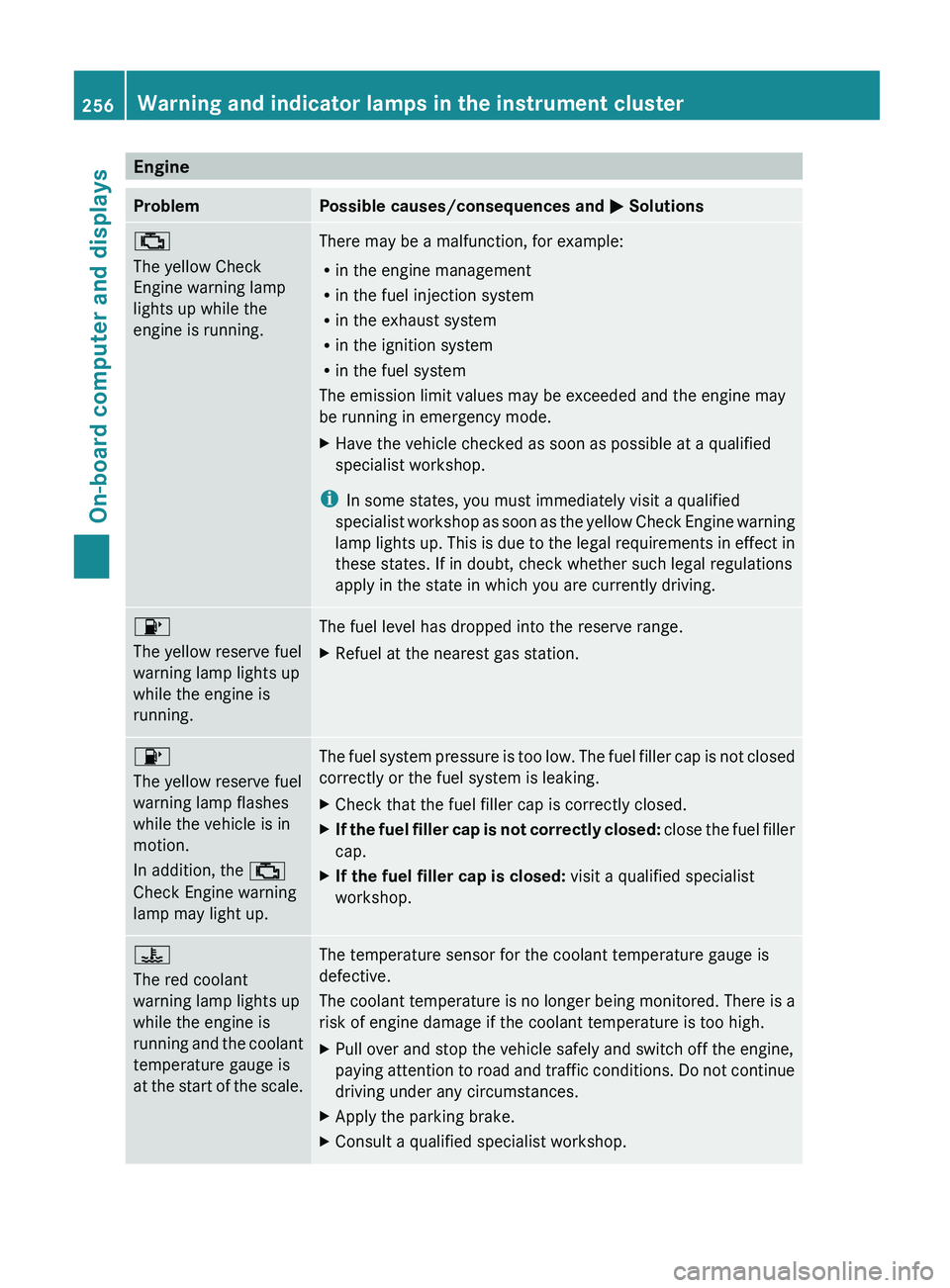
Engine
Problem Possible causes/consequences and
0050 Solutions00B9
The yellow Check
Engine warning lamp
lights up while the
engine is running.
There may be a malfunction, for example:
R
in the engine management
R in the fuel injection system
R in the exhaust system
R in the ignition system
R in the fuel system
The emission limit values may be exceeded and the engine may
be running in emergency mode.
X Have the vehicle checked as soon as possible at a qualified
specialist workshop.
i In some states, you must immediately visit a qualified
specialist workshop as soon
as the yellow Check Engine warning
lamp lights up. This is due to the legal requirements in effect in
these states. If in doubt, check whether such legal regulations
apply in the state in which you are currently driving. 00B6
The yellow reserve fuel
warning lamp lights up
while the engine is
running.
The fuel level has dropped into the reserve range.
X
Refuel at the nearest gas station. 00B6
The yellow reserve fuel
warning lamp flashes
while the vehicle is in
motion.
In addition, the 00B9
Check Engine warning
lamp may light up.
The fuel system pressure is too low. The fuel filler cap is not closed
correctly or the fuel system is leaking.
X
Check that the fuel filler cap is correctly closed.
X If the fuel filler cap is not correctly closed:
close the
fuel
filler
cap.
X If the fuel filler cap is closed: visit a qualified specialist
workshop. 00AC
The red coolant
warning lamp lights up
while the engine is
running
and the
coolant
temperature gauge is
at
the start of the scale. The temperature sensor for the coolant temperature gauge is
defective.
The coolant temperature
is
no longer being monitored. There is a
risk of engine damage if the coolant temperature is too high.
X Pull over and stop the vehicle safely and switch off the engine,
paying attention to road
and traffic conditions. Do not continue
driving under any circumstances.
X Apply the parking brake.
X Consult a qualified specialist workshop.256
Warning and indicator lamps in the instrument cluster
On-board computer and displays
Page 272 of 364
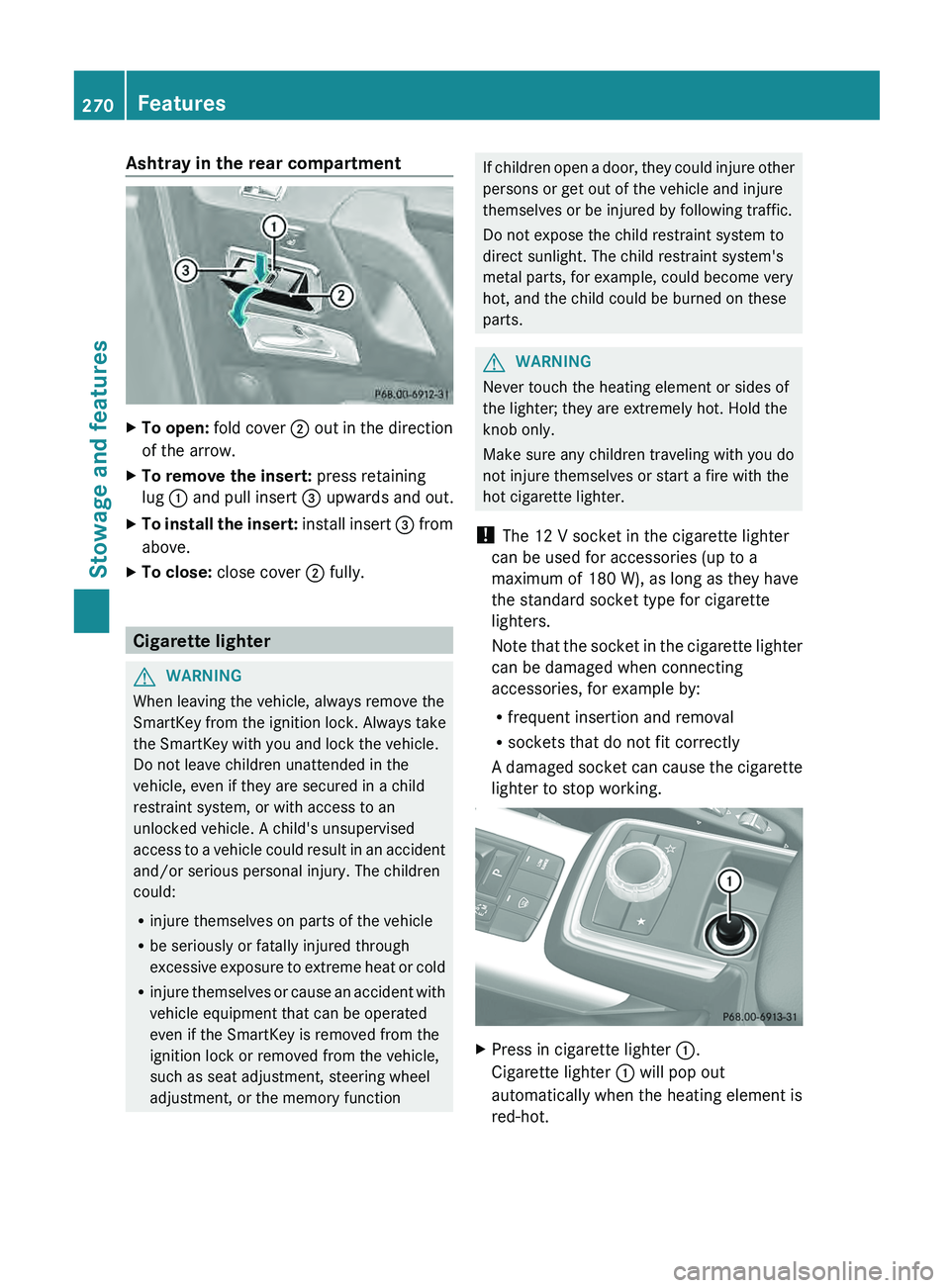
Ashtray in the rear compartment
X
To open: fold cover 0044 out in the direction
of the arrow.
X To remove the insert: press retaining
lug 0043 and pull insert 0087
upwards and out.
X To install the insert:
install insert 0087
from
above.
X To close: close cover 0044 fully.Cigarette lighter
G
WARNING
When leaving the vehicle, always remove the
SmartKey from the ignition lock. Always take
the SmartKey with you and lock the vehicle.
Do not leave children unattended in the
vehicle, even if they are secured in a child
restraint system, or with access to an
unlocked vehicle. A child's unsupervised
access to a vehicle
could result in an accident
and/or serious personal injury. The children
could:
R injure themselves on parts of the vehicle
R be seriously or fatally injured through
excessive exposure to extreme heat or cold
R injure themselves or cause an accident with
vehicle equipment that can be operated
even if the SmartKey is removed from the
ignition lock or removed from the vehicle,
such as seat adjustment, steering wheel
adjustment, or the memory function If children open a door, they could injure other
persons or get out of the vehicle and injure
themselves or be injured by following traffic.
Do not expose the child restraint system to
direct sunlight. The child restraint system's
metal parts, for example, could become very
hot, and the child could be burned on these
parts.
G
WARNING
Never touch the heating element or sides of
the lighter; they are extremely hot. Hold the
knob only.
Make sure any children traveling with you do
not injure themselves or start a fire with the
hot cigarette lighter.
! The 12 V socket in the cigarette lighter
can be used for accessories (up to a
maximum of 180 W), as long as they have
the standard socket type for cigarette
lighters.
Note that the socket
in the cigarette lighter
can be damaged when connecting
accessories, for example by:
R frequent insertion and removal
R sockets that do not fit correctly
A damaged socket can cause the cigarette
lighter to stop working. X
Press in cigarette lighter 0043.
Cigarette lighter 0043 will pop out
automatically when the heating element is
red-hot. 270
Features
Stowage and features
Page 273 of 364
12 V sockets
General notes !
If you are simultaneously using all three
sockets in the vehicle, make sure that you
do not exceed the maximum current draw
of 45 A. Otherwise, you will overload the
fuses.
The sockets can be
used for accessories with
a maximum current draw of 180 W (15 A), e.g.
lamps or chargers for mobile phones.
If you use the sockets for long periods when
the engine is switched off, the battery may
discharge.
X Turn the SmartKey to position 2 in the
ignition lock.
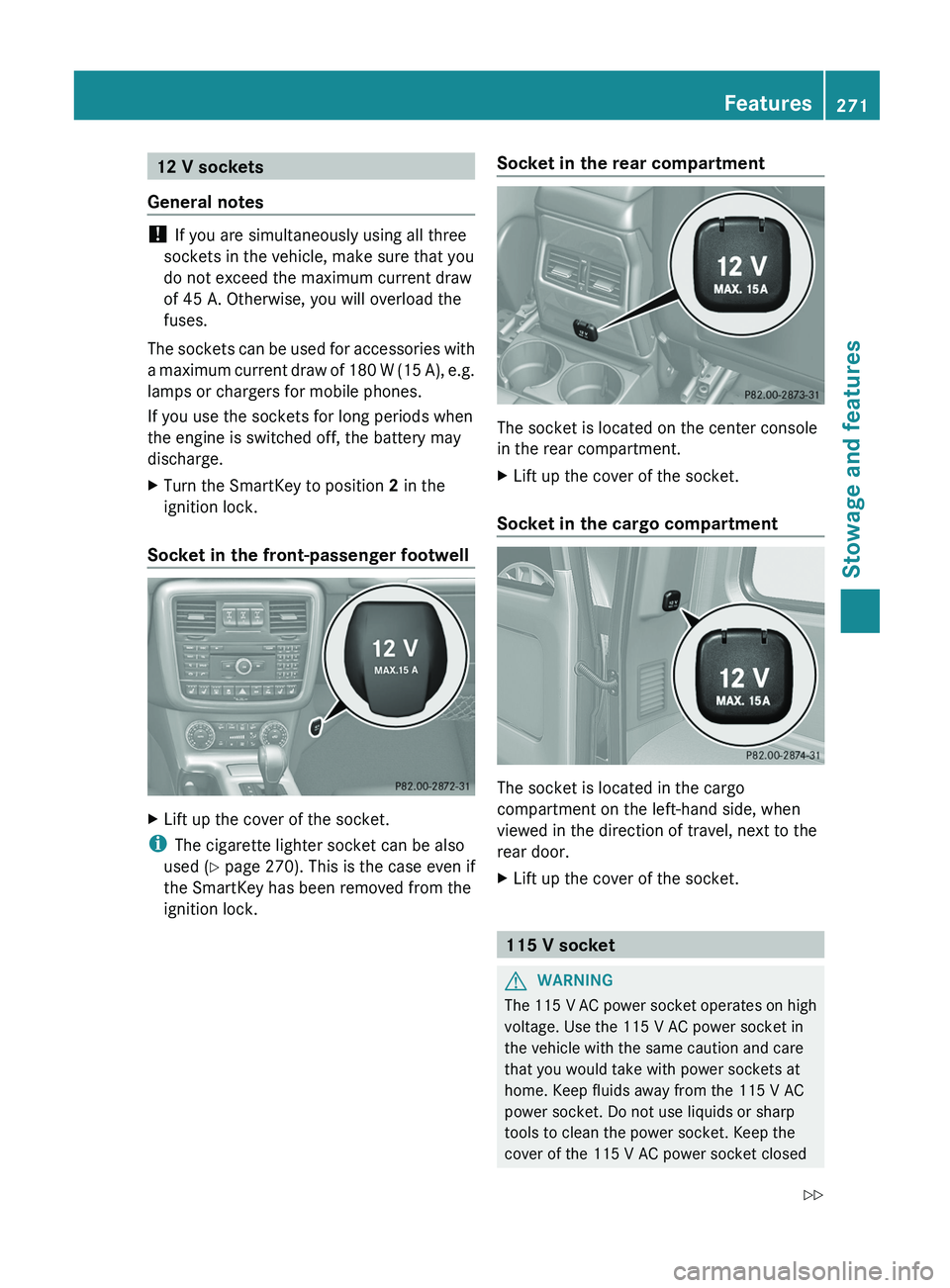
Socket in the front-passenger footwell X
Lift up the cover of the socket.
i The cigarette lighter socket can be also
used ( Y page 270). This is the case even if
the SmartKey has been removed from the
ignition lock. Socket in the rear compartment The socket is located on the center console
in the rear compartment.
X
Lift up the cover of the socket.
Socket in the cargo compartment The socket is located in the cargo
compartment on the left-hand side, when
viewed in the direction of travel, next to the
rear door.
X
Lift up the cover of the socket. 115 V socket
G
WARNING
The 115 V AC power socket operates on high
voltage. Use the 115 V AC power socket in
the vehicle with the same caution and care
that you would take with power sockets at
home. Keep fluids away from the 115 V AC
power socket. Do not use liquids or sharp
tools to clean the power socket. Keep the
cover of the 115 V AC power socket closed Features
271
Stowage and features
Z
Page 274 of 364
when not in use. Otherwise, you could suffer
an electric shock and be seriously or even
fatally injured.
G
WARNING
Any device that you connect must have a
suitable plug and meet
U.S. standards. Never
pull at a cable to disconnect a plug from a
115 V AC power socket. Never use a damaged
connection cable. The 115 V AC power socket
must never be connected to another 115 V
AC power source. Do not use a converter with
an earthed plug for the 115 V AC power
socket. This could cause serious injury to you
and/or other people. G
WARNING
If the 115 V AC power socket is damaged or
pulled out of the
trim, do not use or touch the
115 V AC power socket. The use of a 115 V
AC power socket that has been damaged or
pulled out of the trim could cause serious
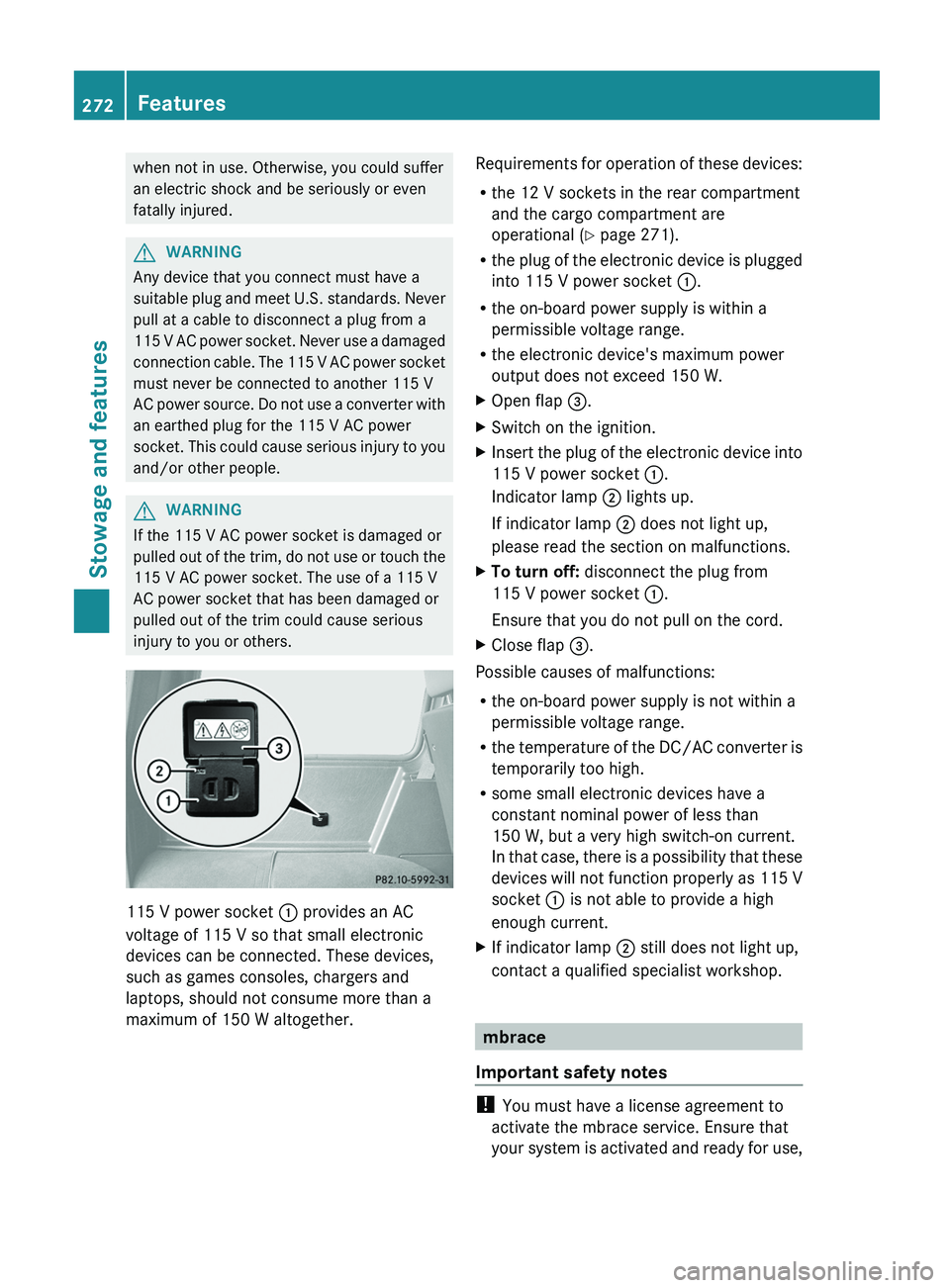
injury to you or others. 115 V power socket
0043 provides an AC
voltage of 115 V so that small electronic
devices can be connected. These devices,
such as games consoles, chargers and
laptops, should not consume more than a
maximum of 150 W altogether. Requirements for operation of these devices:
R
the 12 V sockets in the rear compartment
and the cargo compartment are
operational ( Y page 271).
R the plug of
the
electronic device is plugged
into 115 V power socket 0043.
R the on-board power supply is within a
permissible voltage range.
R the electronic device's maximum power
output does not exceed 150 W.
X Open flap 0087.
X Switch on the ignition.
X Insert the plug of the electronic device into
115 V power socket 0043.
Indicator lamp 0044 lights up.
If indicator lamp 0044 does not light up,
please read the section on malfunctions.
X To turn off: disconnect the plug from
115 V power socket 0043.
Ensure that you do not pull on the cord.
X Close flap 0087.
Possible causes of malfunctions:
R the on-board power supply is not within a
permissible voltage range.
R the temperature of
the
DC/AC converter is
temporarily too high.
R some small electronic devices have a
constant nominal power of less than
150 W, but a very high switch-on current.
In that case, there is a possibility that these
devices will not function properly as 115 V
socket 0043 is not able to provide a high
enough current.
X If indicator lamp 0044 still does not light up,
contact a qualified specialist workshop. mbrace
Important safety notes !
You must have a license agreement to
activate the mbrace service. Ensure that
your system is activated
and ready for use,272
Features
Stowage and features
Page 275 of 364
and press the 0051 MB Info call button to
register. If one
of
these steps is not carried
out, it may not be possible to activate the
system.
If you have questions about the activation,
contact one of the following telephone
hotlines:
R USA: Response Center at
1-888-990-9007
R Canada: Customer Service at
1-888-923-8367
USA only : shortly after successfully
registering with the mbrace service a user ID
and password will be sent to you by post. You
can use this password to log onto the mbrace
area under "Owners Online" at http://
www.mbusa.com.
The mbrace system is available if:
R it has been activated and is operational.
Activation requires an available mobile
phone network, a valid SIM card and a
subscription to a security service.
R the battery is sufficiently charged.
R the corresponding mobile phone network
is available for transmitting data to the
Customer Center.
i Determining the location of the vehicle on
a map is only possible if there is sufficient
GPS reception and the vehicle position can
be forwarded to the Customer Center.
The mbrace system To adjust the volume during an mbrace call,
proceed as follows:
X
Press the 0081 or 0082 button on the
multifunction steering wheel.
or
X Use the COMAND volume control.
The mbrace system provides three different
services:
R automatic and manual emergency call
R Roadside Assistance call
R MB Info call USA only:
you can find further information
and a description of all available features
under "Owners Online" at http://
www.mbusa.com.
System self-test G
WARNING
A malfunction in the system has been
detected if one of the following conditions
occurs:
R the indicator lamp in the SOS button does
not light up during the system self-
diagnosis.
R the indicator lamp in the 009F Roadside
Assistance button does not light up during
the system self-diagnosis.
R the indicator lamp in the 0051 information
button does not light
up during the system
self-diagnosis.
R the indicator lamp in the SOS button,
009F Roadside Assistance button or 0051
information button continues to be lit red
after the system self-diagnosis.
R the Tele Aid inoperative or Tele Aid
not activated message appears on the
multifunction display after the system self-
diagnosis.
If a malfunction is indicated as outlined above,
the system may not operate as expected. In
the event of an emergency, assistance must
be summoned by other means.
Have the system checked at the nearest
authorized Mercedes-Benz Center or contact
the following service hotlines:
R USA: Response Center at
1-888-990-9007
R Canada: Customer Service at
1-888-923-8367
After you have switched on the ignition, the
system carries out a self-diagnosis. Features
273
Stowage and features Z
Page 279 of 364
Downloading destinations in COMAND
Destination Download gives you access to a
database with over ten million points of
interest (POIs) which
can
be downloaded onto
the navigation system of your vehicle. If you
know the destination, you can download the
address or obtain the location of points of
interest (POIs) or important destinations in
the surrounding area.
You are prompted to confirm route guidance
to the address entered.
i Information on the components and
operating principles of the COMAND
system can be found in the separate
COMAND operating instructions.
X Select Yes with the 0059 or 0065 button
on COMAND.
X Confirm with the 008B button on COMAND.
The system calculates the route and
subsequently starts the route guidance with
the address entered.
i If you select No,
the address can be stored
in the address book.
i The Destination Download function is
available if the corresponding mobile
phone network is available and data
transfer is possible.
Search & Send "Search & Send" is a destination entry
service. You can find further information on
"Search & Send" in the separate COMAND
operating instructions.
Vehicle remote opening
If you have unintentionally locked your
vehicle (e.g. the SmartKey is inside the
vehicle) and a replacement key is not
available:
X
Contact the following service hotlines: R
USA: Response Center at
1-888-990-9007
R Canada: Customer Service at
1-888-923-8367
You will be asked for your password.
X Return to your vehicle at the time arranged
with the Response Center.
X Press the release button on the door handle
of the rear door
for at least 20 seconds until
the indicator lamp in the SOS button
(Y page 274) flashes.
The Connecting Call message appears
on the multifunction display.
Alternatively, the vehicle can be opened via
the Internet in the "Owner's Online" section
using your identification number and
password 3
.
i Vehicle remote opening is
only possible if
the corresponding mobile phone network
is accessible.
The SOS button flashes and the
Connecting Call message appears in the
multifunction display to confirm that the
command for vehicle remote unlocking has
been received.
If the lock cylinder on the rear door is
pressed for longer than 20 seconds before
receiving authorization for remote
unlocking from the Response center, you
must wait 15 minutes before you can press
the lock cylinder on the rear door again.
Vehicle remote closing The remote closing feature can be used when
you have forgotten
to
lock the vehicle and you
are no longer nearby. The vehicle can then be
locked by the Mercedes-Benz Customer
Assistance Center.
The vehicle can be remotely locked within
four days of the ignition being turned off.
X Contact the following service hotlines:
3 USA only. Features
277
Stowage and features Z