brake sensor MERCEDES-BENZ G-CLASS SUV 2014 Owners Manual
[x] Cancel search | Manufacturer: MERCEDES-BENZ, Model Year: 2014, Model line: G-CLASS SUV, Model: MERCEDES-BENZ G-CLASS SUV 2014Pages: 272, PDF Size: 39.13 MB
Page 7 of 272
Steering wheel paddle shifters
......101
Transmission position
displa y................................... 100, 101
Auxiliary ventilation
Activating/deactivating ...................94
Activating/deactivating (on the
center console) ................................ 94
Problem (display message) ..............94
Axle load, permissible (trailer
towing) ............................................... 266B
Back button ....................................... 178
Backup lamp Display message ............................ 144
Ball coupling
Installing ........................................ 137
BAS (Brake Assist System) .................60
Battery Checking (SmartKey) .......................68
Important safety guidelines
(SmartKey) ....................................... 67
Replacing (SmartKey) ......................68
Battery (vehicle)
Charging ........................................ 217
Display message ............................ 144
Important safety notes ..................215
Jump starting ................................. 219
Overview ........................................ 215
Blind Spot Assist
Activating/deactivating .................144
Display message ............................ 144
Notes/function .............................. 121
Bluetooth ®
see also Digital Operator's Manual 170
Brake fluid
Display message .................... 144, 149
Notes ............................................. 261
Brake fluid level ................................ 204
Brake lamps Adaptive .......................................... .61
Display message ............................ 144
Brakes
ABS .................................................. 60
BAS .................................................. 60
Brake fluid (notes) .........................261
Display message .................... 144, 146 High-performance brake system
....106
Important safety notes ..................106
Maintenance .................................. 106
Parking brake ................................ 105
Riding tips ...................................... 106
Warning lamp ................................. 159
Breakdown
see Flat tire
see Towing away
Brush guard ....................................... 193
Bulbs see Replacing bulbs
Buttons on the COMAND controller 178 C
Calling up a malfunction see Display messages
Care
Carpets .......................................... 210
Car wash ........................................ 206
Chrome parts ................................. 210
Display ........................................... 210
Gear or selector lever ....................210
Headlamps ............................ 206, 209
Interior ........................................... 210
Matte finish ........................... 206, 208
Notes ............................................. 206
Paint ...................................... 206, 208
Plastic trim .................................... 210
Power washer ........................ 206, 207
Rear view camera ..................206, 210
Roof lining ...................................... 210
Seat belt ........................................ 210
Seat cover ..................................... 210
Sensors ................................. 206, 209
Soft top .......................................... 206
Tail pipes ............................... 206, 210
Trim pieces .................................... 210
Washing by hand ...................206, 207
Wheels ................................... 206, 208
Windows ................................ 206, 209
Wiper blades .......................... 206, 209
Wooden trim .................................. 210
Cargo compartment cover
Installing/removing .......................188
Notes/how to use .........................188
Opening and closing ......................188 Index
5
Page 15 of 272
O
Occupant safety Children in the vehicle .....................53
Important safety notes ....................40
Odometer ........................................... 144
Off-road Differential locks ............................ 131
Off-road ABS .................................... 60
Off-road driving
Checklist ........................................ 108
General information .......................106
Important safety notes ..................108
Off-road fording ................................. 107
Off-road system 4MATIC .......................................... 124
Oil
see Engine oil
On-board computer
AMG menu ..................................... 144
Assistance menu ........................... 144
Display messages ..........................144
DISTRONIC PLUS ........................... 116
Factory settings submenu .............144
Important safety notes ..................142
Lighting submenu .......................... 144
Menu overview .............................. 144
Message memory ..................144, 145
Message memory menu ................. 144
Navigation menu ............................ 144
Operation ....................................... 143
RACETIMER ................................... 144
Service menu ................................. 144
Standard displa y............................ 144
Video DVD operation .....................144
Online and Internet functions
Ending the connection ...................180
Establishing/ending the
connection ..................................... 179
Operating safety
Declaration of conformity ................26
Operating system
see On-board computer
Outside temperature display ...........142
Overhead control panel ......................36
Override feature Rear side windows ...........................59 P
Paint code number ............................258
Paintwork (cleaning
instructions) .............................. 206, 208
Parcel net ........................................... 185
Parking ............................................... 104
Engaging park position ..................100
Important safety notes ..................104
Position of exterior mirror, front-
passenger side ................................. 79
see PARKTRONIC
Parking aid
see Exterior mirrors
see PARKTRONIC
Parking brake
Applying ........................................ .105
Display message .................... 144, 148
Parking lamps
Switching on/off .............................. 83
PARKTRONIC
Deactivating/activating .................127
Driving system ............................... 125
Function/notes ............................. 125
Important safety notes ..................125
Problem (malfunction) ...................128
Range of the sensors .....................125
Trailer towing ................................. 127
Warning displa y............................. 126
Phone book
see also Digital Operator's Manual 170
Plastic trim (cleaning instructions) .210
Power washers .......................... 206, 207
Programming SmartKey ......................................... 67
Program selector button ..................101
Pulling away Automatic transmission ...................98 Q
Qualified specialist workshop ...........27 R
RACETIMER (on-board computer) ....144
Radar sensor system Activating/deactivating .................144
Display message ............................ 144 Index
13
Page 17 of 272
Display message
............................ 144
Emergency Tensioning Devices ....... .52
Fastening ......................................... 49
Fastening, front ............................... 50
Fastening in the rear, center ............50
Important safety guidelines .............47
Releasing ......................................... 51
Special seat belt retractor ...............55
Switching belt adjustment on/off
(on-board computer) ......................144
Warning lamp ................................. 158
Warning lamp (function) ................... 52
Seat heating
Indicator lamp (malfunction) ............79
Seats
Adjusting (electrically) .....................78
Adjusting the 4-way lumbar
support ............................................ 78
Adjusting the head restraint ............78
Cleaning the cover .........................210
Correct driver's seat position ........... 76
Important safety notes ....................76
Multicontour seat ............................ 78
Storing settings (memory function) .. 79
Switching seat heating on/off .........78
Switching seat ventilation on/off ....78
Sensors (cleaning instructions) 206, 209
Service interval display Displaying a service message (on-
board computer) ............................ 205
Service menu (on-board computer) .144
Service products Brake fluid ..................................... 261
Coolant (engine) ............................ 262
Engine oil ....................................... 261
Fuel ................................................ 258
Important safety notes ..................258
Notes ............................................. 258
Refrigerant (air-conditioning
system) .......................................... 261
Washer fluid .................................. .263
Setting a speed limit
see SPEEDTRONIC
Settings
Factory (on-board computer) .........144
Menu overview .............................. 174
On-board computer .......................144
Setting the air distribution .................94Setting the airflow
.............................. 94
Setting the date/time format see also Digital Operator's Manual 170
Setting the language
see also Digital Operator's Manual 170
Setting the time
see also Digital Operator's Manual 170
SETUP (on-board computer) .............144
Shift ranges ....................................... 101
Side marker lamp (display
message) ............................................ 144
Side marker lamps (changing bulbs) .86
Side windows Cleaning ......................................... 206
Important safety information ...........71
Opening/closing .............................. 71
Opening/closing (all) .......................71
Opening/closing (front) ...................71
Overview .......................................... 71
Troubleshooting ............................... 71
SIRIUS services
see also Digital Operator's Manual 170
Ski rack .............................................. 189
Sliding sunroof Important safety notes ....................71
Opening/closing .............................. 72
Operating manually ..........................72
SmartKey
Changing the battery .......................68
Changing the programming .............67
Checking the battery .......................68
Convenience opening feature ..........71
Display message ............................ 144
Door central locking/unlocking .......66
Important safety notes ....................66
Loss ................................................. 69
Malfunction ...................................... 69
Mechanical key ................................ 67
Overview .......................................... 66
Problem (malfunction) .....................69
Starting the engine ..........................98
SMS
see also Digital Operator's Manual 170
Snow chains ...................................... 230 Index
15
Page 27 of 272
Protection of the environment
General notes
H
Environmental note
Daimler's declared policy is one of
comprehensive environmental protection.
The objectives are for the natural resources
that form the basis of our existence on this
planet to be used sparingly and in a manner
that takes the requirements of both nature
and humanity into account.
You too can help to protect the environment
by operating your vehicle in an
environmentally responsible manner.
Fuel consumption and the rate of engine,
transmission, brake and tire wear are affected
by these factors:
R operating conditions of your vehicle
R your personal driving style
You can influence both factors. You should
bear the following in mind:
Operating conditions:
R avoid short trips as these increase fuel
consumption.
R always make sure that the tire pressures
are correct.
R do not carry any unnecessary weight.
R remove roof racks once you no longer need
them.
R a regularly serviced vehicle will contribute
to environmental protection. You should
therefore adhere to the service intervals.
R always have service work carried out at a
qualified specialist workshop.
Personal driving style:
R do not depress the accelerator pedal when
starting the engine.
R do not warm up the engine when the vehicle
is stationary.
R drive carefully and maintain a safe distance
from the vehicle in front.
R avoid frequent, sudden acceleration and
braking. R
change gear in good time and use each gear
only up to Ôof its maximum engine speed.
R switch off the engine in stationary traffic.
R keep an eye on the vehicle's fuel
consumption. Genuine Mercedes-Benz parts
H
Environmental note
Daimler AG also supplies reconditioned major
assemblies and parts which are of the same
quality as new parts. They are covered by the
same Limited Warranty entitlements as new
parts.
! Air bags and Emergency Tensioning
Devices, as well as control units and
sensors for these restraint systems, may be
installed in the following areas of your
vehicle:
R doors
R door pillars
R door sills
R seats
R cockpit
R instrument cluster
R center console
Do not install accessories such as audio
systems in these areas. Do not carry out
repairs or welding. You could impair the
operating efficiency of the restraint
systems.
Have aftermarket accessories installed at
a qualified specialist workshop.
You could jeopardize the operating safety of
your vehicle if you use parts, tires and wheels
as well as accessories relevant to safety
which have not been approved by Mercedes.
This could lead to malfunctions in safety-
relevant systems, e.g. the brake system. Use
only genuine Mercedes-Benz parts or parts of
equal quality. Only use tires, wheels and Introduction
25 Z
Page 117 of 272
road, weather and traffic conditions.
DISTRONIC PLUS is only an aid. You are
responsible for the distance to the vehicle in
front, for vehicle speed, for braking in good
time and for staying in lane. Only engage
DISTRONIC PLUS when the current road,
weather and traffic conditions permit it to be
done safely, and adapt your driving style
accordingly. Drive carefully and maintain a
suitable distance to the vehicle in front.
If DISTRONIC PLUS detects a risk of collision
but cannot sufficiently decelerate the vehicle
in order to maintain the set distance, you will
be warned visually and acoustically.
DISTRONIC PLUS cannot prevent a collision
without your intervention. An intermittent
warning tone will then sound and the distance
warning lamp will light up in the instrument
cluster. Brake immediately in order to
increase the distance from the vehicle in
front, or take evasive action, provided it is
safe to do so.
DISTRONIC PLUS may not detect narrow
vehicles driving in front, e.g. motorcycles, or
vehicles driving on a different line. Therefore,
always pay attention to traffic conditions
even when DISTRONIC PLUS is activated.
Otherwise, you may fail to recognize dangers
in time, cause an accident and injure yourself
and others.
In particular, the detection of obstacles can
be impaired if there is:
R the sensor is dirty or covered
R snow or heavy rain
R interference by other radar sources
R there is the possibility of strong radar
reflections, for example, in parking
garages.
If DISTRONIC PLUS is activated, the vehicle
brakes automatically in certain situations.
This can happen unexpectedly, especially
when towing or in a car wash. There is a risk
of an accident. In these or similar situations,
deactivate DISTRONIC PLUS.
If you want DISTRONIC PLUS to assist you,
the following activation conditions must be fulfilled (Y
page 116) and the radar sensor
system must be operational.
General notes DISTRONIC PLUS regulates the speed and
automatically helps you maintain the
distance to the vehicle detected in front.
DISTRONIC PLUS brakes automatically so
that the set speed is not exceeded.
On long and steep downhill gradients,
especially if the vehicle is laden or towing a
trailer, you must select shift range
1,2or 3
in good time. By doing so, you will make use
of the braking effect of the engine, which
relieves the load on the brake system and
prevents the brakes from overheating and
wearing too quickly.
If DISTRONIC PLUS detects a slower-moving
vehicle in front, your vehicle is braked in order
to maintain the preset distance to the vehicle
in front.
If there is no vehicle in front, DISTRONIC
PLUS operates in the same way as cruise
control in the speed range between 20 mph
(Canada: 30 km/h) and120 mph (Canada:
200 km/h). If a vehicle is driving in front of
you, it operates in the speed range between
0 mph (0 km/h) and 120 mph (Canada:
200 km/h).
Do not use DISTRONIC PLUS while driving on
roads with steep gradients.
As DISTRONIC PLUS transmits radar waves,
it can resemble the radar detectors of the
responsible authorities. You can refer to the
relevant chapter in the Operator's Manual if
questions are asked about this.
i USA only:
This device has been approved by the FCC
as a “Vehicular Radar System”. The radar
sensor is intended for use in an automotive
radar system only. Removal, tampering, or
altering of the device will void any
warranties, and is not permitted by the
FCC. Do not tamper with, alter, or use in
any non-approved way. Driving systems
115Driving and parking Z
Page 119 of 272
R
the vehicle must not be on an uphill or
downhill gradient of more than 22-25%.
R the radar sensor must be free from dirt
(Y page 206).
Activating while driving When driving at speeds below 20 mph
(30 km/h) you can activate DISTRONIC PLUS
if the vehicle in front has been detected and
is shown in the multifunction display. If the
vehicle in front is no longer detected and
displayed, DISTRONIC PLUS switches off and
a tone sounds.
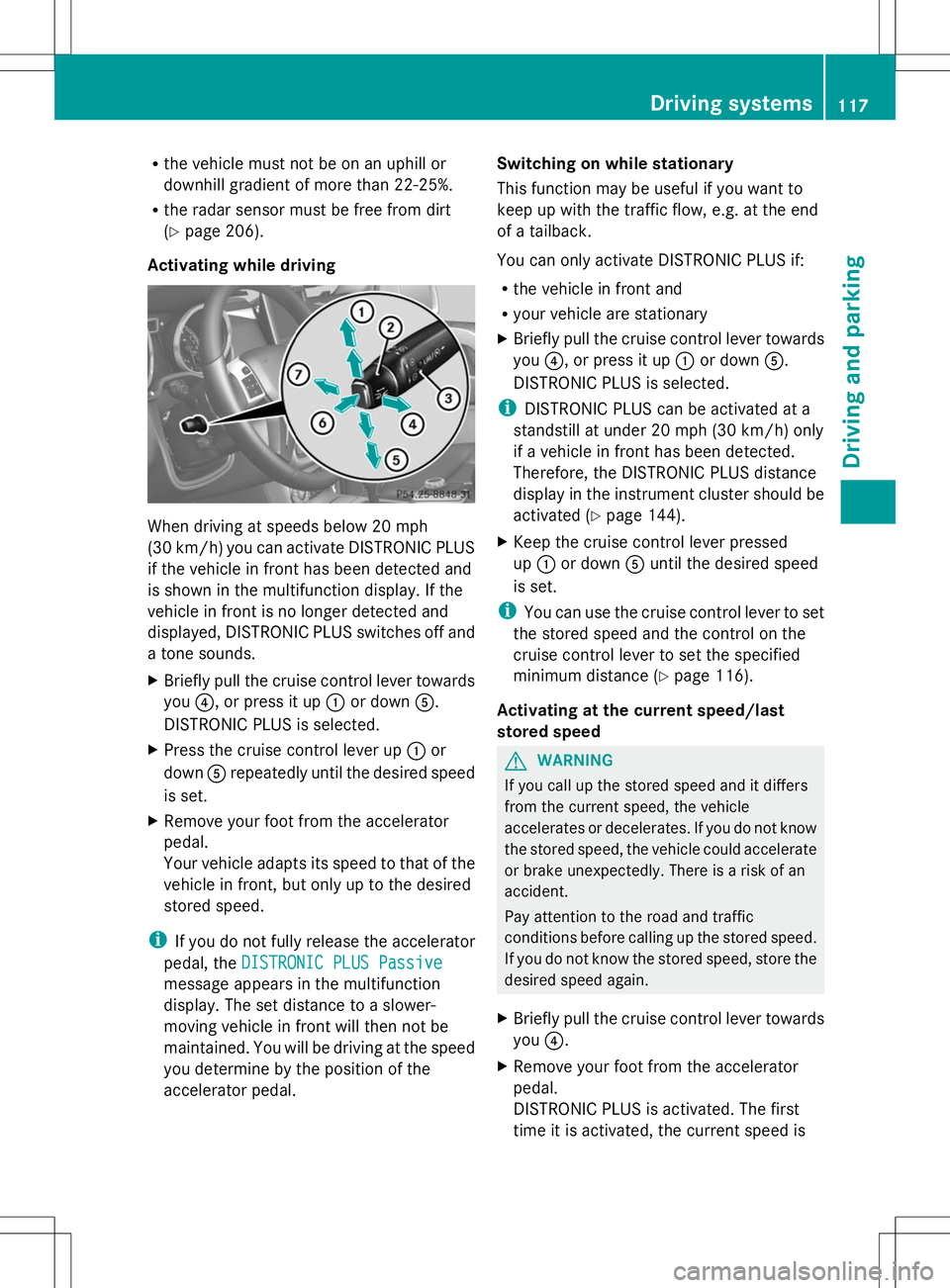
X Briefly pull the cruise control lever towards
you ?, or press it up :or down A.
DISTRONIC PLUS is selected.
X Press the cruise control lever up :or
down Arepeatedly until the desired speed
is set.
X Remove your foot from the accelerator
pedal.
Your vehicle adapts its speed to that of the
vehicle in front, but only up to the desired
stored speed.
i If you do not fully release the accelerator
pedal, the DISTRONIC PLUS Passive
DISTRONIC PLUS Passive
message appears in the multifunction
display. The set distance to a slower-
moving vehicle in front will then not be
maintained. You will be driving at the speed
you determine by the position of the
accelerator pedal. Switching on while stationary
This function may be useful if you want to
keep up with the traffic flow, e.g. at the end
of a tailback.
You can only activate DISTRONIC PLUS if:
R
the vehicle in front and
R your vehicle are stationary
X Briefly pull the cruise control lever towards
you ?, or press it up :or down A.
DISTRONIC PLUS is selected.
i DISTRONIC PLUS can be activated at a
standstill at under 20 mph (30 km/h) only
if a vehicle in front has been detected.
Therefore, the DISTRONIC PLUS distance
display in the instrument cluster should be
activated (Y page 144).
X Keep the cruise control lever pressed
up : or down Auntil the desired speed
is set.
i You can use the cruise control lever to set
the stored speed and the control on the
cruise control lever to set the specified
minimum distance (Y page 116).
Activating at the current speed/last
stored speed G
WARNING
If you call up the stored speed and it differs
from the current speed, the vehicle
accelerates or decelerates. If you do not know
the stored speed, the vehicle could accelerate
or brake unexpectedly. There is a risk of an
accident.
Pay attention to the road and traffic
conditions before calling up the stored speed.
If you do not know the stored speed, store the
desired speed again.
X Briefly pull the cruise control lever towards
you ?.
X Remove your foot from the accelerator
pedal.
DISTRONIC PLUS is activated. The first
time it is activated, the current speed is Driving systems
117Driving and parking Z
Page 127 of 272
i
In wintry driving conditions, the maximum
effect of 4MATIC can only be achieved if
you use winter tires (M+S tires), with snow
chains if necessary.
For information about driving off-road, see
(Y page 108). PARKTRONIC
Important safety notes !
When parking, pay particular attention to
objects above or below the sensors, such
as flower pots or trailer drawbars.
PARKTRONIC does not detect such objects
when they are in the immediate vicinity of
the vehicle. You could damage the vehicle
or the objects.
The sensors may not detect snow and other
objects that absorb ultrasonic waves.
Ultrasonic sources such as an automatic
car wash, the compressed-air brakes on a
truck or a pneumatic drill could cause
PARKTRONIC to malfunction.
PARKTRONIC may not function correctly on
uneven terrain.
PARKTRONIC is an electronic parking aid with
ultrasonic sensors. It indicates visually and
audibly the distance between your vehicle
and an object.
PARKTRONIC is only an aid. It is not a
replacement for your attention to your
immediate surroundings. You are always
responsible for safe maneuvering, parking
and exiting a parking space. Ensure that the
areas in front, behind and to the side of the
vehicle are safe before maneuvering, parking
or pulling away. There must not be any
persons, animals or objects in the area in
which you are maneuvering.
PARKTRONIC does not take into account any
persons or objects located below or above
the detection range. As a result,
PARKTRONIC cannot warn you about objects
in this area. PARKTRONIC is activated automatically when
you:
R
switch on the ignition
R shift the transmission to position D,Ror N
R release the parking brake
PARKTRONIC is deactivated at speeds above
11 mph (18 km/h). It is reactivated at lower
speeds.
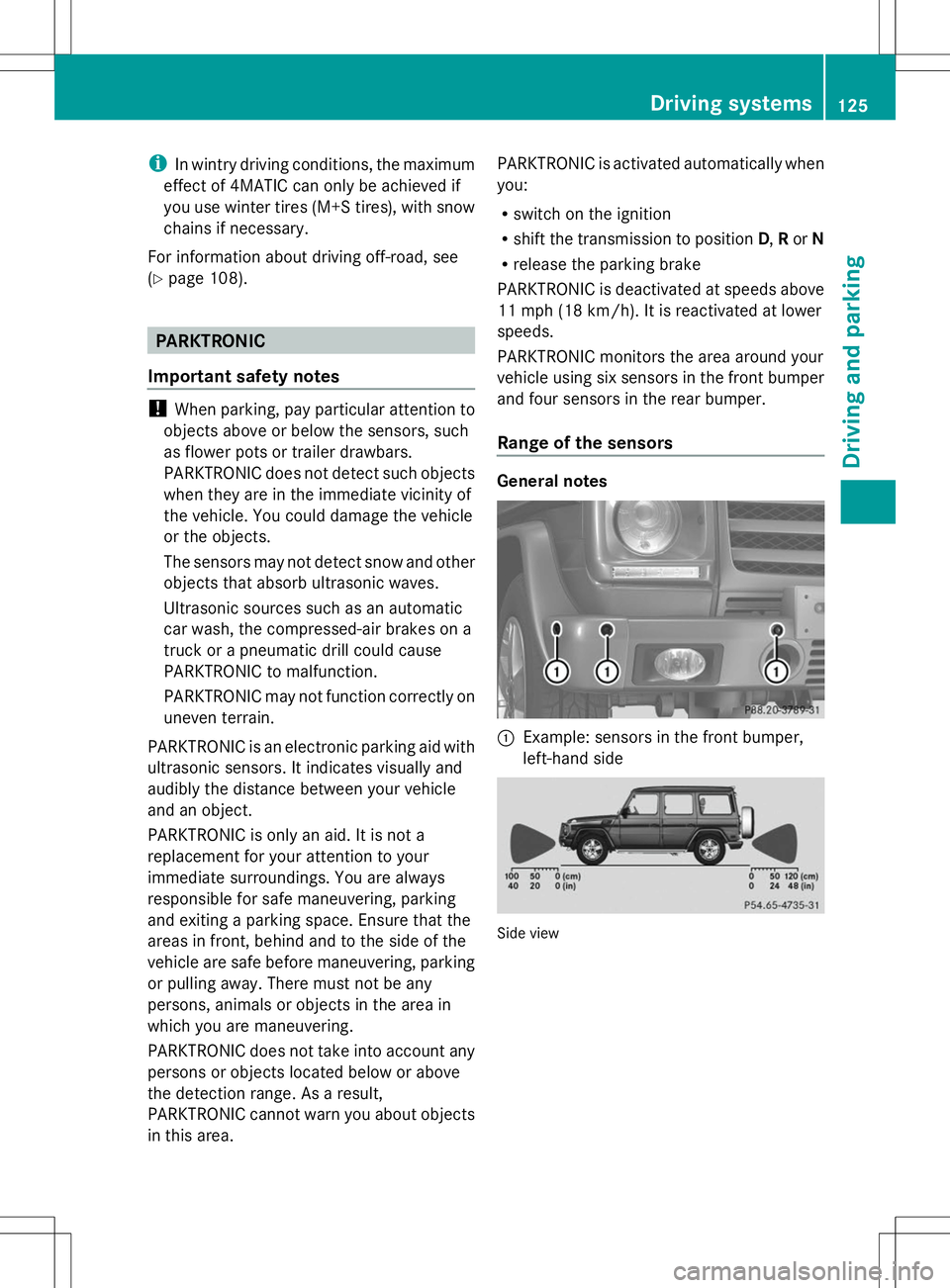
PARKTRONIC monitors the area around your
vehicle using six sensors in the front bumper
and four sensors in the rear bumper.
Range of the sensors General notes
:
Example: sensors in the front bumper,
left-hand side Side view Driving systems
125Driving and parking Z
Page 208 of 272
X
Visit a qualified specialist workshop as
soon as possible. Care
General notes
G
WARNING
Many cleaning products can be hazardous.
Some are poisonous, others are flammable.
Always follow the instructions on the
particular container. Always open your
vehicle's doors or windows when cleaning the
inside.
Never use fluids or solvents that are not
designed for cleaning your vehicle.
Always lock away cleaning products and keep
them out of reach of children.
! For cleaning your vehicle, do not use any
of the following:
R dry, rough or hard cloths
R abrasive cleaning agents
R solvents
R cleaning agents containing solvents
Do not scrub.
Do not touch the surfaces or protective
films with hard objects, e.g. a ring or ice
scraper. You could otherwise scratch or
damage the surfaces and protective film.
! Do not park the vehicle for an extended
period straight after cleaning it, particularly
after having cleaned the wheels with wheel
cleaner. Wheel cleaners could cause
increased corrosion of the brake discs and
brake pads/linings. For this reason, you
should drive for a few minutes after
cleaning. Braking heats the brake discs and
the brake pads/linings, thus drying them.
The vehicle can then be parked. H
Environmental note
Dispose of empty packaging and cleaning
cloths in an environmentally responsible
manner. Regular care of your vehicle is a condition for
retaining the quality in the long term.
Use care products and cleaning agents
recommended and approved by Mercedes-
Benz.
Exterior care
Information in the Digital Operator's
Manual In the Digital Operator's Manual you will find
information on the following topics:
R
Washing by hand
R Power washers
R Cleaning the wheels
R Cleaning the paintwork
R Matte finish care
R Cleaning the windows
R Cleaning the wiper blades
R Cleaning the headlamps
R Cleaning the sensors
R Cleaning the rear view camera
R Cleaning the exhaust pipes
R Cleaning chrome parts
R Cleaning the trailer tow hitch
Automatic car wash G
WARNING
Braking efficiency is reduced after washing
the vehicle. There is a risk of an accident.
After the vehicle has been washed, brake
carefully while paying attention to the traffic
conditions until full braking power is restored.
! Never clean your vehicle in a Touchless
Automatic Car Wash as these use special
cleaning agents. These cleaning agents can
damage the paintwork or plastic parts.
! Make sure that the automatic car wash is
suitable for the size of the vehicle. Fold in
the exterior mirrors before the vehicle is 206
CareMaintenance and care