check engine MERCEDES-BENZ G-CLASS SUV 2014 Owners Manual
[x] Cancel search | Manufacturer: MERCEDES-BENZ, Model Year: 2014, Model line: G-CLASS SUV, Model: MERCEDES-BENZ G-CLASS SUV 2014Pages: 272, PDF Size: 39.13 MB
Page 8 of 272
Cargo compartment enlargement
Important safety note s.................. 185
Cargo tie down rings .........................188
CD see also Digital Operator's Manual 170
CD player/CD changer (on-board
computer) .......................................... 144
Center console Overview .......................................... 34
Upper section .................................. 34
Central locking
Automatic locking (on-board
computer) ...................................... 144
Locking/unlocking (SmartKey) ........66
Changing bulbs
Side marker lamps ...........................86
Changing gears .................................. 101
Checklist After driving off-roa d...................... 108
Before driving off-road ...................108
Child-proof locks
Important safety notes ....................58
Rear doors ....................................... 58
Children
In the vehicle ................................... 53
Restraint systems ............................ 53
Child seat
Automatic recognition .....................44
Automatic recognition/air bag
deactivation, self-test ......................46
LATCH-type (ISOFIX) child seat
anchors ............................................ 56
Special seat belt retractor ...............55
Top Tether ....................................... 57
Troubleshooting ............................... 47
Chrome parts (cleaning
instructions) ...................................... 210
Cigarette lighter ................................ 189
Cleaning Trailer tow hitch ............................. 206
Clear button ....................................... 178
Climate control Controlling automatically .................94
Cooling with air dehumidification ..... 94
Defrosting the windows ...................94
Defrosting the windshield ................94Dual-zone automatic climate
control
....................................... 93, 94
Important safety notes ..............92, 94
Indicator lamp .................................. 94
Maximum cooling ............................ .94
Notes on using dual-zone
automatic climate control ................94
Overview of systems ........................92
Problems with "cooling with air
dehumidification" ............................. 94
Problem with the rear window
defroster .......................................... 94
Refrigerant ..................................... 261
Setting the air distribution ...............94
Setting the airflow ........................... 94
Setting the temperature ..................94
Switching air-recirculation mode
on/off .............................................. 94
Switching on/off .............................. 94
Switching residual heat on/off ........94
Switching the rear window
defroster on/off ............................... 94
Switching the ZONE function on/
off .................................................... 94
Windshield defroster ........................94
Cockpit
Overview .......................................... 30
see Instrument cluster
COMAND
Display ........................................... 173
Examples of operation ...................178
Menu overview .............................. 174
COMAND controller ...........................177
COMAND control panel .....................176
Combination switch ............................83
Compass Display messages ..........................144
Connecting a USB device
see also Digital Operator's Manual 170
Consumption statistics (on-board
computer) .......................................... 144
Convenience opening feature ............94
Convenience telephony see also Digital Operator's Manual 170
Coolant (engine)
Checking the level .........................203
Display message .................... 144, 152
Filling capacity ............................... 2636
Index
Page 11 of 272
Electrical fuses
Fuse box in the cargo
compartmen t................................. 226
Electronic Stability Program
see ESP ®
(Electronic Stability Program)
Electronic Traction System
see 4ETS (Electronic Traction System)
Emergency call
see mbrace
Emergency release
Driver's door .................................... 69
Vehicle ............................................. 69
Emergency Tensioning Devices
Function .......................................... .52
Engine
Display message .................... 144, 152
ECO start/stop function ..................99
Engine number ............................... 258
Jump-starting ................................. 219
Starting the engine with the
SmartKey ......................................... 98
Switching off .................................. 105
Tow-starting (vehicle) ..................... 224
Engine oil
Adding ........................................... 202
Additives ........................................ 261
Checking the oil level ..................... 201
Display message ............................ 144
Filling capacity ............................... 261
Notes about oil grades ................... 261
Temperature (on-board computer) .144
Viscosity ........................................ 261
Entering a city
see also Digital Operator's Manual 170
Entering an address
see also Digital Operator's Manual 170
Environmental protection
Note ................................................ .25
ESP ®
(Electronic Stability
Program) AMG menu (on-board computer) ...144
Deactivating/activating ...................62
Display message .................... 144, 146
Function/notes ................................ 61
Important safety information ...........61
Trailer stabilization ........................... 63
Warning lamp ................................. 162 Exhaust check
................................... 106
Exhaust tail pipe (cleaning
instructions) .............................. 206, 210
Exterior lighting see Lights
Exterior mirrors
Adjusting ......................................... 79
Dipping (automatic) .........................79
Folding in/out (automatically). ........79
Folding in/out (electrically). ............79
Folding in when locking (on-board
computer) ...................................... 144
Out of position (troubleshooting) .....79
Setting ............................................. 79
Storing settings (memory function) .. 79
Storing the parking position ............. 79 F
Filler cap see Fuel filler flap
First-aid kit ......................................... 212
Flat tire Preparing the vehicle .....................214
Floormats ........................................... 198
Fog lamps Switching on/off .............................. 83
Folding the seat backrest (rear)
forwards/back .................................. 186
Fording Off-road ......................................... 106
Frequencies
Garage door opene r....................... 189
Front fog lamps
Display message ............................ 144
Switching on/off .............................. 83
Fuel
Additives ........................................ 260
Consumption statistics ..................144
Displaying the current
consumption .................................. 144
Displaying the range ......................144
Driving tips .................................... 106
Fuel gauge ..................................... 142
Grade (gasoline) ............................ 259
Important safety notes ..................259
Notes about consumption .............261
Notes for AMG vehicles .................260 Index
9
Page 15 of 272
O
Occupant safety Children in the vehicle .....................53
Important safety notes ....................40
Odometer ........................................... 144
Off-road Differential locks ............................ 131
Off-road ABS .................................... 60
Off-road driving
Checklist ........................................ 108
General information .......................106
Important safety notes ..................108
Off-road fording ................................. 107
Off-road system 4MATIC .......................................... 124
Oil
see Engine oil
On-board computer
AMG menu ..................................... 144
Assistance menu ........................... 144
Display messages ..........................144
DISTRONIC PLUS ........................... 116
Factory settings submenu .............144
Important safety notes ..................142
Lighting submenu .......................... 144
Menu overview .............................. 144
Message memory ..................144, 145
Message memory menu ................. 144
Navigation menu ............................ 144
Operation ....................................... 143
RACETIMER ................................... 144
Service menu ................................. 144
Standard displa y............................ 144
Video DVD operation .....................144
Online and Internet functions
Ending the connection ...................180
Establishing/ending the
connection ..................................... 179
Operating safety
Declaration of conformity ................26
Operating system
see On-board computer
Outside temperature display ...........142
Overhead control panel ......................36
Override feature Rear side windows ...........................59 P
Paint code number ............................258
Paintwork (cleaning
instructions) .............................. 206, 208
Parcel net ........................................... 185
Parking ............................................... 104
Engaging park position ..................100
Important safety notes ..................104
Position of exterior mirror, front-
passenger side ................................. 79
see PARKTRONIC
Parking aid
see Exterior mirrors
see PARKTRONIC
Parking brake
Applying ........................................ .105
Display message .................... 144, 148
Parking lamps
Switching on/off .............................. 83
PARKTRONIC
Deactivating/activating .................127
Driving system ............................... 125
Function/notes ............................. 125
Important safety notes ..................125
Problem (malfunction) ...................128
Range of the sensors .....................125
Trailer towing ................................. 127
Warning displa y............................. 126
Phone book
see also Digital Operator's Manual 170
Plastic trim (cleaning instructions) .210
Power washers .......................... 206, 207
Programming SmartKey ......................................... 67
Program selector button ..................101
Pulling away Automatic transmission ...................98 Q
Qualified specialist workshop ...........27 R
RACETIMER (on-board computer) ....144
Radar sensor system Activating/deactivating .................144
Display message ............................ 144 Index
13
Page 17 of 272
Display message
............................ 144
Emergency Tensioning Devices ....... .52
Fastening ......................................... 49
Fastening, front ............................... 50
Fastening in the rear, center ............50
Important safety guidelines .............47
Releasing ......................................... 51
Special seat belt retractor ...............55
Switching belt adjustment on/off
(on-board computer) ......................144
Warning lamp ................................. 158
Warning lamp (function) ................... 52
Seat heating
Indicator lamp (malfunction) ............79
Seats
Adjusting (electrically) .....................78
Adjusting the 4-way lumbar
support ............................................ 78
Adjusting the head restraint ............78
Cleaning the cover .........................210
Correct driver's seat position ........... 76
Important safety notes ....................76
Multicontour seat ............................ 78
Storing settings (memory function) .. 79
Switching seat heating on/off .........78
Switching seat ventilation on/off ....78
Sensors (cleaning instructions) 206, 209
Service interval display Displaying a service message (on-
board computer) ............................ 205
Service menu (on-board computer) .144
Service products Brake fluid ..................................... 261
Coolant (engine) ............................ 262
Engine oil ....................................... 261
Fuel ................................................ 258
Important safety notes ..................258
Notes ............................................. 258
Refrigerant (air-conditioning
system) .......................................... 261
Washer fluid .................................. .263
Setting a speed limit
see SPEEDTRONIC
Settings
Factory (on-board computer) .........144
Menu overview .............................. 174
On-board computer .......................144
Setting the air distribution .................94Setting the airflow
.............................. 94
Setting the date/time format see also Digital Operator's Manual 170
Setting the language
see also Digital Operator's Manual 170
Setting the time
see also Digital Operator's Manual 170
SETUP (on-board computer) .............144
Shift ranges ....................................... 101
Side marker lamp (display
message) ............................................ 144
Side marker lamps (changing bulbs) .86
Side windows Cleaning ......................................... 206
Important safety information ...........71
Opening/closing .............................. 71
Opening/closing (all) .......................71
Opening/closing (front) ...................71
Overview .......................................... 71
Troubleshooting ............................... 71
SIRIUS services
see also Digital Operator's Manual 170
Ski rack .............................................. 189
Sliding sunroof Important safety notes ....................71
Opening/closing .............................. 72
Operating manually ..........................72
SmartKey
Changing the battery .......................68
Changing the programming .............67
Checking the battery .......................68
Convenience opening feature ..........71
Display message ............................ 144
Door central locking/unlocking .......66
Important safety notes ....................66
Loss ................................................. 69
Malfunction ...................................... 69
Mechanical key ................................ 67
Overview .......................................... 66
Problem (malfunction) .....................69
Starting the engine ..........................98
SMS
see also Digital Operator's Manual 170
Snow chains ...................................... 230 Index
15
Page 19 of 272
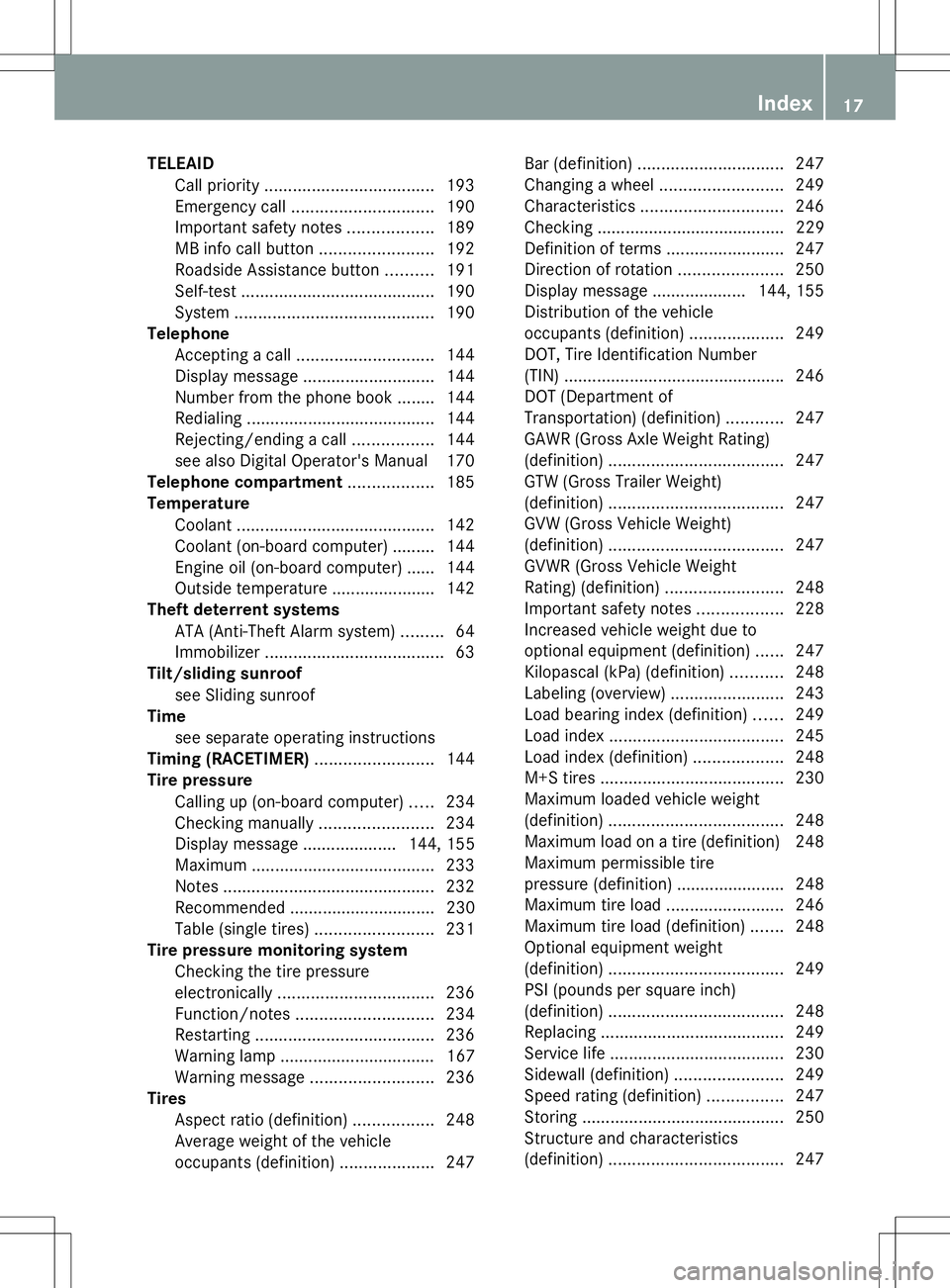
TELEAID
Call priority .................................... 193
Emergency call .............................. 190
Important safety notes ..................189
MB info call button ........................192
Roadside Assistance button ..........191
Self-test ......................................... 190
System .......................................... 190
Telephone
Accepting a call ............................. 144
Display message ............................ 144
Number from the phone book ....... .144
Redialing ........................................ 144
Rejecting/ending a call .................144
see also Digital Operator's Manual 170
Telephone compartment ..................185
Temperature Coolant .......................................... 142
Coolant (on-board computer) ......... 144
Engine oil (on-board computer) ...... 144
Outside temperature ..................... .142
Theft deterrent systems
ATA (Anti-Theft Alarm system) .........64
Immobilizer ...................................... 63
Tilt/sliding sunroof
see Sliding sunroof
Time
see separate operating instructions
Timing (RACETIMER) .........................144
Tire pressure Calling up (on-board computer) .....234
Checking manually ........................234
Display message .................... 144, 155
Maximum ....................................... 233
Notes ............................................. 232
Recommended ............................... 230
Table (single tires) .........................231
Tire pressure monitoring system
Checking the tire pressure
electronically ................................. 236
Function/notes ............................. 234
Restarting ...................................... 236
Warning lamp ................................. 167
Warning message .......................... 236
Tires
Aspect ratio (definition) .................248
Average weight of the vehicle
occupants (definition) ....................247Bar (definition)
............................... 247
Changing a wheel .......................... 249
Characteristics .............................. 246
Checking ........................................ 229
Definition of terms .........................247
Direction of rotatio n...................... 250
Display message .................... 144, 155
Distribution of the vehicle
occupants (definition) ....................249
DOT, Tire Identification Number
(TIN) .............................................. .246
DOT (Department of
Transportation) (definition) ............247
GAWR (Gross Axle Weight Rating)
(definition) ..................................... 247
GTW (Gross Trailer Weight)
(definition) ..................................... 247
GVW (Gross Vehicle Weight)
(definition) ..................................... 247
GVWR (Gross Vehicle Weight
Rating) (definition) .........................248
Important safety notes ..................228
Increased vehicle weight due to
optional equipment (definition) ......247
Kilopascal (kPa) (definition) ...........248
Labeling (overview )........................ 243
Load bearing index (definition) ......249
Load index ..................................... 245
Load index (definition) ...................248
M+S tires ....................................... 230
Maximum loaded vehicle weight
(definition) ..................................... 248
Maximum load on a tire (definition) 248
Maximum permissible tire
pressure (definition) ....................... 248
Maximum tire loa d......................... 246
Maximum tire load (definition) .......248
Optional equipment weight
(definition) ..................................... 249
PSI (pounds per square inch)
(definition) ..................................... 248
Replacing ....................................... 249
Service life ..................................... 230
Sidewall (definition) .......................249
Speed rating (definition) ................247
Storing ........................................... 250
Structure and characteristics
(definition) ..................................... 247 Index
17
Page 34 of 272
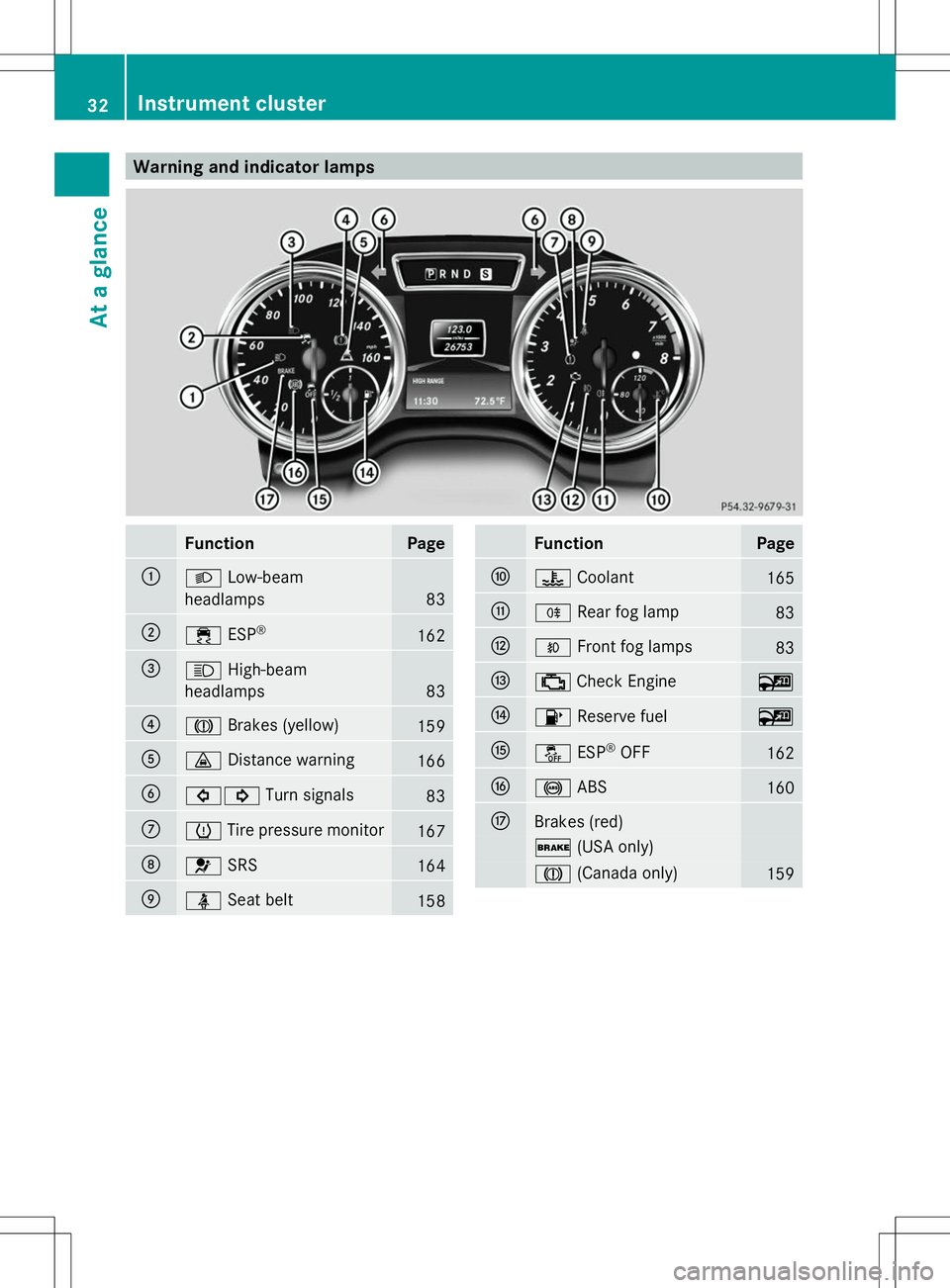
Warning and indicator lamps
Function Page
:
L
Low-beam
headlamps 83
;
÷
ESP® 162
=
K
High-beam
headlamps 83
?
J
Brakes (yellow) 159
A
·
Distance warning 166
B
#!
Turn signals 83
C
h
Tire pressure monitor 167
D
6
SRS 164
E
ü
Seat belt 158 Function Page
F
?
Coolant 165
G
R
Rear fog lamp 83
H
O
Front fog lamps 83
I
;
Check Engine ~
J
8
Reserve fuel ~
K
å
ESP®
OFF 162
L
!
ABS 160
M
Brakes (red)
$
(USA only) J
(Canada only) 15932
Instrument clusterAt a glance
Page 42 of 272
Useful information
i This Operator's Manual describes all
models and all standard and optional
equipment of your vehicle available at the
time of publication of the Operator's
Manual. Country-specific differences are
possible. Please note that your vehicle may
not be equipped with all features
described. This also applies to safety-
related systems and functions.
i Read the information on qualified
specialist workshops: (Y page 27).Occupant safety
Important safety notes
G
WARNING
Modifications to the restraint system, may
cause it to no longer work as intended. The
restraint system may then not perform its
intended protective function by failing in an
accident or triggering unexpectedly, for
example. There is an increased risk of injury.
Never modify parts of the restraint system.
Never tamper with the wiring as well as
electronic components or their software.
In this section, you will learn the most
important facts about the restraint system
components of the vehicle.
The restraint system consists of:
R Seat belts
R Child restraint systems
R LATCH-type (ISOFIX) child seat securing
system
Additional protection is provided by:
R SRS (Supplemental Restraint System)
R NECK-PRO head restraints
R Air bag system components with:
-The 45indicator lamp
- Front-passenger seat with BabySmart™
air bag deactivation system Although the systems are independent, their
protective functions work in conjunction with
each other. Not all air bags are always
deployed in an accident.
i Observe the additional information on
infants and children traveling with you in
the vehicle and restraint systems for
infants and children (Y page 53). SRS (Supplemental Restraint System)
Introduction SRS reduces the risk of occupants coming
into contact with the vehicle's interior in the
event of an accident. It can also reduce the
effect of the forces to which occupants are
subjected during an accident.
SRS consists of:
R SRS warning lamps 6
R Air bags
R Air bag control unit (with crash sensors)
R Emergency Tensioning Device (ETD) for
seat belts
R Seat belt force limiter
SRS warning lamp SRS functions are checked regularly when
you switch on the ignition and when the
engine is running. Therefore, malfunctions
can be detected in good time.
The
6 SRS warning lamp in the instrument
cluster lights up when the ignition is switched
on. It goes out no later than a few seconds
after the engine is started.
The SRS components are in operational
readiness when the 6SRS indicator lamp
goes out while the engine is running. 40
Occupant safetySafety
Page 45 of 272
bag is disabled. If the front-passenger seat is
recognized as empty, the air bag control unit
will not deploy the front-passenger air bag in
the event of a collision.
Ask your passenger to sit correctly on the
front-passenger seat in an upright position
until the 4/ indicator lamp goes out.
If the 4/ indicator lamp does not go
out, please consult an authorized Mercedes-
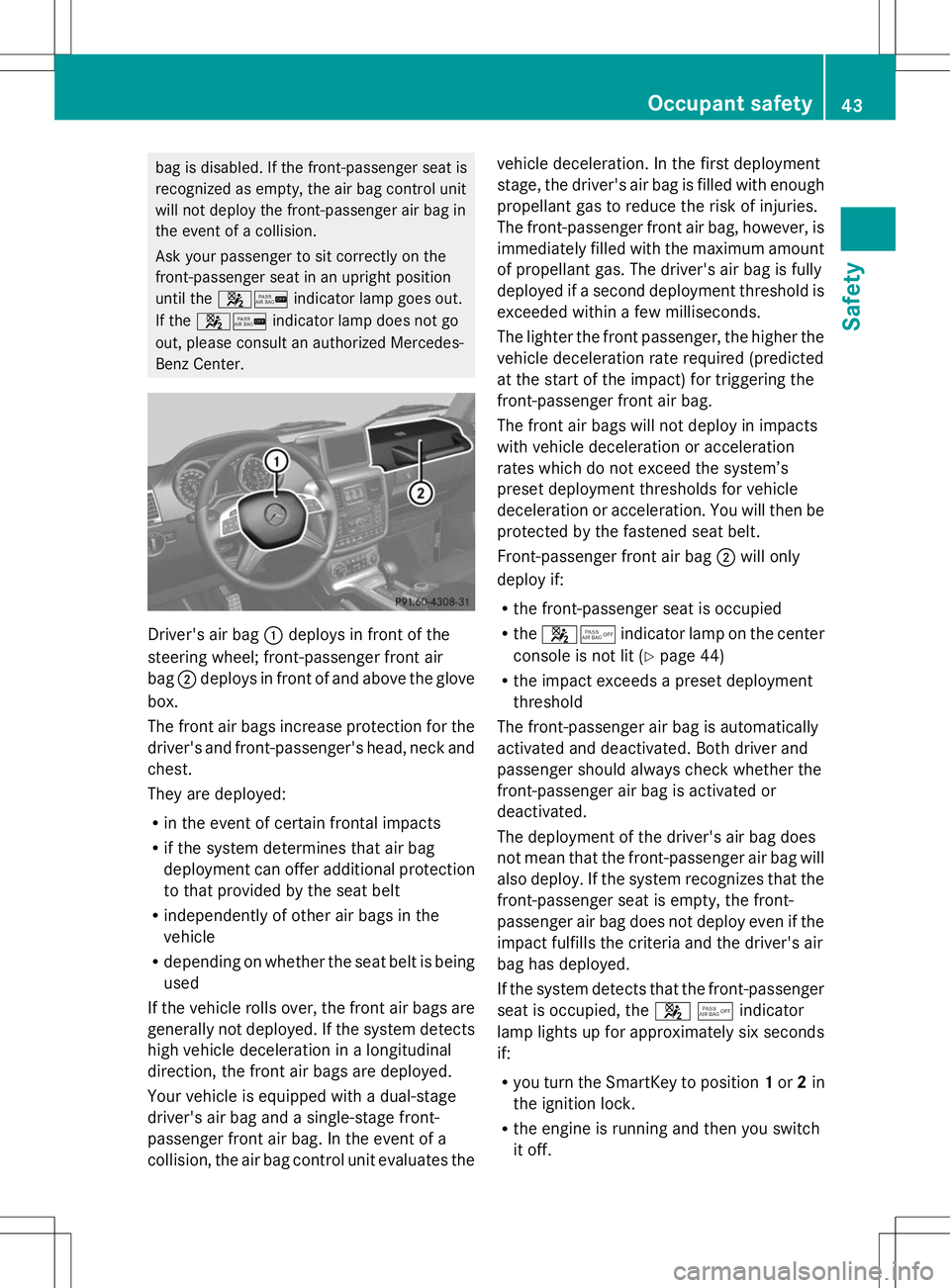
Benz Center. Driver's air bag
:deploys in front of the
steering wheel; front-passenger front air
bag ;deploys in front of and above the glove
box.
The front air bags increase protection for the
driver's and front-passenger's head, neck and
chest.
They are deployed:
R in the event of certain frontal impacts
R if the system determines that air bag
deployment can offer additional protection
to that provided by the seat belt
R independently of other air bags in the
vehicle
R depending on whether the seat belt is being
used
If the vehicle rolls over, the front air bags are
generally not deployed. If the system detects
high vehicle deceleration in a longitudinal
direction, the front air bags are deployed.
Your vehicle is equipped with a dual-stage
driver's air bag and a single-stage front-
passenger front air bag. In the event of a
collision, the air bag control unit evaluates the vehicle deceleration. In the first deployment
stage, the driver's air bag is filled with enough
propellant gas to reduce the risk of injuries.
The front-passenger front air bag, however, is
immediately filled with the maximum amount
of propellant gas. The driver's air bag is fully
deployed if a second deployment threshold is
exceeded within a few milliseconds.
The lighter the front passenger, the higher the
vehicle deceleration rate required (predicted
at the start of the impact) for triggering the
front-passenger front air bag.
The front air bags will not deploy in impacts
with vehicle deceleration or acceleration
rates which do not exceed the system’s
preset deployment thresholds for vehicle
deceleration or acceleration. You will then be
protected by the fastened seat belt.
Front-passenger front air bag ;will only
deploy if:
R the front-passenger seat is occupied
R the 45 indicator lamp on the center
console is not lit (Y page 44)
R the impact exceeds a preset deployment
threshold
The front-passenger air bag is automatically
activated and deactivated. Both driver and
passenger should always check whether the
front-passenger air bag is activated or
deactivated.
The deployment of the driver's air bag does
not mean that the front-passenger air bag will
also deploy. If the system recognizes that the
front-passenger seat is empty, the front-
passenger air bag does not deploy even if the
impact fulfills the criteria and the driver's air
bag has deployed.
If the system detects that the front-passenger
seat is occupied, the 45indicator
lamp lights up for approximately six seconds
if:
R you turn the SmartKey to position 1or 2in
the ignition lock.
R the engine is running and then you switch
it off. Occupant safety
43Safety Z
Page 62 of 272
ABS (Anti-lock Braking System)
Important safety notes i
Observe the "Important safety notes"
section (Y page 59). G
WARNING
If the ABS malfunctions, other driving systems
such as the BAS or the ESP ®
are also switched
off. Observe indicator and warning lamps that
may come on as well as messages in the
multifunction display that may appear.
If the ABS malfunctions, the wheels may lock
during hard braking, reducing the steering
capability and extending the braking distance. G
WARNING
If ABS is faulty, the wheels could lock when
braking. The steerability and braking
characteristics may be severely impaired.
Additionally, further driving safety systems
are deactivated. There is an increased danger
of skidding and accidents.
Drive on carefully. Have ABS checked
immediately at a qualified specialist
workshop.
ABS regulates brake pressure in such a way
that the wheels do not lock when you brake.
This allows you to continue steering the
vehicle when braking.
Provided that the differential locks are not
active, ABS works from a speed of about
5 mph (8 km/h) upwards, regardless of road-
surface conditions. ABS works on slippery
surfaces, even if you only brake gently.
The yellow !ABS warning lamp in the
instrument cluster lights up when the ignition
is switched on. It goes out when the engine is
running.
Braking If ABS intervenes when braking, you will feel
a pulsing in the brake pedal. X
If ABS intervenes: continue to depress the
brake pedal vigorously until the braking
situation is over.
X To make a full brake application:
depress the brake pedal with full force.
The pulsating brake pedal can be an
indication of hazardous road conditions, and
functions as a reminder to take extra care
while driving.
Off-road ABS If the
LOW RANGE shift range is selected by
the transfer case, (Y page 130), an ABS
system specifically suited to off-road terrain
is automatically activated.
At speeds below 37 mph (60 km/h), the front
wheels lock cyclically during braking. The
digging-in effect achieved in the process
reduces the stopping distance on off-road
terrain. This limits steering capability. BAS (Brake Assist System)
i Observe the "Important safety notes"
section (Y page 59). G
WARNING
If BAS is malfunctioning, the braking distance
in an emergency braking situation is
increased. There is a risk of an accident.
In an emergency braking situation, depress
the brake pedal with full force. ABS prevents
the wheels from locking.
BAS operates in emergency braking
situations. If you depress the brake pedal
quickly, BAS automatically boosts the braking
force, thus shortening the stopping distance.
X Keep the brake pedal firmly depressed until
the emergency braking situation is over.
ABS prevents the wheels from locking.
The brakes will function as usual once you
release the brake pedal. BAS is deactivated. 60
Driving safety systemsSafety
Page 63 of 272
Adaptive brake lights
If you brake sharply from a speed of more
than 30 mph (50 km/h) or if braking is
assisted by BAS, the brake lamps flash
rapidly. In this way, traffic traveling behind
you is warned in an even more noticeable
manner.
If you brake sharply from a speed of more
than 45 mph (70 km/h) to a standstill, the
hazard warning lamps are activated
automatically. If the brakes are applied again,
the brake lamps light up continuously. If you
drive faster than 6 mph (10 km/h), the hazard
warning lamps are deactivated automatically.
You can also switch off the hazard warning
lamps using the hazard warning button
(Y page 82). ESP
®
(Electronic Stability Program)
Important safety notes i
Observe the "Important safety notes"
section (Y page 59). G
WARNING
If ESP ®
is malfunctioning, ESP ®
is unable to
stabilize the vehicle. Additionally, further
driving safety systems are deactivated. This
increases the risk of skidding and an accident.
Drive on carefully. Have ESP ®
checked at a
qualified specialist workshop.
! Only operate the vehicle for a maximum
of ten seconds on a brake test
dynamometer. Switch off the ignition.
Application of the brakes by ESP ®
may
otherwise destroy the brake system.
! A function or performance test should
only be carried out on a two-axle
dynamometer. Before you operate the
vehicle on such a dynamometer, please
consult a qualified workshop. You could
otherwise damage the drive train or the
brake system. ESP
®
monitors driving stability and traction.
Traction is the power transmission between
the tires and the road surface.
ESP ®
is deactivated if the åwarning lamp
in the instrument cluster lights up
continuously when the engine is running.
If the ÷ warning lamp and the å
warning lamp are lit continuously, ESP ®
is not
available due to a malfunction.
Observe the information on warning lamps
(Y page 162) and any display messages that
appear in the instrument cluster
(Y page 144).
If ESP ®
detects that the vehicle is deviating
from the direction desired by the driver, one
or more wheels are braked to stabilize the
vehicle. If necessary, the engine output is also
modified to keep the vehicle on the desired
course within physical limits. ESP ®
assists
the driver when pulling away on wet or
slippery roads. ESP ®
can also stabilize the
vehicle during braking.
If ESP ®
intervenes, the ÷warning lamp
flashes in the instrument cluster.
If ESP ®
intervenes:
X Do not deactivate ESP ®
under any
circumstances.
X Only depress the accelerator pedal as far
as necessary when pulling away.
X Adapt your driving style to suit the
prevailing road and weather conditions.
i Only use wheels with the recommended
tire sizes. Only then will ESP ®
function
properly.
i If differential locks are switched on, ABS,
BAS and ESP ®
switch themselves off
automatically.
4ETS (Electronic Traction System) i
Observe the "Important safety notes"
section (Y page 59).
Traction control remains active if you
deactivate ESP ®
. Driving safety systems
61Safety Z