display MERCEDES-BENZ G-CLASS SUV 2015 Owner's Manual
[x] Cancel search | Manufacturer: MERCEDES-BENZ, Model Year: 2015, Model line: G-CLASS SUV, Model: MERCEDES-BENZ G-CLASS SUV 2015Pages: 274, PDF Size: 31.95 MB
Page 25 of 274
XInsert the installation CD into the CD/DVD
drive.
X Follow the installation steps on the
COMAND display.
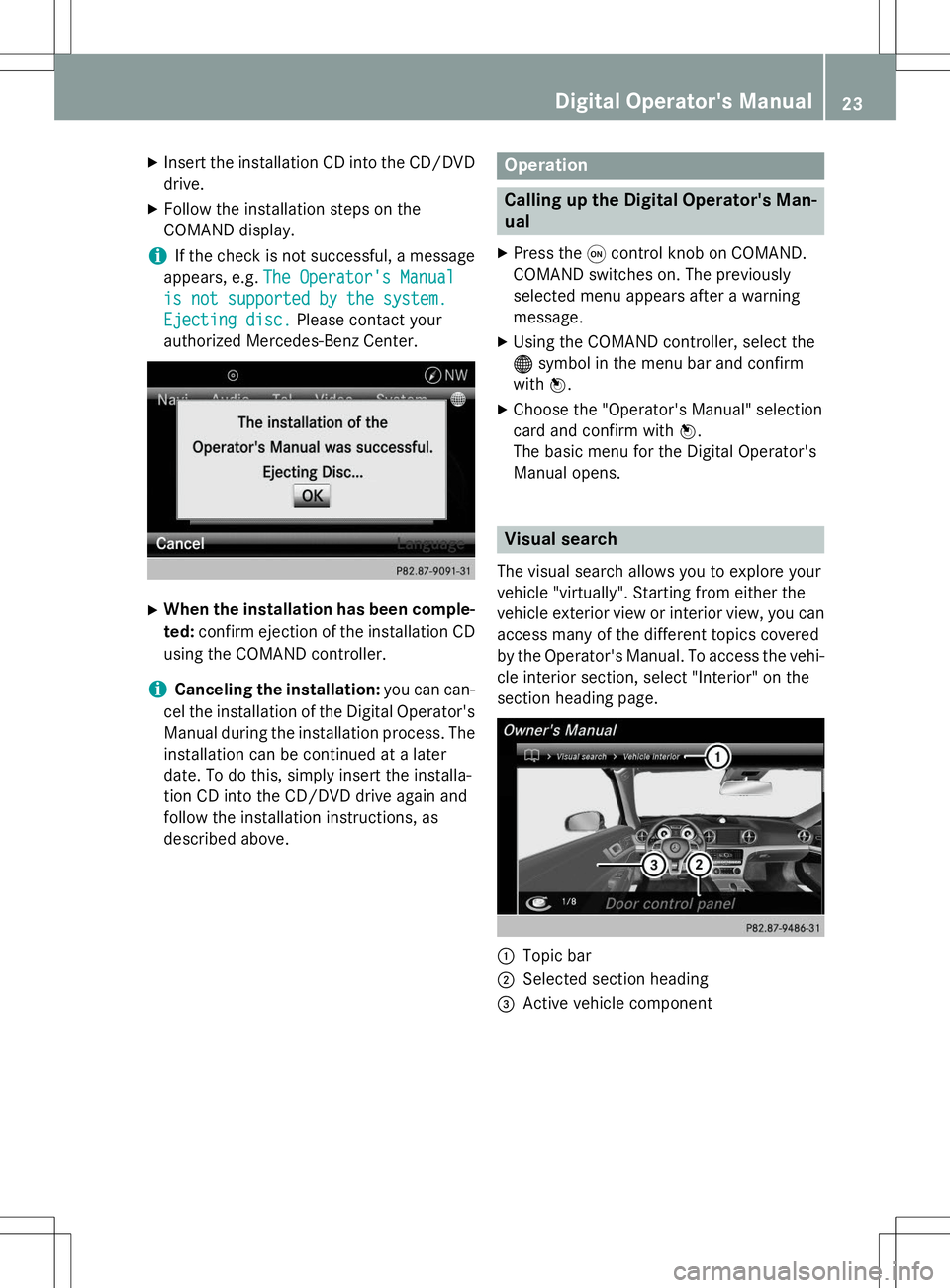
iIf the check is not successful, a message
appears, e.g.
The Operator's Manual
is not supported by the system.
Ejecting disc.Please contact your
authorized Mercedes-Benz Center.
X When the installation has been comple-
ted: confirm ejection of the installation CD
using the COMAND controller.
iCanceling the installation: you can can-
cel the installation of the Digital Operator's Manual during the installation process. The installation can be continued at a later
date. To do this, simply insert the installa-
tion CD into the CD/DVD drive again and
follow the installation instructions, as
described above.
Operation
Calling up the Digital Operator's Man-
ual
X Press the qcontrol knob on COMAND.
COMAND switches on. The previously
selected menu appears after a warning
message.
X Using the COMAND controller, select the® symbol in the menu bar and confirm
with W.
X Choose the "Operator's Manual" selection
card and confirm with W.
The basic menu for the Digital Operator's
Manual opens.
Visual search
The visual search allows you to explore your
vehicle "virtually". Starting from either the
vehicle exterior view or interior view, you can
access many of the different topics covered
by the Operator's Manual. To access the vehi- cle interior section, select "Interior" on the
section heading page.
:Topic bar
;Selected section heading
=Active vehicle component
Digital Operator's Manual23
Page 27 of 274
Operation
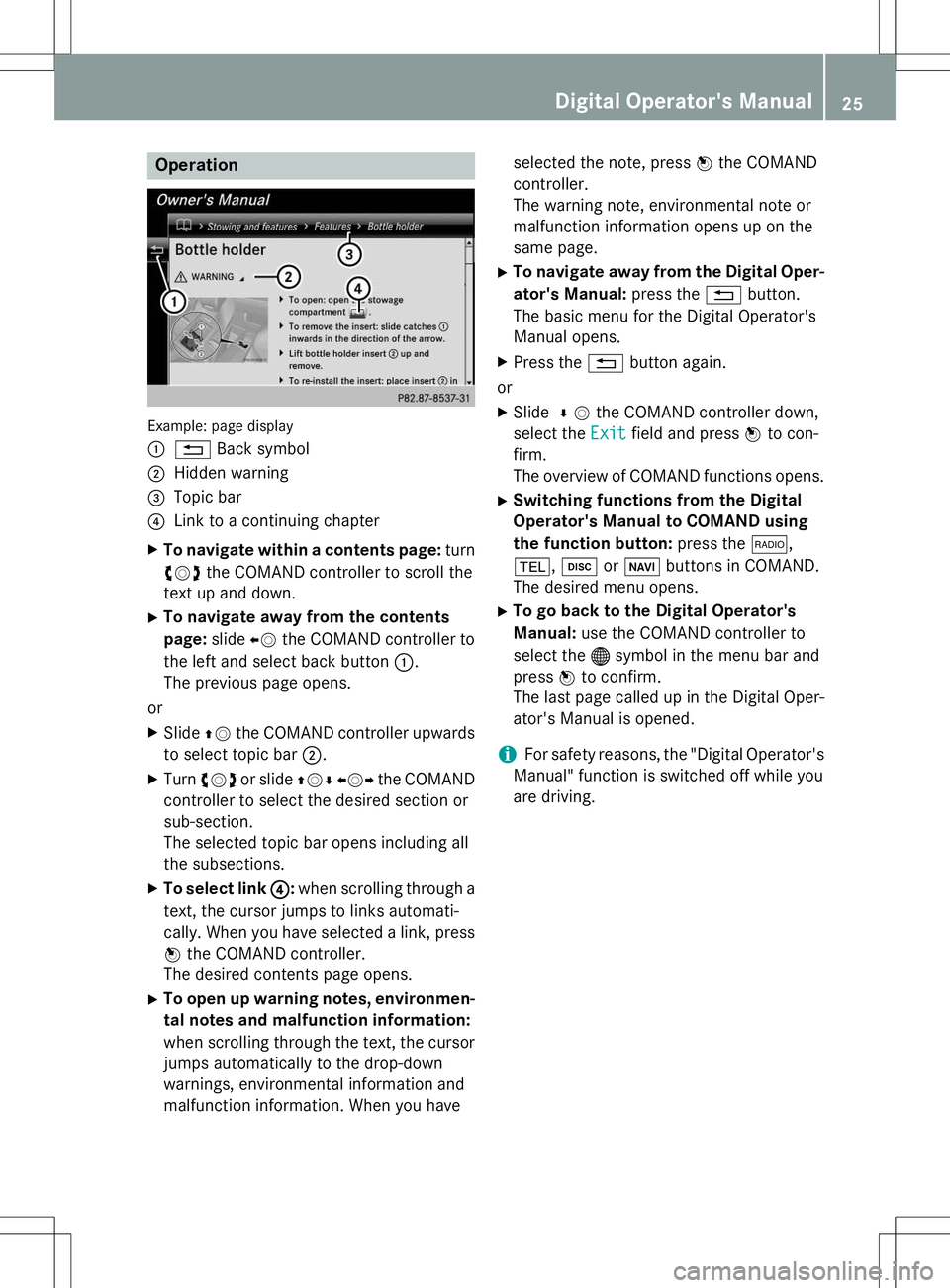
Example: page display :
%Back symbol
;Hidden warning
=Topic bar
?Link to a continuing chapter
X To navigate within a contents page: turn
cVd the COMAND controller to scroll the
text up and down.
X To navigate away from the contents page: slideXVthe COMAND controller to
the left and select back button :.
The previous page opens.
or X Slide ZVthe COMAND controller upwards
to select topic bar ;.
X Turn cVd or slide ZVÆXVY the COMAND
controller to select the desired section or
sub-section.
The selected topic bar opens including all
the subsections.
X To select link ?
:when scrolling through a
text, the cursor jumps to links automati-
cally. When you have selected a link, press
W the COMAND controller.
The desired contents page opens.
X To open up warning notes, environmen-
tal notes and malfunction information:
when scrolling through the text, the cursor
jumps automatically to the drop-down
warnings, environmental information and
malfunction information. When you have selected the note, press
Wthe COMAND
controller.
The warning note, environmental note or
malfunction information opens up on the
same page.
X To navigate away from the Digital Oper-
ator's Manual: press the%button.
The basic menu for the Digital Operator's
Manual opens.
X Press the %button again.
or
X Slide ¬V the COMAND controller down,
select the
Exitfield and press Wto con-
firm.
The overview of COMAND functions opens.
X Switching functions from the Digital
Operator's Manual to COMAND using
the function button: press the$,
% ,h orØ buttons in COMAND.
The desired menu opens.
X To go back to the Digital Operator's
Manual: use the COMAND controller to
select the ®symbol in the menu bar and
press Wto confirm.
The last page called up in the Digital Oper-
ator's Manual is opened.
iFor safety reasons, the "Digital Operator's
Manual" function is switched off while you
are driving.
Digital Operator's Manual25
Page 34 of 274
Cockpit
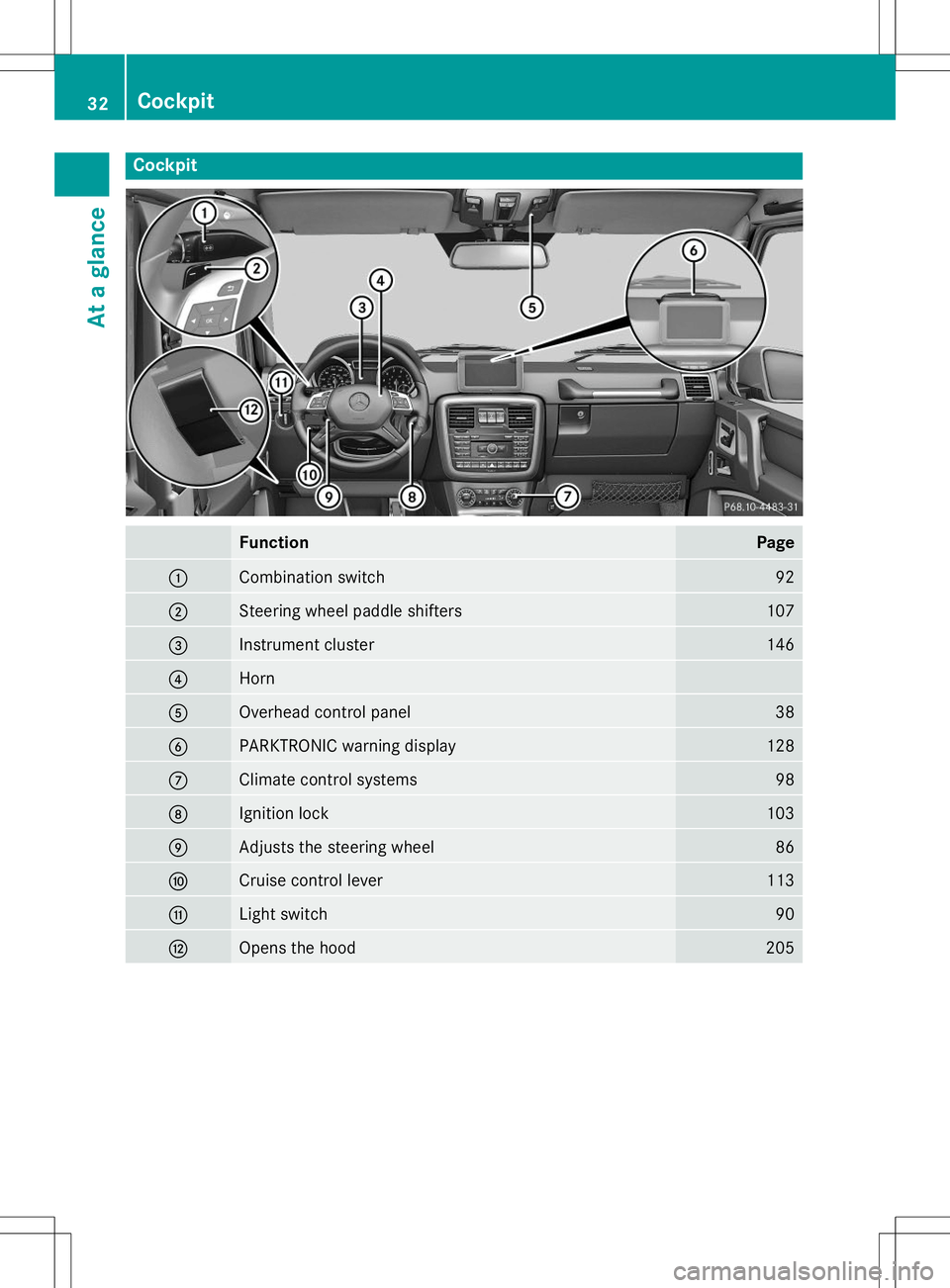
FunctionPage
:Combination switch92
;Steering wheel paddle shifters107
=Instrument cluster146
?Horn
AOverhead control panel38
BPARKTRONIC warning display128
CClimate control systems98
DIgnition lock103
EAdjusts the steering wheel86
FCruise control lever113
GLight switch90
HOpens the hood205
32Cockpit
At a glance
Page 35 of 274
Instrument cluster
Displays and controls
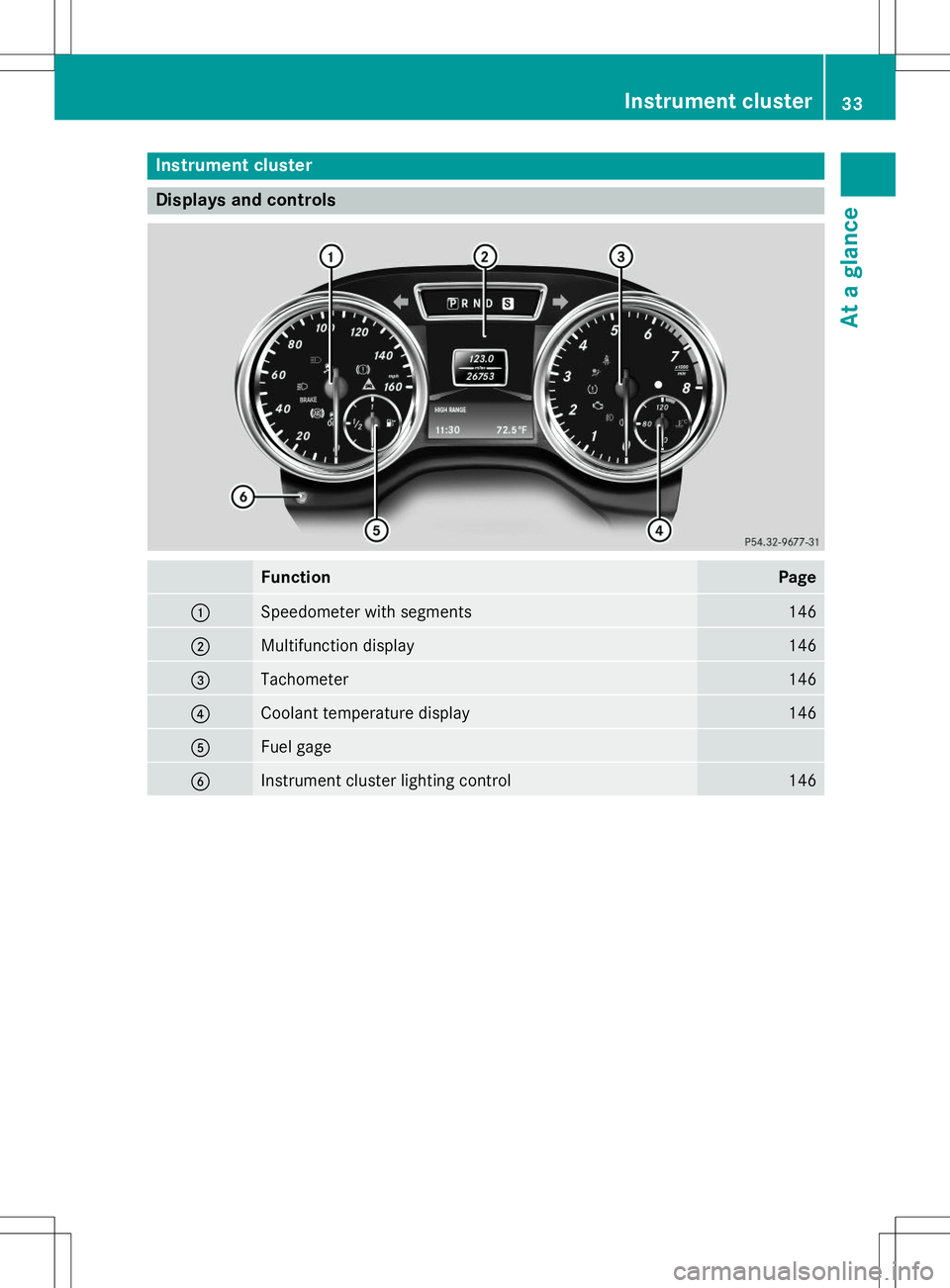
FunctionPage
:Speedometer with segments146
;Multifunction display146
=Tachometer146
?Coolant temperature display146
AFuel gage
BInstrument cluster lighting control146
Instrument cluster33
At a glance
Page 37 of 274
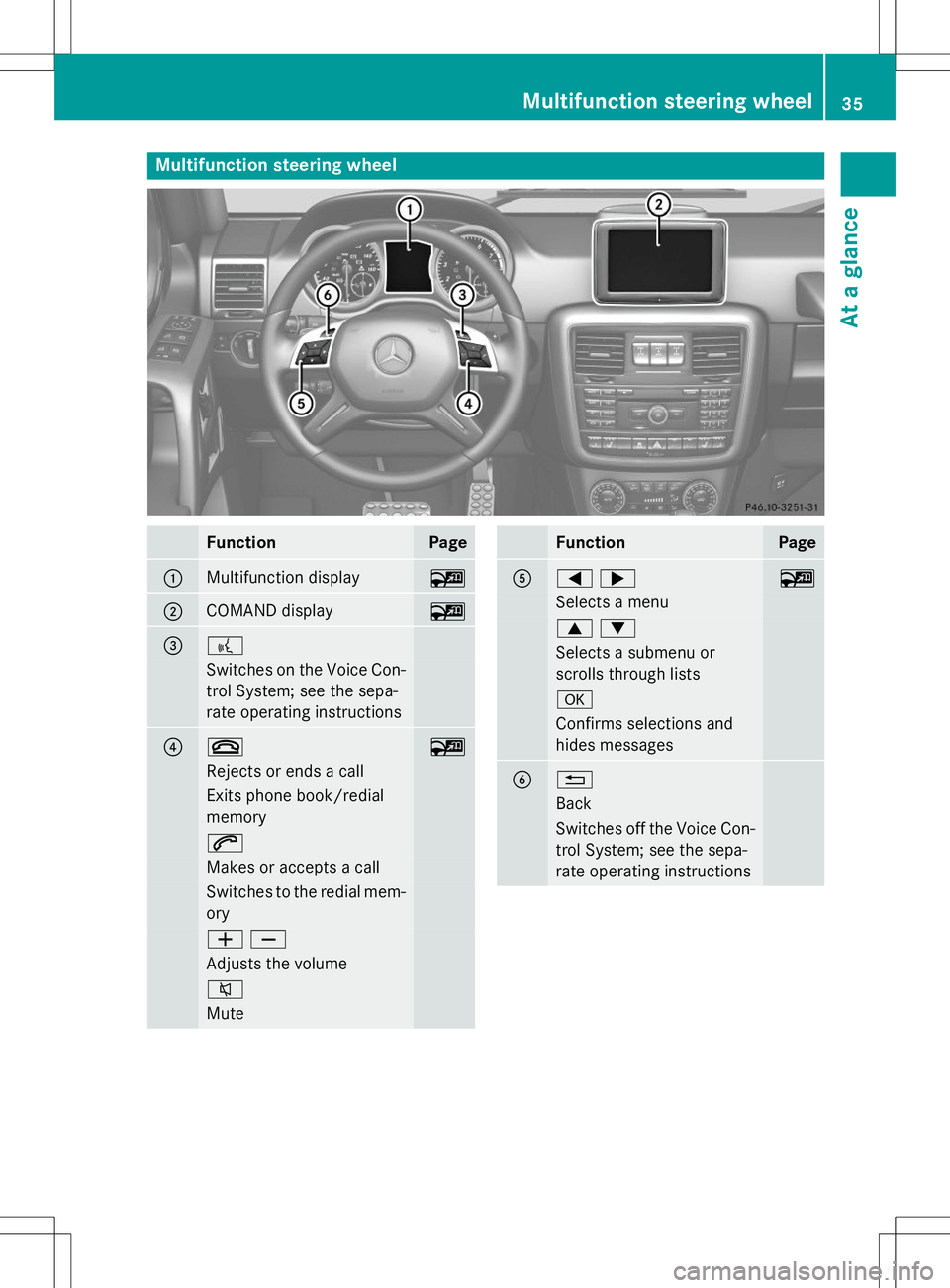
Multifunction steering wheel
FunctionPage
:Multifunction display~
;COMAND display~
=?
Switches on the Voice Con-
trol System; see the sepa-
rate operating instructions
?~~
Rejects or ends a call
Exits phone book/redial memory
6
Makes or accepts a call
Switches to the redial mem- ory
WX
Adjusts the volume
8
Mute
FunctionPage
A=;~
Selects a menu
9:
Selects a submenu or
scrolls through lists
a
Confirms selections and
hides messages
B%
Back
Switches off the Voice Con-
trol System; see the sepa-
rate operating instructions
Multifunction steering wheel35
At a glance
Page 67 of 274
ABS (Anti-lock Braking System)
Important safety notes
iObserve the "Important safety notes" sec-
tion ( Ypage 64).
GWARNING
If the ABS malfunctions, other driving systems
such as the BAS or the ESP ®
are also switched
off. Observe indicator and warning lamps that may come on as well as messages in the mul-
tifunction display that may appear.
If the ABS malfunctions, the wheels may lock
during hard braking, reducing the steering
capability and extending the braking distance.
GWARNING
If ABS is faulty, the wheels could lock when
braking. The steerability and braking charac-
teristics may be severely impaired. Addition-
ally, further driving safety systems are deac-
tivated. There is an increased danger of skid- ding and accidents.
Drive on carefully. Have ABS checked imme-
diately at a qualified specialist workshop.
ABS regulates brake pressure in such a way
that the wheels do not lock when you brake.
This allows you to continue steering the vehi- cle when braking.
Provided that the differential locks are not
active, ABS works from a speed of about
5 mph (8 km/h) upwards, regardless of road-surface conditions. ABS works on slippery
surfaces, even if you only brake gently.
The yellow !ABS warning lamp in the
instrument cluster lights up when the ignition
is switched on. It goes out when the engine is running.
Braking
If ABS intervenes when braking, you will feel apulsing in the brake pedal. X
If ABS intervenes: continue to depress the
brake pedal vigorously until the braking sit-
uation is over.
X To make a full brake application:
depress the brake pedal with full force.
The pulsating brake pedal can be an indica-
tion of hazardous road conditions, and func-
tions as a reminder to take extra care while
driving.
Off-road ABS
If the LOW RANGE shift range is selected by
the transfer case, ( Ypage 132), an ABS sys-
tem specifically suited to off-road terrain is
automatically activated.
At speeds below 37 mph (60 km/h), the front wheels lock cyclically during braking. The dig-
ging-in effect achieved in the process reduces
the stopping distance on off-road terrain. This limits steering capability.
BAS (Brake Assist System)
iObserve the "Important safety notes" sec-
tion ( Ypage 64).
GWARNING
If BAS is malfunctioning, the braking distance
in an emergency braking situation is
increased. There is a risk of an accident.
In an emergency braking situation, depress
the brake pedal with full force. ABS prevents
the wheels from locking.
BAS operates in emergency braking situa-
tions. If you depress the brake pedal quickly,
BAS automatically boosts the braking force,
thus shortening the stopping distance.
X Keep the brake pedal firmly depressed until
the emergency braking situation is over.
ABS prevents the wheels from locking.
The brakes will function as usual once you
release the brake pedal. BAS is deactivated.
Driving safety systems65
Safety
Z
Page 68 of 274
Adaptive brake lights
If you brake sharply from a speed of more
than 30 mph (50 km/h) or if braking is assis-ted by BAS, the brake lamps flash rapidly. In
this way, traffic traveling behind you is
warned in an even more noticeable manner.
If you brake sharply from a speed of more
than 45 mph (70 km/h)to a standstill, the
hazard warning lamps are activated automat-
ically. If the brakes are applied again, the
brake lamps light up continuously. The hazard
warning lamps are deactivated automatically if you drive faster than 6 mph (10 km/h). You
can also switch off the hazard warning lamps using the hazard warning button( Y page 90).
ESP®(Electronic Stability Program)
Important safety notes
iObserve the "Important safety notes" sec-
tion ( Ypage 64).
GWARNING
If ESP ®
is malfunctioning, ESP ®
is unable to
stabilize the vehicle. Additionally, further driv- ing safety systems are deactivated. This
increases the risk of skidding and an accident.
Drive on carefully. Have ESP ®
checked at a
qualified specialist workshop.
!Only operate the vehicle for a maximum of
ten seconds on a brake test dynamometer.
Switch off the ignition.
Application of the brakes by ESP ®
may oth-
erwise destroy the brake system.
!A function or performance test should
only be carried out on a two-axle dyna-
mometer. Before you operate the vehicle
on such a dynamometer, please consult a
qualified workshop. You could otherwise
damage the drive train or the brake system. ESP
®
monitors the driving stability and the
traction. Traction is the power transmission
between the tires and the road surface. ESP ®
is deactivated if the åwarning lamp
in the instrument cluster lights up continu-
ously when the engine is running.
If the ÷ warning lamp and the åwarn-
ing lamp are lit continuously, ESP ®
is not
available due to a malfunction.
Observe the information on warning lamps ( Y page 165) and display messages which
may be displayed in the instrument cluster( Y page 148).
If ESP ®
detects that the vehicle is deviating
from the direction desired by the driver, one
or more wheels are braked to stabilize the
vehicle. If necessary, the engine output is also modified to keep the vehicle on the desired
course within physical limits. ESP ®
assists
the driver when pulling away on wet or slip-
pery roads. ESP ®
can also stabilize the vehi-
cle during braking.
If ESP ®
intervenes, the ÷warning lamp
flashes in the instrument cluster.
If ESP ®
intervenes:
X Do not deactivate ESP ®
under any circum-
stances.
X Only depress the accelerator pedal as far as
necessary when pulling away.
X Adapt your driving style to suit the prevail-
ing road and weather conditions.
iOnly use wheels with the recommended
tire sizes. Only then will ESP ®
function
properly.
iIf differential locks are switched on, ABS,
BAS and ESP ®
switch off automatically.
4ETS (Electronic Traction System)
iObserve the "Important safety notes" sec-
tion ( Ypage 64).
Traction control remains active, even if you
deactivate ESP ®
.
66Driving safety systems
Safety
Page 95 of 274
The bulb may explode if:
R you touch it
R it is hot
R you drop it
R you scratch it
Only operate bulbs in enclosed lamps
designed for that purpose. Only install spare
bulbs of the same type and the specified volt- age.
Marks on the glass tube reduce the service
life of the bulbs. Do not touch the glass tube
with your bare hands. If necessary, clean the
glass tube when cold with alcohol or spirit and
rub it off with a lint-free cloth.
Protect bulbs from moisture during opera-
tion. Do not allow bulbs to come into contact
with liquids.
Xenon bulbs
If your vehicle is equipped with Xenon bulbs,
you can recognize this by the following: the
cone of light from the Xenon bulbs moves
from the top to the bottom and back again
when you start the engine. For this to be
observed, the lights must be switched on
before starting the engine.
Bulbs and lamps are an important aspect of
vehicle safety. You must therefore make sure that these function correctly at all times.
Have the headlamp setting checked regularly.
LED lamps
You can replace neither Xenon bulbs nor LED
bulbs. Have LED bulbs changed at a qualified specialist workshop.
Bulbs and lamps are an important aspect of
vehicle safety. You must therefore make sure
that these function correctly at all times.
Have the headlamp setting checked regularly.
Before changing bulbs
Have the following bulbs replaced at a quali-
fied specialist workshop:
R Additional turn signals in the exterior mir-rors
R High-mounted brake lamp R
High-beam/low-beam headlamps (Xenonbulbs)
R Daytime running lamps
R Parking lamps/standing lamps
R License plate lamp
iIndividual segments of the license plate
lamp LEDs may fail without a display mes-
sage appearing in the multifunction dis-
play. Regularly check the license plate
lamp. If necessary, visit a qualified special-
ist workshop.
You can replace the following bulbs:
R Fog lamp/cornering light with fog lamp
function
R Turn signal lamp (front)
R Brake/tail lamp
R Turn signal lamp (rear)
R Tail lamps/standing lamps
R Backup lamp
R Rear Fog Lamp
R Side marker lamps
Other bulbs
There are bulbs other than the Xenon bulbs
that you cannot replace yourself. Only replace the bulbs listed ( Ypage 94). Have the bulbs
that you cannot replace yourself replaced at a
qualified specialist workshop.
If you require assistance replacing bulbs, con-
sult a qualified specialist workshop.
Do not touch the glass tube of new bulbs with your bare hands. Even minor contamination
can burn into the glass surface and reduce
the service life of the bulbs. Always use a lint-
free cloth or only touch the base of the bulb
when installing.
Only use bulbs of the correct type.
If the new bulb still does not light up, consult a qualified specialist workshop.
Bulbs and lamps are an important aspect of
vehicle safety. You must therefore make surethat these function correctly at all times.
Have the headlamp setting checked regularly.
Replacing bulbs93
Lights and windshield wipers
Z
Page 101 of 274
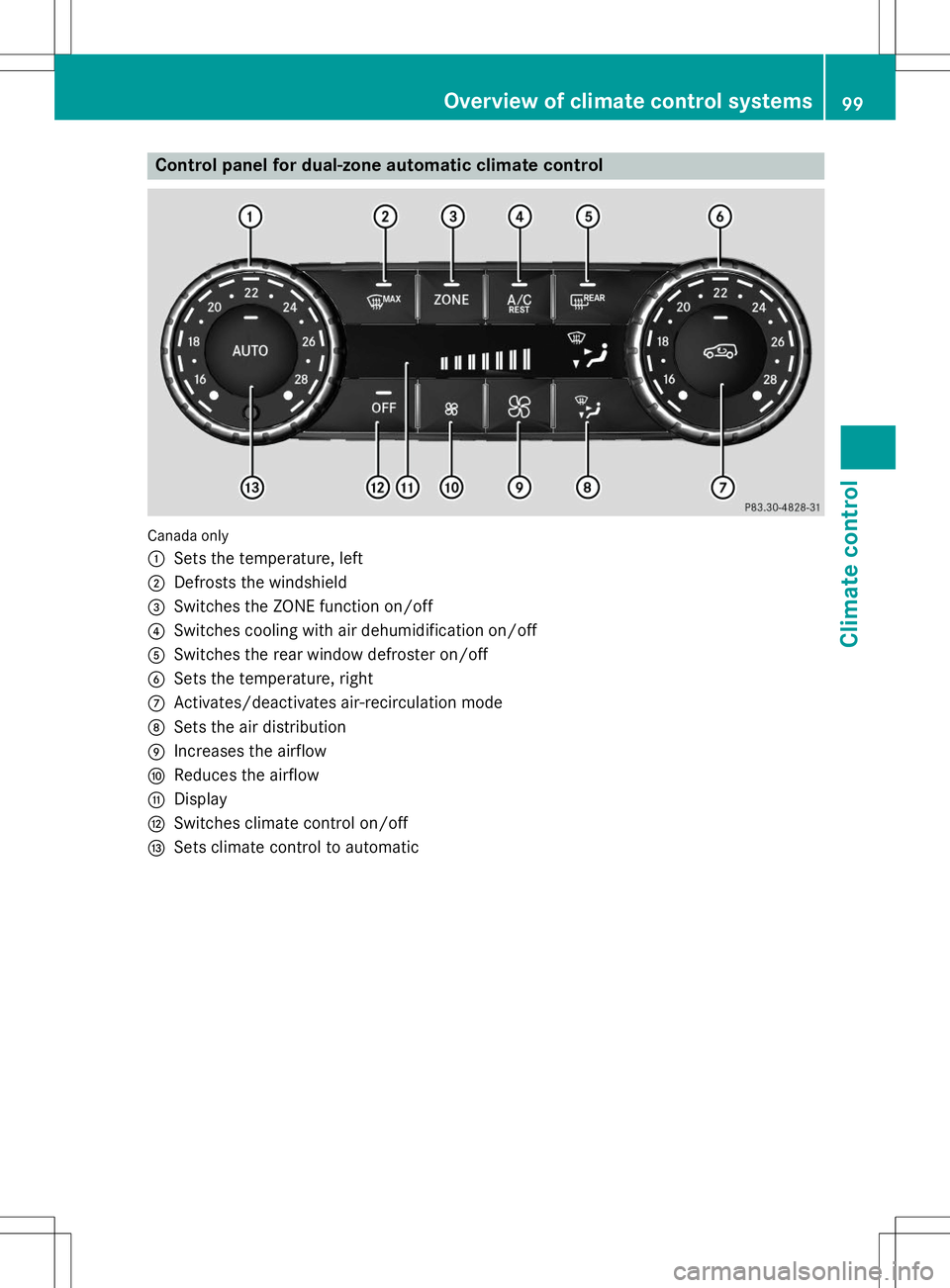
Control panel for dual-zone automatic climate control
Canada only :
Sets the temperature, left
;Defrosts the windshield
=Switches the ZONE function on/off
?Switches cooling with air dehumidification on/off
ASwitches the rear window defroster on/off
BSets the temperature, right
CActivates/deactivates air-recirculation mode
DSets the air distribution
EIncreases the airflow
FReduces the airflow
GDisplay
HSwitches climate control on/off
ISets climate control to automatic
Overview of climate control systems99
Climate control
Page 102 of 274
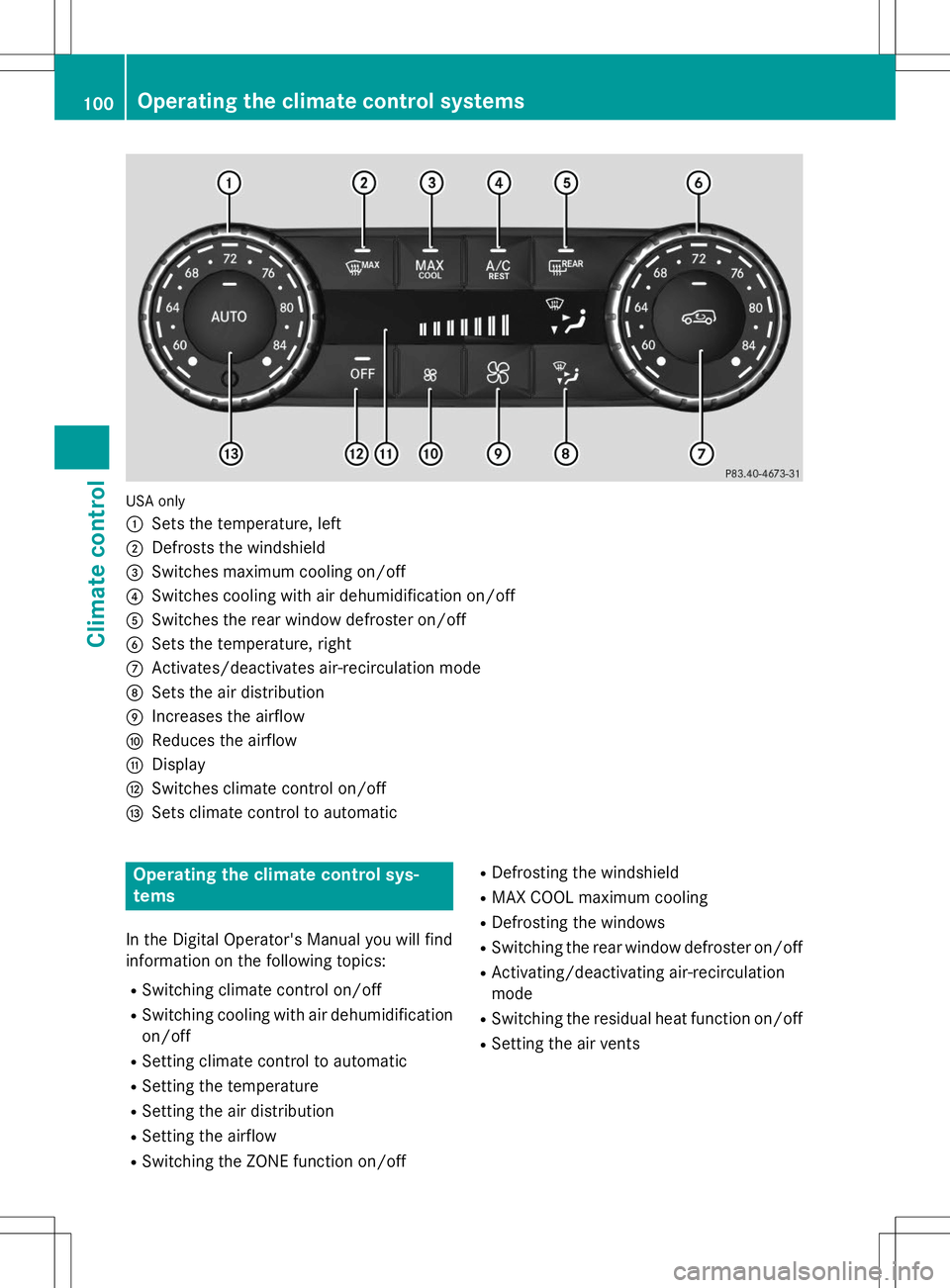
USA only :
Sets the temperature, left
;Defrosts the windshield
=Switches maximum cooling on/off
?Switches cooling with air dehumidification on/off
ASwitches the rear window defroster on/off
BSets the temperature, right
CActivates/deactivates air-recirculation mode
DSets the air distribution
EIncreases the airflow
FReduces the airflow
GDisplay
HSwitches climate control on/off
ISets climate control to automatic
Operating the climate control sys- tems
In the Digital Operator's Manual you will find
information on the following topics: RSwitching climate control on/off
R Switching cooling with air dehumidification
on/off
R Setting climate control to automatic
R Setting the temperature
R Setting the air distribution
R Setting the airflow
R Switching the ZONE function on/off R
Defrosting the windshield
R MAX COOL maximum cooling
R Defrosting the windows
R Switching the rear window defroster on/off
R Activating/deactivating air-recirculation mode
R Switching the residual heat function on/off
R Setting the air vents
100Operating the climate control systems
Climate control