ESP MERCEDES-BENZ G-CLASS SUV 2016 Repair Manual
[x] Cancel search | Manufacturer: MERCEDES-BENZ, Model Year: 2016, Model line: G-CLASS SUV, Model: MERCEDES-BENZ G-CLASS SUV 2016Pages: 261, PDF Size: 6.01 MB
Page 167 of 261
Warning/
indicator
lamp
N N
Signa ltype
Possible causes/consequences and M
MSolutions X
Make sure that the air supply to the engine radiator is not blocked, e.g. by frozen
slush.
X If the coolant temperature is below 120 †, you can continue driving to the
nearest qualified specialist workshop.
X Avoid heavy loads on the engine as you do so, e.g. driving in mountainous terrain
and stop-start traffic. Tyres
Warning/
indicator
lamp
N N
Signal type
Possible causes/consequences and M
MSolutions h
N
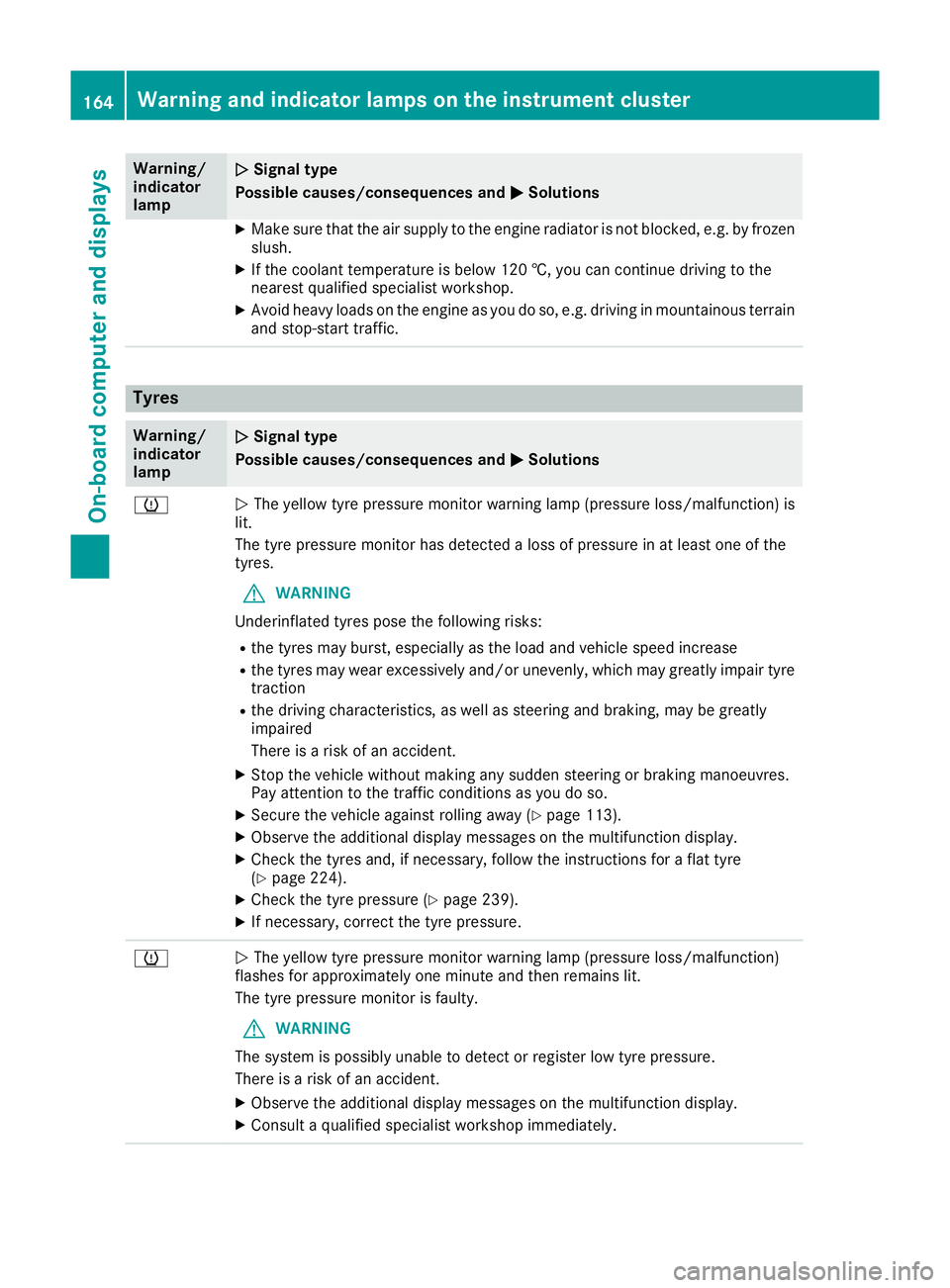
The yellow tyre pressure monitor warning lamp (pressure loss/malfunction) is
lit.
The tyre pressure monitor has detected aloss of pressure in at least one of the
tyres.
G WARNING
Underinflated tyres pose the following risks:
R the tyres may burst, especially as the load and vehicle speed increase
R the tyres may wear excessively and/or unevenly, which may greatly impair tyre
traction
R the driving characteristics, as well as steerin gand braking, may be greatly
impaired
There is arisk of an accident.
X Stop the vehicle without making any sudden steerin gorbraking manoeuvres.
Pay attention to the traffic conditions as you do so.
X Secure the vehicle against rolling away (Y page 113).
X Observe the additional display messages on the multifunction display.
X Check the tyres and, if necessary, follow the instructions for aflat tyre
(Y page 224).
X Check the tyre pressure (Y page 239).
X If necessary, correc tthe tyre pressure. h
N
The yellow tyre pressure monitor warning lamp (pressure loss/malfunction)
flashes for approximately one minute and then remains lit.
The tyre pressure monitor is faulty.
G WARNING
The system is possibly unable to detect or register low tyre pressure.
There is arisk of an accident.
X Observe the additional display messages on the multifunction display.
X Consult aqualified specialist workshop immediately. 164
Warning and indicator lamps on the instrument clusterOn-board computer and displays
Page 168 of 261
Introduction
Oper
ating safety
Important safet ynotes G
WARNING
Operating the integrated information systems and communications equipment in the vehicle
while driving will distract you from traffic con-
ditions. You could then lose control of the
vehicle. Ther eisarisk of an accident.
Only operate these devices if road traffic con-
ditions permit. If you are unsure about the
surrounding conditions, pullo ver toasafe
location and make entries only while the vehi-
cle is stationary.
Observe the lega lrequirements for the country
you are in.
The navigation system calculates the route to
the destination without taking account of the
following, for example:
R traffic lights
R stop and give way signs
R parking or stopping restrictions
R road narrowing
R other road and traffic rule sand regulations
The multimedi asystem may provid eincorrect
navigation announcements if the surroundings
do not correspond to the data on the digital map (for example, aroute may have been diverted or
the direction of aone-wa ystreet may have
changed).
For this reason, you must alwayso bserve road
and traffic rule sand regulations during your
journey .Roada nd traffic rule sand regulations
alwaysh ave priority over the system' sdriving
recommendations.
Remember that even at aspee dof50k m/h,
yourv ehiclecovers adistance of 14 mper sec-
ond.
When using the device please follow:
R the safety notes in this manual
R traffic rules and regulations
R laws and safety standards pertainin gtomotor
vehicles G
WARNING
Modifications to electronic components, their software as well as wiring could affect their
function and/or the oper ation of other net-
worked components. This coul dinparticular
alsobet he case for systems relevant to
safety .They might not function properly any-
more and/or jeopardise the operational
safety of the vehicle. There is an increased
risk of an accident and injury.
Do not attempt to modify the wiring as wellas
electronic components or their software.
Always have work on electrica land electronic
components carrie dout at aqualified special-
ist workshop. Correct use
Th em ultimedia system can be used for th efol-
lowing:
R to receive radio stations
R to play back audio file sonmemory cards and
other dat acarriers
R to mak ecalls via th eBluetooth ®
function
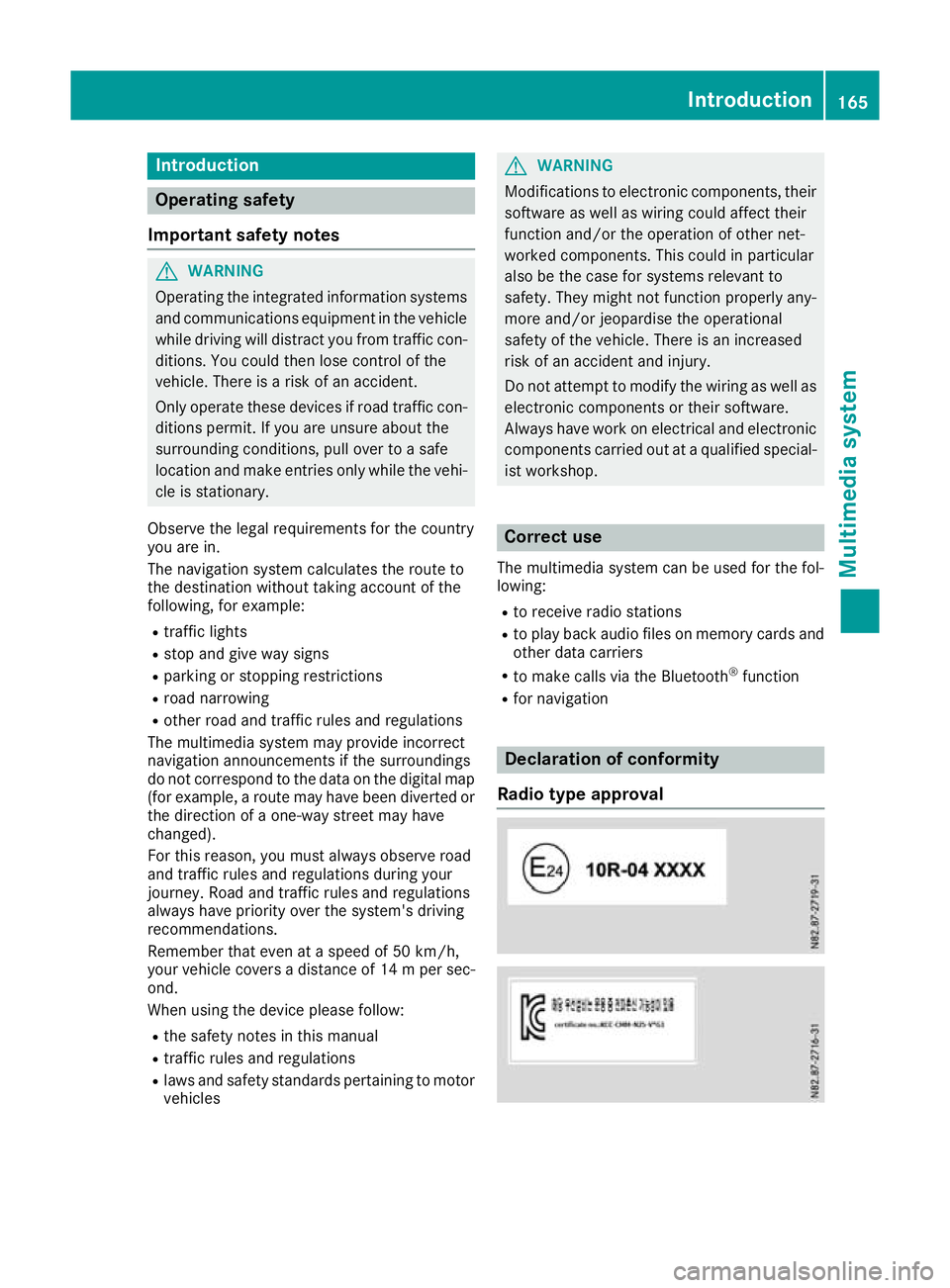
R for navigation Declaration of conformity
Radio type approval Introduction
165Multimedia system Z
Page 177 of 261
Bluetooth
®
settings
Requirements for aBluetooth ®
connec-
tion Yo
uc an connec tBluetooth ®
-compatible mobile
phones and other audio equipmen ttothe mul-
timedia system.
To do so, the followin gcondition smust be met:
R mobile phones must support Hands Fre ePro-
file 1. 0ora bove
R the Bluetooth ®
devic emust be located inside
the vehicle in the vicinity of the multimedia
system
R every Bluetooth ®
devic emust have its own
Bluetooth ®
name, which you can assign your-
self
R Bluetooth ®
must be activate donboth the
multimedia syste mand on the respective
Bluetooth ®
device
R the Bluetooth ®
devic emust be visible for the
multimedia system
R the Bluetooth ®
devic emust support the audio
profile A2DP
i You can obtain further information about
suitable mobile phones:
R at aq ualified specialis tworkshop
R on the Internet at http://www.mercedes-
benz.com/connect
Activating or deactivating th eBlue-
tooth ®
function Switchin
gonthe Bluetooth ®
function on the
multimedi asystem is arequirement for:
R telephony with aBluetooth ®
-capable mobile
phone
R audi oplaybac kwithaB luetooth ®
-capable
mobil edevice
X Press the PHON Ebutton.
X Select O.
Am enu appears.
X Select Bluetooth
Bluetooth.
The #dot indicates that the function is
switched on. Searching for and pairin
gwithaBlue-
tooth ®
device When using your Bluetooth
®
device with the
multimedia system for the first time, you must
search for the Bluetooth ®
device and then pair
it.
Depending on the Bluetooth ®
device used, a
pairing code has to be entered into the Blue-
tooth ®
device or aprompt confirmed on the
Bluetooth ®
device.
There are two options for the search:
R on the Bluetooth ®
device, search for the mul-
timedia system
R on the multimedia system, search for the
Bluetooth ®
device
i Searchin
gonthe Bluetooth ®
device for the
multimedia system is, in most cases, easier.
Starting the search on the Bluetooth ®
device
X Press the PHONE button.
Al ist appears with Bluetooth ®
devices that
have already been paired.
X Start asearch for other Bluetooth ®
devices on
the Bluetooth ®
device (see the manufactur-
er's operating instructions).
i The Bluetooth ®
name "MB Bluetooth" has
been set as the default for the multimedia
system.
X Select the multimedia system on the Blue-
tooth ®
device.
Starting the search on the multimedia system X Press the PHONE button.
Al ist appears with Bluetooth ®
devices that
have already been paired.
X Select Add new device Add new device.
Am essage appears. The multimedia system
searches for available Bluetooth ®
devices.
If Bluetooth ®
devices are available, these
appear in alist. If no Bluetooth ®
devices are
available, amessage appears that no Blue-
tooth ®
device has been found. 174
System settingsMultimedia system
Page 184 of 261

X
Select è.
X Select the contact.
X If several phone numbers are store dfor one
contact, select the desire dnumber.
The number is dialled.
Deleting aphon ebook X
Pres sthe PHONE button.
X Select O.
X Select Delete phone book
Delete phone book.
Ap rompt appears asking whether the phone
book should be deleted.
X Select YES
YES.
The phone book is deleted. Call lists
Transferrin gcall lists If your mobile phone supports the Bluetooth
®
profile PBA P(Phone Book Access Profile), the
call lists of the mobilep hone appear in the mul-
timedia system. When connecting the mobile
phone, you may have to confirm the request for
the PBAP Bluetooth ®
profile.
Displaying call lists X
Press the PHONE button.
X Select Last dialed numbers Last dialed numbers, Received
Received
calls
calls orMissed calls
Missed calls.
Depending on your selection, alist appears
with your most recently dialled phone num-
bers, received calls or missed calls.
Dialling phone numbers from acall list X
Press the PHONE button.
X Select Last dialed numbers Last dialed numbers, Received
Received
calls
calls orMissed calls
Missed calls.
X Select the desired entry.
The number is dialled. Navigation
Important safety notes
G
WARNING
Operating the integrated information systems and communications equipment in the vehicle
while driving will distract you from traffic con-
ditions. You could then lose control of the
vehicle. There is arisk of an accident.
Only operate these devices if road traffic con-
ditions permit. If you are unsure about the
surrounding conditions, pullo ver toasafe
location and make entries only while the vehi-
cle is stationary.
You must observe the lega lrequirements for the
country in which you are driving when operating
the system.
The multimedi asystem calculates the route to
the destination without taking account of the
following, for example:
R traffic lights
R stop and give way signs
R parking or stopping restrictions
R road narrowing
R other road and traffic rule sand regulations
The multimedi asystem may provid eincorrect
driving recommendations if the surroundings do
not correspond to the data on the digital map
(for example, aroute may have been diverted or
the direction of aone-wa ystreet may have
changed).
For this reason, you must alwayso bserve road
and traffic rule sand regulations during your
journey .Roada nd traffic rule sand regulations
alwaysh ave priority over the system' sdriving
recommendations. GPS reception
Positio nfinding and route guidance take place
using GPS ( GlobalPositioning System). Correct
functioning of the navigation system depends,
amongst other things, on GPS reception. In cer-
tain situations, GPS reception may be impaired, there may be interference or there may be no
reception at all,e .g. in tunnels or multi-storey
car parks. Navigat
ion
181Multimedi asystem Z
Page 194 of 261
Setting warnings for speed limits
The following functions are available:
R Warn When Speeding Warn When Speeding:
- Audio and Visual Audio and Visual:ift he vehicle speed
exceeds the maximum permissible speed,
the multimedia system issues an audible
and avisual warning
- Display Display:ift he vehicle speed exceeds the
maximum permissible speed, the multime- dia system issues avisual warning
- Disabled
Disabled:t he multimedia system does not
issue awarning
R Speed Limit Always Visible
Speed Limit Always Visible :ifthis func-
tion is activated, the maximum permissible
speed appears in the multimedia system
R Outside Towns: %d%% of the Speed Outside Towns: %d%% of the Speed
Limit Limit:ift he vehicle speed increases up to
the set percentage of the permissiblem axi-
mum speed, the multimedia system issues a
warning
R Within Towns: %d%% of the Speed Within Towns: %d%% of the Speed
Limit Limit:ift he vehicle speed increases up to
the set percentage of the permissiblem axi-
mum speed, the multimedia system issues a
warning
X Press the NAVI button.
The main menu appears.
X Select Settings Settings.
X Select Warnings
Warnings.
X Select Speed Limit
Speed Limit.
X To set the warning type: selectWarn
WarnWhen
When
Speeding
Speeding.
Am enu appears.
X Select the desired function.
The Ytick indicates the activated function.
X To switch the speed limit display on or off:
select Speed Limit Always Visible Speed Limit Always Visible.
The function is activated or deactivated.
X To define how far the speed limit may be
exceeded: selectOutside Towns: %d%%
Outside Towns: %d%%
of
of the
the Speed
Speed Limit
LimitorWithin
Within Towns:
Towns:%d
%d
%% of the Speed Limit
%% of the Speed Limit.
Am enu appears.
X Set the desired percentage.
Setting warnings for alert points
If this function is activated and the vehicle is
approaching an alert point, the multimedia sys-
tem issues awarning. An alert point is an area
requiring the driver to be especially attentive,
e.g. arailway crossing or aschool. i
This function is not permitted in all countries
and regions. Observe the legal requirements
for the country you are in.
The following functions are available:
R Warning Type
Warning Type:
- Audio and Visual Audio and Visual:ift he vehicle is
approaching an alert point, the multimedia
system issues an audibl eand avisual warn-
ing
- Visual
Visual:ift he vehicle is approaching an
alert point, the multimedia system issues a
visual warning
R Audio Warning
Audio Warning:
- Only When Speeding
Only When Speeding:i fthe vehicle is
approaching an alert point and exceeds the maximum permissible speed in the proc-
ess, the multimedia system issues an audi-ble warning
- When Approaching When Approaching :ifthe vehicle is
approaching an alert point, the multimedia
system issues an audibl ewarning. If the
vehicle exceeds the maximum permissible
speed, the multimedia system issues adif-
ferent audibl ewarning
X Press the NAVI button.
The main menu appears.
X Select Settings
Settings.
X Select Warnings Warnings.
X Select Alert Points
Alert Points.
X Select Alert Point Warnings Alert Point Warnings.
The function is activated or deactivated.
If the function is activated, amessage
appears.
X To activat ethe function: selectActivate Activate.
X If you do not wish to activat
ethe function:
select Cancel
Cancel.
X To set awarning: selectAlert Types
Alert Types.
Am enu appears.
X Select the desired alert point.
X Select Warning Type
Warning Type orAudio Warning
Audio Warning.
X Select the desired function.
The Ytick indicates the activated function.
i The digital map may include
apermissible or
expected maximum speed for some alert
points. In this case, the audibl ewarning may
differ when you exceed or drop below the
maximum permissible speed. Navigati
on
191Multimedi asystem Z
Page 201 of 261
Loading guidelines
G
WARNING
If objects, luggage or loads are not secured or not secured sufficiently, the ycoulds lip,tip
over or be flung around and thereby hit vehicle
occupants. There is arisk of injury ,especially
when braking or abruptly changing directions.
Always store objects so that they cannot be
flung around. Secure objects, luggage or
loads against slipping or tipping before the
journey. G
WARNING
If you loadt he vehicleunevenly, driving char-
acteristics such as steering and braking
behaviou rmay be severely impaired .There is
ar isk of an accident.
Load the vehicl eevenly .Secure the loadso
that it cannot slip. G
WARNING
The exhaust tail pipea nd tail pipetrim can
become very hot. If you come into contact
with these parts of the vehicle, you coul dburn
yourself. There is arisk of injury.
Always be particularl ycarefu laround the
exhaust tail pipea nd the tail pipetrim. Allow
these components to cool downb efore touch-
ing them. G
WARNING
Combustio nengines emit poisonous exhaust
gase ssuch as carbon monoxide .Ifthe rear
door is open when the engine is running, par- ticularly if the vehicl eismoving, exhaust
fumes coul denter the passenger compart-
ment. There is arisk of poisoning.
Turn off the engine before opening the rear
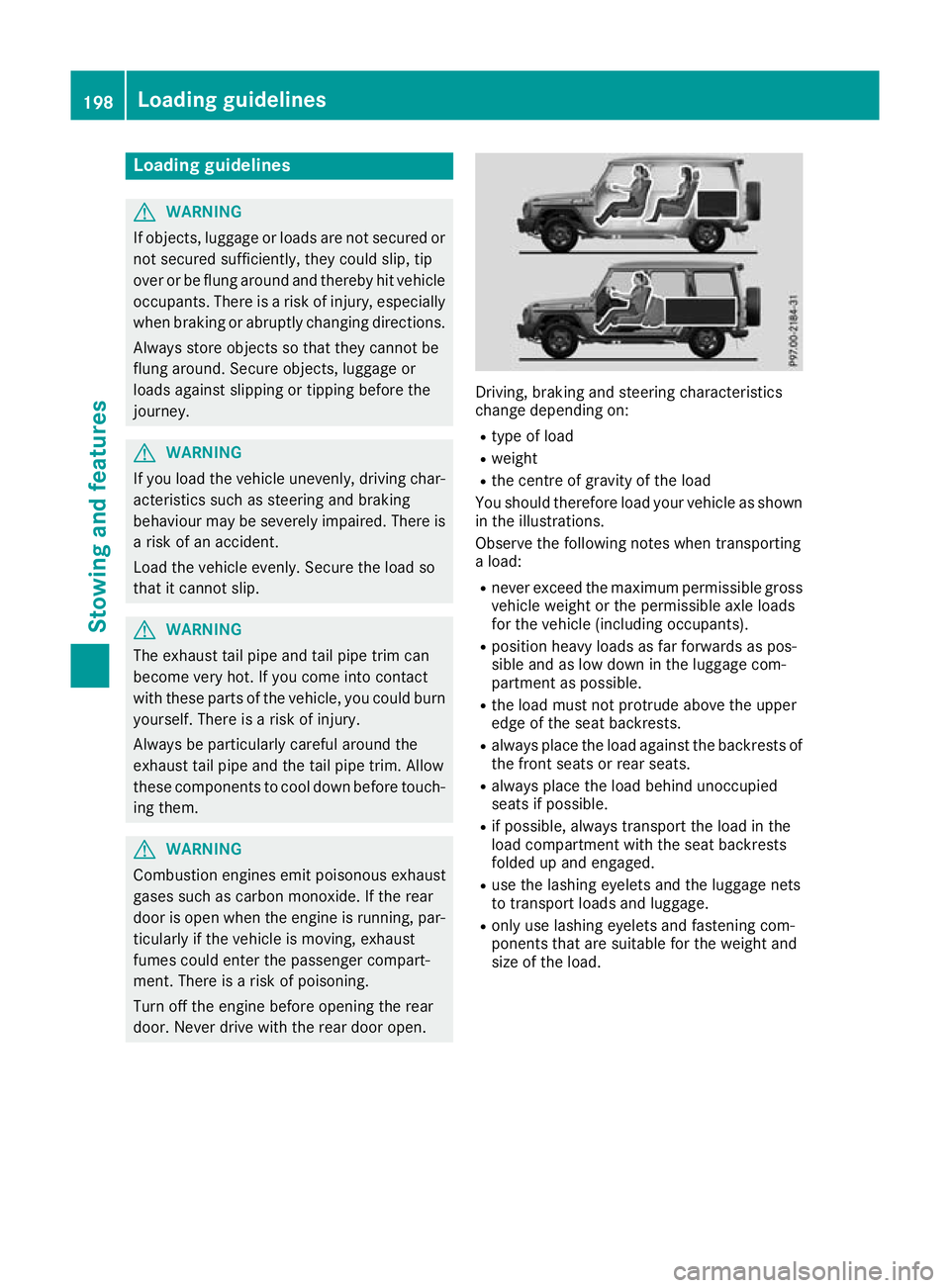
door. Never drive with the rear door open. Driving, braking and steering characteris
tics
change depending on:
R typ eofl oad
R weight
R the centre of gravity of the load
Yo us houl dtherefore load your vehicl easshown
in the illustrations.
Observe the following note swhent ransporting
al oad:
R neve rexceed the maximum permissibl egross
vehicl eweigh tort he permissibl eaxlel oads
for the vehicl e(including occupants).
R positio nheavy loadsasf arforwards as pos-
sibl eand as lo wdownint he luggage com-
partment as possible.
R the load must not protrude above the upper
edge of the sea tbackrests.
R always place the load against the backrests of
the front seats or rea rseats.
R always place the load behind unoccupied
seats if possible.
R if possible, always transport the load in the
load compartment with the sea tbackrests
folde dupa nd engaged.
R uset he lashing eyelets and the luggage nets
to transport load sand luggage.
R onl yuselashing eyelets and fastening com-
ponents tha tare suitabl efor the weight and
size of the load. 198
Loadin
gguidelinesStowing and features
Page 202 of 261
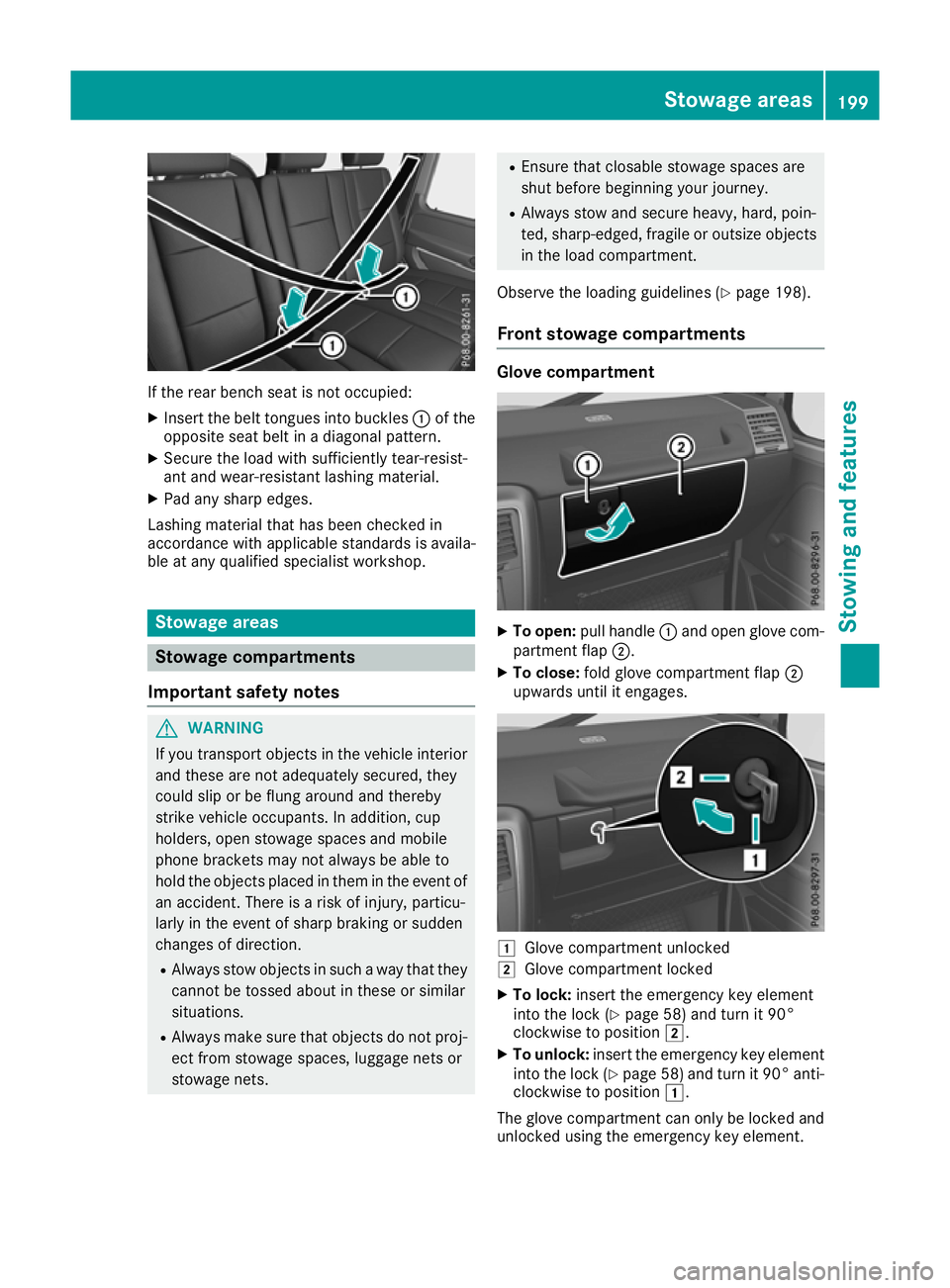
If the rear bench seat is not occupied:
X Insert the belt tongues into buckles :of the
opposite seat belt in adiagonal pattern.
X Secure the load with sufficiently tear-resist-
ant and wear-resistant lashing material.
X Pad any sharp edges.
Lashing materia lthat has been checked in
accordance with applicables tandards is availa-
ble at any qualifieds pecialist workshop. Stowage areas
Stowage compartments
Important safety notes G
WARNING
If you transport objects in the vehicle interior and these are not adequately secured, they
could slip or be flung around and thereby
strike vehicle occupants. In addition, cup
holders, open stowage spaces and mobile
phone brackets may not always be ableto
hold the objects placed in them in the event of an accident. There is arisk of injury ,particu-
larl yint he event of sharp braking or sudden
changes of direction.
R Always stow objects in such away that they
cannot be tossed about in these or similar
situations.
R Always make sure that objects do not proj-
ect from stowage spaces, luggage nets or
stowage nets. R
Ensure that closable stowag espacesa re
shu tbefor eb egin ning your journey.
R Alway sstow and secur eheavy, hard, poin-
ted ,sharp-edged ,fragile or outsize objects
in the load compartment.
Observe the loading guideline s(Ypage 198).
Front stowage compartments Glov
ecompartment X
To open: pull handle :and open glove com-
partment flap ;.
X To close: fold glove compartment flap ;
upwards until it engages. 1
Glove compar tmentu nlocked
2 Glove compartmen tlocked
X To lock: insert theemergency ke yelement
int ot he lock(Ypage 58) and tur nit90°
clockwise to position 2.
X To unlock: insert theemergency ke yelement
int othe lock(Ypage 58 )and tur nit90°anti-
clockwise to position 1.
The glov ecompartmen tcan only be locke dand
unlocked usin gthe emergency ke yelement. Stowage areas
199Stowing and feat ures Z
Page 204 of 261
Befor
eevery trip ,make sur ethat the seat
backrests and the rea rbench seat/rea rseat
are engaged before every trip. G
WARNING
Combustio nengines emit poisonous exhaust
gase ssuch as carbon monoxide .Ifthe rear
door is open when the engine is running, par- ticularly if the vehicl eismoving, exhaust
fumes coul denter the passenger compart-
ment. There is arisk of poisoning.
Turn off the engine before opening the rear
door. Never drive with the rear door open.
Observe the loading guidelines (Y page198).
The left-hand and right-hand rear bench seats
can be folde dforward to increas ethe capacity
of the rear compartment. You can:
R fold the seat backrests forward
R fold the rear bench seat completely forward
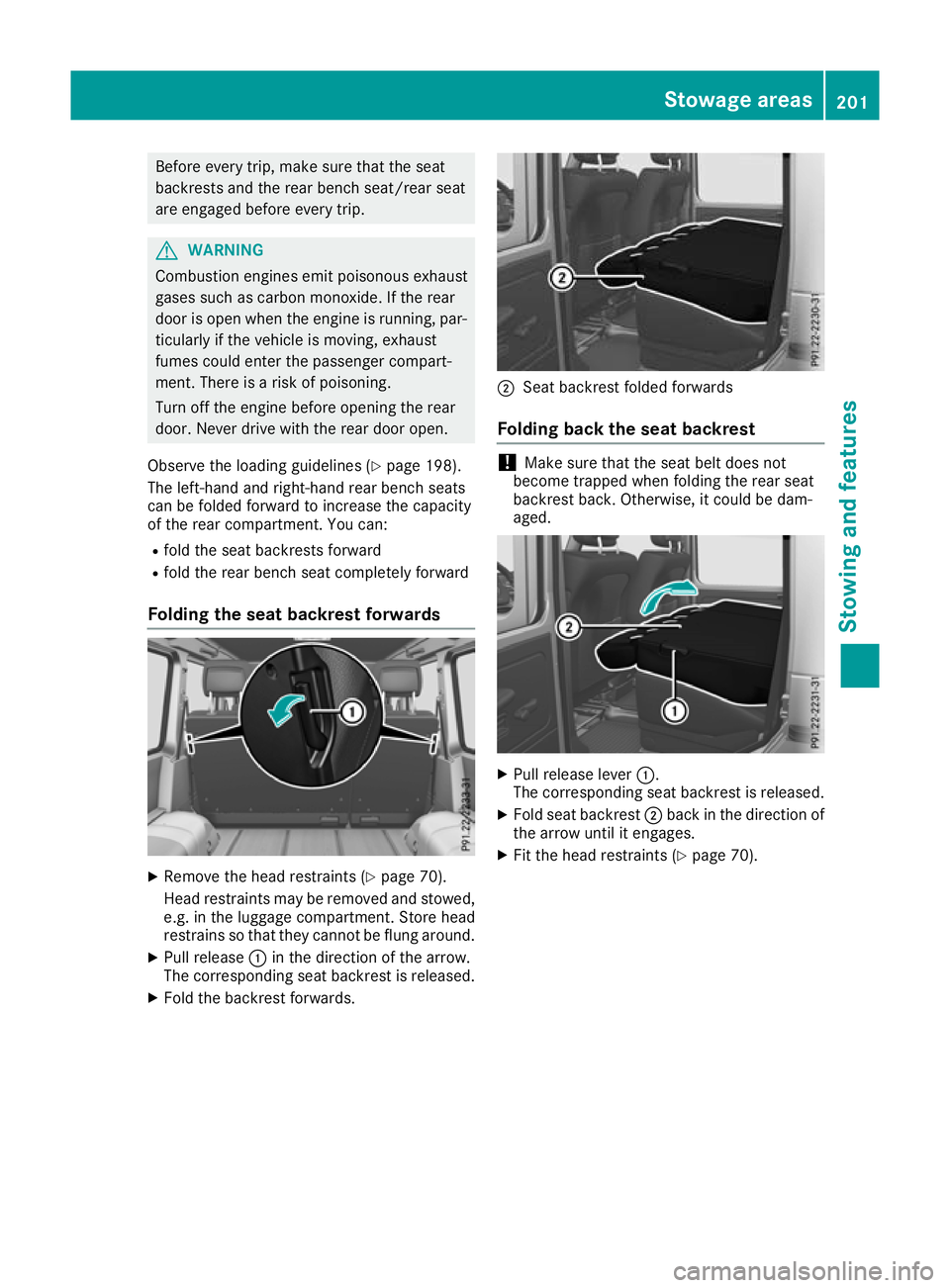
Folding the seat backrest forwards X
Remove the head restraints (Y page 70).
Head restraints ma yberemove dand stowed,
e.g. in th eluggag ecom partment. Store head
restrain ssothatthe yc anno tbeflungaround.
X Pull release :in th edirection of th earrow.
The corresponding seat backrest is released.
X Fold th ebackrest forwards. ;
Seat backres tfolded forwards
Folding bac kthe seat backrest !
Make sure that the seat belt does not
become trapped when folding the rear seat
backrest back .Otherwise, it could be dam-
aged. X
Pull release lever :.
The corresponding seat backrest is released.
X Fold seat backrest ;back in the direction of
the arrow until it engages.
X Fit the head restraints (Y page 70). Stowage areas
201Stowing and features Z
Page 205 of 261
Rear benc
hseat Folding th
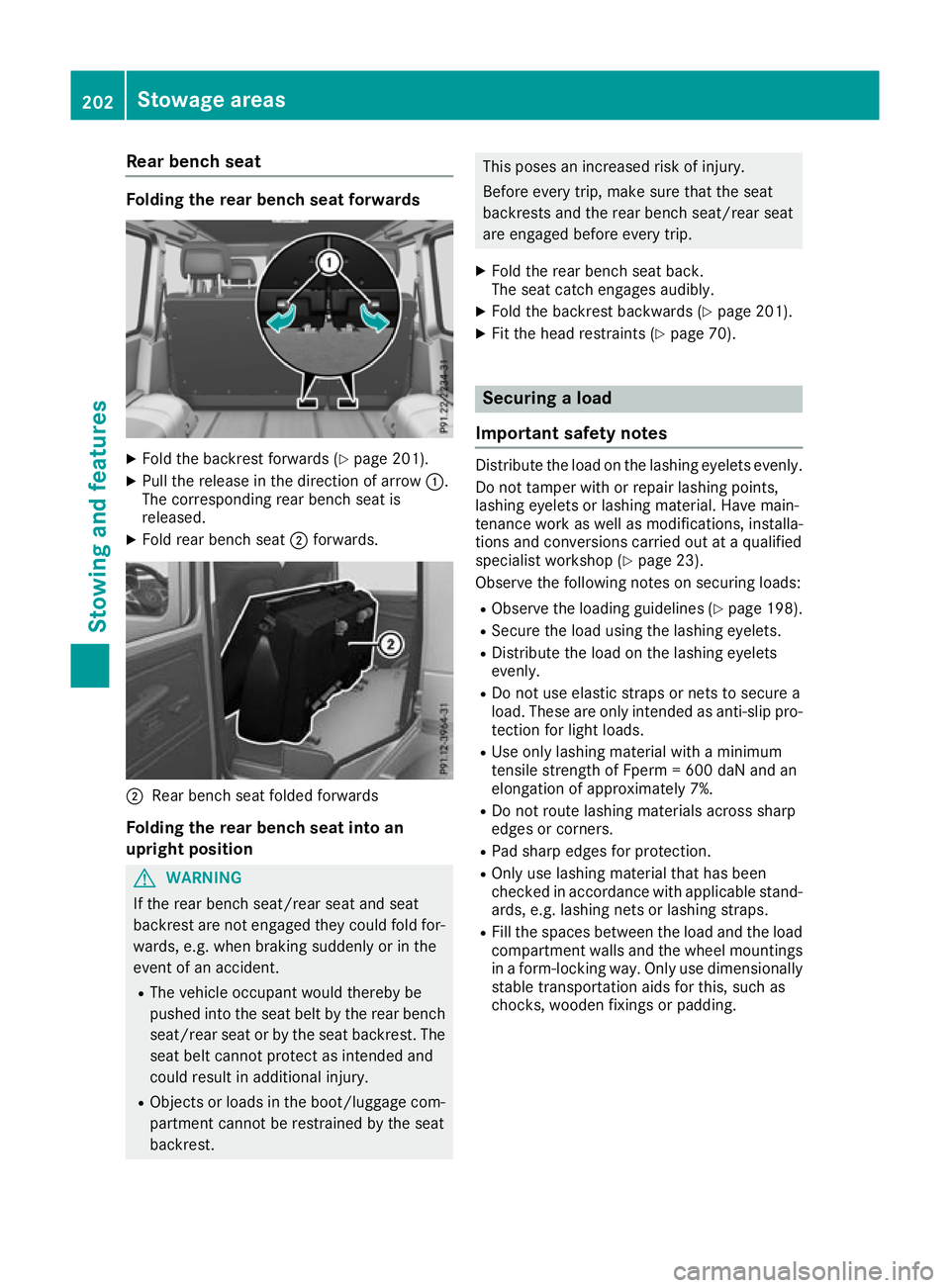
erearb ench seat forwards X
Fold th ebackrest forward s(Ypage 201).
X Pull the release in the directio nofarrow:.
The corresponding rea rbench sea tis
released.
X Fold rea rbench seat ;forwards. ;
Rear bench seat foldedf orwards
Folding th erearb ench sea tint oan
upright position G
WARNING
If th erear bench seat/rea rseat and seat
backrest are not engaged they coul dfold for-
wards, e.g. when braking suddenly or in the
event of an accident.
R The vehicl eoccupant would thereby be
pushed into the seat beltb ythe rear bench
seat/rea rseat or by the seat backrest. The
seat beltc annot protect as intended and
coul dresult in additiona linjury.
R Objects or loads in the boot/luggag ecom-
partment cannot be restrained by the seat
backrest. This poses an increased risk of injury.
Befor
eevery trip, make sure that the seat
backrest sand the rear bench seat/rear seat
are engaged before every trip.
X Fold the rear bench seat back.
The seat catche ngages audibly.
X Fold the backrest backwards (Y page 201).
X Fit the head restraints (Y page 70). Securing
aload
Important safety notes Distribute the load on the lashing eyelets evenly.
Do not tamper with or repair lashing points,
lashing eyelets or lashing mater ial.Hav emain-
tenance work as well as modifications, installa-
tions and conversions carrie doutataq uali fied
specialis tworkshop (Y page 23).
Observe the following note sonsecuring loads:
R Observe the loading guideline s(Ypage 198).
R Secure the load using the lashing eyelets.
R Distribute the load on the lashing eyelets
evenly.
R Do not us eelast ic straps or nets to secur ea
load .These ar eonlyi ntende dasanti-slip pro-
tection for light loads.
R Use onl ylas hing material with aminimum
tensil estrength of Fperm =600 da Nand an
elongation of approximately 7%.
R Do not route lashing material sacross sharp
edge sorc orners.
R Pa ds harp edge sfor protection.
R Onl yuselashing material tha thas been
checked in accordance with applicabl estand-
ards ,e.g.las hing nets or lashing straps.
R Fillthe space sbetween the load and the load
compartment wall sand the whee lmountings
in af orm-locking way. Onl yusedimensionally
stabl etransportatio naidsf or this, such as
chocks, wooden fixings or padding. 202
Stowag
eareasStowing and features
Page 210 of 261
could sli
porbef lung around and thereby
strike vehicle occupants. In addition, cup
holders, ope nstowag espaces and mobile
phone brackets may not always be able to
hol dthe objects place dinthem in the event of
an accident. There is ariskofi njury, particu-
larly in the event of sharp braking or sudden
changes of direction.
R Alway sstow objects in such awaythat they
cannot be tosse dabout in these or similar
situations.
R Alway smake sure that objects do not proj-
ect from stowag espaces, luggage nets or
stowag enets.
R Ensure that closable stowag espaces are
shu tbefore beginning your journey.
R Alway sstow and secure heavy, hard, poin-
ted, sharp-edged, fragil eoroutsize objects
in the loa dcompartment. G
WARNING
The cup holder cannot secure adrinks con-
tainer in place during ajourney .Ifyou use a
cup holder during ajourney ,the drinks con-
tainer coul dbeflung around and liquid could
be spilt. Vehicle occupants coul dcome into
contact with the liquid and, in particular, be
scalded by hot liquid.Y ou couldbedistracted
from the traffic situation and lose control of
the vehicle. There is arisk of an accident and
injury.
Only use the cup holder when the vehicl eis
stationary. Only place containers of asuitable
size in the cup holder. Seal the container, in
particular when it contains hot liquid.
! Only use the cup holders for containers of
the right size and which have lids. The drinks
coul dotherwise spill.
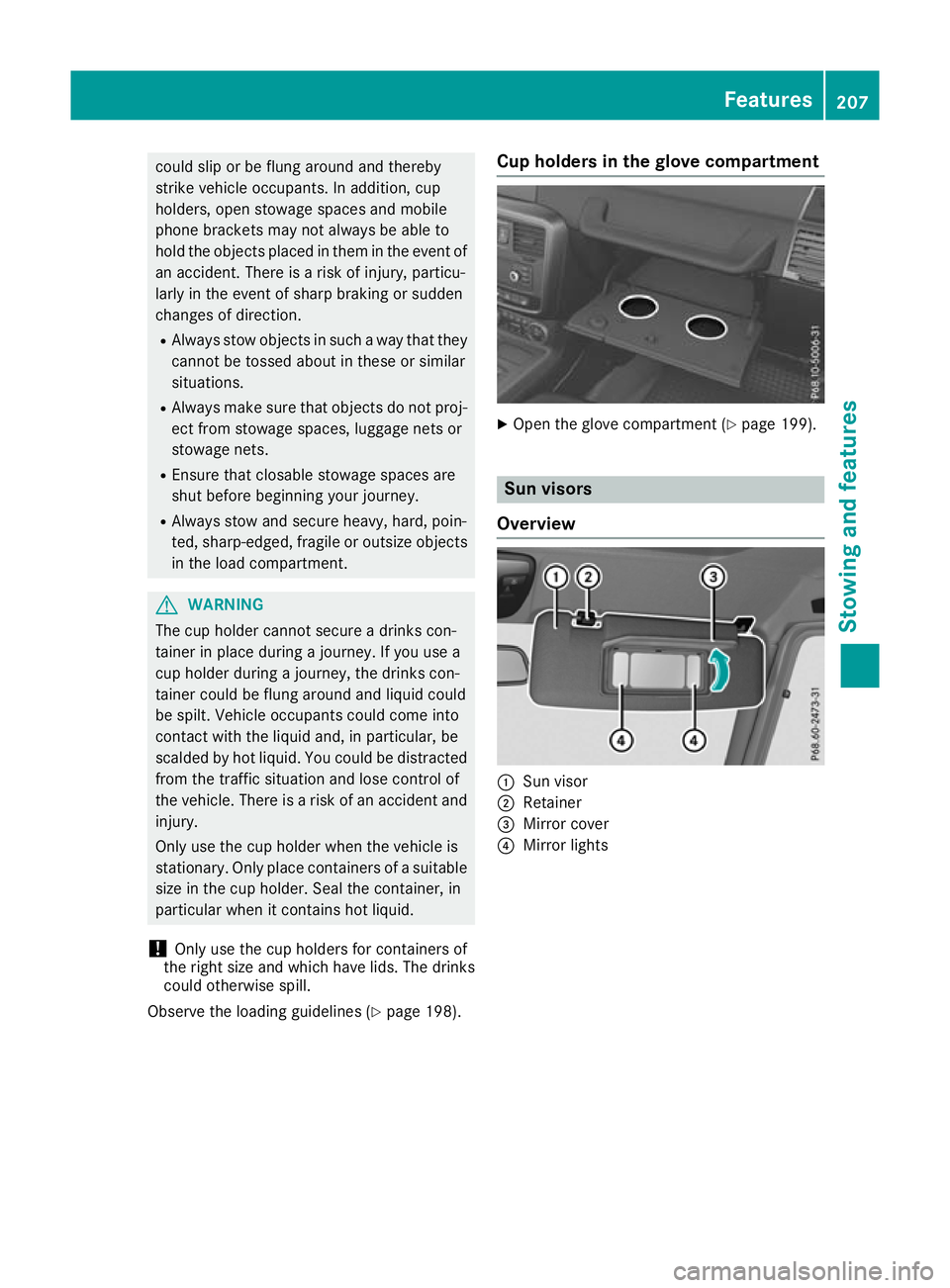
Observe the loading guidelines (Y page198). Cu
ph olders in th eglove compartment X
Ope nthe glove compartment (Y page 199). Sun visors
Overview :
Sun visor
; Retainer
= Mirror cover
? Mirror lights Features
207Stowing and features Z