ESP MERCEDES-BENZ G-CLASS SUV 2018 Owner's Guide
[x] Cancel search | Manufacturer: MERCEDES-BENZ, Model Year: 2018, Model line: G-CLASS SUV, Model: MERCEDES-BENZ G-CLASS SUV 2018Pages: 549, PDF Size: 10.22 MB
Page 149 of 549
#
When driving on unpa vedro ads or off-
ro ad, regular lych eck theve hicle under‐
side. #
Remo vetrapped plants or other flam‐
mable material, in particular. #
Ifth ere is damage, consult a qualified
specialist workshop immediately. When driving off-road, subs
tances su chas sand,
mud and water orwate r mixed with oil may get
into the brakes. This may lead toare duction in
braking ef fect or total brake failure as a result of
increased wear. The braking characteristics will
va ry depending on the material that has entered
th e sy stem. Clean the brakes af ter driving off-
ro ad. If youth en notice reduced braking ef fect
or hear scraping noises, ha vethe brake sy stem
ch ecked at a qualified specialist workshop.
Ad just your driving style to thech anged braking
ch aracteristics. *
NO
TEDama gecaused bydriving over
obs tacles The
vehicle can be damaged by:
R driving up on high kerbs or unpa ved
ro ads.
R quickly driving over obs tacles su chas
ke rbs, speed bumps or po tholes.
R heavy objects hitting the underbody or
ch assis components. #
Do not drive over obs tacles that could
damage theve hicle. #
Check theve hicle regular lyfor dama ge
during off-road driving. #
Adjust theve hicle speed tosuit the
ro ad sur face conditions. #
Ifth ere is damage, consult a qualified
specialist workshop immediately. +
ENVIRONMENTAL
NOTEEnvironmental
dama gedue tonon-obser vance of pro‐
hibition signs Environmental pr
otection has priority. Treat
nature with respect. #
Be sure toobser veprohibition signs. Checklist before driving off-road
Check
thefo llowing points before driving off-
ro ad:
R Fuel le vel
R Engine oil le vel:fill engine oil up tothe maxi‐
mum le velto ensure full gradeability
(/ page 377).
R AdBlue ®
fill le vel of at least 10litres
R Tyre-change tool kit and spare wheel
R Tyres and wheels
Off-road driving
Re ad this section before driving your vehicle off-
ro ad. Practise bydriving over more gentle off-
ro ad terrain firs t. 14 6
Driving and pa rking
Page 153 of 549
R
2 Gentle deceleration and rolling
R 3 Consis tent speed
The inner segment is gr eyand the outer seg‐
ment em pties:
R 1 Sporty acceleration
R 2 Heavy braking
R 3 Fluctuations in speed
Yo u ha vedriven economically when:
R theth re e outer segments are comple tely fil‐
led simultaneously
R the ECO display border lights up
The additional range achi eved as a result of your
driving style in comparison with a driver with a
ve ry sporty driving style is shown under Bonus
from start . Therange displ ayed does not indi‐
cate a fixe dre duction in consum ption. DY
NA MIC SELECT switch Fu
nction of theDY NA MIC SELECT switch Mercedes-AMG
vehicles: observeth e no tes in
th e Supplement. Otherwise, you may failto rec‐
ognise dangers.
Use theDY NA MIC SELECT switch tochange
between thefo llowing drive programs:
R I (Individual): individual settings
R S (Sport): sporty driving style
R C(Comfort): comfortable and economical
driving style
R E (Eco): particular lyeconomical driving style
R Deser t:driving prog ram optimised for driving
on sand
Only change totheDesert driving program on
sand and not on public roads. The availability of
th is function is dependent on the count ry.
The drive program C (Comfort)is automatically
active af terst arting theve hicle. Depending on
the drive program selected, the
fo llowing vehicle characteristics will change:
R drive
-
engine and transmission management
- Active Dis tance Assi stDISTRONIC
R ECO start/ stop function
R ESP ®
R steering
R Vehicles with adjustable damping: sus‐
pension
Properties of the Desert drive prog ram: &
WARNING Risk of accident in drive pro‐
gram Dese rtdue torestricted function of
th e ESP ®
Not all functions of the ESP ®
are available in
th e Desert drive program, e.g. thest abilisa‐
tion function is deactivated, among others.
The wheels can lock while braking and the
braking dis tance is increased. 15 0
Driving and pa rking
Page 154 of 549
Only use
the Desert driving program on sand
and not on public roads. %
The availability of this function is dependent
on the count ry.
R Restricted road suitability
R ESP ®
and ABS specially adap tedfo r sand
R Vehicle stabilisation deactivated
The following driving and driving saf ety sy stems
are deactivated in the drive program Desert:
R Active Parking Assist
R Drive AwayAssi st
R Cross Traf fic Alert
R Active Dis tance Assi stDISTRONIC
R Active Lane Keeping Assist
R cruise control
R Limiter
R Active Brake Assi st
R Attention Assi st
R ESP ®
trailer stabilisation Selecting
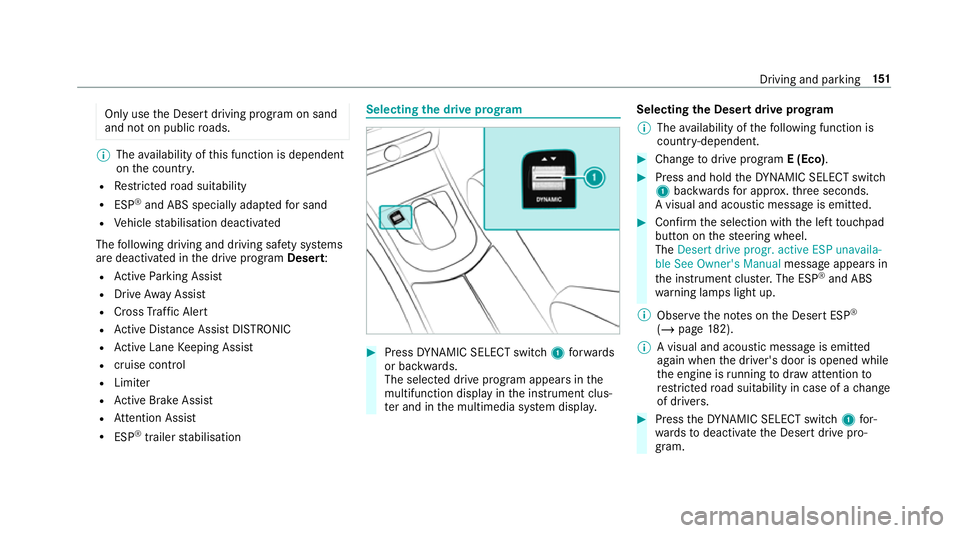
the drive prog ram #
Press DYNA MIC SELECT switch 1forw ards
or backwards.
The selec ted drive program appears in the
multifunction display in the instrument clus‐
te r and in the multimedia sy stem displa y.Selecting
the Desert drive prog ram
% The availability of thefo llowing function is
countr y-dependent. #
Change todrive prog ram E (Eco). #
Press and hold theDY NA MIC SELECT switch
1 backwards for appro x.thre e seconds.
A visual and acoustic message is emitted. #
Confirm the selection with the left touchpad
but ton on thesteering wheel.
The Desert drive progr. active ESP unavaila-
ble See Owner's Manual message appears in
th e instrument clus ter.The ESP ®
and ABS
wa rning lamps light up.
% Obser vethe no tes on the Desert ESP ®
(/ page 182).
% A visual and acoustic messa geis emit ted
again when the driver's door is opened while
th e engine is running todraw attention to
re stricted road suitability in case of a change
of drivers. #
Press theDY NA MIC SELECT switch 1for‐
wa rdsto deactivate the Desert drive pro‐
gram. Driving and parking
151
Page 155 of 549
%
The drive program C (Comfort)is automati‐
cally active af terst arting theve hicle. Configuring drive prog
ram I Multimedia sy
stem:
4 Vehicle 5
e DYNAMIC SELECT
5 Individual #
Select the individual setting. Switching
the operation feedba ckfor drive
prog rammes on/o ff Multimedia sy
stem:
4 Vehicle 5
e DYNAMIC SELECT #
Switch User notification onO or off ª.
When this function is active, a cor responding
message is shown in the media display when
a drive prog ramme is selected with the
DY NA MIC SELECT switch. Displaying
vehicle data Multimedia sy
stem:
4 Vehicle 5
e DYNAMIC SELECT #
Select Vehicle data.
The following information is displa yed:
R Compass
R Wheel angle
R Incline
R Gradient
R Altitude
R LOW RANGE (/page 159)
R Locking (/ page160) Displaying engine data
Multimedia sy
stem:
4 Vehicle 5
e DYNAMIC SELECT #
Select Engine data.
% The values for engine output and engine tor‐
qu e may deviate from the nominal values. Items
that can influence this are, forex am‐
ple:
R Sea le vel
R Fuel grade
R Outside temp erature G-Mode
G-Mode is an additional drive prog ram for off-
ro ad journe ysand is not suitable for use on firm
ro ad sur faces. G-Mode is automatical lyactiva‐
te d, if one of thefo llowing conditions is me t:
R you shift the transfer case totheLO W
RANGE off-road gear (/ page159).
R you en gage at least one dif fere ntial lo ck
( / page 161).
The Gindicator appears in the instrument clus‐
te r.
G-Mode is automatically deactivated again, if the
fo llowing conditions are me t:
R you shift the transfer case tothe on-ro ad
position HIGH RANGE. 15 2
Driving and pa rking
Page 163 of 549
#
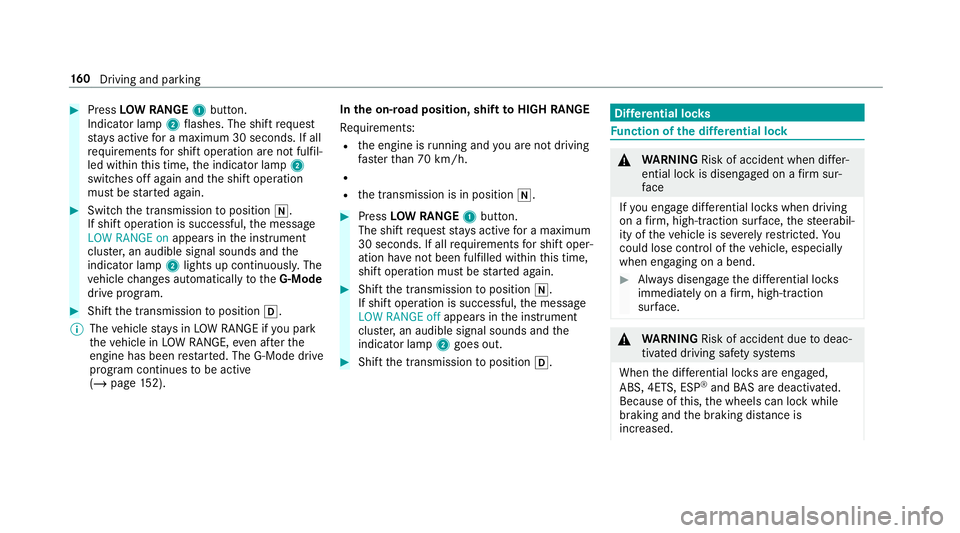
Press LOW RANGE 1button.
Indicator lamp 2flashes. The shift request
st ay s active for a maximum 30 seconds. If all
re qu irements for shift operation are not fulfil‐
led within this time, the indicator lamp 2
switches off again and the shift operation
must be star ted again. #
Switch the transmission toposition i.
If shift operation is successful, the message
LOW RANGE on appears inthe instrument
clus ter,an audible signal sounds and the
indicator lamp 2lights up continuousl y.The
ve hicle changes automatically totheG-Mode
drive prog ram. #
Shift the transmission toposition h.
% The vehicle stay s in LOW RANGE if you park
th eve hicle in LOW RANGE, even af terthe
engine has been restar ted. The G-Mode drive
program continues tobe active
(/ page 152). In
the on-road position, shift toHIGH RANGE
Re quirements:
R the engine is running and you are not driving
fast erthan 70 km/h.
R
R the transmission is in position i. #
Press LOW RANGE 1button.
The shift requeststay s active for a maximum
30 seconds. If all requ irements for shift oper‐
ation ha venot been ful filled within this time,
shift operation must be star ted again. #
Shift the transmission toposition i.
If shift operation is successful, the message
LOW RANGE off appears inthe instrument
clus ter,an audible signal sounds and the
indicator lamp 2goes out. #
Shift the transmission toposition h. Dif
fere ntial loc ks Fu
nction of the dif fere ntial lock &
WARNING Risk of accident when di ffer‐
ential lock is disengaged on a firm sur‐
fa ce
If yo u en gage differe ntial lo cks when driving
on a firm , high-t raction su rface, thesteerabil‐
ity of theve hicle is se verely restricted. Yo u
could lose control of theve hicle, especially
when engaging on a bend. #
Alw ays disengage the dif fere ntial lo cks
immediately on a firm , high-t raction
su rface. &
WARNING Risk of accident due todeac‐
tivated driving saf ety sy stems
When the dif fere ntial lo cks are engaged,
ABS, 4ETS, ESP ®
and BAS are deactivated.
Because of this, the wheels can lock while
braking and the braking dis tance is
increased. 16 0
Driving and pa rking
Page 164 of 549
#
Alw ays disengage the dif fere ntial lo cks
immediately on a firm , high-t raction
su rface. Dif
fere ntial lo cks impr ovethe traction of the
ve hicle when driving off-road and ford ing. The
vehicle has thre e dif fere ntial lo cks:
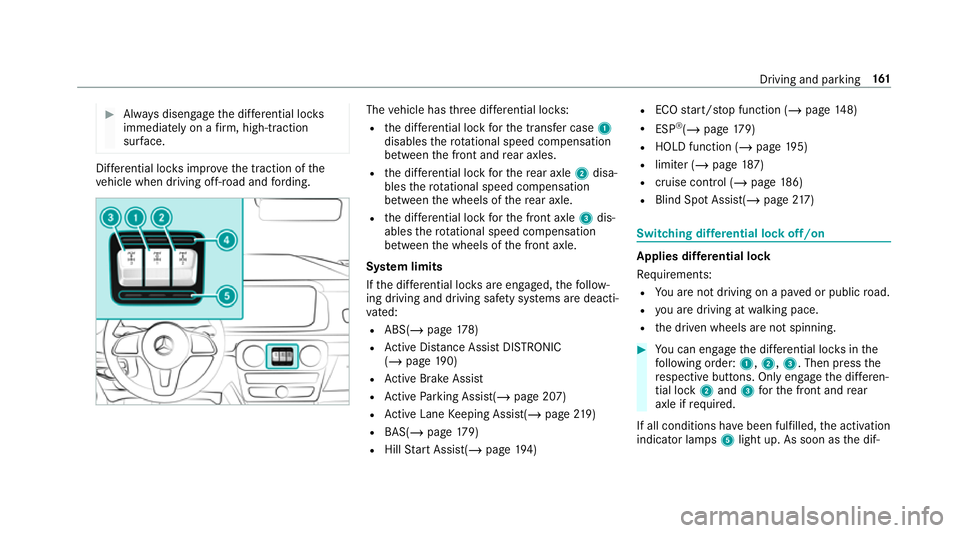
R the dif fere ntial lo ckforth e transfer case 1
disables thero tational speed compensation
between the front and rear axles.
R the dif fere ntial lo ckforth ere ar axle 2disa‐
bles thero tational speed compensation
between the wheels of there ar axle.
R the dif fere ntial lo ckforth e front axle 3dis‐
ables thero tational speed compensation
between the wheels of the front axle.
Sy stem limits
If th e dif fere ntial lo cks are engaged, thefo llow‐
ing driving and driving saf ety sy stems are deacti‐
va ted:
R ABS( /page 178)
R Active Dis tance Assi stDISTRONIC
(/ page 190)
R Active Brake Assi st
R Active Parking Assist(/ page 207)
R Active Lane Keeping Assist(/ page219)
R BAS(/ page179)
R Hill Start Assist(/ page194) R
ECO start/ stop function (/ page148)
R ESP ®
(/ page 179)
R HOLD fu nction (/ page 195)
R limi ter (/ page187)
R cruise control (/ page 186)
R Blind Spot Assi st(/ page 217) Swi
tching dif fere ntial lock off/on Applies dif
fere ntial lock
Re quirements:
R You are not driving on a pa ved or public road.
R you are driving at walking pace.
R the driven wheels are not spinning. #
You can en gage the dif fere ntial lo cks in the
fo llowing order: 1,2, 3. Then press the
re spective buttons. Only engage the dif fere n‐
tial lo ck2 and 3forth e front and rear
axle if requ ired.
If all conditions ha vebeen fulfilled, the activation
indicator lamps 5light up. As soon as the dif‐ Driving and parking
161
Page 165 of 549
fe
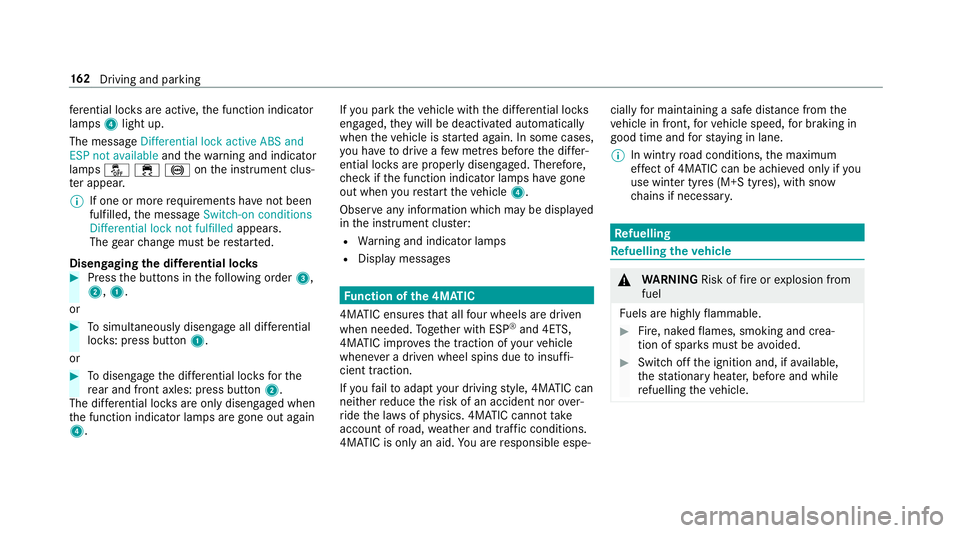
re ntial lo cks are active, the function indicator
lamps 4light up.
The message Differential lock active ABS and
ESP not available andthewa rning and indicator
lamps å÷!on the instrument clus‐
te r appear.
% If one or more requ irements ha venot been
ful filled, the message Switch-on conditions
Differential lock not fulfilled appears.
The gear change must be restar ted.
Disengaging the dif fere ntial loc ks #
Press the buttons in thefo llowing order 3,
2, 1.
or #
Tosimultaneously disengage all dif fere ntial
lo ck s: press button 1.
or #
Todisengage the dif fere ntial lo cksfo rthe
re ar and front axles: press button 2.
The dif fere ntial lo cks are only disengaged when
th e function indicator lamps are gone out again
4. If
yo u park theve hicle with the dif fere ntial lo cks
engaged, they will be deactivated automatically
when theve hicle is star ted again. In some cases,
yo u ha vetodrive a few metres before the dif fer‐
ential loc ksare proper ly disengaged. Therefore,
ch eck if the function indicator lamps ha vegone
out when youre start theve hicle 4.
Obser veany information which may be displa yed
in the instrument clus ter:
R Warning and indicator lamps
R Display messages Fu
nction of the 4MATIC
4MATIC ensures that all four wheels are driven
when needed. Toge ther with ESP ®
and 4ETS,
4MATIC impr ovesth e traction of your vehicle
whene ver a driven wheel spins due toinsuf fi‐
cient traction.
If yo ufa ilto adapt your driving style, 4MATIC can
neither reduce therisk of an accident nor over‐
ri de the la wsof ph ysics. 4MATIC cannot take
account of road, weather and traf fic conditions.
4MATIC is only an aid. You are responsible espe‐ cially
for maintaining a safe dis tance from the
ve hicle in front, forve hicle speed, for braking in
good time and forst ay ing in lane.
% In wint ryroad conditions, the maximum
ef fect of 4MATIC can be achie ved only if you
use winter tyres (M+S tyres), with sn ow
ch ains if necessar y. Re
fuelling Re
fuelling theve hicle &
WARNING Risk offire or explosion from
fuel
Fu els are highly flammable. #
Fire, naked flames, smoking and crea‐
tion of spar ksmust be avoided. #
Swit choff the ignition and, if available,
th est ationary heater, before and while
re fuelling theve hicle. 16 2
Driving and pa rking
Page 166 of 549
&
WARNING Risk of inju ryfrom fuels
Fu els are poisonous and hazardous to your
health. #
Do not swallow fuel or let it come into
contact with skin, eyes or clo thing. #
Do not inhale fuel vapour. #
Keep children away from fuel. #
Keep doors and windo wsclosed du ring
th ere fuelling process.
If yo u or other people come into contact with
fuel, obser vethefo llowing: #
Immediately rinse fuel off your skin with
soap and water. #
If fuel comes into contact with your
ey es, immediately rinse them thor‐
oughly with clean water.Seek medical
attention immediately. #
Ifyo u swallow fuel, seek medical atten‐
tion immediatel y.Do not induce vomit‐
ing. #
Change immediately out of clo thing that
has come into con tact wi thfuel. &
WARNING Risk offire or explosion from
elect rostatic charge
Electros tatic charge can crea tespar ksand
th ereby ignite fuel vapours. #
Before you open the fuel filler cap or
ta ke hold of the pump nozzle, touch the
me tallic vehicle body.
This dischar ges any electros tatic charge
th at may ha vebuilt up. #
Do not get into theve hicle again during
th ere fuelling process.
Otherwise, electros tatic charge could
build up again. &
WARNING Risk offire from fuel mixture
Ve hicles with a diesel engine:
If yo u mix diesel fuel with petrol, theflash
point of the fuel mixture is lo werth an that of
pure diesel fuel. While
the engine is running, component
pa rts in theex haust sy stem may overheat
without warning. #
Neverre fuel using petrol. #
Never mix petrol with diesel fuel. *
NO
TEDama gecaused bythe wrong fuel Ve
hicles with a petrol engine:
Even small amounts of the wrong fuel could
re sult in damage tothe fuel sy stem, the
engine and the emission control sy stem. #
Only refuel using unleaded, sulphu r-free
fuel that con form sto European EN 228,
or an equi valent specification. #
The RONrequ irement is located in the
fuel filler flap.
Fu el of this specification may con tain up to
10 %ethanol. Your vehicle is suitable for use
with E10 fuel. Driving and parking
16 3
Page 175 of 549
th
e inside rearview mir ror.Yo u should test
eve ryposition for at least 25 seconds before
trying ano ther position. #
Hold remo tecontrol 5atthe same angles
at various dis tances in front of the inside rear
view mir ror.Yo u should test eve ryposition
fo r at least 25 seconds before trying ano ther
position. #
Notethat some remo tecontrols transmit
only for a limi ted period, press button 6on
re mo tecontrol 5again before transmission
ends. #
Align the aerial line of the door opener unit
with there mo tecontrol.
% Support and additional information on pro‐
gramming:
R Onthe HomeLink ®
Hotline on (0) 08000
466 354 65 or +49 (0) 6838 907-2 77.
R Onthe Internet at http://
www.homelin k.com. Opening/closing a
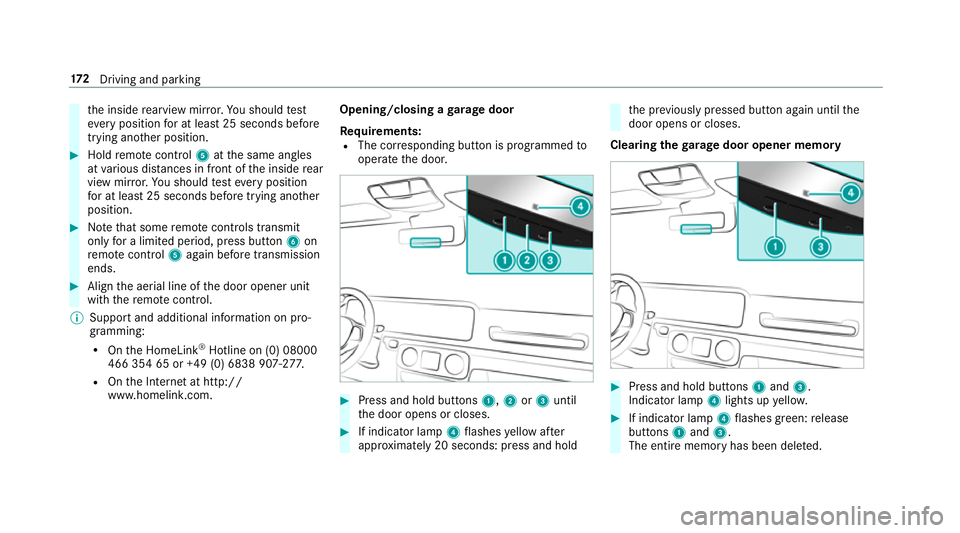
garage door
Requ irements:
R The cor responding button is programmed to
operate the door. #
Press and hold buttons 1,2or3 until
th e door opens or closes. #
If indicator lamp 4flashes yellow af ter
appr oximately 20 seconds: press and hold th
e pr eviously pressed button again until the
door opens or closes.
Clearing thega rage door opener memo ry #
Press and hold buttons 1and 3.
Indicator lamp 4lights up yello w. #
If indicator lamp 4flashes green: release
buttons 1and 3.
The entire memo ryhas been dele ted. 17 2
Driving and pa rking
Page 180 of 549
Note
s on parking up theve hicle If
yo u lea vetheve hicle par ked up for longer than
fo ur we eks, the disconnected battery may be
damaged bydeep dischar ge.
If yo u lea vetheve hicle par ked up for longer than
six weeks, it may suf fer disuse dama ge.
% Further information can be obtained at a
qu alified specialist workshop. St
andby mode (extension of the star ter bat‐
te ry 's period out of use) St
andby mode function
% This function is not available for all models.
If standby mode is activated, theve hicle can be
par kedfo r an extended pe riod of time without
losing po wer.
St andby mode is characterised bythefo llowing:
R thest ar ter battery is preser ved.
R the maximum non-operational time out of
use is displa yed in the multimedia sy stem
displa y. R
functions such as interior pr otection or tow-
aw ay protection are not available.
R the connection toonline services is inter rup‐
te d.
If th efo llowing conditions are fulfilled, standby
mode can be activated or deactivated using the
multimedia sy stem:
R the engine is switched off.
R the ignition is switched on.
Exceeding theve hicle's displa yed non-opera‐
tional time may cause incon venience, i.e. it can‐
not be guaranteed that thest ar ter battery will
re liably start the engine.
The star ter battery must be charge dfirs t in the
fo llowing situations:
R theve hicle's non-operational time must be
ex tended.
R theBattery charge insufficient for standby
mode message appears in the multimedia
sy stem displa y.
% Standby mode is automatically deactivated
when the ignition is switched on. Ac
tivating/deactivating standby mode
Multimedia sy stem:
4 Vehicle 5
î Vehicle settings
5 Standby mode
% This function is not available for all models. #
Activate Oor deacti vate ª the function.
When you activate the function, a prom pt
appears. #
Select Yes.
St andby mode is activated. Driving and driving saf
ety sy stems Driving sy
stems and your responsibility Yo
ur vehicle is equipped with driving sy stems
which assist you in driving, parking and manoeu‐
vring theve hicle. The driving sy stems are aids
and do not relie ve you of your responsibility per‐
ta ining toroad traf fic la w.Pay attention tothe
traf fic conditions at all times and inter vene
when necessa ry. Be aware of the limitations
re ga rding the safe use of these sy stems. Driving and parking
17 7