ESP MERCEDES-BENZ G-CLASS SUV 2018 Workshop Manual
[x] Cancel search | Manufacturer: MERCEDES-BENZ, Model Year: 2018, Model line: G-CLASS SUV, Model: MERCEDES-BENZ G-CLASS SUV 2018Pages: 549, PDF Size: 10.22 MB
Page 192 of 549
#
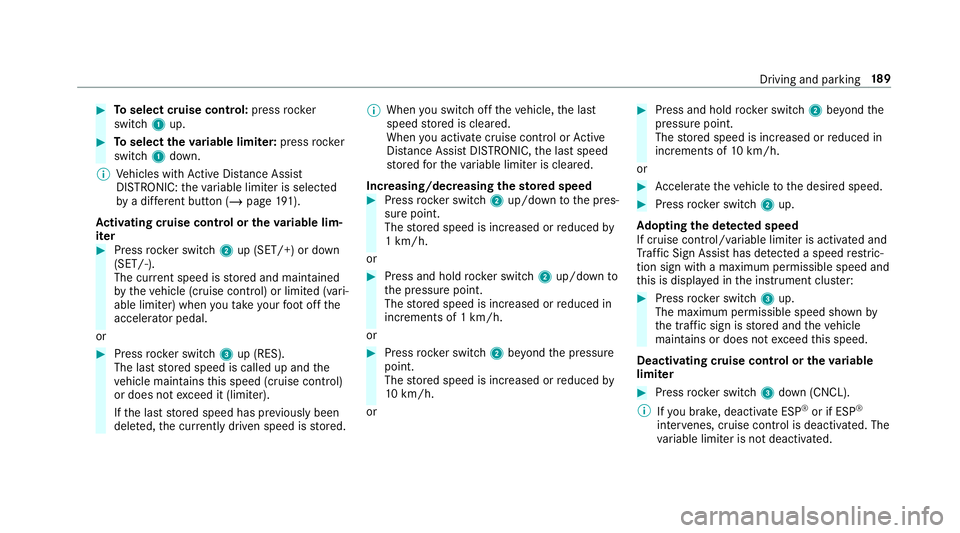
Toselect cruise control: pressrocker
switch 1up. #
Toselect theva riable limi ter: press rocker
switch 1down.
% Vehicles with Active Dis tance Assi st
DISTRONIC: theva riable limiter is selec ted
by a dif fere nt button (/ page 191).
Ac tivating cruise control or the variable lim‐
iter #
Press rocker switch 2up (SET/+) or down
(SET/-).
The cur rent speed is stored and maintained
by theve hicle (cruise contro l) or limited (vari‐
able limiter) when you take your foot off the
accelerator pedal.
or #
Press rocker switch 3up (RES).
The last stored speed is called up and the
ve hicle maintains this speed (cruise control)
or does not exceed it (limiter).
If th e last stored speed has pr eviously been
dele ted, the cur rently driven speed is stored. %
When you swit choff theve hicle, the last
speed stored is cleared.
When you activate cruise cont rol or Active
Dis tance Assi stDISTRONIC, the last speed
st ored forth eva riable limiter is cleared.
Increasing/decreasing thesto red speed #
Press rocker switch 2up/down tothe pres‐
sure point.
The stored speed is increased or reduced by
1 km/h.
or #
Press and hold rocker switch 2up/down to
th e pressure point.
The stored speed is increased or reduced in
increments of 1 km/h.
or #
Press rocker switch 2beyond the pressure
point.
The stored speed is increased or reduced by
10 km/h.
or #
Press and hold rocker switch 2beyond the
pressure point.
The stored speed is increased or reduced in
increments of 10km/h.
or #
Accelerate theve hicle tothe desired speed. #
Press rocker switch 2up.
Ad opting the de tected speed
If cruise control/ variable limiter is activated and
Tr af fic Sign Assi sthas de tected a speed restric‐
tion sign wi tha maximum permissible speed and
th is is displa yed in the instrument clus ter: #
Press rocker switch 3up.
The maximum permissible speed shown by
th e traf fic sign is stored and theve hicle
maintains or does not exceed this speed.
Deactivating cruise control or theva riable
limi ter #
Press rocker switch 3down (CNCL).
% Ifyo u brake, deactivate ESP ®
or if ESP ®
inter venes, cruise control is deacti vated. The
va riable limiter is not deactivated. Driving and parking
18 9
Page 193 of 549
%
When you swit choff theve hicle, the last
speed stored is cleared.
When you select cruise cont rol or Active Dis‐
ta nce Assi stDISTRONIC, the last speed
st ored forth eva riable limiter is cleared.
Pe rm anent limi ter
If th eve hicle should ne verexc eed a specific
speed (e.g. for driving in winter tyre mode), you
can set this speed with the permanent limiter.
Yo u do this by limiting the speed toava lue
between 160 km/h and 240 km/h in the multi‐
media sy stem (/ page190).
Shortly before the set speed is reached, it
appears in the multifunction displa y.When you
confirm the message with %, display mes‐
sages no longer appear until you swit choff the
ve hicle. The speed will only be displa yed again
once theve hicle has been restar ted or if the set
speed is changed.
The permanent limiter does not swit chtopas‐
sive mode even du ring kickdown and the driven
speed remains below the set speed. Setting
the speed limitation for winter tyres
Multimedia sy stem:
4 Vehicle 5
î Vehicle settings
5 Winter tyres limit #
Select a speed or deactivate the function. Ac
tive Di stance Assist DISTRO NIC Fu
nction of Active Di stance Assist
DISTRO NIC
Ac tive Dis tance Assi stDISTRONIC maintains the
set speed on free-flowing roads. If vehicles in
front are de tected, the set dis tance is main‐
ta ined, if necessar y,until theve hicle comes to a
halt. The vehicle accelerates or brakes depend‐
ing on the dis tance totheve hicle in front and
th e set speed. The speed (in thera nge between
20 km/h and 200 km/h) and the dis tance tothe
ve hicle in front are set and sa ved on thesteering
wheel. Other
features of Active Dis tance Assi st
DISTRONIC:
R Adjusts the driving style depending on the
selected drive program (fuel-saving, comfort‐
able or dynamic) (/ page150)
R Initiates ac celerationtothestored speed if
th e turn signal indicator is switched on to
ch ange totheove rtaking lane.
Ac tive Dis tance Assi stDISTRONIC is only an aid.
The driver is responsible forke eping a safe dis‐
tan cetotheve hicle in front, forve hicle speed
and for braking in good time.
Sy stem limitations
The sy stem may be impaired or may not function
in thefo llowing ins tances:
R In sno w,rain, fog, heavy spr ay, if there is
gl are, in direct sunlight or in greatlyvarying
light conditions.
R Ifth ere is swirling dust, e.g. when driving off-
ro ad or on sandy sur faces.
R The windscreen in the area of the camera is
dirty, mis ted up, damaged or co vered. 19 0
Driving and pa rking
Page 195 of 549
R
ESP ®
is acti vated and is not inter vening.
R The transmission is in position h.
R All doors and the bonn etare closed.
R Check of thera dar sensor sy stem has been
successfully comple ted.
R Parking Assist PARKTRONIC is not being
used topark theve hicle or toexit from a
parking space.
R The vehicle does not skid. Switching between
Active Di stance Assist
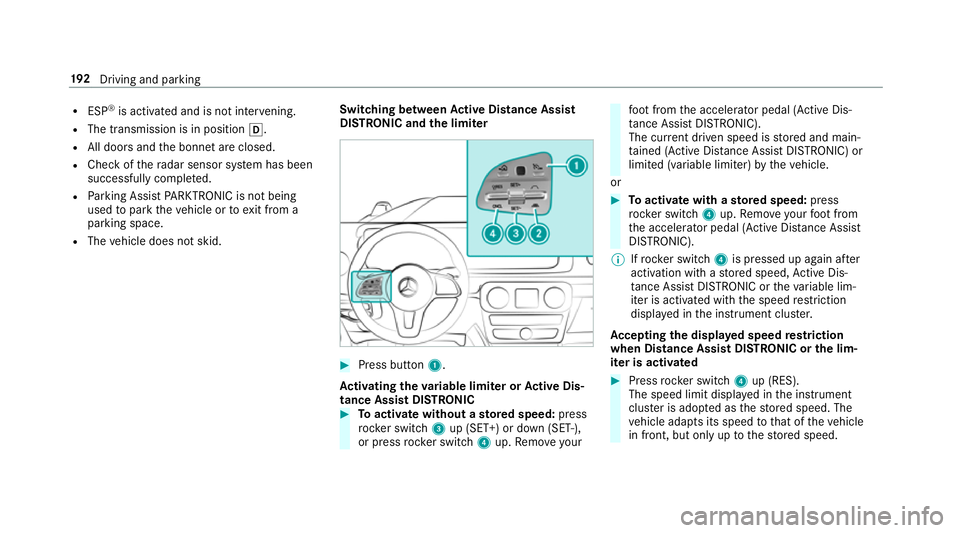
DISTRO NIC and the limiter #
Press button 1.
Ac tivating the variable limi ter or Active Dis‐
tance Assi stDISTRONIC #
Toactivate with out astored speed: press
rock er switch 3up (SET+) or down (SET-),
or press rocker switch 4up. Remo veyour fo
ot from the accelerator pedal (Active Dis‐
ta nce Assi stDISTRONIC).
The cur rent driven speed is stored and main‐
ta ined (Active Dis tance Assi stDISTRONIC) or
limited (variable limiter) bytheve hicle.
or #
Toactivate with ast ored speed: press
rock er switch 4up. Remo veyour foot from
th e accelerator pedal (Active Dis tance Assi st
DISTRONIC).
% Ifrock er switch 4is pressed up again af ter
activation with a stored speed, Active Dis‐
ta nce Assi stDISTRONIC or theva riable lim‐
iter is activated with the speed restriction
displ ayed in the instrument clus ter.
Ac cepting the displa yed speed restriction
when Distance Assist DISTRONIC or the lim‐
iter is activated #
Press rocker switch 4up (RES).
The speed limit displa yed in the instrument
clus ter is adopte d asthestored speed. The
ve hicle adapts its speed tothat of theve hicle
in front, but only up tothestored speed. 19 2
Driving and pa rking
Page 196 of 549
Pulling
away with Active Di stance Assist
DISTRO NIC #
Remo veyour foot from the brake pedal and
activate Active Dis tance Assi stDISTRONIC. #
Press rocker switch 4(RES) up.
or #
Depress the accelerator pedal briefly and
fi rm ly.
The functions of Active Dis tance Assi st
DISTRONIC continue tobe car ried out.
Deactivating Active Di stance Assist
DISTRO NIC &
WARNING Risk of accident due toActive
Dis tance Assi stDISTRONIC still being
activated when you lea vethe driver's
seat
If yo u lea vethe driver's seat while theve hicle
is being braked byActive Dis tance Assi st
DISTRONIC only, theve hicle can rollaw ay. #
Alw ays deactivate Active Dis tance
Assi stDISTRONIC and secure theve hi‐ cle
topreve nt it from rolling away
before you lea vethe driver's seat. #
Press rocker switch 4down (CNCL).
% Ifyo u brake, deactivate ESP ®
or if ESP ®
inter venes, Active Dis tance Assi st
DISTRONIC is deacti vated.
Increasing or reducing the speed #
Press rocker switch 3up (SET+) or down
(SET-) tothe pressure point.
The stored speed is increased or reduced by
1 km/h.
or #
Press and hold rocker switch 3up/down to
th e pressure point.
The stored speed is increased or reduced in
increments of 1 km/h.
or #
Press rocker switch 3beyond the pressure
point.
The stored speed is increased or reduced by
10 km/h.
or #
Press and hold rocker switch 3beyond the
pressure point.
The stored speed is increased or reduced in
increments of 10km/h.
Re ducing or inc reasing the specified dis‐
tance from theve hicle in front #
Toincrease the specified distance: press
rock er switch 2down. #
Toreduce the speci fied distance: press
rock er switch 2up. Driving and parking
19 3
Page 198 of 549
This gives
you enough time tomo veyour foot
from the brake pedal tothe accelera tor pedal
and depress it before theve hicle begins toroll
aw ay. &
WARNING Risk of accident and inju ry
due totheve hicle rolling away
Af ter a short time, Hill Start Assist no lon ger
holds theve hicle and it can rollaw ay. #
Therefore, swiftly mo veyour foot from
th e brake pedal tothe accelerator
pedal. Ne ver attem pttolea vetheve hi‐
cle if it is being held byHill Start Assist. HOLD function
HOLD function
The HOLD function holds
theve hicle at a stand‐
st ill without requ iring youto depress the brake
pedal, e.g. while waiting in traf fic.
The HOLD function is only an aid. The responsi‐
bility forth eve hicle safely standing still remains
with the driver. Sy
stem limitations
The HOLD function is only intended toprov ide
assis tance when driving and is not a su fficient
means of safeguarding theve hicle against rolling
aw ay when stationar y.
R The incline must not be greater than 30%.
Ac tivating/deactivating the HOLD function &
WARNING Risk of an accident due tothe
HOLD function being activated when you
lea vetheve hicle
If yo u lea vetheve hicle while only the HOLD
function is braking theve hicle, theve hicle
can rollaw ay inthefo llowing situations:
R Ifth ere is a malfunction in the sy stem or
in the po wer supply.
R Ifth e HOLD function is deactivated by
depressing the accelerator pedal or brake
pedal, e.g. byave hicle occupant. #
Alw ays deactivate the HOLD function
and secure theve hicle against rolling
aw ay before leaving theve hicle. Re
quirements:
R The vehicle is stationar y.
R The driver's door is closed or the seat belt on
th e driver's side is fastened.
R The engine is running or has been au tomati‐
cally switched off bythe ECO start/ stop
function.
R The electric parking brake is released.
R Active Dis tance Assi stDISTRONIC is deacti‐
va ted.
R The transmission is in position h,kori.
Ac tivating the HOLD function #
Dep ress the brake pedal and af ter a short
time quickly depress fur ther until theë
display appears in the multifunction displa y. #
Release the brake pedal.
Deactivating the HOLD function #
Depress the accelerator pedal topull away.
or #
Depress the brake pedal until theë dis‐
play disappears from the multifunction dis‐
pla y. Driving and pa
rking 19 5
Page 200 of 549
Drive prog
ramC haracteristics
S (Sport) The suspension tuning is sporty.
Desert (theavailability of this function is dependent on the
country)
G-Mode The suspension tuning shi
fts to Off-road mode. Pa
rking Assist PARKTRONIC Fu
nction of Parking Assist PARKTRONIC Pa
rking Assist PARKTRONIC is an electronic
parking assi stance sy stem with ultrasound. It
monitors the area around your vehicle using six sensors
1inthe front bumper and six sensors
in there ar bumper. Parking Assist PARKTRONIC
sho wsyouth e dis tance between your vehicle
and a de tected obs tacle visually and audibly.
Pa rking Assist PARKTRONIC is on lyan aid. It is
not a substitute foryo ur attention tothe sur‐
ro undings. The responsibility for safe manoeu‐
vring and parking remains with you. Make sure
th at there are no persons, animals or objects in
th e manoeuvring area while manoeuvring and
parking in/exiting parking spaces.
In thest andard setting, an intermit tent wa rning
to ne sounds from a di stance of appr oximately
0.3 m toan obs tacle in front and appr oximately
1. 0 m toan obs tacle behind. A continuous tone
sounds from a di stance of appr oximately 0.2 m. Using
theWa rnear lysetting in the multimedia
sy stem, thewa rning tones for front and side
impact pr otection can also be set tosound at a
greater dis tance of appr oximately 1.0 m
(/ page 200).
% The Warnear lysetting is alw ays active in
th ere ar of theve hicle.
If Pa rking Assist PARKTRONIC is deacti vated,
Ac tive Parking Assist is una vailable. Driving and parking
197
Page 201 of 549
Pa
rking Assist PARKTRONIC displ ayinthe
mu ltimedia sy stem Ve
hicles with Active Parking Assist without a
360° Camera Ve
hicles with Active Parking Assist and a 360°
Camera
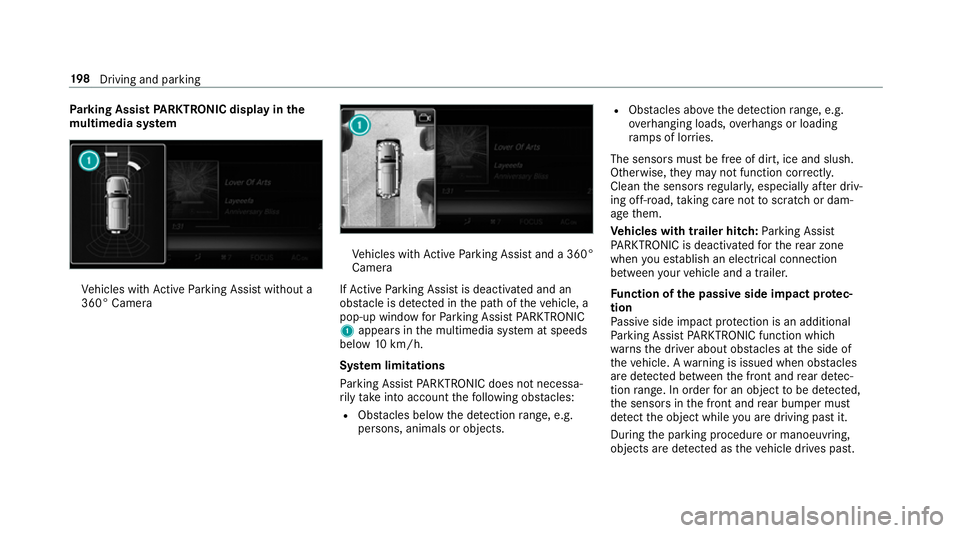
If Ac tive Parking Assist is deactivated and an
obs tacle is de tected in the path of theve hicle, a
pop-up window forPa rking Assist PARKTRONIC
1 appears in the multimedia sy stem at speeds
below 10km/h.
Sy stem limitations
Pa rking Assist PARKTRONIC does not necessa‐
ri ly take into account thefo llowing obs tacles:
R Obs tacles bel ow the detection range, e.g.
pe rsons, animals or objects. R
Obs tacles ab oveth e de tection range, e.g.
ove rhanging loads, overhangs or loading
ra mp s of lor ries.
The sensors must be free of dirt, ice and slush.
Otherwise, they may not function cor rectly.
Clean the sensors regularly, especially af ter driv‐
ing off-road, taking care not toscratch or dam‐
age them.
Ve hicles with trailer hitch: Parking Assist
PA RKTRONIC is deacti vatedfo rth ere ar zone
when you es tablish an elect rical connection
between your vehicle and a trailer.
Fu nction of the passive side impact pr otec‐
tion
Pa ssive side impact pr otection is an additional
Pa rking Assist PARKTRONIC function which
wa rnsth e driver about obs tacles at the side of
th eve hicle. A warning is issued when obs tacles
are de tected between the front and rear de tec‐
tion range. In order for an object tobe de tected,
th e sensors in the front and rear bumper must
de tect the object while you are driving past it.
During the parking procedure or manoeuvring,
objects are de tected as theve hicle drives past. 19 8
Driving and pa rking
Page 204 of 549
#
Select Warn early. #
Activate Oor deacti vate ª the function.
Ac tivating/deactivating audio fadeout
Yo u can specify whe ther thevo lume of a media
source in the multimedia sy stem is tobe
re duced when Parking Assist PARKTRONIC gives
an audible warning. #
Select Audio fadeout during warning tones .#
Activate Oor deacti vate ª the function. Re
versing camera Fu
nction of there ve rsing camera If
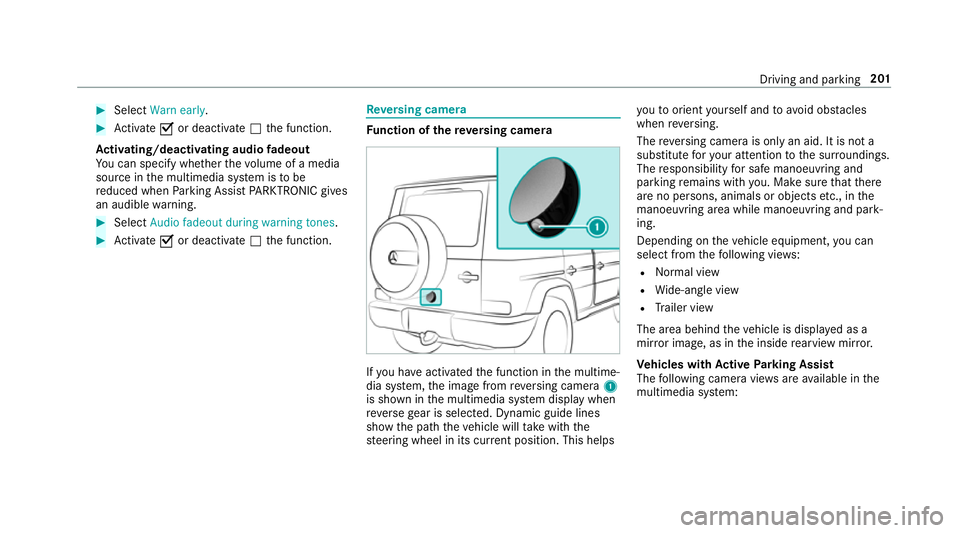
yo u ha veactivated the function in the multime‐
dia sy stem, the image from reve rsing camera 1
is shown in the multimedia sy stem display when
re ve rsege ar is selec ted. Dynamic guide lines
show the path theve hicle will take with the
st eering wheel in its cur rent position. This helps yo
uto orient yourself and to avoid obs tacles
when reve rsing.
The reve rsing camera is only an aid. It is not a
substitute foryo ur attention tothe sur roundings.
The responsibility for safe manoeuvring and
parking remains with you. Make sure that there
are no persons, animals or objects etc., in the
manoeuvring area while manoeuvring and park‐
ing.
Depending on theve hicle equipment, you can
select from thefo llowing vie ws:
R Normal view
R Wide-angle view
R Trailer view
The area behind theve hicle is displa yed as a
mir ror image, as in the inside rearview mir ror.
Ve hicles with Active Parking Assist
The following camera vie wsare available in the
multimedia sy stem: Driving and parking
201
Page 206 of 549
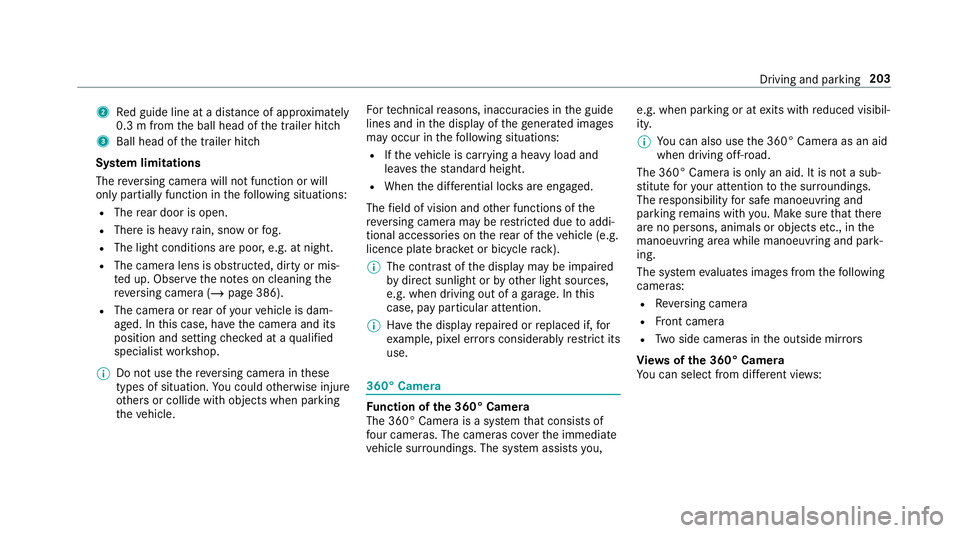
2
Red guide line at a dis tance of appr oximately
0.3 m from the ball head of the trailer hitch
3 Ball head of the trailer hitch
Sy stem limitations
The reve rsing camera will not function or will
only partially function in thefo llowing situations:
R The rear door is open.
R There is heavy rain, snow or fog.
R The light conditions are poor, e.g. at night.
R The camera lens is obstructed, dirty or mis‐
te d up. Obser vethe no tes on cleaning the
re ve rsing camera (/ page 386).
R The camera or rear of your vehicle is dam‐
aged. In this case, ha vethe camera and its
position and setting checked at a qualified
specialist workshop.
% Do not use there ve rsing camera in these
types of situation. You could otherwise injure
ot hers or collide with objects when parking
th eve hicle. Fo
rte ch nical reasons, inaccuracies in the guide
lines and in the display of thege nerated ima ges
may occur in thefo llowing situations:
R Ifth eve hicle is car rying a heavy load and
lea vesth est andard height.
R When the dif fere ntial lo cks are engaged.
The field of vision and other functions of the
re ve rsing camera may be restricted due toaddi‐
tional accesso ries on there ar of theve hicle (e.g.
licence plate brac ket or bicycle rack ).
% The contrast of the display may be impaired
by direct sunlight or by other light sources,
e.g. when driving out of a garage . In this
case, pay particular attention.
% Have the display repaired or replaced if, for
ex ample, pixel er rors considerably restrict its
use. 360° Came
ra Fu
nction of the 360° Camera
The 360° Camera is a sy stem that consists of
fo ur cameras. The cameras co verth e immediate
ve hicle sur roundings. The sy stem assists you, e.g. when parking or at
exits with reduced visibil‐
ity.
% You can also use the 360° Camera as an aid
when driving off-road.
The 360° Camera is only an aid. It is not a sub‐
st itute foryo ur attention tothe sur roundings.
The responsibility for safe manoeuvring and
parking remains with you. Make sure that there
are no persons, animals or objects etc., in the
manoeuvring area while manoeuvring and park‐
ing.
The sy stem evaluates images from thefo llowing
cameras:
R Reversing camera
R Front camera
R Two side cameras in the outside mir rors
Vi ew s of the 360° Camera
Yo u can select from dif fere nt vie ws: Driving and pa
rking 203
Page 210 of 549
#
Engage reve rsege ar. #
Inthe multimedia sy stem, select the desired
vie w.
Switching reve rsing camera automatic mode
on/off
The reve rsing camera is only an aid. It is not a
substitute foryo ur attention tothe sur roundings.
The responsibility for safe manoeuvring and
parking remains with you. Make sure that no
persons, animals or objects etc. are in the
manoeuvring range. Pay attention to your sur‐
ro undings and be ready tobrake at all times.
Multimedia sy stem:
4 Vehicle 5
k Assistance
5 Camera & Park. Assist
5 Auto reversing camera #
Activate Oor deacti vate ª the function. Opening
the camera co ver of the reve rsing
camera
Multimedia sy stem:
4 Vehicle 5
k Assistance
5 Camera & Park. Assist #
Select Open camera cover.
% The camera co ver closes auto maticallyafter
some time or af ter an ignition cycle.
Setting the camera as a favo urite
Yo u can call up the camera view directly in the
multimedia sy stem bysetting it as a favo urite. #
Press theò button on the control ele‐
ment.
The main functions are displa yed. #
Navigate down wards twice.
The Favourites menu appears. #
Select New favourite. #
Select Vehicle . #
Select Camera. Ac
tive Parking Assist Fu
nction of Active Parking Assist
Ac tive Parking Assist is an elect ronic pa rking
assis tance sy stem which uses ultrasound and is
automatically activated during forw ard tra vel.
The sy stem is operational at speeds of up to
appr oximately 35 km/h. When all the conditions
are fulfilled, thec symbol appears in the
multifunction display in the instrument clus ter
and the sy stem automatically sear ches for and
measu res parking spaces on bo thsides of the
ve hicle parallel and perpendicular tothe direc‐
tion of tra vel. If Active Parking Assist is activa‐
te d, suitable parking spaces are shown in the
display of the multimedia sy stem. The ësym‐
bol appears in the display of the multimedia sys‐
te m. The ar rowsshow on which side of the car‐
ri ag ewa y free parking spaces are located.
The parking space and, if necessar y,the parking
direction can be selected as desired. Active
Pa rking Assist calculates a suitable vehicle path
and assists you in parking and exiting the park‐
ing space. Driving and parking
207