warning MERCEDES-BENZ GL 2013 Owners Manual
[x] Cancel search | Manufacturer: MERCEDES-BENZ, Model Year: 2013, Model line: GL, Model: MERCEDES-BENZ GL 2013Pages: 454, PDF Size: 6.31 MB
Page 194 of 454
R
Always keep the engine running and in gear
when driving on a downhill gradient.
Activate DSR (Y page 250).
R Always keep the doors, tailgate, windows
and sliding sunroo fclosed while driving.
R Adapt your speed to the terrain. The
rougher, steeper or more ruts on the
terrain, the slower your speed should be.
R Drive slowly and at an even speed through
the water .Ensure tha tabow wave does not
form as you drive.
R Drive with extreme care on unfamiliar off-
road routes where visibility is poor. For
safety reasons, get out of the vehicle first
and survey the off-road route.
R Look out for obstacles, such as rocks,
holes, tree stumps and furrows.
R Check the depth of water before fording
rivers and streams.
R When fording, do not stop and do not
switch off the engine.
R On sand, drive quickly to overcome the
rolling resistance. Otherwise the vehicle's
wheels could become stuc kinloose
ground.
R Do not jump with the vehicle as this will
interrupt the vehicle's propulsion.
R Always keep the engine running and in gear
when driving on a slope.
R Do not shift the automatic transmission to
transmission position N.
i Do not use the HOLD function when
driving off-road, on steep uphill or downhill
gradients or on slippery or loose surfaces.
The HOLD function cannot hold the vehicle
on such surfaces.
Checklist before driving off-road !
If the engine oil warning lamp lights up
while the vehicle is in motion, stop the
vehicle in a safe place as soon as possible.
Check the engine oil level. The engine oil
warning lamp warning must not be ignored.
Continuing the journey while the symbol is
displayed could lead to engine damage. X
Engine oil level: check the engine oil level
and add oil if necessary.
When driving on steep gradients, the
engine oil level must be sufficiently high to
ensure a correc toil supply in the vehicle.
X DEF tank (BlueTEC vehicles): check the
fluid level and, if necessary, refill to the
maximum (13 l) (Y page 181).
X Wheel-changing tool kit: check that the
jac kis working and make sure you have the
lug wrench, a robust tow cable and a folding
spade in the vehicle.
X Wheels and tires: check the tire tread
depth and tire pressure.
X Check for damage and remove any foreign
objects, e.g. small stones, from the
wheels/tires.
X Replace any missing valve caps.
X Replace dented or damaged wheels.
X Rims: dented or bent rims can result in a
loss of tire pressure and damage the tire
bead. Therefore, check your rims before
driving off-road and replace them as
required.
Checklist after driving off-road !
If you detect damage to the vehicle after
driving off-road, have the vehicle checked
immediately at a qualified specialist
workshop.
X Deactivate DSR (Y page 250).
X Vehicles with the AIRMATIC package:
lower the vehicle to a ride height suitable
for the road conditions, e.g. to the
highway/high-speed level.
X Cleant he headlamps and rear lights and
check for damage.
X Cleant he front and rear license plates.
X Cleant he wheels/tires with a water jet and
remove any foreign objects.
X Cleant he wheels, wheel housings and the
vehicle underside with a water jet; check
for any foreign objects and damage. 192
Driving tipsDriving and parking
Page 196 of 454

R
Select shift range 1.
R Drive very slowly.
R Drive straight ove rthe center of obstacles. Traveling uphill
Approach/departure angle G
WARNING
If you drive on a steep incline at an angle or
turn when driving on an incline, the vehicle
could slip sideways, tip and rollover. There is
a risk of an accident.
Always drive on a steep incline in the line of
fall (straight up or down) and do not turn the
vehicle. All vehicles (except AMG vehicles and
vehicles with AMG bodystyling) 0002 0003
Vehicles without the
ON&OFFROAD package
Highway level 25° 20°
Raised level 30° 25°
Vehicles with the
ON&OFFROAD package
Highway level 25° 20°
Off-road level 1 28° 23°
Off-road level 2 30° 25°
Off-road level 3 33° 27° Vehicles with AMG bodystyling
0002 0003
Vehicles without the
ON&OFFROAD package
Highway level 20° 20°
Raised level 24° 24°
Vehicles with the
ON&OFFROAD package
Highway level 20° 20°
Off-road level 1 22° 22°
Off-road level 2 24° 24°
Off-road level 3 26° 26°
AMG vehicles
0002 0003
Highway level (in sports
mode with the AMG
adaptive suspension
system activated) 19° 19°
Raised level 23° 22°
R
Observe the rules on off-road driving.
R Do not drive at an angle on slopes, inclines
or gradients, but instead follow the direct
line of fall. The maximum gradient-climbing
capability of your vehicle is 100%, which
corresponds to an approach/departure
angle of 45°. Note that the climbing ability
of your vehicle depends on the terrain
conditions.
R Before tackling steep downhill gradients,
select shift range 1.
R Drive slowly.
R Avoid high engine speeds. Drive at
appropriate engine speeds (maximum
3000 rpm). 194
Driving tipsDriving and parking
Page 199 of 454
stored speed is resumed when the gradient
evens out. Cruise control maintains the
stored speed on downhill gradients by
automatically applying the brakes.
Storing or calling up aspeed G
WARNING
If you call up the stored speed and it differs
from the current speed, the vehicle
accelerates or decelerates. If you do not know
the stored speed, the vehicle could accelerate
or brake unexpectedly. There is a ris kofan
accident.
Pay attention to the road and traffic
conditions before calling up the stored speed.
If you do no tknow the stored speed, store the
desired speed again. X
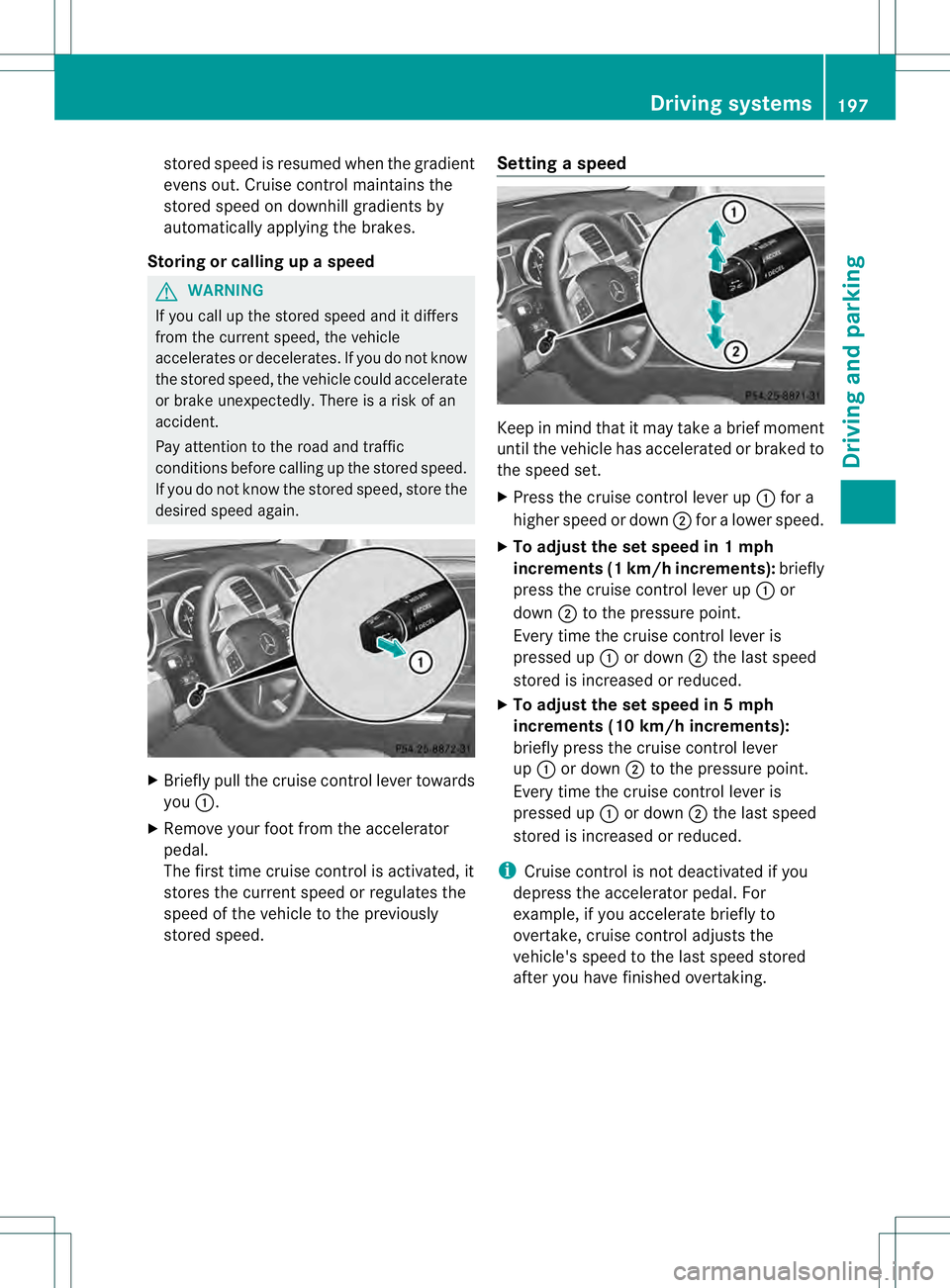
Briefly pull the cruise control lever towards
you 0002.
X Remove your foo tfrom the accelerator
pedal.
The first time cruise control is activated, it
stores the current speed or regulates the
speed of the vehicle to the previously
stored speed. Setting
aspeed Keep in mind tha
titmay take a brie fmoment
until the vehicle has accelerated or braked to
the speed set.
X Press the cruise control lever up 0002for a
higher speed or down 0003for a lower speed.
X To adjust the set speed in 1 mph
increments (1 km/h increments): briefly
press the cruise control lever up 0002or
down 0003to the pressure point.
Every time the cruise control lever is
pressed up 0002or down 0003the last speed
stored is increased or reduced.
X To adjust the set speed in 5 mph
increments (10 km/h increments):
briefly press the cruise control lever
up 0002 or down 0003to the pressure point.
Every time the cruise control lever is
pressed up 0002or down 0003the last speed
stored is increased or reduced.
i Cruise control is not deactivated if you
depress the accelerator pedal. For
example, if you accelerate briefly to
overtake, cruise control adjusts the
vehicle's speed to the last speed stored
after you have finished overtaking. Driving systems
197Driving and parking Z
Page 200 of 454

Deactivating cruise control
There are several ways to deactivate cruise
control:
X
Briefly press the cruise control lever
forwards 0002.
or
X Brake.
Cruise control is automatically deactivated if:
R you engage the electric parking brake.
R you are driving at less than 20 mph
(30 km/h).
R ESP ®
intervenes or you deactivate ESP ®
.
R you activate DSR.
R you shift the transmissio nto position N
while driving.
If cruise control is deactivated, you will hear
a warning tone. You will see the CruiseControl Off message in the multifunction
display for approximately five seconds.
i When you switch off the engine, the last
speed stored is cleared. DISTRONIC PLUS
Important safety notes G
WARNING
DISTRONIC PLUS does not react to:
R people or animals
R stationary obstacles on the road, e.g.
stopped or parked vehicles
R oncoming and crossin gtraffic As a result, DISTRONIC PLUS may neither give
warnings nor intervene in such situations.
There is a risk of an accident.
Always pay careful attention to the traffic
situation and be ready to brake. G
WARNING
DISTRONIC PLUS cannot always clearly
identify other road users and comple xtraffic
situations.
In such cases, DISTRONIC PLUS may:
R give an unnecessary warning and then
brake the vehicle
R neither give a warning nor intervene
R accelerate unexpectedly
There is a risk of an accident.
Continue to drive carefully and be ready to
brake, in particular when warned to do so by
DISTRONIC PLUS. G
WARNING
DISTRONIC PLUS brakes yourv ehicle with up
to 40% of the maximum braking force. If this
braking force is insufficient, DISTRONIC PLUS
warns you visually and audibly .There is a risk
of an accident.
In such cases, apply the brakes yourself and
try to take evasive action.
! If DISTRONIC PLUS or the HOLD function
is activated, the vehicle brakes
automatically in certain situations. To
prevent damage to the vehicle, deactivate
DISTRONIC PLUS and the HOLD function in
the following or other similar situations:
R when towing the vehicle
R in the car wash
If you fail to adapt your driving style,
DISTRONIC PLUS can neither reduce the risk
of accident nor override the laws of physics.
DISTRONIC PLUS cannot take into account
the road, traffic and weather conditions.
DISTRONIC PLUS is only an aid. You are
responsible for the distance to the vehicle in 198
Driving systemsDriving and parking
Page 201 of 454
front, for vehicle speed, for braking in good
time and for staying in you
rlane.
Do not use DISTRONIC PLUS:
R in road and traffic conditions which do not
allow you to maintain a constan tspeed e.g.
in heavy traffic or on winding roads
R on slippery road surfaces .Braking or
accelerating could cause the drive wheels
to lose traction and the vehicle could then
skid
R when there is poor visibility, e.g. due to fog,
heavy rain or snow
DISTRONIC PLUS may not detect narrow
vehicles driving in front, e.g. motorcycles, or
vehicles driving on a different line.
In particular, the detection of obstacles can
be impaired if:
R dirt on the sensors or anything else
covering the sensors
R snow or heavy rain
R interference by other rada rsources
R strong radar reflections, for example, in
parking garages
If DISTRONIC PLUS no longer detects a
vehicle in front, DISTRONIC PLUS may
unexpectedly accelerate the vehicle to the
stored speed.
This speed may:
R be too high if you are driving in a filter lane
or an exit lane
R be so high when driving in the right-hand
lane that you overtake vehicles in the left-
hand lane
R be so high when driving in the left-hand lane
that you overtake vehicles in the right-hand
lane
If there is a change of drivers, advise the new
driver of the speed stored.
General notes DISTRONIC PLUS regulates the speed and
automatically helps you maintain the
distance to the vehicle detected in front. DISTRONIC PLUS brakes automatically so
that the set speed is not exceeded.
On long and steep downhill gradients,
especially if the vehicle is laden or towing a
trailer, you must select shift range
1,2or 3
in good time. By doing so, you will make use
of the braking effect of the engine, This
relieves the load on the brake system and
prevents the brakes from overheating and
wearing too quickly.
If DISTRONIC PLUS detects a slower-moving
vehicle in front, your vehicle is braked in order
to maintain the preset distance to the vehicle
in front.
If DISTRONIC PLUS detects that there is a risk
of a collision, you will be warned visually and
acoustically. DISTRONIC PLUS cannot
prevent a collision without your intervention.
An intermittent warning tone will then sound
and the distance warning lamp will light up in
the instrument cluster. Brake immediately in
order to increase the distance to the vehicle
in front or take evasive action provided it is
safe to do so.
For DISTRONIC PLUS to assist you when
driving, the radar sensor system must be:
R activated (Y page 281)
R operational
If there is no vehicle in front, DISTRONIC
PLUS operates in the same way as cruise
control in the speed range between 20 mph
(Canada: 30 km/h) and120 mph (Canada:
200 km/h). If a vehicle is driving in front of
you, it operates in the speed range between
0 mph (0 km/h) and 120 mph (Canada:
200 km/h).
Do not use DISTRONIC PLUS while driving on
roads with steep gradients.
As DISTRONIC PLUS transmits radar waves,
it can resemble the radar detectors of the
responsible authorities. You can refer to the
relevant chapter in the Operator's Manual if
questions are asked about this.
i USA only: Driving systems
199Driving and parking Z
Page 203 of 454
pressure point for a higher speed or down
0021 for a lower speed.
Every time the cruise control lever is
pressed up or down, the last speed stored
is increased or reduced.
or
X To adjust the set speed in 5 mph
increments (10 km/h increments):
briefly press the cruise control lever
up 0002 past the pressure point for a higher
speed or down 0021for a lower speed.
Every time the cruise control lever is
pressed up or down, the last speed stored
is increased or reduced.
X Remove your foot from the accelerator
pedal.
Your vehicle adapts its speed to that of the
vehicle in front, but only up to the desired
stored speed.
If the vehicle in front has been detected and
is shown in the multifunction display, you can
also activate DISTRONIC PLUS when driving
at speeds below 20 mph (30km/h). If the
vehicle in front is no longer detected and
displayed, for example because it has
changed lanes, DISTRONIC PLUS is
deactivated. You will hear awarning tone if
this is the case.
i If you do no tfully release the accelerator
pedal, the DISTRONIC PLUS Passive message appears in the multifunction
display. The set distance to a slower-
moving vehicle in front will then not be
maintained. You will be driving at the speed
you determine by the position of the
accelerato rpedal.
Activating when driving towards a
stationary vehicle
X Briefly pull the cruise control lever towards
you 0003or press it up 0002or down 0021.
DISTRONIC PLUS is selected.
X To adjust the set speed in 1 mph
increments (1 km/h increments): briefly
press the cruise control lever up 0002to the pressure point for a higher speed or down
0021
for a lower speed.
Every time the cruise control lever is
pressed up or down, the last speed stored
is increased or reduced.
or
X To adjust the set speed in 5 mph
increments (10 km/h increments):
briefly press the cruise control lever
up 0002 past the pressure point for a higher
speed or down 0021for a lower speed.
Every time the cruise control lever is
pressed up or down, the last speed stored
is increased or reduced.
If the vehicle in fron tofyou is stationary, you
can only activate DISTRONIC PLUS once your
vehicle is stationary as well.
i DISTRONIC PLUS can only be activated at
under 20 mph (30km/h) if a vehicle in front
has been detected. Therefore, the
DISTRONIC PLUS distance display in the
instrumen tcluster should be activated
(Y page 276).
i You can use the cruise control lever to set
the stored speed and the control on the
cruise control lever to set the specified
minimum distance (Y page 204).
Activating at the current speed/last
stored speed G
WARNING
If you call up the stored speed and it differs
from the current speed, the vehicle
accelerates or decelerates. If you do not know
the stored speed, the vehicle could accelerate
or brake unexpectedly. There is a risk of an
accident.
Pay attention to the road and traffic
conditions before calling up the stored speed.
If you do not know the stored speed, store the
desired speed again. Driving systems
201Driving and parking Z
Page 205 of 454
DISTRONIC PLU
Suses additional information
from your navigation system so that it can
react appropriately to certain traffic
situations. This is the case if, while following
a vehicle, DISTRONIC PLUS is active and you:
R approach or drive through a traffic circle
R approach a T-intersection
R turn off at a highway exit
Even if the vehicle in front leaves the
detection range, DISTRONIC PLUS
temporarily maintains the current driving
speed and does not accelerate. This is based
on the current map data in the navigation
system.
The current speed is maintained:
R approximately 10 seconds before the
traffic circle/T intersection and
approximately 1.5 seconds when driving on
a traffic circle.
R approximately 12 seconds before reaching
a highway exit and approximately
4s econds after the highway exit.
Afterwards, the vehicle accelerates back to
the set speed you specified.
Stopping G
WARNING
When leaving the vehicle, even if it is braked
only by DISTRONIC PLUS, it could roll away if:
R there is a malfunction in the system or in
the voltage supply.
R DISTRONIC PLUS has been deactivated
with the cruise control lever, e.g. by a
vehicle occupan torfrom outside the
vehicle.
R the electrical system in the engine
compartment, the battery or the fuses have
been tampered with.
R the battery is disconnected.
R the accelerator pedal has been depressed,
e.g. by a vehicle occupant.
There is a risk of an accident. If you wish to exit the vehicle, always turn off
DISTRONIC PLUS and secure the vehicle
against rolling away.
If DISTRONIC PLUS detects that the vehicle
in front is stopping, it brakes yourv ehicle until
it is stationary.
Once your vehicle is stationary, it remains
stationary and you do not need to depress the
brake.
After a time, the electric parking brake
secures the vehicle and relieves the service
brake.
Depending on the specified minimum
distance, your vehicle will come to a standstill
at a sufficien tdistance behind the vehicle in
front .The specified minimum distance is set
using the control on the cruise control lever.
The electric parking brake automatically
secures the vehicle if DISTRONIC PLUS is
activated and:
R the driver's door is open and the driver's
seat belt is unfastened.
R the engine is switched off, unless it is
automatically switched off by the ECO
start/stop function.
R a system malfunction occurs.
R the power supply is not sufficient.
On steep uphill or downhill inclines or if there
is a malfunction, the transmission may also
automatically be shifted into position P.
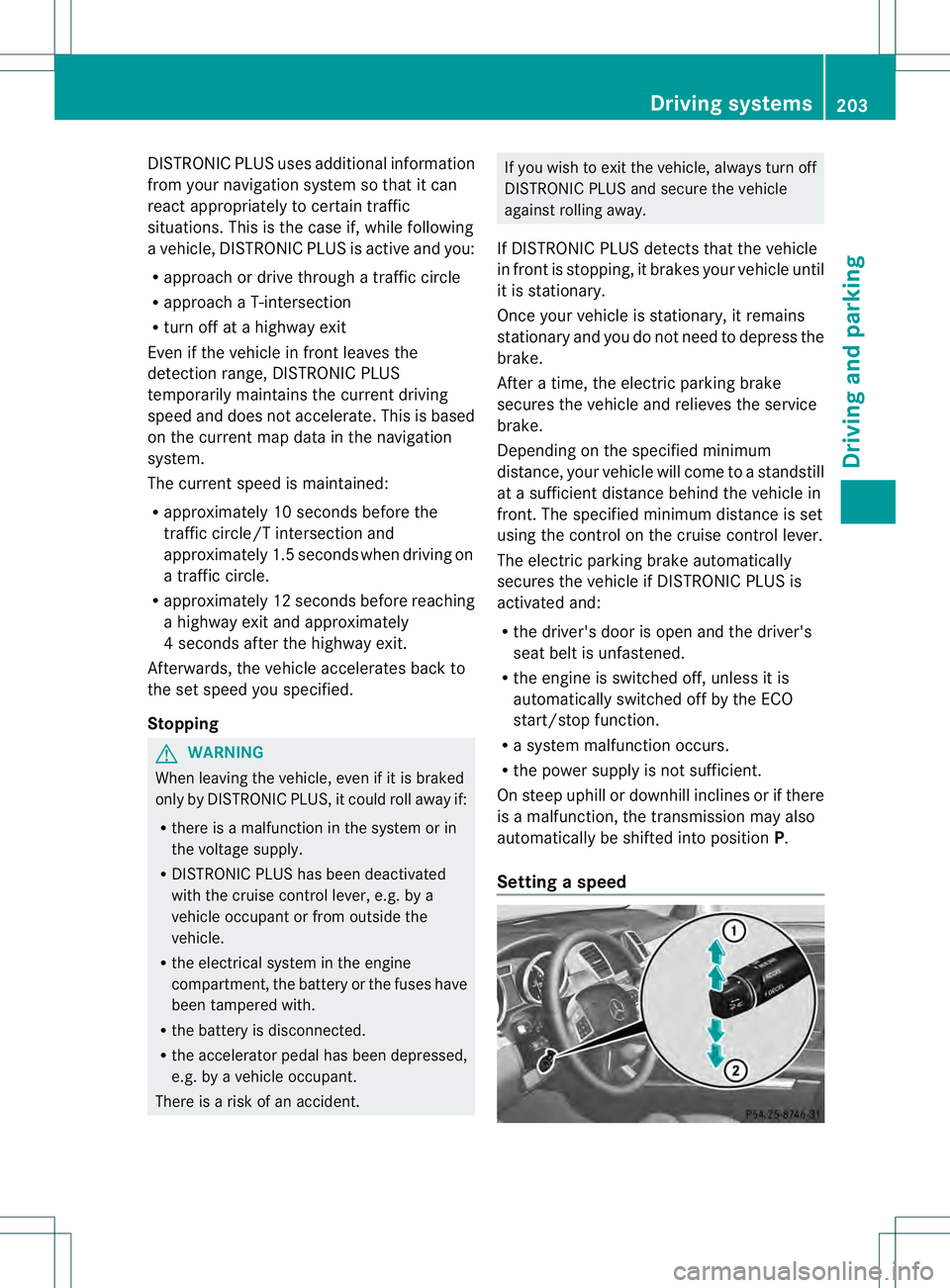
Setting aspeed Driving systems
203Driving and parking Z
Page 207 of 454
accelerate to overtake, DISTRONIC PLUS
adjusts the vehicle's speed to the last
speed stored after you have finished
overtaking.
DISTRONIC PLU Sis automatically
deactivated if:
R you engage the electric parking brake or if
the vehicle is automatically secured with
the electric parking brake
R you are driving slower than 15 mph
(25 km/h) and there is no vehicle in front,
or if the vehicle in front is no longer
detected
R ESP ®
intervenes or you deactivate ESP ®
R the transmission is in the P,Ror Nposition
R you switch off the radar sensor system
(Y page 281)
R you pull the cruise control lever towards
you in order to pull awaya nd the front-
passenge rdoor or one of the rear doors is
open
R you activate DSR
R you activate off-road program 2onvehicles
with the ON&OFFROAD package
R the vehicle has skidded
If DISTRONIC PLUS is deactivated, you will
hear a warning tone. You will see the
DISTRONIC PLUS Off message in the
multifunction display for approximately five
seconds. Displays in the instrument cluster Displays in the speedometer
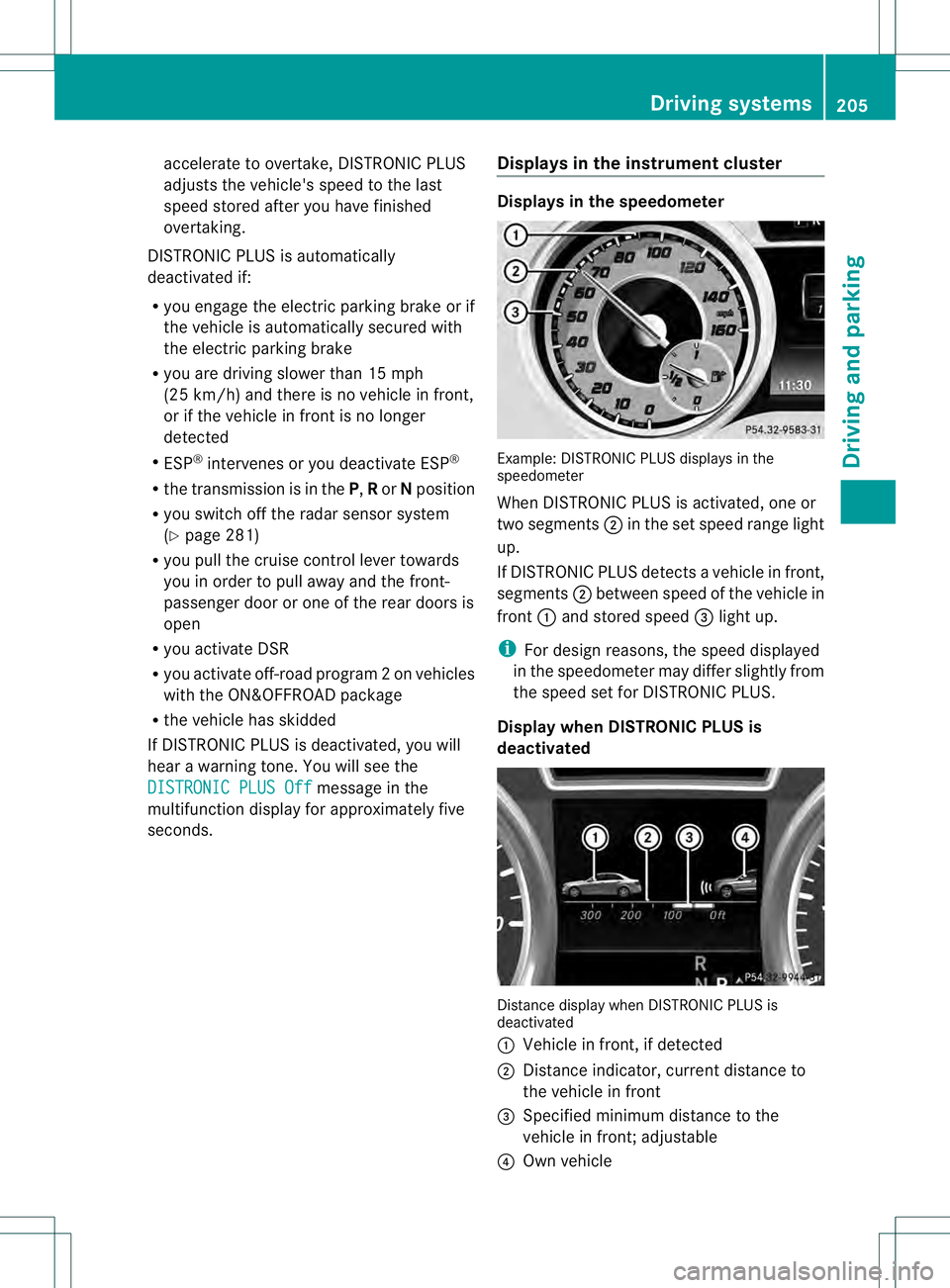
Example: DISTRONIC PLUS displays in the
speedometer
When DISTRONIC PLUS is activated, one or
two segments
0003in the set speed range light
up.
If DISTRONIC PLUS detects avehicle in front,
segments 0003between speed of the vehicle in
front 0002and stored speed 0021light up.
i For design reasons, the speed displayed
in the speedometer may differ slightly from
the speed set for DISTRONIC PLUS.
Display when DISTRONIC PLUS is
deactivated Distance display when DISTRONIC PLUS is
deactivated
0002
Vehicle in front, if detected
0003 Distance indicator, current distance to
the vehicle in front
0021 Specified minimum distance to the
vehicle in front; adjustable
0020 Own vehicle Driving systems
205Driving and parking Z
Page 209 of 454
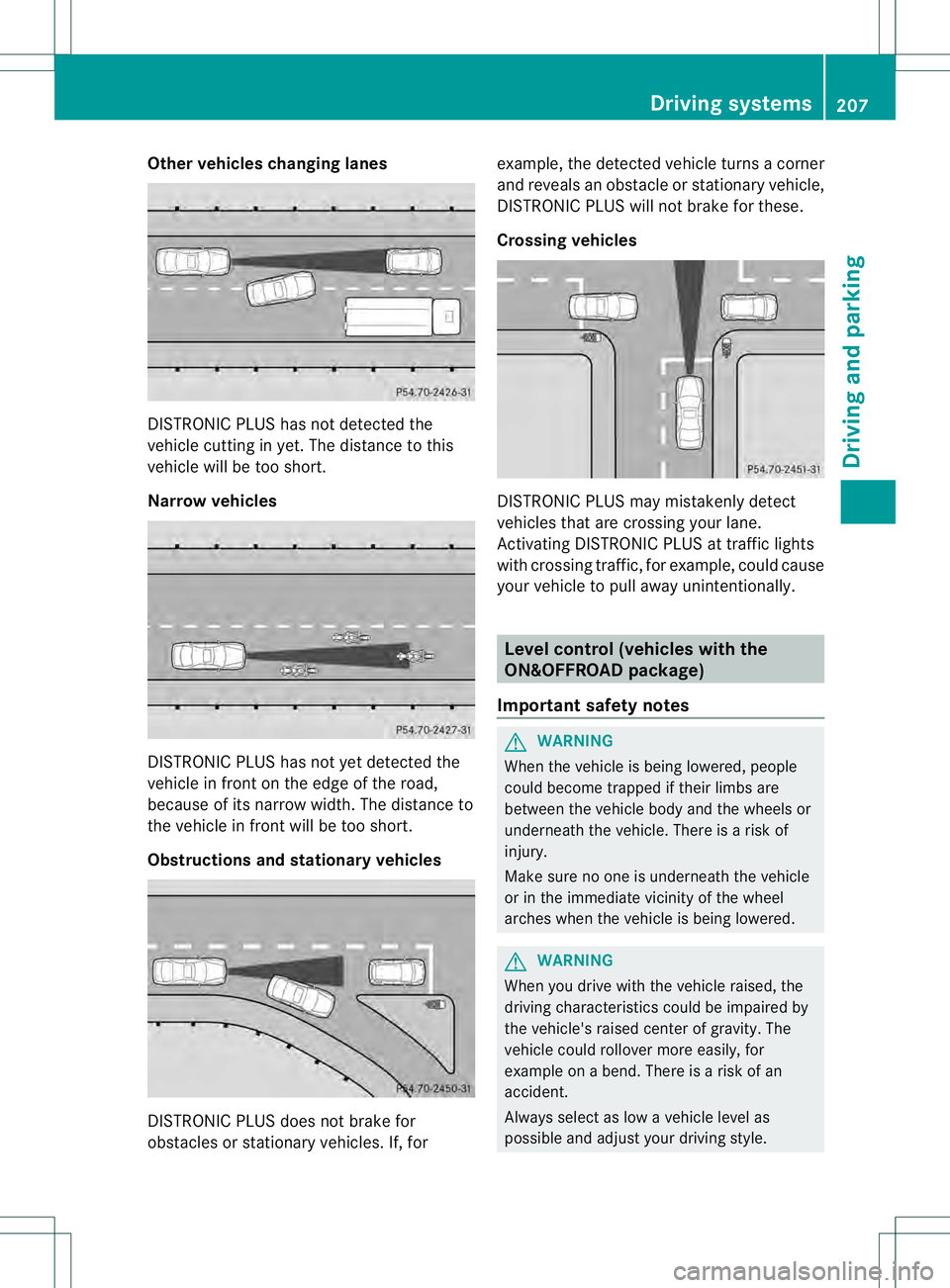
Other vehicles changing lanes
DISTRONIC PLUS has not detected the
vehicle cutting in yet. The distance to this
vehicle will be too short.
Narrow vehicles
DISTRONIC PLUS has not yet detected the
vehicle in fron tonthe edge of the road,
because of its narrow width. The distance to
the vehicle in front will be too short.
Obstructions and stationary vehicles DISTRONIC PLUS does not brake for
obstacles or stationary vehicles. If, for example, the detected vehicle turns a corner
and reveals an obstacle or stationary vehicle,
DISTRONIC PLUS will not brake for these.
Crossing vehicles DISTRONIC PLUS may mistakenly detect
vehicles that are crossing your lane.
Activating DISTRONIC PLUS at traffic lights
with crossing traffic, for example, could cause
your vehicle to pull away unintentionally.
Level control (vehicles with the
ON&OFFROAD package)
Important safety notes G
WARNING
When the vehicle is being lowered, people
could become trapped if their limbs are
between the vehicle body and the wheels or
underneath the vehicle. There is a risk of
injury.
Make sure no one is underneath the vehicle
or in the immediate vicinity of the wheel
arches when the vehicle is being lowered. G
WARNING
When you drive with the vehicle raised, the
driving characteristics could be impaired by
the vehicle's raised center of gravity. The
vehicle could rollover more easily, for
example on a bend. There is a risk of an
accident.
Always select as low a vehicle level as
possible and adjust your driving style. Driving systems
207Driving and parking Z
Page 210 of 454
G
WARNING
When you drive with the chassis lowered or
raised, the vehicle's braking and driving
characteristics can be significantly impaired.
You could also exceed the permissible vehicle
height if the chassis is raised. There is a risk
of an accident.
Adjust the vehicle level before pulling away. G
WARNING
Due to the high center of gravity, the vehicle
may start to skid and roll over in the event of
an abrupt steering maneuver and/or when
the vehicle's speed is not adapted to the road
conditions. There is a risk of an accident.
Always adapt yours peed and driving style to
the vehicle's driving characteristics and to the
prevailing road and weather conditions.
! When driving on extremely rough terrain,
select a high vehicle level in good time.
Make sure there is always sufficien tground
clearance. You will otherwise damage the
vehicle.
R Utility vehicles have a significantly higher
rollover rate than other types of vehicles.
Failure to operate this vehicle safely may
result in an accident, rollover of the vehicle,
and severe or fatal injury.
R In a rollover crash, an unbelted person is
significantly more likely to die than a
person wearing a seat belt.
You and all vehicle occupants should
always weary our seat belts.
Level control adapts the vehicle level
automatically to the current operating and
driving situation. This results in reduced fuel
consumption and improved handling.
Make changes to the vehicle level while the
vehicle is in motion .This enables the vehicle
to adjust to the new level as quickly as
possible.
The vehicle level may change visibly if you
park the vehicle and the outside temperature
changes. If the temperature drops, the vehicle level is lower; with an increase in
temperature, the vehicle level rises.
If you unlock the vehicle or open a door, the
vehicle begins to compensate for load
discrepancies while still parked. However, for
significant level changes, such as after the
vehicle has been stationary for a long period,
the engine must be on. For safety reasons,
the vehicle is only lowered when the doors are
closed. Lowering is interrupted if a door is
opened, and it continues once the door has
been closed.
For information about driving off-road, see
(Y
page 191).
Basic settings The extentt
o which the vehicle is raised or
lowered depends on the basic setting
selected.
Select:
R highway/high-speed level for driving on
normal roads
R off-road level 1for driving on easily
negotiable off-road terrain
R off-road level 2 for driving on normal off-
road terrain
R off-road level 3for freeing the vehicle in
particularly rough terrain at low speeds
only
The individual vehicle levels differ from
highway level as follows:
R highway level: +/–0 in (+/–0 mm)
R high-speed level: –0.6 in (–15 mm)
R off-road level 1: + 1.2 in (+30 mm)
R off-road level 2: + 2.3 in (+60 mm)
R off-road level 3: + 3.6 in (+ 90 mm)
Highway/high-speed level !
Make sure that there is enough ground
clearance when the vehicle is being
lowered. It could otherwise hit the ground,
damaging the underbody. 208
Driving systemsDriving and parking