warning MERCEDES-BENZ GL 2013 Manual PDF
[x] Cancel search | Manufacturer: MERCEDES-BENZ, Model Year: 2013, Model line: GL, Model: MERCEDES-BENZ GL 2013Pages: 454, PDF Size: 6.31 MB
Page 109 of 454
When leaving the vehicle, always take the
SmartKey with you and lock the vehicle. Never
leave children unsupervised in the vehicle.
G
WARNING
When you adjust a seat, you or other vehicle
occupants could become trapped, e.g. on the
seat guide rail. There is arisk of injury.
Make sure when adjusting aseat that no one
has any body parts in the sweep of the seat.
Adjusting the backrest angle (second
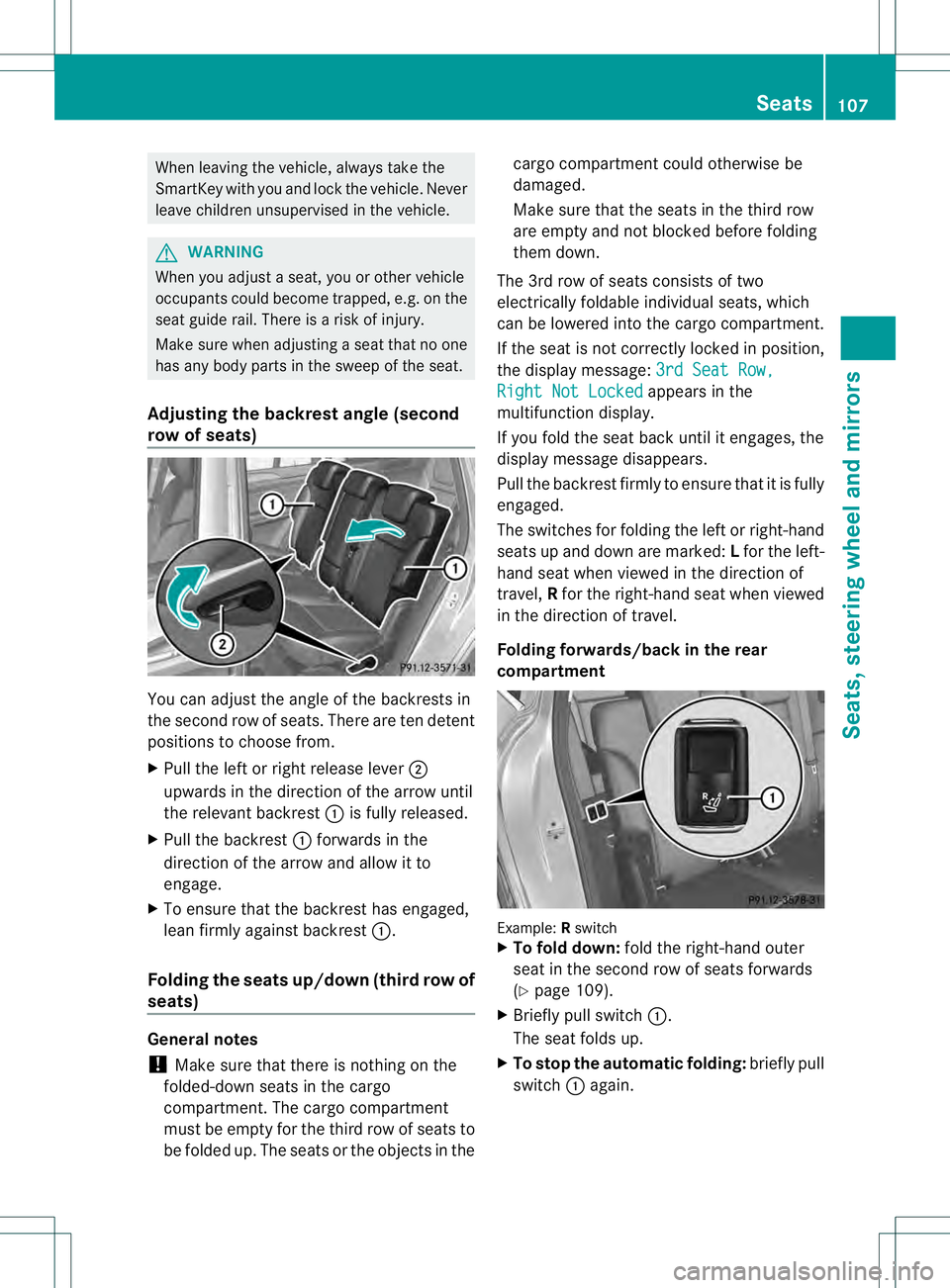
row of seats) You can adjust the angle of the backrests in
the second row of seats. There are ten detent
positions to choose from.
X Pull the left or right release lever 0003
upwards in the direction of the arrow until
the relevant backrest 0002is fully released.
X Pull the backrest 0002forwards in the
direction of the arrow and allow it to
engage.
X To ensure that the backrest has engaged,
lean firmly against backrest 0002.
Folding the seats up/down (thir drow of
seats) General notes
!
Make sure that there is nothing on the
folded-down seats in the cargo
compartment. The cargo compartment
must be empty for th ethird row of seats to
be folded up. The seats or the objects in the cargo compartmentc
ould otherwise be
damaged.
Make sure that the seats in the third row
are empty and not blocked before folding
them down.
The 3rd row of seats consists of two
electrically foldable individual seats, which
can be lowered into the cargo compartment.
If the seat is not correctly locked in position,
the display message: 3rd Seat Row, Right Not Locked appears in the
multifunction display.
If you fold the seat back until it engages, the
display message disappears.
Pull the backrest firmly to ensure that it is fully
engaged.
The switches for folding the left or right-hand
seats up and down are marked: Lfor the left-
hand seat when viewed in the direction of
travel, Rfor the right-hand seat when viewed
in the direction of travel.
Folding forwards/back in the rear
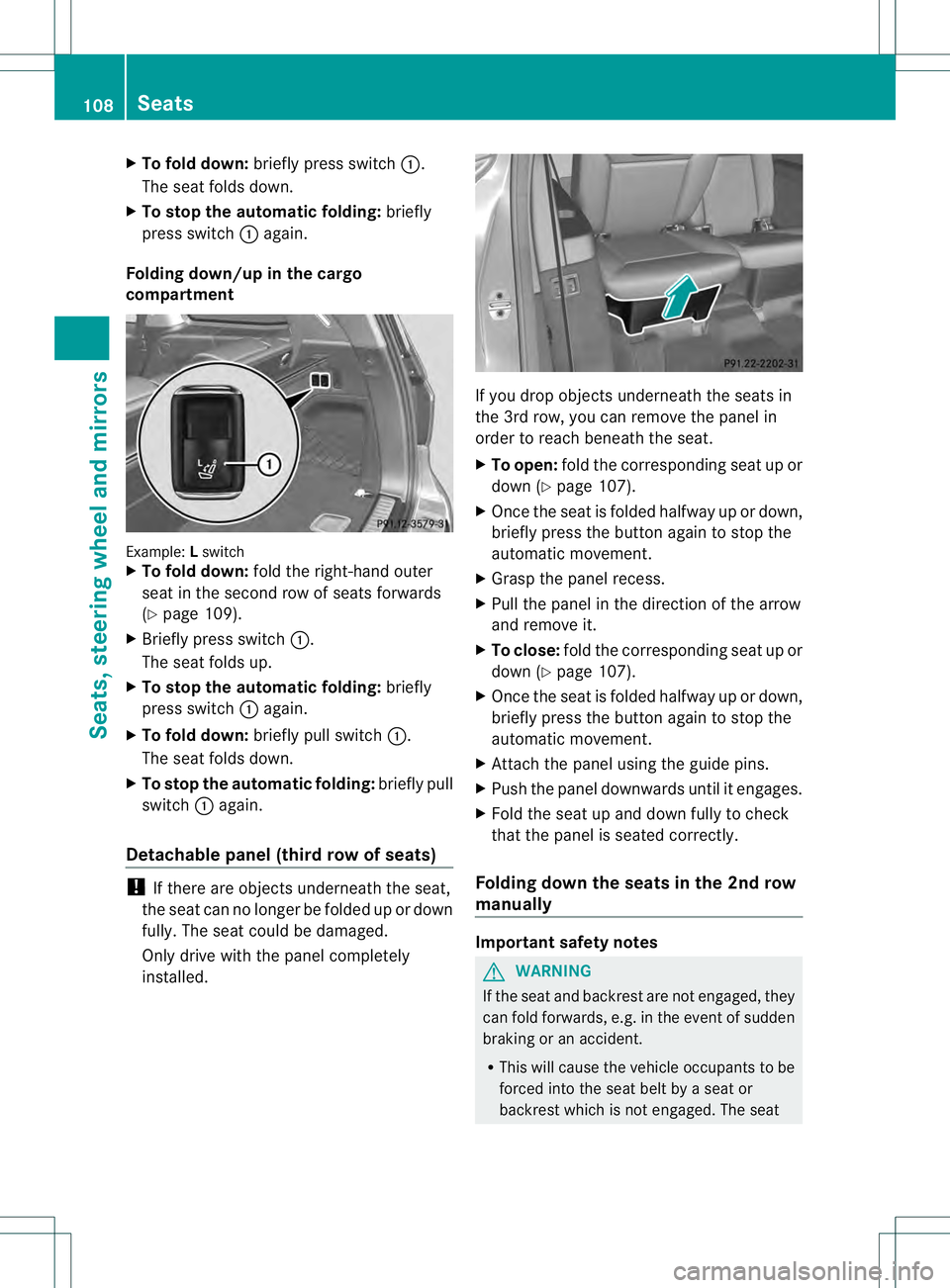
compartment Example:
Rswitch
X To fold down: fold the right-hand outer
seat in the second row of seats forwards
(Y page 109).
X Briefly pull switch 0002.
The seat folds up.
X To stop the automatic folding: briefly pull
switch 0002again. Seats
107Seats, steering wheel and mirrors Z
Page 110 of 454
X
To fold down: briefly press switch 0002.
The sea tfolds down.
X To stop the automatic folding: briefly
press switch 0002again.
Folding down/up in the cargo
compartment Example:
Lswitch
X To fold down: fold the right-hand outer
seat in the second row of seats forwards
(Y page 109).
X Briefly press switch 0002.
The seat folds up.
X To stop the automatic folding: briefly
press switch 0002again.
X To fold down: briefly pull switch 0002.
The seat folds down.
X To stop the automatic folding: briefly pull
switch 0002again.
Detachable panel (third row of seats) !
If there are objects underneath the seat,
the seat can no longer be folded up or down
fully. The seat could be damaged.
Only drive with the panel completely
installed. If you drop objects underneath the seats in
the 3rd row, you can remove the panel in
order to reach beneath the seat.
X
To open: fold the corresponding seat up or
down (Y page 107).
X Once the seat is folded halfway up or down,
briefly press the button again to stop the
automatic movement.
X Grasp the panel recess.
X Pull the panel in the direction of the arrow
and remove it.
X To close: fold the corresponding seat up or
down (Y page 107).
X Once the seat is folded halfway up or down,
briefly press the button again to stop the
automatic movement.
X Attach the panel using the guide pins.
X Push the panel downwards until it engages.
X Fold the seat up and down fully to check
that the panel is seated correctly.
Folding down the seats in the 2nd row
manually Important safety notes
G
WARNING
If the seat and backrest are not engaged, they
can fold forwards, e.g. in the event of sudden
braking or an accident.
R This will cause the vehicle occupants to be
forced into the seat belt by a seat or
backrest which is not engaged. The seat 108
SeatsSeats, steering wheel and mirrors
Page 111 of 454
belt can no longer offer the intended level
of protection and could even cause injuries.
R Ac hild restraint system would no longer be
anchored or positioned correctly and would
not be able to perform its required function.
R The seat backrests cannot restrain objects
or loads in the cargo compartment.
There is an increased risk of injury.
Always make sure that the seat and backrest
are engaged as described:
R before traveling with a passenger on a seat
with the EASY-ENTRY/EXIT feature
R after you have adjusted the seat
R after the EASY-ENTRY/EXIT feature has
been used
R after the cargo compartment enlargement
has been folded forwards G
WARNING
The seat does not engage in the entry/exit
position. The seat could fold back suddenly,
e.g. when accelerating, braking, changing
direction suddenly or in the event of an
accident. Persons in the sweep of the seat
could become trapped. There is a risk of
injury.
Always fold back a seat which has been folded
forwards before you pull away.M ake sure that
the seat and backres tengage fully.
General notes
To enter or exi tthe 3rd row of seats: the outer
left and right seats of the 2nd row can be
folded down.
One of the outer seats of the 2nd row is in the
entry/exit position: the multifunction display
shows, e.g. the 2nd Seat Row, Right Not
Locked display message.
If you fold the seat back until it engages, the
display message disappears.
Pull the backrest firmly to ensure that it is fully
engaged. i
Further related subjects:
R Cargo compartmente nlargement
(folding the 2nd row of seats forwards)
(Y page 340)
R Folding the seats in the 3rd row
forwards/back (Y page 107)
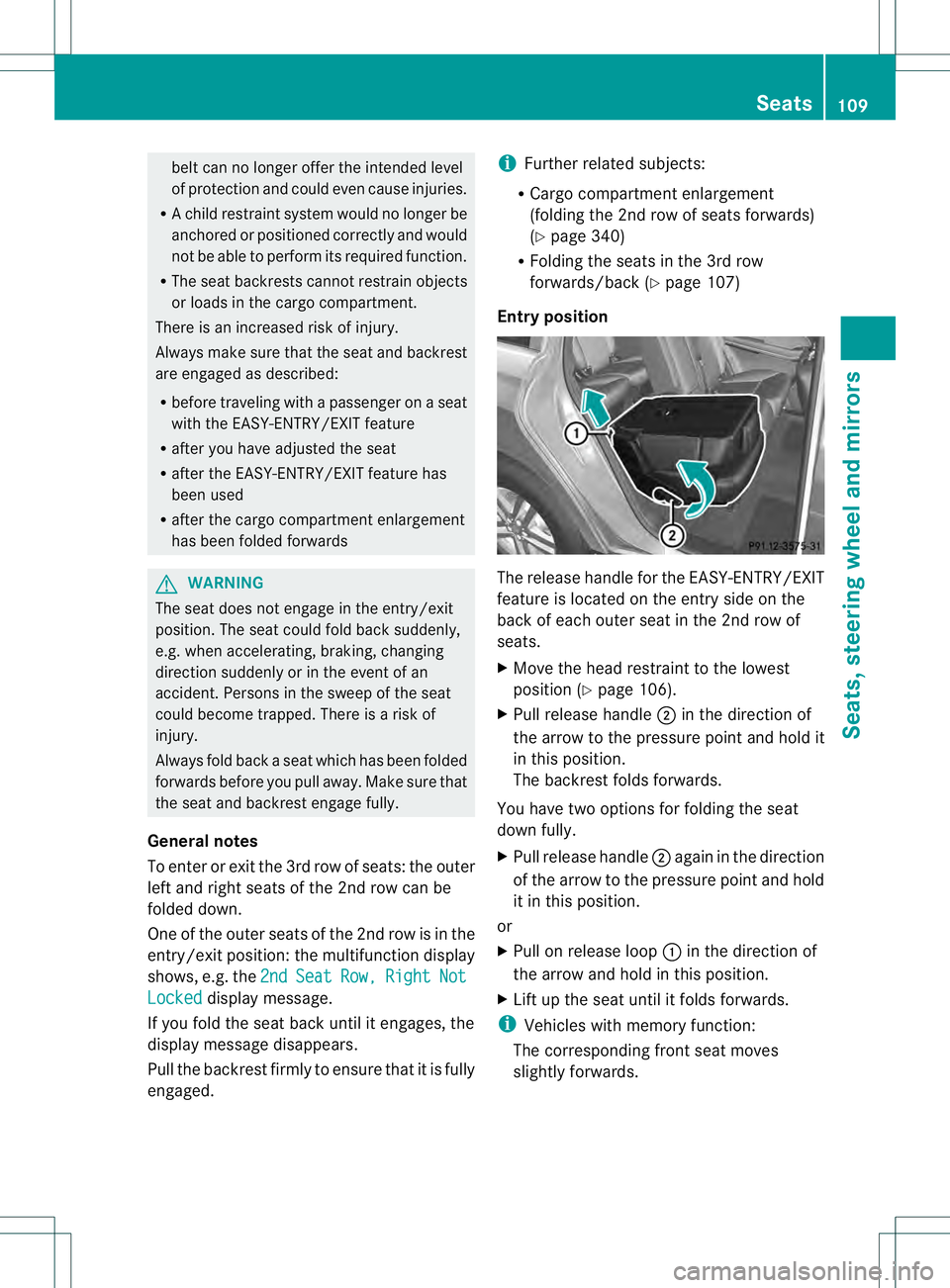
Entry position The release handle for the EASY-ENTRY/EXIT
feature is located on the entry side on the
back of each outer seat in the 2nd row of
seats.
X
Move the head restraint to the lowest
positio n(Ypage 106).
X Pull release handle 0003in the direction of
the arrow to the pressure point and hold it
in this position.
The backrest folds forwards.
You have two options for folding the seat
down fully.
X Pull release handle 0003again in the direction
of the arrow to the pressure point and hold
it in this position.
or
X Pull on release loop 0002in the direction of
the arrow and hold in this position.
X Lift up the seat until it folds forwards.
i Vehicles with memory function:
The corresponding fron tseat moves
slightly forwards. Seats
109Seats, steering wheel and mirrors Z
Page 112 of 454
Entry position
Exit position
G
WARNING
Whe nyou adjust a seat, you or other vehicle
occupants could become trapped, e.g. on the
seat guide rail. There is arisk of injury.
Make sure when adjusting aseat that no one
has any body parts in the sweep of the seat.
i Further related subjects:
R Important safety notes on air bags
(Y page 44)
R Securing children in the vehicle
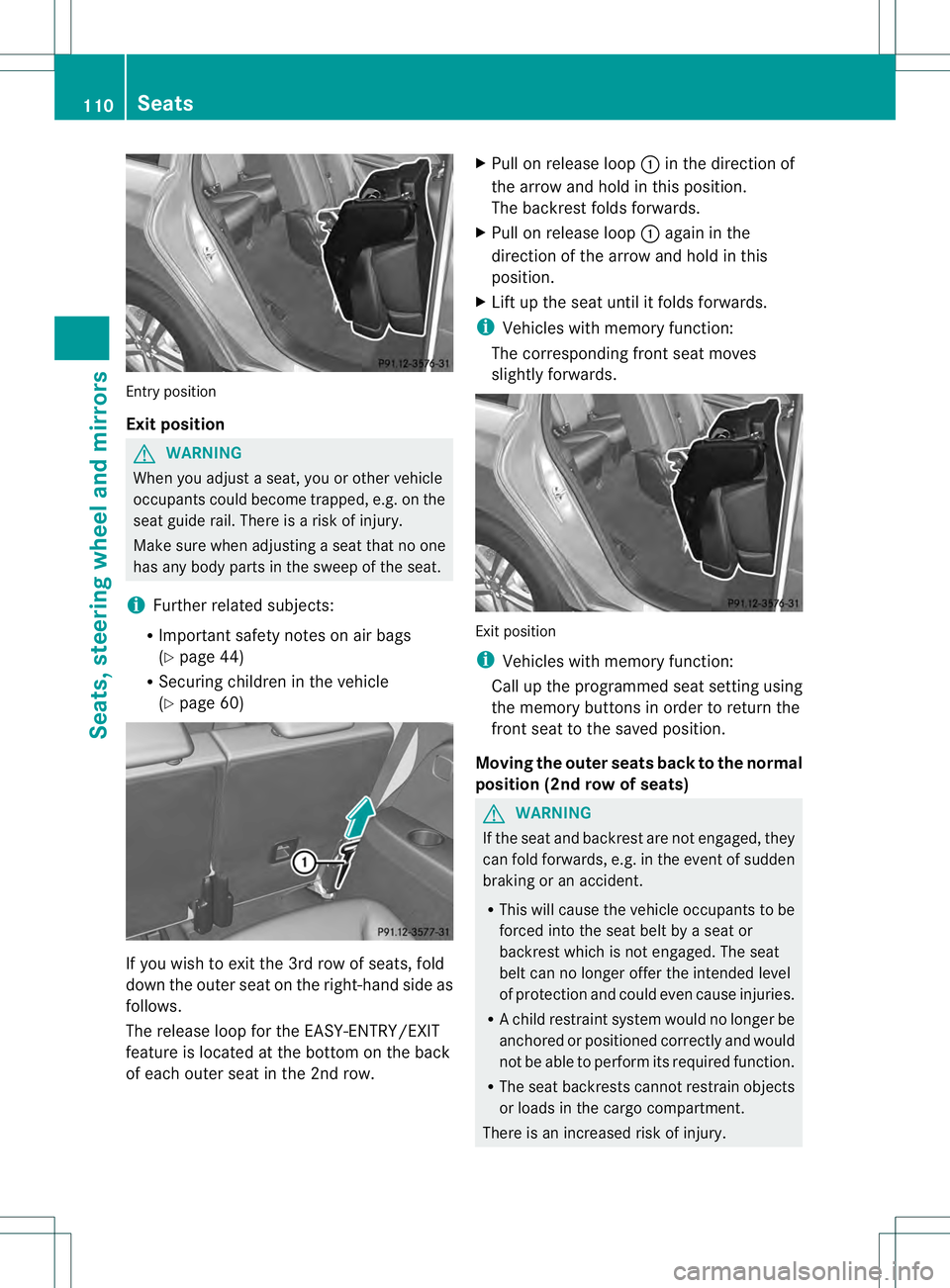
(Y page 60) If you wish to exit the 3rd row of seats, fold
down the outer seat on the right-hand side as
follows.
The release loop for the EASY-ENTRY/EXIT
feature is located at the bottom on the back
of each outer seat in the 2nd row. X
Pull on release loop 0002in the direction of
the arrow and hold in this position.
The backrest folds forwards.
X Pull on release loop 0002again in the
direction of the arrow and hold in this
position.
X Lift up the seat until it folds forwards.
i Vehicles with memory function:
The corresponding fron tseat moves
slightly forwards. Exit position
i
Vehicles with memory function:
Call up the programmed seat setting using
the memory buttons in order to return the
fron tseat to the saved position.
Moving the outer seats back to the normal
position (2nd row of seats) G
WARNING
If the seat and backrest are not engaged, they
can fold forwards, e.g. in the event of sudden
braking or an accident.
R This will cause the vehicle occupants to be
forced into the seat belt by a seat or
backrest which is not engaged. The seat
belt can no longer offer the intended level
of protection and could even cause injuries.
R Ac hild restraint system would no longer be
anchored or positioned correctly and would
not be able to perform its required function.
R The seat backrests cannot restrain objects
or loads in the cargo compartment.
There is an increased risk of injury. 110
SeatsSeats, steering wheel and mirrors
Page 113 of 454
Always make sure tha
tthe seat and backrest
are engaged as described:
R before traveling with a passenger on a seat
with the EASY-ENTRY/EXIT feature
R after you have adjusted the seat
R after the EASY-ENTRY/EXIT feature has
been used
R after the cargo compartment enlargement
has been folded forwards G
WARNING
The seat does not engage in the entry/exit
position. The seat could fold back suddenly,
e.g. when accelerating, braking, changing
direction suddenly or in the event of an
accident. Persons in the sweep of the seat
could become trapped. There is a risk of
injury.
Always fold back a seat which has been folded
forwards before you pull away.M ake sure that
the seat and backres tengage fully.
X To lock the seat: fold back the seatuntil
it engages.
X Fold back the backres tuntil it engages.
Folding down the seats in the 2n drow
electrically Important safety notes
G
WARNING
If the seat and backres tare not engaged, they
can fold forwards, e.g. in the event of sudden
braking or an accident.
R This will cause the vehicle occupants to be
forced into the seat belt by a seat or
backrest which is not engaged. The seat
belt can no longer offer the intended level
of protection and could even cause injuries.
R Ac hild restraint system would no longer be
anchored or positioned correctly and would
not be able to perform its required function.
R The seat backrests cannot restrain objects
or loads in the cargo compartment. There is an increased risk of injury.
Always make sure that the seat and backrest
are engaged as described:
R
before traveling with a passenger on a seat
with the EASY-ENTRY/EXIT feature
R after you have adjusted the seat
R after the EASY-ENTRY/EXIT feature has
been used
R after the cargo compartment enlargement
has been folded forwards G
WARNING
The seat does not engage in the entry/exit
position. The seat could fold back suddenly,
e.g. when accelerating, braking, changing
direction suddenly or in the event of an
accident. Persons in the sweep of the seat
could become trapped. There is a risk of
injury.
Always fold back a seat which has been folded
forwards before you pull away.M ake sure that
the seat and backres tengage fully.
General notes
To enter or exi tthe 3rd row of seats: the outer
left and right seats of the 2nd row can be
folded down electrically.
One of the outer seats of the 2nd row is in the
entry/exit position: the multifunction display
shows, e.g. the 2nd Seat Row, Right Not
locked display message.
If you fold the seat back until it engages, the
display message disappears.
Pull the backrest firmly to ensure that it is fully
engaged.
i Further related subjects:
R Cargo compartmente nlargement
(folding the 2nd row of seats forwards)
(Y page 340)
R Folding the seats in the 3rd row
forwards/back (Y page 107) Seats
111Seats, steering wheel and mirrors Z
Page 114 of 454
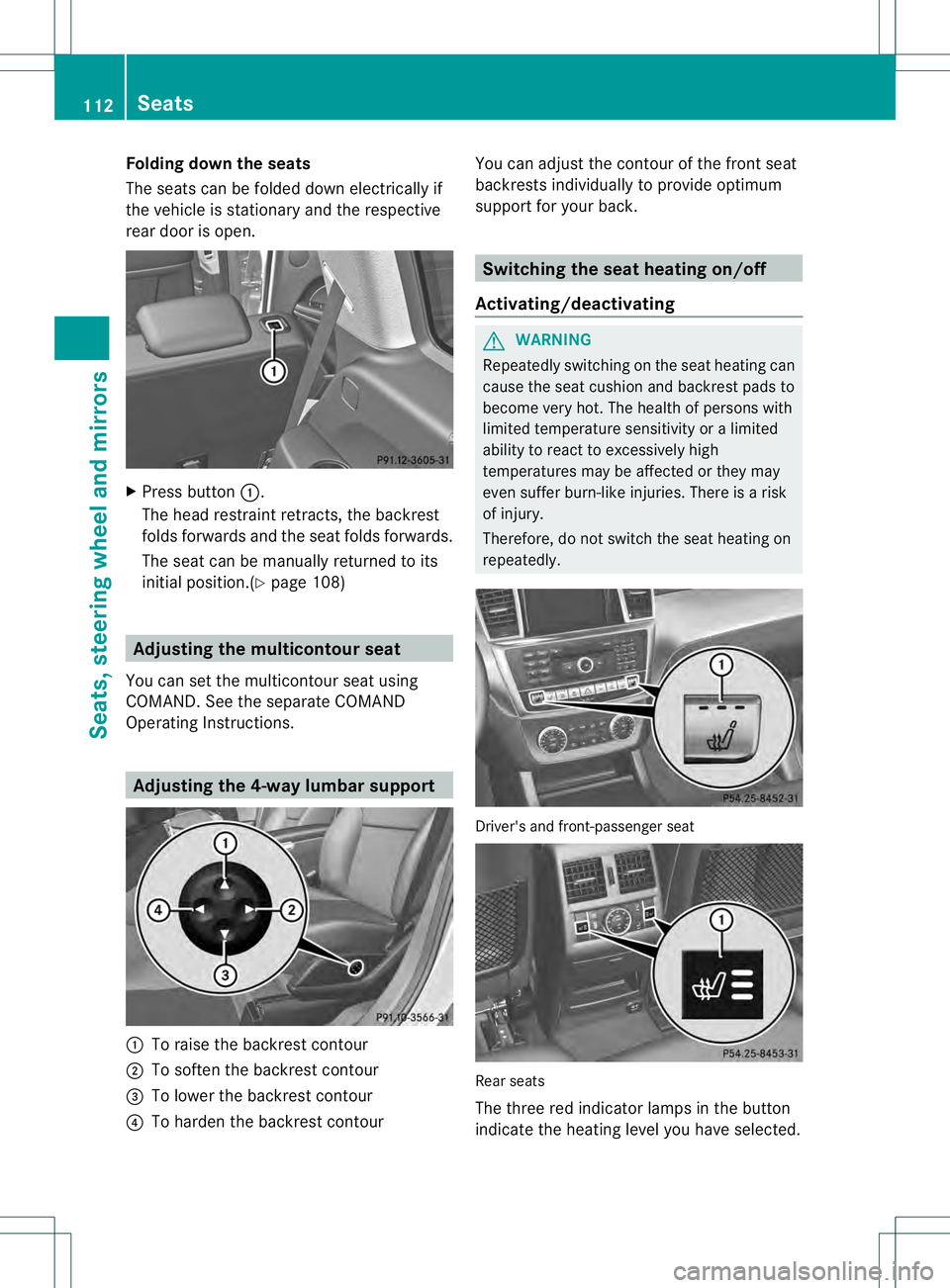
Folding down the seats
The seats can be folded down electrically if
the vehicle is stationary and the respective
rear door is open.
X
Press button 0002.
The head restraint retracts, the backrest
folds forwards and the seat folds forwards.
The seat can be manually returned to its
initial position.(Y page 108) Adjusting the multicontour seat
You can set the multicontour seat using
COMAND .See the separate COMAND
Operating Instructions. Adjusting the 4-way lumbar support
0002
To raise the backrest contour
0003 To soften the backrest contour
0021 To lower the backrest contour
0020 To harden the backrest contour You can adjust the contour of the front seat
backrests individually to provide optimum
support for your back. Switching the seat heating on/off
Activating/deactivating G
WARNING
Repeatedly switching on the seat heating can
cause the seat cushion and backrest pads to
become very hot. The health of persons with
limited temperature sensitivity or a limited
ability to react to excessively high
temperatures may be affected or they may
even suffer burn-like injuries. There is a risk
of injury.
Therefore, do not switch the seat heating on
repeatedly. Driver's and front-passenger seat
Rear seats
The three red indicator lamps in the button
indicate the heating level you have selected.112
SeatsSeats, steering wheel and mirrors
Page 117 of 454
Problems with the seat ventilation
Problem Possible causes/consequences and
0001 Solutions
The seat ventilation has
switched off
prematurely or cannot
be switched on. The on-board voltage is too low because too many electrical
consumers are switched on.
X
Switch off electrical consumers that you do not need, such as
the rear window defroster or interior lighting.
Once the battery is sufficiently charged, the seat ventilation will
switch back on automatically. Steering wheel
Important safety notes
G
WARNING
You could lose control of your vehicle if you
do the following while driving:
R adjust the driver's seat, head restraint,
steering wheel or mirrors
R fasten the seat belt
There is a risk of an accident.
Adjust the driver's seat, head restraint,
steering wheel and mirror and fasten your
seat belt before starting the engine. G
WARNING
Children could injure themselves if they
adjust the steering wheel. There is a risk of
injury.
When leaving the vehicle, always take the
SmartKey with you and lock the vehicle. Never
leave children unsupervised in the vehicle. Adjusting the steering wheel
manually
G
WARNING
If the steering wheel is unlocked while the
vehicle is in motion, it could change position
unexpectedly. This could cause you to lose
control of the vehicle. There is a risk of an
accident. Before starting off, make sure the steering
wheel is locked. Never unlock the steering
wheel while the vehicle is in motion.
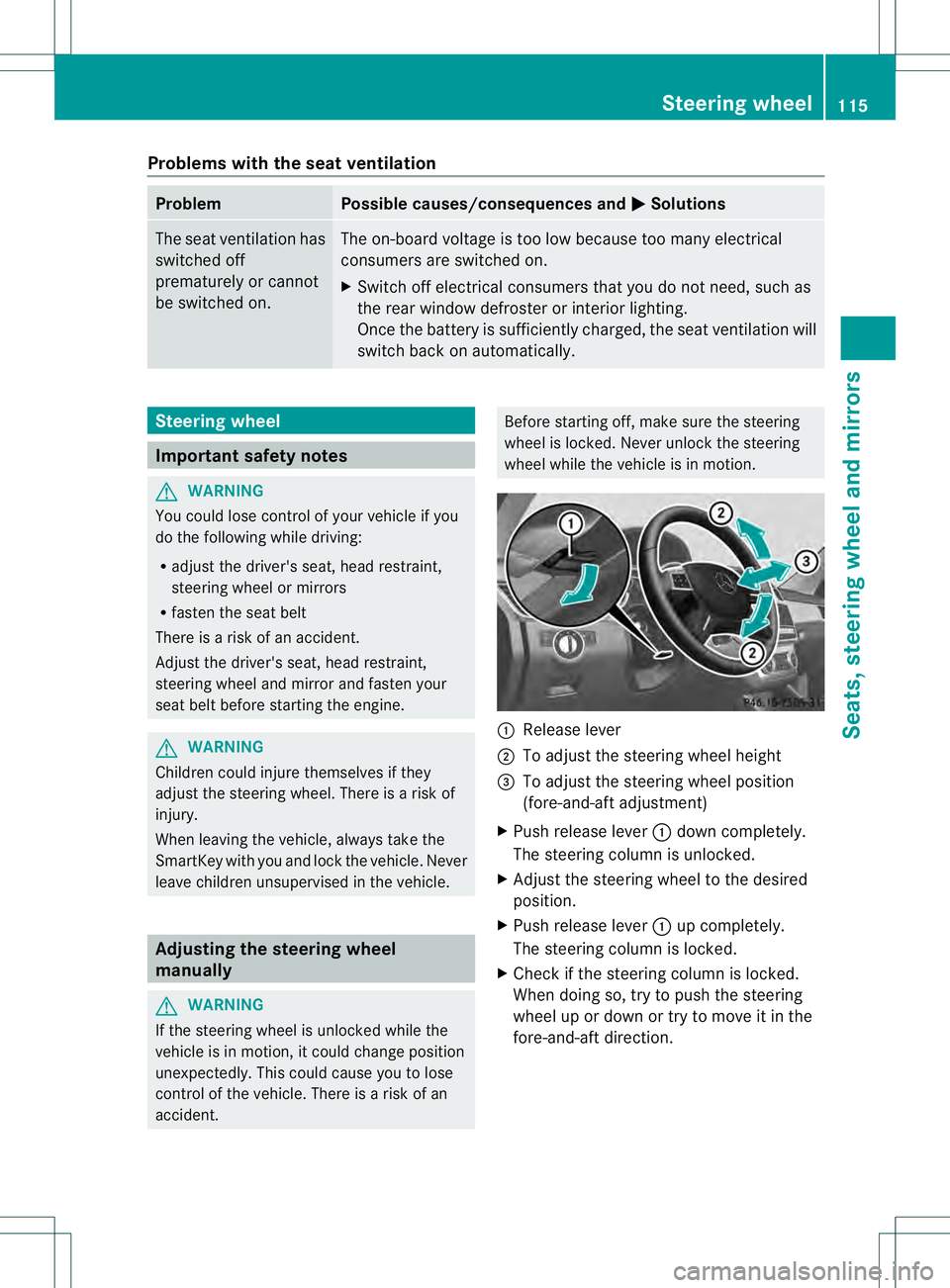
0002
Release lever
0003 To adjust the steering wheel height
0021 To adjust the steering wheel position
(fore-and-aft adjustment)
X Push release lever 0002down completely.
The steering column is unlocked.
X Adjust the steering wheel to the desired
position.
X Push release lever 0002up completely.
The steering column is locked.
X Check if the steering column is locked.
When doing so, try to push the steering
wheel up or down or try to move it in the
fore-and-aft direction. Steering wheel
115Seats, steering wheel and mirrors Z
Page 119 of 454
Problems with the steering wheel heating
Problem Possible causes/consequences and
0001 Solutions
The steering wheel
heating has switched
off prematurely or
cannot be switched on. The on-board voltage is too low because too many electrical
consumers are switched on.
X
Switch off electrical consumers that you do not need, such as
the rear window defroster or interior lighting. EASY-ENTRY/EXIT feature
Important safety notes G
WARNING
When the EASY-ENTRY/EXIT feature adjusts
the steering wheel, you and other vehicle
occupants –particularly childre n–could
become trapped. There is a risk of injury.
While the EASY-ENTRY/EXIT feature is
making adjustments, make sure that no one
has any body parts in the sweep of the
steering wheel.
If somebody becomes trapped:
R press one of the memory function position
buttons, or
R move the switch for steering wheel
adjustmen tinthe opposite direction to that
in which the steering wheel is moving.
The adjustment process is stopped. G
WARNING
If children activate the EASY-ENTRY/EXIT
feature, they can become trapped,
particularly when unattended. There is a risk
of injury.
When leaving the vehicle, always take the
SmartKey with you and lock the vehicle. Never
leave children unsupervised in the vehicle. G
WARNING
If you drive off while the EASY-ENTRY/EXIT
feature is making adjustments, you could lose
control of the vehicle. There is a risk of an
accident. Always wait until the adjustment process is
complete before driving off.
The EASY-ENTRY/EXIT feature makes getting
in and out of your vehicle easier.
You can activate and deactivate the EASY-
ENTRY/EXIT feature in the on-board
computer (Y page 281).
Position of the steering wheel when the
EASY-ENTRY/EXIT featurei s active The steering wheel swings upwards when
you:
R
remove the SmartKey from the ignition lock
R open the driver's door with KEYLESS-GO in
position 1
R open the driver's door and the SmartKey is
in position 0or 1in the ignition lock
i The steering wheel only moves upwards if
it has not already reached the upper end
stop.
Position of the steering wheel for
driving The steering wheel is moved to the last
selected position when:
R
the driver's door is closed
R you insert the SmartKey into the ignition
lock
or
R you press the Start/Stop button once on
vehicles with KEYLESS-GO
When you close the driver's door with the
ignition switched on, the steering wheel is Steering wheel
117Seats, steering wheel and mirrors Z
Page 120 of 454
also automatically moved to the previously
set position.
The last positio
nofthe steering wheel is
stored when you switch off the ignition or
when you store the settingw ith the memory
function (Y page 121).
Crash-responsive EASY-EXIT feature If the crash-responsive EASY-EXIT feature is
triggered in an accident, the steering column
will move upwards when the driver's door is
opened. This occurs irrespective of the
position of the SmartKey in the ignition lock.
This makes it easier to exit the vehicle and
rescue the occupants.
The crash-responsive EASY-EXIT feature is
only operational if the EASY-EXIT/ENTRY
feature is activated in the on-board computer
(Y page 281). Mirrors
Rear-view mirror
X
Anti-glare mode: flick anti-glare lever 0002
forwards or back. Exterior mirrors
Adjusting the exterior mirrors G
WARNING
The exterior mirror on the front-passenger
side reduces the size of the image. Visible
objects are actually closer than they appear. This means that you could misjudge the
distance fro
mroad users traveling behind,
e.g. when changing lane. There is a risk of an
accident.
For this reason, always make sure of the
actual distance from the road users traveling
behind by glancing over your shoulder. X
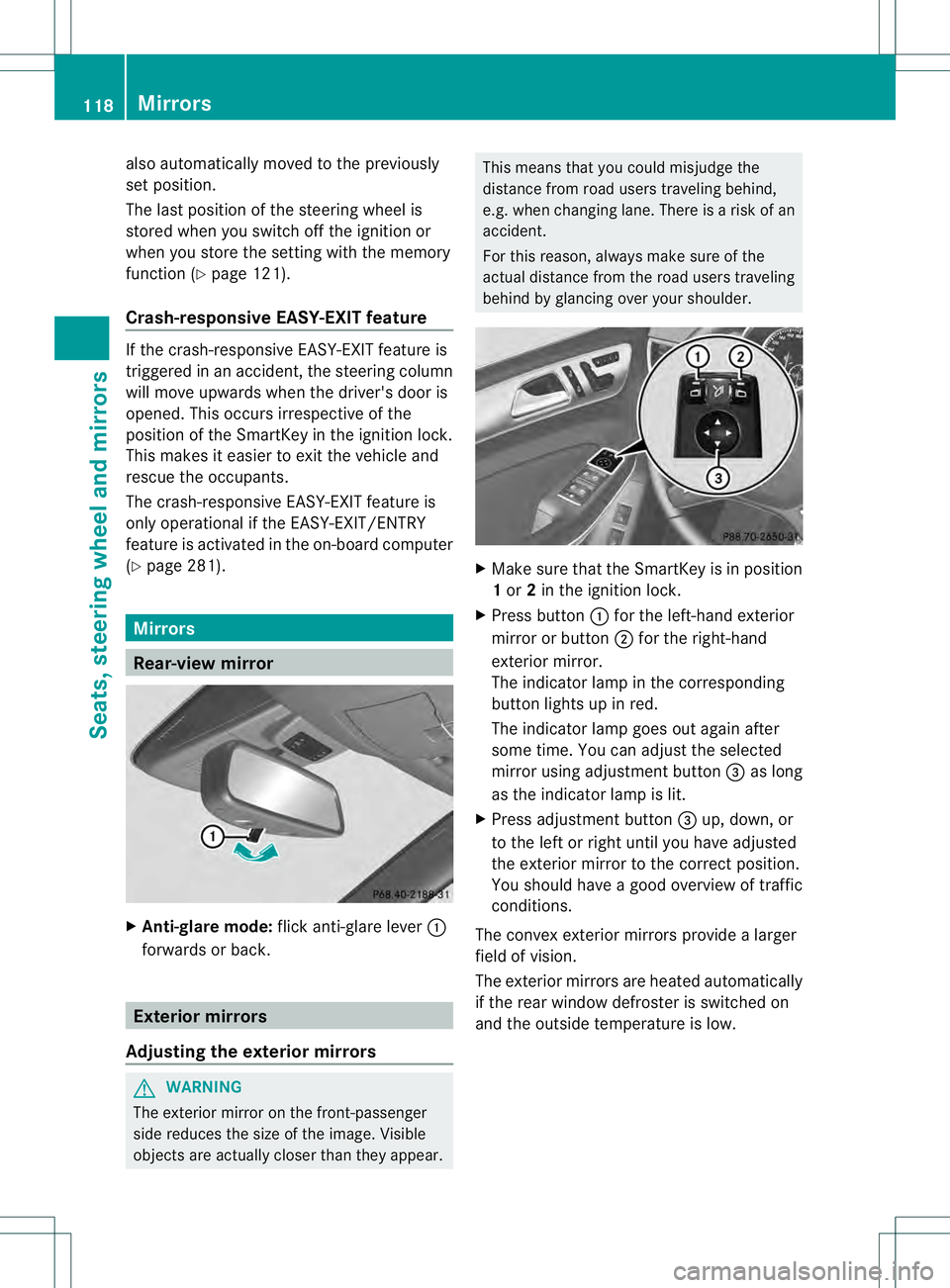
Make sure that the SmartKey is in position
1or 2in the ignition lock.
X Press button 0002for the left-hand exterior
mirror or button 0003for the right-hand
exterior mirror.
The indicator lamp in the corresponding
button lights up in red.
The indicator lamp goes out again after
some time. You can adjust the selected
mirror using adjustment button 0021as long
as the indicator lamp is lit.
X Press adjustmen tbutton 0021up, down, or
to the left or right until you have adjusted
the exterior mirror to the correct position.
You should have a good overview of traffic
conditions.
The convex exterio rmirrors provide a larger
field of vision.
The exterior mirrors are heated automatically
if the rear window defroster is switched on
and the outside temperature is low. 118
MirrorsSeats, steering wheel and mirrors
Page 123 of 454

Calling up a stored parking position
setting 0002
Butto nfor the driver's side exterior mirror
0003 Button for the front-passenger side
exterior mirror
0021 Adjustment button
0020 Memory button M
X Turn the SmartKey to position 2in the
ignition lock.
X Adjust the exterior mirror on the front-
passenger side using button 0003.
X Engage reverse gear.
The exterior mirror on the front-passenger
side moves to the stored parking position.
The exterior mirror on the front-passenger
side moves back to its original position:
R as soon as you exceed a speed of 9mph
(15 km/h)
R if you press button 0002for the exterior
mirror on the driver's side Memory function
Storing settings
G
WARNING
If you use the memor yfunctio nonthe driver's
side while driving, you could lose control of
the vehicle as a result of the adjustments
being made. There is a risk of an accident.
Only use the memory function on the driver's
side when the vehicle is stationary. G
WARNING
When the memory function adjusts the seat
or steering wheel, you and other vehicle
occupants –particularly childre n–could
become trapped. There is a risk of injury.
While the memory function is making
adjustments, make sure that no one has any
body parts in the sweep of the seat or steering
wheel. If somebody becomes trapped,
immediately release the memory function
position button .The adjustment process is
stopped. G
WARNING
Children could become trapped if they
activate the memory function, particularly
when unattended. There is arisk of injury.
When leaving the vehicle, always take the
SmartKey with you and lock the vehicle. Never
leave children unsupervised in the vehicle.
With the memory function, you can store up
to three different settings, e.g. for three
differen tpeople.
The following settings are stored as a single
memory preset:
R position of the seat, backrest and head
restraint
R driver's side: steering wheel position
R driver's side: position of the exterior
mirrors on the driver's and front-passenger
sides Memory function
121Seats, steering wheel and mirrors Z