display MERCEDES-BENZ GL 2013 Owners Manual
[x] Cancel search | Manufacturer: MERCEDES-BENZ, Model Year: 2013, Model line: GL, Model: MERCEDES-BENZ GL 2013Pages: 454, PDF Size: 6.31 MB
Page 284 of 454
X
Press 0004or0003 to select the Auto. Mirror Folding function.
If the Auto. Mirror Folding function is
activated, the vehicle's exterior mirror is
displayed in red in the multifunction
display.
X Press the 000Bbutton to save the setting. 0002
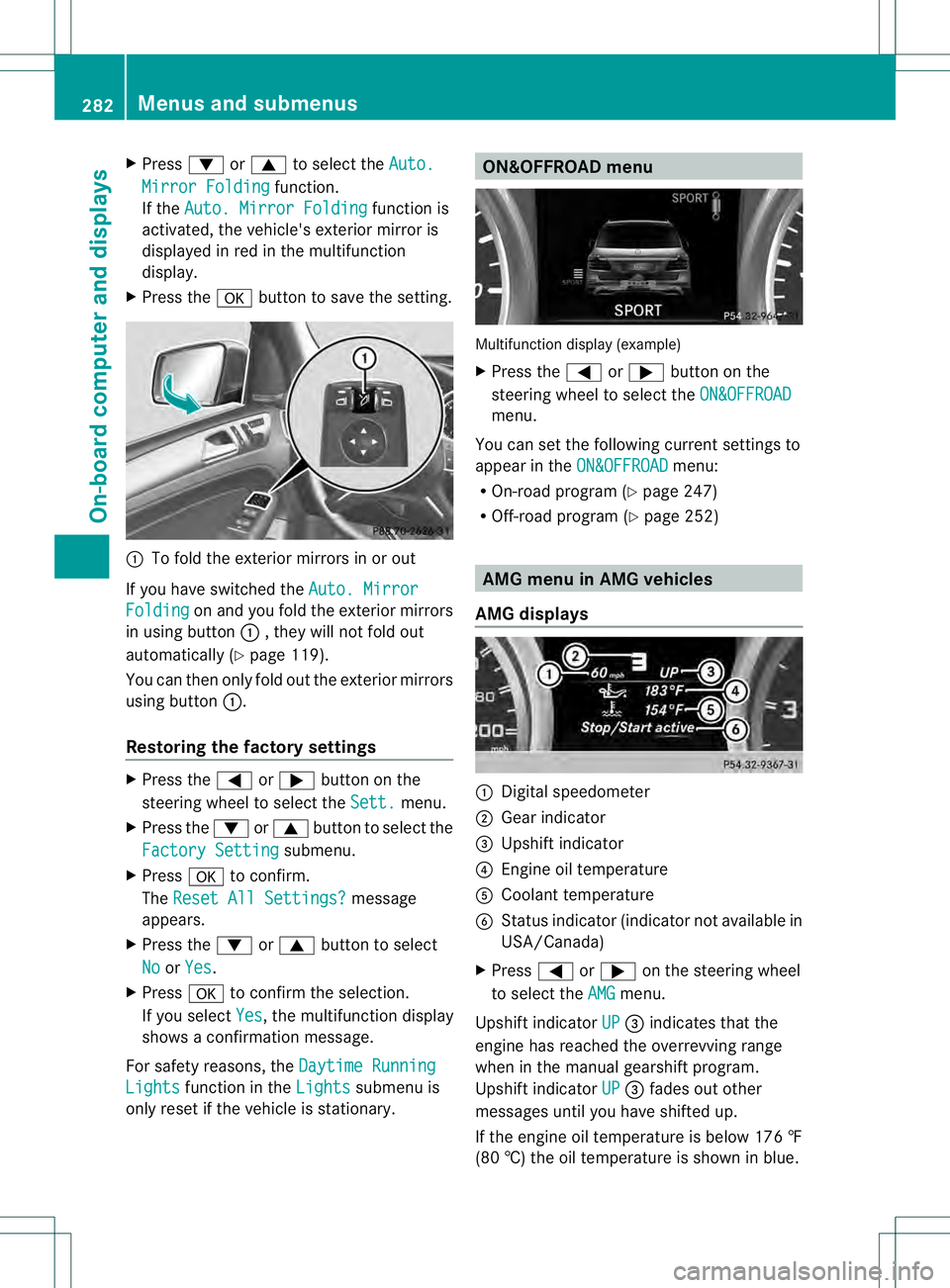
To fold the exterior mirrors in or out
If you have switched the Auto. MirrorFolding on and you fold the exterior mirrors
in using button 0002, they will not fold out
automatically (Y page 119).
You can then only fold out the exterior mirrors
using button 0002.
Restoring the factory settings X
Press the 0002or0005 button on the
steering wheel to select the Sett. menu.
X Press the 0004or0003 button to select the
Factory Setting submenu.
X Press 000Bto confirm.
The Reset All Settings? message
appears.
X Press the 0004or0003 button to select
No or
Yes .
X Press 000Bto confirm the selection.
If you select Yes , the multifunction display
shows a confirmation message.
For safety reasons, the Daytime RunningLights function in the
Lights submenu is
only reset if the vehicle is stationary. ON&OFFROAD menu
Multifunction display (example)
X
Press the 0002or0005 button on the
steering wheel to select the ON&OFFROAD menu.
You can set the following curren tsettings to
appear in the ON&OFFROAD menu:
R On-road program (Y page 247)
R Off-road program (Y page 252) AMG menu in AMG vehicles
AMG displays 0002
Digital speedometer
0003 Gear indicator
0021 Upshift indicator
0020 Engine oil temperature
001E Coolant temperature
001F Status indicator (indicator not available in
USA/Canada)
X Press 0002or0005 on the steering wheel
to select the AMG menu.
Upshift indicator UP 0021
indicates that the
engine has reached the overrevving range
when in the manual gearshift program.
Upshift indicator UP 0021
fades out other
messages until you have shifted up.
If the engine oil temperature is below 176 ‡
(80 †) the oil temperature is shown in blue. 282
Menus and submenusOn-board computer and displays
Page 285 of 454
Avoid driving at full engine outpu
tduring this
time.
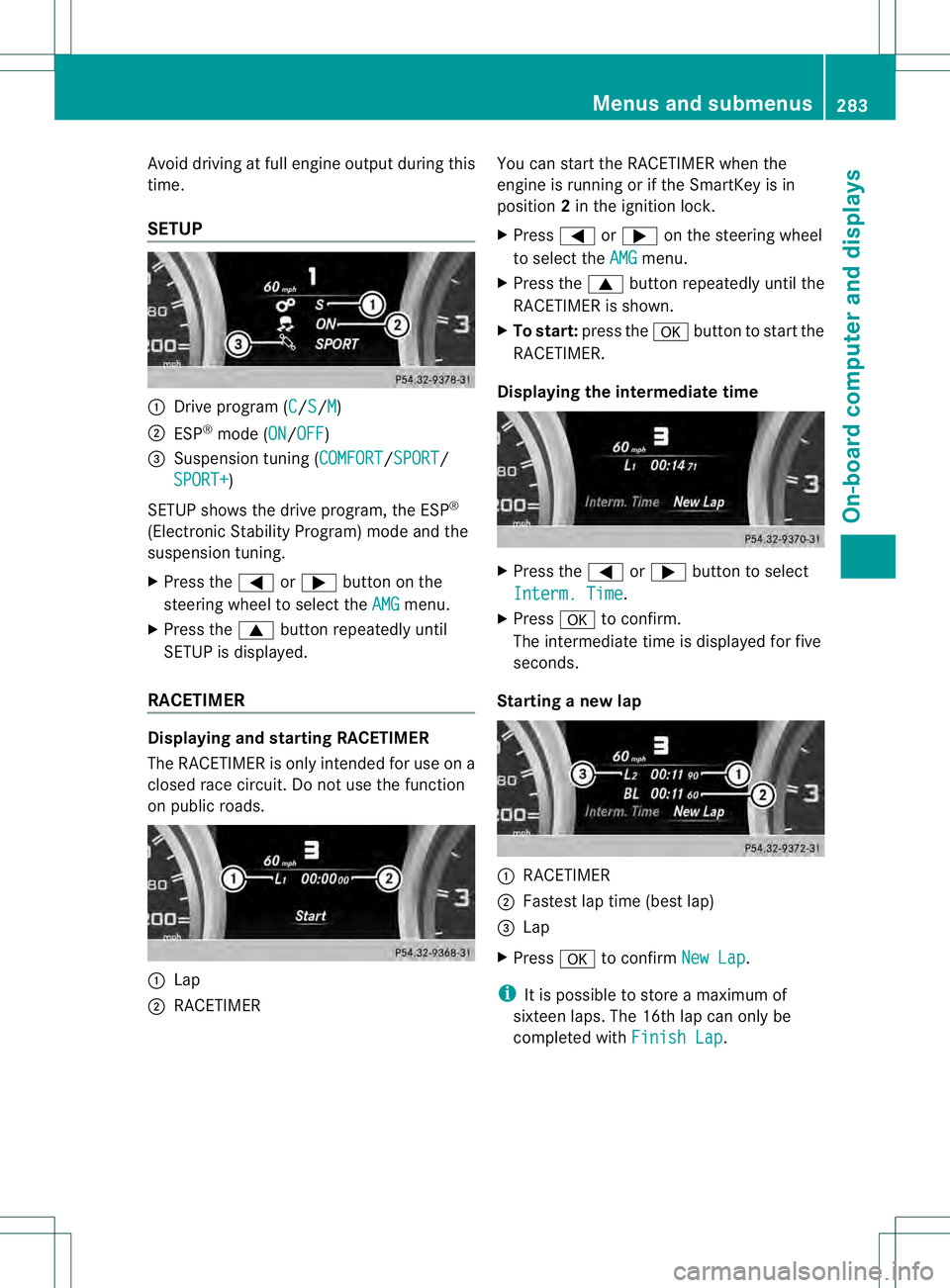
SETUP 0002
Drive program (C /S /M )
0003 ESP ®
mode (ON /OFF )
0021 Suspension tuning (COMFORT /SPORT /
SPORT+ )
SETUP shows the drive program, the ESP ®
(Electronic Stability Program) mode and the
suspension tuning.
X Press the 0002or0005 button on the
steering wheel to select the AMG menu.
X Press the 0003buttonrepeatedly until
SETUP is displayed.
RACETIMER Displaying and starting RACETIMER
The RACETIMER is only intended for use on a
closed race circuit. Do not use the function
on public roads. 0002
Lap
0003 RACETIMER You can start the RACETIMER when the
engine is running or if the SmartKey is in
position
2in the ignition lock.
X Press 0002or0005 on the steering wheel
to select the AMG menu.
X Press the 0003button repeatedly until the
RACETIMER is shown.
X To start: press the 000Bbutton to start the
RACETIMER.
Displaying the intermediate time X
Press the 0002or0005 button to select
Interm. Time .
X Press 000Bto confirm.
The intermediate time is displayed for five
seconds.
Starting a new lap 0002
RACETIMER
0003 Fastes tlap time (bes tlap)
0021 Lap
X Press 000Bto confirm New Lap .
i It is possible to store a maximum of
sixteen laps. The 16th lap can only be
completed with Finish Lap .Menus and submenus
283On-board computer and displays Z
Page 286 of 454
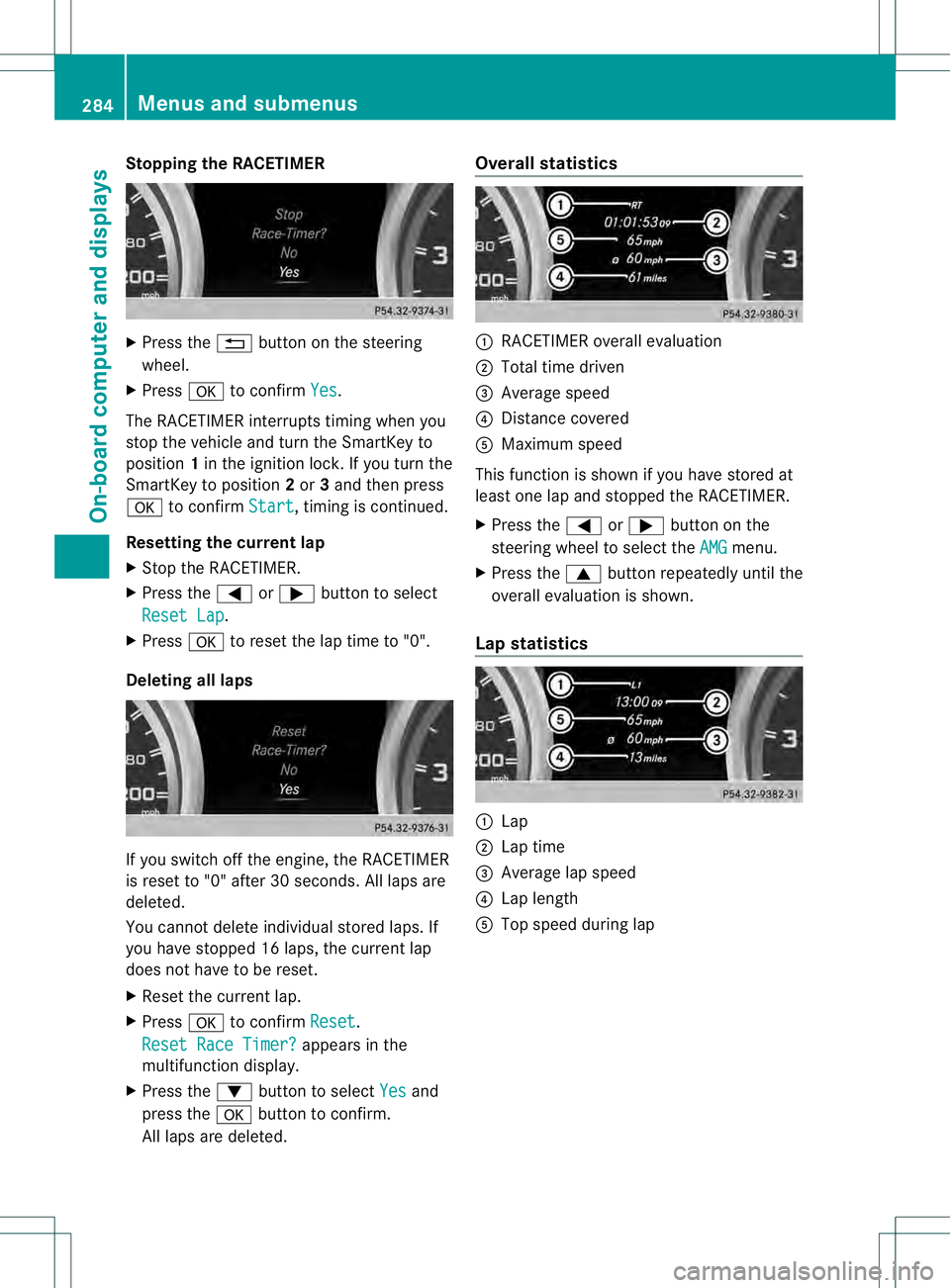
Stopping the RACETIMER
X
Press the 0007button on the steering
wheel.
X Press 000Bto confirm Yes .
The RACETIMER interrupts timing when you
stop the vehicle and turn the SmartKey to
position 1in the ignition lock. If you turn the
SmartKey to position 2or 3and then press
000B to confirm Start , timing is continued.
Resetting the current lap
X Stop the RACETIMER.
X Press the 0002or0005 button to select
Reset Lap .
X Press 000Bto reset the lap time to "0".
Deleting all laps If you switch off the engine, the RACETIMER
is reset to "0" after 30 seconds. All laps are
deleted.
You cannot delete individual stored laps. If
you have stopped 16 laps, the current lap
does not have to be reset.
X Reset the current lap.
X Press 000Bto confirm Reset .
Reset Race Timer? appears in the
multifunction display.
X Press the 0004button to select Yes and
press the 000Bbutton to confirm.
All laps are deleted. Overall statistics
0002
RACETIMER overall evaluation
0003 Total time driven
0021 Average speed
0020 Distance covered
001E Maximum speed
This function is shown if you have stored at
least one lap and stopped the RACETIMER.
X Press the 0002or0005 button on the
steering wheel to select the AMG menu.
X Press the 0003button repeatedly until the
overall evaluation is shown.
Lap statistics 0002
Lap
0003 Lap time
0021 Average lap speed
0020 Lap length
001E Top speed during lap 284
Menus and submenusOn-board computer and displays
Page 287 of 454
This function is only available if you have
stored at least two laps and have stopped the
RACETIMER.
X Press the 0002or0005 button on the
steering wheel to select the AMG menu.
X Press the 0003button repeatedly until the
lap evaluation is shown.
Each lap is shown in a separate submenu.
The fastest lap is indicated by flashing
symbol 0002.
X Press the 0003or0004 button to select a
different lap evaluation. Menus and submenus
285On-board computer and displays Z
Page 288 of 454
Display messages
Introduction
General notes Display messages appear in th
emultifunction display.
Display messages with graphic displays may be shown in simplified for minthe Operator's
Manual and may differ from the messages shown in the multifunction display.
Please respond in accordance with the display messages and follow the additional notes in
this Operator's Manual.
Certain display messages are accompanied by an audible warning tone or a continuous tone.
When you stop and park the vehicle, please observe the notes on:
R HOLD function (Y page 211)
R Parking (Y page 183)
Hiding display messages X
Press the 000Bor0007 button on the steering wheel to hide the display message.
The display message is cleared.
The multifunction display shows high-priority display messages in red. Some high-priority
display messages cannot be hidden.
The multifunction display shows these messages continuously until the causes for the
messages have been remedied.
Message memory The on-board computer saves certain display messages in the
message memory.You can
call up the display messages:
X Press the 0002or0005 button on the steering wheel to select the Serv. menu.
If there are display messages, the multifunction display shows 2 Messages , for example.
X Press the 0003or0004 button to select the entry, e.g. 2 Messages .
X Press 000Bto confirm.
X Press the 0003or0004 button to scroll through the display messages.
When the ignition is switched off, all display messages are deleted, apart from some high-
priority display messages. Once the causes of the high-priority display messages have been
rectified, the corresponding display messages are also deleted. 286
Display messagesOn-board computer and displays
Page 289 of 454
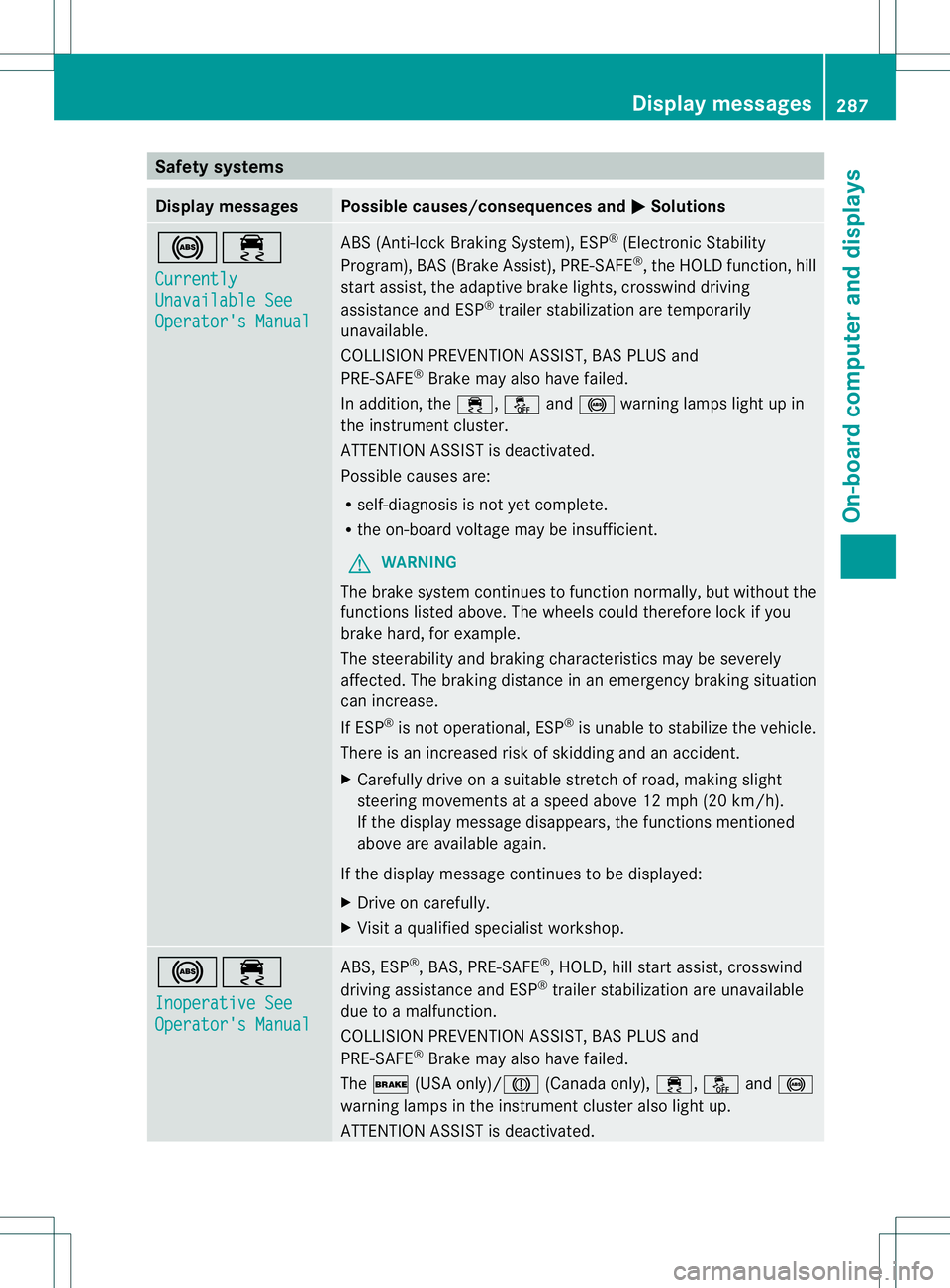
Safety systems
Display messages Possible causes/consequences and
0001 Solutions
0019000F
Currently
Unavailable See
Operator's Manual ABS (Anti-lock Braking System), ESP
®
(Electronic Stability
Program), BAS (Brake Assist), PRE-SAFE ®
, the HOLD function, hill
start assist, the adaptive brake lights, crosswind driving
assistance and ESP ®
trailer stabilization are temporarily
unavailable.
COLLISION PREVENTION ASSIST, BAS PLUS and
PRE-SAFE ®
Brake may also have failed.
In addition, the 000F,0017and0019 warning lamps light up in
the instrument cluster.
ATTENTION ASSIST is deactivated.
Possible causes are:
R self-diagnosis is not yet complete.
R the on-board voltage may be insufficient.
G WARNING
The brake system continues to function normally, but without the
functions listed above. The wheels could therefore lock if you
brake hard, for example.
The steerability and braking characteristics may be severely
affected. The braking distance in an emergency braking situation
can increase.
If ESP ®
is not operational, ESP ®
is unable to stabilize the vehicle.
There is an increased risk of skidding and an accident.
X Carefully drive on a suitable stretch of road, making slight
steering movements at a speed above 12 mph (20 km/h).
If the display message disappears, the functions mentioned
above are available again.
If the display message continues to be displayed:
X Drive on carefully.
X Visit a qualified specialist workshop. 0019000F
Inoperative See
Operator's Manual ABS, ESP
®
, BAS, PRE-SAFE ®
, HOLD, hill start assist, crosswind
driving assistance and ESP ®
trailer stabilization are unavailable
due to a malfunction.
COLLISION PREVENTION ASSIST, BAS PLUS and
PRE-SAFE ®
Brake may also have failed.
The 0012 (USA only)/0009 (Canada only),000F,0017and0019
warning lamps in the instrumen tcluster also light up.
ATTENTION ASSIST is deactivated. Display messages
287On-board computer and displays Z
Page 290 of 454
Display messages Possible causes/consequences and
0001 Solutions
G
WARNING
The brake system continues to function normally, but without the
functions listed above. The wheels could therefore loc kifyou
brake hard, for example.
The steerability and braking characteristics may be severely
affected. The braking distance in an emergency braking situation
can increase.
If ESP ®
is not operational, ESP ®
is unable to stabilize the vehicle.
There is an increased risk of skidding and an accident.
X Drive on carefully.
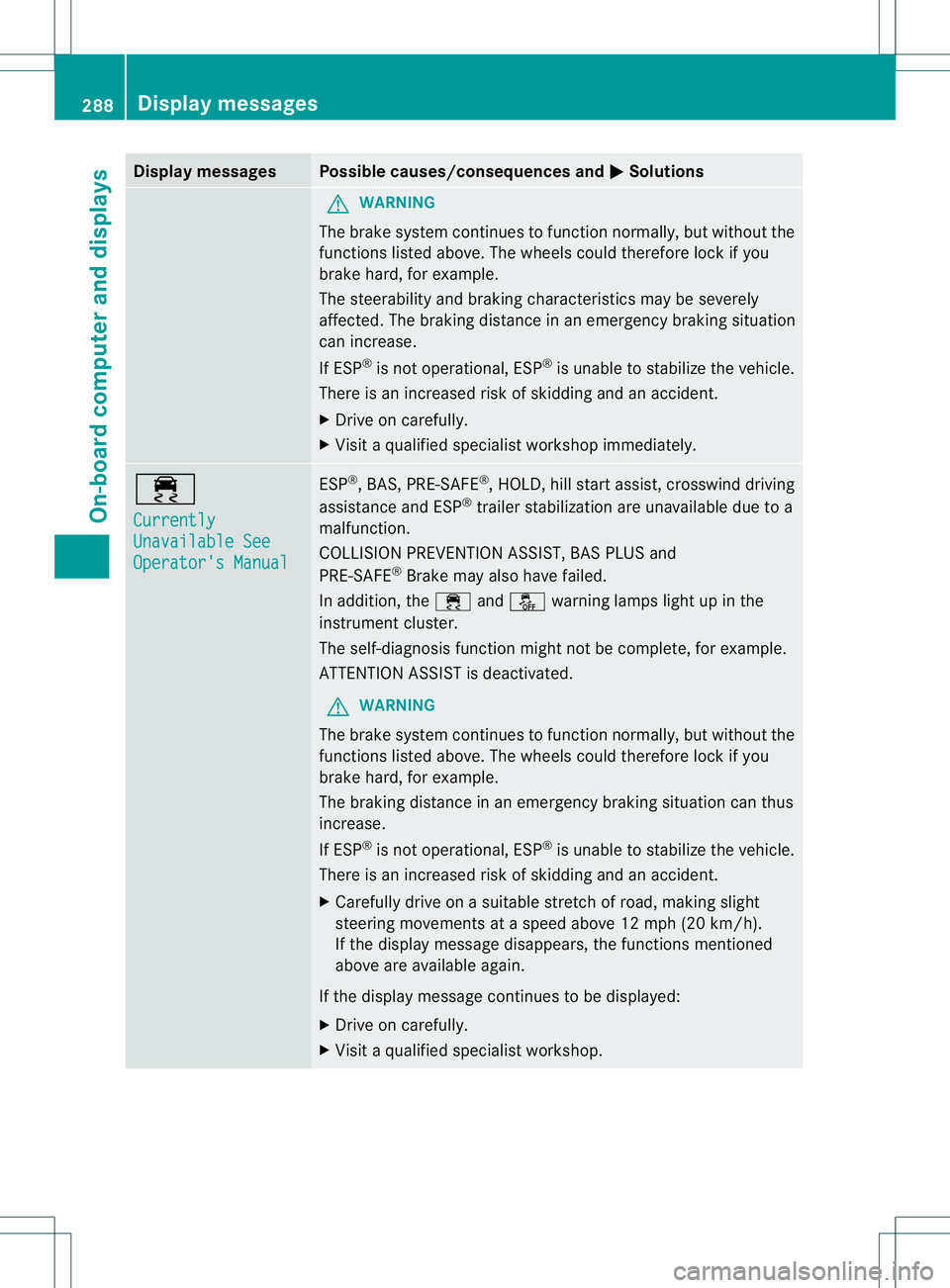
X Visit a qualified specialist workshop immediately. 000F
Currently
Unavailable See
Operator's Manual ESP
®
, BAS, PRE-SAFE ®
, HOLD, hill start assist, crosswind driving
assistance and ESP ®
trailer stabilization are unavailable due to a
malfunction.
COLLISION PREVENTION ASSIST, BAS PLUS and
PRE-SAFE ®
Brake may also have failed.
In addition, the 000Fand0017 warning lamps light up in the
instrument cluster.
The self-diagnosis function might not be complete, for example.
ATTENTION ASSIST is deactivated.
G WARNING
The brake system continues to function normally, but without the
functions listed above. The wheels could therefore lock if you
brake hard, for example.
The braking distance in an emergency braking situation can thus
increase.
If ESP ®
is not operational, ESP ®
is unable to stabilize the vehicle.
There is an increased risk of skidding and an accident.
X Carefully drive on a suitable stretch of road, making slight
steering movements at a speed above 12 mph (20 km/h).
If the display message disappears, the functions mentioned
above are available again.
If the display message continues to be displayed:
X Drive on carefully.
X Visit a qualified specialist workshop. 288
Display messagesOn-board computer and displays
Page 291 of 454
Display messages Possible causes/consequences and
0001 Solutions
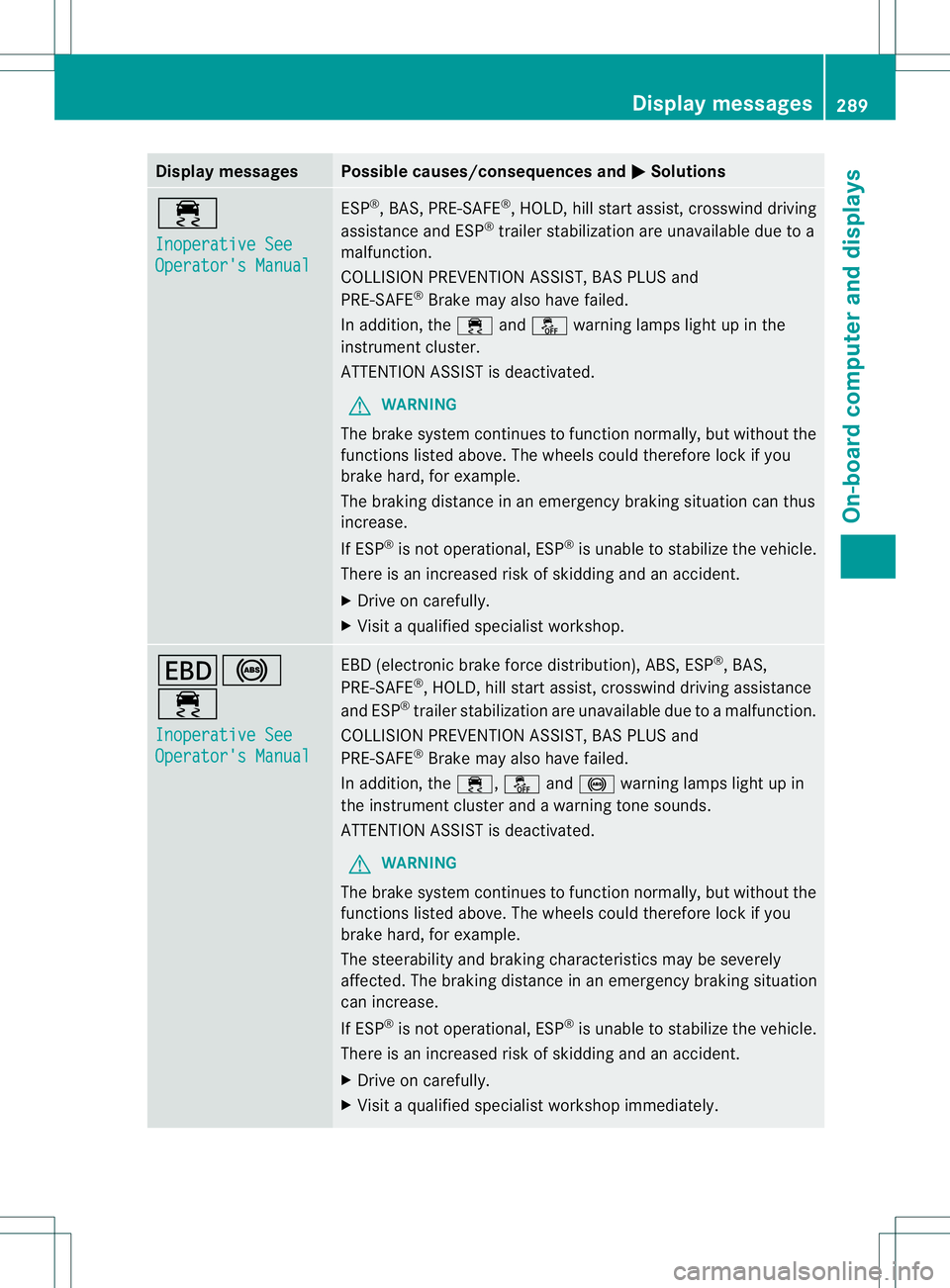
000F
Inoperative See
Operator's Manual ESP
®
, BAS, PRE-SAFE ®
, HOLD, hill start assist, crosswind driving
assistance and ESP ®
trailer stabilization are unavailable due to a
malfunction.
COLLISION PREVENTION ASSIST, BAS PLUS and
PRE-SAFE ®
Brake may also have failed.
In addition, the 000Fand0017 warning lamps ligh tup in the
instrument cluster.
ATTENTION ASSIST is deactivated.
G WARNING
The brake system continues to function normally, but without the
functions listed above. The wheels could therefore lock if you
brake hard, for example.
The braking distance in an emergency braking situation can thus
increase.
If ESP ®
is not operational, ESP ®
is unable to stabilize the vehicle.
There is an increased risk of skidding and an accident.
X Drive on carefully.
X Visit a qualified specialist workshop. 000D0019
000F
Inoperative See
Operator's Manual EBD (electronic brake force distribution), ABS, ESP
®
, BAS,
PRE-SAFE ®
, HOLD, hill start assist, crosswind driving assistance
and ESP ®
trailer stabilization are unavailable due to a malfunction.
COLLISION PREVENTION ASSIST, BAS PLUS and
PRE-SAFE ®
Brake may also have failed.
In addition, the 000F,0017and0019 warning lamps light up in
the instrument cluster and a warning tone sounds.
ATTENTION ASSIST is deactivated.
G WARNING
The brake system continues to function normally, but without the
functions listed above. The wheels could therefore lock if you
brake hard, for example.
The steerability and braking characteristics may be severely
affected. The braking distance in an emergency braking situation
can increase.
If ESP ®
is not operational, ESP ®
is unable to stabilize the vehicle.
There is an increased risk of skidding and an accident.
X Drive on carefully.
X Visit a qualified specialist workshop immediately. Display messages
289On-board computer and displays Z
Page 292 of 454
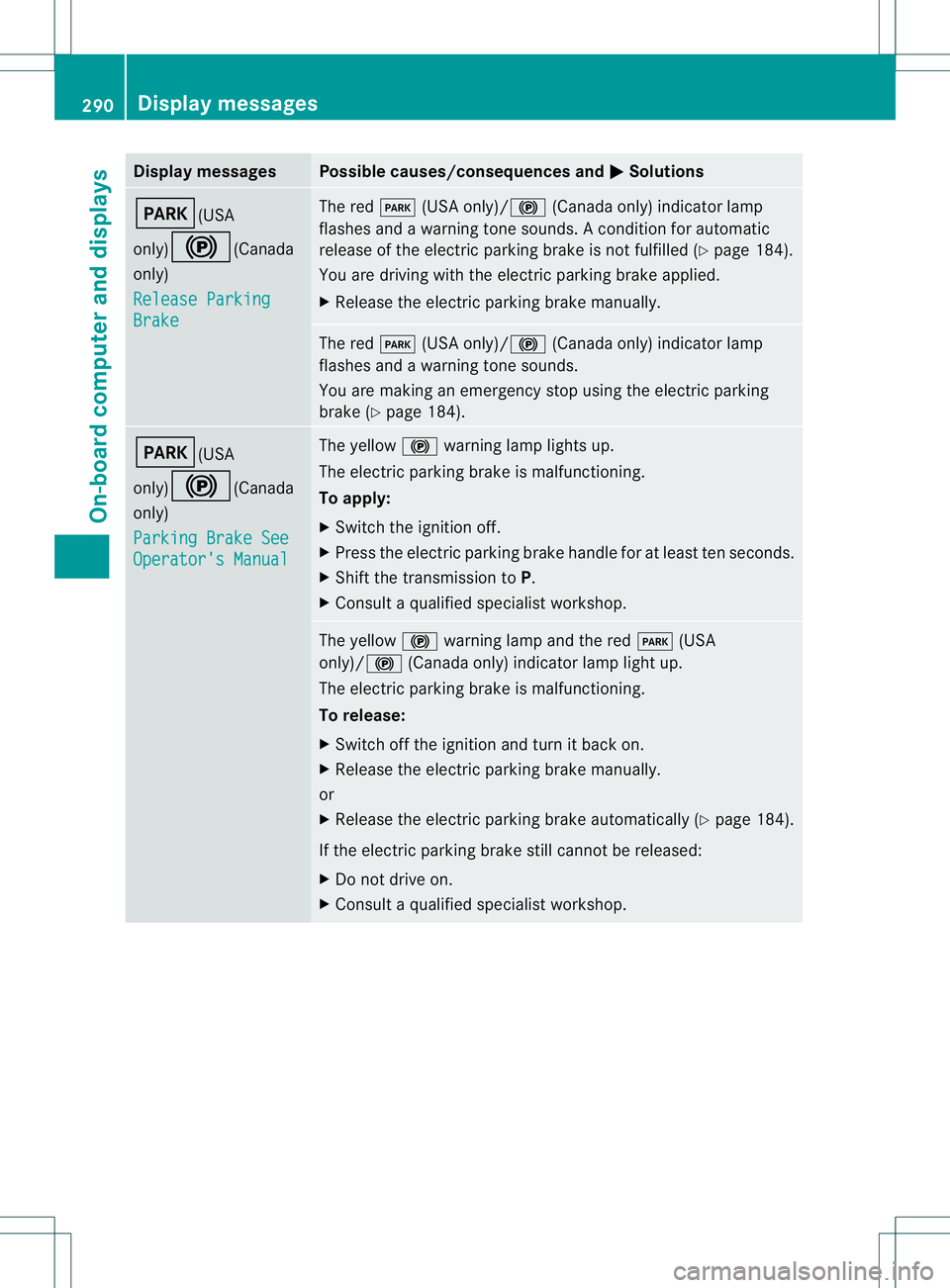
Display messages Possible causes/consequences and
0001 Solutions
0008(USA
only)
000D(Canada
only)
Release Parking Brake The red
0008(USA only)/ 000D(Canada only) indicato rlamp
flashes and a warning tone sounds. Acondition for automatic
release of the electric parking brake is not fulfilled (Y page 184).
You are driving with the electric parking brake applied.
X Release the electric parking brake manually. The red
0008(USA only)/000D (Canada only) indicator lamp
flashes and a warning tone sounds.
You are making an emergency stop using the electric parking
brake (Y page 184). 0008(USA
only)000D(Canada
only)
Parking Brake See
Operator's Manual The yellow
000Dwarning lamp lights up.
The electric parking brake is malfunctioning.
To apply:
X Switch the ignition off.
X Press the electric parking brake handle for at least ten seconds.
X Shift the transmission to P.
X Consult a qualified specialist workshop. The yellow
000Dwarning lamp and the red 0008(USA
only)/000D (Canada only) indicator lamp light up.
The electric parking brake is malfunctioning.
To release:
X Switch off the ignition and turn it back on.
X Release the electric parking brake manually.
or
X Release the electric parking brake automatically (Y page 184).
If the electric parking brake still cannot be released:
X Do not drive on.
X Consult a qualified specialist workshop. 290
Display messagesOn-board computer and displays
Page 293 of 454
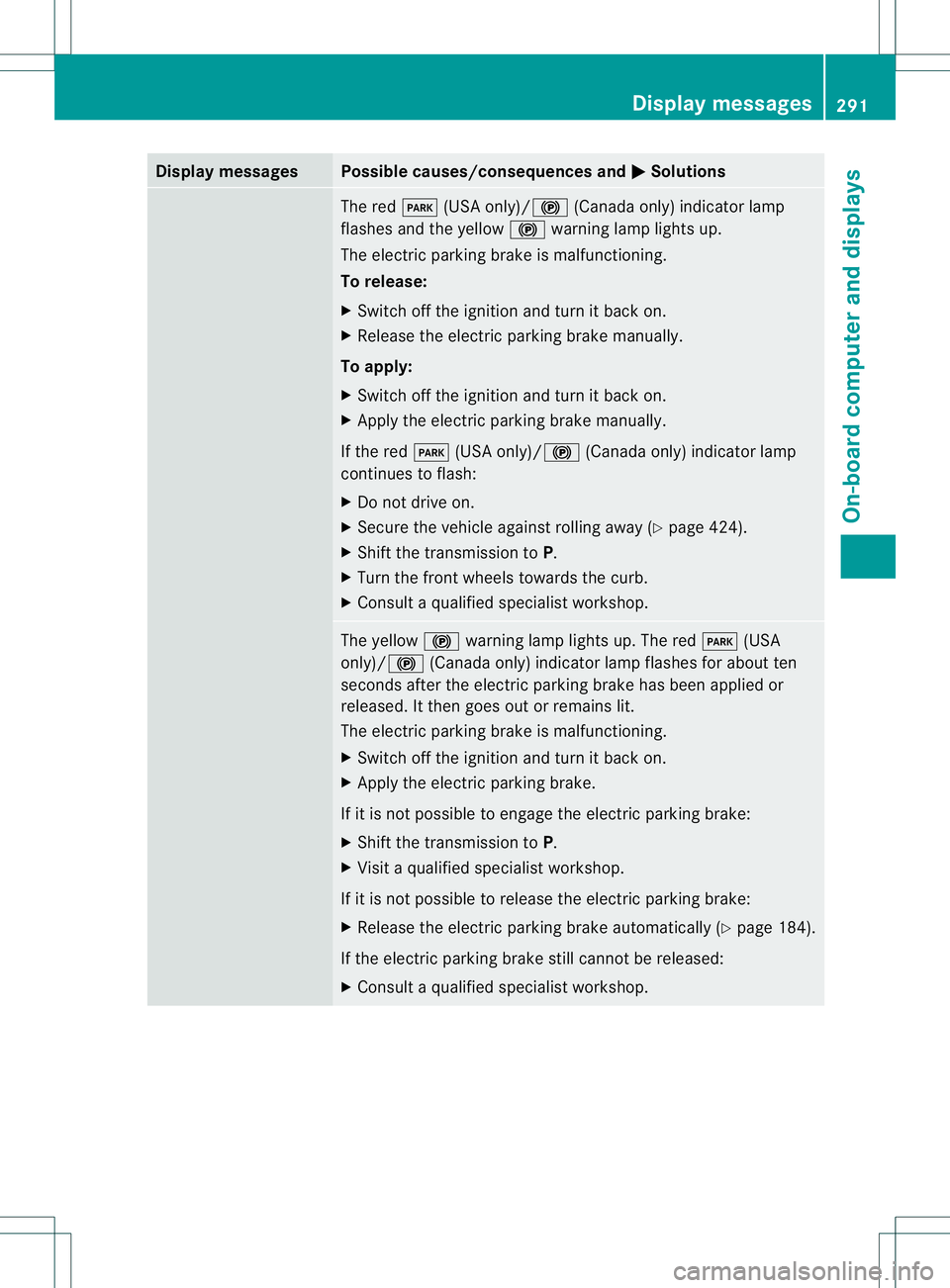
Display messages Possible causes/consequences and
0001 Solutions
The red
0008(USA only)/ 000D(Canada only) indicato rlamp
flashes and the yellow 000Dwarning lamp lights up.
The electric parking brake is malfunctioning.
To release:
X Switch off the ignition and turn it back on.
X Release the electric parking brake manually.
To apply:
X Switch off the ignition and turn it back on.
X Apply the electric parking brake manually.
If the red 0008(USA only)/000D (Canada only) indicator lamp
continues to flash:
X Do not drive on.
X Secure the vehicle against rolling away ( Ypage 424).
X Shift the transmission to P.
X Turn the fron twheels towards the curb.
X Consult a qualified specialist workshop. The yellow
000Dwarning lamp lights up. The red 0008(USA
only)/000D (Canada only) indicator lamp flashes for about ten
seconds after the electric parking brake has been applied or
released. It then goes out or remains lit.
The electric parking brake is malfunctioning.
X Switch off the ignition and turn it back on.
X Apply the electric parking brake.
If it is not possible to engage the electric parking brake:
X Shift the transmission to P.
X Visit a qualified specialist workshop.
If it is not possible to release the electric parking brake:
X Release the electric parking brake automatically (Y page 184).
If the electric parking brake still cannot be released:
X Consult a qualified specialist workshop. Display messages
291On-board computer and displays Z