display MERCEDES-BENZ GL 2014 Owners Manual
[x] Cancel search | Manufacturer: MERCEDES-BENZ, Model Year: 2014, Model line: GL, Model: MERCEDES-BENZ GL 2014Pages: 462, PDF Size: 8.98 MB
Page 292 of 462
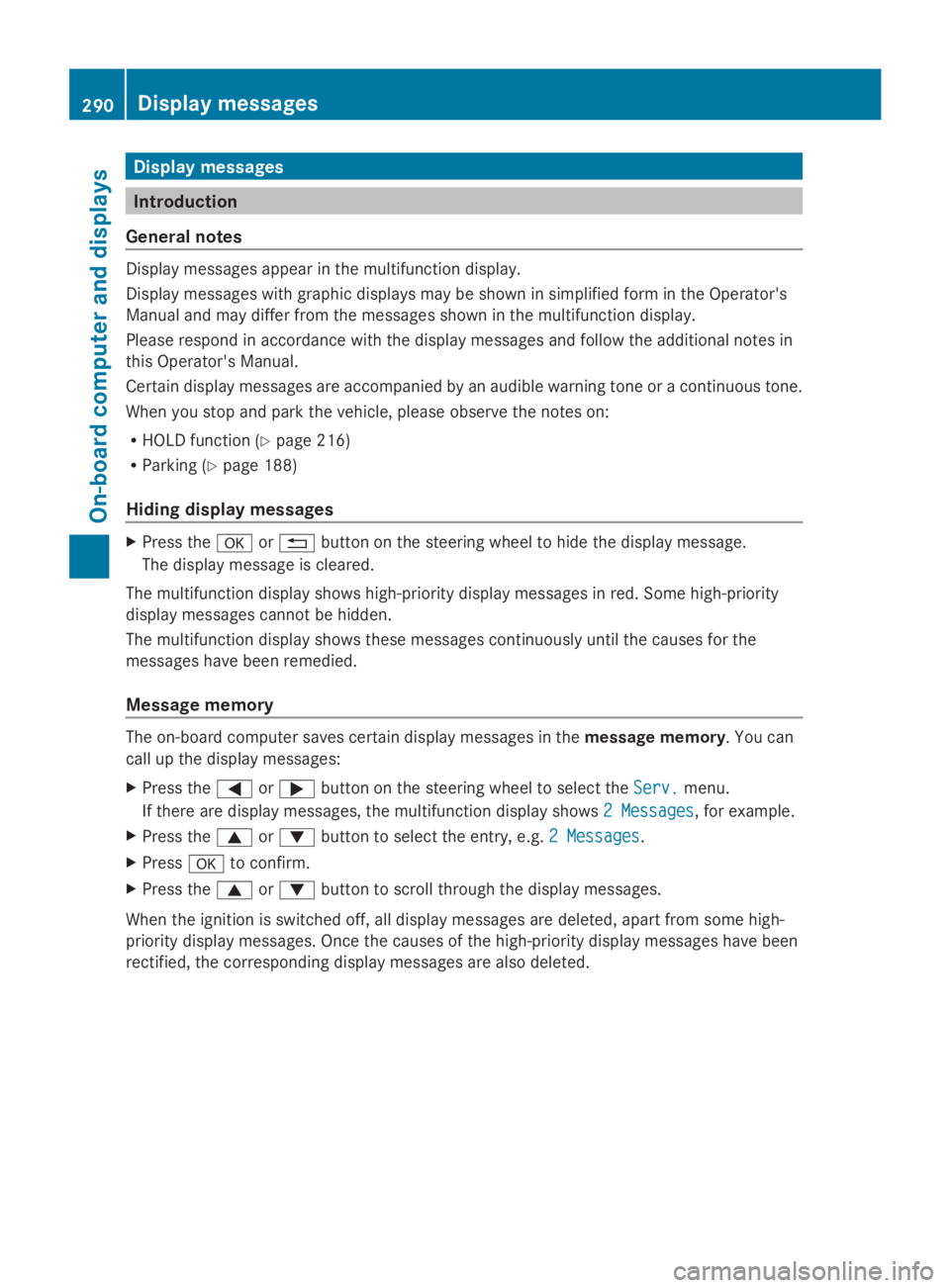
Display messages
Introduction
General notes
Display messages appear in the multifunction display.
Display messages with graphic displays may be shown in simplified form in the Operator's
Manual and may differ from the messages shown in the multifunction display.
Please respond in accordance with the display messages and follow the additional notes in
this Operator's Manual.
Certain display messages are accompanied by an audible warning tone or a continuous tone.
When you stop and park the vehicle, please observe the notes on:
RHOLD function (Ypage 216)
RParking (Ypage 188)
Hiding display messages
XPress thevor8button on the steering wheel to hide the display message.
The display message is cleared.
The multifunction display shows high-priority display messages in red. Some high-priority
display messages cannot be hidden.
The multifunction display shows these messages continuously until the causes for the
messages have been remedied.
Message memory
The on-board computer saves certain display messages in themessage memory. You can
call up the display messages:
XPress theYorebutton on the steering wheel to select theServ.Serv.menu.
If there are display messages, the multifunction display shows2 Messages2 Messages, for example.
XPress thecordbutton to select the entry, e.g.2 Messages2 Messages.
XPressvto confirm.
XPress thecordbutton to scroll through the display messages.
When the ignition is switched off, all display messages are deleted, apart from some high-
priority display messages. Once the causes of the high-priority display messages have been
rectified, the corresponding display messages are also deleted.
290Displaymessages
On-b oard computer and displays
Page 293 of 462
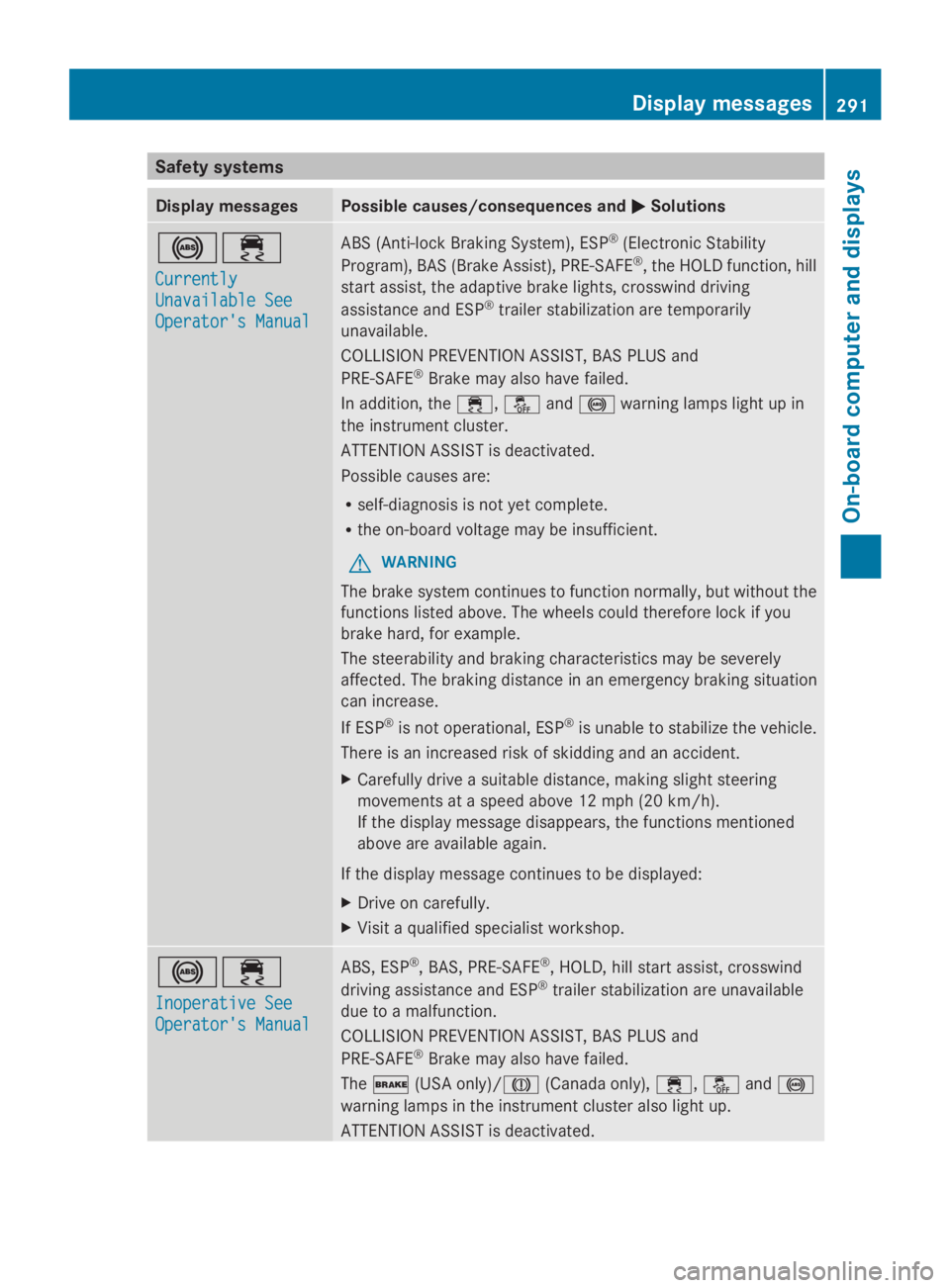
Safety systems
Display messagesPossible causes/consequences andPPSolutions
%
Page 294 of 462
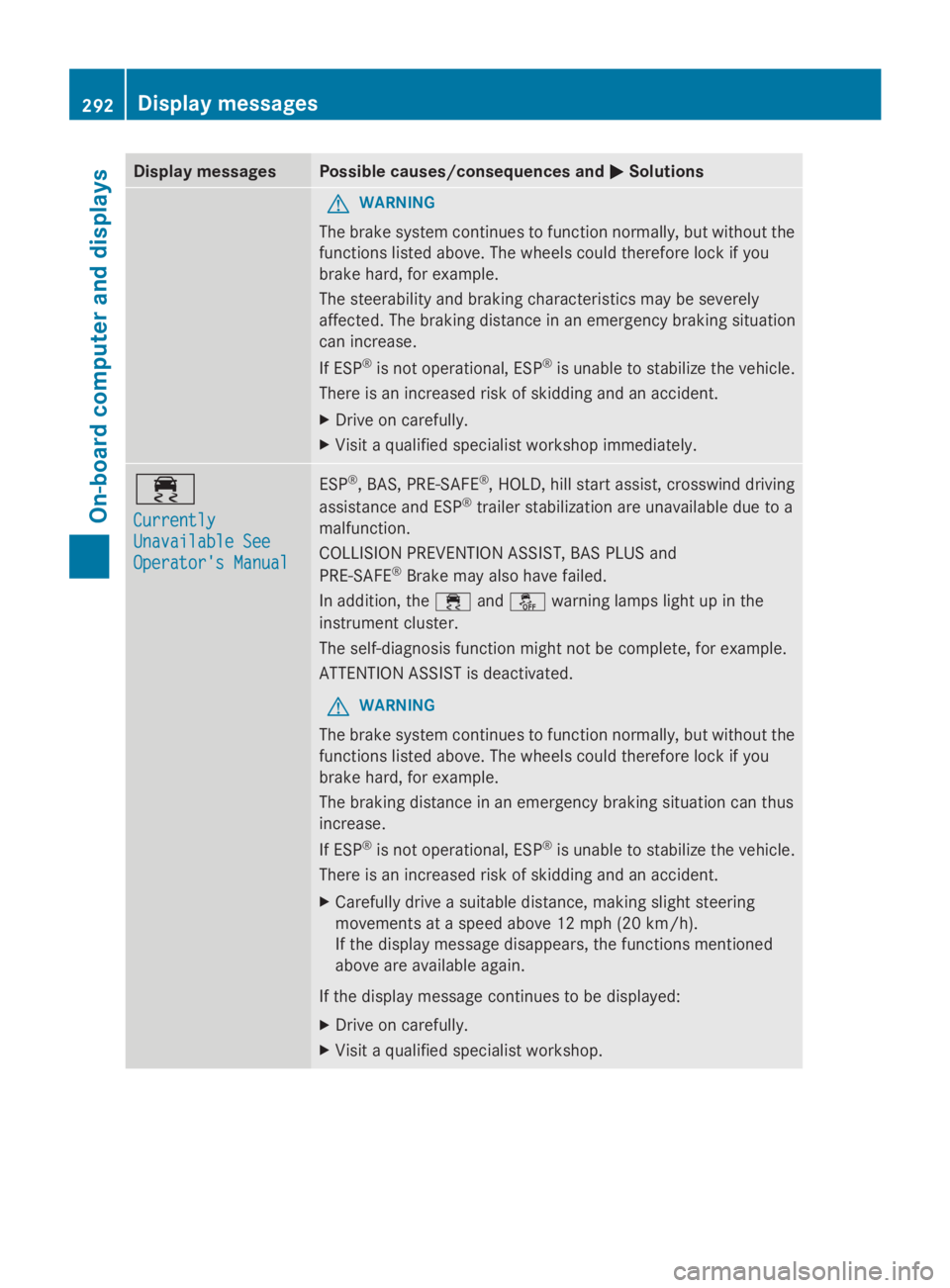
Display messagesPossible causes/consequences andPPSolutions
GWARNING
The brake system continues to function normally, but without the
functions listed above. The wheels could therefore lock if you
brake hard, for example.
The steerability and braking characteristics may be severely
affected. The braking distance in an emergency braking situation
can increase.
If ESP®is not operational, ESP®is unable to stabilize the vehicle.
There is an increased risk of skidding and an accident.
XDrive on carefully.
XVisit a qualified specialist workshop immediately.
Page 295 of 462
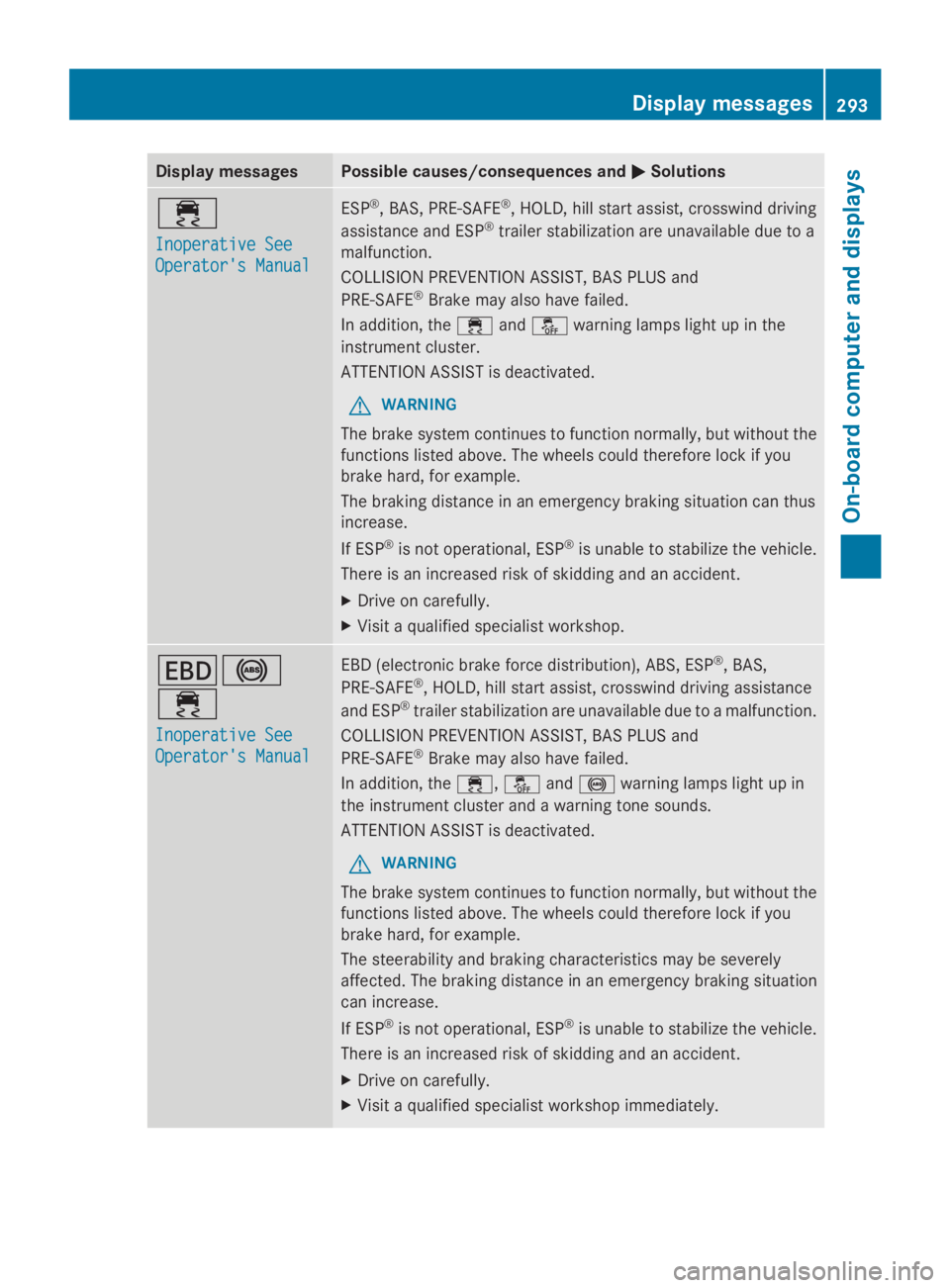
Display messagesPossible causes/consequences andPPSolutions
Page 296 of 462
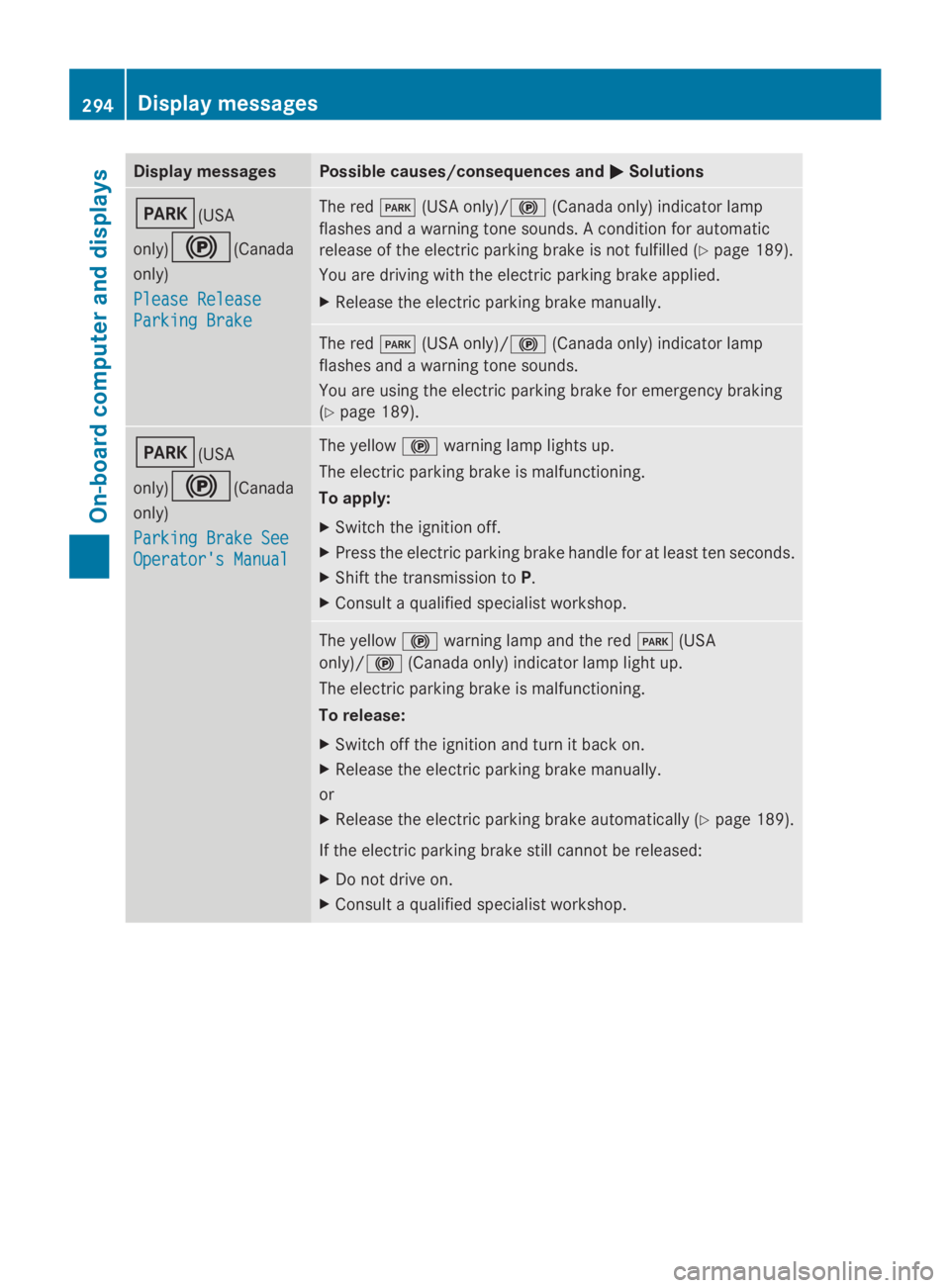
Display messagesPossible causes/consequences andPPSolutions
I(USA
only)$(Canada
only)
Please ReleasePlease Release
Parking BrakeParking Brake
The redI(USA only)/$(Canada only) indicator lamp
flashes and a warning tone sounds. A condition for automatic
release of the electric parking brake is not fulfilled (Ypage 189).
You are driving with the electric parking brake applied.
XRelease the electric parking brake manually.
The redI(USA only)/$(Canada only) indicator lamp
flashes and a warning tone sounds.
You are using the electric parking brake for emergency braking
(Ypage 189).
I(USA
only)$(Canada
only)
Parking Brake SeeParking Brake See
Operator's ManualOperator's Manual
The yellow$warning lamp lights up.
The electric parking brake is malfunctioning.
To apply:
XSwitch the ignition off.
XPress the electric parking brake handle for at least ten seconds.
XShift the transmission toP.
XConsult a qualified specialist workshop.
The yellow$warning lamp and the redI(USA
only)/$(Canada only) indicator lamp light up.
The electric parking brake is malfunctioning.
To release:
XSwitch off the ignition and turn it back on.
XRelease the electric parking brake manually.
or
XRelease the electric parking brake automatically (Ypage 189).
If the electric parking brake still cannot be released:
XDo not drive on.
XConsult a qualified specialist workshop.
294Displaymessages
On-b oard computer and displays
Page 297 of 462
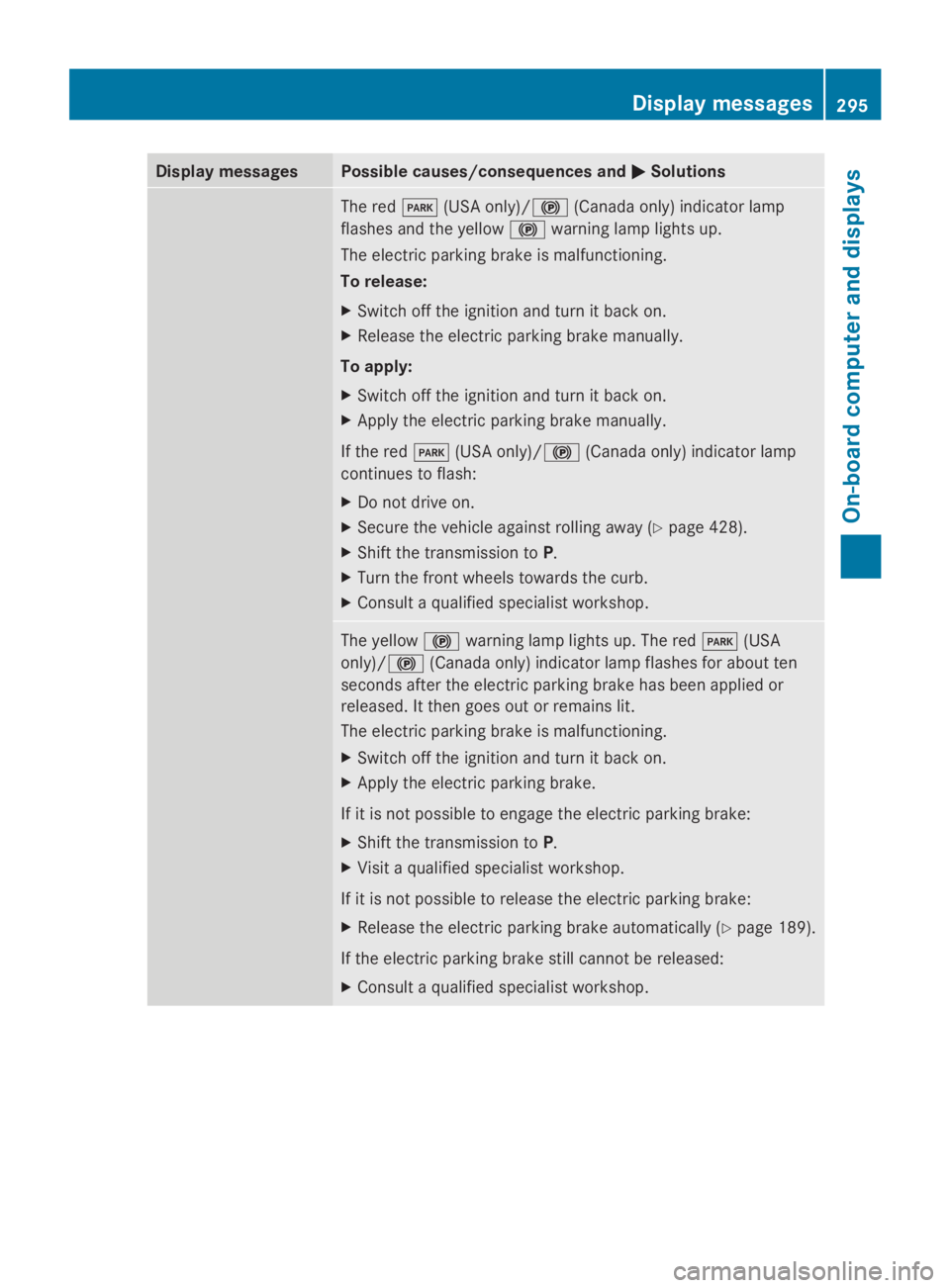
Display messagesPossible causes/consequences andPPSolutions
The redI(USA only)/$(Canada only) indicator lamp
flashes and the yellow$warning lamp lights up.
The electric parking brake is malfunctioning.
To release:
XSwitch off the ignition and turn it back on.
XRelease the electric parking brake manually.
To apply:
XSwitch off the ignition and turn it back on.
XApply the electric parking brake manually.
If the redI(USA only)/$(Canada only) indicator lamp
continues to flash:
XDo not drive on.
XSecure the vehicle against rolling away (Ypage 428).
XShift the transmission toP.
XTurn the front wheels towards the curb.
XConsult a qualified specialist workshop.
The yellow$warning lamp lights up. The redI(USA
only)/$(Canada only) indicator lamp flashes for about ten
seconds after the electric parking brake has been applied or
released. It then goes out or remains lit.
The electric parking brake is malfunctioning.
XSwitch off the ignition and turn it back on.
XApply the electric parking brake.
If it is not possible to engage the electric parking brake:
XShift the transmission toP.
XVisit a qualified specialist workshop.
If it is not possible to release the electric parking brake:
XRelease the electric parking brake automatically (Ypage 189).
If the electric parking brake still cannot be released:
XConsult a qualified specialist workshop.
Displaymessages295
On-b oard computer and displays
Z
Page 298 of 462
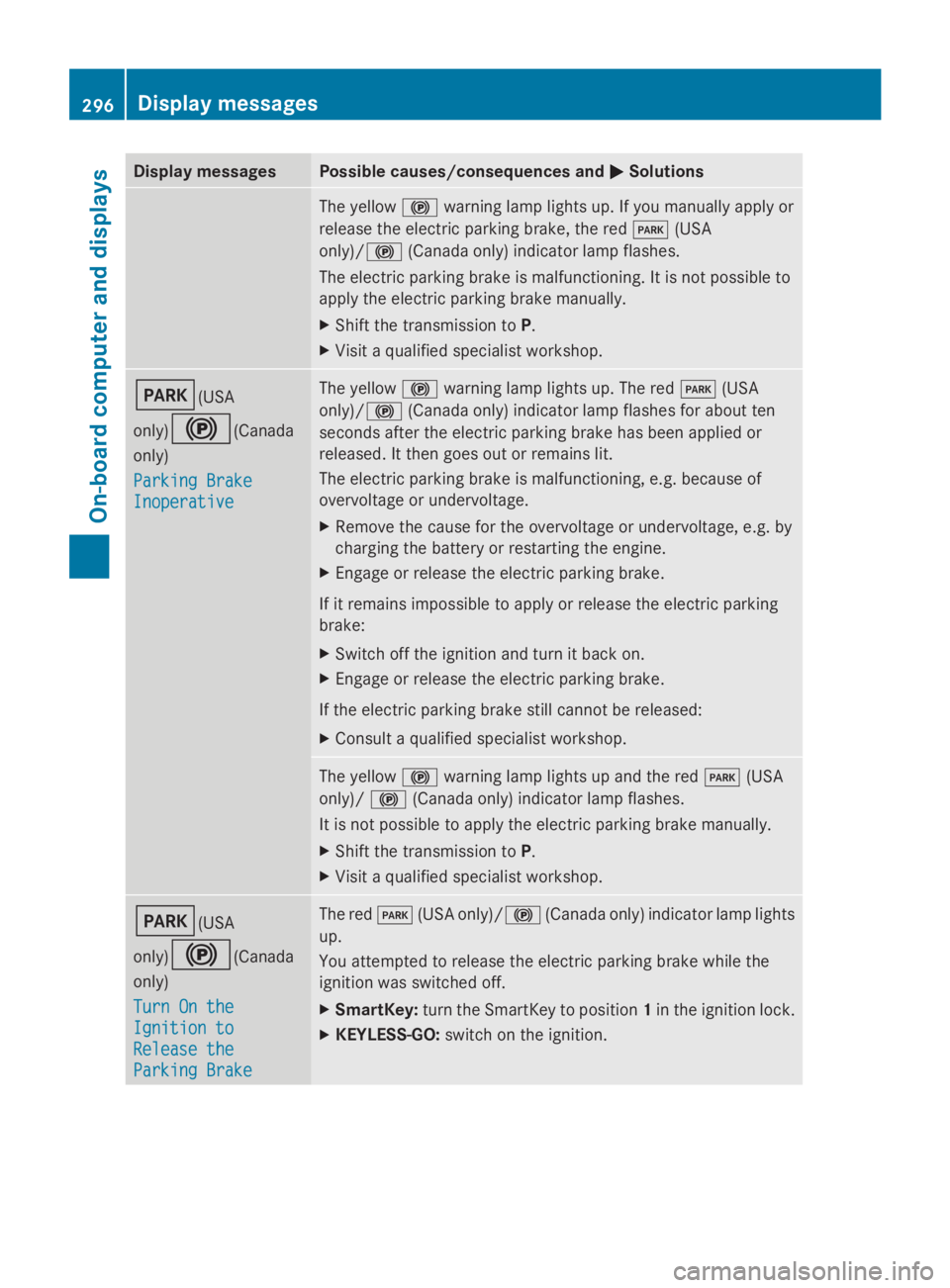
Display messagesPossible causes/consequences andPPSolutions
The yellow$warning lamp lights up. If you manually apply or
release the electric parking brake, the redI(USA
only)/$(Canada only) indicator lamp flashes.
The electric parking brake is malfunctioning. It is not possible to
apply the electric parking brake manually.
XShift the transmission toP.
XVisit a qualified specialist workshop.
I(USA
only)$(Canada
only)
Parking BrakeParking Brake
InoperativeInoperative
The yellow$warning lamp lights up. The redI(USA
only)/$(Canada only) indicator lamp flashes for about ten
seconds after the electric parking brake has been applied or
released. It then goes out or remains lit.
The electric parking brake is malfunctioning, e.g. because of
overvoltage or undervoltage.
XRemove the cause for the overvoltage or undervoltage, e.g. by
charging the battery or restarting the engine.
XEngage or release the electric parking brake.
If it remains impossible to apply or release the electric parking
brake:
XSwitch off the ignition and turn it back on.
XEngage or release the electric parking brake.
If the electric parking brake still cannot be released:
XConsult a qualified specialist workshop.
The yellow$warning lamp lights up and the redI(USA
only)/$(Canada only) indicator lamp flashes.
It is not possible to apply the electric parking brake manually.
XShift the transmission toP.
XVisit a qualified specialist workshop.
I(USA
only)$(Canada
only)
Turn On theTurn On the
Ignition toIgnition to
Release theRelease the
Parking BrakeParking Brake
The redI(USA only)/$(Canada only) indicator lamp lights
up.
You attempted to release the electric parking brake while the
ignition was switched off.
XSmartKey:turn the SmartKey to position1in the ignition lock.
XKEYLESS-GO:switch on the ignition.
296Displaymessages
On-b oard computer and displays
Page 299 of 462
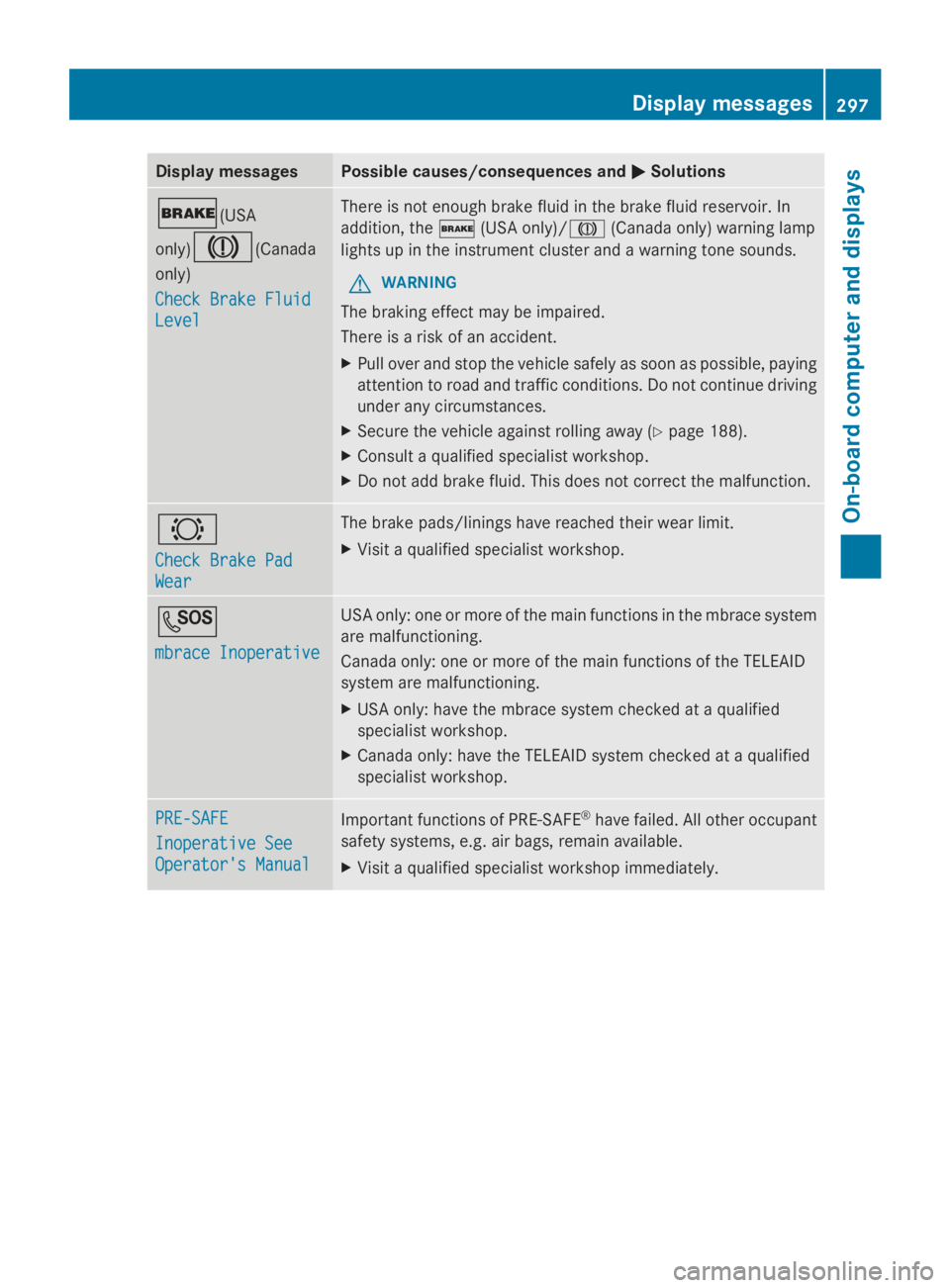
Display messagesPossible causes/consequences andPPSolutions
'(USA
only)M(Canada
only)
Check Brake FluidCheck Brake Fluid
LevelLevel
There is not enough brake fluid in the brake fluid reservoir. In
addition, the'(USA only)/M(Canada only) warning lamp
lights up in the instrument cluster and a warning tone sounds.
GWARNING
The braking effect may be impaired.
There is a risk of an accident.
XPull over and stop the vehicle safely as soon as possible, paying
attention to road and traffic conditions. Do not continue driving
under any circumstances.
XSecure the vehicle against rolling away (Ypage 188).
XConsult a qualified specialist workshop.
XDo not add brake fluid. This does not correct the malfunction.
&
Check Brake PadCheck Brake Pad
WearWear
The brake pads/linings have reached their wear limit.
XVisit a qualified specialist workshop.
S
mbrace Inoperativembrace Inoperative
USA only: one or more of the main functions in the mbrace system
are malfunctioning.
Canada only: one or more of the main functions of the TELEAID
system are malfunctioning.
XUSA only: have the mbrace system checked at a qualified
specialist workshop.
XCanada only: have the TELEAID system checked at a qualified
specialist workshop.
PRE-SAFEPRE-SAFE
Inoperative SeeInoperative See
Operator's ManualOperator's Manual
Important functions of PRE-SAFE®have failed. All other occupant
safety systems, e.g. air bags, remain available.
XVisit a qualified specialist workshop immediately.
Displaymessages297
On-b oard computer and displays
Z
Page 300 of 462
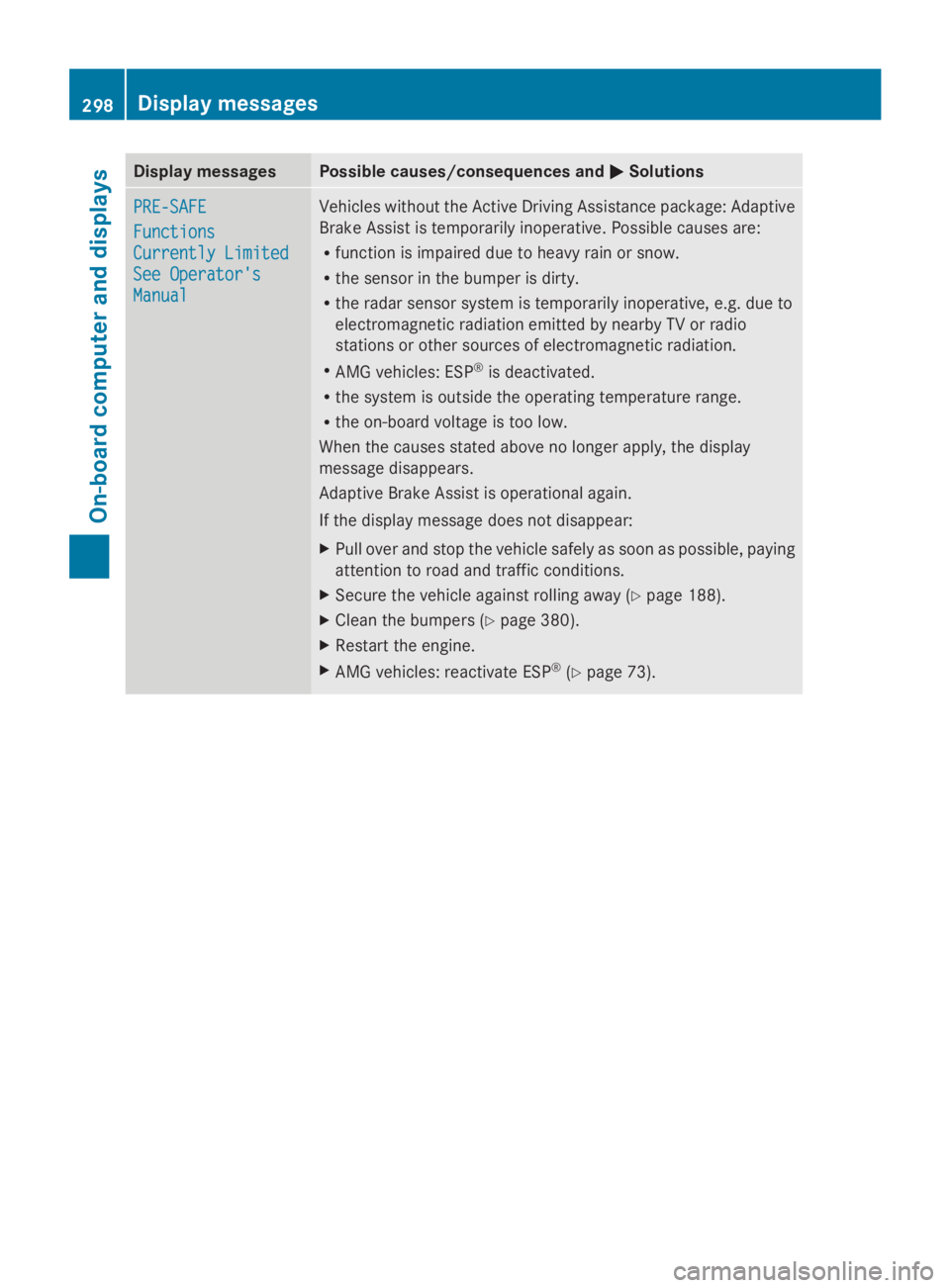
Display messagesPossible causes/consequences andPPSolutions
PRE-SAFEPRE-SAFE
FunctionsFunctions
Currently LimitedCurrently Limited
See Operator'sSee Operator's
ManualManual
Vehicles without the Active Driving Assistance package: Adaptive
Brake Assist is temporarily inoperative. Possible causes are:
Rfunction is impaired due to heavy rain or snow.
Rthe sensor in the bumper is dirty.
Rthe radar sensor system is temporarily inoperative, e.g. due to
electromagnetic radiation emitted by nearby TV or radio
stations or other sources of electromagnetic radiation.
RAMG vehicles: ESP®is deactivated.
Rthe system is outside the operating temperature range.
Rthe on-board voltage is too low.
When the causes stated above no longer apply, the display
message disappears.
Adaptive Brake Assist is operational again.
If the display message does not disappear:
XPull over and stop the vehicle safely as soon as possible, paying
attention to road and traffic conditions.
XSecure the vehicle against rolling away (Ypage 188).
XClean the bumpers (Ypage 380).
XRestart the engine.
XAMG vehicles: reactivate ESP®(Ypage 73).
298Displaymessages
On-b oard computer and displays
Page 301 of 462
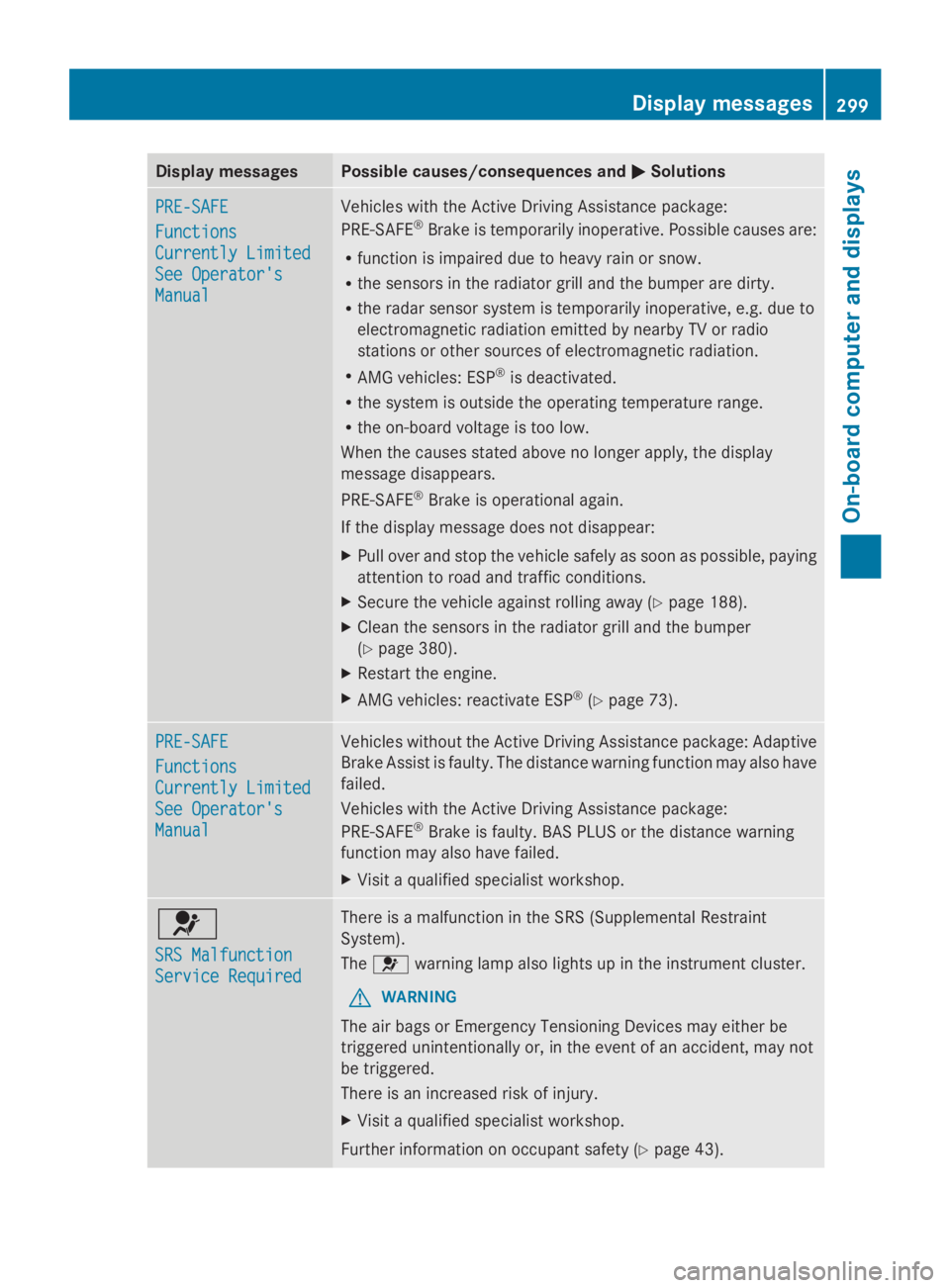
Display messagesPossible causes/consequences andPPSolutions
PRE-SAFEPRE-SAFE
FunctionsFunctions
Currently LimitedCurrently Limited
See Operator'sSee Operator's
ManualManual
Vehicles with the Active Driving Assistance package:
PRE-SAFE®Brake is temporarily inoperative. Possible causes are:
Rfunction is impaired due to heavy rain or snow.
Rthe sensors in the radiator grill and the bumper are dirty.
Rthe radar sensor system is temporarily inoperative, e.g. due to
electromagnetic radiation emitted by nearby TV or radio
stations or other sources of electromagnetic radiation.
RAMG vehicles: ESP®is deactivated.
Rthe system is outside the operating temperature range.
Rthe on-board voltage is too low.
When the causes stated above no longer apply, the display
message disappears.
PRE-SAFE®Brake is operational again.
If the display message does not disappear:
XPull over and stop the vehicle safely as soon as possible, paying
attention to road and traffic conditions.
XSecure the vehicle against rolling away (Ypage 188).
XClean the sensors in the radiator grill and the bumper
(Ypage 380).
XRestart the engine.
XAMG vehicles: reactivate ESP®(Ypage 73).
PRE-SAFEPRE-SAFE
FunctionsFunctions
Currently LimitedCurrently Limited
See Operator'sSee Operator's
ManualManual
Vehicles without the Active Driving Assistance package: Adaptive
Brake Assist is faulty. The distance warning function may also have
failed.
Vehicles with the Active Driving Assistance package:
PRE-SAFE®Brake is faulty. BAS PLUS or the distance warning
function may also have failed.
XVisit a qualified specialist workshop.
u
SRS MalfunctionSRS Malfunction
Service RequiredService Required
There is a malfunction in the SRS (Supplemental Restraint
System).
Theuwarning lamp also lights up in the instrument cluster.
GWARNING
The air bags or Emergency Tensioning Devices may either be
triggered unintentionally or, in the event of an accident, may not
be triggered.
There is an increased risk of injury.
XVisit a qualified specialist workshop.
Further information on occupant safety (Ypage 43).
Displaymessages299
On-b oard computer and displays
Z